light NISSAN NAVARA 2005 Repair Workshop Manual
[x] Cancel search | Manufacturer: NISSAN, Model Year: 2005, Model line: NAVARA, Model: NISSAN NAVARA 2005Pages: 3171, PDF Size: 49.59 MB
Page 1310 of 3171
EC-330
BRAKE SWITCH
BRAKE SWITCH
PFP:25230
DescriptionEBS01KML
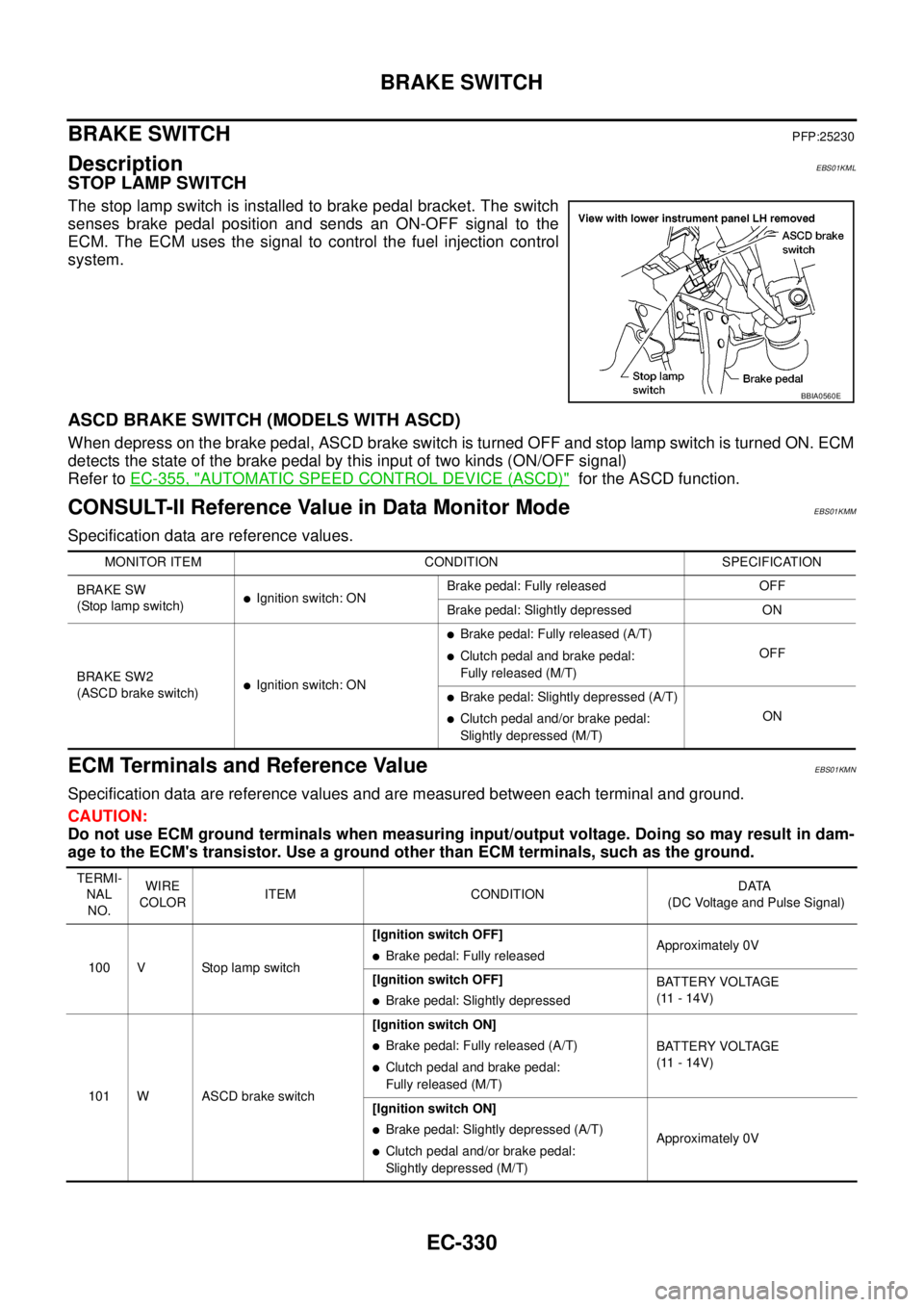
STOP LAMP SWITCH
The stop lamp switch is installed to brake pedal bracket. The switch
senses brake pedal position and sends an ON-OFF signal to the
ECM. The ECM uses the signal to control the fuel injection control
system.
ASCD BRAKE SWITCH (MODELS WITH ASCD)
When depress on the brake pedal, ASCD brake switch is turned OFF and stop lamp switch is turned ON. ECM
detects the state of the brake pedal by this input of two kinds (ON/OFF signal)
Refer toEC-355, "
AUTOMATIC SPEED CONTROL DEVICE (ASCD)"for the ASCD function.
CONSULT-II Reference Value in Data Monitor ModeEBS01KMM
Specification data are reference values.
ECM Terminals and Reference ValueEBS01KMN
Specification data are reference values and are measured between each terminal and ground.
CAUTION:
Do not use ECM ground terminals when measuring input/output voltage. Doing so may result in dam-
age to the ECM's transistor. Use a ground other than ECM terminals, such as the ground.
BBIA0560E
MONITOR ITEM CONDITION SPECIFICATION
BRAKE SW
(Stoplampswitch)
lIgnition switch: ONBrake pedal: Fully released OFF
Brake pedal: Slightly depressed ON
BRAKE SW2
(ASCD brake switch)
lIgnition switch: ON
lBrake pedal: Fully released (A/T)
lClutch pedal and brake pedal:
Fully released (M/T)OFF
lBrake pedal: Slightly depressed (A/T)
lClutch pedal and/or brake pedal:
Slightly depressed (M/T)ON
TERMI-
NAL
NO.WIRE
COLORITEM CONDITIONDATA
(DC Voltage and Pulse Signal)
100 V Stop lamp switch[Ignition switch OFF]
lBrake pedal: Fully releasedApproximately 0V
[Ignition switch OFF]
lBrake pedal: Slightly depressedBATTERY VOLTAGE
(11 - 14V)
101 W ASCD brake switch[Ignition switch ON]
lBrake pedal: Fully released (A/T)
lClutch pedal and brake pedal:
Fully released (M/T)BATTERY VOLTAGE
(11 - 14V)
[Ignition switch ON]
lBrake pedal: Slightly depressed (A/T)
lClutch pedal and/or brake pedal:
Slightly depressed (M/T)Approximately 0V
Page 1312 of 3171
EC-332
BRAKE SWITCH
Diagnostic Procedure
EBS01KMP
A/T MODELS
1.CHECK OVERALL FUNCTION-I
With CONSULT-II
1. Turn ignition switch ON.
2. Select “BRAKE SW” in “DATA MONITOR” mode with CONSULT-II.
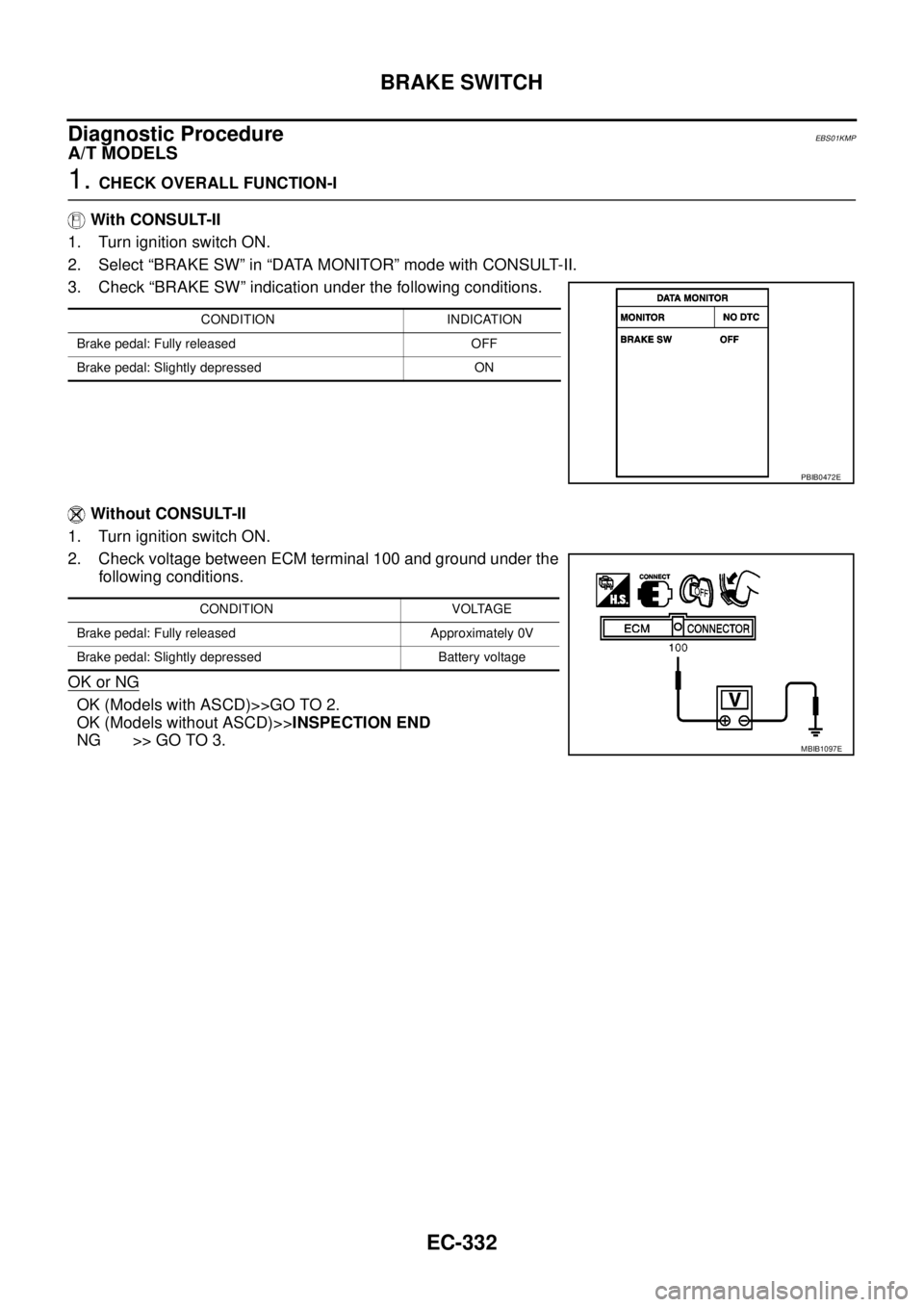
3. Check “BRAKE SW” indication under the following conditions.
Without CONSULT-II
1. Turn ignition switch ON.
2. Check voltage between ECM terminal 100 and ground under the
following conditions.
OK or NG
OK (Models with ASCD)>>GO TO 2.
OK (Models without ASCD)>>INSPECTION END
NG >> GO TO 3.
CONDITION INDICATION
Brake pedal: Fully released OFF
Brake pedal: Slightly depressed ON
PBIB0472E
CONDITION VOLTAGE
Brake pedal: Fully released Approximately 0V
Brake pedal: Slightly depressed Battery voltage
MBIB1097E
Page 1313 of 3171
BRAKE SWITCH
EC-333
C
D
E
F
G
H
I
J
K
L
MA
EC
2.CHECK OVERALL FUNCTION-II
With CONSULT-II
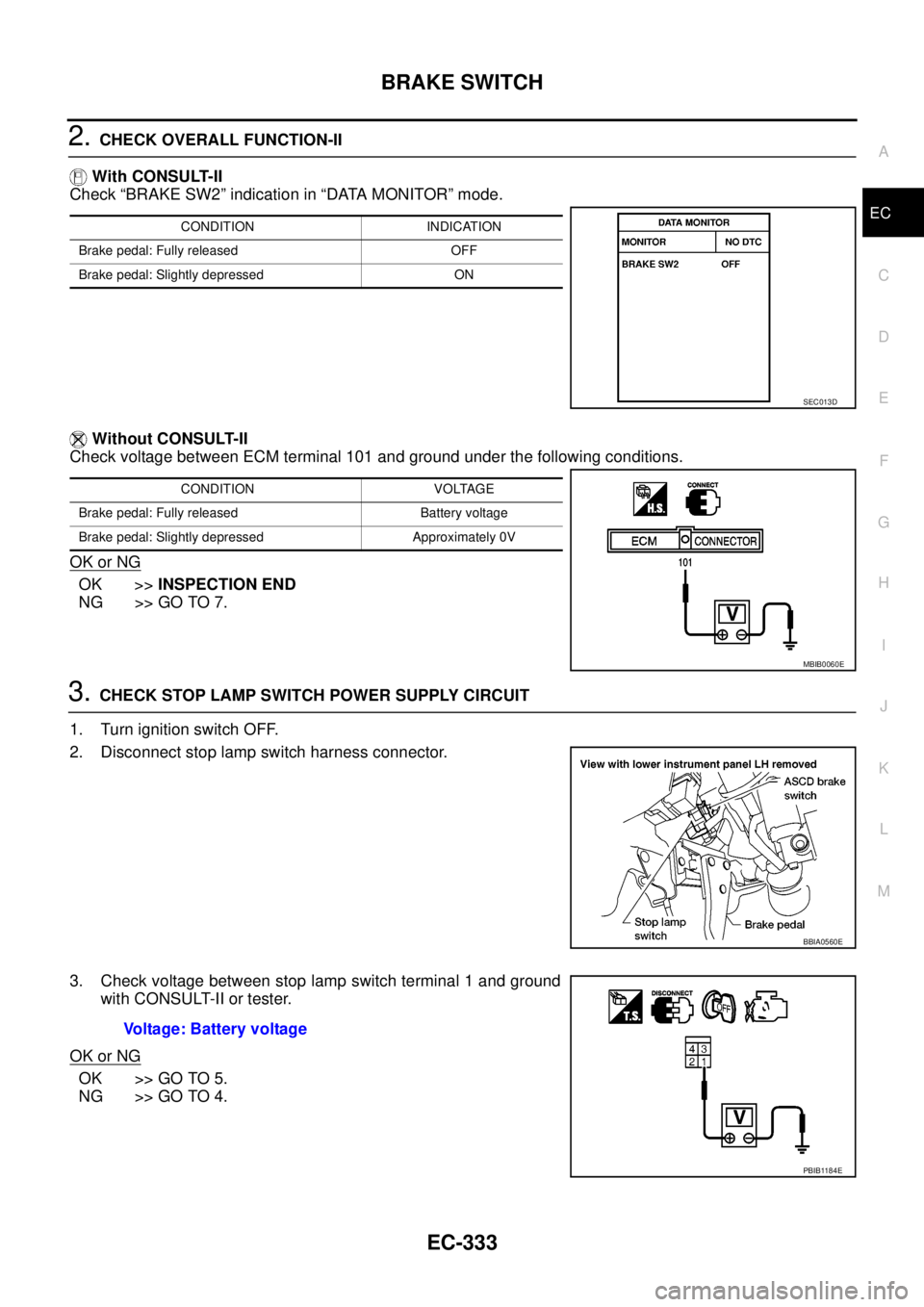
Check “BRAKE SW2” indication in “DATA MONITOR” mode.
Without CONSULT-II
Check voltage between ECM terminal 101 and ground under the following conditions.
OK or NG
OK >>INSPECTION END
NG >> GO TO 7.
3.CHECK STOP LAMP SWITCH POWER SUPPLY CIRCUIT
1. Turn ignition switch OFF.
2. Disconnect stop lamp switch harness connector.
3. Check voltage between stop lamp switch terminal 1 and ground
with CONSULT-II or tester.
OK or NG
OK >> GO TO 5.
NG >> GO TO 4.
CONDITION INDICATION
Brake pedal: Fully released OFF
Brake pedal: Slightly depressed ON
SEC013D
CONDITION VOLTAGE
Brake pedal: Fully released Battery voltage
Brake pedal: Slightly depressed Approximately 0V
MBIB0060E
BBIA0560E
Voltage: Battery voltage
PBIB1184E
Page 1316 of 3171
EC-336
BRAKE SWITCH
M/T MODELS
1.CHECK OVERALL FUNCTION-I
With CONSULT-II
1. Turn ignition switch ON.
2. Select “BRAKE SW” in “DATA MONITOR” mode with CONSULT-II.
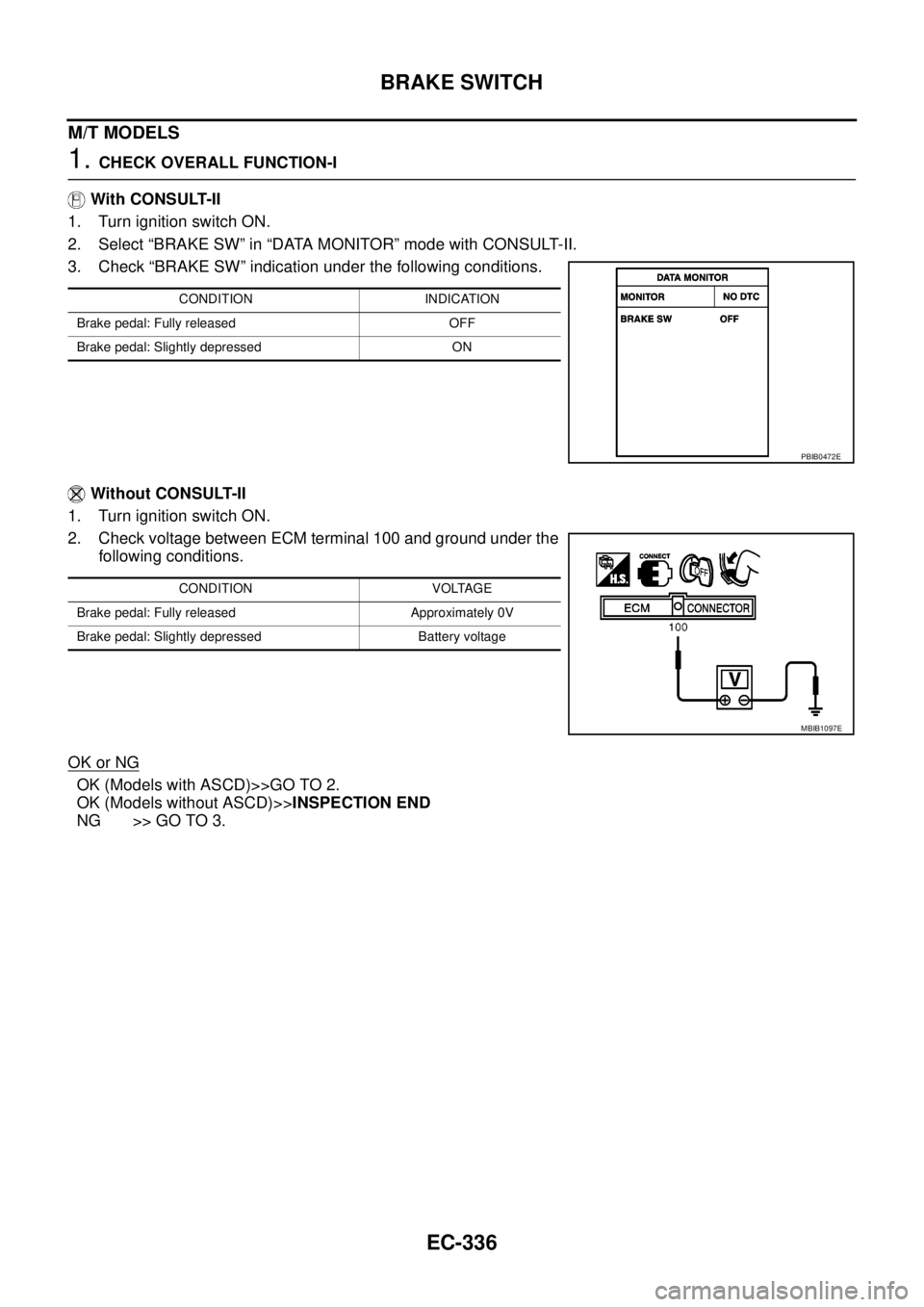
3. Check “BRAKE SW” indication under the following conditions.
Without CONSULT-II
1. Turn ignition switch ON.
2. Check voltage between ECM terminal 100 and ground under the
following conditions.
OK or NG
OK (Models with ASCD)>>GO TO 2.
OK (Models without ASCD)>>INSPECTION END
NG >> GO TO 3.
CONDITION INDICATION
Brake pedal: Fully released OFF
Brake pedal: Slightly depressed ON
PBIB0472E
CONDITION VOLTAGE
Brake pedal: Fully released Approximately 0V
Brake pedal: Slightly depressed Battery voltage
MBIB1097E
Page 1317 of 3171
BRAKE SWITCH
EC-337
C
D
E
F
G
H
I
J
K
L
MA
EC
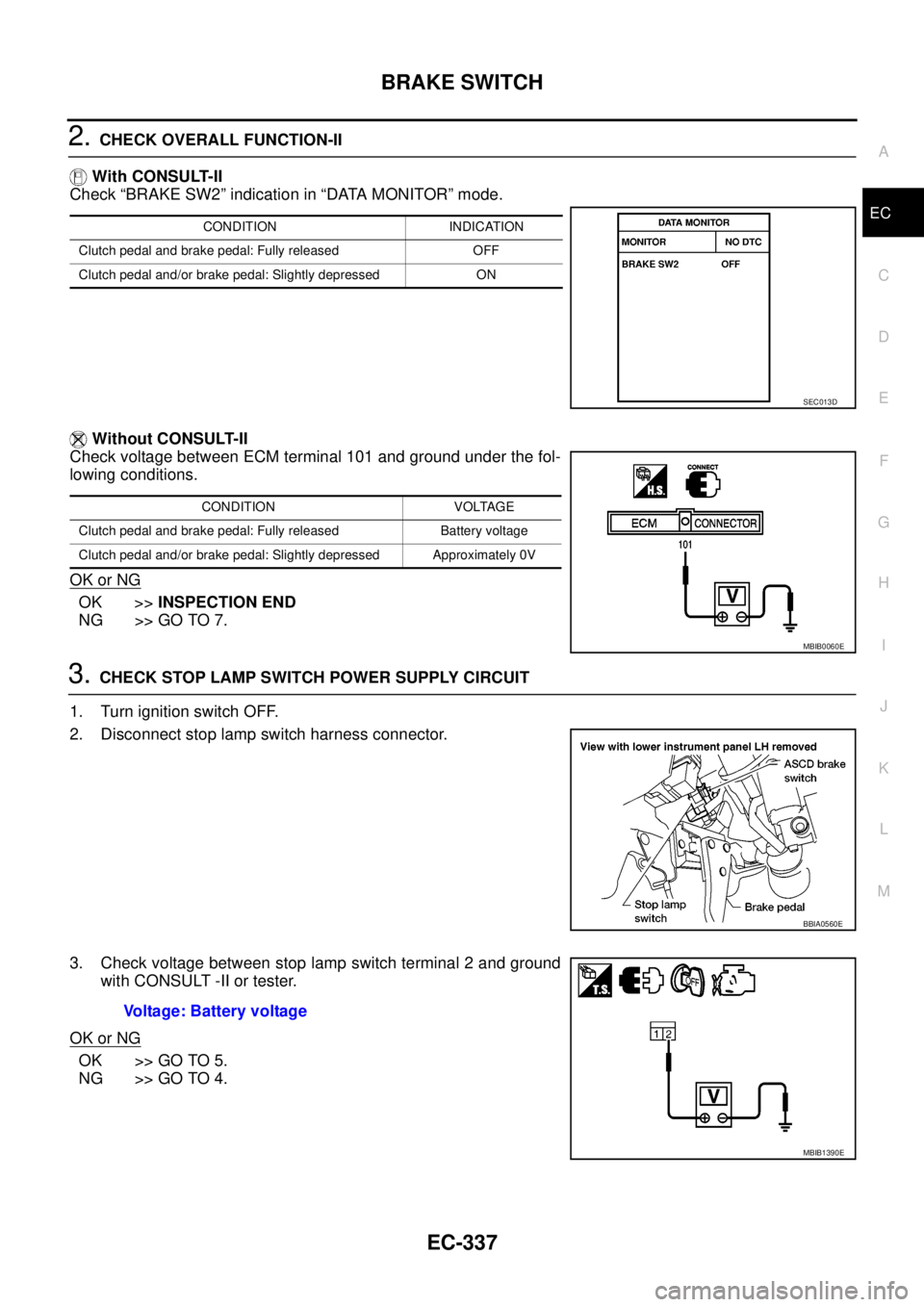
2.CHECK OVERALL FUNCTION-II
With CONSULT-II
Check “BRAKE SW2” indication in “DATA MONITOR” mode.
Without CONSULT-II
Check voltage between ECM terminal 101 and ground under the fol-
lowing conditions.
OK or NG
OK >>INSPECTION END
NG >> GO TO 7.
3.CHECK STOP LAMP SWITCH POWER SUPPLY CIRCUIT
1. Turn ignition switch OFF.
2. Disconnect stop lamp switch harness connector.
3. Check voltage between stop lamp switch terminal 2 and ground
with CONSULT -II or tester.
OK or NG
OK >> GO TO 5.
NG >> GO TO 4.
CONDITION INDICATION
Clutch pedal and brake pedal: Fully released OFF
Clutch pedal and/or brake pedal: Slightly depressed ON
SEC013D
CONDITION VOLTAGE
Clutch pedal and brake pedal: Fully released Battery voltage
Clutch pedal and/or brake pedal: Slightly depressed Approximately 0V
MBIB0060E
BBIA0560E
Voltage: Battery voltage
MBIB1390E
Page 1318 of 3171
EC-338
BRAKE SWITCH
4.DETECT MALFUNCTIONING PART
Check the following.
lFuse block (J/B) connector E103
l10A fuse
lHarness for open or short between stop lamp switch and battery
>> Repair open circuit or short to ground or short to power in harness or connectors.
5.CHECK STOP LAMP SWITCH INPUT SIGNAL CIRCUIT FOR OPEN AND SHORT
1. Disconnect ECM harness connector.
2. Check harness continuity between ECM terminal 100 and stop lamp switch terminal 1.
Refer to Wiring Diagram.
3. Also check harness for short to ground and short to power.
OK or NG
OK >> GO TO 6.
NG >> Repair open circuit or short to ground or short to power in harness or connectors.
6.CHECK STOP LAMP SWITCH
Refer toEC-341, "
Component Inspection".
OK or NG
OK >> GO TO 14.
NG >> Replace stop lamp switch.
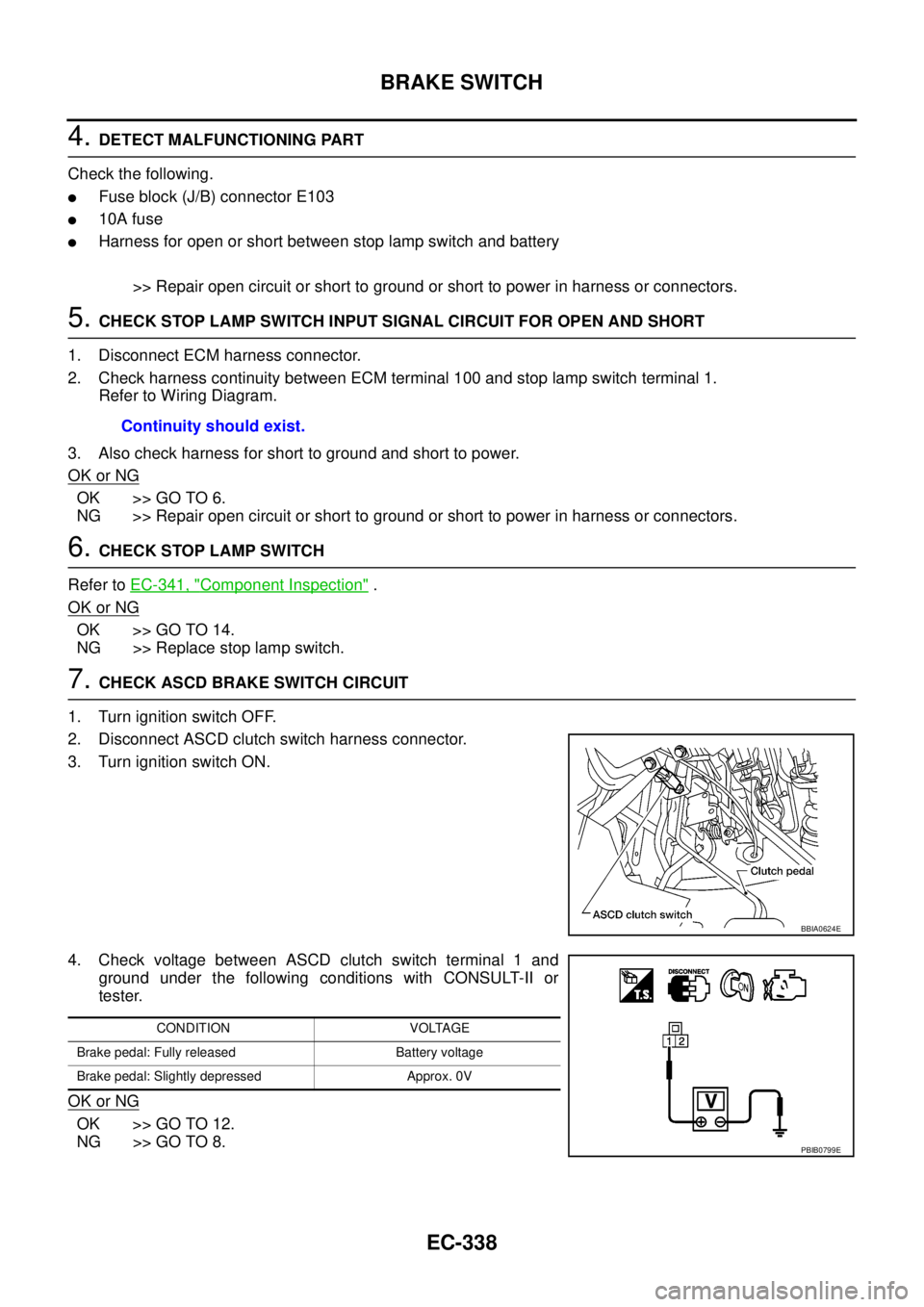
7.CHECK ASCD BRAKE SWITCH CIRCUIT
1. Turn ignition switch OFF.
2. Disconnect ASCD clutch switch harness connector.
3. Turn ignition switch ON.
4. Check voltage between ASCD clutch switch terminal 1 and
ground under the following conditions with CONSULT-II or
tester.
OK or NG
OK >> GO TO 12.
NG >> GO TO 8.Continuity should exist.
BBIA0624E
CONDITION VOLTAGE
Brake pedal: Fully released Battery voltage
Brake pedal: Slightly depressed Approx. 0V
PBIB0799E
Page 1321 of 3171
BRAKE SWITCH
EC-341
C
D
E
F
G
H
I
J
K
L
MA
EC
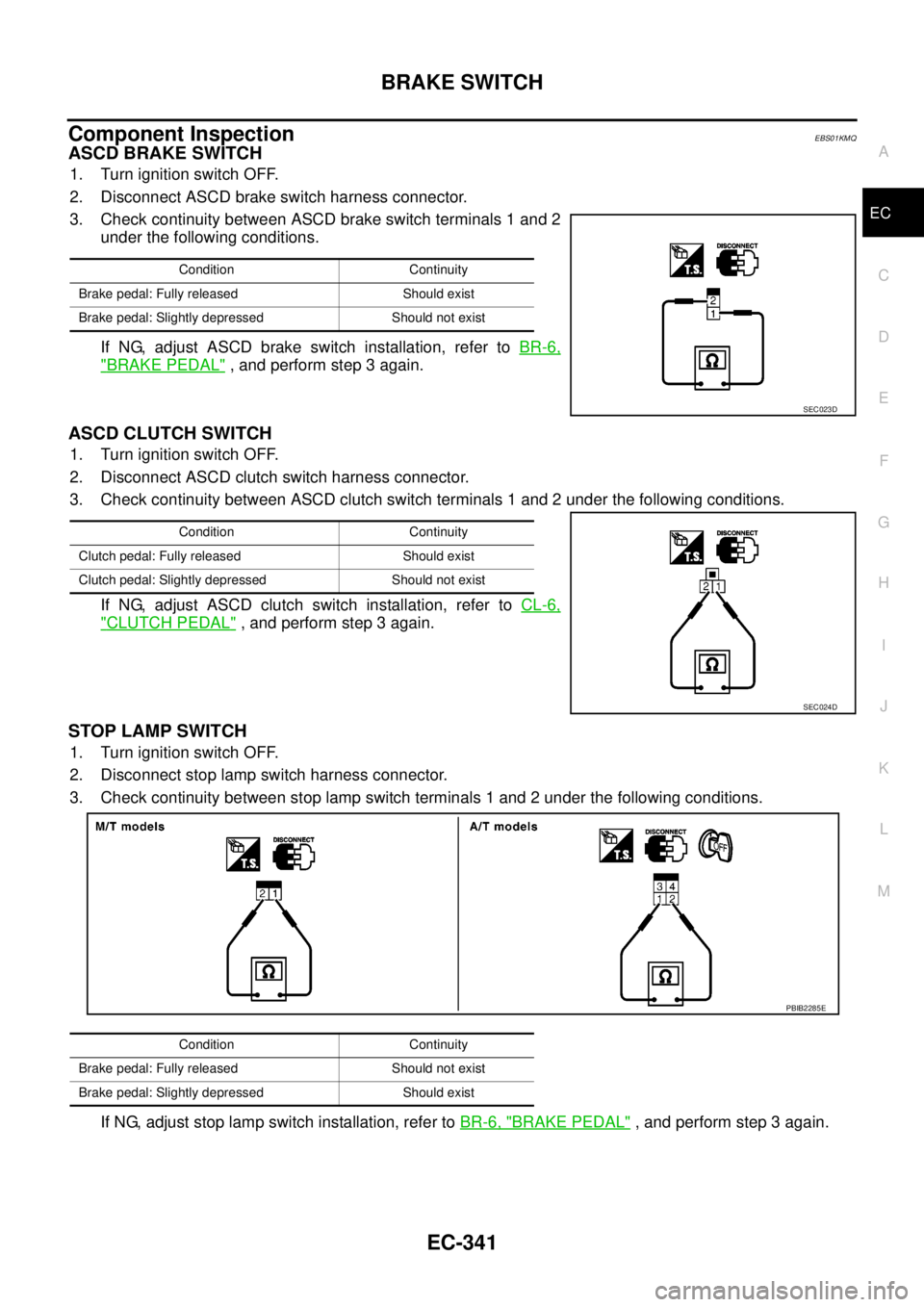
Component InspectionEBS01KMQ
ASCD BRAKE SWITCH
1. Turn ignition switch OFF.
2. Disconnect ASCD brake switch harness connector.
3. Check continuity between ASCD brake switch terminals 1 and 2
under the following conditions.
If NG, adjust ASCD brake switch installation, refer toBR-6,
"BRAKE PEDAL", and perform step 3 again.
ASCD CLUTCH SWITCH
1. Turn ignition switch OFF.
2. Disconnect ASCD clutch switch harness connector.
3. Check continuity between ASCD clutch switch terminals 1 and 2 under the following conditions.
If NG, adjust ASCD clutch switch installation, refer toCL-6,
"CLUTCH PEDAL", and perform step 3 again.
STOP LAMP SWITCH
1. Turn ignition switch OFF.
2. Disconnect stop lamp switch harness connector.
3. Check continuity between stop lamp switch terminals 1 and 2 under the following conditions.
If NG, adjust stop lamp switch installation, refer toBR-6, "
BRAKE PEDAL", and perform step 3 again.
Condition Continuity
Brake pedal: Fully released Should exist
Brake pedal: Slightly depressed Should not exist
SEC023D
Condition Continuity
Clutch pedal: Fully released Should exist
Clutch pedal: Slightly depressed Should not exist
SEC024D
Condition Continuity
Brake pedal: Fully released Should not exist
Brake pedal: Slightly depressed Should exist
PBIB2285E
Page 1337 of 3171
SERVICE DATA AND SPECIFICATIONS (SDS)
EC-357
C
D
E
F
G
H
I
J
K
L
MA
EC
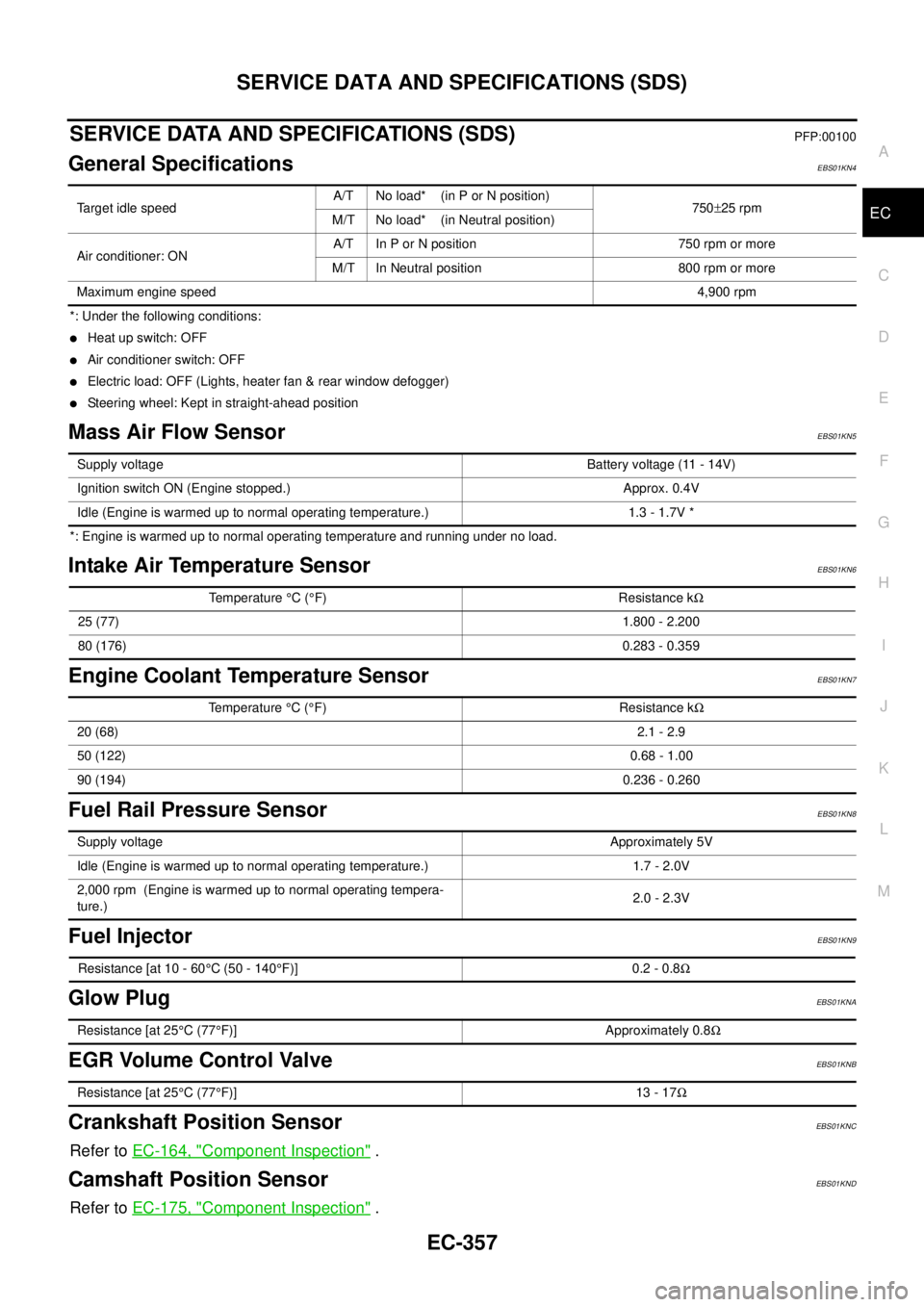
SERVICE DATA AND SPECIFICATIONS (SDS)PFP:00100
General SpecificationsEBS01KN4
*: Under the following conditions:
lHeat up switch: OFF
lAir conditioner switch: OFF
lElectric load: OFF (Lights, heater fan & rear window defogger)
lSteering wheel: Kept in straight-ahead position
Mass Air Flow SensorEBS01KN5
*: Engine is warmed up to normal operating temperature and running under no load.
Intake Air Temperature SensorEBS01KN6
Engine Coolant Temperature SensorEBS01KN7
Fuel Rail Pressure SensorEBS01KN8
Fuel InjectorEBS01KN9
Glow PlugEBS01KNA
EGR Volume Control ValveEBS01KNB
Crankshaft Position SensorEBS01KNC
Refer toEC-164, "Component Inspection".
Camshaft Position SensorEBS01KND
Refer toEC-175, "Component Inspection".
Target idle speedA/T No load* (in P or N position)
750±25 rpm
M/T No load* (in Neutral position)
Air conditioner: ONA/T In P or N position 750 rpm or more
M/T In Neutral position 800 rpm or more
Maximum engine speed4,900 rpm
Supply voltageBattery voltage (11 - 14V)
Ignition switch ON (Engine stopped.) Approx. 0.4V
Idle (Engine is warmed up to normal operating temperature.) 1.3 - 1.7V *
Temperature°C(°F) Resistance kW
25 (77)1.800 - 2.200
80 (176)0.283 - 0.359
Temperature°C(°F) Resistance kW
20 (68)2.1 - 2.9
50 (122)0.68 - 1.00
90 (194)0.236 - 0.260
Supply voltageApproximately 5V
Idle (Engine is warmed up to normal operating temperature.) 1.7 - 2.0V
2,000 rpm (Engine is warmed up to normal operating tempera-
ture.)2.0 - 2.3V
Resistance [at 10 - 60°C (50 - 140°F)] 0.2 - 0.8W
Resistance [at 25°C(77°F)] Approximately 0.8W
Resistance [at 25°C(77°F)] 13 - 17W
Page 1344 of 3171
EI-6
SQUEAK AND RATTLE TROUBLE DIAGNOSES
SQUEAK AND RATTLE TROUBLE DIAGNOSES
PFP:00000
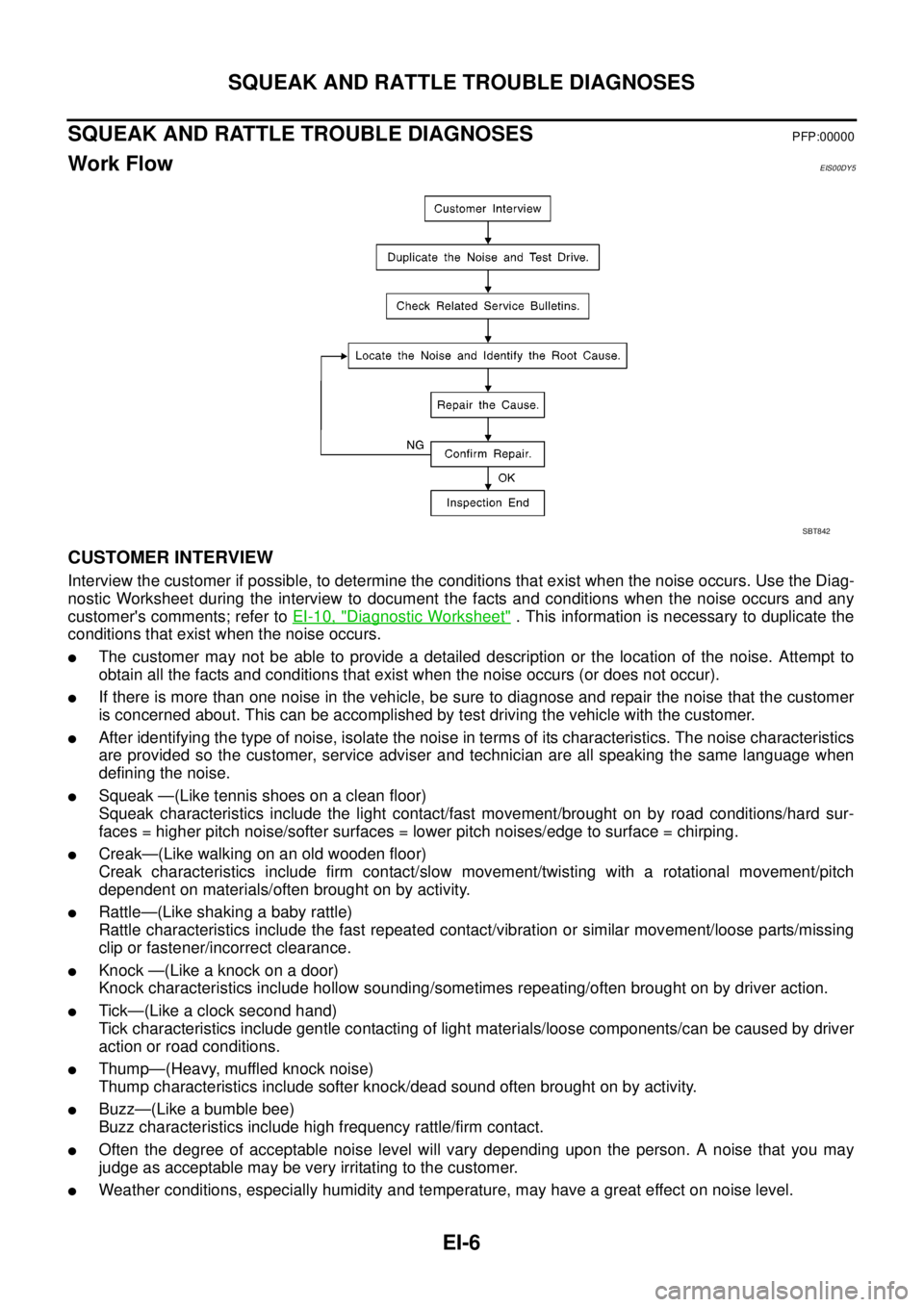
Work FlowEIS00DY5
CUSTOMER INTERVIEW
Interview the customer if possible, to determine the conditions that exist when the noise occurs. Use the Diag-
nostic Worksheet during the interview to document the facts and conditions when the noise occurs and any
customer's comments; refer toEI-10, "
Diagnostic Worksheet". This information is necessary to duplicate the
conditions that exist when the noise occurs.
lThe customer may not be able to provide a detailed description or the location of the noise. Attempt to
obtain all the facts and conditions that exist when the noise occurs (or does not occur).
lIf there is more than one noise in the vehicle, be sure to diagnose and repair the noise that the customer
is concerned about. This can be accomplished by test driving the vehicle with the customer.
lAfter identifying the type of noise, isolate the noise in terms of its characteristics. The noise characteristics
are provided so the customer, service adviser and technician are all speaking the same language when
defining the noise.
lSqueak —(Like tennis shoes on a clean floor)
Squeak characteristics include the light contact/fast movement/brought on by road conditions/hard sur-
faces = higher pitch noise/softer surfaces = lower pitch noises/edge to surface = chirping.
lCreak—(Like walking on an old wooden floor)
Creak characteristics include firm contact/slow movement/twisting with a rotational movement/pitch
dependent on materials/often brought on by activity.
lRattle—(Like shaking a baby rattle)
Rattle characteristics include the fast repeated contact/vibration or similar movement/loose parts/missing
clip or fastener/incorrect clearance.
lKnock —(Like a knock on a door)
Knock characteristics include hollow sounding/sometimes repeating/often brought on by driver action.
lTick—(Like a clock second hand)
Tick characteristics include gentle contacting of light materials/loose components/can be caused by driver
action or road conditions.
lThump—(Heavy, muffled knock noise)
Thump characteristics include softer knock/dead sound often brought on by activity.
lBuzz—(Like a bumble bee)
Buzz characteristics include high frequency rattle/firm contact.
lOften the degree of acceptable noise level will vary depending upon the person. A noise that you may
judge as acceptable may be very irritating to the customer.
lWeather conditions, especially humidity and temperature, may have a great effect on noise level.
SBT842
Page 1346 of 3171

EI-8
SQUEAK AND RATTLE TROUBLE DIAGNOSES
3. Instrument panel to front pillar garnish
4. Instrument panel to windshield
5. Instrument panel mounting pins
6. Wiring harnesses behind the combination meter
7. A/C defroster duct and duct joint
These incidents can usually be located by tapping or moving the components to duplicate the noise or by
pressing on the components while driving to stop the noise. Most of these incidents can be repaired by apply-
ing felt cloth tape or silicone spray (in hard to reach areas). Urethane pads can be used to insulate wiring har-
ness.
CAUTION:
Do not use silicone spray to isolate a squeak or rattle. If you saturate the area with silicone, you will
not be able to recheck the repair.
CENTER CONSOLE
Components to pay attention to include:
1. Shifter assembly cover to finisher
2. A/C control unit and cluster lid C
3. Wiring harnesses behind audio and A/C control unit
The instrument panel repair and isolation procedures also apply to the center console.
DOORS
Pay attention to the:
1. Finisher and inner panel making a slapping noise
2. Inside handle escutcheon to door finisher
3. Wiring harnesses tapping
4. Door striker out of alignment causing a popping noise on starts and stops
Tapping or moving the components or pressing on them while driving to duplicate the conditions can isolate
many of these incidents.
TRUNK
Trunk noises are often caused by a loose jack or loose items put into the trunk by the owner.
In addition look for:
1. Trunk lid bumpers out of adjustment
2. Trunk lid striker out of adjustment
3. The trunk lid torsion bars knocking together
4. A loose license plate or bracket
Most of these incidents can be repaired by adjusting, securing or insulating the item(s) or component(s) caus-
ing the noise.
SUNROOF/HEADLINING
Noises in the sunroof/headlining area can often be traced to one of the following:
1. Sunroof lid, rail, linkage or seals making a rattle or light knocking noise
2. Sun visor shaft shaking in the holder
3. Front or rear windshield touching headliner and squeaking
Again, pressing on the components to stop the noise while duplicating the conditions can isolate most of these
incidents. Repairs usually consist of insulating with felt cloth tape.
OVERHEAD CONSOLE (FRONT AND REAR)
Overhead console noises are often caused by the console panel clips not being engaged correctly. Most of
these incidents are repaired by pushing up on the console at the clip locations until the clips engage.
In addition look for:
1. Loose harness or harness connectors.
2. Front console map/reading lamp lens loose.
3. Loose screws at console attachment points.