ignition NISSAN NAVARA 2005 Repair Workshop Manual
[x] Cancel search | Manufacturer: NISSAN, Model Year: 2005, Model line: NAVARA, Model: NISSAN NAVARA 2005Pages: 3171, PDF Size: 49.59 MB
Page 654 of 3171
BL-70
POWER DOOR LOCK — SUPER LOCK —
CONSULT-II Function (BCM)
EIS00DX6
CONSULT-II and display each diagnostic item using the diagnostic test modes shown following.
CONSULT-II BASIC OPERATION PROCEDURE
CAUTION:
If CONSULT-II is used with no connection of CONSULT-II CONVERTER, malfunctions might be
detected in self-diagnosis depending on control unit which carry out CAN communication.
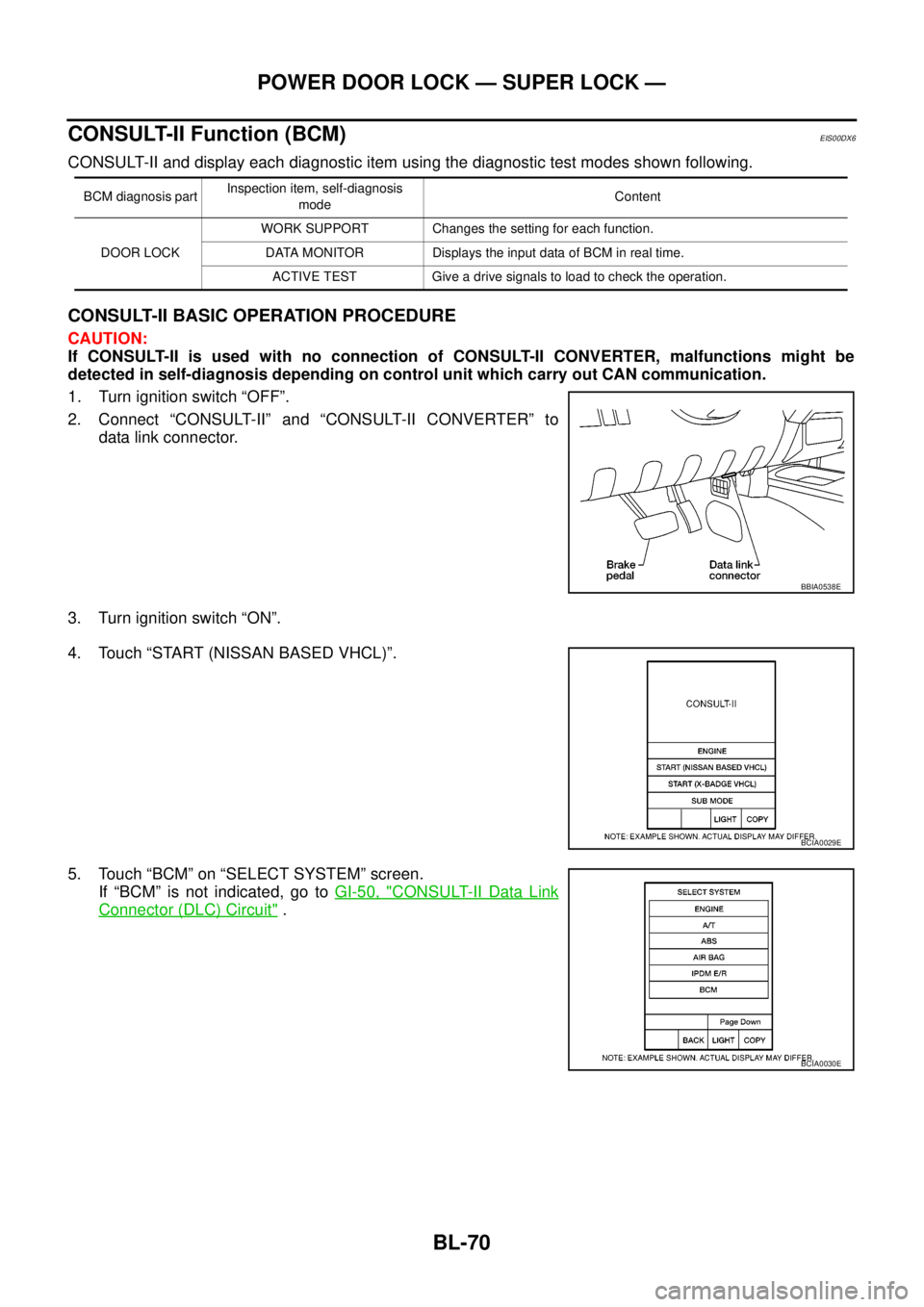
1. Turn ignition switch “OFF”.
2. Connect “CONSULT-II” and “CONSULT-II CONVERTER” to
data link connector.
3. Turn ignition switch “ON”.
4. Touch “START (NISSAN BASED VHCL)”.
5. Touch “BCM” on “SELECT SYSTEM” screen.
If “BCM” is not indicated, go toGI-50, "
CONSULT-II Data Link
Connector (DLC) Circuit".
BCM diagnosis partInspection item, self-diagnosis
modeContent
DOOR LOCKWORK SUPPORT Changes the setting for each function.
DATA MONITOR Displays the input data of BCM in real time.
ACTIVE TEST Give a drive signals to load to check the operation.
BBIA0538E
BCIA0029E
BCIA0030E
Page 655 of 3171
POWER DOOR LOCK — SUPER LOCK —
BL-71
C
D
E
F
G
H
J
K
L
MA
B
BL
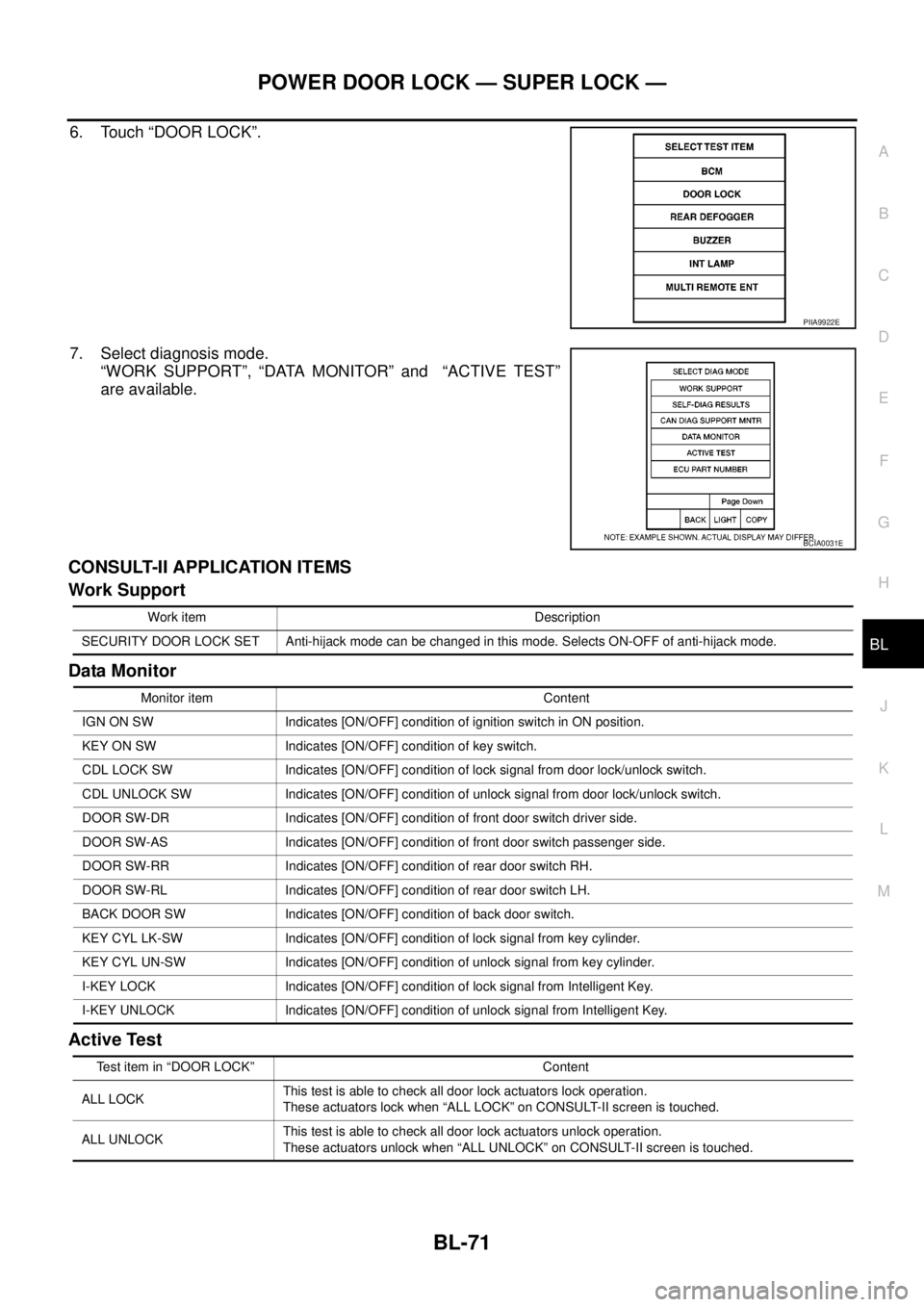
6. Touch “DOOR LOCK”.
7. Select diagnosis mode.
“WORK SUPPORT”, “DATA MONITOR” and “ACTIVE TEST”
are available.
CONSULT-II APPLICATION ITEMS
Work Support
Data Monitor
Active Test
PIIA9922E
BCIA0031E
Work item Description
SECURITY DOOR LOCK SET Anti-hijack mode can be changed in this mode. Selects ON-OFF of anti-hijack mode.
Monitor item Content
IGN ON SW Indicates [ON/OFF] condition of ignition switch in ON position.
KEY ON SW Indicates [ON/OFF] condition of key switch.
CDL LOCK SW Indicates [ON/OFF] condition of lock signal from door lock/unlock switch.
CDL UNLOCK SW Indicates [ON/OFF] condition of unlock signal from door lock/unlock switch.
DOOR SW-DR Indicates [ON/OFF] condition of front door switch driver side.
DOOR SW-AS Indicates [ON/OFF] condition of front door switch passenger side.
DOOR SW-RR Indicates [ON/OFF] condition of rear door switch RH.
DOOR SW-RL Indicates [ON/OFF] condition of rear door switch LH.
BACK DOOR SW Indicates [ON/OFF] condition of back door switch.
KEY CYL LK-SW Indicates [ON/OFF] condition of lock signal from key cylinder.
KEY CYL UN-SW Indicates [ON/OFF] condition of unlock signal from key cylinder.
I-KEY LOCK Indicates [ON/OFF] condition of lock signal from Intelligent Key.
I-KEY UNLOCK Indicates [ON/OFF] condition of unlock signal from Intelligent Key.
Test item in “DOOR LOCK” Content
ALL LOCKThis test is able to check all door lock actuators lock operation.
These actuators lock when “ALL LOCK” on CONSULT-II screen is touched.
ALL UNLOCKThis test is able to check all door lock actuators unlock operation.
These actuators unlock when “ALL UNLOCK” on CONSULT-II screen is touched.
Page 656 of 3171
BL-72
POWER DOOR LOCK — SUPER LOCK —
Work Flow
EIS00DX7
1. Check the symptom and customer's requests.
2. Understand the outline of system. Refer toBL-57, "
System Description".
3. According to the trouble diagnosis, repair or replace the cause of the malfunction. Refer toBL-72, "
Trou-
ble Diagnoses Chart by Symptom".
4. Does power door lock system operate normally?
YES: GO TO 5.
NO:GOTO2.
5. INSPECTION END.
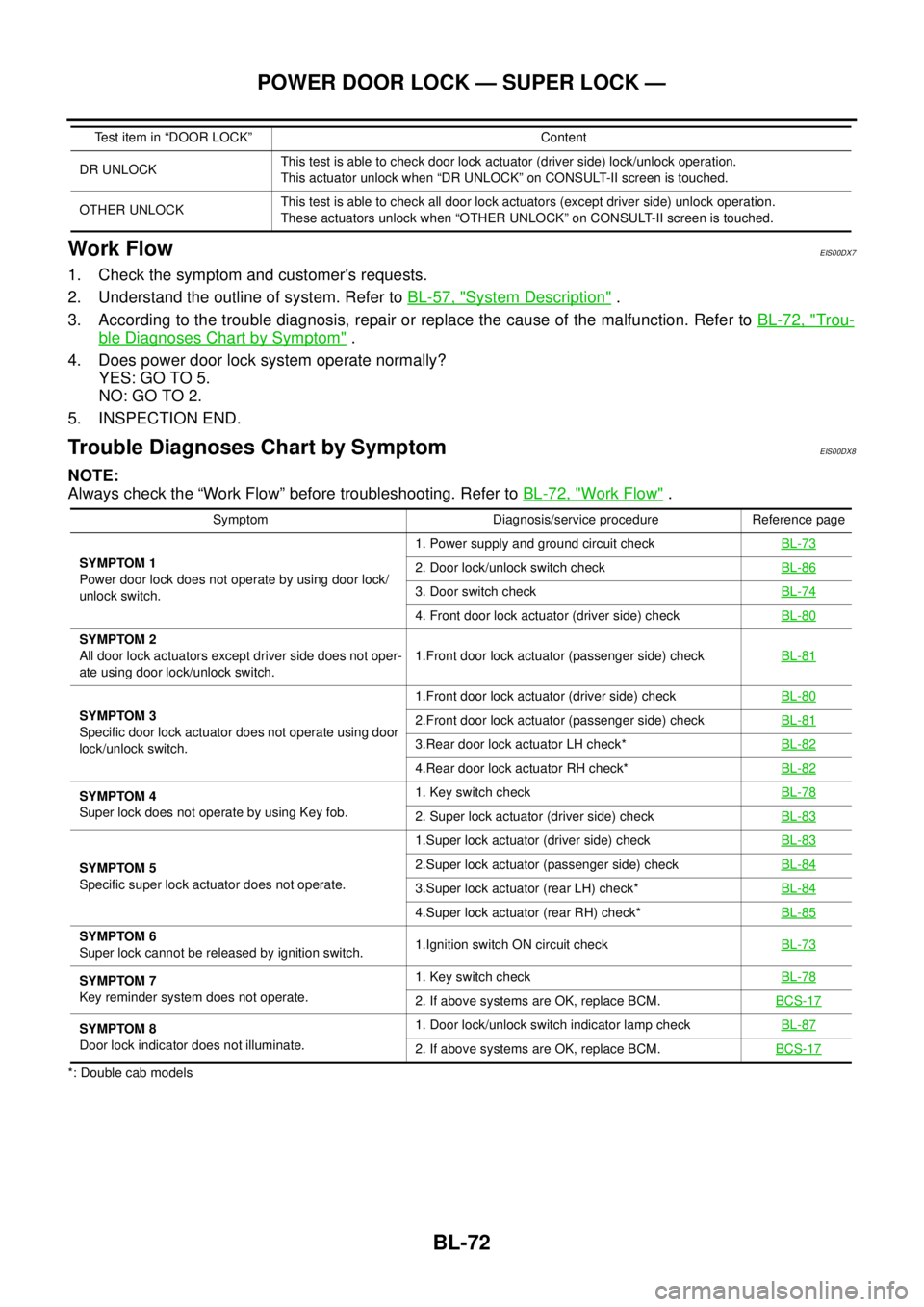
Trouble Diagnoses Chart by SymptomEIS00DX8
NOTE:
Always check the “Work Flow” before troubleshooting. Refer toBL-72, "
Work Flow".
*: Double cab modelsDR UNLOCKThis test is able to check door lock actuator (driver side) lock/unlock operation.
This actuator unlock when “DR UNLOCK” on CONSULT-II screen is touched.
OTHER UNLOCKThis test is able to check all door lock actuators (except driver side) unlock operation.
These actuators unlock when “OTHER UNLOCK” on CONSULT-II screen is touched. Test item in “DOOR LOCK” Content
Symptom Diagnosis/service procedure Reference page
SYMPTOM 1
Power door lock does not operate by using door lock/
unlock switch.1. Power supply and ground circuit checkBL-73
2. Door lock/unlock switch checkBL-86
3. Door switch checkBL-74
4. Front door lock actuator (driver side) checkBL-80
SYMPTOM 2
All door lock actuators except driver side does not oper-
ate using door lock/unlock switch.1.Front door lock actuator (passenger side) checkBL-81
SYMPTOM 3
Specific door lock actuator does not operate using door
lock/unlock switch.1.Front door lock actuator (driver side) checkBL-802.Front door lock actuator (passenger side) checkBL-81
3.Rear door lock actuator LH check*BL-82
4.Rear door lock actuator RH check*BL-82
SYMPTOM 4
Super lock does not operate by using Key fob.1. Key switch checkBL-78
2. Super lock actuator (driver side) checkBL-83
SYMPTOM 5
Specific super lock actuator does not operate.1.Super lock actuator (driver side) checkBL-832.Super lock actuator (passenger side) checkBL-84
3.Super lock actuator (rear LH) check*BL-84
4.Super lock actuator (rear RH) check*BL-85
SYMPTOM 6
Super lock cannot be released by ignition switch.1.Ignition switch ON circuit checkBL-73
SYMPTOM 7
Key reminder system does not operate.1. Key switch checkBL-78
2. If above systems are OK, replace BCM.BCS-17
SYMPTOM 8
Door lock indicator does not illuminate.1. Door lock/unlock switch indicator lamp checkBL-87
2. If above systems are OK, replace BCM.BCS-17
Page 657 of 3171
POWER DOOR LOCK — SUPER LOCK —
BL-73
C
D
E
F
G
H
J
K
L
MA
B
BL
Check Power Supply and Ground CircuitEIS00DX9
1.FUSE INSPECTION
Check the following.
l50A fusible link (letterG, located in the fuse and fusible link box)
l10A fuse [No. 1, located in the fuse block (J/B)]
l10A fuse [No.21, located in the fuse block (J/B)]
NOTE:
Refer toBL-55, "
Component Parts and Harness Connector Location".
OK or NG
OK >> GO TO 2.
NG >> If fuse is blown, be sure to eliminate cause of malfunction before installing new fuse, refer toPG-
4, "POWER SUPPLY ROUTING CIRCUIT".
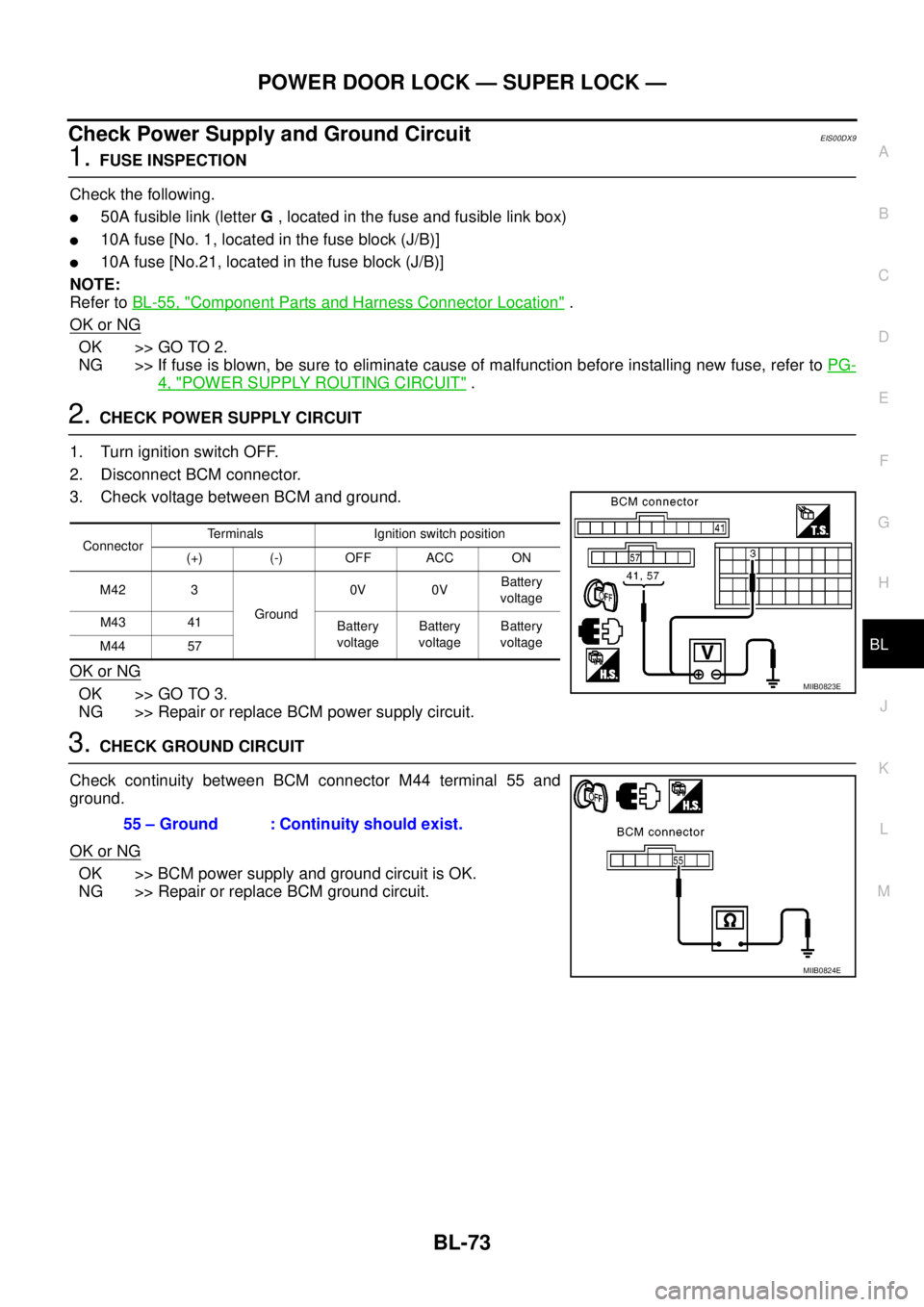
2.CHECK POWER SUPPLY CIRCUIT
1. Turn ignition switch OFF.
2. Disconnect BCM connector.
3. Check voltage between BCM and ground.
OK or NG
OK >> GO TO 3.
NG >> Repair or replace BCM power supply circuit.
3.CHECK GROUND CIRCUIT
Check continuity between BCM connector M44 terminal 55 and
ground.
OK or NG
OK >> BCM power supply and ground circuit is OK.
NG >> Repair or replace BCM ground circuit.
ConnectorTerminals Ignition switch position
(+) (-) OFF ACC ON
M42 3
Ground0V 0VBattery
voltage
M43 41
Battery
voltageBattery
voltageBattery
voltage
M44 57
MIIB0823E
55 – Ground : Continuity should exist.
MIIB0824E
Page 658 of 3171
BL-74
POWER DOOR LOCK — SUPER LOCK —
Check Door Switch
EIS00DXB
CHECK DOOR SWITCH (DOUBLE CAB)
1.CHECK DOOR SWITCH INPUT SIGNAL
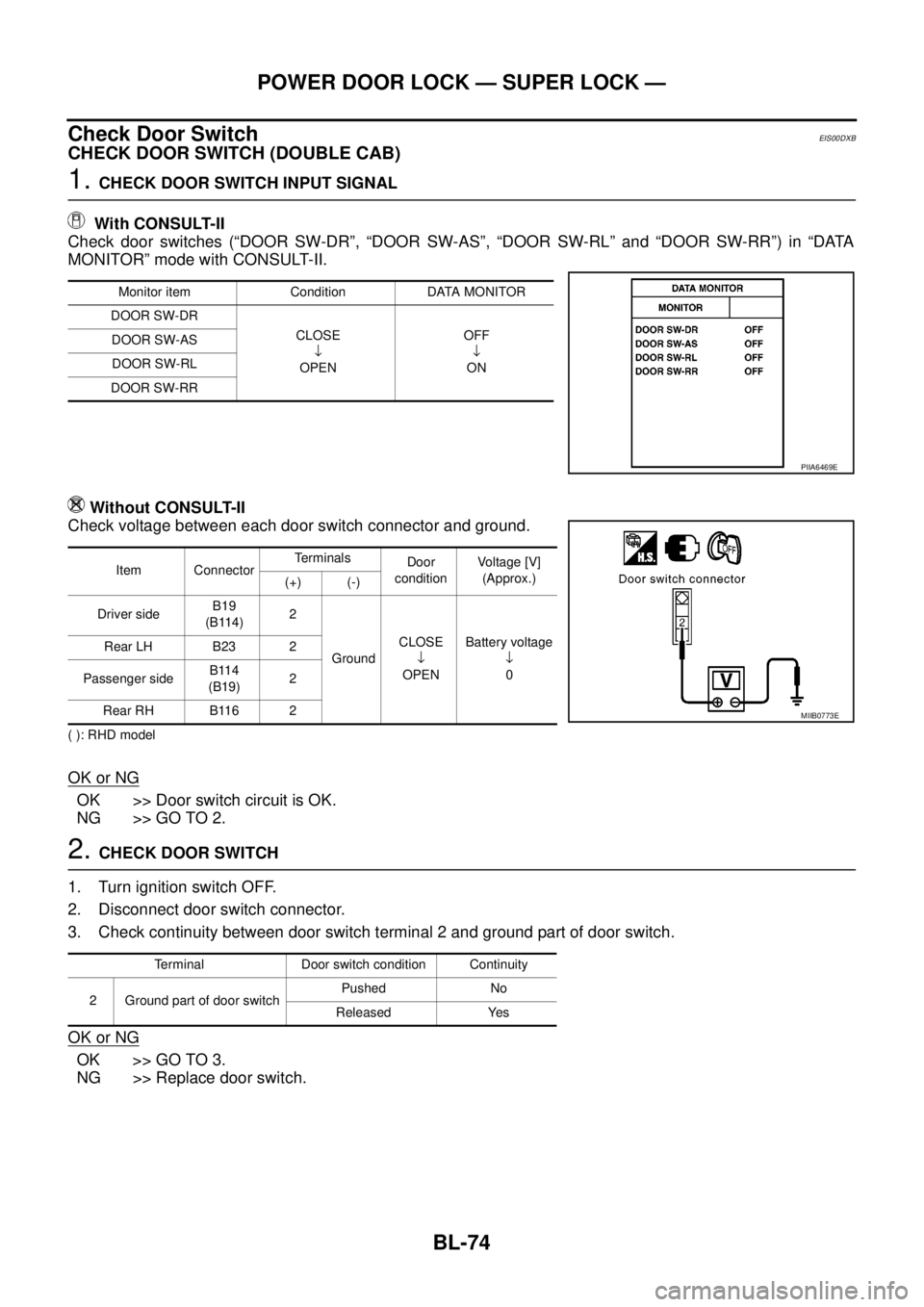
With CONSULT-II
Check door switches (“DOOR SW-DR”, “DOOR SW-AS”, “DOOR SW-RL” and “DOOR SW-RR”) in “DATA
MONITOR” mode with CONSULT-II.
Without CONSULT-II
Check voltage between each door switch connector and ground.
( ): RHD model
OK or NG
OK >> Door switch circuit is OK.
NG >> GO TO 2.
2.CHECK DOOR SWITCH
1. Turn ignition switch OFF.
2. Disconnect door switch connector.
3. Check continuity between door switch terminal 2 and ground part of door switch.
OK or NG
OK >> GO TO 3.
NG >> Replace door switch.
Monitor item Condition DATA MONITOR
DOOR SW-DR
CLOSE
¯
OPENOFF
¯
ON DOOR SW-AS
DOOR SW-RL
DOOR SW-RR
PIIA6469E
Item ConnectorTerminals
Door
conditionVoltage [V]
(Approx.)
(+) (-)
Driver sideB19
(B114)2
GroundCLOSE
¯
OPENBattery voltage
¯
0 Rear LH B23 2
Passenger sideB114
(B19)2
Rear RH B116 2
MIIB0773E
Terminal Door switch condition Continuity
2 Ground part of door switchPushed No
Released Yes
Page 661 of 3171
POWER DOOR LOCK — SUPER LOCK —
BL-77
C
D
E
F
G
H
J
K
L
MA
B
BL
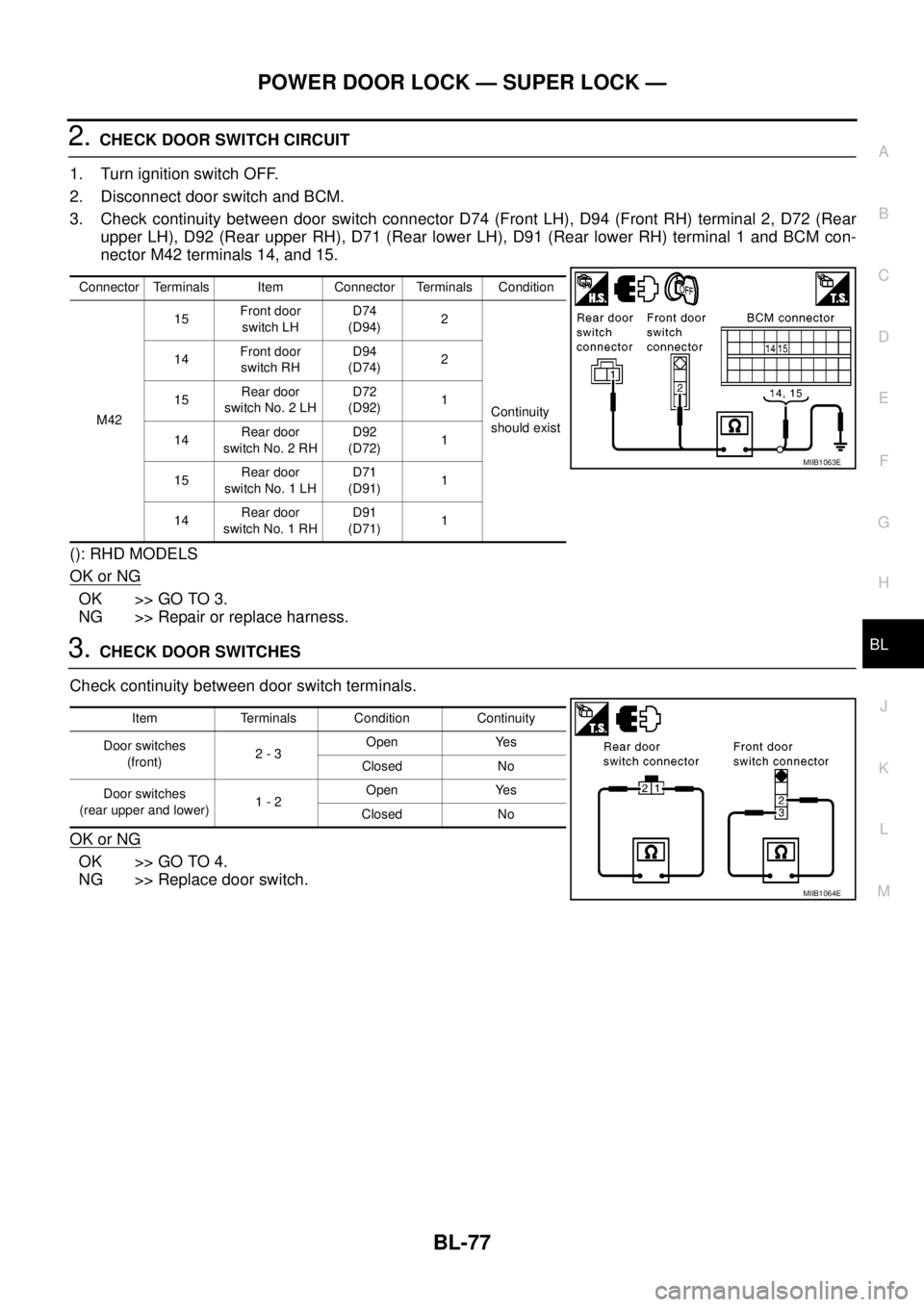
2.CHECK DOOR SWITCH CIRCUIT
1. Turn ignition switch OFF.
2. Disconnect door switch and BCM.
3. Check continuity between door switch connector D74 (Front LH), D94 (Front RH) terminal 2, D72 (Rear
upper LH), D92 (Rear upper RH), D71 (Rear lower LH), D91 (Rear lower RH) terminal 1 and BCM con-
nector M42 terminals 14, and 15.
(): RHD MODELS
OK or NG
OK >> GO TO 3.
NG >> Repair or replace harness.
3.CHECK DOOR SWITCHES
Check continuity between door switch terminals.
OK or NG
OK >> GO TO 4.
NG >> Replace door switch.
Connector Terminals Item Connector Terminals Condition
M4215Front door
switch LHD74
(D94)2
Continuity
should exist 14Front door
switch RHD94
(D74)2
15Rear door
switch No. 2 LHD72
(D92)1
14Rear door
switch No. 2 RHD92
(D72)1
15Rear door
switch No. 1 LHD71
(D91)1
14Rear door
switch No. 1 RHD91
(D71)1
MIIB1063E
Item Terminals Condition Continuity
Door switches
(front)2-3Open Yes
Closed No
Door switches
(rear upper and lower)1-2Open Yes
Closed No
MIIB1064E
Page 662 of 3171
BL-78
POWER DOOR LOCK — SUPER LOCK —
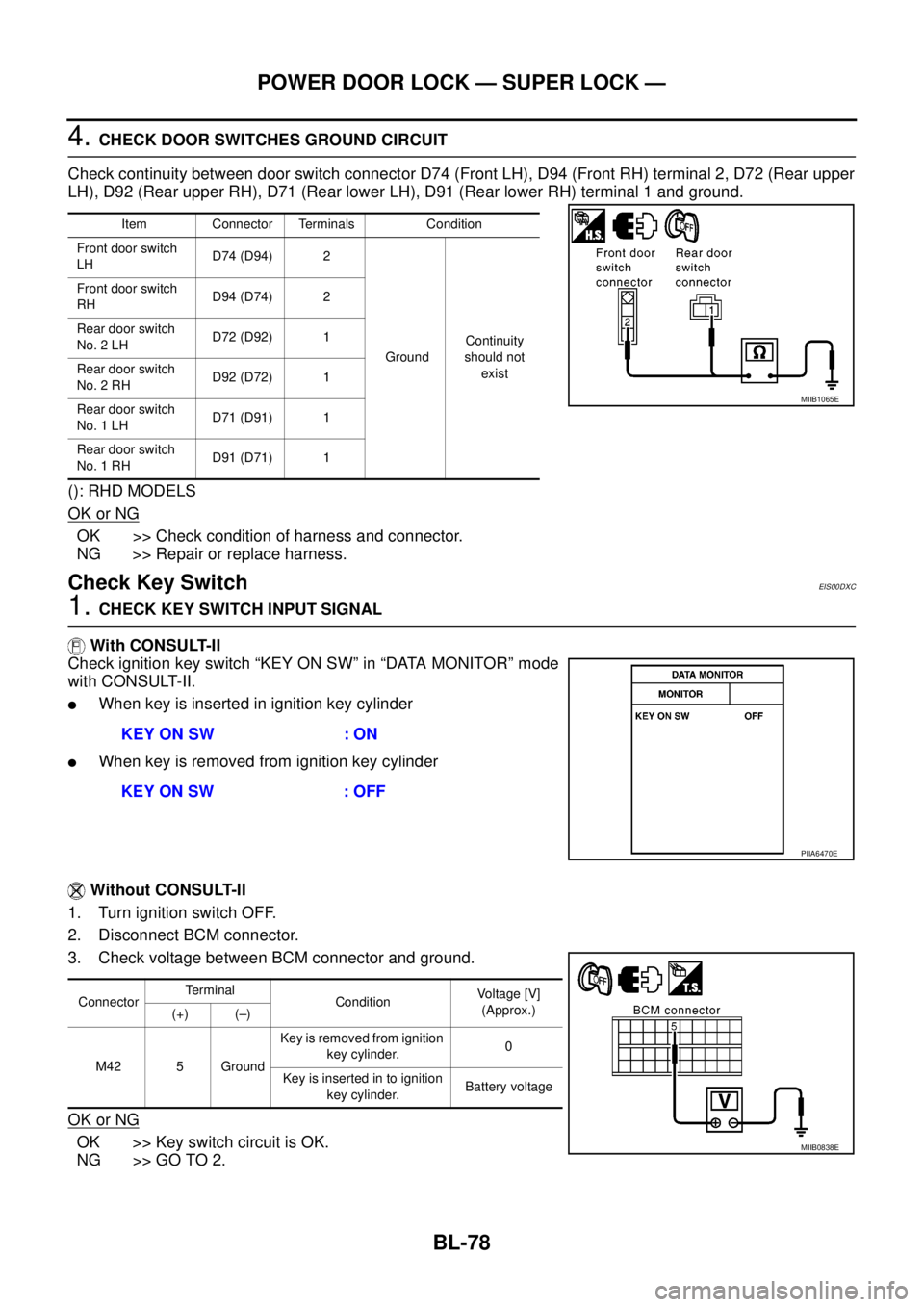
4.CHECK DOOR SWITCHES GROUND CIRCUIT
Check continuity between door switch connector D74 (Front LH), D94 (Front RH) terminal 2, D72 (Rear upper
LH), D92 (Rear upper RH), D71 (Rear lower LH), D91 (Rear lower RH) terminal 1 and ground.
(): RHD MODELS
OK or NG
OK >> Check condition of harness and connector.
NG >> Repair or replace harness.
Check Key SwitchEIS00DXC
1.CHECK KEY SWITCH INPUT SIGNAL
With CONSULT-II
Check ignition key switch “KEY ON SW” in “DATA MONITOR” mode
with CONSULT-II.
lWhen key is inserted in ignition key cylinder
lWhen key is removed from ignition key cylinder
Without CONSULT-II
1. Turn ignition switch OFF.
2. Disconnect BCM connector.
3. Check voltage between BCM connector and ground.
OK or NG
OK >> Key switch circuit is OK.
NG >> GO TO 2.
Item Connector Terminals Condition
Front door switch
LHD74 (D94) 2
GroundContinuity
should not
exist Front door switch
RHD94 (D74) 2
Rear door switch
No. 2 LHD72 (D92) 1
Rear door switch
No. 2 RHD92 (D72) 1
Rear door switch
No. 1 LHD71 (D91) 1
Rear door switch
No. 1 RHD91 (D71) 1
MIIB1065E
KEY ON SW : ON
KEY ON SW : OFF
PIIA6470E
ConnectorTerminal
ConditionVoltage [V]
(Approx.)
(+) (–)
M42 5 GroundKey is removed from ignition
key cylinder.0
Key is inserted in to ignition
key cylinder.Battery voltage
MIIB0838E
Page 663 of 3171
POWER DOOR LOCK — SUPER LOCK —
BL-79
C
D
E
F
G
H
J
K
L
MA
B
BL
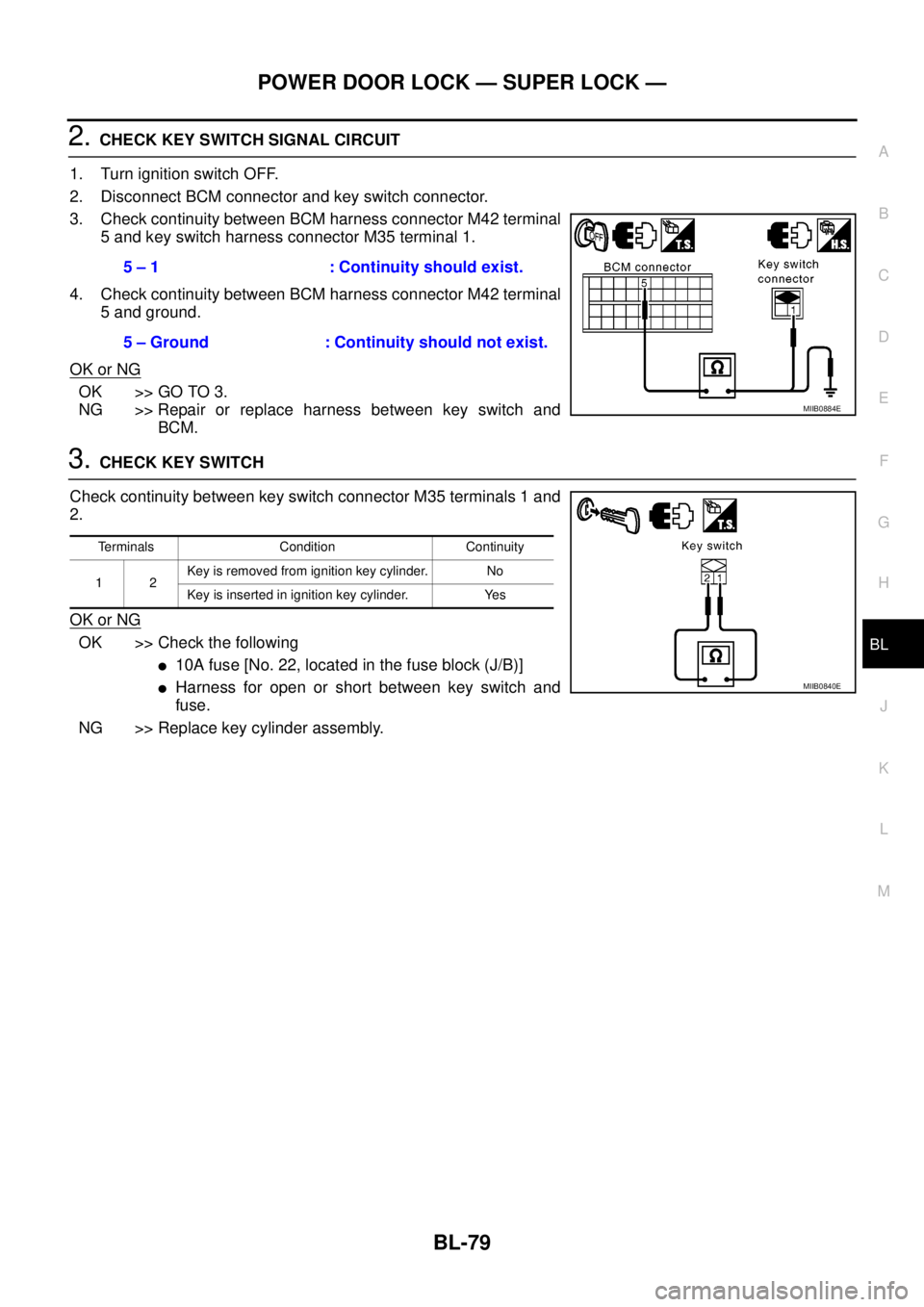
2.CHECK KEY SWITCH SIGNAL CIRCUIT
1. Turn ignition switch OFF.
2. Disconnect BCM connector and key switch connector.
3. Check continuity between BCM harness connector M42 terminal
5 and key switch harness connector M35 terminal 1.
4. Check continuity between BCM harness connector M42 terminal
5 and ground.
OK or NG
OK >> GO TO 3.
NG >> Repair or replace harness between key switch and
BCM.
3.CHECK KEY SWITCH
Check continuity between key switch connector M35 terminals 1 and
2.
OK or NG
OK >> Check the following
l10Afuse[No.22,locatedinthefuseblock(J/B)]
lHarness for open or short between key switch and
fuse.
NG >> Replace key cylinder assembly.5 – 1 : Continuity should exist.
5 – Ground : Continuity should not exist.
MIIB0884E
Terminals Condition Continuity
12Key is removed from ignition key cylinder. No
Key is inserted in ignition key cylinder. Yes
MIIB0840E
Page 664 of 3171
BL-80
POWER DOOR LOCK — SUPER LOCK —
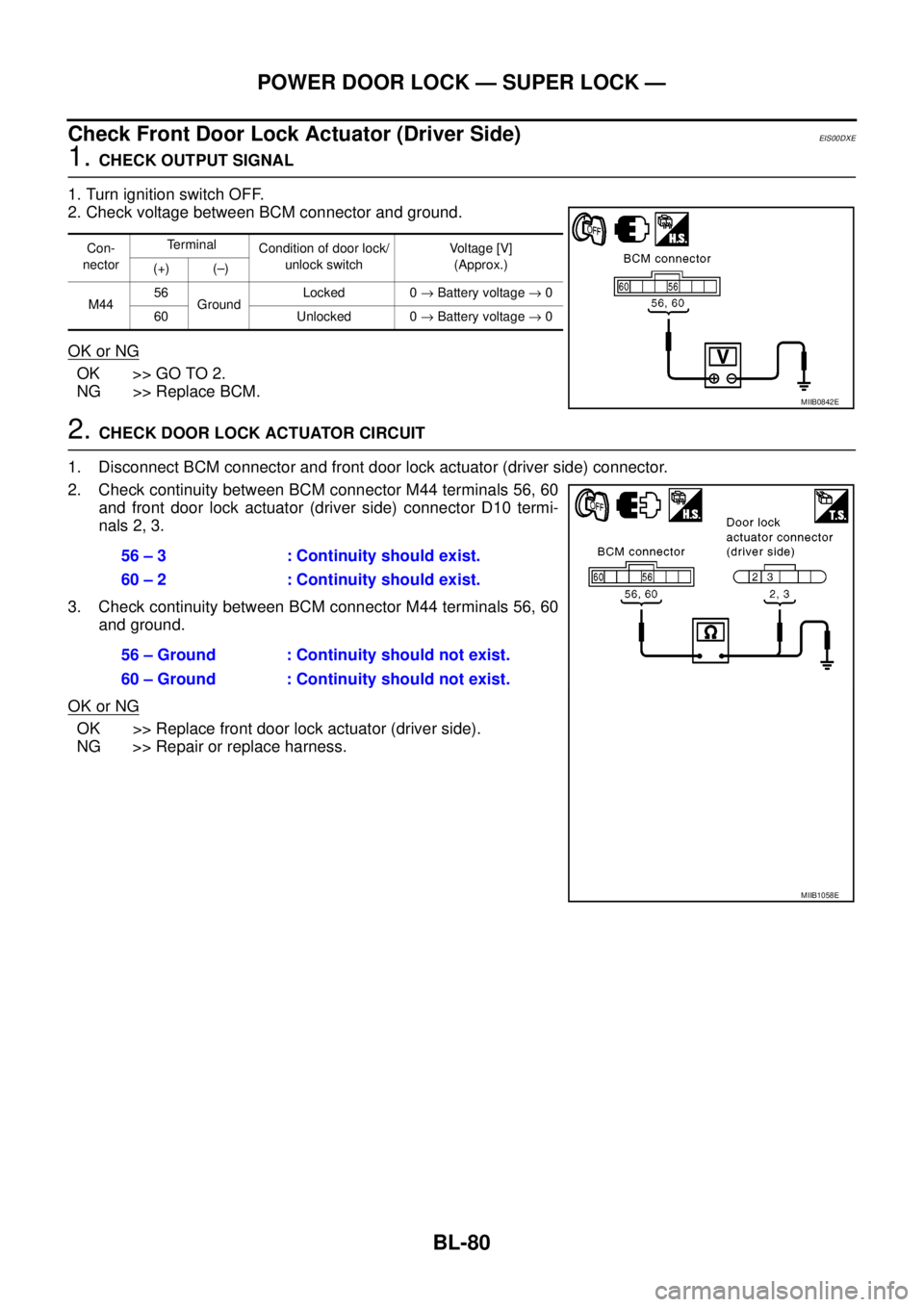
Check Front Door Lock Actuator (Driver Side)
EIS00DXE
1.CHECK OUTPUT SIGNAL
1. Turn ignition switch OFF.
2. Check voltage between BCM connector and ground.
OK or NG
OK >> GO TO 2.
NG >> Replace BCM.
2.CHECK DOOR LOCK ACTUATOR CIRCUIT
1. Disconnect BCM connector and front door lock actuator (driver side) connector.
2. Check continuity between BCM connector M44 terminals 56, 60
and front door lock actuator (driver side) connector D10 termi-
nals 2, 3.
3. Check continuity between BCM connector M44 terminals 56, 60
and ground.
OK or NG
OK >> Replace front door lock actuator (driver side).
NG >> Repair or replace harness.
Con-
nectorTerminal
Condition of door lock/
unlock switchVo l ta g e [V ]
(Approx.)
(+) (–)
M4456
GroundLocked 0®Battery voltage®0
60 Unlocked 0®Battery voltage®0
MIIB0842E
56 – 3 : Continuity should exist.
60 – 2 : Continuity should exist.
56 – Ground : Continuity should not exist.
60 – Ground : Continuity should not exist.
MIIB1058E
Page 665 of 3171
POWER DOOR LOCK — SUPER LOCK —
BL-81
C
D
E
F
G
H
J
K
L
MA
B
BL
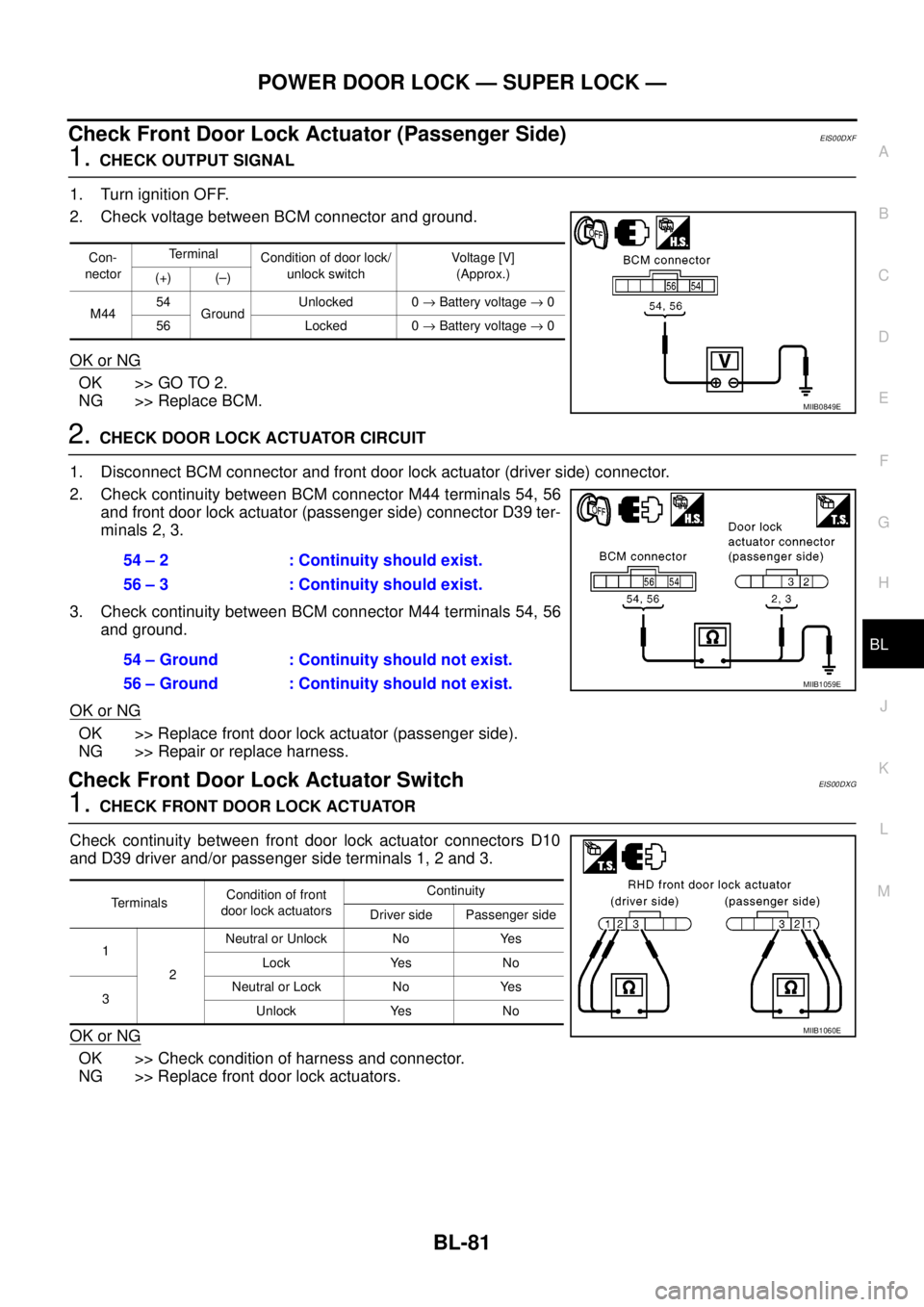
Check Front Door Lock Actuator (Passenger Side)EIS00DXF
1.CHECK OUTPUT SIGNAL
1. Turn ignition OFF.
2. Check voltage between BCM connector and ground.
OK or NG
OK >> GO TO 2.
NG >> Replace BCM.
2.CHECK DOOR LOCK ACTUATOR CIRCUIT
1. Disconnect BCM connector and front door lock actuator (driver side) connector.
2. Check continuity between BCM connector M44 terminals 54, 56
and front door lock actuator (passenger side) connector D39 ter-
minals 2, 3.
3. Check continuity between BCM connector M44 terminals 54, 56
and ground.
OK or NG
OK >> Replace front door lock actuator (passenger side).
NG >> Repair or replace harness.
Check Front Door Lock Actuator SwitchEIS00DXG
1.CHECK FRONT DOOR LOCK ACTUATOR
Check continuity between front door lock actuator connectors D10
and D39 driver and/or passenger side terminals 1, 2 and 3.
OK or NG
OK >> Check condition of harness and connector.
NG >> Replace front door lock actuators.
Con-
nectorTerminal
Condition of door lock/
unlock switchVoltag e [V]
(Approx.)
(+) (–)
M4454
GroundUnlocked 0®Battery voltage®0
56 Locked 0®Battery voltage®0
MIIB0849E
54 – 2 : Continuity should exist.
56 – 3 : Continuity should exist.
54 – Ground : Continuity should not exist.
56 – Ground : Continuity should not exist.
MIIB1059E
TerminalsCondition of front
door lock actuatorsContinuity
Driver side Passenger side
1
2Neutral or Unlock No Yes
Lock Yes No
3Neutral or Lock No Yes
Unlock Yes No
MIIB1060E