ignition NISSAN NAVARA 2005 Repair Workshop Manual
[x] Cancel search | Manufacturer: NISSAN, Model Year: 2005, Model line: NAVARA, Model: NISSAN NAVARA 2005Pages: 3171, PDF Size: 49.59 MB
Page 739 of 3171

THEFT WARNING SYSTEM
BL-155
C
D
E
F
G
H
J
K
L
MA
B
BL
Terminals and Reference Value for BCMEIS00DC2
*: Double cabTerminalWire
ColorItem ConditionVoltage (V)
(Approx.)
3 Y IGN ON Ignition switch ON or START Battery voltage
4 V IGN ACC Ignition switch ACC or ON Battery voltage
12* L Rear door switch RHON (door open) 0
OFF (door closed) Battery voltage
14 LGFront door switch
(Passenger side)ON (door open) 0
OFF (door closed) Battery voltage
15 SBFront door switch
(Driver side)ON (door open) 0
OFF (door closed) Battery voltage
16* P Rear door switch LHON (door open) 0
OFF (door closed) Battery voltage
17 W Door lock/unlock indicator All door closedLock operation
(illuminates)Battery voltage
Other than
above0
21 P CAN L — —
22 L CAN H — —
23 G Security indicator lampGoes OFF®illuminates (Every 2.6 sec-
onds)Battery voltage®0
31 B Ground — 0
32 GR Door lock/unlock switch All door closedUnlock 0
Other than
above5
34 O Door lock/unlock switch All door closedLock 0
Other than
above5
41 Y Power source (Fuse) — Battery voltage
55 B Ground — 0
57 W Power source (Fusible link) — Battery voltage
Page 740 of 3171
BL-156
THEFT WARNING SYSTEM
TerminalsandReferenceValueforIPDME/R
EIS00DC3
*: When horn reminder is ON.
CONSULT-II Function (BCM)EIS00DC4
CONSULT-II can display each diagnostic item using the diagnostic test modes shown following.
CONSULT-II INSPECTION PROCEDURE
CAUTION:
If CONSULT-II is used with no connection of CONSULT-II CONVERTER, malfunctions might be
detected in self-diagnosis depending on control unit which carry out CAN communication.
1. Turn ignition switch OFF.
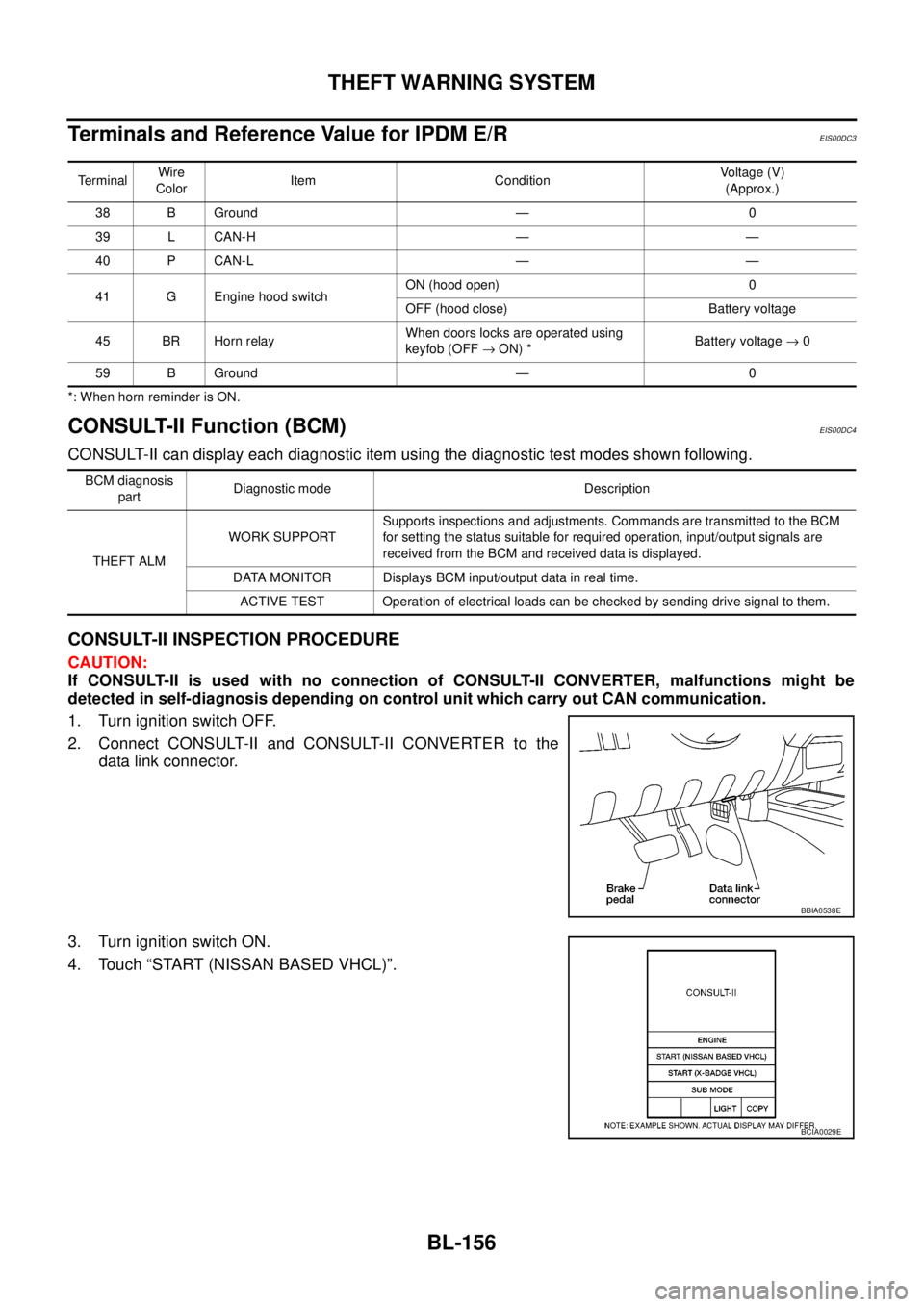
2. Connect CONSULT-II and CONSULT-II CONVERTER to the
data link connector.
3. Turn ignition switch ON.
4. Touch “START (NISSAN BASED VHCL)”.
TerminalWire
ColorItem ConditionVoltage (V)
(Approx.)
38 B Ground — 0
39 L CAN-H — —
40 P CAN-L — —
41 G Engine hood switchON (hood open) 0
OFF (hood close) Battery voltage
45 BR Horn relayWhen doors locks are operated using
keyfob (OFF®ON) *Battery voltage®0
59 B Ground — 0
BCM diagnosis
partDiagnostic mode Description
THEFT ALMWORK SUPPORTSupports inspections and adjustments. Commands are transmitted to the BCM
for setting the status suitable for required operation, input/output signals are
received from the BCM and received data is displayed.
DATA MONITOR Displays BCM input/output data in real time.
ACTIVE TEST Operation of electrical loads can be checked by sending drive signal to them.
BBIA0538E
BCIA0029E
Page 741 of 3171
THEFT WARNING SYSTEM
BL-157
C
D
E
F
G
H
J
K
L
MA
B
BL
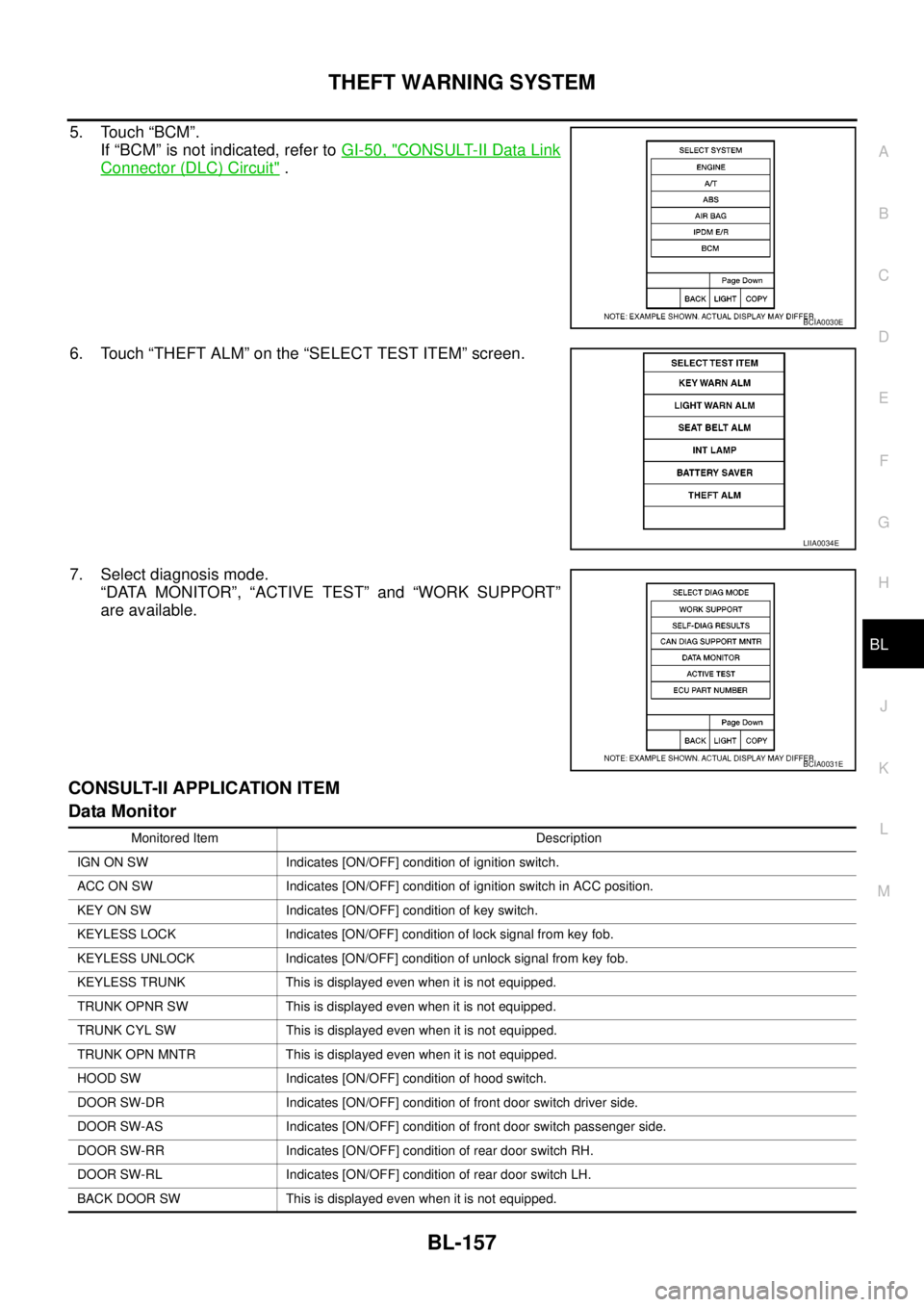
5. Touch “BCM”.
If “BCM” is not indicated, refer toGI-50, "
CONSULT-II Data Link
Connector (DLC) Circuit".
6. Touch “THEFT ALM” on the “SELECT TEST ITEM” screen.
7. Select diagnosis mode.
“DATA MONITOR”, “ACTIVE TEST” and “WORK SUPPORT”
are available.
CONSULT-II APPLICATION ITEM
Data Monitor
BCIA0030E
LIIA0034E
BCIA0031E
Monitored Item Description
IGN ON SW Indicates [ON/OFF] condition of ignition switch.
ACC ON SW Indicates [ON/OFF] condition of ignition switch in ACC position.
KEY ON SW Indicates [ON/OFF] condition of key switch.
KEYLESS LOCK Indicates [ON/OFF] condition of lock signal from key fob.
KEYLESS UNLOCK Indicates [ON/OFF] condition of unlock signal from key fob.
KEYLESS TRUNK This is displayed even when it is not equipped.
TRUNK OPNR SW This is displayed even when it is not equipped.
TRUNK CYL SW This is displayed even when it is not equipped.
TRUNK OPN MNTR This is displayed even when it is not equipped.
HOOD SW Indicates [ON/OFF] condition of hood switch.
DOOR SW-DR Indicates [ON/OFF] condition of front door switch driver side.
DOOR SW-AS Indicates [ON/OFF] condition of front door switch passenger side.
DOOR SW-RR Indicates [ON/OFF] condition of rear door switch RH.
DOOR SW-RL Indicates [ON/OFF] condition of rear door switch LH.
BACK DOOR SW This is displayed even when it is not equipped.
Page 744 of 3171
BL-160
THEFT WARNING SYSTEM
Preliminary Check
EIS00DC6
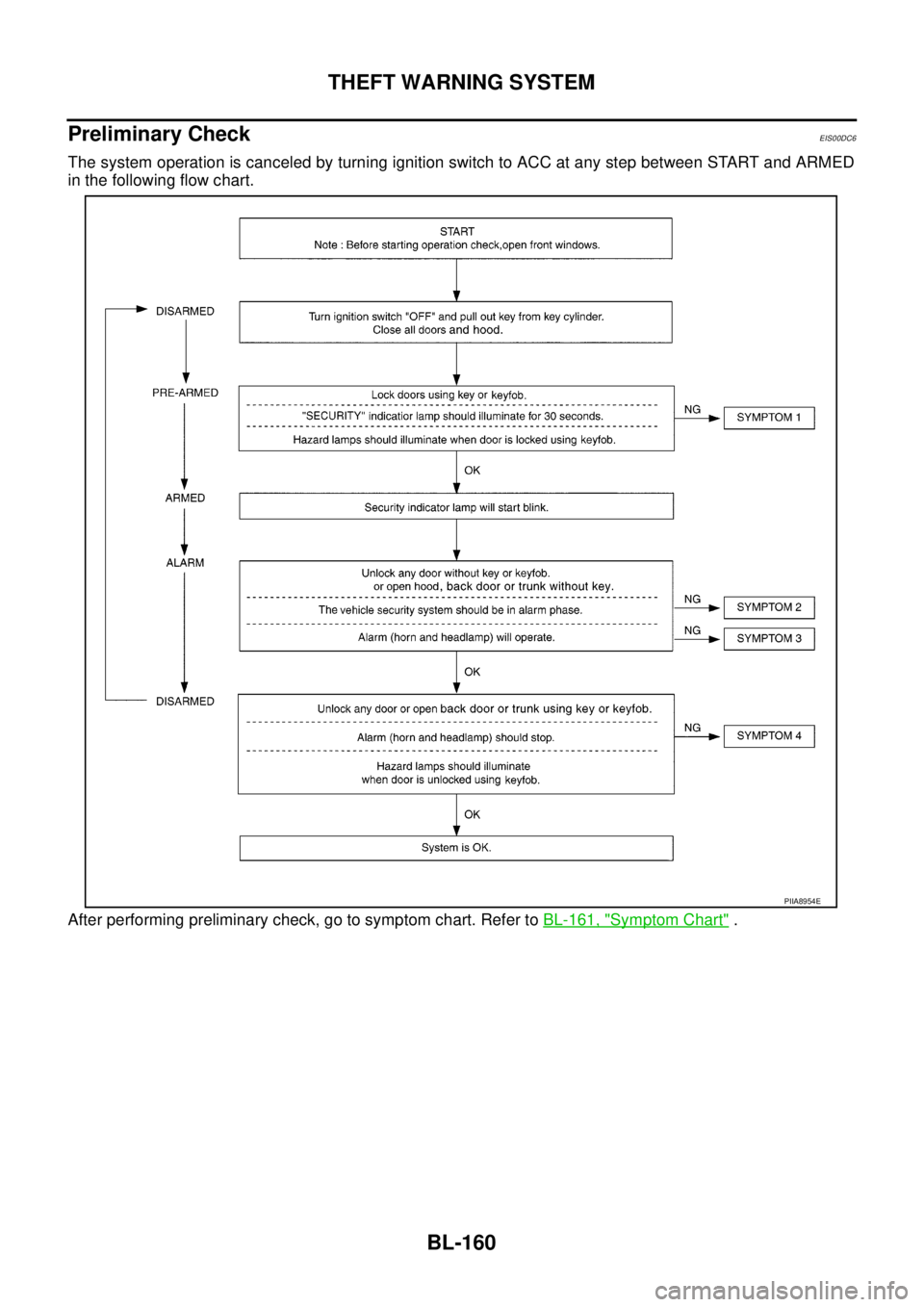
The system operation is canceled by turning ignition switch to ACC at any step between START and ARMED
in the following flow chart.
After performing preliminary check, go to symptom chart. Refer toBL-161, "
Symptom Chart".
PIIA8954E
Page 746 of 3171
BL-162
THEFT WARNING SYSTEM
Diagnostic Procedure 1
EIS00DC8
CHECK DOOR SWITCH (DOUBLE CAB)
1.CHECK DOOR SWITCH INPUT SIGNAL
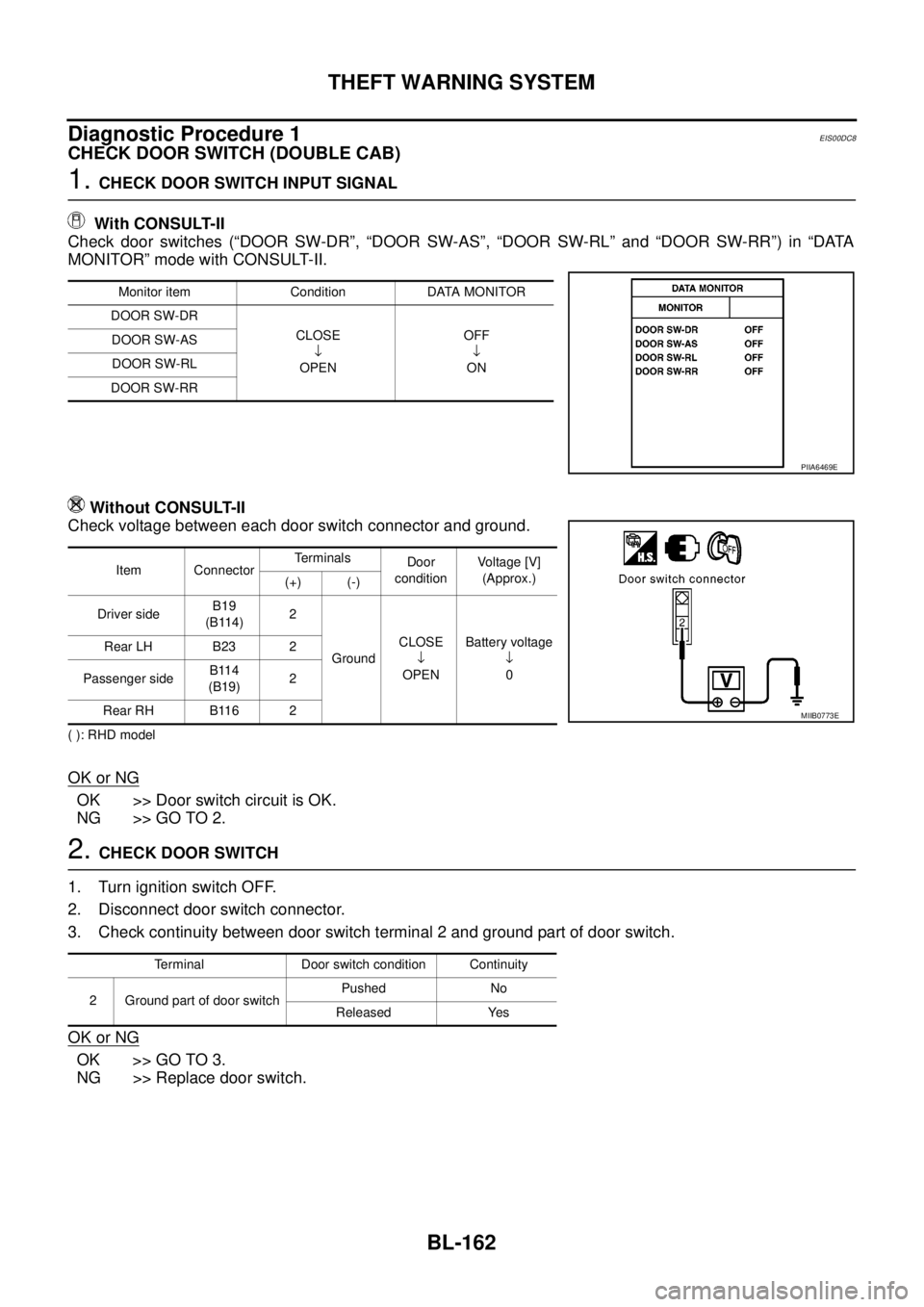
With CONSULT-II
Check door switches (“DOOR SW-DR”, “DOOR SW-AS”, “DOOR SW-RL” and “DOOR SW-RR”) in “DATA
MONITOR” mode with CONSULT-II.
Without CONSULT-II
Check voltage between each door switch connector and ground.
( ): RHD model
OK or NG
OK >> Door switch circuit is OK.
NG >> GO TO 2.
2.CHECK DOOR SWITCH
1. Turn ignition switch OFF.
2. Disconnect door switch connector.
3. Check continuity between door switch terminal 2 and ground part of door switch.
OK or NG
OK >> GO TO 3.
NG >> Replace door switch.
Monitor item Condition DATA MONITOR
DOOR SW-DR
CLOSE
¯
OPENOFF
¯
ON DOOR SW-AS
DOOR SW-RL
DOOR SW-RR
PIIA6469E
Item ConnectorTerminals
Door
conditionVoltage [V]
(Approx.)
(+) (-)
Driver sideB19
(B114)2
GroundCLOSE
¯
OPENBattery voltage
¯
0 Rear LH B23 2
Passenger sideB114
(B19)2
Rear RH B116 2
MIIB0773E
Terminal Door switch condition Continuity
2 Ground part of door switchPushed No
Released Yes
Page 749 of 3171
THEFT WARNING SYSTEM
BL-165
C
D
E
F
G
H
J
K
L
MA
B
BL
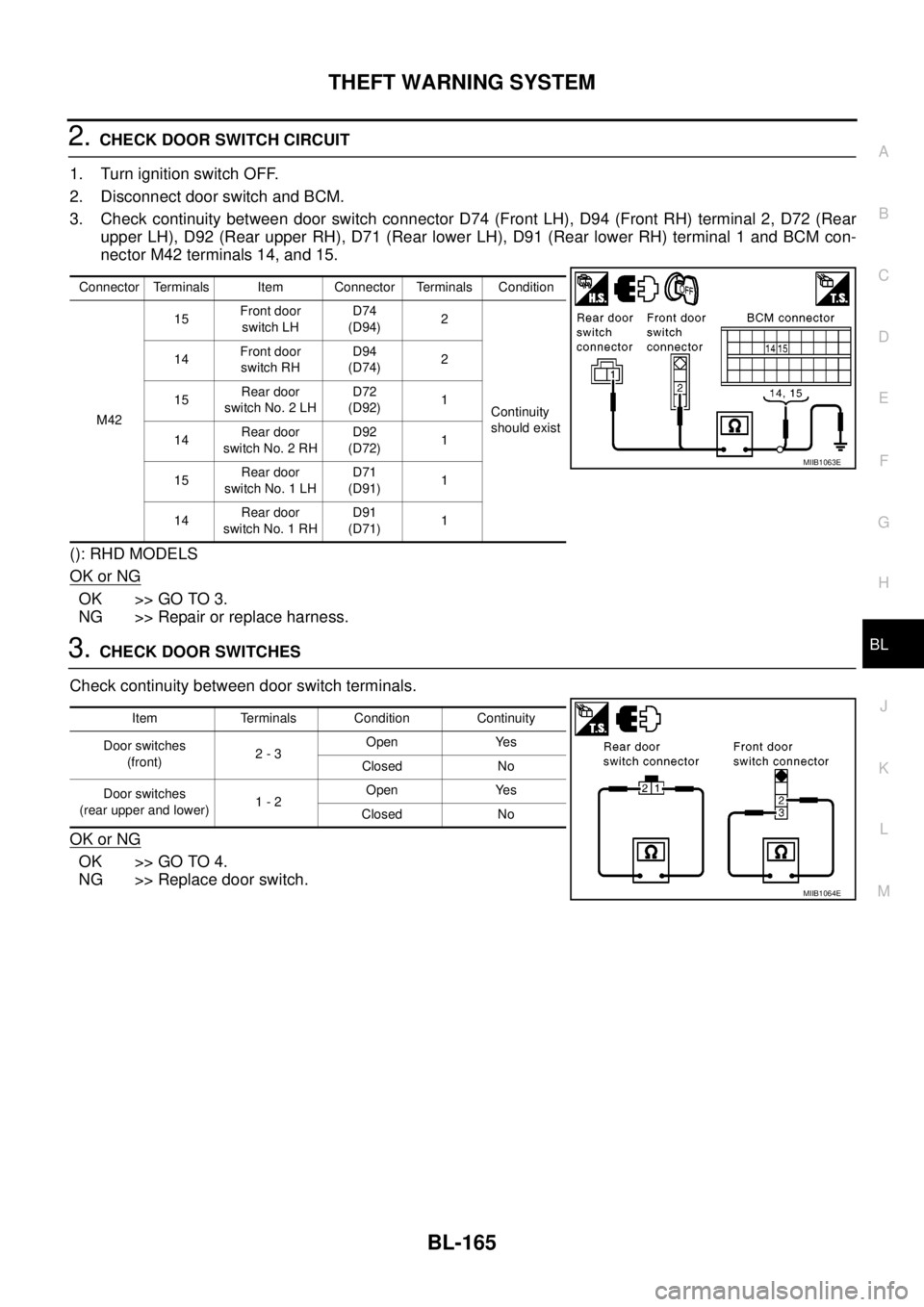
2.CHECK DOOR SWITCH CIRCUIT
1. Turn ignition switch OFF.
2. Disconnect door switch and BCM.
3. Check continuity between door switch connector D74 (Front LH), D94 (Front RH) terminal 2, D72 (Rear
upper LH), D92 (Rear upper RH), D71 (Rear lower LH), D91 (Rear lower RH) terminal 1 and BCM con-
nector M42 terminals 14, and 15.
(): RHD MODELS
OK or NG
OK >> GO TO 3.
NG >> Repair or replace harness.
3.CHECK DOOR SWITCHES
Check continuity between door switch terminals.
OK or NG
OK >> GO TO 4.
NG >> Replace door switch.
Connector Terminals Item Connector Terminals Condition
M4215Front door
switch LHD74
(D94)2
Continuity
should exist 14Front door
switch RHD94
(D74)2
15Rear door
switch No. 2 LHD72
(D92)1
14Rear door
switch No. 2 RHD92
(D72)1
15Rear door
switch No. 1 LHD71
(D91)1
14Rear door
switch No. 1 RHD91
(D71)1
MIIB1063E
Item Terminals Condition Continuity
Door switches
(front)2-3Open Yes
Closed No
Door switches
(rear upper and lower)1-2Open Yes
Closed No
MIIB1064E
Page 751 of 3171
THEFT WARNING SYSTEM
BL-167
C
D
E
F
G
H
J
K
L
MA
B
BL
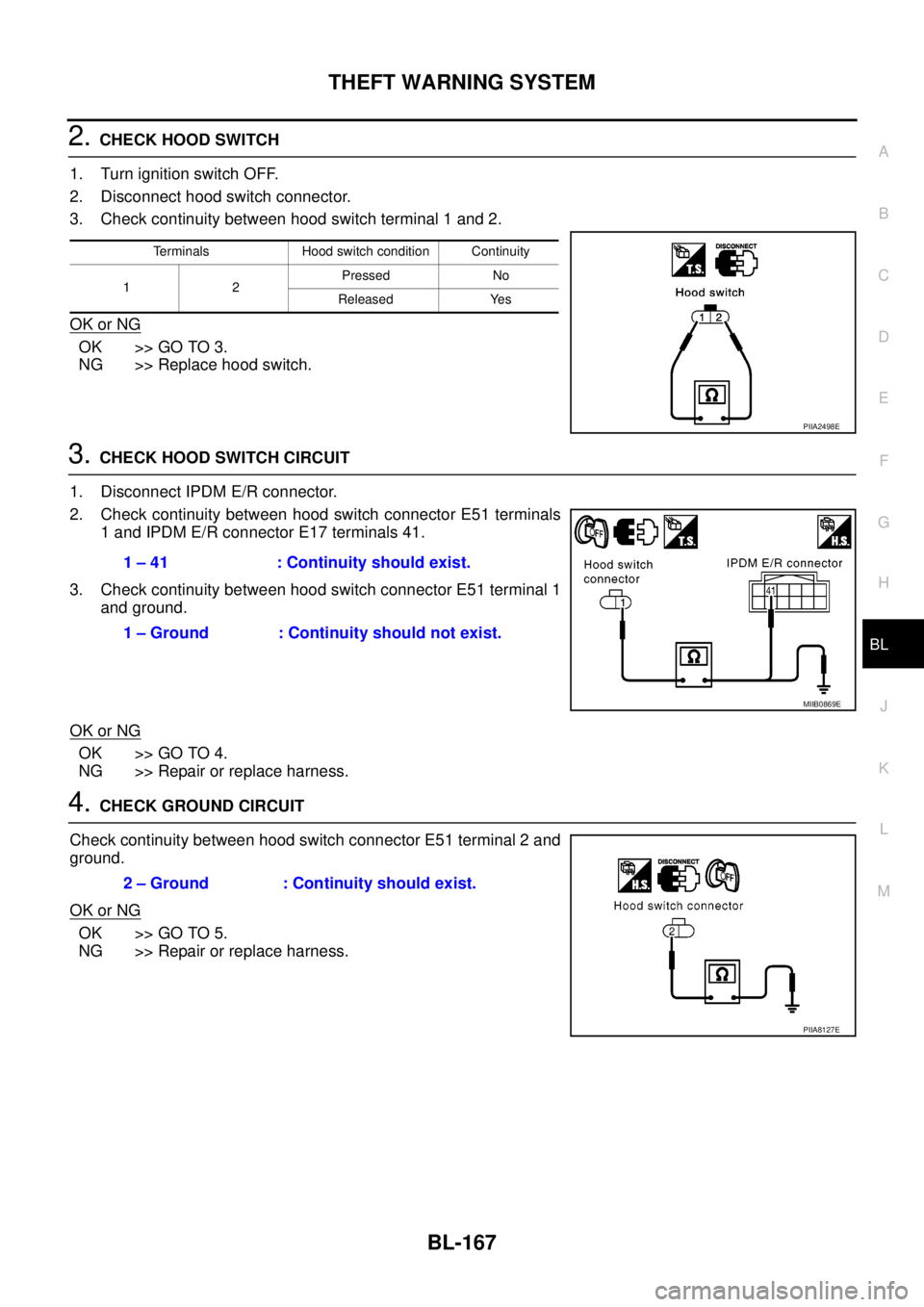
2.CHECK HOOD SWITCH
1. Turn ignition switch OFF.
2. Disconnect hood switch connector.
3. Check continuity between hood switch terminal 1 and 2.
OK or NG
OK >> GO TO 3.
NG >> Replace hood switch.
3.CHECK HOOD SWITCH CIRCUIT
1. Disconnect IPDM E/R connector.
2. Check continuity between hood switch connector E51 terminals
1 and IPDM E/R connector E17 terminals 41.
3. Check continuity between hood switch connector E51 terminal 1
and ground.
OK or NG
OK >> GO TO 4.
NG >> Repair or replace harness.
4.CHECK GROUND CIRCUIT
Check continuity between hood switch connector E51 terminal 2 and
ground.
OK or NG
OK >> GO TO 5.
NG >> Repair or replace harness.
Terminals Hood switch condition Continuity
12Pressed No
Released Yes
PIIA2498E
1 – 41 : Continuity should exist.
1 – Ground : Continuity should not exist.
MIIB0869E
2 – Ground : Continuity should exist.
PIIA8127E
Page 752 of 3171
BL-168
THEFT WARNING SYSTEM
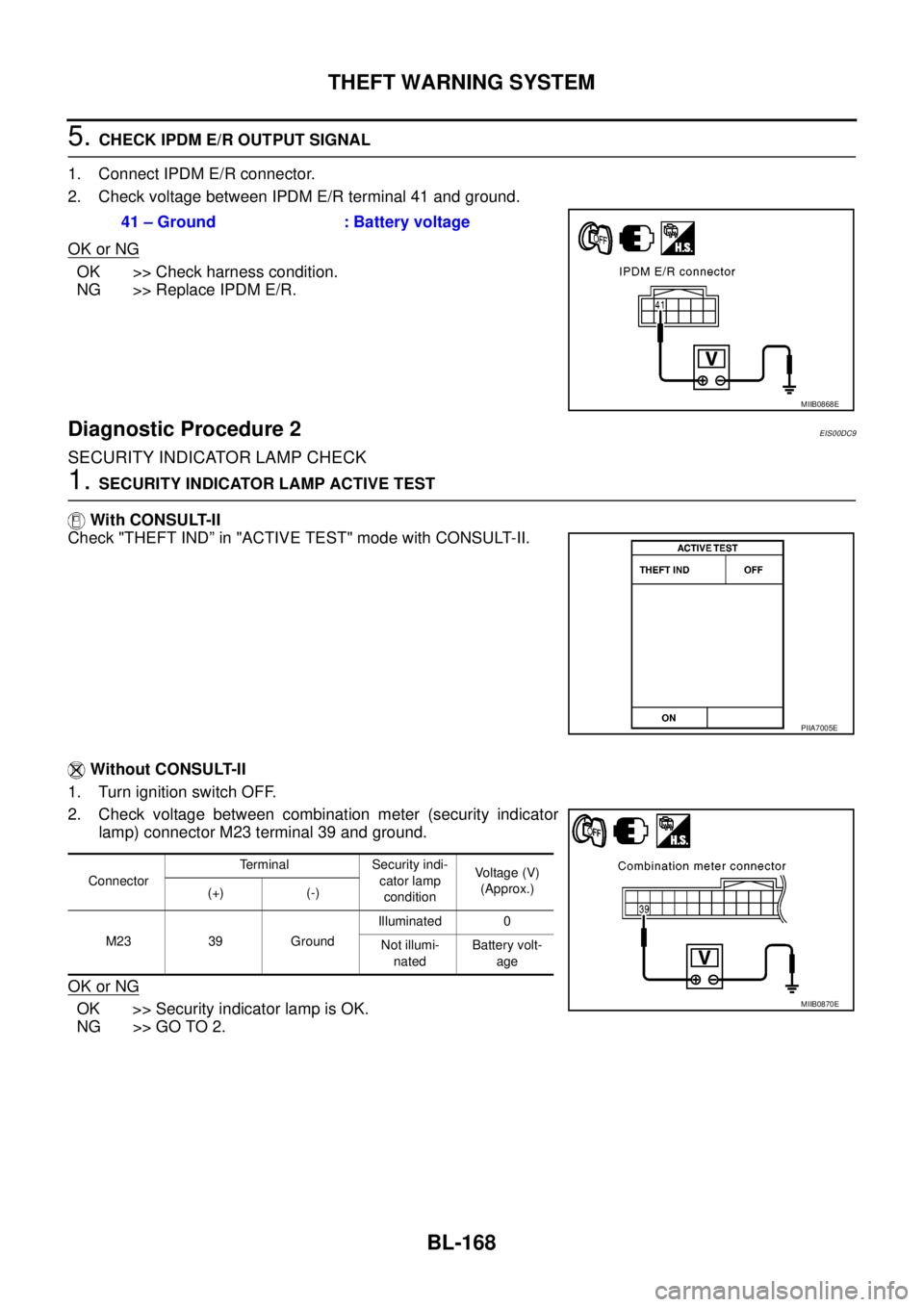
5.CHECK IPDM E/R OUTPUT SIGNAL
1. Connect IPDM E/R connector.
2. Check voltage between IPDM E/R terminal 41 and ground.
OK or NG
OK >> Check harness condition.
NG >> Replace IPDM E/R.
Diagnostic Procedure 2EIS00DC9
SECURITY INDICATOR LAMP CHECK
1.SECURITY INDICATOR LAMP ACTIVE TEST
With CONSULT-II
Check "THEFT IND” in "ACTIVE TEST" mode with CONSULT-II.
Without CONSULT-II
1. Turn ignition switch OFF.
2. Check voltage between combination meter (security indicator
lamp) connector M23 terminal 39 and ground.
OK or NG
OK >> Security indicator lamp is OK.
NG >> GO TO 2.41 – Ground : Battery voltage
MIIB0868E
PIIA7005E
ConnectorTerminal Security indi-
cator lamp
conditionVo l ta g e (V )
(Approx.)
(+) (-)
M23 39 GroundIlluminated 0
Not illumi-
natedBattery volt-
age
MIIB0870E
Page 753 of 3171
THEFT WARNING SYSTEM
BL-169
C
D
E
F
G
H
J
K
L
MA
B
BL
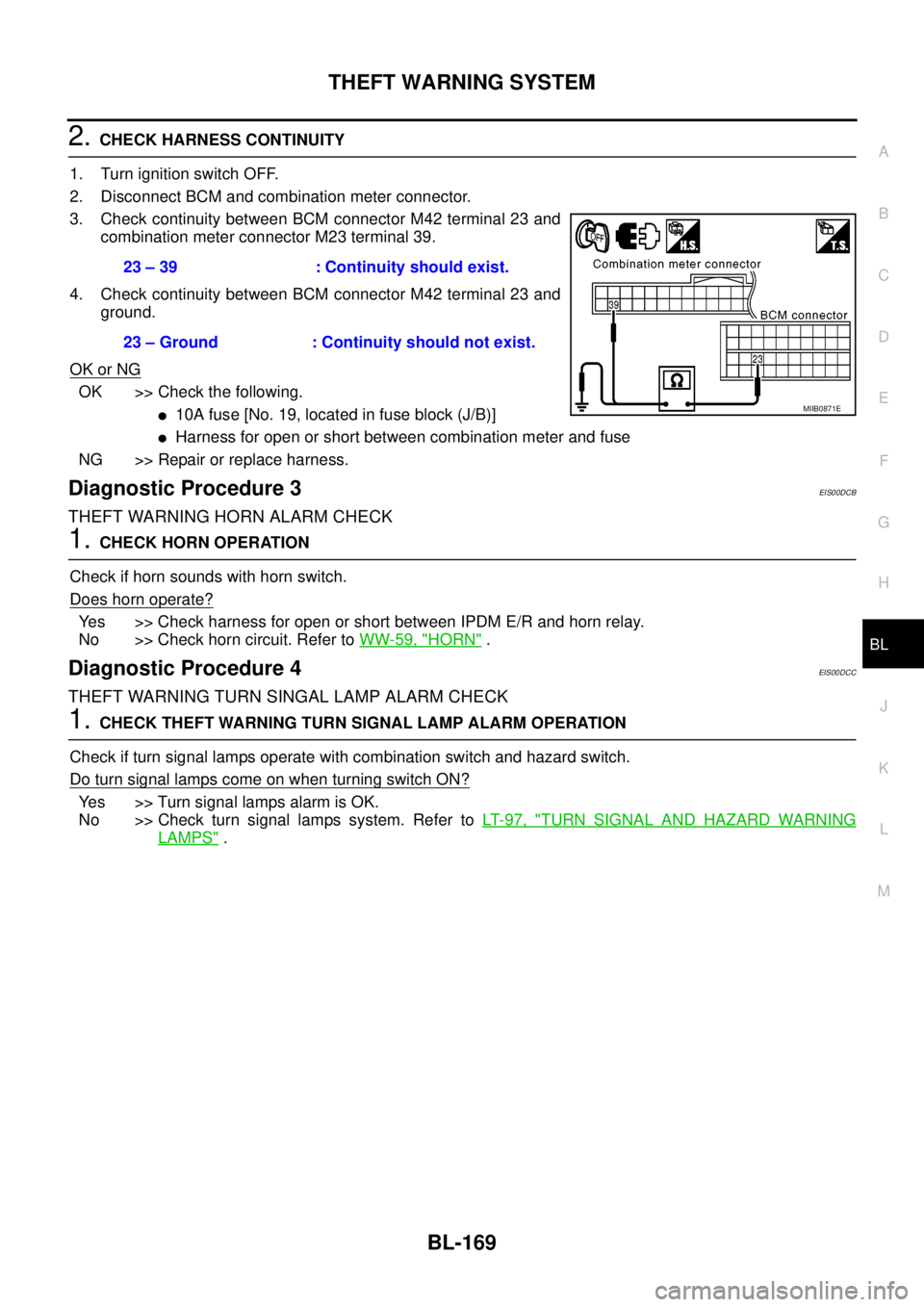
2.CHECK HARNESS CONTINUITY
1. Turn ignition switch OFF.
2. Disconnect BCM and combination meter connector.
3. Check continuity between BCM connector M42 terminal 23 and
combination meter connector M23 terminal 39.
4. Check continuity between BCM connector M42 terminal 23 and
ground.
OK or NG
OK >> Check the following.
l10Afuse[No.19,locatedinfuseblock(J/B)]
lHarness for open or short between combination meter and fuse
NG >> Repair or replace harness.
Diagnostic Procedure 3EIS00DCB
THEFT WARNING HORN ALARM CHECK
1.CHECK HORN OPERATION
Check if horn sounds with horn switch.
Does horn operate?
Yes >> Check harness for open or short between IPDM E/R and horn relay.
No >> Check horn circuit. Refer toWW-59, "
HORN".
Diagnostic Procedure 4EIS00DCC
THEFT WARNING TURN SINGAL LAMP ALARM CHECK
1.CHECK THEFT WARNING TURN SIGNAL LAMP ALARM OPERATION
Check if turn signal lamps operate with combination switch and hazard switch.
DoturnsignallampscomeonwhenturningswitchON?
Yes >> Turn signal lamps alarm is OK.
No >> Check turn signal lamps system. Refer toLT- 9 7 , "
TURN SIGNAL AND HAZARD WARNING
LAMPS". 23 – 39 : Continuity should exist.
23 – Ground : Continuity should not exist.
MIIB0871E
Page 755 of 3171

NATS(NISSAN ANTI-THEFT SYSTEM)
BL-171
C
D
E
F
G
H
J
K
L
MA
B
BL
System DescriptionEIS00DAP
NATS (Nissan Anti-Theft System) has the following immobilizer functions:
lSince only NATS ignition keys, whose ID No. s have been registered into the ECM and IMMU of NATS,
allow the engine to run, a vehicle operation without a registered key in NATS is prevented by NATS.
That is to say, NATS will immobilize the engine if someone tries to start it without the registered key of
NATS.
lThis version of NATS has dongle unit to improve its anti-theft performance (RHD models). Dongle unit has
its own ID which is registered into NATS IMMU. So if dongle unit is replaced, initialization must be per-
formed.
lWhen malfunction of dongle unit is detected:
The security indicator lamp illuminates for about 15 minutes after ignition switch is turned to ON.
–When dongle unit has a malfunction and the indicator lamp is illuminated, engine cannot be started. How-
ever engine can be started only one time when security indicator lamp turns off in about 15 minutes after
ignition switch is turned to ON.
lAll of the originally supplied ignition key IDs have been NATS registered in NATS.
If the vehicle owner requests, a maximum of four key IDs can be registered into the NATS components.
lThe security indicator blinks when the ignition switch is in “OFF” or “ACC” position. Therefore, NATS
warns outsiders that the vehicle is equipped with the anti-theft system.
lWhen NATS detects malfunction, the security indicator lamp lights up as follows.
lNATS trouble diagnoses, system initialization and additional registration of other NATS ignition key IDs
must be performed using CONSULT-II hardware and CONSULT-II NATS software.
Regarding the procedures of NATS initialization and NATS ignition key ID registration, refer to CONSULT-
II operation manual, NATS.
lWhen servicing a malfunction of the NATS (indicated by lighting up of Security Indicator Lamp) or
registering another NATS ignition key ID no., it may be necessary to re-register original key identi-
fication. Therefore, be sure to receive ALL KEYS from vehicle owner.
Condition IGN ON andWith dongle Without dongle
Security indicator Security indicator
NATS malfunction (except dongle unit) is
detected1. 6 times blinking
2. Staying ON after ignition switch is turned ON.Staying ON
Only malfunction of dongle unit is
detected.Staying ON for about 15 minutes after ignition
switch is turned ON.—
Malfunction of NATS and engine related
parts are detected.1. 6 times blinking
2. Staying ON after ignition switch is turned ON.Staying ON
Only engine related part malfunction is
detected.——
Just after initialization of NATS 6 times blinking —