low beam NISSAN NAVARA 2005 Repair User Guide
[x] Cancel search | Manufacturer: NISSAN, Model Year: 2005, Model line: NAVARA, Model: NISSAN NAVARA 2005Pages: 3171, PDF Size: 49.59 MB
Page 2111 of 3171
LT-28
HEADLAMP -CONVENTIONAL TYPE-
Aiming Adjustment
EKS00P7Y
For details, refer to the regulations in your state.
Before performing aiming adjustment, check the following.
1. Ensure all tires are inflated to correct pressure.
2. Place vehicle and screen on level surface.
3. Ensure there is no load in vehicle other than the driver (or equivalent weight placed in driver's position).
Coolant and engine oil filled to correct level, and fuel tank full.
4. Confirm spare tire, jack and tools are properly stowed.
LOW BEAM AND HIGH BEAM
NOTE:
Aim each headlamp individually and ensure other headlamp beam pattern is blocked from screen.
1. Turn headlamp low beam ON.
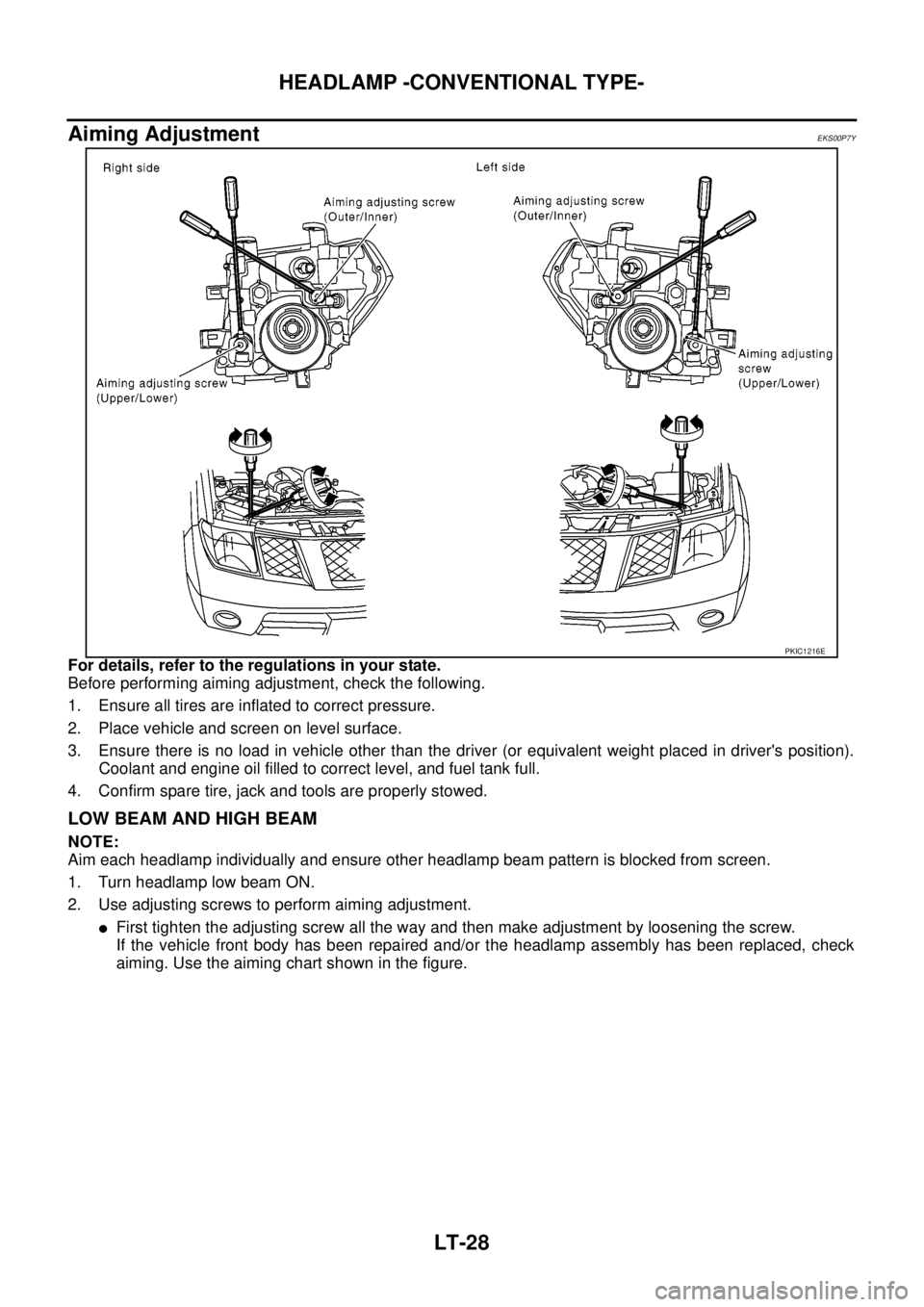
2. Use adjusting screws to perform aiming adjustment.
lFirst tighten the adjusting screw all the way and then make adjustment by loosening the screw.
If the vehicle front body has been repaired and/or the headlamp assembly has been replaced, check
aiming. Use the aiming chart shown in the figure.
PKIC1216E
Page 2112 of 3171
HEADLAMP -CONVENTIONAL TYPE-
LT-29
C
D
E
F
G
H
I
J
L
MA
B
LT
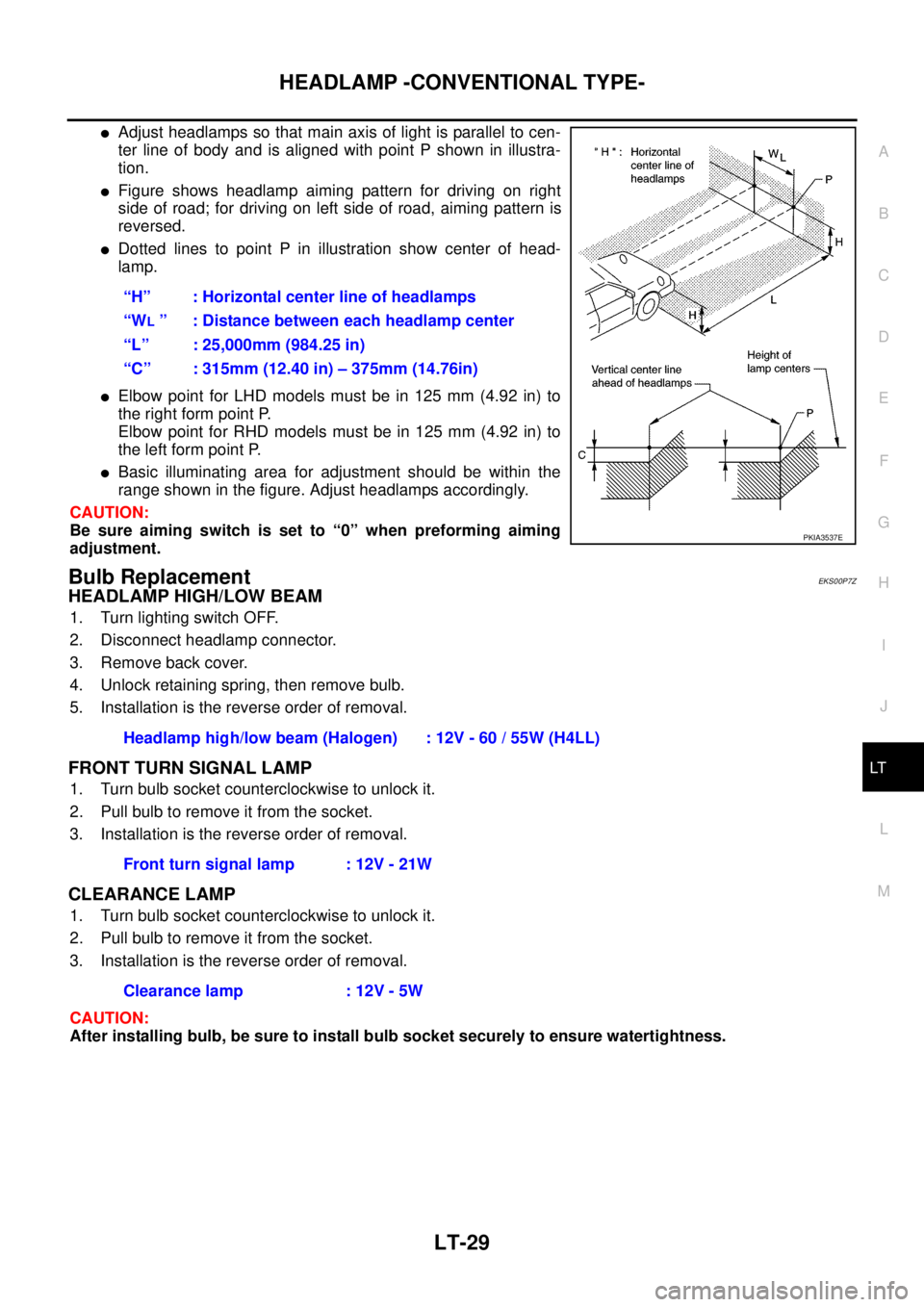
lAdjust headlamps so that main axis of light is parallel to cen-
ter line of body and is aligned with point P shown in illustra-
tion.
lFigure shows headlamp aiming pattern for driving on right
side of road; for driving on left side of road, aiming pattern is
reversed.
lDotted lines to point P in illustration show center of head-
lamp.
lElbow point for LHD models must be in 125 mm (4.92 in) to
the right form point P.
Elbow point for RHD models must be in 125 mm (4.92 in) to
the left form point P.
lBasic illuminating area for adjustment should be within the
range shown in the figure. Adjust headlamps accordingly.
CAUTION:
Be sure aiming switch is set to “0” when preforming aiming
adjustment.
Bulb ReplacementEKS00P7Z
HEADLAMP HIGH/LOW BEAM
1. Turn lighting switch OFF.
2. Disconnect headlamp connector.
3. Remove back cover.
4. Unlock retaining spring, then remove bulb.
5. Installation is the reverse order of removal.
FRONT TURN SIGNAL LAMP
1. Turn bulb socket counterclockwise to unlock it.
2. Pull bulb to remove it from the socket.
3. Installation is the reverse order of removal.
CLEARANCE LAMP
1. Turn bulb socket counterclockwise to unlock it.
2. Pull bulb to remove it from the socket.
3. Installation is the reverse order of removal.
CAUTION:
After installing bulb, be sure to install bulb socket securely to ensure watertightness.“H” : Horizontal center line of headlamps
“W
L” : Distance between each headlamp center
“L” : 25,000mm (984.25 in)
“C” : 315mm (12.40 in) – 375mm (14.76in)
PKIA3537E
Headlamp high/low beam (Halogen) : 12V - 60 / 55W (H4LL)
Front turn signal lamp : 12V - 21W
Clearance lamp : 12V - 5W
Page 2114 of 3171
HEADLAMP - DAYTIME LIGHT SYSTEM -
LT-31
C
D
E
F
G
H
I
J
L
MA
B
LT
HEADLAMP - DAYTIME LIGHT SYSTEM -PFP:26010
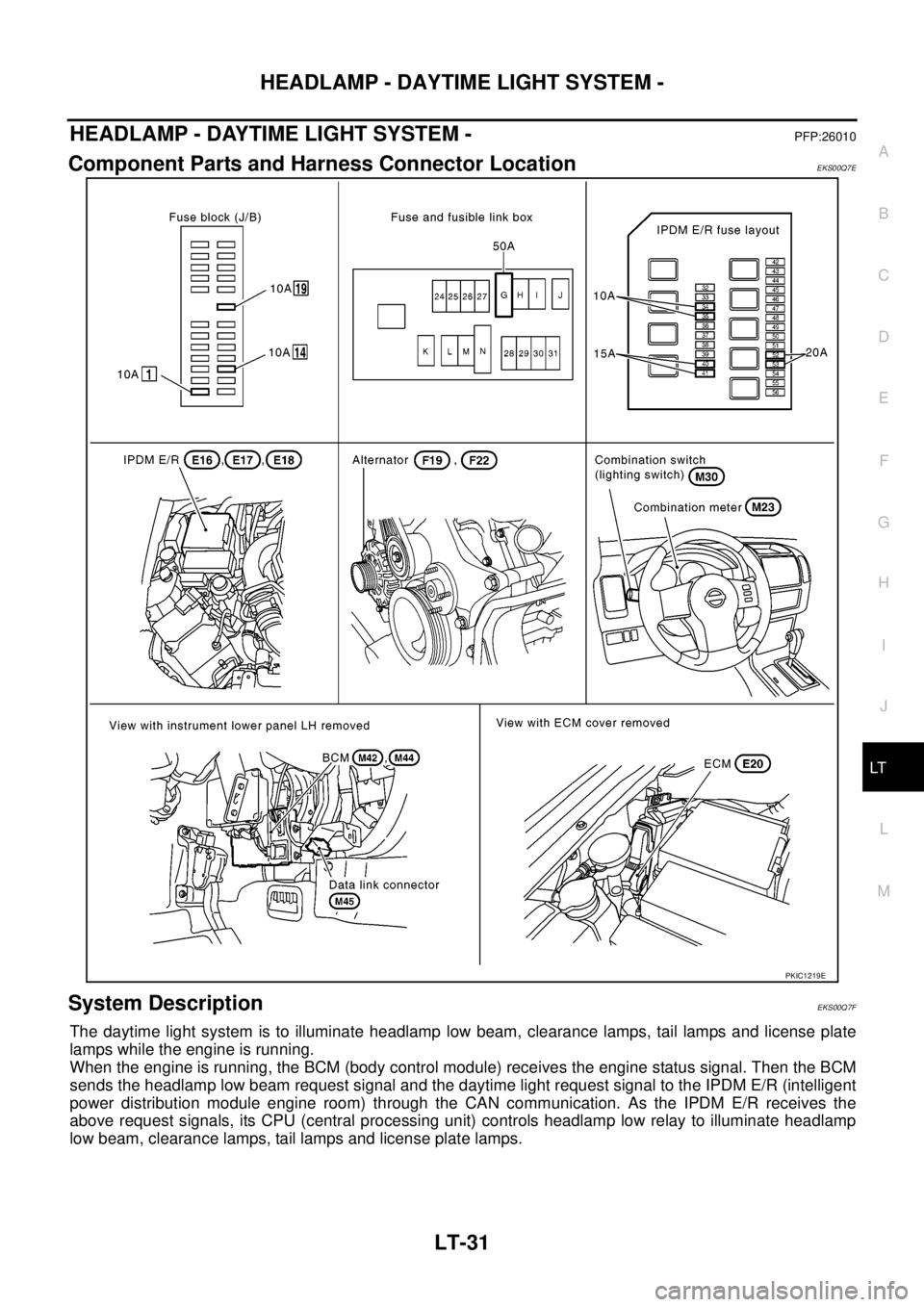
Component Parts and Harness Connector LocationEKS00Q7E
System DescriptionEKS00Q7F
The daytime light system is to illuminate headlamp low beam, clearance lamps, tail lamps and license plate
lamps while the engine is running.
When the engine is running, the BCM (body control module) receives the engine status signal. Then the BCM
sends the headlamp low beam request signal and the daytime light request signal to the IPDM E/R (intelligent
power distribution module engine room) through the CAN communication. As the IPDM E/R receives the
above request signals, its CPU (central processing unit) controls headlamp low relay to illuminate headlamp
low beam, clearance lamps, tail lamps and license plate lamps.
PKIC1219E
Page 2115 of 3171

LT-32
HEADLAMP - DAYTIME LIGHT SYSTEM -
OUTLINE
Power is supplied at all times
lto ignition relay (located in IPDM E/R)
lto headlamp high relay (located in IPDM E/R) and
lto headlamp low relay (located in IPDM E/R), from battery directly,
lthrough 50A fusible link (letter G, located in fuse and fusible link box)
lto BCM terminal 57,
lthrough 20A fuse (No. 52, located in IPDM E/R) and
lthrough 20A fuse (No. 53, located in IPDM E/R)
lto CPU (located in IPDM E/R),
lthrough 10A fuse [No. 19, located in fuse block (J/B)]
lto combination meter terminal 3.
With the ignition switch in the ON or START position, power is supplied
lto ignition relay (located in IPDM E/R),
lthrough 10A fuse [No. 1, located in fuse block (J/B)]
lto BCM terminal 3,
lthrough 10A fuse [No. 14, located in fuse block (J/B)]
lto combination meter terminal 16.
Ground is supplied at all times
lto BCM terminal 55 and
lto combination meter terminal 23
lthrough grounds M21, M80 and M83,
lto IPDM E/R terminals 38 and 59
lthrough grounds E21, E41 and E61.
DAYTIME LIGHT OPERATION
With the lighting switch in the OFF position and engine running, the BCM receives input signal requesting
headlamp low beam, clearance lamp, license plate lamp, and tail lamp to illuminate. This input signal is com-
municated to the IPDM E/R through the CAN communication. The CPU located in the IPDM E/R controls
headlamp low relay.
lthrough 15A fuse (No. 41, located in IPDM E/R)
lthrough IPDM E/R terminal 54
lto front combination lamp RH terminal 1,
lthrough 15A fuse (No. 40, located in IPDM E/R)
lthrough IPDM E/R terminal 52
lto front combination lamp LH terminal 1.
Ground is supplied at all times
lto front combination lamp RH and LH terminals 3
lthrough grounds E21, E41 and E61.
With power and ground supplied, the headlamp low beam, clearance, license plate and tail lamps illuminate.
Page 2129 of 3171
LT-46
HEADLAMP - DAYTIME LIGHT SYSTEM -
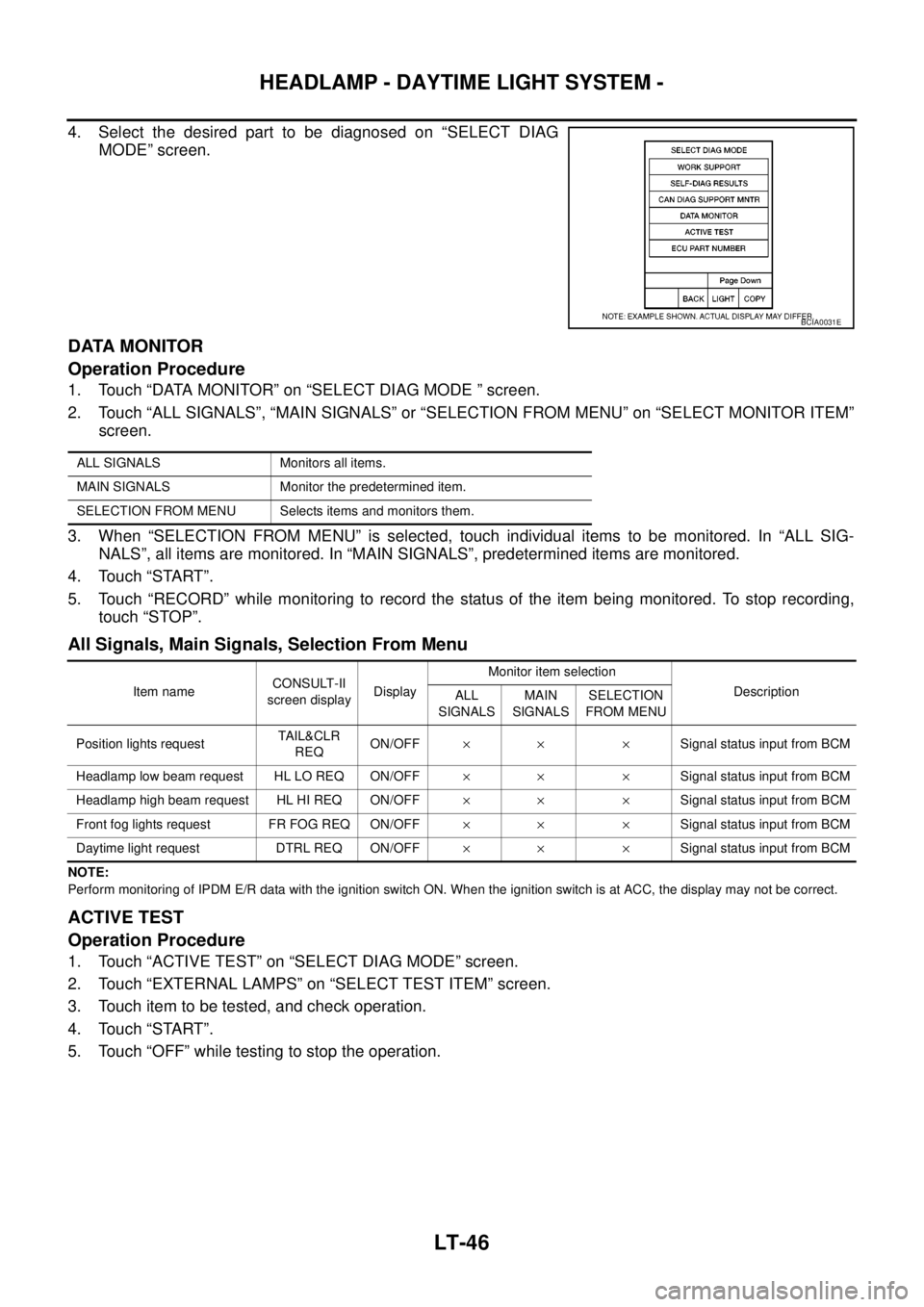
4. Select the desired part to be diagnosed on “SELECT DIAG
MODE” screen.
DATA MONITOR
Operation Procedure
1. Touch “DATA MONITOR” on “SELECT DIAG MODE ” screen.
2. Touch “ALL SIGNALS”, “MAIN SIGNALS” or “SELECTION FROM MENU” on “SELECT MONITOR ITEM”
screen.
3. When “SELECTION FROM MENU” is selected, touch individual items to be monitored. In “ALL SIG-
NALS”, all items are monitored. In “MAIN SIGNALS”, predetermined items are monitored.
4. Touch “START”.
5. Touch “RECORD” while monitoring to record the status of the item being monitored. To stop recording,
touch “STOP”.
All Signals, Main Signals, Selection From Menu
NOTE:
Perform monitoring of IPDM E/R data with the ignition switch ON. When the ignition switch is at ACC, the display may not be correct.
ACTIVE TEST
Operation Procedure
1. Touch “ACTIVE TEST” on “SELECT DIAG MODE” screen.
2. Touch “EXTERNAL LAMPS” on “SELECT TEST ITEM” screen.
3. Touch item to be tested, and check operation.
4. Touch “START”.
5. Touch “OFF” while testing to stop the operation.
BCIA0031E
ALL SIGNALS Monitors all items.
MAIN SIGNALS Monitor the predetermined item.
SELECTION FROM MENU Selects items and monitors them.
Item nameCONSULT-II
screen displayDisplayMonitor item selection
Description
ALL
SIGNALSMAIN
SIGNALSSELECTION
FROM MENU
Position lights requestTA I L & C L R
REQON/OFF´´ ´Signal status input from BCM
Headlamp low beam request HL LO REQ ON/OFF´´ ´Signal status input from BCM
Headlamp high beam request HL HI REQ ON/OFF´´ ´Signal status input from BCM
Front fog lights request FR FOG REQ ON/OFF´´ ´Signal status input from BCM
Daytime light request DTRL REQ ON/OFF´´ ´Signal status input from BCM
Page 2130 of 3171
HEADLAMP - DAYTIME LIGHT SYSTEM -
LT-47
C
D
E
F
G
H
I
J
L
MA
B
LT
Daytime Light Control Does Not Operate Properly (Normal Headlamps Operate
Properly)
EKS00Q7Q
1.CHECK COMBINATION SWITCH INPUT SIGNAL
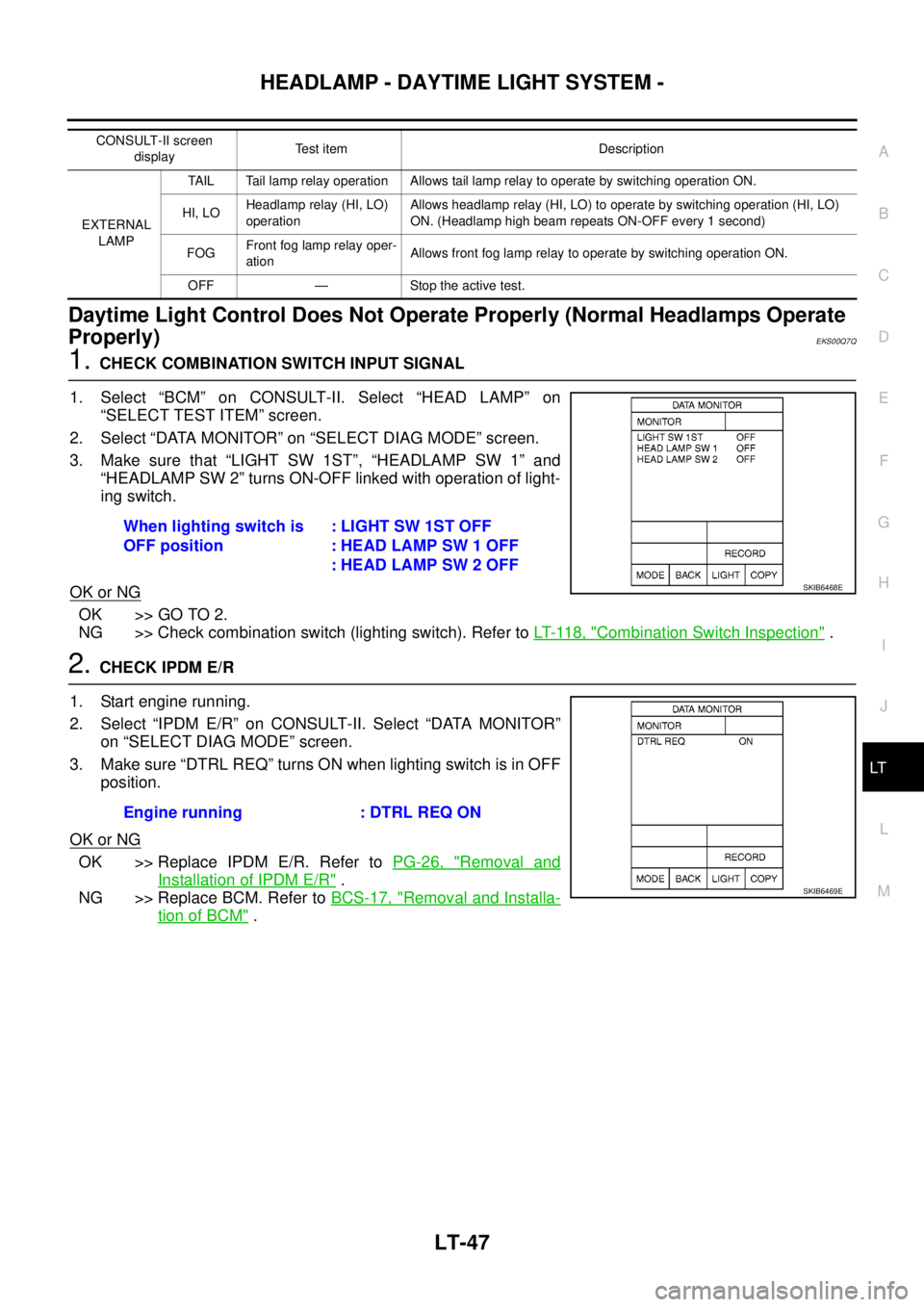
1. Select “BCM” on CONSULT-II. Select “HEAD LAMP” on
“SELECT TEST ITEM” screen.
2. Select “DATA MONITOR” on “SELECT DIAG MODE” screen.
3. Make sure that “LIGHT SW 1ST”, “HEADLAMP SW 1” and
“HEADLAMP SW 2” turns ON-OFF linked with operation of light-
ing switch.
OK or NG
OK >> GO TO 2.
NG >> Check combination switch (lighting switch). Refer toLT- 11 8 , "
Combination Switch Inspection".
2.CHECK IPDM E/R
1. Start engine running.
2. Select “IPDM E/R” on CONSULT-II. Select “DATA MONITOR”
on “SELECT DIAG MODE” screen.
3. Make sure “DTRL REQ” turns ON when lighting switch is in OFF
position.
OK or NG
OK >> Replace IPDM E/R. Refer toPG-26, "Removal and
Installation of IPDM E/R".
NG >> Replace BCM. Refer toBCS-17, "
Removal and Installa-
tion of BCM".
CONSULT-II screen
displayTest item Description
EXTERNAL
LAMPTAIL Tail lamp relay operation Allows tail lamp relay to operate by switching operation ON.
HI, LOHeadlamp relay (HI, LO)
operationAllows headlamp relay (HI, LO) to operate by switching operation (HI, LO)
ON. (Headlamp high beam repeats ON-OFF every 1 second)
FOGFront fog lamp relay oper-
ationAllows front fog lamp relay to operate by switching operation ON.
OFF — Stoptheactivetest.
When lighting switch is
OFF position:LIGHTSW1STOFF
: HEAD LAMP SW 1 OFF
: HEAD LAMP SW 2 OFF
SKIB6468E
Engine running : DTRL REQ ON
SKIB6469E
Page 2144 of 3171

AUTO LIGHT SYSTEM
LT-61
C
D
E
F
G
H
I
J
L
MA
B
LT
Display Item List
NOTE:
This item is displayed, but cannot be monitored.
ACTIVE TEST
Operation Procedure
1. Touch “HEAD LAMP” on “SELECT TEST ITEM” screen.
2. Touch “ACTIVE TEST” on “SELECT DIAG MODE” screen.
3. Touch item to be tested and check operation of the selected item.
4. During the operation check, touching “OFF” deactivates the operation.
Display Item List
Monitor item Contents
IGN ON SW “ON/OFF”Displays status (ignition switch IGN position: ON/other: OFF) of ignition switch judged from
the ignition switch signal.
ACC ON SW “ON/OFF”Displays status (ignition switch ACC or IGN position: ON/other: OFF) of ignition switch judged
from the ignition switch signal.
HI BEAM SW “ON/OFF”Displays status (lighting switch high beam position: ON/other: OFF) of high beam switch
judged from the lighting switch signal.
HEAD LAMP SW 1 “ON/OFF”Displays status (lighting switch 2ND position: ON/other: OFF) of headlamp 1 switch judged
from the lighting switch signal.
HEAD LAMP SW 2 “ON/OFF”Displays status (lighting switch 2ND position: ON/other: OFF) of headlamp 2 switch judged
from the lighting switch signal.
LIGHT SW 1ST “ON/OFF”Displays status (lighting switch 1ST or 2ND position: ON/other: OFF) of lighting switch 1ST
position switch judged from the lighting switch signal.
PASSING SW “ON/OFF”Displays status (lighting switch passing position: ON/other: OFF) of passing switch judged
from the lighting switch signal.
FR FOG SW “ON/OFF”Displays status (lighting switch front fog lamp ON position: ON/others: OFF) of front fog lamp
switch judged from the lighting switch signal.
RR FOG SW “ON/OFF”Displays status (lighting switch rear fog lamp ON position: ON/others: OFF) of rear fog lamp
switch judged from the lighting switch signal.
DOOR SW - DR “ON/OFF”Displays status (door is open: ON/door is closed: OFF) of driver side door switch judged from
the driver side door switch signal.
DOOR SW - AS “ON/OFF”Displays status (door is open: ON/door is closed: OFF) of passenger side door switch judged
from the passenger side door switch signal.
DOOR SW - RR “ON/OFF”Displays status (door is open: ON/door is closed: OFF) of rear door switch (RH) judged from
the rear door switch (RH) signal.
DOOR SW - RL “ON/OFF”Displays status (door is open: ON/door is closed: OFF) of rear door switch (LH) judged from
the rear door switch (LH) signal.
BACK DOOR SW “ON/OFF”Displays status (door is open: ON/door is closed: OFF) of back door switch judged from the
back door switch signal.
TURN SIGNAL R “ON/OFF”Displays status (turn signal switch right position: ON/other: OFF) of turn RH switch judged
from the turn signal switch signal.
TURN SIGNAL L “ON/OFF”Displays status (turn signal switch left position: ON/other: OFF) of turn LH switch judged from
the turn signal switch signal.
CARGO LAMP SW
NOTE“OFF” —
HD LIGHT TIMER“10 sec/
30 sec”Displays status (MODE 1: 10 sec./ MODE 2: 30 sec.) of head light timer.
LIT-SEN FAIL
NOTE“OK” —
AUT LIGHT SYS
NOTE“OFF” —
Test item Description
TAIL LAMP Allows tail lamp relay to operate by switching ON-OFF.
HEAD LAMP Allows headlamp relay (HI, LO) to operate by switching ON-OFF.
Page 2154 of 3171
FRONT FOG LAMP
LT-71
C
D
E
F
G
H
I
J
L
MA
B
LT
FRONT FOG LAMPPFP:26150
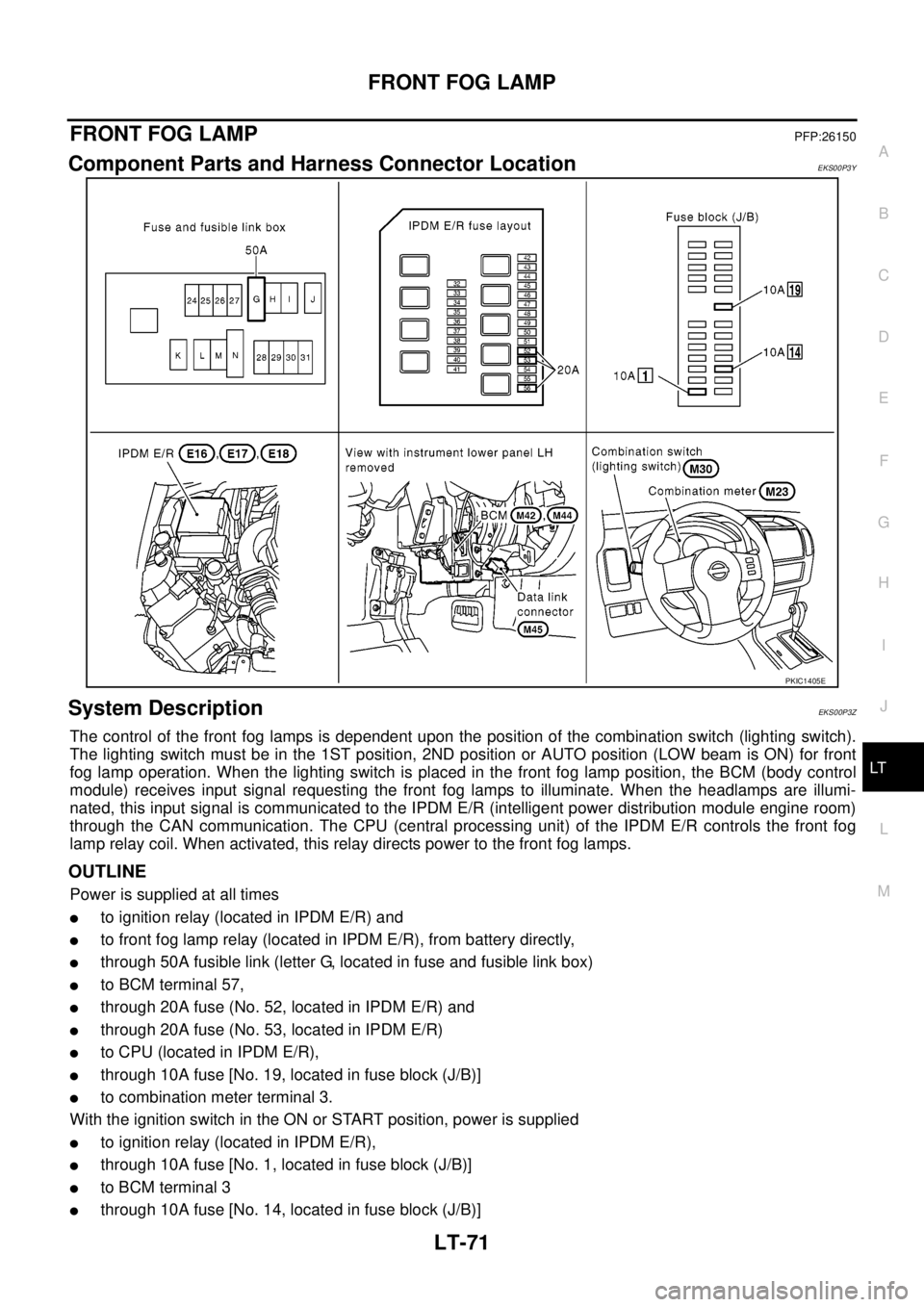
Component Parts and Harness Connector LocationEKS00P3Y
System DescriptionEKS00P3Z
The control of the front fog lamps is dependent upon the position of the combination switch (lighting switch).
The lighting switch must be in the 1ST position, 2ND position or AUTO position (LOW beam is ON) for front
fog lamp operation. When the lighting switch is placed in the front fog lamp position, the BCM (body control
module) receives input signal requesting the front fog lamps to illuminate. When the headlamps are illumi-
nated, this input signal is communicated to the IPDM E/R (intelligent power distribution module engine room)
through the CAN communication. The CPU (central processing unit) of the IPDM E/R controls the front fog
lamp relay coil. When activated, this relay directs power to the front fog lamps.
OUTLINE
Power is supplied at all times
lto ignition relay (located in IPDM E/R) and
lto front fog lamp relay (located in IPDM E/R), from battery directly,
lthrough 50A fusible link (letter G, located in fuse and fusible link box)
lto BCM terminal 57,
lthrough 20A fuse (No. 52, located in IPDM E/R) and
lthrough 20A fuse (No. 53, located in IPDM E/R)
lto CPU (located in IPDM E/R),
lthrough 10A fuse [No. 19, located in fuse block (J/B)]
lto combination meter terminal 3.
With the ignition switch in the ON or START position, power is supplied
lto ignition relay (located in IPDM E/R),
lthrough 10A fuse [No. 1, located in fuse block (J/B)]
lto BCM terminal 3
lthrough 10A fuse [No. 14, located in fuse block (J/B)]
PKIC1405E
Page 2155 of 3171

LT-72
FRONT FOG LAMP
lto combination meter terminal 16.
Ground is supplied
lto BCM terminal 55 and
lto combination meter terminal 23
lthrough grounds M21, M80 and M83,
lto IPDM E/R terminals 38 and 59
lthrough grounds E21, E41 and E61.
FOG LAMP OPERATION
The front fog lamp switch is built into the combination switch. The lighting switch must be in the 1ST position,
2ND position or AUTO position (LOW beam is ON) and the front fog lamp switch must be ON for front fog lamp
operation.
With the front fog lamp switch in the ON position, the CPU of the IPDM E/R grounds the coil side of the front
fog lamp relay. The front fog lamp relay then directs power
lthrough 20A fuse (No. 56, located in IPDM E/R)
lthrough IPDM E/R terminal 50
lto front fog lamp LH terminal 1 and
lthrough IPDM E/R terminal 51
lto front fog lamp RH terminal 1.
Ground is supplied at all times
lto front fog lamp RH and LH terminal 2
lthrough grounds E21, E41 and E61.
With power and ground supplied, the front fog lamps illuminate.
COMBINATION SWITCH READING FUNCTION
Refer toBCS-3, "COMBINATION SWITCH READING FUNCTION".
CAN Communication System DescriptionEKS00P40
Refer toLAN-23, "CAN COMMUNICATION".
Page 2160 of 3171
FRONT FOG LAMP
LT-77
C
D
E
F
G
H
I
J
L
MA
B
LT
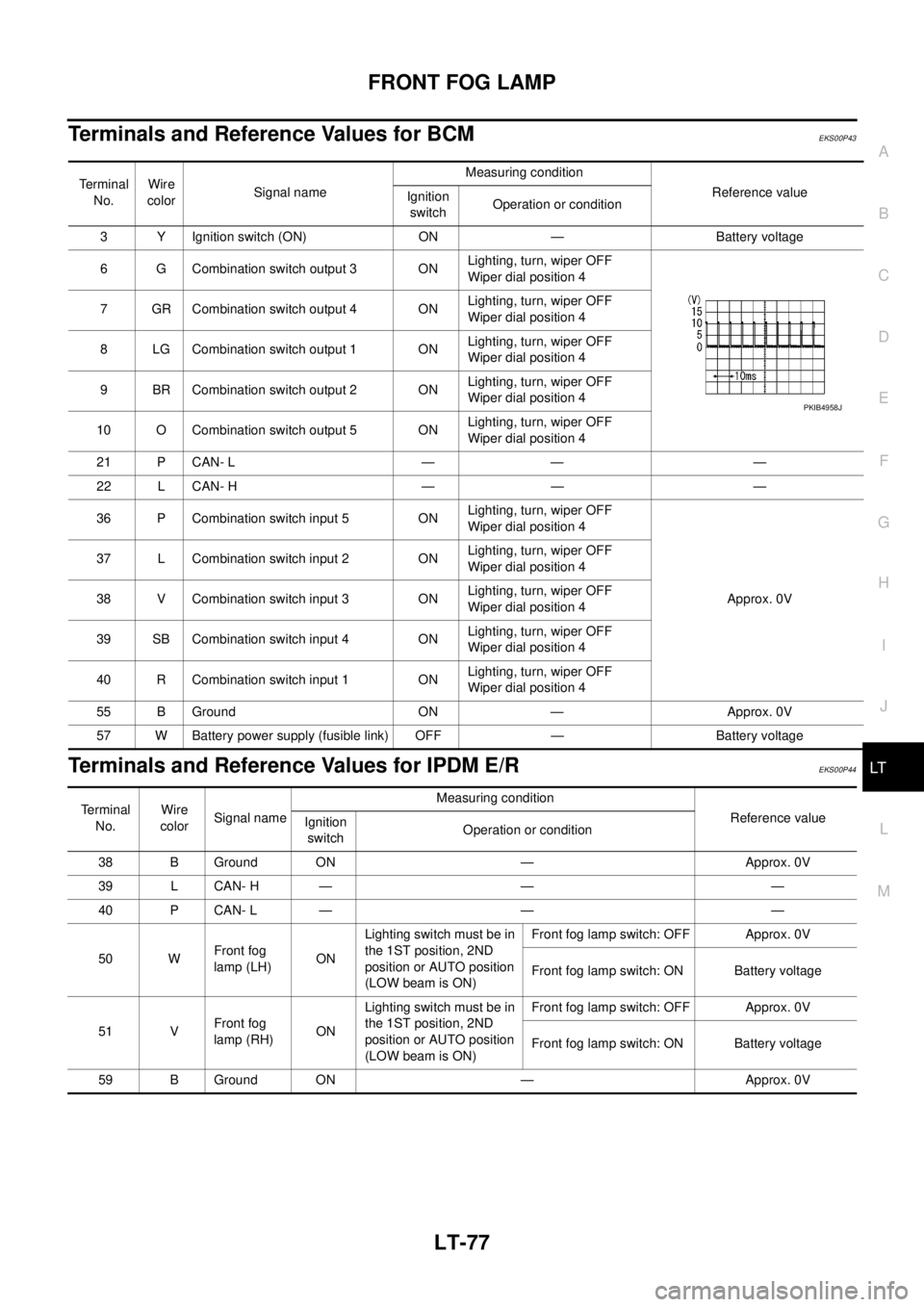
Terminals and Reference Values for BCMEKS00P43
Terminals and Reference Values for IPDM E/REKS00P44
Te r m i n a l
No.Wire
colorSignal nameMeasuring condition
Reference value
Ignition
switchOperation or condition
3 Y Ignition switch (ON) ON — Battery voltage
6 G Combination switch output 3 ONLighting, turn, wiper OFF
Wiper dial position 4
7 GR Combination switch output 4 ONLighting, turn, wiper OFF
Wiper dial position 4
8 LG Combination switch output 1 ONLighting, turn, wiper OFF
Wiper dial position 4
9 BR Combination switch output 2 ONLighting, turn, wiper OFF
Wiper dial position 4
10 O Combination switch output 5 ONLighting, turn, wiper OFF
Wiper dial position 4
21 P CAN- L — — —
22 L CAN- H — — —
36 P Combination switch input 5 ONLighting, turn, wiper OFF
Wiper dial position 4
Approx. 0V 37 L Combination switch input 2 ONLighting, turn, wiper OFF
Wiper dial position 4
38 V Combination switch input 3 ONLighting, turn, wiper OFF
Wiper dial position 4
39 SB Combination switch input 4 ONLighting, turn, wiper OFF
Wiper dial position 4
40 R Combination switch input 1 ONLighting, turn, wiper OFF
Wiper dial position 4
55 B Ground ON — Approx. 0V
57 W Battery power supply (fusible link) OFF — Battery voltage
PKIB4958J
Terminal
No.Wire
colorSignal nameMeasuring condition
Reference value
Ignition
switchOperation or condition
38 B Ground ON — Approx. 0V
39 L CAN- H — — —
40 P CAN- L — — —
50 WFront fog
lamp (LH)ONLighting switch must be in
the 1ST position, 2ND
position or AUTO position
(LOW beam is ON)Front fog lamp switch: OFF Approx. 0V
Front fog lamp switch: ON Battery voltage
51 VFront fog
lamp (RH)ONLighting switch must be in
the 1ST position, 2ND
position or AUTO position
(LOW beam is ON)Front fog lamp switch: OFF Approx. 0V
Front fog lamp switch: ON Battery voltage
59 B Ground ON — Approx. 0V