service NISSAN NAVARA 2005 Repair User Guide
[x] Cancel search | Manufacturer: NISSAN, Model Year: 2005, Model line: NAVARA, Model: NISSAN NAVARA 2005Pages: 3171, PDF Size: 49.59 MB
Page 85 of 3171
TROUBLE DIAGNOSIS
AT-77
D
E
F
G
H
I
J
K
L
MA
B
AT
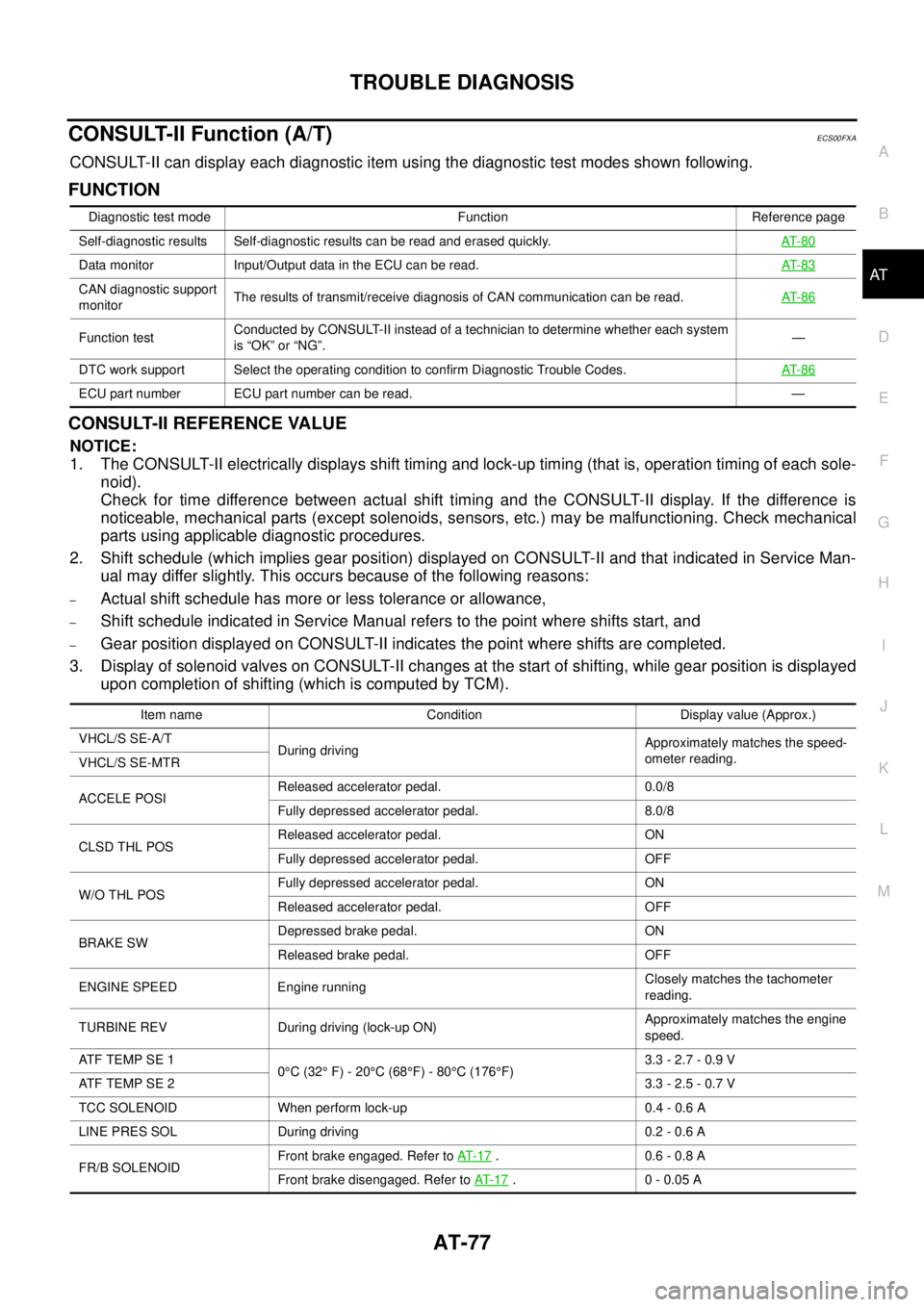
CONSULT-II Function (A/T)ECS00FXA
CONSULT-II can display each diagnostic item using the diagnostic test modes shown following.
FUNCTION
CONSULT-II REFERENCE VALUE
NOTICE:
1. The CONSULT-II electrically displays shift timing and lock-up timing (that is, operation timing of each sole-
noid).
Check for time difference between actual shift timing and the CONSULT-II display. If the difference is
noticeable, mechanical parts (except solenoids, sensors, etc.) may be malfunctioning. Check mechanical
parts using applicable diagnostic procedures.
2. Shift schedule (which implies gear position) displayed on CONSULT-II and that indicated in Service Man-
ual may differ slightly. This occurs because of the following reasons:
–Actual shift schedule has more or less tolerance or allowance,
–Shift schedule indicated in Service Manual refers to the point where shifts start, and
–Gear position displayed on CONSULT-II indicates the point where shifts are completed.
3. Display of solenoid valves on CONSULT-II changes at the start of shifting, while gear position is displayed
upon completion of shifting (which is computed by TCM).
Diagnostic test mode Function Reference page
Self-diagnostic results Self-diagnostic results can be read and erased quickly.AT- 8 0
Data monitor Input/Output data in the ECU can be read.AT- 8 3
CAN diagnostic support
monitorThe results of transmit/receive diagnosis of CAN communication can be read.AT- 8 6
Function testConducted by CONSULT-II instead of a technician to determine whether each system
is “OK” or “NG”.—
DTC work support Select the operating condition to confirm Diagnostic Trouble Codes.AT- 8 6
ECU part number ECU part number can be read. —
Item name Condition Display value (Approx.)
VHCL/S SE-A/T
During drivingApproximately matches the speed-
ometer reading.
VHCL/S SE-MTR
ACCELE POSIReleased accelerator pedal. 0.0/8
Fully depressed accelerator pedal. 8.0/8
CLSD THL POSReleased accelerator pedal. ON
Fully depressed accelerator pedal. OFF
W/O THL POSFully depressed accelerator pedal. ON
Released accelerator pedal. OFF
BRAKE SWDepressed brake pedal. ON
Released brake pedal. OFF
ENGINE SPEED Engine runningClosely matches the tachometer
reading.
TURBINE REV During driving (lock-up ON)Approximately matches the engine
speed.
ATFTEMPSE1
0°C(32°F)-20°C(68°F)-80°C (176°F)3.3 - 2.7 - 0.9 V
ATFTEMPSE23.3 - 2.5 - 0.7 V
TCC SOLENOID When perform lock-up 0.4 - 0.6 A
LINE PRES SOL During driving 0.2 - 0.6 A
FR/B SOLENOIDFront brake engaged. Refer toAT- 1 7
. 0.6 - 0.8 A
Front brake disengaged. Refer toAT- 1 7
.0-0.05A
Page 87 of 3171
TROUBLE DIAGNOSIS
AT-79
D
E
F
G
H
I
J
K
L
MA
B
AT
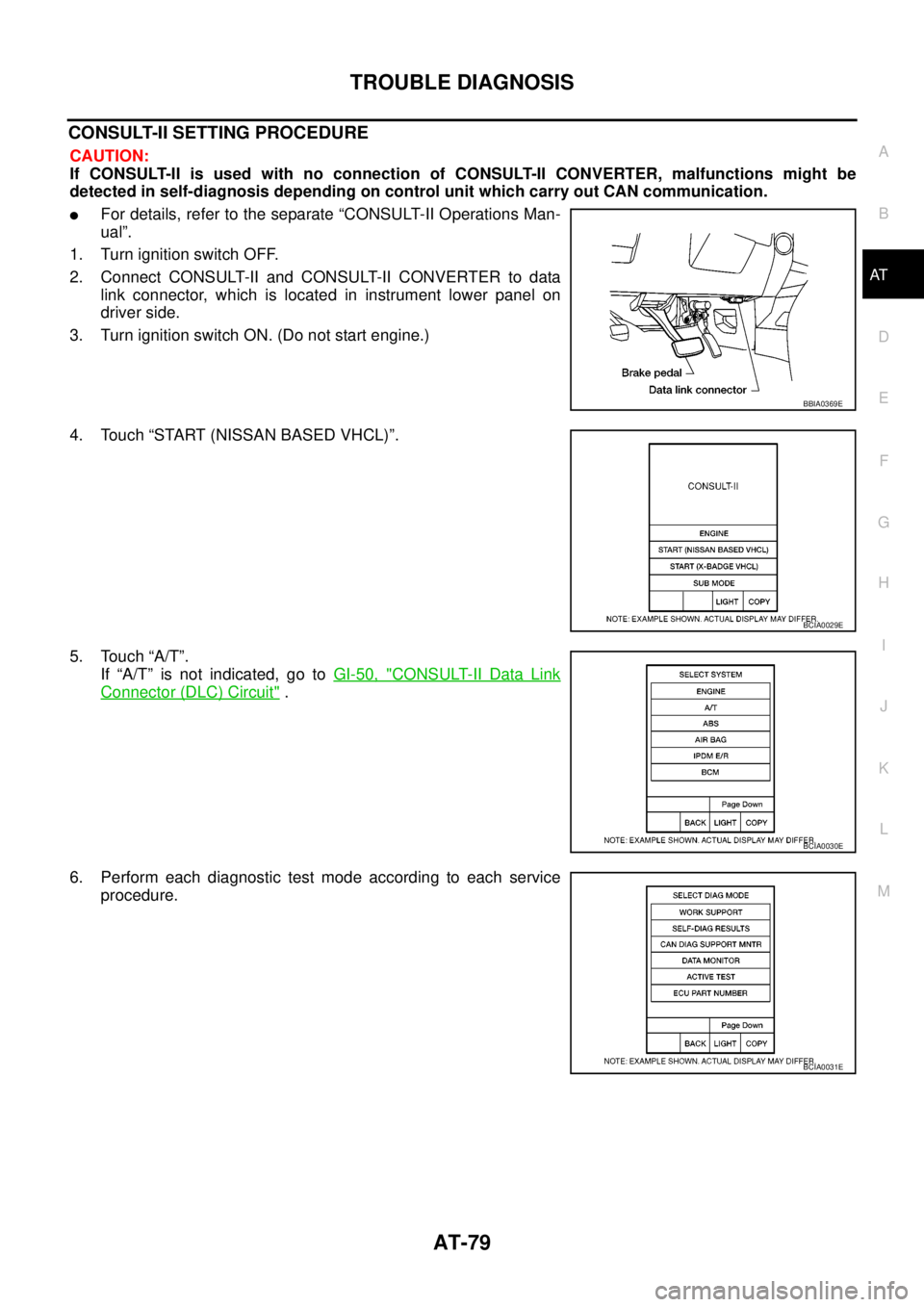
CONSULT-II SETTING PROCEDURE
CAUTION:
If CONSULT-II is used with no connection of CONSULT-II CONVERTER, malfunctions might be
detected in self-diagnosis depending on control unit which carry out CAN communication.
lFor details, refer to the separate “CONSULT-II Operations Man-
ual”.
1. Turn ignition switch OFF.
2. Connect CONSULT-II and CONSULT-II CONVERTER to data
link connector, which is located in instrument lower panel on
driver side.
3. Turn ignition switch ON. (Do not start engine.)
4. Touch “START (NISSAN BASED VHCL)”.
5. Touch “A/T”.
If “A/T” is not indicated, go toGI-50, "
CONSULT-II Data Link
Connector (DLC) Circuit".
6. Perform each diagnostic test mode according to each service
procedure.
BBIA0369E
BCIA0029E
BCIA0030E
BCIA0031E
Page 226 of 3171

AT-218
ON-VEHICLE SERVICE
ON-VEHICLE SERVICE
PFP:00000
Control Valve With TCM and A/T Fluid Temperature Sensor 2ECS00G36
COMPONENTS
1. A/T 2. Snap ring 3. Sub-harness
4. Control valve with TCM 5. Bracket 6. A/T fluid temperature sensor 2
7. Oil pan gasket 8. Oil pan 9. Magnet
10. Drain plug 11. Drain plug gasket 12. Oil pan mounting bolt
13. Terminal cord assembly 14. O-ring
SCIA5478E
Page 227 of 3171
ON-VEHICLE SERVICE
AT-219
D
E
F
G
H
I
J
K
L
MA
B
AT
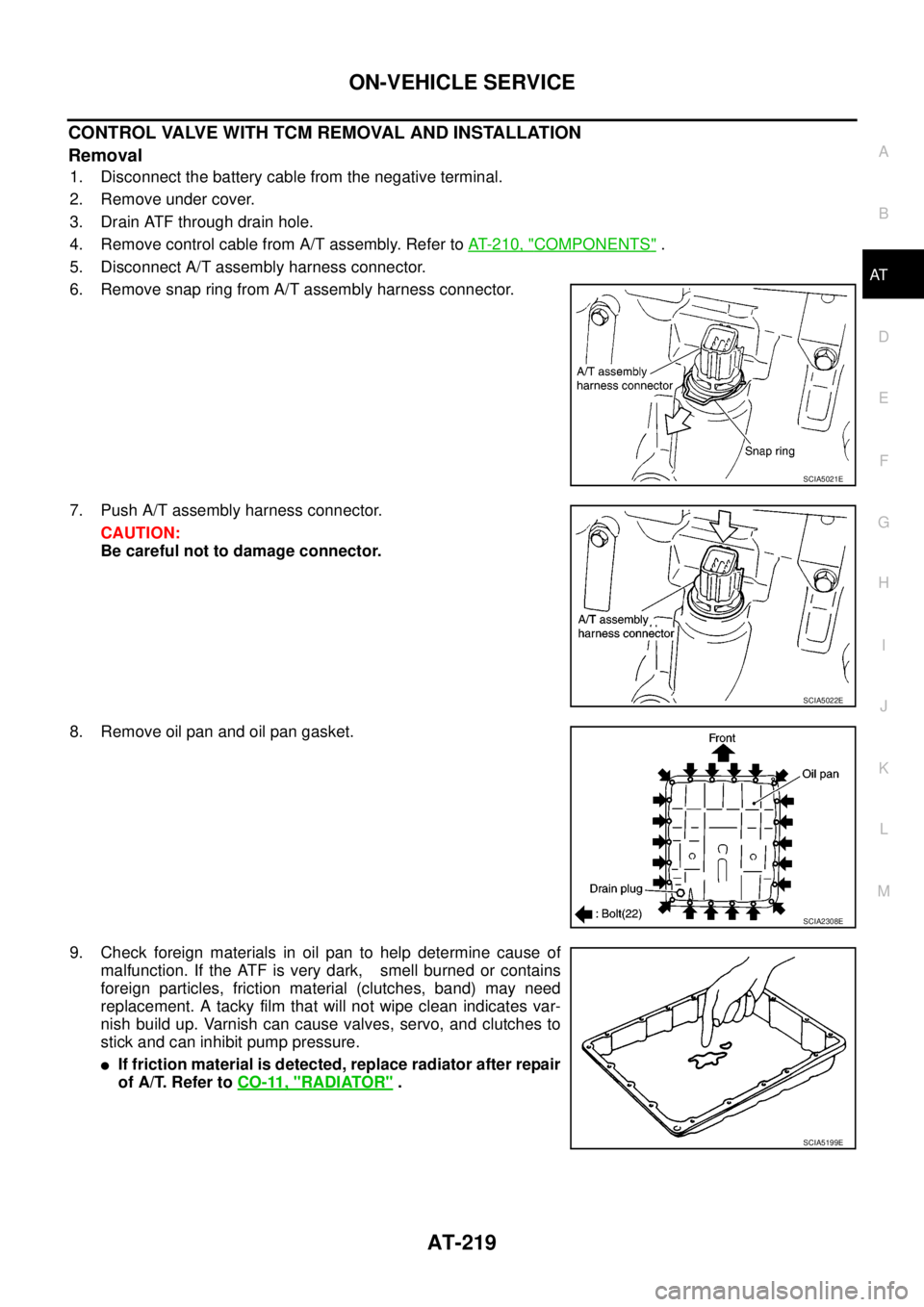
CONTROL VALVE WITH TCM REMOVAL AND INSTALLATION
Removal
1. Disconnect the battery cable from the negative terminal.
2. Remove under cover.
3. Drain ATF through drain hole.
4. Remove control cable from A/T assembly. Refer toAT- 2 1 0 , "
COMPONENTS".
5. Disconnect A/T assembly harness connector.
6. Remove snap ring from A/T assembly harness connector.
7. Push A/T assembly harness connector.
CAUTION:
Be careful not to damage connector.
8. Remove oil pan and oil pan gasket.
9. Check foreign materials in oil pan to help determine cause of
malfunction. If the ATF is very dark, smell burned or contains
foreign particles, friction material (clutches, band) may need
replacement. A tacky film that will not wipe clean indicates var-
nish build up. Varnish can cause valves, servo, and clutches to
stick and can inhibit pump pressure.
lIf friction material is detected, replace radiator after repair
of A/T. Refer toCO-11, "
RADIATOR".
SCIA5021E
SCIA5022E
SCIA2308E
SCIA5199E
Page 228 of 3171
AT-220
ON-VEHICLE SERVICE
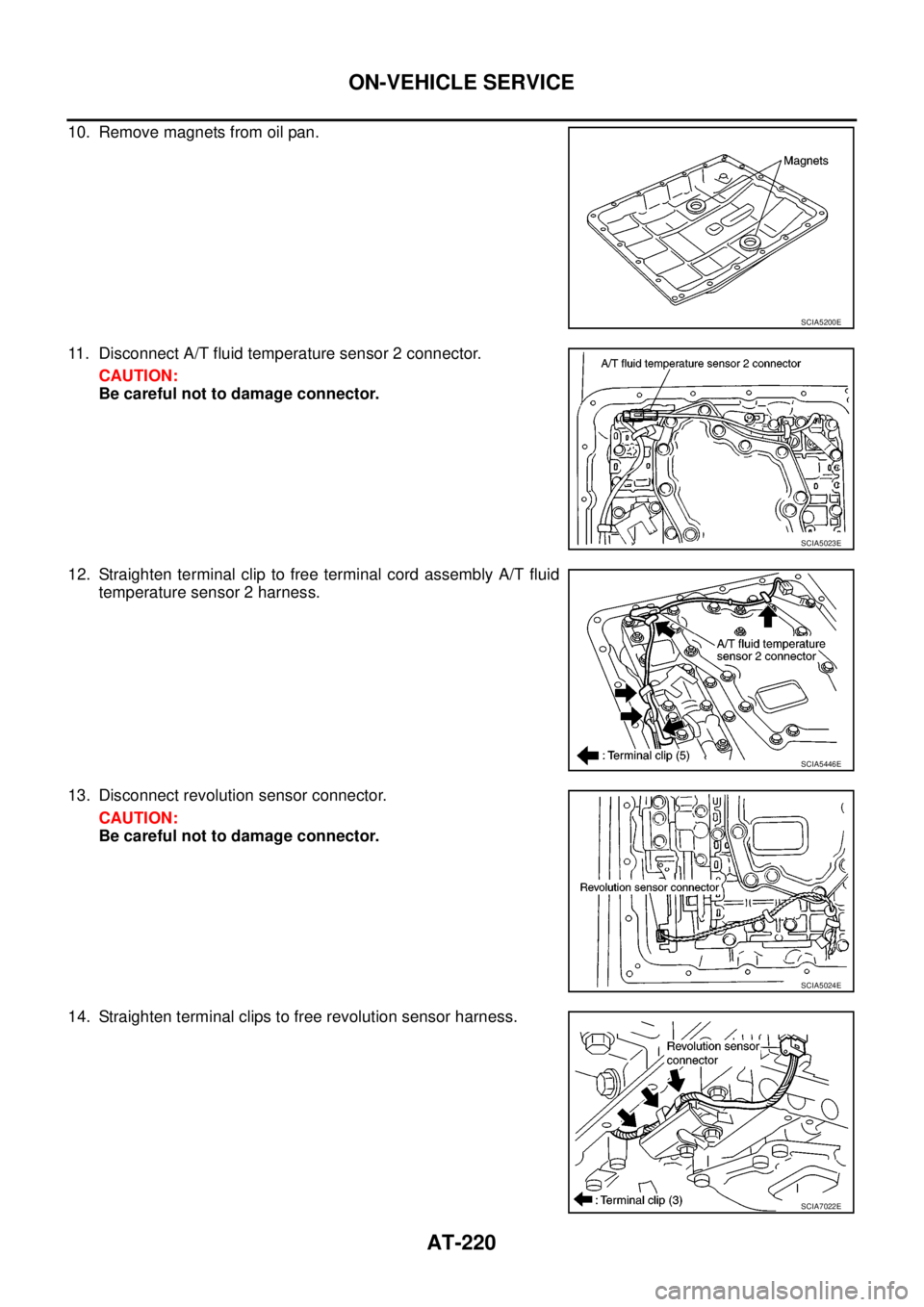
10. Remove magnets from oil pan.
11. Disconnect A/T fluid temperature sensor 2 connector.
CAUTION:
Be careful not to damage connector.
12. Straighten terminal clip to free terminal cord assembly A/T fluid
temperature sensor 2 harness.
13. Disconnect revolution sensor connector.
CAUTION:
Be careful not to damage connector.
14. Straighten terminal clips to free revolution sensor harness.
SCIA5200E
SCIA5023E
SCIA5446E
SCIA5024E
SCIA7022E
Page 229 of 3171
ON-VEHICLE SERVICE
AT-221
D
E
F
G
H
I
J
K
L
MA
B
AT
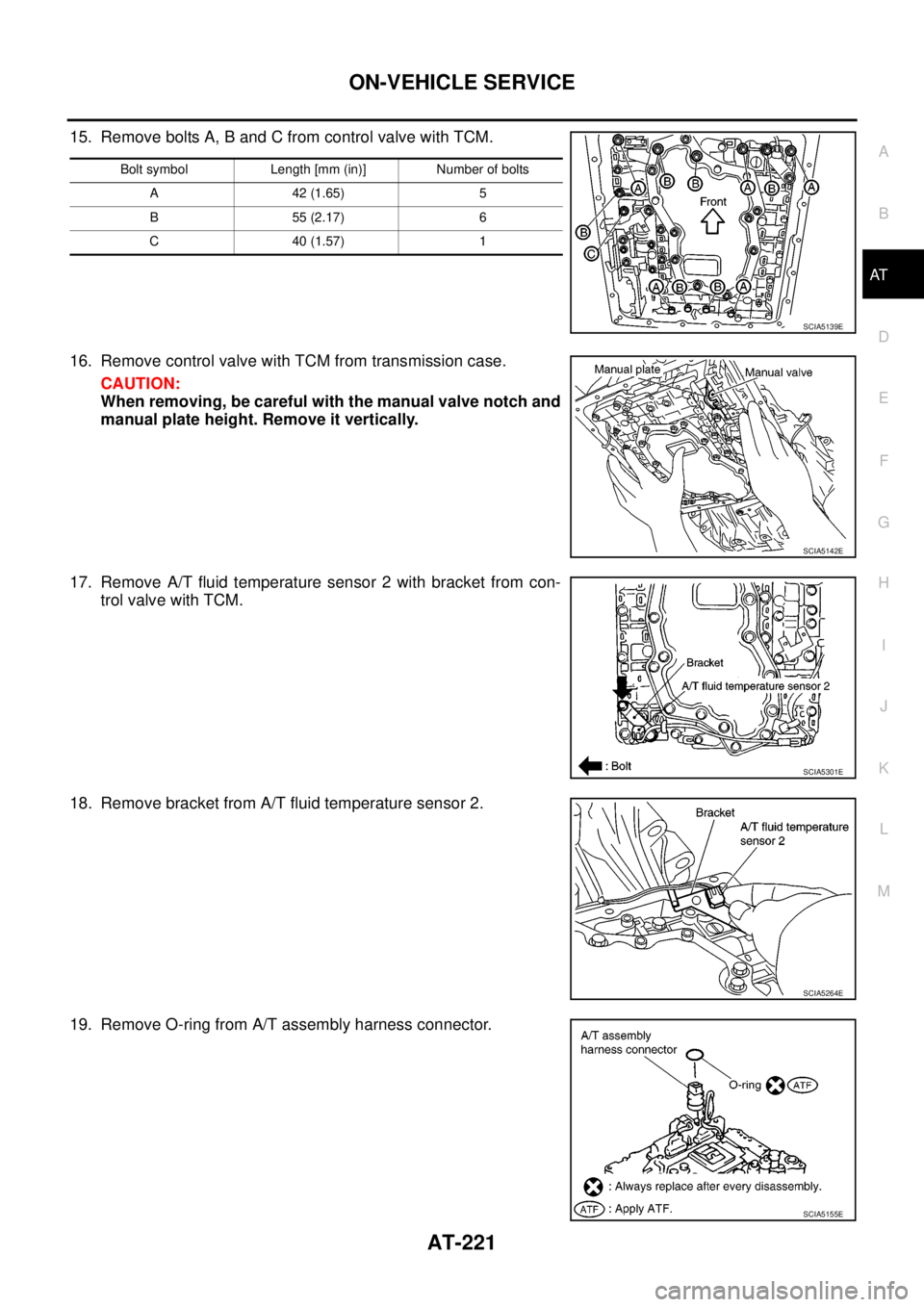
15. Remove bolts A, B and C from control valve with TCM.
16. Remove control valve with TCM from transmission case.
CAUTION:
When removing, be careful with the manual valve notch and
manual plate height. Remove it vertically.
17. Remove A/T fluid temperature sensor 2 with bracket from con-
trol valve with TCM.
18. Remove bracket from A/T fluid temperature sensor 2.
19. Remove O-ring from A/T assembly harness connector.
Bolt symbol Length [mm (in)] Number of bolts
A42(1.65) 5
B55(2.17) 6
C40(1.57) 1
SCIA5139E
SCIA5142E
SCIA5301E
SCIA5264E
SCIA5155E
Page 230 of 3171
AT-222
ON-VEHICLE SERVICE
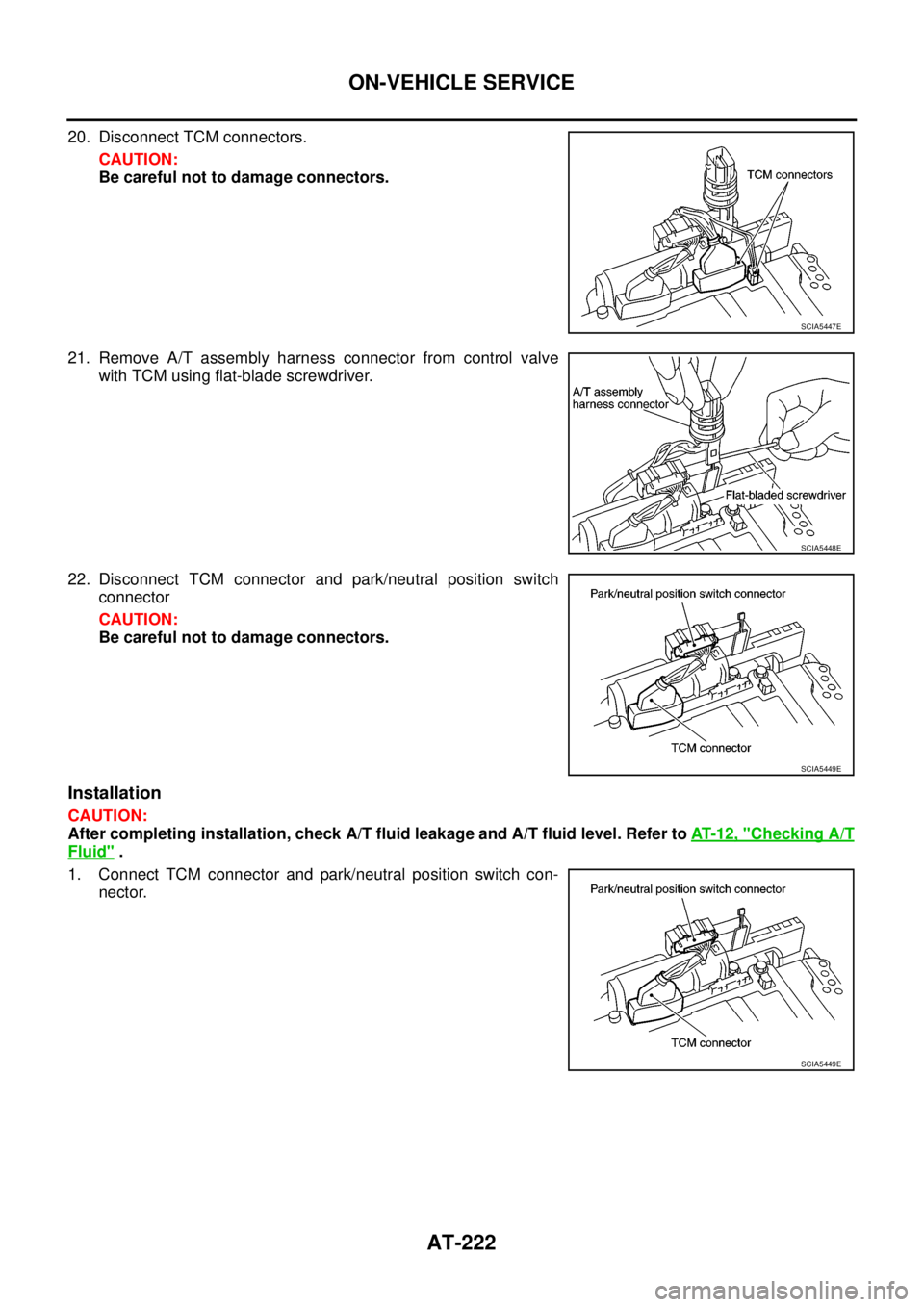
20. Disconnect TCM connectors.
CAUTION:
Be careful not to damage connectors.
21. Remove A/T assembly harness connector from control valve
with TCM using flat-blade screwdriver.
22. Disconnect TCM connector and park/neutral position switch
connector
CAUTION:
Be careful not to damage connectors.
Installation
CAUTION:
After completing installation, check A/T fluid leakage and A/T fluid level. Refer toAT-12, "
Checking A/T
Fluid".
1. Connect TCM connector and park/neutral position switch con-
nector.
SCIA5447E
SCIA5448E
SCIA5449E
SCIA5449E
Page 231 of 3171
ON-VEHICLE SERVICE
AT-223
D
E
F
G
H
I
J
K
L
MA
B
AT
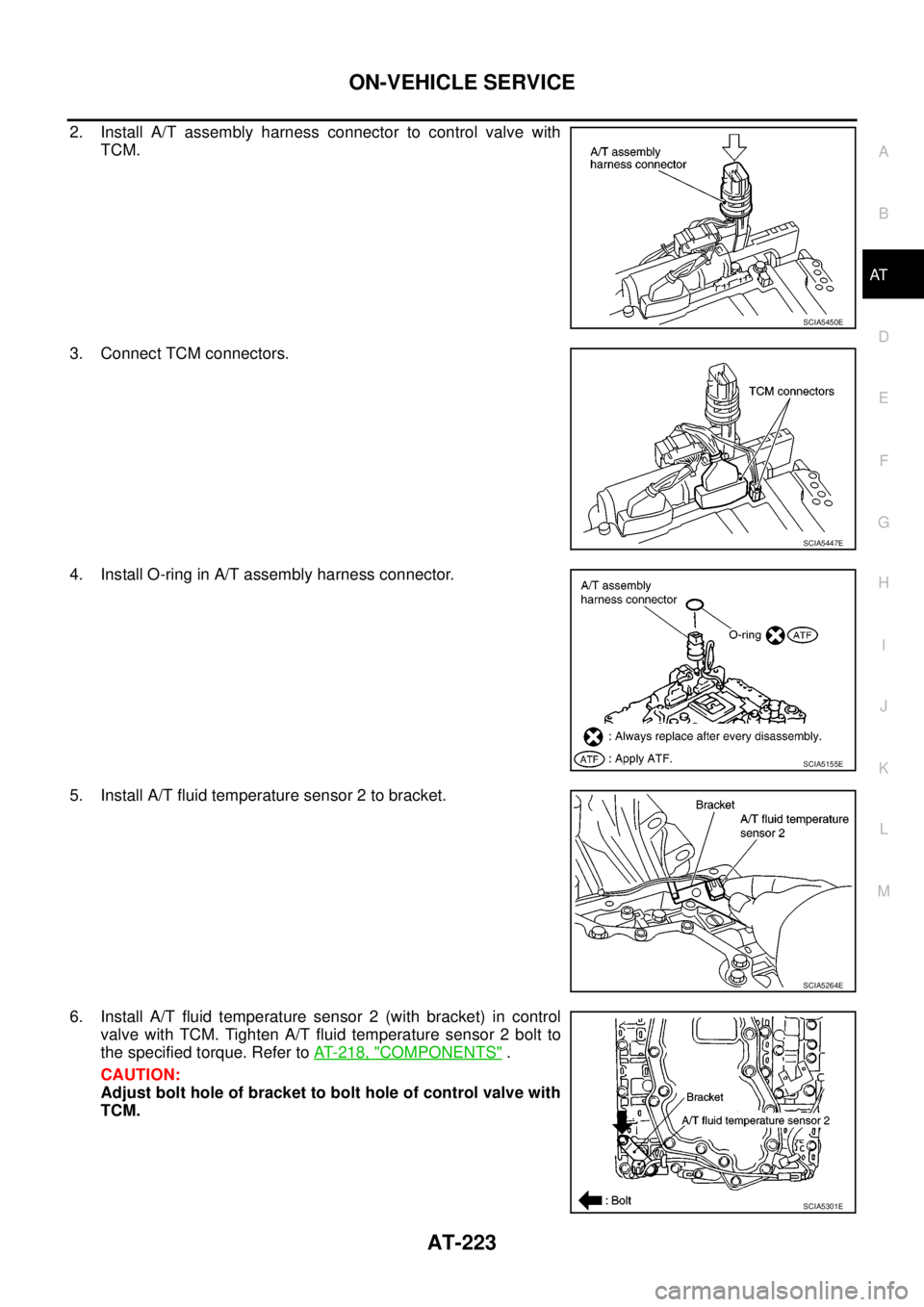
2. Install A/T assembly harness connector to control valve with
TCM.
3. Connect TCM connectors.
4. Install O-ring in A/T assembly harness connector.
5. Install A/T fluid temperature sensor 2 to bracket.
6. Install A/T fluid temperature sensor 2 (with bracket) in control
valve with TCM. Tighten A/T fluid temperature sensor 2 bolt to
the specified torque. Refer toAT- 2 1 8 , "
COMPONENTS".
CAUTION:
Adjust bolt hole of bracket to bolt hole of control valve with
TCM.
SCIA5450E
SCIA5447E
SCIA5155E
SCIA5264E
SCIA5301E
Page 232 of 3171
AT-224
ON-VEHICLE SERVICE
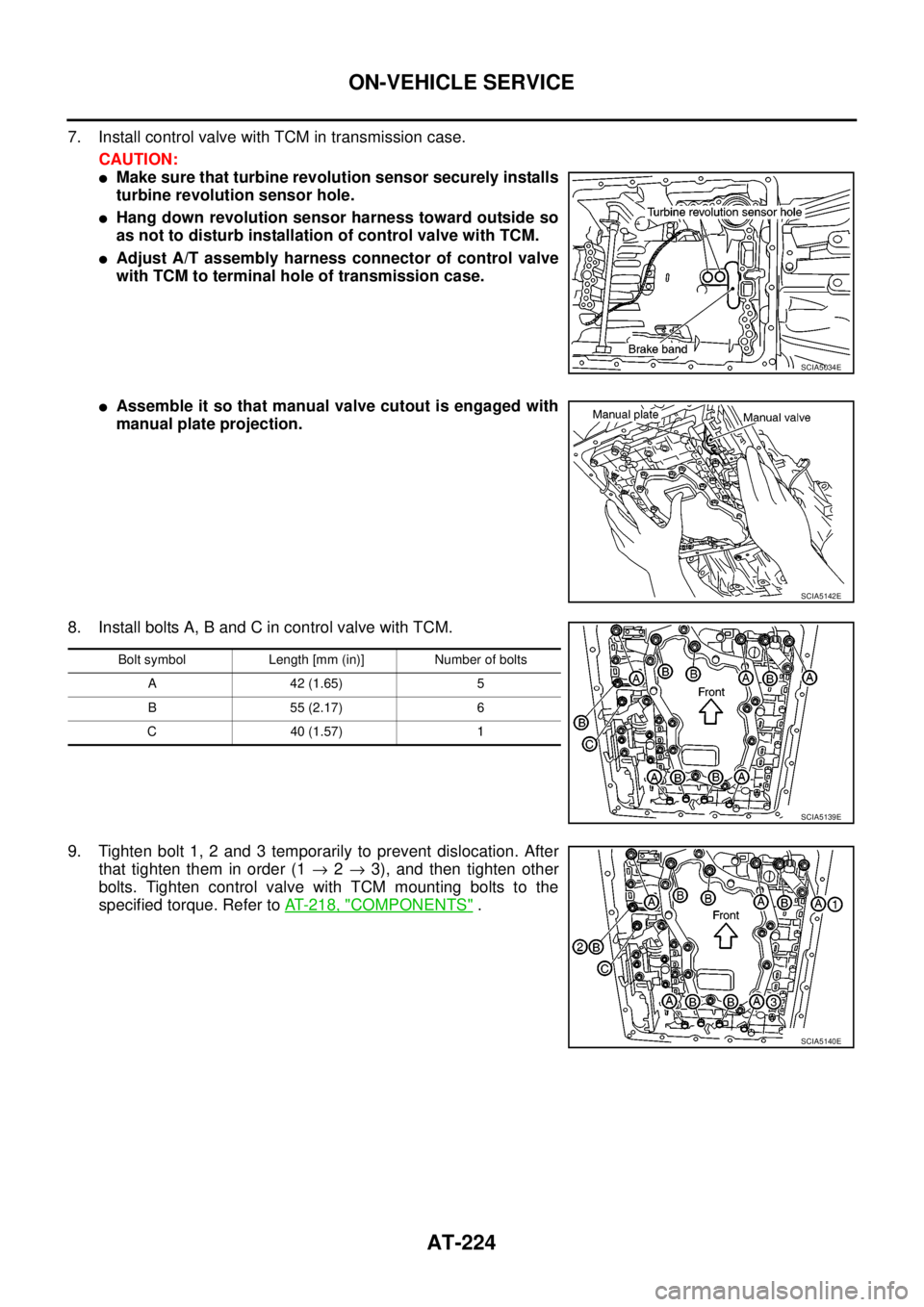
7. Install control valve with TCM in transmission case.
CAUTION:
lMake sure that turbine revolution sensor securely installs
turbine revolution sensor hole.
lHang down revolution sensor harness toward outside so
as not to disturb installation of control valve with TCM.
lAdjust A/T assembly harness connector of control valve
with TCM to terminal hole of transmission case.
lAssemble it so that manual valve cutout is engaged with
manual plate projection.
8. Install bolts A, B and C in control valve with TCM.
9. Tighten bolt 1, 2 and 3 temporarily to prevent dislocation. After
that tighten them in order (1®2®3), and then tighten other
bolts. Tighten control valve with TCM mounting bolts to the
specified torque. Refer toAT- 2 1 8 , "
COMPONENTS".
SCIA5034E
SCIA5142E
Bolt symbol Length [mm (in)] Number of bolts
A 42 (1.65) 5
B 55 (2.17) 6
C 40 (1.57) 1
SCIA5139E
SCIA5140E
Page 233 of 3171
ON-VEHICLE SERVICE
AT-225
D
E
F
G
H
I
J
K
L
MA
B
AT
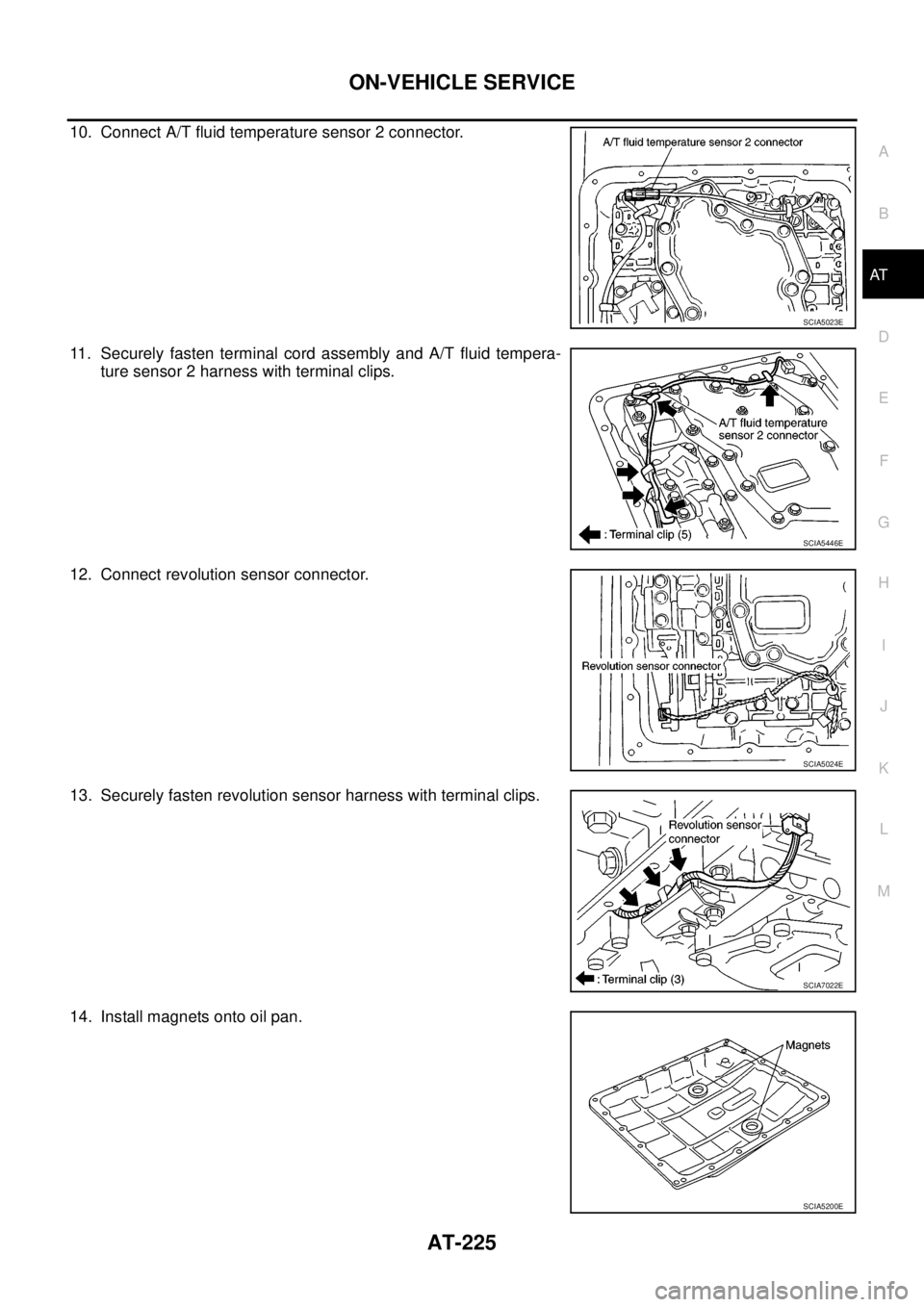
10. Connect A/T fluid temperature sensor 2 connector.
11. Securely fasten terminal cord assembly and A/T fluid tempera-
ture sensor 2 harness with terminal clips.
12. Connect revolution sensor connector.
13. Securely fasten revolution sensor harness with terminal clips.
14. Install magnets onto oil pan.
SCIA5023E
SCIA5446E
SCIA5024E
SCIA7022E
SCIA5200E