battery NISSAN NAVARA 2005 Repair Workshop Manual
[x] Cancel search | Manufacturer: NISSAN, Model Year: 2005, Model line: NAVARA, Model: NISSAN NAVARA 2005Pages: 3171, PDF Size: 49.59 MB
Page 1745 of 3171
REAR WINDOW DEFOGGER
GW-59
C
D
E
F
G
H
J
K
L
MA
B
GW
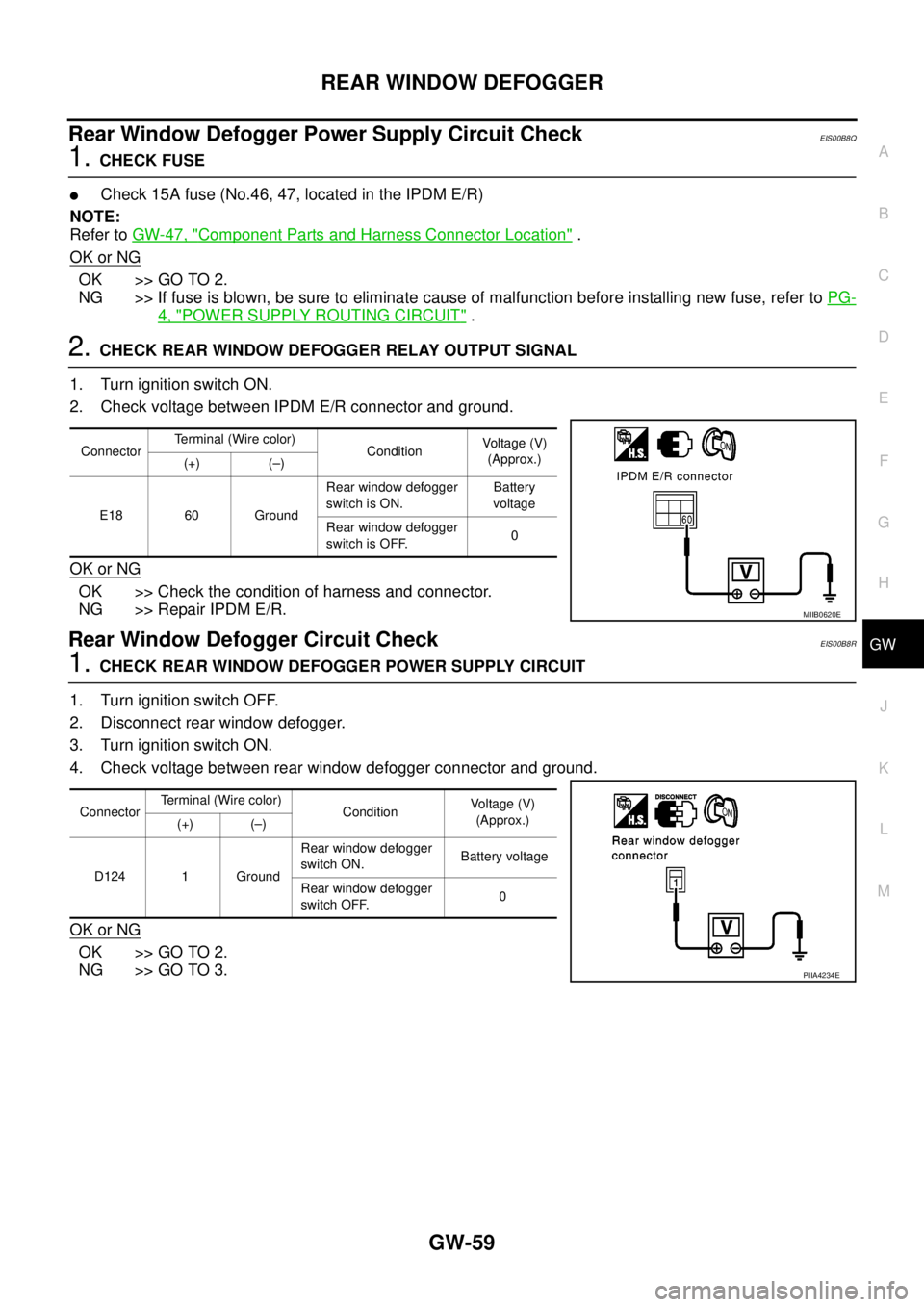
Rear Window Defogger Power Supply Circuit CheckEIS00B8Q
1.CHECK FUSE
lCheck 15A fuse (No.46, 47, located in the IPDM E/R)
NOTE:
Refer toGW-47, "
Component Parts and Harness Connector Location".
OK or NG
OK >> GO TO 2.
NG >> If fuse is blown, be sure to eliminate cause of malfunction before installing new fuse, refer toPG-
4, "POWER SUPPLY ROUTING CIRCUIT".
2.CHECK REAR WINDOW DEFOGGER RELAY OUTPUT SIGNAL
1. Turn ignition switch ON.
2. Check voltage between IPDM E/R connector and ground.
OK or NG
OK >> Check the condition of harness and connector.
NG >> Repair IPDM E/R.
Rear Window Defogger Circuit CheckEIS00B8R
1.CHECK REAR WINDOW DEFOGGER POWER SUPPLY CIRCUIT
1. Turn ignition switch OFF.
2. Disconnect rear window defogger.
3. Turn ignition switch ON.
4. Check voltage between rear window defogger connector and ground.
OK or NG
OK >> GO TO 2.
NG >> GO TO 3.
ConnectorTerminal (Wire color)
ConditionVoltag e (V)
(Approx.)
(+) (–)
E18 60 GroundRear window defogger
switch is ON.Battery
voltage
Rear window defogger
switch is OFF.0
MIIB0620E
ConnectorTerminal (Wire color)
ConditionVo l ta g e (V )
(Approx.)
(+) (–)
D124 1 GroundRear window defogger
switch ON.Battery voltage
Rear window defogger
switch OFF.0
PIIA4234E
Page 1747 of 3171
REAR WINDOW DEFOGGER
GW-61
C
D
E
F
G
H
J
K
L
MA
B
GW
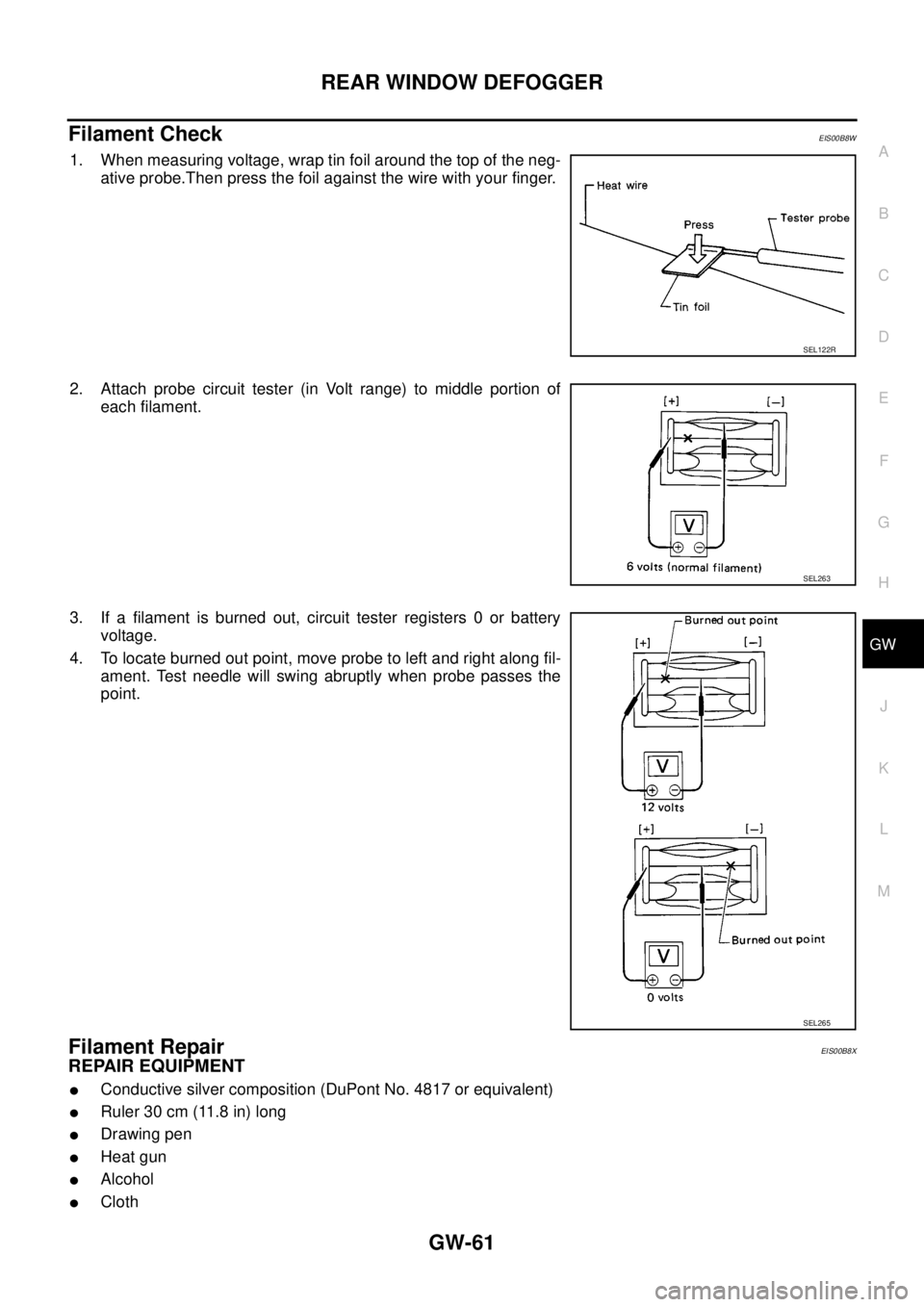
Filament CheckEIS00B8W
1. When measuring voltage, wrap tin foil around the top of the neg-
ative probe.Then press the foil against the wire with your finger.
2. Attach probe circuit tester (in Volt range) to middle portion of
each filament.
3. If a filament is burned out, circuit tester registers 0 or battery
voltage.
4. To locate burned out point, move probe to left and right along fil-
ament. Test needle will swing abruptly when probe passes the
point.
Filament RepairEIS00B8X
REPAIR EQUIPMENT
lConductive silver composition (DuPont No. 4817 or equivalent)
lRuler 30 cm (11.8 in) long
lDrawing pen
lHeat gun
lAlcohol
lCloth
SEL122R
SEL263
SEL265
Page 1754 of 3171
IDX-2
ALPHABETICAL INDEX
Numerics
4LO indicator lamp .............................................TF-16
4LO switch ..............................................TF-56,TF-59
4WD - Wiring diagram .......................................TF-25
4WD shift indicator lamp ....................................TF-16
4WD shift switch .........................TF-16,TF-59,TF-62
4WD system description ....................................TF-15
4WD system diagram ........................................TF-18
4WD warning lamp ............................................TF-17
A
A/C air flow .......................................ATC-30
,MTC-30
A/C compressor clutch removal and installation ...........
ATC-143
,MTC-123
A/C compressor mounting ............ATC-142,MTC-122
A/C compressor precaution ..............ATC-12,MTC-12
A/C compressor special service tool .ATC-16,MTC-16
A/C control operation (auto A/C) .......ATC-28,MTC-28
A/C diagnostic work flow (auto A/C)ATC-103,MTC-95
A/C evaporator ..............................ATC-149,MTC-129
A/C HFC134a (R134a) system precaution .......ATC-4,
MTC-4
A/C HFC134a (R134a) system service procedure .......
ATC-138
,MTC-118
A/C HFC134a (R134a) system service tools ..ATC-16,
MTC-16
A/C HFC134a system service equipment precaution ...
ATC-12
,MTC-12
A/C lubricant (R134a) .......................ATC-24,MTC-24
A/C lubrication oil ..............................ATC-24,MTC-24
A/C operational check .......................ATC-57,MTC-53
A/C self-diagnoses (auto A/C) .......ATC-55,ATC-103,
MTC-51
,MTC-95
A/C service data specification .......ATC-154,MTC-135
A/C trouble diagnoses (auto A/C) .....ATC-33,MTC-33
A/C, A - Wiring diagram ....................ATC-39,MTC-39
A/T fluid checking ......................AT-12,AT-43,MA-29
A/T fluid replacement .............................AT-11,MA-31
A/T fluid temperature sensor ...........................AT-118
A/T IND - Wiring diagram ....................................DI-49
A/T indicator ........................................................DI-48
A/T self-diagnoses .............................................AT-89
A/T shift lock system ........................................AT-212
A/T trouble diagnoses ........................................AT-34
A/T Wiring diagram AT - CAN ............................AT-92
A/T Wiring diagram AT - FTS ..........................AT-119
A/T Wiring diagram AT - MAIN ........................AT-164
A/T Wiring diagram AT - NONDTC ..................AT-174
A/T Wiring diagram AT - PNP/SW ...................AT-100
A/T Wiring diagram AT - STSIG ........................AT-95
A/T Wiring diagram AT - VSS A/T ...................AT-105
ABS - Wiring diagram .....................................BRC-13
Accelerator control system ...............................ACC-2
Accelerator pedal position (APP) sensor ........EC-108,
EC-142
,EC-275
Aiming adjustment ..................................LT-28,LT-85
Air bag ..............................................................SRS-3
Air bag disposal ..............................................SRS-49
Air bleeding (hydraulic clutch) ..............................CL-8
Air cleaner and air duct .....................................EM-15
Air cleaner filter .................................................EM-17
Air cleaner filter replacement ............................MA-25
Air conditioner cut control ..................................EC-20
Air flow meter - See Mass air flow sensor ..........EC-92
Air mix. door motor .........................................ATC-68
Alternator ...........................................................SC-14
Ambient sensor .............................ATC-105,ATC-117
Angular tightening application .............................EM-4
APP2PW - Wiring diagram ..............................EC-229
APPS - Wiring diagram ....................................EC-110
APPS2 - Wiring diagram ..................................EC-144
APPS3 - Wiring diagram ..................................EC-277
ASC/BS - Wiring diagram ................................EC-192
ASC/SW - Wiring diagram ...............................EC-208
ASCBOF - Wiring diagram ...............................EC-331
ASCD ...............................................................EC-355
ASCD (automatic speed control device) ...........ACS-2
ASCD brake switch ...........................EC-189,EC-330
ASCD clutch switch ..........................EC-189,EC-330
ASCD indicator lamp .......................................EC-351
ASCD steering switch ......................................EC-206
ASCIND - Wiring diagram ................................EC-352
ATP switch ..............................................TF-82,TF-85
Auto air conditioner - Wiring diagramATC-39,MTC-39
Auto anti-dazzling inside mirror .......................GW-45
Autolamp ............................................................LT-49
Automatic amplifier ..........................ATC-60,MTC-55
Automatic transmission number ..............GI-58,GI-59
B
Back door trim .....................................................EI-30
BACK/L - Wiring diagram .................................LT-123
Back-up lamp ...................................................LT-123
Back-up lamp switch (M/T) ...................MT-12,MT-19
Ball joint (front) ................................................FSU-15
Barometric pressure (BARO) sensor ...............EC-293
Basic inspection .................................................EC-38
Battery .................................................................SC-5
Baulk ring (M/T) ................................................MT-21
BCM (Body control module) ..............................BCS-3
Blower motor ...ATC-80,ATC-121,MTC-71,MTC-100
Body mounting ....................................BL-189,BL-190
BOOST - Wiring diagram .................................EC-155
Brake booster ....................................................BR-19
Brake fluid level ................................................MA-35
Brake inspection ...............................................MA-35
Brake lines and cables inspection ....................MA-35
Brake master cylinder ........................................BR-17
Brake pedal ..........................................................BR-6
Brake switch ....................................................EC-330
Bulb specifications ...........................................LT-173
Bumper, front ......................................................EI-15
Bumper, rear .......................................................EI-17
Page 1761 of 3171

IP-2
PRECAUTIONS
PRECAUTIONS
PFP:00001
Precautions for Supplemental Restraint System (SRS) “AIR BAG” and “SEAT
BELT PRE-TENSIONER”
EIS00DZ8
The Supplemental Restraint System such as “AIR BAG” and “SEAT BELT PRE-TENSIONER”, used along
with a front seat belt, helps to reduce the risk or severity of injury to the driver and front passenger for certain
types of collision. Information necessary to service the system safely is included in the SRS and SB section of
this Service Manual.
WARNING:
lTo avoid rendering the SRS inoperative, which could increase the risk of personal injury or death
in the event of a collision which would result in air bag inflation, all maintenance must be per-
formed by an authorized NISSAN/INFINITI dealer.
lImproper maintenance, including incorrect removal and installation of the SRS, can lead to per-
sonal injury caused by unintentional activation of the system. For removal of Spiral Cable and Air
Bag Module, see the SRS section.
lDo not use electrical test equipment on any circuit related to the SRS unless instructed to in this
Service Manual. SRS wiring harnesses can be identified by yellow and/or orange harnesses or
harness connectors.
Precautions for SRS “AIR BAG” and “SEAT BELT PRE-TENSIONER” ServiceEIS00DZ4
lDo not use electrical test equipment to check SRS circuits unless instructed to in this Service Manual.
lBefore servicing the SRS, turn ignition switch OFF, disconnect both battery cables and wait at least 3 min-
utes.
For approximately 3 minutes after the cables are removed, it is still possible for the air bag and seat belt
pre-tensioner to deploy. Therefore, do not work on any SRS connectors or wires until at least 3 minutes
have passed.
lThe air bag diagnosis sensor unit must always be installed with the arrow marks “Ü” pointing toward the
front of the vehicle for proper operation. Also check the air bag diagnosis sensor unit for cracks, deformi-
ties or rust before installation and replace as required.
lThe spiral cable must be aligned with the neutral position since its rotations are limited. Do not attempt to
turn steering wheel or column after removal of steering gear.
lHandle air bag module carefully. Always place driver and front passenger air bag modules with the pad
side facing upward and seat mounted front side air bag module standing with the stud bolt side facing
down.
lConduct self-diagnosis to check entire SRS for proper function after replacing any components.
lAfter air bag inflates, the front instrument panel assembly should be replaced if damaged.
Page 1772 of 3171
INSTRUMENT PANEL ASSEMBLY
IP-13
C
D
E
F
G
H
J
K
L
MA
B
IP
LOWER INSTRUMENT PANEL LH
Removal
1. Remove LH front kick plate.
2. Remove lower dash side finisher. Refer toEI-34, "
Removal".
3. Remove front pillar finisher. Refer toEI-35, "
Removal".
4. Remove screws using power tool, and remove lower instrument
panel LH.
5. Pull rearward to release clips, disconnect connectors, and
remove lower instrument panel LH.
Installation
Installation is in the reverse order of removal.
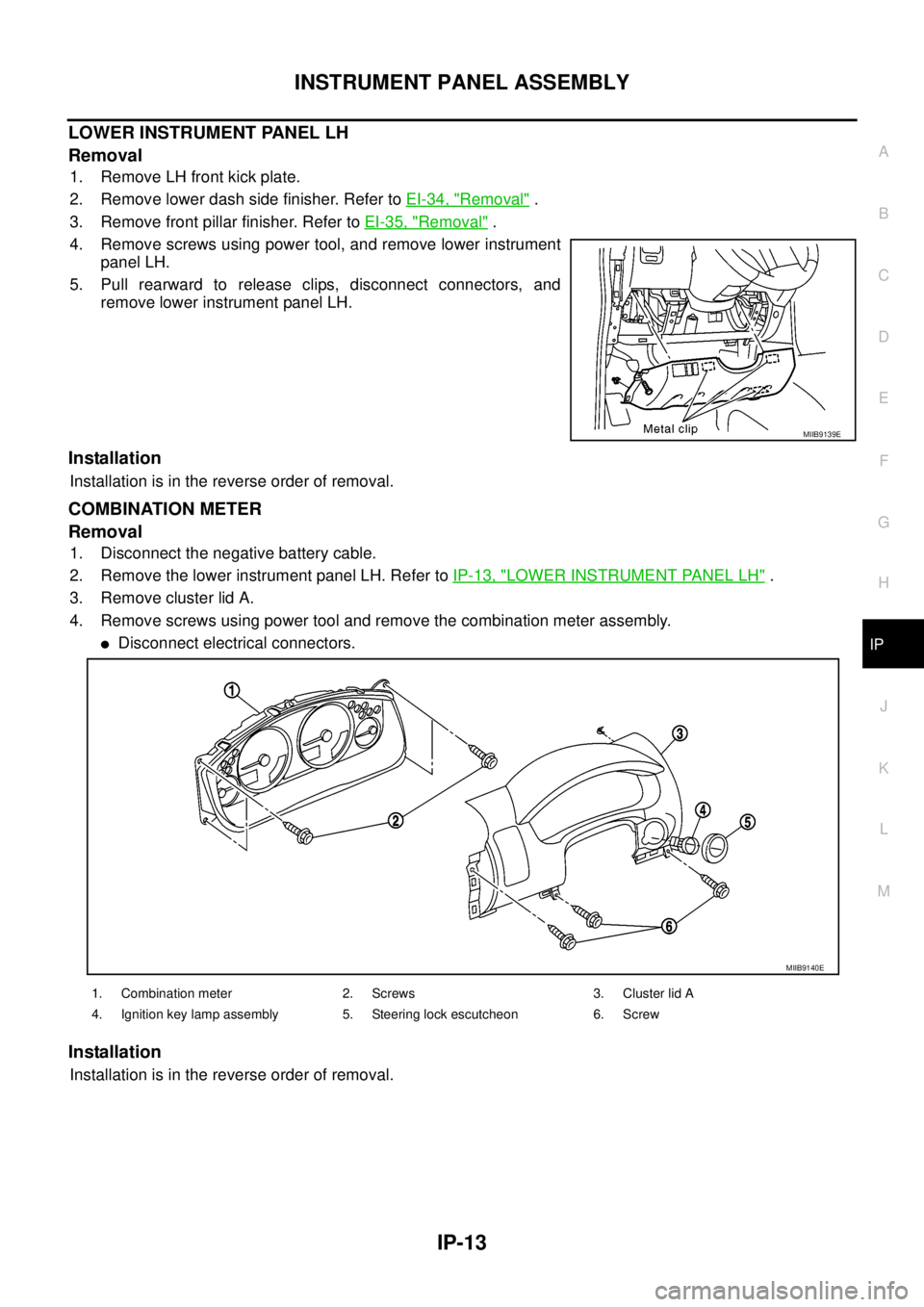
COMBINATION METER
Removal
1. Disconnect the negative battery cable.
2. Remove the lower instrument panel LH. Refer toIP-13, "
LOWER INSTRUMENT PANEL LH".
3. Remove cluster lid A.
4. Remove screws using power tool and remove the combination meter assembly.
lDisconnect electrical connectors.
Installation
Installation is in the reverse order of removal.
MIIB9139E
1. Combination meter 2. Screws 3. Cluster lid A
4. Ignition key lamp assembly 5. Steering lock escutcheon 6. Screw
MIIB9140E
Page 1780 of 3171
![NISSAN NAVARA 2005 Repair Workshop Manual PRECAUTIONS
LAN-3
[CAN]
C
D
E
F
G
H
I
J
L
MA
B
LAN
[CAN]PRECAUTIONSPFP:00001
Precautions for Supplemental Restraint System (SRS) “AIR BAG” and “SEAT
BELT PRE-TENSIONER”
EKS00Q9Y
The Supplement](/img/5/57362/w960_57362-1779.png "NISSAN NAVARA 2005 Repair Workshop Manual PRECAUTIONS
LAN-3
[CAN]
C
D
E
F
G
H
I
J
L
MA
B
LAN
[CAN]PRECAUTIONSPFP:00001
Precautions for Supplemental Restraint System (SRS) “AIR BAG” and “SEAT
BELT PRE-TENSIONER”
EKS00Q9Y
The Supplement")
PRECAUTIONS
LAN-3
[CAN]
C
D
E
F
G
H
I
J
L
MA
B
LAN
[CAN]PRECAUTIONSPFP:00001
Precautions for Supplemental Restraint System (SRS) “AIR BAG” and “SEAT
BELT PRE-TENSIONER”
EKS00Q9Y
The Supplemental Restraint System such as “AIR BAG” and “SEAT BELT PRE-TENSIONER”, used along
with a front seat belt, helps to reduce the risk or severity of injury to the driver and front passenger for certain
types of collision. Information necessary to service the system safely is included in the SRS and SB section of
this Service Manual.
WARNING:
lTo avoid rendering the SRS inoperative, which could increase the risk of personal injury or death
in the event of a collision which would result in air bag inflation, all maintenance must be per-
formed by an authorized NISSAN/INFINITI dealer.
lImproper maintenance, including incorrect removal and installation of the SRS, can lead to per-
sonal injury caused by unintentional activation of the system. For removal of Spiral Cable and Air
Bag Module, see the SRS section.
lDo not use electrical test equipment on any circuit related to the SRS unless instructed to in this
Service Manual. SRS wiring harnesses can be identified by yellow and/or orange harnesses or
harness connectors.
Precautions When Using CONSULT-IIEKS00LBE
When connecting CONSULT-II to data link connector, connect them through CONSULT-II CONVERTER.
CAUTION:
If CONSULT-II is used with no connection of CONSULT-II CONVERTER, malfunctions might be
detected in self-diagnosis depending on control unit which carry out CAN communication.
CHECK POINTS FOR USING CONSULT-II
1. Has CONSULT-II been used without connecting CONSULT-II CONVERTER on this vehicle?
–If YES, GO TO 2.
–If NO, GO TO 5.
2. Is there any indication other than indications relating to CAN communication system in the self-diagnosis
results?
–If YES, GO TO 3.
–If NO, GO TO 4.
3. Based on self-diagnosis results unrelated to CAN communication, carry out the inspection.
4. Malfunctions may be detected in self-diagnosis depending on control units carrying out CAN communica-
tion. Therefore, erase the self-diagnosis results.
5. Diagnose CAN communication system. Refer toLAN-5, "
TROUBLE DIAGNOSES WORK FLOW".
Precautions For Trouble DiagnosisEKS00LBF
CAN SYSTEM
lDo not apply voltage of 7.0 V or higher to the measurement terminals.
lUse the tester with its open terminal voltage being 7.0 V or less.
lBe sure to turn ignition switch off and disconnect negative battery terminal before checking the circuit.
Precautions For Harness RepairEKS00LBG
CAN SYSTEM
lSolder the repaired parts, and wrap with tape. [Frays of twisted
line must be within 110 mm (4.33 in).]
PKIA0306E
Page 1782 of 3171
![NISSAN NAVARA 2005 Repair Workshop Manual TROUBLE DIAGNOSES WORK FLOW
LAN-5
[CAN]
C
D
E
F
G
H
I
J
L
MA
B
LAN
TROUBLE DIAGNOSES WORK FLOWPFP:00004
When Displaying CAN Communication System ErrorsEKS00LBH
WHEN A MALFUNCTION IS DETECTED BY CAN CO](/img/5/57362/w960_57362-1781.png "NISSAN NAVARA 2005 Repair Workshop Manual TROUBLE DIAGNOSES WORK FLOW
LAN-5
[CAN]
C
D
E
F
G
H
I
J
L
MA
B
LAN
TROUBLE DIAGNOSES WORK FLOWPFP:00004
When Displaying CAN Communication System ErrorsEKS00LBH
WHEN A MALFUNCTION IS DETECTED BY CAN CO")
TROUBLE DIAGNOSES WORK FLOW
LAN-5
[CAN]
C
D
E
F
G
H
I
J
L
MA
B
LAN
TROUBLE DIAGNOSES WORK FLOWPFP:00004
When Displaying CAN Communication System ErrorsEKS00LBH
WHEN A MALFUNCTION IS DETECTED BY CAN COMMUNICATION SYSTEM
lCAN communication line is open. (CAN H, CAN L, or both)
lCAN communication line is shorted. (Ground, between CAN lines, or other harnesses)
lThe areas related to CAN communication of unit is malfunctioning.
WHEN A MALFUNCTION IS DETECTED EXCEPT CAN COMMUNICATION SYSTEM
lRemoval and installation of parts : When the units that perform CAN communication or the sensors
related to CAN communication are removed and installed, malfunction may be detected (or DTC other
than CAN communication may be detected).
lFuse blown out (removed): CAN communication of the unit may be stopped at such time.
lLow voltage : If the voltage decreases because of battery discharge when IGN is ON, malfunction may be
detected by self-diagnosis according to the units.
Page 1811 of 3171
![NISSAN NAVARA 2005 Repair Workshop Manual LAN-34
[CAN]
CAN COMMUNICATION
NOTE:
*: Automatic air conditioner models only
TYPE 4/ TYPE 5
System diagram
lTy p e 4
lTy p e 5
Input/output signal chart
T: Transmit R: Receive
PKIC1394E
PKIC1395E
Sig](/img/5/57362/w960_57362-1810.png "NISSAN NAVARA 2005 Repair Workshop Manual LAN-34
[CAN]
CAN COMMUNICATION
NOTE:
*: Automatic air conditioner models only
TYPE 4/ TYPE 5
System diagram
lTy p e 4
lTy p e 5
Input/output signal chart
T: Transmit R: Receive
PKIC1394E
PKIC1395E
Sig")
LAN-34
[CAN]
CAN COMMUNICATION
NOTE:
*: Automatic air conditioner models only
TYPE 4/ TYPE 5
System diagram
lTy p e 4
lTy p e 5
Input/output signal chart
T: Transmit R: Receive
PKIC1394E
PKIC1395E
Signals ECM TCMNAVI
control
unitFront air
controlBCMCombi-
nation
meterABS
actuator
and elec-
tric unit
(control
unit)IPDM
E/R
A/C compressor request signal TR
Accelerator pedal position signal T R
ASCD CRUISE lamp signal T R
ASCD OD cancel request T R
ASCD operation signal T R
ASCD SET lamp signal T R
Battery voltage signal T R
Page 1818 of 3171
![NISSAN NAVARA 2005 Repair Workshop Manual CAN COMMUNICATION
LAN-41
[CAN]
C
D
E
F
G
H
I
J
L
MA
B
LAN
lType 14
lType 15
Input/output signal chart
T: Transmit R: Receive
PKIC1402E
PKIC1384E
Signals ECM TCMNAVI
con-
trol
unitDiffer-
ential
lock
c](/img/5/57362/w960_57362-1817.png "NISSAN NAVARA 2005 Repair Workshop Manual CAN COMMUNICATION
LAN-41
[CAN]
C
D
E
F
G
H
I
J
L
MA
B
LAN
lType 14
lType 15
Input/output signal chart
T: Transmit R: Receive
PKIC1402E
PKIC1384E
Signals ECM TCMNAVI
con-
trol
unitDiffer-
ential
lock
c")
CAN COMMUNICATION
LAN-41
[CAN]
C
D
E
F
G
H
I
J
L
MA
B
LAN
lType 14
lType 15
Input/output signal chart
T: Transmit R: Receive
PKIC1402E
PKIC1384E
Signals ECM TCMNAVI
con-
trol
unitDiffer-
ential
lock
con-
trol
unitFront
air
controlBCMCom-
bina-
tion
meterTrans-
fer
con-
trol
unitABS
actua-
tor and
elec-
tric unit
(con-
trol
unit)IPDM
E/R
A/C compressor request signal TR
Accelerator pedal position signal T R
ASCD CRUISE lamp signal T R
ASCD OD cancel request T R
ASCD operation signal T R
ASCD SET lamp signal T R
Battery voltage signal T R
Closed throttle position signal T R
Cooling fan speed request signal TR
Page 2069 of 3171
![NISSAN NAVARA 2005 Repair Workshop Manual LAN-292
[CAN]
TROUBLE DIAGNOSIS FOR SYSTEM
TROUBLE DIAGNOSIS FOR SYSTEM
PFP:00000
Inspection Between TCM and Data Link Connector CircuitEKS00O4W
1.CHECK CONNECTOR
1. Turn ignition switch OFF.
2. Disco](/img/5/57362/w960_57362-2068.png "NISSAN NAVARA 2005 Repair Workshop Manual LAN-292
[CAN]
TROUBLE DIAGNOSIS FOR SYSTEM
TROUBLE DIAGNOSIS FOR SYSTEM
PFP:00000
Inspection Between TCM and Data Link Connector CircuitEKS00O4W
1.CHECK CONNECTOR
1. Turn ignition switch OFF.
2. Disco")
LAN-292
[CAN]
TROUBLE DIAGNOSIS FOR SYSTEM
TROUBLE DIAGNOSIS FOR SYSTEM
PFP:00000
Inspection Between TCM and Data Link Connector CircuitEKS00O4W
1.CHECK CONNECTOR
1. Turn ignition switch OFF.
2. Disconnect the battery cable from the negative terminal.
3. Check following terminals and connectors for damage, bend and loose connection (connector side and
harness side).
–Harness connector F2
–Harness connector E8
–Harness connector E101
–Harness connector M91
OK or NG
OK >> GO TO 2.
NG >> Repair terminal or connector.
2.CHECK HARNESS FOR OPEN CIRCUIT
1. Disconnect A/T assembly connector and harness connector F2.
2. Check continuity between A/T assembly harness connector F36
terminals 3, 8 and harness connector F2 terminals 2, 3.
OK or NG
OK >> GO TO 3.
NG >> Repair harness.
3.CHECK HARNESS FOR OPEN CIRCUIT
1. Disconnect harness connector E101.
2. Check continuity between harness connector E8 terminals 2, 3
and harness connector E101 terminals 52G, 51G.
OK or NG
OK >> GO TO 4.
NG >> Repair harness.3 – 2 : Continuity should exist.
8 – 3 : Continuity should exist.
SKIB2808E
2 – 52G : Continuity should exist.
3 – 51G : Continuity should exist.
SKIB2809E