battery NISSAN NAVARA 2005 Repair Workshop Manual
[x] Cancel search | Manufacturer: NISSAN, Model Year: 2005, Model line: NAVARA, Model: NISSAN NAVARA 2005Pages: 3171, PDF Size: 49.59 MB
Page 2081 of 3171
![NISSAN NAVARA 2005 Repair Workshop Manual LAN-304
[CAN]
TROUBLE DIAGNOSIS FOR SYSTEM
3.CHECK HARNESS FOR SHORT CIRCUIT
Check continuity between data link connector M45 terminals 6, 14
and ground.
OK or NG
OK >> GO TO 4.
NG >>
lRepair harness.](/img/5/57362/w960_57362-2080.png "NISSAN NAVARA 2005 Repair Workshop Manual LAN-304
[CAN]
TROUBLE DIAGNOSIS FOR SYSTEM
3.CHECK HARNESS FOR SHORT CIRCUIT
Check continuity between data link connector M45 terminals 6, 14
and ground.
OK or NG
OK >> GO TO 4.
NG >>
lRepair harness.")
LAN-304
[CAN]
TROUBLE DIAGNOSIS FOR SYSTEM
3.CHECK HARNESS FOR SHORT CIRCUIT
Check continuity between data link connector M45 terminals 6, 14
and ground.
OK or NG
OK >> GO TO 4.
NG >>
lRepair harness.
lChange harness if shielded lines are used for the har-
ness.
4.ECM AND IPDM E/R INTERNAL CIRCUIT INSPECTION
1. Remove ECM and IPDM E/R from vehicle.
2. Check resistance between ECM terminals.
3. Check resistance between IPDM E/R terminals.
OK or NG
OK >> GO TO 5.
NG >> Replace ECM and/or IPDM E/R.
5.CHECK SYMPTOM
1. Fill in described symptoms on the column “Symptom” in the check sheet.
2. Connect all connectors, and then make sure that the symptom is reproduced.
OK or NG
OK >> GO TO 6.
NG >> Refer toLAN-13, "
Example of Filling in Check Sheet When Initial Conditions Are Not Reproduced"
.
6.UNIT REPRODUCIBILITY INSPECTION
Perform the following procedure for each unit on the CAN network, and then perform reproducibility test.
1. Turn ignition switch OFF.
2. Disconnect the battery cable from the negative terminal.
3. Disconnect the unit connector.
4. Connect the battery cable to the negative terminal.
5. Make sure that the symptom filled in the “Symptom” of the check sheet is reproduced. (Do not confuse it
with the symptom related to removed unit.)
6. Make sure that the same symptom is reproduced.
Inspection results
Reproduced>>Install removed unit, and then check the other unit.
Not reproduced>>Replace removed unit.
IPDM E/R Ignition Relay Circuit InspectionEKS00O5C
Check the following. If no malfunction is found, replace the IPDM E/R.
lIPDM E/R power supply circuit. Refer toPG-24, "Check IPDM E/R Power Supply and Ground Circuit". 6 – Ground : Continuity should not exist.
14 – Ground : Continuity should not exist.
PKIA9872E
Terminal Resistance (Approx.)
95 87 108 – 132W
Terminal Resistance (Approx.)
39 40 108 – 132W
LKIA0037E
Page 2086 of 3171
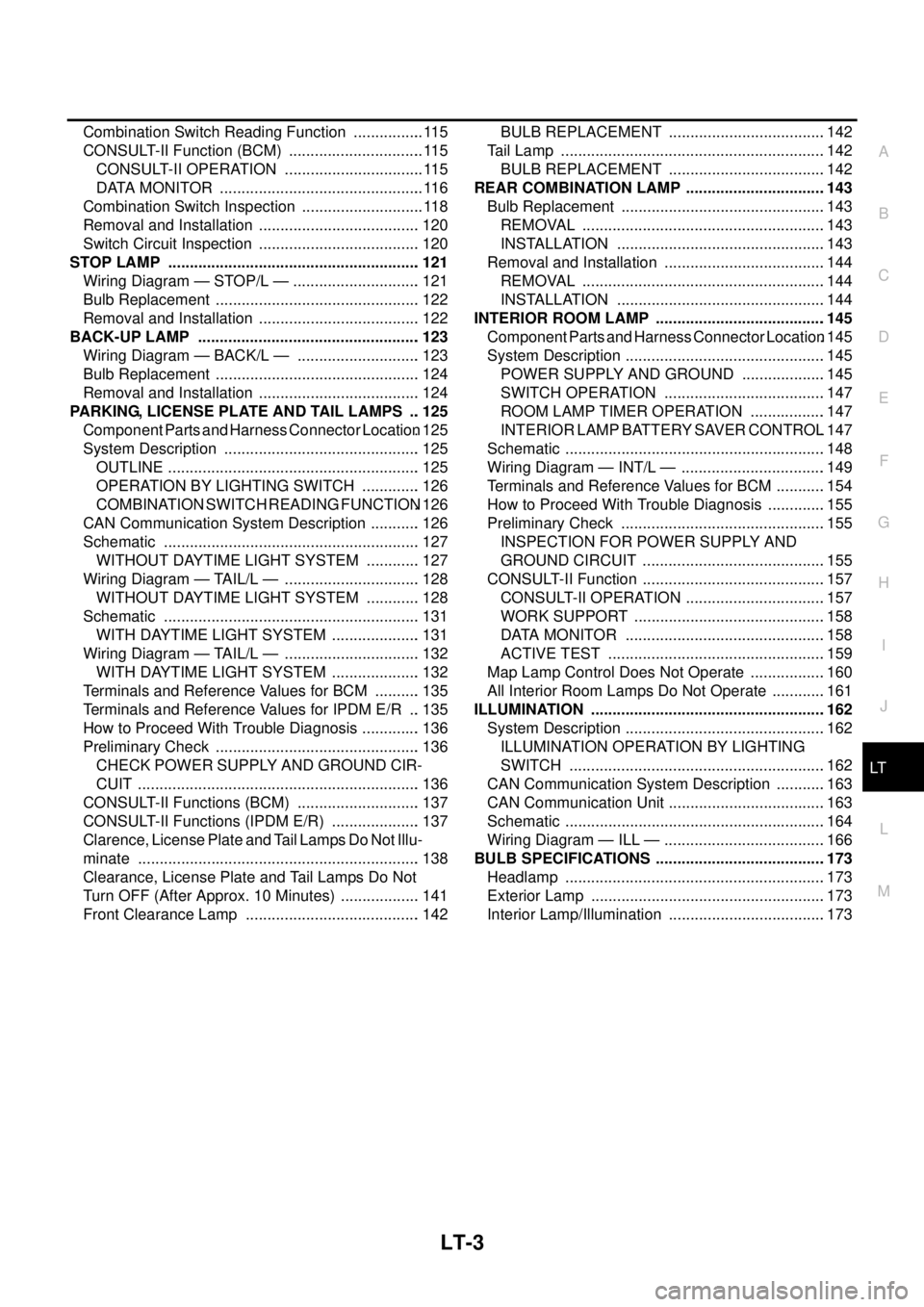
LT-3
C
D
E
F
G
H
I
J
L
MA
B
LT Combination Switch Reading Function ................. 115
CONSULT-II Function (BCM) ................................ 115
CONSULT-II OPERATION ................................. 115
DATA MONITOR ................................................ 116
Combination Switch Inspection ............................. 118
Removal and Installation ...................................... 120
Switch Circuit Inspection ...................................... 120
STOP LAMP ........................................................... 121
Wiring Diagram — STOP/L — .............................. 121
Bulb Replacement ................................................ 122
Removal and Installation ...................................... 122
BACK-UP LAMP .................................................... 123
Wiring Diagram — BACK/L — ............................. 123
Bulb Replacement ................................................ 124
Removal and Installation ...................................... 124
PARKING, LICENSE PLATE AND TAIL LAMPS ... 125
Component Parts and Harness Connector Location. 125
System Description .............................................. 125
OUTLINE ........................................................... 125
OPERATION BY LIGHTING SWITCH .............. 126
COMBINATION SWITCH READING FUNCTION. 126
CAN Communication System Description ............ 126
Schematic ............................................................ 127
WITHOUT DAYTIME LIGHT SYSTEM ............. 127
Wiring Diagram — TAIL/L — ................................ 128
WITHOUT DAYTIME LIGHT SYSTEM ............. 128
Schematic ............................................................ 131
WITH DAYTIME LIGHT SYSTEM ..................... 131
Wiring Diagram — TAIL/L — ................................ 132
WITH DAYTIME LIGHT SYSTEM ..................... 132
Terminals and Reference Values for BCM ........... 135
Terminals and Reference Values for IPDM E/R ... 135
How to Proceed With Trouble Diagnosis .............. 136
Preliminary Check ................................................ 136
CHECK POWER SUPPLY AND GROUND CIR-
CUIT .................................................................. 136
CONSULT-II Functions (BCM) ............................. 137
CONSULT-II Functions (IPDM E/R) ..................... 137
Clarence, License Plate and Tail Lamps Do Not Illu-
minate .................................................................. 138
Clearance, License Plate and Tail Lamps Do Not
Turn OFF (After Approx. 10 Minutes) ................... 141
Front Clearance Lamp ......................................... 142BULB REPLACEMENT .....................................142
Tail Lamp ..............................................................142
BULB REPLACEMENT .....................................142
REAR COMBINATION LAMP .................................143
Bulb Replacement ................................................143
REMOVAL .........................................................143
INSTALLATION .................................................143
Removal and Installation ......................................144
REMOVAL .........................................................144
INSTALLATION .................................................144
INTERIOR ROOM LAMP ........................................145
Component Parts and Harness Connector Location.145
System Description ...............................................145
POWER SUPPLY AND GROUND ....................145
SWITCH OPERATION ......................................147
ROOM LAMP TIMER OPERATION ..................147
INTERIOR LAMP BATTERY SAVER CONTROL.147
Schematic .............................................................148
Wiring Diagram — INT/L — ..................................149
Terminals and Reference Values for BCM ............154
How to Proceed With Trouble Diagnosis ..............155
Preliminary Check ................................................155
INSPECTION FOR POWER SUPPLY AND
GROUND CIRCUIT ...........................................155
CONSULT-II Function ...........................................157
CONSULT-II OPERATION .................................157
WORK SUPPORT .............................................158
DATA MONITOR ...............................................158
ACTIVE TEST ...................................................159
Map Lamp Control Does Not Operate ..................160
All Interior Room Lamps Do Not Operate .............161
ILLUMINATION .......................................................162
System Description ...............................................162
ILLUMINATION OPERATION BY LIGHTING
SWITCH ............................................................162
CAN Communication System Description ............163
CAN Communication Unit .....................................163
Schematic .............................................................164
Wiring Diagram — ILL — ......................................166
BULB SPECIFICATIONS ........................................173
Headlamp .............................................................173
Exterior Lamp .......................................................173
Interior Lamp/Illumination .....................................173
Page 2088 of 3171
HEADLAMP -CONVENTIONAL TYPE-
LT-5
C
D
E
F
G
H
I
J
L
MA
B
LT
HEADLAMP -CONVENTIONAL TYPE-PFP:26010
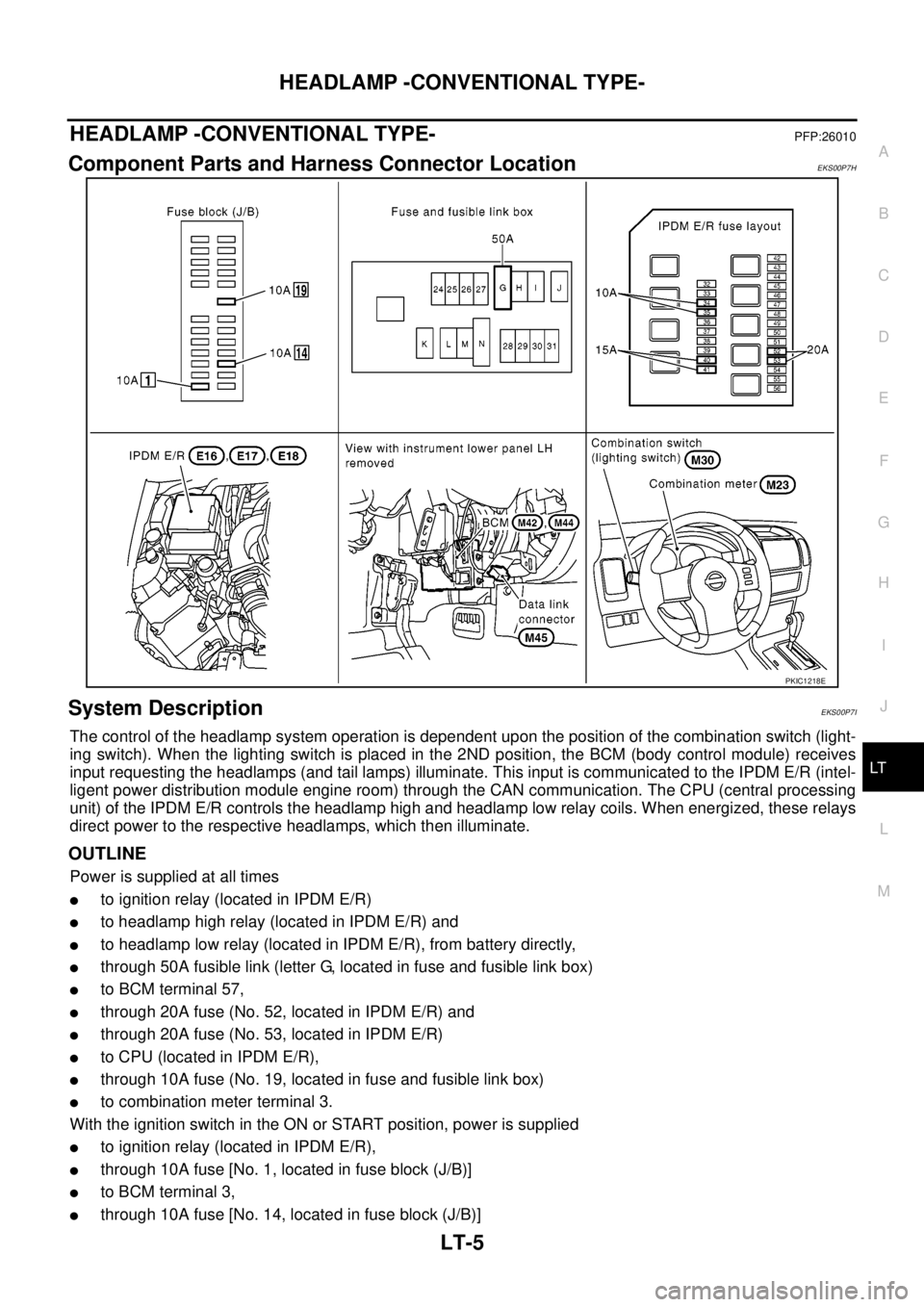
Component Parts and Harness Connector LocationEKS00P7H
System DescriptionEKS00P7I
The control of the headlamp system operation is dependent upon the position of the combination switch (light-
ing switch). When the lighting switch is placed in the 2ND position, the BCM (body control module) receives
input requesting the headlamps (and tail lamps) illuminate. This input is communicated to the IPDM E/R (intel-
ligent power distribution module engine room) through the CAN communication. The CPU (central processing
unit) of the IPDM E/R controls the headlamp high and headlamp low relay coils. When energized, these relays
direct power to the respective headlamps, which then illuminate.
OUTLINE
Power is supplied at all times
lto ignition relay (located in IPDM E/R)
lto headlamp high relay (located in IPDM E/R) and
lto headlamp low relay (located in IPDM E/R), from battery directly,
lthrough 50A fusible link (letter G, located in fuse and fusible link box)
lto BCM terminal 57,
lthrough 20A fuse (No. 52, located in IPDM E/R) and
lthrough 20A fuse (No. 53, located in IPDM E/R)
lto CPU (located in IPDM E/R),
lthrough 10A fuse (No. 19, located in fuse and fusible link box)
lto combination meter terminal 3.
With the ignition switch in the ON or START position, power is supplied
lto ignition relay (located in IPDM E/R),
lthrough 10A fuse [No. 1, located in fuse block (J/B)]
lto BCM terminal 3,
lthrough 10A fuse [No. 14, located in fuse block (J/B)]
PKIC1218E
Page 2095 of 3171
LT-12
HEADLAMP -CONVENTIONAL TYPE-
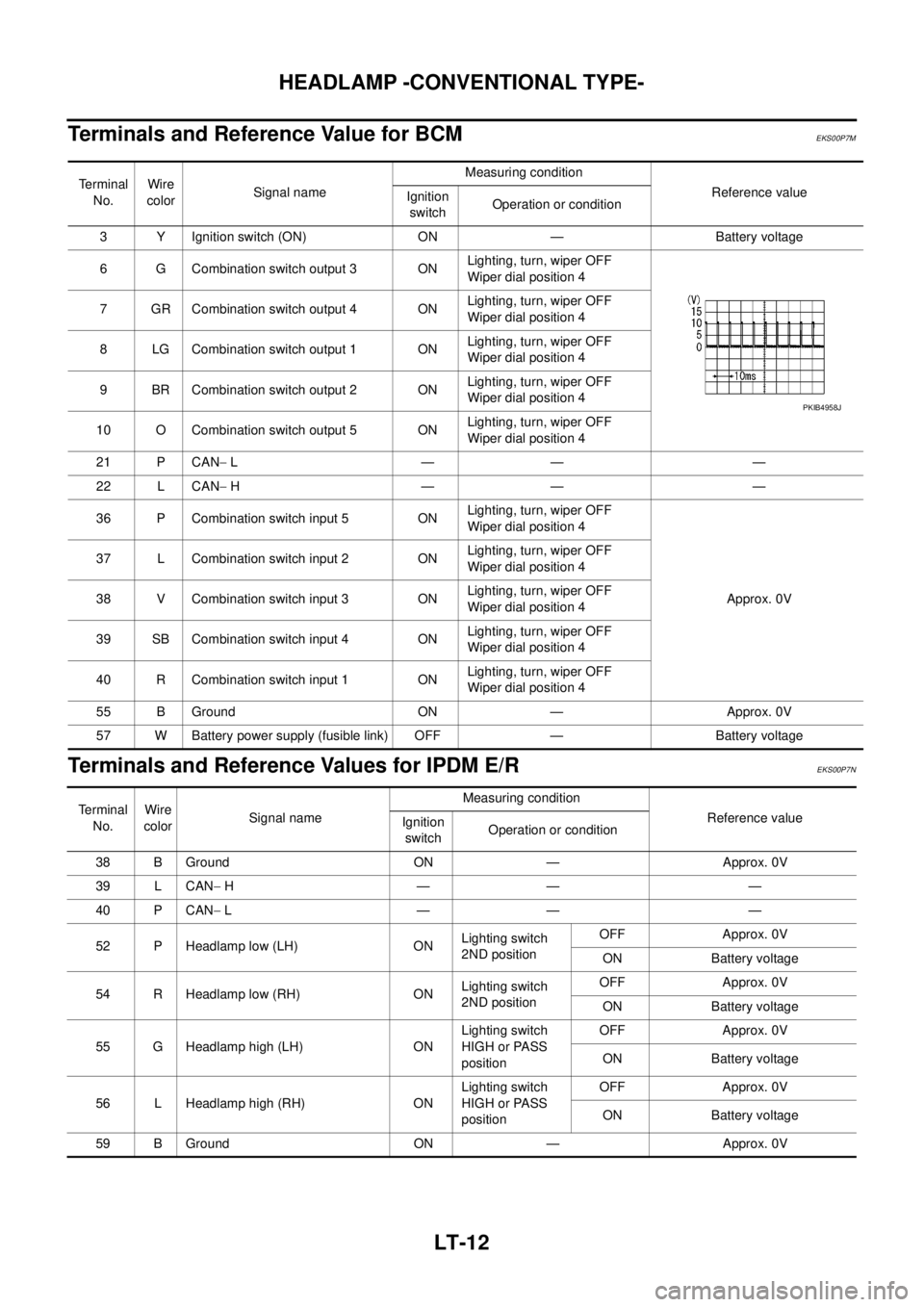
Terminals and Reference Value for BCM
EKS00P7M
Terminals and Reference Values for IPDM E/REKS00P7N
Terminal
No.Wire
colorSignal nameMeasuring condition
Reference value
Ignition
switchOperation or condition
3 Y Ignition switch (ON) ON — Battery voltage
6 G Combination switch output 3 ONLighting, turn, wiper OFF
Wiper dial position 4
7 GR Combination switch output 4 ONLighting, turn, wiper OFF
Wiper dial position 4
8 LG Combination switch output 1 ONLighting, turn, wiper OFF
Wiper dial position 4
9 BR Combination switch output 2 ONLighting, turn, wiper OFF
Wiper dial position 4
10 O Combination switch output 5 ONLighting, turn, wiper OFF
Wiper dial position 4
21 P CAN-L—— —
22 L CAN-H—— —
36 P Combination switch input 5 ONLighting, turn, wiper OFF
Wiper dial position 4
Approx. 0V 37 L Combination switch input 2 ONLighting, turn, wiper OFF
Wiper dial position 4
38 V Combination switch input 3 ONLighting, turn, wiper OFF
Wiper dial position 4
39 SB Combination switch input 4 ONLighting, turn, wiper OFF
Wiper dial position 4
40 R Combination switch input 1 ONLighting, turn, wiper OFF
Wiper dial position 4
55 B Ground ON — Approx. 0V
57 W Battery power supply (fusible link) OFF — Battery voltage
PKIB4958J
Te r m i n a l
No.Wire
colorSignal nameMeasuring condition
Reference value
Ignition
switchOperation or condition
38 B Ground ON — Approx. 0V
39 L CAN-H—— —
40 P CAN-L—— —
52 P Headlamp low (LH) ONLighting switch
2ND positionOFF Approx. 0V
ON Battery voltage
54 R Headlamp low (RH) ONLighting switch
2ND positionOFF Approx. 0V
ON Battery voltage
55 G Headlamp high (LH) ONLighting switch
HIGH or PASS
positionOFF Approx. 0V
ON Battery voltage
56 L Headlamp high (RH) ONLighting switch
HIGH or PASS
positionOFF Approx. 0V
ON Battery voltage
59 B Ground ON — Approx. 0V
Page 2096 of 3171
HEADLAMP -CONVENTIONAL TYPE-
LT-13
C
D
E
F
G
H
I
J
L
MA
B
LT
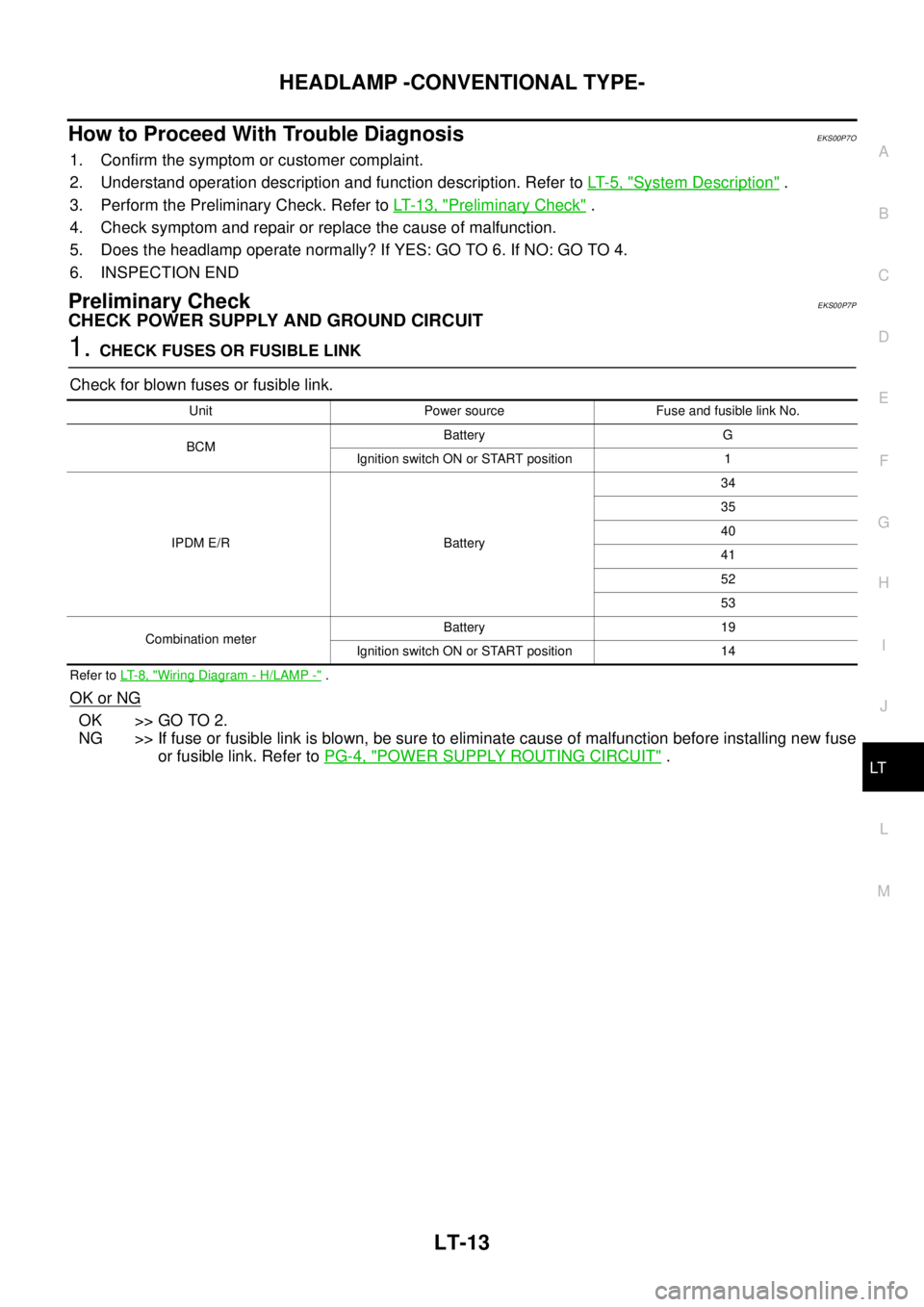
How to Proceed With Trouble DiagnosisEKS00P7O
1. Confirm the symptom or customer complaint.
2. Understand operation description and function description. Refer toLT- 5 , "
System Description".
3. Perform the Preliminary Check. Refer toLT-13, "
Preliminary Check".
4. Check symptom and repair or replace the cause of malfunction.
5. Does the headlamp operate normally? If YES: GO TO 6. If NO: GO TO 4.
6. INSPECTION END
Preliminary CheckEKS00P7P
CHECK POWER SUPPLY AND GROUND CIRCUIT
1.CHECK FUSES OR FUSIBLE LINK
Check for blown fuses or fusible link.
Refer toLT- 8 , "Wiring Diagram - H/LAMP -".
OK or NG
OK >> GO TO 2.
NG >> If fuse or fusible link is blown, be sure to eliminate cause of malfunction before installing new fuse
or fusible link. Refer toPG-4, "
POWER SUPPLY ROUTING CIRCUIT".
Unit Power source Fuse and fusible link No.
BCMBattery G
Ignition switch ON or START position 1
IPDM E/R Battery34
35
40
41
52
53
Combination meterBattery 19
Ignition switch ON or START position 14
Page 2097 of 3171
LT-14
HEADLAMP -CONVENTIONAL TYPE-
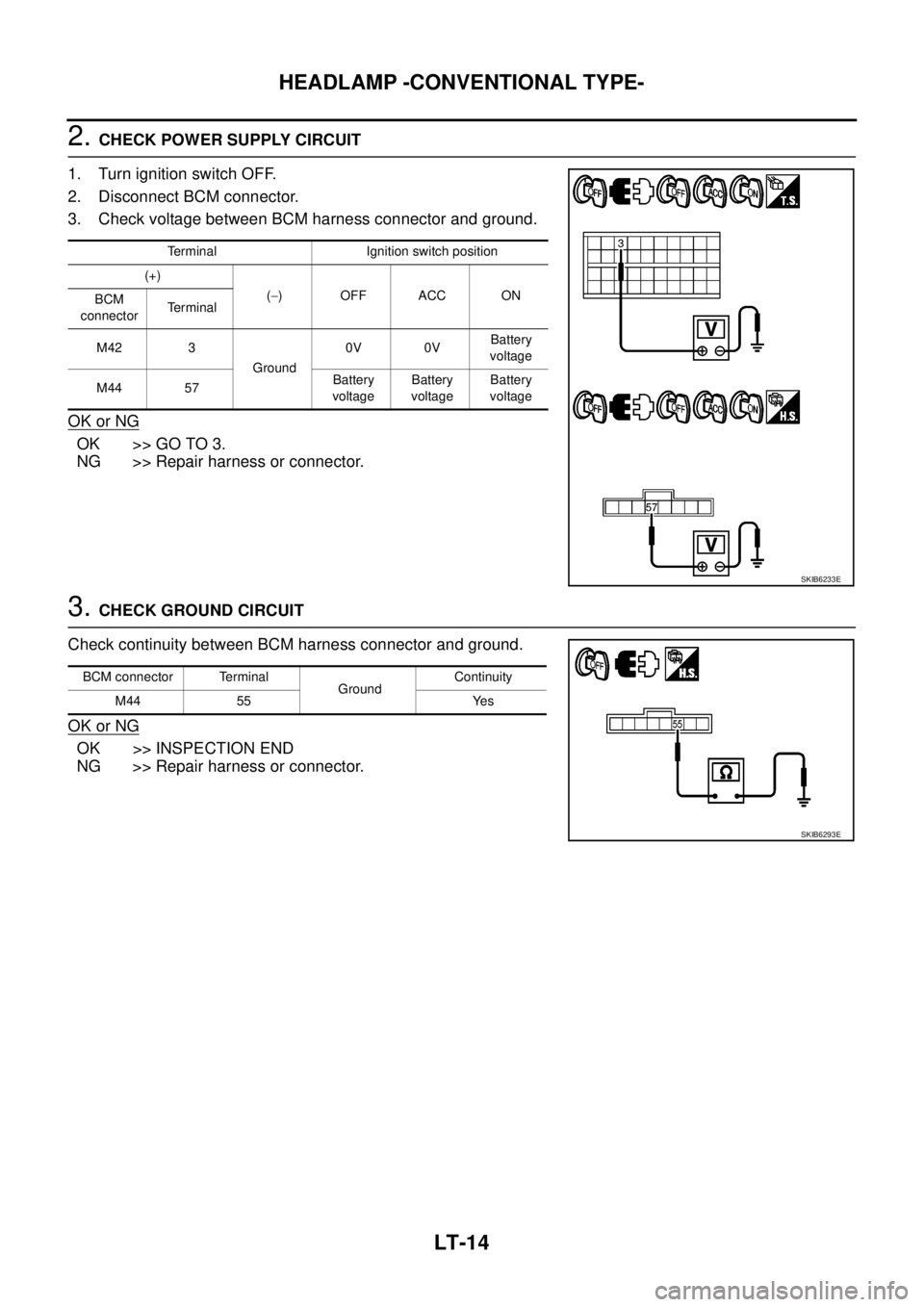
2.CHECK POWER SUPPLY CIRCUIT
1. Turn ignition switch OFF.
2. Disconnect BCM connector.
3. Check voltage between BCM harness connector and ground.
OK or NG
OK >> GO TO 3.
NG >> Repair harness or connector.
3.CHECK GROUND CIRCUIT
Check continuity between BCM harness connector and ground.
OK or NG
OK >> INSPECTION END
NG >> Repair harness or connector.
Terminal Ignition switch position
(+)
(-)OFFACCON
BCM
connectorTerminal
M42 3
Ground0V 0VBattery
voltage
M44 57Battery
voltageBattery
voltageBattery
voltage
SKIB6233E
BCM connector Terminal
GroundContinuity
M44 55 Yes
SKIB6293E
Page 2104 of 3171
HEADLAMP -CONVENTIONAL TYPE-
LT-21
C
D
E
F
G
H
I
J
L
MA
B
LT
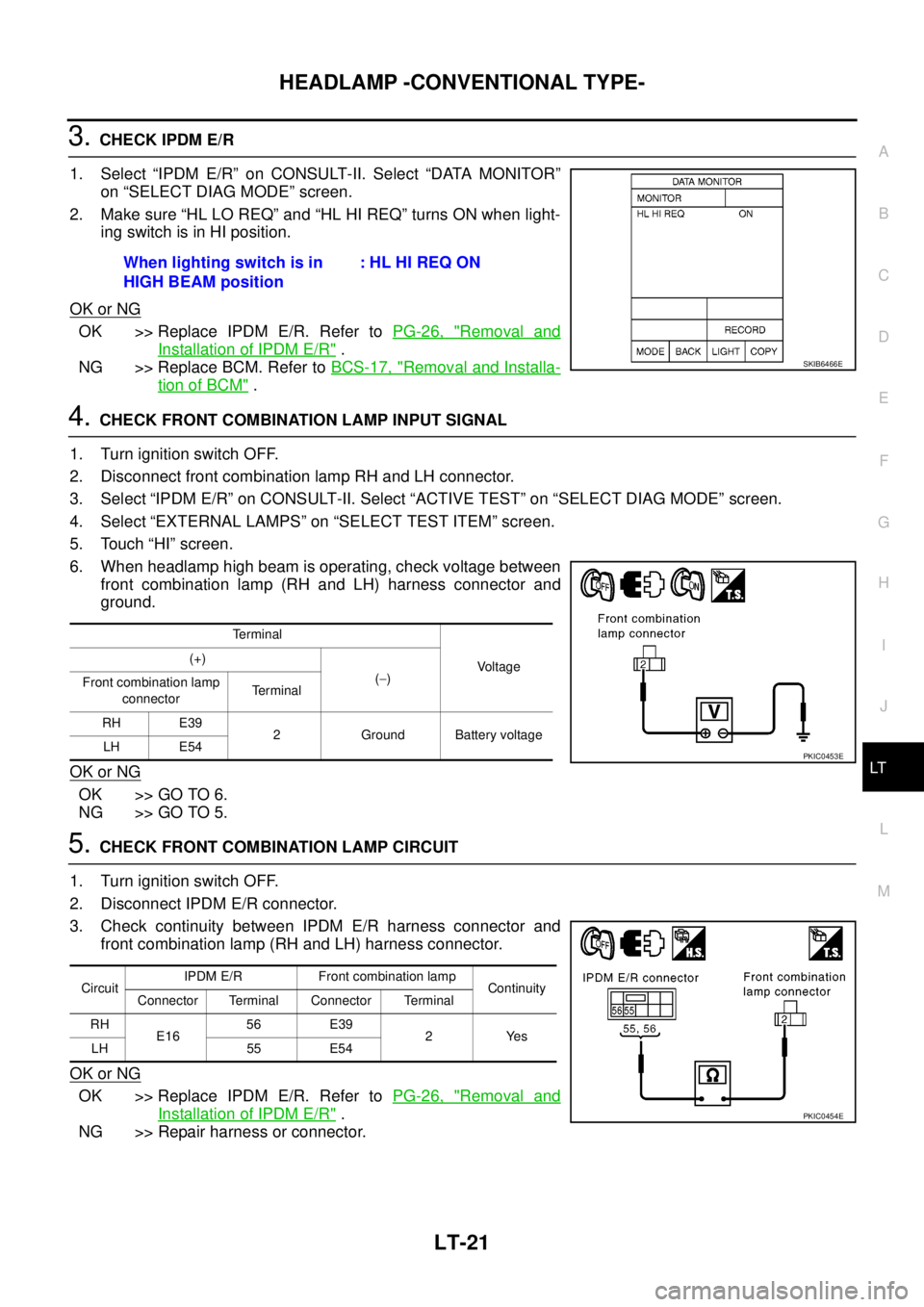
3.CHECK IPDM E/R
1. Select “IPDM E/R” on CONSULT-II. Select “DATA MONITOR”
on “SELECT DIAG MODE” screen.
2. Make sure “HL LO REQ” and “HL HI REQ” turns ON when light-
ingswitchisinHIposition.
OK or NG
OK >> Replace IPDM E/R. Refer toPG-26, "Removal and
Installation of IPDM E/R".
NG >> Replace BCM. Refer toBCS-17, "
Removal and Installa-
tion of BCM".
4.CHECK FRONT COMBINATION LAMP INPUT SIGNAL
1. Turn ignition switch OFF.
2. Disconnect front combination lamp RH and LH connector.
3. Select “IPDM E/R” on CONSULT-II. Select “ACTIVE TEST” on “SELECT DIAG MODE” screen.
4. Select “EXTERNAL LAMPS” on “SELECT TEST ITEM” screen.
5. Touch “HI” screen.
6. When headlamp high beam is operating, check voltage between
front combination lamp (RH and LH) harness connector and
ground.
OK or NG
OK >> GO TO 6.
NG >> GO TO 5.
5.CHECK FRONT COMBINATION LAMP CIRCUIT
1. Turn ignition switch OFF.
2. Disconnect IPDM E/R connector.
3. Check continuity between IPDM E/R harness connector and
front combination lamp (RH and LH) harness connector.
OK or NG
OK >> Replace IPDM E/R. Refer toPG-26, "Removal and
Installation of IPDM E/R".
NG >> Repair harness or connector.When lighting switch is in
HIGH BEAM position:HLHIREQON
SKIB6466E
Terminal
Voltage (+)
(-)
Front combination lamp
connectorTerminal
RH E39
2 Ground Battery voltage
LH E54
PKIC0453E
CircuitIPDM E/R Front combination lamp
Continuity
Connector Terminal Connector Terminal
RH
E1656 E39
2Yes
LH 55 E54
PKIC0454E
Page 2105 of 3171
LT-22
HEADLAMP -CONVENTIONAL TYPE-
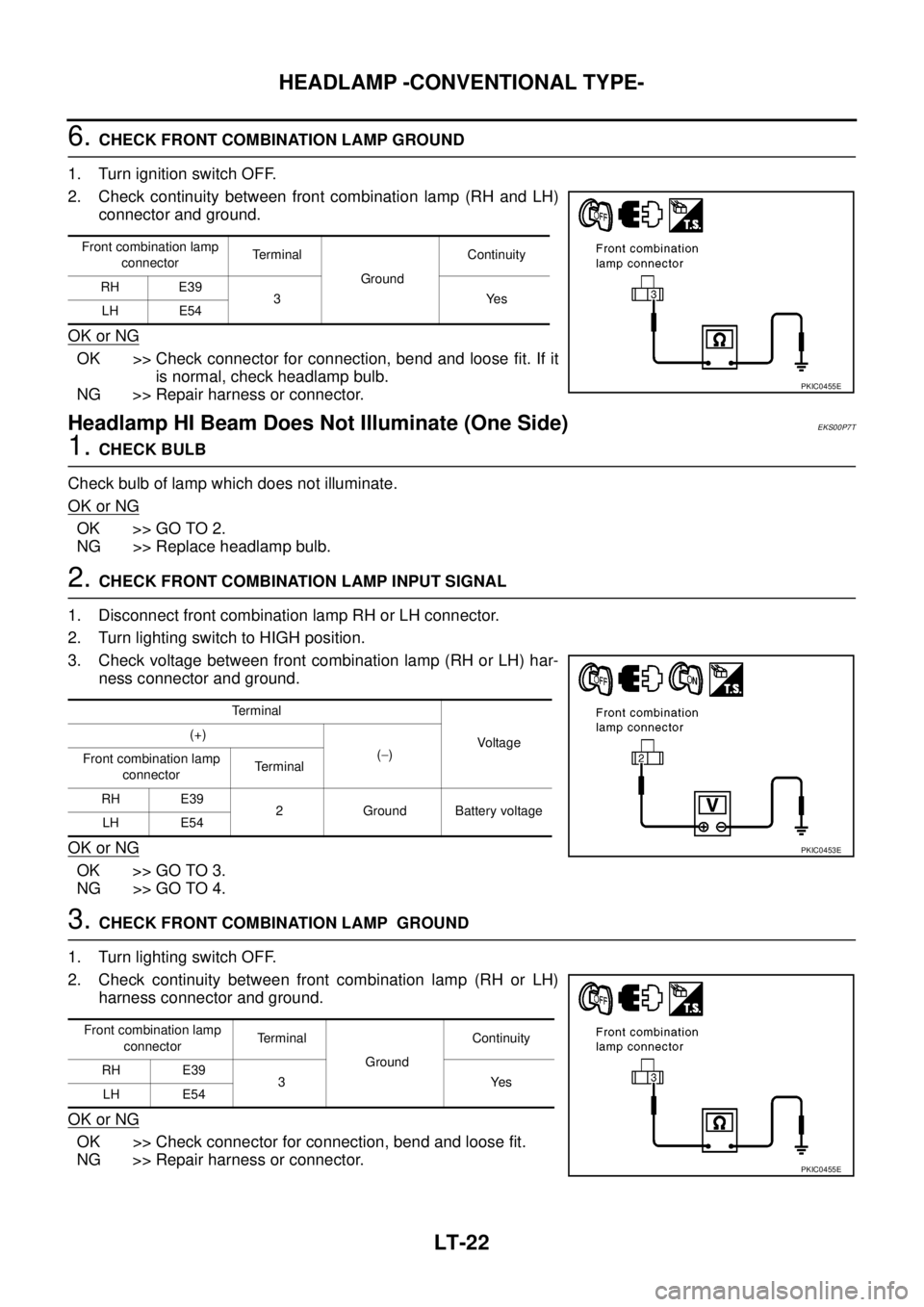
6.CHECK FRONT COMBINATION LAMP GROUND
1. Turn ignition switch OFF.
2. Check continuity between front combination lamp (RH and LH)
connector and ground.
OK or NG
OK >> Check connector for connection, bend and loose fit. If it
is normal, check headlamp bulb.
NG >> Repair harness or connector.
Headlamp HI Beam Does Not Illuminate (One Side)EKS00P7T
1.CHECK BULB
Check bulb of lamp which does not illuminate.
OK or NG
OK >> GO TO 2.
NG >> Replace headlamp bulb.
2.CHECK FRONT COMBINATION LAMP INPUT SIGNAL
1. Disconnect front combination lamp RH or LH connector.
2. Turn lighting switch to HIGH position.
3. Check voltage between front combination lamp (RH or LH) har-
ness connector and ground.
OK or NG
OK >> GO TO 3.
NG >> GO TO 4.
3.CHECK FRONT COMBINATION LAMP GROUND
1. Turn lighting switch OFF.
2. Check continuity between front combination lamp (RH or LH)
harness connector and ground.
OK or NG
OK >> Check connector for connection, bend and loose fit.
NG >> Repair harness or connector.
Front combination lamp
connectorTerminal
GroundContinuity
RH E39
3Yes
LH E54
PKIC0455E
Terminal
Voltag e (+)
(-)
Front combination lamp
connectorTerminal
RH E39
2 Ground Battery voltage
LH E54
PKIC0453E
Front combination lamp
connectorTe r m i n a l
GroundContinuity
RH E39
3Yes
LH E54
PKIC0455E
Page 2107 of 3171
LT-24
HEADLAMP -CONVENTIONAL TYPE-
2.HEADLAMP ACTIVE TEST
With CONSULT-II
1. Select “IPDM E/R” on CONSULT-II. Select “ACTIVE TEST” on
“SELECT DIAG MODE” screen.
2. Select “EXTERNAL LAMPS” on “SELECT TEST ITEM” screen.
3. Touch “LO” screen.
4. Make sure headlamp low beam operation.
Without CONSULT-II
1. Start auto active test. Refer toPG-19, "
Auto Active Test".
2. Make sure headlamp low beam operation.
OK or NG
OK >> GO TO 3.
NG >> GO TO 4.
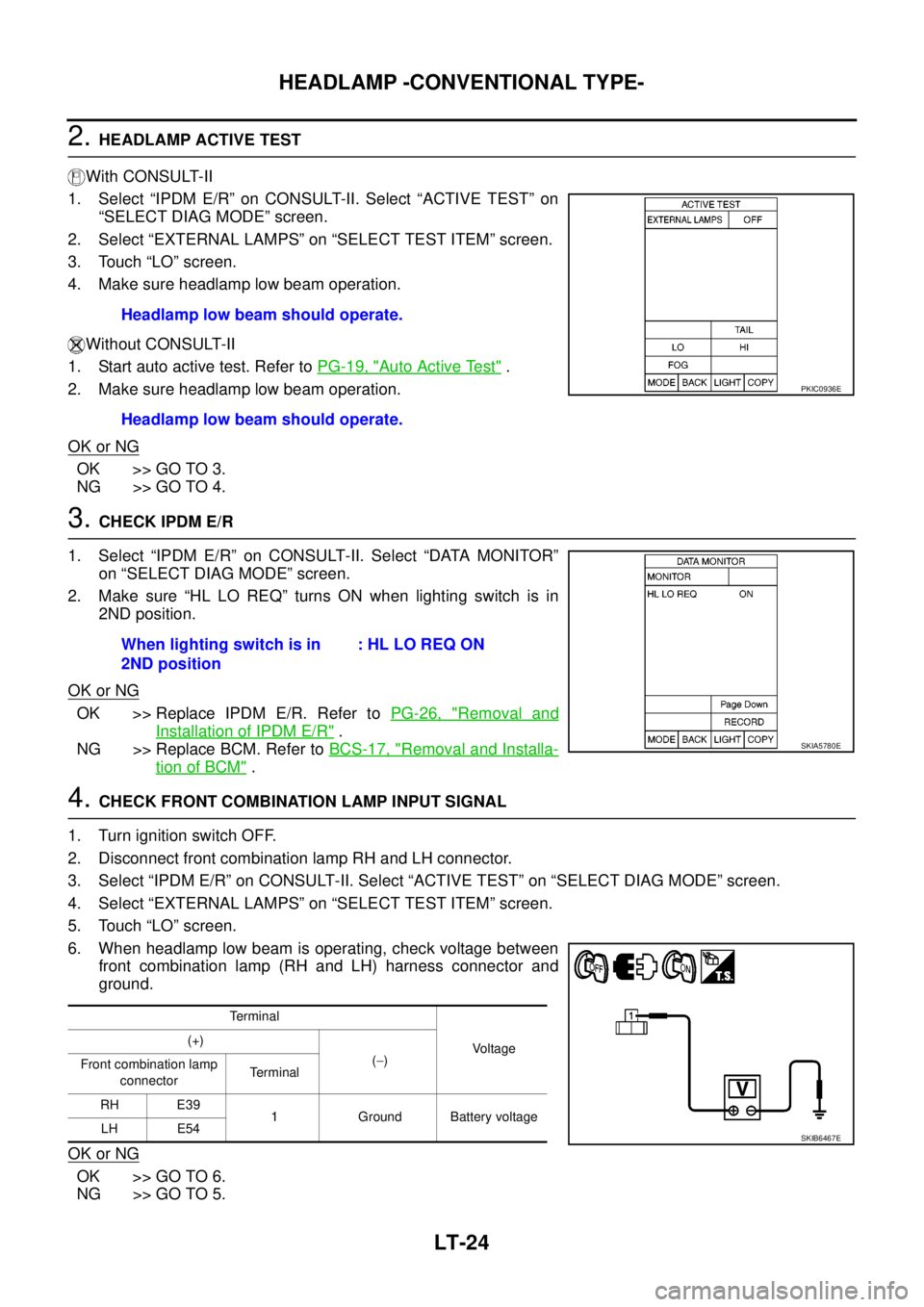
3.CHECK IPDM E/R
1. Select “IPDM E/R” on CONSULT-II. Select “DATA MONITOR”
on “SELECT DIAG MODE” screen.
2. Make sure “HL LO REQ” turns ON when lighting switch is in
2ND position.
OK or NG
OK >> Replace IPDM E/R. Refer toPG-26, "Removal and
Installation of IPDM E/R".
NG >> Replace BCM. Refer toBCS-17, "
Removal and Installa-
tion of BCM".
4.CHECK FRONT COMBINATION LAMP INPUT SIGNAL
1. Turn ignition switch OFF.
2. Disconnect front combination lamp RH and LH connector.
3. Select “IPDM E/R” on CONSULT-II. Select “ACTIVE TEST” on “SELECT DIAG MODE” screen.
4. Select “EXTERNAL LAMPS” on “SELECT TEST ITEM” screen.
5. Touch “LO” screen.
6. When headlamp low beam is operating, check voltage between
front combination lamp (RH and LH) harness connector and
ground.
OK or NG
OK >> GO TO 6.
NG >> GO TO 5.Headlamp low beam should operate.
Headlamp low beam should operate.
PKIC0936E
When lighting switch is in
2ND position:HLLOREQON
SKIA5780E
Te r m i n a l
Voltage (+)
(-)
Front combination lamp
connectorTerminal
RH E39
1 Ground Battery voltage
LH E54
SKIB6467E
Page 2108 of 3171
HEADLAMP -CONVENTIONAL TYPE-
LT-25
C
D
E
F
G
H
I
J
L
MA
B
LT
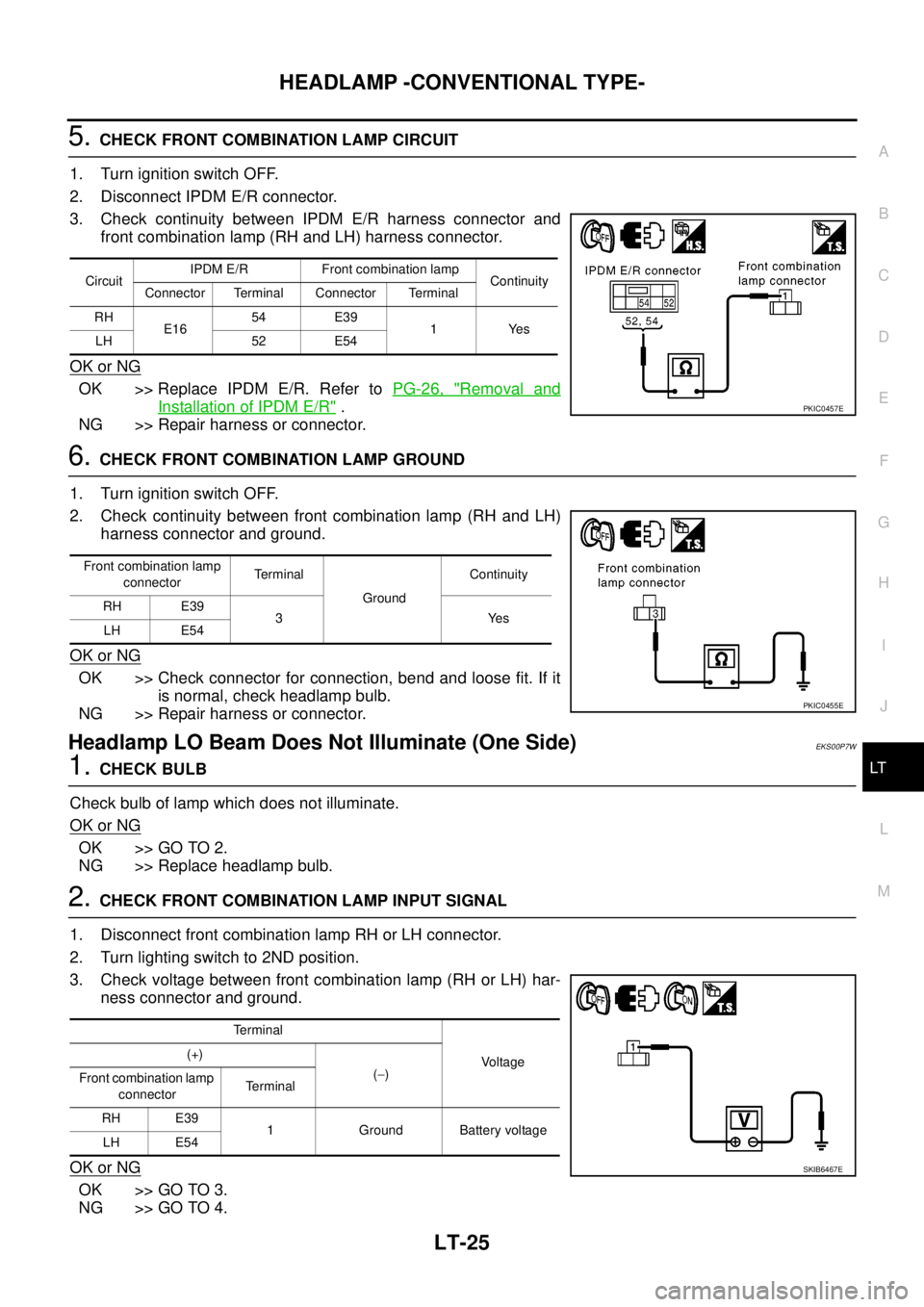
5.CHECK FRONT COMBINATION LAMP CIRCUIT
1. Turn ignition switch OFF.
2. Disconnect IPDM E/R connector.
3. Check continuity between IPDM E/R harness connector and
front combination lamp (RH and LH) harness connector.
OK or NG
OK >> Replace IPDM E/R. Refer toPG-26, "Removal and
Installation of IPDM E/R".
NG >> Repair harness or connector.
6.CHECK FRONT COMBINATION LAMP GROUND
1. Turn ignition switch OFF.
2. Check continuity between front combination lamp (RH and LH)
harness connector and ground.
OK or NG
OK >> Check connector for connection, bend and loose fit. If it
is normal, check headlamp bulb.
NG >> Repair harness or connector.
Headlamp LO Beam Does Not Illuminate (One Side)EKS00P7W
1.CHECK BULB
Check bulb of lamp which does not illuminate.
OK or NG
OK >> GO TO 2.
NG >> Replace headlamp bulb.
2.CHECK FRONT COMBINATION LAMP INPUT SIGNAL
1. Disconnect front combination lamp RH or LH connector.
2. Turn lighting switch to 2ND position.
3. Check voltage between front combination lamp (RH or LH) har-
ness connector and ground.
OK or NG
OK >> GO TO 3.
NG >> GO TO 4.
CircuitIPDM E/R Front combination lamp
Continuity
Connector Terminal Connector Terminal
RH
E1654 E39
1Yes
LH 52 E54
PKIC0457E
Front combination lamp
connectorTerminal
GroundContinuity
RH E39
3Yes
LH E54
PKIC0455E
Terminal
Voltage (+)
(-)
Front combination lamp
connectorTerminal
RH E39
1 Ground Battery voltage
LH E54
SKIB6467E