air condition NISSAN NAVARA 2005 Repair Workshop Manual
[x] Cancel search | Manufacturer: NISSAN, Model Year: 2005, Model line: NAVARA, Model: NISSAN NAVARA 2005Pages: 3171, PDF Size: 49.59 MB
Page 2682 of 3171
SQUEAK AND RATTLE TROUBLE DIAGNOSES
RF-5
C
D
E
F
G
H
J
K
L
MA
B
RF
DUPLICATE THE NOISE AND TEST DRIVE
If possible, drive the vehicle with the customer until the noise is duplicated. Note any additional information on
the Diagnostic Worksheet regarding the conditions or location of the noise. This information can be used to
duplicate the same conditions when you confirm the repair.
If the noise can be duplicated easily during the test drive, to help identify the source of the noise, try to dupli-
cate the noise with the vehicle stopped by doing one or all of the following:
1) Close a door.
2) Tap or push/pull around the area where the noise appears to be coming from.
3) Rev the engine.
4) Use a floor jack to recreate vehicle “twist”.
5) At idle, apply engine load (electrical load, half-clutch on M/T models, drive position on A/T models).
6) Raisethevehicleonahoistandhitatirewitharubberhammer.
lDrive the vehicle and attempt to duplicate the conditions the customer states exist when the noise occurs.
lIf it is difficult to duplicate the noise, drive the vehicle slowly on an undulating or rough road to stress the
vehicle body.
CHECK RELATED SERVICE BULLETINS
After verifying the customer concern or symptom, check ASIST for Technical Service Bulletins (TSBs) related
to that concern or symptom.
If a TSB relates to the symptom, follow the procedure to repair the noise.
LOCATE THE NOISE AND IDENTIFY THE ROOT CAUSE
1. Narrow down the noise to a general area. To help pinpoint the source of the noise, use a listening tool
(Engine Ear or mechanics stethoscope).
2. Narrow down the noise to a more specific area and identify the cause of the noise by:
lremoving the components in the area that you suspect the noise is coming from.
Do not use too much force when removing clips and fasteners, otherwise clips and fastener can be broken
or lost during the repair, resulting in the creation of new noise.
ltapping or pushing/pulling the component that you suspect is causing the noise.
Do not tap or push/pull the component with excessive force, otherwise the noise will be eliminated only
temporarily.
lfeeling for a vibration with your hand by touching the component(s) that you suspect is (are) causing the
noise.
lplacing a piece of paper between components that you suspect are causing the noise.
llooking for loose components and contact marks.
Refer toRF-6, "
Generic Squeak and Rattle Troubleshooting".
REPAIR THE CAUSE
lIf the cause is a loose component, tighten the component securely.
lIf the cause is insufficient clearance between components:
–separate components by repositioning or loosening and retightening the component, if possible.
–insulate components with a suitable insulator such as urethane pads, foam blocks, felt cloth tape or ure-
thane tape are available through your authorized Nissan Parts Department.
CAUTION:
Do not use excessive force as many components are constructed of plastic and may be damaged.
NOTE:
Always check with the Parts Department for the latest parts information.
Each item can be ordered separately as needed.
URETHANE PADS [1.5 mm (0.059 in) thick]
Insulates connectors, harness, etc.
76268-9E005: 100´135 mm (3.94´5.31 in)/76884-71L01: 60´85 mm (2.36´3.35 in)/76884-71L02: 15´
25 mm (0.59´0.98 in)
INSULATOR (Foam blocks)
Insulates components from contact. Can be used to fill space behind a panel.
73982-9E000: 45 mm (1.77 in) thick, 50´50 mm (1.97´1.97 in)/73982-50Y00: 10 mm (0.39 in) thick, 50
´50 mm (1.97´1.97 in)
INSULATOR (Light foam block)
80845-71L00: 30 mm (1.18 in) thick, 30´50 mm (1.18´1.97 in)
Page 2683 of 3171

RF-6
SQUEAK AND RATTLE TROUBLE DIAGNOSES
FELT CLOTHTAPE
Used to insulate where movement does not occur. Ideal for instrument panel applications.
68370-4B000: 15´25 mm (0.59´0.98 in) pad/68239-13E00: 5 mm (0.20 in) wide tape roll
The following materials, not available through NISSAN Parts Department, can also be used to repair squeaks
and rattles.
UHMW(TEFLON) TAPE
Insulates where slight movement is present. Ideal for instrument panel applications.
SILICONE GREASE
Used in place of UHMW tape that will be visible or not fit.
Note: Will only last a few months.
SILICONE SPRAY
Use when grease cannot be applied.
DUCT TAPE
Use to eliminate movement.
CONFIRM THE REPAIR
Confirm that the cause of a noise is repaired by test driving the vehicle. Operate the vehicle under the same
conditions as when the noise originally occurred. Refer to the notes on the Diagnostic Worksheet.
Generic Squeak and Rattle TroubleshootingEIS00CDZ
Refer to Table of Contents for specific component removal and installation information.
INSTRUMENT PANEL
Most incidents are caused by contact and movement between:
1. Cluster lid A and instrument panel
2. Acrylic lens and combination meter housing
3. Instrument panel to front pillar garnish
4. Instrument panel to windshield
5. Instrument panel mounting pins
6. Wiring harnesses behind the combination meter
7. A/C defroster duct and duct joint
These incidents can usually be located by tapping or moving the components to duplicate the noise or by
pressing on the components while driving to stop the noise. Most of these incidents can be repaired by apply-
ing felt cloth tape or silicon spray (in hard to reach areas). Urethane pads can be used to insulate wiring har-
ness.
CAUTION:
Do not use silicone spray to isolate a squeak or rattle. If you saturate the area with silicone, you will
not be able to recheck the repair.
CENTER CONSOLE
Components to pay attention to include:
1. Shifter assembly cover to finisher
2. A/C control unit and cluster lid C
3. Wiring harnesses behind audio and A/C control unit
The instrument panel repair and isolation procedures also apply to the center console.
DOORS
Pay attention to the:
1. Finisher and inner panel making a slapping noise
2. Inside handle escutcheon to door finisher
3. Wiring harnesses tapping
4. Door striker out of alignment causing a popping noise on starts and stops
Tapping or moving the components or pressing on them while driving to duplicate the conditions can isolate
many of these incidents. You can usually insulate the areas with felt cloth tape or insulator foam blocks to
repair the noise.
Page 2684 of 3171
SQUEAK AND RATTLE TROUBLE DIAGNOSES
RF-7
C
D
E
F
G
H
J
K
L
MA
B
RF
TRUNK
Trunk noises are often caused by a loose jack or loose items put into the trunk by the owner.
In addition look for:
1. Trunk lid dumpers out of adjustment
2. Trunk lid striker out of adjustment
3. Trunk lid torsion bars knocking together
4. A loose license plate or bracket
Most of these incidents can be repaired by adjusting, securing or insulating the item(s) or component(s) caus-
ing the noise.
SUNROOF/HEADLINING
Noises in the sunroof/headlining area can often be traced to one of the following:
1. Sunroof lid, rail, linkage or seals making a rattle or light knocking noise
2. Sunvisor shaft shaking in the holder
3. Front or rear windshield touching headlining and squeaking
Again, pressing on the components to stop the noise while duplicating the conditions can isolate most of these
incidents. Repairs usually consist of insulating with felt cloth tape.
SEATS
When isolating seat noise it's important to note the position the seat is in and the load placed on the seat when
the noise is present. These conditions should be duplicated when verifying and isolating the cause of the
noise.
Cause of seat noise include:
1. Headrest rods and holder
2. A squeak between the seat pad cushion and frame
3. Rear seatback lock and bracket
These noises can be isolated by moving or pressing on the suspected components while duplicating the con-
ditions under which the noise occurs. Most of these incidents can be repaired by repositioning the component
or applying urethane tape to the contact area.
UNDERHOOD
Some interior noise may be caused by components under the hood or on the engine wall. The noise is then
transmitted into the passenger compartment.
Causes of transmitted underhood noise include:
1. Any component mounted to the engine wall
2. Components that pass through the engine wall
3. Engine wall mounts and connectors
4. Loose radiator mounting pins
5. Hood bumpers out of adjustment
6. Hood striker out of adjustment
These noises can be difficult to isolate since they cannot be reached from the interior of the vehicle. The best
method is to secure, move or insulate one component at a time and test drive the vehicle. Also, engine RPM
or load can be changed to isolate the noise. Repairs can usually be made by moving, adjusting, securing, or
insulating the component causing the noise.
Page 2695 of 3171
RF-18
SUNROOF
3.CHECK SONROOF MOTOR CIRCUIT
1. Turn ignition switch OFF.
2. Disconnect BCM and sunroof motor assembly connector.
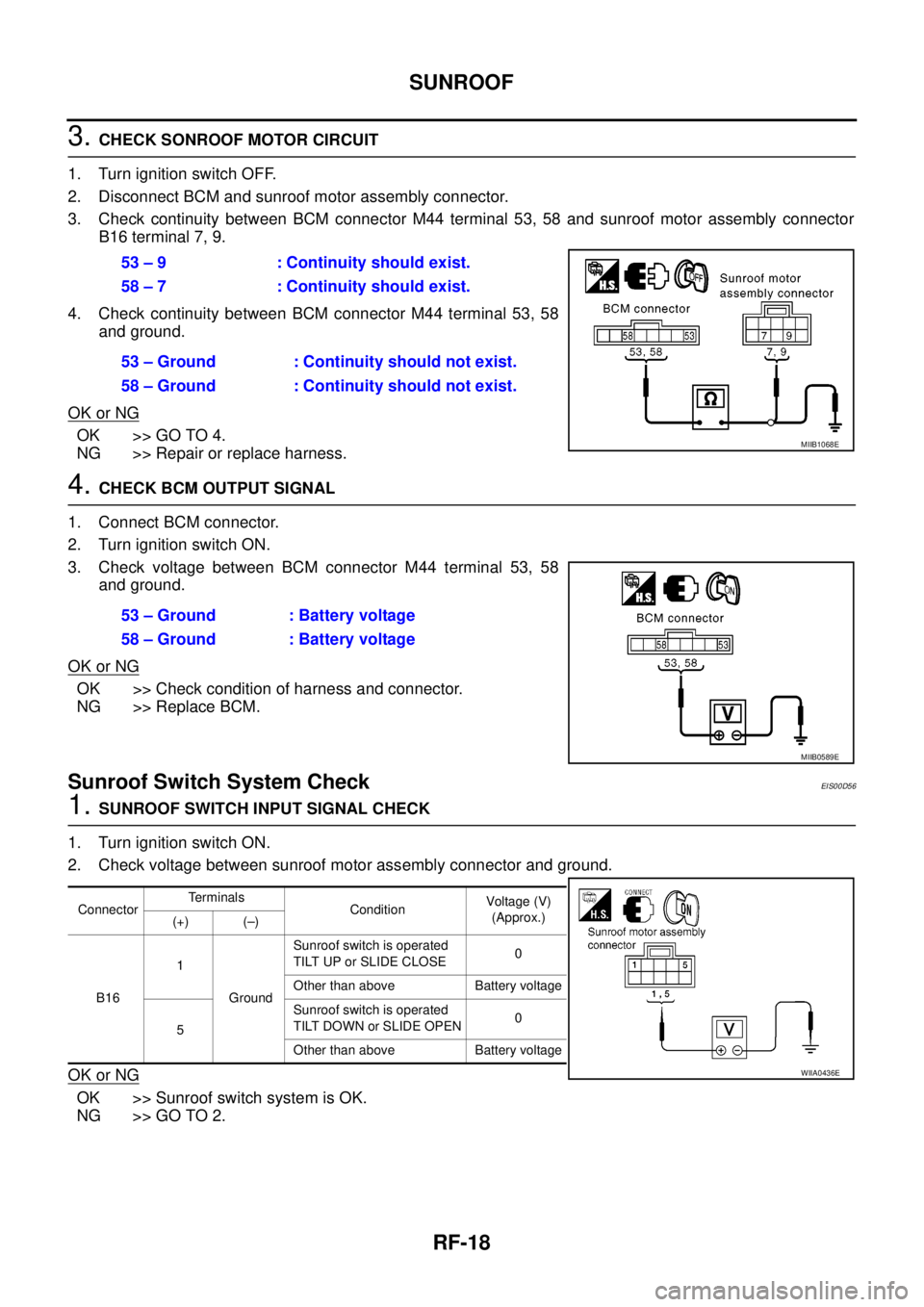
3. Check continuity between BCM connector M44 terminal 53, 58 and sunroof motor assembly connector
B16 terminal 7, 9.
4. Check continuity between BCM connector M44 terminal 53, 58
and ground.
OK or NG
OK >> GO TO 4.
NG >> Repair or replace harness.
4.CHECK BCM OUTPUT SIGNAL
1. Connect BCM connector.
2. Turn ignition switch ON.
3. Check voltage between BCM connector M44 terminal 53, 58
and ground.
OK or NG
OK >> Check condition of harness and connector.
NG >> Replace BCM.
Sunroof Switch System CheckEIS00D56
1.SUNROOF SWITCH INPUT SIGNAL CHECK
1. Turn ignition switch ON.
2. Check voltage between sunroof motor assembly connector and ground.
OK or NG
OK >> Sunroof switch system is OK.
NG >> GO TO 2.53 – 9 : Continuity should exist.
58 – 7 : Continuity should exist.
53 – Ground : Continuity should not exist.
58 – Ground : Continuity should not exist.
MIIB1068E
53 – Ground : Battery voltage
58 – Ground : Battery voltage
MIIB0589E
ConnectorTerminals
ConditionVoltag e (V)
(Approx.)
(+) (–)
B161
GroundSunroof switch is operated
TILT UP or SLIDE CLOSE0
Other than above Battery voltage
5Sunroof switch is operated
TILT DOWN or SLIDE OPEN0
Other than above Battery voltage
WIIA0436E
Page 2696 of 3171
SUNROOF
RF-19
C
D
E
F
G
H
J
K
L
MA
B
RF
2.SUNROOF SWITCH CIRCUIT CHECK
1. Turn ignition switch OFF.
2. Disconnect sunroof motor assembly and sunroof switch connector.
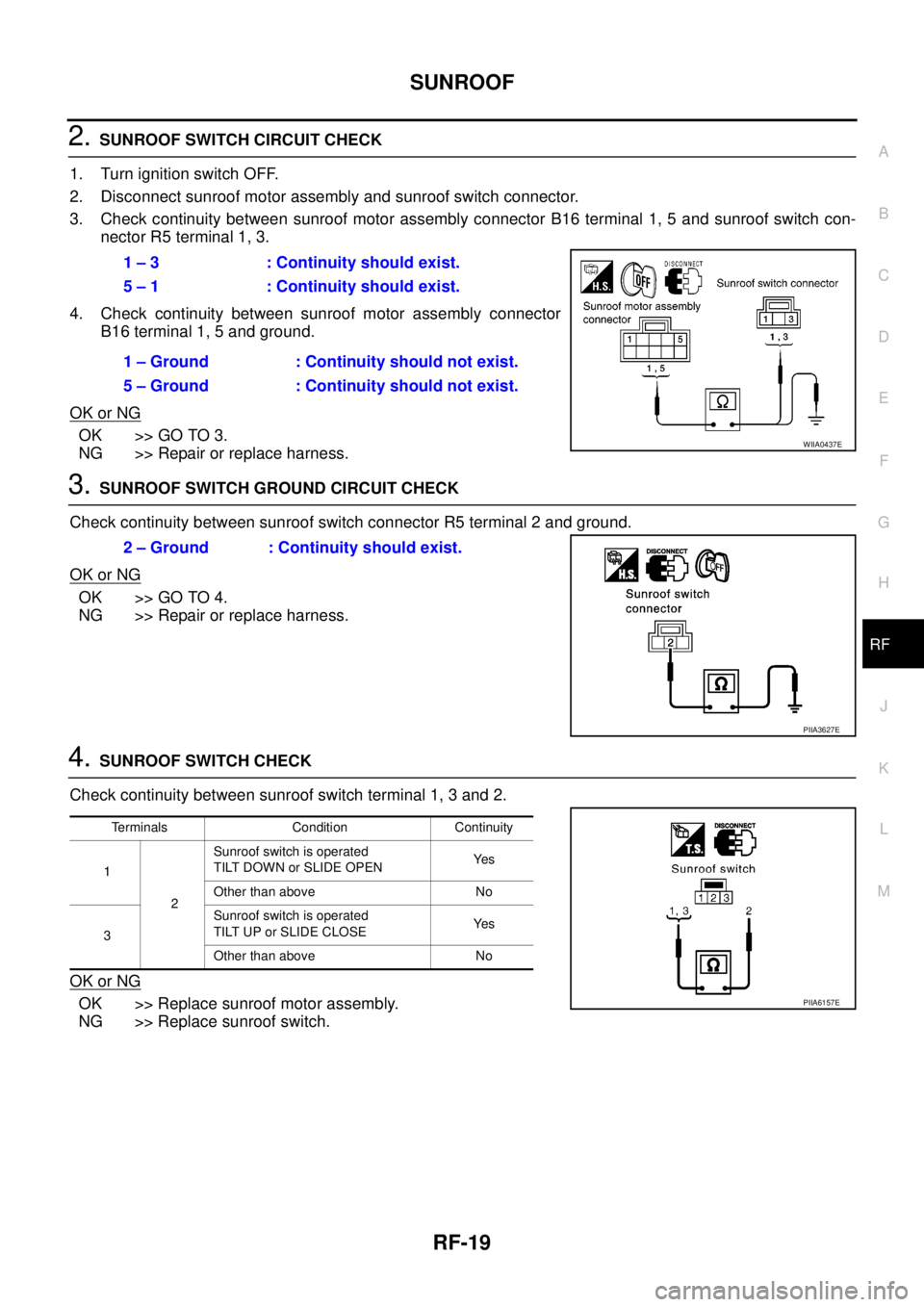
3. Check continuity between sunroof motor assembly connector B16 terminal 1, 5 and sunroof switch con-
nector R5 terminal 1, 3.
4. Check continuity between sunroof motor assembly connector
B16 terminal 1, 5 and ground.
OK or NG
OK >> GO TO 3.
NG >> Repair or replace harness.
3.SUNROOF SWITCH GROUND CIRCUIT CHECK
Check continuity between sunroof switch connector R5 terminal 2 and ground.
OK or NG
OK >> GO TO 4.
NG >> Repair or replace harness.
4.SUNROOF SWITCH CHECK
Check continuity between sunroof switch terminal 1, 3 and 2.
OK or NG
OK >> Replace sunroof motor assembly.
NG >> Replace sunroof switch.1 – 3 : Continuity should exist.
5 – 1 : Continuity should exist.
1 – Ground : Continuity should not exist.
5 – Ground : Continuity should not exist.
WIIA0437E
2 – Ground : Continuity should exist.
PIIA3627E
Terminals Condition Continuity
1
2Sunroof switch is operated
TILT DOWN or SLIDE OPENYe s
Other than above No
3Sunroof switch is operated
TILT UP or SLIDE CLOSEYe s
Other than above No
PIIA6157E
Page 2751 of 3171
![NISSAN NAVARA 2005 Repair Workshop Manual RFD-48
[WITH ELECTRONIC LOCKING DIFFERENTIAL]
TROUBLE DIAGNOSIS
Trouble Diagnosis Chart for Symptoms
EDS003AY
If DIFF LOCK indicator lamp does not turn ON after engine start, perform self-diagnosis. R](/img/5/57362/w960_57362-2750.png "NISSAN NAVARA 2005 Repair Workshop Manual RFD-48
[WITH ELECTRONIC LOCKING DIFFERENTIAL]
TROUBLE DIAGNOSIS
Trouble Diagnosis Chart for Symptoms
EDS003AY
If DIFF LOCK indicator lamp does not turn ON after engine start, perform self-diagnosis. R")
RFD-48
[WITH ELECTRONIC LOCKING DIFFERENTIAL]
TROUBLE DIAGNOSIS
Trouble Diagnosis Chart for Symptoms
EDS003AY
If DIFF LOCK indicator lamp does not turn ON after engine start, perform self-diagnosis. Refer toRFD-51, "SELF-DIAG RESULTSMODE".
Differential Lock Control Unit Input/Output Signal Reference ValuesEDS003AZ
DIFFERENTIAL LOCK CONTROL UNIT INSPECTION TABLE
Specifications with CONSULT-II
Symptom Condition Check itemReference
page
DIFF LOCK indicator lamp does not turn ON.
(DIFF LOCK indicator lamp check)Ignition switch: ONCAN communication line
RFD-70
Power supply and ground for differential
lock control unit
Combination meter
DIFF LOCK indicator lamp does not change.
lEngine running
lDifferential lock mode
switch: ONCombination meter
RFD-73Differential lock mode switch
CAN communication line
DIFF LOCK indicator lamp sometimes flashes.
lEngine running
lDifferential lock mode
switch: ONCombination meter
RFD-74Differential lock mode switch
Differential lock position switch
Differential inner parts
Monitor item [Unit] Content Condition Display value
BATTERY VOLT [V]Power supply voltage for
differential lock control unitIgnition switch: ON Battery voltage
4WD MODE [2H/4H/
4Lo]Condition of 4WD shift
switch4WD shift switch
(Engine running)2WD 2H
4H 4H
4LO 4Lo
VHCL S/SEN-R [km/h]
or [mph]Wheel speed
(Rear wheel right)Vehicle stopped 0 km/h (0 mph)
Vehicle running
CAUTION:
Check air pressure of tire under standard condition.Approximately
equal to the indi-
cation on speed-
ometer (Inside of
±10%)
VHCL S/SEN-L [km/h] or
[mph]Wheel speed
(Rear wheel left)Vehicle stopped 0 km/h (0 mph)
Vehicle running
CAUTION:
Check air pressure of tire under standard condition.Approximately
equal to the indi-
cation on speed-
ometer (Inside of
±10%)
VHCL S/SEN-RL [km/h]
or [mph]Wheel speed
(Average value of rear
wheel right and left)Vehicle stopped 0 km/h (0 mph)
Vehicle running
CAUTION:
Check air pressure of tire under standard condition.Approximately
equal to the indi-
cation on speed-
ometer (Inside of
±10%)
D-LOCK SW SIG [ON/
OFF]Condition of differential
lock mode switchDifferential lock mode switch: ON ON
Differential lock mode switch: OFF OFF
D-LOCK SIG [ON/OFF]Control status of differen-
tial lock
lVehicle stopped
lEngine running
l4WD shift switch: 4LODifferential lock mode
switch: ONON
Differential lock mode
switch: OFFOFF
Page 2759 of 3171
![NISSAN NAVARA 2005 Repair Workshop Manual RFD-56
[WITH ELECTRONIC LOCKING DIFFERENTIAL]
TROUBLE DIAGNOSIS FOR SYSTEM
3.CHECK DIFFERENTIAL LOCK CONTROL UNIT
Check differential lock control unit input/output signal. Refer toRFD-48, "
Differenti](/img/5/57362/w960_57362-2758.png "NISSAN NAVARA 2005 Repair Workshop Manual RFD-56
[WITH ELECTRONIC LOCKING DIFFERENTIAL]
TROUBLE DIAGNOSIS FOR SYSTEM
3.CHECK DIFFERENTIAL LOCK CONTROL UNIT
Check differential lock control unit input/output signal. Refer toRFD-48, \"
Differenti")
RFD-56
[WITH ELECTRONIC LOCKING DIFFERENTIAL]
TROUBLE DIAGNOSIS FOR SYSTEM
3.CHECK DIFFERENTIAL LOCK CONTROL UNIT
Check differential lock control unit input/output signal. Refer toRFD-48, "
Differential Lock Control Unit Input/
Output Signal Reference Values".
OK or NG
OK >> GO TO 4.
NG >> Check differential lock control unit pin terminals for damage or loose connection with harness con-
nector. If any items are damaged, repair or replace damaged parts.
4.CHECK DTC
Perform the self-diagnosis, after driving the vehicle for a while.
OK or NG
OK >>INSPECTION END
NG >> Replace differential lock control unit. Refer toRFD-76, "
Removal and Installation".
Differential Lock Control UnitEDS003B2
DIAGNOSTIC PROCEDURE
1.PERFORM SELF-DIAGNOSIS
With CONSULT-II
1. Turn ignition switch “ON”. (Do not start engine.)
2. Select “SELF-DIAG RESULTS” mode for “DIFF LOCK” with CONSULT-II.
3. Touch “ERASE”.
4. Turn ignition switch “OFF” and wait at least 10 seconds.
5. Perform the self-diagnosis again.
Is the
“CONTROL UNIT 1 [P1834]”,“CONTROL UNIT 2 [P1835]”,“CONTROL UNIT 3 [P1836]”or“CONTROL
UNIT 4 [P1837]”displayed?
YES >> Replace differential lock control unit. Refer toRFD-76, "Removal and Installation".
NO >>INSPECTION END
Differential Lock Mode SwitchEDS003B3
CONSULT-II REFERENCE VALUE IN DATA MONITOR MODE
Data are reference value.
DIFFERENTIAL LOCK CONTROL UNIT TERMINALS AND REFERENCE VALUE
Data are reference value and are measured between each terminal and ground.
CAUTION:
When using a circuit tester to measure voltage for inspection, be sure not to extend forcibly any connector terminals.
Monitor item [Unit] Content Condition Display value
D-LOCK SW SIG [ON/
OFF]Condition of differential
lock mode switchDifferential lock mode switch: ON ON
Differential lock mode switch: OFF OFF
Te r m i n a lWire
colorItem Condition Data (Approx.)
9YDifferential lock mode switch
(ON)Ignition switch: ONDifferential lock mode switch: ON Battery voltage
Differential lock mode switch: OFF 0V
22 GDifferential lock mode switch
(OFF)Ignition switch: ONDifferential lock mode switch: ON 0V
Differential lock mode switch: OFF Battery voltage
Page 2761 of 3171
![NISSAN NAVARA 2005 Repair Workshop Manual RFD-58
[WITH ELECTRONIC LOCKING DIFFERENTIAL]
TROUBLE DIAGNOSIS FOR SYSTEM
2.CHECK DIFFERENTIAL LOCK MODE SWITCH SUPPLY CIRCUIT
1. Turn ignition switch “ON”.
2. Disconnect differential lock mode s](/img/5/57362/w960_57362-2760.png "NISSAN NAVARA 2005 Repair Workshop Manual RFD-58
[WITH ELECTRONIC LOCKING DIFFERENTIAL]
TROUBLE DIAGNOSIS FOR SYSTEM
2.CHECK DIFFERENTIAL LOCK MODE SWITCH SUPPLY CIRCUIT
1. Turn ignition switch “ON”.
2. Disconnect differential lock mode s")
RFD-58
[WITH ELECTRONIC LOCKING DIFFERENTIAL]
TROUBLE DIAGNOSIS FOR SYSTEM
2.CHECK DIFFERENTIAL LOCK MODE SWITCH SUPPLY CIRCUIT
1. Turn ignition switch “ON”.
2. Disconnect differential lock mode switch harness connector.
3. Check voltage between differential lock mode switch harness
connector terminal 3 and ground.
4. Turn ignition switch “OFF”.
5. Check voltage between differential lock mode switch harness
connector terminal 3 and ground.
OK or NG
OK >> GO TO 3.
NG >> Check the following. If any items are damaged, repair or
replace damaged parts.
l10A fuse [No. 3, located in fuse block (J/B)]
lHarness for short or open between ignition switch and differential lock mode switch harness
connector terminal 3
lIgnition switch. Refer toPG-4, "POWER SUPPLY ROUTING CIRCUIT".
3.CHECK DIFFERENTIAL LOCK MODE SWITCH
1. Turn ignition switch “OFF”.
2. Disconnect differential lock mode switch harness connector.
3. Operate differential lock mode switch and check continuity
between differential lock mode switch terminals.
OK or NG
OK >> GO TO 4.
NG >> Replace differential lock mode switch.
Connector Terminal Voltage (Approx.)
M108 3 - Ground Battery voltage
SDIA2534E
Connector Terminal Voltage (Approx.)
M108 3 - Ground 0V
SDIA2643E
Terminal Condition Continuity
1-3Differential lock mode switch: ON No
Differential lock mode switch: OFF Yes
2-3Differential lock mode switch: ON Yes
Differential lock mode switch: OFF No
SDIA2535E
Page 2762 of 3171
![NISSAN NAVARA 2005 Repair Workshop Manual TROUBLE DIAGNOSIS FOR SYSTEM
RFD-59
[WITH ELECTRONIC LOCKING DIFFERENTIAL]
C
E
F
G
H
I
J
K
L
MA
B
RFD
4.CHECK HARNESS BETWEEN DIFFERENTIAL LOCK CONTROL UNIT AND DIFFERENTIAL LOCK
MODE SWITCH
1. Turn i](/img/5/57362/w960_57362-2761.png "NISSAN NAVARA 2005 Repair Workshop Manual TROUBLE DIAGNOSIS FOR SYSTEM
RFD-59
[WITH ELECTRONIC LOCKING DIFFERENTIAL]
C
E
F
G
H
I
J
K
L
MA
B
RFD
4.CHECK HARNESS BETWEEN DIFFERENTIAL LOCK CONTROL UNIT AND DIFFERENTIAL LOCK
MODE SWITCH
1. Turn i")
TROUBLE DIAGNOSIS FOR SYSTEM
RFD-59
[WITH ELECTRONIC LOCKING DIFFERENTIAL]
C
E
F
G
H
I
J
K
L
MA
B
RFD
4.CHECK HARNESS BETWEEN DIFFERENTIAL LOCK CONTROL UNIT AND DIFFERENTIAL LOCK
MODE SWITCH
1. Turn ignition switch “OFF”.
2. Disconnect differential lock control unit harness connector and differential lock mode switch harness con-
nector.
3. Check continuity between the following terminals.
–Differential lock control unit harness connector M107 terminal 9
and differential lock mode switch harness connector M108 ter-
minal 2.
–Differential lock control unit harness connector M107 terminal 22
and differential lock mode switch harness connector M108 ter-
minal 1.
Also check harness for short to ground and short to power.
OK or NG
OK >> GO TO 5.
NG >> Repair or replace damaged parts.
5.CHECK DIFFERENTIAL LOCK CONTROL UNIT
Check differential lock control unit input/output signal. Refer toRFD-48, "
Differential Lock Control Unit Input/
Output Signal Reference Values".
OK or NG
OK >> GO TO 6.
NG >> Check differential lock control unit pin terminals for damage or loose connection with harness con-
nector. If any items are damaged, repair or replace damaged parts.
6.CHECK DTC
Perform the self-diagnosis, after driving the vehicle for a while.
OK or NG
OK >>INSPECTION END
NG >> Replace differential lock control unit. Refer toRFD-76, "
Removal and Installation".
COMPONENT INSPECTION
1. Turn ignition switch “OFF”.
2. Disconnect differential lock mode switch harness connector.
3. Operate differential lock mode switch and check continuity
between differential lock mode switch terminals.
4. If NG, replace differential lock mode switch.Continuity should exist.
SDIA2569E
Terminal Condition Continuity
1-3Differential lock mode switch: ON No
Differential lock mode switch: OFF Yes
2-3Differential lock mode switch: ON Yes
Differential lock mode switch: OFF No
SDIA2535E
Page 2764 of 3171
![NISSAN NAVARA 2005 Repair Workshop Manual TROUBLE DIAGNOSIS FOR SYSTEM
RFD-61
[WITH ELECTRONIC LOCKING DIFFERENTIAL]
C
E
F
G
H
I
J
K
L
MA
B
RFD
DIAGNOSTIC PROCEDURE
1.CHECK DIFFERENTIAL LOCK POSITION SWITCH SIGNAL
With CONSULT-II
1. Start eng](/img/5/57362/w960_57362-2763.png "NISSAN NAVARA 2005 Repair Workshop Manual TROUBLE DIAGNOSIS FOR SYSTEM
RFD-61
[WITH ELECTRONIC LOCKING DIFFERENTIAL]
C
E
F
G
H
I
J
K
L
MA
B
RFD
DIAGNOSTIC PROCEDURE
1.CHECK DIFFERENTIAL LOCK POSITION SWITCH SIGNAL
With CONSULT-II
1. Start eng")
TROUBLE DIAGNOSIS FOR SYSTEM
RFD-61
[WITH ELECTRONIC LOCKING DIFFERENTIAL]
C
E
F
G
H
I
J
K
L
MA
B
RFD
DIAGNOSTIC PROCEDURE
1.CHECK DIFFERENTIAL LOCK POSITION SWITCH SIGNAL
With CONSULT-II
1. Start engine.
2. Select “DATA MONITOR” mode for “DIFF LOCK” with CONSULT-II.
3. Read out ON/OFF switching action of “D-LOCK POS SW SIG”.
Without CONSULT-II
1. Start engine.
2. Check voltage between differential lock control unit harness
connector terminal and ground.
OK or NG
OK >> GO TO 5.
NG >> GO TO 2.
2.CHECK GROUND CIRCUIT
1. Turn ignition switch “OFF”.
2. Disconnect differential lock position switch harness connector.
3. Check continuity between differential lock position switch har-
ness connector C22 terminal 2 and ground.
Also check harness for short to ground and short to power.
OK or NG
OK >> GO TO 3.
NG >> Repair open circuit or short to ground or short to power
in harness or connectors.
Monitor item ConditionDisplay
value
D-LOCK POS
SW SIG
lVehicle stopped
lEngine running
l4WD shift
switch: 4LODifferential lock mode
switch: ON
(DIFF LOCK indicator
lamp: ON)ON
Differential lock mode
switch: OFF
(DIFF LOCK indicator
lamp: OFF)OFF
SDIA2538E
Connector Terminal ConditionVo l ta g e
(Approx.)
M10720 -
Ground
lVehicle stopped
lEngine running
l4WD shift switch:
4LODifferential lock mode
switch: ON
(DIFF LOCK indicator
lamp: ON)0V
Differential lock mode
switch: OFF
(DIFF LOCK indicator
lamp: OFF)Battery
voltage
SDIA2570E
Continuity should exist.
SDIA3428E