air condition NISSAN NAVARA 2005 Repair Workshop Manual
[x] Cancel search | Manufacturer: NISSAN, Model Year: 2005, Model line: NAVARA, Model: NISSAN NAVARA 2005Pages: 3171, PDF Size: 49.59 MB
Page 3050 of 3171
TROUBLE DIAGNOSIS FOR SYSTEM
TF-83
C
E
F
G
H
I
J
K
L
MA
B
TF
DIAGNOSTIC PROCEDURE
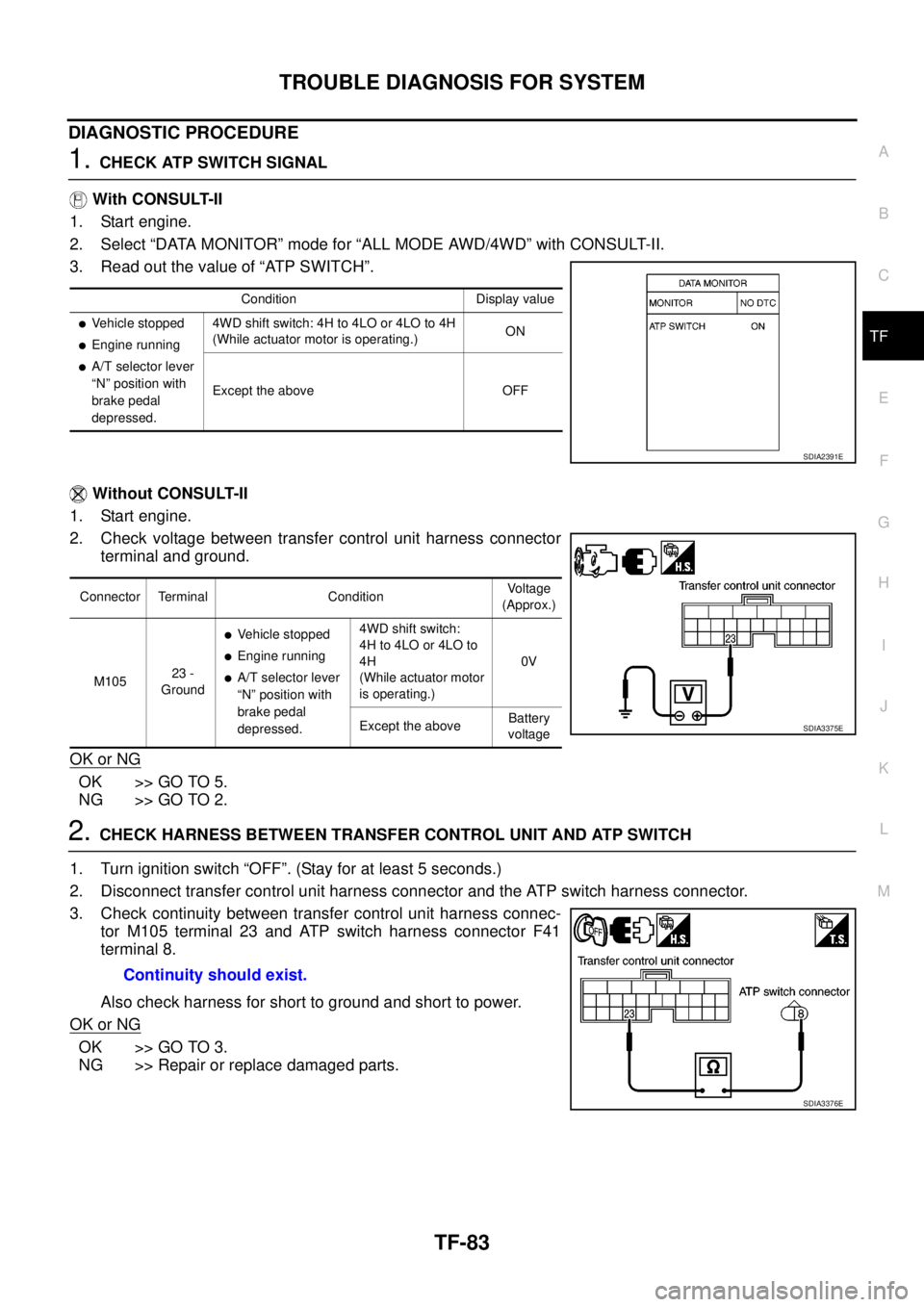
1.CHECK ATP SWITCH SIGNAL
With CONSULT-II
1. Start engine.
2. Select “DATA MONITOR” mode for “ALL MODE AWD/4WD” with CONSULT-II.
3. Read out the value of “ATP SWITCH”.
Without CONSULT-II
1. Start engine.
2. Check voltage between transfer control unit harness connector
terminal and ground.
OK or NG
OK >> GO TO 5.
NG >> GO TO 2.
2.CHECK HARNESS BETWEEN TRANSFER CONTROL UNIT AND ATP SWITCH
1. Turn ignition switch “OFF”. (Stay for at least 5 seconds.)
2. Disconnect transfer control unit harness connector and the ATP switch harness connector.
3. Check continuity between transfer control unit harness connec-
tor M105 terminal 23 and ATP switch harness connector F41
terminal 8.
Also check harness for short to ground and short to power.
OK or NG
OK >> GO TO 3.
NG >> Repair or replace damaged parts.
Condition Display value
lVehicle stopped
lEngine running
lA/T selector lever
“N” position with
brake pedal
depressed.4WD shift switch: 4H to 4LO or 4LO to 4H
(While actuator motor is operating.)ON
Except the above OFF
SDIA2391E
Connector Terminal ConditionVoltage
(Approx.)
M10523 -
Ground
lVehicle stopped
lEngine running
lA/T selector lever
“N” position with
brake pedal
depressed.4WD shift switch:
4H to 4LO or 4LO to
4H
(While actuator motor
is operating.)0V
Except the aboveBattery
voltage
SDIA3375E
Continuity should exist.
SDIA3376E
Page 3051 of 3171
TF-84
TROUBLE DIAGNOSIS FOR SYSTEM
3.CHECK GROUND CIRCUIT
1. Turn ignition switch “OFF”. (Stay for at least 5 seconds.)
2. Disconnect ATP switch harness connector.
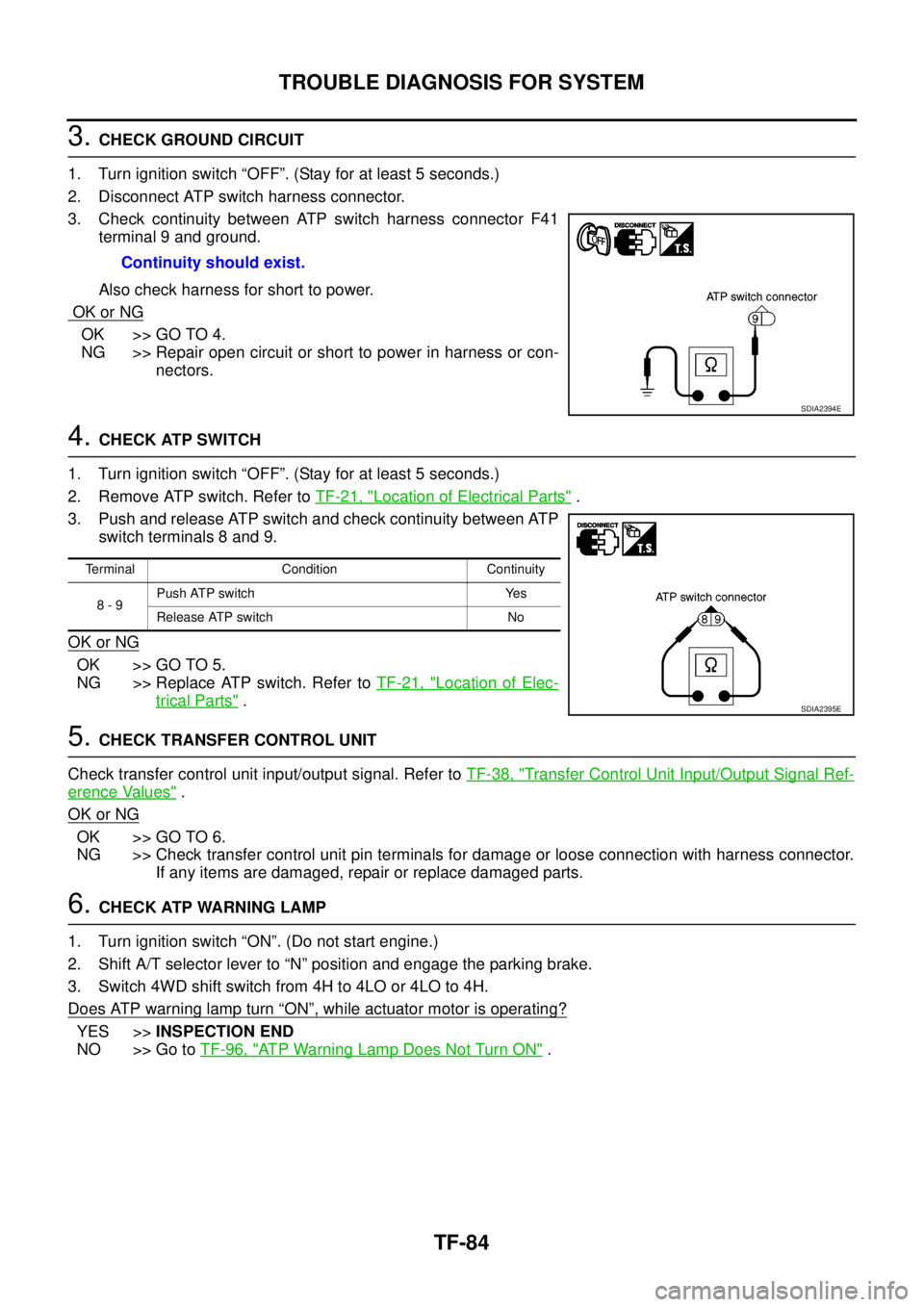
3. Check continuity between ATP switch harness connector F41
terminal 9 and ground.
Also check harness for short to power.
OK or NG
OK >> GO TO 4.
NG >> Repair open circuit or short to power in harness or con-
nectors.
4.CHECK ATP SWITCH
1. Turn ignition switch “OFF”. (Stay for at least 5 seconds.)
2. Remove ATP switch. Refer toTF-21, "
Location of Electrical Parts".
3. Push and release ATP switch and check continuity between ATP
switch terminals 8 and 9.
OK or NG
OK >> GO TO 5.
NG >> Replace ATP switch. Refer toTF-21, "
Location of Elec-
trical Parts".
5.CHECK TRANSFER CONTROL UNIT
Check transfer control unit input/output signal. Refer toTF-38, "
Transfer Control Unit Input/Output Signal Ref-
erence Values".
OK or NG
OK >> GO TO 6.
NG >> Check transfer control unit pin terminals for damage or loose connection with harness connector.
If any items are damaged, repair or replace damaged parts.
6.CHECK ATP WARNING LAMP
1. Turn ignition switch “ON”. (Do not start engine.)
2. Shift A/T selector lever to “N” position and engage the parking brake.
3. Switch 4WD shift switch from 4H to 4LO or 4LO to 4H.
Does ATP warning lamp turn
“ON”, while actuator motor is operating?
YES >>INSPECTION END
NO >> Go toTF-96, "
ATP Warning Lamp Does Not Turn ON". Continuity should exist.
SDIA2394E
Terminal Condition Continuity
8-9Push ATP switch Yes
Release ATP switch No
SDIA2395E
Page 3053 of 3171
TF-86
TROUBLE DIAGNOSIS FOR SYSTEM
2.CHECK HARNESS BETWEEN TRANSFER CONTROL UNIT AND PARK/NEUTRAL POSITION
SWITCH
1. Turn ignition switch “OFF”. (Stay for at least 5 seconds.)
2. Disconnect transfer control unit harness connector and the park/neutral position switch harness connec-
tor.
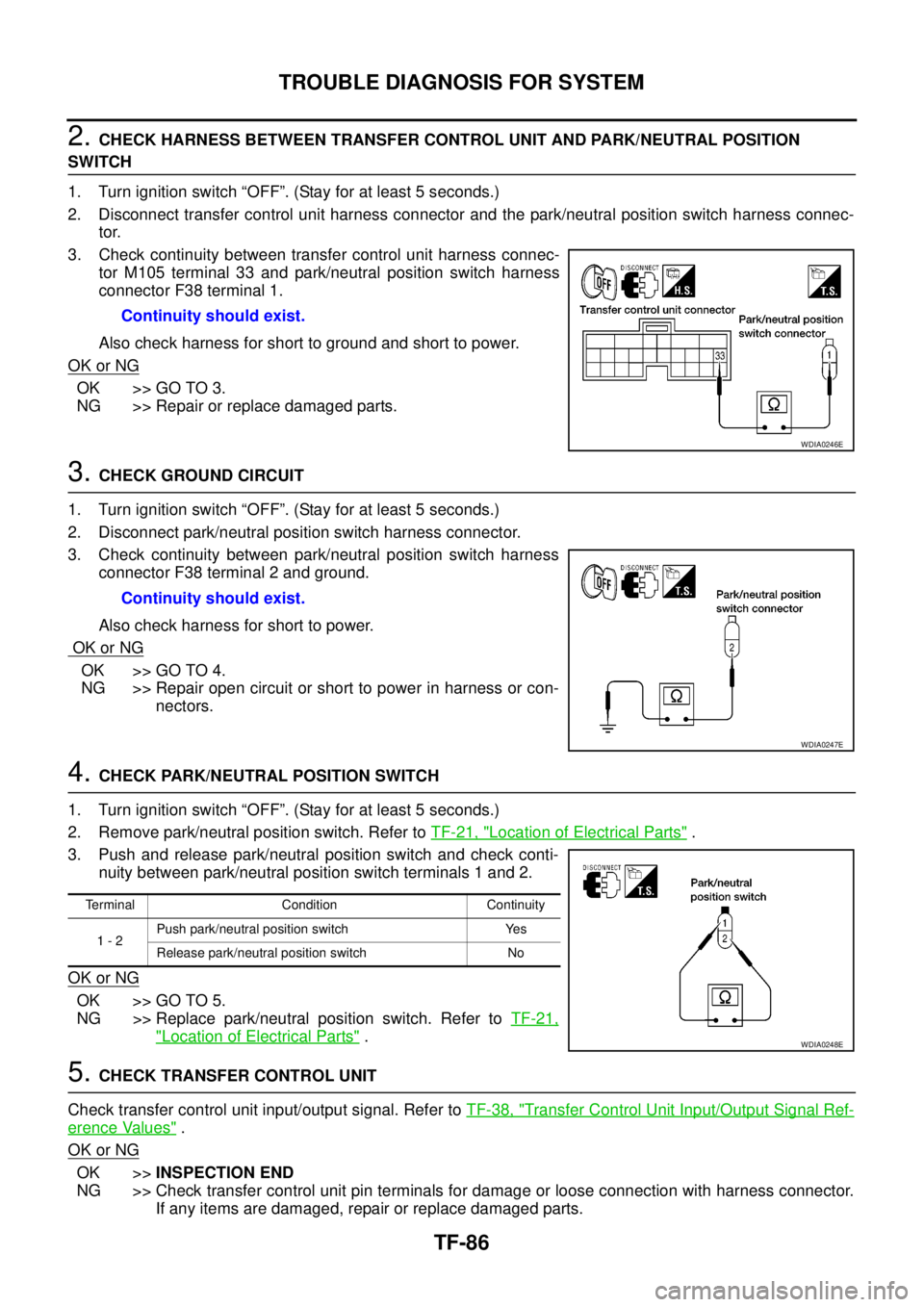
3. Check continuity between transfer control unit harness connec-
tor M105 terminal 33 and park/neutral position switch harness
connector F38 terminal 1.
Also check harness for short to ground and short to power.
OK or NG
OK >> GO TO 3.
NG >> Repair or replace damaged parts.
3.CHECK GROUND CIRCUIT
1. Turn ignition switch “OFF”. (Stay for at least 5 seconds.)
2. Disconnect park/neutral position switch harness connector.
3. Check continuity between park/neutral position switch harness
connector F38 terminal 2 and ground.
Also check harness for short to power.
OK or NG
OK >> GO TO 4.
NG >> Repair open circuit or short to power in harness or con-
nectors.
4.CHECK PARK/NEUTRAL POSITION SWITCH
1. Turn ignition switch “OFF”. (Stay for at least 5 seconds.)
2. Remove park/neutral position switch. Refer toTF-21, "
Location of Electrical Parts".
3. Push and release park/neutral position switch and check conti-
nuity between park/neutral position switch terminals 1 and 2.
OK or NG
OK >> GO TO 5.
NG >> Replace park/neutral position switch. Refer toTF-21,
"Location of Electrical Parts".
5.CHECK TRANSFER CONTROL UNIT
Check transfer control unit input/output signal. Refer toTF-38, "
Transfer Control Unit Input/Output Signal Ref-
erence Values".
OK or NG
OK >>INSPECTION END
NG >> Check transfer control unit pin terminals for damage or loose connection with harness connector.
If any items are damaged, repair or replace damaged parts. Continuity should exist.
WDIA0246E
Continuity should exist.
WDIA0247E
Terminal Condition Continuity
1-2Push park/neutral position switch Yes
Release park/neutral position switch No
WDIA0248E
Page 3066 of 3171
TROUBLE DIAGNOSIS FOR SYMPTOMS
TF-99
C
E
F
G
H
I
J
K
L
MA
B
TF
5.CHECK TRANSFER CONTROL UNIT
Check transfer control unit input/output signal. Refer toTF-38, "
Transfer Control Unit Input/Output Signal Ref-
erence Values".
OK or NG
OK >> GO TO 6.
NG >> Check transfer control unit pin terminals for damage or loose connection with harness connector.
If any items are damaged, repair or replace damaged parts.
6.CHECK TRANSFER INNER PARTS
1. Disassemble transfer assembly. Refer toTF-112, "
Disassembly and Assembly".
2. Check transfer inner parts.
OK or NG
OK >>INSPECTION END
NG >> Repair or replace damaged parts.
4WD Warning Lamp Flashes SlowlyEDS0032I
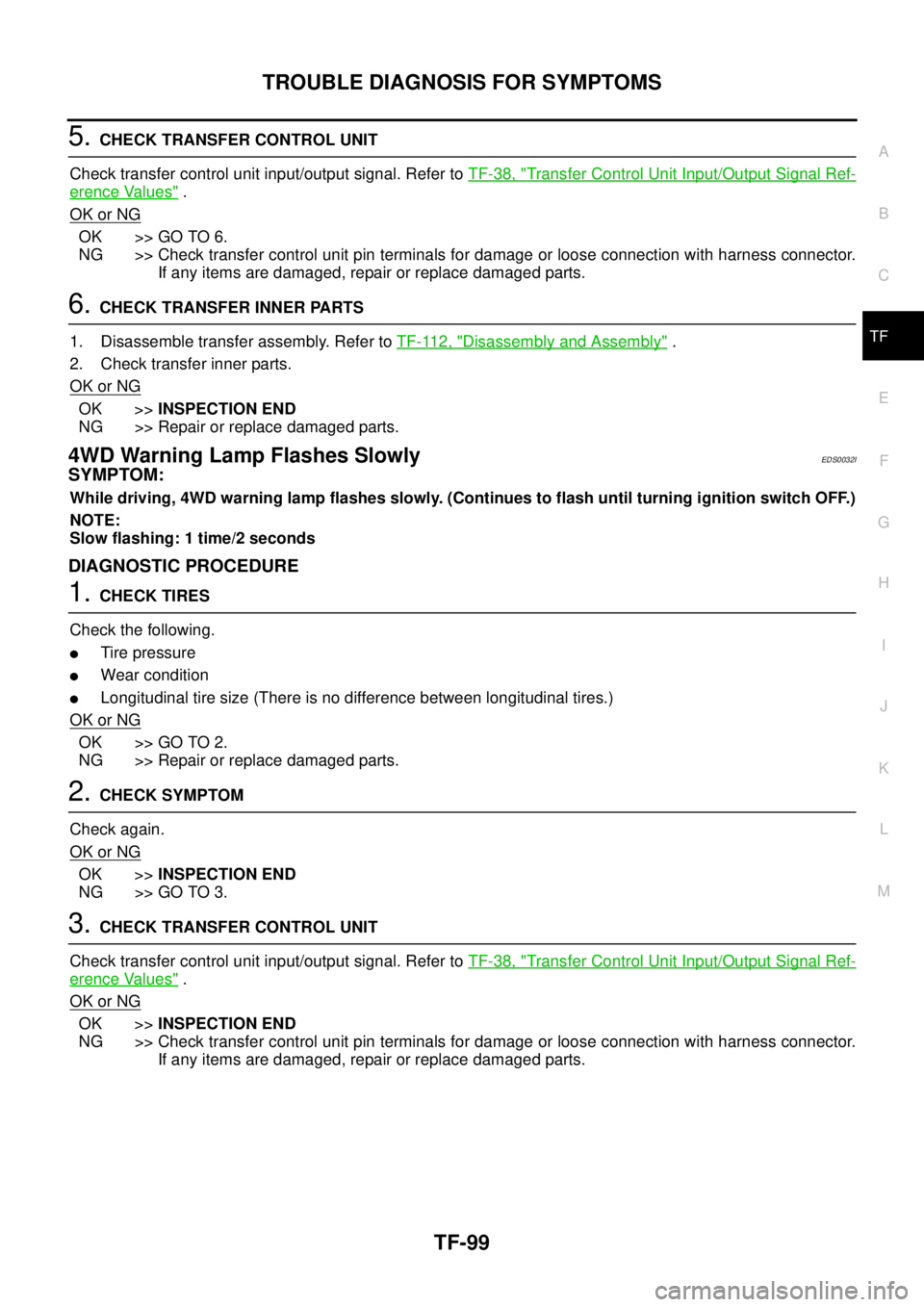
SYMPTOM:
While driving, 4WD warning lamp flashes slowly. (Continues to flash until turning ignition switch OFF.)
NOTE:
Slow flashing: 1 time/2 seconds
DIAGNOSTIC PROCEDURE
1.CHECK TIRES
Check the following.
lTire pressure
lWear condition
lLongitudinal tire size (There is no difference between longitudinal tires.)
OK or NG
OK >> GO TO 2.
NG >> Repair or replace damaged parts.
2.CHECK SYMPTOM
Check again.
OK or NG
OK >>INSPECTION END
NG >> GO TO 3.
3.CHECK TRANSFER CONTROL UNIT
Check transfer control unit input/output signal. Refer toTF-38, "
Transfer Control Unit Input/Output Signal Ref-
erence Values".
OK or NG
OK >>INSPECTION END
NG >> Check transfer control unit pin terminals for damage or loose connection with harness connector.
If any items are damaged, repair or replace damaged parts.
Page 3127 of 3171
WW-16
FRONT WIPER AND WASHER SYSTEM
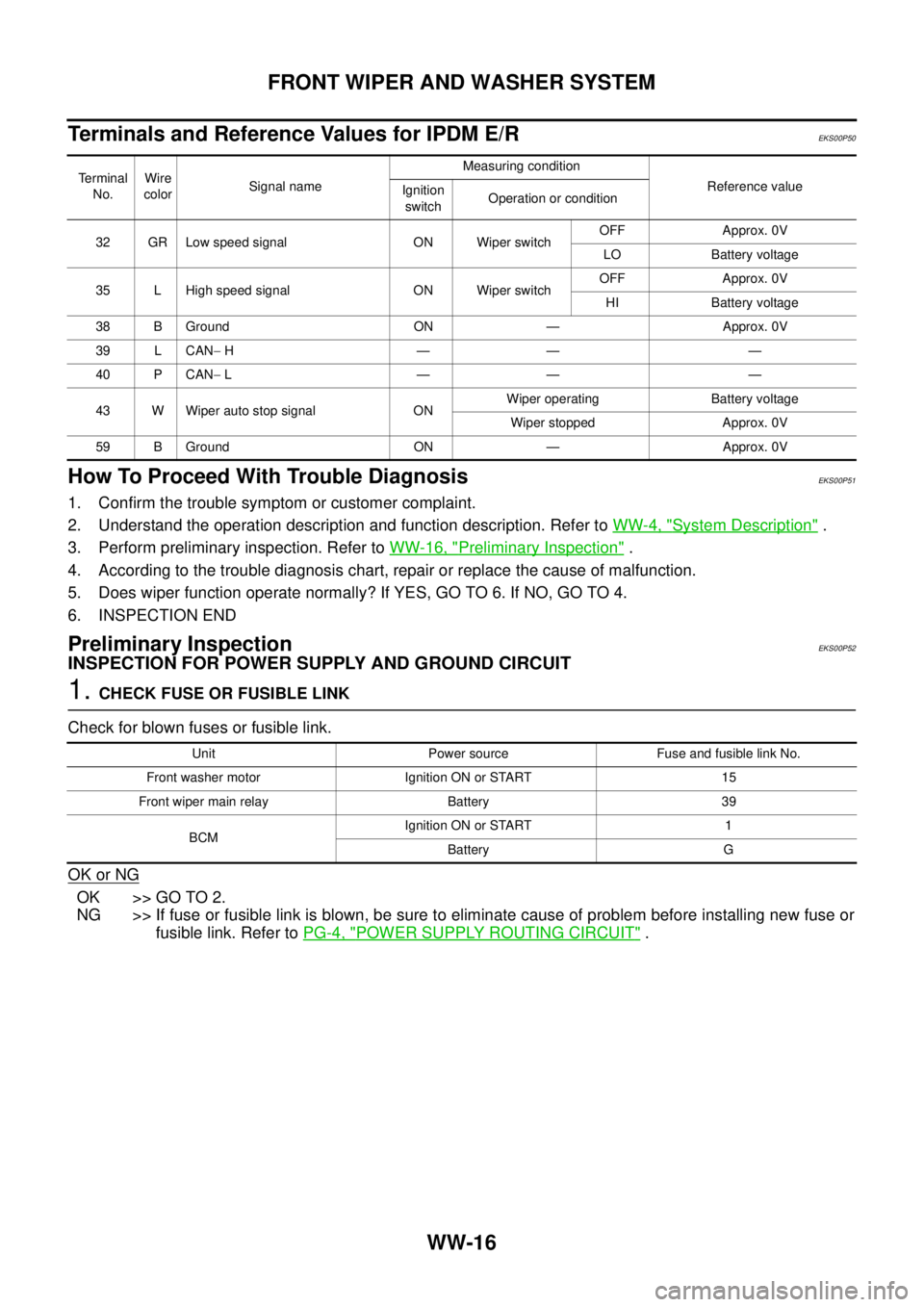
Terminals and Reference Values for IPDM E/R
EKS00P50
How To Proceed With Trouble DiagnosisEKS00P51
1. Confirm the trouble symptom or customer complaint.
2. Understand the operation description and function description. Refer toWW-4, "
System Description".
3. Perform preliminary inspection. Refer toWW-16, "
Preliminary Inspection".
4. According to the trouble diagnosis chart, repair or replace the cause of malfunction.
5. Does wiper function operate normally? If YES, GO TO 6. If NO, GO TO 4.
6. INSPECTION END
Preliminary InspectionEKS00P52
INSPECTION FOR POWER SUPPLY AND GROUND CIRCUIT
1.CHECK FUSE OR FUSIBLE LINK
Check for blown fuses or fusible link.
OK or NG
OK >> GO TO 2.
NG >> If fuse or fusible link is blown, be sure to eliminate cause of problem before installing new fuse or
fusible link. Refer toPG-4, "
POWER SUPPLY ROUTING CIRCUIT".
Te r m i n a l
No.Wire
colorSignal nameMeasuring condition
Reference value
Ignition
switchOperation or condition
32 GR Low speed signal ON Wiper switchOFF Approx. 0V
LO Battery voltage
35 L High speed signal ON Wiper switchOFF Approx. 0V
HI Battery voltage
38 B Ground ON — Approx. 0V
39 L CAN-H—— —
40 P CAN-L—— —
43 W Wiper auto stop signal ONWiper operating Battery voltage
Wiper stopped Approx. 0V
59 B Ground ON — Approx. 0V
Unit Power source Fuse and fusible link No.
Front washer motor Ignition ON or START 15
Front wiper main relay Battery 39
BCMIgnition ON or START 1
Battery G
Page 3134 of 3171

FRONT WIPER AND WASHER SYSTEM
WW-23
C
D
E
F
G
H
I
J
L
MA
B
WW
Front Wiper Does Not Operate in Rain (Front Wiper Switch Turned to INT Posi-
tion)
EKS00Q9V
1.CHECK CONDITIONS OF WINDSHIELD ( LIGHT AND RAIN SENSOR DETECTION AREA)
Check light and rain sensor detection area of windshield for dirt such as greases.
OK or NG
OK >> GO TO 2.
NG >> Clean light and rain sensor detection area of windshield fully.
2.CHECK LIGHT AND RAIN SENSOR INPUT SIGNAL
1. Turn ignition switch OFF.
2. Disconnect BCM connector.
3. Turn ignition switch ON.
4. Check waveform between BCM harness connector and ground.
OK or NG
OK >> Replace light and rain sensor. Refer toLT-65, "Removal and Installation of Light and Rain Sensor"
. If front wiper does not operate, replace BCM. Refer toBCS-17, "Removal and Installation of
BCM".
NG >> GO TO 3.
3.CHECK LIGHT AND RAIN SENSOR SIGNAL CIRCUIT
1. Turn ignition switch OFF.
2. Disconnect BCM connector and light and rain sensor connector.
3. Check continuity between BCM harness connector (A) and light
and rain sensor harness connector (B).
4. Check continuity between BCM harness connector (A) and
ground.
OK or NG
OK >> GO TO 4.
NG >> Repair harness or connector.
Terminal
Condition Voltage (+)
(-)
BCM
connectorTerminal
M42 24 GroundIgnition
switchON
OFF Batterly voltage
SKIB6405E
PKIC1618E
AB
Continuity
Connector Terminal Connector Terminal
M42 24 R3 2 Yes
A
GroundContinuity
Connector Terminal
M42 24 No
PKIC1377E
Page 3162 of 3171
HEADLAMP WASHER
WW-51
C
D
E
F
G
H
I
J
L
MA
B
WW
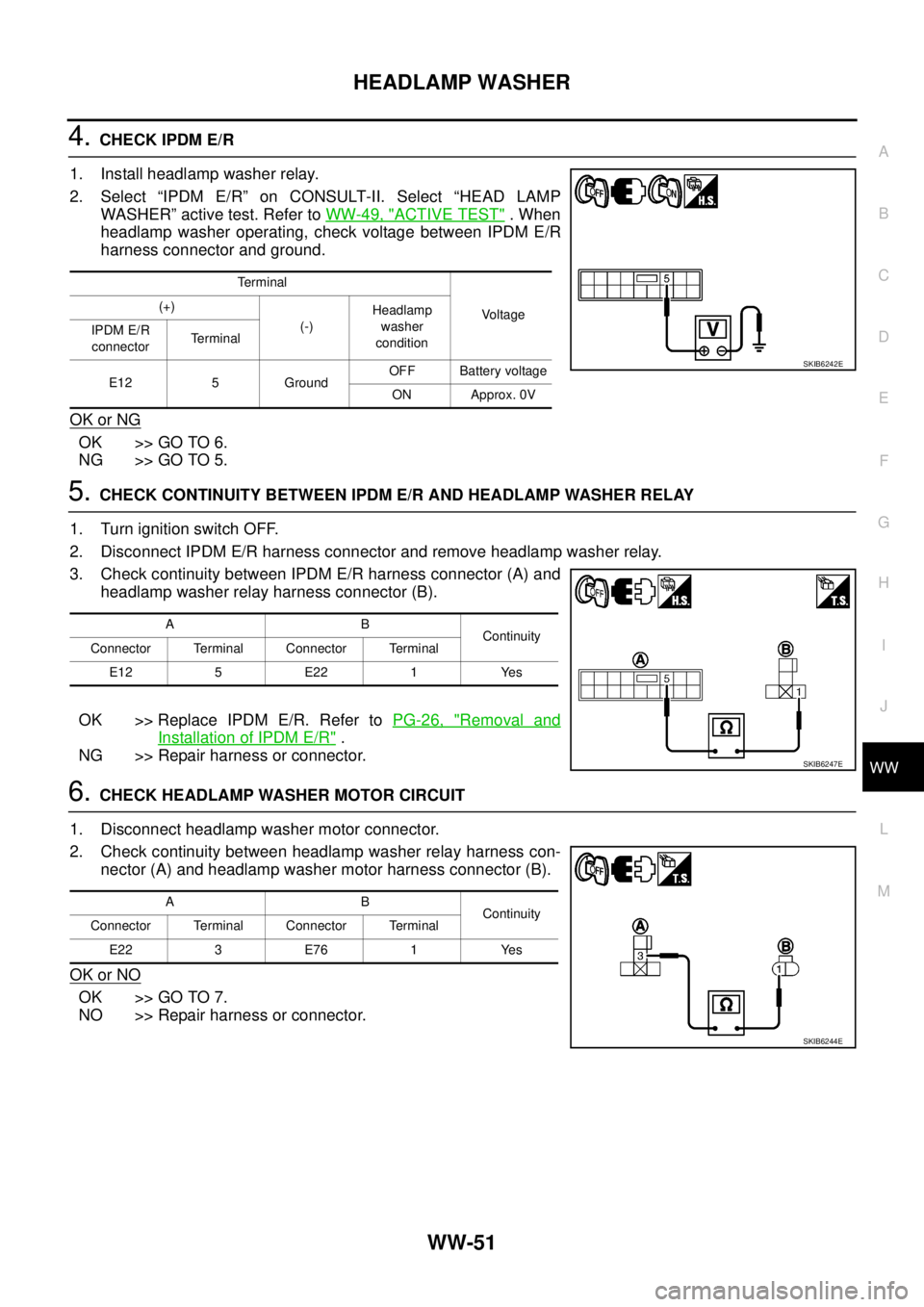
4.CHECK IPDM E/R
1. Install headlamp washer relay.
2. Select “IPDM E/R” on CONSULT-II. Select “HEAD LAMP
WASHER” active test. Refer toWW-49, "
ACTIVE TEST".When
headlamp washer operating, check voltage between IPDM E/R
harness connector and ground.
OK or NG
OK >> GO TO 6.
NG >> GO TO 5.
5.CHECK CONTINUITY BETWEEN IPDM E/R AND HEADLAMP WASHER RELAY
1. Turn ignition switch OFF.
2. Disconnect IPDM E/R harness connector and remove headlamp washer relay.
3. Check continuity between IPDM E/R harness connector (A) and
headlamp washer relay harness connector (B).
OK >> Replace IPDM E/R. Refer toPG-26, "
Removal and
Installation of IPDM E/R".
NG >> Repair harness or connector.
6.CHECK HEADLAMP WASHER MOTOR CIRCUIT
1. Disconnect headlamp washer motor connector.
2. Check continuity between headlamp washer relay harness con-
nector (A) and headlamp washer motor harness connector (B).
OK or NO
OK >> GO TO 7.
NO >> Repair harness or connector.
Terminal
Vo l ta g e (+)
(-)Headlamp
washer
condition IPDM E/R
connectorTerminal
E12 5 GroundOFF Battery voltage
ON Approx. 0V
SKIB6242E
AB
Continuity
Connector Terminal Connector Terminal
E12 5 E22 1 Yes
SKIB6247E
AB
Continuity
Connector Terminal Connector Terminal
E22 3 E76 1 Yes
SKIB6244E
Page 3163 of 3171
WW-52
HEADLAMP WASHER
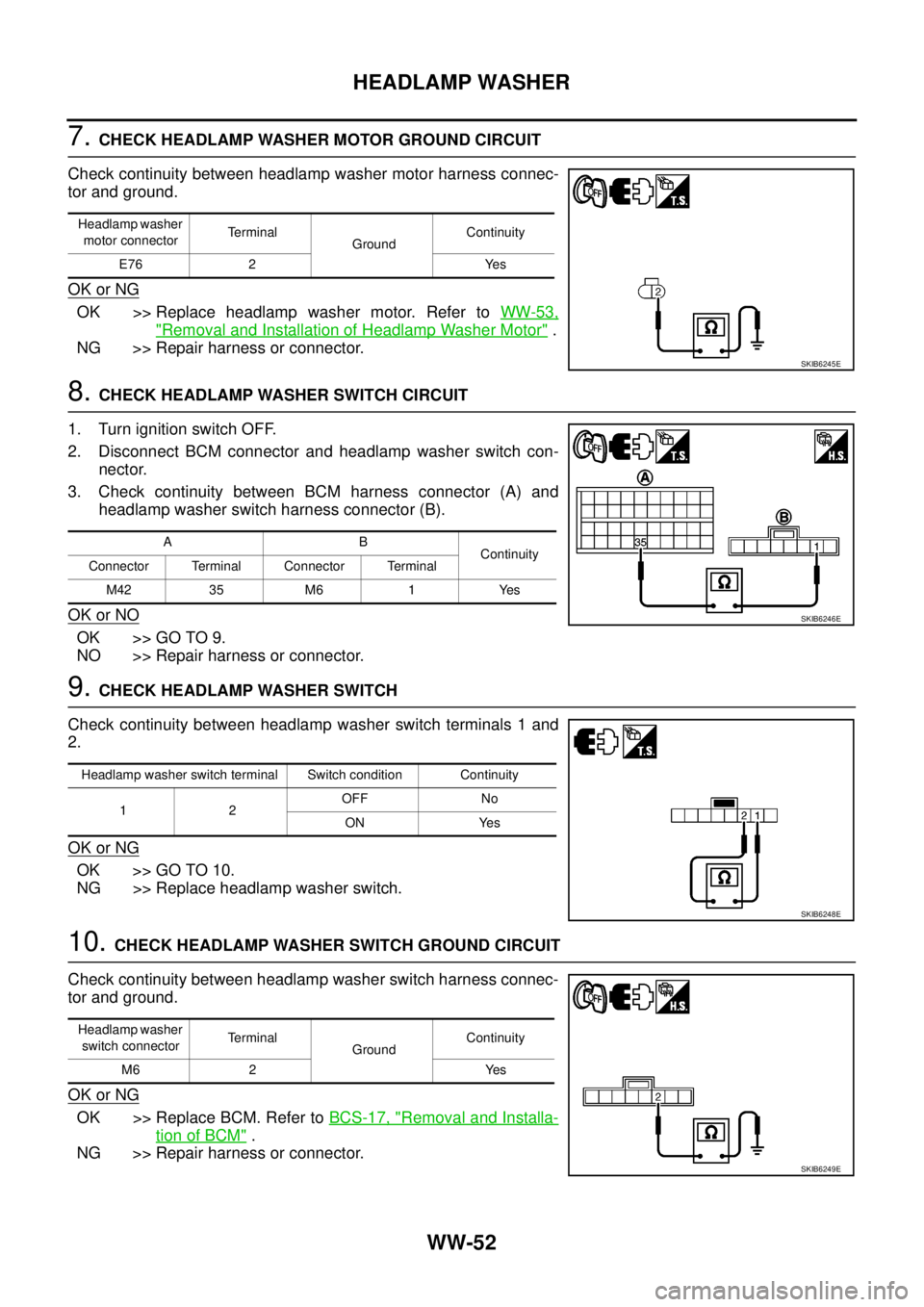
7.CHECK HEADLAMP WASHER MOTOR GROUND CIRCUIT
Check continuity between headlamp washer motor harness connec-
tor and ground.
OK or NG
OK >> Replace headlamp washer motor. Refer toWW-53,
"Removal and Installation of Headlamp Washer Motor".
NG >> Repair harness or connector.
8.CHECK HEADLAMP WASHER SWITCH CIRCUIT
1. Turn ignition switch OFF.
2. Disconnect BCM connector and headlamp washer switch con-
nector.
3. Check continuity between BCM harness connector (A) and
headlamp washer switch harness connector (B).
OK or NO
OK >> GO TO 9.
NO >> Repair harness or connector.
9.CHECK HEADLAMP WASHER SWITCH
Check continuity between headlamp washer switch terminals 1 and
2.
OK or NG
OK >> GO TO 10.
NG >> Replace headlamp washer switch.
10.CHECK HEADLAMP WASHER SWITCH GROUND CIRCUIT
Check continuity between headlamp washer switch harness connec-
tor and ground.
OK or NG
OK >> Replace BCM. Refer toBCS-17, "Removal and Installa-
tion of BCM".
NG >> Repair harness or connector.
Headlamp washer
motor connectorTerminal
GroundContinuity
E76 2 Yes
SKIB6245E
AB
Continuity
Connector Terminal Connector Terminal
M42 35 M6 1 Yes
SKIB6246E
Headlamp washer switch terminal Switch condition Continuity
12OFF No
ON Yes
SKIB6248E
Headlamp washer
switch connectorTerminal
GroundContinuity
M6 2 Yes
SKIB6249E