battery NISSAN NAVARA 2005 Repair Workshop Manual
[x] Cancel search | Manufacturer: NISSAN, Model Year: 2005, Model line: NAVARA, Model: NISSAN NAVARA 2005Pages: 3171, PDF Size: 49.59 MB
Page 3060 of 3171
TROUBLE DIAGNOSIS FOR SYMPTOMS
TF-93
C
E
F
G
H
I
J
K
L
MA
B
TF
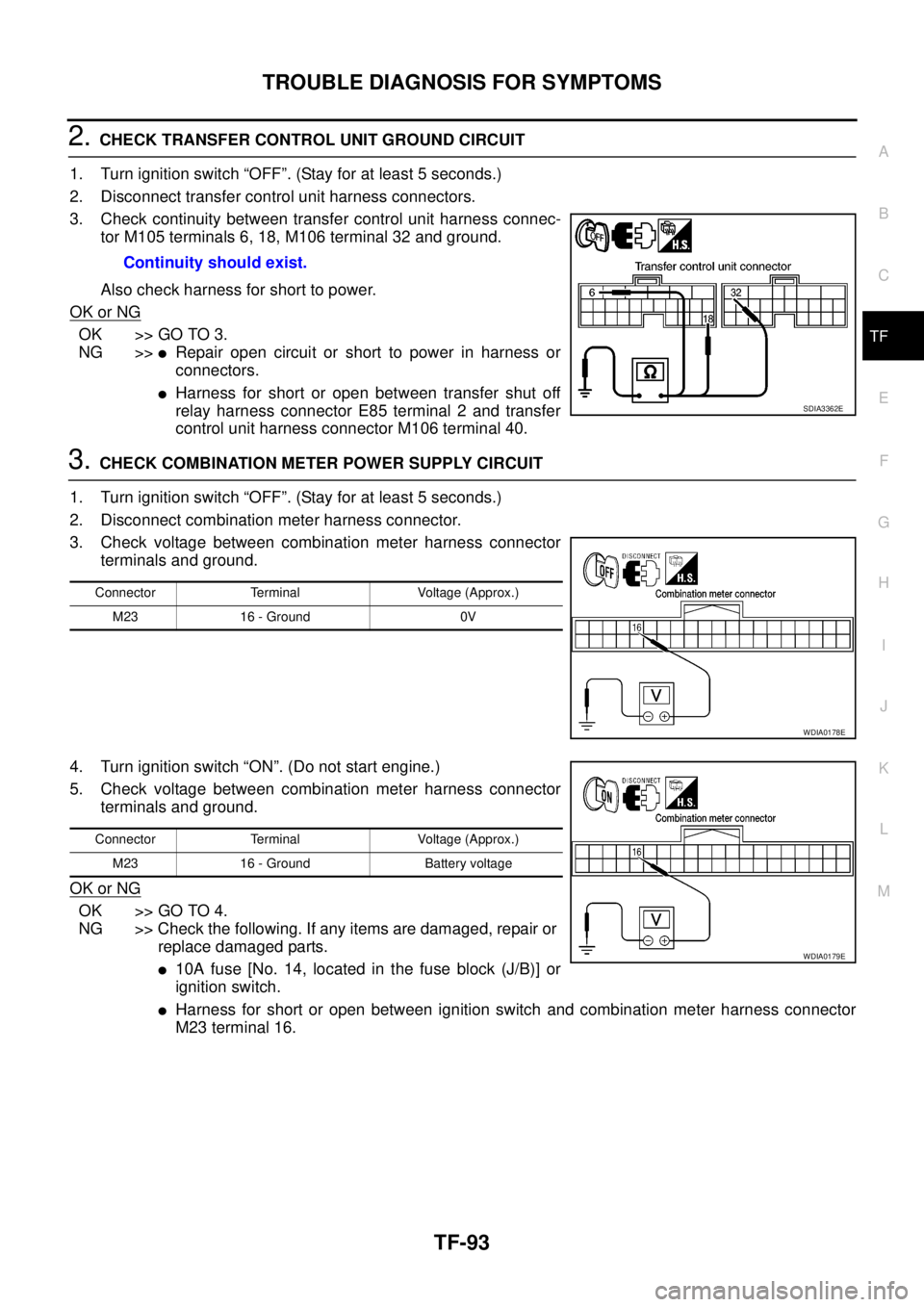
2.CHECK TRANSFER CONTROL UNIT GROUND CIRCUIT
1. Turn ignition switch “OFF”. (Stay for at least 5 seconds.)
2. Disconnect transfer control unit harness connectors.
3. Check continuity between transfer control unit harness connec-
tor M105 terminals 6, 18, M106 terminal 32 and ground.
Also check harness for short to power.
OK or NG
OK >> GO TO 3.
NG >>
lRepair open circuit or short to power in harness or
connectors.
lHarness for short or open between transfer shut off
relay harness connector E85 terminal 2 and transfer
control unit harness connector M106 terminal 40.
3.CHECK COMBINATION METER POWER SUPPLY CIRCUIT
1. Turn ignition switch “OFF”. (Stay for at least 5 seconds.)
2. Disconnect combination meter harness connector.
3. Check voltage between combination meter harness connector
terminals and ground.
4. Turn ignition switch “ON”. (Do not start engine.)
5. Check voltage between combination meter harness connector
terminals and ground.
OK or NG
OK >> GO TO 4.
NG >> Check the following. If any items are damaged, repair or
replace damaged parts.
l10A fuse [No. 14, located in the fuse block (J/B)] or
ignition switch.
lHarness for short or open between ignition switch and combination meter harness connector
M23 terminal 16. Continuity should exist.
SDIA3362E
Connector Terminal Voltage (Approx.)
M23 16 - Ground 0V
WDIA0178E
Connector Terminal Voltage (Approx.)
M23 16 - Ground Battery voltage
WDIA0179E
Page 3067 of 3171
TF-100
TRANSFER CONTROL UNIT
TRANSFER CONTROL UNIT
PFP:33084
Removal and InstallationEDS0032J
REMOVAL
1. Switch 4WD shift switch to 2WD and set transfer assembly to 2WD.
CAUTION:
When removal transfer control unit, transfer state must be at 2WD or AUTO.
2. Turn the ignition switch OFF and disconnect the battery cables.
3. Remove the lower instrument panel LH (LHD models) or lower instrument panel RH (RHD models). Refer
toIP-13, "
LOWER INSTRUMENT PANEL LH"(LHD models) orIP-13, "LOWER INSTRUMENT PANEL
LH"(RHD models).
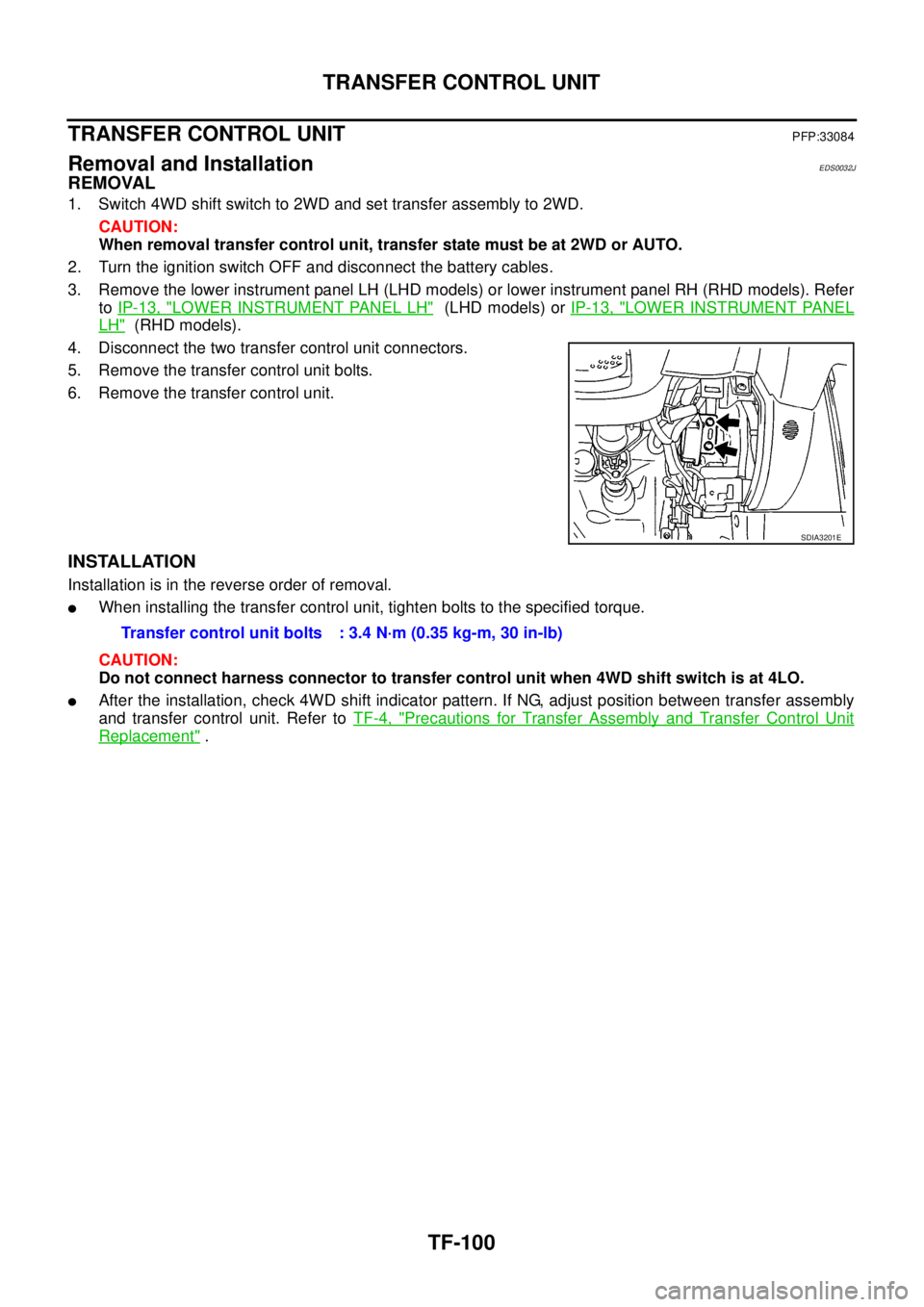
4. Disconnect the two transfer control unit connectors.
5. Remove the transfer control unit bolts.
6. Remove the transfer control unit.
INSTALLATION
Installation is in the reverse order of removal.
lWhen installing the transfer control unit, tighten bolts to the specified torque.
CAUTION:
Do not connect harness connector to transfer control unit when 4WD shift switch is at 4LO.
lAfter the installation, check 4WD shift indicator pattern. If NG, adjust position between transfer assembly
and transfer control unit. Refer toTF-4, "
Precautions for Transfer Assembly and Transfer Control Unit
Replacement".
SDIA3201E
Transfer control unit bolts : 3.4 N·m (0.35 kg-m, 30 in-lb)
Page 3115 of 3171
WW-4
FRONT WIPER AND WASHER SYSTEM
FRONT WIPER AND WASHER SYSTEM
PFP:28810
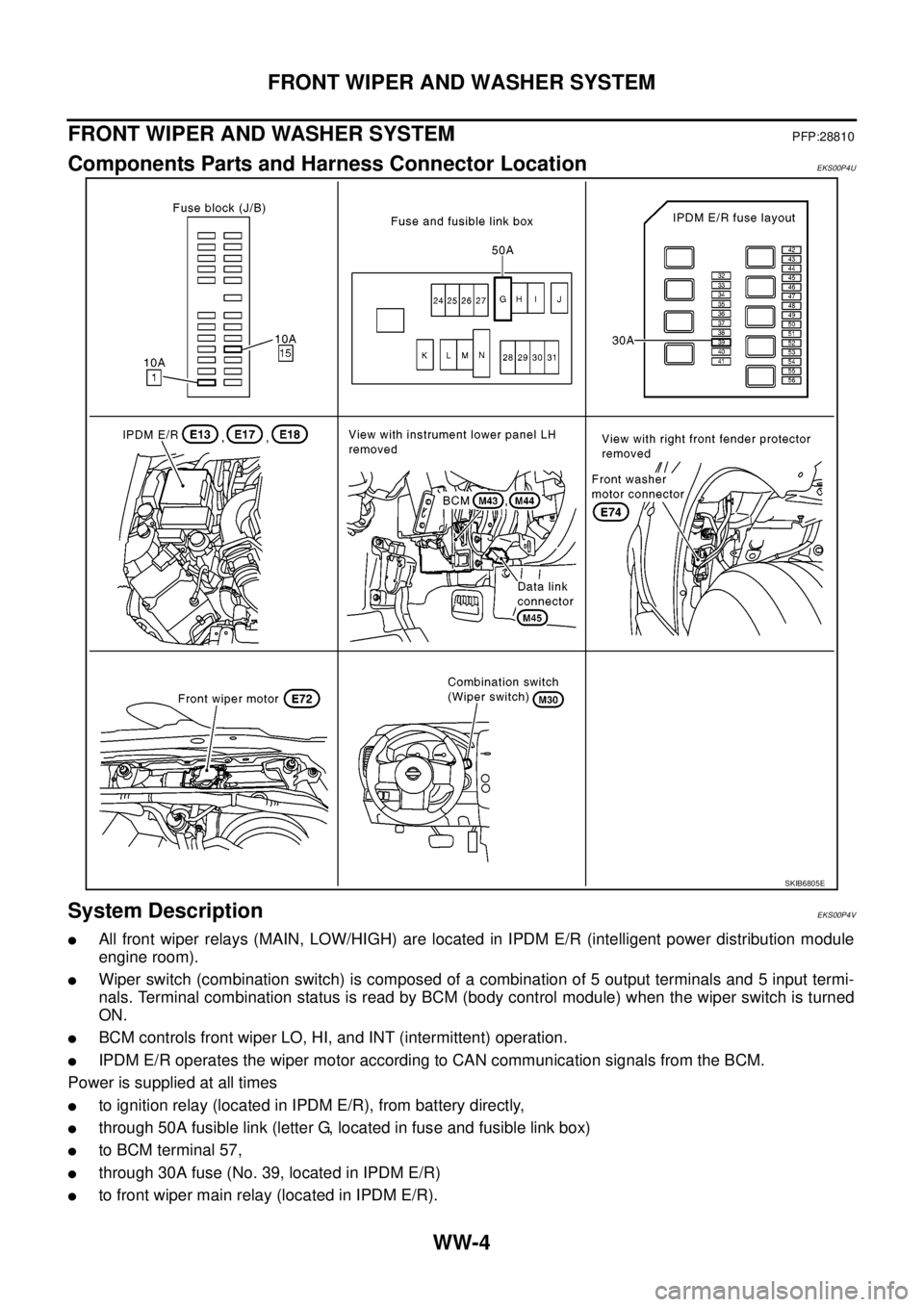
Components Parts and Harness Connector LocationEKS00P4U
System DescriptionEKS00P4V
lAll front wiper relays (MAIN, LOW/HIGH) are located in IPDM E/R (intelligent power distribution module
engine room).
lWiper switch (combination switch) is composed of a combination of 5 output terminals and 5 input termi-
nals. Terminal combination status is read by BCM (body control module) when the wiper switch is turned
ON.
lBCM controls front wiper LO, HI, and INT (intermittent) operation.
lIPDM E/R operates the wiper motor according to CAN communication signals from the BCM.
Power is supplied at all times
lto ignition relay (located in IPDM E/R), from battery directly,
lthrough 50A fusible link (letter G, located in fuse and fusible link box)
lto BCM terminal 57,
lthrough 30A fuse (No. 39, located in IPDM E/R)
lto front wiper main relay (located in IPDM E/R).
SKIB6805E
Page 3126 of 3171

FRONT WIPER AND WASHER SYSTEM
WW-15
C
D
E
F
G
H
I
J
L
MA
B
WW
Terminals and Reference Values for BCMEKS00P4Z
Te r m i n a l
No.Wire
colorSignal nameMeasuring condition
Reference value
Ignition
switchOperation or condition
3 Y Ignition switch (ON) ON — Battery voltage
6 G Combination switch output 3 ONLighting, turn, wiper OFF
Wiper dial position 4
7 GR Combination switch output 4 ONLighting, turn, wiper OFF
Wiper dial position 4
8 LG Combination switch output 1 ONLighting, turn, wiper OFF
Wiper dial position 4
9 BR Combination switch output 2 ONLighting, turn, wiper OFF
Wiper dial position 4
10 O Combination switch output 5 ONLighting, turn, wiper OFF
Wiper dial position 4
21 P CAN-L—— —
22 L CAN-H—— —
24 R Light and rain sensor signal — Ignition switchON
OFF Battery voltage
36 P Combination switch input 5 ONLighting, turn, wiper OFF
Wiper dial position 4
Approx. 0V 37 L Combination switch input 2 ONLighting, turn, wiper OFF
Wiper dial position 4
38 V Combination switch input 3 ONLighting, turn, wiper OFF
Wiper dial position 4
39 SB Combination switch input 4 ONLighting, turn, wiper OFF
Wiper dial position 4
40 R Combination switch input 1 ONLighting, turn, wiper OFF
Wiper dial position 4
42 V Room lamp power supply OFF — Battery voltage
55 B Ground ON — Approx. 0V
57 W Battery power supply (fusible link) OFF — Battery voltage
PKIB4958J
PKIC1618E
Page 3127 of 3171

WW-16
FRONT WIPER AND WASHER SYSTEM
Terminals and Reference Values for IPDM E/R
EKS00P50
How To Proceed With Trouble DiagnosisEKS00P51
1. Confirm the trouble symptom or customer complaint.
2. Understand the operation description and function description. Refer toWW-4, "
System Description".
3. Perform preliminary inspection. Refer toWW-16, "
Preliminary Inspection".
4. According to the trouble diagnosis chart, repair or replace the cause of malfunction.
5. Does wiper function operate normally? If YES, GO TO 6. If NO, GO TO 4.
6. INSPECTION END
Preliminary InspectionEKS00P52
INSPECTION FOR POWER SUPPLY AND GROUND CIRCUIT
1.CHECK FUSE OR FUSIBLE LINK
Check for blown fuses or fusible link.
OK or NG
OK >> GO TO 2.
NG >> If fuse or fusible link is blown, be sure to eliminate cause of problem before installing new fuse or
fusible link. Refer toPG-4, "
POWER SUPPLY ROUTING CIRCUIT".
Te r m i n a l
No.Wire
colorSignal nameMeasuring condition
Reference value
Ignition
switchOperation or condition
32 GR Low speed signal ON Wiper switchOFF Approx. 0V
LO Battery voltage
35 L High speed signal ON Wiper switchOFF Approx. 0V
HI Battery voltage
38 B Ground ON — Approx. 0V
39 L CAN-H—— —
40 P CAN-L—— —
43 W Wiper auto stop signal ONWiper operating Battery voltage
Wiper stopped Approx. 0V
59 B Ground ON — Approx. 0V
Unit Power source Fuse and fusible link No.
Front washer motor Ignition ON or START 15
Front wiper main relay Battery 39
BCMIgnition ON or START 1
Battery G
Page 3128 of 3171
FRONT WIPER AND WASHER SYSTEM
WW-17
C
D
E
F
G
H
I
J
L
MA
B
WW
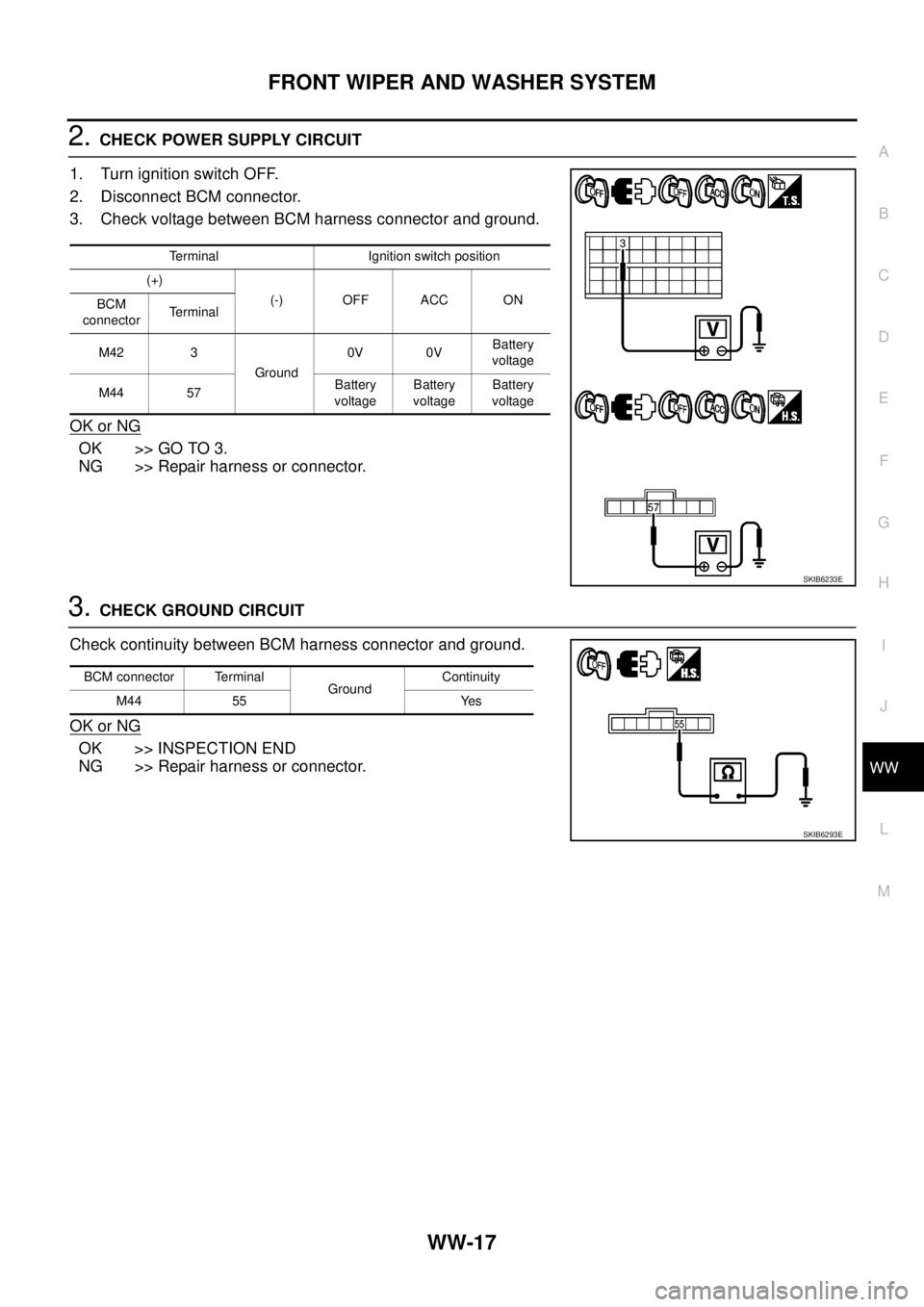
2.CHECK POWER SUPPLY CIRCUIT
1. Turn ignition switch OFF.
2. Disconnect BCM connector.
3. Check voltage between BCM harness connector and ground.
OK or NG
OK >> GO TO 3.
NG >> Repair harness or connector.
3.CHECK GROUND CIRCUIT
Check continuity between BCM harness connector and ground.
OK or NG
OK >> INSPECTION END
NG >> Repair harness or connector.
Terminal Ignition switch position
(+)
(-) OFF ACC ON
BCM
connectorTerminal
M42 3
Ground0V 0VBattery
voltage
M44 57Battery
voltageBattery
voltageBattery
voltage
SKIB6233E
BCM connector Terminal
GroundContinuity
M44 55 Yes
SKIB6293E
Page 3135 of 3171
WW-24
FRONT WIPER AND WASHER SYSTEM
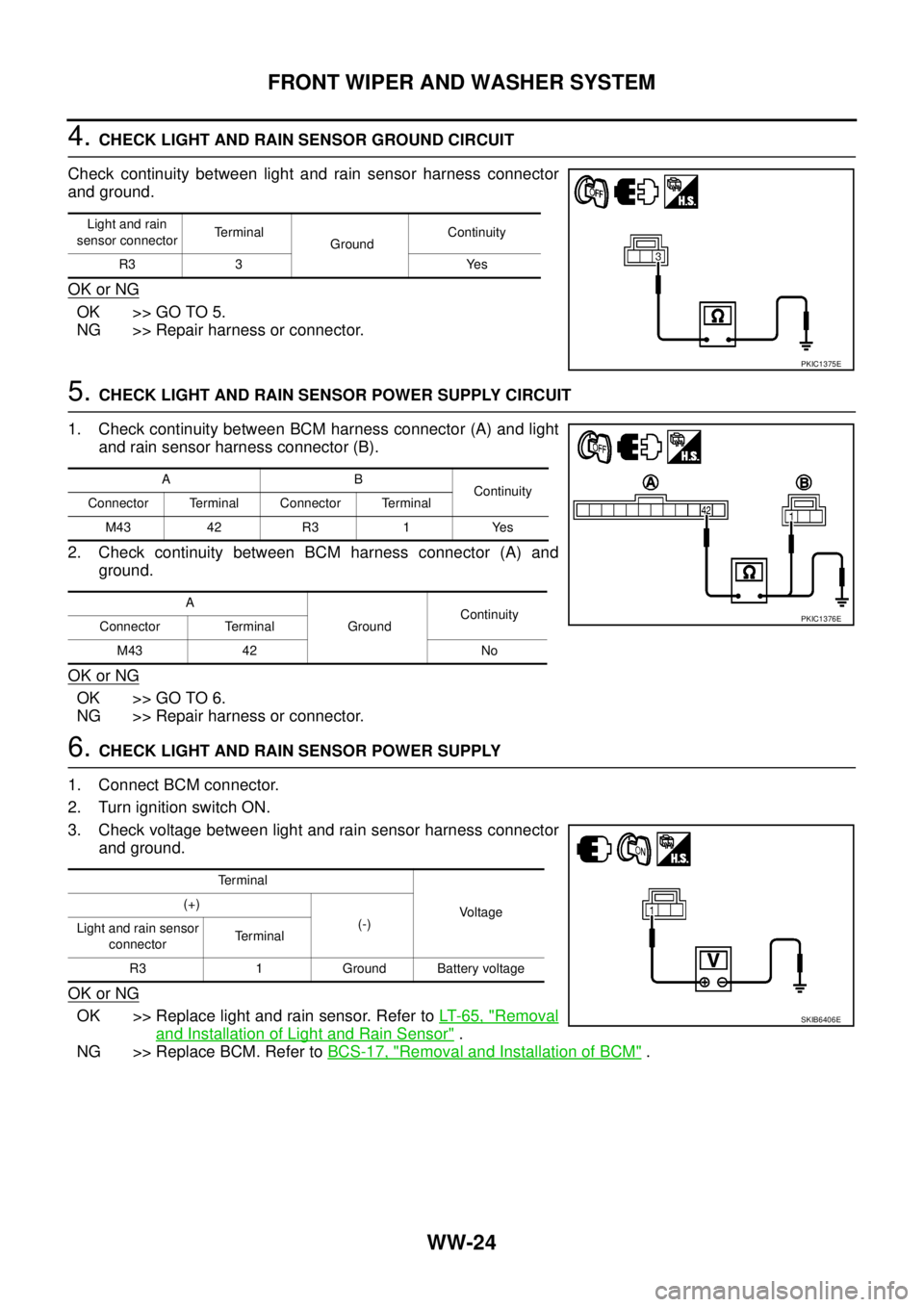
4.CHECK LIGHT AND RAIN SENSOR GROUND CIRCUIT
Check continuity between light and rain sensor harness connector
and ground.
OK or NG
OK >> GO TO 5.
NG >> Repair harness or connector.
5.CHECK LIGHT AND RAIN SENSOR POWER SUPPLY CIRCUIT
1. Check continuity between BCM harness connector (A) and light
and rain sensor harness connector (B).
2. Check continuity between BCM harness connector (A) and
ground.
OK or NG
OK >> GO TO 6.
NG >> Repair harness or connector.
6.CHECK LIGHT AND RAIN SENSOR POWER SUPPLY
1. Connect BCM connector.
2. Turn ignition switch ON.
3. Check voltage between light and rain sensor harness connector
and ground.
OK or NG
OK >> Replace light and rain sensor. Refer toLT-65, "Removal
and Installation of Light and Rain Sensor".
NG >> Replace BCM. Refer toBCS-17, "
Removal and Installation of BCM".
Light and rain
sensor connectorTerminal
GroundContinuity
R3 3 Yes
PKIC1375E
AB
Continuity
Connector Terminal Connector Terminal
M43 42 R3 1 Yes
A
GroundContinuity
Connector Terminal
M43 42 No
PKIC1376E
Terminal
Voltage (+)
(-)
Light and rain sensor
connectorTe r m i n a l
R3 1 Ground Battery voltage
SKIB6406E
Page 3138 of 3171
FRONT WIPER AND WASHER SYSTEM
WW-27
C
D
E
F
G
H
I
J
L
MA
B
WW
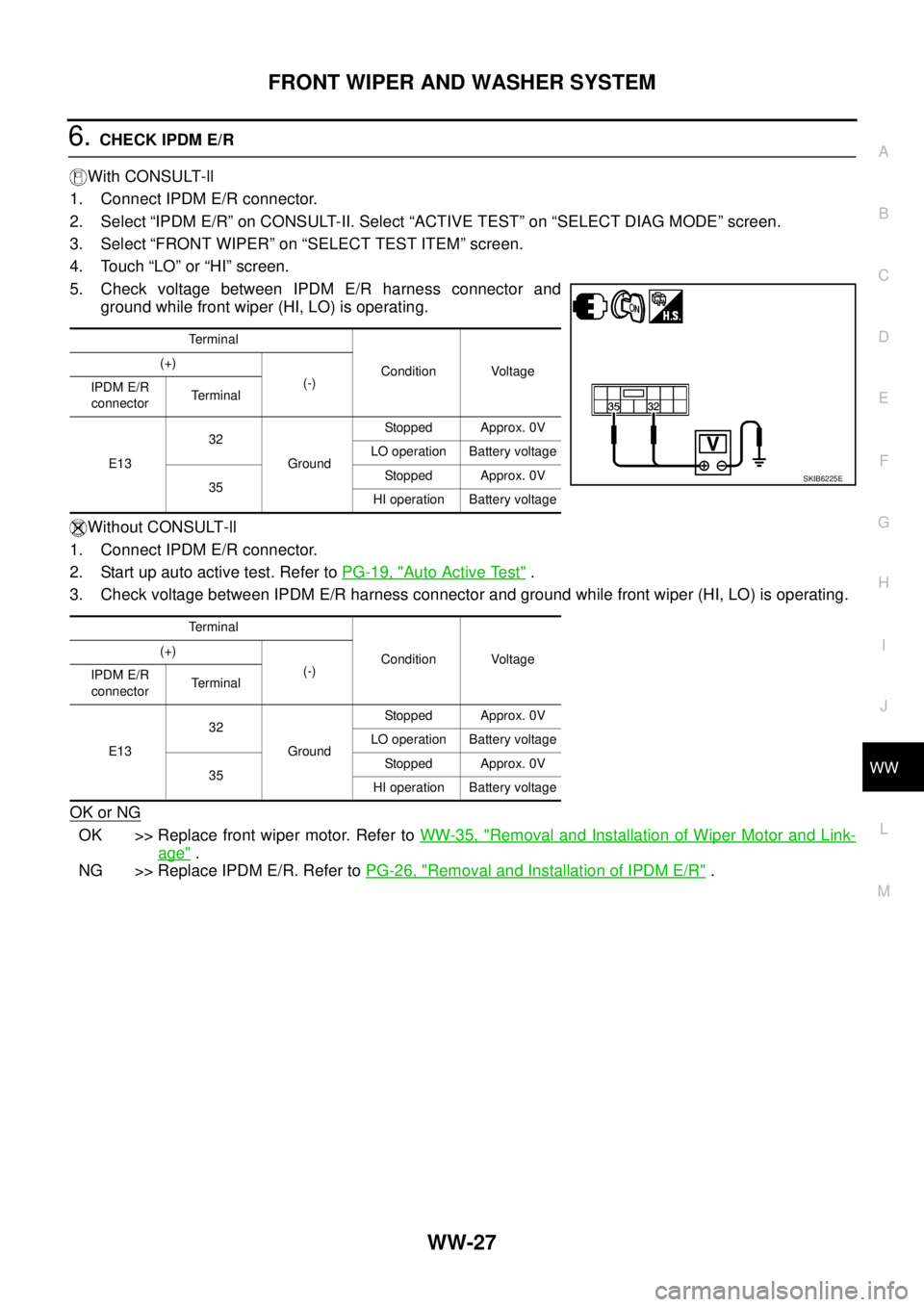
6.CHECK IPDM E/R
With CONSULT-ll
1. Connect IPDM E/R connector.
2. Select “IPDM E/R” on CONSULT-II. Select “ACTIVE TEST” on “SELECT DIAG MODE” screen.
3. Select “FRONT WIPER” on “SELECT TEST ITEM” screen.
4. Touch “LO” or “HI” screen.
5. Check voltage between IPDM E/R harness connector and
ground while front wiper (HI, LO) is operating.
Without CONSULT-ll
1. Connect IPDM E/R connector.
2. Start up auto active test. Refer toPG-19, "
Auto Active Test".
3. Check voltage between IPDM E/R harness connector and ground while front wiper (HI, LO) is operating.
OK or NG
OK >> Replace front wiper motor. Refer toWW-35, "Removal and Installation of Wiper Motor and Link-
age".
NG >> Replace IPDM E/R. Refer toPG-26, "
Removal and Installation of IPDM E/R".
Te r m i n a l
Condition Voltage (+)
(-)
IPDM E/R
connectorTerminal
E1332
GroundStopped Approx. 0V
LO operation Battery voltage
35Stopped Approx. 0V
HI operation Battery voltage
Te r m i n a l
Condition Voltage (+)
(-)
IPDM E/R
connectorTerminal
E1332
GroundStopped Approx. 0V
LO operation Battery voltage
35Stopped Approx. 0V
HI operation Battery voltage
SKIB6225E
Page 3139 of 3171
WW-28
FRONT WIPER AND WASHER SYSTEM
Front Wiper Does Not Return to Stop Position (After Front Wiper for 10 Sec-
onds, They Stop for 20 seconds, and After Repeating the Operations Five
Times, They Become Inoperative)
EKS00P57
CAUTION:
lWhen auto stop signal has not varied for 10 seconds or longer while IPDM E/R is operating front
wipers, IPDM E/R considers front wipers are locked, and stops wiper output. That causes this
symptom.
lThis status can be checked by “DATA MONITOR” of “IPDM E/R” on which “WIPER PROTECTION”
ITEMS SHOWS “BLOCK”.
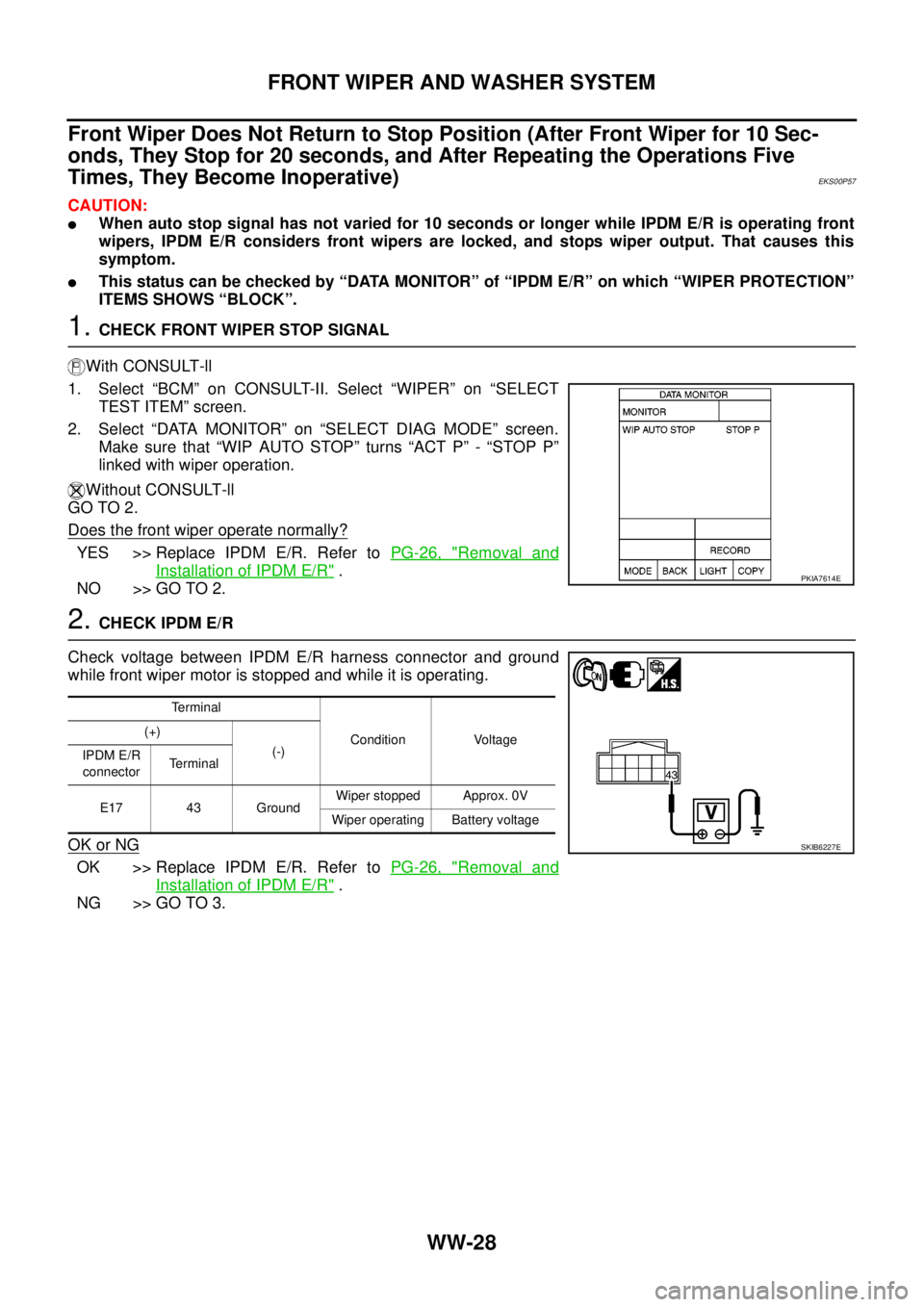
1.CHECK FRONT WIPER STOP SIGNAL
With CONSULT-ll
1. Select “BCM” on CONSULT-II. Select “WIPER” on “SELECT
TEST ITEM” screen.
2. Select “DATA MONITOR” on “SELECT DIAG MODE” screen.
Make sure that “WIP AUTO STOP” turns “ACT P” - “STOP P”
linked with wiper operation.
Without CONSULT-ll
GO TO 2.
Does the front wiper operate normally?
YES >> Replace IPDM E/R. Refer toPG-26, "Removal and
Installation of IPDM E/R".
NO >> GO TO 2.
2.CHECK IPDM E/R
Check voltage between IPDM E/R harness connector and ground
while front wiper motor is stopped and while it is operating.
OK or NG
OK >> Replace IPDM E/R. Refer toPG-26, "Removal and
Installation of IPDM E/R".
NG >> GO TO 3.
PKIA7614E
Terminal
Condition Voltage (+)
(-)
IPDM E/R
connectorTerminal
E17 43 GroundWiper stopped Approx. 0V
Wiper operating Battery voltage
SKIB6227E
Page 3141 of 3171
WW-30
FRONT WIPER AND WASHER SYSTEM
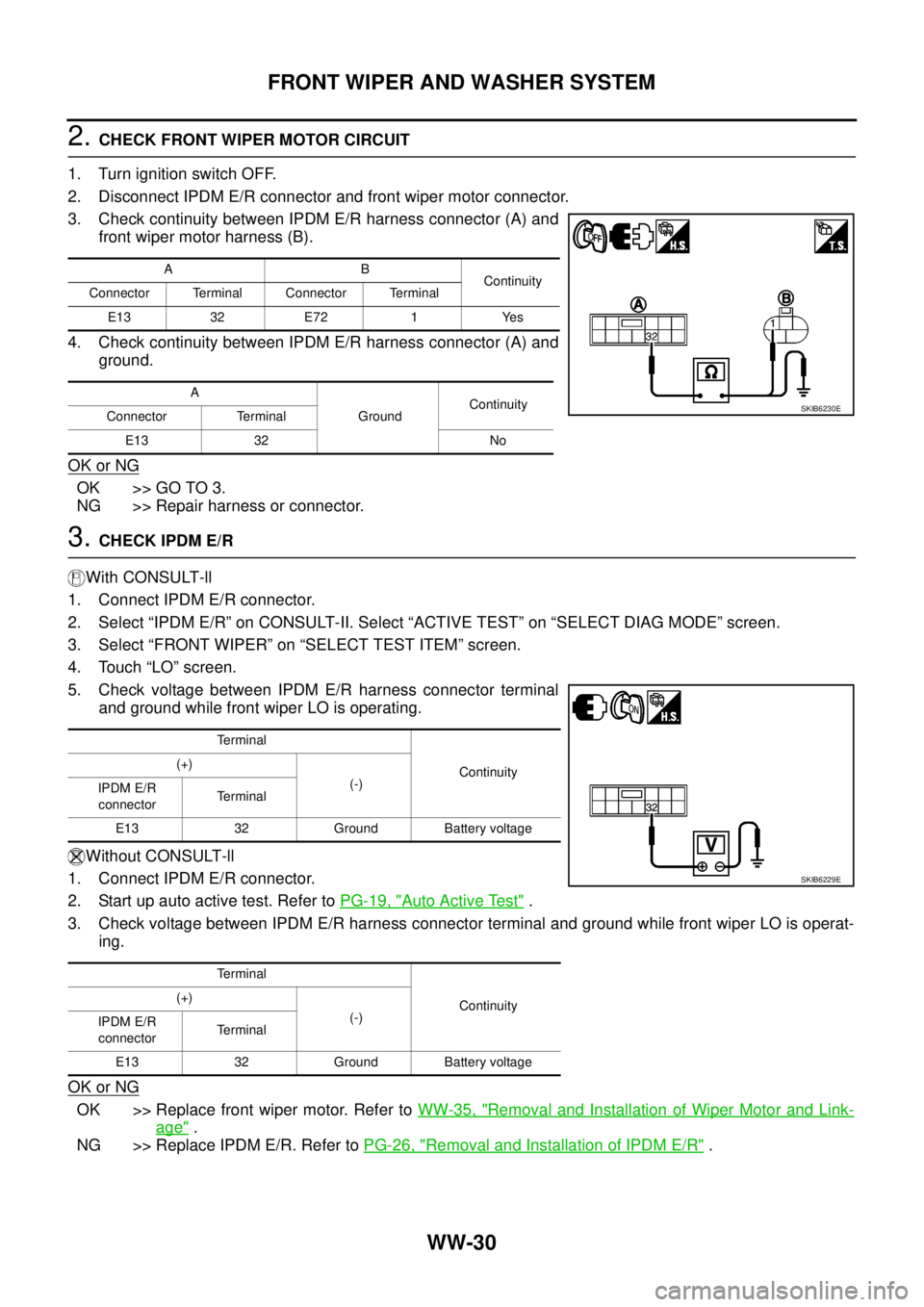
2.CHECK FRONT WIPER MOTOR CIRCUIT
1. Turn ignition switch OFF.
2. Disconnect IPDM E/R connector and front wiper motor connector.
3. Check continuity between IPDM E/R harness connector (A) and
front wiper motor harness (B).
4. Check continuity between IPDM E/R harness connector (A) and
ground.
OK or NG
OK >> GO TO 3.
NG >> Repair harness or connector.
3.CHECK IPDM E/R
With CONSULT-ll
1. Connect IPDM E/R connector.
2. Select “IPDM E/R” on CONSULT-II. Select “ACTIVE TEST” on “SELECT DIAG MODE” screen.
3. Select “FRONT WIPER” on “SELECT TEST ITEM” screen.
4. Touch “LO” screen.
5. Check voltage between IPDM E/R harness connector terminal
and ground while front wiper LO is operating.
Without CONSULT-ll
1. Connect IPDM E/R connector.
2. Startupautoactivetest.RefertoPG-19, "
Auto Active Test".
3. Check voltage between IPDM E/R harness connector terminal and ground while front wiper LO is operat-
ing.
OK or NG
OK >> Replace front wiper motor. Refer toWW-35, "Removal and Installation of Wiper Motor and Link-
age".
NG >> Replace IPDM E/R. Refer toPG-26, "
Removal and Installation of IPDM E/R".
AB
Continuity
Connector Terminal Connector Terminal
E13 32 E72 1 Yes
A
GroundContinuity
Connector Terminal
E13 32 No
SKIB6230E
Terminal
Continuity (+)
(-)
IPDM E/R
connectorTerminal
E13 32 Ground Battery voltage
Terminal
Continuity (+)
(-)
IPDM E/R
connectorTerminal
E13 32 Ground Battery voltage
SKIB6229E