control unit NISSAN NAVARA 2005 Repair Workshop Manual
[x] Cancel search | Manufacturer: NISSAN, Model Year: 2005, Model line: NAVARA, Model: NISSAN NAVARA 2005Pages: 3171, PDF Size: 49.59 MB
Page 2774 of 3171
![NISSAN NAVARA 2005 Repair Workshop Manual TROUBLE DIAGNOSIS FOR SYMPTOMS
RFD-71
[WITH ELECTRONIC LOCKING DIFFERENTIAL]
C
E
F
G
H
I
J
K
L
MA
B
RFD
3.CHECK DIFFERENTIAL LOCK CONTROL UNIT GROUND CIRCUIT
1. Turn ignition switch “OFF”.
2. Disc](/img/5/57362/w960_57362-2773.png "NISSAN NAVARA 2005 Repair Workshop Manual TROUBLE DIAGNOSIS FOR SYMPTOMS
RFD-71
[WITH ELECTRONIC LOCKING DIFFERENTIAL]
C
E
F
G
H
I
J
K
L
MA
B
RFD
3.CHECK DIFFERENTIAL LOCK CONTROL UNIT GROUND CIRCUIT
1. Turn ignition switch “OFF”.
2. Disc")
TROUBLE DIAGNOSIS FOR SYMPTOMS
RFD-71
[WITH ELECTRONIC LOCKING DIFFERENTIAL]
C
E
F
G
H
I
J
K
L
MA
B
RFD
3.CHECK DIFFERENTIAL LOCK CONTROL UNIT GROUND CIRCUIT
1. Turn ignition switch “OFF”.
2. Disconnect differential lock control unit harness connector.
3. Check continuity between differential lock control unit harness
connector M107 terminals 3, 10 and ground.
Also check harness for short to ground and short to power.
OK or NG
OK >> GO TO 4.
NG >> Repair open circuit or short to ground or short to power
in harness or connectors.
4.CHECK COMBINATION METER POWER SUPPLY CIRCUIT
1. Turn ignition switch “OFF”.
2. Disconnect combination meter harness connector.
3. Check voltage between combination meter harness connector
terminal and ground.
4. Turn ignition switch “ON”. (Do not start engine.)
5. Check voltage between combination meter harness connector
terminal and ground.
OK or NG
OK >> GO TO 5.
NG >> Check the following. If any items are damaged, repair or
replace damaged parts.
l10A fuse [No.14, located in the fuse block (J/B)]
lHarness for short or open between ignition switch and combination meter harness connector
terminal 16.
lIgnition switch. Refer toPG-4, "POWER SUPPLY ROUTING CIRCUIT". Continuity should exist.
SDIA2564E
Connector Terminal Voltage (Approx.)
M23 16 - Ground 0V
WDIA0250E
Connector Terminal Voltage (Approx.)
M23 16 - Ground 0V
WDIA0251E
Page 2775 of 3171
![NISSAN NAVARA 2005 Repair Workshop Manual RFD-72
[WITH ELECTRONIC LOCKING DIFFERENTIAL]
TROUBLE DIAGNOSIS FOR SYMPTOMS
5.CHECK HARNESS BETWEEN DIFFERENTIAL LOCK CONTROL UNIT AND COMBINATION METER
1. Turn ignition switch “OFF”.
2. Disconne](/img/5/57362/w960_57362-2774.png "NISSAN NAVARA 2005 Repair Workshop Manual RFD-72
[WITH ELECTRONIC LOCKING DIFFERENTIAL]
TROUBLE DIAGNOSIS FOR SYMPTOMS
5.CHECK HARNESS BETWEEN DIFFERENTIAL LOCK CONTROL UNIT AND COMBINATION METER
1. Turn ignition switch “OFF”.
2. Disconne")
RFD-72
[WITH ELECTRONIC LOCKING DIFFERENTIAL]
TROUBLE DIAGNOSIS FOR SYMPTOMS
5.CHECK HARNESS BETWEEN DIFFERENTIAL LOCK CONTROL UNIT AND COMBINATION METER
1. Turn ignition switch “OFF”.
2. Disconnect differential lock control unit harness connector and combination meter harness connector.
3. Check continuity between differential lock control unit harness
connector M107 terminal 21 and combination meter harness
connector M23 terminal 25.
Also check harness for short to ground and short to power.
OK or NG
OK >> GO TO 6.
NG >> Repair or replace damaged parts.
6.CHECK INDICATOR LAMP CIRCUIT
1. Turn ignition switch “OFF”. (Stay for at least 5 seconds.)
2. Connect combination meter harness connector.
3. Disconnect differential lock control unit harness connector.
4. Turn ignition switch “ON”. (Do not start engine.)
5. Ground the following terminals using suitable wiring.
–Differential lock control unit harness connector M107 terminal 21
and ground.
Do indicator lamps turn on?
OK >> GO TO 7.
NG >> Replace combination meter. Refer toDI-27, "
Removal
and Installation of Combination Meter".
7.CHECK SYMPTOM
Check again.
OK or NG
OK >>INSPECTION END
NG >> GO TO 8.
8.CHECK DIFFERENTIAL LOCK CONTROL UNIT
Check differential lock control unit input/output signal. Refer toRFD-48, "
Differential Lock Control Unit Input/
Output Signal Reference Values".
OK or NG
OK >>INSPECTION END
NG >> Check differential lock control unit pin terminals for damage or loose connection with harness con-
nector. If any items are damaged, repair or replace damaged parts. Continuity should exist.
WDIA0252E
SDIA3453E
Page 2776 of 3171
![NISSAN NAVARA 2005 Repair Workshop Manual TROUBLE DIAGNOSIS FOR SYMPTOMS
RFD-73
[WITH ELECTRONIC LOCKING DIFFERENTIAL]
C
E
F
G
H
I
J
K
L
MA
B
RFD
DIFF LOCK Indicator Lamp Does Not ChangeEDS003BA
SYMPTOM:
DIFF LOCK indicator lamp does not chan](/img/5/57362/w960_57362-2775.png "NISSAN NAVARA 2005 Repair Workshop Manual TROUBLE DIAGNOSIS FOR SYMPTOMS
RFD-73
[WITH ELECTRONIC LOCKING DIFFERENTIAL]
C
E
F
G
H
I
J
K
L
MA
B
RFD
DIFF LOCK Indicator Lamp Does Not ChangeEDS003BA
SYMPTOM:
DIFF LOCK indicator lamp does not chan")
TROUBLE DIAGNOSIS FOR SYMPTOMS
RFD-73
[WITH ELECTRONIC LOCKING DIFFERENTIAL]
C
E
F
G
H
I
J
K
L
MA
B
RFD
DIFF LOCK Indicator Lamp Does Not ChangeEDS003BA
SYMPTOM:
DIFF LOCK indicator lamp does not change when turning differential lock mode switch to “ON” after
engine start.
DIAGNOSTIC PROCEDURE
1.CHECK DIFF LOCK INDICATOR LAMP
Confirm DIFF LOCK indicator lamp when ignition switch is turned to ON.
Does DIFF LOCK indicator lamp turn on?
YES >> GO TO 2.
NO >> Go toRFD-70, "
DIFF LOCK Indicator Lamp Does Not Turn ON".
2.CHECK SELF-DIAGNOSTIC RESULTS
Perform self-diagnosis. Refer toRFD-51, "
SELF-DIAG RESULTS MODE".
Is any malfunction detected by self-diagnosis?
YES >> Check the malfunctioning system.
NO >> GO TO 3.
3.CHECK SYSTEM FOR DIFFERENTIAL LOCK MODE SWITCH
Perform trouble diagnosis for differential lock mode switch system. Refer toRFD-56, "
Differential Lock Mode
Switch".
OK or NG
OK >> GO TO 4.
NG >> Repair or replace damaged parts.
4.CHECK SYMPTOM
Check again.
OK or NG
OK >>INSPECTION END
NG >> GO TO 5.
5.CHECK DIFFERENTIAL LOCK CONTROL UNIT
Check differential lock control unit input/output signal. Refer toRFD-48, "
Differential Lock Control Unit Input/
Output Signal Reference Values".
OK or NG
OK >>INSPECTION END
NG >> Check differential lock control unit pin terminals for damage or loose connection with harness con-
nector. If any items are damaged, repair or replace damaged parts.
Page 2777 of 3171
![NISSAN NAVARA 2005 Repair Workshop Manual RFD-74
[WITH ELECTRONIC LOCKING DIFFERENTIAL]
TROUBLE DIAGNOSIS FOR SYMPTOMS
DIFF LOCK Indicator Lamp Sometimes Flashes
EDS003BB
SYMPTOM:
DIFF LOCK indicator lamp sometimes flashes when it turns ON or](/img/5/57362/w960_57362-2776.png "NISSAN NAVARA 2005 Repair Workshop Manual RFD-74
[WITH ELECTRONIC LOCKING DIFFERENTIAL]
TROUBLE DIAGNOSIS FOR SYMPTOMS
DIFF LOCK Indicator Lamp Sometimes Flashes
EDS003BB
SYMPTOM:
DIFF LOCK indicator lamp sometimes flashes when it turns ON or")
RFD-74
[WITH ELECTRONIC LOCKING DIFFERENTIAL]
TROUBLE DIAGNOSIS FOR SYMPTOMS
DIFF LOCK Indicator Lamp Sometimes Flashes
EDS003BB
SYMPTOM:
DIFF LOCK indicator lamp sometimes flashes when it turns ON or OFF during driving.
DIAGNOSTIC PROCEDURE
1.CHECK DIFF LOCK INDICATOR LAMP
Confirm DIFF LOCK indicator lamp when ignition switch is turned to ON.
Does DIFF LOCK indicator lamp turn on?
YES >> GO TO 2.
NO >> Go toRFD-70, "
DIFF LOCK Indicator Lamp Does Not Turn ON".
2.CHECK SELF-DIAGNOSTIC RESULTS
Perform self-diagnosis. Refer toRFD-51, "
SELF-DIAG RESULTS MODE".
Is any malfunction detected by self-diagnosis?
YES >> Check the malfunctioning system.
NO >> GO TO 3.
3.CHECK SYSTEM FOR DIFFERENTIAL LOCK MODE SWITCH
Perform trouble diagnosis for differential lock mode switch system. Refer toRFD-56, "
Differential Lock Mode
Switch".
OK or NG
OK >> GO TO 4.
NG >> Repair or replace damaged parts.
4.CHECK SYSTEM FOR DIFFERENTIAL POSITION SWITCH
Perform trouble diagnosis for differential lock position switch system. Refer toRFD-60, "
Differential Lock Posi-
tion Switch".
OK or NG
OK >> GO TO 5.
NG >> Repair or replace damaged parts.
5.CHECK SYMPTOM
Check again.
OK or NG
OK >>INSPECTION END
NG >> GO TO 6.
6.CHECK DIFFERENTIAL LOCK CONTROL UNIT
Check differential lock control unit input/output signal. Refer toRFD-48, "
Differential Lock Control Unit Input/
Output Signal Reference Values".
OK or NG
OK >> GO TO 7.
NG >> Check differential lock control unit pin terminals for damage or loose connection with harness con-
nector. If any items are damaged, repair or replace damaged parts.
Page 2779 of 3171
![NISSAN NAVARA 2005 Repair Workshop Manual RFD-76
[WITH ELECTRONIC LOCKING DIFFERENTIAL]
DIFFERENTIAL LOCK CONTROL UNIT
DIFFERENTIAL LOCK CONTROL UNIT
PFP:28496
Removal and InstallationEDS003BC
REMOVAL
1. Turn the ignition switch OFF and disco](/img/5/57362/w960_57362-2778.png "NISSAN NAVARA 2005 Repair Workshop Manual RFD-76
[WITH ELECTRONIC LOCKING DIFFERENTIAL]
DIFFERENTIAL LOCK CONTROL UNIT
DIFFERENTIAL LOCK CONTROL UNIT
PFP:28496
Removal and InstallationEDS003BC
REMOVAL
1. Turn the ignition switch OFF and disco")
RFD-76
[WITH ELECTRONIC LOCKING DIFFERENTIAL]
DIFFERENTIAL LOCK CONTROL UNIT
DIFFERENTIAL LOCK CONTROL UNIT
PFP:28496
Removal and InstallationEDS003BC
REMOVAL
1. Turn the ignition switch OFF and disconnect the battery cables.
2. Remove the lower instrument panel LH (LHD models) or lower instrument panel RH (RHD models). Refer
toIP-13, "
LOWER INSTRUMENT PANEL LH"(LHD models) orIP-13, "LOWER INSTRUMENT PANEL
LH"(RHD models).
3. Disconnect the differential lock control unit connector.
4. Remove the two bolts and remove the differential lock control
unit.
INSTALLATION
Installation is in the reverse order of removal.
lWhen installing differential lock control unit, tighten bolts to the specified torque.
lAfter the installation, check DIFF LOCK indicator lamp. Refer toRFD-33, "Precautions for Differential
Case Assembly and Differential Lock Control Unit Replacement".
WDIA0254E
Differential lock control unit bolts : 5.1 N·m (0.52 kg-m, 45 in-lb)
Page 2784 of 3171
![NISSAN NAVARA 2005 Repair Workshop Manual REAR FINAL DRIVE ASSEMBLY
RFD-81
[WITH ELECTRONIC LOCKING DIFFERENTIAL]
C
E
F
G
H
I
J
K
L
MA
B
RFD
REAR FINAL DRIVE ASSEMBLYPFP:38300
Removal and InstallationEDS003BF
REMOVAL
1. Remove the rear propel](/img/5/57362/w960_57362-2783.png "NISSAN NAVARA 2005 Repair Workshop Manual REAR FINAL DRIVE ASSEMBLY
RFD-81
[WITH ELECTRONIC LOCKING DIFFERENTIAL]
C
E
F
G
H
I
J
K
L
MA
B
RFD
REAR FINAL DRIVE ASSEMBLYPFP:38300
Removal and InstallationEDS003BF
REMOVAL
1. Remove the rear propel")
REAR FINAL DRIVE ASSEMBLY
RFD-81
[WITH ELECTRONIC LOCKING DIFFERENTIAL]
C
E
F
G
H
I
J
K
L
MA
B
RFD
REAR FINAL DRIVE ASSEMBLYPFP:38300
Removal and InstallationEDS003BF
REMOVAL
1. Remove the rear propeller shaft. Refer toPR-8, "Removal and Installation".
lPlug rear end of transmission or transfer.
2. Remove the axle shafts and back plate and torque members. Refer toRAX-7, "
Removal and Installation".
3. Disconnect the following components from the rear final drive.
lABS sensor wire harness
lRear cable (LH) and rear cable (RH)
lBrake hoses and brake tube
lDifferential lock position switch harness connector
lDifferential lock solenoid harness connector
CAUTION:
Position the wire harness, cable and hoses away from the final drive assembly. Failure to do so
may result in components being damaged during rear axle assembly removal.
4. Support the rear final drive using a suitable jack.
5. Remove rear shock absorber lower bolts. Refer toRSU-6, "
Removal and Installation".
6. Remove leaf spring U-bolt nuts. Refer toRSU-7, "
Removal and Installation".
WARNING:
Support the rear final drive assembly using suitable jack before removing leaf spring U-bolt nuts.
7. Remove rear final drive assembly using suitable jack.
INSTALLATION
Installation is the reverse order of removal.
lWhen oil leaks while removing rear final drive assembly, check oil level after the installation. Refer to
RFD-40, "
Checking Differential Gear Oil".
lRefill brake fluid and bleed the air from the brake system. Refer toBR-11, "Bleeding Brake System".
lAfter the installation, check DIFF LOCK indicator lamp. Refer toRFD-33, "Precautions for Differential
Case Assembly and Differential Lock Control Unit Replacement".
Page 2877 of 3171
SE-6
SQUEAK AND RATTLE TROUBLE DIAGNOSES
FELT CLOTHTAPE
Used to insulate where movement does not occur. Ideal for instrument panel applications.
68370-4B000: 15´25 mm (0.59´0.98 in) pad/68239-13E00: 5 mm (0.20 in) wide tape roll
The following materials, not available through NISSAN Parts Department, can also be used to repair squeaks
and rattles.
UHMW(TEFLON) TAPE
Insulates where slight movement is present. Ideal for instrument panel applications.
SILICONE GREASE
Used in place of UHMW tape that will be visible or not fit.
Note: Will only last a few months.
SILICONE SPRAY
Use when grease cannot be applied.
DUCT TAPE
Use to eliminate movement.
CONFIRM THE REPAIR
Confirm that the cause of a noise is repaired by test driving the vehicle. Operate the vehicle under the same
conditions as when the noise originally occurred. Refer to the notes on the Diagnostic Worksheet.
Generic Squeak and Rattle TroubleshootingEIS00CEI
Refer to Table of Contents for specific component removal and installation information.
INSTRUMENT PANEL
Most incidents are caused by contact and movement between:
1. Cluster lid A and instrument panel
2. Acrylic lens and combination meter housing
3. Instrument panel to front pillar garnish
4. Instrument panel to windshield
5. Instrument panel mounting pins
6. Wiring harnesses behind the combination meter
7. A/C defroster duct and duct joint
These incidents can usually be located by tapping or moving the components to duplicate the noise or by
pressing on the components while driving to stop the noise. Most of these incidents can be repaired by apply-
ing felt cloth tape or silicon spray (in hard to reach areas). Urethane pads can be used to insulate wiring har-
ness.
CAUTION:
Do not use silicone spray to isolate a squeak or rattle. If you saturate the area with silicone, you will
not be able to recheck the repair.
CENTER CONSOLE
Components to pay attention to include:
1. Shifter assembly cover to finisher
2. A/C control unit and cluster lid C
3. Wiring harnesses behind audio and A/C control unit
The instrument panel repair and isolation procedures also apply to the center console.
DOORS
Pay attention to the:
1. Finisher and inner panel making a slapping noise
2. Inside handle escutcheon to door finisher
3. Wiring harnesses tapping
4. Door striker out of alignment causing a popping noise on starts and stops
Tapping or moving the components or pressing on them while driving to duplicate the conditions can isolate
many of these incidents. You can usually insulate the areas with felt cloth tape or insulator foam blocks to
repair the noise.
Page 2892 of 3171
FRONT SEAT
SE-21
C
D
E
F
G
H
J
K
L
MA
B
SE
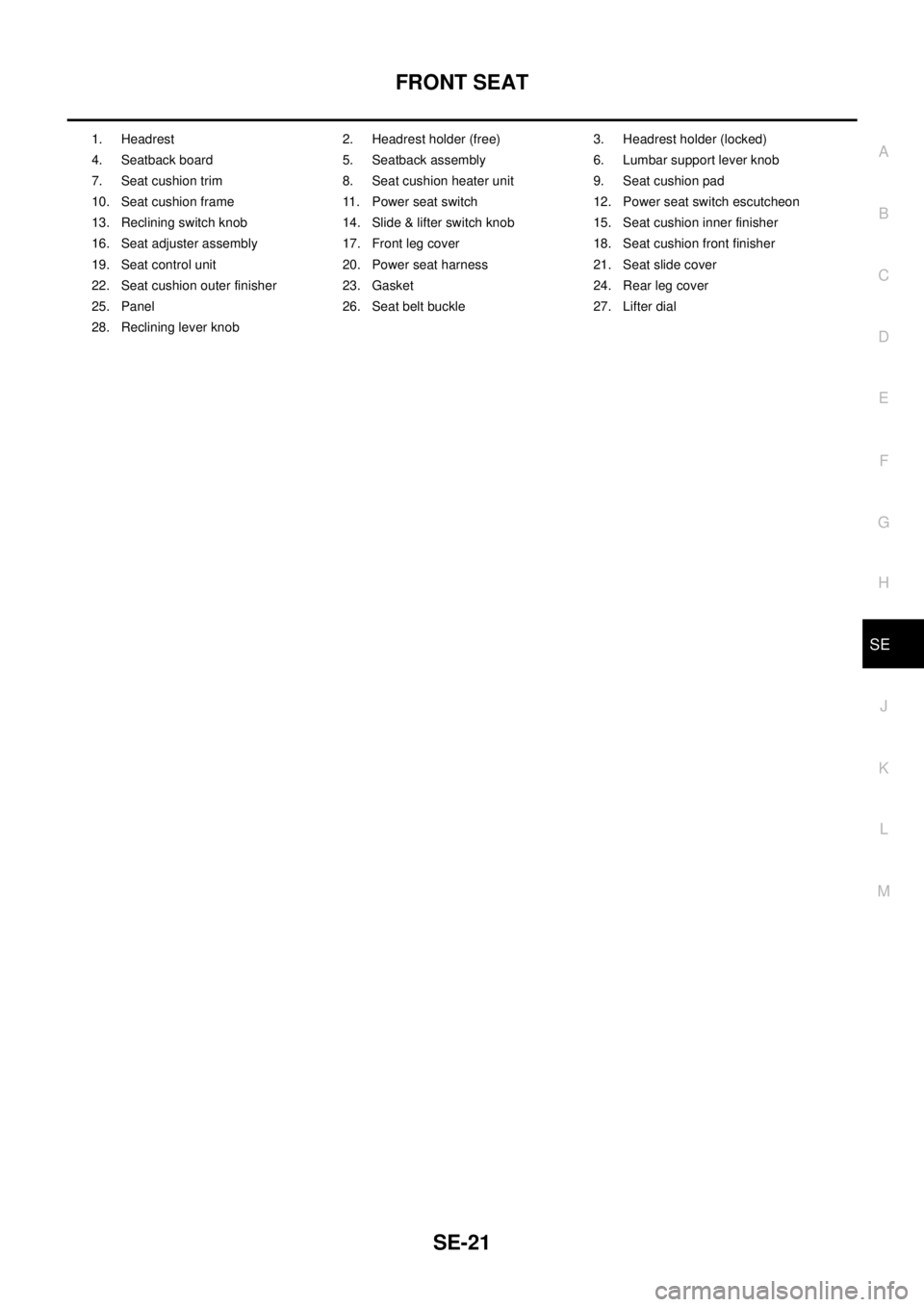
1. Headrest 2. Headrest holder (free) 3. Headrest holder (locked)
4. Seatback board 5. Seatback assembly 6. Lumbar support lever knob
7. Seat cushion trim 8. Seat cushion heater unit 9. Seat cushion pad
10. Seat cushion frame 11. Power seat switch 12. Power seat switch escutcheon
13. Reclining switch knob 14. Slide & lifter switch knob 15. Seat cushion inner finisher
16. Seat adjuster assembly 17. Front leg cover 18. Seat cushion front finisher
19. Seat control unit 20. Power seat harness 21. Seat slide cover
22. Seat cushion outer finisher 23. Gasket 24. Rear leg cover
25. Panel 26. Seat belt buckle 27. Lifter dial
28. Reclining lever knob
Page 2929 of 3171
SRS-20
TROUBLE DIAGNOSIS
Trouble Diagnosis With CONSULT-II
EHS001XO
DIAGNOSTIC PROCEDURE 2
CAUTION:
If CONSULT-II is used with no connection of CONSULT-II CONVERTER, malfunction might be detected
in self-diagnosis depending on control unit which carry out CAN communication.
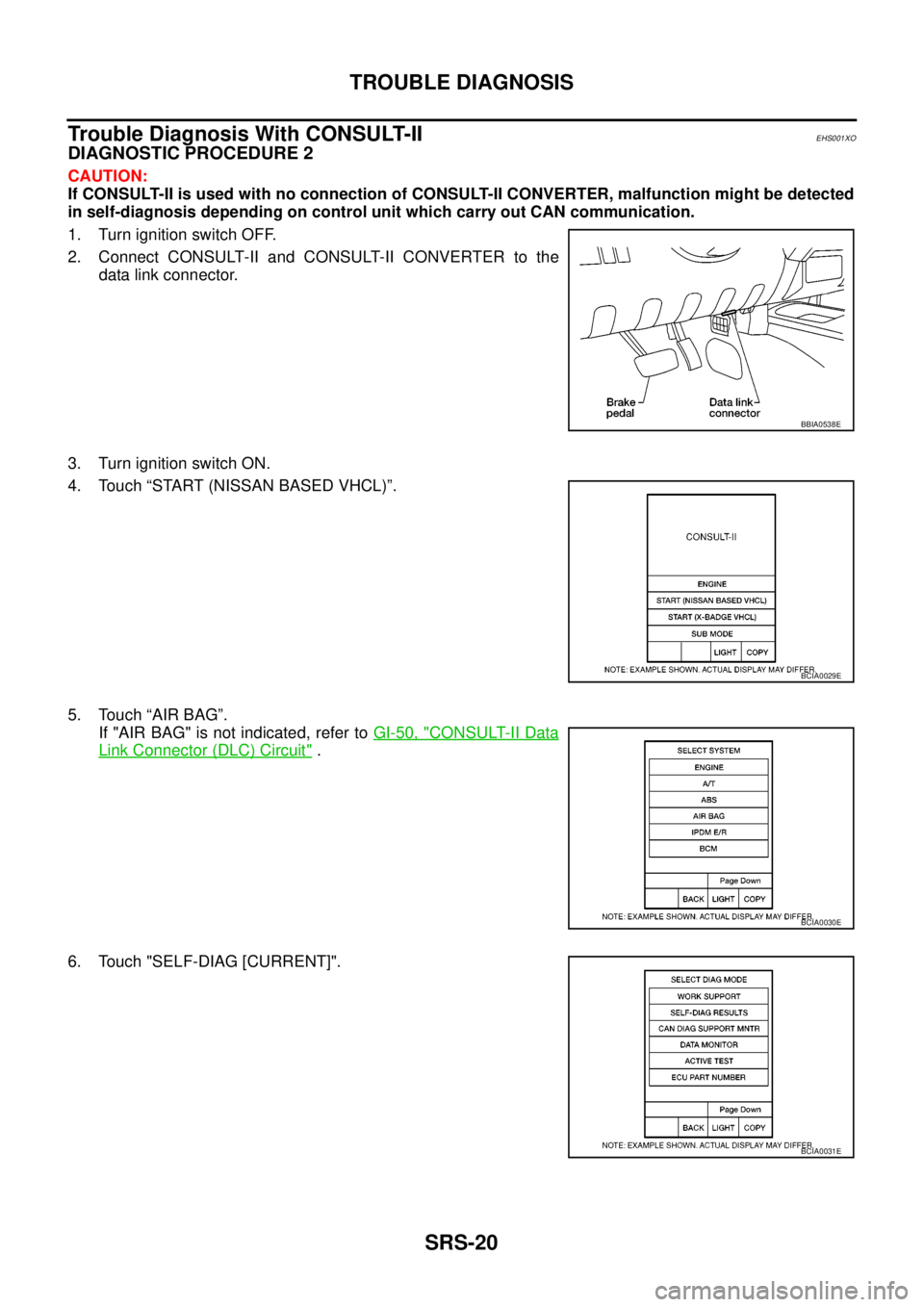
1. Turn ignition switch OFF.
2. Connect CONSULT-II and CONSULT-II CONVERTER to the
data link connector.
3. Turn ignition switch ON.
4. Touch “START (NISSAN BASED VHCL)”.
5. Touch “AIR BAG”.
If "AIR BAG" is not indicated, refer toGI-50, "
CONSULT-II Data
Link Connector (DLC) Circuit".
6. Touch "SELF-DIAG [CURRENT]".
BBIA0538E
BCIA0029E
BCIA0030E
BCIA0031E
Page 2932 of 3171
![NISSAN NAVARA 2005 Repair Workshop Manual TROUBLE DIAGNOSIS
SRS-23
C
D
E
F
G
I
J
K
L
MA
B
SRS
PRE-TEN FRONT LH
[OPEN]
[B1086]lThe circuit for front LH seat belt pre-tensioner is open. 1. Visually check the wiring harness
connections.
2. Repla](/img/5/57362/w960_57362-2931.png "NISSAN NAVARA 2005 Repair Workshop Manual TROUBLE DIAGNOSIS
SRS-23
C
D
E
F
G
I
J
K
L
MA
B
SRS
PRE-TEN FRONT LH
[OPEN]
[B1086]lThe circuit for front LH seat belt pre-tensioner is open. 1. Visually check the wiring harness
connections.
2. Repla")
TROUBLE DIAGNOSIS
SRS-23
C
D
E
F
G
I
J
K
L
MA
B
SRS
PRE-TEN FRONT LH
[OPEN]
[B1086]lThe circuit for front LH seat belt pre-tensioner is open. 1. Visually check the wiring harness
connections.
2. Replace the harness if it has visible
damage.
3. Replace front LH seat belt pre-
tensioner.
(Before disposal, it must be
deployed.)
4. Replace the air bag diagnosis sen-
sor unit.
5. Replace the related harness. PRE-TEN FRONT LH
[VB-SHORT]
[B1087]
lThe circuit for front LH seat belt pre-tensioner is shorted to
some power supply circuit.
PRE-TEN FRONT LH
[GND-SHORT]
[B1088]
lThe circuit for front LH seat belt pre-tensioner is shorted to
ground.
PRE-TEN FRONT LH
[SHORT]
[B1089]
lThe circuits for the front LH seat belt pre-tensioner are
shorted to each other.
PRE-TEN FRONT RH
[OPEN]
[B1081]
lThe circuit for front RH seat belt pre-tensioner is open. 1. Visually check the wiring harness
connections.
2. Replace the harness if it has visible
damage.
3. Replace front RH seat belt pre-
tensioner.
(Before disposal, it must be
deployed.)
4. Replace the air bag diagnosis sen-
sor unit.
5. Replace the related harness. PRE-TEN FRONT RH
[VB-SHORT]
[B1082]
lThe circuit for front RH seat belt pre-tensioner is shorted to
some power supply circuit.
PRE-TEN FRONT RH
[GND-SHORT]
[B1083]
lThe circuit for front RH seat belt pre-tensioner is shorted to
ground.
PRE-TEN FRONT RH
[SHORT]
[B1084]
lThe circuits for the front RH seat belt pre-tensioner are
shorted to each other.
CURTAIN MODULE LH
[OPEN]
[B1150]
lThe circuit for LH side curtain air bag module is open. 1. Visually check the wiring harness
connection.
2. Replace the harness if it has visible
damage.
3. Replace LH side curtain air bag
module.
(Before disposal, it must be
deployed.)
4. Replace the air bag diagnosis sen-
sor unit.
5. Replace the related harness. CURTAIN MODULE LH
[VB-SHORT]
[B1151]
lThe circuit for LH side curtain air bag module is shorted to
some power supply circuits.
CURTAIN MODULE LH
[GND-SHORT]
[B1152]
lThe circuit for LH side curtain air bag module is shorted to
ground.
CURTAIN MODULE LH
[SHORT]
[B1153]
lThe circuits for the LH side curtain air bag module are
shorted to each other.
CURTAIN MODULE RH
[OPEN]
[B1145]
lThe circuit for RH side curtain air bag module is open. 1. Visually check the wiring harness
connection.
2. Replace the harness if it has visible
damage.
3. Replace RH side curtain air bag
module.
(Before disposal, it must be
deployed.)
4. Replace the air bag diagnosis sen-
sor unit.
5. Replace the related harness. CURTAIN MODULE RH
[VB-SHORT]
[B1146]
lThe circuit for RH side curtain air bag module is shorted to
some power supply circuits.
CURTAIN MODULE RH
[GND-SHORT]
[B1147]
lThe circuit for RH side curtain air bag module is shorted to
ground.
CURTAIN MODULE RH
[SHORT]
[B1148]
lThe circuits for the RH side curtain air bag module are
shorted to each other.
CONTROL UNIT
[B1XXX]
lAir bag diagnosis sensor unit is malfunctioning. 1. Visually check the wiring harness
connection.
2. Replace the harness if it has visible
damage.
3. Replace the air bag diagnosis sen-
sor unit. Diagnostic item ExplanationRepair order
Recheck SRS at each replacement