ignition NISSAN NAVARA 2005 Repair Workshop Manual
[x] Cancel search | Manufacturer: NISSAN, Model Year: 2005, Model line: NAVARA, Model: NISSAN NAVARA 2005Pages: 3171, PDF Size: 49.59 MB
Page 2101 of 3171
LT-18
HEADLAMP -CONVENTIONAL TYPE-
CONSULT-II Functions (IPDM E/R)
EKS00P7R
CONSULT-II can display each diagnostic item using the diagnostic test modes shown following.
CONSULT-II BASIC OPERATION
CAUTION:
If CONSULT-II is used with no connection of CONSULT-II CONVERTER, malfunctions might be
detected in self-diagnosis depending on control unit which carries out CAN communication.
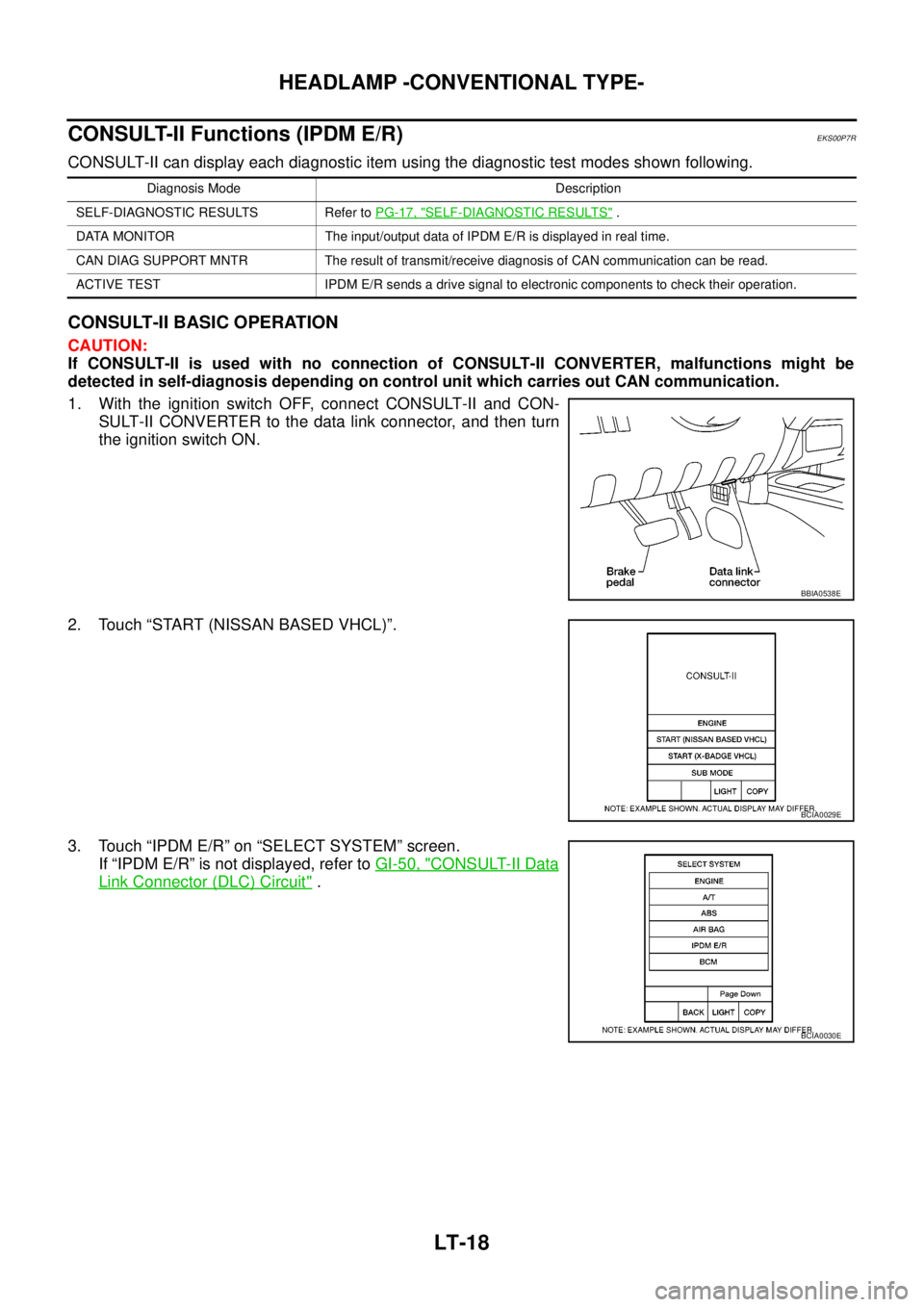
1. With the ignition switch OFF, connect CONSULT-II and CON-
SULT-II CONVERTER to the data link connector, and then turn
the ignition switch ON.
2. Touch “START (NISSAN BASED VHCL)”.
3. Touch “IPDM E/R” on “SELECT SYSTEM” screen.
If “IPDM E/R” is not displayed, refer toGI-50, "
CONSULT-II Data
Link Connector (DLC) Circuit".
Diagnosis Mode Description
SELF-DIAGNOSTIC RESULTS Refer toPG-17, "
SELF-DIAGNOSTIC RESULTS".
DATA MONITOR The input/output data of IPDM E/R is displayed in real time.
CAN DIAG SUPPORT MNTR The result of transmit/receive diagnosis of CAN communication can be read.
ACTIVE TEST IPDM E/R sends a drive signal to electronic components to check their operation.
BBIA0538E
BCIA0029E
BCIA0030E
Page 2102 of 3171
HEADLAMP -CONVENTIONAL TYPE-
LT-19
C
D
E
F
G
H
I
J
L
MA
B
LT
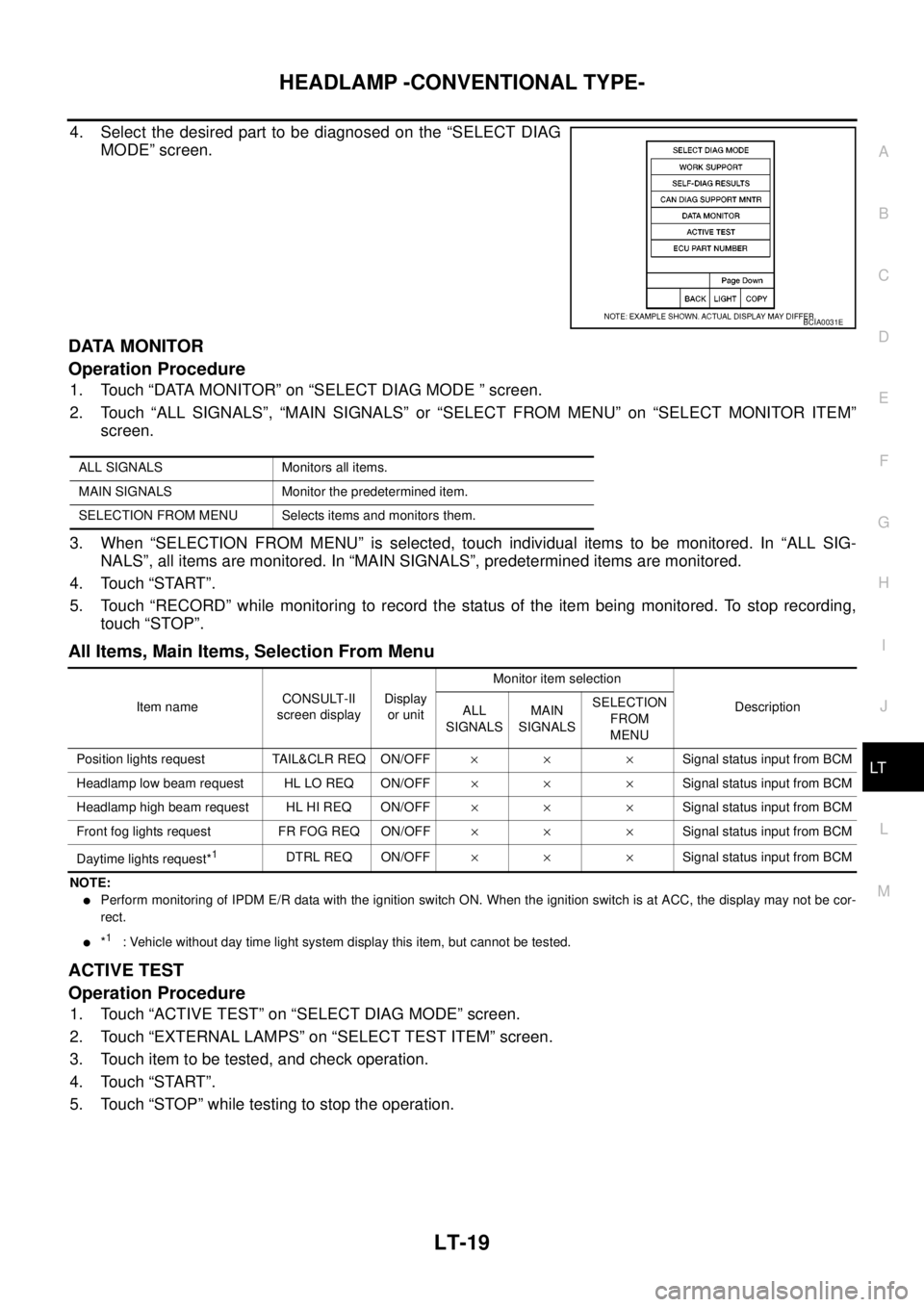
4. Select the desired part to be diagnosed on the “SELECT DIAG
MODE” screen.
DATA MONITOR
Operation Procedure
1. Touch “DATA MONITOR” on “SELECT DIAG MODE ” screen.
2. Touch “ALL SIGNALS”, “MAIN SIGNALS” or “SELECT FROM MENU” on “SELECT MONITOR ITEM”
screen.
3. When “SELECTION FROM MENU” is selected, touch individual items to be monitored. In “ALL SIG-
NALS”, all items are monitored. In “MAIN SIGNALS”, predetermined items are monitored.
4. Touch “START”.
5. Touch “RECORD” while monitoring to record the status of the item being monitored. To stop recording,
touch “STOP”.
All Items, Main Items, Selection From Menu
NOTE:
lPerform monitoring of IPDM E/R data with the ignition switch ON. When the ignition switch is at ACC, the display may not be cor-
rect.
l*1: Vehicle without day time light system display this item, but cannot be tested.
ACTIVE TEST
Operation Procedure
1. Touch “ACTIVE TEST” on “SELECT DIAG MODE” screen.
2. Touch “EXTERNAL LAMPS” on “SELECT TEST ITEM” screen.
3. Touch item to be tested, and check operation.
4. Touch “START”.
5. Touch “STOP” while testing to stop the operation.
BCIA0031E
ALL SIGNALS Monitors all items.
MAIN SIGNALS Monitor the predetermined item.
SELECTION FROM MENU Selects items and monitors them.
Item nameCONSULT-II
screen displayDisplay
or unitMonitor item selection
Description
ALL
SIGNALSMAIN
SIGNALSSELECTION
FROM
MENU
Position lights request TAIL&CLR REQ ON/OFF´´ ´Signal status input from BCM
Headlamp low beam request HL LO REQ ON/OFF´´ ´Signal status input from BCM
Headlamp high beam request HL HI REQ ON/OFF´´ ´Signal status input from BCM
Front fog lights request FR FOG REQ ON/OFF´´ ´Signal status input from BCM
Daytime lights request*
1DTRL REQ ON/OFF´´ ´Signal status input from BCM
Page 2104 of 3171
HEADLAMP -CONVENTIONAL TYPE-
LT-21
C
D
E
F
G
H
I
J
L
MA
B
LT
3.CHECK IPDM E/R
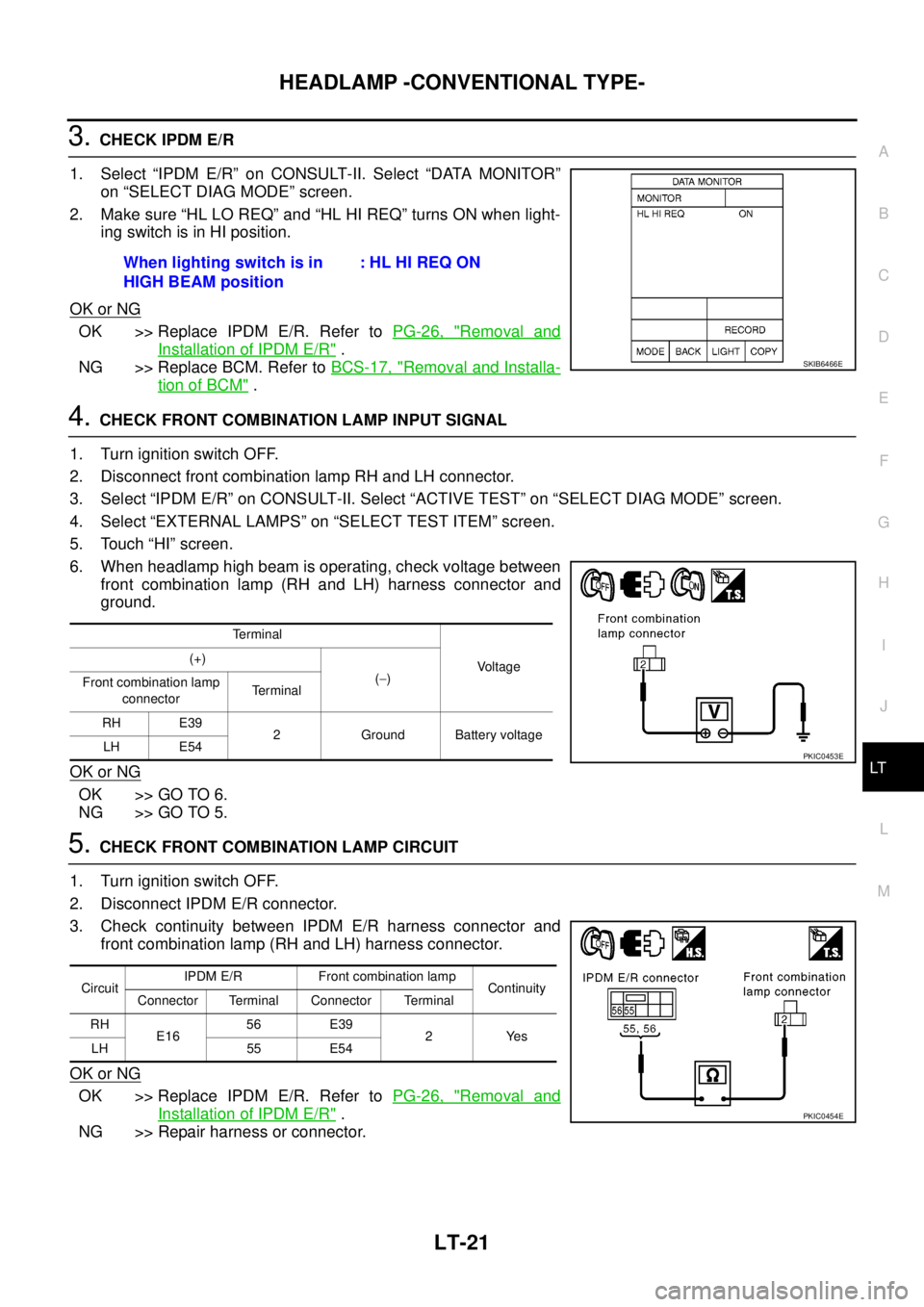
1. Select “IPDM E/R” on CONSULT-II. Select “DATA MONITOR”
on “SELECT DIAG MODE” screen.
2. Make sure “HL LO REQ” and “HL HI REQ” turns ON when light-
ingswitchisinHIposition.
OK or NG
OK >> Replace IPDM E/R. Refer toPG-26, "Removal and
Installation of IPDM E/R".
NG >> Replace BCM. Refer toBCS-17, "
Removal and Installa-
tion of BCM".
4.CHECK FRONT COMBINATION LAMP INPUT SIGNAL
1. Turn ignition switch OFF.
2. Disconnect front combination lamp RH and LH connector.
3. Select “IPDM E/R” on CONSULT-II. Select “ACTIVE TEST” on “SELECT DIAG MODE” screen.
4. Select “EXTERNAL LAMPS” on “SELECT TEST ITEM” screen.
5. Touch “HI” screen.
6. When headlamp high beam is operating, check voltage between
front combination lamp (RH and LH) harness connector and
ground.
OK or NG
OK >> GO TO 6.
NG >> GO TO 5.
5.CHECK FRONT COMBINATION LAMP CIRCUIT
1. Turn ignition switch OFF.
2. Disconnect IPDM E/R connector.
3. Check continuity between IPDM E/R harness connector and
front combination lamp (RH and LH) harness connector.
OK or NG
OK >> Replace IPDM E/R. Refer toPG-26, "Removal and
Installation of IPDM E/R".
NG >> Repair harness or connector.When lighting switch is in
HIGH BEAM position:HLHIREQON
SKIB6466E
Terminal
Voltage (+)
(-)
Front combination lamp
connectorTerminal
RH E39
2 Ground Battery voltage
LH E54
PKIC0453E
CircuitIPDM E/R Front combination lamp
Continuity
Connector Terminal Connector Terminal
RH
E1656 E39
2Yes
LH 55 E54
PKIC0454E
Page 2105 of 3171
LT-22
HEADLAMP -CONVENTIONAL TYPE-
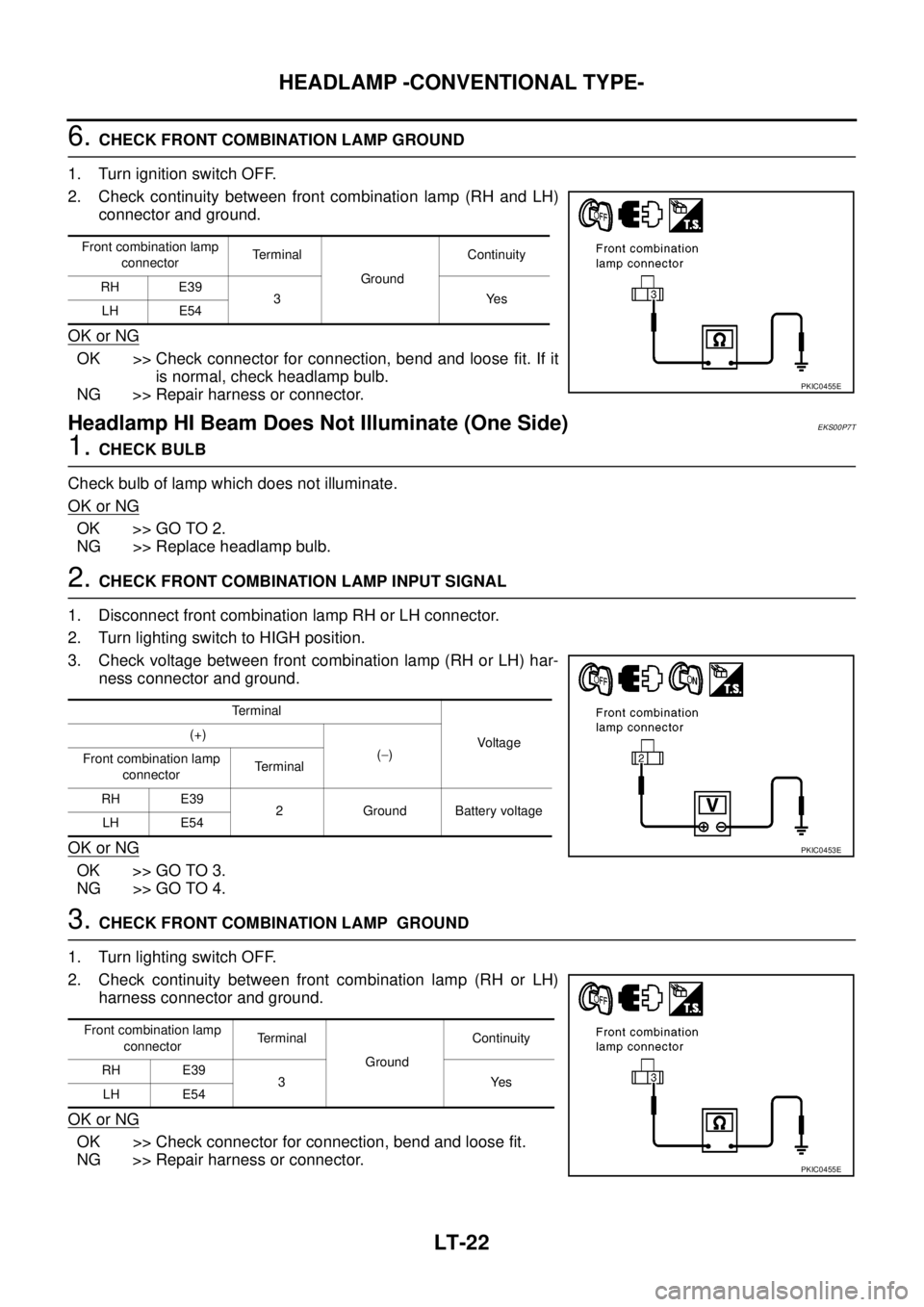
6.CHECK FRONT COMBINATION LAMP GROUND
1. Turn ignition switch OFF.
2. Check continuity between front combination lamp (RH and LH)
connector and ground.
OK or NG
OK >> Check connector for connection, bend and loose fit. If it
is normal, check headlamp bulb.
NG >> Repair harness or connector.
Headlamp HI Beam Does Not Illuminate (One Side)EKS00P7T
1.CHECK BULB
Check bulb of lamp which does not illuminate.
OK or NG
OK >> GO TO 2.
NG >> Replace headlamp bulb.
2.CHECK FRONT COMBINATION LAMP INPUT SIGNAL
1. Disconnect front combination lamp RH or LH connector.
2. Turn lighting switch to HIGH position.
3. Check voltage between front combination lamp (RH or LH) har-
ness connector and ground.
OK or NG
OK >> GO TO 3.
NG >> GO TO 4.
3.CHECK FRONT COMBINATION LAMP GROUND
1. Turn lighting switch OFF.
2. Check continuity between front combination lamp (RH or LH)
harness connector and ground.
OK or NG
OK >> Check connector for connection, bend and loose fit.
NG >> Repair harness or connector.
Front combination lamp
connectorTerminal
GroundContinuity
RH E39
3Yes
LH E54
PKIC0455E
Terminal
Voltag e (+)
(-)
Front combination lamp
connectorTerminal
RH E39
2 Ground Battery voltage
LH E54
PKIC0453E
Front combination lamp
connectorTe r m i n a l
GroundContinuity
RH E39
3Yes
LH E54
PKIC0455E
Page 2107 of 3171
LT-24
HEADLAMP -CONVENTIONAL TYPE-
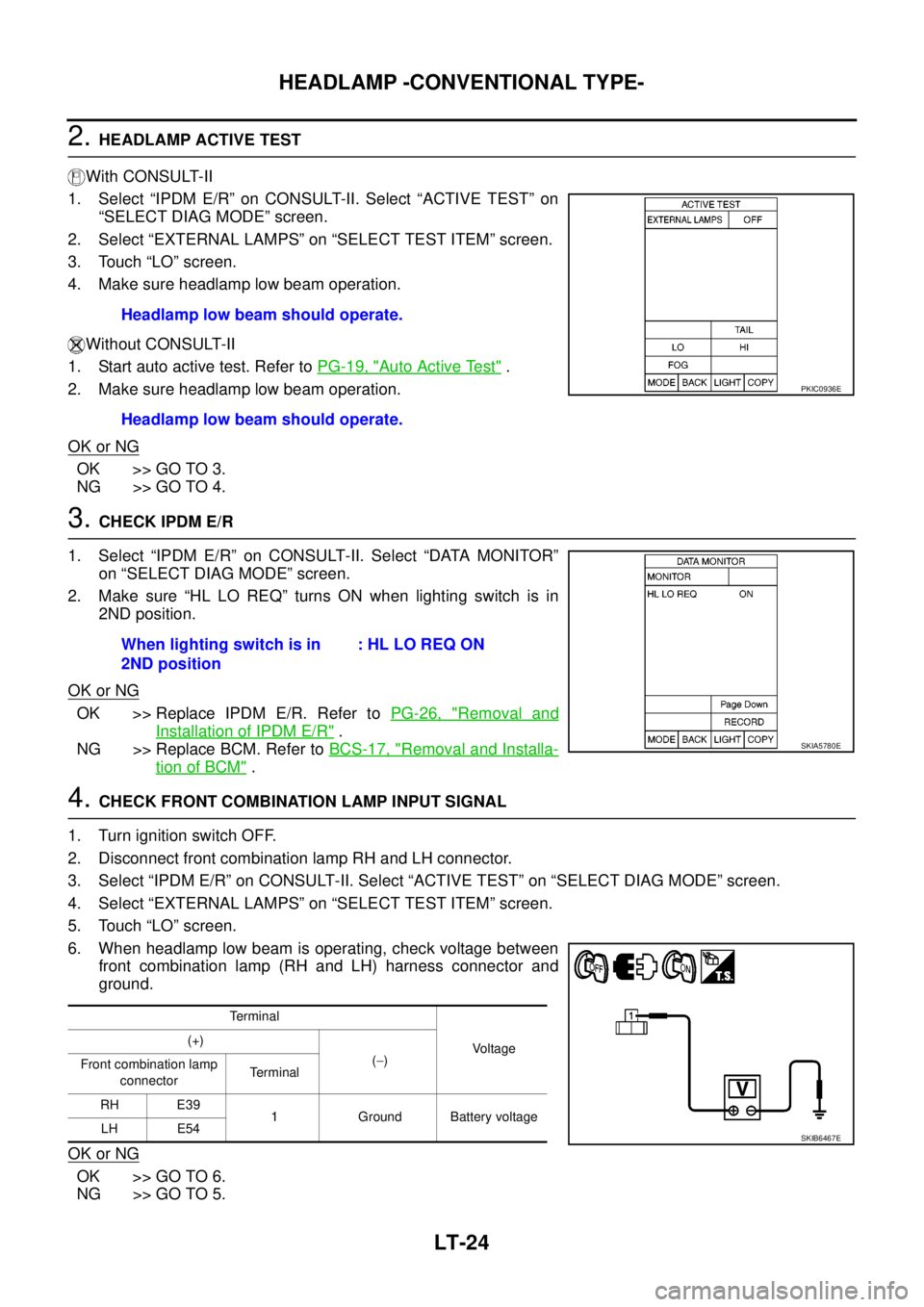
2.HEADLAMP ACTIVE TEST
With CONSULT-II
1. Select “IPDM E/R” on CONSULT-II. Select “ACTIVE TEST” on
“SELECT DIAG MODE” screen.
2. Select “EXTERNAL LAMPS” on “SELECT TEST ITEM” screen.
3. Touch “LO” screen.
4. Make sure headlamp low beam operation.
Without CONSULT-II
1. Start auto active test. Refer toPG-19, "
Auto Active Test".
2. Make sure headlamp low beam operation.
OK or NG
OK >> GO TO 3.
NG >> GO TO 4.
3.CHECK IPDM E/R
1. Select “IPDM E/R” on CONSULT-II. Select “DATA MONITOR”
on “SELECT DIAG MODE” screen.
2. Make sure “HL LO REQ” turns ON when lighting switch is in
2ND position.
OK or NG
OK >> Replace IPDM E/R. Refer toPG-26, "Removal and
Installation of IPDM E/R".
NG >> Replace BCM. Refer toBCS-17, "
Removal and Installa-
tion of BCM".
4.CHECK FRONT COMBINATION LAMP INPUT SIGNAL
1. Turn ignition switch OFF.
2. Disconnect front combination lamp RH and LH connector.
3. Select “IPDM E/R” on CONSULT-II. Select “ACTIVE TEST” on “SELECT DIAG MODE” screen.
4. Select “EXTERNAL LAMPS” on “SELECT TEST ITEM” screen.
5. Touch “LO” screen.
6. When headlamp low beam is operating, check voltage between
front combination lamp (RH and LH) harness connector and
ground.
OK or NG
OK >> GO TO 6.
NG >> GO TO 5.Headlamp low beam should operate.
Headlamp low beam should operate.
PKIC0936E
When lighting switch is in
2ND position:HLLOREQON
SKIA5780E
Te r m i n a l
Voltage (+)
(-)
Front combination lamp
connectorTerminal
RH E39
1 Ground Battery voltage
LH E54
SKIB6467E
Page 2108 of 3171
HEADLAMP -CONVENTIONAL TYPE-
LT-25
C
D
E
F
G
H
I
J
L
MA
B
LT
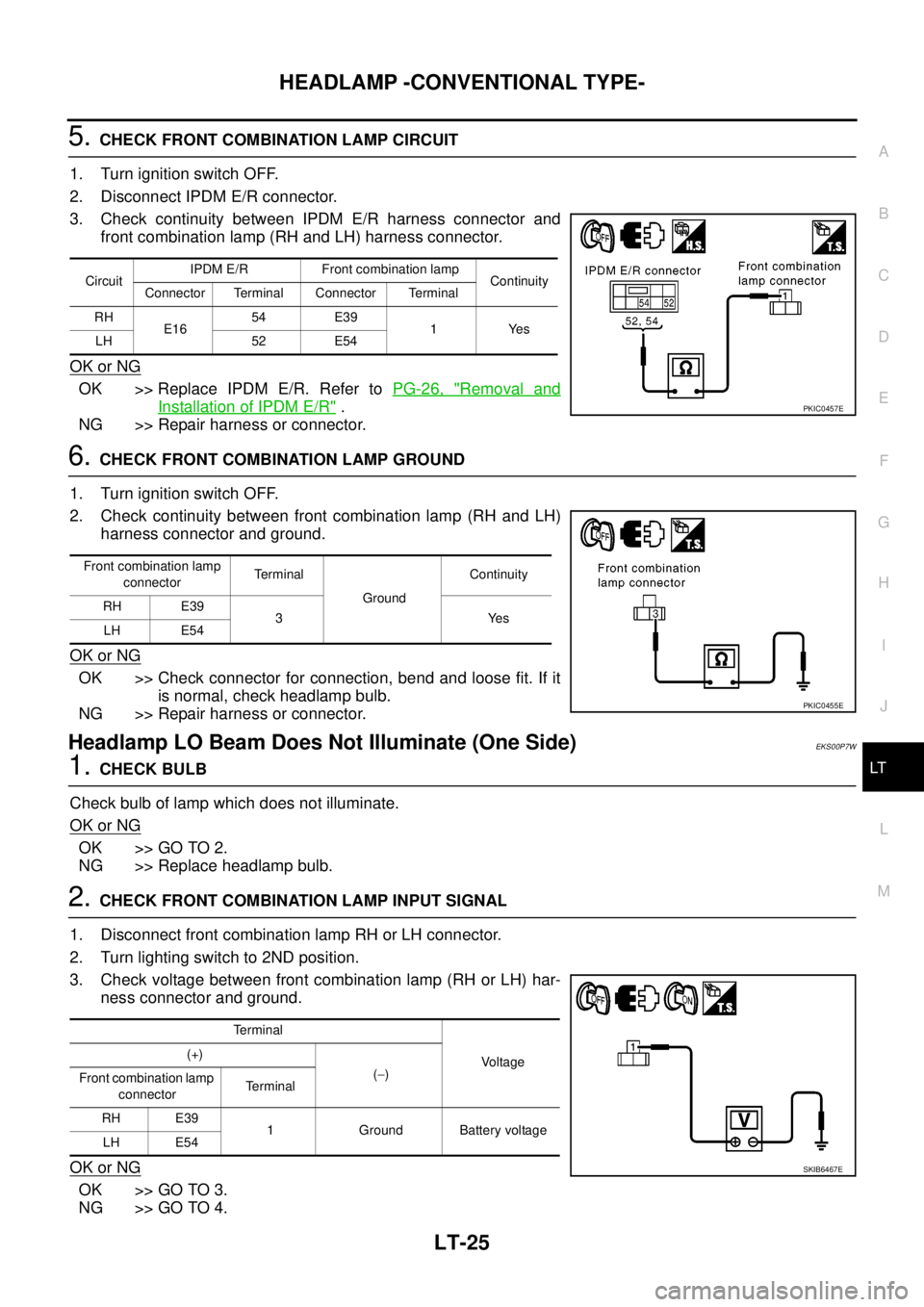
5.CHECK FRONT COMBINATION LAMP CIRCUIT
1. Turn ignition switch OFF.
2. Disconnect IPDM E/R connector.
3. Check continuity between IPDM E/R harness connector and
front combination lamp (RH and LH) harness connector.
OK or NG
OK >> Replace IPDM E/R. Refer toPG-26, "Removal and
Installation of IPDM E/R".
NG >> Repair harness or connector.
6.CHECK FRONT COMBINATION LAMP GROUND
1. Turn ignition switch OFF.
2. Check continuity between front combination lamp (RH and LH)
harness connector and ground.
OK or NG
OK >> Check connector for connection, bend and loose fit. If it
is normal, check headlamp bulb.
NG >> Repair harness or connector.
Headlamp LO Beam Does Not Illuminate (One Side)EKS00P7W
1.CHECK BULB
Check bulb of lamp which does not illuminate.
OK or NG
OK >> GO TO 2.
NG >> Replace headlamp bulb.
2.CHECK FRONT COMBINATION LAMP INPUT SIGNAL
1. Disconnect front combination lamp RH or LH connector.
2. Turn lighting switch to 2ND position.
3. Check voltage between front combination lamp (RH or LH) har-
ness connector and ground.
OK or NG
OK >> GO TO 3.
NG >> GO TO 4.
CircuitIPDM E/R Front combination lamp
Continuity
Connector Terminal Connector Terminal
RH
E1654 E39
1Yes
LH 52 E54
PKIC0457E
Front combination lamp
connectorTerminal
GroundContinuity
RH E39
3Yes
LH E54
PKIC0455E
Terminal
Voltage (+)
(-)
Front combination lamp
connectorTerminal
RH E39
1 Ground Battery voltage
LH E54
SKIB6467E
Page 2109 of 3171
LT-26
HEADLAMP -CONVENTIONAL TYPE-
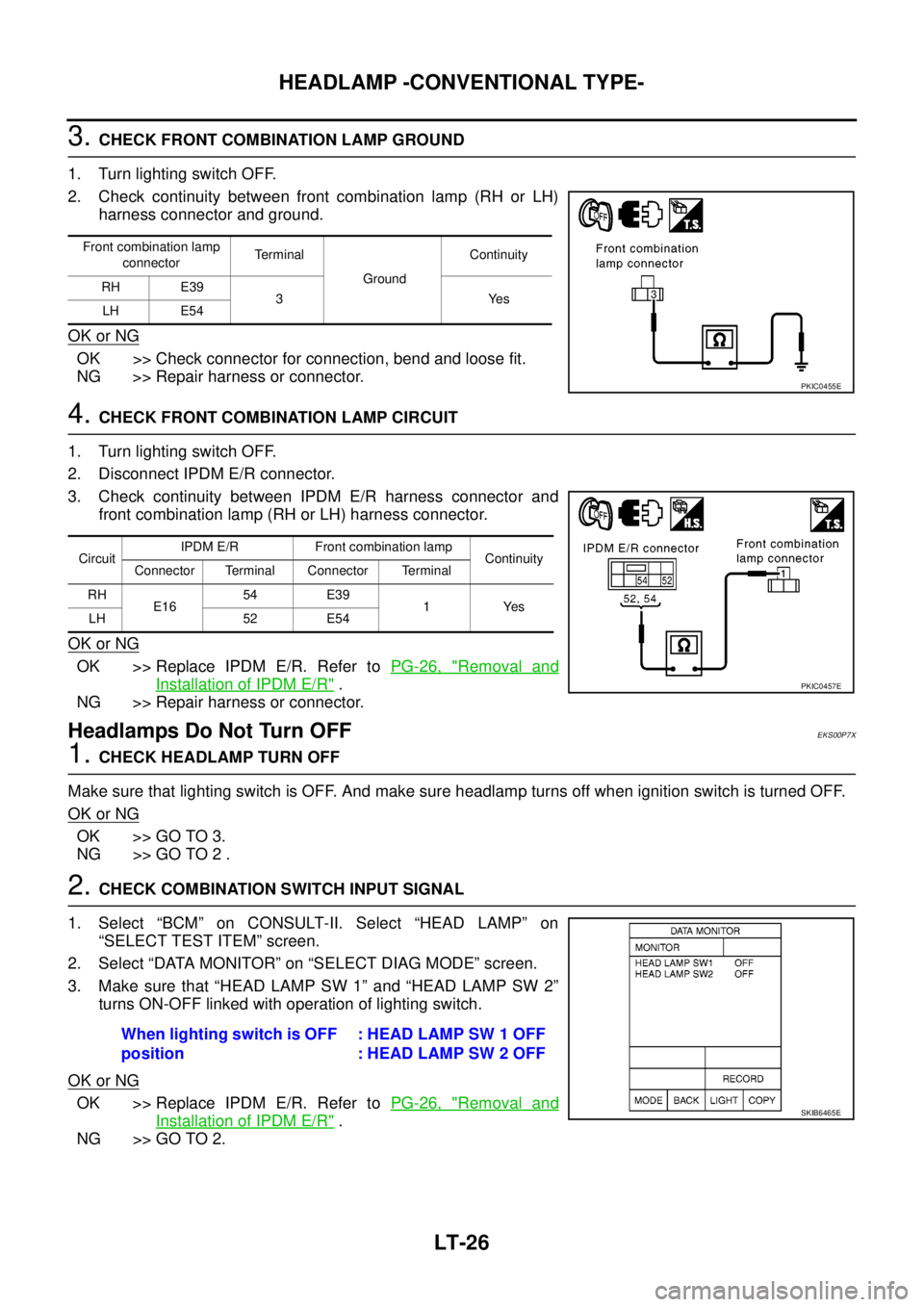
3.CHECK FRONT COMBINATION LAMP GROUND
1. Turn lighting switch OFF.
2. Check continuity between front combination lamp (RH or LH)
harness connector and ground.
OK or NG
OK >> Check connector for connection, bend and loose fit.
NG >> Repair harness or connector.
4.CHECK FRONT COMBINATION LAMP CIRCUIT
1. Turn lighting switch OFF.
2. Disconnect IPDM E/R connector.
3. Check continuity between IPDM E/R harness connector and
front combination lamp (RH or LH) harness connector.
OK or NG
OK >> Replace IPDM E/R. Refer toPG-26, "Removal and
Installation of IPDM E/R".
NG >> Repair harness or connector.
Headlamps Do Not Turn OFFEKS00P7X
1.CHECK HEADLAMP TURN OFF
Make sure that lighting switch is OFF. And make sure headlamp turns off when ignition switch is turned OFF.
OK or NG
OK >> GO TO 3.
NG >> GO TO 2 .
2.CHECK COMBINATION SWITCH INPUT SIGNAL
1. Select “BCM” on CONSULT-II. Select “HEAD LAMP” on
“SELECT TEST ITEM” screen.
2. Select “DATA MONITOR” on “SELECT DIAG MODE” screen.
3. Make sure that “HEAD LAMP SW 1” and “HEAD LAMP SW 2”
turns ON-OFF linked with operation of lighting switch.
OK or NG
OK >> Replace IPDM E/R. Refer toPG-26, "Removal and
Installation of IPDM E/R".
NG >> GO TO 2.
Front combination lamp
connectorTerminal
GroundContinuity
RH E39
3Yes
LH E54
PKIC0455E
CircuitIPDM E/R Front combination lamp
Continuity
Connector Terminal Connector Terminal
RH
E1654 E39
1Yes
LH 52 E54
PKIC0457E
When lighting switch is OFF
position: HEAD LAMP SW 1 OFF
: HEAD LAMP SW 2 OFF
SKIB6465E
Page 2115 of 3171

LT-32
HEADLAMP - DAYTIME LIGHT SYSTEM -
OUTLINE
Power is supplied at all times
lto ignition relay (located in IPDM E/R)
lto headlamp high relay (located in IPDM E/R) and
lto headlamp low relay (located in IPDM E/R), from battery directly,
lthrough 50A fusible link (letter G, located in fuse and fusible link box)
lto BCM terminal 57,
lthrough 20A fuse (No. 52, located in IPDM E/R) and
lthrough 20A fuse (No. 53, located in IPDM E/R)
lto CPU (located in IPDM E/R),
lthrough 10A fuse [No. 19, located in fuse block (J/B)]
lto combination meter terminal 3.
With the ignition switch in the ON or START position, power is supplied
lto ignition relay (located in IPDM E/R),
lthrough 10A fuse [No. 1, located in fuse block (J/B)]
lto BCM terminal 3,
lthrough 10A fuse [No. 14, located in fuse block (J/B)]
lto combination meter terminal 16.
Ground is supplied at all times
lto BCM terminal 55 and
lto combination meter terminal 23
lthrough grounds M21, M80 and M83,
lto IPDM E/R terminals 38 and 59
lthrough grounds E21, E41 and E61.
DAYTIME LIGHT OPERATION
With the lighting switch in the OFF position and engine running, the BCM receives input signal requesting
headlamp low beam, clearance lamp, license plate lamp, and tail lamp to illuminate. This input signal is com-
municated to the IPDM E/R through the CAN communication. The CPU located in the IPDM E/R controls
headlamp low relay.
lthrough 15A fuse (No. 41, located in IPDM E/R)
lthrough IPDM E/R terminal 54
lto front combination lamp RH terminal 1,
lthrough 15A fuse (No. 40, located in IPDM E/R)
lthrough IPDM E/R terminal 52
lto front combination lamp LH terminal 1.
Ground is supplied at all times
lto front combination lamp RH and LH terminals 3
lthrough grounds E21, E41 and E61.
With power and ground supplied, the headlamp low beam, clearance, license plate and tail lamps illuminate.
Page 2122 of 3171
HEADLAMP - DAYTIME LIGHT SYSTEM -
LT-39
C
D
E
F
G
H
I
J
L
MA
B
LT
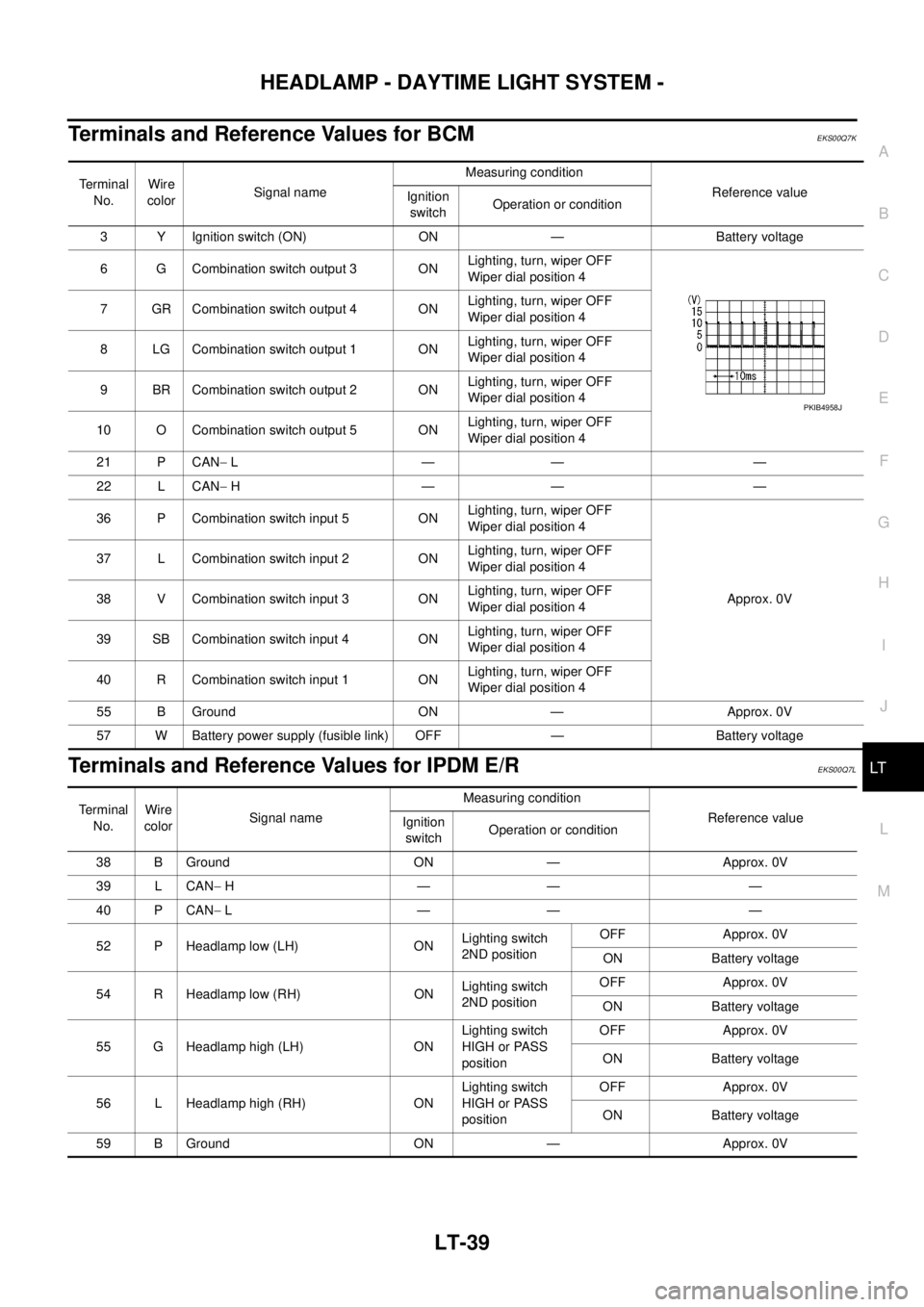
Terminals and Reference Values for BCMEKS00Q7K
Terminals and Reference Values for IPDM E/REKS00Q7L
Te r m i n a l
No.Wire
colorSignal nameMeasuring condition
Reference value
Ignition
switchOperation or condition
3 Y Ignition switch (ON) ON — Battery voltage
6 G Combination switch output 3 ONLighting, turn, wiper OFF
Wiper dial position 4
7 GR Combination switch output 4 ONLighting, turn, wiper OFF
Wiper dial position 4
8 LG Combination switch output 1 ONLighting, turn, wiper OFF
Wiper dial position 4
9 BR Combination switch output 2 ONLighting, turn, wiper OFF
Wiper dial position 4
10 O Combination switch output 5 ONLighting, turn, wiper OFF
Wiper dial position 4
21 P CAN-L—— —
22 L CAN-H—— —
36 P Combination switch input 5 ONLighting, turn, wiper OFF
Wiper dial position 4
Approx. 0V 37 L Combination switch input 2 ONLighting, turn, wiper OFF
Wiper dial position 4
38 V Combination switch input 3 ONLighting, turn, wiper OFF
Wiper dial position 4
39 SB Combination switch input 4 ONLighting, turn, wiper OFF
Wiper dial position 4
40 R Combination switch input 1 ONLighting, turn, wiper OFF
Wiper dial position 4
55 B Ground ON — Approx. 0V
57 W Battery power supply (fusible link) OFF — Battery voltage
PKIB4958J
Terminal
No.Wire
colorSignal nameMeasuring condition
Reference value
Ignition
switchOperation or condition
38 B Ground ON — Approx. 0V
39 L CAN-H—— —
40 P CAN-L—— —
52 P Headlamp low (LH) ONLighting switch
2ND positionOFF Approx. 0V
ON Battery voltage
54 R Headlamp low (RH) ONLighting switch
2ND positionOFF Approx. 0V
ON Battery voltage
55 G Headlamp high (LH) ONLighting switch
HIGH or PASS
positionOFF Approx. 0V
ON Battery voltage
56 L Headlamp high (RH) ONLighting switch
HIGH or PASS
positionOFF Approx. 0V
ON Battery voltage
59 B Ground ON — Approx. 0V
Page 2123 of 3171
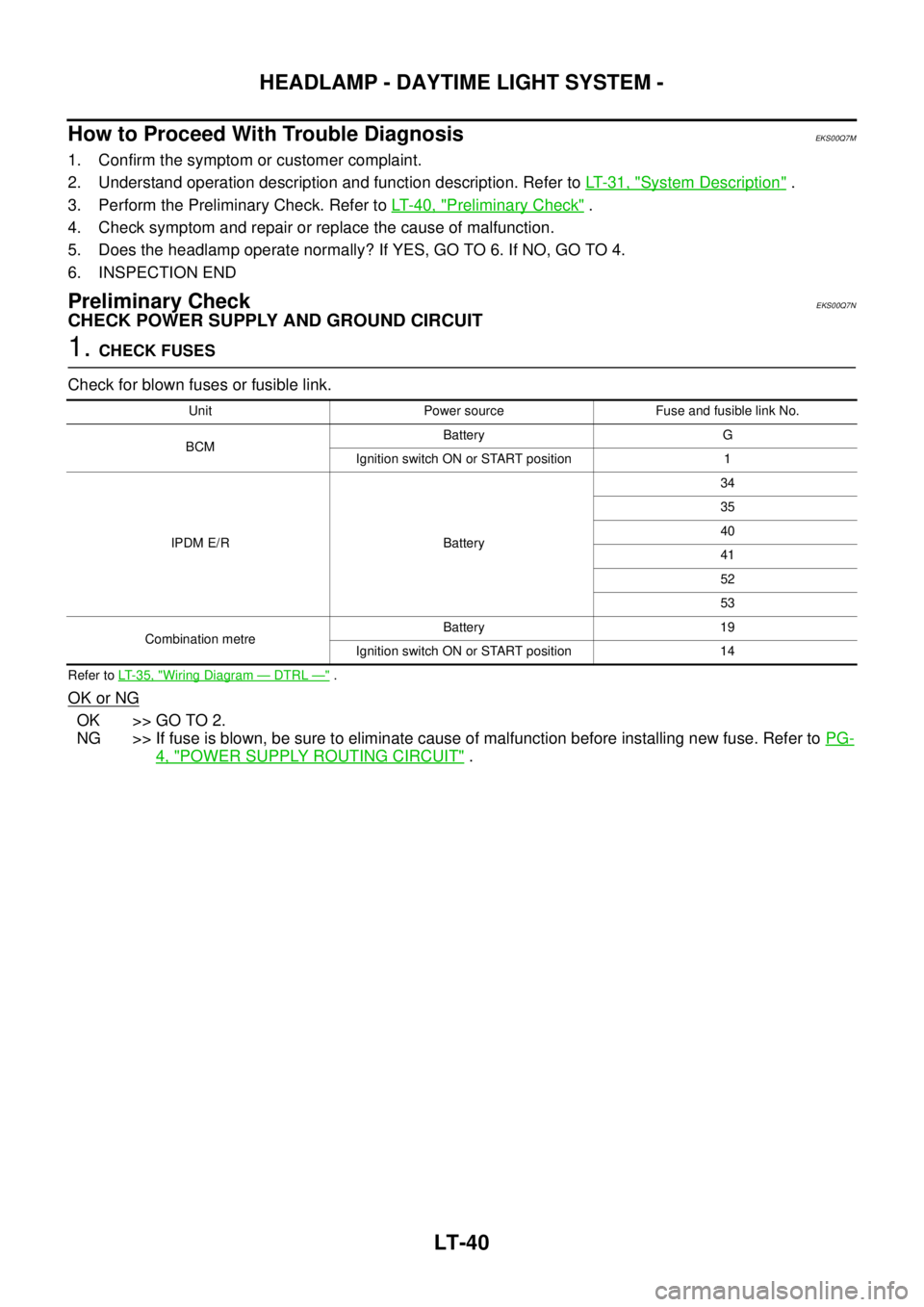
LT-40
HEADLAMP - DAYTIME LIGHT SYSTEM -
How to Proceed With Trouble Diagnosis
EKS00Q7M
1. Confirm the symptom or customer complaint.
2. Understand operation description and function description. Refer toLT-31, "
System Description".
3. Perform the Preliminary Check. Refer toLT-40, "
Preliminary Check".
4. Check symptom and repair or replace the cause of malfunction.
5. Does the headlamp operate normally? If YES, GO TO 6. If NO, GO TO 4.
6. INSPECTION END
Preliminary CheckEKS00Q7N
CHECK POWER SUPPLY AND GROUND CIRCUIT
1.CHECK FUSES
Check for blown fuses or fusible link.
Refer toLT-35, "Wiring Diagram—DTRL—".
OK or NG
OK >> GO TO 2.
NG >> If fuse is blown, be sure to eliminate cause of malfunction before installing new fuse. Refer toPG-
4, "POWER SUPPLY ROUTING CIRCUIT".
Unit Power source Fuse and fusible link No.
BCMBattery G
Ignition switch ON or START position 1
IPDM E/R Battery34
35
40
41
52
53
Combination metreBattery 19
Ignition switch ON or START position 14