ignition NISSAN NAVARA 2005 Repair Workshop Manual
[x] Cancel search | Manufacturer: NISSAN, Model Year: 2005, Model line: NAVARA, Model: NISSAN NAVARA 2005Pages: 3171, PDF Size: 49.59 MB
Page 2170 of 3171
REAR FOG LAMP
LT-87
C
D
E
F
G
H
I
J
L
MA
B
LT
REAR FOG LAMPPFP:26550
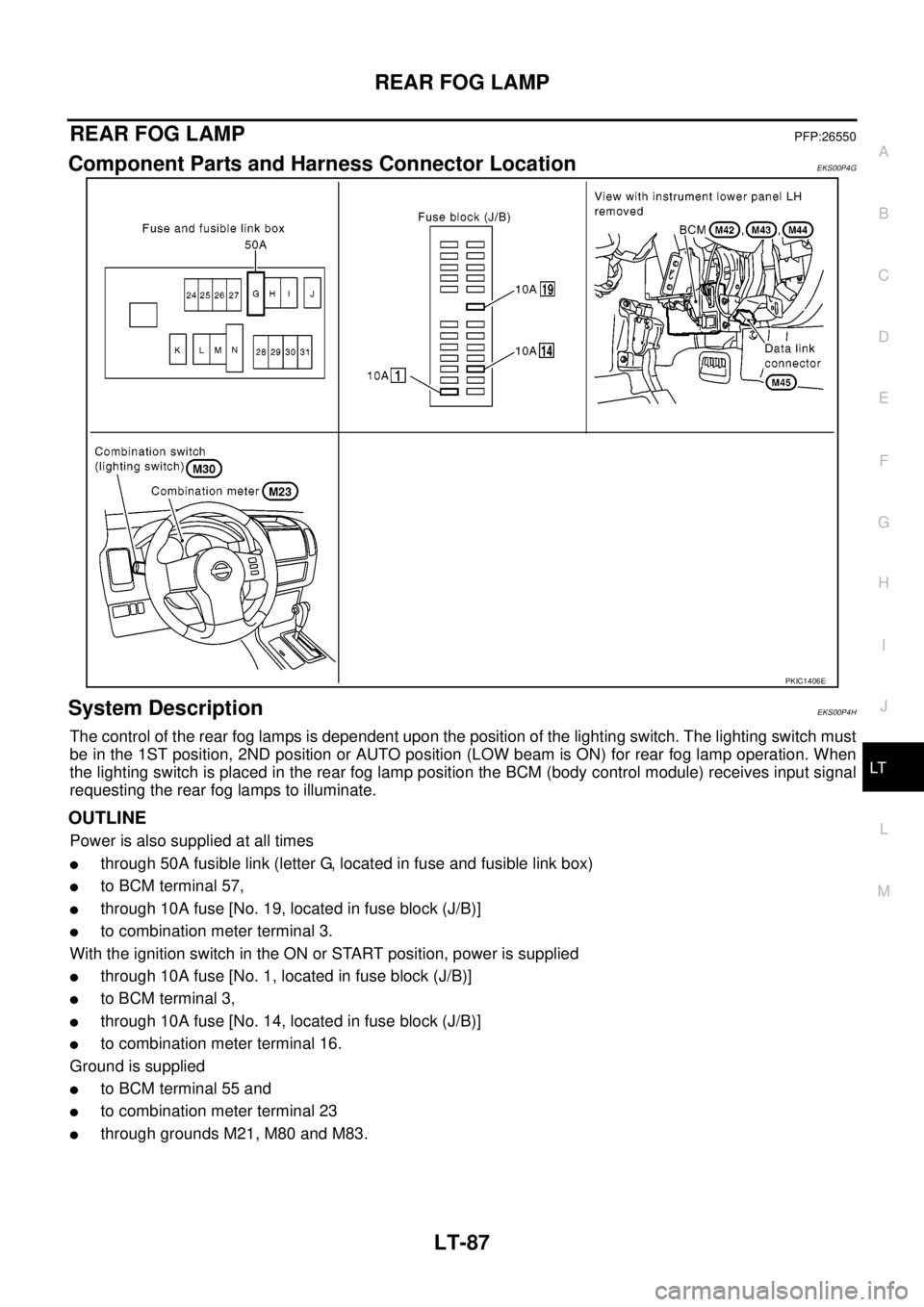
Component Parts and Harness Connector LocationEKS00P4G
System DescriptionEKS00P4H
The control of the rear fog lamps is dependent upon the position of the lighting switch. The lighting switch must
be in the 1ST position, 2ND position or AUTO position (LOW beam is ON) for rear fog lamp operation. When
the lighting switch is placed in the rear fog lamp position the BCM (body control module) receives input signal
requesting the rear fog lamps to illuminate.
OUTLINE
Power is also supplied at all times
lthrough 50A fusible link (letter G, located in fuse and fusible link box)
lto BCM terminal 57,
lthrough 10A fuse [No. 19, located in fuse block (J/B)]
lto combination meter terminal 3.
With the ignition switch in the ON or START position, power is supplied
lthrough 10A fuse [No. 1, located in fuse block (J/B)]
lto BCM terminal 3,
lthrough 10A fuse [No. 14, located in fuse block (J/B)]
lto combination meter terminal 16.
Ground is supplied
lto BCM terminal 55 and
lto combination meter terminal 23
lthrough grounds M21, M80 and M83.
PKIC1406E
Page 2174 of 3171
REAR FOG LAMP
LT-91
C
D
E
F
G
H
I
J
L
MA
B
LT
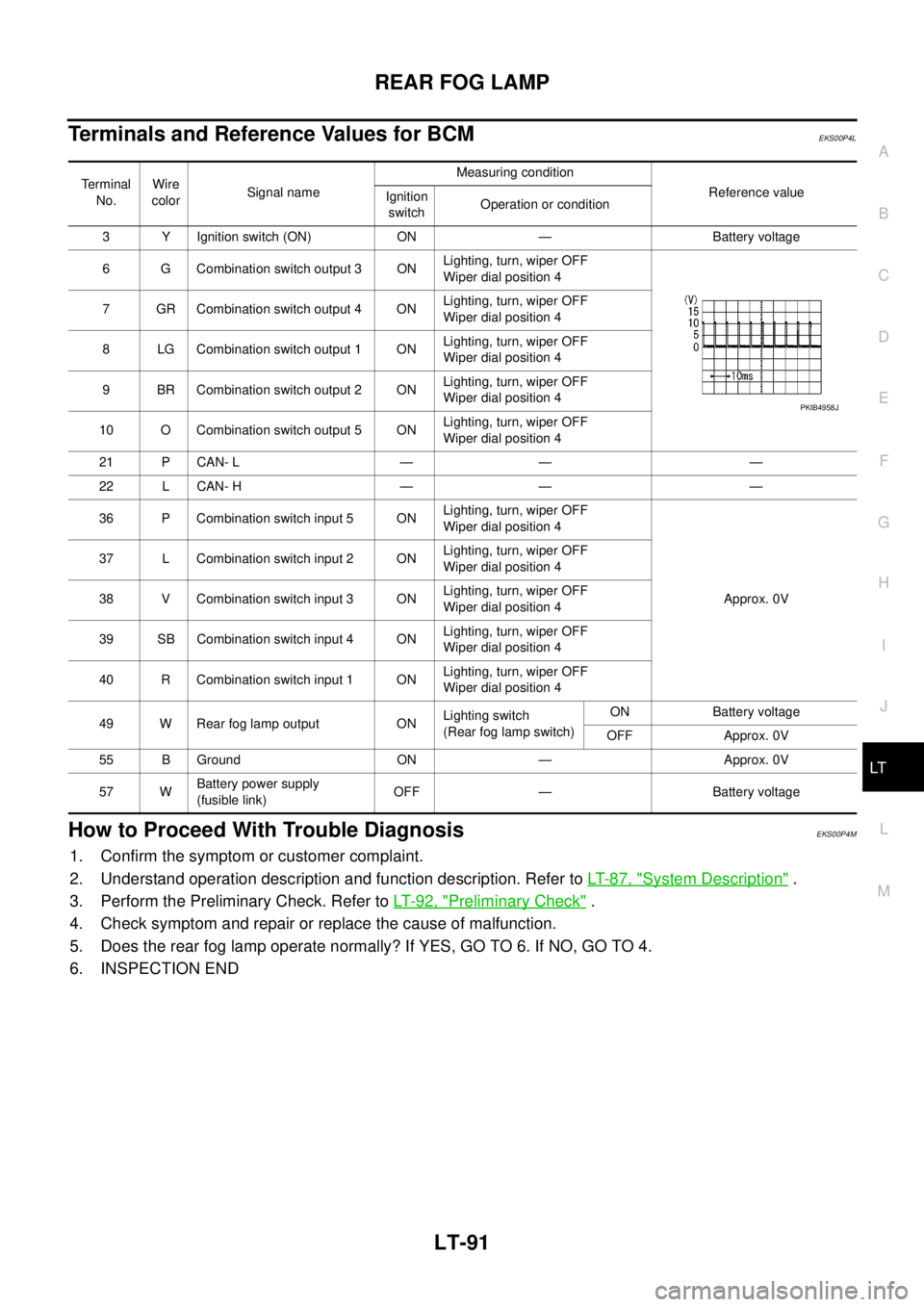
Terminals and Reference Values for BCMEKS00P4L
How to Proceed With Trouble DiagnosisEKS00P4M
1. Confirm the symptom or customer complaint.
2. Understand operation description and function description. Refer toLT-87, "
System Description".
3. Perform the Preliminary Check. Refer toLT-92, "
Preliminary Check".
4. Check symptom and repair or replace the cause of malfunction.
5. Does the rear fog lamp operate normally? If YES, GO TO 6. If NO, GO TO 4.
6. INSPECTION END
Terminal
No.Wire
colorSignal nameMeasuring condition
Reference value
Ignition
switchOperation or condition
3 Y Ignition switch (ON) ON — Battery voltage
6 G Combination switch output 3 ONLighting, turn, wiper OFF
Wiper dial position 4
7 GR Combination switch output 4 ONLighting, turn, wiper OFF
Wiper dial position 4
8 LG Combination switch output 1 ONLighting, turn, wiper OFF
Wiper dial position 4
9 BR Combination switch output 2 ONLighting, turn, wiper OFF
Wiper dial position 4
10 O Combination switch output 5 ONLighting, turn, wiper OFF
Wiper dial position 4
21 P CAN- L — — —
22 L CAN- H — — —
36 P Combination switch input 5 ONLighting, turn, wiper OFF
Wiper dial position 4
Approx. 0V 37 L Combination switch input 2 ONLighting, turn, wiper OFF
Wiper dial position 4
38 V Combination switch input 3 ONLighting, turn, wiper OFF
Wiper dial position 4
39 SB Combination switch input 4 ONLighting, turn, wiper OFF
Wiper dial position 4
40 R Combination switch input 1 ONLighting, turn, wiper OFF
Wiper dial position 4
49 W Rear fog lamp output ONLighting switch
(Rear fog lamp switch)ON Battery voltage
OFF Approx. 0V
55 B Ground ON — Approx. 0V
57 WBattery power supply
(fusible link)OFF — Battery voltage
PKIB4958J
Page 2175 of 3171
LT-92
REAR FOG LAMP
Preliminary Check
EKS00P4N
CHECK POWER SUPPLY AND GROUND CIRCUIT
1.CHECK FUSES
Check for blown fuses.
Refer toLT-89, "Wiring Diagram—R/FOG—".
OK or NG
OK >> GO TO 2.
NO >> If fuse or fusible link is blown, be sure to eliminate cause of malfunction before installing new fuse
or fusible link. Refer toPG-4, "
POWER SUPPLY ROUTING CIRCUIT".
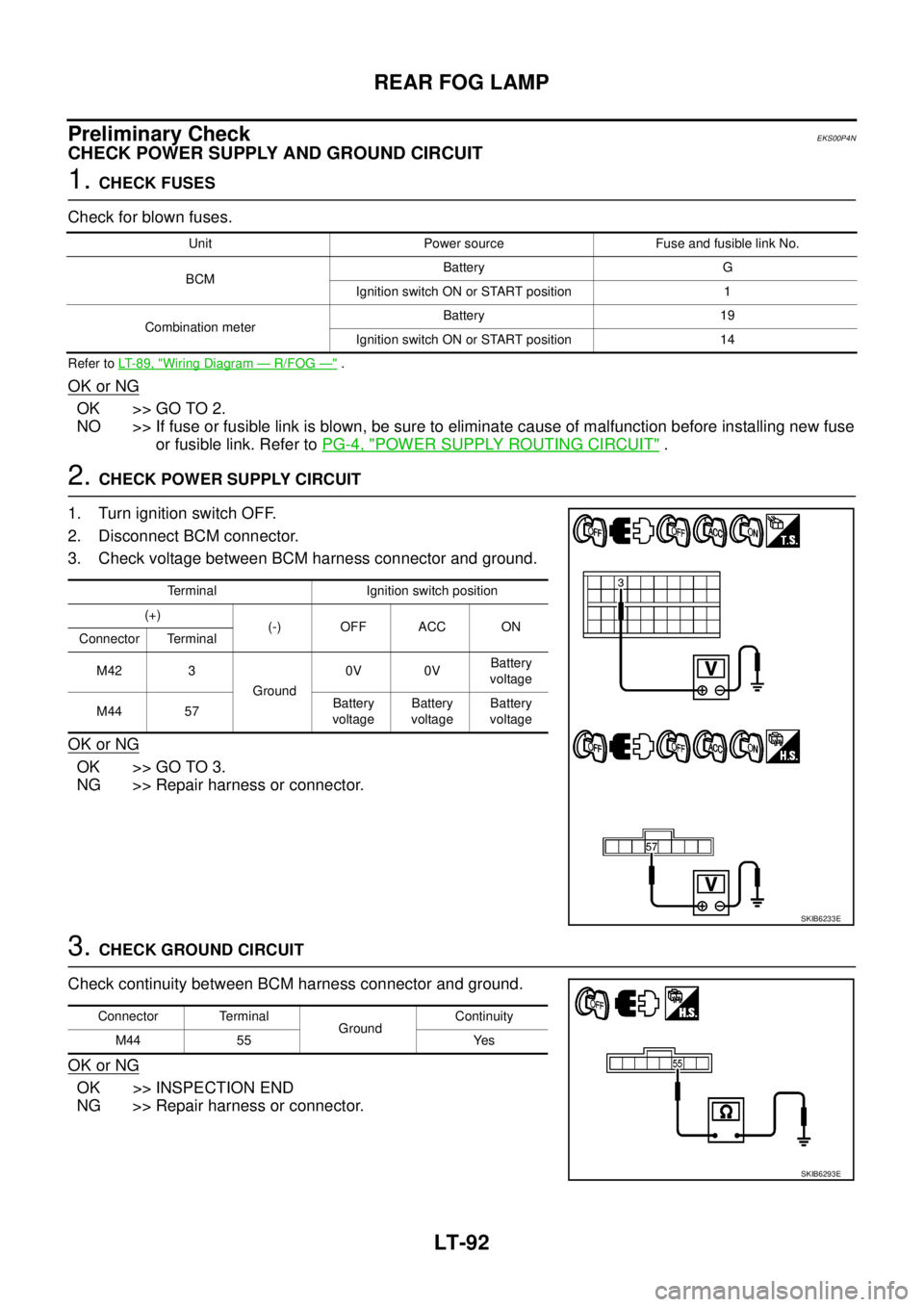
2.CHECK POWER SUPPLY CIRCUIT
1. Turn ignition switch OFF.
2. Disconnect BCM connector.
3. Check voltage between BCM harness connector and ground.
OK or NG
OK >> GO TO 3.
NG >> Repair harness or connector.
3.CHECK GROUND CIRCUIT
Check continuity between BCM harness connector and ground.
OK or NG
OK >> INSPECTION END
NG >> Repair harness or connector.
Unit Power source Fuse and fusible link No.
BCMBattery G
Ignition switch ON or START position 1
Combination meterBattery 19
Ignition switch ON or START position 14
Terminal Ignition switch position
(+)
(-) OFF ACC ON
Connector Terminal
M42 3
Ground0V 0VBattery
voltage
M44 57Battery
voltageBattery
voltageBattery
voltage
SKIB6233E
Connector Terminal
GroundContinuity
M44 55 Yes
SKIB6293E
Page 2177 of 3171
LT-94
REAR FOG LAMP
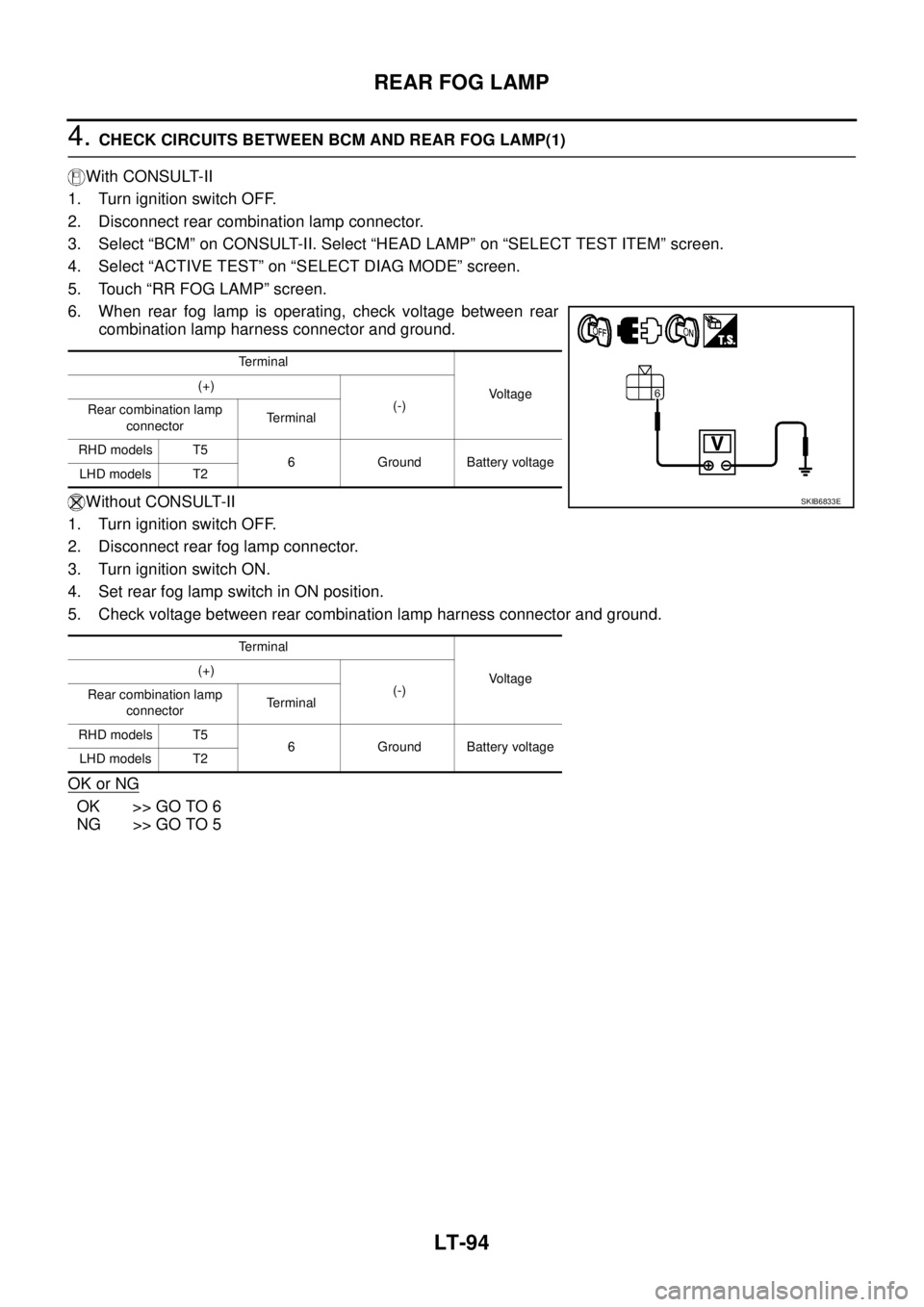
4.CHECK CIRCUITS BETWEEN BCM AND REAR FOG LAMP(1)
With CONSULT-II
1. Turn ignition switch OFF.
2. Disconnect rear combination lamp connector.
3. Select “BCM” on CONSULT-II. Select “HEAD LAMP” on “SELECT TEST ITEM” screen.
4. Select “ACTIVE TEST” on “SELECT DIAG MODE” screen.
5. Touch “RR FOG LAMP” screen.
6. When rear fog lamp is operating, check voltage between rear
combination lamp harness connector and ground.
Without CONSULT-II
1. Turn ignition switch OFF.
2. Disconnect rear fog lamp connector.
3. Turn ignition switch ON.
4. Set rear fog lamp switch in ON position.
5. Check voltage between rear combination lamp harness connector and ground.
OK or NG
OK >> GO TO 6
NG >> GO TO 5
Terminal
Voltage (+)
(-)
Rear combination lamp
connectorTerminal
RHD models T5
6 Ground Battery voltage
LHD models T2
Terminal
Voltage (+)
(-)
Rear combination lamp
connectorTerminal
RHD models T5
6 Ground Battery voltage
LHD models T2
SKIB6833E
Page 2178 of 3171
REAR FOG LAMP
LT-95
C
D
E
F
G
H
I
J
L
MA
B
LT
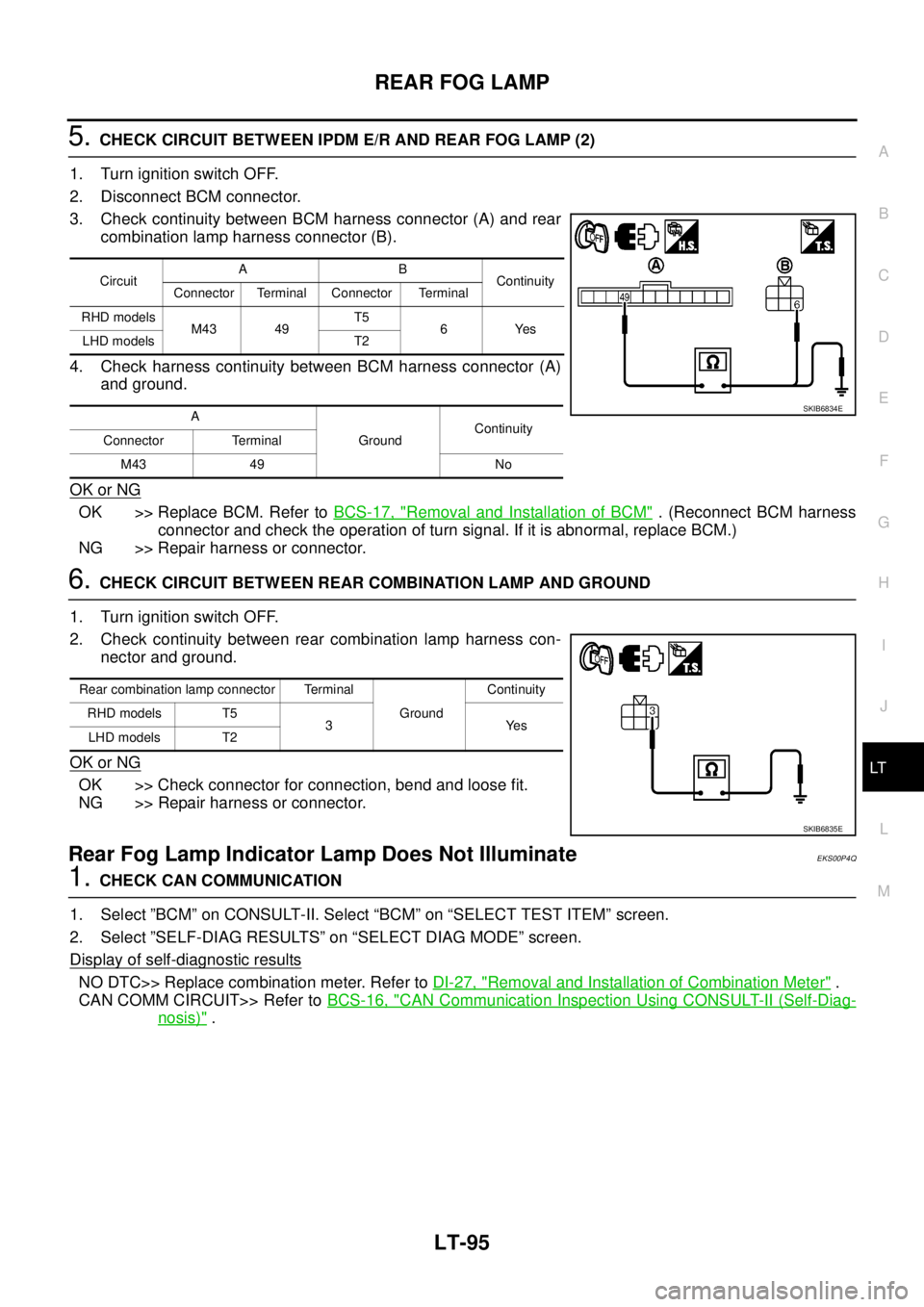
5.CHECK CIRCUIT BETWEEN IPDM E/R AND REAR FOG LAMP (2)
1. Turn ignition switch OFF.
2. Disconnect BCM connector.
3. Check continuity between BCM harness connector (A) and rear
combination lamp harness connector (B).
4. Check harness continuity between BCM harness connector (A)
and ground.
OK or NG
OK >> Replace BCM. Refer toBCS-17, "Removal and Installation of BCM". (Reconnect BCM harness
connector and check the operation of turn signal. If it is abnormal, replace BCM.)
NG >> Repair harness or connector.
6.CHECK CIRCUIT BETWEEN REAR COMBINATION LAMP AND GROUND
1. Turn ignition switch OFF.
2. Check continuity between rear combination lamp harness con-
nector and ground.
OK or NG
OK >> Check connector for connection, bend and loose fit.
NG >> Repair harness or connector.
Rear Fog Lamp Indicator Lamp Does Not IlluminateEKS00P4Q
1.CHECK CAN COMMUNICATION
1. Select ”BCM” on CONSULT-II. Select “BCM” on “SELECT TEST ITEM” screen.
2. Select ”SELF-DIAG RESULTS” on “SELECT DIAG MODE” screen.
Display of self
-diagnostic results
NO DTC>> Replace combination meter. Refer toDI-27, "Removal and Installation of Combination Meter".
CAN COMM CIRCUIT>> Refer toBCS-16, "
CAN Communication Inspection Using CONSULT-II (Self-Diag-
nosis)".
CircuitAB
Continuity
Connector Terminal Connector Terminal
RHD models
M43 49T5
6Yes
LHD models T2
A
GroundContinuity
Connector Terminal
M43 49 No
SKIB6834E
Rear combination lamp connector Terminal
GroundContinuity
RHD models T5
3Yes
LHD models T2
SKIB6835E
Page 2180 of 3171
TURN SIGNAL AND HAZARD WARNING LAMPS
LT-97
C
D
E
F
G
H
I
J
L
MA
B
LT
TURN SIGNAL AND HAZARD WARNING LAMPSPFP:26120
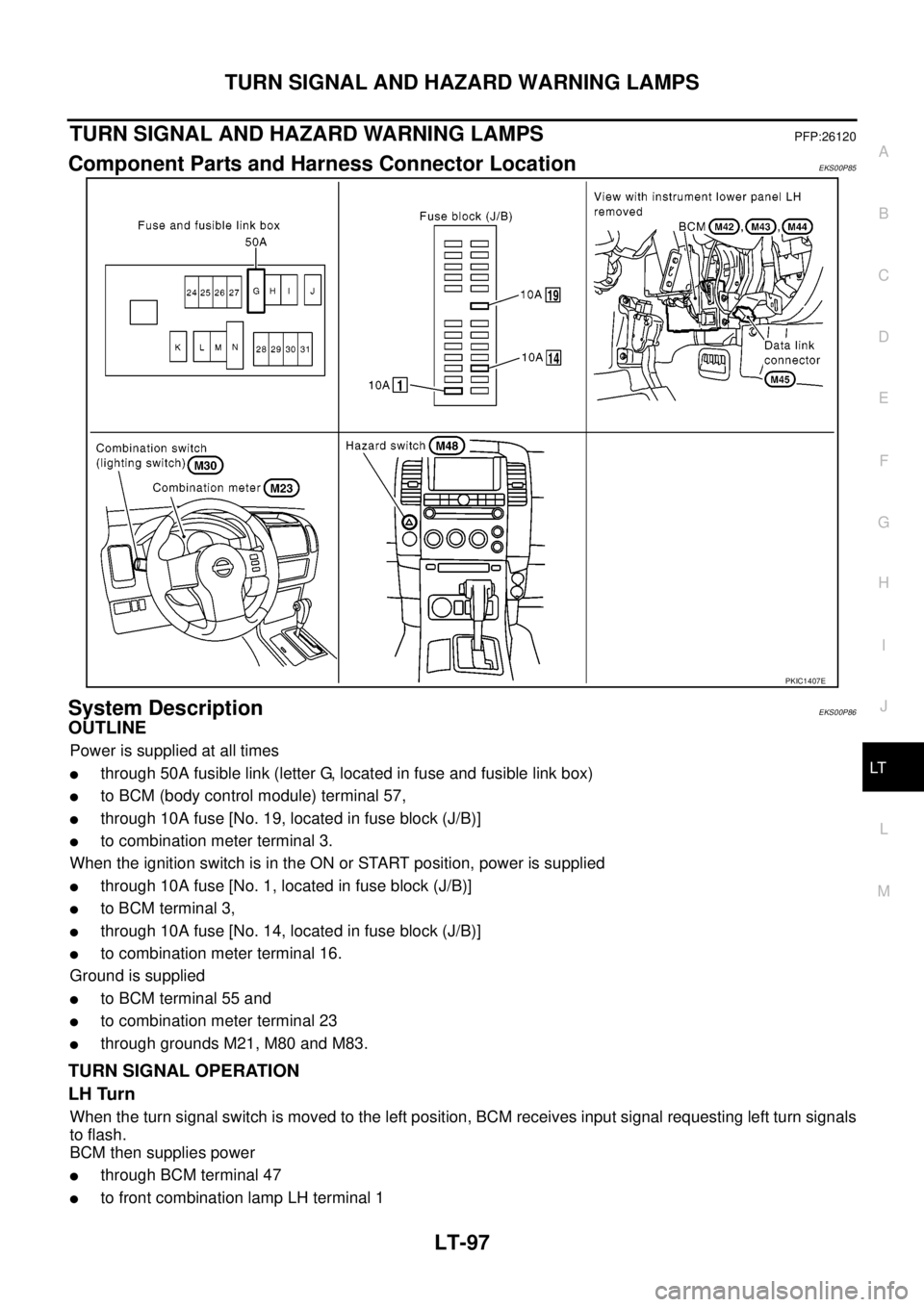
Component Parts and Harness Connector LocationEKS00P85
System DescriptionEKS00P86
OUTLINE
Power is supplied at all times
lthrough 50A fusible link (letter G, located in fuse and fusible link box)
lto BCM (body control module) terminal 57,
lthrough 10A fuse [No. 19, located in fuse block (J/B)]
lto combination meter terminal 3.
When the ignition switch is in the ON or START position, power is supplied
lthrough 10A fuse [No. 1, located in fuse block (J/B)]
lto BCM terminal 3,
lthrough 10A fuse [No. 14, located in fuse block (J/B)]
lto combination meter terminal 16.
Ground is supplied
lto BCM terminal 55 and
lto combination meter terminal 23
lthrough grounds M21, M80 and M83.
TURN SIGNAL OPERATION
LH Turn
When the turn signal switch is moved to the left position, BCM receives input signal requesting left turn signals
to flash.
BCM then supplies power
lthrough BCM terminal 47
lto front combination lamp LH terminal 1
PKIC1407E
Page 2185 of 3171
LT-102
TURN SIGNAL AND HAZARD WARNING LAMPS
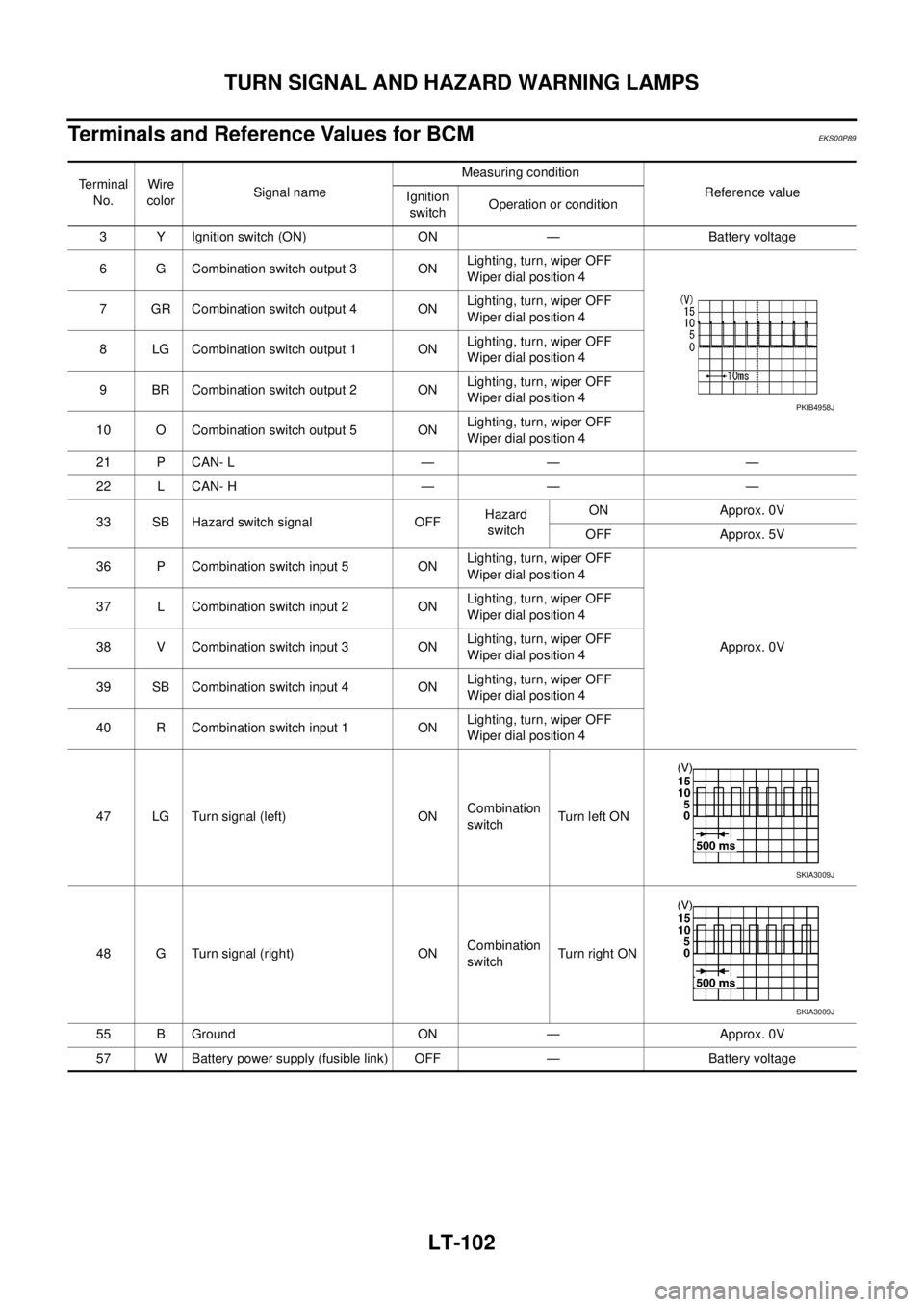
Terminals and Reference Values for BCM
EKS00P89
Terminal
No.Wire
colorSignal nameMeasuring condition
Reference value
Ignition
switchOperation or condition
3 Y Ignition switch (ON) ON — Battery voltage
6 G Combination switch output 3 ONLighting, turn, wiper OFF
Wiper dial position 4
7 GR Combination switch output 4 ONLighting, turn, wiper OFF
Wiper dial position 4
8 LG Combination switch output 1 ONLighting, turn, wiper OFF
Wiper dial position 4
9 BR Combination switch output 2 ONLighting, turn, wiper OFF
Wiper dial position 4
10 O Combination switch output 5 ONLighting, turn, wiper OFF
Wiper dial position 4
21 P CAN- L — — —
22 L CAN- H — — —
33 SB Hazard switch signal OFFHazard
switchON Approx. 0V
OFF Approx. 5V
36 P Combination switch input 5 ONLighting, turn, wiper OFF
Wiper dial position 4
Approx. 0V 37 L Combination switch input 2 ONLighting, turn, wiper OFF
Wiper dial position 4
38 V Combination switch input 3 ONLighting, turn, wiper OFF
Wiper dial position 4
39 SB Combination switch input 4 ONLighting, turn, wiper OFF
Wiper dial position 4
40 R Combination switch input 1 ONLighting, turn, wiper OFF
Wiper dial position 4
47 LG Turn signal (left) ONCombination
switchTurn left ON
48 G Turn signal (right) ONCombination
switchTu rn righ t ON
55 B Ground ON — Approx. 0V
57 W Battery power supply (fusible link) OFF — Battery voltage
PKIB4958J
SKIA3009J
SKIA3009J
Page 2186 of 3171
TURN SIGNAL AND HAZARD WARNING LAMPS
LT-103
C
D
E
F
G
H
I
J
L
MA
B
LT
How to Proceed With Trouble DiagnosisEKS00P8A
1. Confirm the symptom or customer complaint.
2. Understand operation description and function description. Refer toLT-97, "
System Description".
3. Perform preliminary check. Refer toLT- 1 0 3 , "
Preliminary Check".
4. Check symptom and repair or replace the cause of malfunction.
5. Do turn signal and hazard warning lamps operate normally? If YES, GO TO 6. If NO, GO TO 4.
6. INSPECTION END
Preliminary CheckEKS00P8B
CHECK POWER SUPPLY AND GROUND CIRCUIT
1.CHECK FUSES OR FUSIBLE LINK
Check for blown fuses or fusible link.
Refer toLT-100, "Wiring Diagram—TURN—".
OK or NG
OK >> GO TO 2.
NG >> If fuse or fusible link is blown, be sure to eliminate cause of malfunction before installing new fuse
or fusible link. Refer toPG-4, "
POWER SUPPLY ROUTING CIRCUIT".
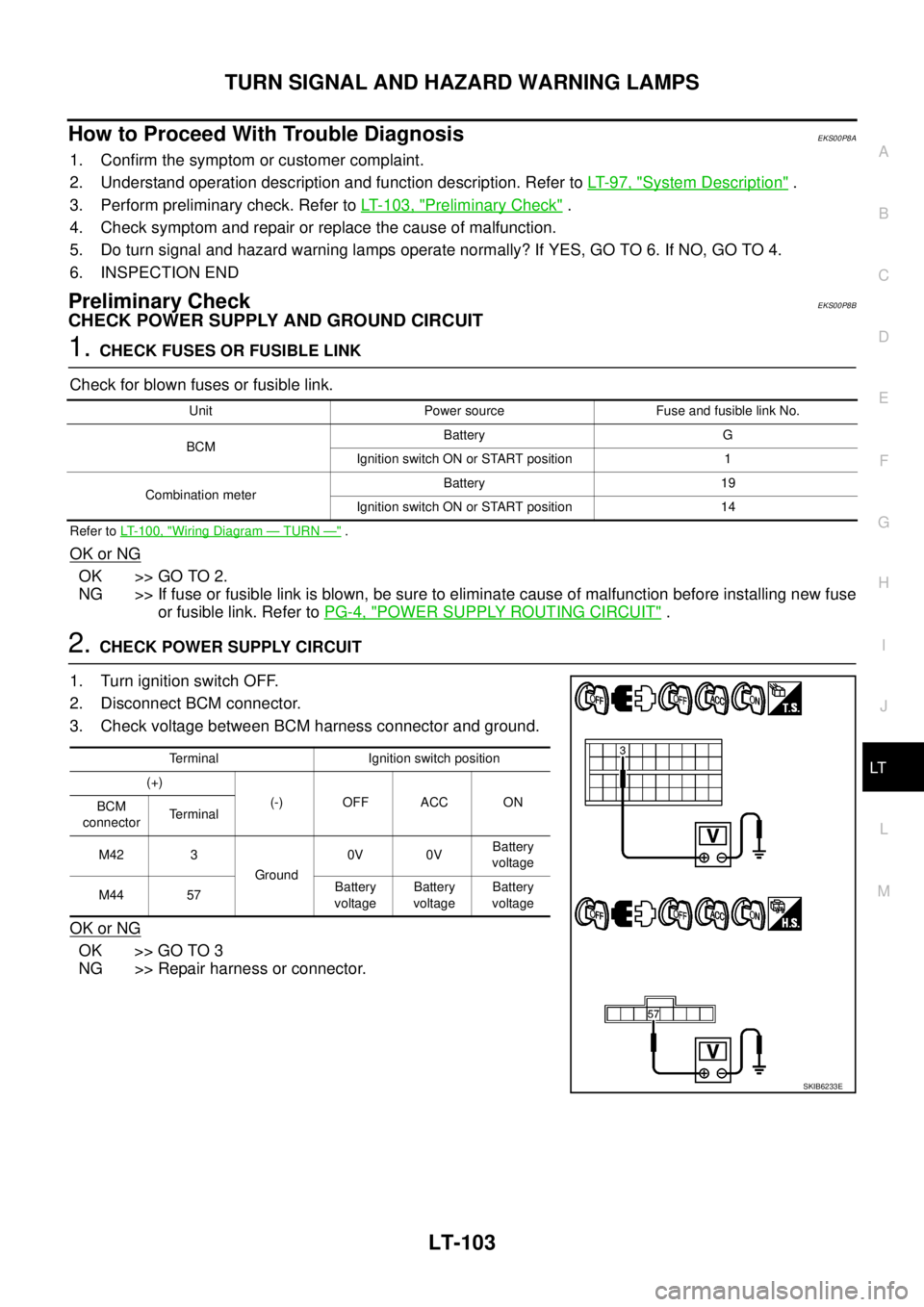
2.CHECK POWER SUPPLY CIRCUIT
1. Turn ignition switch OFF.
2. Disconnect BCM connector.
3. Check voltage between BCM harness connector and ground.
OK or NG
OK >> GO TO 3
NG >> Repair harness or connector.
Unit Power source Fuse and fusible link No.
BCMBattery G
Ignition switch ON or START position 1
Combination meterBattery 19
Ignition switch ON or START position 14
Terminal Ignition switch position
(+)
(-) OFF ACC ON
BCM
connectorTerminal
M42 3
Ground0V 0VBattery
voltage
M44 57Battery
voltageBattery
voltageBattery
voltage
SKIB6233E
Page 2188 of 3171
TURN SIGNAL AND HAZARD WARNING LAMPS
LT-105
C
D
E
F
G
H
I
J
L
MA
B
LT
CONSULT-II Function (BCM)EKS00P8C
CONSULT-II can display each diagnostic item using the diagnostic test mode shown following.
CONSULT-II OPERATION
CAUTION:
If CONSULT-II is used with no connection of CONSULT-II CONVERTER, malfunctions might be
detected in self-diagnosis depending on control unit which carries out CAN communication.
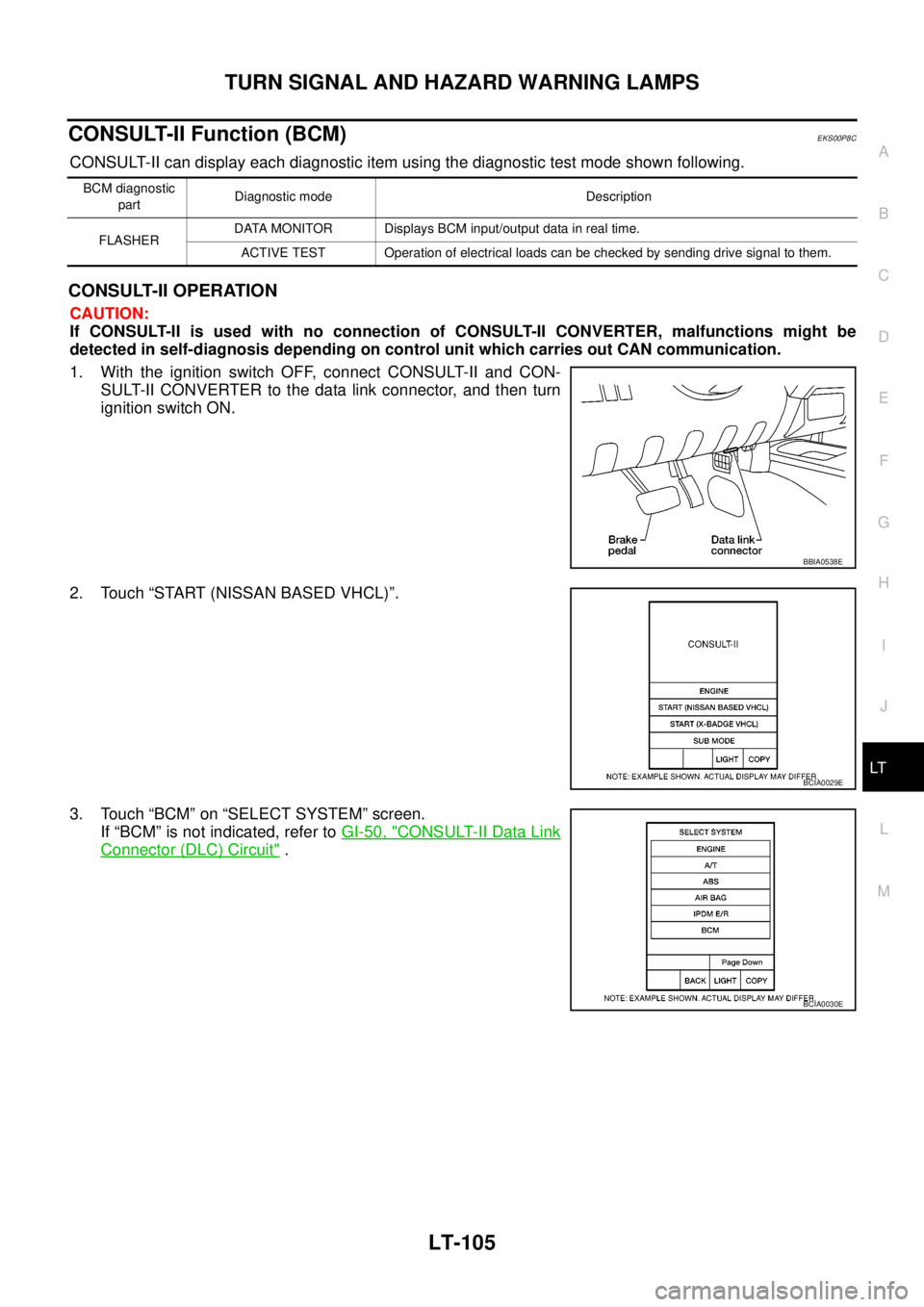
1. With the ignition switch OFF, connect CONSULT-II and CON-
SULT-II CONVERTER to the data link connector, and then turn
ignition switch ON.
2. Touch “START (NISSAN BASED VHCL)”.
3. Touch “BCM” on “SELECT SYSTEM” screen.
If “BCM” is not indicated, refer toGI-50, "
CONSULT-II Data Link
Connector (DLC) Circuit".
BCM diagnostic
partDiagnostic mode Description
FLASHERDATA MONITOR Displays BCM input/output data in real time.
ACTIVE TEST Operation of electrical loads can be checked by sending drive signal to them.
BBIA0538E
BCIA0029E
BCIA0030E
Page 2189 of 3171
LT-106
TURN SIGNAL AND HAZARD WARNING LAMPS
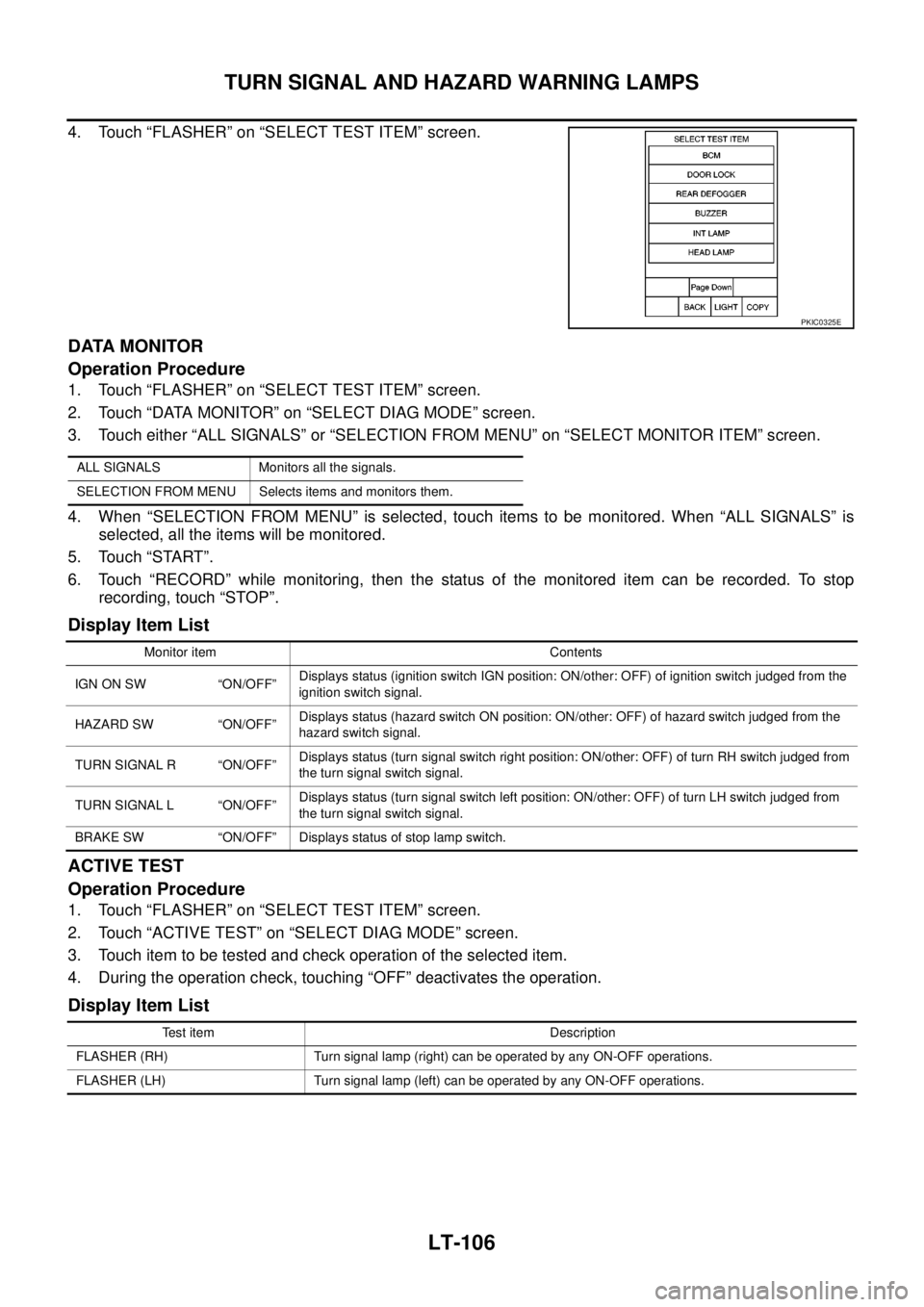
4. Touch “FLASHER” on “SELECT TEST ITEM” screen.
DATA MONITOR
Operation Procedure
1. Touch “FLASHER” on “SELECT TEST ITEM” screen.
2. Touch “DATA MONITOR” on “SELECT DIAG MODE” screen.
3. Touch either “ALL SIGNALS” or “SELECTION FROM MENU” on “SELECT MONITOR ITEM” screen.
4. When “SELECTION FROM MENU” is selected, touch items to be monitored. When “ALL SIGNALS” is
selected, all the items will be monitored.
5. Touch “START”.
6. Touch “RECORD” while monitoring, then the status of the monitored item can be recorded. To stop
recording, touch “STOP”.
Display Item List
ACTIVE TEST
Operation Procedure
1. Touch “FLASHER” on “SELECT TEST ITEM” screen.
2. Touch “ACTIVE TEST” on “SELECT DIAG MODE” screen.
3. Touch item to be tested and check operation of the selected item.
4. During the operation check, touching “OFF” deactivates the operation.
Display Item List
PKIC0325E
ALL SIGNALS Monitors all the signals.
SELECTION FROM MENU Selects items and monitors them.
Monitor item Contents
IGN ON SW “ON/OFF”Displays status (ignition switch IGN position: ON/other: OFF) of ignition switch judged from the
ignition switch signal.
HAZARD SW “ON/OFF”Displays status (hazard switch ON position: ON/other: OFF) of hazard switch judged from the
hazard switch signal.
TURN SIGNAL R “ON/OFF”Displays status (turn signal switch right position: ON/other: OFF) of turn RH switch judged from
the turn signal switch signal.
TURN SIGNAL L “ON/OFF”Displays status (turn signal switch left position: ON/other: OFF) of turn LH switch judged from
the turn signal switch signal.
BRAKE SW “ON/OFF” Displays status of stop lamp switch.
Test item Description
FLASHER (RH) Turn signal lamp (right) can be operated by any ON-OFF operations.
FLASHER (LH) Turn signal lamp (left) can be operated by any ON-OFF operations.