change time NISSAN NAVARA 2005 Repair Repair Manual
[x] Cancel search | Manufacturer: NISSAN, Model Year: 2005, Model line: NAVARA, Model: NISSAN NAVARA 2005Pages: 3171, PDF Size: 49.59 MB
Page 2751 of 3171
![NISSAN NAVARA 2005 Repair Repair Manual RFD-48
[WITH ELECTRONIC LOCKING DIFFERENTIAL]
TROUBLE DIAGNOSIS
Trouble Diagnosis Chart for Symptoms
EDS003AY
If DIFF LOCK indicator lamp does not turn ON after engine start, perform self-diagnosis. R](/img/5/57362/w960_57362-2750.png "NISSAN NAVARA 2005 Repair Repair Manual RFD-48
[WITH ELECTRONIC LOCKING DIFFERENTIAL]
TROUBLE DIAGNOSIS
Trouble Diagnosis Chart for Symptoms
EDS003AY
If DIFF LOCK indicator lamp does not turn ON after engine start, perform self-diagnosis. R")
RFD-48
[WITH ELECTRONIC LOCKING DIFFERENTIAL]
TROUBLE DIAGNOSIS
Trouble Diagnosis Chart for Symptoms
EDS003AY
If DIFF LOCK indicator lamp does not turn ON after engine start, perform self-diagnosis. Refer toRFD-51, "SELF-DIAG RESULTSMODE".
Differential Lock Control Unit Input/Output Signal Reference ValuesEDS003AZ
DIFFERENTIAL LOCK CONTROL UNIT INSPECTION TABLE
Specifications with CONSULT-II
Symptom Condition Check itemReference
page
DIFF LOCK indicator lamp does not turn ON.
(DIFF LOCK indicator lamp check)Ignition switch: ONCAN communication line
RFD-70
Power supply and ground for differential
lock control unit
Combination meter
DIFF LOCK indicator lamp does not change.
lEngine running
lDifferential lock mode
switch: ONCombination meter
RFD-73Differential lock mode switch
CAN communication line
DIFF LOCK indicator lamp sometimes flashes.
lEngine running
lDifferential lock mode
switch: ONCombination meter
RFD-74Differential lock mode switch
Differential lock position switch
Differential inner parts
Monitor item [Unit] Content Condition Display value
BATTERY VOLT [V]Power supply voltage for
differential lock control unitIgnition switch: ON Battery voltage
4WD MODE [2H/4H/
4Lo]Condition of 4WD shift
switch4WD shift switch
(Engine running)2WD 2H
4H 4H
4LO 4Lo
VHCL S/SEN-R [km/h]
or [mph]Wheel speed
(Rear wheel right)Vehicle stopped 0 km/h (0 mph)
Vehicle running
CAUTION:
Check air pressure of tire under standard condition.Approximately
equal to the indi-
cation on speed-
ometer (Inside of
±10%)
VHCL S/SEN-L [km/h] or
[mph]Wheel speed
(Rear wheel left)Vehicle stopped 0 km/h (0 mph)
Vehicle running
CAUTION:
Check air pressure of tire under standard condition.Approximately
equal to the indi-
cation on speed-
ometer (Inside of
±10%)
VHCL S/SEN-RL [km/h]
or [mph]Wheel speed
(Average value of rear
wheel right and left)Vehicle stopped 0 km/h (0 mph)
Vehicle running
CAUTION:
Check air pressure of tire under standard condition.Approximately
equal to the indi-
cation on speed-
ometer (Inside of
±10%)
D-LOCK SW SIG [ON/
OFF]Condition of differential
lock mode switchDifferential lock mode switch: ON ON
Differential lock mode switch: OFF OFF
D-LOCK SIG [ON/OFF]Control status of differen-
tial lock
lVehicle stopped
lEngine running
l4WD shift switch: 4LODifferential lock mode
switch: ONON
Differential lock mode
switch: OFFOFF
Page 2854 of 3171
CHARGING SYSTEM
SC-21
C
D
E
F
G
H
I
J
L
MA
B
SC
2.BATTERY VOLTAGE INSPECTION
1. Turn ignition switch OFF.
2. Disconnect alternator connector.
3. Turn ignition switch ON.
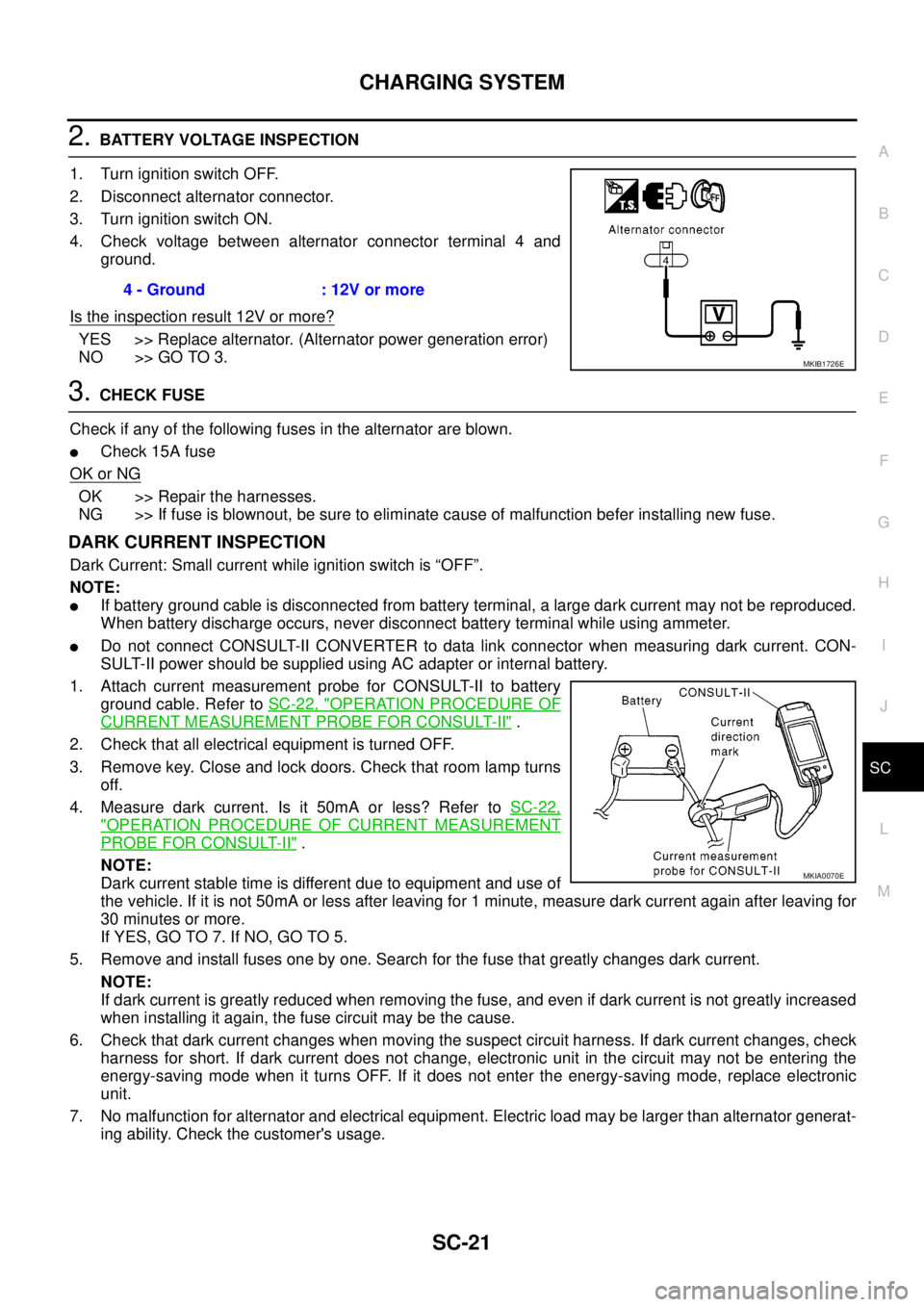
4. Check voltage between alternator connector terminal 4 and
ground.
Is the inspection result 12V or more?
YES >> Replace alternator. (Alternator power generation error)
NO >> GO TO 3.
3.CHECK FUSE
Check if any of the following fuses in the alternator are blown.
lCheck 15A fuse
OK or NG
OK >> Repair the harnesses.
NG >> If fuse is blownout, be sure to eliminate cause of malfunction befer installing new fuse.
DARK CURRENT INSPECTION
Dark Current: Small current while ignition switch is “OFF”.
NOTE:
lIf battery ground cable is disconnected from battery terminal, a large dark current may not be reproduced.
When battery discharge occurs, never disconnect battery terminal while using ammeter.
lDo not connect CONSULT-II CONVERTER to data link connector when measuring dark current. CON-
SULT-II power should be supplied using AC adapter or internal battery.
1. Attach current measurement probe for CONSULT-II to battery
ground cable. Refer toSC-22, "
OPERATION PROCEDURE OF
CURRENT MEASUREMENT PROBE FOR CONSULT-II".
2. Check that all electrical equipment is turned OFF.
3. Remove key. Close and lock doors. Check that room lamp turns
off.
4. Measure dark current. Is it 50mA or less? Refer toSC-22,
"OPERATION PROCEDURE OF CURRENT MEASUREMENT
PROBE FOR CONSULT-II".
NOTE:
Dark current stable time is different due to equipment and use of
the vehicle. If it is not 50mA or less after leaving for 1 minute, measure dark current again after leaving for
30 minutes or more.
If YES, GO TO 7. If NO, GO TO 5.
5. Remove and install fuses one by one. Search for the fuse that greatly changes dark current.
NOTE:
If dark current is greatly reduced when removing the fuse, and even if dark current is not greatly increased
when installing it again, the fuse circuit may be the cause.
6. Check that dark current changes when moving the suspect circuit harness. If dark current changes, check
harness for short. If dark current does not change, electronic unit in the circuit may not be entering the
energy-saving mode when it turns OFF. If it does not enter the energy-saving mode, replace electronic
unit.
7. No malfunction for alternator and electrical equipment. Electric load may be larger than alternator generat-
ing ability. Check the customer's usage.4 - Ground : 12V or more
MKIB1726E
MKIA0070E
Page 2878 of 3171

SQUEAK AND RATTLE TROUBLE DIAGNOSES
SE-7
C
D
E
F
G
H
J
K
L
MA
B
SE
TRUNK
Trunk noises are often caused by a loose jack or loose items put into the trunk by the owner.
In addition look for:
1. Trunk lid dumpers out of adjustment
2. Trunk lid striker out of adjustment
3. Trunk lid torsion bars knocking together
4. A loose license plate or bracket
Most of these incidents can be repaired by adjusting, securing or insulating the item(s) or component(s) caus-
ing the noise.
SUNROOF/HEADLINING
Noises in the sunroof/headlining area can often be traced to one of the following:
1. Sunroof lid, rail, linkage or seals making a rattle or light knocking noise
2. Sunvisor shaft shaking in the holder
3. Front or rear windshield touching headlining and squeaking
Again, pressing on the components to stop the noise while duplicating the conditions can isolate most of these
incidents. Repairs usually consist of insulating with felt cloth tape.
SEATS
When isolating seat noise it's important to note the position the seat is in and the load placed on the seat when
the noise is present. These conditions should be duplicated when verifying and isolating the cause of the
noise.
Cause of seat noise include:
1. Headrest rods and holder
2. A squeak between the seat pad cushion and frame
3. Rear seatback lock and bracket
These noises can be isolated by moving or pressing on the suspected components while duplicating the con-
ditions under which the noise occurs. Most of these incidents can be repaired by repositioning the component
or applying urethane tape to the contact area.
UNDERHOOD
Some interior noise may be caused by components under the hood or on the engine wall. The noise is then
transmitted into the passenger compartment.
Causes of transmitted underhood noise include:
1. Any component mounted to the engine wall
2. Components that pass through the engine wall
3. Engine wall mounts and connectors
4. Loose radiator mounting pins
5. Hood bumpers out of adjustment
6. Hood striker out of adjustment
These noises can be difficult to isolate since they cannot be reached from the interior of the vehicle. The best
method is to secure, move or insulate one component at a time and test drive the vehicle. Also, engine RPM
or load can be changed to isolate the noise. Repairs can usually be made by moving, adjusting, securing, or
insulating the component causing the noise.
Page 2925 of 3171
SRS-16
TROUBLE DIAGNOSIS
CONSULT-II Function (AIR BAG)
EHS001XK
CONSULT-II can display each diagnostic item using the diagnostic test modes shown following.
CONSULT-II FunctionEHS001XL
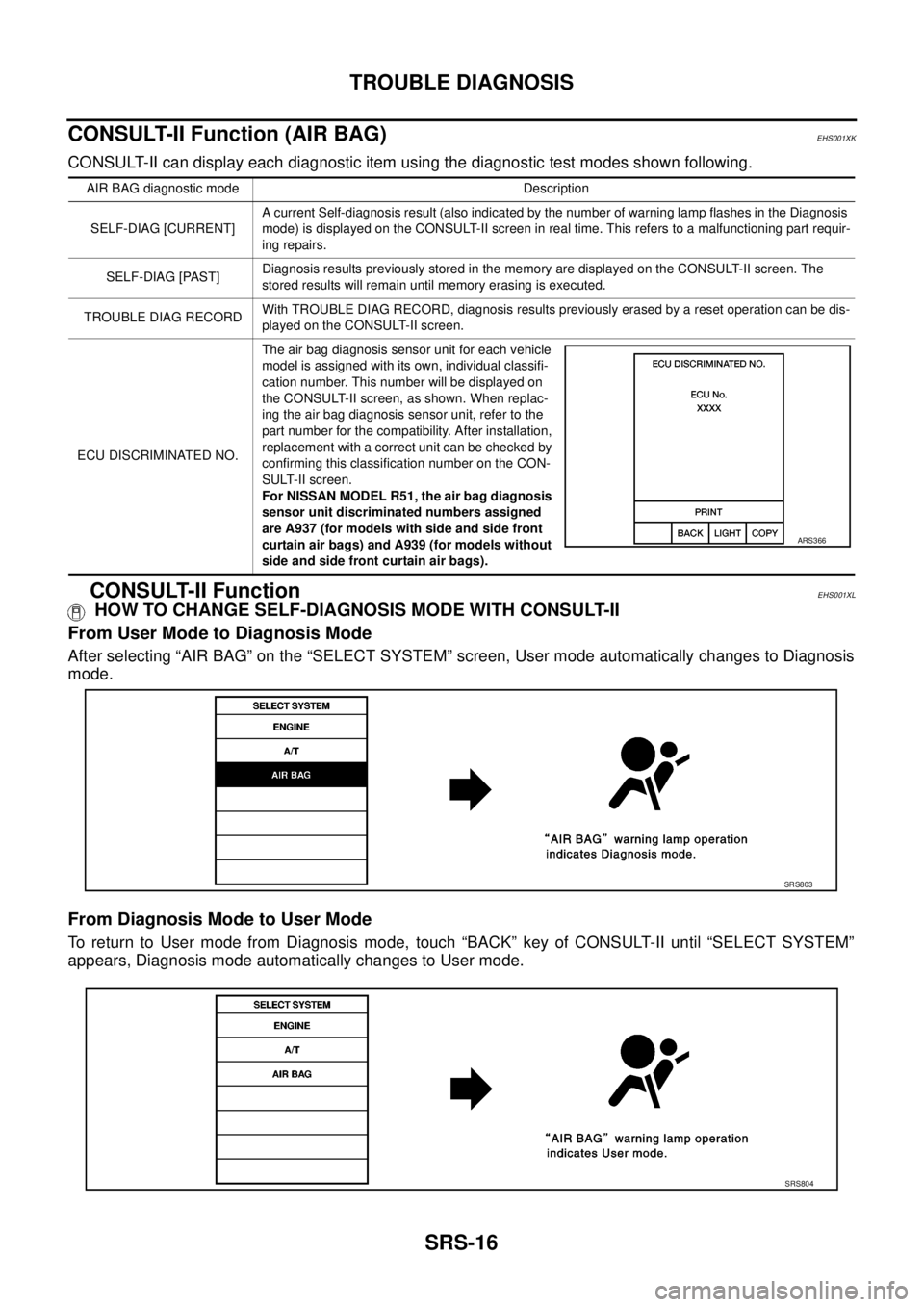
HOW TO CHANGE SELF-DIAGNOSIS MODE WITH CONSULT-II
From User Mode to Diagnosis Mode
After selecting “AIR BAG” on the “SELECT SYSTEM” screen, User mode automatically changes to Diagnosis
mode.
From Diagnosis Mode to User Mode
To return to User mode from Diagnosis mode, touch “BACK” key of CONSULT-II until “SELECT SYSTEM”
appears, Diagnosis mode automatically changes to User mode.
AIR BAG diagnostic mode Description
SELF-DIAG [CURRENT]A current Self-diagnosis result (also indicated by the number of warning lamp flashes in the Diagnosis
mode) is displayed on the CONSULT-II screen in real time. This refers to a malfunctioning part requir-
ing repairs.
SELF-DIAG [PAST]Diagnosis results previously stored in the memory are displayed on the CONSULT-II screen. The
stored results will remain until memory erasing is executed.
TROUBLE DIAG RECORDWith TROUBLE DIAG RECORD, diagnosis results previously erased by a reset operation can be dis-
played on the CONSULT-II screen.
ECU DISCRIMINATED NO.The air bag diagnosis sensor unit for each vehicle
model is assigned with its own, individual classifi-
cation number. This number will be displayed on
the CONSULT-II screen, as shown. When replac-
ing the air bag diagnosis sensor unit, refer to the
part number for the compatibility. After installation,
replacement with a correct unit can be checked by
confirming this classification number on the CON-
SULT-II screen.
For NISSAN MODEL R51, the air bag diagnosis
sensor unit discriminated numbers assigned
are A937 (for models with side and side front
curtain air bags) and A939 (for models without
side and side front curtain air bags).
ARS366
SRS803
SRS804
Page 2926 of 3171
![NISSAN NAVARA 2005 Repair Repair Manual TROUBLE DIAGNOSIS
SRS-17
C
D
E
F
G
I
J
K
L
MA
B
SRS
HOW TO ERASE SELF-DIAGNOSIS RESULTS
l“SELF-DIAG [CURRENT]”
A current self-diagnosis result is displayed on the CONSULT-II
screen in real time.
A](/img/5/57362/w960_57362-2925.png "NISSAN NAVARA 2005 Repair Repair Manual TROUBLE DIAGNOSIS
SRS-17
C
D
E
F
G
I
J
K
L
MA
B
SRS
HOW TO ERASE SELF-DIAGNOSIS RESULTS
l“SELF-DIAG [CURRENT]”
A current self-diagnosis result is displayed on the CONSULT-II
screen in real time.
A")
TROUBLE DIAGNOSIS
SRS-17
C
D
E
F
G
I
J
K
L
MA
B
SRS
HOW TO ERASE SELF-DIAGNOSIS RESULTS
l“SELF-DIAG [CURRENT]”
A current self-diagnosis result is displayed on the CONSULT-II
screen in real time.
After the malfunction is repaired completely, no malfunction is
detected on “SELF-DIAG [CURRENT]”.
l“SELF-DIAG [PAST]”
Return to the “SELF-DIAG [CURRENT]” CONSULT-II screen by
touching “BACK” key of CONSULT-II and select “SELF-DIAG
[PAST]” in SELECT DIAG MODE. Touch “ERASE” in “SELF-
DIAG [PAST]” mode.
NOTE:
If the memory of the malfunction in “SELF-DIAG [PAST]” is
not erased, the User mode will continue to show the system
malfunction by the operation of the warning lamp even if
the malfunction is repaired completely.
l“TROUBLE DIAG RECORD”
The memory of “TROUBLE DIAG RECORD” cannot be erased.
Self-Diagnosis Function (Without CONSULT-II)EHS001XM
lThe reading of these results is accomplished using one of two modes — “User mode” and “Diagnosis
mode”.
lAfter a malfunction is repaired, turn the ignition switch OFF for at least one second, then back ON. Diag-
nosis mode returns to the User mode. At that time, the self-diagnostic result is cleared.
HOW TO CHANGE SELF-DIAGNOSIS MODE
SRS701
SRS702
SHIA0183E
Page 3005 of 3171
TF-38
TROUBLE DIAGNOSIS
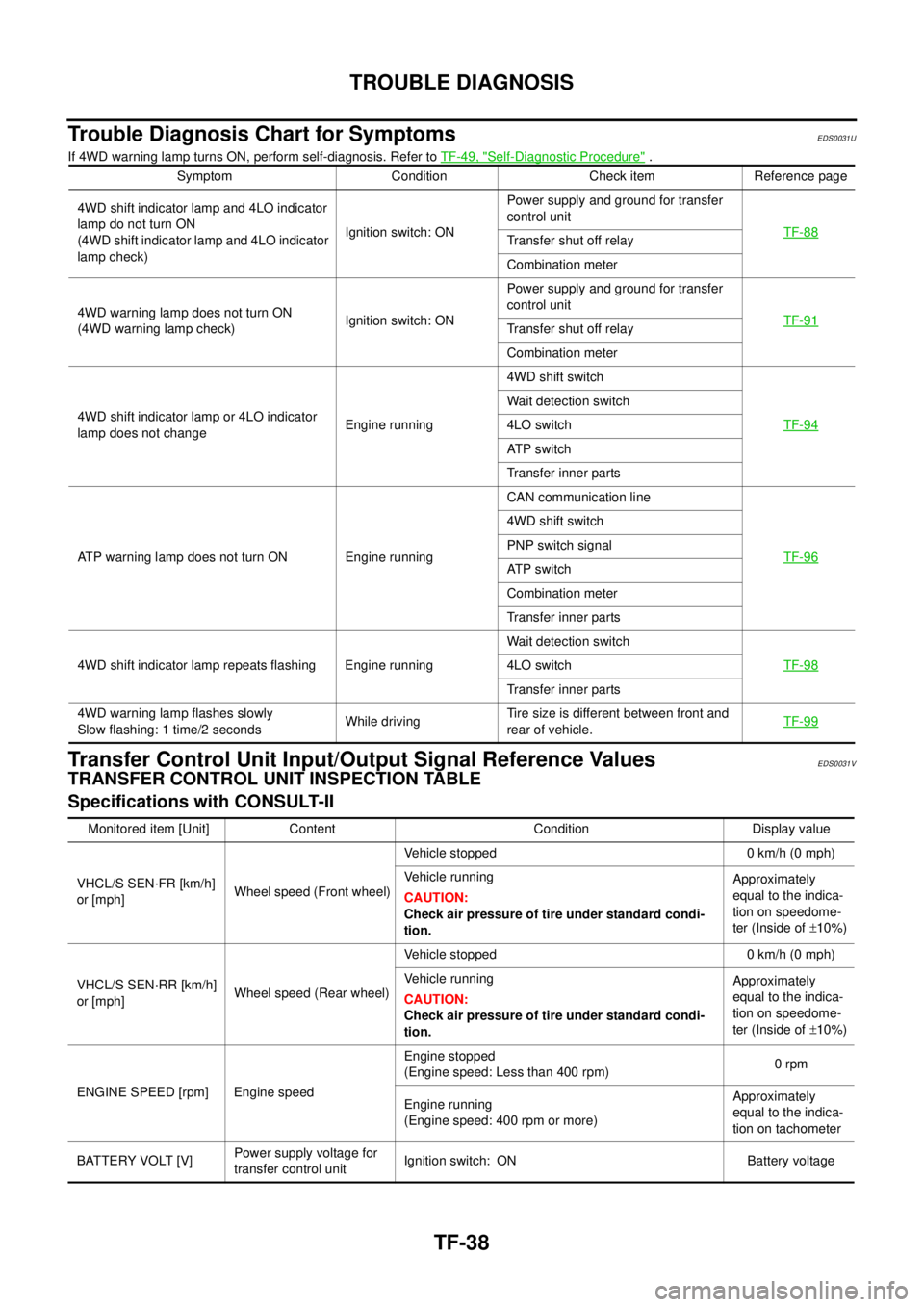
Trouble Diagnosis Chart for Symptoms
EDS0031U
If 4WD warning lamp turns ON, perform self-diagnosis. Refer toTF-49, "Self-Diagnostic Procedure".
Transfer Control Unit Input/Output Signal Reference ValuesEDS0031V
TRANSFER CONTROL UNIT INSPECTION TABLE
Specifications with CONSULT-II
Symptom Condition Check item Reference page
4WD shift indicator lamp and 4LO indicator
lamp do not turn ON
(4WD shift indicator lamp and 4LO indicator
lamp check)Ignition switch: ONPower supply and ground for transfer
control unit
TF-88
Transfer shut off relay
Combination meter
4WD warning lamp does not turn ON
(4WD warning lamp check)Ignition switch: ONPower supply and ground for transfer
control unit
TF-91
Transfer shut off relay
Combination meter
4WD shift indicator lamp or 4LO indicator
lamp does not changeEngine running4WD shift switch
TF-94
Wait detection switch
4LO switch
AT P s w i t c h
Transfer inner parts
ATP warning lamp does not turn ON Engine runningCAN communication line
TF-96
4WD shift switch
PNP switch signal
AT P s w i t c h
Combination meter
Transfer inner parts
4WD shift indicator lamp repeats flashing Engine runningWait detection switch
TF-98
4LO switch
Transfer inner parts
4WD warning lamp flashes slowly
Slow flashing: 1 time/2 secondsWhile drivingTire size is different between front and
rear of vehicle.TF-99
Monitored item [Unit] Content Condition Display value
VHCL/S SEN·FR [km/h]
or [mph]Wheel speed (Front wheel)Vehicle stopped 0 km/h (0 mph)
Vehicle running
CAUTION:
Check air pressure of tire under standard condi-
tion.Approximately
equal to the indica-
tion on speedome-
ter (Inside of±10%)
VHCL/S SEN·RR [km/h]
or [mph]Wheel speed (Rear wheel)Vehicle stopped 0 km/h (0 mph)
Vehicle running
CAUTION:
Check air pressure of tire under standard condi-
tion.Approximately
equal to the indica-
tion on speedome-
ter (Inside of±10%)
ENGINE SPEED [rpm] Engine speedEngine stopped
(Engine speed: Less than 400 rpm)0rpm
Engine running
(Engine speed: 400 rpm or more)Approximately
equal to the indica-
tion on tachometer
BATTERY VOLT [V]Power supply voltage for
transfer control unitIgnition switch: ON Battery voltage
Page 3119 of 3171
WW-8
FRONT WIPER AND WASHER SYSTEM
COMBINATION SWITCH READING FUNCTION
Description
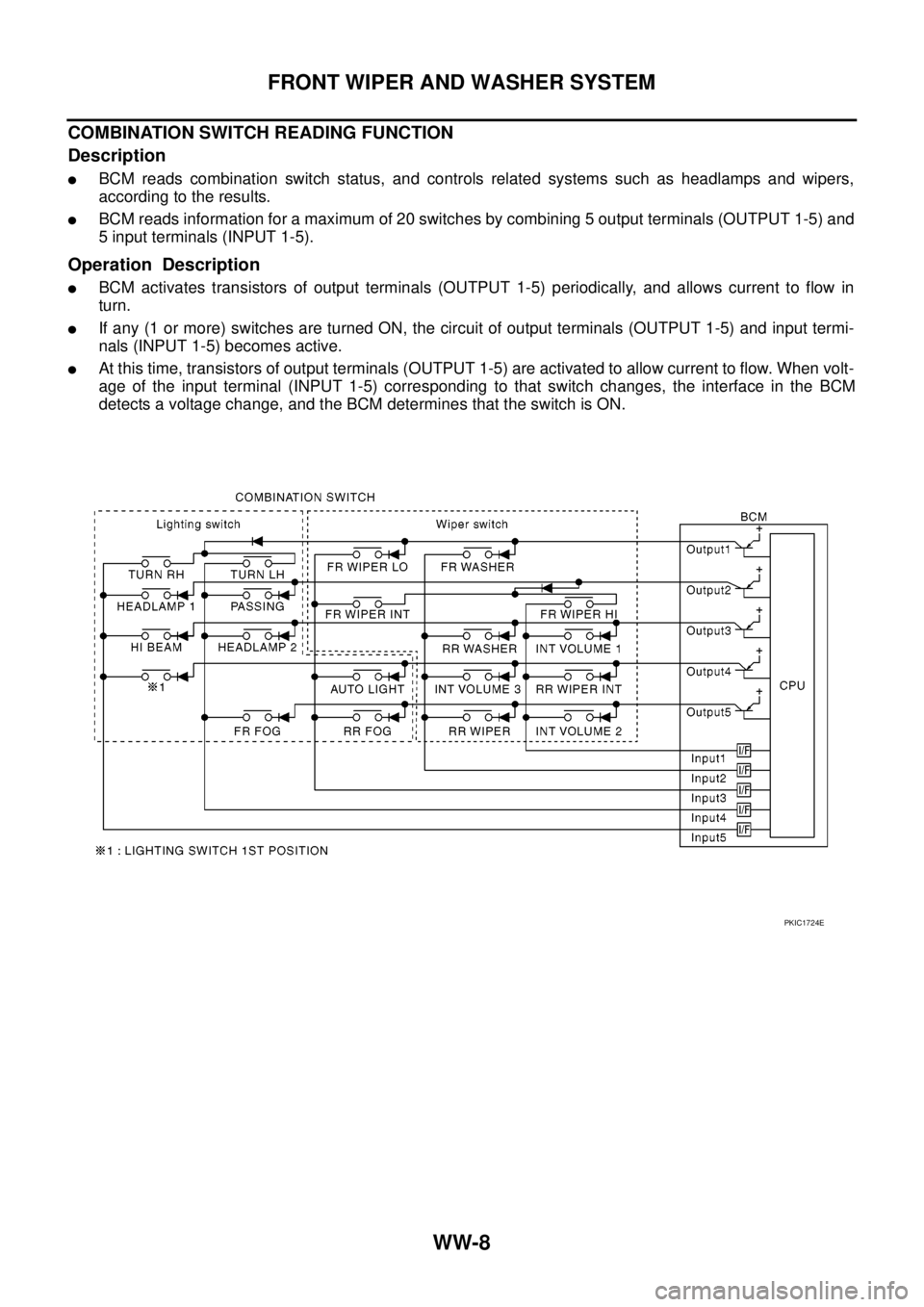
lBCM reads combination switch status, and controls related systems such as headlamps and wipers,
according to the results.
lBCM reads information for a maximum of 20 switches by combining 5 output terminals (OUTPUT 1-5) and
5 input terminals (INPUT 1-5).
Operation Description
lBCM activates transistors of output terminals (OUTPUT 1-5) periodically, and allows current to flow in
turn.
lIf any (1 or more) switches are turned ON, the circuit of output terminals (OUTPUT 1-5) and input termi-
nals (INPUT 1-5) becomes active.
lAt this time, transistors of output terminals (OUTPUT 1-5) are activated to allow current to flow. When volt-
age of the input terminal (INPUT 1-5) corresponding to that switch changes, the interface in the BCM
detects a voltage change, and the BCM determines that the switch is ON.
PKIC1724E
Page 3120 of 3171
FRONT WIPER AND WASHER SYSTEM
WW-9
C
D
E
F
G
H
I
J
L
MA
B
WW
BCM - Operation Table of Combination Switches
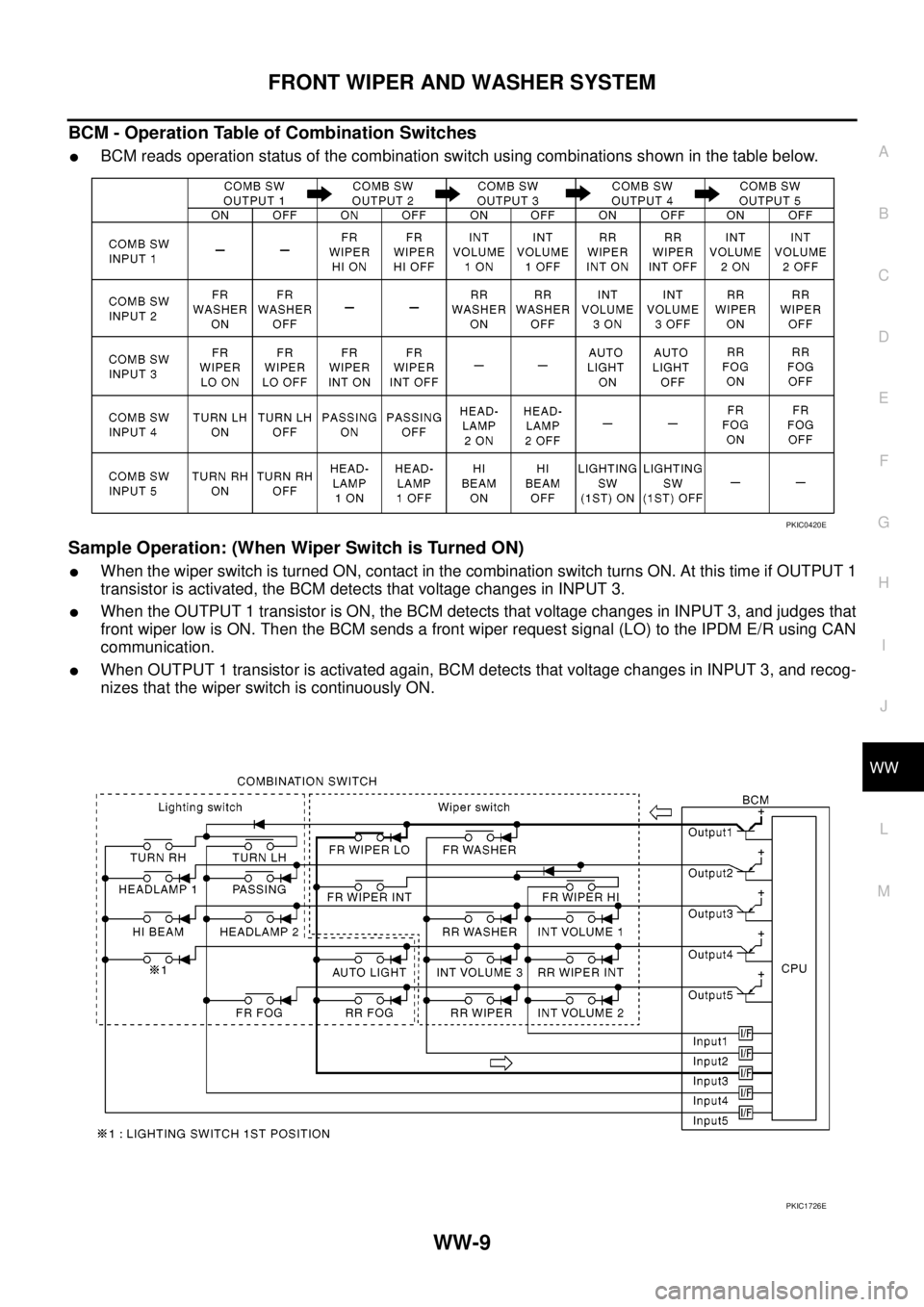
lBCM reads operation status of the combination switch using combinations shown in the table below.
Sample Operation: (When Wiper Switch is Turned ON)
lWhen the wiper switch is turned ON, contact in the combination switch turns ON. At this time if OUTPUT 1
transistor is activated, the BCM detects that voltage changes in INPUT 3.
lWhen the OUTPUT 1 transistor is ON, the BCM detects that voltage changes in INPUT 3, and judges that
front wiper low is ON. Then the BCM sends a front wiper request signal (LO) to the IPDM E/R using CAN
communication.
lWhen OUTPUT 1 transistor is activated again, BCM detects that voltage changes in INPUT 3, and recog-
nizes that the wiper switch is continuously ON.
PKIC0420E
PKIC1726E
Page 3129 of 3171
WW-18
FRONT WIPER AND WASHER SYSTEM
CONSULT-II Function (BCM)
EKS00P53
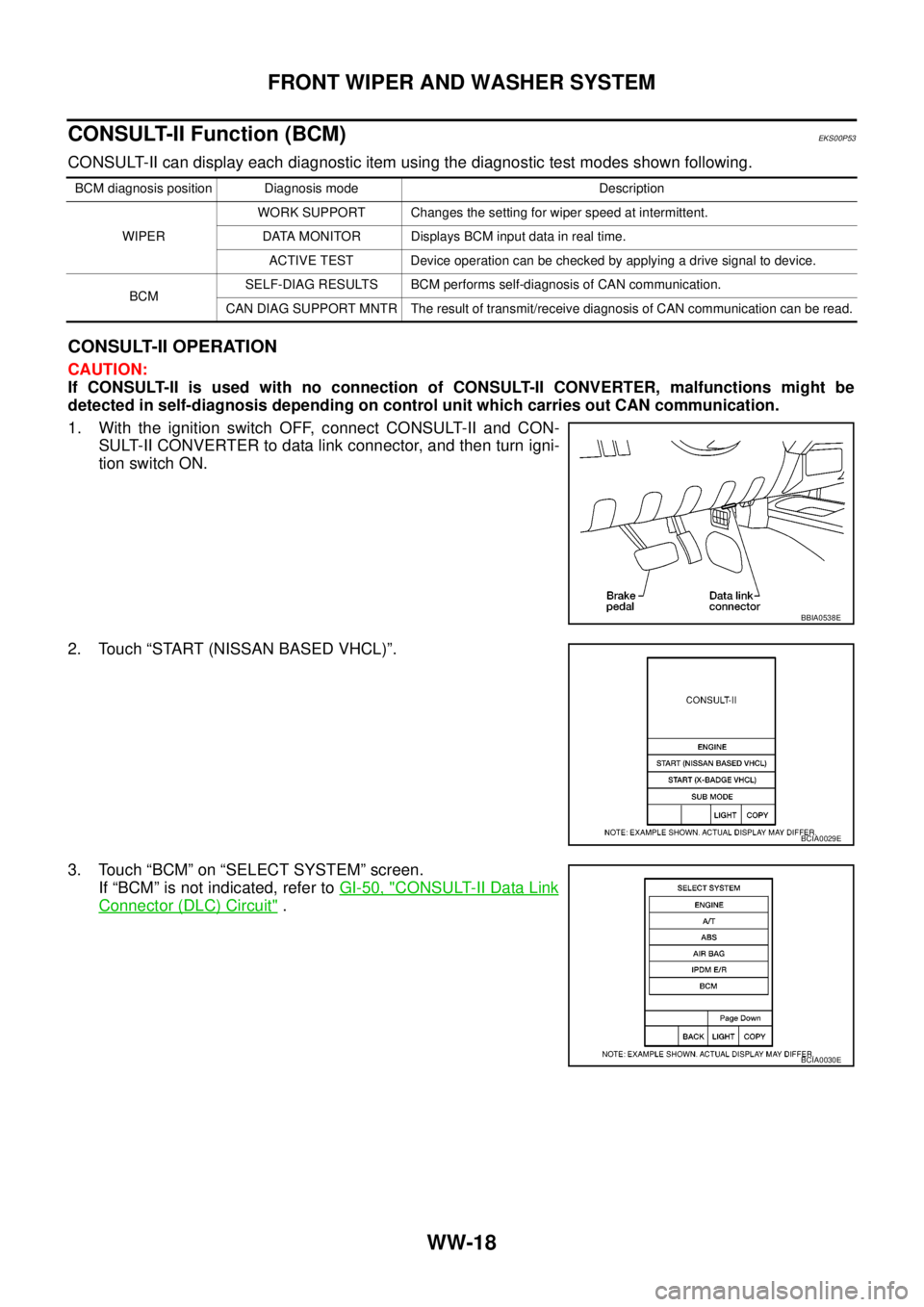
CONSULT-II can display each diagnostic item using the diagnostic test modes shown following.
CONSULT-II OPERATION
CAUTION:
If CONSULT-II is used with no connection of CONSULT-II CONVERTER, malfunctions might be
detected in self-diagnosis depending on control unit which carries out CAN communication.
1. With the ignition switch OFF, connect CONSULT-II and CON-
SULT-II CONVERTER to data link connector, and then turn igni-
tion switch ON.
2. Touch “START (NISSAN BASED VHCL)”.
3. Touch “BCM” on “SELECT SYSTEM” screen.
If “BCM” is not indicated, refer toGI-50, "
CONSULT-II Data Link
Connector (DLC) Circuit".
BCM diagnosis position Diagnosis mode Description
WIPERWORK SUPPORT Changes the setting for wiper speed at intermittent.
DATA MONITOR Displays BCM input data in real time.
ACTIVE TEST Device operation can be checked by applying a drive signal to device.
BCMSELF-DIAG RESULTS BCM performs self-diagnosis of CAN communication.
CAN DIAG SUPPORT MNTR The result of transmit/receive diagnosis of CAN communication can be read.
BBIA0538E
BCIA0029E
BCIA0030E
Page 3144 of 3171
FRONT WIPER AND WASHER SYSTEM
WW-33
C
D
E
F
G
H
I
J
L
MA
B
WW
Front Wiper Intermittent Operation Switch Position Cannot Be AdjustedEKS00P5B
1.CHECK COMBINATION SWITCH TO BCM
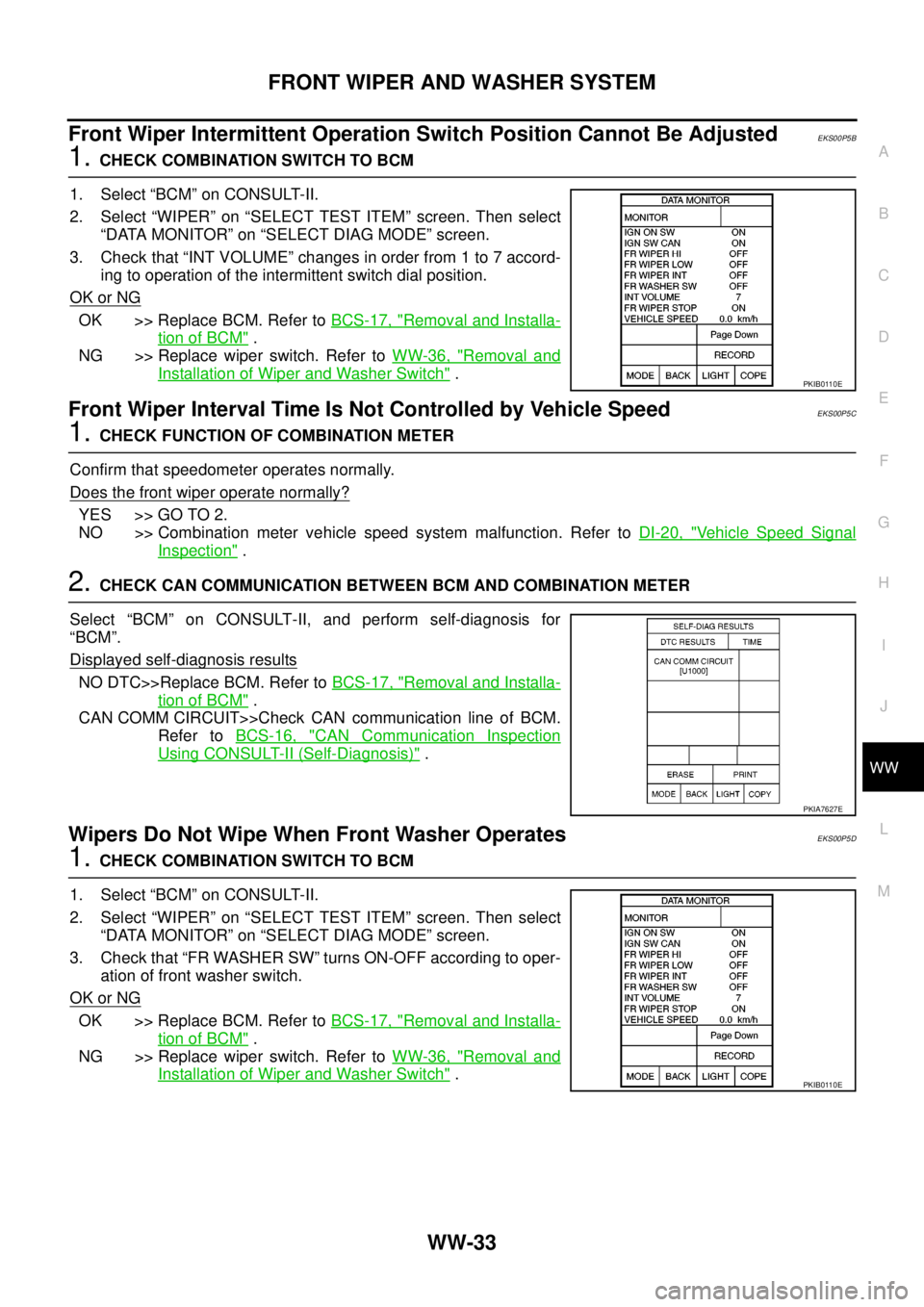
1. Select “BCM” on CONSULT-II.
2. Select “WIPER” on “SELECT TEST ITEM” screen. Then select
“DATA MONITOR” on “SELECT DIAG MODE” screen.
3. Check that “INT VOLUME” changes in order from 1 to 7 accord-
ing to operation of the intermittent switch dial position.
OK or NG
OK >> Replace BCM. Refer toBCS-17, "Removal and Installa-
tion of BCM".
NG >> Replace wiper switch. Refer toWW-36, "
Removal and
Installation of Wiper and Washer Switch".
Front Wiper Interval Time Is Not Controlled by Vehicle SpeedEKS00P5C
1.CHECK FUNCTION OF COMBINATION METER
Confirm that speedometer operates normally.
Does the front wiper operate normally?
YES >> GO TO 2.
NO >> Combination meter vehicle speed system malfunction. Refer toDI-20, "
Vehicle Speed Signal
Inspection".
2.CHECK CAN COMMUNICATION BETWEEN BCM AND COMBINATION METER
Select “BCM” on CONSULT-II, and perform self-diagnosis for
“BCM”.
Displayed self
-diagnosis results
NO DTC>>Replace BCM. Refer toBCS-17, "Removal and Installa-
tion of BCM".
CAN COMM CIRCUIT>>Check CAN communication line of BCM.
Refer toBCS-16, "
CAN Communication Inspection
Using CONSULT-II (Self-Diagnosis)".
Wipers Do Not Wipe When Front Washer OperatesEKS00P5D
1.CHECK COMBINATION SWITCH TO BCM
1. Select “BCM” on CONSULT-II.
2. Select “WIPER” on “SELECT TEST ITEM” screen. Then select
“DATA MONITOR” on “SELECT DIAG MODE” screen.
3. Check that “FR WASHER SW” turns ON-OFF according to oper-
ation of front washer switch.
OK or NG
OK >> Replace BCM. Refer toBCS-17, "Removal and Installa-
tion of BCM".
NG >> Replace wiper switch. Refer toWW-36, "
Removal and
Installation of Wiper and Washer Switch".
PKIB0110E
PKIA7627E
PKIB0110E