display NISSAN NAVARA 2005 Repair Manual Online
[x] Cancel search | Manufacturer: NISSAN, Model Year: 2005, Model line: NAVARA, Model: NISSAN NAVARA 2005Pages: 3171, PDF Size: 49.59 MB
Page 369 of 3171
TROUBLE DIAGNOSIS
ATC-35
C
D
E
F
G
H
I
K
L
MA
B
AT C
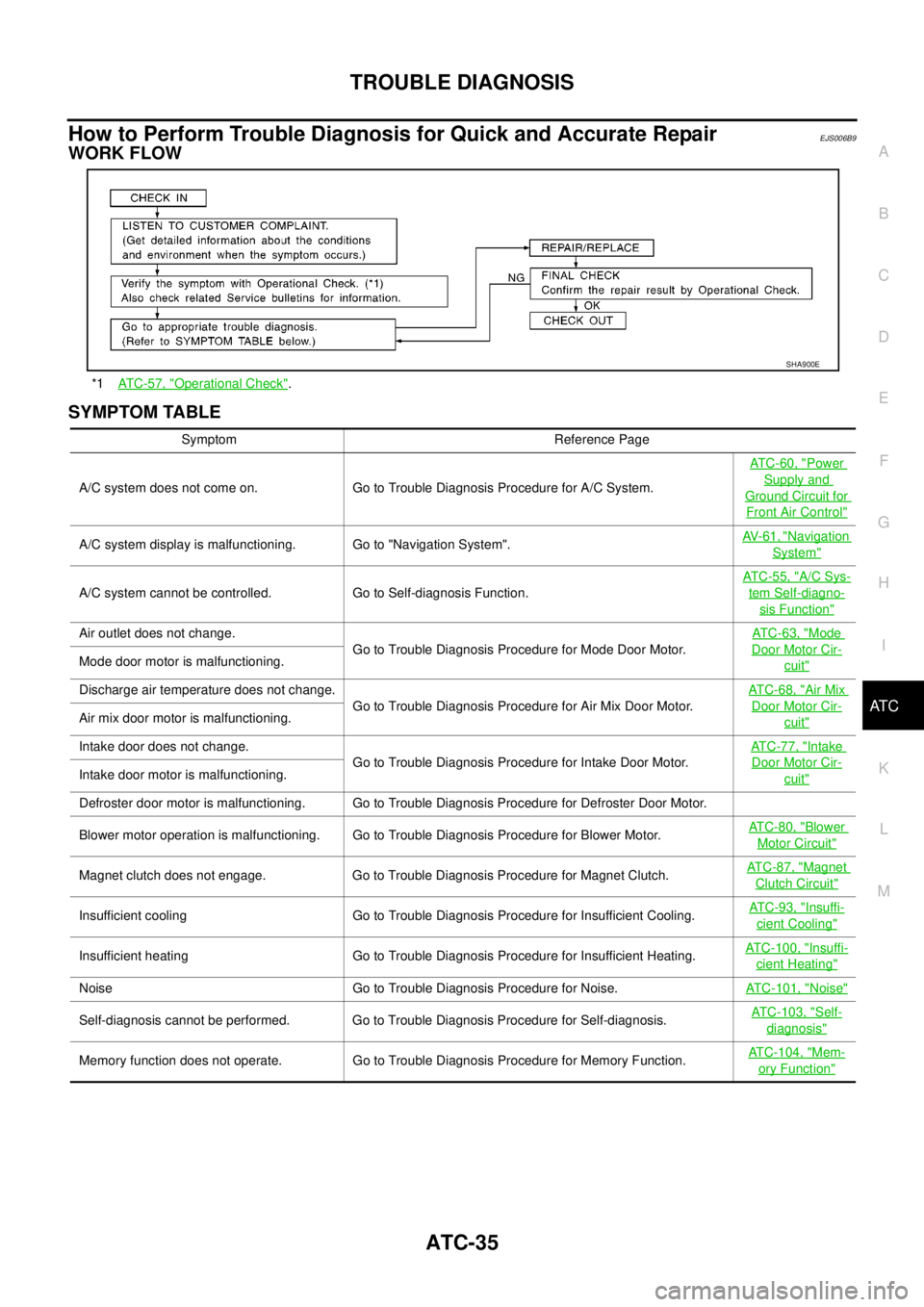
How to Perform Trouble Diagnosis for Quick and Accurate RepairEJS006B9
WORK FLOW
SYMPTOM TABLE
*1AT C - 5 7 , "Operational Check".
SHA900E
Symptom Reference Page
A/C system does not come on. Go to Trouble Diagnosis Procedure for A/C System.ATC-60, "
Power
Supply and
Ground Circuit for
Front Air Control"
A/C system display is malfunctioning. Go to "Navigation System".AV-61, "Navigation
System"
A/C system cannot be controlled. Go to Self-diagnosis Function.AT C - 5 5 , "
A/C Sys-
tem Self-diagno-
sis Function"
Air outlet does not change.
Go to Trouble Diagnosis Procedure for Mode Door Motor.AT C - 6 3 , "Mode
Door Motor Cir-
cuit"Mode door motor is malfunctioning.
Discharge air temperature does not change.
Go to Trouble Diagnosis Procedure for Air Mix Door Motor.ATC-68, "
Air Mix
Door Motor Cir-
cuit"Air mix door motor is malfunctioning.
Intake door does not change.
Go to Trouble Diagnosis Procedure for Intake Door Motor.AT C - 7 7 , "
Intake
Door Motor Cir-
cuit"Intake door motor is malfunctioning.
Defroster door motor is malfunctioning. Go to Trouble Diagnosis Procedure for Defroster Door Motor.
Blower motor operation is malfunctioning. Go to Trouble Diagnosis Procedure for Blower Motor.ATC-80, "
Blower
Motor Circuit"
Magnet clutch does not engage. Go to Trouble Diagnosis Procedure for Magnet Clutch.AT C - 8 7 , "Magnet
Clutch Circuit"
Insufficient cooling Go to Trouble Diagnosis Procedure for Insufficient Cooling.AT C - 9 3 , "Insuffi-
cient Cooling"
Insufficient heating Go to Trouble Diagnosis Procedure for Insufficient Heating.ATC-100, "Insuffi-
cient Heating"
Noise Go to Trouble Diagnosis Procedure for Noise.ATC-101, "Noise"
Self-diagnosis cannot be performed. Go to Trouble Diagnosis Procedure for Self-diagnosis.ATC-103, "Self-
diagnosis"
Memory function does not operate. Go to Trouble Diagnosis Procedure for Memory Function.ATC-104, "Mem-
ory Function"
Page 389 of 3171
TROUBLE DIAGNOSIS
ATC-55
C
D
E
F
G
H
I
K
L
MA
B
AT C
A/C System Self-diagnosis FunctionEJS006BG
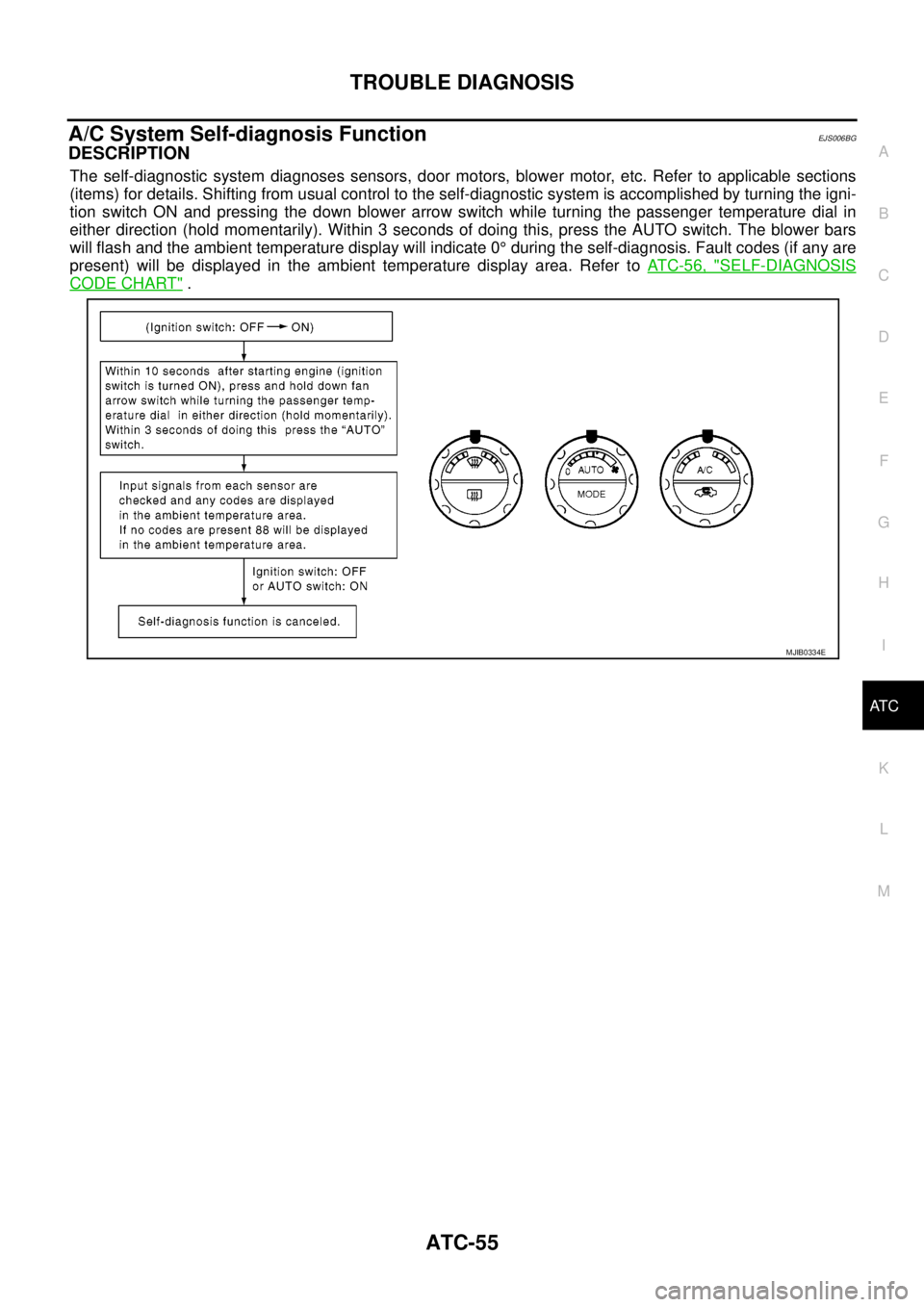
DESCRIPTION
The self-diagnostic system diagnoses sensors, door motors, blower motor, etc. Refer to applicable sections
(items) for details. Shifting from usual control to the self-diagnostic system is accomplished by turning the igni-
tion switch ON and pressing the down blower arrow switch while turning the passenger temperature dial in
either direction (hold momentarily). Within 3 seconds of doing this, press the AUTO switch. The blower bars
will flash and the ambient temperature display will indicate 0°during the self-diagnosis. Fault codes (if any are
present) will be displayed in the ambient temperature display area. Refer toAT C - 5 6 , "
SELF-DIAGNOSIS
CODE CHART".
MJIB0334E
Page 391 of 3171
TROUBLE DIAGNOSIS
ATC-57
C
D
E
F
G
H
I
K
L
MA
B
AT C
Operational CheckEJS006BH
The purpose of the operational check is to confirm that the system operates properly.
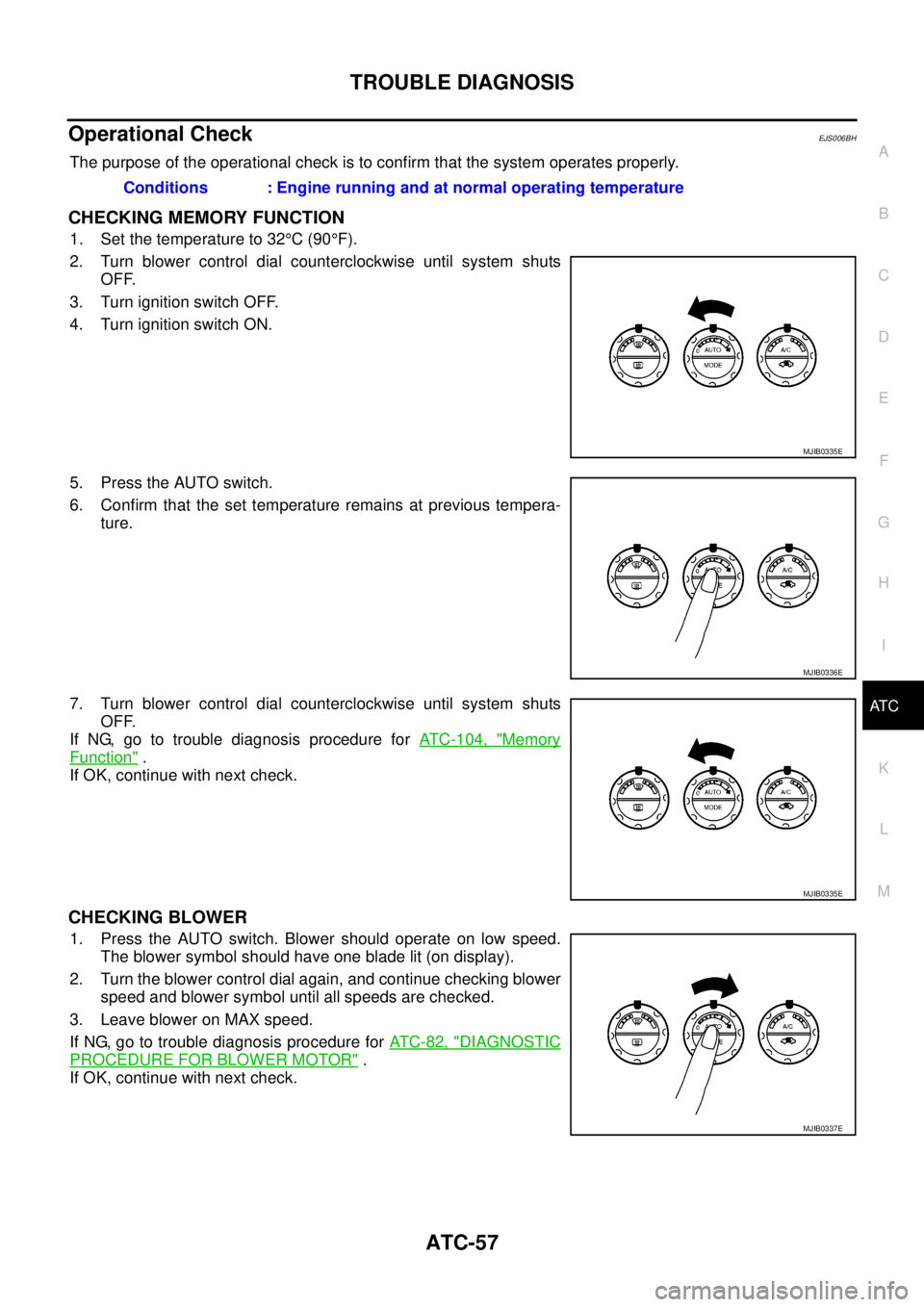
CHECKING MEMORY FUNCTION
1. Set the temperature to 32°C(90°F).
2. Turn blower control dial counterclockwise until system shuts
OFF.
3. Turn ignition switch OFF.
4. Turn ignition switch ON.
5. Press the AUTO switch.
6. Confirm that the set temperature remains at previous tempera-
ture.
7. Turn blower control dial counterclockwise until system shuts
OFF.
If NG, go to trouble diagnosis procedure forATC-104, "
Memory
Function".
If OK, continue with next check.
CHECKING BLOWER
1. Press the AUTO switch. Blower should operate on low speed.
The blower symbol should have one blade lit (on display).
2. Turn the blower control dial again, and continue checking blower
speed and blower symbol until all speeds are checked.
3. Leave blower on MAX speed.
If NG, go to trouble diagnosis procedure forAT C - 8 2 , "
DIAGNOSTIC
PROCEDURE FOR BLOWER MOTOR".
If OK, continue with next check.Conditions : Engine running and at normal operating temperature
MJIB0335E
MJIB0336E
MJIB0335E
MJIB0337E
Page 392 of 3171
ATC-58
TROUBLE DIAGNOSIS
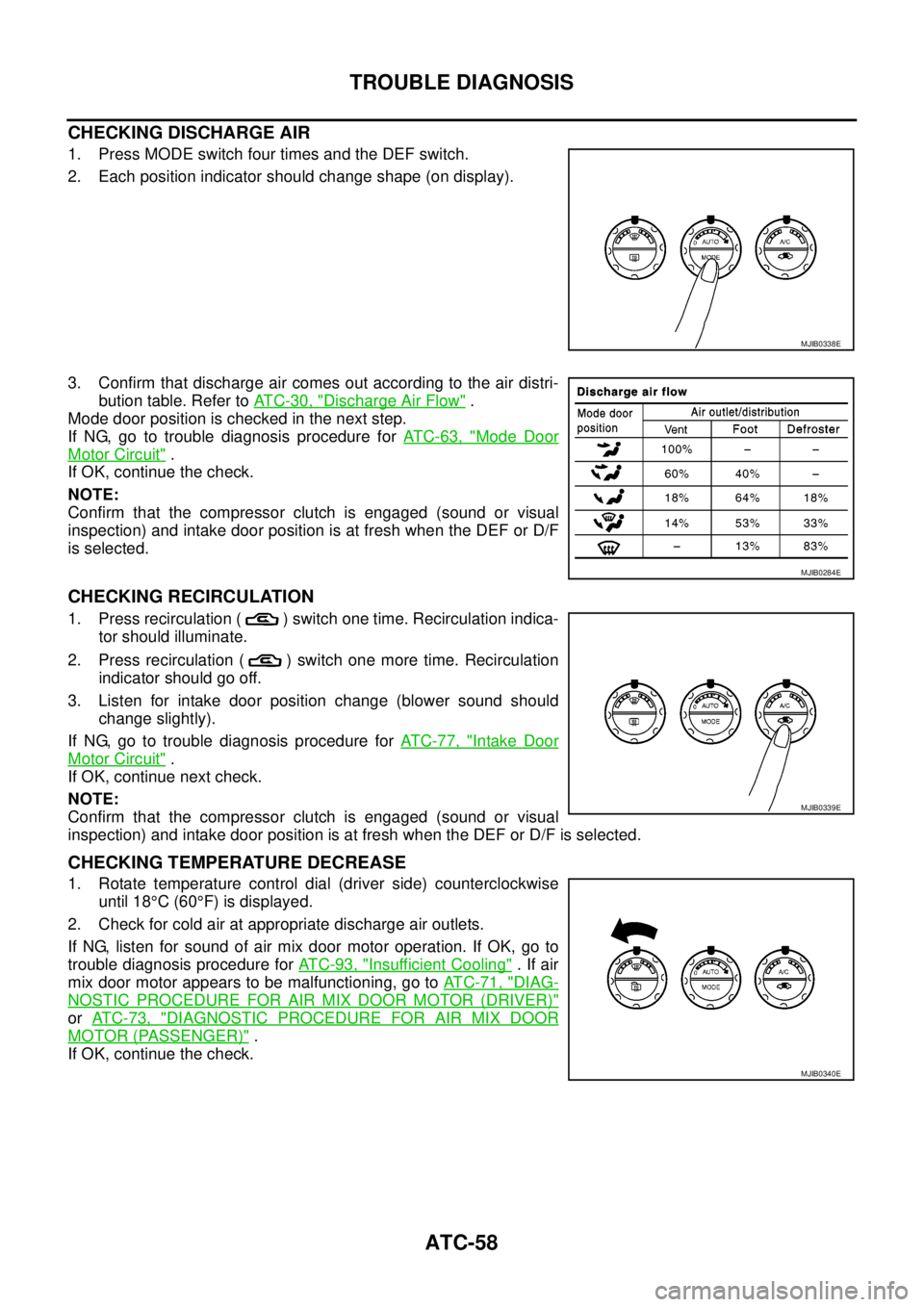
CHECKING DISCHARGE AIR
1. Press MODE switch four times and the DEF switch.
2. Each position indicator should change shape (on display).
3. Confirm that discharge air comes out according to the air distri-
bution table. Refer toAT C - 3 0 , "
Discharge Air Flow".
Mode door position is checked in the next step.
If NG, go to trouble diagnosis procedure forAT C - 6 3 , "
Mode Door
Motor Circuit".
If OK, continue the check.
NOTE:
Confirm that the compressor clutch is engaged (sound or visual
inspection) and intake door position is at fresh when the DEF or D/F
is selected.
CHECKING RECIRCULATION
1. Press recirculation ( ) switch one time. Recirculation indica-
tor should illuminate.
2. Press recirculation ( ) switch one more time. Recirculation
indicator should go off.
3. Listen for intake door position change (blower sound should
change slightly).
If NG, go to trouble diagnosis procedure forAT C - 7 7 , "
Intake Door
Motor Circuit".
If OK, continue next check.
NOTE:
Confirm that the compressor clutch is engaged (sound or visual
inspection) and intake door position is at fresh when the DEF or D/F is selected.
CHECKING TEMPERATURE DECREASE
1. Rotate temperature control dial (driver side) counterclockwise
until 18°C(60°F) is displayed.
2. Check for cold air at appropriate discharge air outlets.
If NG, listen for sound of air mix door motor operation. If OK, go to
trouble diagnosis procedure forAT C - 9 3 , "
Insufficient Cooling".Ifair
mix door motor appears to be malfunctioning, go toAT C - 7 1 , "
DIAG-
NOSTIC PROCEDURE FOR AIR MIX DOOR MOTOR (DRIVER)"
orAT C - 7 3 , "DIAGNOSTIC PROCEDURE FOR AIR MIX DOOR
MOTOR (PASSENGER)".
If OK, continue the check.
MJIB0338E
MJIB0284E
MJIB0339E
MJIB0340E
Page 393 of 3171
TROUBLE DIAGNOSIS
ATC-59
C
D
E
F
G
H
I
K
L
MA
B
AT C
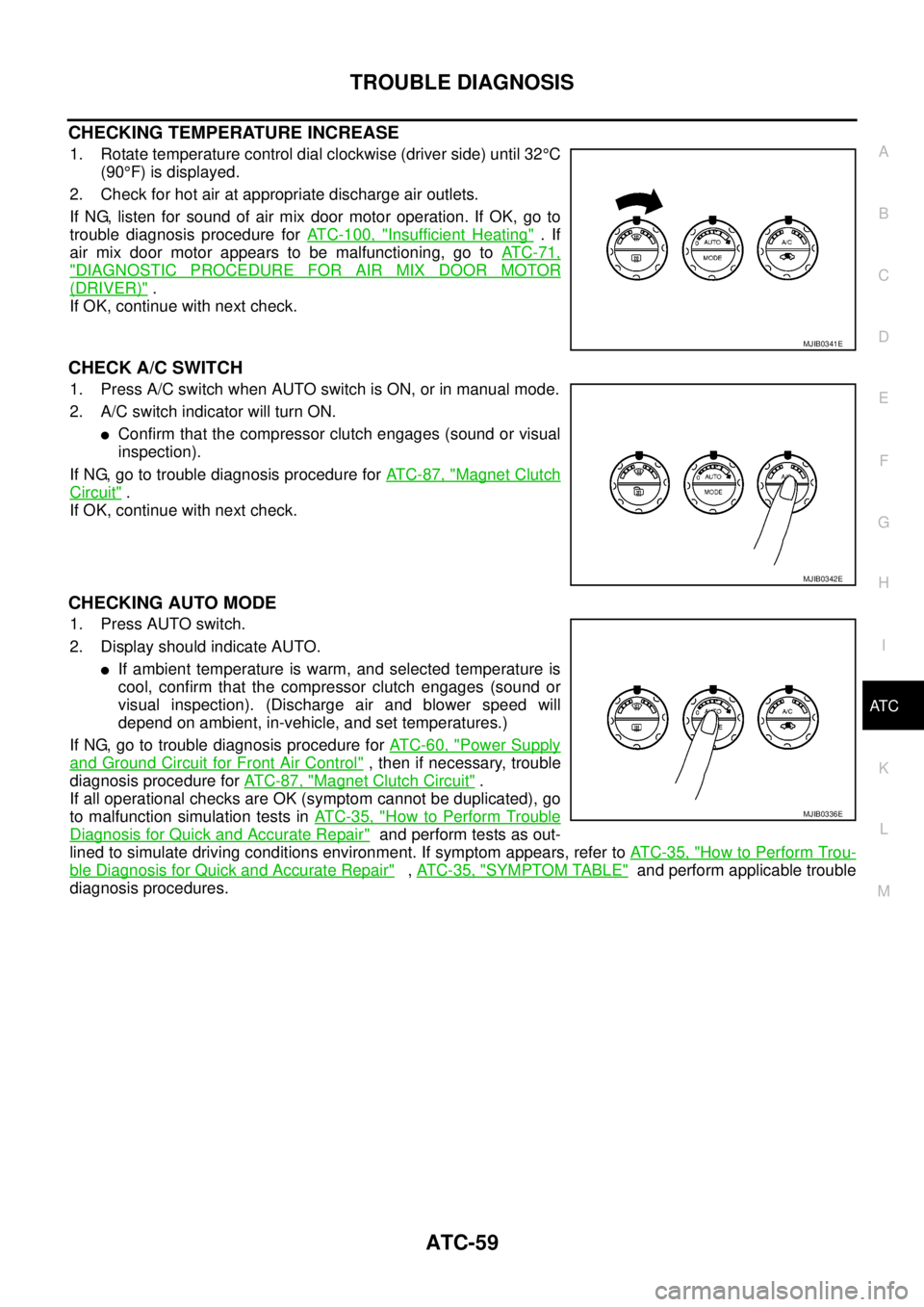
CHECKING TEMPERATURE INCREASE
1. Rotate temperature control dial clockwise (driver side) until 32°C
(90°F) is displayed.
2. Check for hot air at appropriate discharge air outlets.
If NG, listen for sound of air mix door motor operation. If OK, go to
trouble diagnosis procedure forATC-100, "
Insufficient Heating".If
air mix door motor appears to be malfunctioning, go toAT C - 7 1 ,
"DIAGNOSTIC PROCEDURE FOR AIR MIX DOOR MOTOR
(DRIVER)".
If OK, continue with next check.
CHECK A/C SWITCH
1. Press A/C switch when AUTO switch is ON, or in manual mode.
2. A/C switch indicator will turn ON.
lConfirm that the compressor clutch engages (sound or visual
inspection).
If NG, go to trouble diagnosis procedure forAT C - 8 7 , "
Magnet Clutch
Circuit".
If OK, continue with next check.
CHECKING AUTO MODE
1. Press AUTO switch.
2. Display should indicate AUTO.
lIf ambient temperature is warm, and selected temperature is
cool, confirm that the compressor clutch engages (sound or
visual inspection). (Discharge air and blower speed will
depend on ambient, in-vehicle, and set temperatures.)
If NG, go to trouble diagnosis procedure forAT C - 6 0 , "
Power Supply
and Ground Circuit for Front Air Control", then if necessary, trouble
diagnosis procedure forAT C - 8 7 , "
Magnet Clutch Circuit".
If all operational checks are OK (symptom cannot be duplicated), go
to malfunction simulation tests inAT C - 3 5 , "
How to Perform Trouble
Diagnosis for Quick and Accurate Repair"and perform tests as out-
lined to simulate driving conditions environment. If symptom appears, refer toAT C - 3 5 , "
How to Perform Trou-
ble Diagnosis for Quick and Accurate Repair",AT C - 3 5 , "SYMPTOM TABLE"and perform applicable trouble
diagnosis procedures.
MJIB0341E
MJIB0342E
MJIB0336E
Page 395 of 3171
TROUBLE DIAGNOSIS
ATC-61
C
D
E
F
G
H
I
K
L
MA
B
AT C
COMPONENT DESCRIPTION
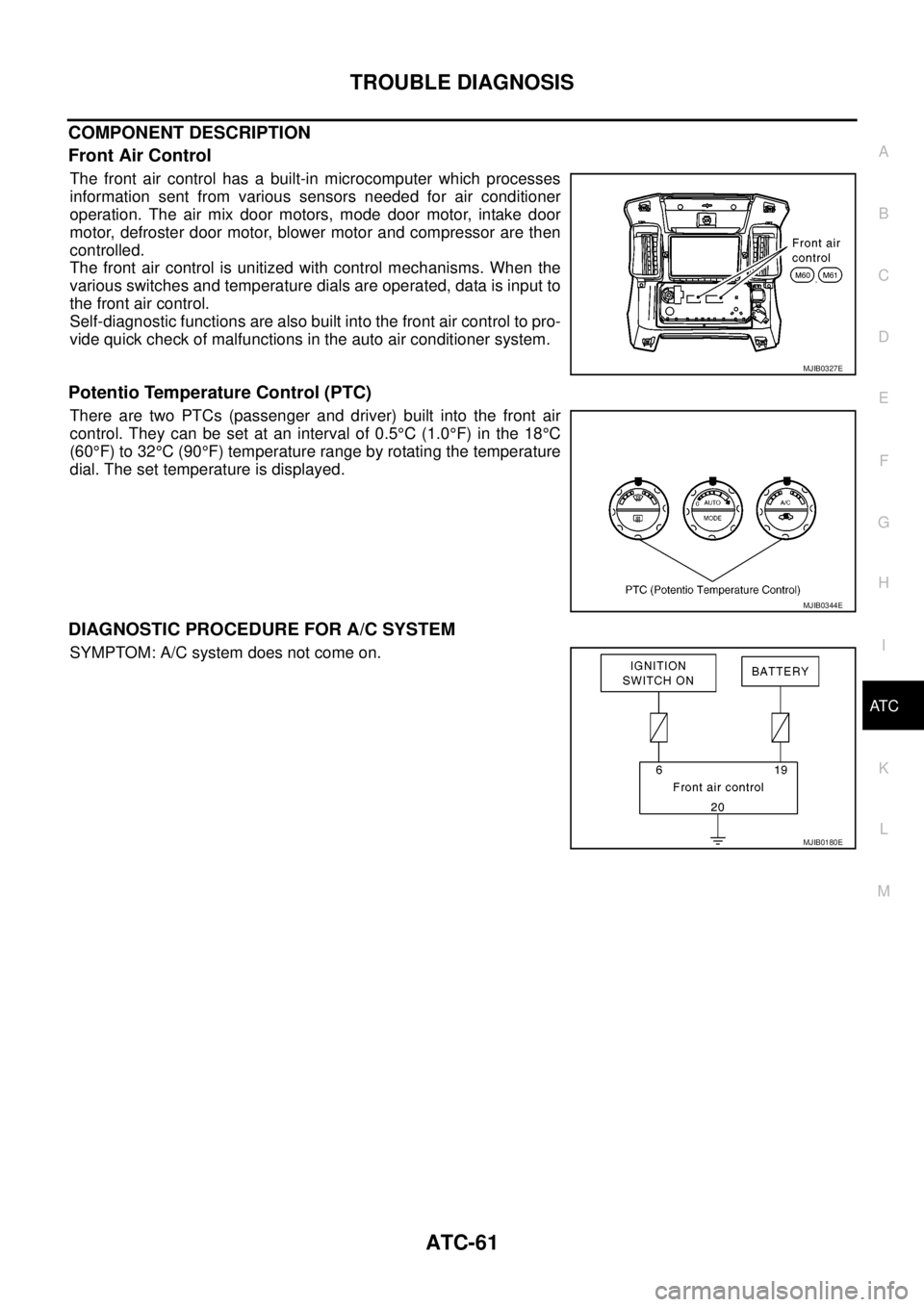
Front Air Control
The front air control has a built-in microcomputer which processes
information sent from various sensors needed for air conditioner
operation. The air mix door motors, mode door motor, intake door
motor, defroster door motor, blower motor and compressor are then
controlled.
The front air control is unitized with control mechanisms. When the
various switches and temperature dials are operated, data is input to
the front air control.
Self-diagnostic functions are also built into the front air control to pro-
vide quick check of malfunctions in the auto air conditioner system.
Potentio Temperature Control (PTC)
There are two PTCs (passenger and driver) built into the front air
control. They can be set at an interval of 0.5°C(1.0°F) in the 18°C
(60°F) to 32°C(90°F) temperature range by rotating the temperature
dial. The set temperature is displayed.
DIAGNOSTIC PROCEDURE FOR A/C SYSTEM
SYMPTOM: A/C system does not come on.
MJIB0327E
MJIB0344E
MJIB0180E
Page 489 of 3171

AV-1
AUDIO-VISUAL SYSTEM
K ELECTRICAL
CONTENTS
C
D
E
F
G
H
I
J
L
M
SECTIONAV
A
B
AV
AUDIO-VISUAL SYSTEM
PRECAUTIONS .......................................................... 3
Precautions for Supplemental Restraint System
(SRS)“AIRBAG”and“SEATBELTPRE-TEN-
SIONER” .................................................................. 3
Wiring Diagrams and Trouble Diagnosis .................. 3
SYSTEM DESCRIPTION ............................................ 4
System Functions ..................................................... 4
AUDIO ................................................................... 4
NATS AUDIO LINK (WITHOUT NAVIGATION
SYSTEM) .............................................................. 4
VEHICLE INFORMATION SYSTEM ..................... 5
NAVIGATION SYSTEM ......................................... 5
HANDS-FREE PHONE ......................................... 7
Component Description ............................................ 8
AUDIO UNIT ......................................................... 8
NAVI CONTROL UNIT .......................................... 8
GPS ANTENNA .................................................... 9
DISPLAY UNIT ...................................................... 9
AV SWITCH .......................................................... 9
Component Parts Location ..................................... 10
Location Of Antenna .............................................. 10
Schematic — AUDIO — / With 1CD Player Type... 12
Wiring Diagram — AUDIO — / With 1CD Player Type
... 13
Schematic — AUDIO — / With 6CD Player Type... 16
Wiring Diagram — AUDIO — / With 6CD Player Type
... 17
Schematic — NAVI — ............................................ 20
Wiring Diagram — NAVI — .................................... 21
Schematic — NAVI — / COMM .............................. 28
Wiring Diagram — NAVI — / COMM ...................... 29
Wiring Diagram — TELEPHONE (PRE WIRE) —
/ Without NAVI ........................................................ 32
CAN Communication .............................................. 33
SYSTEM DESCRIPTION .................................... 33
TERMINALS AND REFERENCE VALUE FOR CON-
TROL UNIT ............................................................... 34
Audio Unit (1CD Player Type) ................................ 34
Audio Unit (6CD Player Type) Without NAVI .......... 35Audio Unit (With NAVI) ........................................... 37
NAVI Control Unit ................................................... 38
Display Unit ............................................................ 41
DIAGNOSIS SYSTEM ............................................... 44
Navigation System Diagnosis Function .................. 44
On Bord Self-Diagnosis Function ........................... 44
DESCRIPTION .................................................... 44
DIAGNOSIS ITEM ............................................... 44
OPERATION PROCEDURE ................................ 45
Self Diagnosis Mode ............................................... 46
ERROR DETECTION RANGE OF SELF-DIAG-
NOSIS MODE ..................................................... 47
DIAGNOSIS RESULTS ....................................... 47
Confirmation/Adjustment Mode .............................. 48
SCREEN TROUBLE DIAGNOSIS ...................... 49
VEHICLE SIGNALS ............................................ 49
SPEAKER TEST ................................................. 50
NAVIGATION ....................................................... 50
ERROR HISTORY ............................................... 51
VEHICLE CAN DIAGNOSIS ............................... 53
AV COMM DIAGNOSIS ....................................... 54
HANDSFREE PHONE ........................................ 54
BLUETOOTH ....................................................... 54
DELETE UNIT CONNECTION LOG ................... 55
CONSULT-II Functions ........................................... 56
CONSULT-II FUNCTIONS ................................... 56
CONSULT-II BASIC OPERATION PROCEDURE
... 56
SELF-DIAG RESULTS ........................................ 56
DATA MONITOR ................................................. 58
AV COMM MONITOR .......................................... 59
ECU PART NUMBER .......................................... 60
TROUBLE DIAGNOSIS ............................................ 61
Navigation System .................................................. 61
RGB Image ............................................................. 61
Voice Activated Control System ............................. 62
Steering Wheel Switch ............................................ 63
Component Parts Inspection .................................. 63
STEERING WHEEL SWITCH UNIT INSPEC-
Page 490 of 3171

AV-2
TION .................................................................... 63
Example of Symptoms Not Malfunction .................. 65
BASIC OPERATION ............................................ 65
VEHICLE ICON ................................................... 65
MAP DVD-ROM ................................................... 66
ROUTE CALCULATION AND VISUAL GUID-
ANCE ................................................................... 66
VOICE GUIDANCE ............................................. 67
VOICE RECOGNITION ....................................... 67
EXAMPLES OF CURRENT LOCATION MARK
DISPLACEMENT ................................................. 68
THE CURRENT POSITION MARK SHOWS A
POSITION THAT IS COMPLETELY INCOR-
RECT. .................................................................. 71
THE CURRENT POSITION MARK JUMPS. ....... 72
THE CURRENT LOCATION MARK IS IN A
RIVER OR THE SEA. .......................................... 72
CURRENT LOCATION MARK ROTATES WITH-
OUT OPERATION ............................................... 72
WHEN DRIVING ON THE SAME ROAD, SOME-
TIMES THE CURRENT LOCATION MARK IS IN
THE CORRECT PLACE AND SOMETIMES IT IS
IN THE INCORRECT PLACE. ............................. 72
LOCATION CORRECTION BY MAP MATCHING
IS SLOW. ............................................................. 72
ALTHOUGH THE GPS RECEIVING DISPLAY IS
GREEN, THE VEHICLE MARK DOES NOT
RETURN TO THE CORRECT LOCATION. ......... 72
THE NAME OF THE CURRENT PLACE IS NOT
DISPLAYED. ........................................................ 72
THE DISPLAY IS DIFFERENT BETWEEN BIRD-
VIEW® AND (FLAT) MAP DISPLAY. ................... 72
REMOVAL AND INSTALLATION ............................. 73
Auido Unit (1CD Player Type) ................................ 73
REMOVAL ........................................................... 73INSTALLATION .................................................... 73
Audio Unit ( 6CD Player Type ) Without NAVI ........ 73
REMOVAL ............................................................ 73
INSTALLATION .................................................... 73
Audio Unit (6CD Player Type) With NAVI ............... 74
REMOVAL ............................................................ 74
INSTALLATION .................................................... 74
Front Door Speaker ................................................ 74
REMOVAL ............................................................ 74
INSTALLATION .................................................... 74
Rear Door Speaker ................................................. 74
REMOVAL ............................................................ 74
INSTALLATION .................................................... 74
Tweeter ................................................................... 75
REMOVAL ............................................................ 75
INSTALLATION .................................................... 75
Roof Antenna .......................................................... 75
REMOVAL ............................................................ 75
INSTALLATION .................................................... 75
NAVI Control Unit .................................................... 75
REMOVAL ............................................................ 75
INSTALLATION .................................................... 75
GPS Antenna .......................................................... 76
REMOVAL ............................................................ 76
INSTALLATION .................................................... 76
Display Unit ............................................................. 77
REMOVAL ............................................................ 77
INSTALLATION .................................................... 77
AV Switch ................................................................ 77
REMOVAL ............................................................ 77
INSTALLATION .................................................... 77
Microphone ............................................................. 77
REMOVAL ............................................................ 77
INSTALLATION .................................................... 77
Page 492 of 3171

AV-4
SYSTEM DESCRIPTION
SYSTEM DESCRIPTION
PFP:00000
System FunctionsEKS00Q5X
Refer to Owner's Manual for audio system operating instructions.
AUDIO
Speed Sensitive Volume (6CD Player Type)
Volume level of this system gone up and down automatically in proportion to the vehicle speed. And the con-
trol level can be selected by the customer.
NATS AUDIO LINK (WITHOUT NAVIGATION SYSTEM)
Description
The link with the NATS IMMU implies that the audio unit can basically only be operated if connected to the
matching NATS IMMU to which the audio unit was initially fitted on the production line.
Since radio operation is impossible after the link with the NATS is disrupted theft of the audio unit is basically
useless since special equipment is required to reset the audio unit.
Initialization Process for Audio Units That Are Linked to The NATS IMMU
New audio units will be delivered to the factories in the “NEW” state, i.e. ready to be linked with the vehicle's
NATS. When the audio unit in “NEW” state is first switched on at the factory, it will start up communication with
the vehicle's immobilizer control unit (IMMU) and send a code (the “audio unit Code”) to the IMMU. The IMMU
will then store this code, which is unique to each audio unit, in its (permanent) memory.
Upon receipt of the code by the IMMU, the NATS will confirm correct receipt of the audio unit code to the audio
unit. Hereafter, the audio unit will operate as normal.
During the initialization process, “NEW” is displayed on the audio unit display. Normally though, communica-
tion between audio unit and IMMU takes such a short time (300 ms) that the audio unit seems to switch on
directly without showing “NEW” on its display.
Normal Operation
Each time the audio unit is switched on afterwards, the audio unit code will be verified between the audio unit
and the NATS before the audio unit becomes operational. During the code verification process, “WAIT” is
shown on the audio unit display. Again, the communication takes such a short time (300 ms) that the audio
unit seems to switch on directly without showing “WAIT” on its display.
When The Radio Is Locked
In case of a audio unit being linked with the vehicle's NATS (immobilizer system), disconnection of the link
between the audio unit and the IMMU will cause the audio unit to switch into the lock (“SECURE”) mode in
which the audio unit is fully inoperative. Hence, repair of the audio unit is basically impossible, unless the
audio unit is reset to the “NEW” state for which special decoding equipment is required.
Clarion has provided their authorized service representatives with so called “decoder boxes” which can bring
the audio unit back to the “NEW” state, enabling the audio unit to be switched on after which repair can be per-
formed. Subsequently, when the repaired audio unit is delivered to the final user again, it will be in the “NEW”
state to enable re-linking the audio unit to the vehicle's immobilizer system. As a result of the above, repair of
the audio unit can only be done by an authorized Clarion representative (when the owner of the vehicle
requests repair and can show personal identification).
Service Procedure
Item Service procedure Description
Battery disconnection No additional action required. –
Radio needs repair Repair needs to be done by authorized
representative of radio manufacturer since
radio cannot be operated unless it is reset
to NEW state, using special decoding
equipment.–
Replacement of radio by new part No additional action required. Radio is delivered in NEW state.
Transferring radio to another vehicle/
replacement of radio by an “old” partRadio needs to be reset to NEW state by
authorized representative of radio manu-
facturer.–
Replacement of IMMU Radio needs to be reset to NEW state by
authorized representative of Clarion.After switching on the radio, it will display
“SECURE” after 1 minute.
Page 493 of 3171
SYSTEM DESCRIPTION
AV-5
C
D
E
F
G
H
I
J
L
MA
B
AV
Personal Audio Setting
The radio is designed to store several settings (volume, bass, treble, preset stations) with every NATS ignition
key used. Up to a maximum of 4 NATS keys can be registered. During the communication mentioned under
“Anti-Theft System”, the radio will recognize the used ignition key and select the accompanying settings.
VEHICLE INFORMATION SYSTEM
lThe status of audio system, fuel consumption, rear view monitor and navigation system are displayed.
lNAVI control unit receives the data signal from ECM, combination meter via CAN communication. It calcu-
lates the values of fuel economy, and trip computer from the received information and displays them.
NAVIGATION SYSTEM
Refer to Owner's Manual or navigation system Owner's Manual for navigation system operating instructions.
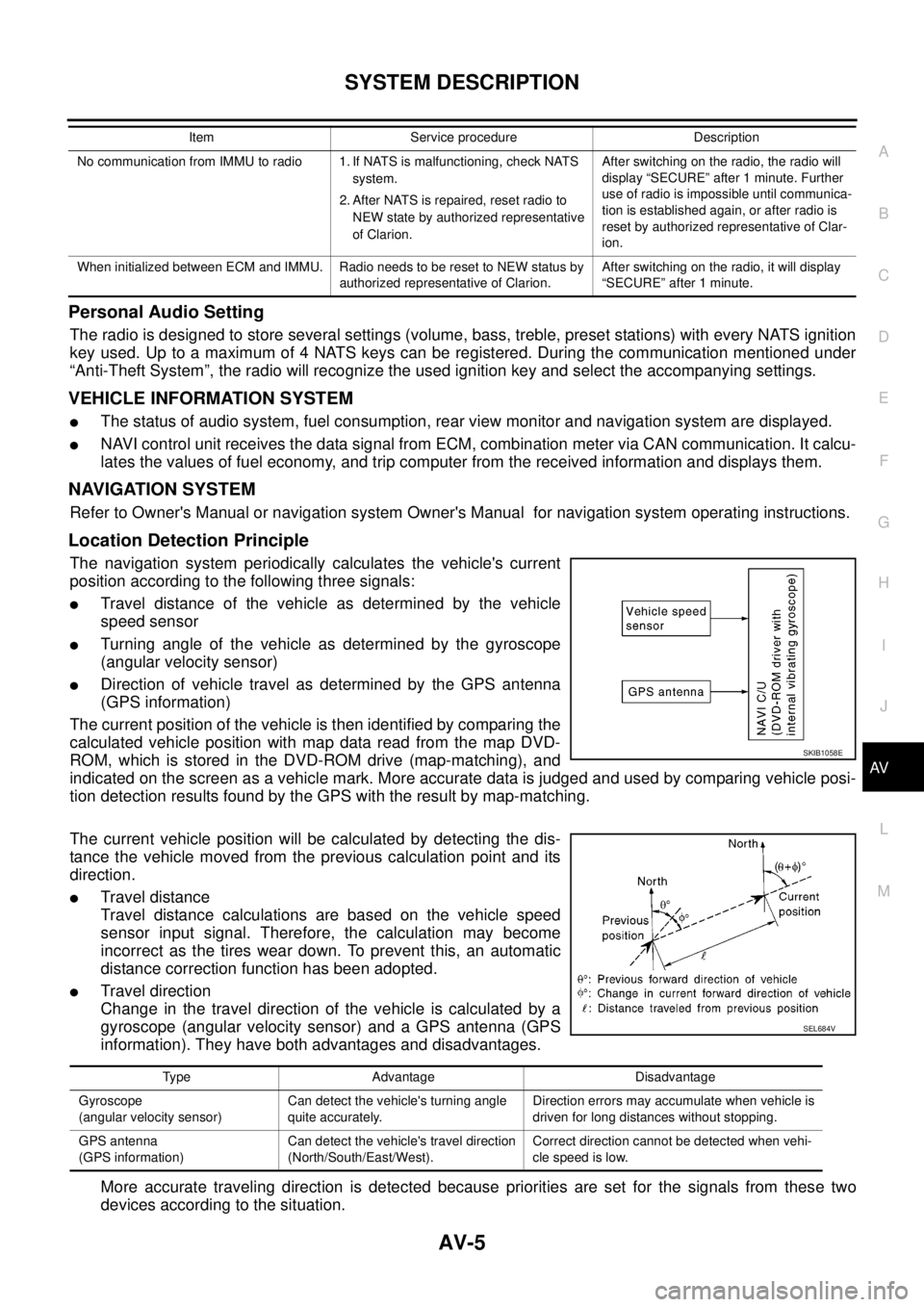
Location Detection Principle
The navigation system periodically calculates the vehicle's current
position according to the following three signals:
lTravel distance of the vehicle as determined by the vehicle
speed sensor
lTurning angle of the vehicle as determined by the gyroscope
(angular velocity sensor)
lDirection of vehicle travel as determined by the GPS antenna
(GPS information)
The current position of the vehicle is then identified by comparing the
calculated vehicle position with map data read from the map DVD-
ROM, which is stored in the DVD-ROM drive (map-matching), and
indicated on the screen as a vehicle mark. More accurate data is judged and used by comparing vehicle posi-
tion detection results found by the GPS with the result by map-matching.
The current vehicle position will be calculated by detecting the dis-
tance the vehicle moved from the previous calculation point and its
direction.
lTravel distance
Travel distance calculations are based on the vehicle speed
sensor input signal. Therefore, the calculation may become
incorrect as the tires wear down. To prevent this, an automatic
distance correction function has been adopted.
lTravel direction
Change in the travel direction of the vehicle is calculated by a
gyroscope (angular velocity sensor) and a GPS antenna (GPS
information). They have both advantages and disadvantages.
More accurate traveling direction is detected because priorities are set for the signals from these two
devices according to the situation.
No communication from IMMU to radio 1. If NATS is malfunctioning, check NATS
system.
2. After NATS is repaired, reset radio to
NEW state by authorized representative
of Clarion.After switching on the radio, the radio will
display “SECURE” after 1 minute. Further
use of radio is impossible until communica-
tion is established again, or after radio is
reset by authorized representative of Clar-
ion.
When initialized between ECM and IMMU. Radio needs to be reset to NEW status by
authorized representative of Clarion.After switching on the radio, it will display
“SECURE” after 1 minute. Item Service procedure Description
SKIB1058E
Type Advantage Disadvantage
Gyroscope
(angular velocity sensor)Can detect the vehicle's turning angle
quite accurately.Direction errors may accumulate when vehicle is
driven for long distances without stopping.
GPS antenna
(GPS information)Can detect the vehicle's travel direction
(North/South/East/West).Correct direction cannot be detected when vehi-
cle speed is low.
SEL684V