display NISSAN NAVARA 2005 Repair Owners Manual
[x] Cancel search | Manufacturer: NISSAN, Model Year: 2005, Model line: NAVARA, Model: NISSAN NAVARA 2005Pages: 3171, PDF Size: 49.59 MB
Page 494 of 3171
AV-6
SYSTEM DESCRIPTION
Map-Matching
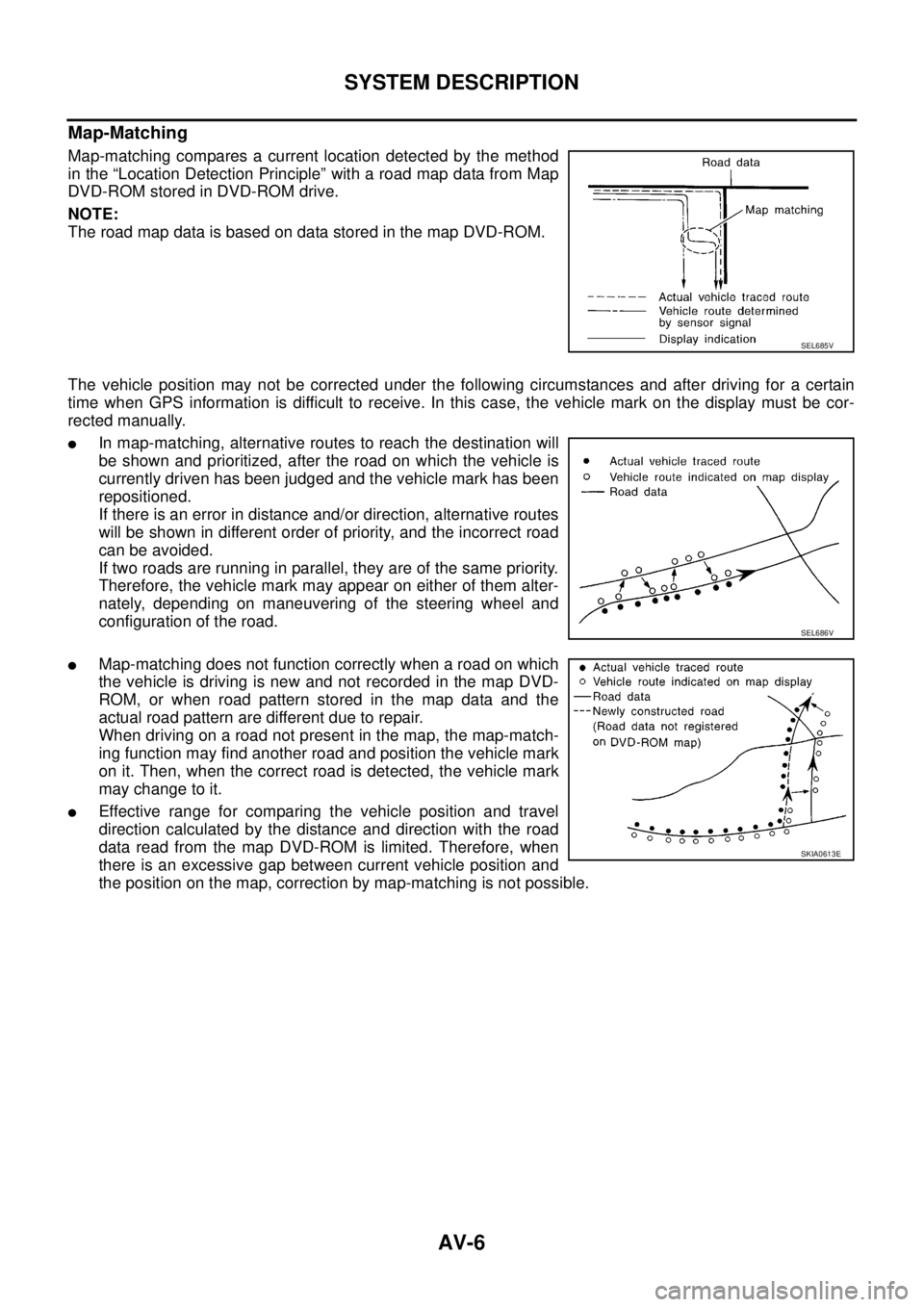
Map-matching compares a current location detected by the method
in the “Location Detection Principle” with a road map data from Map
DVD-ROM stored in DVD-ROM drive.
NOTE:
TheroadmapdataisbasedondatastoredinthemapDVD-ROM.
The vehicle position may not be corrected under the following circumstances and after driving for a certain
time when GPS information is difficult to receive. In this case, the vehicle mark on the display must be cor-
rected manually.
lIn map-matching, alternative routes to reach the destination will
be shown and prioritized, after the road on which the vehicle is
currently driven has been judged and the vehicle mark has been
repositioned.
If there is an error in distance and/or direction, alternative routes
will be shown in different order of priority, and the incorrect road
can be avoided.
If two roads are running in parallel, they are of the same priority.
Therefore, the vehicle mark may appear on either of them alter-
nately, depending on maneuvering of the steering wheel and
configuration of the road.
lMap-matching does not function correctly when a road on which
the vehicle is driving is new and not recorded in the map DVD-
ROM, or when road pattern stored in the map data and the
actual road pattern are different due to repair.
When driving on a road not present in the map, the map-match-
ing function may find another road and position the vehicle mark
on it. Then, when the correct road is detected, the vehicle mark
may change to it.
lEffective range for comparing the vehicle position and travel
direction calculated by the distance and direction with the road
data read from the map DVD-ROM is limited. Therefore, when
there is an excessive gap between current vehicle position and
the position on the map, correction by map-matching is not possible.
SEL685V
SEL686V
SKIA0613E
Page 496 of 3171
AV-8
SYSTEM DESCRIPTION
Component Description
EKS00Q5Y
AUDIO UNIT
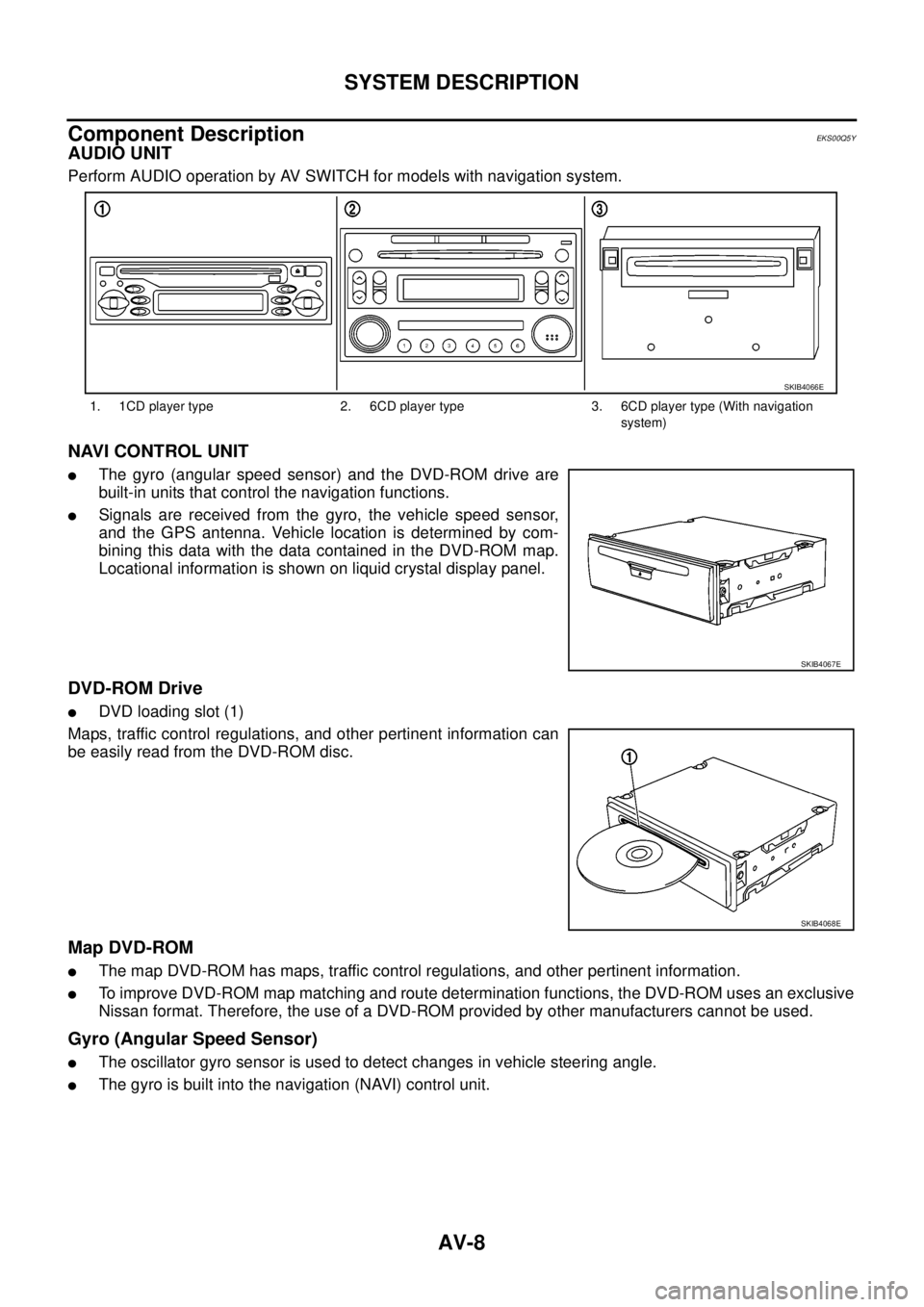
Perform AUDIO operation by AV SWITCH for models with navigation system.
NAVI CONTROL UNIT
lThe gyro (angular speed sensor) and the DVD-ROM drive are
built-in units that control the navigation functions.
lSignals are received from the gyro, the vehicle speed sensor,
and the GPS antenna. Vehicle location is determined by com-
bining this data with the data contained in the DVD-ROM map.
Locational information is shown on liquid crystal display panel.
DVD-ROM Drive
lDVD loading slot (1)
Maps, traffic control regulations, and other pertinent information can
be easily read from the DVD-ROM disc.
Map DVD-ROM
lThe map DVD-ROM has maps, traffic control regulations, and other pertinent information.
lTo improve DVD-ROM map matching and route determination functions, the DVD-ROM uses an exclusive
Nissan format. Therefore, the use of a DVD-ROM provided by other manufacturers cannot be used.
Gyro (Angular Speed Sensor)
lThe oscillator gyro sensor is used to detect changes in vehicle steering angle.
lThe gyro is built into the navigation (NAVI) control unit.
1. 1CD player type 2. 6CD player type 3. 6CD player type (With navigation
system)
SKIB4066E
SKIB4067E
SKIB4068E
Page 497 of 3171
SYSTEM DESCRIPTION
AV-9
C
D
E
F
G
H
I
J
L
MA
B
AV
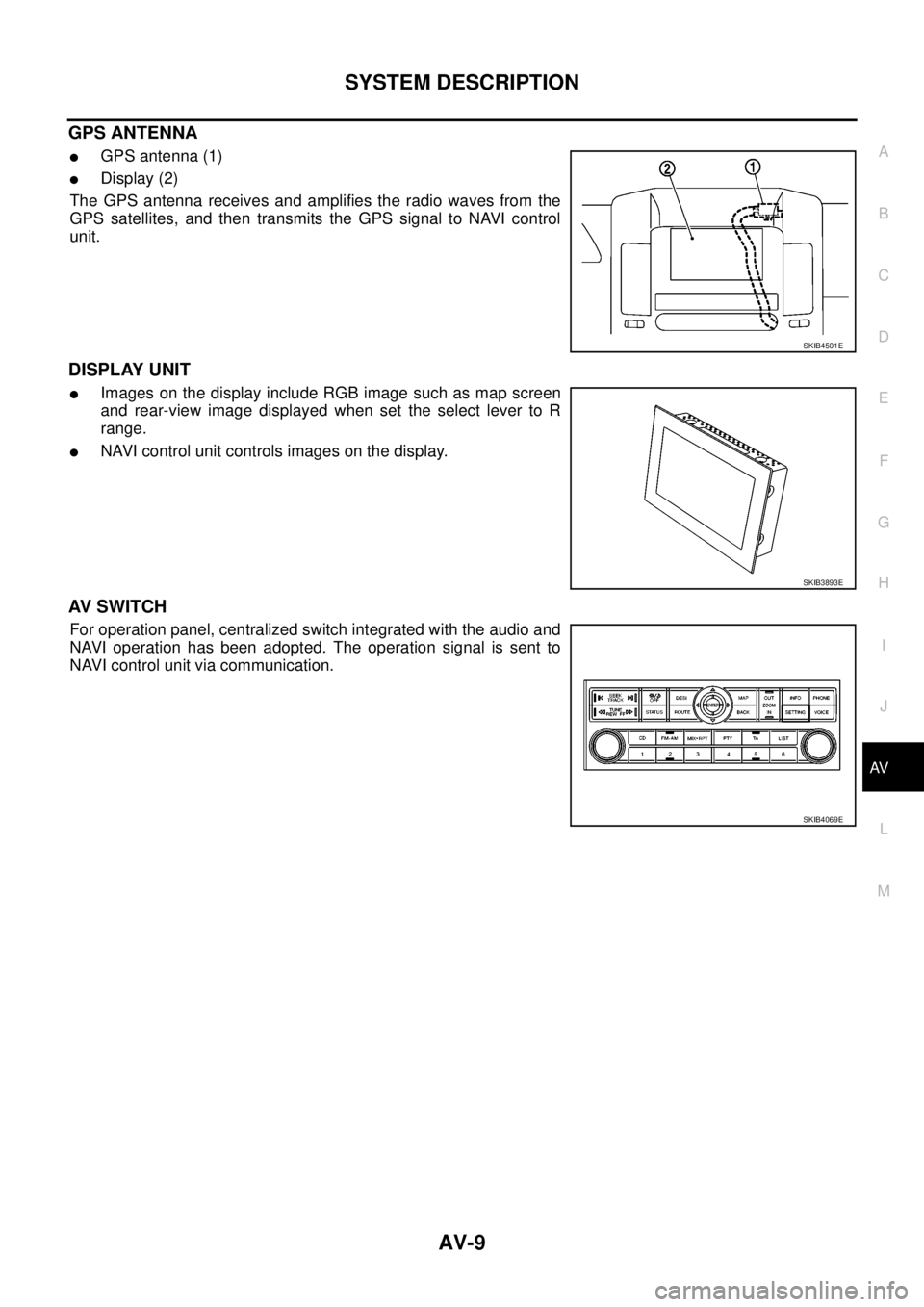
GPS ANTENNA
lGPS antenna (1)
lDisplay (2)
The GPS antenna receives and amplifies the radio waves from the
GPS satellites, and then transmits the GPS signal to NAVI control
unit.
DISPLAY UNIT
lImages on the display include RGB image such as map screen
and rear-view image displayed when set the select lever to R
range.
lNAVI control unit controls images on the display.
AV S W I T C H
For operation panel, centralized switch integrated with the audio and
NAVI operation has been adopted. The operation signal is sent to
NAVI control unit via communication.
SKIB4501E
SKIB3893E
SKIB4069E
Page 527 of 3171
TERMINALS AND REFERENCE VALUE FOR CONTROL UNIT
AV-39
C
D
E
F
G
H
I
J
L
MA
B
AV
10
(W)11
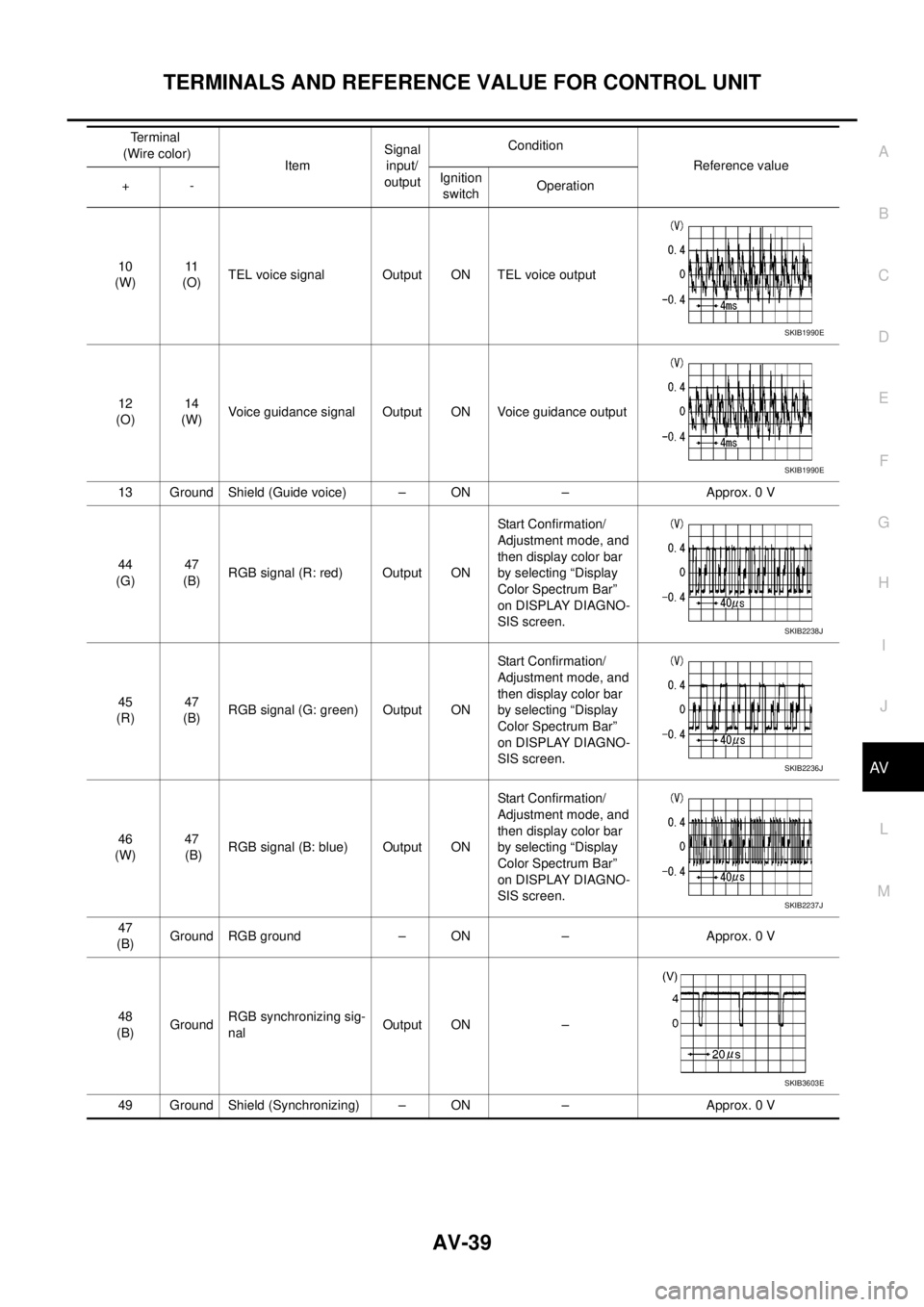
(O)TEL voice signal Output ON TEL voice output
12
(O)14
(W)Voice guidance signal Output ON Voice guidance output
13 Ground Shield (Guide voice) – ON – Approx. 0 V
44
(G)47
(B)RGB signal (R: red) Output ONStart Confirmation/
Adjustment mode, and
then display color bar
by selecting “Display
Color Spectrum Bar”
on DISPLAY DIAGNO-
SIS screen.
45
(R)47
(B)RGB signal (G: green) Output ONStart Confirmation/
Adjustment mode, and
then display color bar
by selecting “Display
Color Spectrum Bar”
on DISPLAY DIAGNO-
SIS screen.
46
(W)47
(B)RGB signal (B: blue) Output ONStart Confirmation/
Adjustment mode, and
then display color bar
by selecting “Display
Color Spectrum Bar”
on DISPLAY DIAGNO-
SIS screen.
47
(B)Ground RGB ground – ON – Approx. 0 V
48
(B)GroundRGB synchronizing sig-
nalOutput ON –
49 Ground Shield (Synchronizing) – ON – Approx. 0 VTerminal
(Wire color)
ItemSignal
input/
outputCondition
Reference value
+-Ignition
switchOperation
SKIB1990E
SKIB1990E
SKIB2238J
SKIB2236J
SKIB2237J
SKIB3603E
Page 528 of 3171
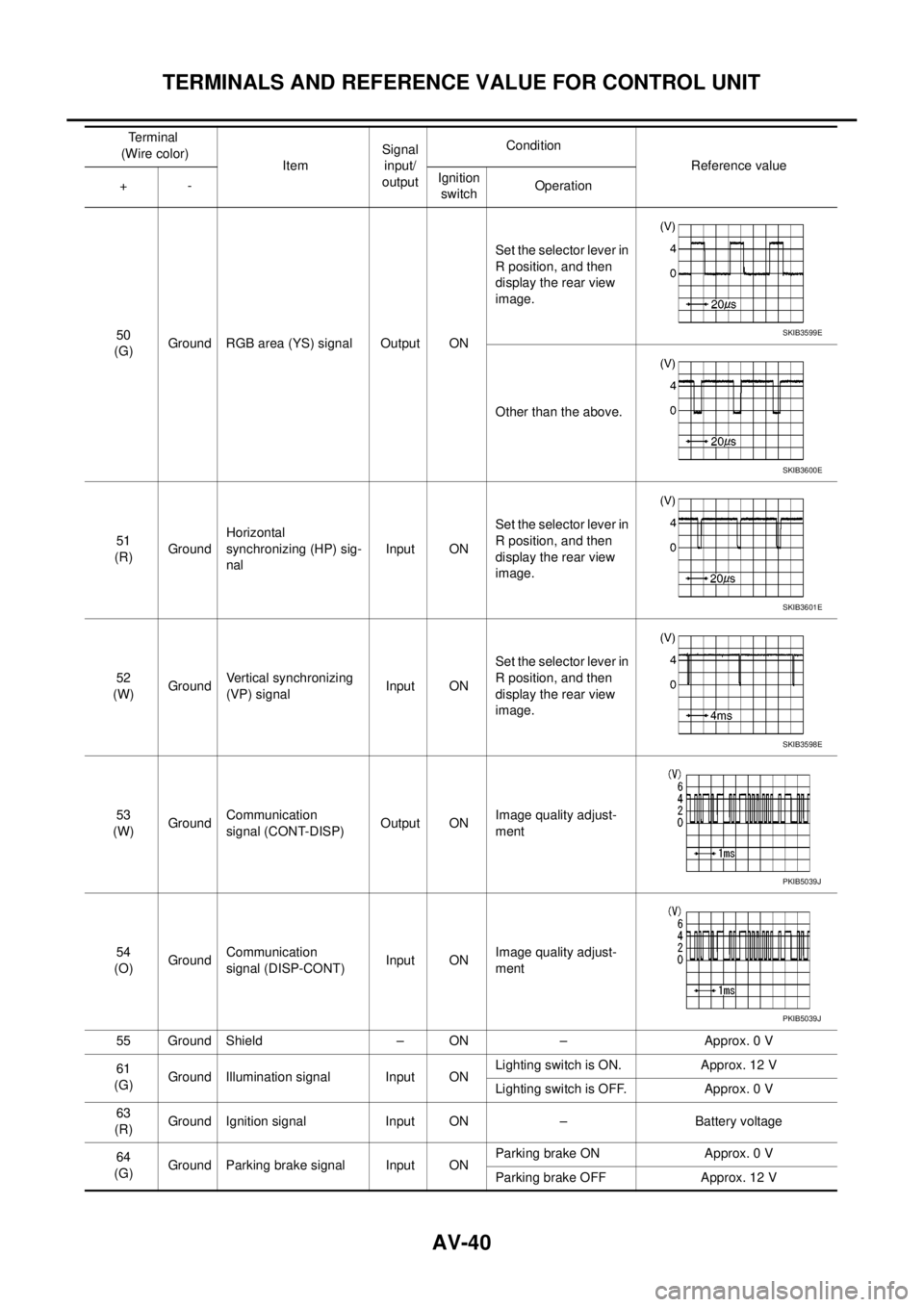
AV-40
TERMINALS AND REFERENCE VALUE FOR CONTROL UNIT
50
(G)Ground RGB area (YS) signal Output ONSet the selector lever in
R position, and then
display the rear view
image.
Other than the above.
51
(R)GroundHorizontal
synchronizing (HP) sig-
nalInput ONSet the selector lever in
R position, and then
display the rear view
image.
52
(W)GroundVertical synchronizing
(VP) signalInput ONSet the selector lever in
R position, and then
display the rear view
image.
53
(W)GroundCommunication
signal (CONT-DISP)Output ONImage quality adjust-
ment
54
(O)GroundCommunication
signal (DISP-CONT)Input ONImage quality adjust-
ment
55 Ground Shield – ON – Approx. 0 V
61
(G)Ground Illumination signal Input ONLighting switch is ON. Approx. 12 V
Lighting switch is OFF. Approx. 0 V
63
(R)Ground Ignition signal Input ON – Battery voltage
64
(G)Ground Parking brake signal Input ONParking brake ON Approx. 0 V
Parking brake OFF Approx. 12 V Terminal
(Wire color)
ItemSignal
input/
outputCondition
Reference value
+-Ignition
switchOperationSKIB3599E
SKIB3600E
SKIB3601E
SKIB3598E
PKIB5039J
PKIB5039J
Page 529 of 3171
TERMINALS AND REFERENCE VALUE FOR CONTROL UNIT
AV-41
C
D
E
F
G
H
I
J
L
MA
B
AV
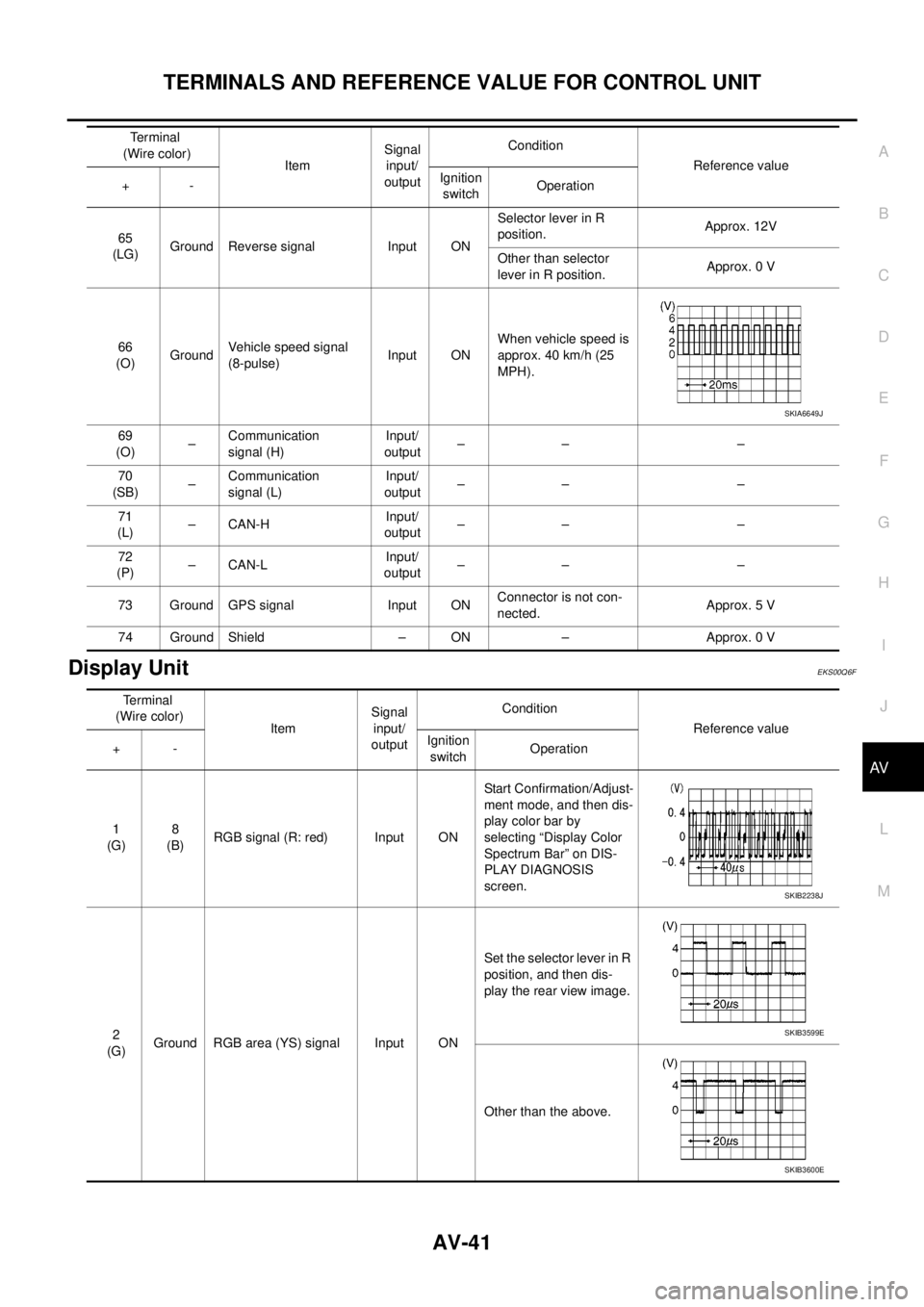
Display UnitEKS00Q6F
65
(LG)Ground Reverse signal Input ONSelector lever in R
position.Approx. 12V
Other than selector
lever in R position.Approx. 0 V
66
(O)GroundVehicle speed signal
(8-pulse)Input ONWhen vehicle speed is
approx. 40 km/h (25
MPH).
69
(O)–Communication
signal (H)Input/
output–– –
70
(SB)–Communication
signal (L)Input/
output–– –
71
(L)–CAN-HInput/
output–– –
72
(P)–CAN-LInput/
output–– –
73 Ground GPS signal Input ONConnector is not con-
nected.Approx. 5 V
74 Ground Shield – ON – Approx. 0 VTerminal
(Wire color)
ItemSignal
input/
outputCondition
Reference value
+-Ignition
switchOperation
SKIA6649J
Terminal
(Wire color)
ItemSignal
input/
outputCondition
Reference value
+-Ignition
switchOperation
1
(G)8
(B)RGB signal (R: red) Input ONStart Confirmation/Adjust-
ment mode, and then dis-
play color bar by
selecting “Display Color
Spectrum Bar” on DIS-
PLAY DIAGNOSIS
screen.
2
(G)Ground RGB area (YS) signal Input ONSet the selector lever in R
position, and then dis-
play the rear view image.
Other than the above.
SKIB2238J
SKIB3599E
SKIB3600E
Page 530 of 3171
AV-42
TERMINALS AND REFERENCE VALUE FOR CONTROL UNIT
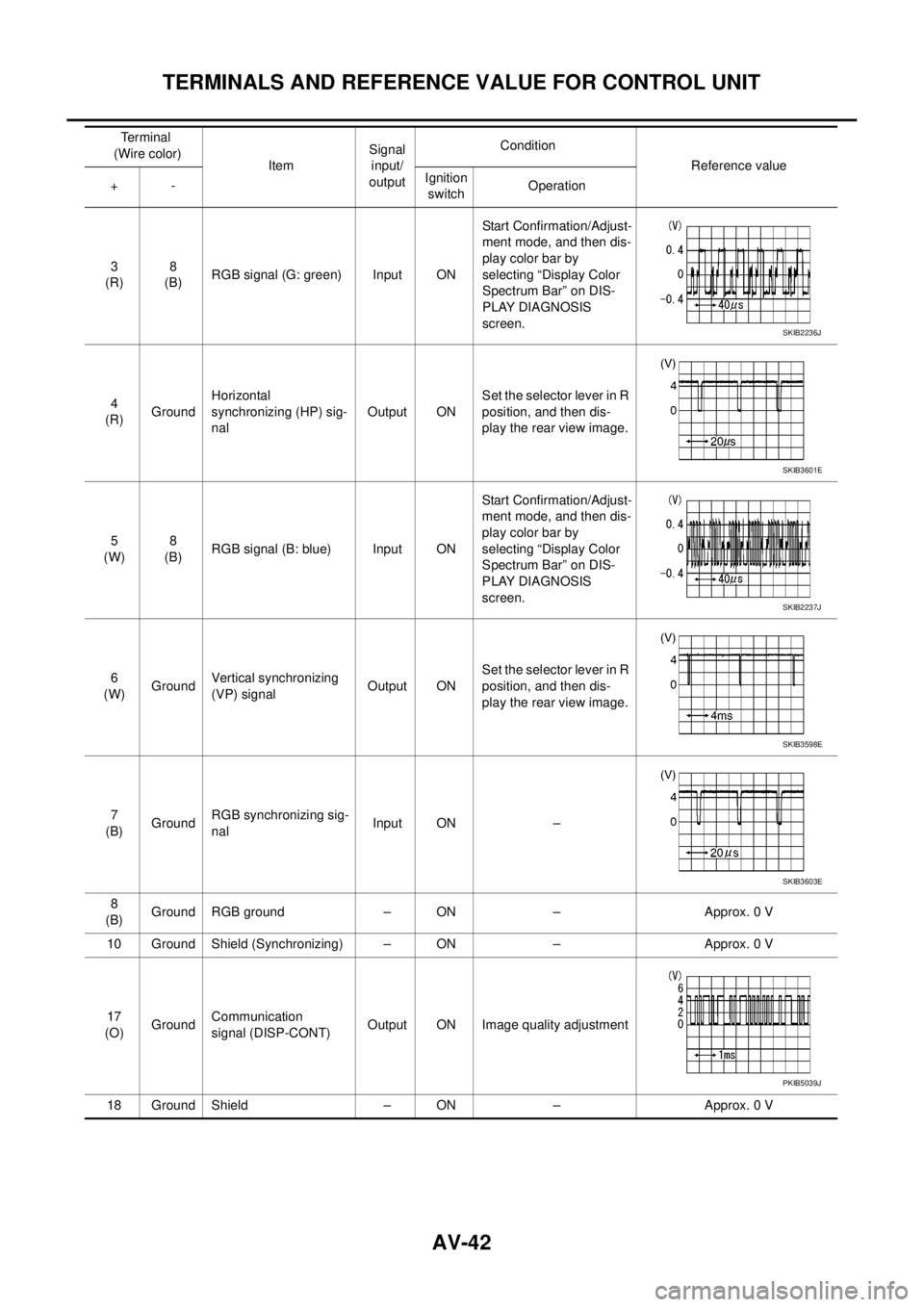
3
(R)8
(B)RGB signal (G: green) Input ONStart Confirmation/Adjust-
ment mode, and then dis-
play color bar by
selecting “Display Color
Spectrum Bar” on DIS-
PLAY DIAGNOSIS
screen.
4
(R)GroundHorizontal
synchronizing (HP) sig-
nalOutput ONSet the selector lever in R
position, and then dis-
play the rear view image.
5
(W)8
(B)RGB signal (B: blue) Input ONStart Confirmation/Adjust-
ment mode, and then dis-
play color bar by
selecting “Display Color
Spectrum Bar” on DIS-
PLAY DIAGNOSIS
screen.
6
(W)GroundVertical synchronizing
(VP) signalOutput ONSet the selector lever in R
position, and then dis-
play the rear view image.
7
(B)GroundRGB synchronizing sig-
nalInput ON –
8
(B)Ground RGB ground – ON – Approx. 0 V
10 Ground Shield (Synchronizing) – ON – Approx. 0 V
17
(O)GroundCommunication
signal (DISP-CONT)Output ON Image quality adjustment
18 Ground Shield – ON – Approx. 0 VTerminal
(Wire color)
ItemSignal
input/
outputCondition
Reference value
+-Ignition
switchOperation
SKIB2236J
SKIB3601E
SKIB2237J
SKIB3598E
SKIB3603E
PKIB5039J
Page 532 of 3171

AV-44
DIAGNOSIS SYSTEM
DIAGNOSIS SYSTEM
PFP:00000
Navigation System Diagnosis FunctionEKS00Q6H
lThere are 2 diagnosis functions (on board diagnosis and diagnosis using CONSULT-II), and it is neces-
sary to use them properly according to the condition. If the on board diagnosis starts, perform diagnosis
with on board diagnosis. If the on board diagnosis does not start (the cause being that the system is not
started, the switch operation is not activated, etc.), perform diagnosis using CONSULT-II.
lAt on board diagnosis, the NAVI control unit diagnosis function starts by switch operation and the NAVI
control unit performs the diagnosis for each unit of system.
lAt diagnosis using CONSULT-II, the NAVI control unit diagnosis function starts by the communication
between CONSULT-II and NAVI control unit, and the NAVI control unit performs the diagnosis for each
unit of system.
On Bord Self-Diagnosis FunctionEKS00Q6I
DESCRIPTION
lThe on board diagnosis function has a self-diagnosis mode for performing trouble diagnosis automatically
and a Confirmation/Adjustment mode for operating manually.
lSelf-diagnosis mode performs the diagnosis at NAVI control unit, connections between each unit that
composes the system, and connections between NAVI control unit and GPS antenna. It displays the
results on the display.
lConfirmation/Adjustment mode is used to monitor the vehicle signals requiring operation and judgement
by a technician (malfunctions that cannot be automatically judged by the system), the confirmation/adjust-
ment of setting value, the error history of system, and the communication condition of system.
DIAGNOSIS ITEM
Mode Description
Self Diagnosis
lNAVI control unit diagnosis (DVD-ROM drive will not be diagnosed when
no map DVD-ROM is in it.)
lThe connection diagnosis between NAVI control unit and GPS antenna
and the connection diagnosis between NAVI control unit and each unit
can be performed.
Confirma-
tion/Adjust-
mentDisplay DiagnosisThe tint can be confirmed by the color spectrum bar display. The shading
of color can be confirmed by the gradation bar display.
Vehicle SignalsDiagnosis of signals can be performed for vehicle speed, parking brake,
lights, ignition (ignition switch), and reverse.
Speaker Test The connection of a speaker can be confirmed by test tone.
NavigationSteering Angle
AdjustmentWhen there is a difference between the actual turning angle and the vehi-
cle mark turning angle, it can be adjusted.
Speed CalibrationWhen there is a difference between the current location mark and the
actual location, it can be adjusted.
Error HistoryThe system malfunction and its frequency that occurred in the past are dis-
played. When the malfunctioning item is selected, the time and place that
the selected malfunction last occurred are displayed.
Vehicle CAN Diagnosis The transmitting/receiving of CAN communication can be monitored.
AV COMM DiagnosisThe communication condition of each unit that composes the system can
be monitored.
Handsfree PhoneEach setting of hands-free volume adjustment, voice microphone test,
delete hands-free memory can be performed.
Bluetooth Passkey and device name can be confirmed/changed.
Delete Unit Commection Log The connection history and error history of unit can be deleted.
Page 533 of 3171
DIAGNOSIS SYSTEM
AV-45
C
D
E
F
G
H
I
J
L
MA
B
AV
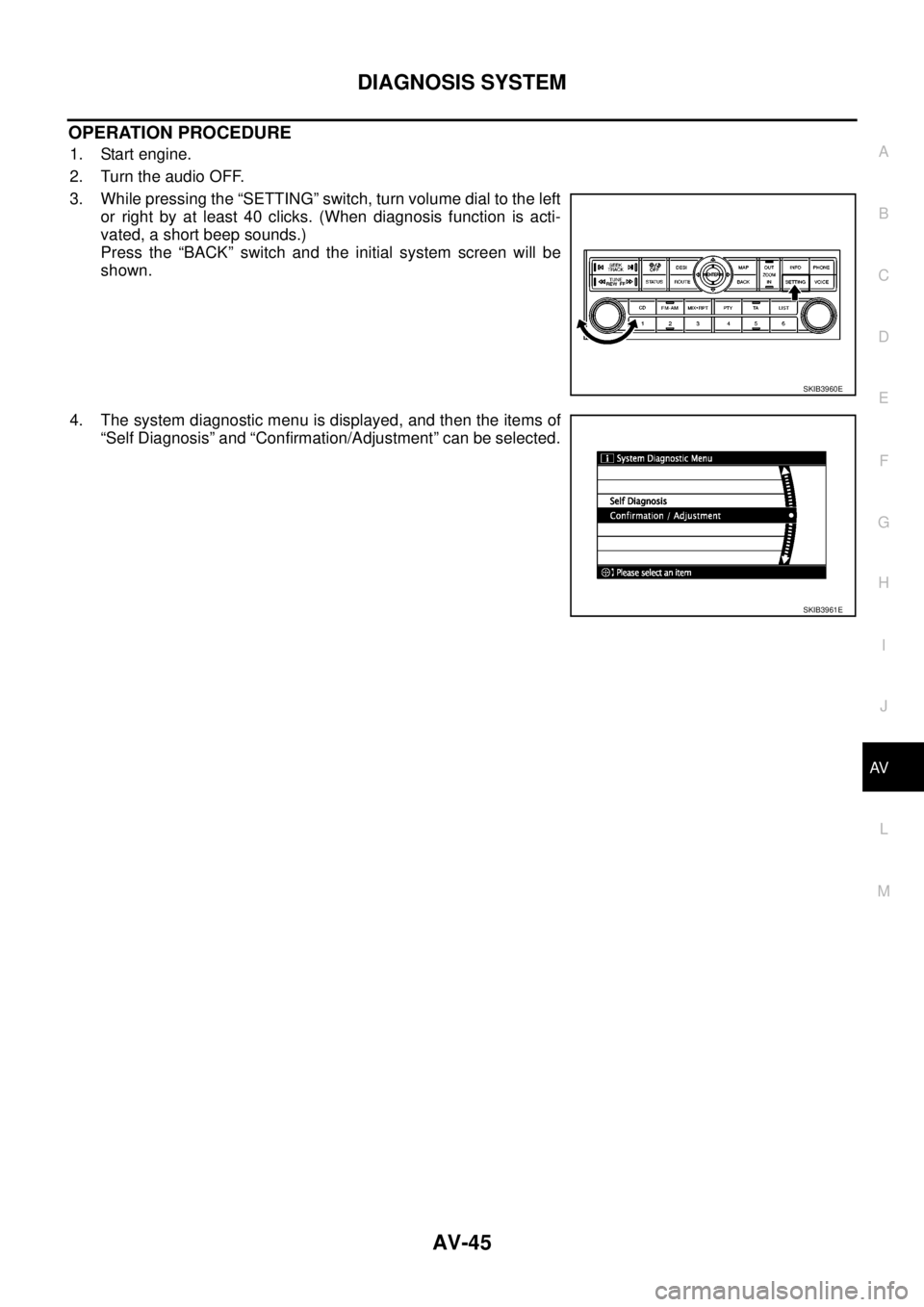
OPERATION PROCEDURE
1. Start engine.
2. Turn the audio OFF.
3. While pressing the “SETTING” switch, turn volume dial to the left
or right by at least 40 clicks. (When diagnosis function is acti-
vated, a short beep sounds.)
Press the “BACK” switch and the initial system screen will be
shown.
4. The system diagnostic menu is displayed, and then the items of
“Self Diagnosis” and “Confirmation/Adjustment” can be selected.
SKIB3960E
SKIB3961E
Page 534 of 3171
AV-46
DIAGNOSIS SYSTEM
Self Diagnosis Mode
EKS00Q6J
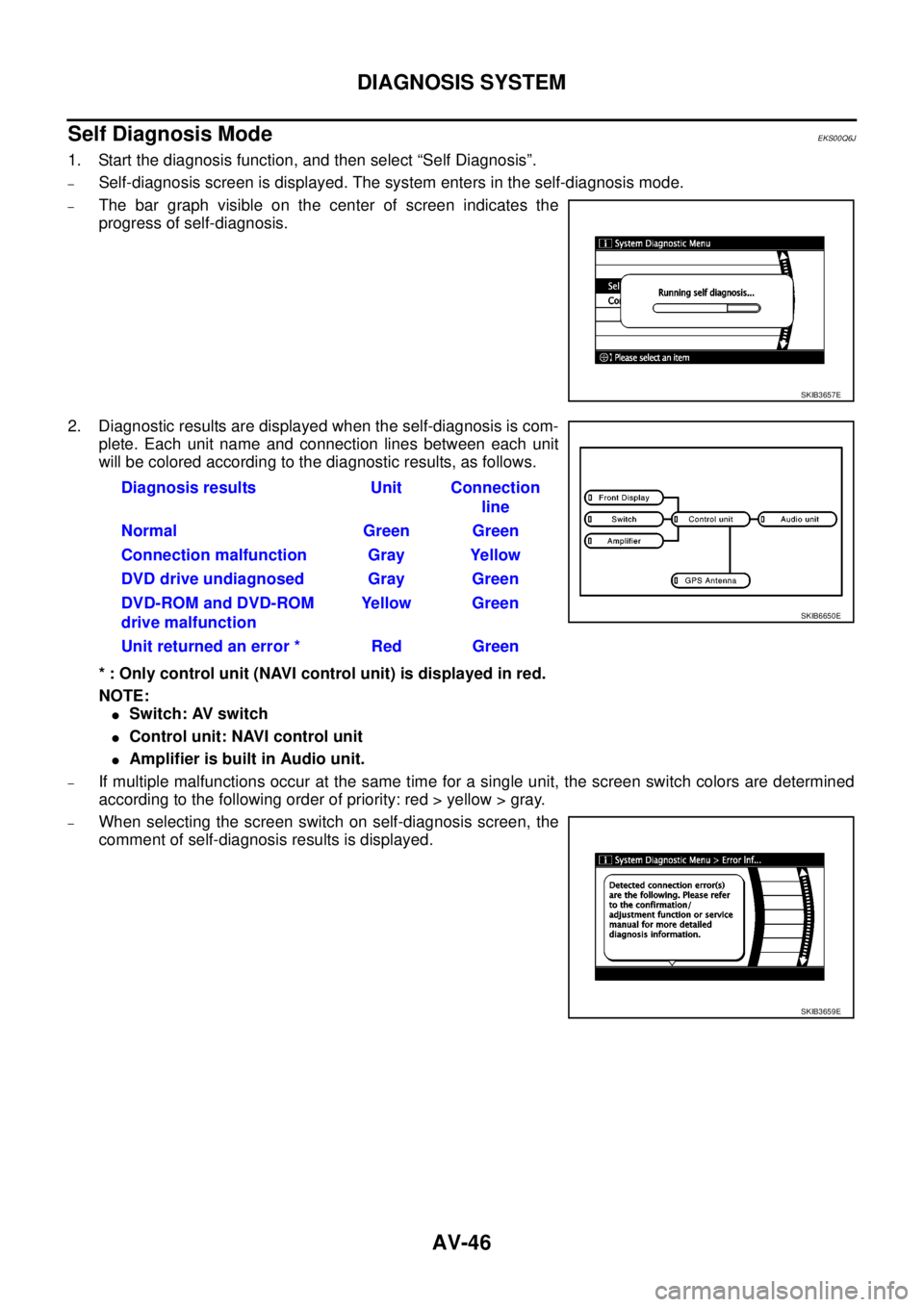
1. Start the diagnosis function, and then select “Self Diagnosis”.
–Self-diagnosis screen is displayed. The system enters in the self-diagnosis mode.
–The bar graph visible on the center of screen indicates the
progress of self-diagnosis.
2. Diagnostic results are displayed when the self-diagnosis is com-
plete. Each unit name and connection lines between each unit
will be colored according to the diagnostic results, as follows.
* : Only control unit (NAVI control unit) is displayed in red.
NOTE:
lSwitch: AV switch
lControl unit: NAVI control unit
lAmplifier is built in Audio unit.
–If multiple malfunctions occur at the same time for a single unit, the screen switch colors are determined
according to the following order of priority: red > yellow > gray.
–When selecting the screen switch on self-diagnosis screen, the
comment of self-diagnosis results is displayed.
SKIB3657E
Diagnosis results Unit Connection
line
Normal Green Green
Connection malfunction Gray Yellow
DVD drive undiagnosed Gray Green
DVD-ROM and DVD-ROM
drive malfunctionYellow Green
Unit returned an error * Red Green
SKIB6650E
SKIB3659E