display NISSAN NAVARA 2005 Repair Workshop Manual
[x] Cancel search | Manufacturer: NISSAN, Model Year: 2005, Model line: NAVARA, Model: NISSAN NAVARA 2005Pages: 3171, PDF Size: 49.59 MB
Page 547 of 3171
DIAGNOSIS SYSTEM
AV-59
C
D
E
F
G
H
I
J
L
MA
B
AV
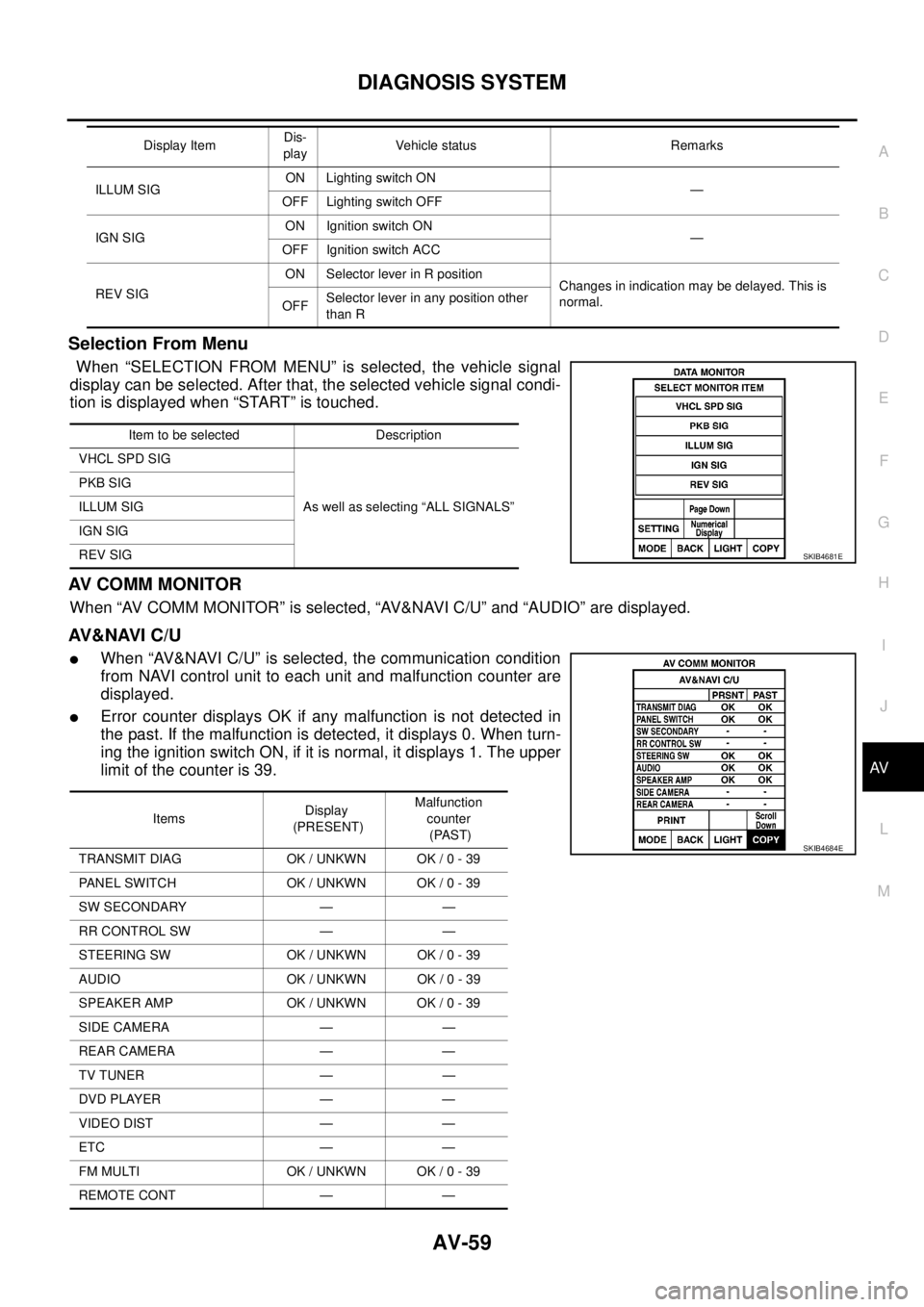
Selection From Menu
When “SELECTION FROM MENU” is selected, the vehicle signal
display can be selected. After that, the selected vehicle signal condi-
tion is displayed when “START” is touched.
AV C O M M M O N I T O R
When “AV COMM MONITOR” is selected, “AV&NAVI C/U” and “AUDIO” are displayed.
AV&NAVI C/U
lWhen “AV&NAVI C/U” is selected, the communication condition
from NAVI control unit to each unit and malfunction counter are
displayed.
lError counter displays OK if any malfunction is not detected in
the past. If the malfunction is detected, it displays 0. When turn-
ing the ignition switch ON, if it is normal, it displays 1. The upper
limitofthecounteris39.
ILLUM SIGON Lighting switch ON
—
OFF Lighting switch OFF
IGN SIGON Ignition switch ON
—
OFF Ignition switch ACC
REV SIGON Selector lever in R position
Changes in indication may be delayed. This is
normal.
OFFSelector lever in any position other
than R Display ItemDis-
playVehicle status Remarks
Item to be selected Description
VHCL SPD SIG
As well as selecting “ALL SIGNALS” PKB SIG
ILLUM SIG
IGN SIG
REV SIG
SKIB4681E
ItemsDisplay
(PRESENT)Malfunction
counter
(PAST)
TRANSMIT DIAG OK / UNKWN OK / 0 - 39
PANEL SWITCH OK / UNKWN OK / 0 - 39
SW SECONDARY — —
RR CONTROL SW — —
STEERING SW OK / UNKWN OK / 0 - 39
AUDIO OK / UNKWN OK / 0 - 39
SPEAKER AMP OK / UNKWN OK / 0 - 39
SIDE CAMERA — —
REAR CAMERA — —
TV TUNER — —
DVD PLAYER — —
VIDEO DIST — —
ETC — —
FM MULTI OK / UNKWN OK / 0 - 39
REMOTE CONT — —
SKIB4684E
Page 548 of 3171
AV-60
DIAGNOSIS SYSTEM
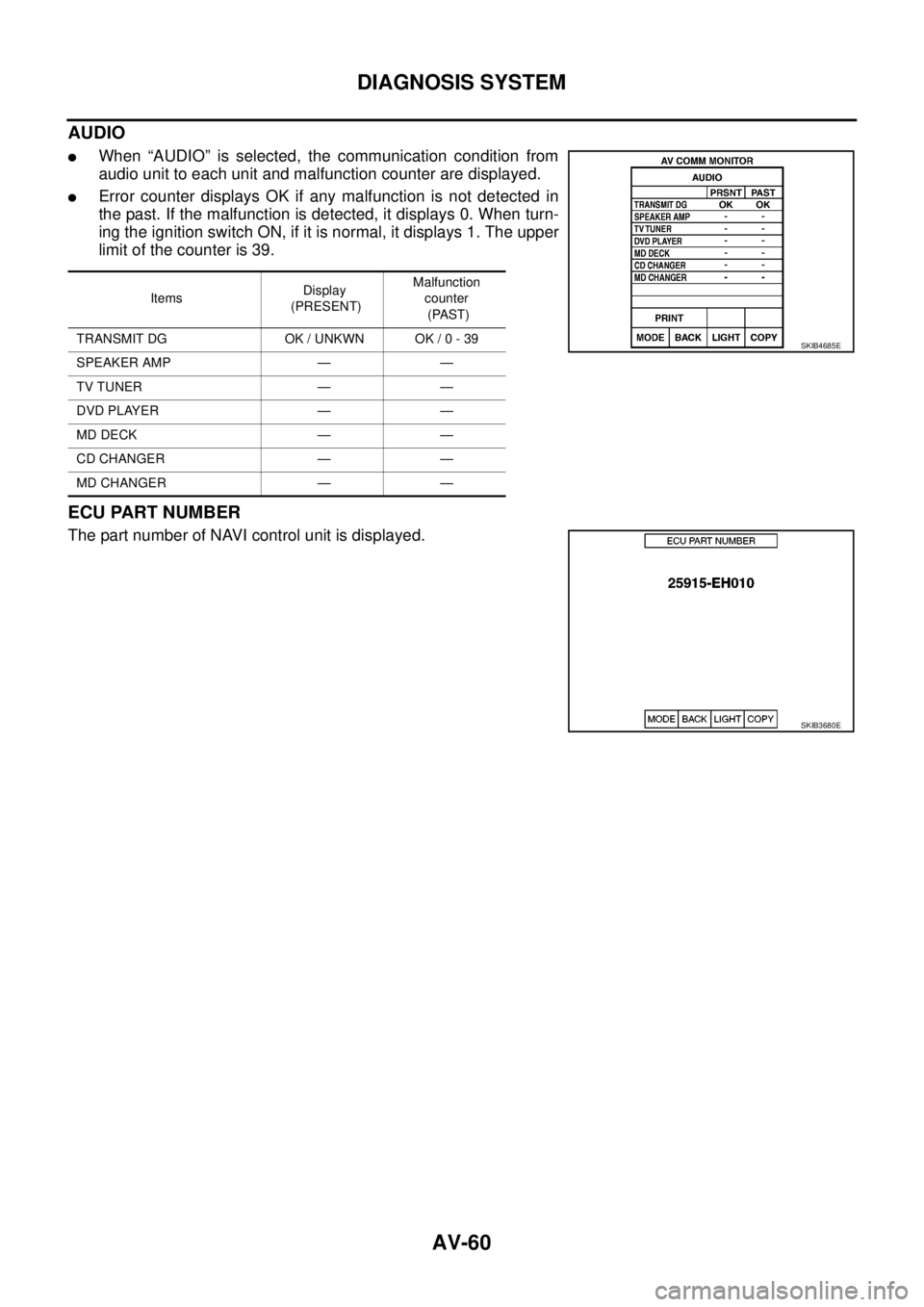
AUDIO
lWhen “AUDIO” is selected, the communication condition from
audio unit to each unit and malfunction counter are displayed.
lError counter displays OK if any malfunction is not detected in
the past. If the malfunction is detected, it displays 0. When turn-
ing the ignition switch ON, if it is normal, it displays 1. The upper
limitofthecounteris39.
ECU PART NUMBER
The part number of NAVI control unit is displayed.
ItemsDisplay
(PRESENT)Malfunction
counter
(PAST)
TRANSMIT DG OK / UNKWN OK / 0 - 39
SPEAKER AMP — —
TV TUNER — —
DVD PLAYER — —
MD DECK — —
CD CHANGER — —
MD CHANGER — —
SKIB4685E
SKIB3680E
Page 549 of 3171

TROUBLE DIAGNOSIS
AV-61
C
D
E
F
G
H
I
J
L
MA
B
AV
TROUBLE DIAGNOSISPFP:00004
Navigation SystemEKS00Q6O
RGB ImageEKS00Q6P
Symptoms Check items Possible malfunction location/Action to take
AV switch cannot be operatedAll switches cannot be operatedPerform the self-diagnosis using CONSULT-II
Refer toAV-56, "
SELF-DIAG RESULTS".
Only specified switch cannot be
operated
lPerform the self-diagnosis using CONSULT-II
Refer toAV-56, "
SELF-DIAG RESULTS".
–No malfunction
AV switch
–Malfunction is detected
Refer toAV-57, "
Self-Diagnostic Results Display
Item".
Map screen is not displayed
(RGB image other than map is
normal)–Perform the on board self-diagnosis
Refer toAV-47, "
DIAGNOSIS RESULTS".
Fuel economy information display
is malfunctioning–Perform the self-diagnosis using CONSULT-II
Refer toAV-56, "
SELF-DIAG RESULTS".
Voice guidance is not heard. –
lVoice guidance signal circuit
lAudio unit
lNAVI control unit
Traffic information (RDS-TMC) is
not receivedRadio broadcasts are received
lCommunication signal circuit
lAudio unit
lNAVI control unit
Radio broadcasts are not received
lWindow antenna or rod antenna
lAntenna feeder
lAntenna amp. ON signal circuit
lAudio unit
lNAVI control unit
Symptoms Check items Possible malfunction location/Action to take
Color of RGB image is not proper.Light blue (Cyan) tint
lRGB signal (R: red) circuit
lDisplay unit
lNAVI control unit
Purple (Magenta) tint and image is
rolling
lRGB signal (G: green) circuit
lDisplay unit
lNAVI control unit
Screen looks yellowish
lRGB signal (B: blue) circuit
lDisplay unit
lNAVI control unit
RGB image is not displayed
(Nothing is displayed on the
screen)
lAV switch cannot be operated
when it is pressed
lBacklight of display is turned onPerform the self-diagnosis using CONSULT-II
Refer toAV-56, "SELF-DIAG RESULTS".
l“MULTI AV” is not displayed on
“SELECT SYSTEM” screen of
CONSULT-II.lNAVI control unit power supply and ground circuit
lNAVI control unit
Backlight of display is not turned on
lDisplay unit power supply and ground circuit
lDisplay unit
Page 550 of 3171

AV-62
TROUBLE DIAGNOSIS
Voice Activated Control System
EKS00Q6Q
Symptoms Check items Probable malfunction location
The voice cannot be controlled
even if the voice control screen is
displayedVoice sounds at “Speaker Test” and
“Voice Microphone Test” of Confir-
mation/Adjustment modeNAVI control unit
Voice does not sound at “Speaker
Test” and “Voice Microphone Test” of
Confirmation/Adjustment mode
lMIC. power supply circuit
lShield (MIC.) circuit
lMIC. signal circuit
lMicrophone
lNAVI control unit
The voice cannot be controlled
(Voice control screen is not dis-
played)TEL operation screen is displayed by
pressing and holding “TEL/PPT”
switch of steering wheel switchNAVI control unit
lTEL operation screen is not dis-
played by pressing and holding
“TEL/PPT” switch of steering
wheel switch
lOther steering wheel switches are
normalSteering wheel switch
“BACK”, “VOL UP”, “VOL DOWN”,
and “TEL/PPT” switches of steering
wheel switch are not operated
lRemote control signal B circuit
lSteering wheel switch
lAudio unit
All steering wheel switches are not
operated
lRemote control signal ground circuit
lSteering wheel switch
lAudio unit
Page 553 of 3171

TROUBLE DIAGNOSIS
AV-65
C
D
E
F
G
H
I
J
L
MA
B
AV
Example of Symptoms Not MalfunctionEKS00Q6T
BASIC OPERATION
NOTE:
Locations stored in the Address Book and other memory functions may be lost if the vehicle's battery is disconnected or becomes dis-
charged. If this occurs, service the vehicle's battery as necessary and re-enter the information in the Address Book.
VEHICLE ICON
Symptom Possible cause Possible solution
No image is displayed.The brightness is at the lowest setting. Adjust the brightness of the display.
The display is turned off.
Press and hold to turn on the display.
No voice guidance is available.
The volume is too high or too low.The volume is not set correctly, or it is turned off. Adjust the volume of voice guidance.
Volume guidance is not provided for narrow streets
(roads displayed in gray).This is not a malfunction.
No map is displayed on the screen.The map DVD-ROM is not inserted, or it is inserted
upside down.Insert the map DVD-ROM correctly.
A screen other than map screen is displayed. Press “MAP”.
Thescreenistoodim.
The movement is slow.The temperature in the interior of the vehicle is low.Wait until the interior of the vehicle has
warmed up.
Some pixels in the display are
darker or brighter than others.This condition is an inherent characteristic of liquid
crystal displays.This is not a malfunction.
Some menu items cannot be
selected.Some menu items become unavailable while the
vehicle is driven.Park the vehicle in a safe location, and
then operate the navigation system.
Symptom Possible cause Possible solution
Names of roads and locations dif-
fer between Plan view and Bird-
view™.This is because the quantity of the displayed infor-
mation is reduced so that the screen does not
become too crowded. There is also a chance that
names of the roads or locations may be displayed
multiple times, and the names appearing on the a
screen may be different because of a processing
procedure.This is not a malfunction.
The vehicle icon is not displayed in
the correct position.The vehicle was transported after the ignition switch
was turned off, for example, by a ferry or car trans-
porter.Drive the vehicle for a while on a road
whereGPScanbereceived.
The position and direction of the vehicle may be
incorrect depending on the driving environments and
the levels of positioning accuracy of the navigation
system.This is not a malfunction. Drive the vehi-
cle for a while to automatically correct the
position and direction of the vehicle icon.
Whenthevehicleistravellingona
new road, the vehicle icon is
located on another road nearby.Because the new road is not stored in the map data,
the system automatically places the vehicle ion on
the nearest road available.Updated road information will be included
in the next version of the map DVD-ROM.
The screen does not switch to the
night screen even after turning on
the headlights.The daytime screen was set the last time the head-
lights were turned on.Set the screen to the night screen mode
using when turning on the headlights.
The map does not scroll even
when the vehicle is moving.The current location map screen is not displayed. Press “MAP”.
The vehicle icon is not displayed. The current location map screen is not displayed. Press “MAP”.
The GPS indicator on the screen
remains gray.GPS signals cannot be received depending on the
vehicle location, such as in a parking garage, on a
road that has numerous tall buildings, etc.Drive on an open, straight road for a
while.
GPS signals cannot be received because objects
are placed on the rear parcel shelf.Remove the objects from the rear parcel
shelf.
A sufficient amount of GPS satellites are not avail-
able.Wait for the satellites to move locations
available for navigation system.
Page 554 of 3171

AV-66
TROUBLE DIAGNOSIS
MAP DVD-ROM
ROUTE CALCULATION AND VISUAL GUIDANCE
Thelocationofvehicleiconismis-
aligned from the actual position.When using tire chains or replacing the tires, speed
calculations based on the speed sensor may be
incorrect.Drive the vehicle for a while [at approxi-
mately 30 km/h (19 MPH) for about 30
minutes] to automatically correct the vehi-
cle icon position.
If this does not correct the vehicle icon
position, contact an NISSAN dealer.
The map data has mistake or is incomplete (the
vehicle icon position is always misaligned in the
same area).Updated road information will be included
in the next version of the map DVD-ROM. Symptom Possible cause Possible solution
Symptom Possible cause Possible solution
The message “Error” appears. Map DVD-ROM is dirty or partially damaged.Check the DVD-ROM and wipe it clean
with a soft cloth.
If there is any damage, replace the DVD-
ROM.
Symptom Possible cause Possible solution
In the auto reroute calculation,
waypoints are not included.Waypoints already passed are not included in the
auto reroute calculation.In case of going to that waypoints again,
edit the route.
Route information is not displayed.Route calculation has not yet been performed.Set the destination and perform route cal-
culation.
The vehicle is not driven on the suggested route. Drive on the suggested route.
Route guidance is set to off. Turn on route guidance.
Route information is not provided for narrow streets
(roads displayed in gray).This is not a malfunction.
The auto reroute calculation (or
detour calculation) suggests the
same route as the one previously
suggested.Route calculation took priority conditions into con-
sideration, but the same route was calculated.This is not a malfunction.
A waypoint cannot be added.Five waypoints are already set on the route, includ-
ing ones that already passed.A maximum of 5 waypoints can be set on
the route. In case of going to 6 or more
waypoints, perform route calculations mul-
tiple times as necessary.
The suggested route is not dis-
played.Roads near the destination cannot be calculated.Reset the destination to a main or ordinary
road, and recalculate the route.
The starting point and destination are too close. Set a more distant destination.
The starting point and destination are too far away.Divide the way by selecting one or two
intermediate destinations, and perform
route calculations multiple times.
There are time restricted roads (by day of week, by
time) near the current vehicle location or destina-
toin.Set Use Time Restricted Roads to off.
A part of the route is not displayed.The suggested route includes narrow streets (roads
displayed in gray).This is not a malfunction.
The part of the route already
passed is deleted.A route is managed by sections between way-
points. If you passed the first waypoint, the section
between the starting point and the waypoint is
deleted. (It may not be deleted depending on the
area.)This is not a malfunction.
Page 556 of 3171
AV-68
TROUBLE DIAGNOSIS
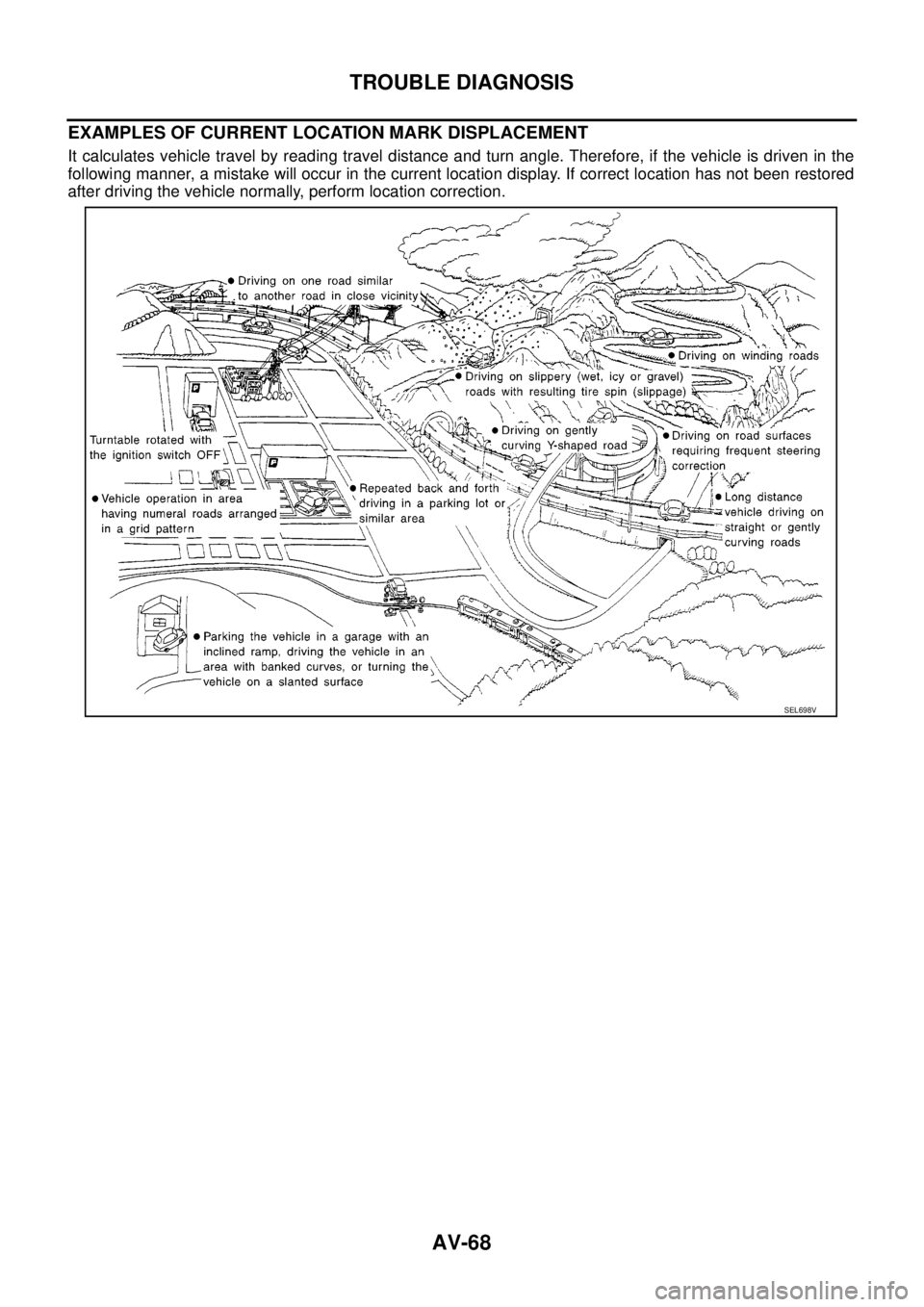
EXAMPLES OF CURRENT LOCATION MARK DISPLACEMENT
It calculates vehicle travel by reading travel distance and turn angle. Therefore, if the vehicle is driven in the
following manner, a mistake will occur in the current location display. If correct location has not been restored
after driving the vehicle normally, perform location correction.
SEL698V
Page 558 of 3171
AV-70
TROUBLE DIAGNOSIS
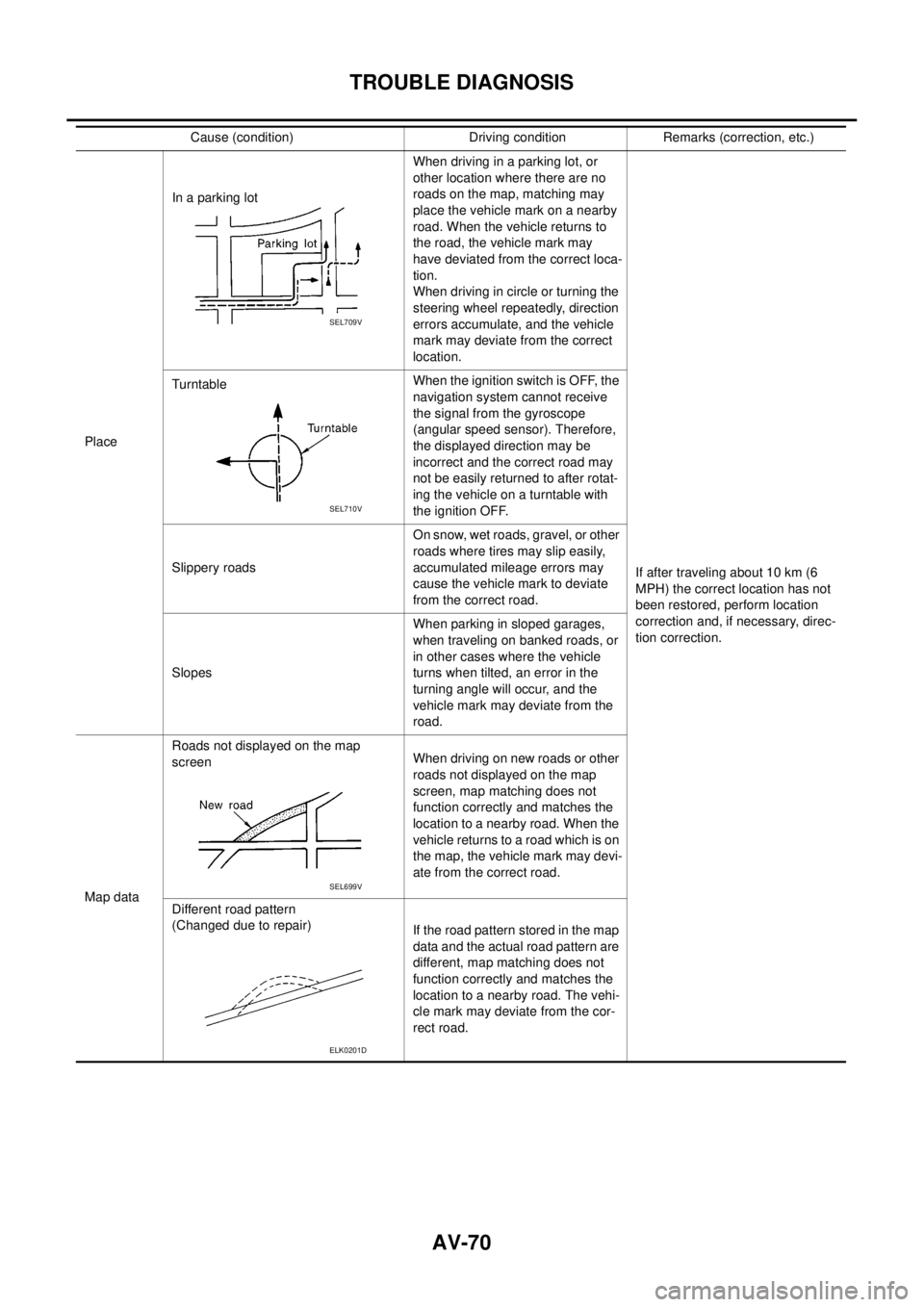
PlaceIn a parking lotWhen driving in a parking lot, or
other location where there are no
roads on the map, matching may
place the vehicle mark on a nearby
road. When the vehicle returns to
the road, the vehicle mark may
have deviated from the correct loca-
tion.
When driving in circle or turning the
steering wheel repeatedly, direction
errors accumulate, and the vehicle
mark may deviate from the correct
location.
If after traveling about 10 km (6
MPH) the correct location has not
been restored, perform location
correction and, if necessary, direc-
tion correction. TurntableWhentheignitionswitchisOFF,the
navigation system cannot receive
the signal from the gyroscope
(angular speed sensor). Therefore,
the displayed direction may be
incorrect and the correct road may
not be easily returned to after rotat-
ing the vehicle on a turntable with
the ignition OFF.
Slippery roadsOn snow, wet roads, gravel, or other
roads where tires may slip easily,
accumulated mileage errors may
cause the vehicle mark to deviate
from the correct road.
SlopesWhen parking in sloped garages,
when traveling on banked roads, or
in other cases where the vehicle
turns when tilted, an error in the
turning angle will occur, and the
vehicle mark may deviate from the
road.
Map dataRoads not displayed on the map
screenWhen driving on new roads or other
roads not displayed on the map
screen, map matching does not
function correctly and matches the
location to a nearby road. When the
vehicle returns to a road which is on
the map, the vehicle mark may devi-
ate from the correct road.
Different road pattern
(Changed due to repair)
If the road pattern stored in the map
data and the actual road pattern are
different, map matching does not
function correctly and matches the
location to a nearby road. The vehi-
cle mark may deviate from the cor-
rect road. Cause (condition) Driving condition Remarks (correction, etc.)
SEL709V
SEL710V
SEL699V
ELK0201D
Page 559 of 3171
TROUBLE DIAGNOSIS
AV-71
C
D
E
F
G
H
I
J
L
MA
B
AV
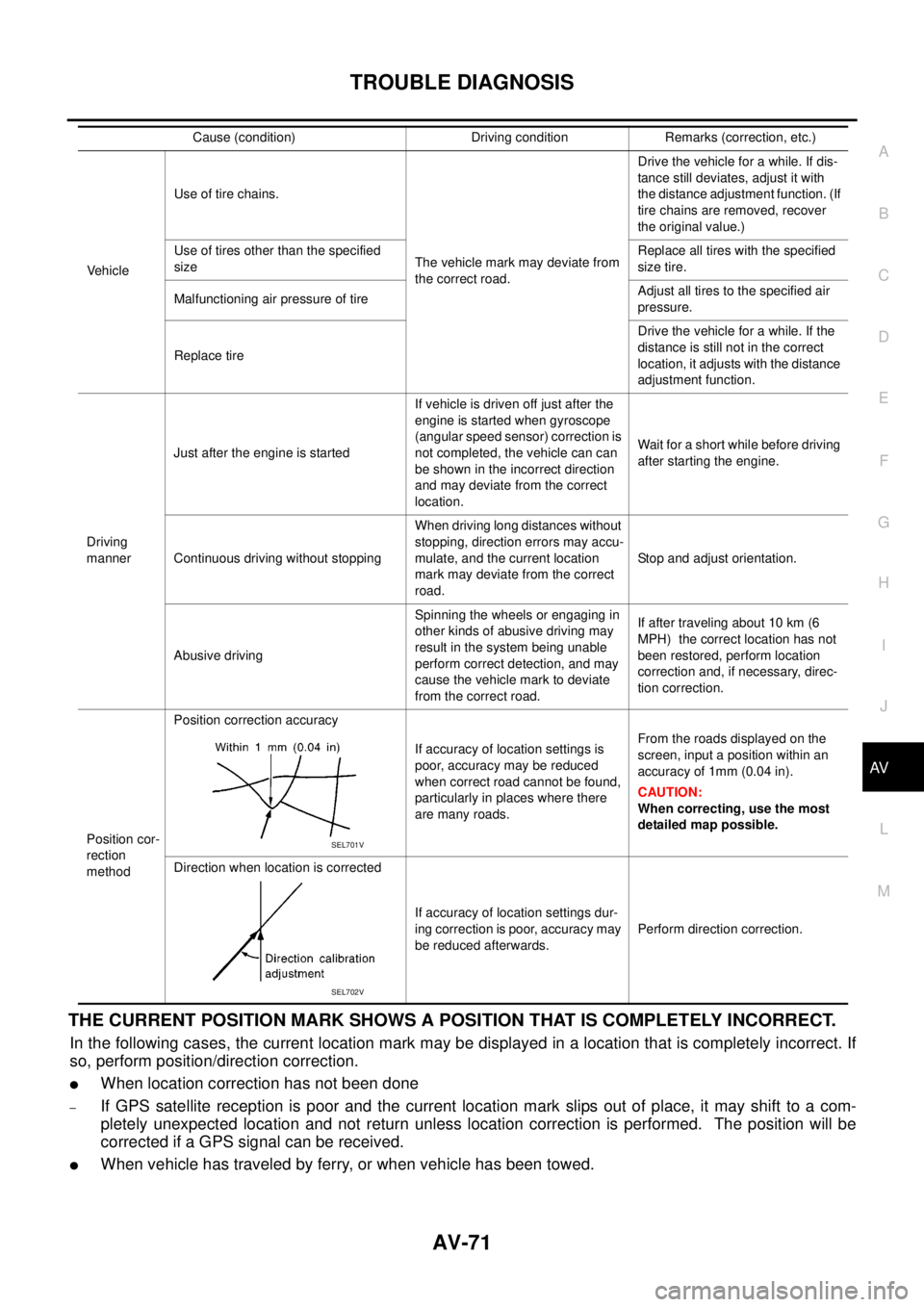
THE CURRENT POSITION MARK SHOWS A POSITION THAT IS COMPLETELY INCORRECT.
In the following cases, the current location mark may be displayed in a location that is completely incorrect. If
so, perform position/direction correction.
lWhen location correction has not been done
–If GPS satellite reception is poor and the current location mark slips out of place, it may shift to a com-
pletely unexpected location and not return unless location correction is performed. The position will be
corrected if a GPS signal can be received.
lWhen vehicle has traveled by ferry, or when vehicle has been towed.
VehicleUse of tire chains.
The vehicle mark may deviate from
the correct road.Drivethevehicleforawhile.Ifdis-
tance still deviates, adjust it with
the distance adjustment function. (If
tire chains are removed, recover
the original value.)
Use of tires other than the specified
sizeReplace all tires with the specified
size tire.
Malfunctioning air pressure of tireAdjust all tires to the specified air
pressure.
Replace tireDrive the vehicle for a while. If the
distance is still not in the correct
location, it adjusts with the distance
adjustment function.
Driving
mannerJust after the engine is startedIf vehicle is driven off just after the
engine is started when gyroscope
(angular speed sensor) correction is
not completed, the vehicle can can
be shown in the incorrect direction
and may deviate from the correct
location.Wait for a short while before driving
after starting the engine.
Continuous driving without stoppingWhen driving long distances without
stopping, direction errors may accu-
mulate, and the current location
mark may deviate from the correct
road.Stop and adjust orientation.
Abusive drivingSpinning the wheels or engaging in
other kinds of abusive driving may
result in the system being unable
perform correct detection, and may
cause the vehicle mark to deviate
from the correct road.If after traveling about 10 km (6
MPH) the correct location has not
been restored, perform location
correction and, if necessary, direc-
tion correction.
Position cor-
rection
methodPosition correction accuracy
If accuracy of location settings is
poor, accuracy may be reduced
when correct road cannot be found,
particularly in places where there
are many roads.From the roads displayed on the
screen, input a position within an
accuracy of 1mm (0.04 in).
CAUTION:
When correcting, use the most
detailed map possible.
Direction when location is corrected
If accuracy of location settings dur-
ing correction is poor, accuracy may
be reduced afterwards.Perform direction correction. Cause (condition) Driving condition Remarks (correction, etc.)
SEL701V
SEL702V
Page 560 of 3171

AV-72
TROUBLE DIAGNOSIS
–Because calculation of the current location cannot be done when traveling with the ignition OFF, for exam-
ple when traveling by ferry or when being towed, the location before travel is displayed. If the precise loca-
tioncanbedetectedwithGPS,thelocationwillbecorrected.
THE CURRENT POSITION MARK JUMPS.
In the following cases, the current location mark may appear to jump as a result of automatic correction of the
current location.
lWhen map matching has been done
–If current location and the current location mark are different when map matching is done, the current
location mark may seem to jump. At this time, the location may be “corrected” to the incorrect road or to a
location which is not on a road.
lWhen GPS location correction has been done
–If current location and the current location mark are different when location is corrected using GPS mea-
surements, the current location mark may seem to jump. At this time, the location may be “corrected” to a
location which is not on a road.
THE CURRENT LOCATION MARK IS IN A RIVER OR THE SEA.
The navigation system moves the current location mark with no distinction between land and rivers or sea. If
the location mark is somehow out of place, it may appear that the vehicle is driving in a river or the sea.
CURRENT LOCATION MARK ROTATES WITHOUT OPERATION
If the ignition switch is turned ON with the turntable rotating, the rotating condition is recorded as the stop con-
dition. Therefore, the current location mark might rotate when actually stopping.
WHEN DRIVING ON THE SAME ROAD, SOMETIMES THE CURRENT LOCATION MARK IS IN
THE CORRECT PLACE AND SOMETIMES IT IS IN THE INCORRECT PLACE.
The conditions of the GPS antenna (GPS data) and gyroscope (angular speed sensor) change gradually.
Depending on the road traveled and operation of the steering wheel, the location detection results will be dif-
ferent. Therefore, even on a road on which the location has never been incorrect, conditions may cause the
vehicle mark to deviate.
LOCATION CORRECTION BY MAP MATCHING IS SLOW.
lThe map matching function needs to refer to the data of the surrounding area. It is necessary to drive
some distance for the function to work.
lBecause of the way map matching operates, when there are many roads running in similar directions in
the surrounding area a matching determination may be impossible. The location will remain uncorrected
until some special feature is found.
ALTHOUGH THE GPS RECEIVING DISPLAY IS GREEN, THE VEHICLE MARK DOES NOT
RETURN TO THE CORRECT LOCATION.
lGPS accuracy has a malfunction range of about 10 m. In some cases the current location mark may not
be on the correct street, even when GPS location correction is done.
lThe navigation system compares the results of GPS location detection with the results from map-match-
ing location detection. The one that is determined to have higher accuracy is used.
lPosition correction by GPS is not available while the vehicle is stopped.
THE NAME OF THE CURRENT PLACE IS NOT DISPLAYED.
The current place name might not be displayed when there is no name of place information in the map screen.
THE DISPLAY IS DIFFERENT BETWEEN BIRDVIEW®AND (FLAT) MAP DISPLAY.
The following is different at birdview®.
lThe current place name displays names that are primarily in the direction of vehicle travel.
lThe amount of time before the vehicle travel or turn angle is updated on the screen is longer than for the
(flat) map display.
lThe conditions for display of place names, roads, and other data are different for nearby areas and for
more distant areas.
lSome trimming of the character data is done to prevent the display from becoming too complex. In some
cases and in some locations, the display contents may differ.
lThe same place name, street name, etc. may be displayed multiple times.