fuse NISSAN NOTE 2016 Service Repair Manual
[x] Cancel search | Manufacturer: NISSAN, Model Year: 2016, Model line: NOTE, Model: NISSAN NOTE 2016Pages: 3641, PDF Size: 28.72 MB
Page 2646 of 3641
PG
FUSE AND FUSIBLE LINK BOXPG-59
< WIRING DIAGRAM >
C
DE
F
G H
I
J
K L
B A
O P
N
FUSE AND FUSIBLE LINK BOX
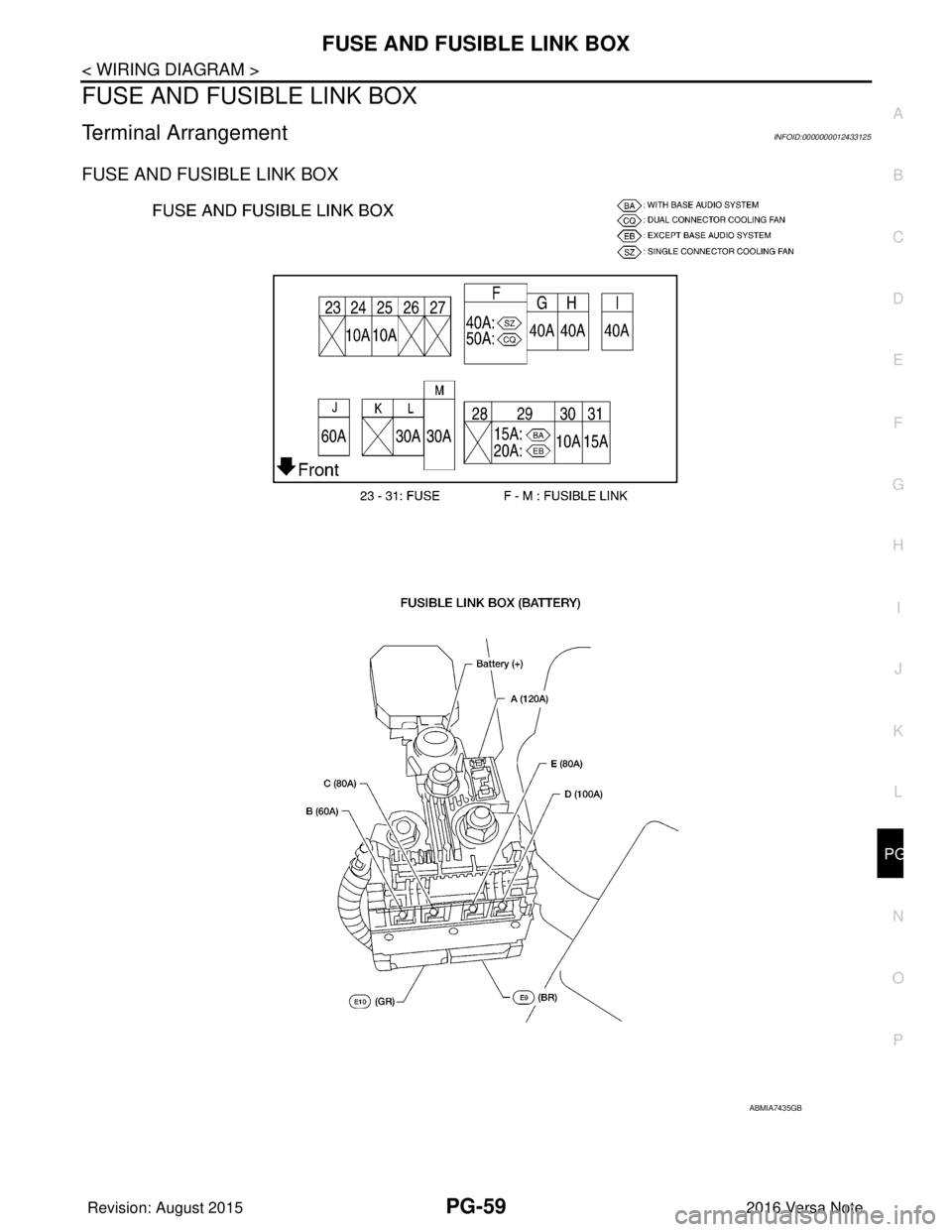
Terminal ArrangementINFOID:0000000012433125
FUSE AND FUSIBLE LINK BOX
ABMIA7435GB
Revision: August 2015
2016 Versa Note
cardiagn.com
Page 2652 of 3641
PG
FUSE INSPECTIONPG-65
< BASIC INSPECTION >
C
DE
F
G H
I
J
K L
B A
O P
N
FUSE INSPECTION
How To CheckINFOID:0000000012433130
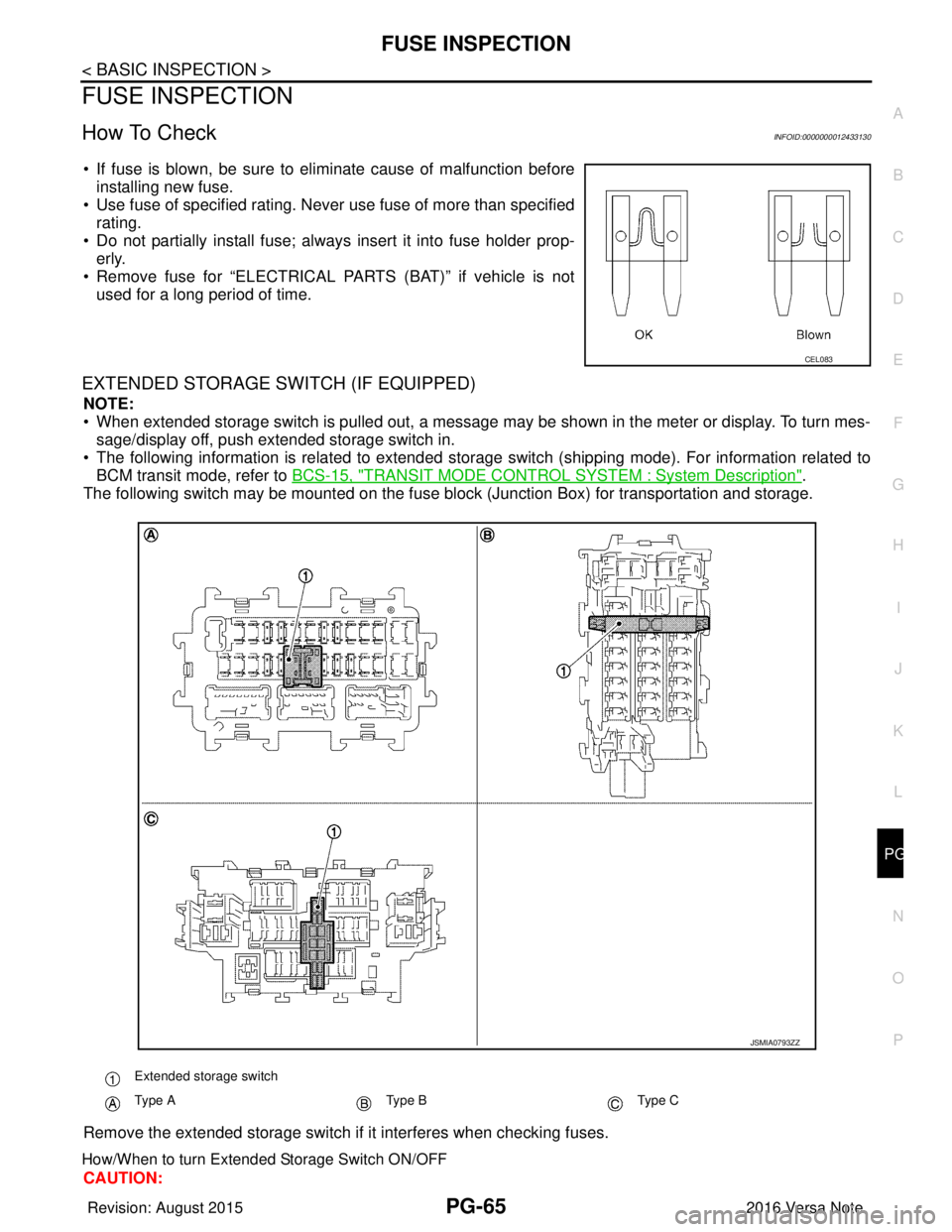
• If fuse is blown, be sure to eliminate cause of malfunction before
installing new fuse.
• Use fuse of specified rating. Never use fuse of more than specified
rating.
• Do not partially install fuse; always insert it into fuse holder prop- erly.
• Remove fuse for “ELECTRICAL PARTS (BAT)” if vehicle is not used for a long period of time.
EXTENDED STORAGE SWITCH (IF EQUIPPED)
NOTE:
• When extended storage switch is pulled out, a message may be shown in the\
meter or display. To turn mes-sage/display off, push extended storage switch in.
• The following information is related to extended storage switch (shipping mode). For information related to BCM transit mode, refer to BCS-15, "
TRANSIT MODE CONTROL SYSTEM : System Description".
The following switch may be mounted on the fuse block (Junction Box) for transportation and storage.
Remove the extended storage switch if it interferes when checking fuses.
How/When to turn Extended Storage Switch ON/OFF
CAUTION:
CEL083
Extended storage switch
Type AType BType C
JSMIA0793ZZ
Revision: August 2015 2016 Versa Note
cardiagn.com
Page 2653 of 3641
PG-66
< BASIC INSPECTION >
FUSE INSPECTION
• Turn the ignition switch OFF when operating the extended storage switch.
• Under normal conditions, keep the extended storage switch in ON state. Never operate the extended
storage switch except when necessary.
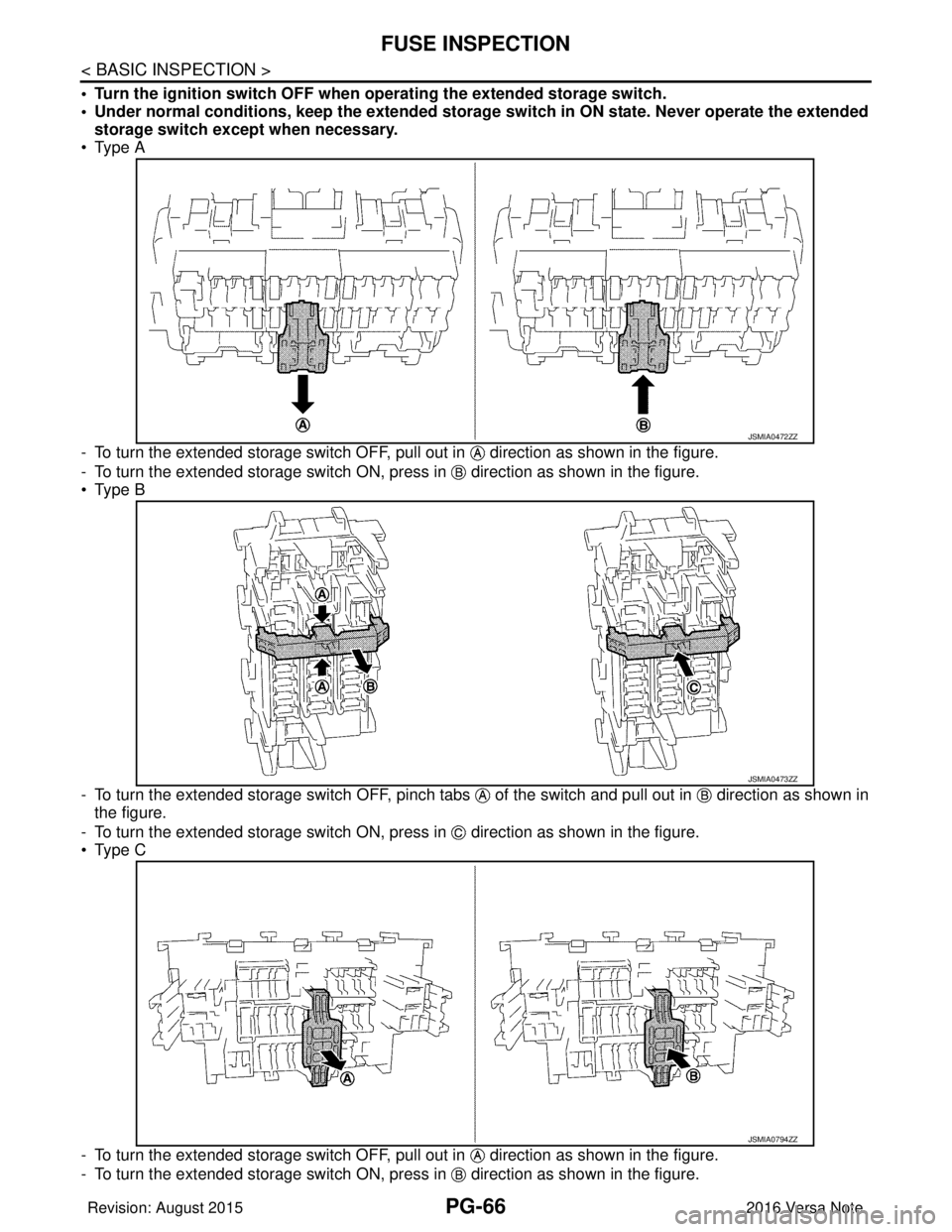
• Type A
- To turn the extended storage switch OFF, pull out in direction as shown in the figure.
- To turn the extended storage switch ON, press in direction as shown in the figure.
• Type B
- To turn the extended storage switch OFF, pinch tabs of the switch and pull out in direction as shown in
the figure.
- To turn the extended storage switch ON, press in direction as shown in the figure.
• Type C
- To turn the extended storage switch OFF, pull out in direction as shown in the figure.
- To turn the extended storage switch ON, press in direction as shown in the figure.
JSMIA0472ZZ
JSMIA0473ZZ
JSMIA0794ZZ
Revision: August 2015 2016 Versa Note
cardiagn.com
Page 2654 of 3641
PG
FUSE INSPECTIONPG-67
< BASIC INSPECTION >
C
DE
F
G H
I
J
K L
B A
O P
N
How To Remove Extended Storage Switch
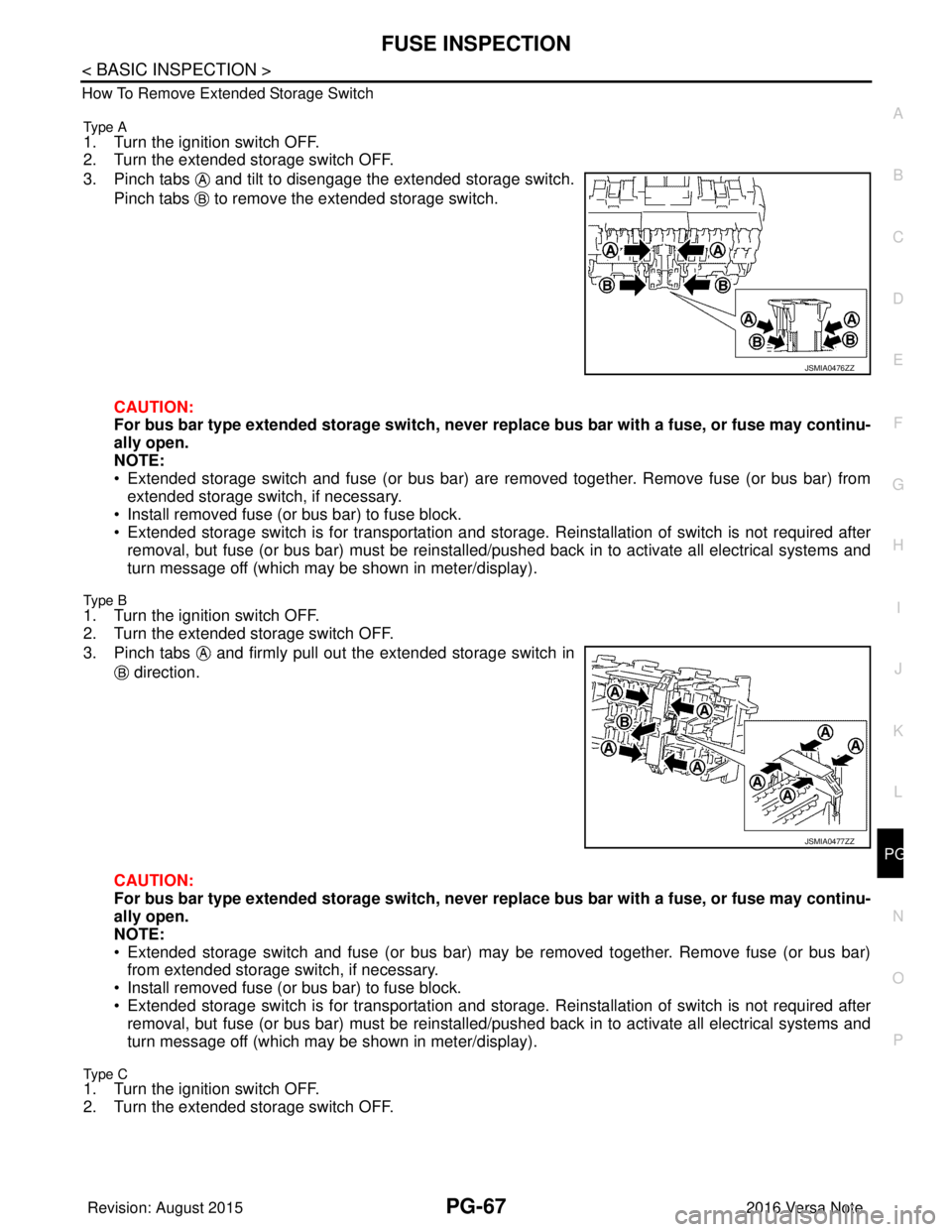
Type A
1. Turn the ignition switch OFF.
2. Turn the extended storage switch OFF.
3. Pinch tabs and tilt to disengage the extended storage switch.
Pinch tabs to remove the extended storage switch.
CAUTION:
For bus bar type extended storage switch, never replace bus bar with a fuse, or fuse may continu-
ally open.
NOTE:
• Extended storage switch and fuse (or bus bar) are removed together. Remove fuse (or bus bar) from extended storage switch, if necessary.
• Install removed fuse (or bus bar) to fuse block.
• Extended storage switch is for transportation and storage. Reinstallation of switch is not required after
removal, but fuse (or bus bar) must be reinstalled/ pushed back in to activate all electrical systems and
turn message off (which may be shown in meter/display).
Type B
1. Turn the ignition switch OFF.
2. Turn the extended storage switch OFF.
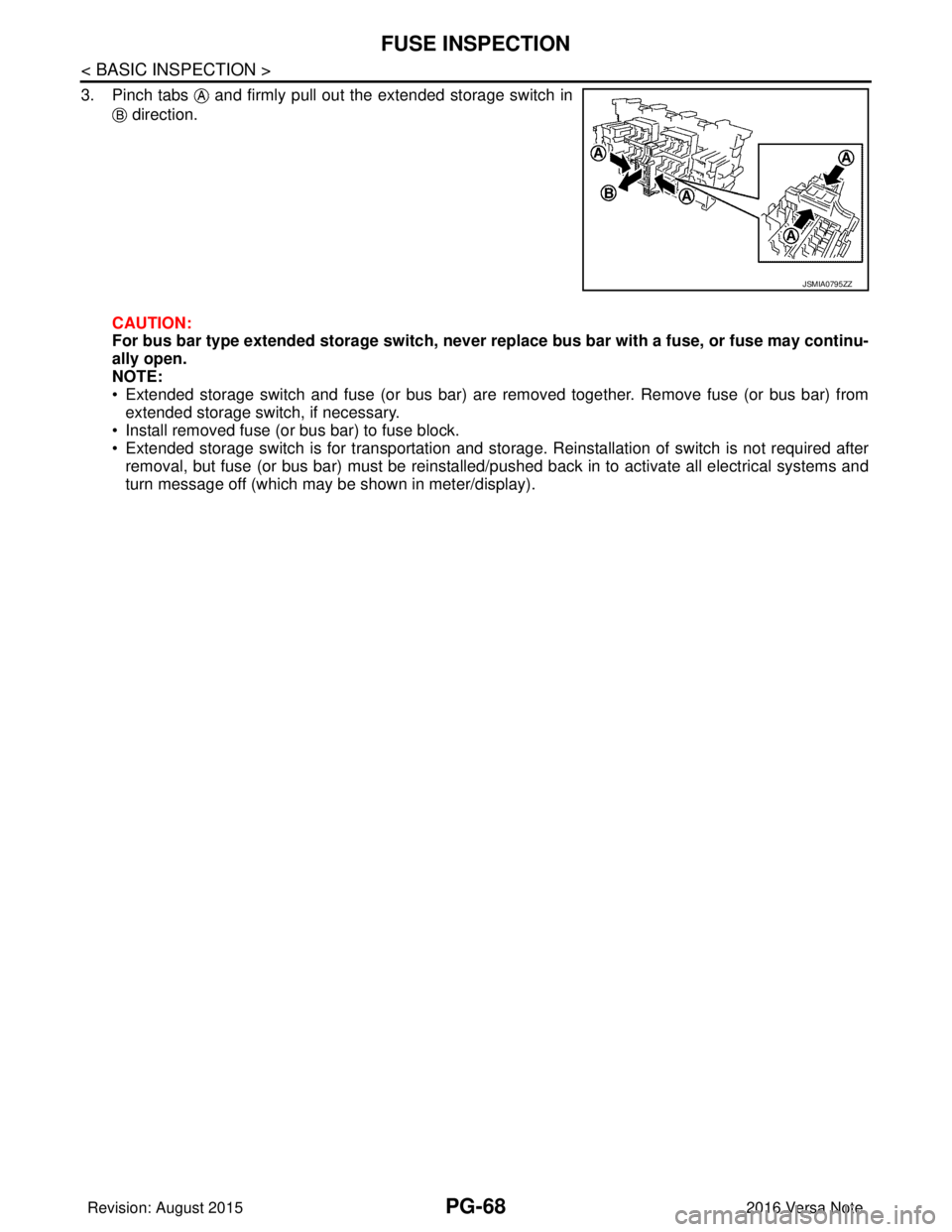
3. Pinch tabs and firmly pull out the extended storage switch in
direction.
CAUTION:
For bus bar type extended storage switch, never replace bus bar with a fuse, or fuse may continu-
ally open.
NOTE:
• Extended storage switch and fuse (or bus bar) may be removed together. Remove fuse (or bus bar) from extended storage switch, if necessary.
• Install removed fuse (or bus bar) to fuse block.
• Extended storage switch is for transportation and storage. Reinstallation of switch is not required after
removal, but fuse (or bus bar) must be reinstalled/ pushed back in to activate all electrical systems and
turn message off (which may be shown in meter/display).
Type C1. Turn the ignition switch OFF.
2. Turn the extended storage switch OFF.
JSMIA0476ZZ
JSMIA0477ZZ
Revision: August 2015 2016 Versa Note
cardiagn.com
Page 2655 of 3641
PG-68
< BASIC INSPECTION >
FUSE INSPECTION
3. Pinch tabs and firmly pull out the extended storage switch in direction.
CAUTION:
For bus bar type extended storage switch, never replace bus bar with a fuse, or fuse may continu-
ally open.
NOTE:
• Extended storage switch and fuse (or bus bar) are removed together. Remove fuse (or bus bar) from extended storage switch, if necessary.
• Install removed fuse (or bus bar) to fuse block.
• Extended storage switch is for transportation and storage. Reinstallation of switch is not required after removal, but fuse (or bus bar) must be reinstalled/pushed back in to activate all electrical systems and
turn message off (which may be shown in meter/display).
JSMIA0795ZZ
Revision: August 2015 2016 Versa Note
cardiagn.com
Page 2686 of 3641
POWER SUPPLY AND GROUND CIRCUITPWC-25
< DTC/CIRCUIT DIAGNOSIS >
C
DE
F
G H
I
J
L
M A
B
PWC
N
O P
DTC/CIRCUIT DIAGNOSIS
POWER SUPPLY AND GROUND CIRCUIT
BCM (BODY CONTROL SYSTEM) (W ITH INTELLIGENT KEY SYSTEM)
BCM (BODY CONTROL SYSTEM) (WITH IN TELLIGENT KEY SYSTEM) : Diagnosis
Procedure
INFOID:0000000012542488
Regarding Wiring Diagram information, refer to BCS-52, "Wiring Diagram".
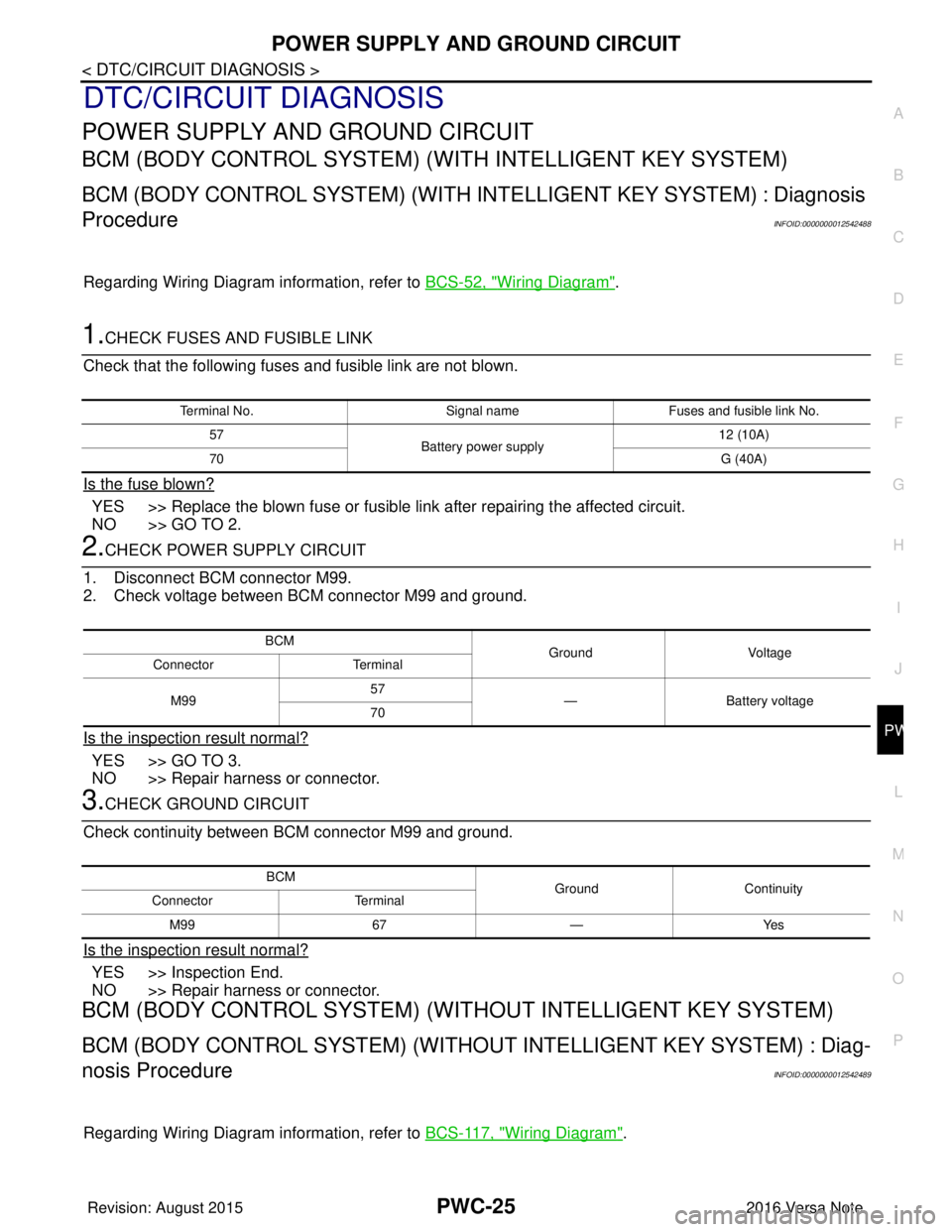
1.CHECK FUSES AND FUSIBLE LINK
Check that the following fuses and fusible link are not blown.
Is the fuse blown?
YES >> Replace the blown fuse or fusible link after repairing the affected circuit.
NO >> GO TO 2.
2.CHECK POWER SUPPLY CIRCUIT
1. Disconnect BCM connector M99.
2. Check voltage between BCM connector M99 and ground.
Is the inspection result normal?
YES >> GO TO 3.
NO >> Repair harness or connector.
3.CHECK GROUND CIRCUIT
Check continuity between BCM connector M99 and ground.
Is the inspection result normal?
YES >> Inspection End.
NO >> Repair harness or connector.
BCM (BODY CONTROL SYSTEM) (WIT HOUT INTELLIGENT KEY SYSTEM)
BCM (BODY CONTROL SYSTEM) (WITHOUT INTELLIGENT KEY SYSTEM) : Diag-
nosis Procedure
INFOID:0000000012542489
Regarding Wiring Diagram information, refer to BCS-117, "Wiring Diagram".
Terminal No.Signal nameFuses and fusible link No.
57 Battery power supply 12 (10A)
70 G (40A)
BCM
Ground Voltage
Connector Terminal
M99 57
— Battery voltage
70
BCM GroundContinuity
Connector Terminal
M99 67—Yes
Revision: August 2015 2016 Versa Note
cardiagn.com
Page 2687 of 3641

PWC-26
< DTC/CIRCUIT DIAGNOSIS >
POWER SUPPLY AND GROUND CIRCUIT
1.CHECK FUSES AND FUSIBLE LINK
Check that the following fuses and fusible link are not blown.
Is the fuse blown?
YES >> Replace the blown fuse or fusible link after repairing the affected circuit.
NO >> GO TO 2.
2.CHECK POWER SUPPLY CIRCUIT
1. Turn ignition switch OFF.
2. Disconnect BCM connectors.
3. Check voltage between BCM connector and ground.
Is the inspection result normal?
YES >> GO TO 3.
NO >> Repair harness or connector.
3.CHECK GROUND CIRCUIT
Check continuity between BCM connector and ground.
Is the inspection result normal?
YES >> Inspection End.
NO >> Repair harness or connector.
POWER WINDOW MAIN SWITCH
POWER WINDOW MAIN SWITCH : Diagnosis ProcedureINFOID:0000000012431810
Regarding Wiring Diagram information, refer to PWC-16, "Wiring Diagram".
1.CHECK MAIN POWER WINDOW AND DOOR LOCK/UNLOCK SWITCH POWER SUPPLY
1. Turn ignition switch OFF.
2. Disconnect main power window and door lock/unlock switch connector.
3. Check voltage between main power window and door lock/unlock switch harness connector and ground.
Terminal No. Signal nameFuses and fusible link No.
37 Battery power supply 8 (10A)
42 12 (10A)
50 G (40A)
11 Ignition switch ACC or ON 18 (10A)
38 Ignition switch ON or START 2 (10A)
BCMGround Ignition switch position
Connector Terminal
—OFF
ACC ON
M18 11
0 V
Battery voltage
Battery voltage
37
Battery voltage
38 0 V0 V
M19 42
Battery voltage Battery voltage
50
BCM GroundContinuity
Connector Terminal
M19 55—Yes
Revision: August 2015 2016 Versa Note
cardiagn.com
Page 2777 of 3641
WT-34
< DTC/CIRCUIT DIAGNOSIS >
POWER SUPPLY AND GROUND CIRCUIT
POWER SUPPLY AND GROUND CIRCUIT
WITH INTELLIGENT KEY
WITH INTELLIGENT KEY : Diagnosis ProcedureINFOID:0000000012542961
Regarding Wiring Diagram information, refer to BCS-52, "Wiring Diagram".
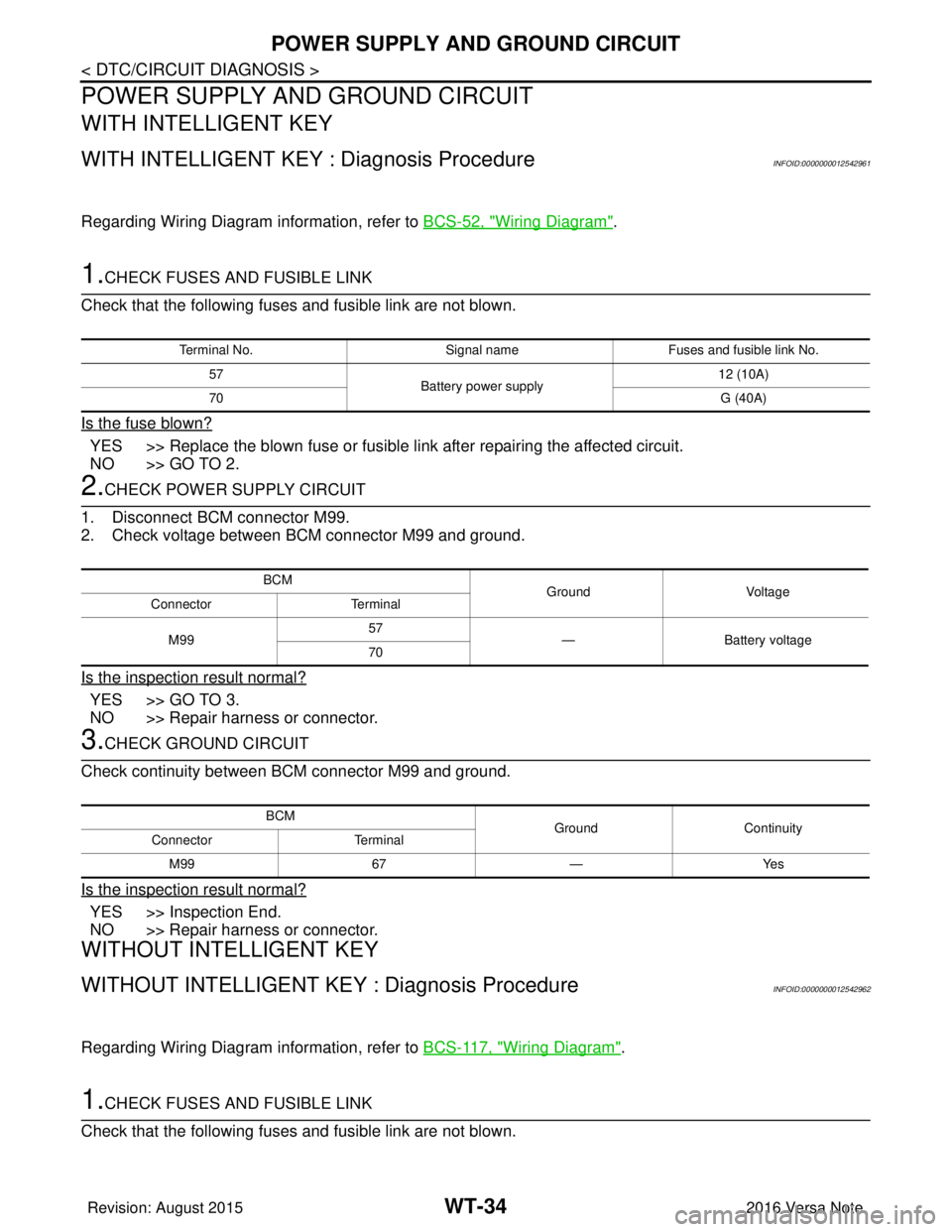
1.CHECK FUSES AND FUSIBLE LINK
Check that the following fuses and fusible link are not blown.
Is the fuse blown?
YES >> Replace the blown fuse or fusible link after repairing the affected circuit.
NO >> GO TO 2.
2.CHECK POWER SUPPLY CIRCUIT
1. Disconnect BCM connector M99.
2. Check voltage between BCM connector M99 and ground.
Is the inspection result normal?
YES >> GO TO 3.
NO >> Repair harness or connector.
3.CHECK GROUND CIRCUIT
Check continuity between BCM connector M99 and ground.
Is the inspection result normal?
YES >> Inspection End.
NO >> Repair harness or connector.
WITHOUT INTELLIGENT KEY
WITHOUT INTELLIGENT KEY : Diagnosis ProcedureINFOID:0000000012542962
Regarding Wiring Diagram information, refer to BCS-117, "Wiring Diagram".
1.CHECK FUSES AND FUSIBLE LINK
Check that the following fuses and fusible link are not blown.
Terminal No. Signal nameFuses and fusible link No.
57 Battery power supply 12 (10A)
70 G (40A)
BCM
Ground Voltage
Connector Terminal
M99 57
— Battery voltage
70
BCM GroundContinuity
Connector Terminal
M99 67—Yes
Revision: August 2015 2016 Versa Note
cardiagn.com
Page 2778 of 3641
POWER SUPPLY AND GROUND CIRCUITWT-35
< DTC/CIRCUIT DIAGNOSIS >
C
DF
G H
I
J
K L
M A
B
WT
N
O P
Is the fuse blown?
YES >> Replace the blown fuse or fusible link after repairing the affected circuit.
NO >> GO TO 2.
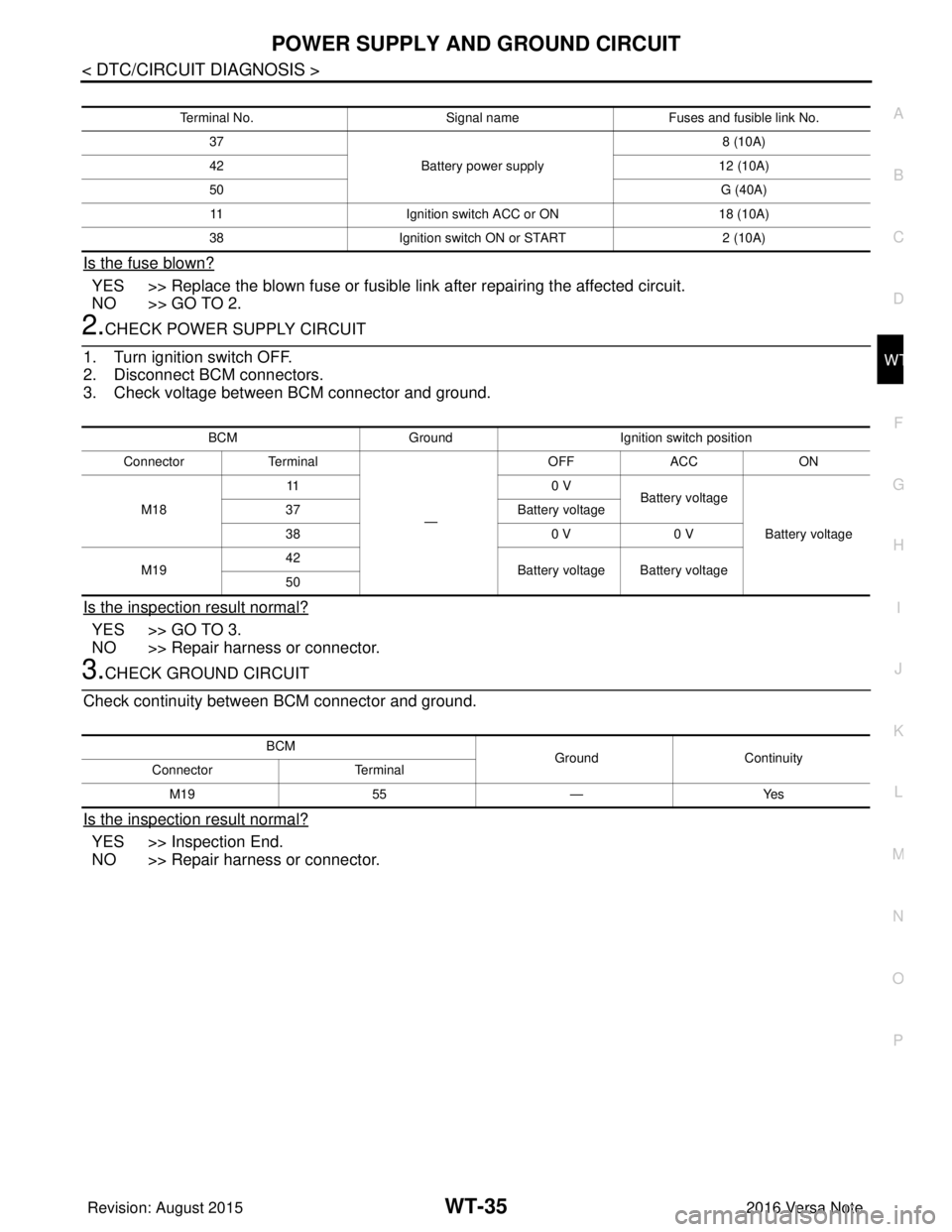
2.CHECK POWER SUPPLY CIRCUIT
1. Turn ignition switch OFF.
2. Disconnect BCM connectors.
3. Check voltage between BCM connector and ground.
Is the inspection result normal?
YES >> GO TO 3.
NO >> Repair harness or connector.
3.CHECK GROUND CIRCUIT
Check continuity between BCM connector and ground.
Is the inspection result normal?
YES >> Inspection End.
NO >> Repair harness or connector.
Terminal No. Signal nameFuses and fusible link No.
37 Battery power supply 8 (10A)
42 12 (10A)
50 G (40A)
11 Ignition switch ACC or ON 18 (10A)
38 Ignition switch ON or START 2 (10A)
BCMGround Ignition switch position
Connector Terminal
—OFF
ACC ON
M18 11
0 V
Battery voltage
Battery voltage
37
Battery voltage
38 0 V0 V
M19 42
Battery voltage Battery voltage
50
BCM GroundContinuity
Connector Terminal
M19 55—Yes
Revision: August 2015 2016 Versa Note
cardiagn.com
Page 2916 of 3641
![NISSAN NOTE 2016 Service Repair Manual B2198 NATS ANTENNA AMP.SEC-59
< DTC/CIRCUIT DIAGNOSIS > [WITH INTELLIGENT KEY SYSTEM]
C
D
E
F
G H
I
J
L
M A
B
SEC
N
O P
B2198 NATS ANTENNA AMP.
DTC LogicINFOID:0000000012430371
DTC DETECTION LOGIC
DTC](/img/5/57363/w960_57363-2915.png "NISSAN NOTE 2016 Service Repair Manual B2198 NATS ANTENNA AMP.SEC-59
< DTC/CIRCUIT DIAGNOSIS > [WITH INTELLIGENT KEY SYSTEM]
C
D
E
F
G H
I
J
L
M A
B
SEC
N
O P
B2198 NATS ANTENNA AMP.
DTC LogicINFOID:0000000012430371
DTC DETECTION LOGIC
DTC")
B2198 NATS ANTENNA AMP.SEC-59
< DTC/CIRCUIT DIAGNOSIS > [WITH INTELLIGENT KEY SYSTEM]
C
D
E
F
G H
I
J
L
M A
B
SEC
N
O P
B2198 NATS ANTENNA AMP.
DTC LogicINFOID:0000000012430371
DTC DETECTION LOGIC
DTC CONFIRMATION PROCEDURE
1.PERFORM DTC CONFIRMATION PROCEDURE
1. Make the conditions that BCM enters in the low power consumption mode (BCM sleep condition).
Refer to BCS-13, "
POWER CONSUMPTION CONTROL SY STEM : System Description".
2. Turn ignition switch ON.
3. Check DTC in “Self Diagnostic Result” of “BCM” using CONSULT.
Is DTC detected?
YES >> Go to SEC-59, "Diagnosis Procedure".
NO >> Inspection End.
Diagnosis ProcedureINFOID:0000000012430372
Regarding Wiring Diagram information, refer to SEC-37, "Wiring Diagram".
1.CHECK FUSE
1. Turn power switch OFF.
2. Check that the following fuse in IPDM E/R is not blown.
Is the inspection result normal?
YES >> GO TO 2.
NO >> Replace the blown fuse after repairing the cause of blowing.
2.CHECK NATS ANTENNA AMP. POWER SUPPLY
1. Disconnect NATS antenna amp. connector.
2. Check voltage between NATS antenna amp. harness connector and ground.
Is the inspection result normal?
YES >> GO TO 4.
NO >> GO TO 3.
3.CHECK NATS ANTENNA AMP. POWER SUPPLY CIRCUIT
1. Disconnect IPDM E/R connector.
2. Check continuity between IPDM E/R har ness connector and NATS antenna amp. connector.
DTC No. Trouble diagnosis name DTC detecting conditionPossible cause
B2198 NATS ANTENNA AMP Inactive communication between NATS
antenna amp. and BCM is detected when
BCM enters in the low power consumption
mode. (BCM sleep condition) • Harness or connectors
(NATS antenna amp. circuit is open or
shorted.)
• NATS antenna amp.
•BCM
Signal name Fuse No.
Battery power supply 53 (20 A)
(+)
(–)Voltage (V)
(Approx.)
NATS antenna amp.
Connector Terminal
M21 1GroundBattery voltage
Revision: August 2015 2016 Versa Note
cardiagn.com