Wiper NISSAN NOTE 2016 Service Repair Manual
[x] Cancel search | Manufacturer: NISSAN, Model Year: 2016, Model line: NOTE, Model: NISSAN NOTE 2016Pages: 3641, PDF Size: 28.72 MB
Page 3615 of 3641

WW-50
< SYMPTOM DIAGNOSIS >
WIPER AND WASHER SYSTEM SYMPTOMS
SYMPTOM DIAGNOSIS
WIPER AND WASHER SYSTEM SYMPTOMS
Symptom TableINFOID:0000000012433229
CAUTION:
Perform the self-diagnosis with CONSULT before performing the diagnosis by symptom. Perform the
diagnosis by DTC if DTC is detected.
SymptomPossible malfunction Reference
Front wiper does not op-
erate in... HI only
• Combination switch (wiper and washer
switch)
• Harness between combination switch (wip- er and washer switch) and BCM
•BCM Combination switch (wiper
and washer switch)
Refer to BCS-72, "
Symptom
Ta b l e" (with Intelligent Key
system) or BCS-134, "
Symp-
tom Table" (without Intelligent
Key system).
• IPDM E/R
• Harness between IPDM E/R and front wiper motor
• Front wiper motor Front wiper motor (HI) circuit
Refer to WW-38, "
Component
Function Check".
Front wiper request signal (IPDM E/R) Check FR WIP REQ in DATA
MONITOR of IPDM E/R. Re-
fer to PCS-10, "
CONSULT
Function (IPDM E/R)".
LO and INT • Combination switch (wiper and washer
switch)
• Harness between combination switch (wip- er and washer switch) and BCM
•BCM Combination switch (wiper
and washer switch)
Refer to BCS-72, "
Symptom
Ta b l e" (with Intelligent Key
system) or BCS-134, "
Symp-
tom Table" (without Intelligent
Key system).
• IPDM E/R
• Harness between IPDM E/R and front wiper motor
• Front wiper motor Front wiper motor (LO) circuit
Refer to WW-36, "
Component
Function Check".
Front wiper request signal (IPDM E/R) Check FR WIP REQ in DATA
MONITOR of IPDM E/R. Re-
fer to PCS-10, "
CONSULT
Function (IPDM E/R)".
INT only • Combination switch (wiper and washer
switch)
• Harness between combination switch (wip- er and washer switch) and BCM
•BCM Combination switch (wiper
and washer switch)
Refer to BCS-72, "
Symptom
Ta b l e" (with Intelligent Key
system) or BCS-134, "
Symp-
tom Table" (without Intelligent
Key system).
Front wiper request signal (IPDM E/R) Check FR WIP REQ in DATA
MONITOR of IPDM E/R. Re-
fer to PCS-10, "
CONSULT
Function (IPDM E/R)".
Any mode —Refer to WW-53, "
Diagnosis
Procedure".
Revision: August 2015
2016 Versa Note
cardiagn.com
Page 3616 of 3641
WIPER AND WASHER SYSTEM SYMPTOMSWW-51
< SYMPTOM DIAGNOSIS >
C
DE
F
G H
I
J
K
M A
B
WW
N
O P
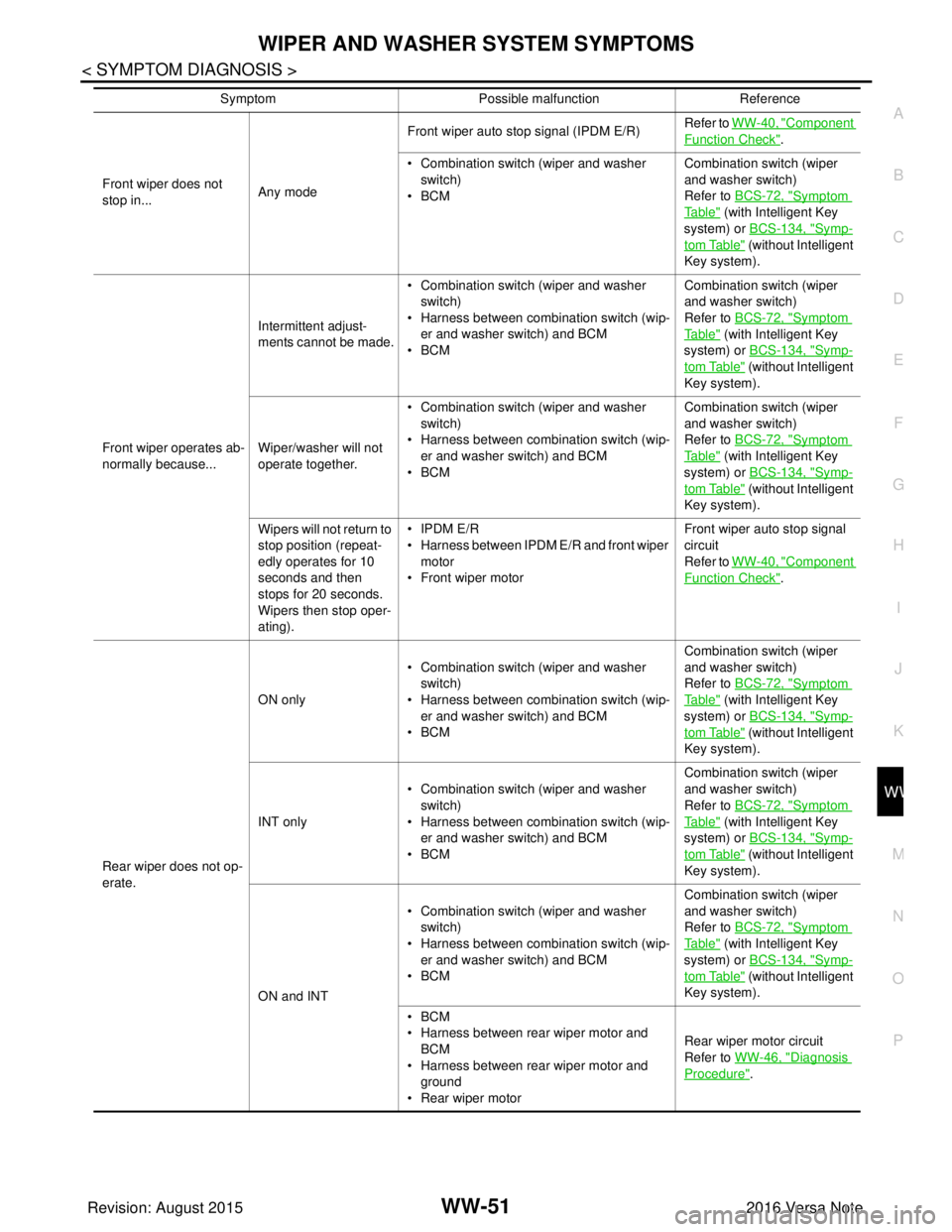
Front wiper does not
stop in... Any modeFront wiper auto stop signal (IPDM E/R)
Refer to
WW-40, "
Component
Function Check".
• Combination switch (wiper and washer switch)
•BCM Combination switch (wiper
and washer switch)
Refer to
BCS-72, "
Symptom
Ta b l e" (with Intelligent Key
system) or BCS-134, "
Symp-
tom Table" (without Intelligent
Key system).
Front wiper operates ab-
normally because... Intermittent adjust-
ments cannot be made.
• Combination switch (wiper and washer
switch)
• Harness between combination switch (wip- er and washer switch) and BCM
•BCM Combination switch (wiper
and washer switch)
Refer to
BCS-72, "
Symptom
Ta b l e" (with Intelligent Key
system) or BCS-134, "
Symp-
tom Table" (without Intelligent
Key system).
Wiper/washer will not
operate together. • Combination switch (wiper and washer
switch)
• Harness between combination switch (wip- er and washer switch) and BCM
•BCM Combination switch (wiper
and washer switch)
Refer to
BCS-72, "
Symptom
Ta b l e" (with Intelligent Key
system) or BCS-134, "
Symp-
tom Table" (without Intelligent
Key system).
Wipers will not return to
stop position (repeat-
edly operates for 10
seconds and then
stops for 20 seconds.
Wipers then stop oper-
ating). • IPDM E/R
• Harness between IPDM E/R and front wiper
motor
• Front wiper motor Front wiper auto stop signal
circuit
Refer to
WW-40, "
Component
Function Check".
Rear wiper does not op-
erate. ON only
• Combination switch (wiper and washer
switch)
• Harness between combination switch (wip-
er and washer switch) and BCM
•BCM Combination switch (wiper
and washer switch)
Refer to
BCS-72, "
Symptom
Ta b l e" (with Intelligent Key
system) or BCS-134, "
Symp-
tom Table" (without Intelligent
Key system).
INT only • Combination switch (wiper and washer
switch)
• Harness between combination switch (wip- er and washer switch) and BCM
•BCM Combination switch (wiper
and washer switch)
Refer to
BCS-72, "
Symptom
Ta b l e" (with Intelligent Key
system) or BCS-134, "
Symp-
tom Table" (without Intelligent
Key system).
ON and INT • Combination switch (wiper and washer
switch)
• Harness between combination switch (wip- er and washer switch) and BCM
•BCM Combination switch (wiper
and washer switch)
Refer to
BCS-72, "
Symptom
Ta b l e" (with Intelligent Key
system) or BCS-134, "
Symp-
tom Table" (without Intelligent
Key system).
•BCM
• Harness between rear wiper motor and BCM
• Harness between rear wiper motor and ground
• Rear wiper motor Rear wiper motor circuit
Refer to
WW-46, "
Diagnosis
Procedure".
Symptom
Possible malfunction Reference
Revision: August 2015 2016 Versa Note
cardiagn.com
Page 3617 of 3641

WW-52
< SYMPTOM DIAGNOSIS >
WIPER AND WASHER SYSTEM SYMPTOMS
Rear wiper does not
stop.ON only
• Combination switch (wiper and washer
switch)
•BCM Rear wiper motor circuit
Refer to WW-46, "
Diagnosis
Procedure".
INT only • Combination switch (wiper and washer
switch)
•BCM Combination switch (wiper
and washer switch)
Refer to BCS-72, "
Symptom
Ta b l e" (with Intelligent Key
system) or BCS-134, "
Symp-
tom Table" (without Intelligent
Key system).
Rear wiper does not op-
erate normally. Wiper is not linked to
the washer operation.
• Combination switch (wiper and washer
switch)
• Harness between rear wiper motor and BCM
•BCM Combination switch (wiper
and washer switch)
Refer to BCS-72, "
Symptom
Ta b l e" (with Intelligent Key
system) or BCS-134, "
Symp-
tom Table" (without Intelligent
Key system).
BCM —
Rear wiper does not re-
turn to the Stop position
(Stops after a five-sec-
ond operation). •BCM
• Harness between rear wiper motor and
BCM
• Rear wiper motor Rear wiper auto stop signal
circuit
Refer to WW-48, "
Diagnosis
Procedure".
Rear wiper stops after
operating for five sec-
onds when ignition
switch is turned ON.
Front and rear washer
motor does not operate. Front and rear washer
motor does not operate
when the washing
windshield.• Combination switch (wiper and washer
switch)
• Harness between combination switch (wip- er and washer switch) and BCM
•BCM Combination switch (wiper
and washer switch)
Refer to BCS-72, "
Symptom
Ta b l e" (with Intelligent Key
system) or BCS-134, "
Symp-
tom Table" (without Intelligent
Key system).
• Harness between rear combination switch (wiper and washer switch) and front and
rear washer motor.
• Front and rear washer motor Front and rear washer motor
circuit
Refer to WW-43, "
Diagnosis
Procedure".
Symptom
Possible malfunction Reference
Revision: August 2015 2016 Versa Note
cardiagn.com
Page 3618 of 3641
FRONT WIPER DOES NOT OPERATEWW-53
< SYMPTOM DIAGNOSIS >
C
DE
F
G H
I
J
K
M A
B
WW
N
O P
FRONT WIPER DO ES NOT OPERATE
DescriptionINFOID:0000000012433230
The front wiper does not operate under any operation conditions.
Diagnosis ProcedureINFOID:0000000012433231
Regarding Wiring Diagram information, refer to WW-22, "Wiring Diagram".
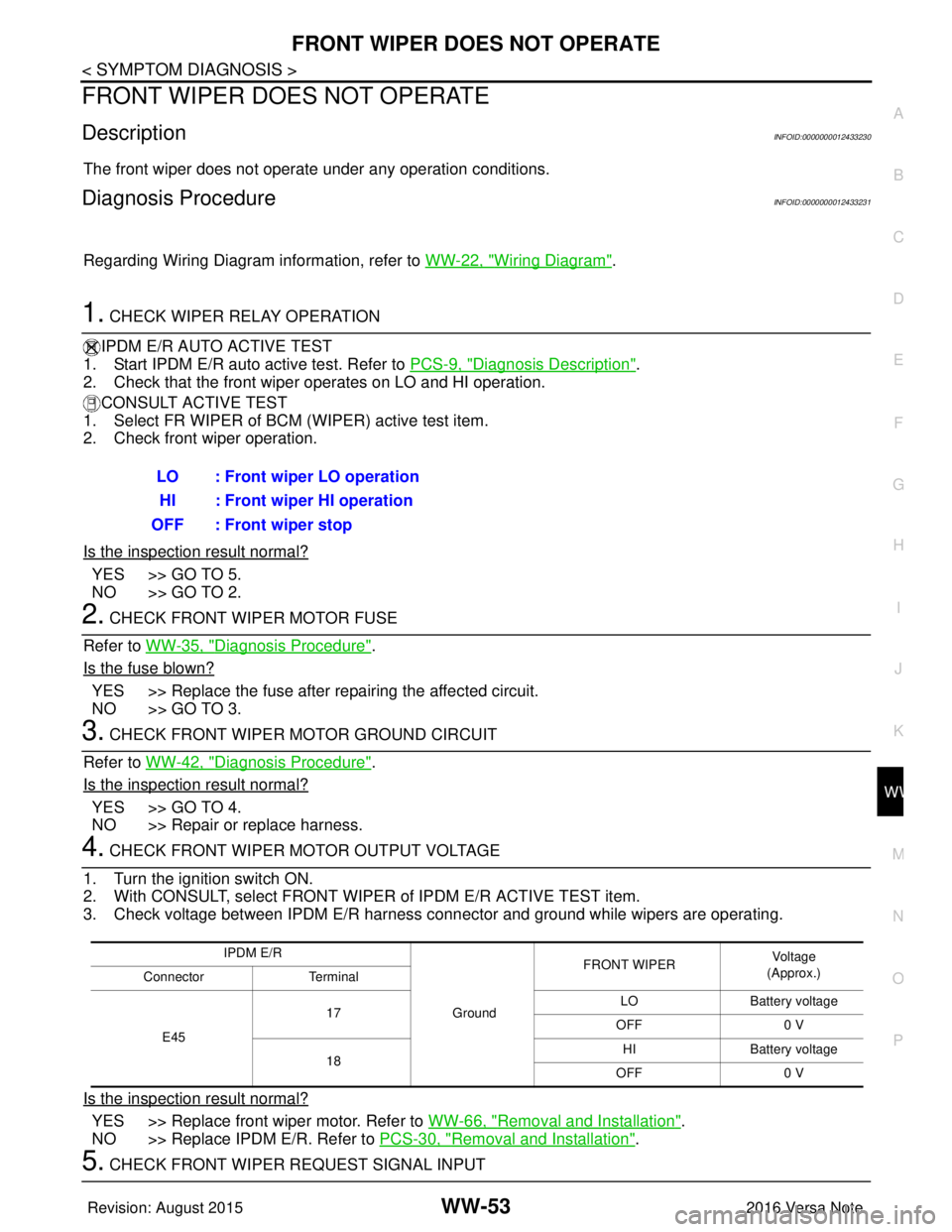
1. CHECK WIPER RELAY OPERATION
IPDM E/R AUTO ACTIVE TEST
1. Start IPDM E/R auto active test. Refer to PCS-9, "
Diagnosis Description".
2. Check that the front wiper operates on LO and HI operation.
CONSULT ACTIVE TEST
1. Select FR WIPER of BCM (WIPER) active test item.
2. Check front wiper operation.
Is the inspection result normal?
YES >> GO TO 5.
NO >> GO TO 2.
2. CHECK FRONT WIPER MOTOR FUSE
Refer to WW-35, "
Diagnosis Procedure".
Is the fuse blown?
YES >> Replace the fuse after repairing the affected circuit.
NO >> GO TO 3.
3. CHECK FRONT WIPER MOTOR GROUND CIRCUIT
Refer to WW-42, "
Diagnosis Procedure".
Is the inspection result normal?
YES >> GO TO 4.
NO >> Repair or replace harness.
4. CHECK FRONT WIPER MOTOR OUTPUT VOLTAGE
1. Turn the ignition switch ON.
2. With CONSULT, select FRONT WIPER of IPDM E/R ACTIVE TEST item.
3. Check voltage between IPDM E/R harness connector and ground while wipers are operating.
Is the inspection result normal?
YES >> Replace front wiper motor. Refer to WW-66, "Removal and Installation".
NO >> Replace IPDM E/R. Refer to PCS-30, "
Removal and Installation".
5. CHECK FRONT WIPER REQUEST SIGNAL INPUTLO : Front wiper LO operation
HI : Front wiper HI operation
OFF : Front wiper stop
IPDM E/R
GroundFRONT WIPER
Vo l ta g e
(Approx.)
Connector Terminal
E45 17
LO
Battery voltage
OFF 0 V
18 HI
Battery voltage
OFF 0 V
Revision: August 2015 2016 Versa Note
cardiagn.com
Page 3619 of 3641
WW-54
< SYMPTOM DIAGNOSIS >
FRONT WIPER DOES NOT OPERATE
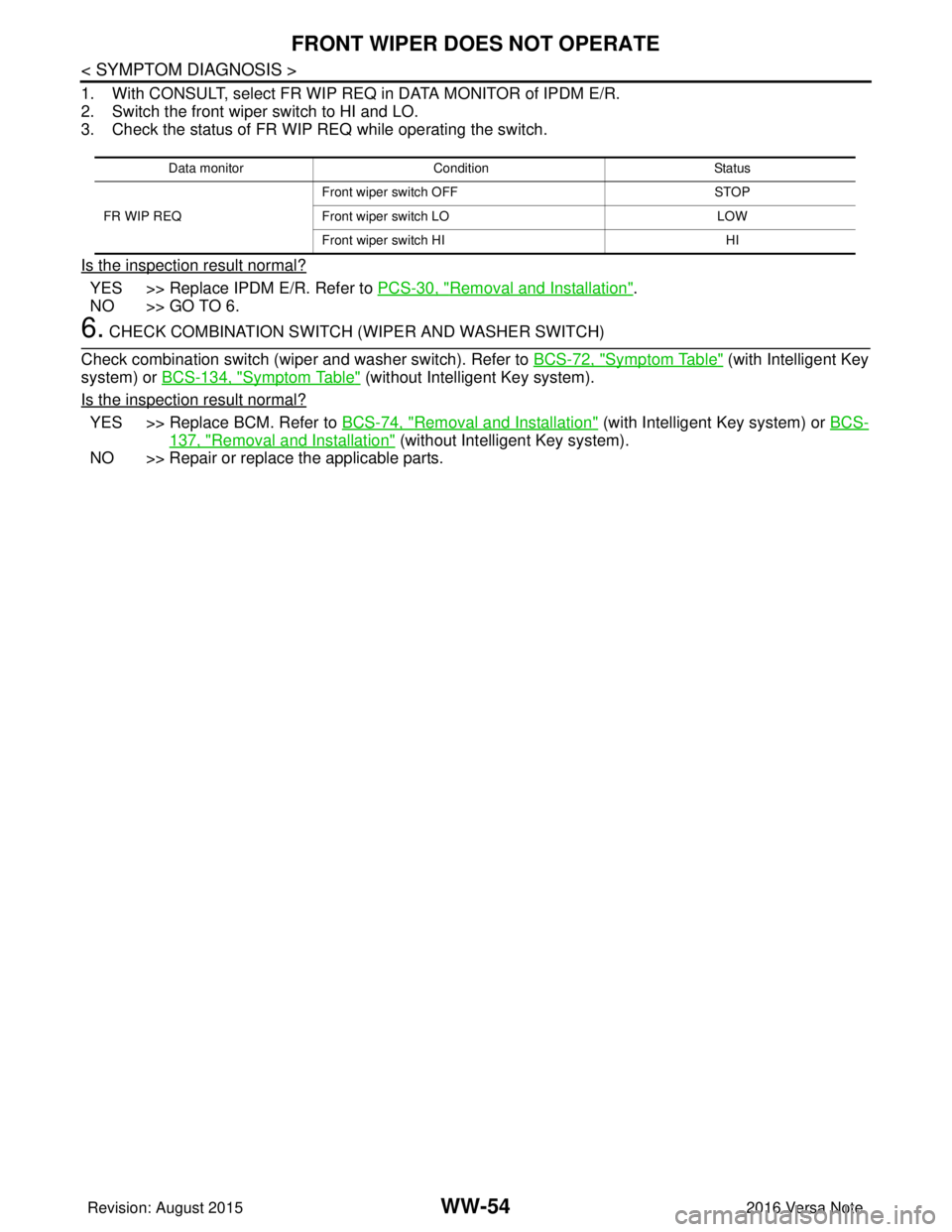
1. With CONSULT, select FR WIP REQ in DATA MONITOR of IPDM E/R.
2. Switch the front wiper switch to HI and LO.
3. Check the status of FR WIP REQ while operating the switch.
Is the inspection result normal?
YES >> Replace IPDM E/R. Refer to PCS-30, "Removal and Installation".
NO >> GO TO 6.
6. CHECK COMBINATION SWITCH (WIPER AND WASHER SWITCH)
Check combination switch (wiper and washer switch). Refer to BCS-72, "
Symptom Table" (with Intelligent Key
system) or BCS-134, "
Symptom Table" (without Intelligent Key system).
Is the inspection result normal?
YES >> Replace BCM. Refer to BCS-74, "Removal and Installation" (with Intelligent Key system) or BCS-
137, "Removal and Installation" (without Intelligent Key system).
NO >> Repair or replace the applicable parts.
Data monitor Condition Status
FR WIP REQ Front wiper switch OFF
STOP
Front wiper switch LO LOW
Front wiper switch HI HI
Revision: August 2015 2016 Versa Note
cardiagn.com
Page 3620 of 3641

NORMAL OPERATING CONDITIONWW-55
< SYMPTOM DIAGNOSIS >
C
DE
F
G H
I
J
K
M A
B
WW
N
O P
NORMAL OPERATING CONDITION
DescriptionINFOID:0000000012433232
FRONT WIPER PROTECTION FUNCTION
IPDM E/R detects front wiper stop positi on by a front wiper stop position signal.
When a front wiper stop position signal is in the conditions listed below, IPDM E/R stops power supply to wiper
after repeating a front wiper 10 seconds activation and 20 seconds stop.
NOTE:
This operation status can be confirmed on the IPDM E/ R “Data Monitor” that displays “BLOCK” for the item
“WIP PROT” while the wiper is stopped.
REAR WIPER MOTOR PROTECTION FUNCTION
• BCM may stop rear wiper to protect the rear wiper motor when the rear wiper is stopped for 5 seconds or
more due to a snowfall.
• Rear wiper operates normally one minute after the obstacles are removed with rear wiper OFF.
Ignition switch Front wiper switch Front wiper stop position signal
ON OFF The front wiper stop position signal (stop position) cannot be input for 10 seconds.
ON The front wiper stop position signal does not change for 10 seconds.
Revision: August 2015 2016 Versa Note
cardiagn.com
Page 3628 of 3641
FRONT WIPER ARMWW-63
< REMOVAL AND INSTALLATION >
C
DE
F
G H
I
J
K
M A
B
WW
N
O P
FRONT WIPER ARM
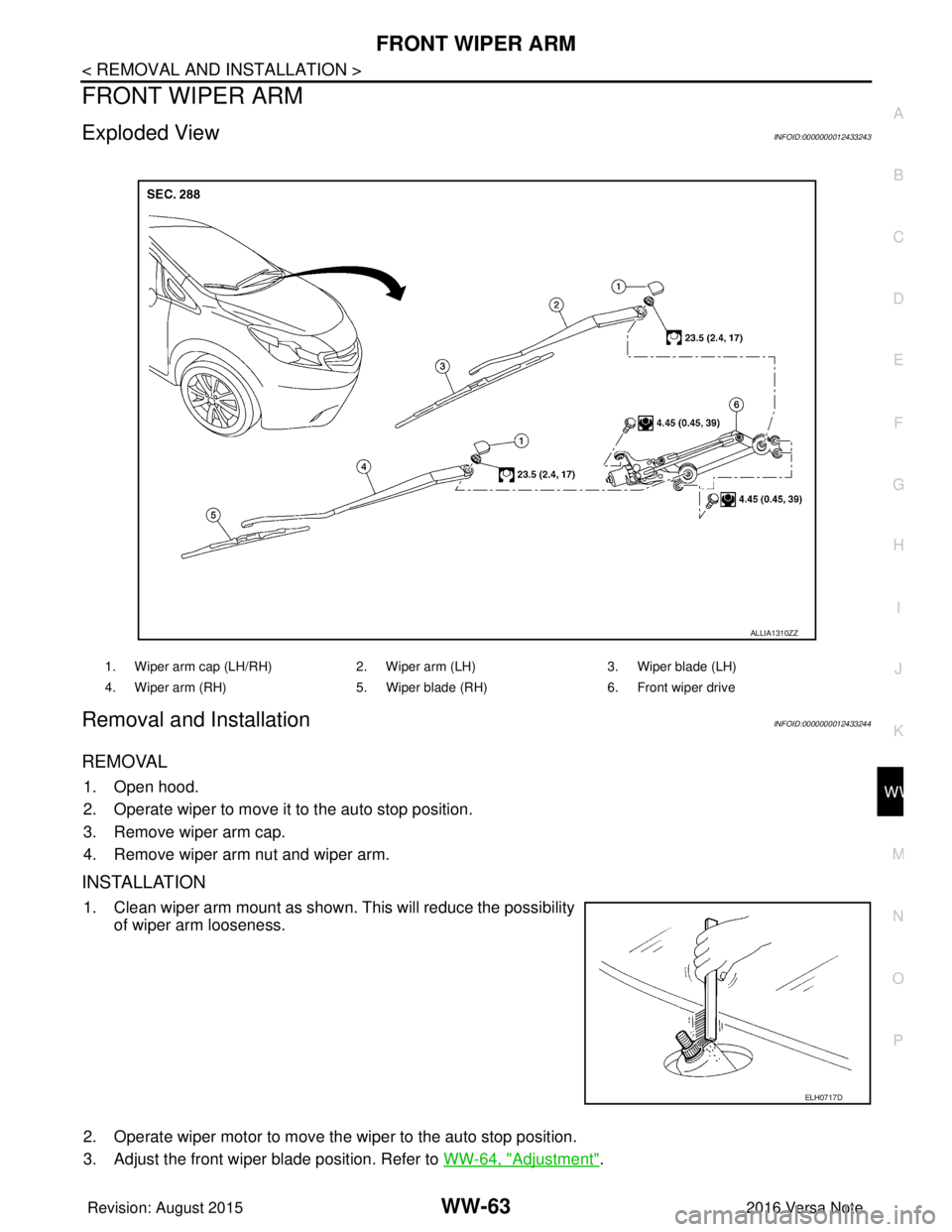
Exploded ViewINFOID:0000000012433243
Removal and InstallationINFOID:0000000012433244
REMOVAL
1. Open hood.
2. Operate wiper to move it to the auto stop position.
3. Remove wiper arm cap.
4. Remove wiper arm nut and wiper arm.
INSTALLATION
1. Clean wiper arm mount as shown. This will reduce the possibility of wiper arm looseness.
2. Operate wiper motor to move the wiper to the auto stop position.
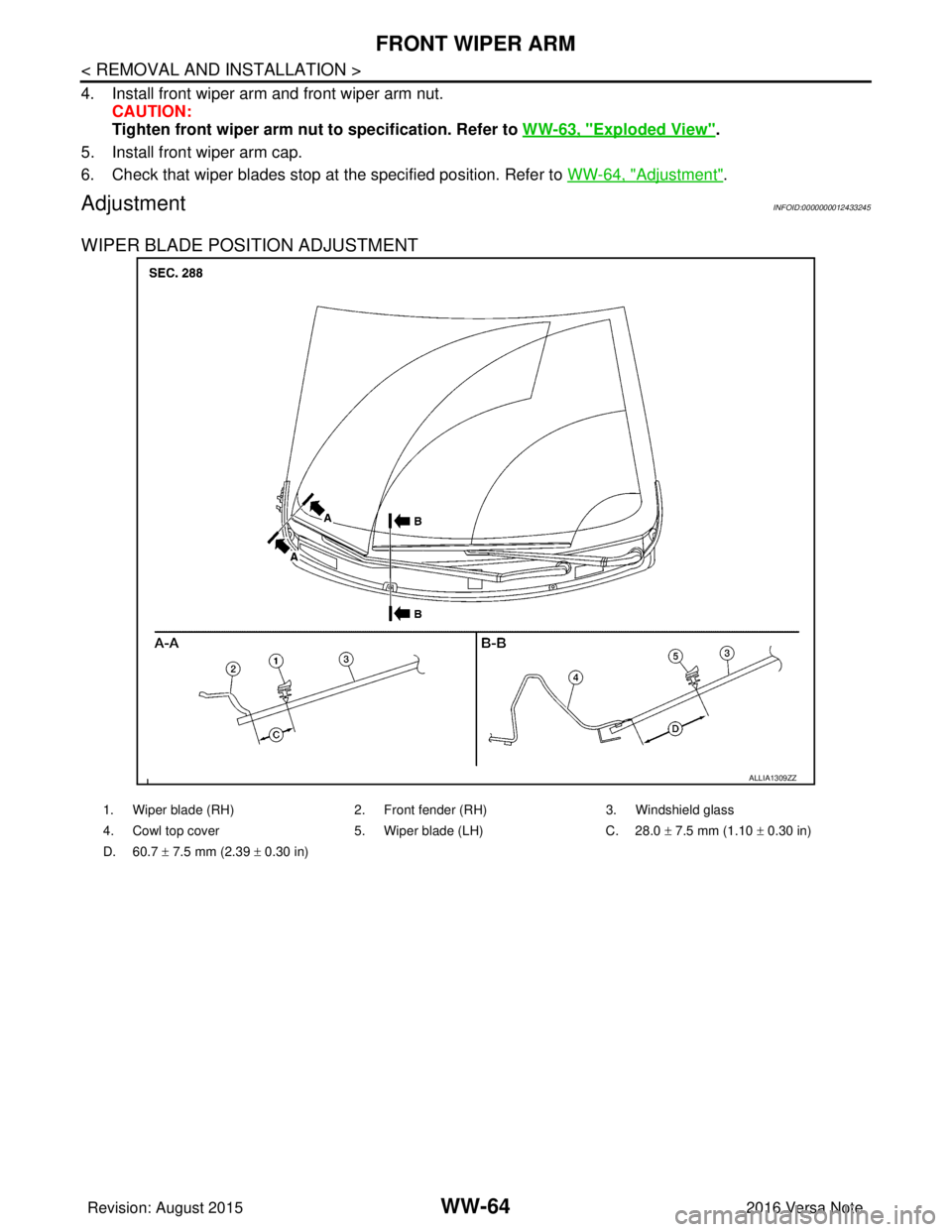
3. Adjust the front wiper blade position. Refer to WW-64, "
Adjustment".
1. Wiper arm cap (LH/RH)2. Wiper arm (LH)3. Wiper blade (LH)
4. Wiper arm (RH) 5. Wiper blade (RH)6. Front wiper drive
ALLIA1310ZZ
ELH0717D
Revision: August 2015 2016 Versa Note
cardiagn.com
Page 3629 of 3641
WW-64
< REMOVAL AND INSTALLATION >
FRONT WIPER ARM
4. Install front wiper arm and front wiper arm nut.CAUTION:
Tighten front wiper arm nut to specification. Refer to WW-63, "
Exploded View".
5. Install front wiper arm cap.
6. Check that wiper blades stop at the specified position. Refer to WW-64, "
Adjustment".
AdjustmentINFOID:0000000012433245
WIPER BLADE POSITION ADJUSTMENT
ALLIA1309ZZ
1. Wiper blade (RH) 2. Front fender (RH) 3. Windshield glass
4. Cowl top cover 5. Wiper blade (LH) C. 28.0 ± 7.5 mm (1.10 ± 0.30 in)
D. 60.7 ± 7.5 mm (2.39 ± 0.30 in)
Revision: August 2015 2016 Versa Note
cardiagn.com
Page 3630 of 3641
FRONT WIPER BLADEWW-65
< REMOVAL AND INSTALLATION >
C
DE
F
G H
I
J
K
M A
B
WW
N
O P
FRONT WIPER BLADE
Removal and InstallationINFOID:0000000012433246
REMOVAL
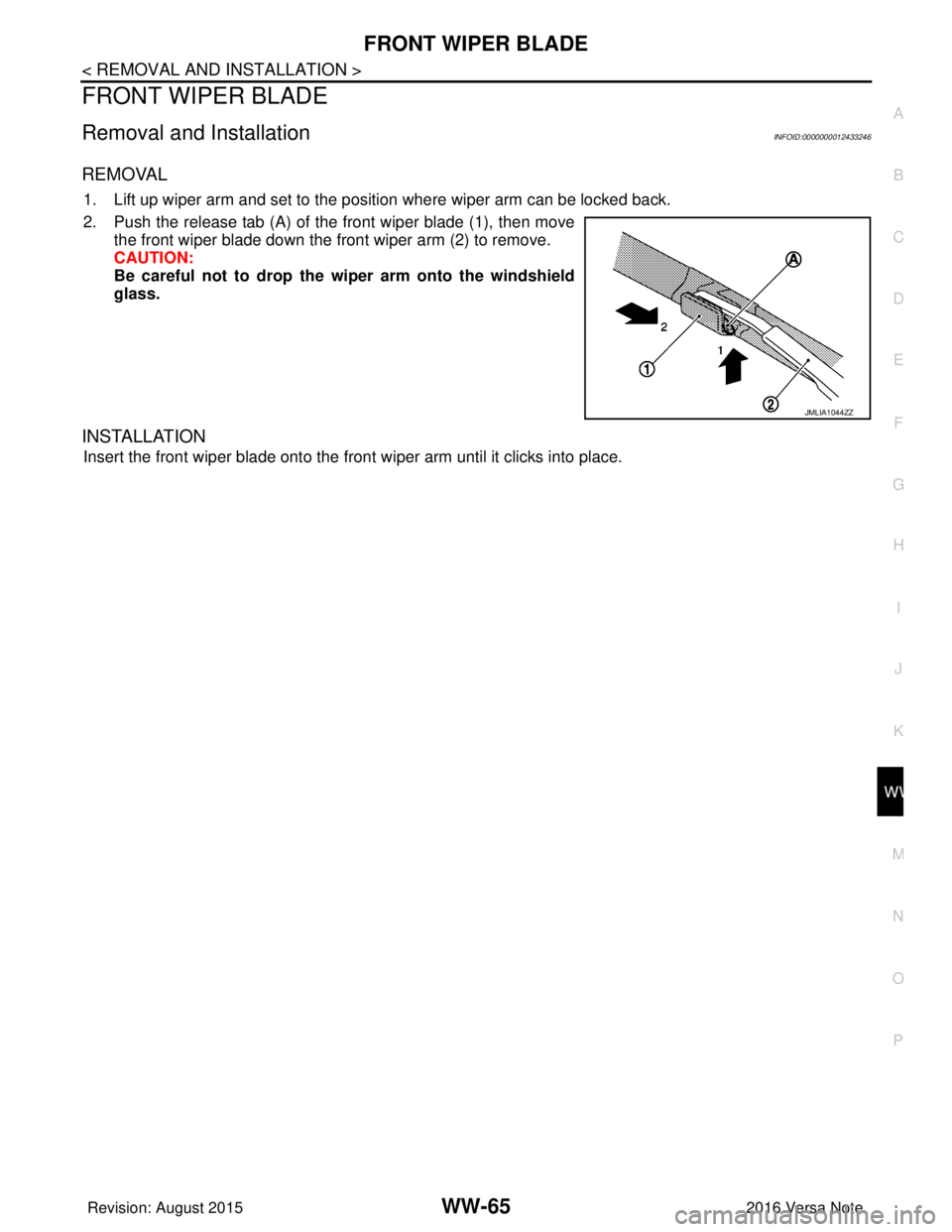
1. Lift up wiper arm and set to the position where wiper arm can be locked back.
2. Push the release tab (A) of the front wiper blade (1), then move the front wiper blade down the front wiper arm (2) to remove.
CAUTION:
Be careful not to drop the wiper arm onto the windshield
glass.
INSTALLATION
Insert the front wiper blade onto the front wiper arm until it clicks into place.
JMLIA1044ZZ
Revision: August 2015 2016 Versa Note
cardiagn.com
Page 3631 of 3641
WW-66
< REMOVAL AND INSTALLATION >
FRONT WIPER DRIVE ASSEMBLY
FRONT WIPER DRIVE ASSEMBLY
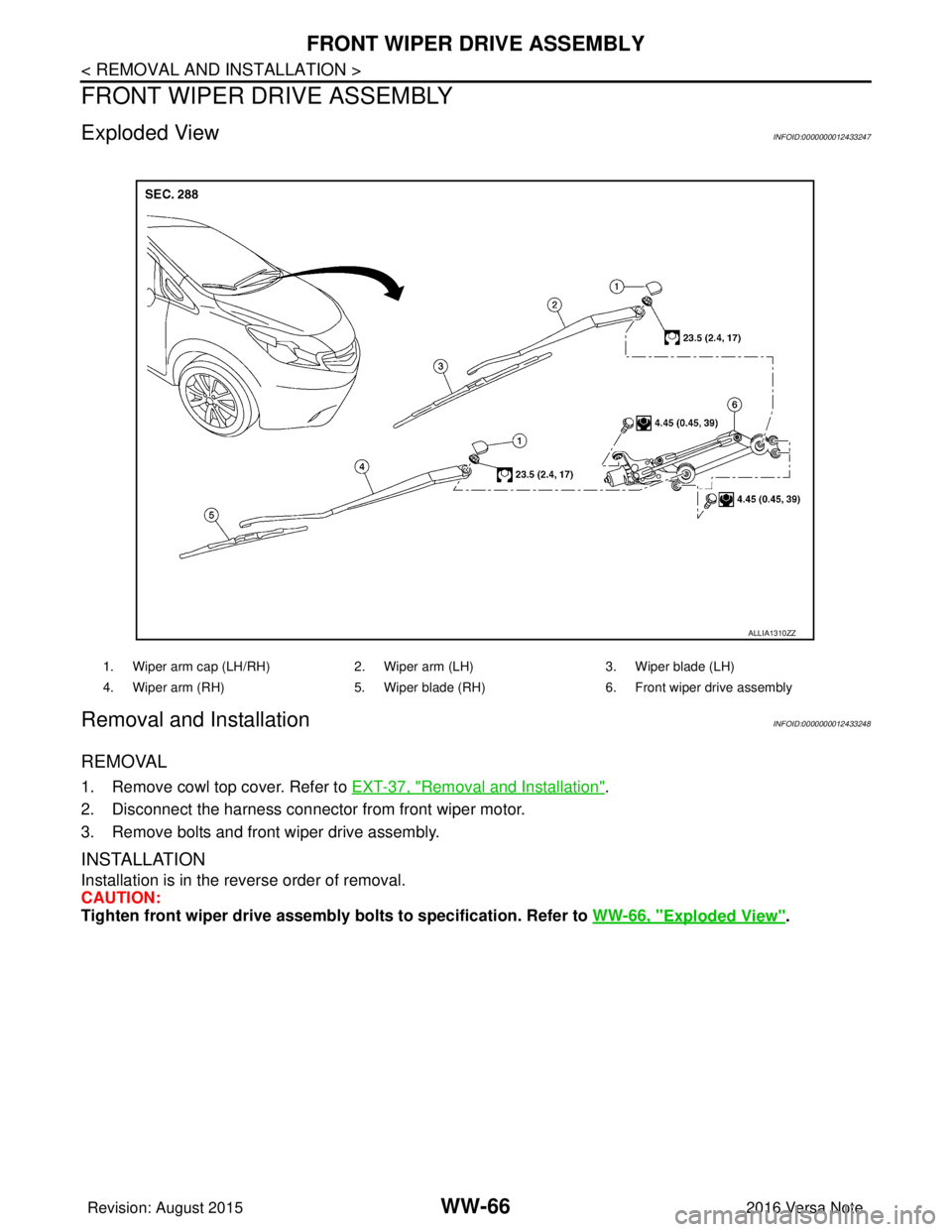
Exploded ViewINFOID:0000000012433247
Removal and InstallationINFOID:0000000012433248
REMOVAL
1. Remove cowl top cover. Refer to EXT-37, "Removal and Installation".
2. Disconnect the harness connector from front wiper motor.
3. Remove bolts and front wiper drive assembly.
INSTALLATION
Installation is in the reverse order of removal.
CAUTION:
Tighten front wiper drive assembly bo lts to specification. Refer to WW-66, "
Exploded View".
1. Wiper arm cap (LH/RH) 2. Wiper arm (LH)3. Wiper blade (LH)
4. Wiper arm (RH) 5. Wiper blade (RH) 6. Front wiper drive assembly
ALLIA1310ZZ
Revision: August 2015 2016 Versa Note
cardiagn.com