trans NISSAN NOTE 2016 Service Repair Manual
[x] Cancel search | Manufacturer: NISSAN, Model Year: 2016, Model line: NOTE, Model: NISSAN NOTE 2016Pages: 3641, PDF Size: 28.72 MB
Page 1673 of 3641
DIAGNOSIS SYSTEM (IPDM E/R)EXL-21
< SYSTEM DESCRIPTION >
C
DE
F
G H
I
J
K
M A
B
EXL
N
O P
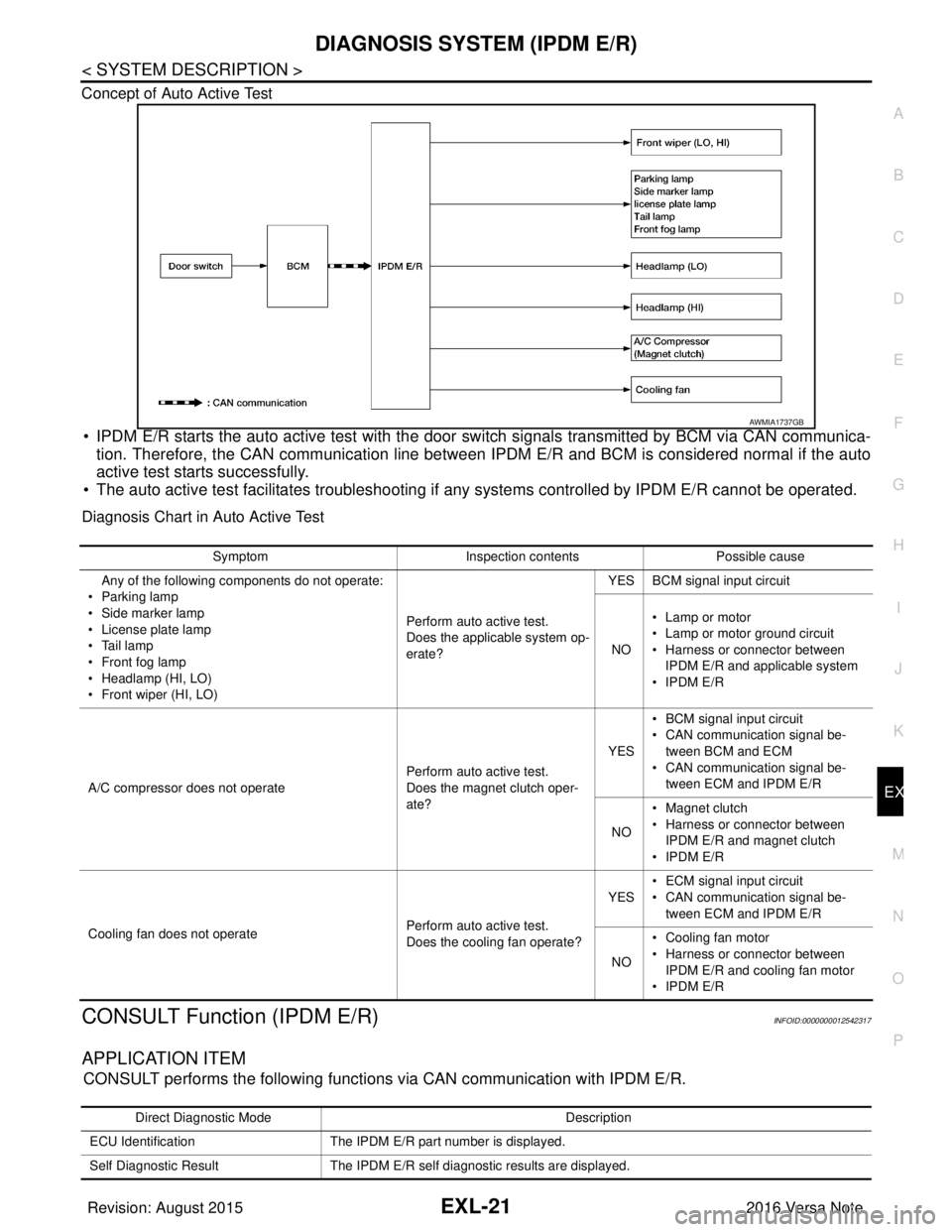
Concept of Auto Active Test
• IPDM E/R starts the auto active test with the door
switch signals transmitted by BCM via CAN communica-
tion. Therefore, the CAN communication line between IPDM E/R and BCM is considered normal if the auto
active test starts successfully.
• The auto active test facilitates troubleshooting if any systems controlled by IPDM E/R cannot be operated.
Diagnosis Chart in Auto Active Test
CONSULT Function (IPDM E/R)INFOID:0000000012542317
APPLICATION ITEM
CONSULT performs the following functions via CAN communication with IPDM E/R.
AWMIA1737GB
SymptomInspection contentsPossible cause
Any of the following components do not operate:
•Parking lamp
• Side marker lamp
• License plate lamp
•Tail lamp
•Front fog lamp
• Headlamp (HI, LO)
• Front wiper (HI, LO) Perform auto active test.
Does the applicable system op-
erate?YES BCM signal input circuit
NO • Lamp or motor
• Lamp or motor ground circuit
• Harness or connector between
IPDM E/R and applicable system
•IPDM E/R
A/C compressor does not operate Perform auto active test.
Does the magnet clutch oper-
ate?YES
• BCM signal input circuit
• CAN communication signal be-
tween BCM and ECM
• CAN communication signal be-
tween ECM and IPDM E/R
NO • Magnet clutch
• Harness or connector between
IPDM E/R and magnet clutch
•IPDM E/R
Cooling fan does not operate Perform auto active test.
Does the cooling fan operate?YES
• ECM signal input circuit
• CAN communication signal be-
tween ECM and IPDM E/R
NO • Cooling fan motor
• Harness or connector between
IPDM E/R and cooling fan motor
•IPDM E/R
Direct Diagnostic Mode Description
ECU Identification The IPDM E/R part number is displayed.
Self Diagnostic Result The IPDM E/R self diagnostic results are displayed.
Revision: August 2015 2016 Versa Note
cardiagn.com
Page 1674 of 3641

EXL-22
< SYSTEM DESCRIPTION >
DIAGNOSIS SYSTEM (IPDM E/R)
ECU IDENTIFICATION
The IPDM E/R part number is displayed.
SELF DIAGNOSTIC RESULT
Refer to PCS-20, "DTCIndex".
DATA MONITOR
ACTIVE TEST
Data Monitor The IPDM E/R input/output data is displayed in real time.
Active Test The IPDM E/R activates outputs to test components.
CAN Diag Support Mntr The result of transmit/receive diagnosis of CAN communication is displayed.
Direct Diagnostic Mode
Description
Monitor Item [Unit]Main
Signals Description
MOTOR FAN REQ [1/2/3/4] ×Indicates cooling fan speed signal received from ECM on CAN communication
line
AC COMP REQ [On/Off] ×Indicates A/C compressor request signal received from ECM on CAN commu-
nication line
TAIL&CLR REQ [On/Off] ×Indicates position light request signal received from BCM on CAN communica-
tion line
HL LO REQ [On/Off] ×Indicates low beam request signal received from BCM on CAN communication
line
HL HI REQ [On/Off] ×Indicates high beam request signal received from BCM on CAN communication
line
FR FOG REQ [On/Off] ×Indicates front fog light request signal received from BCM on CAN communica-
tion line
FR WIP REQ [Stop/1LOW/Low/Hi] ×Indicates front wiper request signal received from BCM on CAN communication
line
WIP AUTO STOP [STOP P/ACT P] ×Indicates condition of front wiper auto stop signal
WIP PROT [Off/BLOCK] ×Indicates condition of front wiper fail-safe operation
IGN RLY1 -REQ [On/Off] Indicates ignition switch ON signal received from BCM on CAN communication
line
IGN RLY [On/Off] ×Indicates condition of ignition relay
PUSH SW [On/Off] Indicates condition of push-button ignition switch
INTER/NP SW [On/Off] Indicates condition of CVT shift position
ST RLY CONT [On/Off] Indicates starter relay status signal received from BCM on CAN communication
line
IHBT RLY -REQ [On/Off] Indicates starter control relay signal received from BCM on CAN communication
line
ST/INHI RLY [Off/ ST /INHI] Indicates condition of starter relay and starter control relay
DETENT SW [On/Off] Indicates condition of CVT shift selector (park position switch)
DTRL REQ [Off] Indicates daytime running light request signal received from BCM on CAN com-
munication line
THFT HRN REQ [On/Off] Indicates theft warning horn request signal received from BCM on CAN commu-
nication line
HORN CHIRP [On/Off] Indicates horn reminder signal received from BCM on CAN communication line
Te s t i t e m D e s c r i p t i o n
HORN This test is able to check horn operation [On].
FRONT WIPER This test is able to check wiper motor operation [Hi/Lo/Off].
Revision: August 2015 2016 Versa Note
cardiagn.com
Page 1778 of 3641
SYSTEMEXT-11
< SYSTEM DESCRIPTION >
C
DE
F
G H
I
J
L
M A
B
EXT
N
O P
SYSTEM
ACTIVE GRILLE SHUTTER SYSTEM
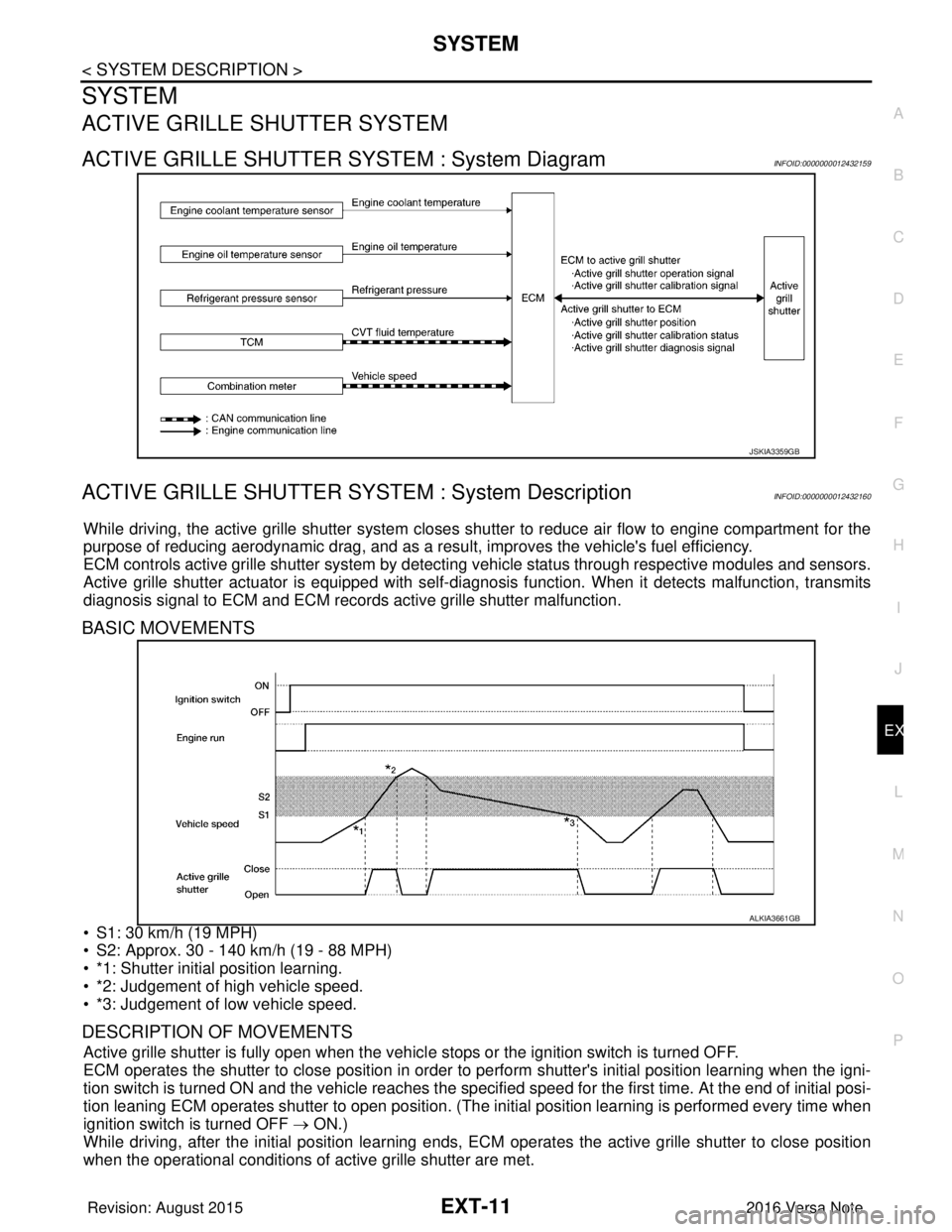
ACTIVE GRILLE SHUTTER SYSTEM : System DiagramINFOID:0000000012432159
ACTIVE GRILLE SHUTTER SYSTEM : System DescriptionINFOID:0000000012432160
While driving, the active grille shutter system closes shutter to reduce air flow to engine compartment for the
purpose of reducing aerodynamic drag, and as a resu lt, improves the vehicle's fuel efficiency.
ECM controls active grille shutter system by detecting vehicle status through respective modules and sensors.
Active grille shutter actuator is equipped with self-d iagnosis function. When it detects malfunction, transmits
diagnosis signal to ECM and ECM records active grille shutter malfunction.
BASIC MOVEMENTS
• S1: 30 km/h (19 MPH)
• S2: Approx. 30 - 140 km/h (19 - 88 MPH)
• *1: Shutter initial position learning.
• *2: Judgement of high vehicle speed.
• *3: Judgement of low vehicle speed.
DESCRIPTION OF MOVEMENTS
Active grille shutter is fully open when the vehicl e stops or the ignition switch is turned OFF.
ECM operates the shutter to close position in order to perform shutter's initial position learning when the igni-
tion switch is turned ON and the vehicle reaches the specified speed for the first time. At the end of initial posi-
tion leaning ECM operates shutter to open position. (The in itial position learning is performed every time when
ignition switch is turned OFF → ON.)
While driving, after the initial position learning ends, EC M operates the active grille shutter to close position
when the operational conditions of active grille shutter are met.
JSKIA3359GB
ALKIA3661GB
Revision: August 2015 2016 Versa Note
cardiagn.com
Page 1787 of 3641

EXT-20
< SYMPTOM DIAGNOSIS >
SQUEAK AND RATTLE TROUBLE DIAGNOSES
1. Loose harness or harness connectors.
2. Front console map/reading lamp lens loose.
3. Loose screws at console attachment points.
SEATS
When isolating seat noise it's important to note the position the seat is in and the load placed on the seat when
the noise is present. These conditions should be duplicated when verifying and isolating the cause of the
noise.
Cause of seat noise include:
1. Headrest rods and holder
2. A squeak between the seat pad cushion and frame
3. The rear seatback lock and bracket
These noises can be isolated by moving or pressing on the suspected components while duplicating the con-
ditions under which the noise occurs. Most of thes e incidents can be repaired by repositioning the component
or applying urethane tape to the contact area.
UNDERHOOD
Some interior noise may be caused by components under the hood or on the engine wall. The noise is then
transmitted into the passenger compartment.
Causes of transmitted underhood noise include:
1. Any component installed to the engine wall
2. Components that pass through the engine wall
3. Engine wall mounts and connectors
4. Loose radiator installation pins
5. Hood bumpers out of adjustment
6. Hood striker out of adjustment
These noises can be difficult to isolate since they cannot be reached from the interior of the vehicle. The best
method is to secure, move or insulate one component at a time and test drive the vehicle. Also, engine rpm or
load can be changed to isolate the noise. Repairs can usually be made by moving, adjusting, securing, or
insulating the component causing the noise.
Revision: August 2015 2016 Versa Note
cardiagn.com
Page 1818 of 3641
FAX-1
TRANSMISSION & DRIVELINE
CEF
G H
I
J
K L
M
SECTION FA X
A
B
FA X
N
O P
CONTENTS
FRONT AXLE
PRECAUTION ....... ........................................2
PRECAUTIONS .............................................. .....2
Precaution for Supplemental Restraint System
(SRS) "AIR BAG" and "SEAT BELT PRE-TEN-
SIONER" ............................................................. ......
2
Precaution for Drive Shaft .........................................2
Precautions for Wheel Hub and Knuckle ..................2
PREPARATION ............................................3
PREPARATION .............................................. .....3
Special Service Tools .......................................... ......3
Commercial Service Tools ........................................4
SYMPTOM DIAGNOSIS ...............................6
NOISE, VIBRATION AND HARSHNESS
(NVH) TROUBLESHOOTING ........................ .....
6
NVH Troubleshooting Chart ................................ ......6
PERIODIC MAINTENANCE ..........................7
FRONT WHEEL HUB AND KNUCKLE ......... .....7
Inspection ............................................................ ......7
FRONT DRIVE SHAFT ........................................8
Inspection ............................................................ ......8
REMOVAL AND INSTALLATION ................9
FRONT WHEEL HUB AND KNUCKLE ......... .....9
Exploded View ..................................................... .....9
Removal and Installation ..........................................9
Disassembly and Assembly .....................................11
Inspection ................................................................13
FRONT DRIVE SHAFT BOOT ..........................14
Exploded View .........................................................14
WHEEL SIDE ......................................................... ....14
WHEEL SIDE : Removal and Installation ................15
TRANSAXLE SIDE ................................................ ....18
TRANSAXLE SIDE : Removal and Installation .......18
Inspection ............................................................ ....18
FRONT DRIVE SHAFT .....................................19
Exploded View .........................................................19
Removal and Installation .........................................19
UNIT DISASSEMBLY AND ASSEMBLY ....21
FRONT DRIVE SHAFT .....................................21
Exploded View ..................................................... ....21
Disassembly and Assembly .....................................22
SERVICE DATA AND SPECIFICATIONS
(SDS) ............... .......................................... ...
27
SERVICE DATA AND SPECIFICATIONS
(SDS) .................................................................
27
Wheel Bearing ..................................................... ....27
Drive Shaft ...............................................................27
Revision: August 2015 2016 Versa Note
cardiagn.com
Page 1827 of 3641
FAX-10
< REMOVAL AND INSTALLATION >
FRONT WHEEL HUB AND KNUCKLE
6. Separate the drive shaft from the wheel hub by lightly tapping the end of the drive shaft using a suitable
tool and a wood block.
NOTE:
Use suitable puller if wheel hub and drive shaft cannot be separated after performing the above proce-
dure.
7. Remove wheel hub lock nut.
8. Remove the nut and separate the steering out er socket from steering knuckle. Refer to ST-14, "
Exploded
View".
9. Remove the nuts and bolts, then separate the steering knuckle from strut. Refer to FA X - 9 , "
Removal and
Installation".
10. Suspend the drive shaft with suitable wire. CAUTION:
• Do not place drive shaft joint at an extreme angle. Also be careful not to overextend slide joint.
• Do not allow drive shaft to hang down withou t support for joint sub-assembly, shaft and the
other parts.
11. Remove transverse link outer nut and bolt. Remove steering knuckle from transverse link.
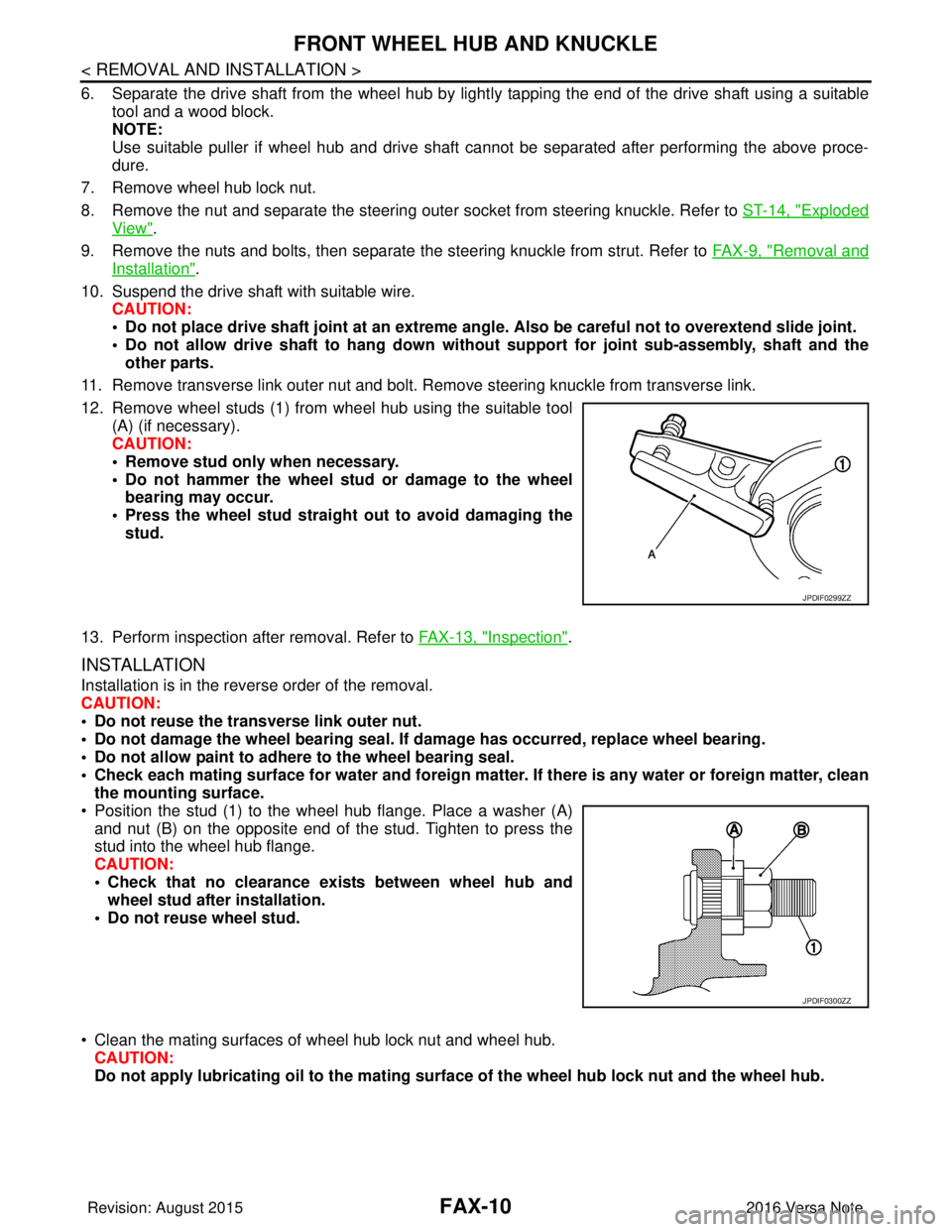
12. Remove wheel studs (1) from wheel hub using the suitable tool (A) (if necessary).
CAUTION:
• Remove stud only when necessary.
• Do not hammer the wheel stud or damage to the wheelbearing may occur.
• Press the wheel stud straight out to avoid damaging the stud.
13. Perform inspection after removal. Refer to FAX-13, "
Inspection".
INSTALLATION
Installation is in the reverse order of the removal.
CAUTION:
• Do not reuse the transverse link outer nut.
• Do not damage the wheel bearing seal. If damage has occurred, replace wheel bearing.
• Do not allow paint to adhere to the wheel bearing seal.
• Check each mating surface for water and foreign matter. If there is any water or foreign matter, clean
the mounting surface.
• Position the stud (1) to the wheel hub flange. Place a washer (A) and nut (B) on the opposite end of the stud. Tighten to press the
stud into the wheel hub flange.
CAUTION:
• Check that no clearance exists between wheel hub andwheel stud after installation.
• Do not reuse wheel stud.
• Clean the mating surfaces of wheel hub lock nut and wheel hub. CAUTION:
Do not apply lubricatin g oil to the mating surface of the wh eel hub lock nut and the wheel hub.
JPDIF0299ZZ
JPDIF0300ZZ
Revision: August 2015 2016 Versa Note
cardiagn.com
Page 1830 of 3641
FRONT WHEEL HUB AND KNUCKLEFAX-13
< REMOVAL AND INSTALLATION >
CEF
G H
I
J
K L
M A
B
FA X
N
O P
5. Perform inspection after assembly. Refer to FAX-13, "Inspection".
InspectionINFOID:0000000012431893
INSPECTION AFTER REMOVAL
Check the following items, and replace the part if necessary.
• Check components for deformation, cracks, and other damage.
• Check boots of transverse link and steering outer so cket ball joint for breakage, axial end play, and swing
torque. Refer to FSU-10, "
Inspection" and FSU-20, "Ball Joint".
INSPECTION AFTER DISASSEMBLY
Wheel Hub
• Check wheel hub for cracks (with magnetic exploration or dye testing). Replace if necessary.
Steering Knuckle
• Check steering knuckle for deformation, cracks, and other damage. Replace if any non-standard conditions
are found.
Snap Rings
• Check snap ring for wear or cracks. Replace if necessary.
INSPECTION AFTER ASSEMBLY
Check wheel bearing rotating torque as per the following instructions.
NOTE:
The adequacy of turning torque can be judged from a measurement value by a spring balancer.
1. For a proper fit of the bearing, turn the wheel hub clockwise and counterclockwise, respectively, 10 times
or more with a press-fit load applied.
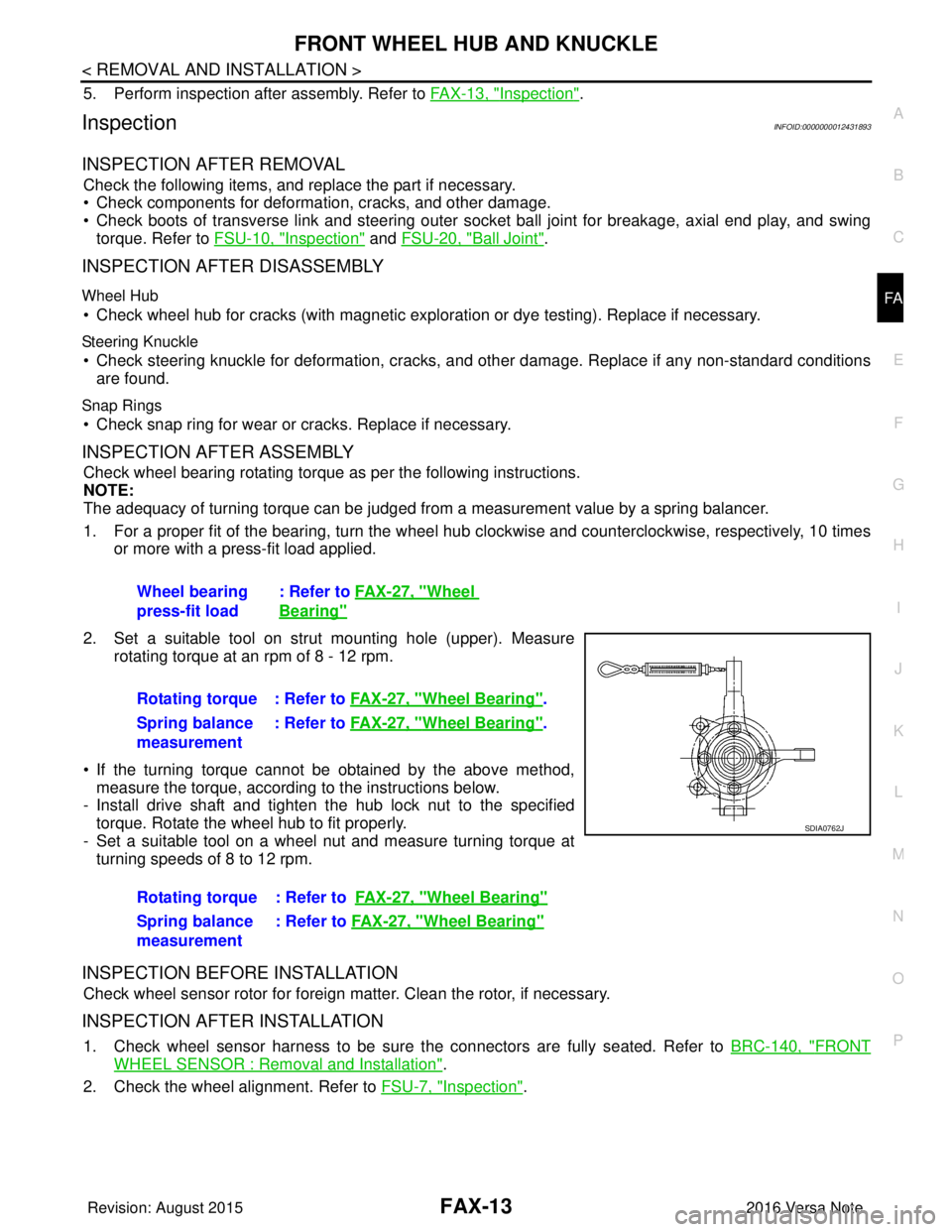
2. Set a suitable tool on strut mounting hole (upper). Measure rotating torque at an rpm of 8 - 12 rpm.
• If the turning torque cannot be obtained by the above method, measure the torque, according to the instructions below.
- Install drive shaft and tighten the hub lock nut to the specified
torque. Rotate the wheel hub to fit properly.
- Set a suitable tool on a wheel nut and measure turning torque at turning speeds of 8 to 12 rpm.
INSPECTION BEFORE INSTALLATION
Check wheel sensor rotor for foreign matter. Clean the rotor, if necessary.
INSPECTION AFTER INSTALLATION
1. Check wheel sensor harness to be sure the connectors are fully seated. Refer to BRC-140, "FRONT
WHEEL SENSOR : Removal and Installation".
2. Check the wheel alignment. Refer to FSU-7, "
Inspection".
Wheel bearing
press-fit load
: Refer to
FAX-27, "
Wheel
Bearing"
Rotating torque : Refer to FAX-27, "Wheel Bearing".
Spring balance
measurement : Refer to
FAX-27, "
Wheel Bearing".
Rotating torque : Refer to FAX-27, "
Wheel Bearing"
Spring balance
measurement: Refer to
FAX-27, "Wheel Bearing"
SDIA0762J
Revision: August 2015 2016 Versa Note
cardiagn.com
Page 1832 of 3641
FRONT DRIVE SHAFT BOOTFAX-15
< REMOVAL AND INSTALLATION >
CEF
G H
I
J
K L
M A
B
FA X
N
O P
WHEEL SIDE : Removal and InstallationINFOID:0000000012431895
REMOVAL
1. Remove the wheel and tire using power tool. Refer to WT-48, "Removal and Installation".
2. Remove the brake caliper torque member bolts, leav ing the brake hose attached. Position the brake cali-
per aside with wire. Refer to BR-37, "
BRAKE CALIPER ASSEMBLY : Removal and Installation".
CAUTION:
Do not depress the brake pedal while the brake caliper is removed.
3. Put alignment marks on the disc brake rotor and on the wheel hub. Remove the disc brake rotor.
CAUTION:
Do not drop the disc brake rotor.
4. Remove the wheel sensor bolt. Position the wheel sensor and the wheel sensor harness aside. Refer to
BRC-140, "
FRONT WHEEL SENSOR : Removal and Installation".
5. Remove the cotter pin from the drive shaft.
6. Hold the wheel hub using Tool. Loosen the wheel hub lock nut.
7. Using a piece of wood and a suitable tool, tap on the wheel hub lock nut to disengage the drive shaft from the wheel hub.
CAUTION:
• Do not place the drive shaft joint at an extreme angle. Also be careful not to overextend slide
joint.
• Do not allow the drive shaft to hang down without support.
NOTE:
Use a suitable puller if the drive shaft cannot be separated from the wheel hub even after performing the
above procedure.
8. Remove the wheel hub lock nut.
9. Remove the nut and bolt from the lower ball joint. Disconnect the steering knuckle from the transverse
link.
10. Remove the drive shaft from the wheel hub.
11. Remove the boot bands.
12. Separate the boot from the joint sub-assembly.
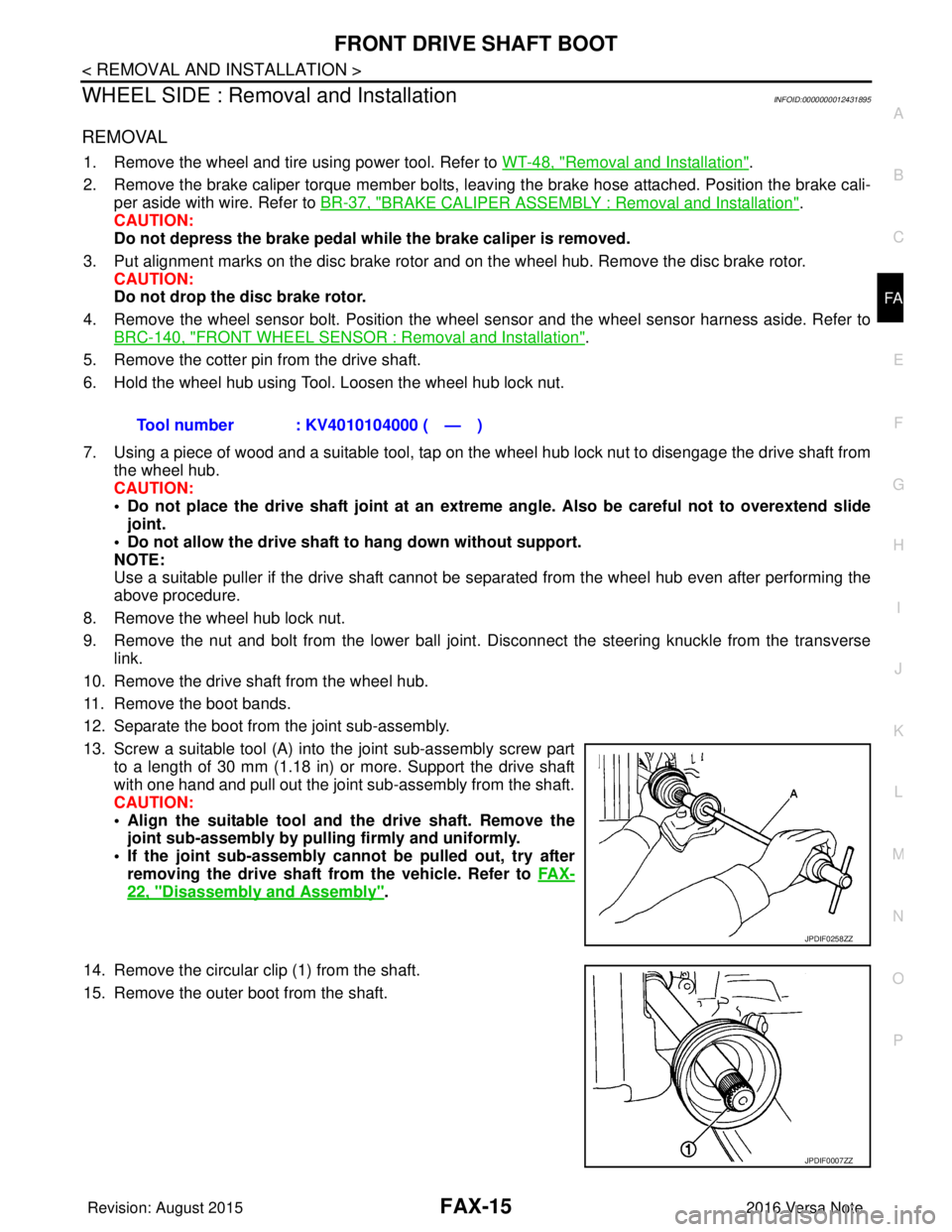
13. Screw a suitable tool (A) into the joint sub-assembly screw part to a length of 30 mm (1.18 in) or more. Support the drive shaft
with one hand and pull out the joint sub-assembly from the shaft.
CAUTION:
• Align the suitable tool an d the drive shaft. Remove the
joint sub-assembly by pull ing firmly and uniformly.
• If the joint sub-assembly cannot be pulled out, try after removing the drive shaft from the vehicle. Refer to FA X -
22, "Disassembly and Assembly".
14. Remove the circular clip (1) from the shaft.
15. Remove the outer boot from the shaft. Tool number : KV4010104000 ( — )
JPDIF0258ZZ
JPDIF0007ZZ
Revision: August 2015
2016 Versa Note
cardiagn.com
Page 1835 of 3641
FAX-18
< REMOVAL AND INSTALLATION >
FRONT DRIVE SHAFT BOOT
• Check each mating surface for water and foreign matter. If there is any water or foreign matter,
clean the mating surface.
17. Install the transverse link to the steering knuckle with the nut and bolt. Refer to FSU-10, "
Exploded View".
18. Hold the wheel hub using a Tool. Tighten the wheel hub lock nut. CAUTION:
• Since the drive shaft is assembled by press-fitting, use a torque wrench to tighten the wheel hub
lock nut. Do not use a power tool.
• Too much torque causes axle noise. Too little torque causes wheel bearing looseness. Tighten the wheel hub lock nut to the specification.
19. Install the cotter pin. Securely bend the cotter pin to prevent rattles. CAUTION:
Do not reuse the cotter pin.
20. Install the wheel sensor, the wheel sensor bolt, and the wheel sensor harness. Refer to BRC-140,
"FRONT WHEEL SENSOR : Removal and Installation".
21. Align the matching marks on the disc brake roto r and on the wheel hub. Install the disc brake rotor.
CAUTION:
Do not drop the disc brake rotor.
22. Remove the wire from the brake caliper. Install the brake caliper and the brake caliper torque member
bolts. Refer to BR-37, "
BRAKE CALIPER ASSEMBLY : Removal and Installation".
CAUTION:
Do not twist the brake hose.
23. Install the wheel and tire. Refer to WT-48, "
Removal and Installation".
24. Complete the inspection. Refer to FAX-18, "
Inspection".
TRANSAXLE SIDE
TRANSAXLE SIDE : Removal and InstallationINFOID:0000000012431896
Remove boot after drive shaft is removed from the vehicle.
• For drive shaft removal and installation, refer to FAX-19, "
Removal and Installation".
• For drive shaft disassembly and assembly, refer to FAX-22, "
Disassembly and Assembly".
InspectionINFOID:0000000012431897
INSPECTION AFTER INSTALLATION
1. Check the wheel sensor harness to be sure the connectors are fully seated.
2. Check the wheel alignment. Refer to FSU-7, "
Inspection".
Tool number : KV4010104000 ( — )
Revision: August 2015
2016 Versa Note
cardiagn.com
Page 1837 of 3641
FAX-20
< REMOVAL AND INSTALLATION >
FRONT DRIVE SHAFT
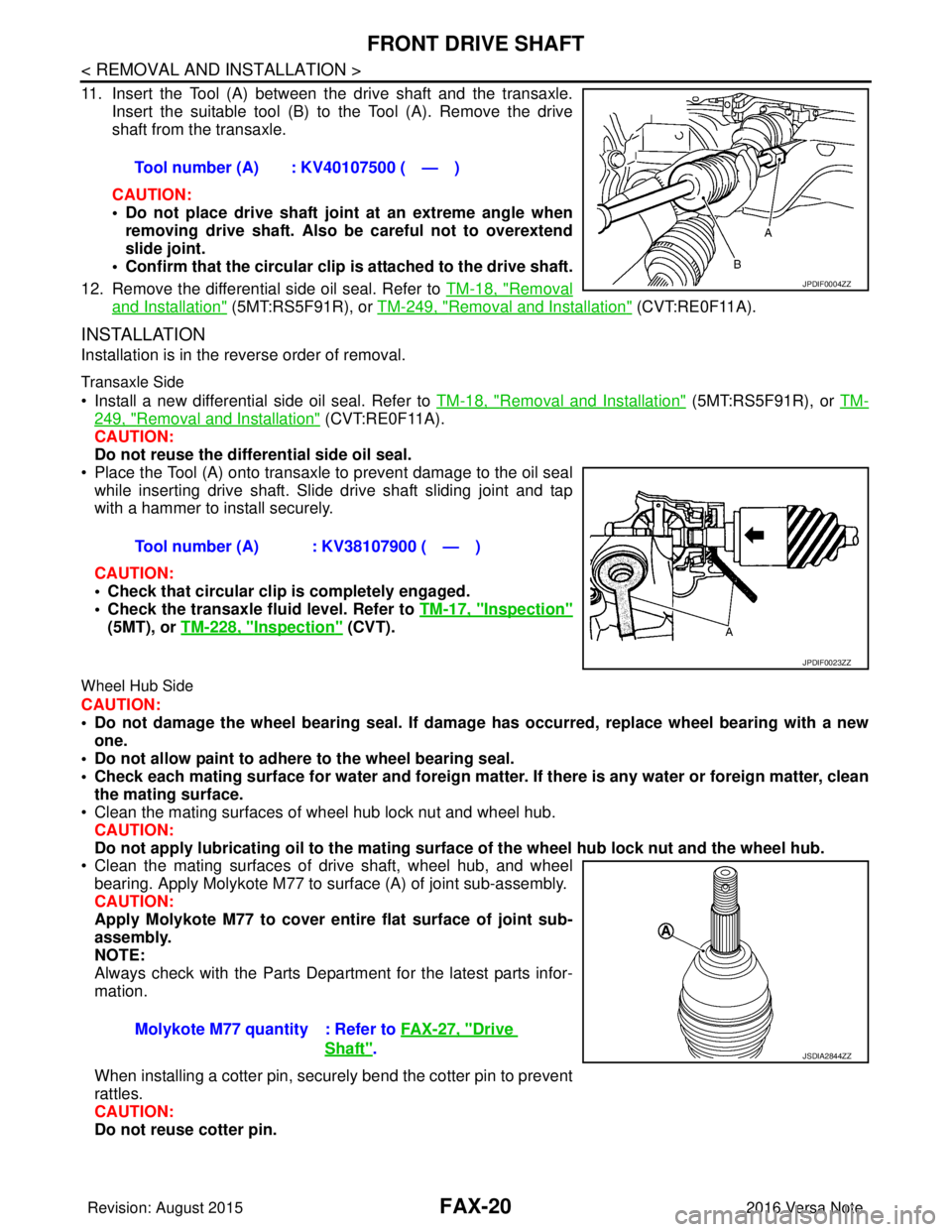
11. Insert the Tool (A) between the drive shaft and the transaxle.
Insert the suitable tool (B) to the Tool (A). Remove the drive
shaft from the transaxle.
CAUTION:
• Do not place drive shaft joint at an extreme angle when removing drive shaft. Also be careful not to overextend
slide joint.
• Confirm that the circular clip is attached to the drive shaft.
12. Remove the differential side oil seal. Refer to TM-18, "
Removal
and Installation" (5MT:RS5F91R), or TM-249, "Removal and Installation" (CVT:RE0F11A).
INSTALLATION
Installation is in the reverse order of removal.
Transaxle Side
• Install a new differential side oil seal. Refer to TM-18, "Removal and Installation" (5MT:RS5F91R), or TM-
249, "Removal and Installation" (CVT:RE0F11A).
CAUTION:
Do not reuse the differential side oil seal.
• Place the Tool (A) onto transaxle to prevent damage to the oil seal while inserting drive shaft. Slide drive shaft sliding joint and tap
with a hammer to install securely.
CAUTION:
• Check that circular clip is completely engaged.
• Check the transaxle fluid level. Refer to TM-17, "
Inspection"
(5MT), or TM-228, "Inspection" (CVT).
Wheel Hub Side
CAUTION:
• Do not damage the wheel bearing seal. If damage has occurred, replace wheel bearing with a new
one.
• Do not allow paint to adhere to the wheel bearing seal.
• Check each mating surface for water and foreign matter. If there is any water or foreign matter, clean
the mating surface.
• Clean the mating surfaces of wheel hub lock nut and wheel hub.
CAUTION:
Do not apply lubricatin g oil to the mating surface of the wh eel hub lock nut and the wheel hub.
• Clean the mating surfaces of drive shaft, wheel hub, and wheel
bearing. Apply Molykote M77 to surface (A) of joint sub-assembly.
CAUTION:
Apply Molykote M77 to cover entire flat surface of joint sub-
assembly.
NOTE:
Always check with the Parts Department for the latest parts infor-
mation.
When installing a cotter pin, securely bend the cotter pin to prevent
rattles.
CAUTION:
Do not reuse cotter pin. Tool number (A) : KV40107500 ( — )
JPDIF0004ZZ
Tool number (A) : KV38107900 ( — )
JPDIF0023ZZ
Molykote M77 quantity : Refer to
FAX-27, "Drive
Shaft".JSDIA2844ZZ
Revision: August 2015 2016 Versa Note
cardiagn.com