EXT-38 NISSAN NOTE 2016 Service User Guide
[x] Cancel search | Manufacturer: NISSAN, Model Year: 2016, Model line: NOTE, Model: NISSAN NOTE 2016Pages: 3641, PDF Size: 28.72 MB
Page 1757 of 3641
FRONT FOG LAMPEXL-105
< REMOVAL AND INSTALLATION >
C
DE
F
G H
I
J
K
M A
B
EXL
N
O P
Bulb ReplacementINFOID:0000000012432837
WARNING:
Do not touch bulb by hand while it is lit or right after being turned off. Burning may result.
CAUTION:
• Do not touch the glass surface of the bulb with bare hands or allow oi l or grease to get on it to pre-
vent damage to the bulb.
• Do not leave bulb out of lamp reflector for a long time because dust, moisture smoke, etc. may affect
the performance of lamp. When replacing bulb, be sure to replace it with new one.
REMOVAL
1. Partially remove fender protector. Refer to EXT-38, "Exploded View".
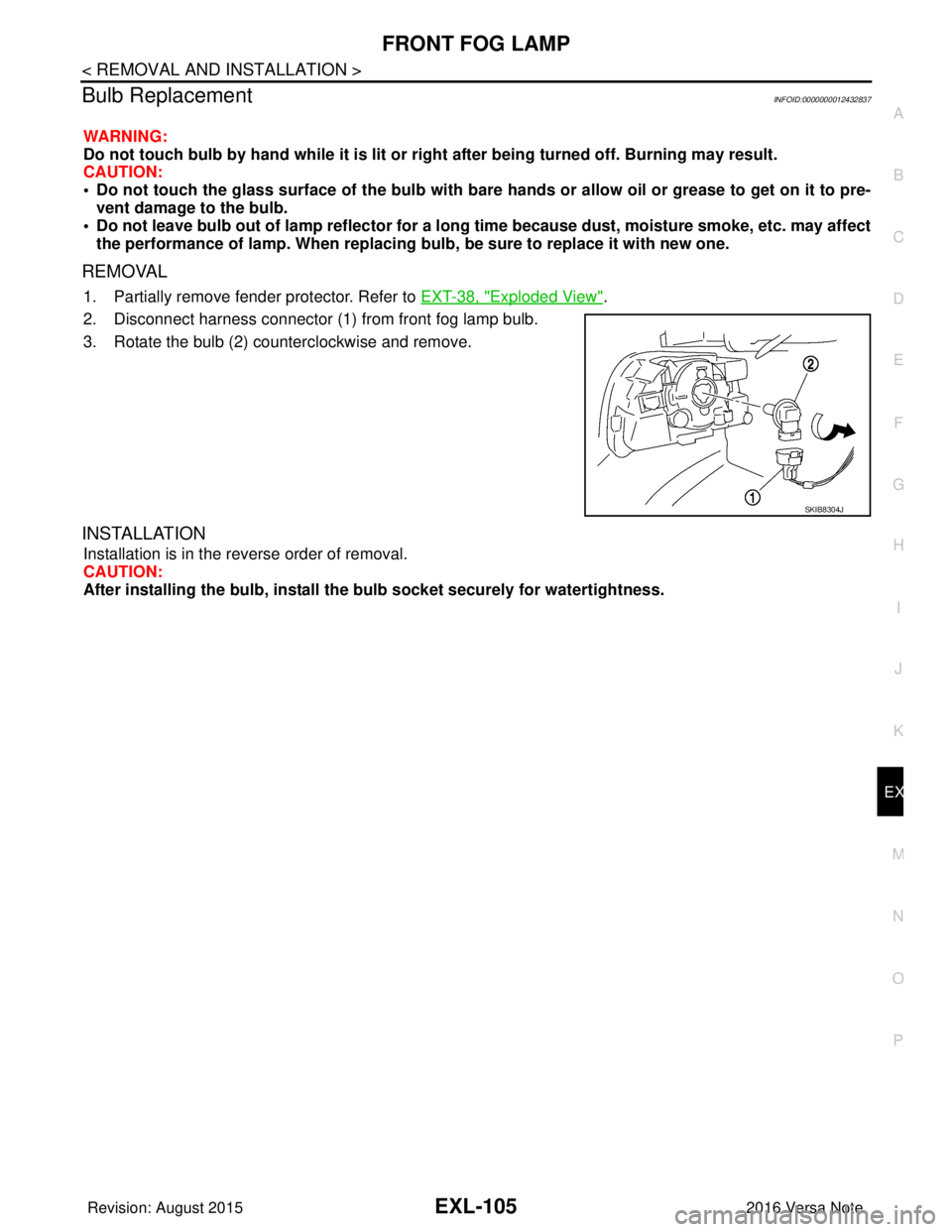
2. Disconnect harness connector (1) from front fog lamp bulb.
3. Rotate the bulb (2) counterclockwise and remove.
INSTALLATION
Installation is in the reverse order of removal.
CAUTION:
After installing the bulb, install the bulb socket securely for watertightness.
SKIB8304J
Revision: August 2015 2016 Versa Note
cardiagn.com
Page 1792 of 3641
FRONT BUMPEREXT-25
< REMOVAL AND INSTALLATION >
C
DE
F
G H
I
J
L
M A
B
EXT
N
O P
2. Remove the four front bumper fascia upper clips.
3. Remove the front under cover. Refer to EXT-39, "
FRONT UNDER COVER : Removal and Installation".
4. Partially remove front fender protectors (LH/RH) at the front edge to access front bumper fascia bolts.
Refer to EXT-38, "
Exploded View".
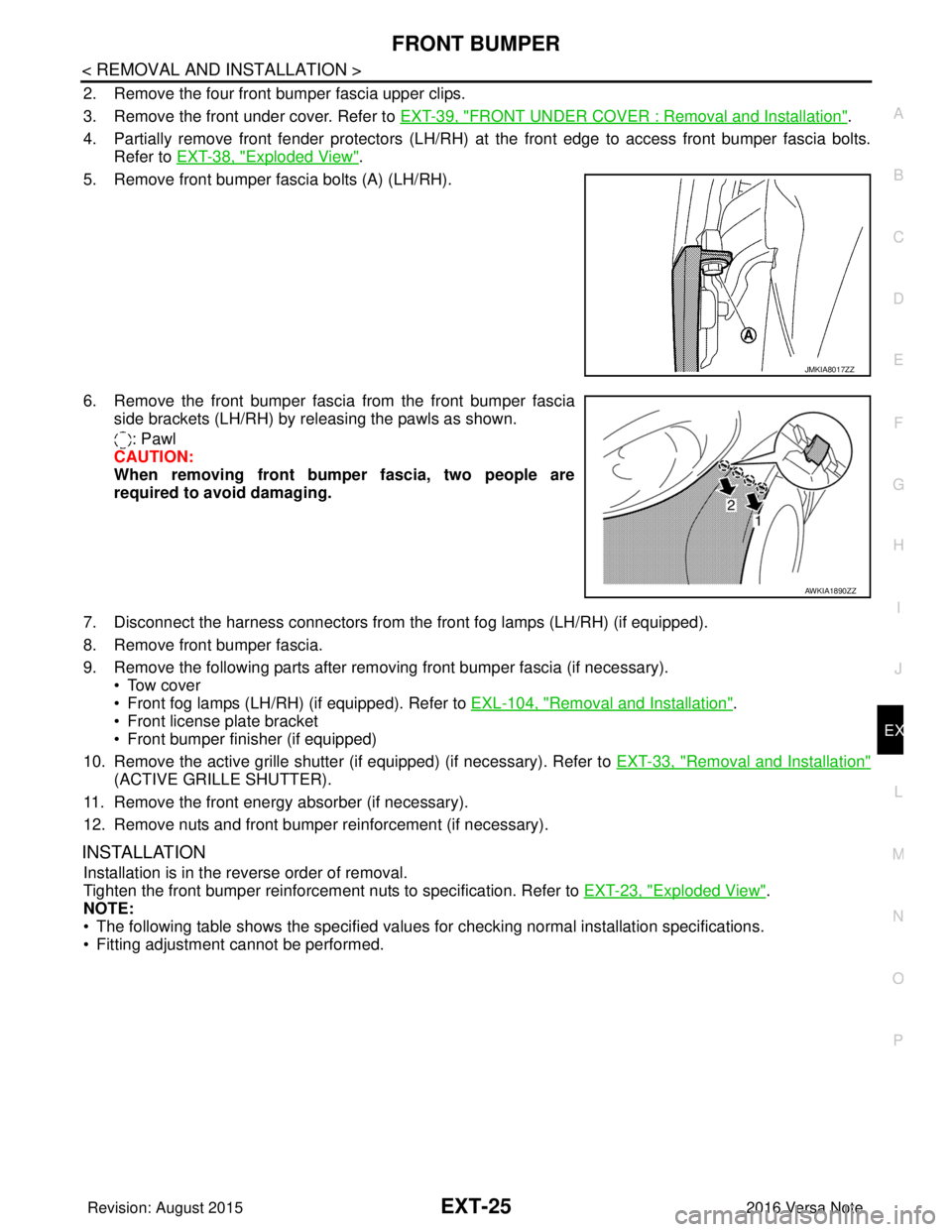
5. Remove front bumper fascia bolts (A) (LH/RH).
6. Remove the front bumper fasci a from the front bumper fascia
side brackets (LH/RH) by releasing the pawls as shown.
: Pawl
CAUTION:
When removing front bumper fascia, two people are
required to avoid damaging.
7. Disconnect the harness connectors from t he front fog lamps (LH/RH) (if equipped).
8. Remove front bumper fascia.
9. Remove the following parts after removing front bumper fascia (if necessary). • Tow cover
• Front fog lamps (LH/RH) (if equipped). Refer to EXL-104, "
Removal and Installation".
• Front license plate bracket
• Front bumper finisher (if equipped)
10. Remove the active grille shutter (if equipped) (if necessary). Refer to EXT-33, "
Removal and Installation"
(ACTIVE GRILLE SHUTTER).
11. Remove the front energy absorber (if necessary).
12. Remove nuts and front bumper reinforcement (if necessary).
INSTALLATION
Installation is in the reverse order of removal.
Tighten the front bumper reinforcement nuts to specification. Refer to EXT-23, "
Exploded View".
NOTE:
• The following table shows the specified values for checking normal installation specifications.
• Fitting adjustment cannot be performed.
JMKIA8017ZZ
AWKIA1890ZZ
Revision: August 2015 2016 Versa Note
cardiagn.com
Page 1805 of 3641
EXT-38
< REMOVAL AND INSTALLATION >
FENDER PROTECTOR
FENDER PROTECTOR
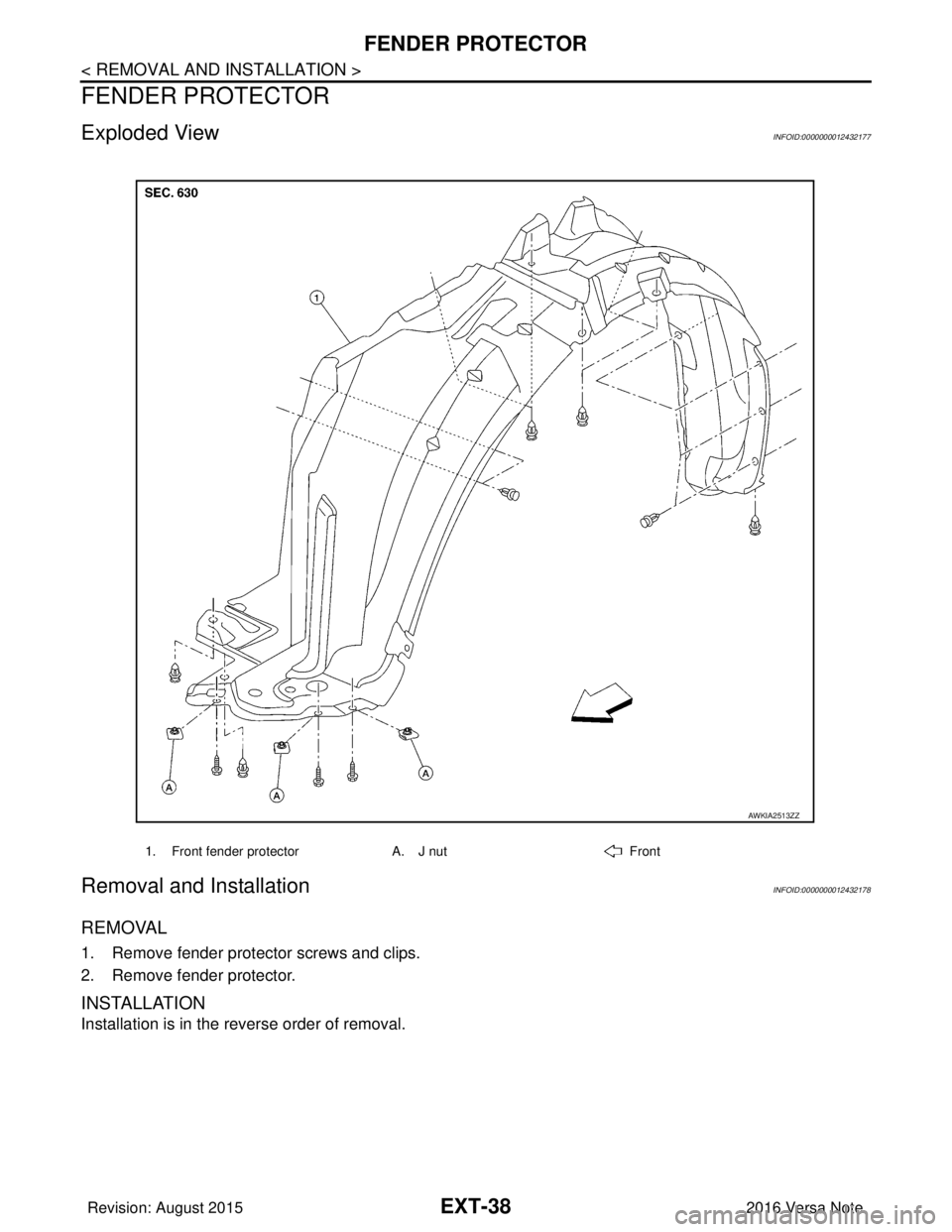
Exploded ViewINFOID:0000000012432177
Removal and InstallationINFOID:0000000012432178
REMOVAL
1. Remove fender protector screws and clips.
2. Remove fender protector.
INSTALLATION
Installation is in the reverse order of removal.
1. Front fender protectorA. J nutFront
AWKIA2513ZZ
Revision: August 2015 2016 Versa Note
cardiagn.com
Page 2051 of 3641
HA-26
< REMOVAL AND INSTALLATION >
COMPRESSOR
REMOVAL AND INSTALLATION
COMPRESSOR
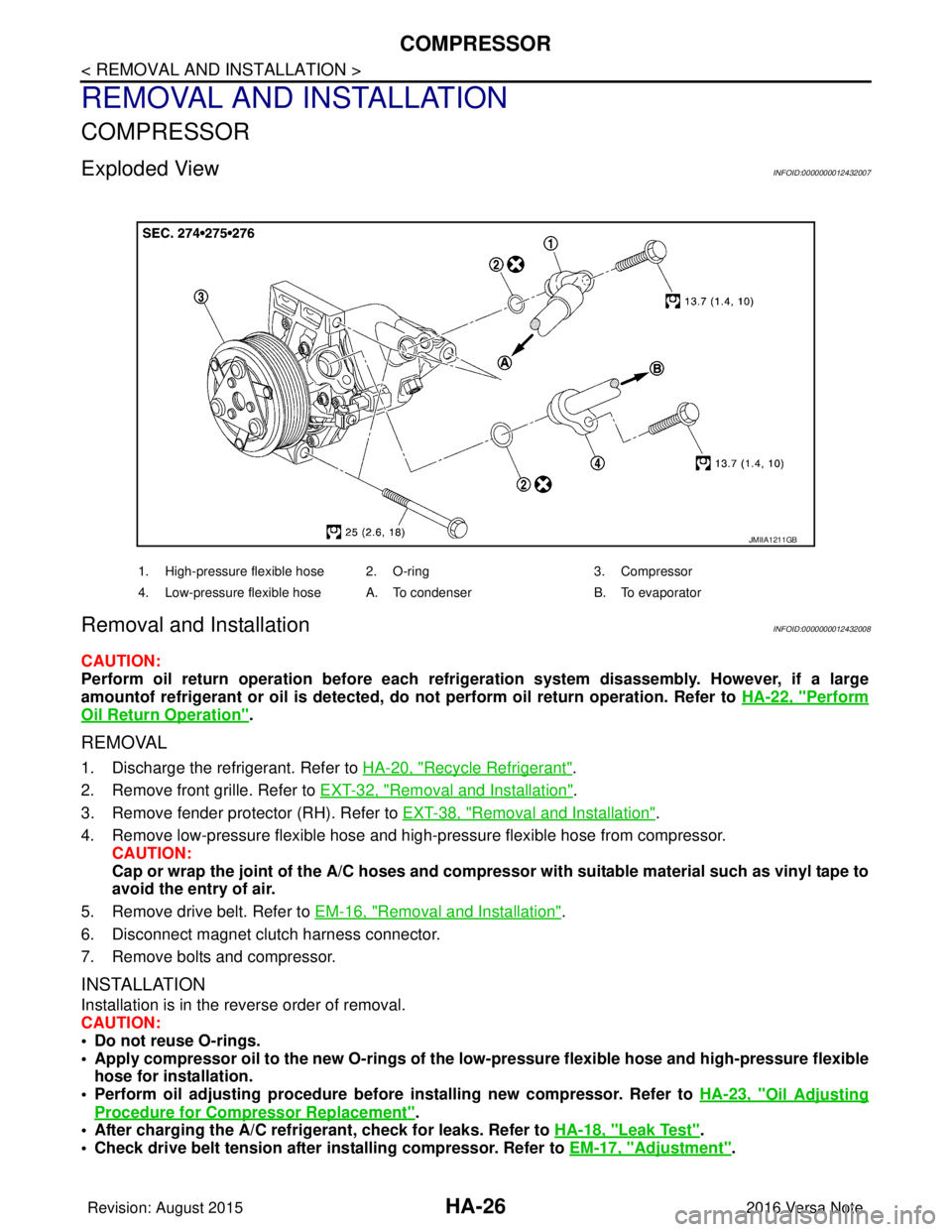
Exploded ViewINFOID:0000000012432007
Removal and InstallationINFOID:0000000012432008
CAUTION:
Perform oil return operation before each refrigeration system disassembly. However, if a large
amountof refrigerant or oil is detected, do not perform oil return operation. Refer to HA-22, "
Perform
Oil Return Operation".
REMOVAL
1. Discharge the refrigerant. Refer to HA-20, "Recycle Refrigerant".
2. Remove front grille. Refer to EXT-32, "
Removal and Installation".
3. Remove fender protector (RH). Refer to EXT-38, "
Removal and Installation".
4. Remove low-pressure flexible hose and high-pressure flexible hose from compressor. CAUTION:
Cap or wrap the joint of the A/C hoses and compr essor with suitable material such as vinyl tape to
avoid the entry of air.
5. Remove drive belt. Refer to EM-16, "
Removal and Installation".
6. Disconnect magnet clutch harness connector.
7. Remove bolts and compressor.
INSTALLATION
Installation is in the reverse order of removal.
CAUTION:
• Do not reuse O-rings.
• Apply compressor oil to the new O-rings of the low-pressure flexible hose an d high-pressure flexible
hose for installation.
• Perform oil adjusting procedure before installing new compressor. Refer to HA-23, "
Oil Adjusting
Procedure for Compressor Replacement".
• After charging the A/C refrig erant, check for leaks. Refer to HA-18, "
Leak Test".
• Check drive belt tension after installing compressor. Refer to EM-17, "
Adjustment".
JMIIA1211GB
1. High-pressure flexible hose 2. O-ring 3. Compressor
4. Low-pressure flexible hose A. To condenser B. To evaporator
Revision: August 2015 2016 Versa Note
cardiagn.com
Page 2328 of 3641
ENGINE MAINTENANCEMA-13
< PERIODIC MAINTENANCE >
C
DE
F
G H
I
J
K L
M B
MA
N
O A
ENGINE MAINTENANCE
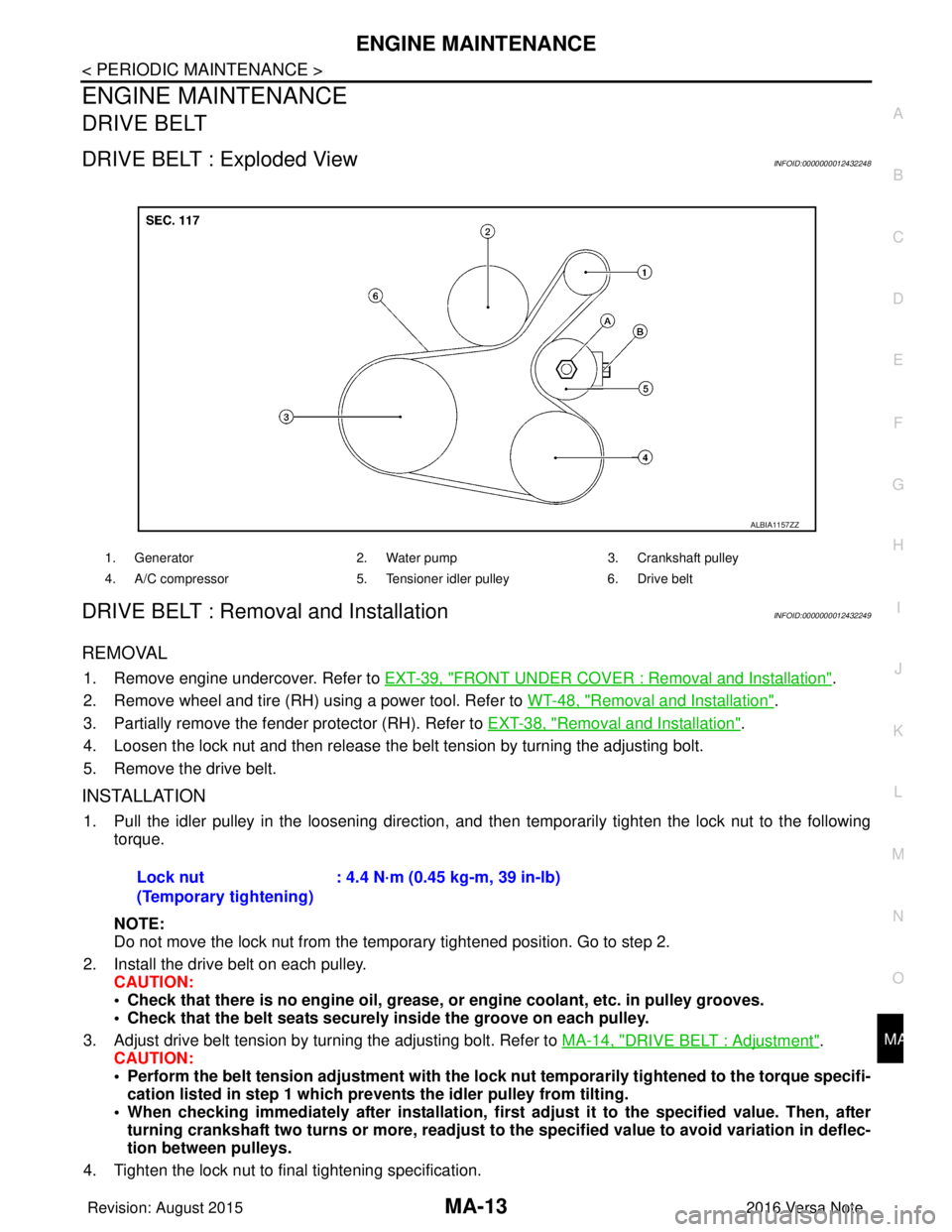
DRIVE BELT
DRIVE BELT : Exploded ViewINFOID:0000000012432248
DRIVE BELT : Removal and InstallationINFOID:0000000012432249
REMOVAL
1. Remove engine undercover. Refer to
EXT-39, "FRONT UNDER COVER : Removal and Installation".
2. Remove wheel and tire (RH) using a power tool. Refer to WT-48, "
Removal and Installation".
3. Partially remove the fender protector (RH). Refer to EXT-38, "
Removal and Installation".
4. Loosen the lock nut and then release the belt tension by turning the adjusting bolt.
5. Remove the drive belt.
INSTALLATION
1. Pull the idler pulley in the loosening direction, and then temporarily tighten the lock nut to the following
torque.
NOTE:
Do not move the lock nut from the temporary tightened position. Go to step 2.
2. Install the drive belt on each pulley. CAUTION:
• Check that there is no engine oil, grease, or engine coolant, etc. in pulley grooves.
• Check that the belt seats securely inside the groove on each pulley.
3. Adjust drive belt tension by turning the adjusting bolt. Refer to MA-14, "
DRIVE BELT : Adjustment".
CAUTION:
• Perform the belt tension adjustment with the lock nut temporarily tightened to the torque specifi-
cation listed in step 1 which preven ts the idler pulley from tilting.
• When checking immediately after in stallation, first adjust it to the specified value. Then, after
turning crankshaft two turns or more, readjust to the specified value to avoid variation in deflec-
tion between pulleys.
4. Tighten the lock nut to final tightening specification.
1. Generator 2. Water pump3. Crankshaft pulley
4. A/C compressor 5. Tensioner idler pulley6. Drive belt
ALBIA1157ZZ
Lock nut
(Temporary tightening): 4.4 N·m (0.45 kg-m, 39 in-lb)
Revision: August 2015
2016 Versa Note
cardiagn.com
Page 2329 of 3641
MA-14
< PERIODIC MAINTENANCE >
ENGINE MAINTENANCE
5. Check that belt tension is within the specification using suitable tool. Refer to EM-116, "Drive Belt".
DRIVE BELT : InspectionINFOID:0000000012432250
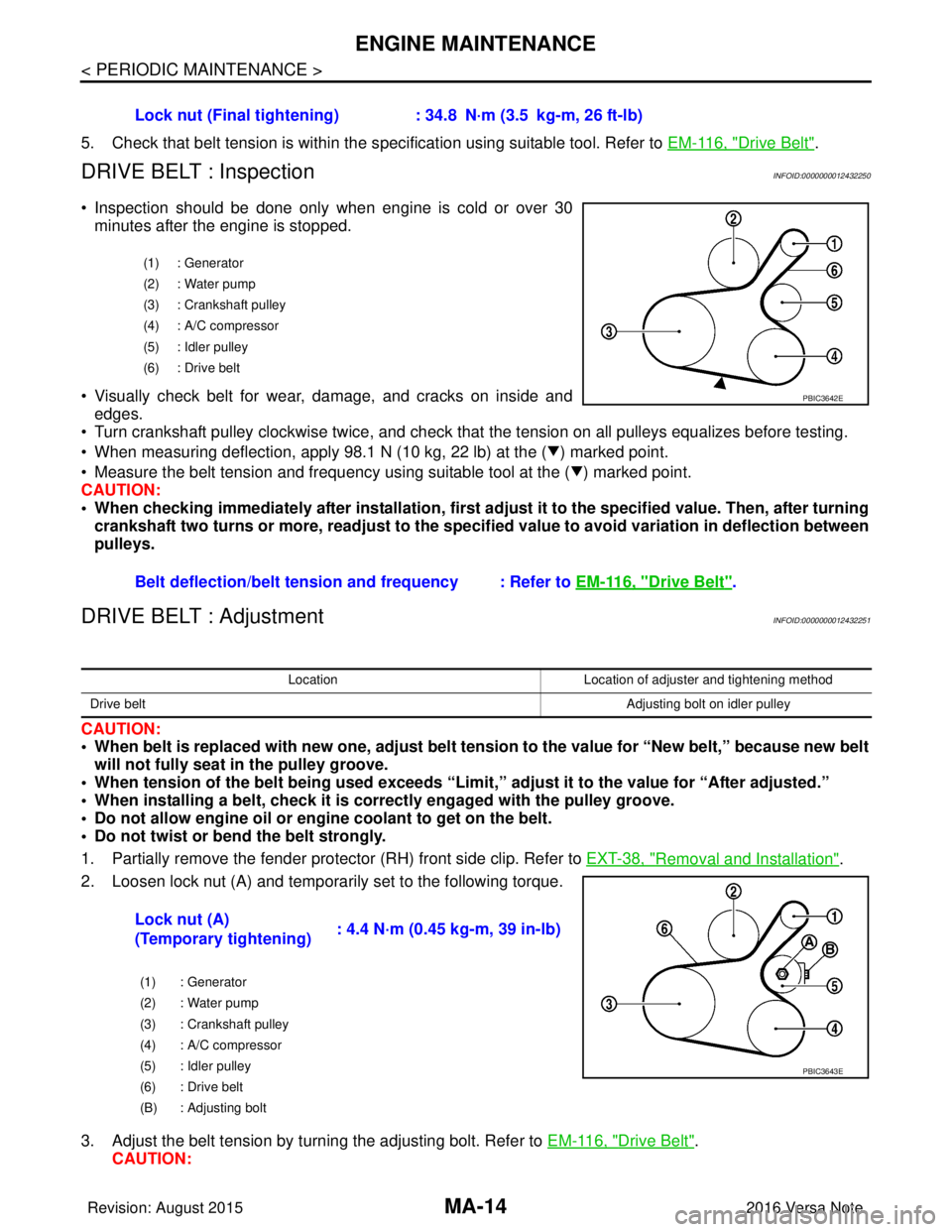
• Inspection should be done only when engine is cold or over 30
minutes after the engine is stopped.
• Visually check belt for wear, damage, and cracks on inside and edges.
• Turn crankshaft pulley clockwise twice, and check that the tension on all pulleys equalizes before testing.
• When measuring deflection, apply 98.1 N (10 kg, 22 lb) at the ( ) marked point.
• Measure the belt tension and frequency using suitable tool at the ( ) marked point.
CAUTION:
• When checking immediately after installation, first ad just it to the specified value. Then, after turning
crankshaft two turns or more, readjust to the speci fied value to avoid variation in deflection between
pulleys.
DRIVE BELT : AdjustmentINFOID:0000000012432251
CAUTION:
• When belt is replaced with new one, adjust belt tension to the value for “New belt,” because new belt will not fully seat in the pulley groove.
• When tension of the belt being used exceeds “Limit,” adjust it to the value for “After adjusted.”
• When installing a belt, check it is co rrectly engaged with the pulley groove.
• Do not allow engine oil or engine coolant to get on the belt.
• Do not twist or bend the belt strongly.
1. Partially remove the fender protector (RH) front side clip. Refer to EXT-38, "
Removal and Installation".
2. Loosen lock nut (A) and temporarily set to the following torque.
3. Adjust the belt tension by turning the adjusting bolt. Refer to EM-116, "
Drive Belt".
CAUTION: Lock nut (Final tightening) :
34.8 N·m (3.5 kg-m, 26 ft-lb)
(1) : Generator
(2) : Water pump
(3) : Crankshaft pulley
(4) : A/C compressor
(5) : Idler pulley
(6) : Drive belt
Belt deflection/belt tension and frequency : Refer to EM-116, "Drive Belt".
PBIC3642E
LocationLocation of adjuster and tightening method
Drive belt Adjusting bolt on idler pulley
Lock nut (A)
(Temporary tightening): 4.4 N·m (0.45 kg-m, 39 in-lb)
(1) : Generator
(2) : Water pump
(3) : Crankshaft pulley
(4) : A/C compressor
(5) : Idler pulley
(6) : Drive belt
(B) : Adjusting bolt
PBIC3643E
Revision: August 2015
2016 Versa Note
cardiagn.com
Page 3264 of 3641
![NISSAN NOTE 2016 Service User Guide 5TH MAIN GEAR ASSEMBLYTM-23
< REMOVAL AND INSTALLATION > [5MT: RS5F91R]
C
EF
G H
I
J
K L
M A
B
TM
N
O P
5TH MAIN GEAR ASSEMBLY
Removal and InstallationINFOID:0000000012430959
REMOVAL
1. Move the shift](/img/5/57363/w960_57363-3263.png "NISSAN NOTE 2016 Service User Guide 5TH MAIN GEAR ASSEMBLYTM-23
< REMOVAL AND INSTALLATION > [5MT: RS5F91R]
C
EF
G H
I
J
K L
M A
B
TM
N
O P
5TH MAIN GEAR ASSEMBLY
Removal and InstallationINFOID:0000000012430959
REMOVAL
1. Move the shift")
5TH MAIN GEAR ASSEMBLYTM-23
< REMOVAL AND INSTALLATION > [5MT: RS5F91R]
C
EF
G H
I
J
K L
M A
B
TM
N
O P
5TH MAIN GEAR ASSEMBLY
Removal and InstallationINFOID:0000000012430959
REMOVAL
1. Move the shift selector to the 3rd gear position.
2. Disconnect the shifter cable and the selector cable fr om shifter lever A and selector lever. Refer to TM-20,
"Removal and Installation".
CAUTION:
Do not move shifter lever A and selector lever to disconnect each cable.
3. Drain gear oil. Refer to TM-17, "
Draining".
4. Remove fender protector (LH). Refer to EXT-38, "
Removal and Installation".
5. Remove the harness clamp (A) from rear housing (1).
6. Remove rear housing and O-ring. CAUTION:
Remove in direction of input shaft ( ) as shown. Rear
housing gear oil channel is inserted to input shaft center
hole.
7. Remove 5th main gear assembly. Refer to step 5 through 8 of “Disassembly of TRANSAXLE ASSEMBLY”. Refer to TM-30,
"Disassembly".
INSTALLATION
Installation is in the reverse order of removal.
• Shift into 3rd with shifter lever to install the 5th main gear assembly, referring to Step 36 to 39 of “Assemblyof TRANSAXLE ASSEMBLY” Refer to TM-36, "
Assembly".
• Install O-ring and the rear housing to the transaxle case and tighten the bolts to the specified torque. Refer to TM-26, "
Exploded View".
CAUTION:
• Do not reuse O-ring.
• Do not pinch O-ring when installing rear housing.
• Refill gear oil. Refer to TM-17, "
Refilling".
InspectionINFOID:0000000012430960
INSPECTION AFTER INSTALLATION
• Check the operation of the control linkage. Refer to TM-21, "Inspection".
• Check the gear oil level and for oil leaks. Refer to TM-17, "
Inspection".
JPDIC0734ZZ
SCIA1709J
Revision: August 2015 2016 Versa Note
cardiagn.com
Page 3498 of 3641
![NISSAN NOTE 2016 Service User Guide CVT FLUID FILTERTM-257
< REMOVAL AND INSTALLATION > [CVT: RE0F11A]
C
EF
G H
I
J
K L
M A
B
TM
N
O P
CVT FLUID FILTER
Exploded ViewINFOID:0000000012431220
Removal and InstallationINFOID:0000000012431221](/img/5/57363/w960_57363-3497.png "NISSAN NOTE 2016 Service User Guide CVT FLUID FILTERTM-257
< REMOVAL AND INSTALLATION > [CVT: RE0F11A]
C
EF
G H
I
J
K L
M A
B
TM
N
O P
CVT FLUID FILTER
Exploded ViewINFOID:0000000012431220
Removal and InstallationINFOID:0000000012431221")
CVT FLUID FILTERTM-257
< REMOVAL AND INSTALLATION > [CVT: RE0F11A]
C
EF
G H
I
J
K L
M A
B
TM
N
O P
CVT FLUID FILTER
Exploded ViewINFOID:0000000012431220
Removal and InstallationINFOID:0000000012431221
REMOVAL
1. Remove fender protector (LH). Refer to EXT-38, "Removal and Installation".
2. Remove fluid filter cover bolt (A).
1. Transaxle assembly 2. CVT fluid filter3. Fluid filter cover
: Always replace after every disassembly.
: N·m (kg-m, in-lb)
: Apply CVT fluid
JSDIA5448GB
JSDIA5047ZZ
Revision: August 2015 2016 Versa Note
cardiagn.com
Page 3621 of 3641
WW-56
< REMOVAL AND INSTALLATION >
WASHER TANK
REMOVAL AND INSTALLATION
WASHER TANK
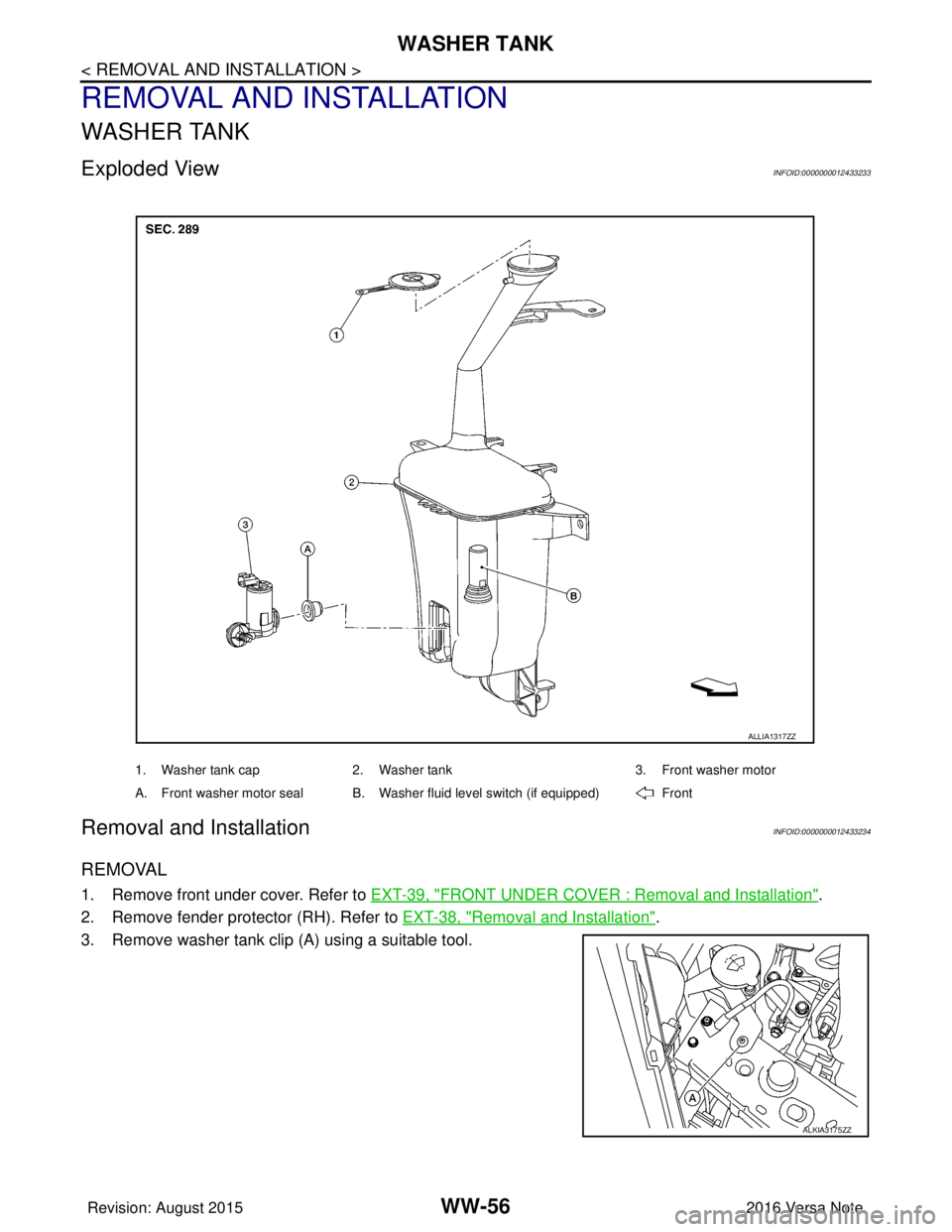
Exploded ViewINFOID:0000000012433233
Removal and InstallationINFOID:0000000012433234
REMOVAL
1. Remove front under cover. Refer to EXT-39, "FRONT UNDER COVER : Removal and Installation".
2. Remove fender protector (RH). Refer to EXT-38, "
Removal and Installation".
3. Remove washer tank clip (A) using a suitable tool.
1. Washer tank cap 2. Washer tank 3. Front washer motor
A. Front washer motor seal B. Washer fluid level switch (if equipped) Front
ALLIA1317ZZ
ALKIA3175ZZ
Revision: August 2015 2016 Versa Note
cardiagn.com
Page 3623 of 3641
WW-58
< REMOVAL AND INSTALLATION >
FRONT WASHER MOTOR
FRONT WASHER MOTOR
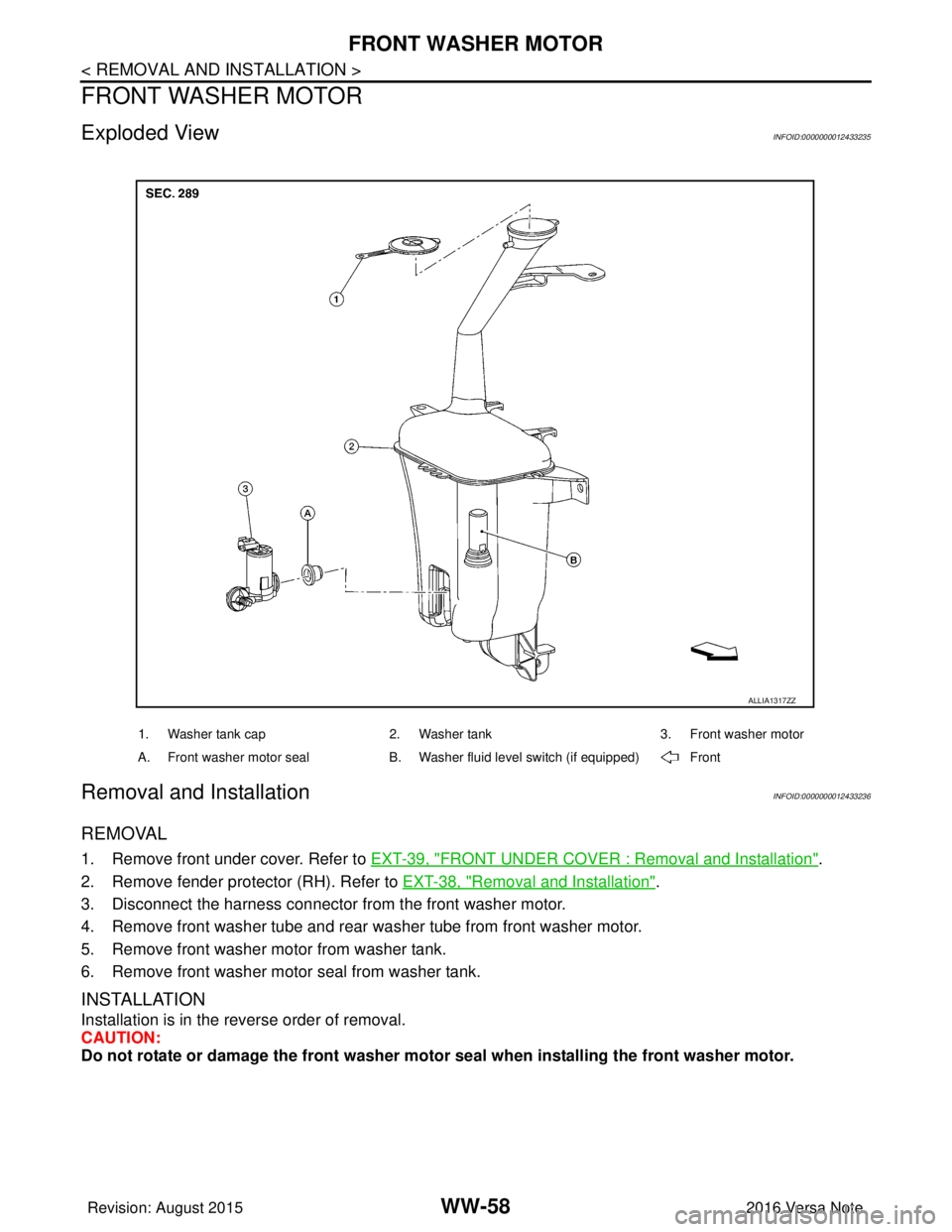
Exploded ViewINFOID:0000000012433235
Removal and InstallationINFOID:0000000012433236
REMOVAL
1. Remove front under cover. Refer to EXT-39, "FRONT UNDER COVER : Removal and Installation".
2. Remove fender protector (RH). Refer to EXT-38, "
Removal and Installation".
3. Disconnect the harness connector from the front washer motor.
4. Remove front washer tube and rear wa sher tube from front washer motor.
5. Remove front washer motor from washer tank.
6. Remove front washer motor seal from washer tank.
INSTALLATION
Installation is in the reverse order of removal.
CAUTION:
Do not rotate or damage the front washer moto r seal when installing the front washer motor.
1. Washer tank cap 2. Washer tank 3. Front washer motor
A. Front washer motor seal B. Washer fluid level switch (if equipped) Front
ALLIA1317ZZ
Revision: August 2015 2016 Versa Note
cardiagn.com