brake NISSAN NOTE 2016 Service Repair Manual
[x] Cancel search | Manufacturer: NISSAN, Model Year: 2016, Model line: NOTE, Model: NISSAN NOTE 2016Pages: 3641, PDF Size: 28.72 MB
Page 2500 of 3641
PARKING BRAKE CABLEPB-7
< REMOVAL AND INSTALLATION >
C
DE
G H
I
J
K L
M A
B
PB
N
O P
PARKING BRAKE CABLE
Removal and InstallationINFOID:0000000012430691
REMOVAL
1. Remove the center console assembly. Refer to IP-18, "Removal and Installation".
2. Remove the adjusting nut. Refer to PB-6, "
Exploded View".
3. Separate the parking brake front cable from parking brake rear cables (RH/LH). Refer to PB-6, "
Exploded
View".
CAUTION:
To prevent damage to the parts, do not bend the parking brake cables.
4. Remove the parking brake front cable.
INSTALLATION
Installation is in the reverse order of removal.
CAUTION:
Do not reuse the adjusting nut.
• Inspect and adjust the parking brake. Refer to PB-4, "
Inspection and Adjustment".
Revision: August 2015 2016 Versa Note
cardiagn.com
Page 2501 of 3641
PB-8
< REMOVAL AND INSTALLATION >
PARKING BRAKE REAR CABLE
PARKING BRAKE REAR CABLE
Removal and InstallationINFOID:0000000012430692
REMOVAL
1. Remove the center console assembly. Refer to IP-18, "Removal and Installation".
2. Loosen the adjusting nut. Refer to PB-6, "
Exploded View".
NOTE:
It is not necessary to remove the parking brake front cable.
3. Separate the parking brake rear cables (RH/LH ) from the parking brake front cable. Refer to PB-6,
"Exploded View".
4. Remove the rear wheels and tires using power tool. Refer to WT-48, "
Exploded View".
5. Remove rear wheel sensors. Refer to BRC-143, "
REAR SENSOR ROTOR : Removal and Installation".
6. Remove the rear drum brake components. Refer to BR-41, "
Removal and Installation".
CAUTION:
Do not separate the brake tube from the wheel cylinders.
7. Remove the center muffler. Refer to EX-5, "
Exploded View".
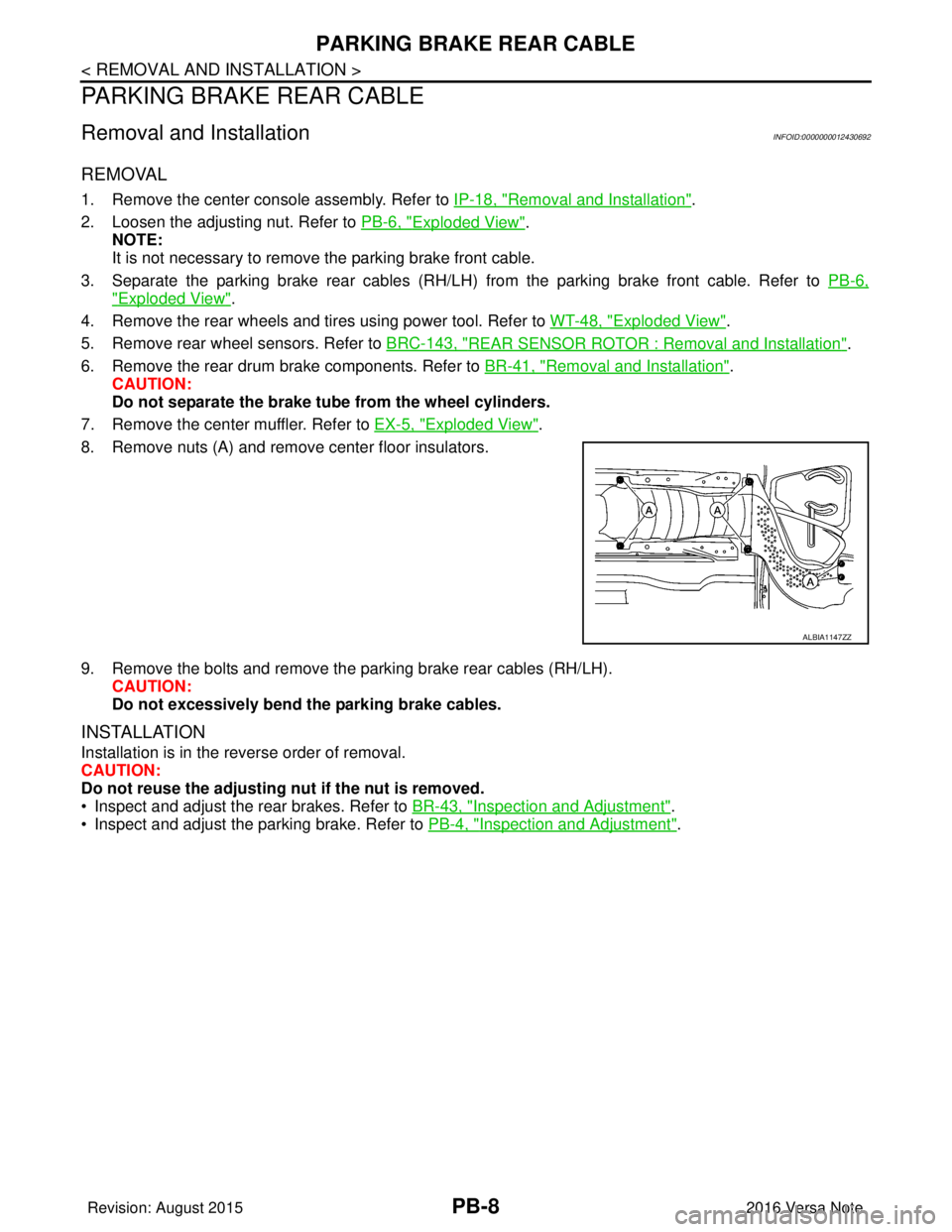
8. Remove nuts (A) and remove center floor insulators.
9. Remove the bolts and remove the parking brake rear cables (RH/LH). CAUTION:
Do not excessively bend the parking brake cables.
INSTALLATION
Installation is in the reverse order of removal.
CAUTION:
Do not reuse the adjusting nut if the nut is removed.
• Inspect and adjust the rear brakes. Refer to BR-43, "
Inspection and Adjustment".
• Inspect and adjust the parking brake. Refer to PB-4, "
Inspection and Adjustment".
ALBIA1147ZZ
Revision: August 2015 2016 Versa Note
cardiagn.com
Page 2502 of 3641
PARKING BRAKE SWITCHPB-9
< REMOVAL AND INSTALLATION >
C
DE
G H
I
J
K L
M A
B
PB
N
O P
PARKING BRAKE SWITCH
Removal and InstallationINFOID:0000000012430693
REMOVAL
1. Remove the center console assembly. Refer to PB-6, "Exploded View".
2. Disconnect the harness connector from the parking brake switch. Refer to PB-6, "
Exploded View".
3. Remove the screw and remove the parking brake switch. Refer to PB-6, "
Exploded View".
INSTALLATION
Installation is in the reverse order of removal.
CAUTION:
Replace the parking brake switch if it has been dropped or sustained an impact.
Adjust the parking brake cable if necessary. Refer to PB-4, "
Inspection and Adjustment".
Revision: August 2015 2016 Versa Note
cardiagn.com
Page 2503 of 3641

PB-10
< SERVICE DATA AND SPECIFICATIONS (SDS)
SERVICE DATA AND SPECIFICATIONS (SDS)
SERVICE DATA AND SPECIFICATIONS (SDS)
SERVICE DATA AND SPECIFICATIONS (SDS)
Parking Brake ControlINFOID:0000000012430694
ItemStandard
Number of notches [under force of 196 N (20.0 kg-f, 44.1 lb-f)] 11 − 12 notches
Number of notches when brake warning light illuminates 1 notch
Revision: August 20152016 Versa Note
cardiagn.com
Page 2537 of 3641
![NISSAN NOTE 2016 Service Repair Manual PCS-34
< SYSTEM DESCRIPTION >[POWER DISTRIBUTION SYSTEM]
SYSTEM
SYSTEM
POWER DISTRIBUTION SYSTEM
POWER DISTRIBUTION SYSTEM
: System DescriptionINFOID:0000000012433289
SYSTEM DIAGRAM
SYSTEM DESCRIPTIO](/img/5/57363/w960_57363-2536.png "NISSAN NOTE 2016 Service Repair Manual PCS-34
< SYSTEM DESCRIPTION >[POWER DISTRIBUTION SYSTEM]
SYSTEM
SYSTEM
POWER DISTRIBUTION SYSTEM
POWER DISTRIBUTION SYSTEM
: System DescriptionINFOID:0000000012433289
SYSTEM DIAGRAM
SYSTEM DESCRIPTIO")
PCS-34
< SYSTEM DESCRIPTION >[POWER DISTRIBUTION SYSTEM]
SYSTEM
SYSTEM
POWER DISTRIBUTION SYSTEM
POWER DISTRIBUTION SYSTEM
: System DescriptionINFOID:0000000012433289
SYSTEM DIAGRAM
SYSTEM DESCRIPTION
• PDS (POWER DISTRIBUTION SYSTEM) is the system that BCM contro ls with the operation of the push-
button ignition switch and performs the power distribution to each power circuit. This system is used instead
of the mechanical power supply changing mechanism wi th the operation of the conventional key cylinder.
• The push-button ignition switch can be operated when Intelligent Key is in the following condition:
- Intelligent Key is in the detection area of the inside key antenna.
- Intelligent Key backside is contacted to push-button ignition switch.
• The push-button ignition switch operation is input to BCM as a signal. BCM changes the power supply posi-
tion according to the status and operates the following relays to supply power to each power circuit:
- Ignition relay-1
- Ignition relay-2
- Accessory relay-1
- Accessory relay-2
- Blower motor relay NOTE:
The engine switch operation changes due to the conditions of brake pedal, selector lever and vehicle speed.
• The power supply position can be confirmed with the light ing of the indicators in the push-button ignition
switch.
IGNITION BATTERY SAVER SYSTEM
When all the following conditions are met for a period of time, the battery saver system will turn off the power
supply (ignition switch ON/ACC → OFF) to prevent battery discharge.
• Ignition switch is in the ACC or ON position
• Turn signal lamp is not in operation
• Selector lever is in the P (park) position
Reset Condition of Igniti on Battery Saver System
If any of the following conditions are met, the battery saver system is released.
• Ignition switch is not in the ACC or ON position
• Turn signal lamp is in operation
• Selector lever is not in the P (park) position
NOTE:
The ignition battery saver system can be temporarily di sabled, without using CONSULT, to prevent it from
functioning when performing trouble diagnosis. Refer to PCS-53, "
Work Procedure".
POWER SUPPLY POSITION CHANGE TABLE BY PUSH-BUTTON IGNITION SWITCH OPERA-
AWMIA3150GB
Revision: August 2015 2016 Versa Note
cardiagn.com
Page 2538 of 3641
![NISSAN NOTE 2016 Service Repair Manual PCS
SYSTEMPCS-35
< SYSTEM DESCRIPTION > [POWER DISTRIBUTION SYSTEM]
C
D
E
F
G H
I
J
K L
B A
O P
N
TION
The power supply position changing operation can be performed with the following operations.
NOTE](/img/5/57363/w960_57363-2537.png "NISSAN NOTE 2016 Service Repair Manual PCS
SYSTEMPCS-35
< SYSTEM DESCRIPTION > [POWER DISTRIBUTION SYSTEM]
C
D
E
F
G H
I
J
K L
B A
O P
N
TION
The power supply position changing operation can be performed with the following operations.
NOTE")
PCS
SYSTEMPCS-35
< SYSTEM DESCRIPTION > [POWER DISTRIBUTION SYSTEM]
C
D
E
F
G H
I
J
K L
B A
O P
N
TION
The power supply position changing operation can be performed with the following operations.
NOTE:
• When an Intelligent Key is within the detection area of inside key antenna and when Intelligent Key backside
is contacted to push-button ignition switch, it is equivalent to the operations below.
• When starting the engine, the BCM monitors under the engine start conditions:
- Brake pedal operating condition
- Selector lever position
- Vehicle speed
Vehicle speed: less than 4 km/h (2.5 MPH)
Vehicle speed: 4 km/h (2.5 MPH) or more
Emergency stop operation
• Press and hold the push-button ignition switch for 2 seconds or more.
• Press the push-button ignition switch 3 times or more within 1.5 seconds.
Fail-safeINFOID:0000000012567363
BCM performs fail-safe control when the following DTCs are detected.
Power supply position Engine start/stop condition
Push-button
ignition switch
operation frequency
With CVT
With M/T
Selector lever position Brake pedal condition Clutch pedal condition
OFF → ACC —Released Released 1
OFF → ACC → ON —Released Released 2
OFF → ACC → ON →
OFF —
Released Released 3
OFF → START
ACC → START
ON → START P (Park) or N (Neutral) Depressed
Depressed1
Engine is running → OFF ——— 1
Power supply position Engine start/stop condition
Push-button
ignition switch
operation frequency
With CVT
With M/T
Selector lever position Brake pedal condition Clutch pedal condition
Engine is running →
ACC ———
Emergency stop
operation
Engine stall return opera-
tion while driving N (Neutral)
ReleasedDepressed 1
CONSULT Display Fail-safe Cancellation
B2192: ID DISCORD BCM-ECM Inhibit engine cranking Erase DTC
B2193: CHAIN OF BCM-ECM Inhibit engine cranking Erase DTC
B2195: ANTI SCANNING Inhibit engine cranking Ignition switch ON → OFF
B2196: DONGLE NG Inhibit engine cranking Erase DTC
B2198: NATS ANTENNA AMP Inhibit engine cranking Erase DTC
B2557: VEHICLE SPEED —When the following CAN signal status (vehicle speed signal) becomes
consistent
• Vehicle spee
d signal (ABS)
• Vehicle speed signal (Meter)
B2601: SHIFT P SIGNAL —500 ms after the following signal reception status becomes consistent
• Park position switch signal
• P range signal (CAN)
Revision: August 2015
2016 Versa Note
cardiagn.com
Page 2541 of 3641
![NISSAN NOTE 2016 Service Repair Manual PCS-38
< SYSTEM DESCRIPTION >[POWER DISTRIBUTION SYSTEM]
DIAGNOSIS SYSTEM (BCM)
INTELLIGENT KEY
INTELLIGENT KEY : CONSULT Function (BCM - INTELLIGENT KEY)INFOID:0000000012542492
SELF DIAGNOSTIC RESULT](/img/5/57363/w960_57363-2540.png "NISSAN NOTE 2016 Service Repair Manual PCS-38
< SYSTEM DESCRIPTION >[POWER DISTRIBUTION SYSTEM]
DIAGNOSIS SYSTEM (BCM)
INTELLIGENT KEY
INTELLIGENT KEY : CONSULT Function (BCM - INTELLIGENT KEY)INFOID:0000000012542492
SELF DIAGNOSTIC RESULT")
PCS-38
< SYSTEM DESCRIPTION >[POWER DISTRIBUTION SYSTEM]
DIAGNOSIS SYSTEM (BCM)
INTELLIGENT KEY
INTELLIGENT KEY : CONSULT Function (BCM - INTELLIGENT KEY)INFOID:0000000012542492
SELF DIAGNOSTIC RESULT
Refer to
BCS-50, "DTCIndex".
DATA MONITOR
ACTIVE TEST
Monitor Item [Unit] Main Description
REQ SW -DR [On/Off] ×Indicates condition of door request switch LH.
REQ SW -AS [On/Off] ×Indicates condition of door request switch RH.
REQ SW -BD/TR [On/Off] ×Indicates condition of back door request switch.
PUSH SW [On/Off] Indicates condition of push-button ignition switch.
CLUCH SW [On/Off] ×Indicates condition of clutch interlock switch.
BRAKE SW 1 [On/Off] ×Indicates condition of brake switch.
BRAKE SW 2 [On/Off] Indicates condition of brake switch.
DETE/CANCL SW [On/Off] ×Indicates condition of P (park) position.
SFT PN/N SW [On/Off] ×Indicates condition of P (park) or N (neutral) position.
UNLK SEN -DR [On/Off] ×Indicates condition of door unlock sensor.
PUSH SW -IPDM [On/Off] Indicates condition of push-button ignition switch received from IPDM E/R on
CAN communication line.
IGN RLY1 -F/B [On/Off] Indicates condition of ignition relay 1 received from IPDM E/R on CAN commu-
nication line.
DETE SW -IPDM [On/Off] Indicates condition of detent switch received from TCM on CAN communication
line.
SFT PN -IPDM [On/Off] Indicates condition of P (park) or N (neutral) position from TCM on CAN com-
munication line.
SFT P -MET [On/Off] Indicates condition of P (park) position from TCM on CAN communication line.
SFT N -MET [On/Off] Indicates condition of N (neutral) position from IPDM E/R on CAN communica-
tion line.
ENGINE STATE [Stop/Start/Crank/Run] ×Indicates condition of engine state from ECM on CAN communication line.
VEH SPEED 1 [mph/km/h] ×Indicates condition of ve
hicle speed signal receiv ed from ABS on CAN commu-
nication line.
VEH SPEED 2 [mph/km/h] ×Indicates condition of vehicle speed signal received from combination meter on
CAN communication line.
DOOR STAT -DR [LOCK/READY/UNLK] ×Indicates condition of driver side door status.
DOOR STAT -AS [LOCK/READY/UNLK] ×Indicates condition of passenger side door status.
ID OK FLAG [Set/Reset] Indicates condition of Intelligent Key ID.
PRMT ENG STRT [Set/Reset] Indicates condition of engine start possibility.
RKE OPE COUN1 [0-19] ×When remote keyless entry receiver receives the signal transmitted while oper-
ating on Intelligent Key, the numerical value start changing.
RKE OPE COUN2 [0-19] ×When remote keyless entry receiver receives the signal transmitted while oper-
ating on Intelligent Key, the numerical value start changing.
RKE-LOCK [On/Off] Indicates condition of lock signal from Intelligent Key.
RKE-UNLOCK [On/Off] Indicates condition of unlock signal from Intelligent Key.
RKE-PANIC [On/Off] Indicates condition of panic signal from Intelligent Key.
RKE-MODE CHG [On/Off] Indicates condition of mode change signal from Intelligent Key.
Revision: August 2015 2016 Versa Note
cardiagn.com
Page 2556 of 3641
![NISSAN NOTE 2016 Service Repair Manual PCS
PROCEDURE FOR TEMPORARILY DISABLING THE IGNITION BATTERY SAV-
ER SYSTEM
PCS-53
< BASIC INSPECTION > [POWER DISTRIBUTION SYSTEM]
C
D
E
F
G H
I
J
K L
B A
O P
N
PROCEDURE FOR TEMPORARILY DISAB
LING T](/img/5/57363/w960_57363-2555.png "NISSAN NOTE 2016 Service Repair Manual PCS
PROCEDURE FOR TEMPORARILY DISABLING THE IGNITION BATTERY SAV-
ER SYSTEM
PCS-53
< BASIC INSPECTION > [POWER DISTRIBUTION SYSTEM]
C
D
E
F
G H
I
J
K L
B A
O P
N
PROCEDURE FOR TEMPORARILY DISAB
LING T")
PCS
PROCEDURE FOR TEMPORARILY DISABLING THE IGNITION BATTERY SAV-
ER SYSTEM
PCS-53
< BASIC INSPECTION > [POWER DISTRIBUTION SYSTEM]
C
D
E
F
G H
I
J
K L
B A
O P
N
PROCEDURE FOR TEMPORARILY DISAB
LING THE IGNITION BATTERY
SAVER SYSTEM
DescriptionINFOID:0000000012762527
The ignition battery saver system can be temporarily di sabled, without using CONSULT, to prevent it form
functioning when performing trouble diagnosis.
Work ProcedureINFOID:0000000012762528
1. Enter the vehicle carrying a registered Intelligent Key.
2. Place the ignition switch in the OFF position.
3. Without depressing the brake pedal, press and hold the push-button ignition switch continuously for ten
seconds.
4. Check that the buzzer in the combination meter sounds for two seconds.
5. Operation is completed. NOTE:
When the ignition switch is placed in any position other than ON, the ignition battery saver system is acti-
vated again.
Revision: August 2015 2016 Versa Note
cardiagn.com
Page 2631 of 3641

PG-44
< WIRING DIAGRAM >
HARNESS
C2 M6 W/4 : Dongle unitB1 M61 — : Body ground
B2 M7 W/16 : Door mirror remote control switch C1 M62 W/2 : Front blower motor
D1 M8 G/20 : Joint connector–M02 C3 M64 W/8 : Steering angle sensor
A3 M9 W/12 : To D1 E3 M65 W/4 : Front air control
D3 M10 L/20 : Joint connector–M01 D5 M66 B/3 : Console power socket
B4 M11 W/2 : To B28 A4 M69 SMJ : To E7
F3 M12 W/16 : To B29 E2 M70 W/20 : AV control unit
F3 M13 W/24 : To B30 D3 M71 W/24 : AV control unit
B3 M14 BR/6 : Rear window defogger relay F2 M75 Y/4 : To D101
B4 M15 W/16 : To B23 D2 M76 GR/5 : AV control unit
A4 M16 W/24 : To B24 E1 M77 Y/4 : Front passenger air bag module
D5 M17 B/1 : Parking brake switch A4 M78 B/2 :To E11
A2 M18 W/40 : BCM (Body contro
l module) (Without
Intelligent Key system) F1 M79 — : Body ground
A1 M19 W/15 : BCM (Body contro
l module) (Without
Intelligent Key system) A 3 M 8 0 Y / 4 : T o D 3
A2 M20 B/15 : BCM (Body contro
l module) (Without
Intelligent Key system) F2 M81 W/12 : To D115
C2 M21 W/4 : NATS antenna amp. C1 M82 W/40 : Combination meter (With type A)
B3 M22 W/16 : Data link connector D5 M83 B/3 : G sensor
E 4 M 2 3 W / 4 : Remote keyless entry receiver (Without
Intelligent Key system) E2 M84 — : Body ground
C1 M24 W/40 : Combination meter (With type B) E2 M85 — : Body ground
C4 M25 W/8 : Push–button ignition swtich F5 M89 L/2 : Inside key antenna (Console)
C3 M26 W/6 : Ignition switch E1 M90 B/4: Remote keyless entry receiver (With
Intelligent Key system without tire pressure
monitoring system)
C2 M27 BR/2 : Key switch F2 M92 W/12 : To D116
C3 M28 W/16 : Combination switch A3 M93 W/24 : To D16
E 3 M 2 9 W / 2 4 : T o B 1 F 1 M 9 4 W / 4: Remote keyless entry receiver (With
Intelligent Key system with tire pressure
monitoring system)
C4 M30 GR/8 : Combination switch (Spiral cable) D3 M95 L/2 : Inside key antenna (Instrument center)
C3 M31 Y/6 : Combination switch (Spiral cable) A2 M97 B/40 : BCM (Body contro
l module) (With
Intelligent Key system)
E5 M32 W/16 : To M201 A2 M98 W/40: BCM (Body contro
l module) (With
Intelligent Key system)
E3 M33 B/15 : Front air control A2 M99 W/15: BCM (Body contro
l module) (With
Intelligent Key system)
B3 M34 GR/6 : VDC off switch A2 M100 B / 1 5: BCM (Body contro
l module) (With
Intelligent Key system)
D4 M35 Y/28 : Air bag diagnosis sensor unit D2 M101 W/16 : Audio unit (With base audio system)
D1 M36 BR/2 : Front passenger air bag off indicator A3 M103 W/12 : Accessory prewire LH
E4 M38 W/8 : CVT shift selector E2 M104 W/12 : Accessory prewire RH
B3 M39 L/4 : Accessory relay–2 C2 M151 BR/4 : Front blower motor resistor
E2 M40 W/32 : Audio unit (With display audio system) Console sub harness
B3 M41 B/5 : Back door lock actuator relay E5 M201 W / 1 6 : T o M 3 2
C3 M42 BR/4 : Thermo control amp. E4 M202 B/3 : Console power socket
E2 M43 W/20 : Audio unit (With base audio system) C4 M203 BR/6 : Heated seat swtich RH
Revision: August 2015 2016 Versa Note
cardiagn.com
Page 2632 of 3641
PG
HARNESSPG-45
< WIRING DIAGRAM >
C
DE
F
G H
I
J
K L
B A
O P
N
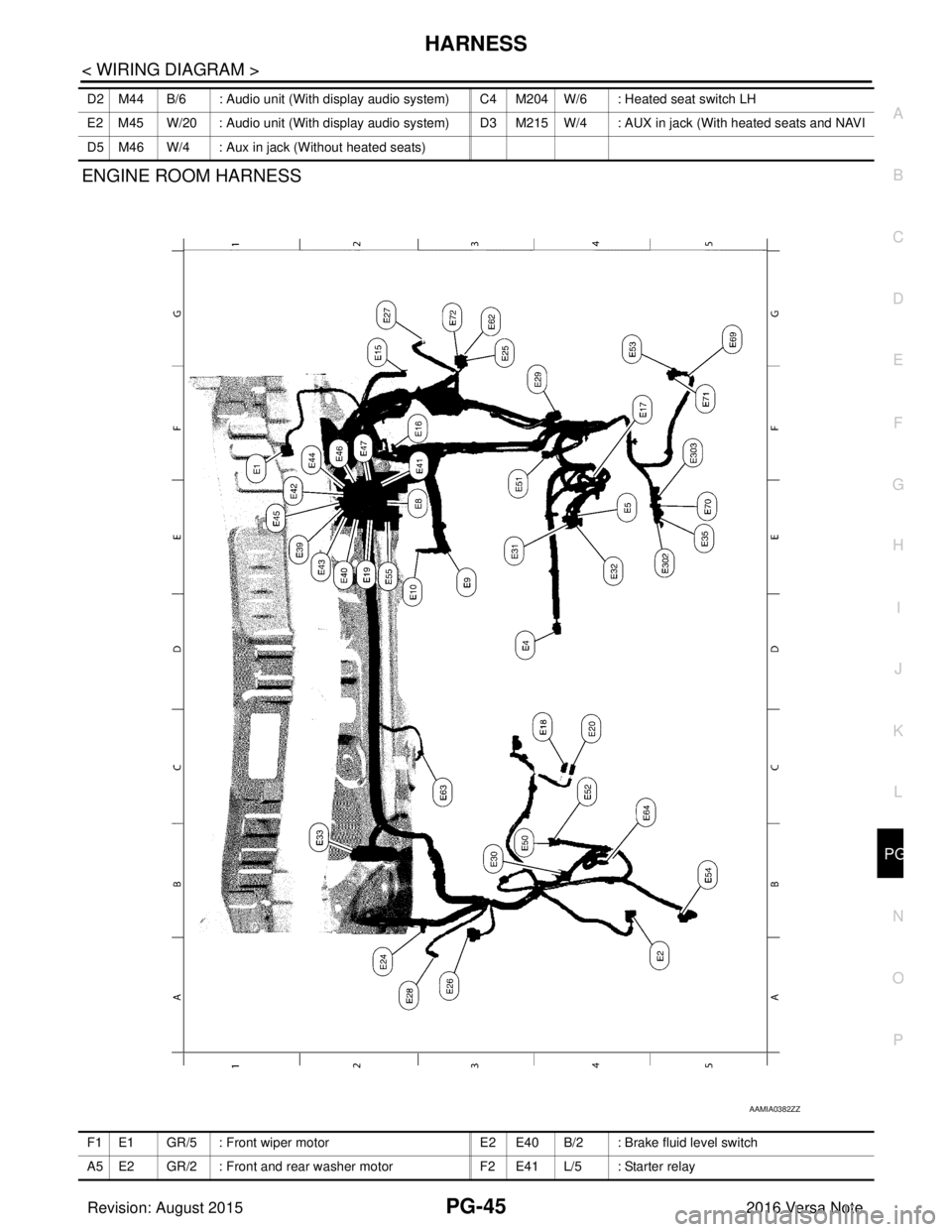
ENGINE ROOM HARNESS
D2 M44 B/6 : Audio unit (With display audio system) C4 M204
W/6 : Heated seat switch LH
E2 M45 W/20 : Audio unit (With display audio system) D3 M215 W/4 : AUX in jack (With heated seats and NAVI
D5 M46 W/4 : Aux in jack (Without heated seats)
AAMIA0382ZZ
F1 E1 GR/5 : Front wiper motor E2 E40 B/2 : Brake fluid level switch
A5 E2 GR/2 : Front and rear washer motor F2 E41 L/5 : Starter relay
Revision: August 2015 2016 Versa Note
cardiagn.com