brake NISSAN NOTE 2016 Service Repair Manual
[x] Cancel search | Manufacturer: NISSAN, Model Year: 2016, Model line: NOTE, Model: NISSAN NOTE 2016Pages: 3641, PDF Size: 28.72 MB
Page 2786 of 3641

NOISE, VIBRATION AND HARSHNESS (NVH) TROUBLESHOOTINGWT-43
< SYMPTOM DIAGNOSIS >
C
DF
G H
I
J
K L
M A
B
WT
N
O P
NOISE, VIBRATION AND HARSHN ESS (NVH) TROUBLESHOOTING
NVH Troubleshooting ChartINFOID:0000000012432464
Use chart below to find the cause of the symptom . If necessary, repair or replace these parts.
×: Applicable
Reference page
WT-44WT-44WT-45WT-54FSU-8—
—
WT-54FSU-5FA X - 6RAX-4RSU-4—
—
FA X - 6BR-7ST-7
Possible cause and SUSPECTED PARTS
Improper installation, looseness
Out-of-round
Imbalance
Incorrect tire pressure
Uneven tire wear
Deformation or damage
Non-uniformity
Incorrect tire size
FRONT AXLE AND FRONT SUSPENSION
REAR AXLE AND REAR SUSPENSION
TIRES
ROAD WHEELS
DRIVE SHAFT
BRAKE
STEERING
Symptom TIRENoise
××××××× × × ××××
Shake ×××××× × × × ××××
Vibration ××××××
Shimmy ×××××××× × × × ××
Shudder ×
××××× × × × × ××
Poor quality ride or
handling ×××××× × × ××
WHEEL Noise
××× × × × × ×××
Shake ××× × × × × ×××
Shimmy, Shudder ×××× ×××××
Poor quality ride or
handling ×× × ×
× × ×
Revision: August 2015 2016 Versa Note
cardiagn.com
Page 2803 of 3641
SB-6
< BASIC INSPECTION >
COMPONENT INSPECTION
SEAT BELT RETRACTOR ON-VEHICLE CHECK
Emergency Locking Retractors (ELR) and Automatic Locking Retractors (ALR)
NOTE:
All seat belt retractors are Emergency Locking Retractors (ELR) type. In an emergency (sudden stop) the
retractor will lock and prevent the webbing from extendi ng any further. All 3-point type seat belt retractors
except the driver seat belt also have an Automati c Locking Retractors (ALR) mode. The ALR mode (also
called child restraint mode) is used when installing child seats. The ALR mode is activated when the seat belt
is fully extended. When the webbing is then retracted part ially, the ALR mode automatically locks the seat belt
in a specific position so the webbing cannot be extended any further. To cancel the ALR mode, allow the seat
belt to fully wind back into the retractor.
Check the seat belt retractors with the following test(s ) to determine if a retractor assembly is operating prop-
erly.
ELR Function Stationary Check
Grasp the shoulder webbing and pull forward quickly. T he retractor should lock and prevent the belt from
extending further.
ALR Function Stationary Check
1. Pull out the entire length of seat belt from retractor until a click is heard.
2. Retract the webbing partially. A clicking noise shoul d be heard as the webbing retracts, indicating that the
retractor is in the Automatic Locking Retractors (ALR) mode.
3. Grasp the seat belt and try to pull out the retractor. The webbing must lock and not extend any further. If it
does not operate normally, replace the retractor assembly.
4. Allow the entire length of the webbing to re tract to cancel the automatic locking mode.
ELR Function Moving Check
WARNING:
Perform the following test in a safe, open area clear of other vehicles and obstructions (for example, a
large, empty parking lot). Road surface must be p aved and dry. Never perform the following test on
wet or gravel roads or on public streets and highw ays. This could result in an accident and serious
personal injury. The driver and passenger must be prepared to brace themselves in the event that the
retractor does not lock.
1. Fasten driver seat belt. Buckle a passenger into the seat for the belt that is to be tested.
2. Proceed to the designated safe area.
3. Drive the vehicle at approximately 16 km/h ( 10 mph). Notify any passengers of a pending sudden stop
and the driver and passenger must be prepared to brace themselves in the event that the retractor does
not lock. Apply brakes firmly and make a very hard stop.
During stopping, seat belts should lock and not be extended. If the seat belt retractor assembly does not lock,
perform the retractor off-vehicle check.
FRONT SEAT BELT RETRACTOR OFF-VEHICLE CHECK
1. Remove the front seat belt retractor. Refer to SB-9, "SEAT BELT RETRACTOR : Removal and Installa-
tion".
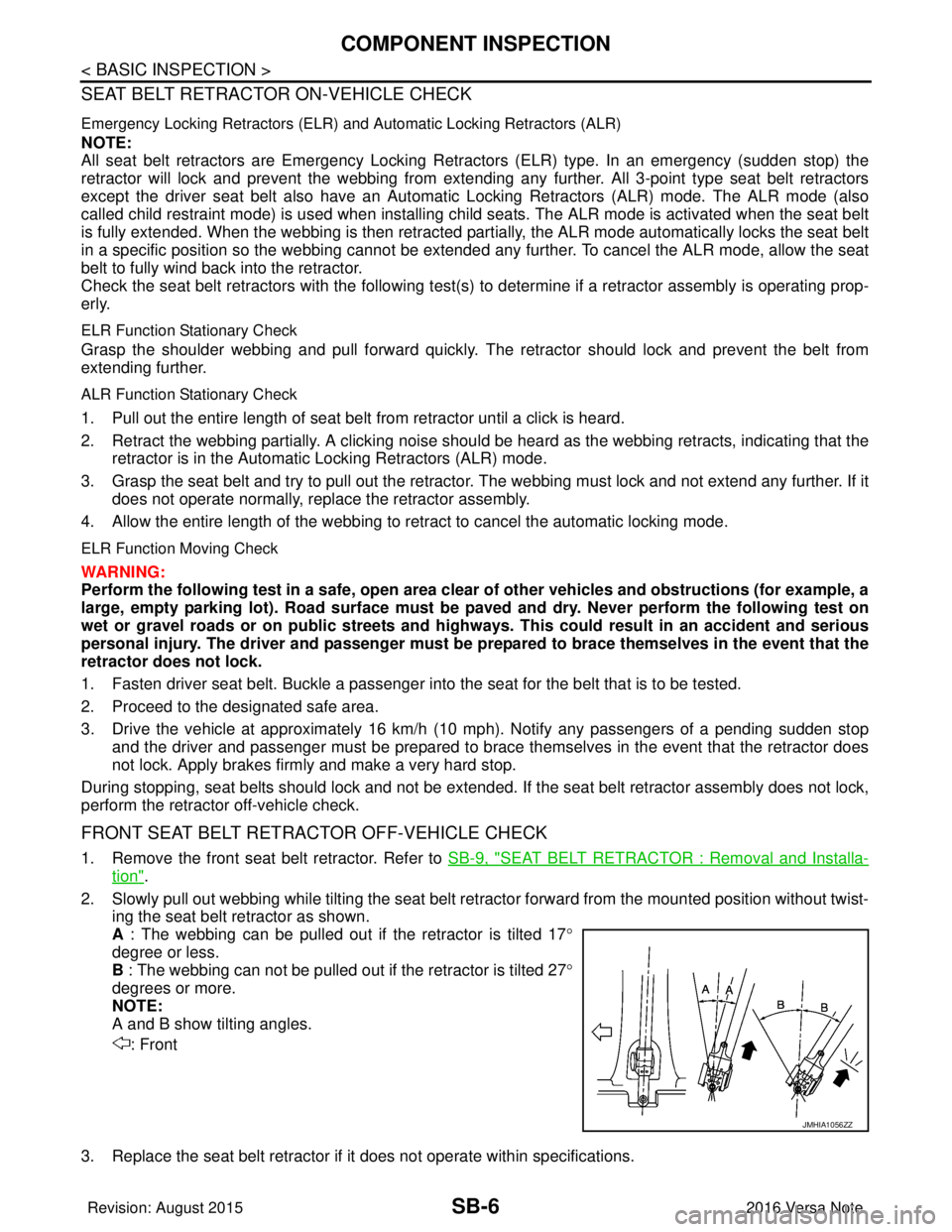
2. Slowly pull out webbing while tilting the seat belt re tractor forward from the mounted position without twist-
ing the seat belt retractor as shown.
A : The webbing can be pulled out if the retractor is tilted 17 °
degree or less.
B : The webbing can not be pulled out if the retractor is tilted 27°
degrees or more.
NOTE:
A and B show tilting angles.
: Front
3. Replace the seat belt retractor if it does not operate within specifications.
JMHIA1056ZZ
Revision: August 2015 2016 Versa Note
cardiagn.com
Page 2865 of 3641
![NISSAN NOTE 2016 Service Repair Manual SEC-8
< SYSTEM DESCRIPTION >[WITH INTELLIGENT KEY SYSTEM]
COMPONENT PARTS
3. ABS actuator and electric unit (control unit) ABS actuator and electric unit (control unit)
transmits the vehicle speed si](/img/5/57363/w960_57363-2864.png "NISSAN NOTE 2016 Service Repair Manual SEC-8
< SYSTEM DESCRIPTION >[WITH INTELLIGENT KEY SYSTEM]
COMPONENT PARTS
3. ABS actuator and electric unit (control unit) ABS actuator and electric unit (control unit)
transmits the vehicle speed si")
SEC-8
< SYSTEM DESCRIPTION >[WITH INTELLIGENT KEY SYSTEM]
COMPONENT PARTS
3. ABS actuator and electric unit (control unit) ABS actuator and electric unit (control unit)
transmits the vehicle speed signal to BCM via
CAN communication.
BCM also receives the vehicle speed signal
from the combination meter via CAN commu-
nication. BCM compares both signals to de-
tect the vehicle speed.
Refer to
BRC-8, "
ABS Actuator and Electric
Unit (Control Unit)" for detailed installation lo-
cation.
4. Intelligent Key warning buzzer Intelligent Key warning buzzer warns the us-
er, who is outside the vehicle, of operation
confirmation according to Intelligent Key op-
eration and door request switch operation, or
of an inappropriate operation.
5. Transmission range switch Transmission range switch detects the CVT
shift selector lever position.
6. IPDM E/R Starter control relay is integrated in IPDM E/R
and used for the engine starting function.
Starter relay is controlled by BCM, and starter
control relay is controlled by IPDM E/R while
communicating with BCM. IPDM E/R sends
the starter control rela
y and starter relay sta-
tus signal to BCM.
7. BCM BCM controls INTELLIGENT KEY SYSTEM
(ENGINE START FUNCTION), NISSAN VE-
HICLE IMMOBILIZER SYSTEM-NATS [NVIS
(NATS)] and VEHICLE SECURITY SYSTEM.
BCM performs the ID verification between
BCM and Intelligent Key when the Intelligent
Key is carried into the detection area of inside
key antenna, and push-button ignition switch
is pressed. If the ID verification result is OK,
ignition switch operation is available.
Then, when the ignition switch is turned ON,
BCM performs ID verification between BCM
and ECM. If the ID verification result is OK,
ECM can start engine.
Refer to
BCS-6, "
BODY CONTROL SYSTEM
: Component Parts Location" for detailed in-
stallation location.
8. Clutch interlock switch Clutch interlock switch detects that clutch
pedal is depressed, and then transmits ON/
OFF signal to the BCM.
9. Stop lamp switch Stop lamp switch detects that brake pedal is
depressed, and then transmits ON/OFF sig-
nal to the BCM.
10. Main power window and door lock/unlock switch Door lock and unlock switch is integrated into
the main power window and door lock/unlock
switch.
Door lock and unlock switch transmits door
lock/unlock operation signal to BCM.
Refer to
PWC-7, "
Main Power Window And
Door Lock/Unlock Switch".
11. CVT shift selector (park position switch) Park position switch is integrated into the
CVT shift selector and detects that the selec-
tor lever is in the P (park) position, then trans-
mits ON/OFF signal to the BCM and IPDM E/
R.
No.
Component Function
Revision: August 2015 2016 Versa Note
cardiagn.com
Page 2868 of 3641
![NISSAN NOTE 2016 Service Repair Manual COMPONENT PARTSSEC-11
< SYSTEM DESCRIPTION > [WITH INTELLIGENT KEY SYSTEM]
C
D
E
F
G H
I
J
L
M A
B
SEC
N
O P
Stop Lamp SwitchINFOID:0000000012430339
Stop lamp switch detects that brake pedal is depre](/img/5/57363/w960_57363-2867.png "NISSAN NOTE 2016 Service Repair Manual COMPONENT PARTSSEC-11
< SYSTEM DESCRIPTION > [WITH INTELLIGENT KEY SYSTEM]
C
D
E
F
G H
I
J
L
M A
B
SEC
N
O P
Stop Lamp SwitchINFOID:0000000012430339
Stop lamp switch detects that brake pedal is depre")
COMPONENT PARTSSEC-11
< SYSTEM DESCRIPTION > [WITH INTELLIGENT KEY SYSTEM]
C
D
E
F
G H
I
J
L
M A
B
SEC
N
O P
Stop Lamp SwitchINFOID:0000000012430339
Stop lamp switch detects that brake pedal is depressed, and then transmits the signal to BCM.
Transmission Range SwitchINFOID:0000000012430340
Transmission range switch is integrated in CVT asse mbly, and detects the CVT shift selector position.
TCM receives the transmission range switch signal and then transmits the P/N position signal to BCM and
IPDM E/R.
BCM confirms the CVT shift selector position with the following 5 signals:
• P (Park) position signal from CVT shift selector (park position switch)
• P/N position signal from TCM
• P (Park) position signal from IPDM E/R (CAN)
• P/N position signal from IPDM E/R (CAN)
• P/N position signal from TCM (CAN)
IPDM E/R confirms the CVT shift selector position with the following 3 signals:
• P (Park) position signal from CVT shift selector (park position switch)
• P/N position signal from TCM
• P/N position signal from BCM (CAN)
Revision: August 2015 2016 Versa Note
cardiagn.com
Page 2870 of 3641
![NISSAN NOTE 2016 Service Repair Manual SYSTEMSEC-13
< SYSTEM DESCRIPTION > [WITH INTELLIGENT KEY SYSTEM]
C
D
E
F
G H
I
J
L
M A
B
SEC
N
O P
Refer to SEC-15, "NISSAN ANTI-THEFT SYSTEM : System Description" for any functions other than engin](/img/5/57363/w960_57363-2869.png "NISSAN NOTE 2016 Service Repair Manual SYSTEMSEC-13
< SYSTEM DESCRIPTION > [WITH INTELLIGENT KEY SYSTEM]
C
D
E
F
G H
I
J
L
M A
B
SEC
N
O P
Refer to SEC-15, \"NISSAN ANTI-THEFT SYSTEM : System Description\" for any functions other than engin")
SYSTEMSEC-13
< SYSTEM DESCRIPTION > [WITH INTELLIGENT KEY SYSTEM]
C
D
E
F
G H
I
J
L
M A
B
SEC
N
O P
Refer to SEC-15, "NISSAN ANTI-THEFT SYSTEM : System Description" for any functions other than engine
start function of Intelligent Key system.
PRECAUTIONS FOR INTELLIGENT KEY SYSTEM
The transponder (the chip for NATS ID verification) is integrated into the Intelligent Key. (For the con-
ventional models, it is integrated into the mechanical key.) Therefore, ID verification cannot be per-
formed by mechanical key only.
In that case, NATS ID verification can be perfor med when Intelligent Key backside is contacted to
push-button ignition switch while brake pedal is depressed. If verification result is OK, engine can be
started.
OPERATION WHEN INTELLIGENT KEY IS CARRIED
1. When the push-button ignition switch is pressed, the BCM activates the inside key antenna and transmits the request signal to the Intelligent Key.
2. The Intelligent Key receives the request signal and transmits the Intelligent Key ID signal to the BCM.
3. BCM receives the Intelligent Key ID signal via remote keyless entry receiver and verifies it with the regis-
tered ID.
4. BCM turns ACC relay ON and transmits the i gnition power supply ON signal to IPDM E/R.
5. IPDM E/R turns the ignition relay ON and starts the ignition power supply.
6. IPDM E/R turns the starter control relay ON for engine starting in advance.
7. BCM detects the selector lever position and brake pedal operation condition.
8. BCM transmits the starter request signal to IPDM E/R and turns the starter relay ON if BCM judges that the engine start condition* is satisfied.
9. Power supply is supplied through the starter relay and the starter control relay to operate the starter motor. CAUTION:
If a malfunction is detected in the Intelligent Key system, the “KEY” warning lamp on the combina-
tion meter illuminates. At that time, the engine cannot be started.
10. When BCM receives feedback signal from ECM indicating that the engine is started, the BCM transmits a stop signal to IPDM E/R and stops cranking by turning OFF the starter motor relay. (If engine start is
unsuccessful, cranking stops aut omatically within 5 seconds.)
CAUTION:
When the Intelligent Key is carried outside of th e vehicle (inside key antenna detection area) while
the power supply is in the ACC or ON position, even if the engine start condition* is satisfied, the
engine cannot be started.
*: For the engine start condition, refer to “IGNIT ION SWITCH POSITION CHANGE TABLE BY PUSH-BUT-
TON IGNITION SWITCH OPERATION”.
OPERATION RANGE
Engine can be started when Intelligent Key is inside the vehicle. However, sometimes engine may not start
when Intelligent Key is on instrument panel or in glove box.
ENGINE START OPERATION WHEN INTELLIGENT KEY IS CONTACTED TO PUSH-BUTTON IG-
NITION SWITCH
When Intelligent Key battery is discharged, NATS ID verification between transponder in Intelligent Key and
BCM is performed when Intelligent Key backside is cont acted to push-button ignition switch while brake pedal
is depressed. If the verification result is OK, engine can be started.
IGNITION SWITCH POSITION CHANGE TABLE BY PUSH-BUTTON IGNITION SWITCH OPERA-
TION
The ignition switch position can be changed by the following operations:
NOTE:
• When an Intelligent Key is within the detection area of inside key antenna or when Intelligent Key backside is contacted to push-button ignition switch, it is equivalent to the operations below:
• When starting the engine, the BCM monitors under the engine start conditions:
- Brake pedal operation condition
- Selector lever position
- Vehicle speed
Vehicle speed: less than 4 km/h (2.5 MPH)
Revision: August 2015 2016 Versa Note
cardiagn.com
Page 2871 of 3641
![NISSAN NOTE 2016 Service Repair Manual SEC-14
< SYSTEM DESCRIPTION >[WITH INTELLIGENT KEY SYSTEM]
SYSTEM
Vehicle speed: 4 km/h (2.5 MPH) or more
Emergency stop operation
• Press and hold the push-button ignition switch for 2 seconds or m](/img/5/57363/w960_57363-2870.png "NISSAN NOTE 2016 Service Repair Manual SEC-14
< SYSTEM DESCRIPTION >[WITH INTELLIGENT KEY SYSTEM]
SYSTEM
Vehicle speed: 4 km/h (2.5 MPH) or more
Emergency stop operation
• Press and hold the push-button ignition switch for 2 seconds or m")
SEC-14
< SYSTEM DESCRIPTION >[WITH INTELLIGENT KEY SYSTEM]
SYSTEM
Vehicle speed: 4 km/h (2.5 MPH) or more
Emergency stop operation
• Press and hold the push-button ignition switch for 2 seconds or more.
• Press the push-button ignition switch 3 times or more within 1.5 seconds.
NISSAN ANTI-THEFT SYSTEM
Power supply positionCondition
Push-button ignition switch opera-
tion frequency
Selector lever Brake pedal operation condi-
tion
OFF → ACC —Not depressed 1
OFF → ACC → ON —Not depressed 2
OFF → ACC → ON → OFF — Not depressed 3
OFF → START
ACC → START
ON → START P or N position
Depressed 1
Engine is running → OFF — — 1
Power supply position Condition
Push-button ignition switch opera-
tion frequency
Selector lever Brake pedal operation condi-
tion
Engine is running → ACC — —Emergency stop operation
Engine stall return operation
while driving N position
Not depressed 1
Revision: August 2015 2016 Versa Note
cardiagn.com
Page 2872 of 3641
![NISSAN NOTE 2016 Service Repair Manual SYSTEMSEC-15
< SYSTEM DESCRIPTION > [WITH INTELLIGENT KEY SYSTEM]
C
D
E
F
G H
I
J
L
M A
B
SEC
N
O P
NISSAN ANTI-THEFT SYSTEM : System DescriptionINFOID:0000000012430342
SYSTEM DIAGRAM
SYSTEM DESCRIPT](/img/5/57363/w960_57363-2871.png "NISSAN NOTE 2016 Service Repair Manual SYSTEMSEC-15
< SYSTEM DESCRIPTION > [WITH INTELLIGENT KEY SYSTEM]
C
D
E
F
G H
I
J
L
M A
B
SEC
N
O P
NISSAN ANTI-THEFT SYSTEM : System DescriptionINFOID:0000000012430342
SYSTEM DIAGRAM
SYSTEM DESCRIPT")
SYSTEMSEC-15
< SYSTEM DESCRIPTION > [WITH INTELLIGENT KEY SYSTEM]
C
D
E
F
G H
I
J
L
M A
B
SEC
N
O P
NISSAN ANTI-THEFT SYSTEM : System DescriptionINFOID:0000000012430342
SYSTEM DIAGRAM
SYSTEM DESCRIPTION
• The Nissan Anti-Theft System (NATS) prevents the engine from being started by Intelligent Key whose ID is
not registered to the vehicle (BCM). It has higher protection against auto theft involving the duplication of
mechanical keys.
• The ignition key integrated in the Intelligent Key cannot start the engine. When the Intelligent Key battery is
discharged, the NATS ID verification is performed between the transponder integrated with Intelligent Key
and BCM via NATS antenna amp. when the Intelligent Ke y backside is contacted to push-button ignition
switch while brake pedal is depressed. If the verifica tion result is OK, the engine start operation can be per-
formed by the push-button ignition switch operation.
• Locate the security indicator lamp and always blinks it when the ignition switch is in any position except ON
to warn that the vehicle is equipped with Nissan Anti-Theft System (NATS).
• Up to 4 Intelligent Keys can be registered (including the standard ignition key) upon request from the owner.
• When replacing ECM, BCM or Intelligent Key, the spec ified procedure (Initialization and registration) using
CONSULT is required.
• For initialization and registration of Intelligent Keys, refer to CONSULT Immobilizer mode and follow the on-
screen instructions.
• Possible symptom of NATS malfunction is “Engine c an not start”. This symptom also occurs because of
other than NATS malfunction, so start the trouble diagnosis according to SEC-46, "
Work Flow".
• If ECM other than genuine part is installed, the engine cannot be started. For ECM replacement procedure, refer to EC-477, "
Removal and Installation".
ALKIA3647GB
Revision: August 2015 2016 Versa Note
cardiagn.com
Page 2873 of 3641
![NISSAN NOTE 2016 Service Repair Manual SEC-16
< SYSTEM DESCRIPTION >[WITH INTELLIGENT KEY SYSTEM]
SYSTEM
PRECAUTIONS FOR KEY REGISTRATION
• The ID registration is a procedure that erases the cu
rrent NATS ID once, and then registers a ne](/img/5/57363/w960_57363-2872.png "NISSAN NOTE 2016 Service Repair Manual SEC-16
< SYSTEM DESCRIPTION >[WITH INTELLIGENT KEY SYSTEM]
SYSTEM
PRECAUTIONS FOR KEY REGISTRATION
• The ID registration is a procedure that erases the cu
rrent NATS ID once, and then registers a ne")
SEC-16
< SYSTEM DESCRIPTION >[WITH INTELLIGENT KEY SYSTEM]
SYSTEM
PRECAUTIONS FOR KEY REGISTRATION
• The ID registration is a procedure that erases the cu
rrent NATS ID once, and then registers a new ID. There-
fore before starting the registration operation, collect all registered Intelligent Keys from the customer.
• When registering the Intelligent Key, perform only one procedure to simultaneously register both IDs (NATS
ID and Intelligent Key ID).
SECURITY INDICATOR LAMP
• Security indicator lamp warns that the vehicle is equipped with NATS.
• Security indicator lamp always blinks when the i gnition switch is in any position other than ON.
NOTE:
Because security indicator lamp is highly efficient, the battery is barely affected.
ENGINE START OPERATION WHEN INTELLIGENT KEY IS CONTACTED TO PUSH-BUTTON IG-
NITION SWITCH
1. When brake pedal is depressed while selector lever is in the P position the BCM activates NATS antenna amp. that is located behind push-button ignition switch.
2. When Intelligent Key (transponder built-in) backsi de is contacted to push-button ignition switch, BCM
starts NATS ID verification between BCM and Intelligent Key (transponder built-in) via NATS antenna
amp.
3. When NATS ID verification result is OK, buzzer in combination meter sounds and BCM transmits the result to ECM.
4. BCM turns ACC relay ON and transmits ignition power supply ON signal to IPDM E/R.
5. IPDM E/R turns the ignition relay ON and starts the ignition power supply.
6. IPDM E/R turns the starter control relay ON for engine starting in advance.
7. BCM detects that the selector leve r position and brake pedal operation condition.
8. BCM transmits starter request signal to IPDM E/R and turns the starter relay ON if BCM judges that the
engine start condition* is satisfied.
9. Power supply is supplied through the starter relay and the starter control relay to operate the starter motor.
10. When BCM receives feedback signal from ECM indica ting that the engine is started, BCM transmits a
stop signal to IPDM E/R and stops cranking by turning off the starter motor relay. (If engine start is unsuc-
cessful, cranking stops automatically within 5 seconds.)
*: For the engine start condition, refer to “IGN ITION SWITCH POSITION CHANGE TABLE BY PUSH-BUT-
TON IGNITION SWITCH OPERATION” below.
IGNITION SWITCH POSITION CHANGE TABLE BY PUSH-BUTTON IGNITION SWITCH OPERA-
TION
The ignition switch position can be changed by the following operations.
NOTE:
• When an Intelligent Key is within the detection area of inside key antenna or when Intelligent Key backside is
contacted to push-button ignition switch, it is equivalent to the operations below:
• When starting the engine, the BCM monitors under the engine start conditions:
- Brake pedal operation condition
- Selector lever position
- Vehicle speed
Vehicle speed: less than 4 km/h (2.5 MPH)
Power supply position Condition
Push-button ignition switch opera-
tion frequency
Selector lever Brake pedal operation condi-
tion
OFF → ACC —Not depressed 1
OFF → ACC → ON —Not depressed 2
OFF → ACC → ON → OFF — Not depressed 3
OFF → START
ACC → START
ON → START P or N position
Depressed 1
Engine is running → OFF — — 1
Revision: August 2015 2016 Versa Note
cardiagn.com
Page 2874 of 3641
![NISSAN NOTE 2016 Service Repair Manual SYSTEMSEC-17
< SYSTEM DESCRIPTION > [WITH INTELLIGENT KEY SYSTEM]
C
D
E
F
G H
I
J
L
M A
B
SEC
N
O P
Vehicle speed: 4 km/h (2.5 MPH) or more
Emergency stop operation
• Press and hold the push-button](/img/5/57363/w960_57363-2873.png "NISSAN NOTE 2016 Service Repair Manual SYSTEMSEC-17
< SYSTEM DESCRIPTION > [WITH INTELLIGENT KEY SYSTEM]
C
D
E
F
G H
I
J
L
M A
B
SEC
N
O P
Vehicle speed: 4 km/h (2.5 MPH) or more
Emergency stop operation
• Press and hold the push-button")
SYSTEMSEC-17
< SYSTEM DESCRIPTION > [WITH INTELLIGENT KEY SYSTEM]
C
D
E
F
G H
I
J
L
M A
B
SEC
N
O P
Vehicle speed: 4 km/h (2.5 MPH) or more
Emergency stop operation
• Press and hold the push-button ignition switch for 2 seconds or more.
• Press the push-button ignition switch 3 times or more within 1.5 seconds.
Power supply position
Condition
Push-button ignition switch opera-
tion frequency
Selector lever Brake pedal operation condi-
tion
Engine is running → ACC — —Emergency stop operation
Engine stall return operation
while driving N position
Not depressed 1
Revision: August 2015 2016 Versa Note
cardiagn.com
Page 2876 of 3641
![NISSAN NOTE 2016 Service Repair Manual DIAGNOSIS SYSTEM (BCM)SEC-19
< SYSTEM DESCRIPTION > [WITH INTELLIGENT KEY SYSTEM]
C
D
E
F
G H
I
J
L
M A
B
SEC
N
O P
INTELLIGENT KEY
INTELLIGENT KEY : CONSULT Func tion (BCM - INTELLIGENT KEY)INFOID:00](/img/5/57363/w960_57363-2875.png "NISSAN NOTE 2016 Service Repair Manual DIAGNOSIS SYSTEM (BCM)SEC-19
< SYSTEM DESCRIPTION > [WITH INTELLIGENT KEY SYSTEM]
C
D
E
F
G H
I
J
L
M A
B
SEC
N
O P
INTELLIGENT KEY
INTELLIGENT KEY : CONSULT Func tion (BCM - INTELLIGENT KEY)INFOID:00")
DIAGNOSIS SYSTEM (BCM)SEC-19
< SYSTEM DESCRIPTION > [WITH INTELLIGENT KEY SYSTEM]
C
D
E
F
G H
I
J
L
M A
B
SEC
N
O P
INTELLIGENT KEY
INTELLIGENT KEY : CONSULT Func tion (BCM - INTELLIGENT KEY)INFOID:0000000012542526
SELF DIAGNOSTIC RESULT
Refer to BCS-50, "DTCIndex".
DATA MONITOR
ACTIVE TEST
Monitor Item [Unit] Main Description
REQ SW -DR [On/Off] ×Indicates condition of door request switch LH.
REQ SW -AS [On/Off] ×Indicates condition of door request switch RH.
REQ SW -BD/TR [On/Off] ×Indicates condition of back door request switch.
PUSH SW [On/Off] Indicates condition of push-button ignition switch.
CLUCH SW [On/Off] ×Indicates condition of clutch interlock switch.
BRAKE SW 1 [On/Off] ×Indicates condition of brake switch.
BRAKE SW 2 [On/Off] Indicates condition of brake switch.
DETE/CANCL SW [On/Off] ×Indicates condition of P (park) position.
SFT PN/N SW [On/Off] ×Indicates condition of P (park) or N (neutral) position.
UNLK SEN -DR [On/Off] ×Indicates condition of door unlock sensor.
PUSH SW -IPDM [On/Off] Indicates condition of push-button ignition switch received from IPDM E/R on
CAN communication line.
IGN RLY1 -F/B [On/Off] Indicates condition of ignition relay 1 received from IPDM E/R on CAN commu-
nication line.
DETE SW -IPDM [On/Off] Indicates condition of detent switch received from TCM on CAN communication
line.
SFT PN -IPDM [On/Off] Indicates condition of P (park) or N (neutral) position from TCM on CAN com-
munication line.
SFT P -MET [On/Off] Indicates condition of P (park) position from TCM on CAN communication line.
SFT N -MET [On/Off] Indicates condition of N (neutral) position from IPDM E/R on CAN communica-
tion line.
ENGINE STATE [Stop/Start/Crank/Run] ×Indicates condition of engine state from ECM on CAN communication line.
VEH SPEED 1 [mph/km/h] ×Indicates condition of vehicle speed si
gnal received from ABS on CAN commu-
nication line.
VEH SPEED 2 [mph/km/h] ×Indicates condition of vehicle speed signal received from combination meter on
CAN communication line.
DOOR STAT -DR [LOCK/READY/UNLK] ×Indicates condition of driver side door status.
DOOR STAT -AS [LOCK/READY/UNLK] ×Indicates condition of passenger side door status.
ID OK FLAG [Set/Reset] Indicates condition of Intelligent Key ID.
PRMT ENG STRT [Set/Reset] Indicates condition of engine start possibility.
RKE OPE COUN1 [0-19] ×When remote keyless entry receiver receives the signal transmitted while oper-
ating on Intelligent Key, the numerical value start changing.
RKE OPE COUN2 [0-19] ×When remote keyless entry receiver receives the signal transmitted while oper-
ating on Intelligent Key, the numerical value start changing.
RKE-LOCK [On/Off] Indicates condition of lock signal from Intelligent Key.
RKE-UNLOCK [On/Off] Indicates condition of unlock signal from Intelligent Key.
RKE-PANIC [On/Off] Indicates condition of panic signal from Intelligent Key.
RKE-MODE CHG [On/Off] Indicates condition of mode change signal from Intelligent Key.
Revision: August 2015 2016 Versa Note
cardiagn.com