ABS NISSAN NOTE 2016 Service Repair Manual
[x] Cancel search | Manufacturer: NISSAN, Model Year: 2016, Model line: NOTE, Model: NISSAN NOTE 2016Pages: 3641, PDF Size: 28.72 MB
Page 2736 of 3641
RSU-8
< REMOVAL AND INSTALLATION >
REAR SHOCK ABSORBER
REMOVAL AND INSTALLATION
REAR SHOCK ABSORBER
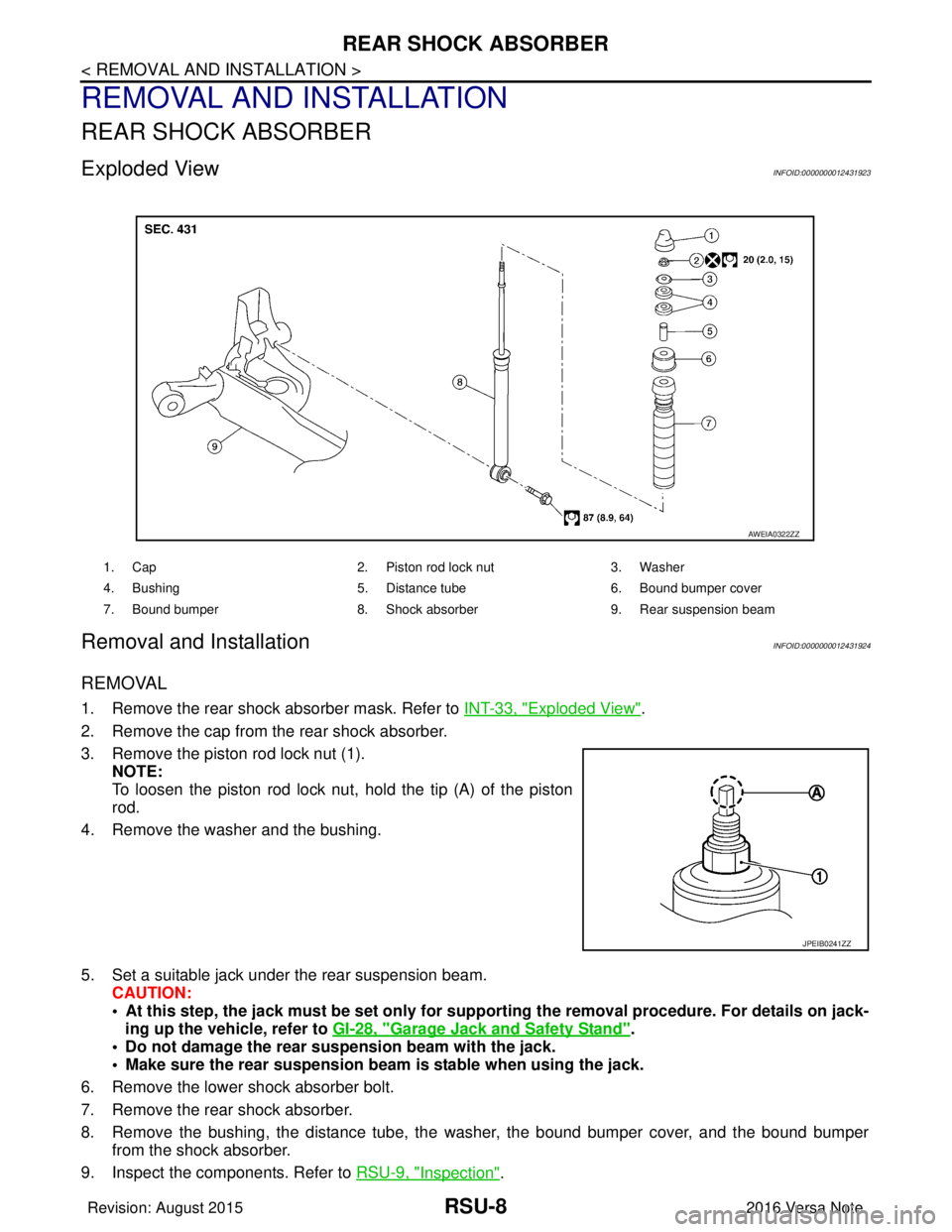
Exploded ViewINFOID:0000000012431923
Removal and InstallationINFOID:0000000012431924
REMOVAL
1. Remove the rear shock absorber mask. Refer to INT-33, "Exploded View".
2. Remove the cap from the rear shock absorber.
3. Remove the piston rod lock nut (1). NOTE:
To loosen the piston rod lock nut, hold the tip (A) of the piston
rod.
4. Remove the washer and the bushing.
5. Set a suitable jack under the rear suspension beam. CAUTION:
• At this step, the jack must be set only for supp orting the removal procedure. For details on jack-
ing up the vehicle, refer to GI-28, "
Garage Jack and Safety Stand".
• Do not damage the rear suspension beam with the jack.
• Make sure the rear suspension beam is stable when using the jack.
6. Remove the lower shock absorber bolt.
7. Remove the rear shock absorber.
8. Remove the bushing, the distance tube, the washer, the bound bumper cover, and the bound bumper
from the shock absorber.
9. Inspect the components. Refer to RSU-9, "
Inspection".
1. Cap 2. Piston rod lock nut 3. Washer
4. Bushing 5. Distance tube6. Bound bumper cover
7. Bound bumper 8. Shock absorber 9. Rear suspension beam
AWEIA0322ZZ
JPEIB0241ZZ
Revision: August 2015 2016 Versa Note
cardiagn.com
Page 2737 of 3641
REAR SHOCK ABSORBERRSU-9
< REMOVAL AND INSTALLATION >
C
DF
G H
I
J
K L
M A
B
RSU
N
O P
INSTALLATION
Installation is in the reverse order of removal.
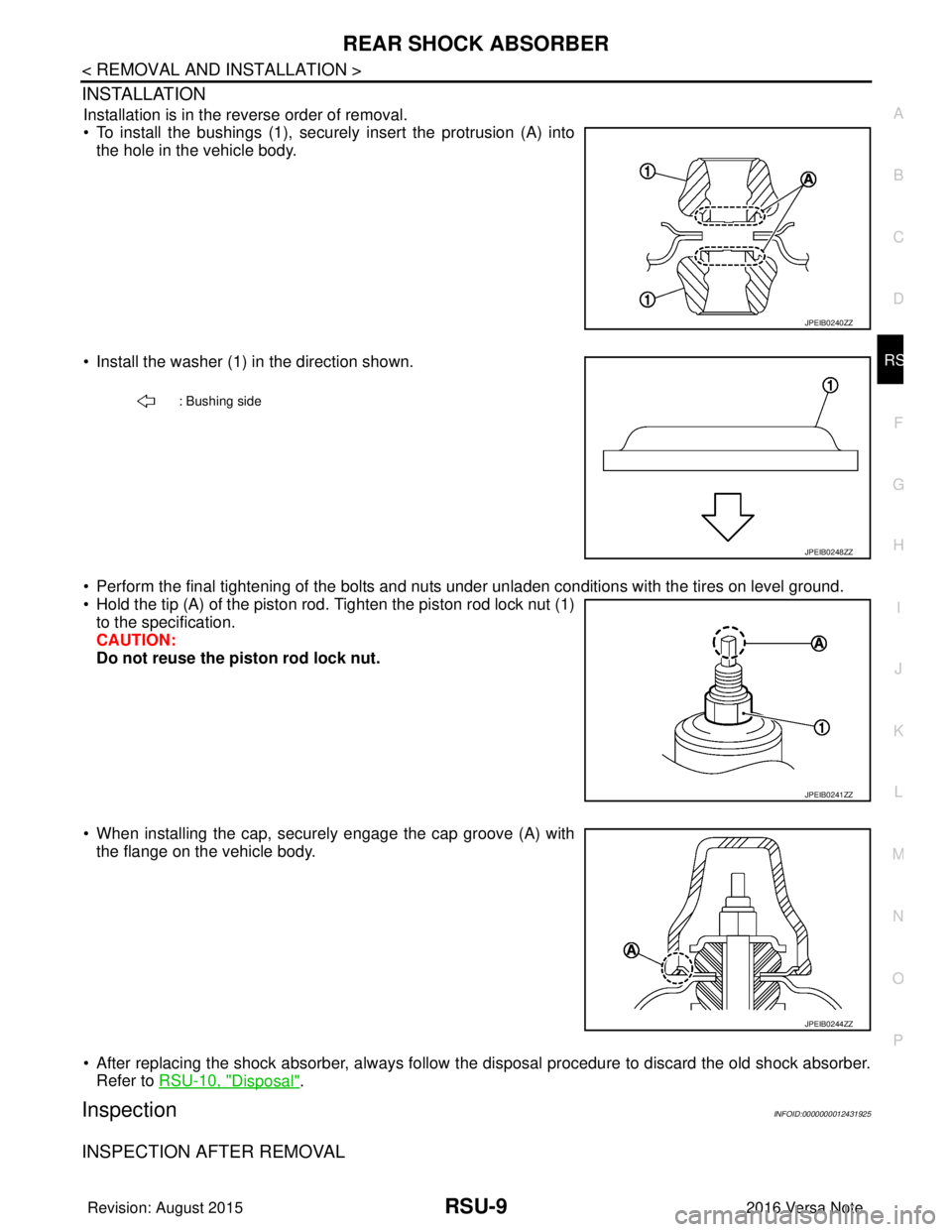
• To install the bushings (1), securely insert the protrusion (A) into the hole in the vehicle body.
• Install the washer (1) in the direction shown.
• Perform the final tightening of the bolts and nuts under unladen conditions with the tires on level ground.
• Hold the tip (A) of the piston rod. Tighten the piston rod lock nut (1) to the specification.
CAUTION:
Do not reuse the piston rod lock nut.
• When installing the cap, securely engage the cap groove (A) with the flange on the vehicle body.
• After replacing the shock absorber, always follow t he disposal procedure to discard the old shock absorber.
Refer to RSU-10, "
Disposal".
InspectionINFOID:0000000012431925
INSPECTION AFTER REMOVAL
JPEIB0240ZZ
: Bushing side
JPEIB0248ZZ
JPEIB0241ZZ
JPEIB0244ZZ
Revision: August 2015 2016 Versa Note
cardiagn.com
Page 2738 of 3641
RSU-10
< REMOVAL AND INSTALLATION >
REAR SHOCK ABSORBER
Shock Absorber
Check the following items and replace the parts if necessary.
• Check the shock absorber for oil leaks, deformation, cracks, and other damage.
• Check the piston rod for damage, uneven wear, and distortion.
Bound Bumper, Bushing
Check for cracks and damage. Replace the parts if necessary.
Washer, Bound Bumper Cover, Distance Tube
• Check for cracks and damage. Replace the parts if necessary.
DisposalINFOID:0000000012431926
1. Set the shock absorber horizontally with the piston rod fully extended.
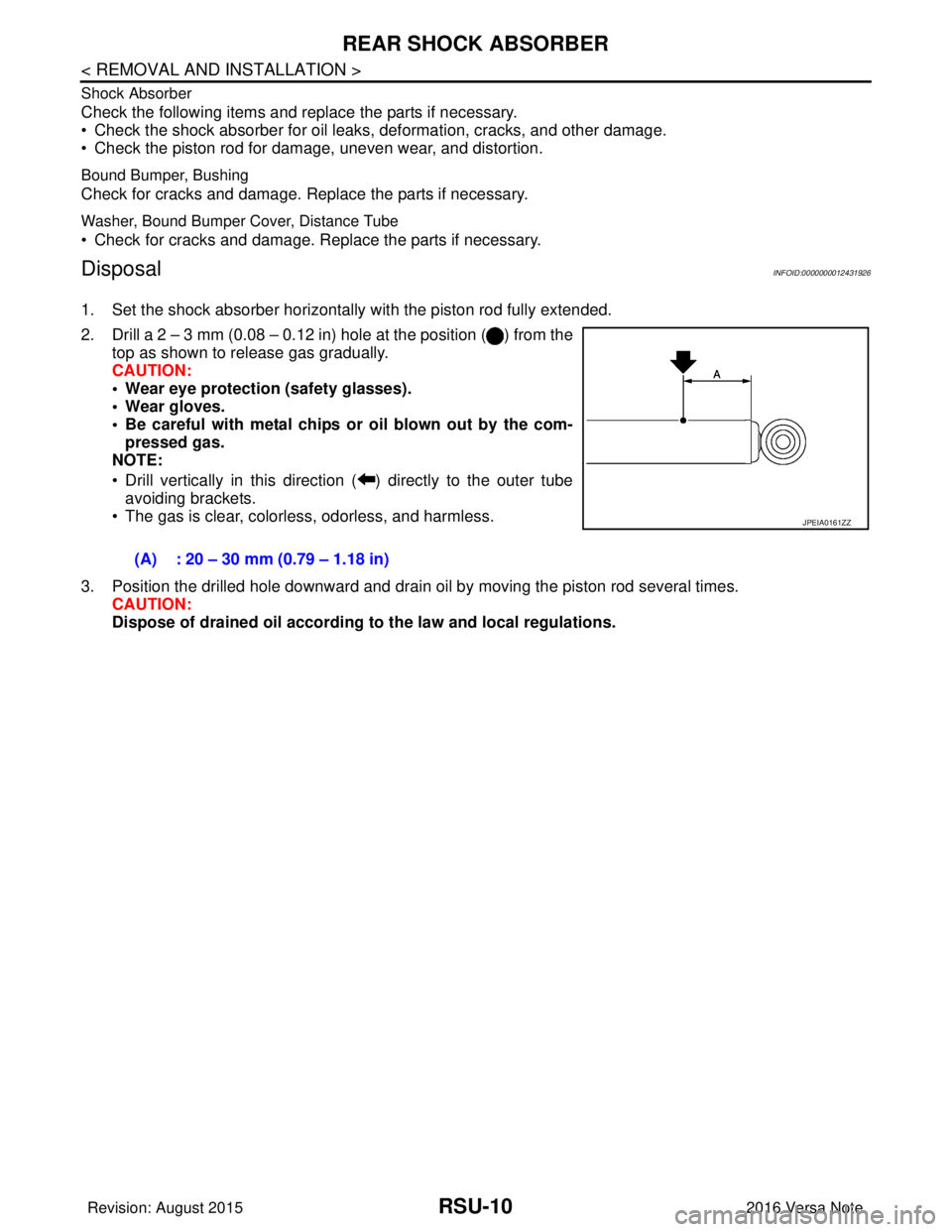
2. Drill a 2 – 3 mm (0.08 – 0.12 in) hole at the position ( ) from thetop as shown to release gas gradually.
CAUTION:
• Wear eye protection (safety glasses).
• Wear gloves.
• Be careful with metal chips or oil blown out by the com-pressed gas.
NOTE:
• Drill vertically in this direction ( ) directly to the outer tube avoiding brackets.
• The gas is clear, colorless, odorless, and harmless.
3. Position the drilled hole downward and drain oil by moving the piston rod several times. CAUTION:
Dispose of drained oil according to the law and local regulations.
(A) : 20 – 30 mm (0.79 – 1.18 in)
JPEIA0161ZZ
Revision: August 2015
2016 Versa Note
cardiagn.com
Page 2739 of 3641
COIL SPRINGRSU-11
< REMOVAL AND INSTALLATION >
C
DF
G H
I
J
K L
M A
B
RSU
N
O P
COIL SPRING
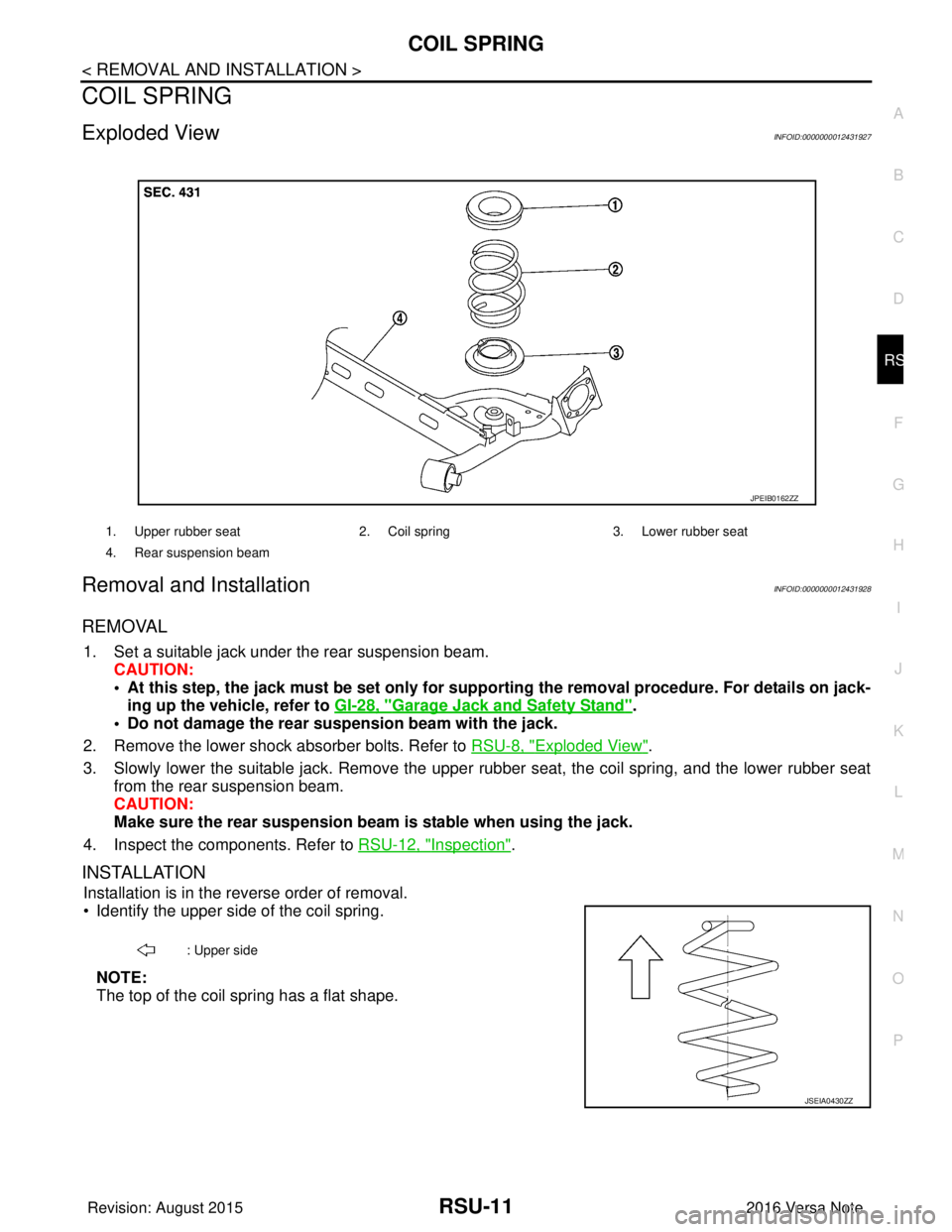
Exploded ViewINFOID:0000000012431927
Removal and InstallationINFOID:0000000012431928
REMOVAL
1. Set a suitable jack under the rear suspension beam. CAUTION:
• At this step, the jack must be set only for suppo rting the removal procedure. For details on jack-
ing up the vehicle, refer to GI-28, "
Garage Jack and Safety Stand".
• Do not damage the rear su spension beam with the jack.
2. Remove the lower shock absorber bolts. Refer to RSU-8, "
Exploded View".
3. Slowly lower the suitable jack. Remove the upper rubber seat, the coil spring, and the lower rubber seat
from the rear suspension beam.
CAUTION:
Make sure the rear susp ension beam is stable when using the jack.
4. Inspect the components. Refer to RSU-12, "
Inspection".
INSTALLATION
Installation is in the reverse order of removal.
• Identify the upper side of the coil spring.
NOTE:
The top of the coil spring has a flat shape.
1. Upper rubber seat 2. Coil spring3. Lower rubber seat
4. Rear suspension beam
JPEIB0162ZZ
: Upper side
JSEIA0430ZZ
Revision: August 2015 2016 Versa Note
cardiagn.com
Page 2741 of 3641
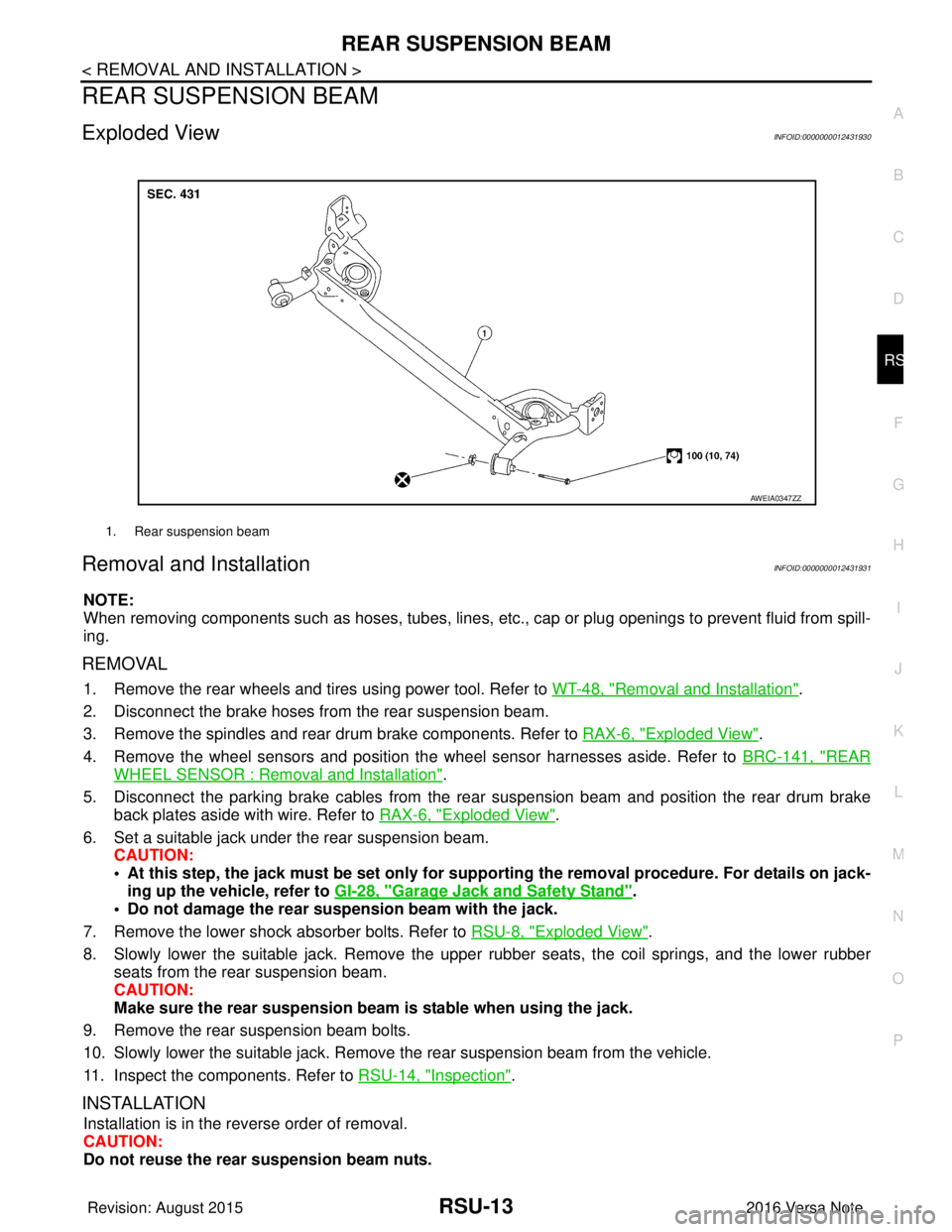
REAR SUSPENSION BEAMRSU-13
< REMOVAL AND INSTALLATION >
C
DF
G H
I
J
K L
M A
B
RSU
N
O P
REAR SUSPENSION BEAM
Exploded ViewINFOID:0000000012431930
Removal and InstallationINFOID:0000000012431931
NOTE:
When removing components such as hoses, tubes, lines, etc. , cap or plug openings to prevent fluid from spill-
ing.
REMOVAL
1. Remove the rear wheels and tires using power tool. Refer to WT-48, "Removal and Installation".
2. Disconnect the brake hoses from the rear suspension beam.
3. Remove the spindles and rear drum brake components. Refer to RAX-6, "
Exploded View".
4. Remove the wheel sensors and position the wheel sensor harnesses aside. Refer to BRC-141, "
REAR
WHEEL SENSOR : Removal and Installation".
5. Disconnect the parking brake cables from the rear suspension beam and position the rear drum brake
back plates aside with wire. Refer to RAX-6, "
Exploded View".
6. Set a suitable jack under the rear suspension beam. CAUTION:
• At this step, the jack must be set only for suppo rting the removal procedure. For details on jack-
ing up the vehicle, refer to GI-28, "
Garage Jack and Safety Stand".
• Do not damage the rear su spension beam with the jack.
7. Remove the lower shock absorber bolts. Refer to RSU-8, "
Exploded View".
8. Slowly lower the suitable jack. Remove the upper rubber seats, the coil springs, and the lower rubber seats from the rear suspension beam.
CAUTION:
Make sure the rear susp ension beam is stable when using the jack.
9. Remove the rear suspension beam bolts.
10. Slowly lower the suitable jack. Remove the rear suspension beam from the vehicle.
11. Inspect the components. Refer to RSU-14, "
Inspection".
INSTALLATION
Installation is in the reverse order of removal.
CAUTION:
Do not reuse the rear suspension beam nuts.
1. Rear suspension beam
AWEIA0347ZZ
Revision: August 2015 2016 Versa Note
cardiagn.com
Page 2794 of 3641
TRANSMITTERWT-51
< REMOVAL AND INSTALLATION >
C
DF
G H
I
J
K L
M A
B
WT
N
O P
CAUTION:
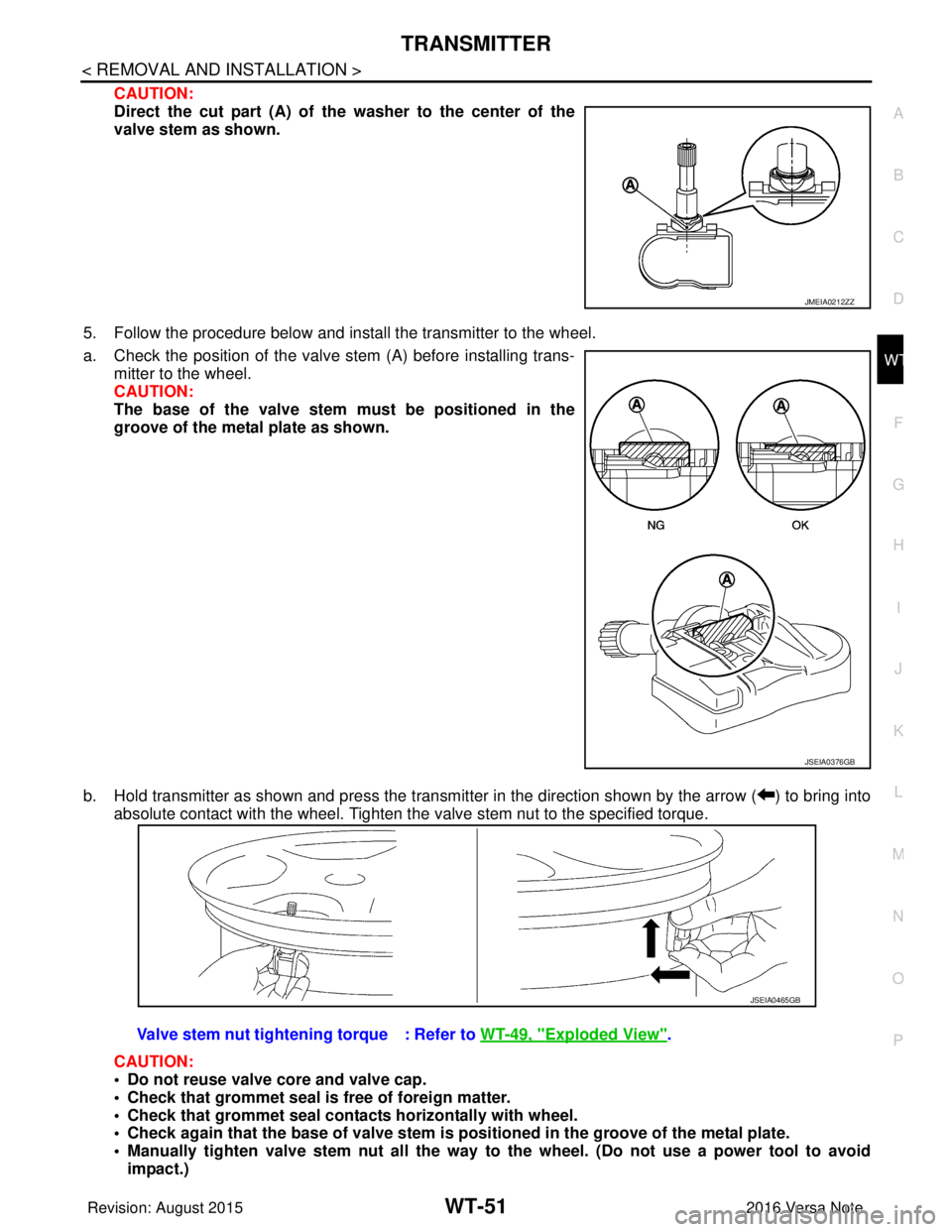
Direct the cut part (A) of the washer to the center of the
valve stem as shown.
5. Follow the procedure below and install the transmitter to the wheel.
a. Check the position of the valve stem (A) before installing trans-
mitter to the wheel.
CAUTION:
The base of the valve stem mu st be positioned in the
groove of the metal plate as shown.
b. Hold transmitter as shown and press the transmitter in the direction shown by the arrow ( ) to bring into absolute contact with the wheel. Tighten the valve stem nut to the specified torque.
CAUTION:
• Do not reuse valve core and valve cap.
• Check that grommet seal is free of foreign matter.
• Check that grommet seal contacts horizontally with wheel.
• Check again that the base of valve stem is po sitioned in the groove of the metal plate.
• Manually tighten valve stem nut all the way to the wheel. (Do not use a power tool to avoid
impact.)
JMEIA0212ZZ
JSEIA0376GB
Valve stem nut tightening torque : Refer to WT-49, "Exploded View".
JSEIA0465GB
Revision: August 2015 2016 Versa Note
cardiagn.com
Page 2864 of 3641
![NISSAN NOTE 2016 Service Repair Manual COMPONENT PARTSSEC-7
< SYSTEM DESCRIPTION > [WITH INTELLIGENT KEY SYSTEM]
C
D
E
F
G H
I
J
L
M A
B
SEC
N
O P
SYSTEM DESCRIPTION
COMPONENT PARTS
Component Parts LocationINFOID:0000000012430324
A. View r](/img/5/57363/w960_57363-2863.png "NISSAN NOTE 2016 Service Repair Manual COMPONENT PARTSSEC-7
< SYSTEM DESCRIPTION > [WITH INTELLIGENT KEY SYSTEM]
C
D
E
F
G H
I
J
L
M A
B
SEC
N
O P
SYSTEM DESCRIPTION
COMPONENT PARTS
Component Parts LocationINFOID:0000000012430324
A. View r")
COMPONENT PARTSSEC-7
< SYSTEM DESCRIPTION > [WITH INTELLIGENT KEY SYSTEM]
C
D
E
F
G H
I
J
L
M A
B
SEC
N
O P
SYSTEM DESCRIPTION
COMPONENT PARTS
Component Parts LocationINFOID:0000000012430324
A. View right of steering column B. View with glove box cover removed No. Component Function
1. Combination meter Combination meter transmits the vehicle
speed signal to BCM via CAN communica-
tion.
BCM also receives the vehicle speed signal
from ABS actuator and electric unit (control
unit) via CAN communication. BCM com-
pares both signals to detect the vehicle
speed.
Security indicator lamp is located on combi-
nation meter.
Security indicator lamp blinks when ignition
switch is in any position other than ON to
warn that NISSAN VEHICLE IMMOBILIZER
SYSTEM-NATS [NVIS (NATS)] is on board.
Refer to MWI-9, "
METER SYSTEM : Combi-
nation Meter".
2. Inside key antenna (instrument center) Inside key antenna (instrument center) de-
tects whether Intelligent Key is inside the ve-
hicle or not, and then transmits the signal to
the BCM.
Refer to SEC-10, "
Inside Key Antenna".
AWKIA3649ZZ
Revision: August 2015
2016 Versa Note
cardiagn.com
Page 2865 of 3641
![NISSAN NOTE 2016 Service Repair Manual SEC-8
< SYSTEM DESCRIPTION >[WITH INTELLIGENT KEY SYSTEM]
COMPONENT PARTS
3. ABS actuator and electric unit (control unit) ABS actuator and electric unit (control unit)
transmits the vehicle speed si](/img/5/57363/w960_57363-2864.png "NISSAN NOTE 2016 Service Repair Manual SEC-8
< SYSTEM DESCRIPTION >[WITH INTELLIGENT KEY SYSTEM]
COMPONENT PARTS
3. ABS actuator and electric unit (control unit) ABS actuator and electric unit (control unit)
transmits the vehicle speed si")
SEC-8
< SYSTEM DESCRIPTION >[WITH INTELLIGENT KEY SYSTEM]
COMPONENT PARTS
3. ABS actuator and electric unit (control unit) ABS actuator and electric unit (control unit)
transmits the vehicle speed signal to BCM via
CAN communication.
BCM also receives the vehicle speed signal
from the combination meter via CAN commu-
nication. BCM compares both signals to de-
tect the vehicle speed.
Refer to
BRC-8, "
ABS Actuator and Electric
Unit (Control Unit)" for detailed installation lo-
cation.
4. Intelligent Key warning buzzer Intelligent Key warning buzzer warns the us-
er, who is outside the vehicle, of operation
confirmation according to Intelligent Key op-
eration and door request switch operation, or
of an inappropriate operation.
5. Transmission range switch Transmission range switch detects the CVT
shift selector lever position.
6. IPDM E/R Starter control relay is integrated in IPDM E/R
and used for the engine starting function.
Starter relay is controlled by BCM, and starter
control relay is controlled by IPDM E/R while
communicating with BCM. IPDM E/R sends
the starter control rela
y and starter relay sta-
tus signal to BCM.
7. BCM BCM controls INTELLIGENT KEY SYSTEM
(ENGINE START FUNCTION), NISSAN VE-
HICLE IMMOBILIZER SYSTEM-NATS [NVIS
(NATS)] and VEHICLE SECURITY SYSTEM.
BCM performs the ID verification between
BCM and Intelligent Key when the Intelligent
Key is carried into the detection area of inside
key antenna, and push-button ignition switch
is pressed. If the ID verification result is OK,
ignition switch operation is available.
Then, when the ignition switch is turned ON,
BCM performs ID verification between BCM
and ECM. If the ID verification result is OK,
ECM can start engine.
Refer to
BCS-6, "
BODY CONTROL SYSTEM
: Component Parts Location" for detailed in-
stallation location.
8. Clutch interlock switch Clutch interlock switch detects that clutch
pedal is depressed, and then transmits ON/
OFF signal to the BCM.
9. Stop lamp switch Stop lamp switch detects that brake pedal is
depressed, and then transmits ON/OFF sig-
nal to the BCM.
10. Main power window and door lock/unlock switch Door lock and unlock switch is integrated into
the main power window and door lock/unlock
switch.
Door lock and unlock switch transmits door
lock/unlock operation signal to BCM.
Refer to
PWC-7, "
Main Power Window And
Door Lock/Unlock Switch".
11. CVT shift selector (park position switch) Park position switch is integrated into the
CVT shift selector and detects that the selec-
tor lever is in the P (park) position, then trans-
mits ON/OFF signal to the BCM and IPDM E/
R.
No.
Component Function
Revision: August 2015 2016 Versa Note
cardiagn.com
Page 2867 of 3641
![NISSAN NOTE 2016 Service Repair Manual SEC-10
< SYSTEM DESCRIPTION >[WITH INTELLIGENT KEY SYSTEM]
COMPONENT PARTS
When power supply position is turned ON, BCM starts
communication with ECM and performs the ID verifica-
tion between BCM an](/img/5/57363/w960_57363-2866.png "NISSAN NOTE 2016 Service Repair Manual SEC-10
< SYSTEM DESCRIPTION >[WITH INTELLIGENT KEY SYSTEM]
COMPONENT PARTS
When power supply position is turned ON, BCM starts
communication with ECM and performs the ID verifica-
tion between BCM an")
SEC-10
< SYSTEM DESCRIPTION >[WITH INTELLIGENT KEY SYSTEM]
COMPONENT PARTS
When power supply position is turned ON, BCM starts
communication with ECM and performs the ID verifica-
tion between BCM and ECM.
If the verification result is OK, the engine can start. If the verification result is invalid, the engine can not start.
IPDM E/RINFOID:0000000012430328
IPDM E/R has the starter relay and starter control relay inside. Starter relay and starter control relay are used
for the engine starting function. IPDM E/R controls these relays while communicating with BCM.
NATS Antenna Amp.INFOID:0000000012430329
The ID verification is performed between BCM and transponder in Intelligent Key via NATS antenna amp.
when Intelligent Key backside is contacted to push-button igni tion switch in case that Intelligent Key battery is
discharged. If the ID verification result is OK, the operation of starting engine is available.
Combination MeterINFOID:0000000012430330
Combination meter transmits the vehicle speed signal to BCM via CAN communication.
BCM also receives the vehicle speed signal from ABS ac tuator and electric unit (control unit) via CAN commu-
nication. BCM compares both signals to detect the vehicle speed.
Door SwitchINFOID:0000000012430331
Door switch detects door open/close conditi on and then transmits ON/OFF signal to BCM.
Outside Key AntennaINFOID:0000000012430332
Outside key antenna detects whether Intelligent Key is outside the vehicle and transmits the signal to BCM.
Three outside key antennas are installed in the front outside handle LH, front outside handle RH and rear
bumper.
Inside Key AntennaINFOID:0000000012430333
Inside key antenna detects whether Intelligent Key is inside the vehicle and transmits the signal to BCM.
Three inside key antennas are installed in the instrument center, console and trunk room.
Remote Keyless Entry ReceiverINFOID:0000000012430334
Remote keyless entry receiver receives each button oper ation signal and electronic key ID signal from Intelli-
gent Key and then transmits the signal to BCM.
Intelligent KeyINFOID:0000000012430335
Each Intelligent Key has an individual electronic ID and transmits the ID signal by request from BCM.
Carrying the Intelligent Key whose ID is registered in BC M, the driver can perform, remote start, door lock/
unlock operation, remote liftgate, panic alarm and push-button ignition switch operation.
Push-button Ignition SwitchINFOID:0000000012430336
Push-button ignition switch detects that push-button is pressed and then transmits the signal to BCM. BCM
changes the power supply position with the operation of push-button ignition switch. BCM maintains the power
supply position status while push-button is not operated.
Security Indicator LampINFOID:0000000012430337
Security indicator lamp is located on combination meter.
Security indicator lamp blinks when power supply positi on is any position other than ON to warn that NISSAN
VEHICLE IMMOBILIZER SYSTEM-NATS (NATS) is on board.
Starter RelayINFOID:0000000012430338
Engine starting system functions by controlling both starter relay and starter control relay.
Starter relay is controlled by BCM, and starter contro l relay is controlled by IPDM E/R on request from BCM.
IPDM E/R transmits starter relay and starter control relay status signal to BCM via CAN communication.
Revision: August 2015 2016 Versa Note
cardiagn.com
Page 2876 of 3641
![NISSAN NOTE 2016 Service Repair Manual DIAGNOSIS SYSTEM (BCM)SEC-19
< SYSTEM DESCRIPTION > [WITH INTELLIGENT KEY SYSTEM]
C
D
E
F
G H
I
J
L
M A
B
SEC
N
O P
INTELLIGENT KEY
INTELLIGENT KEY : CONSULT Func tion (BCM - INTELLIGENT KEY)INFOID:00](/img/5/57363/w960_57363-2875.png "NISSAN NOTE 2016 Service Repair Manual DIAGNOSIS SYSTEM (BCM)SEC-19
< SYSTEM DESCRIPTION > [WITH INTELLIGENT KEY SYSTEM]
C
D
E
F
G H
I
J
L
M A
B
SEC
N
O P
INTELLIGENT KEY
INTELLIGENT KEY : CONSULT Func tion (BCM - INTELLIGENT KEY)INFOID:00")
DIAGNOSIS SYSTEM (BCM)SEC-19
< SYSTEM DESCRIPTION > [WITH INTELLIGENT KEY SYSTEM]
C
D
E
F
G H
I
J
L
M A
B
SEC
N
O P
INTELLIGENT KEY
INTELLIGENT KEY : CONSULT Func tion (BCM - INTELLIGENT KEY)INFOID:0000000012542526
SELF DIAGNOSTIC RESULT
Refer to BCS-50, "DTCIndex".
DATA MONITOR
ACTIVE TEST
Monitor Item [Unit] Main Description
REQ SW -DR [On/Off] ×Indicates condition of door request switch LH.
REQ SW -AS [On/Off] ×Indicates condition of door request switch RH.
REQ SW -BD/TR [On/Off] ×Indicates condition of back door request switch.
PUSH SW [On/Off] Indicates condition of push-button ignition switch.
CLUCH SW [On/Off] ×Indicates condition of clutch interlock switch.
BRAKE SW 1 [On/Off] ×Indicates condition of brake switch.
BRAKE SW 2 [On/Off] Indicates condition of brake switch.
DETE/CANCL SW [On/Off] ×Indicates condition of P (park) position.
SFT PN/N SW [On/Off] ×Indicates condition of P (park) or N (neutral) position.
UNLK SEN -DR [On/Off] ×Indicates condition of door unlock sensor.
PUSH SW -IPDM [On/Off] Indicates condition of push-button ignition switch received from IPDM E/R on
CAN communication line.
IGN RLY1 -F/B [On/Off] Indicates condition of ignition relay 1 received from IPDM E/R on CAN commu-
nication line.
DETE SW -IPDM [On/Off] Indicates condition of detent switch received from TCM on CAN communication
line.
SFT PN -IPDM [On/Off] Indicates condition of P (park) or N (neutral) position from TCM on CAN com-
munication line.
SFT P -MET [On/Off] Indicates condition of P (park) position from TCM on CAN communication line.
SFT N -MET [On/Off] Indicates condition of N (neutral) position from IPDM E/R on CAN communica-
tion line.
ENGINE STATE [Stop/Start/Crank/Run] ×Indicates condition of engine state from ECM on CAN communication line.
VEH SPEED 1 [mph/km/h] ×Indicates condition of vehicle speed si
gnal received from ABS on CAN commu-
nication line.
VEH SPEED 2 [mph/km/h] ×Indicates condition of vehicle speed signal received from combination meter on
CAN communication line.
DOOR STAT -DR [LOCK/READY/UNLK] ×Indicates condition of driver side door status.
DOOR STAT -AS [LOCK/READY/UNLK] ×Indicates condition of passenger side door status.
ID OK FLAG [Set/Reset] Indicates condition of Intelligent Key ID.
PRMT ENG STRT [Set/Reset] Indicates condition of engine start possibility.
RKE OPE COUN1 [0-19] ×When remote keyless entry receiver receives the signal transmitted while oper-
ating on Intelligent Key, the numerical value start changing.
RKE OPE COUN2 [0-19] ×When remote keyless entry receiver receives the signal transmitted while oper-
ating on Intelligent Key, the numerical value start changing.
RKE-LOCK [On/Off] Indicates condition of lock signal from Intelligent Key.
RKE-UNLOCK [On/Off] Indicates condition of unlock signal from Intelligent Key.
RKE-PANIC [On/Off] Indicates condition of panic signal from Intelligent Key.
RKE-MODE CHG [On/Off] Indicates condition of mode change signal from Intelligent Key.
Revision: August 2015 2016 Versa Note
cardiagn.com