service NISSAN NOTE 2016 Service Repair Manual
[x] Cancel search | Manufacturer: NISSAN, Model Year: 2016, Model line: NOTE, Model: NISSAN NOTE 2016Pages: 3641, PDF Size: 28.72 MB
Page 2822 of 3641
SQUEAK AND RATTLE TROUBLE DIAGNOSESSE-9
< SYMPTOM DIAGNOSIS >
C
DE
F
G H
I
K L
M A
B
SE
N
O P
If possible, drive the vehicle with the customer until the noise is duplicated. Note any additional information on
the Diagnostic Worksheet regarding the conditions or lo cation of the noise. This information can be used to
duplicate the same conditions when you confirm the repair.
If the noise can be duplicated easily during the test drive, to help identify the source of the noise, try to dupli-
cate the noise with the vehicle stopped by doing one or all of the following:
1) Close a door.
2) Tap or push/pull around the area where the noise appears to be coming from.
3) Rev the engine.
4) Use a floor jack to recreate vehicle “twist”.
5) At idle, apply engine load (electrical load, half-clutch on M/T model, drive position on CVT and A/T models).
6) Raise the vehicle on a hoist and hit a tire with a rubber hammer.
• Drive the vehicle and attempt to duplicate the conditions the customer states exist when the noise occurs.
• If it is difficult to duplicate the noise, drive the vehicle slowly on an undulating or rough road to stress the
vehicle body.
CHECK RELATED SERVICE BULLETINS
After verifying the customer concern or symptom, check ASIST for Technical Service Bulletins (TSBs) related
to that concern or symptom.
If a TSB relates to the symptom, follow the procedure to repair the noise.
LOCATE THE NOISE AND IDENTIFY THE ROOT CAUSE
1. Narrow down the noise to a general area. To help pinpoint the source of the noise, use a listening tool (Chassis Ear: J-39570, Engine Ear: J-39565 and mechanic's stethoscope).
2. Narrow down the noise to a more specific area and identify the cause of the noise by: • removing the components in the area that you suspect the noise is coming from.Do not use too much force when removing clips and fasteners, otherwise clips and fasteners can be
broken or lost during the repair, resulting in the creation of new noise.
• tapping or pushing/pulling the component that you suspect is causing the noise.
Do not tap or push/pull the component with excessive force, otherwise the noise will be eliminated only
temporarily.
• feeling for a vibration with your hand by touching the component(s) that you suspect is (are) causing the
noise.
• placing a piece of paper between components that you suspect are causing the noise.
• looking for loose components and contact marks. Refer to SE-9, "
Generic Squeak and Rattle Troubleshooting".
REPAIR THE CAUSE
• If the cause is a loose component, tighten the component securely.
• If the cause is insufficient clearance between components:
- separate components by repositioning or loos ening and retightening the component, if possible.
- insulate components with a suitable insulator such as urethane pads, foam blocks, felt cloth tape or urethane tape. A NISSAN Squeak and Rattle Kit (J-50397) is available through your authorized NISSAN Parts Depart-
ment.
CAUTION:
Do not use excessive force as many components are constructed of plastic and may be damaged.
NOTE:
• Always check with the Parts Department for the latest parts information.
• The materials contained in the NISSAN Squeak and Rattle Kit (J-50397) are listed on the inside cover of the
kit; and can each be ordered separately as needed.
• The following materials not found in the kit can also be used to repair squeaks and rattles.
- SILICONE GREASE: Use instead of UHMW tape that will be visible or does not fit. The silicone grease will
only last a few months.
- SILICONE SPRAY: Use when grease cannot be applied.
- DUCT TAPE: Use to eliminate movement.
CONFIRM THE REPAIR
Confirm that the cause of a noise is repaired by test driving the vehicle. Operate the vehicle under the same
conditions as when the noise originally occurred. Refer to the notes on the Diagnostic Worksheet.
Generic Squeak and Rattle TroubleshootingINFOID:0000000012432032
Refer to Table of Contents for specific component removal and installation information.
Revision: August 2015 2016 Versa Note
cardiagn.com
Page 2835 of 3641
SE-22
< REMOVAL AND INSTALLATION >
FRONT SEAT
PASSENGER SIDE : Remo val and Installation
INFOID:0000000012432038
WARNING:
• Do not leave any objects (screwdriver s, tools, etc.) on the seat during repair. It can lead to personal
injury if the side air bag module should accidentally deploy.
• Always work from the side or back of th e seatback, do not work in front of seat.
• Do not use air tools or electric tools for servicing the seat assembly.
• Do not drop, tilt, or bump the si de air bag module while installing the seat. Always handle it with
care.
• After the side air bag module inflates, the front seat frame must be replaced.
• Before removing the front seat, tu rn the ignition switch OFF, disconnect both battery cables then
wait at least three minutes.
CAUTION:
When removing and inst alling the seat, use shop cloths to protect components from damage.
REMOVAL
1. Disconnect negative and positive battery terminals, then wait at least three minutes. Refer to PG-70,
"Removal and Installation (Battery)".
2. Slide the seat to the full forward position.
3. Remove the seat rear bolts.
4. Slide the seat to the full rearward position.
5. Remove the seat front bolts.
6. Tilt the seat rearward and disconnect the harness connectors from the seat and remove.
INSTALLATION
Installation is in the reverse order of removal.
WARNING:
• Perform additional services when installing front passenger seat. Refer to SRC-39, "
ZERO POINT
RESET : Description".
• Zero point reset must be performed every time th e front passenger seat is removed from the vehicle.
• Zero point reset is done after the front passenger seat is installed in vehicle and all bolts are tight-
ened to specification.
CAUTION:
Make sure that the seat harness or the floor trim is not damaged during installation.
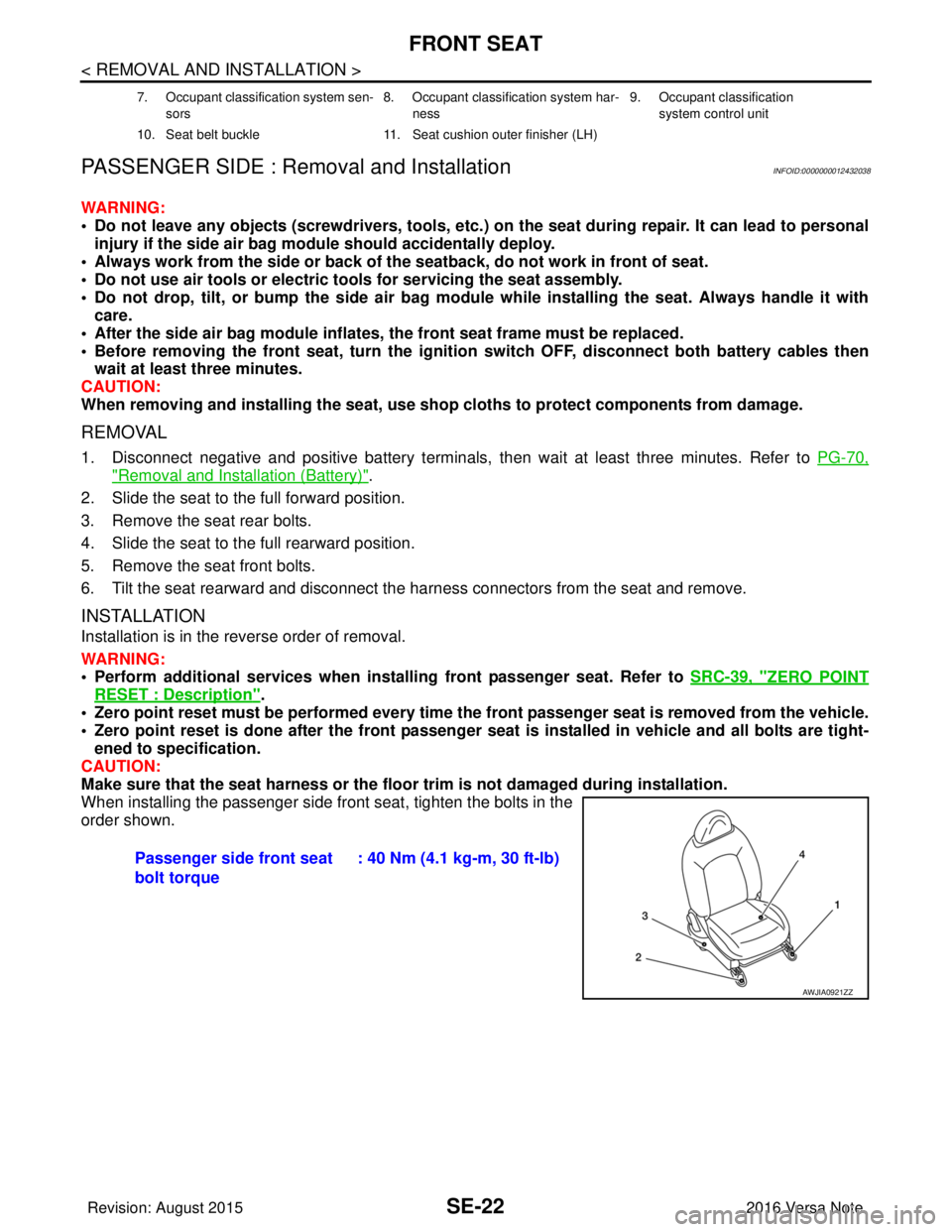
When installing the passenger side front seat, tighten the bolts in the
order shown.
7. Occupant classification system sen-
sors 8. Occupant classification system har-
ness 9. Occupant classification
system control unit
10. Seat belt buckle 11. Seat cushion outer finisher (LH)
Passenger side front seat
bolt torque: 40 Nm (4.1 kg-m, 30 ft-lb)
AWJIA0921ZZ
Revision: August 2015
2016 Versa Note
cardiagn.com
Page 2858 of 3641

SEC-1
BODY EXTERIOR, DOORS, ROOF & VEHICLE SECURITY
C
DE
F
G H
I
J
L
M
SECTION SEC
A
B
SEC
N
O P
CONTENTS
SECURITY CONTROL SYSTEM
WITH INTELLIGENT KEY SYSTEM
PRECAUTION ....... ........................................
5
PRECAUTIONS .............................................. .....5
Precaution for Supplemental Restraint System
(SRS) "AIR BAG" and "SEAT BELT PRE-TEN-
SIONER" ............................................................. ......
5
Precaution for Work ..................................................5
PREPARATION ............................................6
PREPARATION .............................................. .....6
Special Service Tool ........................................... ......6
SYSTEM DESCRIPTION ..............................7
COMPONENT PARTS ................................... .....7
Component Parts Location .................................. ......7
CVT Shift Selector (Park Position Switch) ................9
BCM ..........................................................................9
ECM ..........................................................................9
IPDM E/R ................................................................10
NATS Antenna Amp. ...............................................10
Combination Meter ..................................................10
Door Switch .............................................................10
Outside Key Antenna ..............................................10
Inside Key Antenna .................................................10
Remote Keyless Entry Receiver .............................10
Intelligent Key ..........................................................10
Push-button Ignition Switch .....................................10
Security Indicator Lamp ...................................... ....10
Starter Relay ...........................................................10
Stop Lamp Switch ...................................................11
Transmission Range Switch ....................................11
SYSTEM .............................................................12
INTELLIGENT KEY SYSTEM/ENGINE START
FUNCTION ............................................................. ....
12
INTELLIGENT KEY SYSTEM/ENGINE START
FUNCTION : System Description ............................
12
NISSAN ANTI-THEFT SYSTEM ................................14
NISSAN ANTI-THEFT SYST EM : System De-
scription ............................................................... ....
15
DIAGNOSIS SYSTEM (BCM) ...........................18
COMMON ITEM ..................................................... ....18
COMMON ITEM : CONSULT Function (BCM -
COMMON ITEM) .....................................................
18
INTELLIGENT KEY ................................................ ....19
INTELLIGENT KEY : CONSULT Function (BCM -
INTELLIGENT KEY) ................................................
19
THEFT ALM ........................................................... ....21
THEFT ALM : CONSULT Function (BCM -
THEFT) ....................................................................
21
IMMU ...................................................................... ....21
IMMU : CONSULT Function (BCM - IMMU) ............21
ECU DIAGNOSIS INFORMATION ..............23
ECM, IPDM E/R, BCM .......................................23
List of ECU Reference ......................................... ....23
WIRING DIAGRAM ......................................24
INTELLIGENT KEY SYSTEM/ENGINE
START FUNCTION ...........................................
24
Wiring Diagram .................................................... ....24
NVIS - WITH INTELLIGENT KEY SYSTEM .....37
Wiring Diagram ........................................................37
BASIC INSPECTION ...................................46
DIAGNOSIS AND REPAIR WORK FLOW .......46
Work Flow ............................................................ ....46
ADDITIONAL SERVICE WHEN REPLACING
CONTROL UNIT ................................................
49
ECM ........................................................................ ....49
Revision: August 2015 2016 Versa Note
cardiagn.com
Page 2860 of 3641

SEC-3
C
DE
F
G H
I
J
L
M A
B
SEC
N
O P
B26FC KEY REGISTRATION ........................ ....98
DTC Logic ........................................................... ....98
Diagnosis Procedure ...............................................98
B210B STARTER CONTROL RELAY ...............99
DTC Logic ........................................................... ....99
Diagnosis Procedure ...............................................99
B210C STARTER CONTROL RELAY .............100
DTC Logic ........................................................... ..100
Diagnosis Procedure .............................................100
B210D STARTER RELAY ................................102
DTC Logic .............................................................102
Diagnosis Procedure .............................................102
B210E STARTER RELAY ................................104
DTC Logic .............................................................104
Diagnosis Procedure .............................................104
B210F SHIFT POSITION/CLUTCH INTER-
LOCK SWITCH .................................................
106
DTC Logic ........................................................... ..106
Diagnosis Procedure .............................................106
B2110 SHIFT POSITION/CLUTCH INTER-
LOCK SWITCH .................................................
108
DTC Logic ........................................................... ..108
Diagnosis Procedure .............................................108
VEHICLE SECURITY INDICATOR ..................110
Description .......................................................... ..110
Component Function Check ................................110
Diagnosis Procedure .............................................110
SYMPTOM DIAGNOSIS ............................112
ENGINE DOES NOT START WHEN INTELLI-
GENT KEY IS INSIDE OF VEHICLE .............. ..
112
Description .......................................................... ..112
Diagnosis Procedure .............................................112
SECURITY INDICATOR LAMP DOES NOT
TURN ON OR BLINK .......................................
113
Description .......................................................... ..113
Diagnosis Procedure .............................................113
REMOVAL AND INSTALLATION .............114
NATS ANTENNA AMP. .................................. ..114
Removal and Installation .......................................114
PUSH-BUTTON IGNITION SWITCH .............. ..115
Removal and Installation .......................................115
REMOTE KEYLESS ENTRY RECEIVER ...... ..116
Removal and Installation .......................................116
WITHOUT INTELLIGE NT KEY SYSTEM
PRECAUTION ....... .....................................
117
PRECAUTIONS .............................................. ..117
Precaution for Supplemental Restraint System
(SRS) "AIR BAG" and "SEAT BELT PRE-TEN-
SIONER" ............................................................. ..
117
Precaution for Work ...............................................117
PREPARATION .........................................118
PREPARATION ...............................................118
Special Service Tool ............................................ ..118
SYSTEM DESCRIPTION ...........................119
COMPONENT PARTS ....................................119
NISSAN VEHICLE IMMOBILIZER SYSTEM-NATS ..119
NISSAN VEHICLE IMMOBILIZER SYSTEM-
NATS : Component Parts Location .......................
119
NISSAN VEHICLE IMMOBILIZER SYSTEM-
NATS : CVT Shift Selector (Park Position Switch) ..
121
NISSAN VEHICLE IMMOBILIZER SYSTEM-
NATS : BCM ..........................................................
121
NISSAN VEHICLE IMMOBILIZER SYSTEM-
NATS : ECM ..........................................................
121
NISSAN VEHICLE IMMOBILIZER SYSTEM-
NATS : IPDM E/R ..................................................
121
NISSAN VEHICLE IMMOBILIZER SYSTEM-
NATS : Combination Meter ....................................
121
NISSAN VEHICLE IMMOBILIZER SYSTEM-
NATS : Door Switch ...............................................
122
NISSAN VEHICLE IMMOBILIZER SYSTEM-
NATS : Remote Keyless Entry Receiver ...............
122
NISSAN VEHICLE IMMOBILIZER SYSTEM-
NATS : Security Indicator Lamp .......................... ..
122
NISSAN VEHICLE IMMOBILIZER SYSTEM-
NATS : Starter Relay .............................................
122
NISSAN VEHICLE IMMOBILIZER SYSTEM-
NATS : Stop Lamp Switch .....................................
122
NISSAN VEHICLE IMMOBILIZER SYSTEM-
NATS : Transmission Range Switch .....................
122
SYSTEM ..........................................................123
NISSAN VEHICLE IMMOBILIZER SYSTEM-NATS ..123
NISSAN VEHICLE IMMOBILIZER SYSTEM-
NATS : System Diagram .......................................
123
NISSAN VEHICLE IMMOBILIZER SYSTEM-
NATS : System Description ...................................
123
DIAGNOSIS SYSTEM (BCM) .........................125
COMMON ITEM ..................................................... ..125
COMMON ITEM : CONSULT Function (BCM -
COMMON ITEM) ...................................................
125
IMMU ...................................................................... ..126
IMMU : CONSULT Function (BCM - IMMU) ..........126
DIAGNOSIS SYSTEM (IPDM E/R) .................127
Diagnosis Description ............................................127
CONSULT Function (IPDM E/R) ...........................128
ECU DIAGNOSIS INFORMATION ............131
Revision: August 2015 2016 Versa Note
cardiagn.com
Page 2862 of 3641
![NISSAN NOTE 2016 Service Repair Manual PRECAUTIONSSEC-5
< PRECAUTION > [WITH INTELLIGENT KEY SYSTEM]
C
D
E
F
G H
I
J
L
M A
B
SEC
N
O P
PRECAUTION
PRECAUTIONS
Precaution for Supplemental Restraint System (SRS) "AIR BAG" and "SEAT BELT
PRE](/img/5/57363/w960_57363-2861.png "NISSAN NOTE 2016 Service Repair Manual PRECAUTIONSSEC-5
< PRECAUTION > [WITH INTELLIGENT KEY SYSTEM]
C
D
E
F
G H
I
J
L
M A
B
SEC
N
O P
PRECAUTION
PRECAUTIONS
Precaution for Supplemental Restraint System (SRS) \"AIR BAG\" and \"SEAT BELT
PRE")
PRECAUTIONSSEC-5
< PRECAUTION > [WITH INTELLIGENT KEY SYSTEM]
C
D
E
F
G H
I
J
L
M A
B
SEC
N
O P
PRECAUTION
PRECAUTIONS
Precaution for Supplemental Restraint System (SRS) "AIR BAG" and "SEAT BELT
PRE-TENSIONER"
INFOID:0000000012430321
The Supplemental Restraint System such as “AIR BAG” and “SEAT BELT PRE-TENSIONER”, used along
with a front seat belt, helps to reduce the risk or severi ty of injury to the driver and front passenger for certain
types of collision. Information necessary to service the system safely is included in the SR and SB section of
this Service Manual.
WARNING:
• To avoid rendering the SRS inoper ative, which could increase the risk of personal injury or death in
the event of a collision which would result in air bag inflation, all maintenance must be performed by
an authorized NISSAN/INFINITI dealer.
• Improper maintenance, including in correct removal and installation of the SRS, can lead to personal
injury caused by unintentional act ivation of the system. For removal of Spiral Cable and Air Bag
Module, see the SR section.
• Do not use electrical test equipm ent on any circuit related to the SRS unless instructed to in this
Service Manual. SRS wiring harnesses can be identi fied by yellow and/or orange harnesses or har-
ness connectors.
PRECAUTIONS WHEN USING POWER TOOLS (AIR OR ELECTRIC) AND HAMMERS
WARNING:
• When working near the Airbag Diagnosis Sensor Un it or other Airbag System sensors with the Igni-
tion ON or engine running, DO NOT use air or el ectric power tools or strike near the sensor(s) with a
hammer. Heavy vibration could activate the sensor( s) and deploy the air bag(s), possibly causing
serious injury.
• When using air or electric power tools or hammers, always switch the Ignition OFF, disconnect the
battery and wait at least three mi nutes before performing any service.
Precaution for WorkINFOID:0000000012430322
• When removing or disassembling each component, be ca reful not to damage or deform it. If a component
may be subject to interference, be sure to protect it with a shop cloth.
• When removing (disengaging) components with a screwdriver or similar tool, be sure to wrap the component with a shop cloth or vinyl tape to protect it.
• Protect the removed parts with a shop cloth and prevent them from being dropped.
• Replace a deformed or damaged clip.
• If a part is specified as a non-reusabl e part, always replace it with a new one.
• Be sure to tighten bolts and nuts securely to the specified torque.
• After installation is complete, be sure to check that each part works properly.
• Follow the steps below to clean components:
- Water soluble dirt:
• Dip a soft cloth into lukewarm water, wring the water out of the cloth and wipe the dirty area.
• Then rub with a soft, dry cloth.
-Oily dirt:
• Dip a soft cloth into lukewarm water with mild detergent (concentration: within 2 to 3%) and wipe the dirty
area.
• Then dip a cloth into fresh water, wring the water out of the cloth and wipe the detergent off.
• Then rub with a soft, dry cloth.
- Do not use organic solvent such as thinner, benzene, alcohol or gasoline.
- For genuine leather seats, use a genuine leather seat cleaner.
Revision: August 2015 2016 Versa Note
cardiagn.com
Page 2863 of 3641
![NISSAN NOTE 2016 Service Repair Manual SEC-6
< PREPARATION >[WITH INTELLIGENT KEY SYSTEM]
PREPARATION
PREPARATION
PREPARATION
Special Service ToolINFOID:0000000012430323
The actual shape of the tools may differ from those illustrated here.](/img/5/57363/w960_57363-2862.png "NISSAN NOTE 2016 Service Repair Manual SEC-6
< PREPARATION >[WITH INTELLIGENT KEY SYSTEM]
PREPARATION
PREPARATION
PREPARATION
Special Service ToolINFOID:0000000012430323
The actual shape of the tools may differ from those illustrated here.")
SEC-6
< PREPARATION >[WITH INTELLIGENT KEY SYSTEM]
PREPARATION
PREPARATION
PREPARATION
Special Service ToolINFOID:0000000012430323
The actual shape of the tools may differ from those illustrated here.
Tool number
(TechMate No.)
Tool name Description
—
(J-46534)
Trim Tool Set Removing trim components
AWJIA0483ZZ
Revision: August 2015
2016 Versa Note
cardiagn.com
Page 2904 of 3641
![NISSAN NOTE 2016 Service Repair Manual DIAGNOSIS AND REPAIR WORK FLOWSEC-47
< BASIC INSPECTION > [WITH INTELLIGENT KEY SYSTEM]
C
D
E
F
G H
I
J
L
M A
B
SEC
N
O P
1.GET INFORMATION FOR SYMPTOM
1. Get detailed information from the customer ab](/img/5/57363/w960_57363-2903.png "NISSAN NOTE 2016 Service Repair Manual DIAGNOSIS AND REPAIR WORK FLOWSEC-47
< BASIC INSPECTION > [WITH INTELLIGENT KEY SYSTEM]
C
D
E
F
G H
I
J
L
M A
B
SEC
N
O P
1.GET INFORMATION FOR SYMPTOM
1. Get detailed information from the customer ab")
DIAGNOSIS AND REPAIR WORK FLOWSEC-47
< BASIC INSPECTION > [WITH INTELLIGENT KEY SYSTEM]
C
D
E
F
G H
I
J
L
M A
B
SEC
N
O P
1.GET INFORMATION FOR SYMPTOM
1. Get detailed information from the customer about the symptom (the condition and the environment when
the incident/malfunction occurs).
2. Check operation condition of the function that is malfunctioning.
>> GO TO 2.
2.CHECK DTC
1. Check DTC.
2. Perform the following procedure if DTC is detected.
- Record DTC and freeze frame data (Print them out using CONSULT.)
- Erase DTC.
- Study the relationship between the cause detected by DTC and the symptom described by the customer.
3. Check related service bulletins for information.
Are any symptoms described and any DTC detected?
Symptom is described, DTC is detected>>GO TO 3.
Symptom is described, DTC is not detected>>GO TO 4.
Symptom is not described, DTC is detected>>GO TO 5.
3.CONFIRM THE SYMPTOM
Try to confirm the symptom described by the customer.
Also study the normal operation and fa il-safe related to the symptom.
Verify relation between the symptom and t he condition when the symptom is detected.
>> GO TO 5.
4.CONFIRM THE SYMPTOM
Try to confirm the symptom described by the customer.
Verify relation between the symptom and t he condition when the symptom is detected.
>> GO TO 6.
5.PERFORM DTC CONFIRMATION PROCEDURE
Perform DTC CONFIRMATION PROCEDURE for the det ected DTC, and then check that DTC is detected
again. At this time, always connect CONSULT to the vehicle, and check self diagnostic results in real time.
If two or more DTCs are detected, refer to BCS-49, "
DTCInspectionPriorityChart" and determine trouble
diagnosis order.
NOTE:
• Freeze frame data is useful if the DTC is not detected.
• Perform Component Function Check if DTC CONF IRMATION PROCEDURE is not included on Service
Manual. This simplified check procedure is an effect ive alternative though DTC cannot be detected during
this check.
If the result of Component Function Check is NG, it is the same as the detection of DTC by DTC CONFIR-
MATION PROCEDURE.
Is DTC detected?
YES >> GO TO 7.
NO >> Check according to GI-42, "
Intermittent Incident".
6.DETECT MALFUNCTIONING SYST EM BY SYMPTOM DIAGNOSIS
Detect malfunctioning system according to SYMPTO M DIAGNOSIS based on the confirmed symptom in step
4, and determine the trouble diagnosis order based on possible causes and symptom.
Is the symptom described?
YES >> GO TO 7.
NO >> Monitor input data from related sensors or check voltage of related module terminals using CON- SULT.
7.DETECT MALFUNCTIONING PA RT BY DIAGNOSIS PROCEDURE
Revision: August 2015 2016 Versa Note
cardiagn.com
Page 2906 of 3641
![NISSAN NOTE 2016 Service Repair Manual ADDITIONAL SERVICE WHEN REPLACING CONTROL UNITSEC-49
< BASIC INSPECTION > [WITH INTELLIGENT KEY SYSTEM]
C
D
E
F
G H
I
J
L
M A
B
SEC
N
O P
ADDITIONAL SERVICE WHEN REPLACING CONTROL UNIT
ECM
ECM : Desc](/img/5/57363/w960_57363-2905.png "NISSAN NOTE 2016 Service Repair Manual ADDITIONAL SERVICE WHEN REPLACING CONTROL UNITSEC-49
< BASIC INSPECTION > [WITH INTELLIGENT KEY SYSTEM]
C
D
E
F
G H
I
J
L
M A
B
SEC
N
O P
ADDITIONAL SERVICE WHEN REPLACING CONTROL UNIT
ECM
ECM : Desc")
ADDITIONAL SERVICE WHEN REPLACING CONTROL UNITSEC-49
< BASIC INSPECTION > [WITH INTELLIGENT KEY SYSTEM]
C
D
E
F
G H
I
J
L
M A
B
SEC
N
O P
ADDITIONAL SERVICE WHEN REPLACING CONTROL UNIT
ECM
ECM : DescriptionINFOID:0000000012430351
When replacing ECM, this procedure must be performed.
ECM : Work ProcedureINFOID:0000000012430352
1.PERFORM INITIALIZATION OF NATS SYSTEM AND REGISTRATION OF ALL NATS IGNITION KEY IDS
Perform BCM initialization. (NATS)
>> GO TO 2.
2.PERFORM ACCELERATOR PEDAL RE LEASED POSITION LEARNING
Refer to EC-128, "
Work Procedure".
>> GO TO 3.
3.PERFORM THROTTLE VALVE CL OSED POSITION LEARNING
Refer to EC-129, "
Work Procedure".
>> GO TO 4.
4.PERFORM IDLE AIR VOLUME LEARNING
Refer to EC-130, "
Work Procedure".
>> END
BCM
BCM : DescriptionINFOID:0000000012542548
BEFORE REPLACEMENT
When replacing BCM, save or print current vehicle s pecification with CONSULT configuration before replace-
ment.
NOTE:
If “READ CONFIGURATION” can not be used, use the “WRITE CONFIGURATION - Manual selection” after
replacing BCM.
AFTER REPLACEMENT
CAUTION:
When replacing BCM, always perform “WRITE CONFIGURATION” with CONSULT. Or not doing so,
BCM control function do es not operate normally.
• Complete the procedure of “WRITE CONFIGURATION” in order.
• Configuration is different for each vehicle model. Confirm conf iguration of each vehicle model.
• If you set incorrect “WRITE CONF IGURATION”, incidents might occur.
NOTE:
When replacing BCM, perform the system initialization (NATS) (if equipped).
BCM : Work ProcedureINFOID:0000000012542549
1.SAVING VEHICLE SPECIFICATION
CONSULT Configuration
Perform “READ CONFIGURATION” to save or prin t current vehicle specification. Refer to BCS-59, "
Descrip-
tion".
NOTE:
Revision: August 2015 2016 Versa Note
cardiagn.com
Page 2907 of 3641
![NISSAN NOTE 2016 Service Repair Manual SEC-50
< BASIC INSPECTION >[WITH INTELLIGENT KEY SYSTEM]
ADDITIONAL SERVICE WHEN
REPLACING CONTROL UNIT
If “READ CONFIGURATION” can not be used, use the “WRITE CONFIGURATION - Manual selectionâ](/img/5/57363/w960_57363-2906.png "NISSAN NOTE 2016 Service Repair Manual SEC-50
< BASIC INSPECTION >[WITH INTELLIGENT KEY SYSTEM]
ADDITIONAL SERVICE WHEN
REPLACING CONTROL UNIT
If “READ CONFIGURATION” can not be used, use the “WRITE CONFIGURATION - Manual selectionâ")
SEC-50
< BASIC INSPECTION >[WITH INTELLIGENT KEY SYSTEM]
ADDITIONAL SERVICE WHEN
REPLACING CONTROL UNIT
If “READ CONFIGURATION” can not be used, use the “WRITE CONFIGURATION - Manual selection” after
replacing BCM.
>> GO TO 2.
2.REPLACE BCM
Replace BCM. Refer to BCS-74, "
Removal and Installation".
>> GO TO 3.
3.WRITING VEHICLE SPECIFICATION
CONSULT Configuration
Perform “WRITE CONFIGURATION - Config file” or “W RITE CONFIGURATION - Manual selection” to write
vehicle specification. Refer to BCS-59, "
Work Procedure".
>> GO TO 4.
4.REGISTER INTELLIGENT KEYS
For initialization and registration of Intelligent Keys, refer to CONSULT immobilizer mode and follow the on-
screen instructions.
>> WORK END
Revision: August 2015 2016 Versa Note
cardiagn.com
Page 2909 of 3641
![NISSAN NOTE 2016 Service Repair Manual SEC-52
< DTC/CIRCUIT DIAGNOSIS >[WITH INTELLIGENT KEY SYSTEM]
P1611 ID DISCORD, IMMU-ECM
P1611 ID DISCORD, IMMU-ECM
DTC LogicINFOID:0000000012430358
DTC DETECTION LOGIC
DTC CONFIRMATION PROCEDURE
1.PE](/img/5/57363/w960_57363-2908.png "NISSAN NOTE 2016 Service Repair Manual SEC-52
< DTC/CIRCUIT DIAGNOSIS >[WITH INTELLIGENT KEY SYSTEM]
P1611 ID DISCORD, IMMU-ECM
P1611 ID DISCORD, IMMU-ECM
DTC LogicINFOID:0000000012430358
DTC DETECTION LOGIC
DTC CONFIRMATION PROCEDURE
1.PE")
SEC-52
< DTC/CIRCUIT DIAGNOSIS >[WITH INTELLIGENT KEY SYSTEM]
P1611 ID DISCORD, IMMU-ECM
P1611 ID DISCORD, IMMU-ECM
DTC LogicINFOID:0000000012430358
DTC DETECTION LOGIC
DTC CONFIRMATION PROCEDURE
1.PERFORM DTC CONFIRMATION PROCEDURE
1. Turn ignition switch ON.
2. Check DTC in “Self Diagnostic Result” of “ENGINE” using CONSULT.
Is DTC detected?
YES >> Go to SEC-52, "Diagnosis Procedure".
NO >> Inspection End.
Diagnosis ProcedureINFOID:0000000012430359
1.PERFORM INITIALIZATION
Perform initialization of BCM and registration of all In telligent Keys using CONSULT. Refer to the CONSULT
Immobilizer mode and follow t he on-screen instructions.
Can the system be initialized and can the engine be started with registered Intelligent Key?
YES >> Inspection End.
NO >> GO TO 2.
2.CHECK SELF DIAGNOSTIC RESULT
1. Select “Self Diagnostic Result” of “ENGINE” using CONSULT.
2. Erase DTC.
3. Perform DTC CONFIRMATION PROCEDURE for DTC P1611. Refer to SEC-52, "
DTC Logic".
Is DTC detected?
YES >> GO TO 3.
NO >> Inspection End.
3.REPLACE BCM
1. Replace BCM. Refer to BCS-74, "
Removal and Installation".
2. Perform initialization of BCM and registration of all Intelligent Keys using CONSULT. Refer to the CON-
SULT Immobilizer mode and follow the on-screen instructions.
Can the system be initialized and can the engine be started with registered Intelligent Key?
YES >> Inspection End.
NO >> GO TO 4.
4.REPLACE ECM
1. Replace ECM. Refer to EC-477, "
Removal and Installation".
2. Perform “ADDITIONAL SERVICE WHEN REPLACING ECM”. Refer to EC-125, "
Work Procedure".
>> Inspection End.
DTC No. Trouble diagnosis name DTC detecting conditionPossible cause
P1611 ID DISCORD, IMMU-ECM The ID verification results between BCM
and ECM are invalid. •BCM
•ECM
Revision: August 2015
2016 Versa Note
cardiagn.com