battery NISSAN NOTE 2016 Service Repair Manual
[x] Cancel search | Manufacturer: NISSAN, Model Year: 2016, Model line: NOTE, Model: NISSAN NOTE 2016Pages: 3641, PDF Size: 28.72 MB
Page 1936 of 3641
GI-48
< BASIC INSPECTION >
SERVICE INFORMATION FOR ELECTRICAL INCIDENT
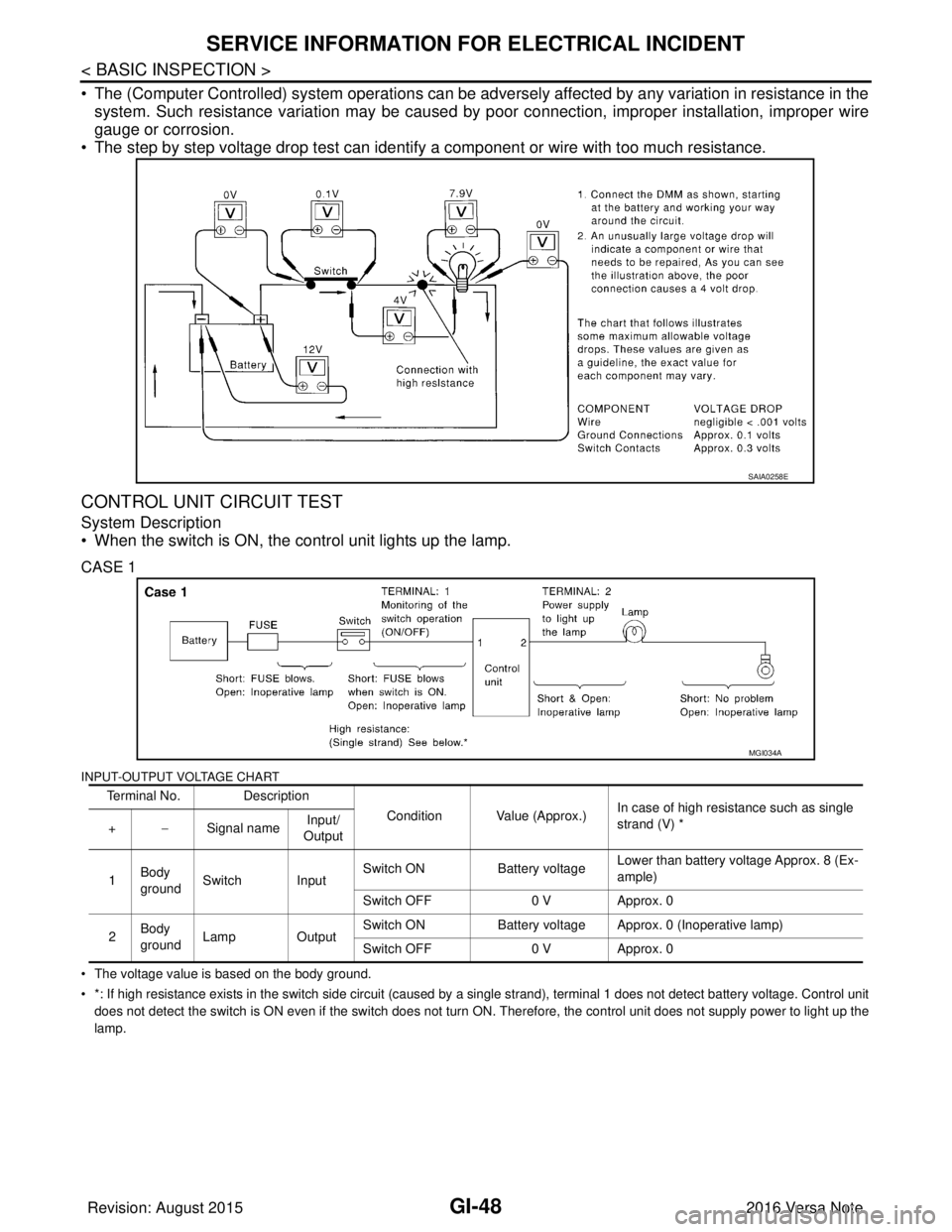
• The (Computer Controlled) system operations can be adversely affected by any variation in resistance in the
system. Such resistance variation may be caused by poor connection, improper installation, improper wire
gauge or corrosion.
• The step by step voltage drop test can identify a component or wire with too much resistance.
CONTROL UNIT CIRCUIT TEST
System Description
• When the switch is ON, the control unit lights up the lamp.
CASE 1
INPUT-OUTPUT VOLTAGE CHART
• The voltage value is based on the body ground.
• *: If high resistance exists in the switch side circuit (caused by a single strand), terminal 1 does not detect battery voltag e. Control unit
does not detect the switch is ON even if the switch does not turn ON. Therefore, the control unit does not supply power to ligh t up the
lamp.
SAIA0258E
Terminal No. Description
Condition Value (Approx.)In case of high resistance such as single
strand (V) *
+ −Signal name Input/
Output
1 Body
ground Switch Input Switch ON
Battery voltageLower than battery voltage Approx. 8 (Ex-
ample)
Switch OFF 0 V Approx. 0
2 Body
ground
Lamp Output Switch ON
Battery voltage Approx. 0 (Inoperative lamp)
Switch OFF 0 V Approx. 0
MGI034A
Revision: August 2015 2016 Versa Note
cardiagn.com
Page 1937 of 3641
SERVICE INFORMATION FOR ELECTRICAL INCIDENTGI-49
< BASIC INSPECTION >
C
DE
F
G H
I
J
K L
M B
GI
N
O P
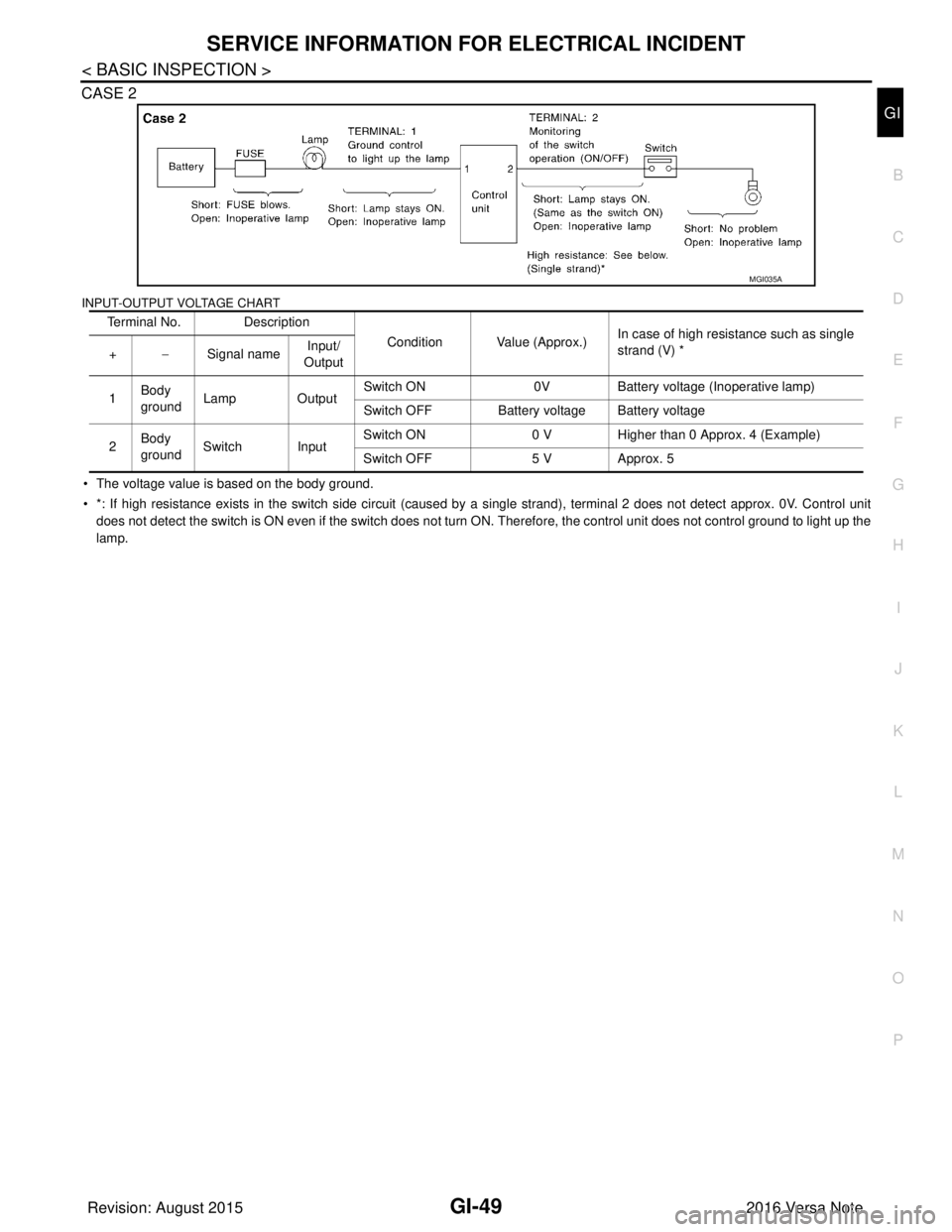
CASE 2
INPUT-OUTPUT VOLTAGE CHART
• The voltage value is based on the body ground.
• *: If high resistance exists in the switch side circuit (caused by a single strand), terminal 2 does not detect approx. 0V. Co
ntrol unit
does not detect the switch is ON even if the switch does not turn ON. Therefore, the control unit does not control ground to li ght up the
lamp. Terminal No. Description
Condition Value (Approx.)In case of high resistance such as single
strand (V) *
+ −Signal name Input/
Output
1 Body
ground
Lamp Output Switch ON
0VBattery voltage (Inoperative lamp)
Switch OFF Battery voltage Battery voltage
2 Body
ground
Switch Input Switch ON
0 V Higher than 0 Approx. 4 (Example)
Switch OFF 5 V Approx. 5
MGI035A
Revision: August 2015 2016 Versa Note
cardiagn.com
Page 1942 of 3641

GW-2
< PRECAUTION >
PRECAUTIONS
PRECAUTION
PRECAUTIONS
Precaution for Supplemental Restraint System (SRS) "AIR BAG" and "SEAT BELT
PRE-TENSIONER"
INFOID:0000000012430522
The Supplemental Restraint System such as “A IR BAG” and “SEAT BELT PRE-TENSIONER”, used along
with a front seat belt, helps to reduce the risk or severity of injury to the driver and front passenger for certain
types of collision. Information necessary to service the system safely is included in the SR and SB section of
this Service Manual.
WARNING:
• To avoid rendering the SRS inopera tive, which could increase the risk of personal injury or death in
the event of a collision which would result in air bag inflation, all maintenance must be performed by
an authorized NISSAN/INFINITI dealer.
• Improper maintenance, including in correct removal and installation of the SRS, can lead to personal
injury caused by unintent ional activation of the system. For re moval of Spiral Cable and Air Bag
Module, see the SR section.
• Do not use electrical test equipmen t on any circuit related to the SRS unless instructed to in this
Service Manual. SRS wiring harn esses can be identified by yellow and/or orange harnesses or har-
ness connectors.
PRECAUTIONS WHEN USING POWER TOOLS (AIR OR ELECTRIC) AND HAMMERS
WARNING:
• When working near the Airbag Diagnosis Sensor Unit or other Airbag System sensors with the Igni-
tion ON or engine running, DO NOT use air or electri c power tools or strike near the sensor(s) with a
hammer. Heavy vibration could activate the sensor( s) and deploy the air bag(s), possibly causing
serious injury.
• When using air or electric power tools or hammers , always switch the Ignition OFF, disconnect the
battery and wait at least three minutes before performing any service.
Handling for Adhe sive and PrimerINFOID:0000000012430523
• Do not use an adhesive which is past its usable date. Shel f life of this product is limited to six months after
the date of manufacture. Carefully adhere to the expiration or manufacture date printed on the box.
• Keep primers and adhesive in a cool, dry place. Ideally, they should be stored in a refrigerator.
• Open the seal of the primer and adhesive just before application. Discard the remainder.
• Before application, be sure to shake the primer container to stir the contents. If any floating material is found,
do not use it.
• If any primer or adhesive contacts the skin, wipe it off with gasoline or equivalent and wash the skin with
soap.
• When using primer and adhesive, always observe the precautions in the instruction manual.
Precaution for WorkINFOID:0000000012430524
• When removing or disassembling each component, be careful not to damage or deform it. If a component
may be subject to interference, be sure to protect it with a shop cloth.
• When removing (disengaging) components with a screwdriver or similar tool, be sure to wrap the component with a shop cloth or vinyl tape to protect it.
• Protect the removed parts with a shop cloth and prevent them from being dropped.
• Replace a deformed or damaged clip.
• If a part is specified as a non-reusable part, always replace it with a new one.
• Be sure to tighten bolts and nuts securely to the specified torque.
• After installation is complete, be sure to check that each part works properly.
• Follow the steps below to clean components:
- Water soluble dirt:
• Dip a soft cloth into lukewarm water, wring the water out of the cloth and wipe the dirty area.
• Then rub with a soft, dry cloth.
- Oily dirt:
• Dip a soft cloth into lukewarm water with mild detergent (concentration: within 2 to 3%) and wipe the dirty area.
Revision: August 2015 2016 Versa Note
cardiagn.com
Page 1961 of 3641
FRONT DOOR GLASS AND REGULATORGW-21
< REMOVAL AND INSTALLATION >
C
DE
F
G H
I
J
L
M A
B
GW
N
O P
FRONT DOOR GLASS AND REGULATOR
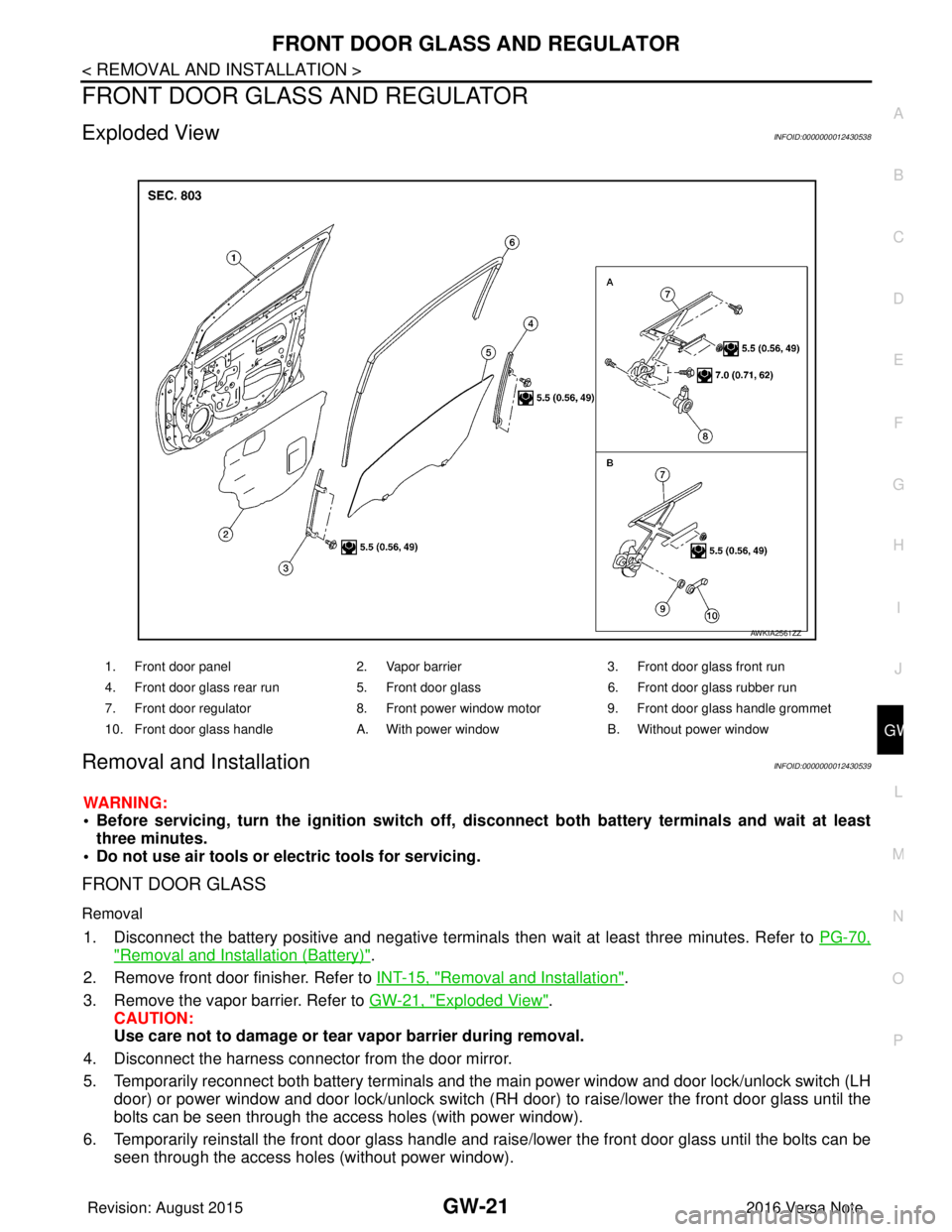
Exploded ViewINFOID:0000000012430538
Removal and InstallationINFOID:0000000012430539
WARNING:
• Before servicing, turn the ignition switch off, disconnect both battery terminals and wait at least
three minutes.
• Do not use air tools or electric tools for servicing.
FRONT DOOR GLASS
Removal
1. Disconnect the battery positive and negative terminals then wait at least three minutes. Refer to PG-70,
"Removal and Installation (Battery)".
2. Remove front door finisher. Refer to INT-15, "
Removal and Installation".
3. Remove the vapor barrier. Refer to GW-21, "
Exploded View".
CAUTION:
Use care not to damage or tear vapor barrier during removal.
4. Disconnect the harness connector from the door mirror.
5. Temporarily reconnect both battery terminals and the main power window and door lock/unlock switch (LH
door) or power window and door lock/unlock switch (RH door) to raise/lower the front door glass until the
bolts can be seen through the access holes (with power window).
6. Temporarily reinstall the front door glass handle and raise/lower the front door glass until the bolts can be seen through the access holes (without power window).
1. Front door panel 2. Vapor barrier3. Front door glass front run
4. Front door glass rear run 5. Front door glass6. Front door glass rubber run
7. Front door regulator 8. Front power window motor9. Front door glass handle grommet
10. Front door glass handle A. With power windowB. Without power window
AWKIA2561ZZ
Revision: August 2015 2016 Versa Note
cardiagn.com
Page 1962 of 3641
GW-22
< REMOVAL AND INSTALLATION >
FRONT DOOR GLASS AND REGULATOR
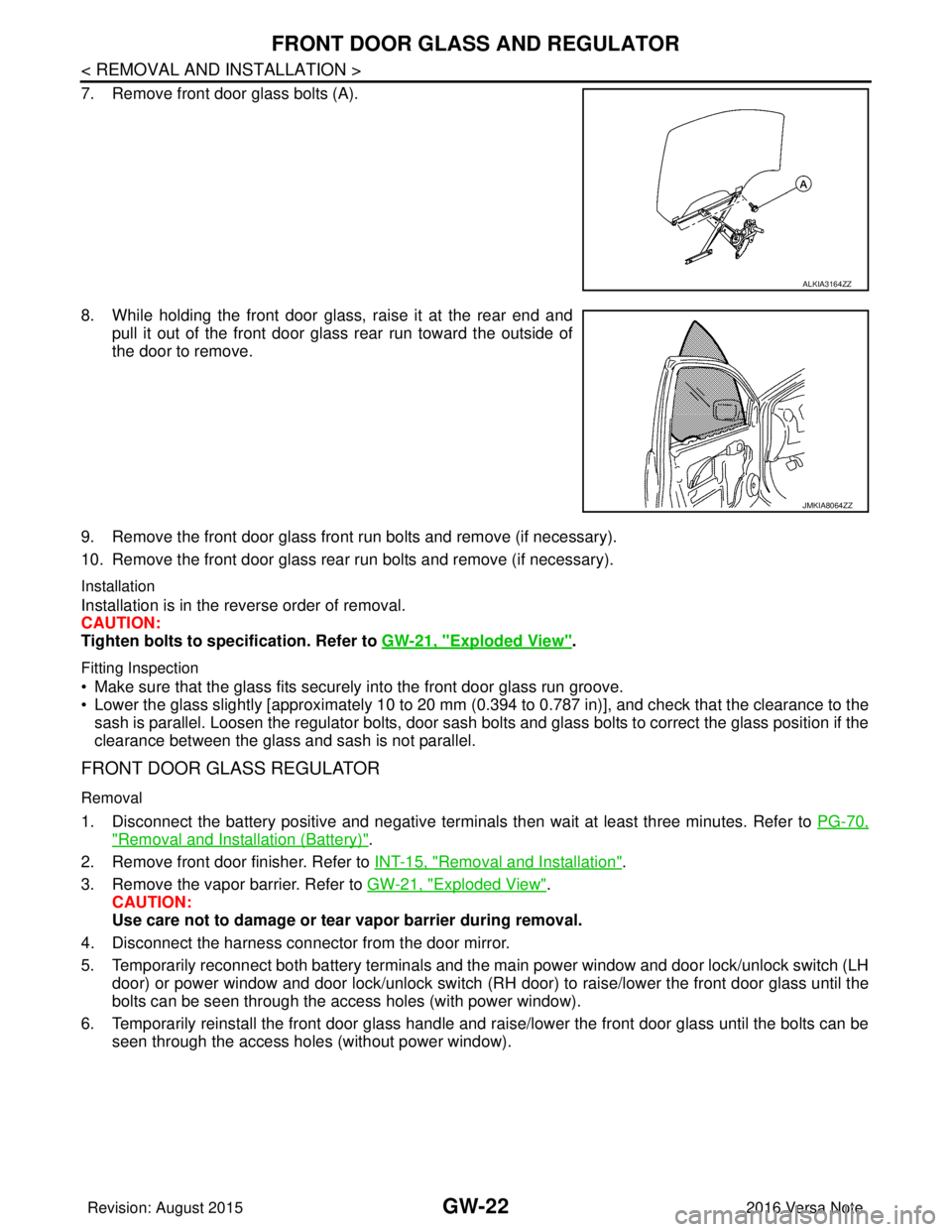
7. Remove front door glass bolts (A).
8. While holding the front door glass, raise it at the rear end andpull it out of the front door glass rear run toward the outside of
the door to remove.
9. Remove the front door glass front run bolts and remove (if necessary).
10. Remove the front door glass rear run bolts and remove (if necessary).
Installation
Installation is in the reverse order of removal.
CAUTION:
Tighten bolts to specification. Refer to GW-21, "
Exploded View".
Fitting Inspection
• Make sure that the glass fits securely into the front door glass run groove.
• Lower the glass slightly [approximately 10 to 20 mm (0.394 to 0.787 in)], and check that the clearance to the
sash is parallel. Loosen the regulator bolts, door sash bolts and glass bolts to correct the glass position if the
clearance between the glass and sash is not parallel.
FRONT DOOR GLASS REGULATOR
Removal
1. Disconnect the battery positive and negative terminal s then wait at least three minutes. Refer to PG-70,
"Removal and Installation (Battery)".
2. Remove front door finisher. Refer to INT-15, "
Removal and Installation".
3. Remove the vapor barrier. Refer to GW-21, "
Exploded View".
CAUTION:
Use care not to damage or tear vapor barrier during removal.
4. Disconnect the harness connector from the door mirror.
5. Temporarily reconnect both battery terminals and the main power window and door lock/unlock switch (LH door) or power window and door lock/unlock switch (RH door) to raise/lower the front door glass until the
bolts can be seen through the access holes (with power window).
6. Temporarily reinstall the front door glass handle and raise/lower the front door glass until the bolts can be seen through the access holes (without power window).
ALKIA3164ZZ
JMKIA8064ZZ
Revision: August 2015 2016 Versa Note
cardiagn.com
Page 1971 of 3641
![NISSAN NOTE 2016 Service Repair Manual PRECAUTIONSHAC-3
< PRECAUTION > [MANUAL AIR CONDITIONING]
C
D
E
F
G H
J
K L
M A
B
HAC
N
O P
PRECAUTION
PRECAUTIONS
Precaution for Supplemental Restraint System (SRS) "AIR BAG" and "SEAT BELT
PRE-TEN](/img/5/57363/w960_57363-1970.png "NISSAN NOTE 2016 Service Repair Manual PRECAUTIONSHAC-3
< PRECAUTION > [MANUAL AIR CONDITIONING]
C
D
E
F
G H
J
K L
M A
B
HAC
N
O P
PRECAUTION
PRECAUTIONS
Precaution for Supplemental Restraint System (SRS) \"AIR BAG\" and \"SEAT BELT
PRE-TEN")
PRECAUTIONSHAC-3
< PRECAUTION > [MANUAL AIR CONDITIONING]
C
D
E
F
G H
J
K L
M A
B
HAC
N
O P
PRECAUTION
PRECAUTIONS
Precaution for Supplemental Restraint System (SRS) "AIR BAG" and "SEAT BELT
PRE-TENSIONER"
INFOID:0000000012430709
The Supplemental Restraint System such as “AIR BAG” and “SEAT BELT PRE-TENSIONER”, used along
with a front seat belt, helps to reduce the risk or severi ty of injury to the driver and front passenger for certain
types of collision. Information necessary to service the system safely is included in the SR and SB section of
this Service Manual.
WARNING:
• To avoid rendering the SRS inoper ative, which could increase the risk of personal injury or death in
the event of a collision which would result in air bag inflation, all maintenance must be performed by
an authorized NISSAN/INFINITI dealer.
• Improper maintenance, including in correct removal and installation of the SRS, can lead to personal
injury caused by unintentional act ivation of the system. For removal of Spiral Cable and Air Bag
Module, see the SR section.
• Do not use electrical test equipm ent on any circuit related to the SRS unless instructed to in this
Service Manual. SRS wiring harnesses can be identi fied by yellow and/or orange harnesses or har-
ness connectors.
PRECAUTIONS WHEN USING POWER TOOLS (AIR OR ELECTRIC) AND HAMMERS
WARNING:
• When working near the Airbag Diagnosis Sensor Un it or other Airbag System sensors with the Igni-
tion ON or engine running, DO NOT use air or el ectric power tools or strike near the sensor(s) with a
hammer. Heavy vibration could activate the sensor( s) and deploy the air bag(s), possibly causing
serious injury.
• When using air or electric power tools or hammers, always switch the Ignition OFF, disconnect the
battery and wait at least three mi nutes before performing any service.
Precaution for Procedure without Cowl Top CoverINFOID:0000000012430710
When performing the procedure after removing cowl top cover, cover
the lower end of windshield with urethane, etc to prevent damage to
windshield.
Precaution for WorkINFOID:0000000012430711
• When removing or disassembling each component, be ca reful not to damage or deform it. If a component
may be subject to interference, be sure to protect it with a shop cloth.
• When removing (disengaging) components with a screwdriver or similar tool, be sure to wrap the component with a shop cloth or vinyl tape to protect it.
• Protect the removed parts with a shop cloth and prevent them from being dropped.
• Replace a deformed or damaged clip.
• If a part is specified as a non-reusabl e part, always replace it with a new one.
• Be sure to tighten bolts and nuts securely to the specified torque.
• After installation is complete, be sure to check that each part works properly.
• Follow the steps below to clean components:
- Water soluble dirt:
• Dip a soft cloth into lukewarm water, wring the water out of the cloth and wipe the dirty area.
• Then rub with a soft, dry cloth.
-Oily dirt:
PIIB3706J
Revision: August 2015 2016 Versa Note
cardiagn.com
Page 1985 of 3641
![NISSAN NOTE 2016 Service Repair Manual DIAGNOSIS SYSTEM (BCM) (WITH INTELLIGENT KEY SYSTEM)
HAC-17
< SYSTEM DESCRIPTION > [MANUAL AIR CONDITIONING]
C
D
E
F
G H
J
K L
M A
B
HAC
N
O P
DIAGNOSIS SYSTEM (BCM) (WIT H INTELLIGENT KEY SYSTEM)
COM](/img/5/57363/w960_57363-1984.png "NISSAN NOTE 2016 Service Repair Manual DIAGNOSIS SYSTEM (BCM) (WITH INTELLIGENT KEY SYSTEM)
HAC-17
< SYSTEM DESCRIPTION > [MANUAL AIR CONDITIONING]
C
D
E
F
G H
J
K L
M A
B
HAC
N
O P
DIAGNOSIS SYSTEM (BCM) (WIT H INTELLIGENT KEY SYSTEM)
COM")
DIAGNOSIS SYSTEM (BCM) (WITH INTELLIGENT KEY SYSTEM)
HAC-17
< SYSTEM DESCRIPTION > [MANUAL AIR CONDITIONING]
C
D
E
F
G H
J
K L
M A
B
HAC
N
O P
DIAGNOSIS SYSTEM (BCM) (WIT H INTELLIGENT KEY SYSTEM)
COMMON ITEM
COMMON ITEM : CONSULT Function (BCM - COMMON ITEM)INFOID:0000000012542299
APPLICATION ITEM
CONSULT performs the following functions via CAN communication with BCM.
SYSTEM APPLICATION
BCM can perform the following functions.
Direct Diagnostic Mode Description
ECU Identification The BCM part number is displayed.
Self Diagnostic Result The BCM self diagnostic results are displayed.
Data Monitor The BCM input/output data is displayed in real time.
Active Test The BCM activates outputs to test components.
Work support The settings for BCM functions can be changed.
Configuration • The vehicle specification can be read and saved.
• The vehicle specification can be written when replacing BCM.
CAN DIAG SUPPORT MNTR The result of transmit/receive diagnosis of CAN communication is displayed.
System Sub System Direct Diagnostic Mode
ECU Identification
Self Diagnostic Result
Data Monitor
Active Test
Work support
Configuration
CAN DIAG SUPPORT MNTR
Door lock
DOOR LOCK ×××
Rear window defogger REAR DEFOGGER ××
Warning chime BUZZER ××
Interior room lamp timer INT LAMP ×××
Exterior lamp HEAD LAMP ×××
Wiper and washer WIPER ×××
Turn signal and hazard warning lamps FLASHER ×××
Air conditioner AIR CONDITIONER ×
Intelligent Key system INTELLIGENT KEY ××××
Combination switch COMB SW ×
BCM BCM× × ×××
Immobilizer IMMU ××××
Interior room lamp battery saver BATTERY SAVER ×××
Vehicle security system THEFT ALM ××
RAP system RETAINED PWR ×
Signal buffer system SIGNAL BUFFER ×
TPMS AIR PRESSURE MONITOR ××××
Panic alarm system PANIC ALARM ×
Revision: August 2015 2016 Versa Note
cardiagn.com
Page 1987 of 3641
![NISSAN NOTE 2016 Service Repair Manual DIAGNOSIS SYSTEM (BCM) (WITHOUT INTELLIGENT KEY SYSTEM)HAC-19
< SYSTEM DESCRIPTION > [MANUAL AIR CONDITIONING]
C
D
E
F
G H
J
K L
M A
B
HAC
N
O P
DIAGNOSIS SYSTEM (BCM) (WITHO UT INTELLIGENT KEY SYSTEM](/img/5/57363/w960_57363-1986.png "NISSAN NOTE 2016 Service Repair Manual DIAGNOSIS SYSTEM (BCM) (WITHOUT INTELLIGENT KEY SYSTEM)HAC-19
< SYSTEM DESCRIPTION > [MANUAL AIR CONDITIONING]
C
D
E
F
G H
J
K L
M A
B
HAC
N
O P
DIAGNOSIS SYSTEM (BCM) (WITHO UT INTELLIGENT KEY SYSTEM")
DIAGNOSIS SYSTEM (BCM) (WITHOUT INTELLIGENT KEY SYSTEM)HAC-19
< SYSTEM DESCRIPTION > [MANUAL AIR CONDITIONING]
C
D
E
F
G H
J
K L
M A
B
HAC
N
O P
DIAGNOSIS SYSTEM (BCM) (WITHO UT INTELLIGENT KEY SYSTEM)
COMMON ITEM
COMMON ITEM : CONSULT Function (BCM - COMMON ITEM)INFOID:0000000012542301
APPLICATION ITEM
CONSULT performs the following functions via CAN communication with BCM.
SYSTEM APPLICATION
BCM can perform the following functions.
Direct Diagnostic Mode Description
ECU Identification The BCM part number is displayed.
Self Diagnostic Result The BCM self diagnostic results are displayed.
Data Monitor The BCM input/output data is displayed in real time.
Active Test The BCM activates outputs to test components.
Work support The settings for BCM functions can be changed.
Configuration • The vehicle specification can be read and saved.
• The vehicle specification can be written when replacing BCM.
CAN DIAG SUPPORT MNTR The result of transmit/receive diagnosis of CAN communication is displayed.
System Sub System Direct Diagnostic Mode
ECU Identification
Self Diagnostic Result
Data Monitor
Active Test
Work support
Configuration
CAN DIAG SUPPORT MNTR
Door lock
DOOR LOCK ×××
Rear window defogger REAR DEFOGGER ××
Warning chime BUZZER ××
Interior room lamp timer INT LAMP ×××
Remote keyless entry system MULTI REMOTE ENT ×××
Exterior lamp HEAD LAMP ×××
Wiper and washer WIPER ×××
Turn signal and hazard warning lamps FLASHER ××
Air conditioner AIR CONDITIONER ×
Combination switch COMB SW ×
BCM BCM× × ×××
Immobilizer IMMU ×××
Interior room lamp battery saver BATTERY SAVER ×××
Vehicle security system THEFT ALM ××
RAP system RETAINED PWR ××
Signal buffer system SIGNAL BUFFER ×
TPMS AIR PRESSURE MONITOR ××××
Panic alarm system PANIC ALARM ×
Revision: August 2015 2016 Versa Note
cardiagn.com
Page 2000 of 3641
![NISSAN NOTE 2016 Service Repair Manual HAC-32
< DTC/CIRCUIT DIAGNOSIS >[MANUAL AIR CONDITIONING]
A/C ON SIGNAL
DTC/CIRCUIT DIAGNOSIS
A/C ON SIGNAL
Component Function CheckINFOID:0000000012430729
1.CHECK A/C ON SIGNAL
With CONSULT
1. Turn i](/img/5/57363/w960_57363-1999.png "NISSAN NOTE 2016 Service Repair Manual HAC-32
< DTC/CIRCUIT DIAGNOSIS >[MANUAL AIR CONDITIONING]
A/C ON SIGNAL
DTC/CIRCUIT DIAGNOSIS
A/C ON SIGNAL
Component Function CheckINFOID:0000000012430729
1.CHECK A/C ON SIGNAL
With CONSULT
1. Turn i")
HAC-32
< DTC/CIRCUIT DIAGNOSIS >[MANUAL AIR CONDITIONING]
A/C ON SIGNAL
DTC/CIRCUIT DIAGNOSIS
A/C ON SIGNAL
Component Function CheckINFOID:0000000012430729
1.CHECK A/C ON SIGNAL
With CONSULT
1. Turn ignition switch ON.
2. Operate front blower motor.
3. Select “AIR CONDITIONER” of “BCM”.
4. Select “AIR COND SW” in “Data Monitor”, and check status under the following condition.
Is the inspection result normal?
YES >> Inspection End.
NO >> Refer to HAC-32, "
Diagnosis Procedure".
Diagnosis ProcedureINFOID:0000000012545183
Regarding Wiring Diagram information, refer to HAC-22, "Wiring Diagram".
1.CHECK FUSE
1. Turn ignition switch OFF.
2. Check 10A fuse (No. 21, located in fuse block (J/B)]. NOTE:
Refer to PG-58, "
Terminal Arrangement".
Is the inspection result normal?
YES >> GO TO 2.
NO >> Replace the blown fuse after repairing the affected circuit.
2.CHECK THERMO CONTROL AMP. POWER SUPPLY
1. Turn ignition switch OFF.
2. Disconnect thermo control amp. connector.
3. Turn ignition switch ON.
4. Check voltage between thermo control amp. harness connector and ground.
Is the inspection result normal?
YES >> GO TO 3.
NO >> Repair harness or connector between thermo control amp. and fuse.
3.CHECK THERMO CONTROL AM P. GROUND CIRCUIT FOR OPEN
1. Turn ignition switch OFF.
2. Check continuity between thermo c ontrol amp. harness connector and ground.
Monitor item Condition Status
AIR COND SW A/C switch ON
On
OFF Off
+
−Voltage (V)
(Approx.)
Thermo control amp.
Connector Terminal
M42 3GroundBattery voltage
Revision: August 2015 2016 Versa Note
cardiagn.com
Page 2005 of 3641
![NISSAN NOTE 2016 Service Repair Manual DEFROSTER POSITION SIGNALHAC-37
< DTC/CIRCUIT DIAGNOSIS > [MANUAL AIR CONDITIONING]
C
D
E
F
G H
J
K L
M A
B
HAC
N
O P
DEFROSTER POSITION SIGNAL
DescriptionINFOID:0000000012430734
• Each signal is se](/img/5/57363/w960_57363-2004.png "NISSAN NOTE 2016 Service Repair Manual DEFROSTER POSITION SIGNALHAC-37
< DTC/CIRCUIT DIAGNOSIS > [MANUAL AIR CONDITIONING]
C
D
E
F
G H
J
K L
M A
B
HAC
N
O P
DEFROSTER POSITION SIGNAL
DescriptionINFOID:0000000012430734
• Each signal is se")
DEFROSTER POSITION SIGNALHAC-37
< DTC/CIRCUIT DIAGNOSIS > [MANUAL AIR CONDITIONING]
C
D
E
F
G H
J
K L
M A
B
HAC
N
O P
DEFROSTER POSITION SIGNAL
DescriptionINFOID:0000000012430734
• Each signal is sent to BCM by setting the D/F or DEF position.
• BCM judges the change of the air inlet and recognition of A/C switch ON or OFF according to input switch
signal.
Component Function CheckINFOID:0000000012430735
1.CHECK DEFROSTER POSITION SIGNAL
With CONSULT
1. Turn the ignition switch ON.
2. Select the “FR DEF SW” on “Data Monitor” in BCM.
3. Check the A/C switch signal when A/C switch is operated.
Is inspection result normal?
YES >> Inspection End.
NO >> Refer to HAC-37, "
Diagnosis Procedure".
Diagnosis ProcedureINFOID:0000000012430736
Regarding Wiring Diagram information, refer to HAC-22, "Wiring Diagram".
1.CHECK VOLTAGE BETWEEN FRONT AIR CONTROL AND GROUND
1. Turn the ignition switch OFF.
2. Disconnect the front air control connector.
3. Turn the ignition switch ON.
4. Check voltage between front air control harness connector and ground.
Is inspection result normal?
YES >> Replace the front air control. Refer to HAC-52, "Removal and Installation".
NO >> GO TO 2.
2.CHECK CONTINUITY BETWEEN FRONT AIR CONTROL AND BCM
1. Turn the ignition switch OFF.
2. Disconnect the BCM connector.
3. Check continuity between front air control harness connector and BCM harness connector.
Is inspection result normal?
YES >> GO TO 3.
NO >> Repair the harness or connector.
Monitor item Condition Status
FR DEF SW MODE position D/F or DEF
On
VENT, B/L or FOOT Off
(+) (− )
Voltag e
(Approx.)
Front air control
—
Connector Terminal
M65 16GroundBattery voltage
Front air control BCM
Continuity
Connector Terminal Connector Terminal
M65 16M19 (without Intelligent Key system)
31
Ye s
M98 (with Intelligent Key system) 103
Revision: August 2015 2016 Versa Note
cardiagn.com