battery NISSAN NOTE 2016 Service Repair Manual
[x] Cancel search | Manufacturer: NISSAN, Model Year: 2016, Model line: NOTE, Model: NISSAN NOTE 2016Pages: 3641, PDF Size: 28.72 MB
Page 2007 of 3641
![NISSAN NOTE 2016 Service Repair Manual A/C INDICATORHAC-39
< DTC/CIRCUIT DIAGNOSIS > [MANUAL AIR CONDITIONING]
C
D
E
F
G H
J
K L
M A
B
HAC
N
O P
A/C INDICATOR
Diagnosis ProcedureINFOID:0000000012430739
Regarding Wiring Diagram information,](/img/5/57363/w960_57363-2006.png "NISSAN NOTE 2016 Service Repair Manual A/C INDICATORHAC-39
< DTC/CIRCUIT DIAGNOSIS > [MANUAL AIR CONDITIONING]
C
D
E
F
G H
J
K L
M A
B
HAC
N
O P
A/C INDICATOR
Diagnosis ProcedureINFOID:0000000012430739
Regarding Wiring Diagram information,")
A/C INDICATORHAC-39
< DTC/CIRCUIT DIAGNOSIS > [MANUAL AIR CONDITIONING]
C
D
E
F
G H
J
K L
M A
B
HAC
N
O P
A/C INDICATOR
Diagnosis ProcedureINFOID:0000000012430739
Regarding Wiring Diagram information, refer to HAC-22, "Wiring Diagram".
1.CHECK SYMPTOM
Check symptom (A or B).
Which symptom is detected?
A >> GO TO 2.
B >> GO TO 6.
2.CHECK FUSE
1. Turn ignition switch OFF.
2. Check 10A fuse (No. 21, located in fuse block (J/B)]. NOTE:
Refer to PG-58, "
Terminal Arrangement".
Is the inspection result normal?
YES >> GO TO 3.
NO >> Replace the blown fuse after repairing the affected circuit.
3.CHECK A/C INDICATOR POWER SUPPLY
1. Turn ignition switch ON.
2. Check voltage between front air control harness connector and ground.
Is the inspection result normal?
YES >> GO TO 4.
NO >> Repair harness or connector between front air control and fuse.
4.CHECK A/C INDICATOR CIRCUIT
Check voltage between front air control harness connector and ground.
Is the inspection result normal?
YES >> GO TO 5.
NO >> Replace front air control. Refer to HAC-52, "
Removal and Installation".
5.CHECK A/C INDICATOR CIRCUIT FOR OPEN
1. Turn ignition switch OFF.
2. Disconnect front air control connector and BCM connector.
3. Check continuity between front air control harness connector and BCM harness connector.
Symptom
A A/C indicator does not turn ON.
B A/C indicator does not turn OFF.
+ −Vo l ta g e
(Approx.)
Front air control
Connector Terminal
M33 15 GroundBattery voltage
+
−Vo l ta g e
(Approx.)
Front air control
Connector Terminal
M33 14 GroundBattery voltage
Revision: August 2015 2016 Versa Note
cardiagn.com
Page 2009 of 3641
![NISSAN NOTE 2016 Service Repair Manual FRONT BLOWER MOTORHAC-41
< DTC/CIRCUIT DIAGNOSIS > [MANUAL AIR CONDITIONING]
C
D
E
F
G H
J
K L
M A
B
HAC
N
O P
FRONT BLOWER MOTOR
DescriptionINFOID:0000000012430740
The front blower motor utilizes a b](/img/5/57363/w960_57363-2008.png "NISSAN NOTE 2016 Service Repair Manual FRONT BLOWER MOTORHAC-41
< DTC/CIRCUIT DIAGNOSIS > [MANUAL AIR CONDITIONING]
C
D
E
F
G H
J
K L
M A
B
HAC
N
O P
FRONT BLOWER MOTOR
DescriptionINFOID:0000000012430740
The front blower motor utilizes a b")
FRONT BLOWER MOTORHAC-41
< DTC/CIRCUIT DIAGNOSIS > [MANUAL AIR CONDITIONING]
C
D
E
F
G H
J
K L
M A
B
HAC
N
O P
FRONT BLOWER MOTOR
DescriptionINFOID:0000000012430740
The front blower motor utilizes a brush-less motor with a rotating magnet. Quietness is improved over previous
motors where the brush was the poi nt of contact and the coil rotated.
Diagnosis ProcedureINFOID:0000000012430741
Regarding Wiring Diagram information, refer to HAC-22, "Wiring Diagram".
1.CHECK SYMPTOM
Check symptom (A or B).
Which symptom is detected?
A >> GO TO 2.
B >> GO TO 7.
2.CHECK FUSE
1. Turn ignition switch OFF.
2. Check 15A fuses (Nos. 20 and 22, located in fuse block (J/B)]. NOTE:
Refer to PG-58, "
Terminal Arrangement".
Is the inspection result normal?
YES >> GO TO 3.
NO >> Replace the blown fuse after repairing the affected circuit.
3.CHECK FRONT BLOWER MOTOR POWER SUPPLY
1. Disconnect front blower motor connector.
2. Turn ignition switch ON.
3. Check voltage between front blower motor harness connector and ground.
Is the inspection result normal?
YES >> GO TO 5.
NO >> GO TO 4.
4.CHECK BLOWER RELAY
1. Turn ignition switch OFF.
2. Check blower relay. Refer to HAC-43, "
Component Inspection (Blower Relay)".
Is the inspection result normal?
YES >> Repair harness or connector between front blower motor and fuse.
NO >> Replace blower relay.
5.CHECK FAN SWITCH GROUND CIRCUIT FOR OPEN
1. Turn ignition switch OFF.
2. Disconnect front air control connector.
Symptom
A Front blower motor does not operate at any dial position.
B Front blower motor does not operate at any dial position other than 4th, or operation speed is not normal.
+ −Voltage (V)
(Approx.)
Front blower motor
Connector Terminal
M62 1 GroundBattery voltage
Revision: August 2015 2016 Versa Note
cardiagn.com
Page 2010 of 3641
![NISSAN NOTE 2016 Service Repair Manual HAC-42
< DTC/CIRCUIT DIAGNOSIS >[MANUAL AIR CONDITIONING]
FRONT BLOWER MOTOR
3. Check continuity between front air control harness connector and ground.
Is the inspection result normal?
YES >> GO TO 6](/img/5/57363/w960_57363-2009.png "NISSAN NOTE 2016 Service Repair Manual HAC-42
< DTC/CIRCUIT DIAGNOSIS >[MANUAL AIR CONDITIONING]
FRONT BLOWER MOTOR
3. Check continuity between front air control harness connector and ground.
Is the inspection result normal?
YES >> GO TO 6")
HAC-42
< DTC/CIRCUIT DIAGNOSIS >[MANUAL AIR CONDITIONING]
FRONT BLOWER MOTOR
3. Check continuity between front air control harness connector and ground.
Is the inspection result normal?
YES >> GO TO 6.
NO >> Repair harness or connector.
6.CHECK FAN SWITCH 4TH POSITION CIRCUIT FOR OPEN
Check continuity between front air control harne ss connector and front blower motor harness connector.
Is the inspection result normal?
YES >> GO TO 10.
NO >> Repair the harness or connector.
7.CHECK FRONT BLOWER MOTO R RESISTOR POWER SUPPLY
1. Turn ignition switch OFF.
2. Disconnect front blower motor resistor connector.
3. Turn ignition switch ON.
4. Check voltage between front blower motor resistor harness connector and ground.
Is the inspection result normal?
YES >> GO TO 8.
NO >> Repair harness or connector between front bl ower motor resistor and front blower motor.
8.CHECK FAN SWITCH 1ST, 2ND, AND 3RD POSITION CIRCUIT FOR OPEN
1. Turn ignition switch OFF.
2. Disconnect front air control.
3. Check continuity between front air control har ness connector and front blower motor resistor.
Is the inspection result normal?
YES >> GO TO 9.
NO >> Repair harness or connector.
9.CHECK FRONT BLOWER MOTOR RESISTOR
Check front blower motor resistor. Refer to HAC-43, "
Component Inspection (Front Blower Motor Resistor)".
Is the inspection result normal?
YES >> GO TO 10.
NO >> Replace front blower motor resistor. Refer to HAC-55, "
Removal and Installation".
Front air control
— Continuity
Connector Terminal
M33 6 Ground Yes
Front air control Front blower motor
Continuity
Connector TerminalConnector Terminal
M33 1M62 2Yes
+
−Voltage (V)
(Approx.)
Front blower motor resistor
Connector Terminal
M151 3 GroundBattery voltage
Front air control Front blower motor resistor
Continuity
Connector TerminalConnector Terminal
M33 2
M151 1
Ye s
34
42
Revision: August 2015 2016 Versa Note
cardiagn.com
Page 2011 of 3641
![NISSAN NOTE 2016 Service Repair Manual FRONT BLOWER MOTORHAC-43
< DTC/CIRCUIT DIAGNOSIS > [MANUAL AIR CONDITIONING]
C
D
E
F
G H
J
K L
M A
B
HAC
N
O P
10.CHECK FAN SWITCH
Check fan switch. Refer to HAC-43, "
Component Inspection (Fan Switc](/img/5/57363/w960_57363-2010.png "NISSAN NOTE 2016 Service Repair Manual FRONT BLOWER MOTORHAC-43
< DTC/CIRCUIT DIAGNOSIS > [MANUAL AIR CONDITIONING]
C
D
E
F
G H
J
K L
M A
B
HAC
N
O P
10.CHECK FAN SWITCH
Check fan switch. Refer to HAC-43, \"
Component Inspection (Fan Switc")
FRONT BLOWER MOTORHAC-43
< DTC/CIRCUIT DIAGNOSIS > [MANUAL AIR CONDITIONING]
C
D
E
F
G H
J
K L
M A
B
HAC
N
O P
10.CHECK FAN SWITCH
Check fan switch. Refer to HAC-43, "
Component Inspection (Fan Switch)".
Is the inspection result normal?
YES >> Replace front blower motor. Refer to VTL-9, "Removal and Installation".
NO >> Replace front air control. Refer to HAC-52, "
Removal and Installation".
Component Inspection (Front Blower Motor)INFOID:0000000012430742
1.CHECK FRONT BLOWER MOTOR
1. Connect battery voltage to terminal 1 of front blower motor.
2. Connect ground to terminal 2 of front blower motor.
Does the front blower motor operate?
YES >> Intermittent incident. Refer to GI-42, "Intermittent Incident".
NO >> Replace front blower motor. Refer to VTL-9, "
Removal and Installation".
Component Inspection (Blower Relay)INFOID:0000000012430743
1.CHECK BLOWER RELAY
1. Remove blower relay. Refer to PG-58, "
Terminal Arrangement".
2. Check continuity between blower relay terminal 3 and 5 when
the voltage is supplied between terminal 1 and 2.
Is the inspection result normal?
YES >> Inspection End.
NO >> Replace blower relay.
Component Inspection (Front Blower Motor Resistor)INFOID:0000000012430744
1.CHECK FRONT BLOWER MOTOR RESISTOR
1. Disconnect front blower motor resistor connector.
2. Check resistance between front blower motor resistor terminals. Refer to applicable table for the normal value.
Is the inspection result normal?
YES >> Inspection End.
NO >> Replace front blower motor resistor. Refer to HAC-55, "
Removal and Installation".
Component Inspection (Fan Switch)INFOID:0000000012430745
1.CHECK FAN SWITCH
1. Remove front air control. Refer to HAC-52, "
Removal and Installation".
2. Check continuity between front air control terminals.
Terminal Voltage Continuity
35 ON
Yes
OFF No
JSIIA1551ZZ
Te r m i n a l Resistance:
Ω
(Approx.)
3 10
.5 4
41 .5 6
23 .0 7
Revision: August 2015 2016 Versa Note
cardiagn.com
Page 2013 of 3641
![NISSAN NOTE 2016 Service Repair Manual MAGNET CLUTCHHAC-45
< DTC/CIRCUIT DIAGNOSIS > [MANUAL AIR CONDITIONING]
C
D
E
F
G H
J
K L
M A
B
HAC
N
O P
MAGNET CLUTCH
DescriptionINFOID:0000000012430746
SYSTEM DESCRIPTION
When the blower speed dial](/img/5/57363/w960_57363-2012.png "NISSAN NOTE 2016 Service Repair Manual MAGNET CLUTCHHAC-45
< DTC/CIRCUIT DIAGNOSIS > [MANUAL AIR CONDITIONING]
C
D
E
F
G H
J
K L
M A
B
HAC
N
O P
MAGNET CLUTCH
DescriptionINFOID:0000000012430746
SYSTEM DESCRIPTION
When the blower speed dial")
MAGNET CLUTCHHAC-45
< DTC/CIRCUIT DIAGNOSIS > [MANUAL AIR CONDITIONING]
C
D
E
F
G H
J
K L
M A
B
HAC
N
O P
MAGNET CLUTCH
DescriptionINFOID:0000000012430746
SYSTEM DESCRIPTION
When the blower speed dial is in one of the fan speed pos itions, the front air control outputs a fan ON signal to
the BCM. When the A/C switch is pressed, the A/C switch LED illuminat es and the front air control outputs a
compressor ON signal to the BCM. Any mode control button can be selected. As long as the BCM receives a
compressor ON signal and a fan ON signal from the front air control, the conditions required for the BCM to
transmit a compressor ON request to the ECM have been met.
The BCM sends a compressor ON signal to ECM, via CAN communication line.
The ECM judges whether the compressor can be turned ON, based on each sensor status (refrigerant pres-
sure sensor signal, throttle angle sensor, etc.). If it judges the compressor can be turned ON, it sends a com-
pressor ON signal to IPDM E/R, via CAN communication line.
Upon receipt of a compressor ON signal from ECM, IPDM E/R turns the A/C relay ON to operate the compres-
sor.
Component Function CheckINFOID:0000000012430747
1.CHECK MAGNET CLUTCH OPERATION
Perform auto active test of IPDM E/R. Refer to PCS-10, "
CONSULT Function (IPDM E/R)".
Is the inspection result normal?
YES >> Inspection End.
NO >> Refer to HAC-45, "
Diagnosis Procedure".
Diagnosis ProcedureINFOID:0000000012430748
Regarding Wiring Diagram information, refer to HAC-22, "Wiring Diagram".
1.CHECK FUSE
Check 10A fuse (No. 42, located in IPDM E/R).
NOTE:
Refer to PG-60, "
IPDM E/R Terminal Arrangement".
Is the inspection result normal?
YES >> GO TO 2.
NO >> Replace the blown fuse after repairing the affected circuit.
2.CHECK MAGNET CLUTCH
1. Turn ignition switch OFF.
2. Disconnect compressor connector.
3. Directly apply battery voltage to the magnet clut ch. Check for operation visually and by sound.
Does it operate normally?
YES >> GO TO 3.
NO >> Replace magnet clutch. Refer to HA-26, "
Removal and Installation".
3.CHECK MAGNET CLUTCH POWER SUPPLY CIRCUIT FOR OPEN
1. Disconnect IPDM E/R connector.
2. Check continuity between IPDM E/R harness connector and compressor harness connector.
IPDM E/R Compressor
Continuity
Connector TerminalConnector Terminal
E45 28F3 1Yes
Revision: August 2015 2016 Versa Note
cardiagn.com
Page 2028 of 3641

PRECAUTIONSHA-3
< PRECAUTION >
C
DE
F
G H
J
K L
M A
B
HA
N
O P
PRECAUTION
PRECAUTIONS
Precaution for Supplemental Restraint System (SRS) "AIR BAG" and "SEAT BELT
PRE-TENSIONER"
INFOID:0000000012431985
The Supplemental Restraint System such as “AIR BAG” and “SEAT BELT PRE-TENSIONER”, used along
with a front seat belt, helps to reduce the risk or severi ty of injury to the driver and front passenger for certain
types of collision. Information necessary to service the system safely is included in the SR and SB section of
this Service Manual.
WARNING:
• To avoid rendering the SRS inoper ative, which could increase the risk of personal injury or death in
the event of a collision which would result in air bag inflation, all maintenance must be performed by
an authorized NISSAN/INFINITI dealer.
• Improper maintenance, including in correct removal and installation of the SRS, can lead to personal
injury caused by unintentional act ivation of the system. For removal of Spiral Cable and Air Bag
Module, see the SR section.
• Do not use electrical test equipm ent on any circuit related to the SRS unless instructed to in this
Service Manual. SRS wiring harnesses can be identi fied by yellow and/or orange harnesses or har-
ness connectors.
PRECAUTIONS WHEN USING POWER TOOLS (AIR OR ELECTRIC) AND HAMMERS
WARNING:
• When working near the Airbag Diagnosis Sensor Un it or other Airbag System sensors with the Igni-
tion ON or engine running, DO NOT use air or el ectric power tools or strike near the sensor(s) with a
hammer. Heavy vibration could activate the sensor( s) and deploy the air bag(s), possibly causing
serious injury.
• When using air or electric power tools or hammers, always switch the Ignition OFF, disconnect the
battery and wait at least three mi nutes before performing any service.
Precaution for WorkINFOID:0000000012918336
• When removing or disassembling each component, be ca reful not to damage or deform it. If a component
may be subject to interference, be sure to protect it with a shop cloth.
• When removing (disengaging) components with a screwdriver or similar tool, be sure to wrap the component with a shop cloth or vinyl tape to protect it.
• Protect the removed parts with a shop cloth and prevent them from being dropped.
• Replace a deformed or damaged clip.
• If a part is specified as a non-reusabl e part, always replace it with a new one.
• Be sure to tighten bolts and nuts securely to the specified torque.
• After installation is complete, be sure to check that each part works properly.
• Follow the steps below to clean components:
- Water soluble dirt:
• Dip a soft cloth into lukewarm water, wring the water out of the cloth and wipe the dirty area.
• Then rub with a soft, dry cloth.
-Oily dirt:
• Dip a soft cloth into lukewarm water with mild detergent (concentration: within 2 to 3%) and wipe the dirty
area.
• Then dip a cloth into fresh water, wring the water out of the cloth and wipe the detergent off.
• Then rub with a soft, dry cloth.
- Do not use organic solvent such as thinner, benzene, alcohol or gasoline.
- For genuine leather seats, use a genuine leather seat cleaner.
Revision: August 2015 2016 Versa Note
cardiagn.com
Page 2035 of 3641
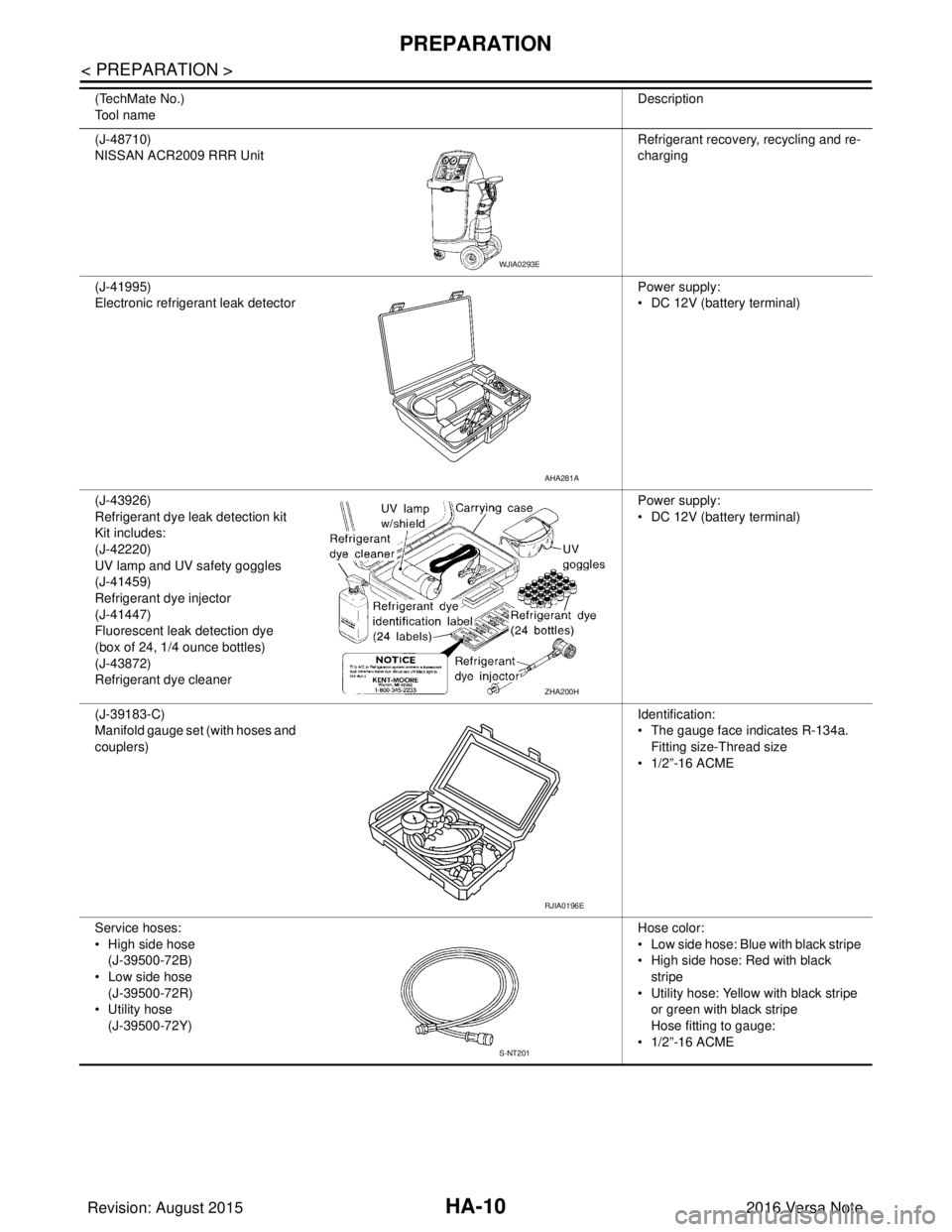
HA-10
< PREPARATION >
PREPARATION
(J-48710)
NISSAN ACR2009 RRR UnitRefrigerant recovery
, recycling and re-
charging
(J-41995)
Electronic refrigerant leak detector Power supply:
• DC 12V (battery terminal)
(J-43926)
Refrigerant dye leak detection kit
Kit includes:
(J-42220)
UV lamp and UV safety goggles
(J-41459)
Refrigerant dye injector
(J-41447)
Fluorescent leak detection dye
(box of 24, 1/4 ounce bottles)
(J-43872)
Refrigerant dye cleaner Power supply:
• DC 12V (battery terminal)
(J-39183-C)
Manifold gauge set (with hoses and
couplers) Identification:
• The gauge face indicates R-134a.
Fitting size-Thread size
• 1/2”-16 ACME
Service hoses:
• High side hose (J-39500-72B)
• Low side hose (J-39500-72R)
• Utility hose (J-39500-72Y) Hose color:
• Low side hose: Blue with black stripe
• High side hose: Red with black
stripe
• Utility hose: Yellow with black stripe
or green with black stripe
Hose fitting to gauge:
• 1/2”-16 ACME
(TechMate No.)
Tool name
Description
WJIA0293E
AHA281A
ZHA200H
RJIA0196E
S-NT201
Revision: August 2015
2016 Versa Note
cardiagn.com
Page 2043 of 3641
HA-18
< PERIODIC MAINTENANCE >
REFRIGERANT
PERIODIC MAINTENANCE
REFRIGERANT
DescriptionINFOID:0000000012431997
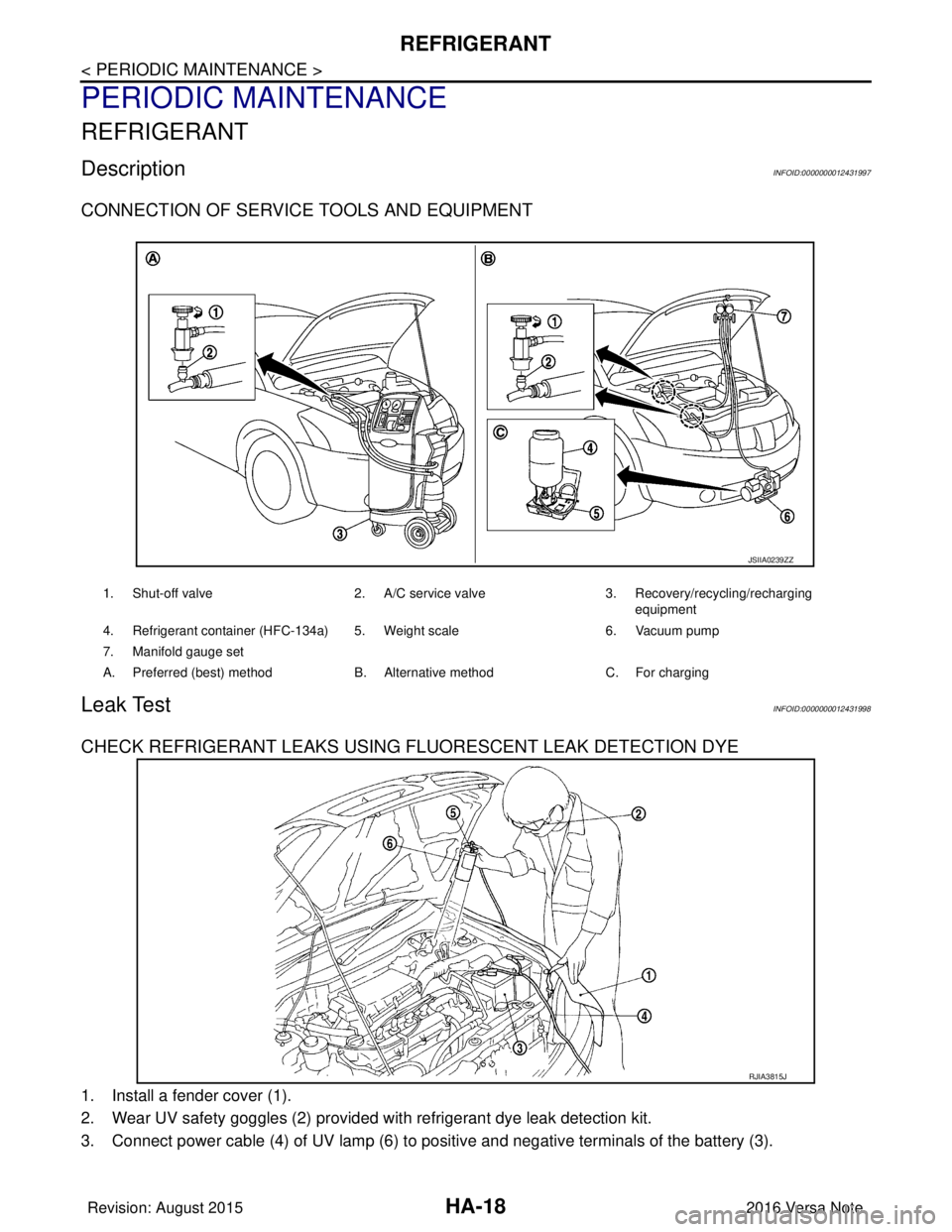
CONNECTION OF SERVICE TOOLS AND EQUIPMENT
Leak TestINFOID:0000000012431998
CHECK REFRIGERANT LEAKS USING FLUORESCENT LEAK DETECTION DYE
1. Install a fender cover (1).
2. Wear UV safety goggles (2) provided with refrigerant dye leak detection kit.
3. Connect power cable (4) of UV lamp (6) to positive and negative terminals of the battery (3).
1. Shut-off valve2. A/C service valve 3. Recovery/recycling/recharging
equipment
4. Refrigerant container (HFC-134a) 5. Weight scale 6. Vacuum pump
7. Manifold gauge set
A. Preferred (best) method B. Alternative methodC. For charging
JSIIA0239ZZ
RJIA3815J
Revision: August 2015 2016 Versa Note
cardiagn.com
Page 2064 of 3641

HRN-2
< PRECAUTION >
PRECAUTIONS
PRECAUTION
PRECAUTIONS
Precaution for Supplemental Restraint System (SRS) "AIR BAG" and "SEAT BELT
PRE-TENSIONER"
INFOID:0000000012431935
The Supplemental Restraint System such as “A IR BAG” and “SEAT BELT PRE-TENSIONER”, used along
with a front seat belt, helps to reduce the risk or severity of injury to the driver and front passenger for certain
types of collision. Information necessary to service the system safely is included in the SR and SB section of
this Service Manual.
WARNING:
• To avoid rendering the SRS inopera tive, which could increase the risk of personal injury or death in
the event of a collision which would result in air bag inflation, all maintenance must be performed by
an authorized NISSAN/INFINITI dealer.
• Improper maintenance, including in correct removal and installation of the SRS, can lead to personal
injury caused by unintent ional activation of the system. For re moval of Spiral Cable and Air Bag
Module, see the SR section.
• Do not use electrical test equipmen t on any circuit related to the SRS unless instructed to in this
Service Manual. SRS wiring harn esses can be identified by yellow and/or orange harnesses or har-
ness connectors.
PRECAUTIONS WHEN USING POWER TOOLS (AIR OR ELECTRIC) AND HAMMERS
WARNING:
• When working near the Airbag Diagnosis Sensor Unit or other Airbag System sensors with the Igni-
tion ON or engine running, DO NOT use air or electri c power tools or strike near the sensor(s) with a
hammer. Heavy vibration could activate the sensor( s) and deploy the air bag(s), possibly causing
serious injury.
• When using air or electric power tools or hammers , always switch the Ignition OFF, disconnect the
battery and wait at least three minutes before performing any service.
Revision: August 2015 2016 Versa Note
cardiagn.com
Page 2070 of 3641

IP-2
< PRECAUTION >
PRECAUTIONS
PRECAUTION
PRECAUTIONS
Precaution for Supplemental Restraint System (SRS) "AIR BAG" and "SEAT BELT
PRE-TENSIONER"
INFOID:0000000012430769
The Supplemental Restraint System such as “A IR BAG” and “SEAT BELT PRE-TENSIONER”, used along
with a front seat belt, helps to reduce the risk or severity of injury to the driver and front passenger for certain
types of collision. Information necessary to service the system safely is included in the SR and SB section of
this Service Manual.
WARNING:
• To avoid rendering the SRS inopera tive, which could increase the risk of personal injury or death in
the event of a collision which would result in air bag inflation, all maintenance must be performed by
an authorized NISSAN/INFINITI dealer.
• Improper maintenance, including in correct removal and installation of the SRS, can lead to personal
injury caused by unintent ional activation of the system. For re moval of Spiral Cable and Air Bag
Module, see the SR section.
• Do not use electrical test equipmen t on any circuit related to the SRS unless instructed to in this
Service Manual. SRS wiring harn esses can be identified by yellow and/or orange harnesses or har-
ness connectors.
PRECAUTIONS WHEN USING POWER TOOLS (AIR OR ELECTRIC) AND HAMMERS
WARNING:
• When working near the Airbag Diagnosis Sensor Unit or other Airbag System sensors with the Igni-
tion ON or engine running, DO NOT use air or electri c power tools or strike near the sensor(s) with a
hammer. Heavy vibration could activate the sensor( s) and deploy the air bag(s), possibly causing
serious injury.
• When using air or electric power tools or hammers , always switch the Ignition OFF, disconnect the
battery and wait at least three minutes before performing any service.
Precaution for WorkINFOID:0000000012430770
• When removing or disassembling each component, be careful not to damage or deform it. If a component may be subject to interference, be sure to protect it with a shop cloth.
• When removing (disengaging) components with a screwdriver or similar tool, be sure to wrap the component with a shop cloth or vinyl tape to protect it.
• Protect the removed parts with a shop cloth and prevent them from being dropped.
• Replace a deformed or damaged clip.
• If a part is specified as a non-reusable part, always replace it with a new one.
• Be sure to tighten bolts and nuts securely to the specified torque.
• After installation is complete, be sure to check that each part works properly.
• Follow the steps below to clean components:
- Water soluble dirt:
• Dip a soft cloth into lukewarm water, wring the water out of the cloth and wipe the dirty area.
• Then rub with a soft, dry cloth.
- Oily dirt:
• Dip a soft cloth into lukewarm water with mild detergent (concentration: within 2 to 3%) and wipe the dirty area.
• Then dip a cloth into fresh water, wring the water out of the cloth and wipe the detergent off.
• Then rub with a soft, dry cloth.
- Do not use organic solvent such as thinner, benzene, alcohol or gasoline.
- For genuine leather seats, use a genuine leather seat cleaner.
Revision: August 2015 2016 Versa Note
cardiagn.com