battery NISSAN NOTE 2016 Service Repair Manual
[x] Cancel search | Manufacturer: NISSAN, Model Year: 2016, Model line: NOTE, Model: NISSAN NOTE 2016Pages: 3641, PDF Size: 28.72 MB
Page 2083 of 3641
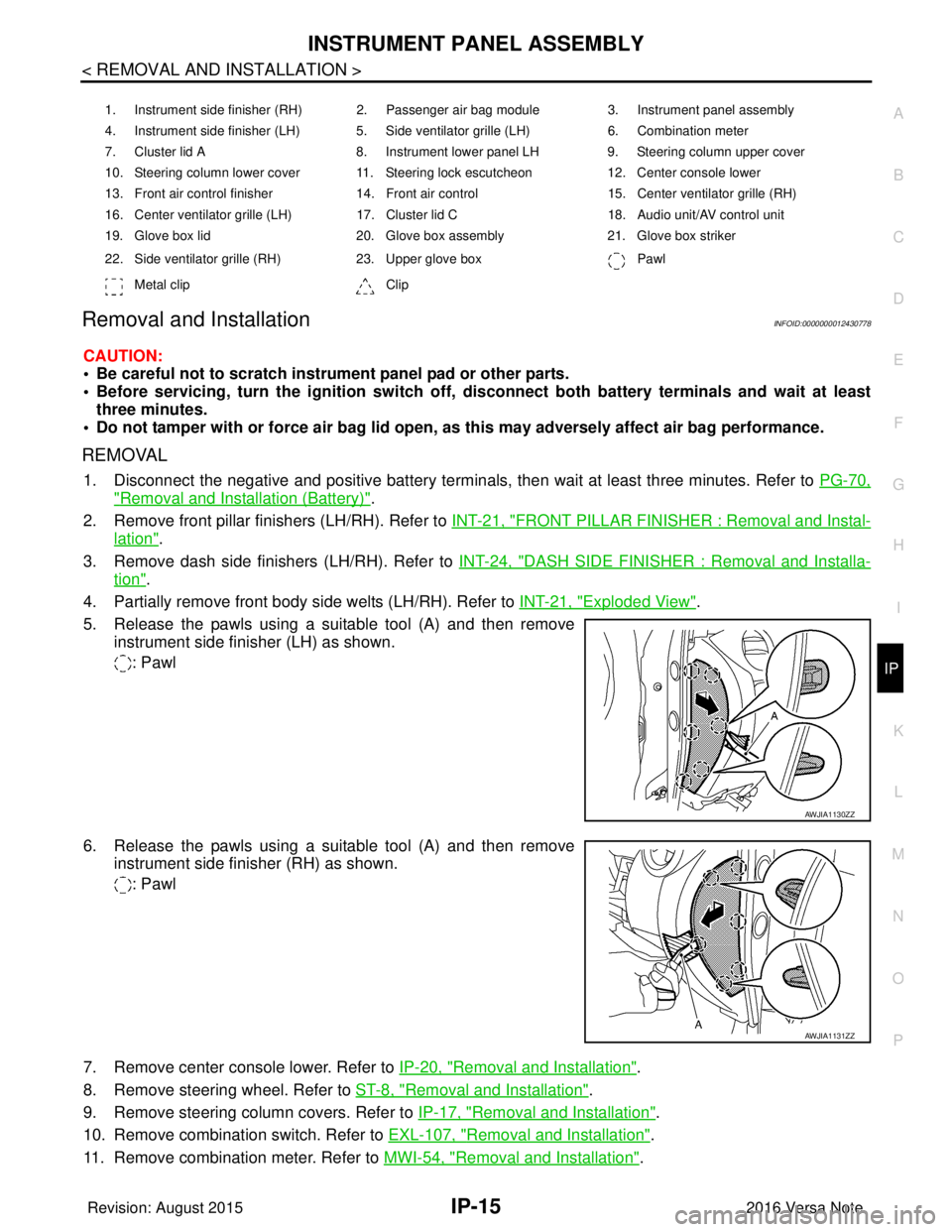
INSTRUMENT PANEL ASSEMBLYIP-15
< REMOVAL AND INSTALLATION >
C
DE
F
G H
I
K L
M A
B
IP
N
O P
Removal and InstallationINFOID:0000000012430778
CAUTION:
• Be careful not to scratch instrument panel pad or other parts.
• Before servicing, turn the ignition switch off, disconnect both battery terminals and wait at least
three minutes.
• Do not tamper with or force air bag lid open, as this may adversely affect air bag performance.
REMOVAL
1. Disconnect the negative and positive battery terminals, then wait at least three minutes. Refer to PG-70,
"Removal and Installation (Battery)".
2. Remove front pillar finishers (LH/RH). Refer to INT-21, "
FRONT PILLAR FINISHER : Removal and Instal-
lation".
3. Remove dash side finishers (LH/RH). Refer to INT-24, "
DASH SIDE FINISHER : Removal and Installa-
tion".
4. Partially remove front body side welts (LH/RH). Refer to INT-21, "
Exploded View".
5. Release the pawls using a suitable tool (A) and then remove instrument side finisher (LH) as shown.
: Pawl
6. Release the pawls using a suitable tool (A) and then remove instrument side finisher (RH) as shown.
: Pawl
7. Remove center console lower. Refer to IP-20, "
Removal and Installation".
8. Remove steering wheel. Refer to ST-8, "
Removal and Installation".
9. Remove steering column covers. Refer to IP-17, "
Removal and Installation".
10. Remove combination switch. Refer to EXL-107, "
Removal and Installation".
11. Remove combination meter. Refer to MWI-54, "
Removal and Installation".
1. Instrument side finisher (RH) 2. Passenger air bag module 3. Instrument panel assembly
4. Instrument side finisher (LH) 5. Side ventilator grille (LH) 6. Combination meter
7. Cluster lid A 8. Instrument lower panel LH9. Steering column upper cover
10. Steering column lower cover 11. Steering lock escutcheon 12. Center console lower
13. Front air control finisher 14. Front air control15. Center ventilator grille (RH)
16. Center ventilator grille (LH) 17. Cluster lid C 18. Audio unit/AV control unit
19. Glove box lid 20. Glove box assembly21. Glove box striker
22. Side ventilator grille (RH) 23. Upper glove box Pawl
Metal clip Clip
AWJIA1130ZZ
AWJIA1131ZZ
Revision: August 2015 2016 Versa Note
cardiagn.com
Page 2095 of 3641

INL-1
DRIVER CONTROLS
C
DE
F
G H
I
J
K
M
SECTION INL
A
B
INL
N
O P
CONTENTS
INTERIOR LIGHTING SYSTEM
PRECAUTION ....... ........................................3
PRECAUTIONS .............................................. .....3
Precaution for Supplemental Restraint System
(SRS) "AIR BAG" and "SEAT BELT PRE-TEN-
SIONER" ............................................................. ......
3
Precaution for Work ..................................................3
PREPARATION ............................................4
PREPARATION .............................................. .....4
Special Service Tool ........................................... ......4
SYSTEM DESCRIPTION ..............................5
COMPONENT PARTS ................................... .....5
Component Parts Location .................................. ......5
SYSTEM ..............................................................7
INTERIOR ROOM LAMP CONTROL SYSTEM .... ......7
INTERIOR ROOM LAMP CONTROL SYSTEM :
System Description ...................................................
7
ILLUMINATION CONTROL SYSTEM ................... ......9
ILLUMINATION CONTROL SYSTEM : System
Description ................................................................
9
DIAGNOSIS SYSTEM (BCM) (WITH INTELLI-
GENT KEY SYSTEM) .........................................
10
COMMON ITEM ..................................................... ....10
COMMON ITEM : CONSULT Function (BCM -
COMMON ITEM) .....................................................
10
DOOR LOCK ......................................................... ....11
DOOR LOCK : CONSULT Function (BCM -
DOOR LOCK) .........................................................
11
INT LAMP .............................................................. ....11
INT LAMP : CONSULT Function (BCM - INT
LAMP) .....................................................................
11
INTELLIGENT KEY ............................................... ....12
INTELLIGENT KEY : CONSULT Function (BCM -
INTELLIGENT KEY) ................................................
12
BATTERY SAVER ................................................. ....14
BATTERY SAVER : CONSULT Function (BCM -
BATTERY SAVER) ..................................................
14
DIAGNOSIS SYSTEM (BCM) (WITHOUT IN-
TELLIGENT KEY SYSTEM) .............................
16
COMMON ITEM ..................................................... ....16
COMMON ITEM : CONSULT Function (BCM -
COMMON ITEM) .....................................................
16
DOOR LOCK .......................................................... ....17
DOOR LOCK : CONSULT Function (BCM -
DOOR LOCK) ..........................................................
17
INT LAMP ............................................................... ....17
INT LAMP : CONSULT Function (BCM - INT
LAMP) ......................................................................
18
BATTERY SAVER ................................................. ....19
BATTERY SAVER : CONSULT Function (BCM -
BATTERY SAVER) ..................................................
19
ECU DIAGNOSIS INFO RMATION ..............20
BCM ...................................................................20
List of ECU Reference ......................................... ....20
WIRING DIAGRAM ......................................21
INTERIOR ROOM LAMP CONTROL SYSTEM
...
21
Wiring Diagram .................................................... ....21
ILLUMINATION .................................................28
Wiring Diagram ........................................................28
BASIC INSPECTION ...................................37
DIAGNOSIS AND REPAIR WORKFLOW ........37
Work Flow ............................................................ ....37
Revision: August 2015 2016 Versa Note
cardiagn.com
Page 2096 of 3641

INL-2
DTC/CIRCUIT DIAGNOSIS ...................... ...39
POWER SUPPLY AND GROUND CIRCUIT .. ...39
BCM (BODY CONTROL SYSTEM) (WITH INTEL-
LIGENT KEY SYSTEM) ..... .......................................
39
BCM (BODY CONTROL S YSTEM) (WITH INTEL-
LIGENT KEY SYSTEM) : Dia gnosis Procedure .....
39
BCM (BODY CONTROL SYST EM) (WITHOUT IN-
TELLIGENT KEY SYSTEM) . ....................................
39
BCM (BODY CONTROL SYSTEM) (WITHOUT
INTELLIGENT KEY SYSTEM) : Diagnosis Proce-
dure ..................................................................... ...
39
BATTERY SAVER OUTPUT/POWER SUP-
PLY CIRCUIT .....................................................
41
Description ........................................................... ...41
Component Function Check ...................................41
Diagnosis Procedure ..............................................41
INTERIOR ROOM LAMP CONTROL CIRCUIT
...
43
Description ........................................................... ...43
Component Function Check ...................................43
Diagnosis Procedure ..............................................43
CARGO LAMP CONTROL CIRCUIT ................46
Description ........................................................... ...46
Component Function Check ...................................46
Diagnosis Procedure ..............................................46
PUSH-BUTTON IGNITION SWITCH ILLUMI-
NATION CIRCUIT ..............................................
48
Description ........................................................... ...48
Component Function Check ...................................48
Diagnosis Procedure ............................................ ...48
SYMPTOM DIAGNOSIS ............................50
INTERIOR LIGHTING SYSTEM SYMPTOMS ...50
Symptom Table .................................................... ...50
REMOVAL AND INSTALLATION ..............51
MAP LAMP ........................................................51
Exploded View ..................................................... ...51
Removal and Installation .........................................51
Bulb Replacement ................................................ ...51
INTERIOR ROOM LAMP ...................................53
Exploded View ..................................................... ...53
Removal and Installation .........................................53
Bulb Replacement ................................................ ...53
CARGO ROOM LAMP ......................................54
Exploded View ..................................................... ...54
Removal and Installation .........................................54
Bulb Replacement ................................................ ...54
SHIFT SELECTOR LAMP .................................55
Bulb Replacement ...................................................55
ILLUMINATION CONTROL SWITCH ...............56
Removal and Installation .........................................56
SERVICE DATA AND SPECIFICATIONS
(SDS) .......... ................................. ...............
57
SERVICE DATA AND SPECIFICATIONS
(SDS) .............................................................. ...
57
Bulb Specifications ............................................... ...57
Revision: August 2015 2016 Versa Note
cardiagn.com
Page 2097 of 3641
PRECAUTIONSINL-3
< PRECAUTION >
C
DE
F
G H
I
J
K
M A
B
INL
N
O P
PRECAUTION
PRECAUTIONS
Precaution for Supplemental Restraint System (SRS) "AIR BAG" and "SEAT BELT
PRE-TENSIONER"
INFOID:0000000012432718
The Supplemental Restraint System such as “AIR BAG” and “SEAT BELT PRE-TENSIONER”, used along
with a front seat belt, helps to reduce the risk or severi ty of injury to the driver and front passenger for certain
types of collision. Information necessary to service the system safely is included in the SR and SB section of
this Service Manual.
WARNING:
• To avoid rendering the SRS inoper ative, which could increase the risk of personal injury or death in
the event of a collision which would result in air bag inflation, all maintenance must be performed by
an authorized NISSAN/INFINITI dealer.
• Improper maintenance, including in correct removal and installation of the SRS, can lead to personal
injury caused by unintentional act ivation of the system. For removal of Spiral Cable and Air Bag
Module, see the SR section.
• Do not use electrical test equipm ent on any circuit related to the SRS unless instructed to in this
Service Manual. SRS wiring harnesses can be identi fied by yellow and/or orange harnesses or har-
ness connectors.
PRECAUTIONS WHEN USING POWER TOOLS (AIR OR ELECTRIC) AND HAMMERS
WARNING:
• When working near the Airbag Diagnosis Sensor Un it or other Airbag System sensors with the Igni-
tion ON or engine running, DO NOT use air or el ectric power tools or strike near the sensor(s) with a
hammer. Heavy vibration could activate the sensor( s) and deploy the air bag(s), possibly causing
serious injury.
• When using air or electric power tools or hammers, always switch the Ignition OFF, disconnect the
battery and wait at least three mi nutes before performing any service.
Precaution for WorkINFOID:0000000012432719
• When removing or disassembling each component, be ca reful not to damage or deform it. If a component
may be subject to interference, be sure to protect it with a shop cloth.
• When removing (disengaging) components with a screwdriver or similar tool, be sure to wrap the component with a shop cloth or vinyl tape to protect it.
• Protect the removed parts with a shop cloth and prevent them from being dropped.
• Replace a deformed or damaged clip.
• If a part is specified as a non-reusabl e part, always replace it with a new one.
• Be sure to tighten bolts and nuts securely to the specified torque.
• After installation is complete, be sure to check that each part works properly.
• Follow the steps below to clean components:
- Water soluble dirt:
• Dip a soft cloth into lukewarm water, wring the water out of the cloth and wipe the dirty area.
• Then rub with a soft, dry cloth.
-Oily dirt:
• Dip a soft cloth into lukewarm water with mild detergent (concentration: within 2 to 3%) and wipe the dirty
area.
• Then dip a cloth into fresh water, wring the water out of the cloth and wipe the detergent off.
• Then rub with a soft, dry cloth.
- Do not use organic solvent such as thinner, benzene, alcohol or gasoline.
- For genuine leather seats, use a genuine leather seat cleaner.
Revision: August 2015 2016 Versa Note
cardiagn.com
Page 2100 of 3641
INL-6
< SYSTEM DESCRIPTION >
COMPONENT PARTS
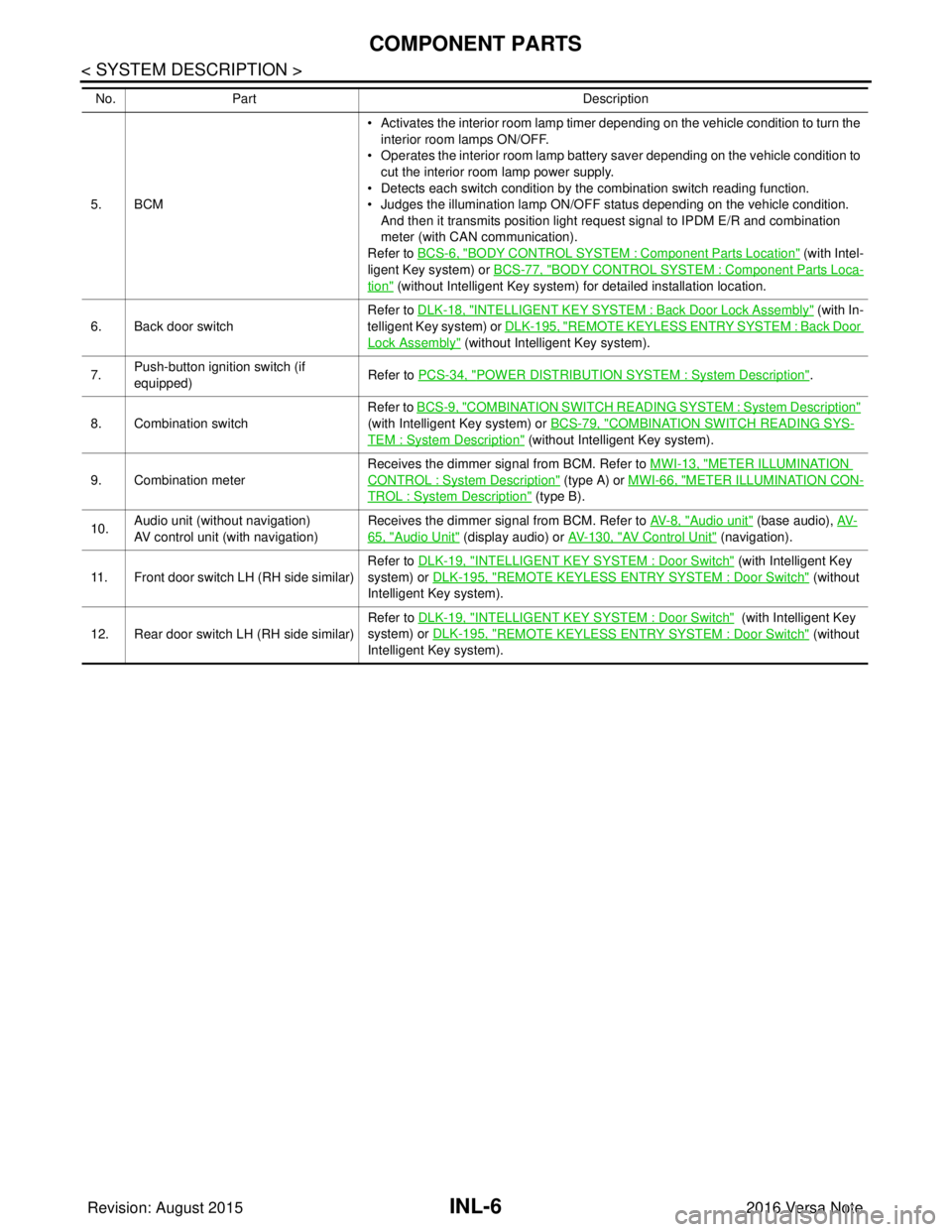
5. BCM• Activates the interior room lamp timer depending on the vehicle condition to turn the
interior room lamps ON/OFF.
• Operates the interior room lamp battery saver depending on the vehicle condition to cut the interior room lamp power supply.
• Detects each switch condition by the combination switch reading function.
• Judges the illumination lamp ON/OFF status depending on the vehicle condition.
And then it transmits position light request signal to IPDM E/R and combination
meter (with CAN communication).
Refer to BCS-6, "
BODY CONTROL SYSTEM : Component Part s Location" (with Intel-
ligent Key system) or BCS-77, "
BODY CONTROL SYSTEM : Component Parts Loca-
tion" (without Intelligent Key system) for detailed installation location.
6. Back door switch Refer to DLK-18, "
INTELLIGENT KEY SYSTEM : Ba
ck Door Lock Assembly" (with In-
telligent Key system) or DLK-195, "
REMOTE KEYLESS ENTRY SYSTEM : Back Door
Lock Assembly" (without Intelligent Key system).
7. Push-button ignition switch (if
equipped) Refer to PCS-34, "
POWER DISTRIBUTION SYSTEM : System Description".
8. Combination switch Refer to
BCS-9, "
COMBINATION SWITCH READING SY STEM : System Description"
(with Intelligent Key system) or BCS-79, "
COMBINATION SWITCH READING SYS-
TEM : System Description" (without Intelligent Key system).
9. Combination meter Receives the dimmer signal from BCM. Refer to
MWI-13, "
METER ILLUMINATION
CONTROL : System Description" (type A) or MWI-66, "METER ILLUMINATION CON-
TROL : System Description" (type B).
10. Audio unit (without navigation)
AV control unit (with navigation) Receives the dimmer signal from BCM. Refer to
AV- 8 , "
Audio unit" (base audio), AV-
65, "Audio Unit" (display audio) or AV- 1 3 0 , "AV Control Unit" (navigation).
11. Front door switch LH (RH side similar) Refer to DLK-19, "
INTELLIGENT KEY SYSTEM : Door Switch" (with Intelligent Key
system) or DLK-195, "
REMOTE KEYLESS ENTRY SYSTEM : Door Switch" (without
Intelligent Key system).
12. Rear door switch LH (RH side similar) Refer to DLK-19, "
INTELLIGENT KEY SYSTEM : Door Switch" (with Intelligent Key
system) or DLK-195, "
REMOTE KEYLESS ENTRY SYSTEM : Door Switch" (without
Intelligent Key system).
No.
Part Description
Revision: August 2015 2016 Versa Note
cardiagn.com
Page 2102 of 3641
INL-8
< SYSTEM DESCRIPTION >
SYSTEM
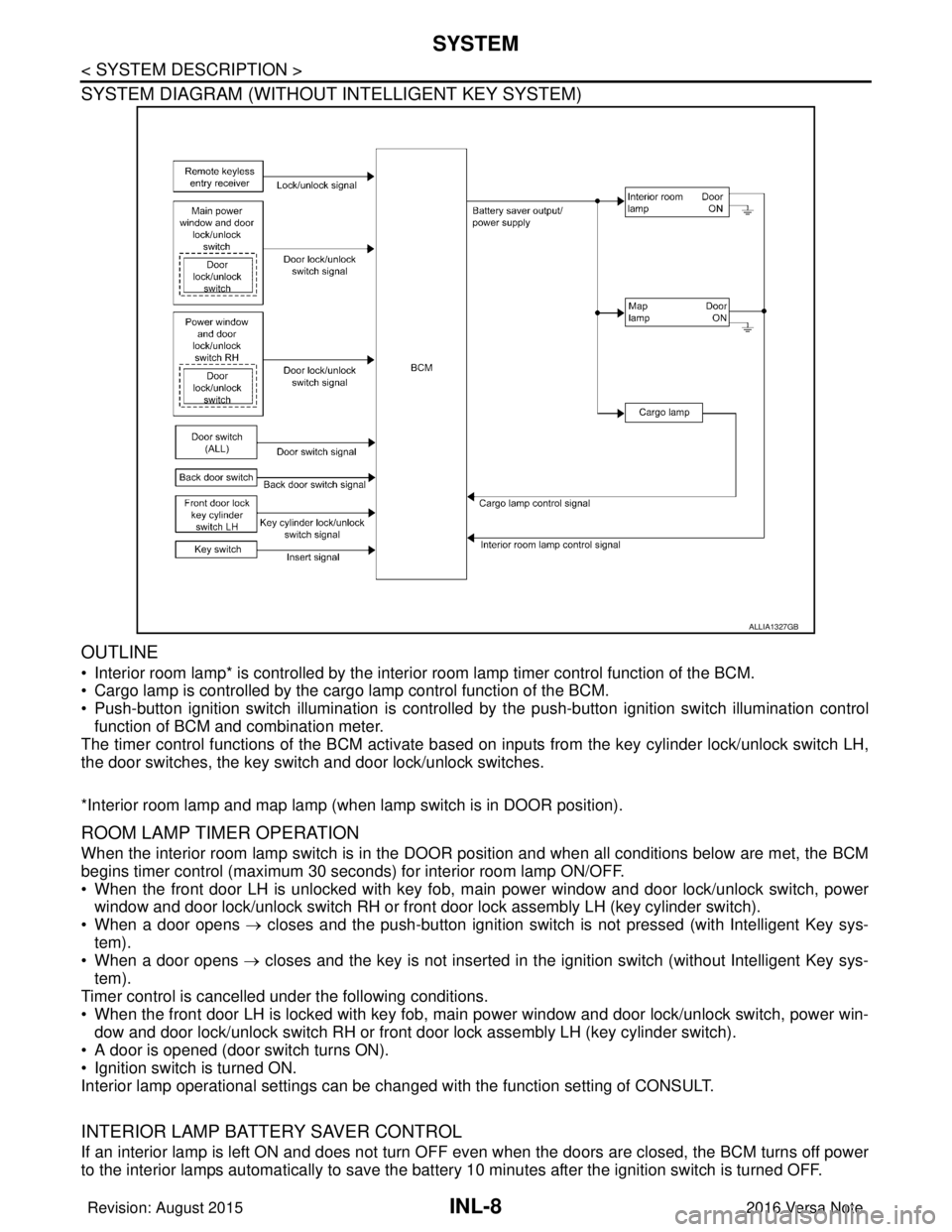
SYSTEM DIAGRAM (WITHOUT INTELLIGENT KEY SYSTEM)
OUTLINE
• Interior room lamp* is controlled by the interior room lamp timer control function of the BCM.
• Cargo lamp is controlled by the cargo lamp control function of the BCM.
• Push-button ignition switch illumination is controlled by the push-button ignition switch illumination control
function of BCM and combination meter.
The timer control functions of the BCM activate based on inputs from the key cylinder lock/unlock switch LH,
the door switches, the key switch and door lock/unlock switches.
*Interior room lamp and map lamp (when lamp switch is in DOOR position).
ROOM LAMP TIMER OPERATION
When the interior room lamp switch is in the DOOR position and when all conditions below are met, the BCM
begins timer control (maximum 30 seconds) for interior room lamp ON/OFF.
• When the front door LH is unlocked with key fob, main power window and door lock/unlock switch, power
window and door lock/unlock switch RH or front door lock assembly LH (key cylinder switch).
• When a door opens → closes and the push-button ignition switch is not pressed (with Intelligent Key sys-
tem).
• When a door opens → closes and the key is not inserted in the ignition switch (without Intelligent Key sys-
tem).
Timer control is cancelled under the following conditions.
• When the front door LH is locked with key fob, main power window and door lock/unlock switch, power win-
dow and door lock/unlock switch RH or front door lock assembly LH (key cylinder switch).
• A door is opened (door switch turns ON).
• Ignition switch is turned ON.
Interior lamp operational settings can be changed with the function setting of CONSULT.
INTERIOR LAMP BATTERY SAVER CONTROL
If an interior lamp is left ON and does not turn OFF even when the doors are closed, the BCM turns off power
to the interior lamps automatically to save the batte ry 10 minutes after the ignition switch is turned OFF.
ALLIA1327GB
Revision: August 2015 2016 Versa Note
cardiagn.com
Page 2103 of 3641
SYSTEMINL-9
< SYSTEM DESCRIPTION >
C
DE
F
G H
I
J
K
M A
B
INL
N
O P
The BCM controls power and ground to all interior lamps.
After the battery saver system turns the la mps OFF, the lamps will illuminate again when
• a signal is received from a key fob, main power window and door lock/unlock switch, power window and
door lock/unlock switch RH or when the front door lock assembly LH (key cylinder switch) is locked or
unlocked
• a door is opened or closed
• the key is removed from or inserted into t he ignition switch (without Intelligent Key system).
The interior lamp battery saver control time per iod can be changed with the function setting of CONSULT.
ILLUMINATION CONTROL SYSTEM
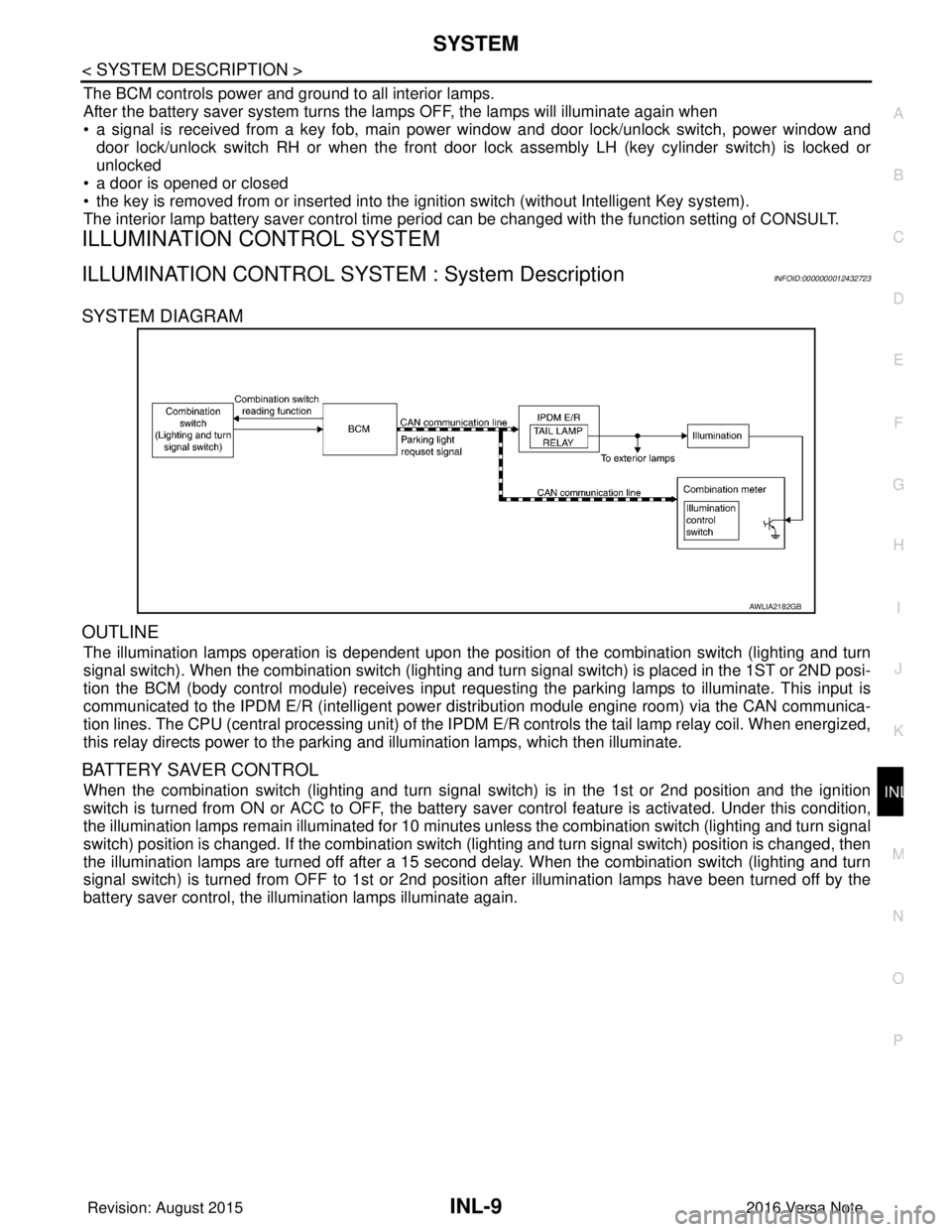
ILLUMINATION CONTROL SYSTEM : System DescriptionINFOID:0000000012432723
SYSTEM DIAGRAM
OUTLINE
The illumination lamps operation is dependent upon the posit ion of the combination switch (lighting and turn
signal switch). When the combination switch (lighting and turn signal switch) is placed in the 1ST or 2ND posi-
tion the BCM (body control module) receives input requesting the parking lamps to illuminate. This input is
communicated to the IPDM E/R (intelligent power distribution module engine room) via the CAN communica-
tion lines. The CPU (central processing unit) of the IPDM E/R controls the tail lamp relay coil. When energized,
this relay directs power to the parking and illumination lamps, which then illuminate.
BATTERY SAVER CONTROL
When the combination switch (lighting and turn signal switch) is in the 1st or 2nd position and the ignition
switch is turned from ON or ACC to OFF, the battery saver control feature is activated. Under this condition,
the illumination lamps remain illuminated for 10 minutes unless the combination switch (lighting and turn signal
switch) position is changed. If the combination switch (lighting and turn signal switch) position is changed, then
the illumination lamps are turned off after a 15 second delay. When the combination switch (lighting and turn
signal switch) is turned from OFF to 1st or 2nd position after illumination lamps have been turned off by the
battery saver control, the illumination lamps illuminate again.
AWLIA2182GB
Revision: August 2015 2016 Versa Note
cardiagn.com
Page 2104 of 3641

INL-10
< SYSTEM DESCRIPTION >
DIAGNOSIS SYSTEM (BCM) (WITH INTELLIGENT KEY SYSTEM)
DIAGNOSIS SYSTEM (BCM) (WITH INTELLIGENT KEY SYSTEM)
COMMON ITEM
COMMON ITEM : CONSULT Function (BCM - COMMON ITEM)INFOID:0000000012542969
APPLICATION ITEM
CONSULT performs the following functions via CAN communication with BCM.
SYSTEM APPLICATION
BCM can perform the following functions.
Direct Diagnostic Mode Description
ECU Identification The BCM part number is displayed.
Self Diagnostic Result The BCM self diagnostic results are displayed.
Data Monitor The BCM input/output data is displayed in real time.
Active Test The BCM activates outputs to test components.
Work support The settings for BCM functions can be changed.
Configuration • The vehicle specification can be read and saved.
• The vehicle specification can be written when replacing BCM.
CAN DIAG SUPPORT MNTR The result of transmit/receive diagnosis of CAN communication is displayed.
System Sub System Direct Diagnostic Mode
ECU Identification
Self Diagnostic Result
Data Monitor
Active Test
Work support
Configuration
CAN DIAG SUPPORT MNTR
Door lock
DOOR LOCK ×××
Rear window defogger REAR DEFOGGER ××
Warning chime BUZZER ××
Interior room lamp timer INT LAMP ×××
Exterior lamp HEAD LAMP ×××
Wiper and washer WIPER ×××
Turn signal and hazard warning lamps FLASHER ×××
Air conditioner AIR CONDITIONER ×
Intelligent Key system INTELLIGENT KEY ××××
Combination switch COMB SW ×
BCM BCM× × ×××
Immobilizer IMMU ××××
Interior room lamp battery saver BATTERY SAVER ×××
Vehicle security system THEFT ALM ××
RAP system RETAINED PWR ×
Signal buffer system SIGNAL BUFFER ×
TPMS AIR PRESSURE MONITOR ××××
Panic alarm system PANIC ALARM ×
Revision: August 2015 2016 Versa Note
cardiagn.com
Page 2107 of 3641
![NISSAN NOTE 2016 Service Repair Manual DIAGNOSIS SYSTEM (BCM) (WITH INTELLIGENT KEY SYSTEM)
INL-13
< SYSTEM DESCRIPTION >
C
D E
F
G H
I
J
K
M A
B
INL
N
O P
ACTIVE TEST
BRAKE SW 2 [On/Off] Indicates condition of brake switch.
DETE/CANCL SW](/img/5/57363/w960_57363-2106.png "NISSAN NOTE 2016 Service Repair Manual DIAGNOSIS SYSTEM (BCM) (WITH INTELLIGENT KEY SYSTEM)
INL-13
< SYSTEM DESCRIPTION >
C
D E
F
G H
I
J
K
M A
B
INL
N
O P
ACTIVE TEST
BRAKE SW 2 [On/Off] Indicates condition of brake switch.
DETE/CANCL SW")
DIAGNOSIS SYSTEM (BCM) (WITH INTELLIGENT KEY SYSTEM)
INL-13
< SYSTEM DESCRIPTION >
C
D E
F
G H
I
J
K
M A
B
INL
N
O P
ACTIVE TEST
BRAKE SW 2 [On/Off] Indicates condition of brake switch.
DETE/CANCL SW [On/Off] ×Indicates condition of P (park) position.
SFT PN/N SW [On/Off] ×Indicates condition of P (park) or N (neutral) position.
UNLK SEN -DR [On/Off] ×Indicates condition of door unlock sensor.
PUSH SW -IPDM [On/Off] Indicates condition of push-button ignition switch received from IPDM E/R on
CAN communication line.
IGN RLY1 -F/B [On/Off] Indicates condition of ignition relay 1 received from IPDM E/R on CAN commu-
nication line.
DETE SW -IPDM [On/Off] Indicates condition of detent switch received from TCM on CAN communication
line.
SFT PN -IPDM [On/Off] Indicates condition of P (park) or N (neutral) position from TCM on CAN com-
munication line.
SFT P -MET [On/Off] Indicates condition of P (park) position from TCM on CAN communication line.
SFT N -MET [On/Off] Indicates condition of N (neutral) position from IPDM E/R on CAN communica-
tion line.
ENGINE STATE [Stop/Start/Crank/Run] ×Indicates condition of engine state from ECM on CAN communication line.
VEH SPEED 1 [mph/km/h] ×Indicates condition of vehicle speed si
gnal received from ABS on CAN commu-
nication line.
VEH SPEED 2 [mph/km/h] ×Indicates condition of vehicle speed signal received from combination meter on
CAN communication line.
DOOR STAT -DR [LOCK/READY/UNLK] ×Indicates condition of driver side door status.
DOOR STAT -AS [LOCK/READY/UNLK] ×Indicates condition of passenger side door status.
ID OK FLAG [Set/Reset] Indicates condition of Intelligent Key ID.
PRMT ENG STRT [Set/Reset] Indicates condition of engine start possibility.
RKE OPE COUN1 [0-19] ×When remote keyless entry receiver receives the signal transmitted while oper-
ating on Intelligent Key, the numerical value start changing.
RKE OPE COUN2 [0-19] ×When remote keyless entry receiver receives the signal transmitted while oper-
ating on Intelligent Key, the numerical value start changing.
RKE-LOCK [On/Off] Indicates condition of lock signal from Intelligent Key.
RKE-UNLOCK [On/Off] Indicates condition of unlock signal from Intelligent Key.
RKE-PANIC [On/Off] Indicates condition of panic signal from Intelligent Key.
RKE-MODE CHG [On/Off] Indicates condition of mode change signal from Intelligent Key.
Monitor Item [Unit]
Main Description
Test Item Description
INSIDE BUZZER This test is able to check combination meter warning chime operation [Take Out/Knob/Key/
Off].
LCD This test is able to check combination me
ter display information [Off/LK WN/OUTKEY/NO
KY/BATT/INSRT/SFT P/ROTAT/ID NG/B&P I/B&P N].
BATTERY SAVER This test is able to check battery saver operation [On/Off].
ENGINE SW ILLUMI This test is able to check push-button ignition switch START indicator operation [On/Off].
PUSH SWITCH INDICATOR This test is able to check push-button ignition switch indicator operation [On/Off].
INT LAMP This test is able to check interior room lamp operation [On/Off].
INDICATOR This test is able to check combination mete r warning lamp operation [KEY ON/KEY IND/Off].
FLASHER This test is able to check hazard lamp operation [LH/RH/Off].
OUTSIDE BUZZER This test is able to check Intelligent Key warning buzzer operation [On/Off].
HORN This test is able to check horn operation [On].
P RANGE This test is able to check CVT shift selector illumination operation [On/Off].
Revision: August 2015 2016 Versa Note
cardiagn.com
Page 2108 of 3641

INL-14
< SYSTEM DESCRIPTION >
DIAGNOSIS SYSTEM (BCM) (WITH INTELLIGENT KEY SYSTEM)
WORK SUPPORT
*: Initial Setting
BATTERY SAVER
BATTERY SAVER : CONSULT Func tion (BCM - BATTERY SAVER)INFOID:0000000012542973
DATA MONITOR
Support ItemSetting Description
LOCK/UNLOCK BY I-KEY On*
Door lock/unlock function from Intelligent Key ON.
Off Door lock/unlock function from Intelligent Key OFF.
ANTI KEY LOCK IN FUNCTI On*
Anti lock out setting ON.
Off Anti lock out setting OFF.
ANS BACK I-KEY UNLOCK Off
No buzzer reminder when doors are unlocked with request switch.
On* Buzzer reminder when doors are unlocked with request switch.
ANS BACK I-KEY LOCK Horn Chirp
Horn chirp reminder when doors are locked with request switch.
Buzzer* Buzzer reminder when doors are locked with request switch.
Off No reminder when doors are locked with request switch.
HORN WITH KEYLESS LOCK Off
Horn chirp reminder when doors are locked with Intelligent Key.
On* No horn chirp reminder when doors are locked with Intelligent Key.
HAZARD ANSWER BACK Lock/Unlock*
Hazard warning lamp activation when doors are locked/unlocked
with Intelligent Key or request switch.
Unlock Only Hazard warning lamp activation when doors are unlocked with Intel-
ligent Key or request switch.
Lock Only Hazard warning lamp activation when doors are locked with Intelli-
gent Key or request switch.
Off No hazard warning lamp activation when doors are locked/unlocked
with Intelligent Key or request switch.
INSIDE ANT DIAGNOSIS —This function allows inside key antenna self-diagnosis.
CONFIRM KEY FOB ID —Intelligent Key ID code can be checked.
SHORT CRANKING OUTPUT Start70 msec
Starter motor operation duration time setting.
100 msec
200 msec
End —
PANIC ALARM SET MODE 3 1.5 sec
Intelligent Key panic alarm button setting.
MODE 2 OFF
MODE 1* 0.5 sec
LO- BATT OF KEY FOB WARN On*
Intelligent Key low battery warning ON.
Off Intelligent Key low battery warning OFF.
AUTO LOCK SET MODE7 5 min
Auto door lock time setting.
MODE6 4 min
MODE5 3 min
MODE4 2 min
MODE3* 1 min
MODE2 30 sec
MODE1 Off
Revision: August 2015
2016 Versa Note
cardiagn.com