reset NISSAN NOTE 2016 Service Owner's Guide
[x] Cancel search | Manufacturer: NISSAN, Model Year: 2016, Model line: NOTE, Model: NISSAN NOTE 2016Pages: 3641, PDF Size: 28.72 MB
Page 2427 of 3641
![NISSAN NOTE 2016 Service Owners Guide MWI
DIAGNOSIS SYSTEM (COMBINATION METER)MWI-69
< SYSTEM DESCRIPTION > [TYPE B]
C
D
E
F
G H
I
J
K L
M B A
O P
DIAGNOSIS SYSTEM (C OMBINATION METER)
On Board Diagnosis FunctionINFOID:0000000012432611
ON](/img/5/57363/w960_57363-2426.png "NISSAN NOTE 2016 Service Owners Guide MWI
DIAGNOSIS SYSTEM (COMBINATION METER)MWI-69
< SYSTEM DESCRIPTION > [TYPE B]
C
D
E
F
G H
I
J
K L
M B A
O P
DIAGNOSIS SYSTEM (C OMBINATION METER)
On Board Diagnosis FunctionINFOID:0000000012432611
ON")
MWI
DIAGNOSIS SYSTEM (COMBINATION METER)MWI-69
< SYSTEM DESCRIPTION > [TYPE B]
C
D
E
F
G H
I
J
K L
M B A
O P
DIAGNOSIS SYSTEM (C OMBINATION METER)
On Board Diagnosis FunctionINFOID:0000000012432611
ON BOARD DIAGNOSIS
The following meter functions can be checked during Combination Meter Self-Diagnosis Mode:
• Pointer sweep of speedometer, tachometer and gauges.
• Illumination of all lamps/LEDs that are controlled by the combination meter (regardless of switch status).
• Error code
STARTING COMBINATION ME TER SELF-DIAGNOSIS MODE
NOTE:
• Check combination meter power supply and ground circuits if self-diagnosis mode does not start. Refer to
MWI-98, "
COMBINATION METER : Diagnosis Procedure". Replace combination meter if power supply and
ground circuits are found to be normal and self-diagnosis mode does not start. Refer to MWI-115, "
Removal
and Installation".
• Combination meter self-diagnosis mode will function with the ignition switch in ON. Combination meter self-
diagnosis mode will exit upon turning the ignition switch to OFF.
METHOD OF STARTING
1. Turn ignition switch to OFF.
2. While pressing the trip reset switch (1), turn the ignition switch ON.
3. Press the trip reset switch at least 3 times. (Within 7 seconds
after the ignition switch is turned ON.)
4. All LCD segments turn ON. NOTE:
If any of the segments are not activa ted, replace the combination meter.
5. The mode switches in the order shown below each time the trip reset switch is pressed. NOTE:
• If the trip reset switch is not operated for 20 sec onds or more, the self-diagnosis mode is automatically
cancelled.
• When the trip reset switch is pressed during the indica tion of Test order “10,” test item returns to Test
order “2.”
AWNIA3606ZZ
AWNIA3625ZZ
Revision: August 2015 2016 Versa Note
cardiagn.com
Page 2429 of 3641
![NISSAN NOTE 2016 Service Owners Guide MWI
DIAGNOSIS SYSTEM (COMBINATION METER)MWI-71
< SYSTEM DESCRIPTION > [TYPE B]
C
D
E
F
G H
I
J
K L
M B A
O P
CONSULT Function (METER/M&A)INFOID:0000000012432612
APPLICATION ITEMS
CONSULT can display e](/img/5/57363/w960_57363-2428.png "NISSAN NOTE 2016 Service Owners Guide MWI
DIAGNOSIS SYSTEM (COMBINATION METER)MWI-71
< SYSTEM DESCRIPTION > [TYPE B]
C
D
E
F
G H
I
J
K L
M B A
O P
CONSULT Function (METER/M&A)INFOID:0000000012432612
APPLICATION ITEMS
CONSULT can display e")
MWI
DIAGNOSIS SYSTEM (COMBINATION METER)MWI-71
< SYSTEM DESCRIPTION > [TYPE B]
C
D
E
F
G H
I
J
K L
M B A
O P
CONSULT Function (METER/M&A)INFOID:0000000012432612
APPLICATION ITEMS
CONSULT can display each diagnostic item using the diagnostic test modes shown.
SELF DIAG RESULT
Refer to MWI-77, "DTC Index".
DATA MONITOR
Display Item List
X: Applicable
Tachometer 0Normal
—
1 An engine speed signal cannot be received from
ECM. Perform “Self Diagnostic Result” of “ECM.”
Refer to EC-87, "
DTCIndex".
Speedometer 0Normal
—
1 A vehicle speed signal cannot be received from
ABS actuator and electric
unit (control unit).
Perform “Self Diagnostic Result” of “ABS.”
Refer to BRC-43, "
DTC Index".
2 A vehicle speed si
gnal received from the ABS ac-
tuator and electric unit (control unit) is abnormal.
— 0 Displays “0” constantly. —
— 0 Displays “0” constantly. —
— 0 Displays “0” constantly. —
Trip odometer reset
switch 0Normal
—
2 When judging that the trip odometer reset switch
signal circuit is short-circuited for 5 minutes or
more. Replace combination meter.
Refer to MWI-115, "
Removal and Installa-
tion".
Item Code Description Action to take/Reference
METER/M&A Diagnosis mode
Description
Self Diagnostic Result The combination meter self-diagnosis results.
Data Monitor Displays combination meter input/output data in real time.
Work support Supports combination meter diagnosis.
ECU Identification The combination meter part number is displayed.
Warning History Lighting history of the warning lamp and indicator lamp can be checked.
Display item [Unit]MAIN
SIGNALS Description
SPEED METER
[mph] or [km/h] X Displays the value of vehicle speed signal.
SPEED OUTPUT
[mph] or [km/h] XDisplays the value of vehicle speed signal, which is transmitted to each unit with
CAN communication.
ODO OUTPUT
[mph] or [km/h] Displays odometer signal value transmitted to other units via CAN communica-
tion.
TACHO METER
[rpm] X Displays the value of engine speed signal, which is input from ECM.
FUEL METER
[L] X Displays the fuel level.
W TEMP METER
[ ° C] or [ °F] X Displays the value of engine coolant temperature signal, which is input from ECM.
ABS W/L
[On/Off] Displays [ON/OFF] condition of ABS warning indicator
Revision: August 2015
2016 Versa Note
cardiagn.com
Page 2435 of 3641
![NISSAN NOTE 2016 Service Owners Guide MWI
COMBINATION METERMWI-77
< ECU DIAGNOSIS INFORMATION > [TYPE B]
C
D
E
F
G H
I
J
K L
M B A
O P
*1:For Canada
Fail-safeINFOID:0000000012432614
The combination meter activates the fail-safe contro l i](/img/5/57363/w960_57363-2434.png "NISSAN NOTE 2016 Service Owners Guide MWI
COMBINATION METERMWI-77
< ECU DIAGNOSIS INFORMATION > [TYPE B]
C
D
E
F
G H
I
J
K L
M B A
O P
*1:For Canada
Fail-safeINFOID:0000000012432614
The combination meter activates the fail-safe contro l i")
MWI
COMBINATION METERMWI-77
< ECU DIAGNOSIS INFORMATION > [TYPE B]
C
D
E
F
G H
I
J
K L
M B A
O P
*1:For Canada
Fail-safeINFOID:0000000012432614
The combination meter activates the fail-safe contro l if CAN communication with each unit is malfunctioning.
DTC IndexINFOID:0000000012432615
Function Specifications
Speedometer Reset to zero by suspending communication.
Tachometer
Illumination control When suspending communication, changes to nighttime mode.
Shift position indicator When suspending communication, not indicate.
Information display Trip com-
puterCurrent fuel consump-
tion
• When reception time of an abnormal signal is 2 seconds or
less, the last received datum is used for calculation to indi-
cate the result.
• When reception time of an abnormal signal is more than two seconds, the last result calculated during normal condition is
indicated.
Average fuel consump-
tion
Distance to empty
Odo/trip meter An indicated value is maintained at communications blackout.
Buzzer The buzzer turns OFF by suspending communication.
Warning lamp/indicator lamp ABS warning lamp
The lamp turns ON by suspending communication.
Slip indicator lamp
Malfunction indicator lamp (MIL)
VDC OFF indicator lamp
EPS warning lamp
Brake warning lamp
High beam indicator lamp
The lamp turns OFF by suspending communication.
Turn signal indicator lamp
Door warning lamp
Light indicator lamp
Engine oil pressure warning lamp
High water temperature warning
lamp
Key warning lamp
O/D OFF indicator lamp
Shift P warning lamp
Engine start operation indicator lamp
Display contents of CONSULT
Diagnostic item is detected when... Refer to
CAN COMM CIRCUIT
[U1000] When combination meter is not transmitting or receiving CAN communication signal for
2 seconds or more.
MWI-93
CONTROL UNIT (CAN)
[U1010]When detecting error during the initial diagnosis of the CAN controller of combination
meter.
MWI-94
VEHICLE SPEED
[B2205]The abnormal vehicle speed signal is input from the ABS actuator and electric unit (con-
trol unit) for 2 seconds or more.
MWI-95
ENGINE SPEED
[B2267]If ECM continuously transmits abnormal engine speed signals for 2 seconds or more.
MWI-96
WATER TEMP
[B2268]If ECM continuously transmits abnormal engine coolant temperature signals for 60 sec-
onds or more.
MWI-97
Revision: August 2015
2016 Versa Note
cardiagn.com
Page 2537 of 3641
![NISSAN NOTE 2016 Service Owners Guide PCS-34
< SYSTEM DESCRIPTION >[POWER DISTRIBUTION SYSTEM]
SYSTEM
SYSTEM
POWER DISTRIBUTION SYSTEM
POWER DISTRIBUTION SYSTEM
: System DescriptionINFOID:0000000012433289
SYSTEM DIAGRAM
SYSTEM DESCRIPTIO](/img/5/57363/w960_57363-2536.png "NISSAN NOTE 2016 Service Owners Guide PCS-34
< SYSTEM DESCRIPTION >[POWER DISTRIBUTION SYSTEM]
SYSTEM
SYSTEM
POWER DISTRIBUTION SYSTEM
POWER DISTRIBUTION SYSTEM
: System DescriptionINFOID:0000000012433289
SYSTEM DIAGRAM
SYSTEM DESCRIPTIO")
PCS-34
< SYSTEM DESCRIPTION >[POWER DISTRIBUTION SYSTEM]
SYSTEM
SYSTEM
POWER DISTRIBUTION SYSTEM
POWER DISTRIBUTION SYSTEM
: System DescriptionINFOID:0000000012433289
SYSTEM DIAGRAM
SYSTEM DESCRIPTION
• PDS (POWER DISTRIBUTION SYSTEM) is the system that BCM contro ls with the operation of the push-
button ignition switch and performs the power distribution to each power circuit. This system is used instead
of the mechanical power supply changing mechanism wi th the operation of the conventional key cylinder.
• The push-button ignition switch can be operated when Intelligent Key is in the following condition:
- Intelligent Key is in the detection area of the inside key antenna.
- Intelligent Key backside is contacted to push-button ignition switch.
• The push-button ignition switch operation is input to BCM as a signal. BCM changes the power supply posi-
tion according to the status and operates the following relays to supply power to each power circuit:
- Ignition relay-1
- Ignition relay-2
- Accessory relay-1
- Accessory relay-2
- Blower motor relay NOTE:
The engine switch operation changes due to the conditions of brake pedal, selector lever and vehicle speed.
• The power supply position can be confirmed with the light ing of the indicators in the push-button ignition
switch.
IGNITION BATTERY SAVER SYSTEM
When all the following conditions are met for a period of time, the battery saver system will turn off the power
supply (ignition switch ON/ACC → OFF) to prevent battery discharge.
• Ignition switch is in the ACC or ON position
• Turn signal lamp is not in operation
• Selector lever is in the P (park) position
Reset Condition of Igniti on Battery Saver System
If any of the following conditions are met, the battery saver system is released.
• Ignition switch is not in the ACC or ON position
• Turn signal lamp is in operation
• Selector lever is not in the P (park) position
NOTE:
The ignition battery saver system can be temporarily di sabled, without using CONSULT, to prevent it from
functioning when performing trouble diagnosis. Refer to PCS-53, "
Work Procedure".
POWER SUPPLY POSITION CHANGE TABLE BY PUSH-BUTTON IGNITION SWITCH OPERA-
AWMIA3150GB
Revision: August 2015 2016 Versa Note
cardiagn.com
Page 2541 of 3641
![NISSAN NOTE 2016 Service Owners Guide PCS-38
< SYSTEM DESCRIPTION >[POWER DISTRIBUTION SYSTEM]
DIAGNOSIS SYSTEM (BCM)
INTELLIGENT KEY
INTELLIGENT KEY : CONSULT Function (BCM - INTELLIGENT KEY)INFOID:0000000012542492
SELF DIAGNOSTIC RESULT](/img/5/57363/w960_57363-2540.png "NISSAN NOTE 2016 Service Owners Guide PCS-38
< SYSTEM DESCRIPTION >[POWER DISTRIBUTION SYSTEM]
DIAGNOSIS SYSTEM (BCM)
INTELLIGENT KEY
INTELLIGENT KEY : CONSULT Function (BCM - INTELLIGENT KEY)INFOID:0000000012542492
SELF DIAGNOSTIC RESULT")
PCS-38
< SYSTEM DESCRIPTION >[POWER DISTRIBUTION SYSTEM]
DIAGNOSIS SYSTEM (BCM)
INTELLIGENT KEY
INTELLIGENT KEY : CONSULT Function (BCM - INTELLIGENT KEY)INFOID:0000000012542492
SELF DIAGNOSTIC RESULT
Refer to
BCS-50, "DTCIndex".
DATA MONITOR
ACTIVE TEST
Monitor Item [Unit] Main Description
REQ SW -DR [On/Off] ×Indicates condition of door request switch LH.
REQ SW -AS [On/Off] ×Indicates condition of door request switch RH.
REQ SW -BD/TR [On/Off] ×Indicates condition of back door request switch.
PUSH SW [On/Off] Indicates condition of push-button ignition switch.
CLUCH SW [On/Off] ×Indicates condition of clutch interlock switch.
BRAKE SW 1 [On/Off] ×Indicates condition of brake switch.
BRAKE SW 2 [On/Off] Indicates condition of brake switch.
DETE/CANCL SW [On/Off] ×Indicates condition of P (park) position.
SFT PN/N SW [On/Off] ×Indicates condition of P (park) or N (neutral) position.
UNLK SEN -DR [On/Off] ×Indicates condition of door unlock sensor.
PUSH SW -IPDM [On/Off] Indicates condition of push-button ignition switch received from IPDM E/R on
CAN communication line.
IGN RLY1 -F/B [On/Off] Indicates condition of ignition relay 1 received from IPDM E/R on CAN commu-
nication line.
DETE SW -IPDM [On/Off] Indicates condition of detent switch received from TCM on CAN communication
line.
SFT PN -IPDM [On/Off] Indicates condition of P (park) or N (neutral) position from TCM on CAN com-
munication line.
SFT P -MET [On/Off] Indicates condition of P (park) position from TCM on CAN communication line.
SFT N -MET [On/Off] Indicates condition of N (neutral) position from IPDM E/R on CAN communica-
tion line.
ENGINE STATE [Stop/Start/Crank/Run] ×Indicates condition of engine state from ECM on CAN communication line.
VEH SPEED 1 [mph/km/h] ×Indicates condition of ve
hicle speed signal receiv ed from ABS on CAN commu-
nication line.
VEH SPEED 2 [mph/km/h] ×Indicates condition of vehicle speed signal received from combination meter on
CAN communication line.
DOOR STAT -DR [LOCK/READY/UNLK] ×Indicates condition of driver side door status.
DOOR STAT -AS [LOCK/READY/UNLK] ×Indicates condition of passenger side door status.
ID OK FLAG [Set/Reset] Indicates condition of Intelligent Key ID.
PRMT ENG STRT [Set/Reset] Indicates condition of engine start possibility.
RKE OPE COUN1 [0-19] ×When remote keyless entry receiver receives the signal transmitted while oper-
ating on Intelligent Key, the numerical value start changing.
RKE OPE COUN2 [0-19] ×When remote keyless entry receiver receives the signal transmitted while oper-
ating on Intelligent Key, the numerical value start changing.
RKE-LOCK [On/Off] Indicates condition of lock signal from Intelligent Key.
RKE-UNLOCK [On/Off] Indicates condition of unlock signal from Intelligent Key.
RKE-PANIC [On/Off] Indicates condition of panic signal from Intelligent Key.
RKE-MODE CHG [On/Off] Indicates condition of mode change signal from Intelligent Key.
Revision: August 2015 2016 Versa Note
cardiagn.com
Page 2651 of 3641

PG-64
< BASIC INSPECTION >
INSPECTION AND ADJUSTMENT
INSPECTION AND ADJUSTMENT
ADDITIONAL SERVICE WHEN REMOVING BATTERY NEGATIVE TERMINAL
ADDITIONAL SERVICE WHEN REMOVING BATTERY NEGATIVE TERMINAL : Spe-
cial Repair Requirement
INFOID:0000000012433129
Required Procedure After Battery Disconnection
System ItemReference
Engine Control System Idle Air Volume Learning EC-130
Audio, Visual & Navigation SystemAudio (Radio Preset) Refer to Owner's Manual.
Navigation System
Refer to Owner's Manual.
Revision: August 2015 2016 Versa Note
cardiagn.com
Page 2657 of 3641
PG-70
< REMOVAL AND INSTALLATION >
BATTERY
REMOVAL AND INSTALLATION
BATTERY
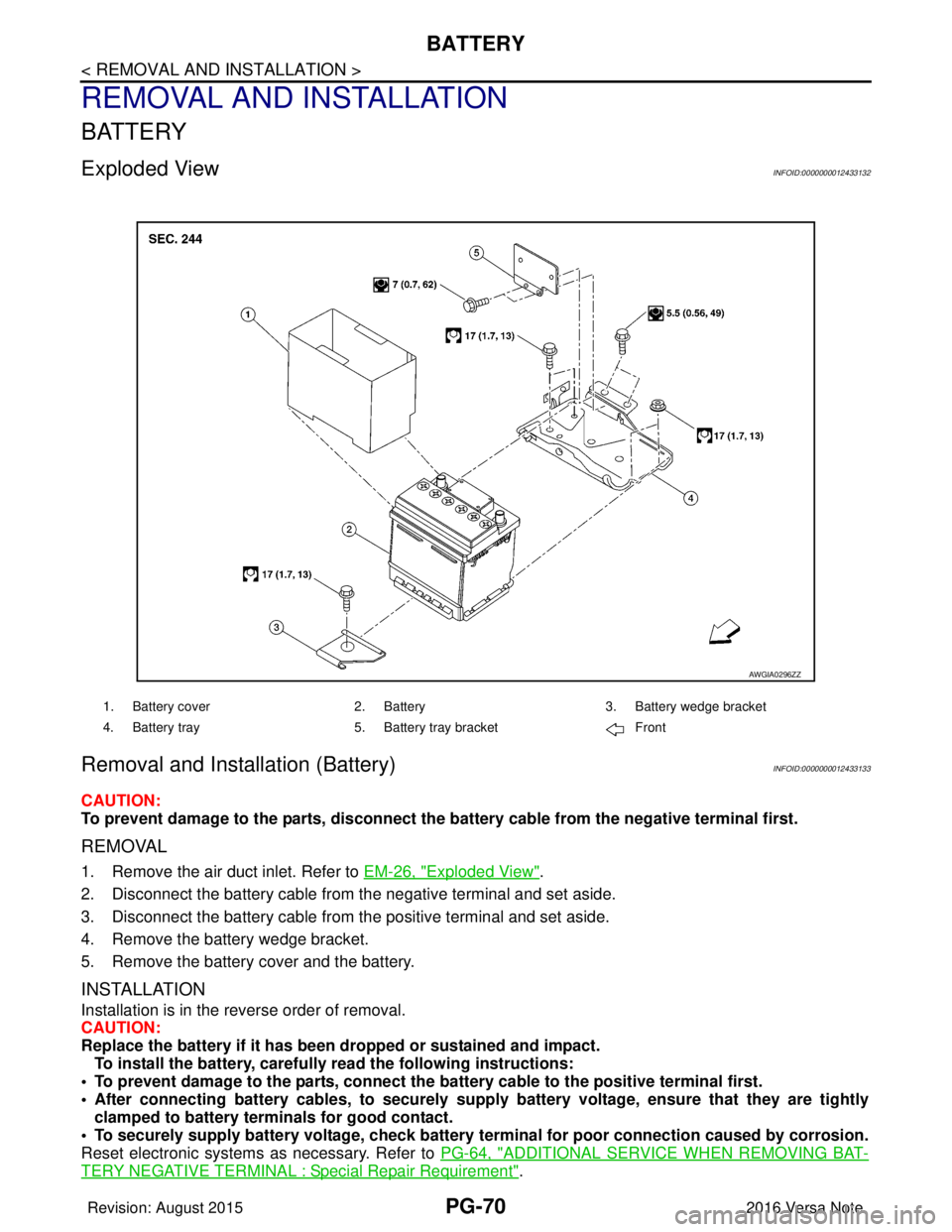
Exploded ViewINFOID:0000000012433132
Removal and Installation (Battery)INFOID:0000000012433133
CAUTION:
To prevent damage to the parts, disconnect the battery cable from the negative terminal first.
REMOVAL
1. Remove the air duct inlet. Refer to EM-26, "Exploded View".
2. Disconnect the battery cable from the negative terminal and set aside.
3. Disconnect the battery cable from the positive terminal and set aside.
4. Remove the battery wedge bracket.
5. Remove the battery cover and the battery.
INSTALLATION
Installation is in the reverse order of removal.
CAUTION:
Replace the battery if it has been dropped or sustained and impact. To install the battery, carefully read the following instructions:
• To prevent damage to the parts, connect the battery cable to the positive terminal first.
• After connecting battery cables, to securely supply battery voltage, ensure that they are tightly
clamped to battery term inals for good contact.
• To securely supply battery voltage, check battery terminal for poor connection caused by corrosion.
Reset electronic systems as necessary. Refer to PG-64, "
ADDITIONAL SERVICE WHEN REMOVING BAT-
TERY NEGATIVE TERMINAL : Special Repair Requirement".
AWGIA0296ZZ
1. Battery cover2. Battery3. Battery wedge bracket
4. Battery tray 5. Battery tray bracket Front
Revision: August 2015 2016 Versa Note
cardiagn.com
Page 2658 of 3641
PG
BATTERYPG-71
< REMOVAL AND INSTALLATION >
C
DE
F
G H
I
J
K L
B A
O P
N
Removal and Installation (Battery Tray)INFOID:0000000012433134
CAUTION:
To prevent damage to the parts, disconnect the battery cable from the negative terminal first.
REMOVAL
1. Remove the battery. Refer to
PG-70, "Removal and Installation (Battery)".
2. Remove the battery tray bracket. Refer to PG-70, "
Exploded View".
3. Remove the IPDM E/R. Refer to PCS-30, "
Removal and Installation".
4. Disconnect the harness from the TCM and remove the TCM bracket. Refer to TM-239, "
Removal and
Installation" (FOR CVT MODEL).
5. Disconnect the harness fr om the battery tray.
6. Remove the nuts and bolts and remove the battery tray. Refer to PG-70, "
Exploded View".
INSTALLATION
Installation is in the reverse order of removal.
CAUTION:
Replace electrical components as necessary, if any have been dropped or sustained and impact.
To install the battery, carefully read the following instructions:
• To prevent damage to the parts, connect the battery cable to the positive terminal first.
• After connecting battery cables, to securely supp ly battery voltage, ensure that they are tightly
clamped to battery terminals for good contact.
• To securely supply battery voltage, check battery terminal for poor connection caused by corrosion.
Reset electronic systems as necessary. Refer to PG-64, "
ADDITIONAL SERVICE WHEN REMOVING BAT-
TERY NEGATIVE TERMINAL : Special Repair Requirement".
Revision: August 2015 2016 Versa Note
cardiagn.com
Page 2659 of 3641
PG-72
< REMOVAL AND INSTALLATION >
BATTERY TERMINAL WITH FUSIBLE LINK
BATTERY TERMINAL WITH FUSIBLE LINK
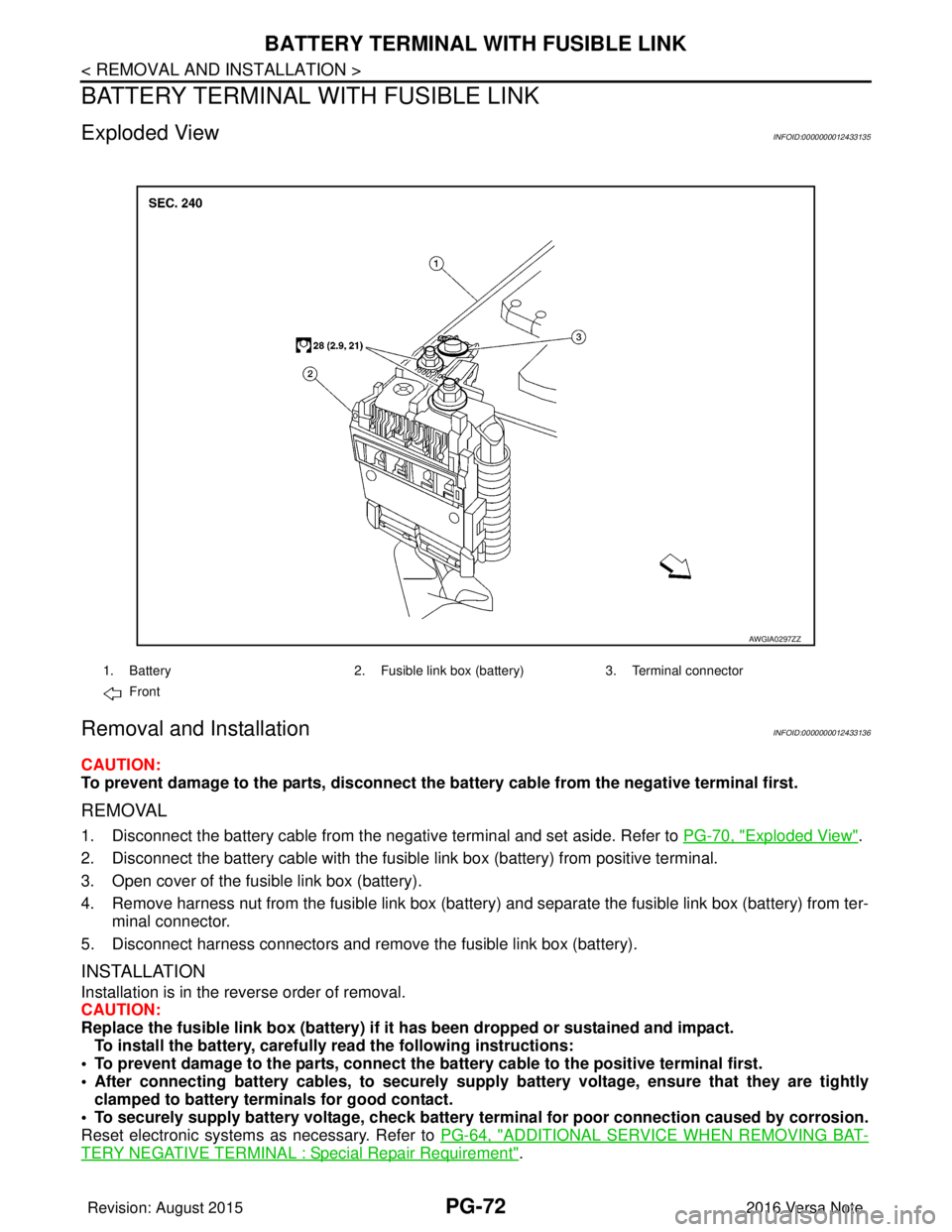
Exploded ViewINFOID:0000000012433135
Removal and InstallationINFOID:0000000012433136
CAUTION:
To prevent damage to the parts, disconnect the battery cable from the negative terminal first.
REMOVAL
1. Disconnect the battery cable from the negative terminal and set aside. Refer to PG-70, "Exploded View".
2. Disconnect the battery cable with the fusibl e link box (battery) from positive terminal.
3. Open cover of the fusible link box (battery).
4. Remove harness nut from the fusible link box (battery ) and separate the fusible link box (battery) from ter-
minal connector.
5. Disconnect harness connectors and remove the fusible link box (battery).
INSTALLATION
Installation is in the reverse order of removal.
CAUTION:
Replace the fusible link box (battery) if it has been dropped or sustained and impact.
To install the battery, carefully read the following instructions:
• To prevent damage to the parts, connect the battery cable to the positive terminal first.
• After connecting battery cables, to securely supply battery voltage, ensure that they are tightly
clamped to battery term inals for good contact.
• To securely supply battery voltage, check battery terminal for poor connection caused by corrosion.
Reset electronic systems as necessary. Refer to PG-64, "
ADDITIONAL SERVICE WHEN REMOVING BAT-
TERY NEGATIVE TERMINAL : Special Repair Requirement".
AWGIA0297ZZ
1. Battery2. Fusible link box (battery) 3. Terminal connector
Front
Revision: August 2015 2016 Versa Note
cardiagn.com
Page 2660 of 3641
PG
BATTERY CURRENT SENSORPG-73
< REMOVAL AND INSTALLATION >
C
DE
F
G H
I
J
K L
B A
O P
N
BATTERY CURRENT SENSOR
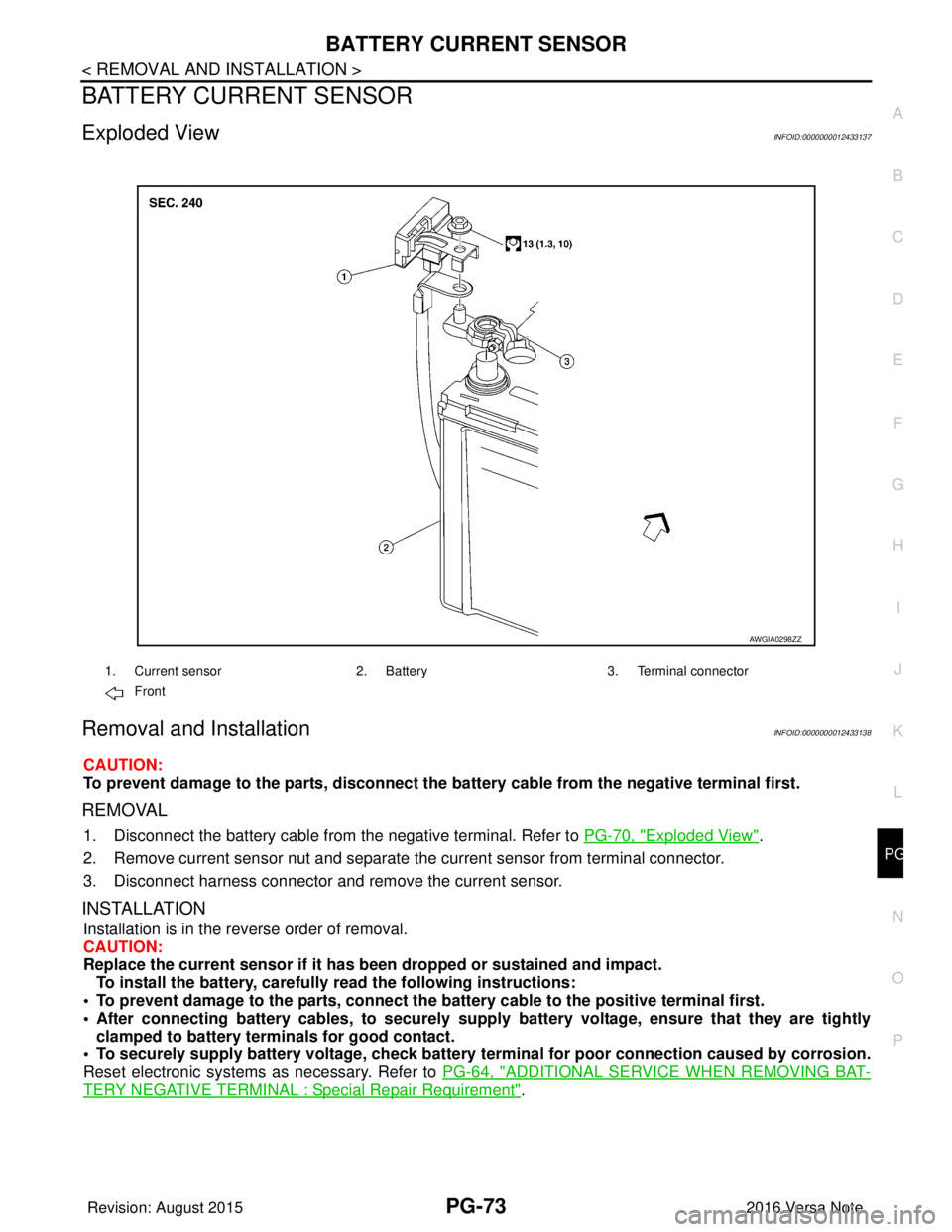
Exploded ViewINFOID:0000000012433137
Removal and InstallationINFOID:0000000012433138
CAUTION:
To prevent damage to the parts, disconnect the battery cable from the negative terminal first.
REMOVAL
1. Disconnect the battery cable from
the negative terminal. Refer to PG-70, "Exploded View".
2. Remove current sensor nut and separate the current sensor from terminal connector.
3. Disconnect harness connector and remove the current sensor.
INSTALLATION
Installation is in the reverse order of removal.
CAUTION:
Replace the current sensor if it has b een dropped or sustained and impact.
To install the battery, carefully read the following instructions:
• To prevent damage to the parts, connect the battery cable to the positive terminal first.
• After connecting battery cables, to securely supp ly battery voltage, ensure that they are tightly
clamped to battery terminals for good contact.
• To securely supply battery voltage, check battery terminal for poor connection caused by corrosion.
Reset electronic systems as necessary. Refer to PG-64, "
ADDITIONAL SERVICE WHEN REMOVING BAT-
TERY NEGATIVE TERMINAL : Special Repair Requirement".
AWGIA0298ZZ
1. Current sensor2. Battery3. Terminal connector
Front
Revision: August 2015 2016 Versa Note
cardiagn.com