reset NISSAN NOTE 2016 Service Service Manual
[x] Cancel search | Manufacturer: NISSAN, Model Year: 2016, Model line: NOTE, Model: NISSAN NOTE 2016Pages: 3641, PDF Size: 28.72 MB
Page 2835 of 3641
SE-22
< REMOVAL AND INSTALLATION >
FRONT SEAT
PASSENGER SIDE : Remo val and Installation
INFOID:0000000012432038
WARNING:
• Do not leave any objects (screwdriver s, tools, etc.) on the seat during repair. It can lead to personal
injury if the side air bag module should accidentally deploy.
• Always work from the side or back of th e seatback, do not work in front of seat.
• Do not use air tools or electric tools for servicing the seat assembly.
• Do not drop, tilt, or bump the si de air bag module while installing the seat. Always handle it with
care.
• After the side air bag module inflates, the front seat frame must be replaced.
• Before removing the front seat, tu rn the ignition switch OFF, disconnect both battery cables then
wait at least three minutes.
CAUTION:
When removing and inst alling the seat, use shop cloths to protect components from damage.
REMOVAL
1. Disconnect negative and positive battery terminals, then wait at least three minutes. Refer to PG-70,
"Removal and Installation (Battery)".
2. Slide the seat to the full forward position.
3. Remove the seat rear bolts.
4. Slide the seat to the full rearward position.
5. Remove the seat front bolts.
6. Tilt the seat rearward and disconnect the harness connectors from the seat and remove.
INSTALLATION
Installation is in the reverse order of removal.
WARNING:
• Perform additional services when installing front passenger seat. Refer to SRC-39, "
ZERO POINT
RESET : Description".
• Zero point reset must be performed every time th e front passenger seat is removed from the vehicle.
• Zero point reset is done after the front passenger seat is installed in vehicle and all bolts are tight-
ened to specification.
CAUTION:
Make sure that the seat harness or the floor trim is not damaged during installation.
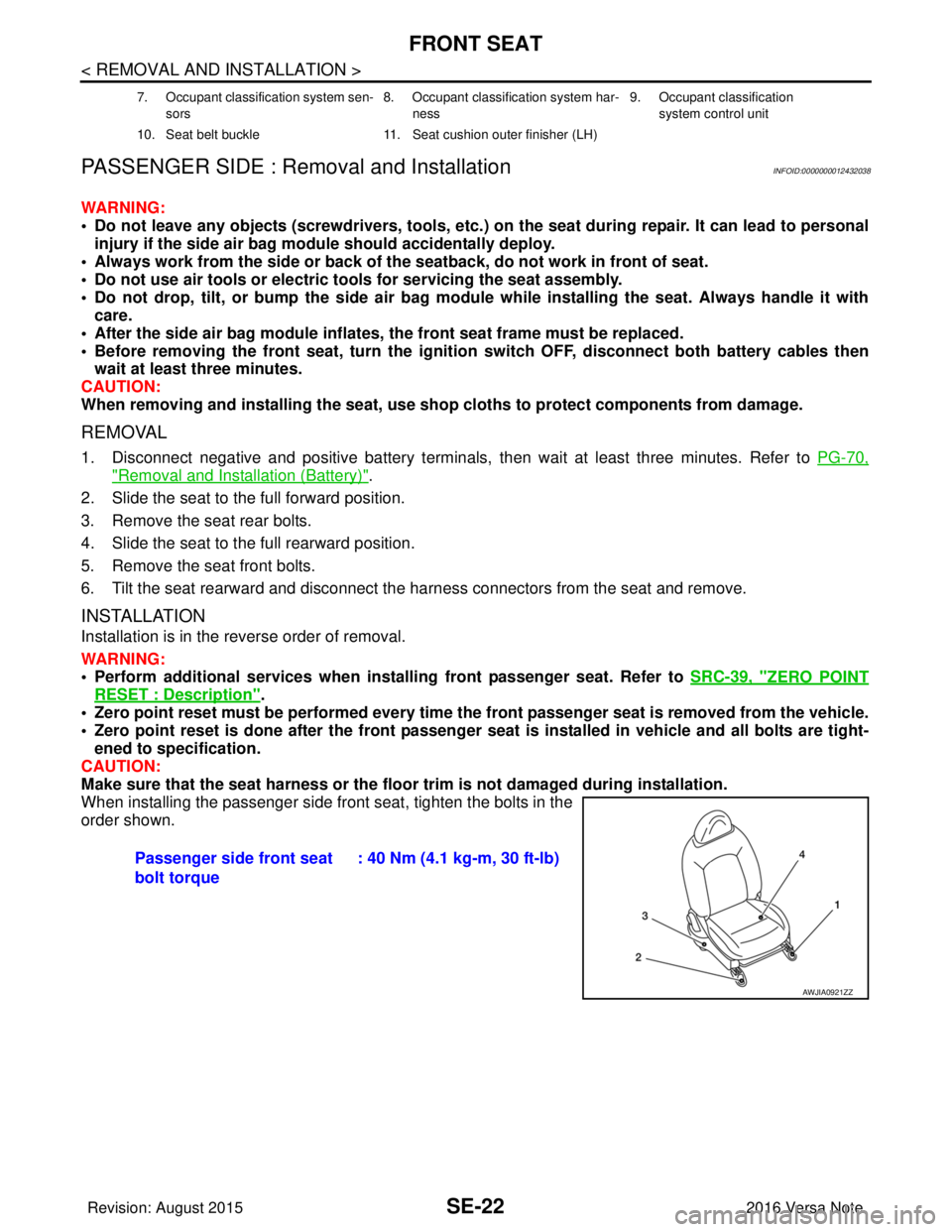
When installing the passenger side front seat, tighten the bolts in the
order shown.
7. Occupant classification system sen-
sors 8. Occupant classification system har-
ness 9. Occupant classification
system control unit
10. Seat belt buckle 11. Seat cushion outer finisher (LH)
Passenger side front seat
bolt torque: 40 Nm (4.1 kg-m, 30 ft-lb)
AWJIA0921ZZ
Revision: August 2015
2016 Versa Note
cardiagn.com
Page 2876 of 3641
![NISSAN NOTE 2016 Service Service Manual DIAGNOSIS SYSTEM (BCM)SEC-19
< SYSTEM DESCRIPTION > [WITH INTELLIGENT KEY SYSTEM]
C
D
E
F
G H
I
J
L
M A
B
SEC
N
O P
INTELLIGENT KEY
INTELLIGENT KEY : CONSULT Func tion (BCM - INTELLIGENT KEY)INFOID:00](/img/5/57363/w960_57363-2875.png "NISSAN NOTE 2016 Service Service Manual DIAGNOSIS SYSTEM (BCM)SEC-19
< SYSTEM DESCRIPTION > [WITH INTELLIGENT KEY SYSTEM]
C
D
E
F
G H
I
J
L
M A
B
SEC
N
O P
INTELLIGENT KEY
INTELLIGENT KEY : CONSULT Func tion (BCM - INTELLIGENT KEY)INFOID:00")
DIAGNOSIS SYSTEM (BCM)SEC-19
< SYSTEM DESCRIPTION > [WITH INTELLIGENT KEY SYSTEM]
C
D
E
F
G H
I
J
L
M A
B
SEC
N
O P
INTELLIGENT KEY
INTELLIGENT KEY : CONSULT Func tion (BCM - INTELLIGENT KEY)INFOID:0000000012542526
SELF DIAGNOSTIC RESULT
Refer to BCS-50, "DTCIndex".
DATA MONITOR
ACTIVE TEST
Monitor Item [Unit] Main Description
REQ SW -DR [On/Off] ×Indicates condition of door request switch LH.
REQ SW -AS [On/Off] ×Indicates condition of door request switch RH.
REQ SW -BD/TR [On/Off] ×Indicates condition of back door request switch.
PUSH SW [On/Off] Indicates condition of push-button ignition switch.
CLUCH SW [On/Off] ×Indicates condition of clutch interlock switch.
BRAKE SW 1 [On/Off] ×Indicates condition of brake switch.
BRAKE SW 2 [On/Off] Indicates condition of brake switch.
DETE/CANCL SW [On/Off] ×Indicates condition of P (park) position.
SFT PN/N SW [On/Off] ×Indicates condition of P (park) or N (neutral) position.
UNLK SEN -DR [On/Off] ×Indicates condition of door unlock sensor.
PUSH SW -IPDM [On/Off] Indicates condition of push-button ignition switch received from IPDM E/R on
CAN communication line.
IGN RLY1 -F/B [On/Off] Indicates condition of ignition relay 1 received from IPDM E/R on CAN commu-
nication line.
DETE SW -IPDM [On/Off] Indicates condition of detent switch received from TCM on CAN communication
line.
SFT PN -IPDM [On/Off] Indicates condition of P (park) or N (neutral) position from TCM on CAN com-
munication line.
SFT P -MET [On/Off] Indicates condition of P (park) position from TCM on CAN communication line.
SFT N -MET [On/Off] Indicates condition of N (neutral) position from IPDM E/R on CAN communica-
tion line.
ENGINE STATE [Stop/Start/Crank/Run] ×Indicates condition of engine state from ECM on CAN communication line.
VEH SPEED 1 [mph/km/h] ×Indicates condition of vehicle speed si
gnal received from ABS on CAN commu-
nication line.
VEH SPEED 2 [mph/km/h] ×Indicates condition of vehicle speed signal received from combination meter on
CAN communication line.
DOOR STAT -DR [LOCK/READY/UNLK] ×Indicates condition of driver side door status.
DOOR STAT -AS [LOCK/READY/UNLK] ×Indicates condition of passenger side door status.
ID OK FLAG [Set/Reset] Indicates condition of Intelligent Key ID.
PRMT ENG STRT [Set/Reset] Indicates condition of engine start possibility.
RKE OPE COUN1 [0-19] ×When remote keyless entry receiver receives the signal transmitted while oper-
ating on Intelligent Key, the numerical value start changing.
RKE OPE COUN2 [0-19] ×When remote keyless entry receiver receives the signal transmitted while oper-
ating on Intelligent Key, the numerical value start changing.
RKE-LOCK [On/Off] Indicates condition of lock signal from Intelligent Key.
RKE-UNLOCK [On/Off] Indicates condition of unlock signal from Intelligent Key.
RKE-PANIC [On/Off] Indicates condition of panic signal from Intelligent Key.
RKE-MODE CHG [On/Off] Indicates condition of mode change signal from Intelligent Key.
Revision: August 2015 2016 Versa Note
cardiagn.com
Page 3018 of 3641

SRC-1
RESTRAINTS
C
DE
F
G
I
J
K L
M
SECTION SRC
A
B
SRC
N
O P
CONTENTS
SRS AIRBAG CONTROL SYSTEM
PRECAUTION ....... ........................................4
PRECAUTIONS .............................................. .....4
Precaution for Supplemental Restraint System
(SRS) "AIR BAG" and "SEAT BELT PRE-TEN-
SIONER" ............................................................. ......
4
Service ......................................................................4
SYSTEM DESCRIPTION ..............................5
COMPONENT PARTS ................................... .....5
Component Parts Location .................................. ......5
Driver Air Bag Module ...............................................6
Front Passenger Air Bag Module ..............................6
Front Side Air Bag Module .................................. ......7
Side Curtain Air Bag Module .....................................7
Front Seat Belt Pre-tensioner ....................................7
Air Bag Diagnosis Sensor Unit ..................................7
Crash Zone Sensor ...................................................8
Front Side Air Bag Satellite Sensor ...........................8
Rear Side Air Bag Satellite Sensor ...........................8
Front Door Satellite Sensor .......................................8
SRS Component Connectors ....................................8
SYSTEM .............................................................10
SRS AIR BAG SYSTEM ............................................10
SRS AIR BAG SYSTEM : System Description ... ....10
OCCUPANT CLASSIFICATION SYSTEM ............ ....10
OCCUPANT CLASSIFICATION SYSTEM : Sys-
tem Description .......................................................
11
SEAT BELT WARNING LAMP SYSTEM .............. ....12
SEAT BELT WARNING LAMP SYSTEM : System
Description ..............................................................
12
DIAGNOSIS SYSTEM (AIR BAG) .....................14
Description .......................................................... ....14
On Board Diagnosis Function .................................14
Trouble Diagnosis with CONSULT ..........................16
CONSULT Function (AIR BAG) ..............................16
ECU DIAGNOSIS INFORMATION ..............17
DIAGNOSIS SENSOR UNIT .............................17
DTC Index ........................................................... ....17
Flash Code Index ....................................................21
WIRING DIAGRAM ......................................25
SRS AIR BAG SYSTEM ...................................25
Wiring Diagram .................................................... ....25
BASIC INSPECTION ...................................36
DIAGNOSIS AND REPAIR WORK FLOW .......36
Work Flow ............................................................ ....36
INSPECTION AND ADJUSTMENT ..................39
ADDITIONAL SERVICE WHEN REPLACING
CONTROL UNIT .................................................... ....
39
ADDITIONAL SERVICE WHEN REPLACING
CONTROL UNIT : Description .................................
39
ADDITIONAL SERVICE WHEN REPLACING
CONTROL UNIT : Special Repair Requirement ......
39
ZERO POINT RESET ............................................. ....39
ZERO POINT RESET : Description .........................39
ZERO POINT RESET : Special Repair Require-
ment .........................................................................
39
INTERMITTENT INCIDENT ..............................41
Inspection Procedure ..............................................41
DTC/CIRCUIT DIAGNOSIS .........................42
B0001, B0002 DRIVER AIRBAG MODULE .....42
DTC Logic ............................................................ ....42
Diagnosis Procedure ...............................................43
B0010, B0011 PASSENGER AIRBAG MOD-
ULE ....................................................................
45
DTC Logic ................................................................45
Diagnosis Procedure ...............................................45
Revision: August 2015 2016 Versa Note
cardiagn.com
Page 3028 of 3641
SYSTEMSRC-11
< SYSTEM DESCRIPTION >
C
DE
F
G
I
J
K L
M A
B
SRC
N
O P
OCCUPANT CLASSIFICATION SYSTEM : System DescriptionINFOID:0000000012430602
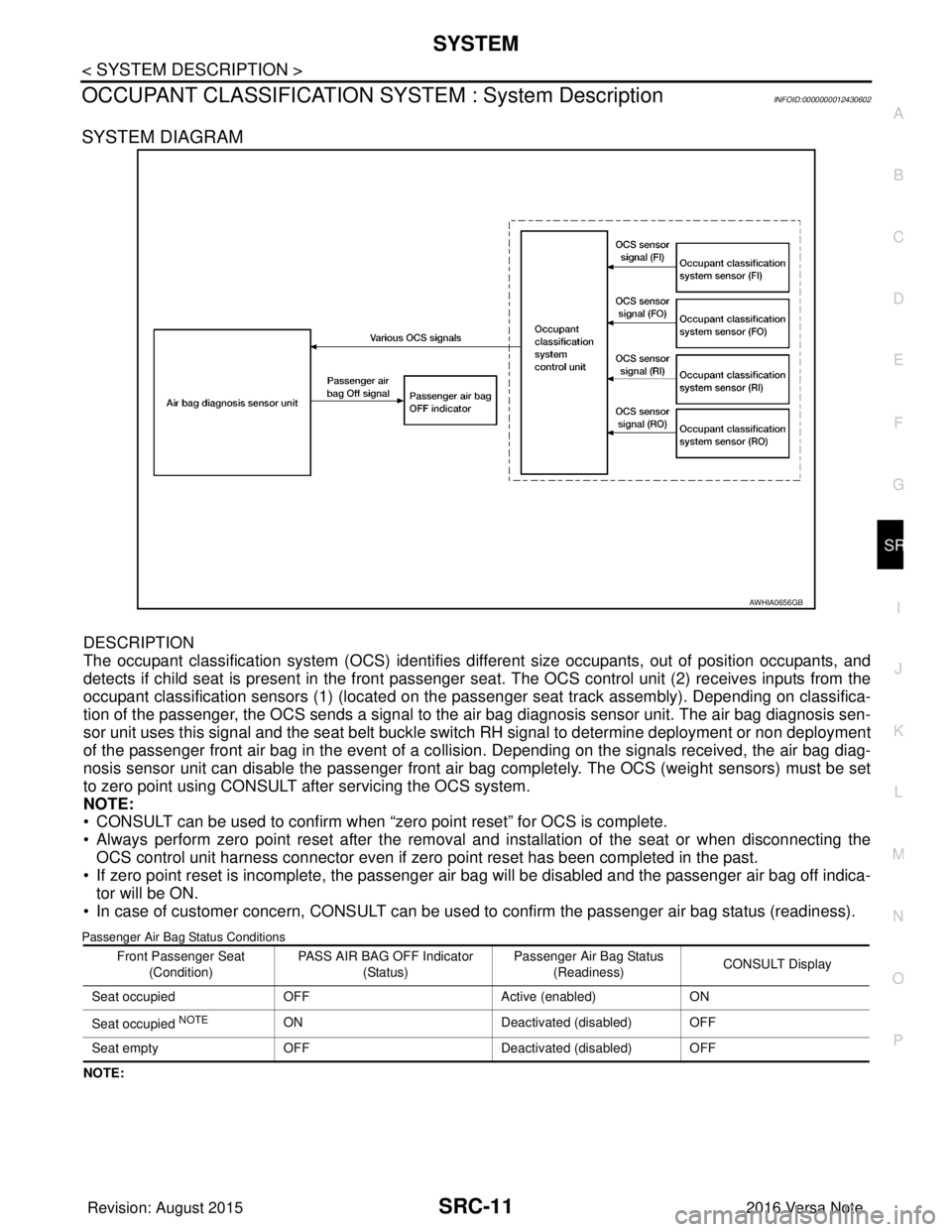
SYSTEM DIAGRAM
DESCRIPTION
The occupant classification system (OCS) identifies diff erent size occupants, out of position occupants, and
detects if child seat is present in the front passenger seat. The OCS control unit (2) receives inputs from the
occupant classification sensors (1) (located on the pa ssenger seat track assembly). Depending on classifica-
tion of the passenger, the OCS sends a signal to the air bag diagnosis sensor unit. The air bag diagnosis sen-
sor unit uses this signal and the seat belt buckle swit ch RH signal to determine deployment or non deployment
of the passenger front air bag in the event of a co llision. Depending on the signals received, the air bag diag-
nosis sensor unit can disable the passenger front air bag completely. The OCS (weight sensors) must be set
to zero point using CONSULT after servicing the OCS system.
NOTE:
• CONSULT can be used to confirm when “zero point reset” for OCS is complete.
• Always perform zero point reset after the removal and installation of the seat or when disconnecting the OCS control unit harness connector even if zero point reset has been completed in the past.
• If zero point reset is incomplete, the passenger air bag will be disabled and the passenger air bag off indica-
tor will be ON.
• In case of customer concern, CONSULT can be us ed to confirm the passenger air bag status (readiness).
Passenger Air Bag Status Conditions
NOTE:
AWHIA0656GB
Front Passenger Seat
(Condition) PASS AIR BAG OFF Indicator
(Status) Passenger Air Bag Status
(Readiness) CONSULT Display
Seat occupied OFF Active (enabled)ON
Seat occupied
NOTEON Deactivated (disabled) OFF
Seat empty OFF Deactivated (disabled) OFF
Revision: August 2015 2016 Versa Note
cardiagn.com
Page 3033 of 3641
SRC-16
< SYSTEM DESCRIPTION >
DIAGNOSIS SYSTEM (AIR BAG)
Trouble Diagnosis with CONSULT
INFOID:0000000012430606
1. Connect CONSULT.
2. DTC is displayed on SELF-DIAG RESULTS.
NOTE:
If a malfunction is not detected on “SELF-DIAG RESULTS [CURRENT]”, but a malfunction is detected during
SRS Operation Check, the following cases may exist:
• “SELF-DIAG [PAST]” memory might not be erased. Refer to SRC-14, "
On Board Diagnosis Function".
• SRS system malfunctions intermittently. Refer to SRC-41, "
InspectionProcedure".
DIAGNOSIS MODE
1. Connect CONSULT.
2. Confirm that zero point reset of OCS is complete.
3. If no DTCs are detected on “SELF-DIAG RESULTS [CURRE NT]”, repair of SRS is completed. Go to step
4.
If any DTCs are detected on “SELF-DIAG RESULT S [CURRENT]”, the malfunction has not been repaired
completely or another malfunction is being detected. Perform SRS Operation Check again. Refer to SRC-
14, "On Board Diagnosis Function".
4. Touch “ERASE”. NOTE:
Touching “ERASE” will clear the SRS memory of the malfunction (“SELF-DIAG [PAST]”). If “SELF-
DIAG [PAST]” is not erased, User Mode may sh ow the previous system malfunction even if the
malfunction has been repaired completely.
5. Check that no malfunction is det ected in “SELF-DIAG [PAST]”.
6. Exit Diagnosis Mode and disconnect the CONSULT.
7. Perform SRS Operation Check. Refer to SRC-14, "
On Board Diagnosis Function".
SRS HISTORY CHECK
1. Check repair history of the SRS. If no repairs have been made, perform SRC-14, "On Board Diagnosis
Function". If repairs have been made, GO TO step 2.
2. Erase ”SELF-DIAG [PAST]” after repair. Refer to SRC-14, "
On Board Diagnosis Function".
CONSULT Function (AIR BAG)INFOID:0000000012430607
CONSULT can display each diagnostic item using the diagnostic test modes shown following.
Diagnostic Test ModeDiagnostic Item Description
Self Diagnostic Result SEL F-DIAG RESULT [CURRENT]A current Self-diagnosis result (also indicated by the number of
warning lamp flashes in the Diagnosis mode) is displayed on the
CONSULT screen in real time. This refers to a malfunctioning part
requiring repairs.
Data Monitor DATA MONITOR Displays air bag diagnosis sensor unit input/output data in real time.
ECU Identification ECU DISCRIMINATED NO. Air bag diagnosis sensor unit ECU discriminated number (identifica-
tion number) or part number is displayed. Air bag diagnosis sensor
unit has individual ECU discriminated number (identification num-
ber) or part number based on model and equipment.
Trouble Diagnostic Record TR OUBLE DIAG RECORD [PAST] With TROUBLE DIAG RECORD, diagnosis results previously
erased by a reset operation can be displayed on the CONSULT
screen.
Revision: August 2015
2016 Versa Note
cardiagn.com
Page 3038 of 3641

DIAGNOSIS SENSOR UNITSRC-21
< ECU DIAGNOSIS INFORMATION >
C
DE
F
G
I
J
K L
M A
B
SRC
N
O P
Flash Code IndexINFOID:0000000012430609
WARNING LAMP FLASH CODE CHART
OCCUPANT DETECTION SENSOR UNIT [UNIT FAIL]
B00A0The OCS control unit is malfunctioning. Refer to
SRC-84, "Diag-
nosis Procedure".
OCCUPANT DETECTION SENSOR UNIT [NO DATA]
OCCUPANT DETECTION SENSOR UNIT [UNDEFINED]
OCCUPANT DETECTION SENSOR UNIT [RESET FAIL]
OCCUPANT DETECTION SENSOR UNIT [COMM FAIL] Communication between the OCS control
unit and the air bag diagnosis sensor unit is
interrupted.
OCCUPANT DETECTION SENSOR [UNIT FAIL] The OCS sensor is malfunctioning.
OCCUPANT DETECTION SENSOR [POWER FAIL] The OCS sensor circuit is malfunctioning.
CONTROL UNIT [UNIT FAIL] B14XX
Air bag diagnosis sensor unit is malfunction-
ing. Refer to SRC-86, "
Diag-
nosis Procedure".
PASS A/B INDCTR CKT [UNIT MALFUNC]
B00D2Malfunction in front passenger air bag ON
indicator circuit.
Refer to SRC-88, "
Diag-
nosis Procedure".
PASS A/B INDCTR CKT [GND-SHORT] Front passenger air bag ON indicator circuit
is shorted to ground.
PASS A/B INDCTR CKT [VB-SHORT] Front passenger air bag ON indicator circuit
is shorted to power supply circuit.
PASS A/B INDCTR CKT [OPEN] Front passenger air bag ON indicator circuit
is open.
PASS A/B INDCTR CKT [PWE-SHORT/OPEN] Front passenger air bag ON indicator circuit
is open or shorted to power supply circuit.
PASSENGER AIRBAG INDICATOR CIRCUIT [FAIL]
B00D5Front passenger air bag OFF indicator is
malfunctioning.
Refer to SRC-90, "
Diag-
nosis Procedure".
PASSENGER AIRBAG INDICATOR CIRCUIT [OPEN] Front passenger air bag OFF indicator cir-
cuit is open.
PASSENGER AIRBAG INDICATOR CIRCUIT [VB-SHORT] Front passenger air bag OFF indicator is
shorted to a power supply circuit.
PASSENGER AIRBAG INDICATOR CIRCUIT [GND-SHORT] Front passenger air bag OFF indicator is
shorted to ground.
IGN VOLTAGE [LOW] B142AIgnition voltage to the air bag diagnosis sen-
sor unit is low.
Refer to SRC-92, "
Diag-
nosis Procedure".
IGN VOLTAGE [HIGH] Ignition voltage to the air bag diagnosis sen-
sor unit is high.
CAN COMMUNICATION FAILURE U1000 CAN system communication failure. Refer to
SRC-94, "
Diag-
nosis Procedure".
CAN COMMUNICATION FAILURE [CONTROL UNIT] U1010
CAN system (control unit) failure.
Refer to SRC-95, "
Diag-
nosis Procedure".
FRONTAL COLLISION DETECTION B1421 Frontal collision detected. Driver and/or
front passenger air bag modules are de-
ployed.Refer to SR-5, "
For
Frontal Collision".
SIDE COLLISION DETECTION B1422Side collision detected. Curtain air bag mod-
ule and seat belt pre-tensioner are de-
ployed. Refer to SR-7, "
For Side
and Rollover Collision".
CONSULT name
DTCDTC detecting condition Repair order
Revision: August 2015 2016 Versa Note
cardiagn.com
Page 3056 of 3641

INSPECTION AND ADJUSTMENTSRC-39
< BASIC INSPECTION >
C
DE
F
G
I
J
K L
M A
B
SRC
N
O P
INSPECTION AND ADJUSTMENT
ADDITIONAL SERVICE WHEN REPLACING CONTROL UNIT
ADDITIONAL SERVICE WHEN REPL ACING CONTROL UNIT : Description
INFOID:0000000012430612
Always perform zero point reset using CONSULT when removing and installing the passenger seat or servic-
ing the occupant classification system. If zero point reset is not performed the OCS may not operate normally,
which may increase the risk of serious injury in a collision.
ADDITIONAL SERVICE WHEN REPLACING CONTROL UNIT : Special Repair Re-
quirement
INFOID:0000000012430613
WORK PROCEDURE WHEN REPLACING CONTROL UNIT
1.PERFORM ZERO POINT RESET
Perform zero point reset. Refer to SRC-39, "
ZERO POINT RESET : Special Repair Requirement".
Is zero point reset performed normally?
YES >> INSPECTION END
NO >> Check condition as per the following, and perform zero point reset again. • Passenger seat is occupied by an object.
• Excessive vibration is applied while performing zero point reset.
• Occupant detection system is malfunctioning.NOTE:
If “Incomplete” is displayed on “zero point reset cu rrent status”, zero point reset is not completed
normally. Check the condition as per the following and perform zero point reset again.
• Passenger seat is occupied by an object.
• Excessive vibration is applied while performing zero point reset.
• Occupant detection system is malfunctioning.
ZERO POINT RESET
ZERO POINT RESET : DescriptionINFOID:0000000012430614
Zero point reset is an initializing procedure for occupant detection sensor that must be performed when replac-
ing or removing and installing passenger seat.
If zero point reset is not performed, the initializati on is incomplete and Occupant Detection System does not
operate normally.
NOTE:
• When zero point reset is performed once after removal and installation of passenger seat, CONSULT dis- plays “complete”.
• When reinstalling passenger seat after removal, the initial value for occupant detection sensor changes, and
Occupant Detection System does not operate normally.
• Always perform zero point reset after performing the work as per the following.
- Reinstallation of passenger seat
- Installation of passenger seat that is zero point reset complete
- Installation of passenger seat that is zero point reset in complete
ZERO POINT RESET : Special Repair RequirementINFOID:0000000012430615
1.PERFORM ZERO POINT RESET
1. Perform zero point reset. NOTE:
When performing zero point reset, be careful of the items described as per the following.
• Perform zero point reset after installing passenger seat to the vehicle
• Do not put any objects on passenger seat
• Do not apply excessive vibration to the vehicle
• Do not touch the vehicle
• Do not tilt the vehicle
Revision: August 2015 2016 Versa Note
cardiagn.com
Page 3057 of 3641

SRC-40
< BASIC INSPECTION >
INSPECTION AND ADJUSTMENT
2. Select start on “Zero point reset function” screen from, WORK SUPPORT of CONSULT “OCCUPANT
DETECTION”.
3. “Zero point reset” starts.
>> GO TO 2.
2.CONFIRMATION OF SETTING
1. Proceed to “Zero point reset function” screen from work support of CONSULT “OCCUPANT DETEC-
TION”.
2. Check that “Complete” or “Incomplete” is displayed on “Zero point reset status”.
CAUTION:
• “Complete” is displayed on “zero point reset current status” if the seat is reinstalled by seat removal
and installation, or “zero point reset” is already performed.
• “Zero point reset current status” displays “Incompl ete” if a new seat is installed. When turning key
switch ON without performing zero point reset , front passenger air bag OFF indicator turns ON.
When zero point reset is performed, front passenger air bag OFF indicator turns OFF.
• Air bag warning lamp blinks in user mode only.
• Air bag sensor unit does not record whethe r or not zero point reset is performed.
Is condition
“ALREADY PERFORMED”?
YES >> Print out “ZERO POINT RESET CURRENT STATUS” screen, and inspection end.
NO >> Check condition as per the following, and perform zero point reset again. • Passenger seat is occupied by an object.
• Excessive vibration is applied while performing zero point reset.
• Occupant detection system is malfunctioning.NOTE:
If “Incomplete” is displayed on “zero point reset cu rrent status”, zero point reset is not completed
normally. Check the condition as per the following and perform zero point reset again.
• Passenger seat is occupied by an object.
• Excessive vibration is applied while performing zero point reset.
• Occupant detection system is malfunctioning.
Revision: August 2015 2016 Versa Note
cardiagn.com
Page 3100 of 3641
B00A0 OCS SYSTEMSRC-83
< DTC/CIRCUIT DIAGNOSIS >
C
DE
F
G
I
J
K L
M A
B
SRC
N
O P
B00A0 OCS SYSTEM
DescriptionINFOID:0000000012430661
DTC B00A0 OCCUPANT CLASSIFICATION SYSTEM (OCS)
The OCS control unit is wired to the air bag diagnosis s ensor unit. The air bag diagnosis sensor unit will mon-
itor the OCS for failures and interruptions in co mmunication between the OCS control unit and the air bag
diagnosis sensor unit.
PA R T L O C AT I O N
Refer to SRC-5, "Component Parts Location".
DTC LogicINFOID:0000000012430662
DTC DETECTION LOGIC
With CONSULT
DTC CONFIRMATION PROCEDURE (With CONSULT)
1.CHECK SELF-DIAG RESULT
1. Turn ignition switch ON.
2. Check for DTC using CONSULT.
Is the DTC detected?
YES (Current DTC)>>Refer to SRC-84, "Diagnosis Procedure".
YES (Past DTC)>>GO TO 2.
NO >> Inspection End.
2.ERASE SELF-DIAG RESULT
Erase the DTC using CONSULT.
Can the DTC be erased?
YES >> Inspection End.
NO >> Refer to SRC-84, "
Diagnosis Procedure".
DTC CONFIRMATION PROCEDURE (Without CONSULT)
1.CHECK SELF-DIAG RESULT
1. Turn ignition switch ON.
2. Check the air bag warning lamp status. Refer to SRC-14, "
On Board Diagnosis Function".
NOTE:
CONSULT name DTC DTC detecting condition Repair order
OCCUPANT DETECTION SENSOR UNIT [UNIT FAIL]
B00A0The OCS control unit is malfunction-
ing.
Refer to SRC-84, "
Diagnosis Proce-
dure".
OCCUPANT DETECTION SENSOR UNIT [NO DATA]
OCCUPANT DETECTION SENSOR UNIT [UNDEFINED]
OCCUPANT DETECTION SENSOR UNIT [RESET FAIL]
OCCUPANT DETECTION SENSOR [UNIT FAIL] The OCS sensor is malfunctioning.
OCCUPANT DETECTION SENSOR [POWER FAIL] The OCS sensor circuit is malfunc-
tioning.
OCCUPANT DETECTION SENSOR UNIT [COMM FAIL] Communication between the OCS
control unit and the air bag diagnosis
sensor unit is interrupted.
Revision: August 2015
2016 Versa Note
cardiagn.com
Page 3122 of 3641

SR-6
< BASIC INSPECTION >
COLLISION DIAGNOSIS
FOR FRONTAL COLLISION: When SRS is not activated in a collision
CAUTION:
Due to varying models and option levels, not all parts listed in the chart below apply to all vehicles.
WORK PROCEDURE
1. Before performing any of the following steps, ensure that all vehicle body and structural repairs have been
completed.
2. Check the SRS components using the table below: Replace any SRS components showing visible signs of damage. (dents, cracks and deformation, etc.)
3. Perform self-diagnosis using CONSULT or air bag warning lamp. Refer to SRC-14, "
Description" for
details.
Ensure entire SRS operates properly.
4. After the work is completed, perform self-diagnosis to check that no malfunction is detected. Refer to
SRC-14, "
Description".
SRS INSPECTION (FOR FRONTAL COLLISION)
Occupant classification system
(Passenger seat) 1. Remove passenger seat assembly.
2. Check control unit case for dents, cracks of deformities.
3. Check connectors for damage and terminals for deformities.
4. Check seat frame and cushion pan for dents or deformities.
5. If no damage is found, reinstall seat with new fasteners.
6. If damaged — REPLACE seat cushion assembly with new fasteners.
7. Perform zero point reset function after front passenger seat is installed in the vehicle and all
bolts are tightened to specification. Refer to SRC-39, "
ZERO POINT RESET : Special Repair
Requirement".
Harness and connectors 1. Check connectors for poor connection, damage, and terminals for deformities. 2. Check harness for binding, chafing, cuts, or deformities.
3. If no damage is found, reinstall the harness and connectors.
4. If damaged — REPLACE the damaged harness. Do not attempt to repair, splice or modify any SRS harness.
Instrument panel assembly If the passenger front air bag has deployed: REPLACE the instrument panel assembly. (integrated type)
Part
Inspection
Part Inspection
Driver air bag module If the driver air bag has NOT been activated:
1. Remove driver air bag module. Check harness cover and connectors for damage, terminals for deformities, and harness for binding.
2. Install driver air bag module into the steering wheel to check fit and alignment with the wheel.
3. If no damage is found, reinstall with new fasteners.
4. If damaged — REPLACE. Install driver air bag modules with new fasteners.
Front passenger air bag module
(if equipped) If the front passenger air bag has NOT been activated:
1. Remove front passenger air bag module. Check harness cover and connectors for damage,
terminals for deformities, and harness for binding.
2. Install front passenger air bag module into the instrument panel to check fit with the instrument panel.
3. If no damage is found, reinstall with new fasteners.
4. If damaged — REPLACE. Install front passenger air bag modules with new fasteners.
Crash zone sensor If the front air bags or seat belt pre-tensioners have NOT been activated:
1. Remove the crash zone sensor. Check harness connectors for damage, terminals for defor-
mities, and harness for binding.
2. Check for visible signs of damage (dents, cracks, deformation) of the crash zone sensor and bracket.
3. Install the crash zone sensor to check fit.
4. If no damage is found, reinstall with new fasteners.
5. If damaged — REPLACE the crash zone sensor and bracket with new fasteners.
Revision: August 2015 2016 Versa Note
cardiagn.com