lock NISSAN NOTE 2016 Service Repair Manual
[x] Cancel search | Manufacturer: NISSAN, Model Year: 2016, Model line: NOTE, Model: NISSAN NOTE 2016Pages: 3641, PDF Size: 28.72 MB
Page 2077 of 3641
SQUEAK AND RATTLE TROUBLE DIAGNOSESIP-9
< SYMPTOM DIAGNOSIS >
C
DE
F
G H
I
K L
M A
B
IP
N
O P
If possible, drive the vehicle with the customer until the noise is duplicated. Note any additional information on
the Diagnostic Worksheet regarding the conditions or lo cation of the noise. This information can be used to
duplicate the same conditions when you confirm the repair.
If the noise can be duplicated easily during the test drive, to help identify the source of the noise, try to dupli-
cate the noise with the vehicle stopped by doing one or all of the following:
1) Close a door.
2) Tap or push/pull around the area where the noise appears to be coming from.
3) Rev the engine.
4) Use a floor jack to recreate vehicle “twist”.
5) At idle, apply engine load (electrical load, half-clutch on M/T model, drive position on CVT and A/T models).
6) Raise the vehicle on a hoist and hit a tire with a rubber hammer.
• Drive the vehicle and attempt to duplicate the conditions the customer states exist when the noise occurs.
• If it is difficult to duplicate the noise, drive the vehicle slowly on an undulating or rough road to stress the
vehicle body.
CHECK RELATED SERVICE BULLETINS
After verifying the customer concern or symptom, check ASIST for Technical Service Bulletins (TSBs) related
to that concern or symptom.
If a TSB relates to the symptom, follow the procedure to repair the noise.
LOCATE THE NOISE AND IDENTIFY THE ROOT CAUSE
1. Narrow down the noise to a general area. To help pinpoint the source of the noise, use a listening tool (Chassis Ear: J-39570, Engine Ear: J-39565 and mechanic's stethoscope).
2. Narrow down the noise to a more specific area and identify the cause of the noise by: • removing the components in the area that you suspect the noise is coming from.Do not use too much force when removing clips and fasteners, otherwise clips and fasteners can be
broken or lost during the repair, resulting in the creation of new noise.
• tapping or pushing/pulling the component that you suspect is causing the noise.
Do not tap or push/pull the component with excessive force, otherwise the noise will be eliminated only
temporarily.
• feeling for a vibration with your hand by touching the component(s) that you suspect is (are) causing the
noise.
• placing a piece of paper between components that you suspect are causing the noise.
• looking for loose components and contact marks. Refer to IP-9, "
Generic Squeak and Rattle Troubleshooting".
REPAIR THE CAUSE
• If the cause is a loose component, tighten the component securely.
• If the cause is insufficient clearance between components:
- separate components by repositioning or loos ening and retightening the component, if possible.
- insulate components with a suitable insulator such as urethane pads, foam blocks, felt cloth tape or urethane tape. A NISSAN Squeak and Rattle Kit (J-50397) is available through your authorized NISSAN Parts Depart-
ment.
CAUTION:
Do not use excessive force as many components are constructed of plastic and may be damaged.
NOTE:
• Always check with the Parts Department for the latest parts information.
• The materials contained in the NISSAN Squeak and Rattle Kit (J-50397) are listed on the inside cover of the
kit; and can each be ordered separately as needed.
• The following materials not found in the kit can also be used to repair squeaks and rattles.
- SILICONE GREASE: Use instead of UHMW tape that will be visible or does not fit. The silicone grease will
only last a few months.
- SILICONE SPRAY: Use when grease cannot be applied.
- DUCT TAPE: Use to eliminate movement.
CONFIRM THE REPAIR
Confirm that the cause of a noise is repaired by test driving the vehicle. Operate the vehicle under the same
conditions as when the noise originally occurred. Refer to the notes on the Diagnostic Worksheet.
Generic Squeak and Rattle TroubleshootingINFOID:0000000012430775
Refer to Table of Contents for specific component removal and installation information.
Revision: August 2015 2016 Versa Note
cardiagn.com
Page 2078 of 3641

IP-10
< SYMPTOM DIAGNOSIS >
SQUEAK AND RATTLE TROUBLE DIAGNOSES
INSTRUMENT PANEL
Most incidents are caused by contact and movement between:
1. Cluster lid A and the instrument panel
2. Acrylic lens and combination meter housing
3. Instrument panel to front pillar finisher
4. Instrument panel to windshield
5. Instrument panel pins
6. Wiring harnesses behind the combination meter
7. A/C defroster duct and duct joint
These incidents can usually be located by tapping or moving the components to duplicate the noise or by
pressing on the components while driving to stop the noise. Most of these incidents can be repaired by apply-
ing felt cloth tape or silicone spray (in hard to reach areas). Urethane pads can be used to insulate wiring har-
ness.
CAUTION:
Do not use silicone spray to isolate a squeak or rattle. If you saturate the ar ea with silicone, you will
not be able to recheck the repair.
CENTER CONSOLE
Components to pay attention to include:
1. Shift selector assembly cover to finisher
2. A/C control unit and cluster lid C
3. Wiring harnesses behind audio and A/C control unit
The instrument panel repair and isolation pr ocedures also apply to the center console.
DOORS
Pay attention to the:
1. Finisher and inner panel making a slapping noise
2. Inside handle escutcheon to door finisher
3. Wiring harnesses tapping
4. Door striker out of alignment causing a popping noise on starts and stops
Tapping or moving the components or pressing on them wh ile driving to duplicate the conditions can isolate
many of these incidents. You can usually insulate the areas with felt cloth tape or insulator foam blocks from
the NISSAN Squeak and Rattle Kit (J-50397) to repair the noise.
TRUNK
Trunk noises are often caused by a loose jack or loose items put into the trunk by the owner.
In addition look for:
1. Trunk lid bumpers out of adjustment
2. Trunk lid striker out of adjustment
3. The trunk lid torsion bars knocking together
4. A loose license plate or bracket
Most of these incidents can be repaired by adjusting, se curing or insulating the item(s) or component(s) caus-
ing the noise.
SUNROOF/HEADLINING
Noises in the sunroof/headlining area c an often be traced to one of the following:
1. Sunroof lid, rail, linkage or seals making a rattle or light knocking noise
2. Sun visor shaft shaking in the holder
3. Front or rear windshield touching headlining and squeaking
Again, pressing on the components to stop the noise while duplicating the conditions can isolate most of these
incidents. Repairs usually consist of insulating with felt cloth tape.
OVERHEAD CONSOLE (FRONT AND REAR)
Overhead console noises are often caused by the c onsole panel clips not being engaged correctly. Most of
these incidents are repaired by pushing up on the c onsole at the clip locations until the clips engage.
In addition look for:
Revision: August 2015 2016 Versa Note
cardiagn.com
Page 2079 of 3641

SQUEAK AND RATTLE TROUBLE DIAGNOSESIP-11
< SYMPTOM DIAGNOSIS >
C
DE
F
G H
I
K L
M A
B
IP
N
O P
1. Loose harness or harness connectors.
2. Front console map/reading lamp lens loose.
3. Loose screws at console attachment points.
SEATS
When isolating seat noise it's important to note the position the seat is in and the load placed on the seat when
the noise is present. These conditions should be duplicated when verifying and isolating the cause of the
noise.
Cause of seat noise include:
1. Headrest rods and holder
2. A squeak between the seat pad cushion and frame
3. The rear seatback lock and bracket
These noises can be isolated by moving or pressing on the suspected components while duplicating the con-
ditions under which the noise occurs. Most of thes e incidents can be repaired by repositioning the component
or applying urethane tape to the contact area.
UNDERHOOD
Some interior noise may be caused by components under the hood or on the engine wall. The noise is then
transmitted into the passenger compartment.
Causes of transmitted underhood noise include:
1. Any component installed to the engine wall
2. Components that pass through the engine wall
3. Engine wall mounts and connectors
4. Loose radiator installation pins
5. Hood bumpers out of adjustment
6. Hood striker out of adjustment
These noises can be difficult to isolate since they cannot be reached from the interior of the vehicle. The best
method is to secure, move or insulate one component at a time and test drive the vehicle. Also, engine rpm or
load can be changed to isolate the noise. Repairs can usually be made by moving, adjusting, securing, or
insulating the component causing the noise.
Revision: August 2015 2016 Versa Note
cardiagn.com
Page 2083 of 3641
INSTRUMENT PANEL ASSEMBLYIP-15
< REMOVAL AND INSTALLATION >
C
DE
F
G H
I
K L
M A
B
IP
N
O P
Removal and InstallationINFOID:0000000012430778
CAUTION:
• Be careful not to scratch instrument panel pad or other parts.
• Before servicing, turn the ignition switch off, disconnect both battery terminals and wait at least
three minutes.
• Do not tamper with or force air bag lid open, as this may adversely affect air bag performance.
REMOVAL
1. Disconnect the negative and positive battery terminals, then wait at least three minutes. Refer to PG-70,
"Removal and Installation (Battery)".
2. Remove front pillar finishers (LH/RH). Refer to INT-21, "
FRONT PILLAR FINISHER : Removal and Instal-
lation".
3. Remove dash side finishers (LH/RH). Refer to INT-24, "
DASH SIDE FINISHER : Removal and Installa-
tion".
4. Partially remove front body side welts (LH/RH). Refer to INT-21, "
Exploded View".
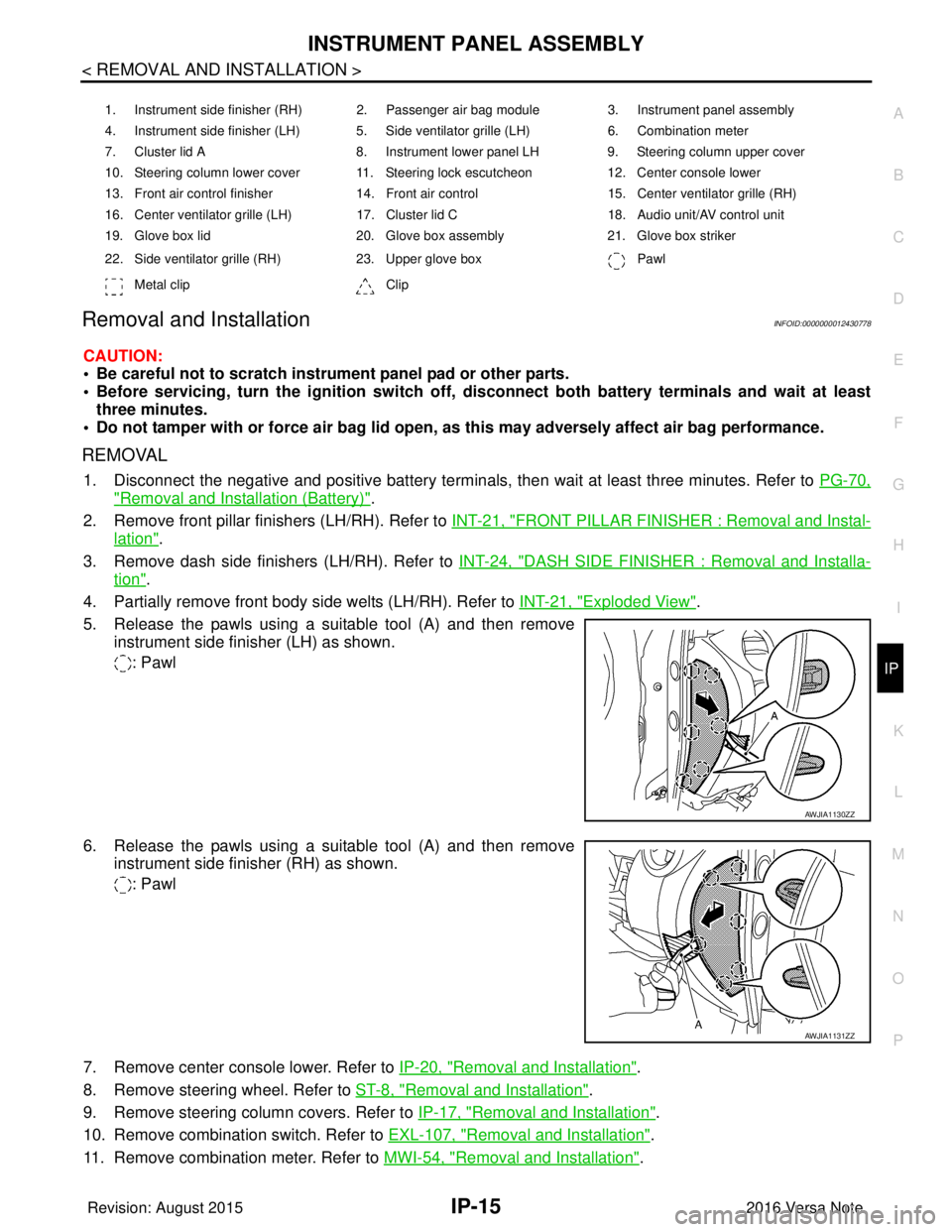
5. Release the pawls using a suitable tool (A) and then remove instrument side finisher (LH) as shown.
: Pawl
6. Release the pawls using a suitable tool (A) and then remove instrument side finisher (RH) as shown.
: Pawl
7. Remove center console lower. Refer to IP-20, "
Removal and Installation".
8. Remove steering wheel. Refer to ST-8, "
Removal and Installation".
9. Remove steering column covers. Refer to IP-17, "
Removal and Installation".
10. Remove combination switch. Refer to EXL-107, "
Removal and Installation".
11. Remove combination meter. Refer to MWI-54, "
Removal and Installation".
1. Instrument side finisher (RH) 2. Passenger air bag module 3. Instrument panel assembly
4. Instrument side finisher (LH) 5. Side ventilator grille (LH) 6. Combination meter
7. Cluster lid A 8. Instrument lower panel LH9. Steering column upper cover
10. Steering column lower cover 11. Steering lock escutcheon 12. Center console lower
13. Front air control finisher 14. Front air control15. Center ventilator grille (RH)
16. Center ventilator grille (LH) 17. Cluster lid C 18. Audio unit/AV control unit
19. Glove box lid 20. Glove box assembly21. Glove box striker
22. Side ventilator grille (RH) 23. Upper glove box Pawl
Metal clip Clip
AWJIA1130ZZ
AWJIA1131ZZ
Revision: August 2015 2016 Versa Note
cardiagn.com
Page 2092 of 3641
IP-24
< REMOVAL AND INSTALLATION >
INSTRUMENT LOWER PANEL LH
INSTRUMENT LOWER PANEL LH
Removal and InstallationINFOID:0000000012430786
REMOVAL
1. Remove data link connector from instrument lower panel LH.
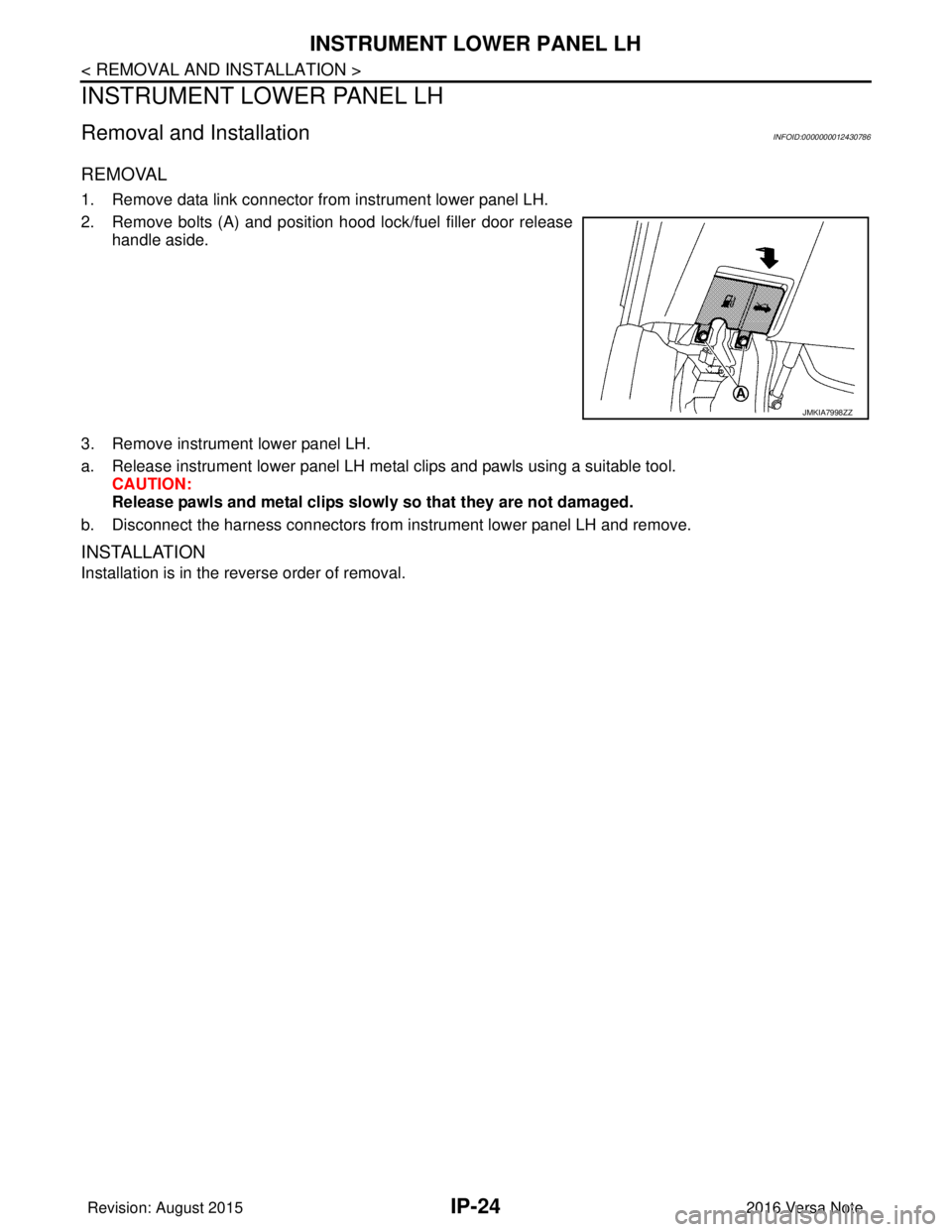
2. Remove bolts (A) and position hood lock/fuel filler door releasehandle aside.
3. Remove instrument lower panel LH.
a. Release instrument lower panel LH metal clips and pawls using a suitable tool. CAUTION:
Release pawls and metal clips slowly so that they are not damaged.
b. Disconnect the harness connectors from instrument lower panel LH and remove.
INSTALLATION
Installation is in the reverse order of removal.
JMKIA7998ZZ
Revision: August 2015 2016 Versa Note
cardiagn.com
Page 2095 of 3641

INL-1
DRIVER CONTROLS
C
DE
F
G H
I
J
K
M
SECTION INL
A
B
INL
N
O P
CONTENTS
INTERIOR LIGHTING SYSTEM
PRECAUTION ....... ........................................3
PRECAUTIONS .............................................. .....3
Precaution for Supplemental Restraint System
(SRS) "AIR BAG" and "SEAT BELT PRE-TEN-
SIONER" ............................................................. ......
3
Precaution for Work ..................................................3
PREPARATION ............................................4
PREPARATION .............................................. .....4
Special Service Tool ........................................... ......4
SYSTEM DESCRIPTION ..............................5
COMPONENT PARTS ................................... .....5
Component Parts Location .................................. ......5
SYSTEM ..............................................................7
INTERIOR ROOM LAMP CONTROL SYSTEM .... ......7
INTERIOR ROOM LAMP CONTROL SYSTEM :
System Description ...................................................
7
ILLUMINATION CONTROL SYSTEM ................... ......9
ILLUMINATION CONTROL SYSTEM : System
Description ................................................................
9
DIAGNOSIS SYSTEM (BCM) (WITH INTELLI-
GENT KEY SYSTEM) .........................................
10
COMMON ITEM ..................................................... ....10
COMMON ITEM : CONSULT Function (BCM -
COMMON ITEM) .....................................................
10
DOOR LOCK ......................................................... ....11
DOOR LOCK : CONSULT Function (BCM -
DOOR LOCK) .........................................................
11
INT LAMP .............................................................. ....11
INT LAMP : CONSULT Function (BCM - INT
LAMP) .....................................................................
11
INTELLIGENT KEY ............................................... ....12
INTELLIGENT KEY : CONSULT Function (BCM -
INTELLIGENT KEY) ................................................
12
BATTERY SAVER ................................................. ....14
BATTERY SAVER : CONSULT Function (BCM -
BATTERY SAVER) ..................................................
14
DIAGNOSIS SYSTEM (BCM) (WITHOUT IN-
TELLIGENT KEY SYSTEM) .............................
16
COMMON ITEM ..................................................... ....16
COMMON ITEM : CONSULT Function (BCM -
COMMON ITEM) .....................................................
16
DOOR LOCK .......................................................... ....17
DOOR LOCK : CONSULT Function (BCM -
DOOR LOCK) ..........................................................
17
INT LAMP ............................................................... ....17
INT LAMP : CONSULT Function (BCM - INT
LAMP) ......................................................................
18
BATTERY SAVER ................................................. ....19
BATTERY SAVER : CONSULT Function (BCM -
BATTERY SAVER) ..................................................
19
ECU DIAGNOSIS INFO RMATION ..............20
BCM ...................................................................20
List of ECU Reference ......................................... ....20
WIRING DIAGRAM ......................................21
INTERIOR ROOM LAMP CONTROL SYSTEM
...
21
Wiring Diagram .................................................... ....21
ILLUMINATION .................................................28
Wiring Diagram ........................................................28
BASIC INSPECTION ...................................37
DIAGNOSIS AND REPAIR WORKFLOW ........37
Work Flow ............................................................ ....37
Revision: August 2015 2016 Versa Note
cardiagn.com
Page 2100 of 3641
INL-6
< SYSTEM DESCRIPTION >
COMPONENT PARTS
5. BCM• Activates the interior room lamp timer depending on the vehicle condition to turn the
interior room lamps ON/OFF.
• Operates the interior room lamp battery saver depending on the vehicle condition to cut the interior room lamp power supply.
• Detects each switch condition by the combination switch reading function.
• Judges the illumination lamp ON/OFF status depending on the vehicle condition.
And then it transmits position light request signal to IPDM E/R and combination
meter (with CAN communication).
Refer to BCS-6, "
BODY CONTROL SYSTEM : Component Part s Location" (with Intel-
ligent Key system) or BCS-77, "
BODY CONTROL SYSTEM : Component Parts Loca-
tion" (without Intelligent Key system) for detailed installation location.
6. Back door switch Refer to DLK-18, "
INTELLIGENT KEY SYSTEM : Ba
ck Door Lock Assembly" (with In-
telligent Key system) or DLK-195, "
REMOTE KEYLESS ENTRY SYSTEM : Back Door
Lock Assembly" (without Intelligent Key system).
7. Push-button ignition switch (if
equipped) Refer to PCS-34, "
POWER DISTRIBUTION SYSTEM : System Description".
8. Combination switch Refer to
BCS-9, "
COMBINATION SWITCH READING SY STEM : System Description"
(with Intelligent Key system) or BCS-79, "
COMBINATION SWITCH READING SYS-
TEM : System Description" (without Intelligent Key system).
9. Combination meter Receives the dimmer signal from BCM. Refer to
MWI-13, "
METER ILLUMINATION
CONTROL : System Description" (type A) or MWI-66, "METER ILLUMINATION CON-
TROL : System Description" (type B).
10. Audio unit (without navigation)
AV control unit (with navigation) Receives the dimmer signal from BCM. Refer to
AV- 8 , "
Audio unit" (base audio), AV-
65, "Audio Unit" (display audio) or AV- 1 3 0 , "AV Control Unit" (navigation).
11. Front door switch LH (RH side similar) Refer to DLK-19, "
INTELLIGENT KEY SYSTEM : Door Switch" (with Intelligent Key
system) or DLK-195, "
REMOTE KEYLESS ENTRY SYSTEM : Door Switch" (without
Intelligent Key system).
12. Rear door switch LH (RH side similar) Refer to DLK-19, "
INTELLIGENT KEY SYSTEM : Door Switch" (with Intelligent Key
system) or DLK-195, "
REMOTE KEYLESS ENTRY SYSTEM : Door Switch" (without
Intelligent Key system).
No.
Part Description
Revision: August 2015 2016 Versa Note
cardiagn.com
Page 2102 of 3641
INL-8
< SYSTEM DESCRIPTION >
SYSTEM
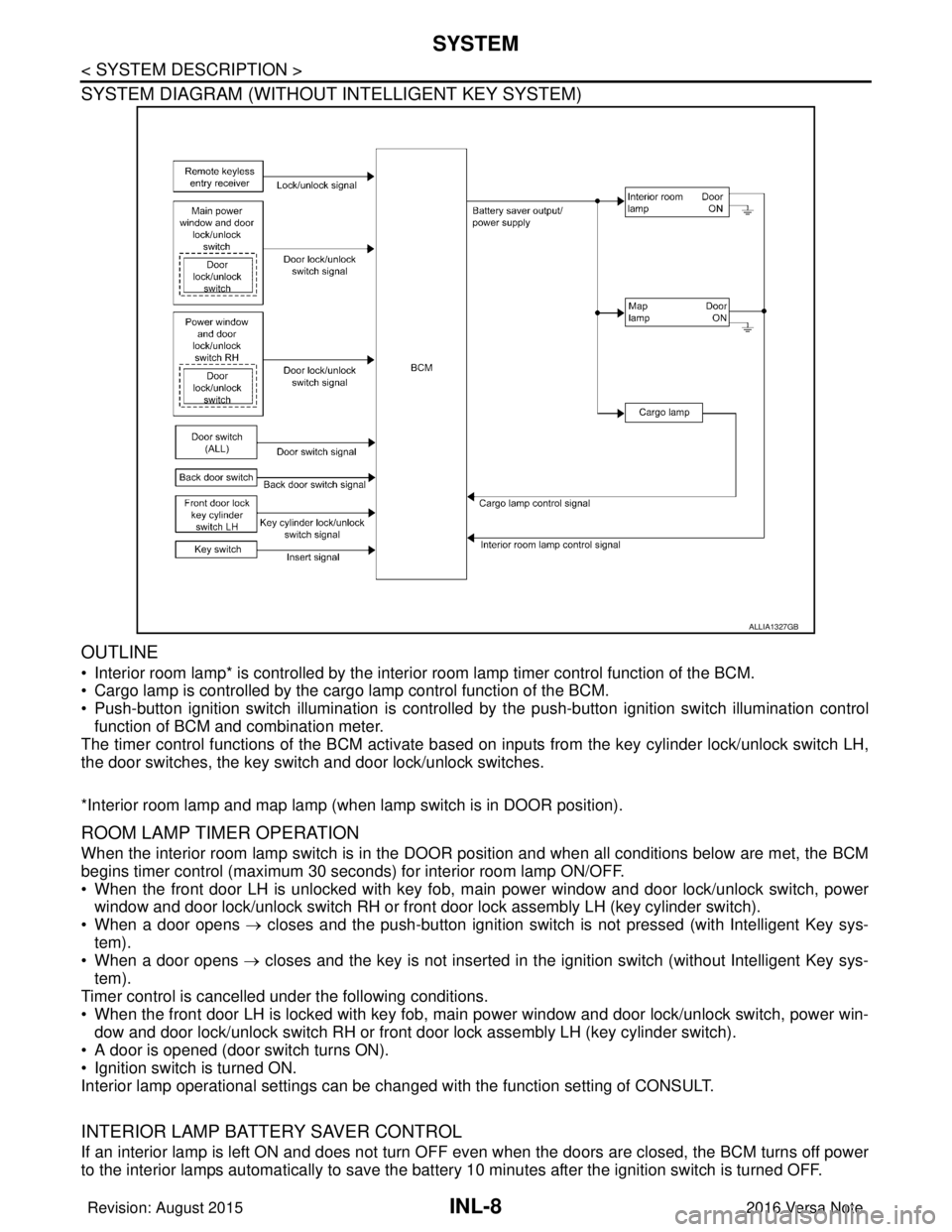
SYSTEM DIAGRAM (WITHOUT INTELLIGENT KEY SYSTEM)
OUTLINE
• Interior room lamp* is controlled by the interior room lamp timer control function of the BCM.
• Cargo lamp is controlled by the cargo lamp control function of the BCM.
• Push-button ignition switch illumination is controlled by the push-button ignition switch illumination control
function of BCM and combination meter.
The timer control functions of the BCM activate based on inputs from the key cylinder lock/unlock switch LH,
the door switches, the key switch and door lock/unlock switches.
*Interior room lamp and map lamp (when lamp switch is in DOOR position).
ROOM LAMP TIMER OPERATION
When the interior room lamp switch is in the DOOR position and when all conditions below are met, the BCM
begins timer control (maximum 30 seconds) for interior room lamp ON/OFF.
• When the front door LH is unlocked with key fob, main power window and door lock/unlock switch, power
window and door lock/unlock switch RH or front door lock assembly LH (key cylinder switch).
• When a door opens → closes and the push-button ignition switch is not pressed (with Intelligent Key sys-
tem).
• When a door opens → closes and the key is not inserted in the ignition switch (without Intelligent Key sys-
tem).
Timer control is cancelled under the following conditions.
• When the front door LH is locked with key fob, main power window and door lock/unlock switch, power win-
dow and door lock/unlock switch RH or front door lock assembly LH (key cylinder switch).
• A door is opened (door switch turns ON).
• Ignition switch is turned ON.
Interior lamp operational settings can be changed with the function setting of CONSULT.
INTERIOR LAMP BATTERY SAVER CONTROL
If an interior lamp is left ON and does not turn OFF even when the doors are closed, the BCM turns off power
to the interior lamps automatically to save the batte ry 10 minutes after the ignition switch is turned OFF.
ALLIA1327GB
Revision: August 2015 2016 Versa Note
cardiagn.com
Page 2103 of 3641
SYSTEMINL-9
< SYSTEM DESCRIPTION >
C
DE
F
G H
I
J
K
M A
B
INL
N
O P
The BCM controls power and ground to all interior lamps.
After the battery saver system turns the la mps OFF, the lamps will illuminate again when
• a signal is received from a key fob, main power window and door lock/unlock switch, power window and
door lock/unlock switch RH or when the front door lock assembly LH (key cylinder switch) is locked or
unlocked
• a door is opened or closed
• the key is removed from or inserted into t he ignition switch (without Intelligent Key system).
The interior lamp battery saver control time per iod can be changed with the function setting of CONSULT.
ILLUMINATION CONTROL SYSTEM
ILLUMINATION CONTROL SYSTEM : System DescriptionINFOID:0000000012432723
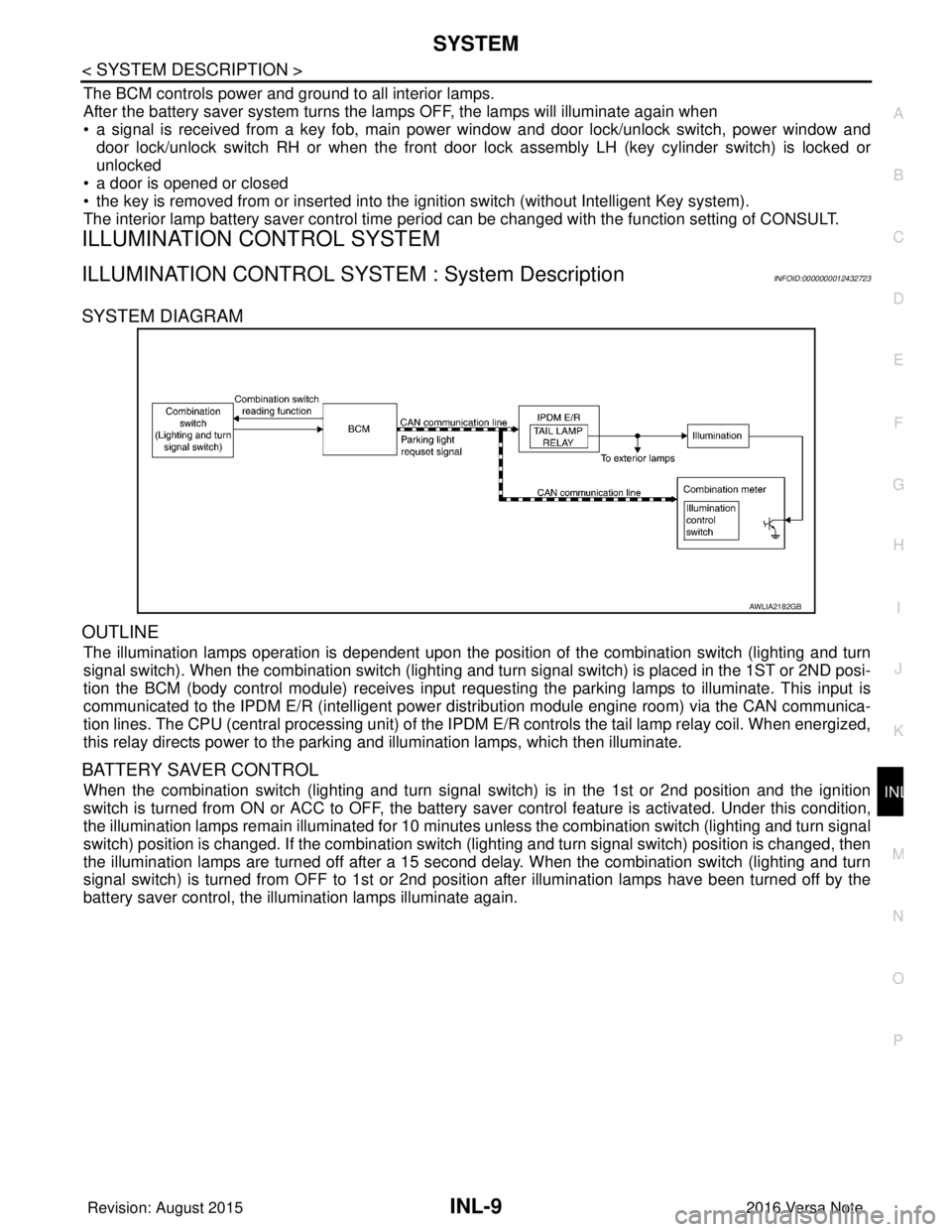
SYSTEM DIAGRAM
OUTLINE
The illumination lamps operation is dependent upon the posit ion of the combination switch (lighting and turn
signal switch). When the combination switch (lighting and turn signal switch) is placed in the 1ST or 2ND posi-
tion the BCM (body control module) receives input requesting the parking lamps to illuminate. This input is
communicated to the IPDM E/R (intelligent power distribution module engine room) via the CAN communica-
tion lines. The CPU (central processing unit) of the IPDM E/R controls the tail lamp relay coil. When energized,
this relay directs power to the parking and illumination lamps, which then illuminate.
BATTERY SAVER CONTROL
When the combination switch (lighting and turn signal switch) is in the 1st or 2nd position and the ignition
switch is turned from ON or ACC to OFF, the battery saver control feature is activated. Under this condition,
the illumination lamps remain illuminated for 10 minutes unless the combination switch (lighting and turn signal
switch) position is changed. If the combination switch (lighting and turn signal switch) position is changed, then
the illumination lamps are turned off after a 15 second delay. When the combination switch (lighting and turn
signal switch) is turned from OFF to 1st or 2nd position after illumination lamps have been turned off by the
battery saver control, the illumination lamps illuminate again.
AWLIA2182GB
Revision: August 2015 2016 Versa Note
cardiagn.com
Page 2104 of 3641

INL-10
< SYSTEM DESCRIPTION >
DIAGNOSIS SYSTEM (BCM) (WITH INTELLIGENT KEY SYSTEM)
DIAGNOSIS SYSTEM (BCM) (WITH INTELLIGENT KEY SYSTEM)
COMMON ITEM
COMMON ITEM : CONSULT Function (BCM - COMMON ITEM)INFOID:0000000012542969
APPLICATION ITEM
CONSULT performs the following functions via CAN communication with BCM.
SYSTEM APPLICATION
BCM can perform the following functions.
Direct Diagnostic Mode Description
ECU Identification The BCM part number is displayed.
Self Diagnostic Result The BCM self diagnostic results are displayed.
Data Monitor The BCM input/output data is displayed in real time.
Active Test The BCM activates outputs to test components.
Work support The settings for BCM functions can be changed.
Configuration • The vehicle specification can be read and saved.
• The vehicle specification can be written when replacing BCM.
CAN DIAG SUPPORT MNTR The result of transmit/receive diagnosis of CAN communication is displayed.
System Sub System Direct Diagnostic Mode
ECU Identification
Self Diagnostic Result
Data Monitor
Active Test
Work support
Configuration
CAN DIAG SUPPORT MNTR
Door lock
DOOR LOCK ×××
Rear window defogger REAR DEFOGGER ××
Warning chime BUZZER ××
Interior room lamp timer INT LAMP ×××
Exterior lamp HEAD LAMP ×××
Wiper and washer WIPER ×××
Turn signal and hazard warning lamps FLASHER ×××
Air conditioner AIR CONDITIONER ×
Intelligent Key system INTELLIGENT KEY ××××
Combination switch COMB SW ×
BCM BCM× × ×××
Immobilizer IMMU ××××
Interior room lamp battery saver BATTERY SAVER ×××
Vehicle security system THEFT ALM ××
RAP system RETAINED PWR ×
Signal buffer system SIGNAL BUFFER ×
TPMS AIR PRESSURE MONITOR ××××
Panic alarm system PANIC ALARM ×
Revision: August 2015 2016 Versa Note
cardiagn.com