start NISSAN NOTE 2016 Service Repair Manual
[x] Cancel search | Manufacturer: NISSAN, Model Year: 2016, Model line: NOTE, Model: NISSAN NOTE 2016Pages: 3641, PDF Size: 28.72 MB
Page 3011 of 3641
![NISSAN NOTE 2016 Service Repair Manual SEC-154
< DTC/CIRCUIT DIAGNOSIS >[WITHOUT INTELLIGENT KEY SYSTEM]
POWER SUPPLY AND GROUND CIRCUIT
POWER SUPPLY AND GROUND CIRCUIT
BCM
BCM : Diagnosis ProcedureINFOID:0000000012542538
Regarding Wiring](/img/5/57363/w960_57363-3010.png "NISSAN NOTE 2016 Service Repair Manual SEC-154
< DTC/CIRCUIT DIAGNOSIS >[WITHOUT INTELLIGENT KEY SYSTEM]
POWER SUPPLY AND GROUND CIRCUIT
POWER SUPPLY AND GROUND CIRCUIT
BCM
BCM : Diagnosis ProcedureINFOID:0000000012542538
Regarding Wiring")
SEC-154
< DTC/CIRCUIT DIAGNOSIS >[WITHOUT INTELLIGENT KEY SYSTEM]
POWER SUPPLY AND GROUND CIRCUIT
POWER SUPPLY AND GROUND CIRCUIT
BCM
BCM : Diagnosis ProcedureINFOID:0000000012542538
Regarding Wiring Diagram information, refer to
BCS-117, "Wiring Diagram".
1.CHECK FUSES AND FUSIBLE LINK
Check that the following fuses and fusible link are not blown.
Is the fuse blown?
YES >> Replace the blown fuse or fusible link after repairing the affected circuit.
NO >> GO TO 2.
2.CHECK POWER SUPPLY CIRCUIT
1. Turn ignition switch OFF.
2. Disconnect BCM connectors.
3. Check voltage between BCM connector and ground.
Is the inspection result normal?
YES >> GO TO 3.
NO >> Repair harness or connector.
3.CHECK GROUND CIRCUIT
Check continuity between BCM connector and ground.
Is the inspection result normal?
YES >> Inspection End.
NO >> Repair harness or connector.
Terminal No. Signal nameFuses and fusible link No.
37 Battery power supply 8 (10A)
42 12 (10A)
50 G (40A)
11 Ignition switch ACC or ON 18 (10A)
38 Ignition switch ON or START 2 (10A)
BCMGround Ignition switch position
Connector Terminal
—OFF
ACC ON
M18 11
0 V
Battery voltage
Battery voltage
37
Battery voltage
38 0 V0 V
M19 42
Battery voltage Battery voltage
50
BCM GroundContinuity
Connector Terminal
M19 55—Yes
Revision: August 2015 2016 Versa Note
cardiagn.com
Page 3015 of 3641
![NISSAN NOTE 2016 Service Repair Manual SEC-158
< SYMPTOM DIAGNOSIS >[WITHOUT INTELLIGENT KEY SYSTEM]
NISSAN VEHICLE IMMOBILIZE
R SYSTEM-NATS SYMPTOMS
SYMPTOM DIAGNOSIS
NISSAN VEHICLE IMMOBILIZER SYSTEM-NATS SYMPTOMS
Symptom TableINFOID:000](/img/5/57363/w960_57363-3014.png "NISSAN NOTE 2016 Service Repair Manual SEC-158
< SYMPTOM DIAGNOSIS >[WITHOUT INTELLIGENT KEY SYSTEM]
NISSAN VEHICLE IMMOBILIZE
R SYSTEM-NATS SYMPTOMS
SYMPTOM DIAGNOSIS
NISSAN VEHICLE IMMOBILIZER SYSTEM-NATS SYMPTOMS
Symptom TableINFOID:000")
SEC-158
< SYMPTOM DIAGNOSIS >[WITHOUT INTELLIGENT KEY SYSTEM]
NISSAN VEHICLE IMMOBILIZE
R SYSTEM-NATS SYMPTOMS
SYMPTOM DIAGNOSIS
NISSAN VEHICLE IMMOBILIZER SYSTEM-NATS SYMPTOMS
Symptom TableINFOID:0000000012430490
NOTE:
• Before performing the diagnosis in the following table, check “ SEC-139, "
Work Flow"”.
• Check that vehicle is under the condition shown in “Conditions of vehicle” before starting diagnosis, and check each symptom.
• If the following symptoms are detected, check syst ems shown in the “Diagnosis/service procedure” column
in this order.
CONDITIONS OF VEHICLE (OPERATING CONDITIONS)
• Mechanical key is not inserted into key cylinder.
• Ignition knob switch is not depressed.
Symptom Diagnosis/service procedure Reference page
Security indicator does not turn ON or flash. 1. Check vehicle security indicator
SEC-155
2. Check Intermittent Incident GI-42
Revision: August 2015 2016 Versa Note
cardiagn.com
Page 3027 of 3641
SRC-10
< SYSTEM DESCRIPTION >
SYSTEM
SYSTEM
SRS AIR BAG SYSTEM
SRS AIR BAG SYSTEM : System DescriptionINFOID:0000000012430601
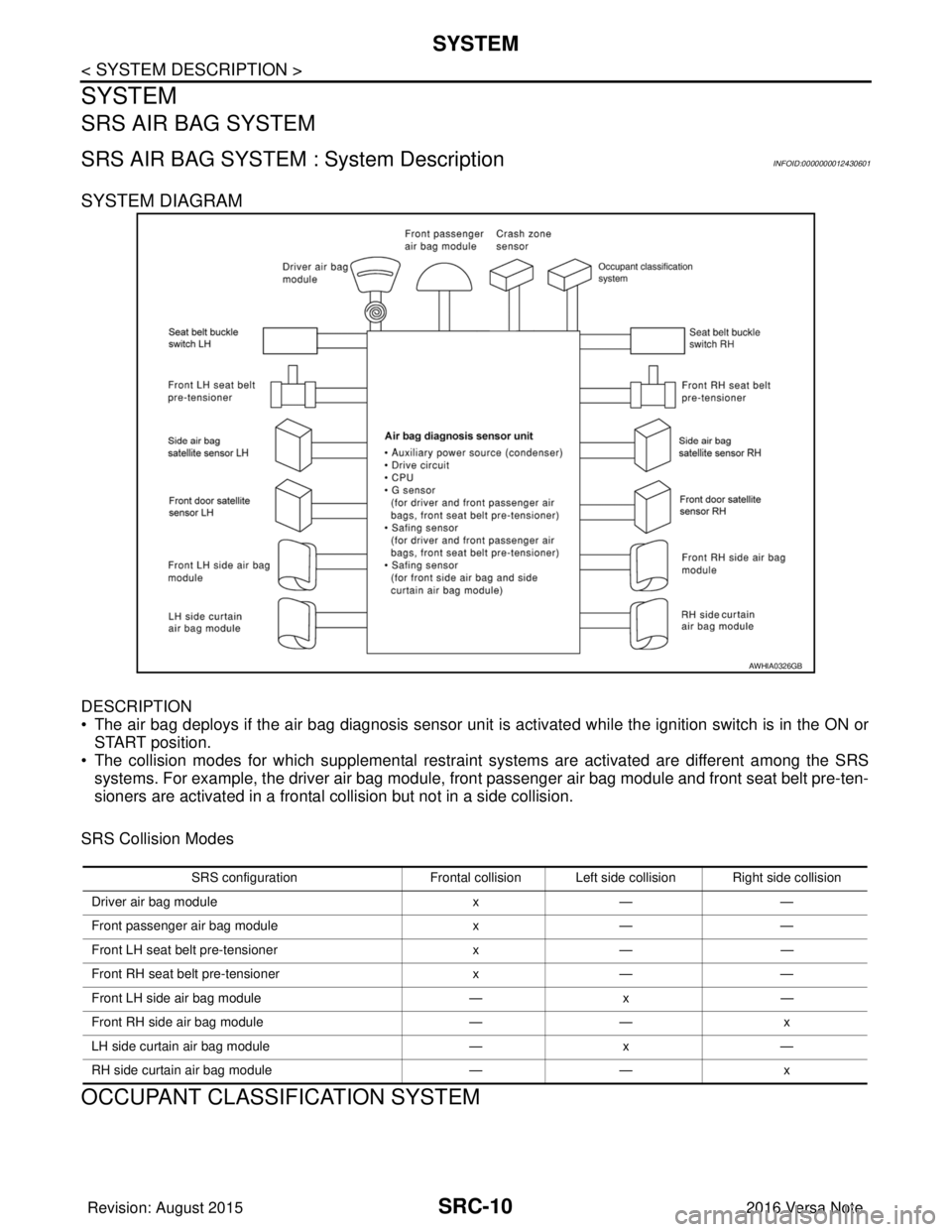
SYSTEM DIAGRAM
DESCRIPTION
• The air bag deploys if the air bag diagnosis sensor unit is activated while the ignition switch is in the ON orSTART position.
• The collision modes for which supplemental restraint systems are activated are different among the SRS
systems. For example, the driver air bag module, fr ont passenger air bag module and front seat belt pre-ten-
sioners are activated in a frontal collision but not in a side collision.
SRS Collision Modes
OCCUPANT CLASSIFICATION SYSTEM
AWHIA0326GB
SRS configuration Frontal collision Left side collision Right side collision
Driver air bag module x— —
Front passenger air bag module x— —
Front LH seat belt pre-tensioner x— —
Front RH seat belt pre-tensioner x— —
Front LH side air bag module —x —
Front RH side air bag module —— x
LH side curtain air bag module —x —
RH side curtain air bag module —— x
Revision: August 2015 2016 Versa Note
cardiagn.com
Page 3031 of 3641

SRC-14
< SYSTEM DESCRIPTION >
DIAGNOSIS SYSTEM (AIR BAG)
DIAGNOSIS SYSTEM (AIR BAG)
DescriptionINFOID:0000000012430604
CAUTION:
• Never use electrical test equipment on any circuit related to the SRS unless instructed in this Ser-
vice Manual. SRS wiring harnesses can be identifi ed by yellow and/or orange harnesses or harness
connectors.
• Never repair, splice or modify the SRS wiring harn ess. If the harness is damaged, replace it with a
new one.
• Keep ground portion clean.
DIAGNOSIS FUNCTION
• The SRS self-diagnostic results can be read with air bag warning lamp and/or CONSULT.
• The user mode is exclusively prepared for the customer (driver). This mode warns the driver of a system
malfunction through the operation of the air bag warning lamp.
• The diagnosis mode allows the technician to locate and inspect the malfunctioning part.
• The mode applications for the air bag warning lamp and CONSULT are as per the following items.
× : Application, —: Not application
On Board Diagn osis FunctionINFOID:0000000012430605
ON-BOARD DIAGNOSIS
There are two self diagnosis functions with air bag warning lamp per the following items.
•USER MODE
• DIAGNOSIS MODE
METHOD OF STARTING
• Diagnosis mode changes from user mode to diagnosis mode when changing operation is performed.
• In user mode, when SRS air bag warning lamp is not turning ON, changing to diagnosis mode by ignition
switch operation is not possible.
• In diagnosis mode, when repair is complete and system is normal, the mode changes to user mode when
ignition switch is turned from OFF to ON.
Procedure to Change Diagnosis Mode
1. Turn ignition switch from OFF to ON.
2. SRS air bag lamp turns ON for 7 seconds and turns OFF, then turn ignition switch OFF within 2 seconds after the lamp turns OFF.
NOTE:
When in Diagnosis Mode, the air bag warning lamp may illuminate for more than 7 seconds after the igni-
tion switch is turned ON. If this is the case, the i gnition switch must still be cycled OFF after 7 seconds.
3. After turning ignition switch OFF, wait for 3 seconds or more.
4. Repeat operation 1 to 3 for 2 times so that operation 1 to 3 is repeated for 3 times in total.
5. Turn ignition switch from OFF to ON. Diagnosis mode changes.
USER MODE
In USER MODE, air bag warning lamp on combination meter turns ON when a malfunction is detected and
warns the customer (driver).
How to Read Air Bag Warning Lamp
1. Turn the ignition switch from OFF to ON, and check that the air bag warning lamp turns ON.
2. Compare the air bag warning lamp operation pattern with the examples.
Air Bag Warning Lamp Examples:
Diagnosis tool User modeDiagnosis mode
Air bag warning lamp ××
CONSULT –×
Revision: August 2015 2016 Versa Note
cardiagn.com
Page 3057 of 3641

SRC-40
< BASIC INSPECTION >
INSPECTION AND ADJUSTMENT
2. Select start on “Zero point reset function” screen from, WORK SUPPORT of CONSULT “OCCUPANT
DETECTION”.
3. “Zero point reset” starts.
>> GO TO 2.
2.CONFIRMATION OF SETTING
1. Proceed to “Zero point reset function” screen from work support of CONSULT “OCCUPANT DETEC-
TION”.
2. Check that “Complete” or “Incomplete” is displayed on “Zero point reset status”.
CAUTION:
• “Complete” is displayed on “zero point reset current status” if the seat is reinstalled by seat removal
and installation, or “zero point reset” is already performed.
• “Zero point reset current status” displays “Incompl ete” if a new seat is installed. When turning key
switch ON without performing zero point reset , front passenger air bag OFF indicator turns ON.
When zero point reset is performed, front passenger air bag OFF indicator turns OFF.
• Air bag warning lamp blinks in user mode only.
• Air bag sensor unit does not record whethe r or not zero point reset is performed.
Is condition
“ALREADY PERFORMED”?
YES >> Print out “ZERO POINT RESET CURRENT STATUS” screen, and inspection end.
NO >> Check condition as per the following, and perform zero point reset again. • Passenger seat is occupied by an object.
• Excessive vibration is applied while performing zero point reset.
• Occupant detection system is malfunctioning.NOTE:
If “Incomplete” is displayed on “zero point reset cu rrent status”, zero point reset is not completed
normally. Check the condition as per the following and perform zero point reset again.
• Passenger seat is occupied by an object.
• Excessive vibration is applied while performing zero point reset.
• Occupant detection system is malfunctioning.
Revision: August 2015 2016 Versa Note
cardiagn.com
Page 3109 of 3641

SRC-92
< DTC/CIRCUIT DIAGNOSIS >
B142A IGNITION VOLTAGE
B142A IGNITION VOLTAGE
DescriptionINFOID:0000000012430671
DTC B142A IGNITION VOLTAGE
Ignition voltage is supplied to the air bag diagnosis sensor unit when the ignition is in the ON position. The air
bag diagnosis sensor unit will monitor for low or high ignition voltage.
PA R T L O C AT I O N
Refer to SRC-5, "Component Parts Location".
DTC LogicINFOID:0000000012430672
DTC DETECTION LOGIC
With CONSULT
DTC CONFIRMATION PROCEDURE (With CONSULT)
1.INSPECTION START
Turn ignition switch ON.
>> GO TO 2.
2.CHECK SELF-DIAG RESULT
Check for the DTC on CONSULT.
Is the DTC detected?
YES >> Refer to SRC-92, "Diagnosis Procedure".
NO >> Inspection End.
Diagnosis ProcedureINFOID:0000000012430673
NOTE:
Follow the procedures in numerical order when repairi ng malfunctioning parts. Confirm whether malfunction is
eliminated using air bag warning lamp each time repair is finished. If malfunction is still observed, proceed to
the next step. When malfunction is eliminated, further repair work is not required.
1.HARNESS CONNECTOR
Is there any visible damage to the connector?
YES or NO
YES >> Replace the harness.
NO >> GO TO 2
2.WIRING HARNESS
Is there any visible damage to the harness?
YES or NO
YES >> Replace the harness.
NO >> GO TO 3
3.AIR BAG DIAGNOSIS SENSOR UNIT
CONSULT name DTC DTC detecting condition Repair order
IGN VOLTAGE [LOW] B142AIgnition voltage low at air bag diagnosis sensor unit. Refer to
SRC-92, "
Diagnosis Procedure".
IGN VOLTAGE [HIGH] Ignition voltage high at air bag diagnosis sensor unit.
Revision: August 2015
2016 Versa Note
cardiagn.com
Page 3113 of 3641
SRC-96
< DTC/CIRCUIT DIAGNOSIS >
B142X COLLISION DETECTION
B142X COLLISION DETECTION
DescriptionINFOID:0000000012430680
DTC B142X COLLISION DETECTION
The air bag diagnosis sensor unit will set this DTC if it has detected a collision which has resulted in a deploy-
ment of one or more air bags or pre-tensioners. If this DTC is detected after a SRS repair, the air bag diagno-
sis sensor unit has not yet been replaced. This DTC can not be erased.
PA R T L O C AT I O N
Refer to SRC-5, "Component Parts Location".
DTC LogicINFOID:0000000012430681
DTC DETECTION LOGIC
With CONSULT
DTC CONFIRMATION PROCEDURE (With CONSULT)
1.INSPECTION START
Turn ignition switch ON.
>> GO TO 2.
2.CHECK SELF-DIAG RESULT
Check for the DTC on CONSULT.
Is the DTC detected?
YES >> Refer to SRC-96, "Diagnosis Procedure".
NO >> Inspection End.
Diagnosis ProcedureINFOID:0000000012430682
Refer to SR-5, "For Frontal Collision" or SR-7, "For Side and Rollover Collision".
CONSULT name DTCDTC detecting condition Repair order
FRONTAL COLLISION DETECTION B1421 Frontal collision detected. Driver and/or
front passenger air bag modules are de-
ployed.Refer to SR-5, "
For Frontal Collision".
SIDE COLLISION DETECTION B1422 Side collision detected. Curtain air bag
module and seat belt pre-tensioner are
deployed.Refer to SR-7, "
For Side and Rollover
Collision".
Revision: August 2015
2016 Versa Note
cardiagn.com
Page 3153 of 3641

STR-1
ENGINE
C
DE
F
G H
I
J
K L
M
SECTION STR
A
STR
N
O P
CONTENTS
STARTING SYSTEM
PRECAUTION ....... ........................................2
PRECAUTIONS .............................................. .....2
Precaution for Supplemental Restraint System
(SRS) "AIR BAG" and "SEAT BELT PRE-TEN-
SIONER" ............................................................. ......
2
PREPARATION ............................................3
PREPARATION .............................................. .....3
Special Service Tool ........................................... ......3
Commercial Service Tools ........................................3
SYSTEM DESCRIPTION ..............................4
COMPONENT PARTS ................................... .....4
STARTING SYSTEM (WITHOUT INTELLIGENT
KEY) ....................................................................... ......
4
STARTING SYSTEM (WITHOUT INTELLIGENT
KEY) : Component Parts Location ...................... ......
4
STARTING SYSTEM (WITHOUT INTELLIGENT
KEY) : Component Description .......................... ......
5
STARTING SYSTEM (WITH INTELLIGENT KEY) ......5
STARTING SYSTEM (WITH INTELLIGENT KEY)
: Component Parts Location ......................................
6
STARTING SYSTEM (WITH INTELLIGENT KEY)
: Component Description ..........................................
6
SYSTEM ..............................................................8
STARTING SYSTEM (WITHOUT INTELLIGENT
KEY) ....................................................................... ......
8
STARTING SYSTEM (WITHOUT INTELLIGENT
KEY) : System Diagram ...................................... ......
8
STARTING SYSTEM (WITHOUT INTELLIGENT
KEY) : System Description .................................. ......
8
STARTING SYSTEM (WITH INTELLIGENT KEY) ......8
STARTING SYSTEM (WITH INTELLIGENT KEY)
: System Diagram ......................................................
9
STARTING SYSTEM (WITH INTELLIGENT KEY)
: System Description ............................................ .....
9
WIRING DIAGRAM ......................................10
STARTING SYSTEM .........................................10
Wiring Diagram - With Intelligent Key System ..... ....10
Wiring Diagram - Without Intelligent Key System ....16
BASIC INSPECTION ....... ............................21
DIAGNOSIS AND REPAIR WORKFLOW ........21
Work Flow (With GR8-1200 NI) ........................... ....21
Work Flow (Without GR8-1200 NI) ..........................25
DTC/CIRCUIT DIAGNOSIS .........................27
B TERMINAL CIRCUIT .....................................27
Description ........................................................... ....27
Diagnosis Procedure ...............................................27
S CONNECTOR CIRCUIT .................................29
Description ...............................................................29
Diagnosis Procedure ...............................................29
SYMPTOM DIAGNOSIS ..............................30
STARTING SYSTEM .........................................30
Symptom Table ................................................... ....30
REMOVAL AND INSTALLATION ...............31
STARTER MOTOR ...........................................31
Exploded View ..................................................... ....31
Removal and Installation .........................................31
SERVICE DATA AND SPECIFICATIONS
(SDS) ............... .......................................... ...
32
SERVICE DATA AND SPECIFICATIONS
(SDS) .................................................................
32
Starter Motor ........................................................ ....32
Revision: August 2015 2016 Versa Note
cardiagn.com
Page 3155 of 3641
PREPARATIONSTR-3
< PREPARATION >
C
DE
F
G H
I
J
K L
M A
STR
NP
O
PREPARATION
PREPARATION
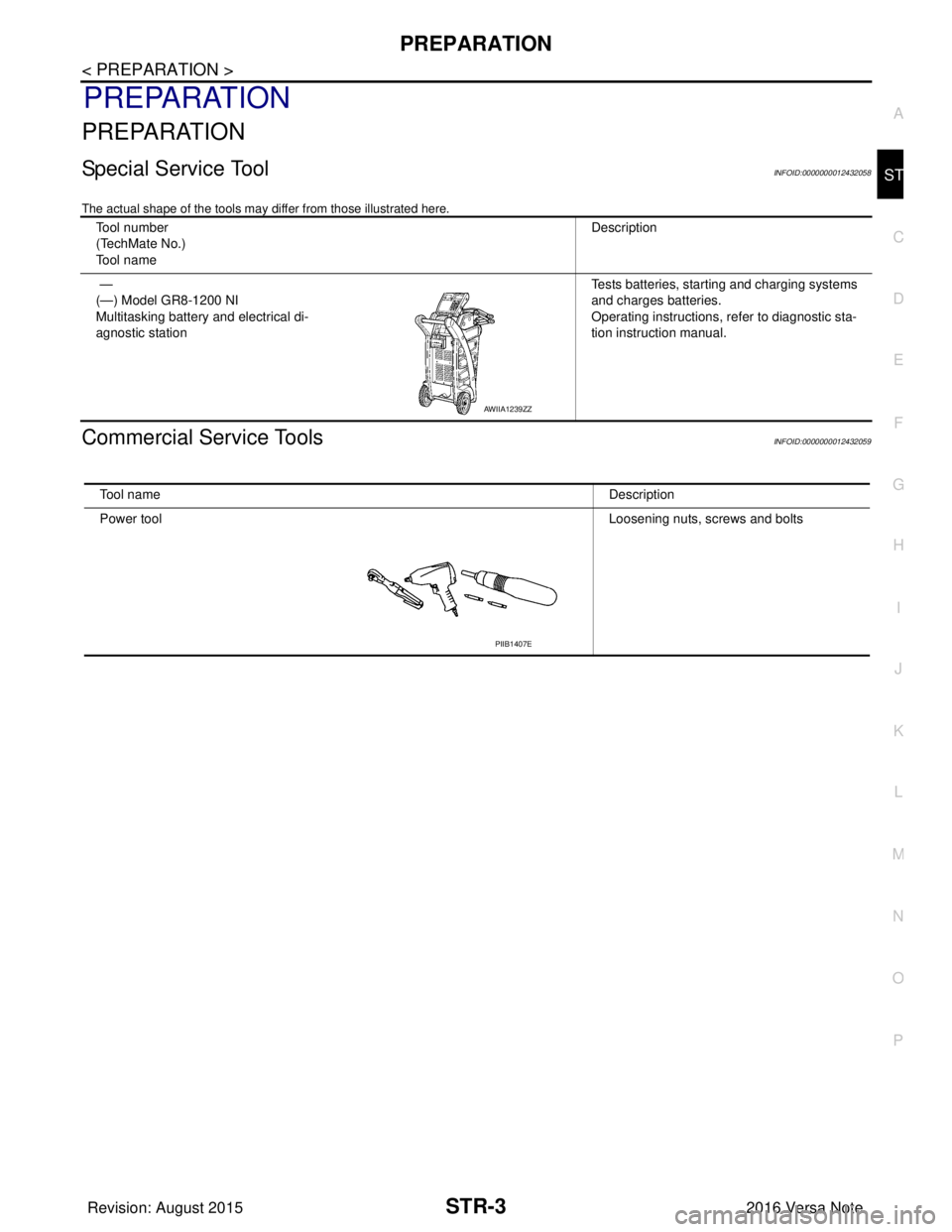
Special Service ToolINFOID:0000000012432058
The actual shape of the tools may di
ffer from those illustrated here.
Commercial Service ToolsINFOID:0000000012432059
Tool number
(TechMate No.)
Tool name Description
—
(—) Model GR8-1200 NI
Multitasking battery and electrical di-
agnostic station Tests batteries, starting and charging systems
and charges batteries.
Operating instructions, refer to diagnostic sta-
tion instruction manual.
AWIIA1239ZZ
Tool name
Description
Power tool Loosening nuts, screws and bolts
PIIB1407E
Revision: August 2015 2016 Versa Note
cardiagn.com
Page 3156 of 3641
STR-4
< SYSTEM DESCRIPTION >
COMPONENT PARTS
SYSTEM DESCRIPTION
COMPONENT PARTS
STARTING SYSTEM (WITHOUT INTELLIGENT KEY)
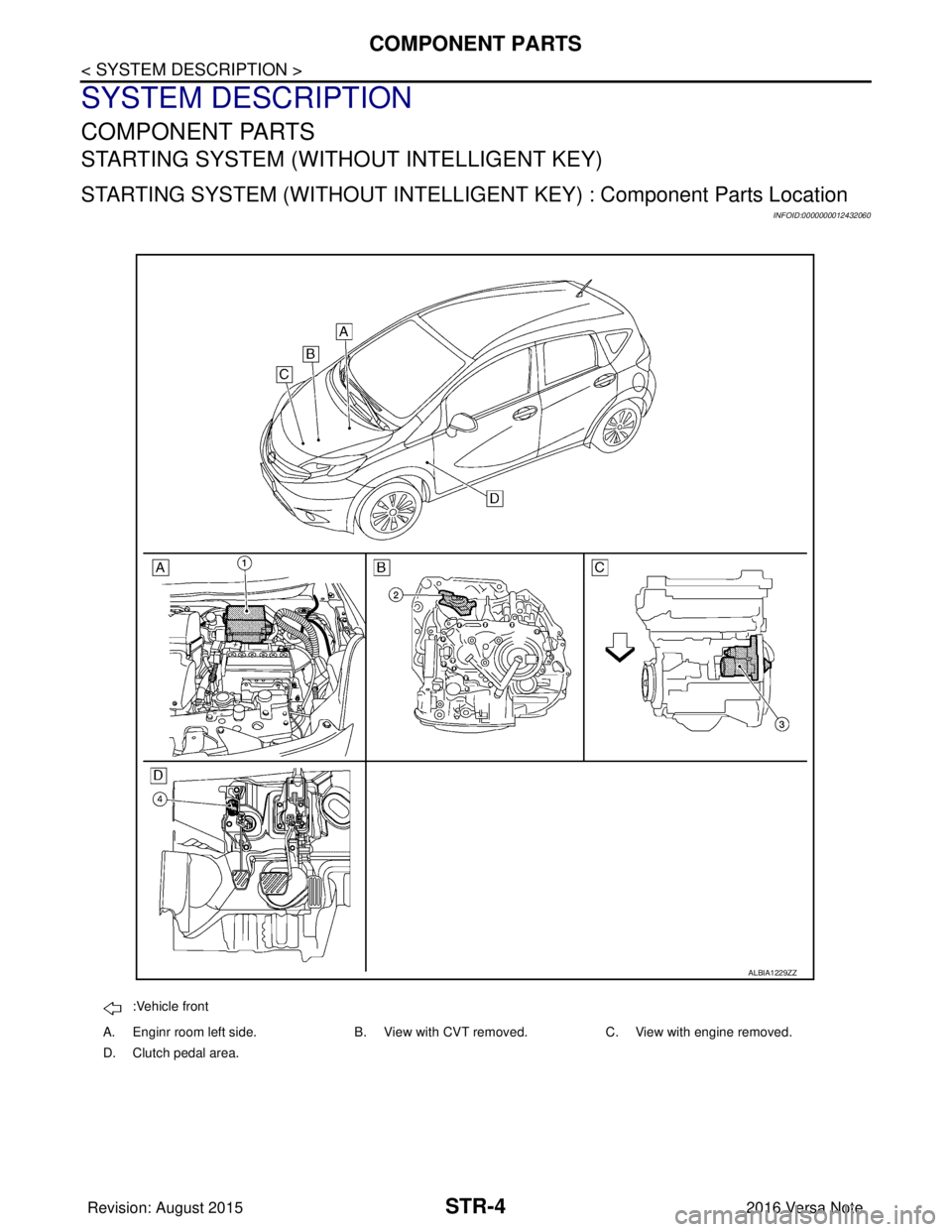
STARTING SYSTEM (WITHOUT INTELLIGENT KEY) : Component Parts Location
INFOID:0000000012432060
:Vehicle front
A. Enginr room left side. B. View with CVT removed. C. View with engine removed.
D. Clutch pedal area.
ALBIA1229ZZ
Revision: August 2015 2016 Versa Note
cardiagn.com