lock NISSAN NOTE 2016 Service Repair Manual
[x] Cancel search | Manufacturer: NISSAN, Model Year: 2016, Model line: NOTE, Model: NISSAN NOTE 2016Pages: 3641, PDF Size: 28.72 MB
Page 2982 of 3641
![NISSAN NOTE 2016 Service Repair Manual DIAGNOSIS SYSTEM (BCM)SEC-125
< SYSTEM DESCRIPTION > [WITHOUT INTELLIGENT KEY SYSTEM]
C
D
E
F
G H
I
J
L
M A
B
SEC
N
O P
DIAGNOSIS SYSTEM (BCM)
COMMON ITEM
COMMON ITEM : CONSULT Function (BCM - COMMON](/img/5/57363/w960_57363-2981.png "NISSAN NOTE 2016 Service Repair Manual DIAGNOSIS SYSTEM (BCM)SEC-125
< SYSTEM DESCRIPTION > [WITHOUT INTELLIGENT KEY SYSTEM]
C
D
E
F
G H
I
J
L
M A
B
SEC
N
O P
DIAGNOSIS SYSTEM (BCM)
COMMON ITEM
COMMON ITEM : CONSULT Function (BCM - COMMON")
DIAGNOSIS SYSTEM (BCM)SEC-125
< SYSTEM DESCRIPTION > [WITHOUT INTELLIGENT KEY SYSTEM]
C
D
E
F
G H
I
J
L
M A
B
SEC
N
O P
DIAGNOSIS SYSTEM (BCM)
COMMON ITEM
COMMON ITEM : CONSULT Function (BCM - COMMON ITEM)INFOID:0000000012542531
APPLICATION ITEM
CONSULT performs the following functions via CAN communication with BCM.
SYSTEM APPLICATION
BCM can perform the following functions.
Direct Diagnostic Mode Description
ECU Identification The BCM part number is displayed.
Self Diagnostic Result The BCM self diagnostic results are displayed.
Data Monitor The BCM input/output data is displayed in real time.
Active Test The BCM activates outputs to test components.
Work support The settings for BCM functions can be changed.
Configuration • The vehicle specification can be read and saved.
• The vehicle specification can be written when replacing BCM.
CAN DIAG SUPPORT MNTR The result of transmit/receive diagnosis of CAN communication is displayed.
System Sub System Direct Diagnostic Mode
ECU Identification
Self Diagnostic Result
Data Monitor
Active Test
Work support
Configuration
CAN DIAG SUPPORT MNTR
Door lock
DOOR LOCK ×××
Rear window defogger REAR DEFOGGER ××
Warning chime BUZZER ××
Interior room lamp timer INT LAMP ×××
Remote keyless entry system MULTI REMOTE ENT ×××
Exterior lamp HEAD LAMP ×××
Wiper and washer WIPER ×××
Turn signal and hazard warning lamps FLASHER ××
Air conditioner AIR CONDITIONER ×
Combination switch COMB SW ×
BCM BCM× × ×××
Immobilizer IMMU ×××
Interior room lamp battery saver BATTERY SAVER ×××
Vehicle security system THEFT ALM ××
RAP system RETAINED PWR ××
Signal buffer system SIGNAL BUFFER ×
TPMS AIR PRESSURE MONITOR ××××
Panic alarm system PANIC ALARM ×
Revision: August 2015 2016 Versa Note
cardiagn.com
Page 2986 of 3641
![NISSAN NOTE 2016 Service Repair Manual DIAGNOSIS SYSTEM (IPDM E/R)SEC-129
< SYSTEM DESCRIPTION > [WITHOUT INTELLIGENT KEY SYSTEM]
C
D
E
F
G H
I
J
L
M A
B
SEC
N
O P
ECU IDENTIFICATION
The IPDM E/R part number is displayed.
SELF DIAGNOSTIC R](/img/5/57363/w960_57363-2985.png "NISSAN NOTE 2016 Service Repair Manual DIAGNOSIS SYSTEM (IPDM E/R)SEC-129
< SYSTEM DESCRIPTION > [WITHOUT INTELLIGENT KEY SYSTEM]
C
D
E
F
G H
I
J
L
M A
B
SEC
N
O P
ECU IDENTIFICATION
The IPDM E/R part number is displayed.
SELF DIAGNOSTIC R")
DIAGNOSIS SYSTEM (IPDM E/R)SEC-129
< SYSTEM DESCRIPTION > [WITHOUT INTELLIGENT KEY SYSTEM]
C
D
E
F
G H
I
J
L
M A
B
SEC
N
O P
ECU IDENTIFICATION
The IPDM E/R part number is displayed.
SELF DIAGNOSTIC RESULT
Refer to PCS-20, "DTCIndex".
DATA MONITOR
ACTIVE TEST
Data Monitor The IPDM E/R input/output data is displayed in real time.
Active Test The IPDM E/R activates outputs to test components.
CAN Diag Support Mntr The result of transmit/receive diagnosis of CAN communication is displayed.
Direct Diagnostic Mode
Description
Monitor Item [Unit]Main
Signals Description
MOTOR FAN REQ [1/2/3/4] ×Indicates cooling fan speed signal received from ECM on CAN communication
line
AC COMP REQ [On/Off] ×Indicates A/C compressor request signal received from ECM on CAN commu-
nication line
TAIL&CLR REQ [On/Off] ×Indicates position light request signal
received from BCM on CAN communica-
tion line
HL LO REQ [On/Off] ×Indicates low beam request signal received from BCM on CAN communication
line
HL HI REQ [On/Off] ×Indicates high beam request signal received from BCM on CAN communication
line
FR FOG REQ [On/Off] ×Indicates front fog light request signal received from BCM on CAN communica-
tion line
FR WIP REQ [Stop/1LOW/Low/Hi] ×Indicates front wiper request signal received from BCM on CAN communication
line
WIP AUTO STOP [STOP P/ACT P] ×Indicates condition of front wiper auto stop signal
WIP PROT [Off/BLOCK] ×Indicates condition of front wiper fail-safe operation
IGN RLY1 -REQ [On/Off] Indicates ignition switch ON signal received from BCM on CAN communication
line
IGN RLY [On/Off] ×Indicates condition of ignition relay
PUSH SW [On/Off] Indicates condition of push-button ignition switch
INTER/NP SW [On/Off] Indicates condition of CVT shift position
ST RLY CONT [On/Off] Indicates starter relay status signal received from BCM on CAN communication
line
IHBT RLY -REQ [On/Off] Indicates starter control relay signal received from BCM on CAN communication
line
ST/INHI RLY [Off/ ST /INHI] Indicates condition of starter relay and starter control relay
DETENT SW [On/Off] Indicates condition of CVT shift selector (park position switch)
DTRL REQ [Off] Indicates daytime running light request signal received from BCM on CAN com-
munication line
THFT HRN REQ [On/Off] Indicates theft warning horn request signal received from BCM on CAN commu-
nication line
HORN CHIRP [On/Off] Indicates horn reminder signal received from BCM on CAN communication line
Test item Description
HORN This test is able to check horn operation [On].
FRONT WIPER This test is able to check wiper motor operation [Hi/Lo/Off].
Revision: August 2015 2016 Versa Note
cardiagn.com
Page 3000 of 3641
![NISSAN NOTE 2016 Service Repair Manual P1610 LOCK MODESEC-143
< DTC/CIRCUIT DIAGNOSIS > [WITHOUT INTELLIGENT KEY SYSTEM]
C
D
E
F
G H
I
J
L
M A
B
SEC
N
O P
DTC/CIRCUIT DIAGNOSIS
P1610 LOCK MODE
DescriptionINFOID:0000000012430465
When the st](/img/5/57363/w960_57363-2999.png "NISSAN NOTE 2016 Service Repair Manual P1610 LOCK MODESEC-143
< DTC/CIRCUIT DIAGNOSIS > [WITHOUT INTELLIGENT KEY SYSTEM]
C
D
E
F
G H
I
J
L
M A
B
SEC
N
O P
DTC/CIRCUIT DIAGNOSIS
P1610 LOCK MODE
DescriptionINFOID:0000000012430465
When the st")
P1610 LOCK MODESEC-143
< DTC/CIRCUIT DIAGNOSIS > [WITHOUT INTELLIGENT KEY SYSTEM]
C
D
E
F
G H
I
J
L
M A
B
SEC
N
O P
DTC/CIRCUIT DIAGNOSIS
P1610 LOCK MODE
DescriptionINFOID:0000000012430465
When the starting operation is carried more than five times consecutively under the following conditions, NATS
will shift to the mode which prevents the engine from being started.
• Unregistered mechanical key is used.
• BCM or ECM's malfunctioning.
DTC LogicINFOID:0000000012430466
DTC DETECTION LOGIC
DTC CONFIRMATION PROCEDURE
1.PERFORM DTC CONFIRMATION PROCEDURE
1. Turn ignition switch ON.
2. Check “Self Diagnostic Result” using CONSULT.
Is DTC detected?
YES >> Refer to SEC-143, "Diagnosis Procedure".
NO >> Inspection End.
Diagnosis ProcedureINFOID:0000000012430467
1.CHECK ENGINE START FUNCTION
1. Perform the check for DTC except DTC P1610.
2. Use CONSULT to erase DTC after fixing.
3. Check that engine can start with registered mechanical key.
Does the engine start?
YES >> Inspection End.
NO >> GO TO 2.
2.CHECK INTERMITTENT INCIDENT
Refer to GI-42, "
Intermittent Incident".
>> Inspection End.
DTC No. Trouble diagnosis
name DTC detecting condition
Possible cause
P1610 LOCK MODE When the starting operation is carried out
five or more times consecutively under the
following conditions:
• Unregistered mechanical key
• BCM or ECM's malfunctioning. • Mechanical key
•BCM
•ECM
Revision: August 2015
2016 Versa Note
cardiagn.com
Page 3004 of 3641
![NISSAN NOTE 2016 Service Repair Manual B2191, P1615 DIFFERENCE OF KEYSEC-147
< DTC/CIRCUIT DIAGNOSIS > [WITHOUT INTELLIGENT KEY SYSTEM]
C
D
E
F
G H
I
J
L
M A
B
SEC
N
O P
B2191, P1615 DIFFERENCE OF KEY
DescriptionINFOID:0000000012430471
Per](/img/5/57363/w960_57363-3003.png "NISSAN NOTE 2016 Service Repair Manual B2191, P1615 DIFFERENCE OF KEYSEC-147
< DTC/CIRCUIT DIAGNOSIS > [WITHOUT INTELLIGENT KEY SYSTEM]
C
D
E
F
G H
I
J
L
M A
B
SEC
N
O P
B2191, P1615 DIFFERENCE OF KEY
DescriptionINFOID:0000000012430471
Per")
B2191, P1615 DIFFERENCE OF KEYSEC-147
< DTC/CIRCUIT DIAGNOSIS > [WITHOUT INTELLIGENT KEY SYSTEM]
C
D
E
F
G H
I
J
L
M A
B
SEC
N
O P
B2191, P1615 DIFFERENCE OF KEY
DescriptionINFOID:0000000012430471
Performs ID verification through BCM when mechanical key is inserted in the ignition key cylinder.
Prohibits the release of steering lock or start of engine when an unregistered ID of mechanical key is used.
DTC LogicINFOID:0000000012430472
DTC DETECTION LOGIC
DTC CONFIRMATION PROCEDURE
1.PERFORM DTC CONFIRMATION PROCEDURE
1. Insert mechanical key into the key cylinder.
2. Check “Self Diagnostic Result” using CONSULT.
Is DTC detected?
YES >> Refer to SEC-147, "Diagnosis Procedure".
NO >> Inspection End.
Diagnosis ProcedureINFOID:0000000012430473
1.PERFORM INITIALIZATION
Perform initialization with CONSULT. Re-register all mechanical keys.
For initialization and registration of mechanical key. Refer to CONSULT Immobilizer mode and follow the on-
screen instructions.
Can the system be initialized and can the engine be started with re-registered mechanical key?
YES >> Mechanical key was unregistered.
NO >> BCM is malfunctioning. • Replace BCM. Refer to BCS-137, "
Removal and Installation".
• Perform initialization again.
DTC No. Trouble diagnosis
name DTC detecting condition
Possible cause
B2191 DIFFERENCE OF
KEY The ID verification results between BCM and me-
chanical key are NG. The registration is necessary.
Mechanical key
P1615
Revision: August 2015 2016 Versa Note
cardiagn.com
Page 3013 of 3641
![NISSAN NOTE 2016 Service Repair Manual SEC-156
< DTC/CIRCUIT DIAGNOSIS >[WITHOUT INTELLIGENT KEY SYSTEM]
VEHICLE SECURITY INDICATOR
4. Check continuity between BCM connector M18 terminal 23 and ground.
Is the inspection result normal?
YES](/img/5/57363/w960_57363-3012.png "NISSAN NOTE 2016 Service Repair Manual SEC-156
< DTC/CIRCUIT DIAGNOSIS >[WITHOUT INTELLIGENT KEY SYSTEM]
VEHICLE SECURITY INDICATOR
4. Check continuity between BCM connector M18 terminal 23 and ground.
Is the inspection result normal?
YES")
SEC-156
< DTC/CIRCUIT DIAGNOSIS >[WITHOUT INTELLIGENT KEY SYSTEM]
VEHICLE SECURITY INDICATOR
4. Check continuity between BCM connector M18 terminal 23 and ground.
Is the inspection result normal?
YES >> Check the following:
• 10A fuse No. 8, located in fuse block (J/B)
• Harness for open or short between security indicator lamp and fuse.
NO >> Repair or replace harness.
Diagnosis Procedure (Type A)INFOID:0000000012430489
Regarding Wiring Diagram information, refer to SEC-132, "Wiring Diagram".
1.SECURITY INDICATOR LAMP ACTIVE TEST
With CONSULT
Check “THEFT IND”” in “Active Test” of “IMMU”.
Without CONSULT
1. Disconnect BCM.
2. Check voltage between BCM harness connector M18 terminal 23 and ground.
Is the inspection result normal?
YES >> Security indicator lamp is OK.
NO >> GO TO 2.
2.SECURITY INDICATOR LAMP CHECK
Check security indicator lamp condition.
Is the inspection result normal?
YES >> GO TO 3.
NO >> Replace combination meter. Refer to MWI-54, "
Removal and Installation".
3.CHECK HARNESS CONTINUITY
1. Turn ignition switch OFF.
2. Disconnect BCM and security indicator lamp connector.
3. Check continuity between BCM connector M18 term inal 23 and combination meter connector M82 termi-
nal 18.
4. Check continuity between BCM connector M18 terminal 23 and ground.
BCM Combination meter
Continuity
Connector TerminalConnector Terminal
M 182 3M 241 8 Y es
BCM GroundContinuity
Connector Terminal
M18 23 No
ConnectorTe r m i n a l s
ConditionVoltage (V)
(Approx.)
(+) (-)
M18 23Ground ON
0
OFF Battery voltage
BCM Combination meter
Continuity
Connector TerminalConnector Terminal
M 182 3M 821 8 Y es
Revision: August 2015 2016 Versa Note
cardiagn.com
Page 3014 of 3641
![NISSAN NOTE 2016 Service Repair Manual VEHICLE SECURITY INDICATORSEC-157
< DTC/CIRCUIT DIAGNOSIS > [WITHOUT INTELLIGENT KEY SYSTEM]
C
D
E
F
G H
I
J
L
M A
B
SEC
N
O P
Is the inspection result normal?
YES >> Check the following: • 10A fuse](/img/5/57363/w960_57363-3013.png "NISSAN NOTE 2016 Service Repair Manual VEHICLE SECURITY INDICATORSEC-157
< DTC/CIRCUIT DIAGNOSIS > [WITHOUT INTELLIGENT KEY SYSTEM]
C
D
E
F
G H
I
J
L
M A
B
SEC
N
O P
Is the inspection result normal?
YES >> Check the following: • 10A fuse")
VEHICLE SECURITY INDICATORSEC-157
< DTC/CIRCUIT DIAGNOSIS > [WITHOUT INTELLIGENT KEY SYSTEM]
C
D
E
F
G H
I
J
L
M A
B
SEC
N
O P
Is the inspection result normal?
YES >> Check the following: • 10A fuse No. 8, located in fuse block (J/B)
• Harness for open or short between security indicator lamp and fuse.
NO >> Repair or replace harness.
BCM
GroundContinuity
Connector Terminal
M18 23 No
Revision: August 2015 2016 Versa Note
cardiagn.com
Page 3016 of 3641
![NISSAN NOTE 2016 Service Repair Manual NATS ANTENNA AMP.SEC-159
< REMOVAL AND INSTALLATION > [WITHOUT INTELLIGENT KEY SYSTEM]
C
D
E
F
G H
I
J
L
M A
B
SEC
N
O P
REMOVAL AND INSTALLATION
NATS ANTENNA AMP.
Removal and InstallationINFOID:00000](/img/5/57363/w960_57363-3015.png "NISSAN NOTE 2016 Service Repair Manual NATS ANTENNA AMP.SEC-159
< REMOVAL AND INSTALLATION > [WITHOUT INTELLIGENT KEY SYSTEM]
C
D
E
F
G H
I
J
L
M A
B
SEC
N
O P
REMOVAL AND INSTALLATION
NATS ANTENNA AMP.
Removal and InstallationINFOID:00000")
NATS ANTENNA AMP.SEC-159
< REMOVAL AND INSTALLATION > [WITHOUT INTELLIGENT KEY SYSTEM]
C
D
E
F
G H
I
J
L
M A
B
SEC
N
O P
REMOVAL AND INSTALLATION
NATS ANTENNA AMP.
Removal and InstallationINFOID:0000000012430491
REMOVAL
1. Remove combination switch. Refer to BCS-75, "Removal and Installation".
2. Remove the NATS antenna amp bolt (A).
3. Disconnect the harness connector (B) from the NATS antenna amp. (1) and remove.
INSTALLATION
Installation is in the reverse order of removal.
NOTE:
• If NATS antenna amp. is not installed correctly, NV IS (NATS) system will not operate properly and “SELF-
DIAG RESULTS" on CONSULT screen will show “LOCK MODE” or "CHAIN OF IMMU-KEY".
• Initialization is not necessary when only the NATS antenna amp. is replaced with a new one.
AWKIA2524ZZ
Revision: August 2015 2016 Versa Note
cardiagn.com
Page 3026 of 3641
COMPONENT PARTSSRC-9
< SYSTEM DESCRIPTION >
C
DE
F
G
I
J
K L
M A
B
SRC
N
O P
• Driver front air bag module
• Passenger front air bag module
• LH side curtain air bag module
• RH side curtain air bag module
• Front LH seat belt pre-tensioner
• Front RH seat belt pre-tensioner
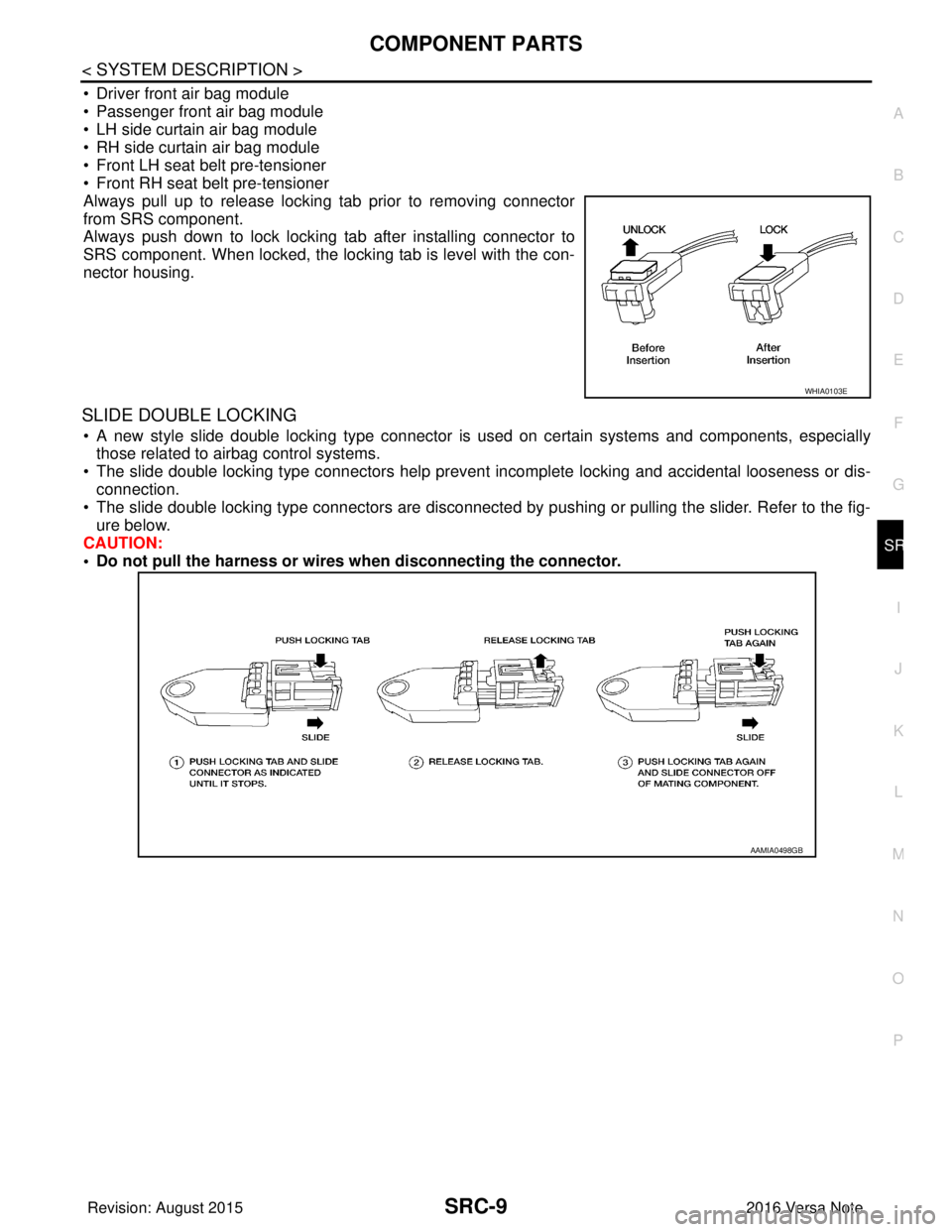
Always pull up to release locking tab prior to removing connector
from SRS component.
Always push down to lock locking tab after installing connector to
SRS component. When locked, the locking tab is level with the con-
nector housing.
SLIDE DOUBLE LOCKING
• A new style slide double locking type connector is used on certain systems and components, especially those related to airbag control systems.
• The slide double locking type connectors help prevent incomplete locking and accidental looseness or dis-
connection.
• The slide double locking type connectors are disconnected by pushing or pulling the slider. Refer to the fig- ure below.
CAUTION:
• Do not pull the harness or wires when disconnecting the connector.
WHIA0103E
AAMIA0498GB
Revision: August 2015 2016 Versa Note
cardiagn.com
Page 3114 of 3641
SRS AIR BAG WARNING LAMP DOES NOT TURN OFF
SRC-97
< SYMPTOM DIAGNOSIS >
C
D E
F
G
I
J
K L
M A
B
SRC
N
O P
SYMPTOM DIAGNOSIS
SRS AIR BAG WARNING LAMP DOES NOT TURN OFF
Diagnosis ProcedureINFOID:0000000012430683
1.CHECK AIR BAG MODULE AND SEAT BELT PRE-TENSIONER
Check the deployment of air bag module.
Is air bag module deployed?
YES >> Replace the malfunctioning parts.
NO >> GO TO 2.
2.CHECK AIR BAG FUSE
Check 10 A fuse [No.7, located in fuse block (J/B)].
Is the inspection result normal?
YES >> GO TO 3.
NO >> Replace the fuse.
3.CHECK HARNESS CONNECTOR
Check the harness connector.
Is the inspection result normal?
YES >> GO TO 4.
NO >> Replace harness connectors.
4.CHECK WIRING HARNESS
Check the wiring harness externals.
Is the inspection result normal?
YES >> GO TO 5.
NO >> Replace wiring harness.
5.REPLACE AIR BAG DIAGNOSIS SENSOR UNIT
1. Replace air bag diagnosis sensor unit. Refer to SR-30, "
Removal and Installation".
2. Check air bag warning lamp operation.
Is the inspection result normal?
YES >> Inspection End.
NO >> GO TO 6.
6.REPLACE COMBINATION METER
1. Replace combination meter. Refer to MWI-54, "
Removal and Installation" (type A) or MWI-115, "Removal
and Installation" (type B).
2. Check air bag warning lamp operation.
Is the inspection result normal?
YES >> Inspection End.
NO >> GO TO 1.
Revision: August 2015 2016 Versa Note
cardiagn.com
Page 3116 of 3641

SEAT BELT WARNING SYSTEMSRC-99
< SYMPTOM DIAGNOSIS >
C
DE
F
G
I
J
K L
M A
B
SRC
N
O P
SEAT BELT WARNING SYSTEM
Seat Belt Warning Syst em Does Not FunctionINFOID:0000000012430685
1.SEAT BELT WARNING LIGHT
Turn ignition switch ON.
Does the seat belt warning lamp come ON?
YES >> GO TO 2.
NO >> • Check 10A fuse [No. 8, loca ted in the fuse block (J/B)].
• Check seat belt buckle switch (driver seat).
• Check harness between combination meter and seat belt buckle switch (driver seat).
• Check combination meter. Refer to MWI-11, "
METER SYSTEM : Fail-safe" (type A) or MWI-62,
"METER SYSTEM : Fail-safe" (type B).
2.SEAT BELT BUCKLE (DRIVER SEAT)
Fasten the seat belt buckle (driver seat).
Does the seat belt warning lamp go OFF?
YES >> GO TO 3.
NO >> • Check seat belt buckle switch (driver seat). • Check harness between combination meter and seat belt buckle switch (driver seat).
3.OCCUPANT CLASSIFICATION SYSTEM
Have a helper sit in the passenger seat.
Does the seat belt warning lamp go ON?
YES >> GO TO 4.
NO >> • Check occupant classification system. Refer to SRC-11, "
OCCUPANT CLASSIFICATION SYS-
TEM : System Description".
• Check harness between occupant classification control unit and air bag diagnosis sensor unit.
4.SEAT BELT BUCKLE (PASSENGER SEAT)
Fasten the seat belt buckle (passenger seat).
Does the seat belt warning lamp go OFF?
YES >> System OK.
NO >> • Check seat belt buckle switch (passenger seat). • Check harness between seat belt buckle switch (passenger seat) and air bag diagnosis sensor
unit.
• Replace air bag diagnosis sensor unit. Refer to SR-30, "
Removal and Installation".
Revision: August 2015 2016 Versa Note
cardiagn.com