lock NISSAN NOTE 2016 Service Repair Manual
[x] Cancel search | Manufacturer: NISSAN, Model Year: 2016, Model line: NOTE, Model: NISSAN NOTE 2016Pages: 3641, PDF Size: 28.72 MB
Page 3129 of 3641
DRIVER AIR BAG MODULESR-13
< REMOVAL AND INSTALLATION >
C
DE
F
G
I
J
K L
M A
B
SR
N
O P
• Do not use air tools or electric tools for servicing.
CAUTION:
• Do not allow oil, grease, detergent or water to come in contact with the driver air bag module.
REMOVAL
1. Disconnect negative and positive battery terminals, then wait at least three minutes. Refer to PG-70,
"Removal and Installation (Battery)".
2. Remove driver air bag module type 1:
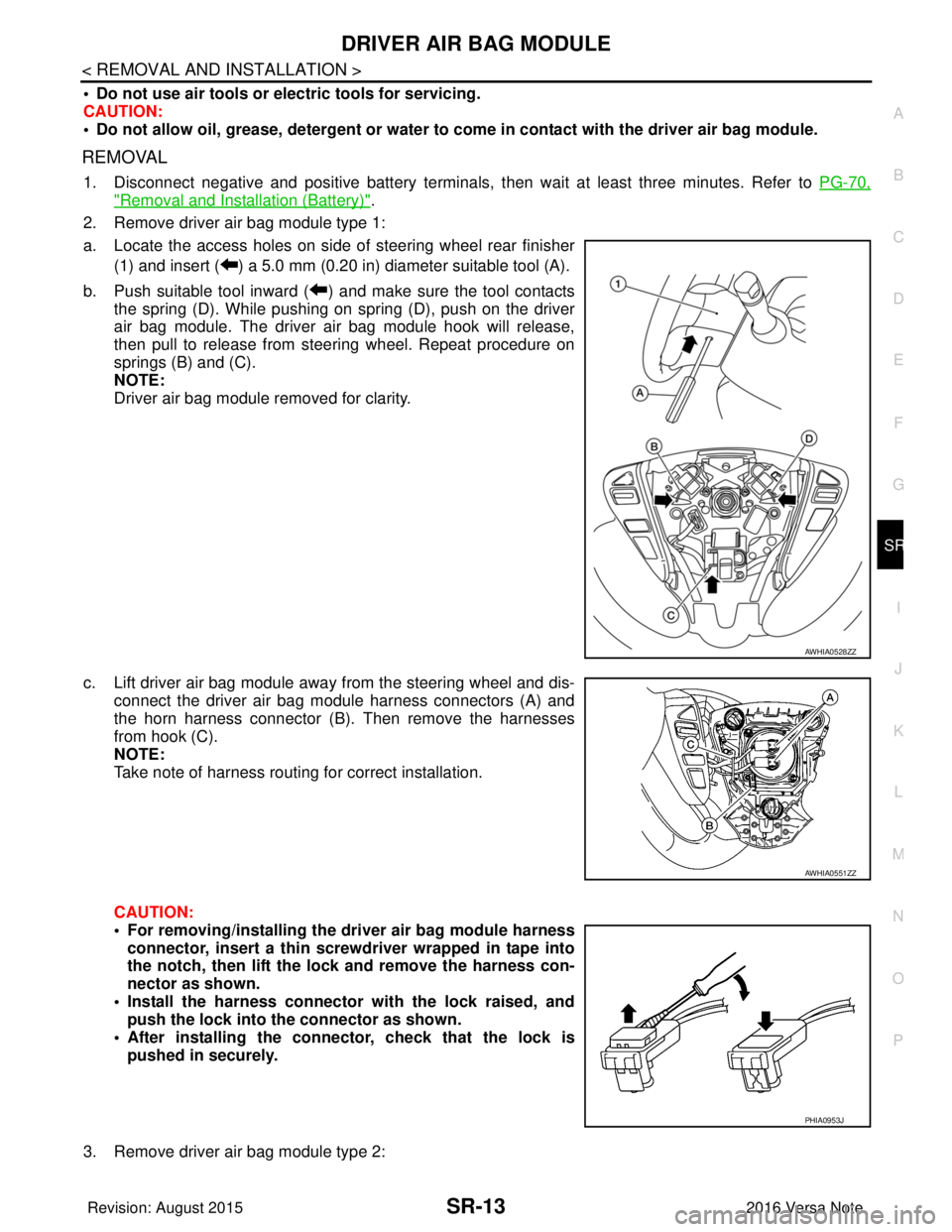
a. Locate the access holes on side of steering wheel rear finisher (1) and insert ( ) a 5.0 mm (0.20 in) diameter suitable tool (A).
b. Push suitable tool inward ( ) and make sure the tool contacts the spring (D). While pushing on spring (D), push on the driver
air bag module. The driver air bag module hook will release,
then pull to release from steering wheel. Repeat procedure on
springs (B) and (C).
NOTE:
Driver air bag module removed for clarity.
c. Lift driver air bag module away from the steering wheel and dis- connect the driver air bag module harness connectors (A) and
the horn harness connector (B). Then remove the harnesses
from hook (C).
NOTE:
Take note of harness routing for correct installation.
CAUTION:
• For removing/installing the driver air bag module harness
connector, insert a thin screwdriver wrapped in tape into
the notch, then lift the lock and remove the harness con-
nector as shown.
• Install the harness connector with the lock raised, and push the lock into the connector as shown.
• After installing the connector, check that the lock is pushed in securely.
3. Remove driver air bag module type 2:
AWHIA0528ZZ
AWHIA0551ZZ
PHIA0953J
Revision: August 2015 2016 Versa Note
cardiagn.com
Page 3130 of 3641
SR-14
< REMOVAL AND INSTALLATION >
DRIVER AIR BAG MODULE
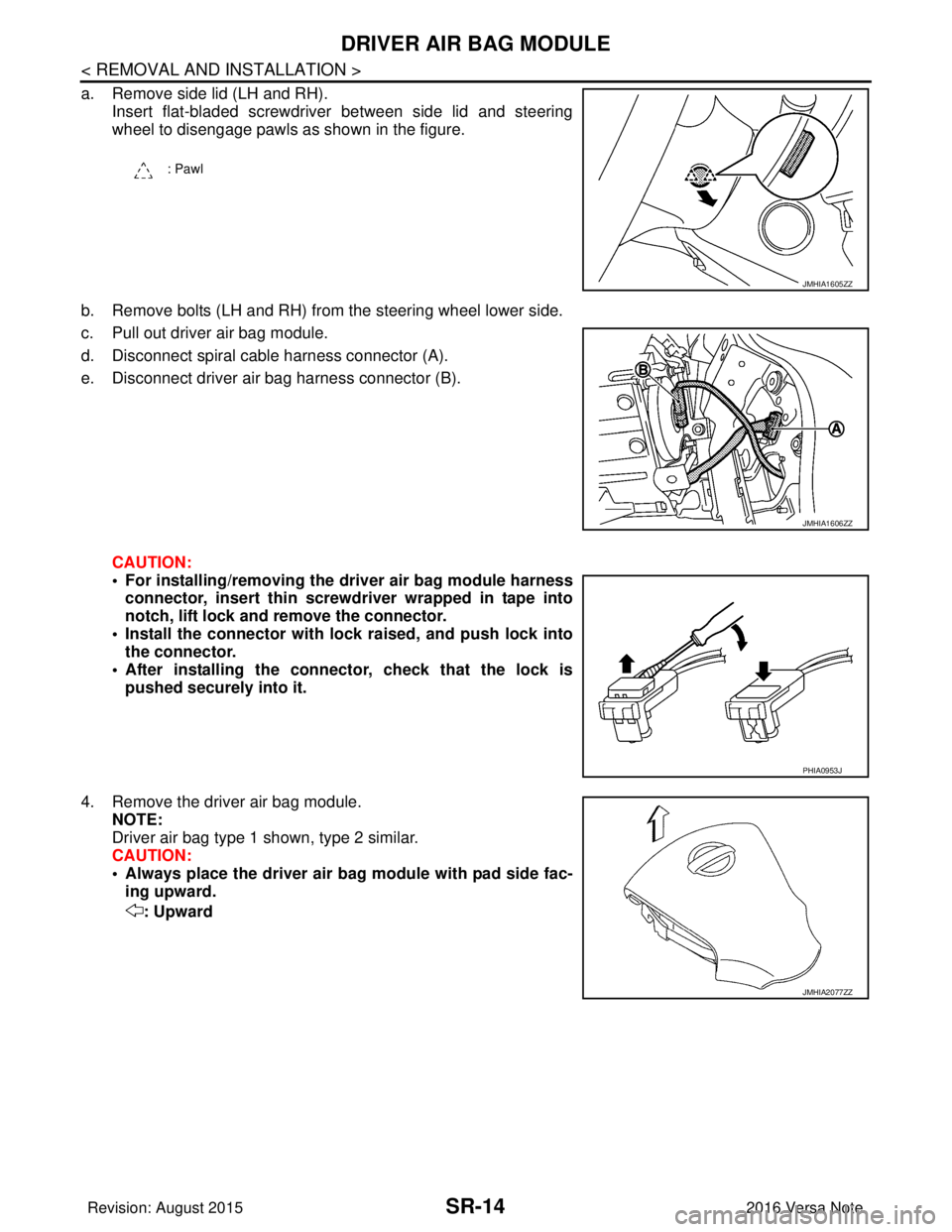
a. Remove side lid (LH and RH).Insert flat-bladed screwdriver between side lid and steering
wheel to disengage pawls as shown in the figure.
b. Remove bolts (LH and RH) from the steering wheel lower side.
c. Pull out driver air bag module.
d. Disconnect spiral cable harness connector (A).
e. Disconnect driver air bag harness connector (B).
CAUTION:
• For installing/removing the driver air bag module harnessconnector, insert thin screwdriver wrapped in tape into
notch, lift lock and remove the connector.
• Install the connector with lock raised, and push lock into
the connector.
• After installing the conn ector, check that the lock is
pushed securely into it.
4. Remove the driver air bag module. NOTE:
Driver air bag type 1 shown, type 2 similar.
CAUTION:
• Always place the driver air ba g module with pad side fac-
ing upward.
: Upward
: Pawl
JMHIA1605ZZ
JMHIA1606ZZ
PHIA0953J
JMHIA2077ZZ
Revision: August 2015 2016 Versa Note
cardiagn.com
Page 3134 of 3641
SR-18
< REMOVAL AND INSTALLATION >
SPIRAL CABLE
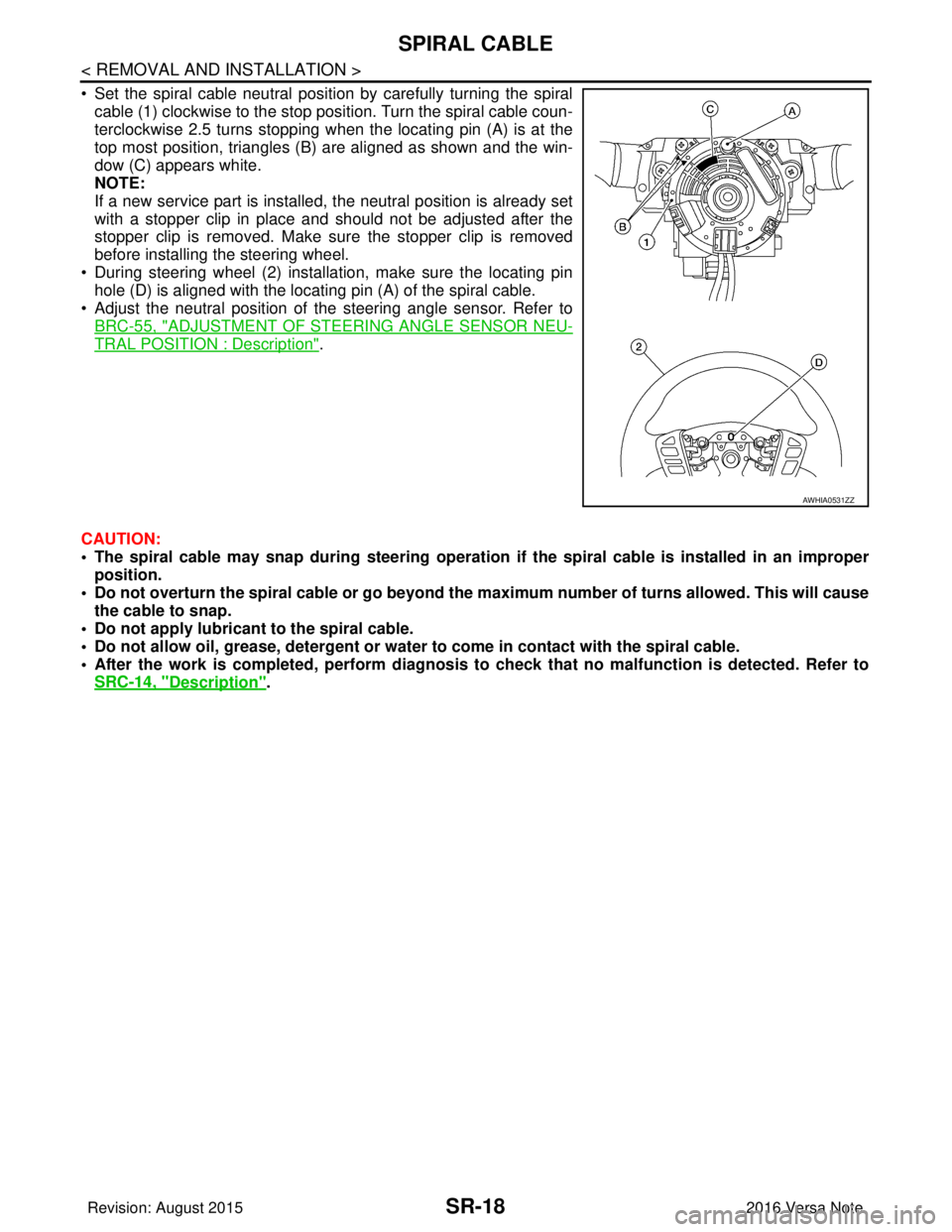
• Set the spiral cable neutral position by carefully turning the spiralcable (1) clockwise to the stop position. Turn the spiral cable coun-
terclockwise 2.5 turns stopping when the locating pin (A) is at the
top most position, triangles (B) are aligned as shown and the win-
dow (C) appears white.
NOTE:
If a new service part is installed, the neutral position is already set
with a stopper clip in place and should not be adjusted after the
stopper clip is removed. Make sure the stopper clip is removed
before installing the steering wheel.
• During steering wheel (2) installation, make sure the locating pin hole (D) is aligned with the locating pin (A) of the spiral cable.
• Adjust the neutral position of the steering angle sensor. Refer to
BRC-55, "
ADJUSTMENT OF STEERI NG ANGLE SENSOR NEU-
TRAL POSITION : Description".
CAUTION:
• The spiral cable may snap during steering operation if the spiral cable is installed in an improper
position.
• Do not overturn the spiral cable or go beyond the maximum number of turns allowed. This will cause
the cable to snap.
• Do not apply lubricant to the spiral cable.
• Do not allow oil, grease, detergent or water to come in contact with the spiral cable.
• After the work is completed, perform diagnosis to check that no malfunction is detected. Refer to
SRC-14, "
Description".
AWHIA0531ZZ
Revision: August 2015 2016 Versa Note
cardiagn.com
Page 3138 of 3641
SR-22
< REMOVAL AND INSTALLATION >
SIDE CURTAIN AIR BAG MODULE
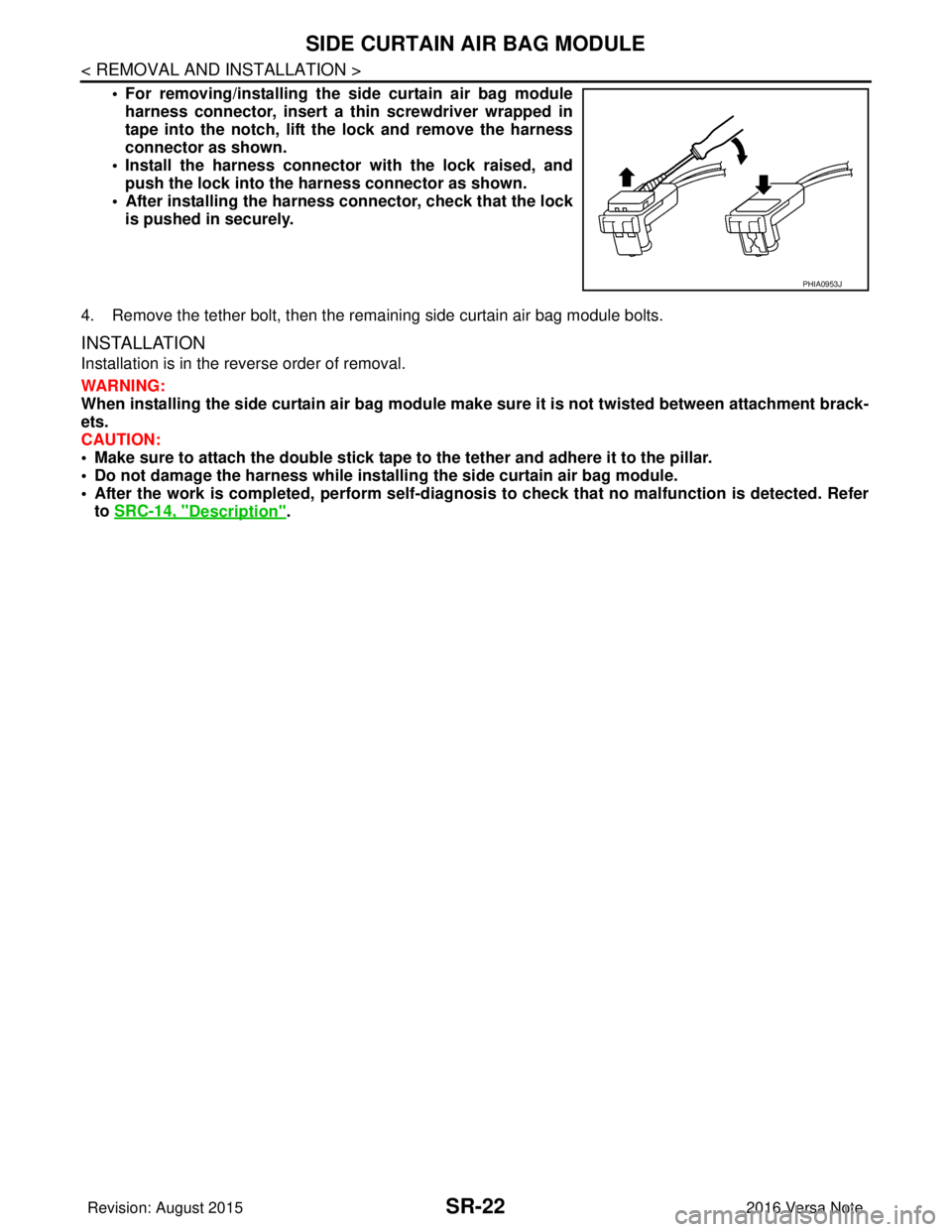
• For removing/installing the side curtain air bag moduleharness connector, insert a thin screwdriver wrapped in
tape into the notch, lift the lock and remove the harness
connector as shown.
• Install the harness connector with the lock raised, and push the lock into the harness connector as shown.
• After installing the harness connector, check that the lock
is pushed in securely.
4. Remove the tether bolt, then the remaining side curtain air bag module bolts.
INSTALLATION
Installation is in the reverse order of removal.
WARNING:
When installing the side curtain air bag module make sure it is not twisted between attachment brack-
ets.
CAUTION:
• Make sure to attach the double stick tape to the tether and adhere it to the pillar.
• Do not damage the harness while installi ng the side curtain air bag module.
• After the work is completed, perform self-diagnos is to check that no malfunction is detected. Refer
to SRC-14, "
Description".
PHIA0953J
Revision: August 2015 2016 Versa Note
cardiagn.com
Page 3141 of 3641
CRASH ZONE SENSORSR-25
< REMOVAL AND INSTALLATION >
C
DE
F
G
I
J
K L
M A
B
SR
N
O P
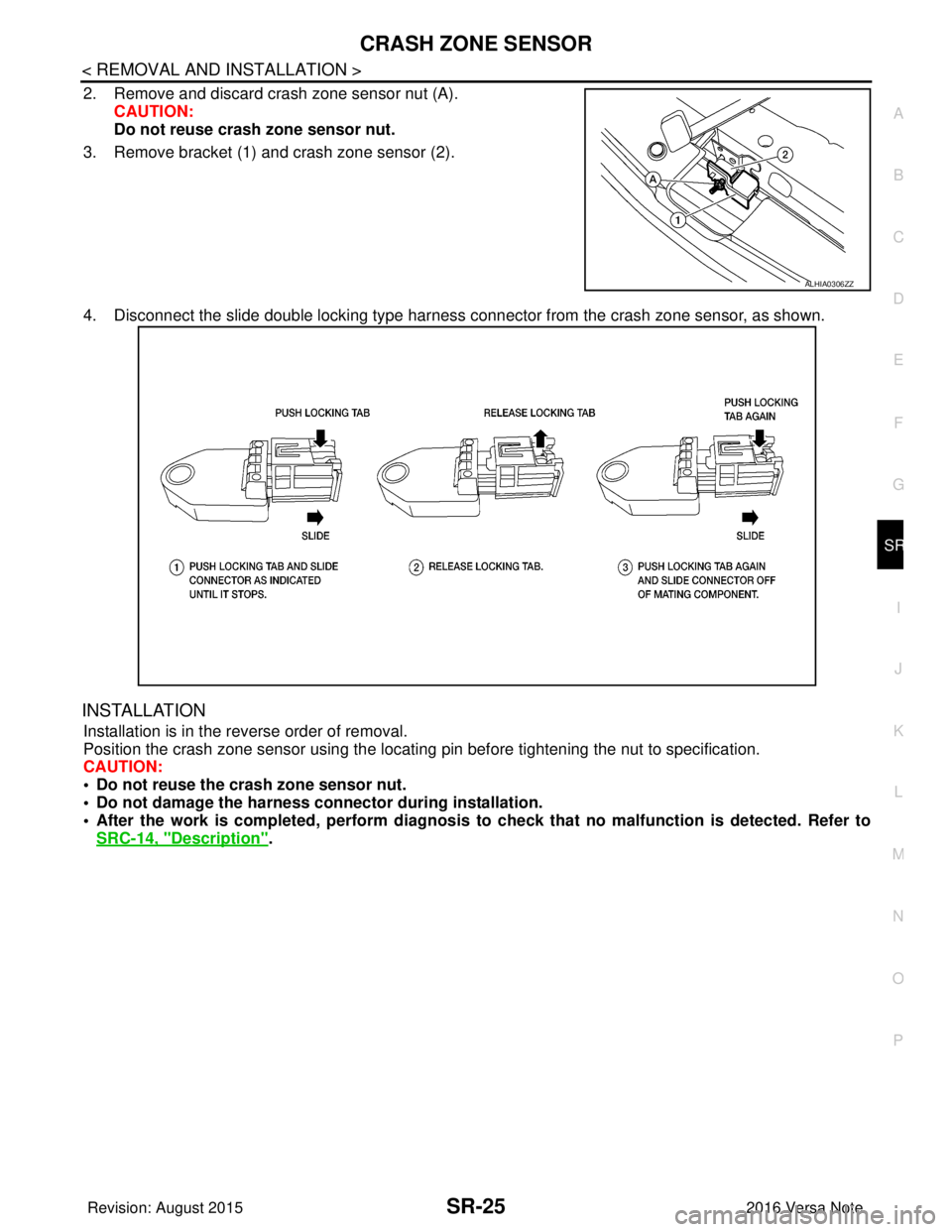
2. Remove and discard crash zone sensor nut (A). CAUTION:
Do not reuse crash zone sensor nut.
3. Remove bracket (1) and crash zone sensor (2).
4. Disconnect the slide double locking type harness connector from the crash zone sensor, as shown.
INSTALLATION
Installation is in the reverse order of removal.
Position the crash zone sensor using the locating pin before tightening the nut to specification.
CAUTION:
• Do not reuse the crash zone sensor nut.
• Do not damage the harness conn ector during installation.
• After the work is completed, perform diagnosis to check that no malfunction is detected. Refer to
SRC-14, "
Description".
ALHIA0306ZZ
Revision: August 2015 2016 Versa Note
cardiagn.com
Page 3143 of 3641
SATELLITE SENSORSR-27
< REMOVAL AND INSTALLATION >
C
DE
F
G
I
J
K L
M A
B
SR
N
O P
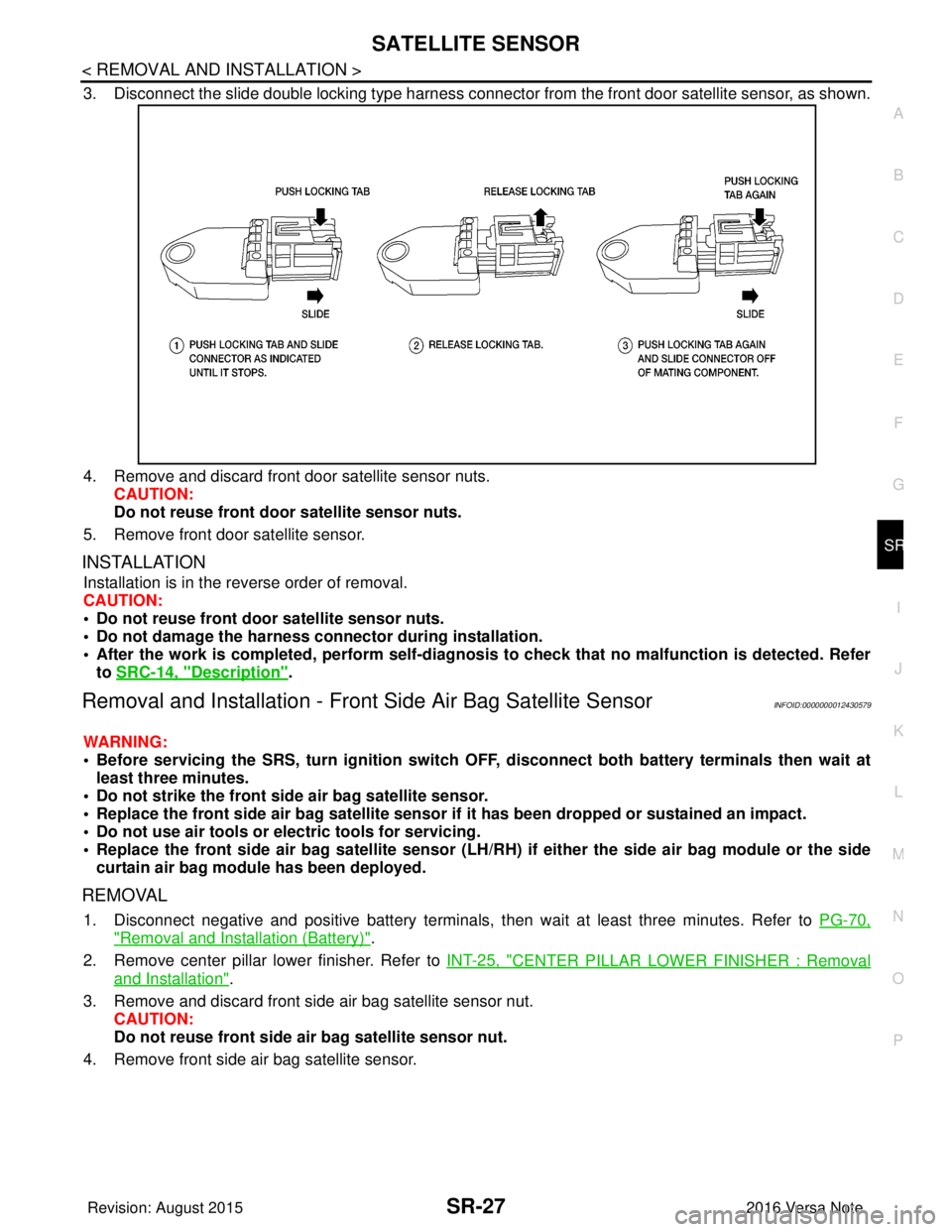
3. Disconnect the slide double locking type harness connecto r from the front door satellite sensor, as shown.
4. Remove and discard front door satellite sensor nuts. CAUTION:
Do not reuse front door satellite sensor nuts.
5. Remove front door satellite sensor.
INSTALLATION
Installation is in the reverse order of removal.
CAUTION:
• Do not reuse front door satellite sensor nuts.
• Do not damage the harness conn ector during installation.
• After the work is completed, perform self-diagnosi s to check that no malfunction is detected. Refer
to SRC-14, "
Description".
Removal and Installation - Fron t Side Air Bag Satellite SensorINFOID:0000000012430579
WARNING:
• Before servicing the SRS, turn ig nition switch OFF, disconnect both battery terminals then wait at
least three minutes.
• Do not strike the front side air bag satellite sensor.
• Replace the front side air bag satellite sensor if it has been dropped or sustained an impact.
• Do not use air tools or electric tools for servicing.
• Replace the front side air bag satellite sensor (LH/RH) if either the side air bag module or the side
curtain air bag module has been deployed.
REMOVAL
1. Disconnect negative and positive battery terminals, then wait at least three minutes. Refer to PG-70,
"Removal and Installation (Battery)".
2. Remove center pillar lower finisher. Refer to INT-25, "
CENTER PILLAR LOWER FINISHER : Removal
and Installation".
3. Remove and discard front side air bag satellite sensor nut. CAUTION:
Do not reuse front side air bag satellite sensor nut.
4. Remove front side air bag satellite sensor.
Revision: August 2015 2016 Versa Note
cardiagn.com
Page 3144 of 3641

SR-28
< REMOVAL AND INSTALLATION >
SATELLITE SENSOR
5. Disconnect the slide double locking type harness connector from front side air bag satellite sensor, asshown.
INSTALLATION
Installation is in the reverse order of removal.
Position the front side air bag satellite sensor using t he locating pin before tightening the nut to specification.
CAUTION:
• Do not reuse the front side air bag satellite sensor nut.
• Do not damage the harness connector during installation.
• After the work is completed, perform self-diagnos is to check that no malfunction is detected. Refer
to SRC-14, "
Description".
Removal and Installation - Rear Side Air Bag Satellite SensorINFOID:0000000012430580
WARNING:
• Before servicing the SRS, turn ignition switch OFF, disconnect bot h battery terminals then wait at
least three minutes.
• Replace the rear side air bag satellite sensor if it has been dropped or sustained an impact.
• Replace the rear side air bag satellite sensor (LH/RH) if either the side air bag module or the side cur-
tain air bag module has been deployed.
• Do not strike the rear side air bag satellite sensor.
• Do not use air tools or el ectric tools for servicing.
REMOVAL
1. Disconnect negative and positive battery terminals, then wait at least three minutes. Refer to PG-70,
"Removal and Installation (Battery)".
2. Remove luggage side lower finisher. Refer to INT-34, "
LUGGAGE SIDE LOWER FINISHER : Removal
and Installation".
Revision: August 2015 2016 Versa Note
cardiagn.com
Page 3145 of 3641
SATELLITE SENSORSR-29
< REMOVAL AND INSTALLATION >
C
DE
F
G
I
J
K L
M A
B
SR
N
O P
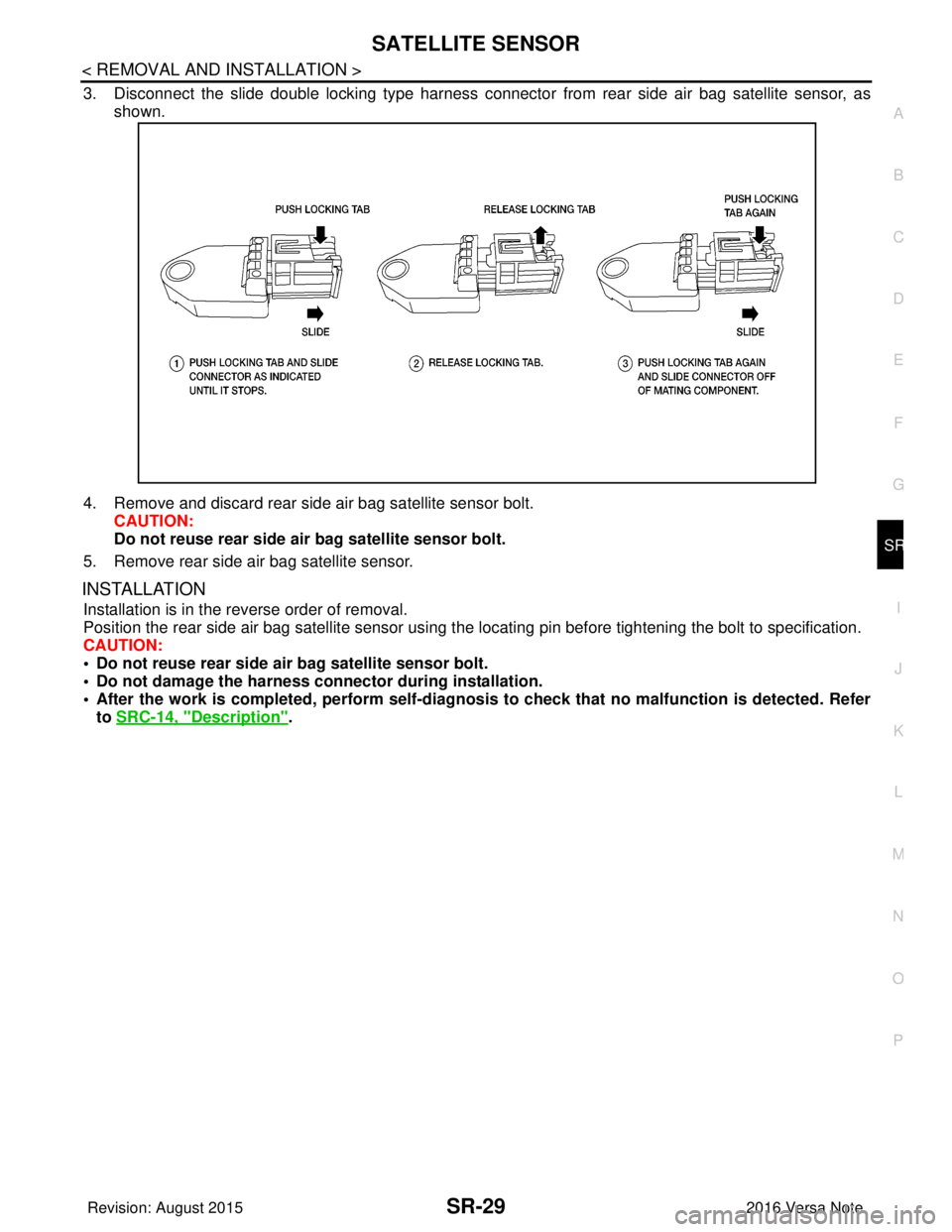
3. Disconnect the slide double locking type harness connecto r from rear side air bag satellite sensor, as
shown.
4. Remove and discard rear side air bag satellite sensor bolt. CAUTION:
Do not reuse rear side ai r bag satellite sensor bolt.
5. Remove rear side air bag satellite sensor.
INSTALLATION
Installation is in the reverse order of removal.
Position the rear side air bag satellite sensor using the locating pin before tightening the bolt to specification.
CAUTION:
• Do not reuse rear side ai r bag satellite sensor bolt.
• Do not damage the harness conn ector during installation.
• After the work is completed, perform self-diagnosi s to check that no malfunction is detected. Refer
to SRC-14, "
Description".
Revision: August 2015 2016 Versa Note
cardiagn.com
Page 3147 of 3641
AIR BAG DIAGNOSIS SENSOR UNITSR-31
< REMOVAL AND INSTALLATION >
C
DE
F
G
I
J
K L
M A
B
SR
N
O P
4. Disconnect the harness connectors from the front seat belt pre-tensioners (LH/RH).
CAUTION:
• For removing/installing the front seat belt pre-tensioner
harness connector, insert a thin screwdriver wrapped in
tape into the notch, then lift the lock and remove the har-
ness connector as shown.
• Install the harness connector with the lock raised, and push the lock into the harness connector as shown.
• After installing the harness connector, check that the lock
is pushed in securely.
5. Remove the center console assembly. Refer to IP-18, "
Removal and Installation".
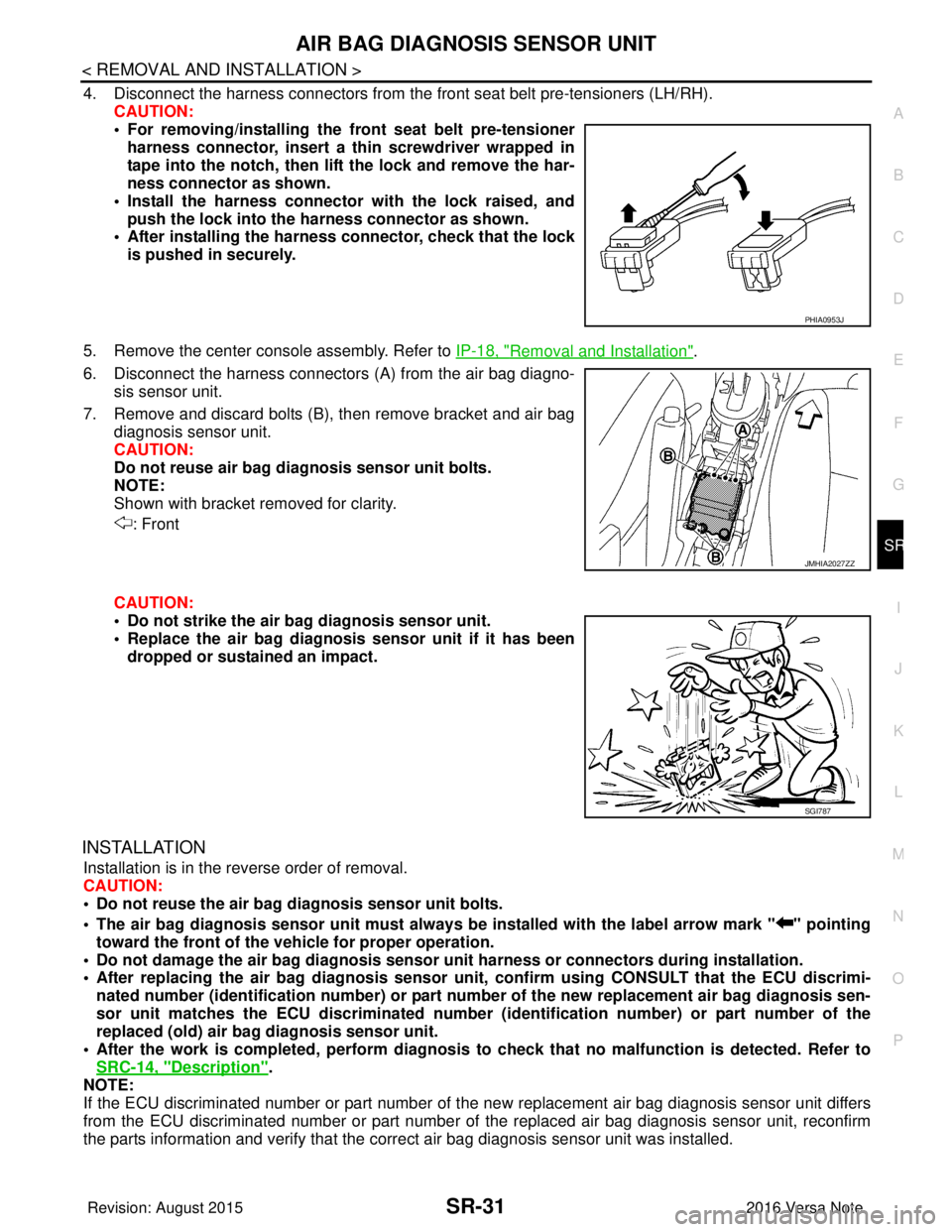
6. Disconnect the harness connectors (A) from the air bag diagno-
sis sensor unit.
7. Remove and discard bolts (B), then remove bracket and air bag diagnosis sensor unit.
CAUTION:
Do not reuse air bag diagnosis sensor unit bolts.
NOTE:
Shown with bracket removed for clarity.
: Front
CAUTION:
• Do not strike the air ba g diagnosis sensor unit.
• Replace the air bag diagnosis sensor unit if it has been
dropped or sustained an impact.
INSTALLATION
Installation is in the reverse order of removal.
CAUTION:
• Do not reuse the air bag diagnosis sensor unit bolts.
• The air bag diagnosis sensor unit must always be installed with the label arrow mark " " pointing
toward the front of the vehicle for proper operation.
• Do not damage the air bag diagnosis sensor un it harness or connectors during installation.
• After replacing the air bag diagnosis sensor un it, confirm using CONSULT that the ECU discrimi-
nated number (identification number) or part number of the new replacement air bag diagnosis sen-
sor unit matches the ECU discrimin ated number (identification number) or part number of the
replaced (old) air bag diagnosis sensor unit.
• After the work is completed, perform diagnosis to check that no malfunction is detected. Refer to
SRC-14, "
Description".
NOTE:
If the ECU discriminated number or part number of the new replacement air bag diagnosis sensor unit differs
from the ECU discriminated number or part number of the replaced air bag diagnosis sensor unit, reconfirm
the parts information and verify that the corre ct air bag diagnosis sensor unit was installed.
PHIA0953J
JMHIA2027ZZ
SGI787
Revision: August 2015 2016 Versa Note
cardiagn.com
Page 3157 of 3641

COMPONENT PARTSSTR-5
< SYSTEM DESCRIPTION >
C
DE
F
G H
I
J
K L
M A
STR
NP
O
STARTING SYSTEM (WITHOUT INTELL
IGENT KEY) : Component Description
INFOID:0000000012432061
STARTING SYSTEM (WITH INTELLIGENT KEY)
No.Component part Description
1. IPDM E/R CPU inside IPDM E/R operates the starter control relay when
the ignition switch is in the start position.
2. Transmission range switch (CVT Models) Supplies power to the starter co
ntrol relay (inside IPDM E/R)
when the selector lever is shifted into the P or N position.
3. Starter motor The starter motor plunger closes and the motor is supplied
with battery power, which in turn cranks the engine, when the
S terminal is supplied with electric power.
4. Clutch interlock switch (M/T Models) Clutch interlock switch supplies power to the coil side of the
starter control relay when the clutch pedal is depressed to
crank the engine.
Revision: August 2015
2016 Versa Note
cardiagn.com