battery NISSAN NOTE 2016 Service Repair Manual
[x] Cancel search | Manufacturer: NISSAN, Model Year: 2016, Model line: NOTE, Model: NISSAN NOTE 2016Pages: 3641, PDF Size: 28.72 MB
Page 2693 of 3641

PWC-32
< DTC/CIRCUIT DIAGNOSIS >
REAR POWER WINDOW SWITCH
REAR POWER WINDOW SWITCH
Component Function CheckINFOID:0000000012431816
1. CHECK FUNCTION
Check rear power window motor operation with rear power window switch.
Is the inspection result normal?
YES >> Inspection End.
NO >> Refer to PWC-32, "
Diagnosis Procedure".
Diagnosis ProcedureINFOID:0000000012431817
Regarding Wiring Diagram information, refer to PWC-16, "Wiring Diagram".
1.CHECK REAR POWER WINDOW SWITCH INPUT SIGNAL
1. Turn ignition switch OFF.
2. Disconnect rear power window switch connector.
3. Turn ignition switch ON.
4. Check voltage between rear power window switch harness connector and ground.
Is the inspection result normal?
YES >> GO TO 3.
NO >> GO TO 2.
2.CHECK REAR POWER WINDOW SWITCH CIRCUIT
1. Turn ignition switch OFF.
2. Disconnect main power window and door lock/unlock switch connector.
3. Check continuity between main power window and door lock/unlock switch harness connector and rear power window switch harness connector.
4. Check continuity between main power window and door lock/unlock switch harness connector and
ground.
(+)
(-)Condition Vo l ta g e
(Approx.)
Rear power window switch
Connector Terminal
LH D203 7
Ground Power window main
switch (rear LH)
NEUTRAL
0
DOWN Battery voltage
8 NEUTRAL
0
UP Battery voltage
RH D303 7
Power window main
switch (rear RH)NEUTRAL
0
DOWN Battery voltage
8 NEUTRAL
0
UP Battery voltage
Main power window and door lock/unlock switch Rear power window switch
Continuity
Connector Terminal ConnectorTerminal
D7 1
LHD203 8
Ye s
37
5
RHD303 7
78
Revision: August 2015 2016 Versa Note
cardiagn.com
Page 2695 of 3641
PWC-34
< DTC/CIRCUIT DIAGNOSIS >
POWER WINDOW MOTOR
POWER WINDOW MOTOR
DRIVER SIDE
DRIVER SIDE : Component Function CheckINFOID:0000000012431819
1. CHECK FUNCTION
Check front power window motor LH operation with main power window and door lock/unlock switch.
Is the inspection result normal?
YES >> Inspection End.
NO >> Refer to PWC-34, "
DRIVER SIDE : Diagnosis Procedure".
DRIVER SIDE : Diagnosis ProcedureINFOID:0000000012431820
Regarding Wiring Diagram information, refer to PWC-16, "Wiring Diagram".
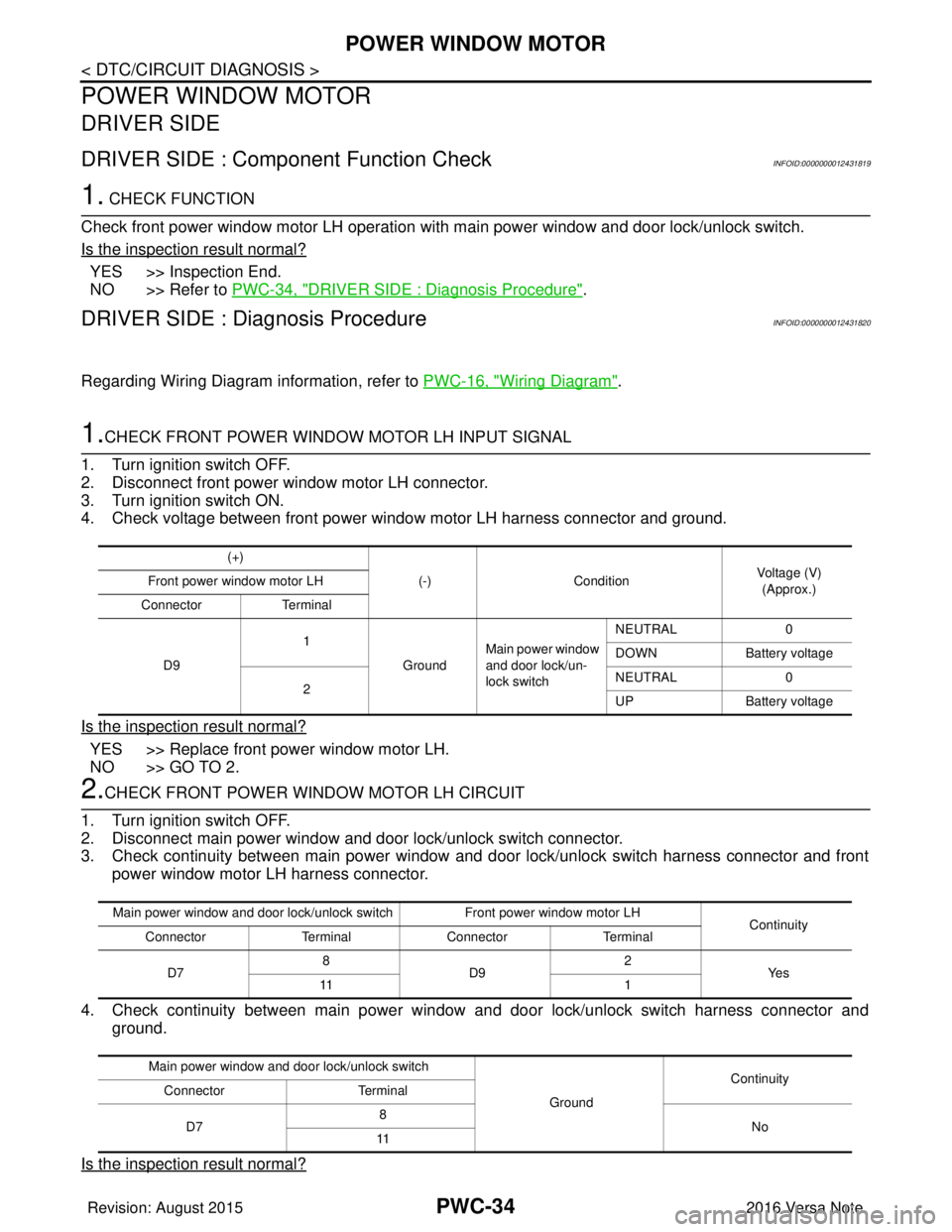
1.CHECK FRONT POWER WINDOW MOTOR LH INPUT SIGNAL
1. Turn ignition switch OFF.
2. Disconnect front power window motor LH connector.
3. Turn ignition switch ON.
4. Check voltage between front power window motor LH harness connector and ground.
Is the inspection result normal?
YES >> Replace front power window motor LH.
NO >> GO TO 2.
2.CHECK FRONT POWER WINDOW MOTOR LH CIRCUIT
1. Turn ignition switch OFF.
2. Disconnect main power window and door lock/unlock switch connector.
3. Check continuity between main power window and door lock/unlock switch harness connector and front power window motor LH harness connector.
4. Check continuity between main power window and door lock/unlock switch harness connector and
ground.
Is the inspection result normal?
(+) (-)Condition Voltage (V)
(Approx.)
Front power window motor LH
Connector Terminal
D9 1
GroundMain power window
and door lock/un-
lock switch NEUTRAL
0
DOWN Battery voltage
2 NEUTRAL
0
UP Battery voltage
Main power window and door lock/unlock switch Front power window motor LH
Continuity
Connector TerminalConnector Terminal
D7 8
D9 2
Ye s
11 1
Main power window and door lock/unlock switch GroundContinuity
Connector Terminal
D7 8
No
11
Revision: August 2015 2016 Versa Note
cardiagn.com
Page 2696 of 3641
POWER WINDOW MOTORPWC-35
< DTC/CIRCUIT DIAGNOSIS >
C
DE
F
G H
I
J
L
M A
B
PWC
N
O P
YES >> Replace main power window and door lock/unlock switch. Refer to PWC-55, "Removal and Instal-
lation".
NO >> Repair or replace harness.
PASSENGER SIDE
PASSENGER SIDE : Comp onent Function CheckINFOID:0000000012431821
1. CHECK FUNCTION
Check front power window motor RH operation with main power window and d\
oor lock/unlock switch or power
window and door lock/unlock switch RH.
Is the inspection result normal?
YES >> Inspection End.
NO >> Refer to PWC-35, "
PASSENGER SIDE : Diagnosis Procedure".
PASSENGER SIDE : Dia gnosis ProcedureINFOID:0000000012431822
Regarding Wiring Diagram information, refer to PWC-16, "Wiring Diagram".
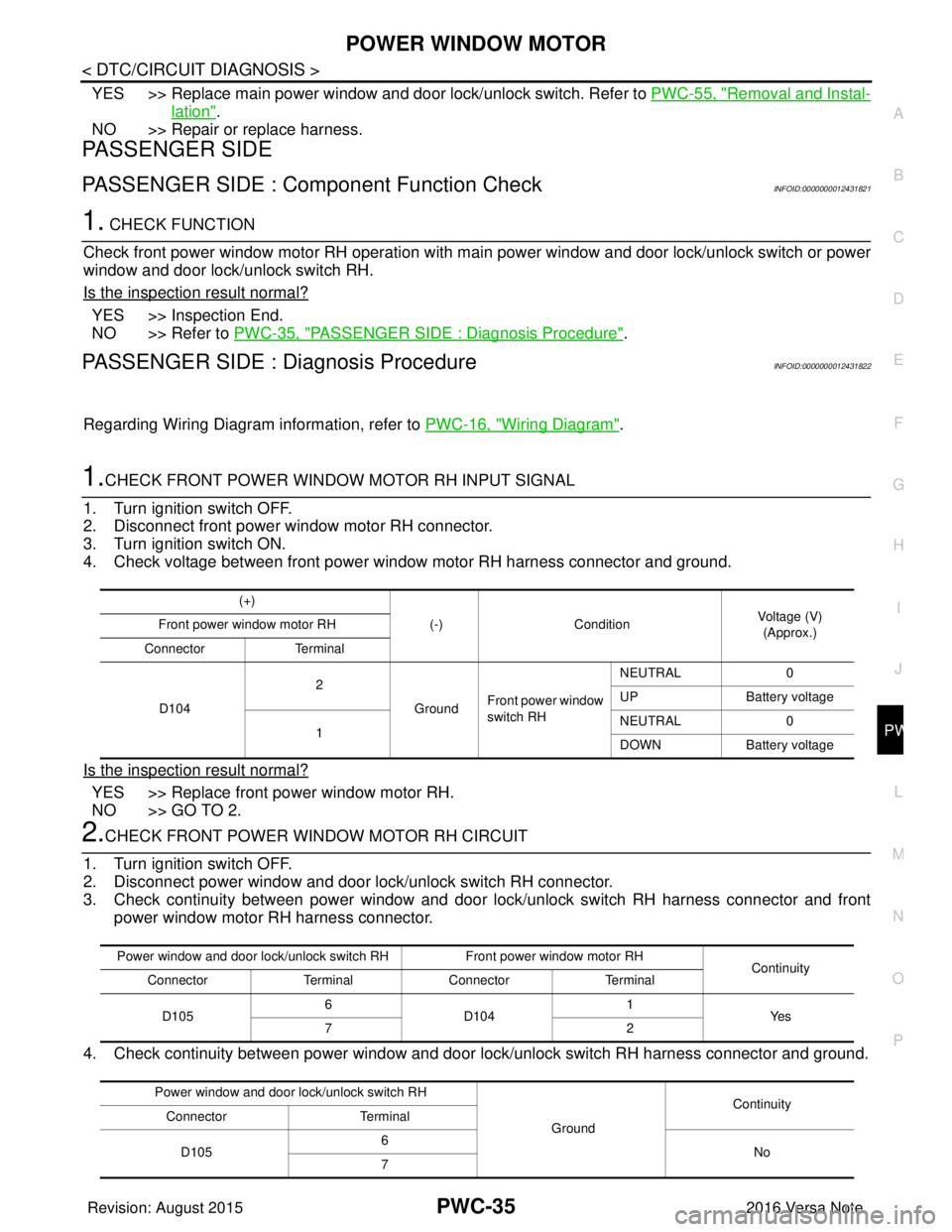
1.CHECK FRONT POWER WINDOW MOTOR RH INPUT SIGNAL
1. Turn ignition switch OFF.
2. Disconnect front power window motor RH connector.
3. Turn ignition switch ON.
4. Check voltage between front power window motor RH harness connector and ground.
Is the inspection result normal?
YES >> Replace front power window motor RH.
NO >> GO TO 2.
2.CHECK FRONT POWER WINDOW MOTOR RH CIRCUIT
1. Turn ignition switch OFF.
2. Disconnect power window and door lock/unlock switch RH connector.
3. Check continuity between power window and door lock/unlock switch RH harness connector and front power window motor RH harness connector.
4. Check continuity between power window and door lock/unlock switch RH harness connector and ground.
(+)
(-)Condition Voltage (V)
(Approx.)
Front power window motor RH
Connector Terminal
D104 2
GroundFront power window
switch RH NEUTRAL
0
UP Battery voltage
1 NEUTRAL
0
DOWN Battery voltage
Power window and door lock/unlock switch RH Front power window motor RH
Continuity
Connector TerminalConnector Terminal
D105 6
D104 1
Ye s
72
Power window and door lock/unlock switch RH GroundContinuity
Connector Terminal
D105 6
No
7
Revision: August 2015 2016 Versa Note
cardiagn.com
Page 2697 of 3641
PWC-36
< DTC/CIRCUIT DIAGNOSIS >
POWER WINDOW MOTOR
Is the inspection result normal?
YES >> Replace power window and door lock/unlock switch RH. Refer to PWC-56, "Removal and Installa-
tion".
NO >> Repair or replace harness.
REAR LH
REAR LH : Componen t Function CheckINFOID:0000000012431823
1.CHECK FUNCTION
Check rear power window motor LH operation with main power window and door lock/unlock switch or rear
power window switch LH.
Is the inspection result normal?
YES >> Inspection End.
NO >> Refer to PWC-36, "
REAR LH : Diagnosis Procedure".
REAR LH : Diagnosis ProcedureINFOID:0000000012431824
Regarding Wiring Diagram information, refer to PWC-16, "Wiring Diagram".
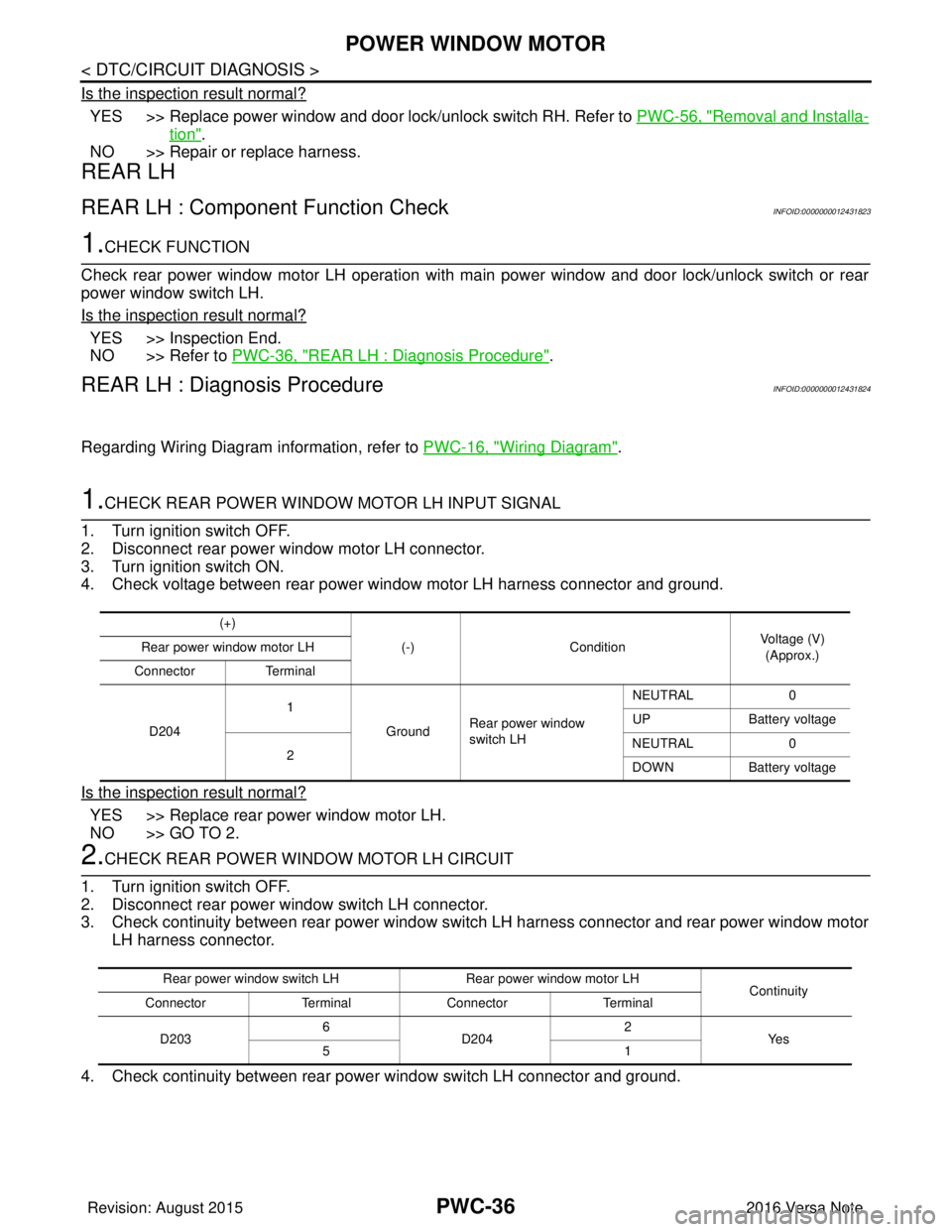
1.CHECK REAR POWER WINDOW MOTOR LH INPUT SIGNAL
1. Turn ignition switch OFF.
2. Disconnect rear power window motor LH connector.
3. Turn ignition switch ON.
4. Check voltage between rear power window motor LH harness connector and ground.
Is the inspection result normal?
YES >> Replace rear power window motor LH.
NO >> GO TO 2.
2.CHECK REAR POWER WINDOW MOTOR LH CIRCUIT
1. Turn ignition switch OFF.
2. Disconnect rear power window switch LH connector.
3. Check continuity between rear power window switch LH harness connector and rear power window motor LH harness connector.
4. Check continuity between rear power window switch LH connector and ground.
(+) (-)Condition Voltage (V)
(Approx.)
Rear power window motor LH
Connector Terminal
D204 1
GroundRear power window
switch LH NEUTRAL
0
UP Battery voltage
2 NEUTRAL
0
DOWN Battery voltage
Rear power window switch LH Rear power window motor LH
Continuity
Connector TerminalConnector Terminal
D203 6
D204 2
Ye s
51
Revision: August 2015 2016 Versa Note
cardiagn.com
Page 2698 of 3641
POWER WINDOW MOTORPWC-37
< DTC/CIRCUIT DIAGNOSIS >
C
DE
F
G H
I
J
L
M A
B
PWC
N
O P
Is the inspection result normal?
YES >> Replace rear power window switch LH. Refer to PWC-57, "Removal and Installation".
NO >> Repair or replace harness.
REAR RH
REAR RH : Component Function CheckINFOID:0000000012431825
1. CHECK FUNCTION
Check rear power window motor RH operation with main power window and door lock/unlock switch or rear
power window switch RH.
Is the inspection result normal?
YES >> Inspection End.
NO >> Refer to PWC-37, "
REAR RH : Diagnosis Procedure".
REAR RH : Diagnosis ProcedureINFOID:0000000012431826
Regarding Wiring Diagram information, refer to PWC-16, "Wiring Diagram".
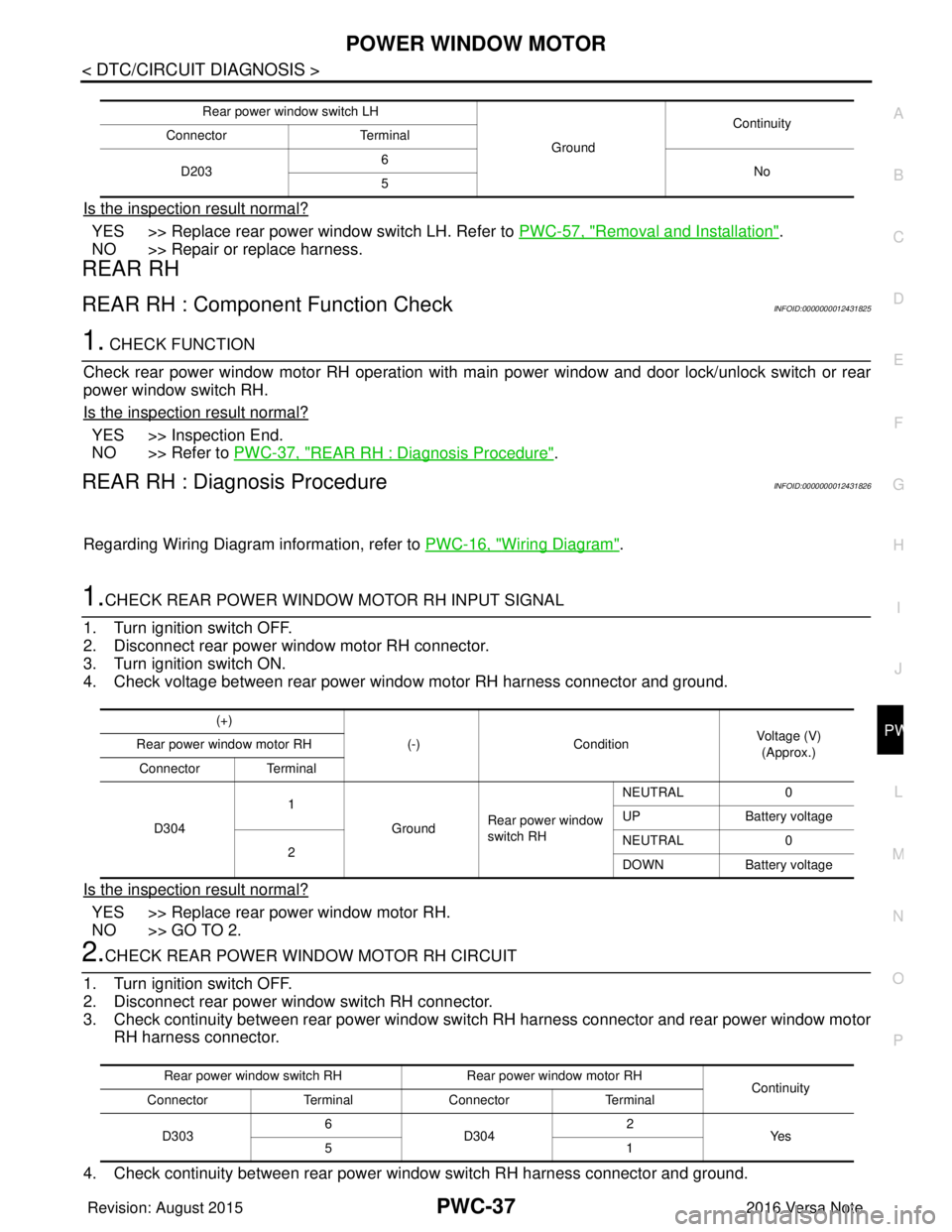
1.CHECK REAR POWER WINDOW MOTOR RH INPUT SIGNAL
1. Turn ignition switch OFF.
2. Disconnect rear power window motor RH connector.
3. Turn ignition switch ON.
4. Check voltage between rear power window motor RH harness connector and ground.
Is the inspection result normal?
YES >> Replace rear power window motor RH.
NO >> GO TO 2.
2.CHECK REAR POWER WINDOW MOTOR RH CIRCUIT
1. Turn ignition switch OFF.
2. Disconnect rear power window switch RH connector.
3. Check continuity between rear power window swit ch RH harness connector and rear power window motor
RH harness connector.
4. Check continuity between rear power window switch RH harness connector and ground.
Rear power window switch LH GroundContinuity
Connector Terminal
D203 6
No
5
(+)
(-)Condition Voltage (V)
(Approx.)
Rear power window motor RH
Connector Terminal
D304 1
GroundRear power window
switch RH NEUTRAL
0
UP Battery voltage
2 NEUTRAL
0
DOWN Battery voltage
Rear power window switch RH Rear power window motor RH
Continuity
Connector TerminalConnector Terminal
D303 6
D304 2
Ye s
51
Revision: August 2015 2016 Versa Note
cardiagn.com
Page 2720 of 3641

RAX-2
< PRECAUTION >
PRECAUTIONS
PRECAUTION
PRECAUTIONS
Precaution for Supplemental Restraint System (SRS) "AIR BAG" and "SEAT BELT
PRE-TENSIONER"
INFOID:0000000012431904
The Supplemental Restraint System such as “A IR BAG” and “SEAT BELT PRE-TENSIONER”, used along
with a front seat belt, helps to reduce the risk or severity of injury to the driver and front passenger for certain
types of collision. Information necessary to service the system safely is included in the SR and SB section of
this Service Manual.
WARNING:
• To avoid rendering the SRS inopera tive, which could increase the risk of personal injury or death in
the event of a collision which would result in air bag inflation, all maintenance must be performed by
an authorized NISSAN/INFINITI dealer.
• Improper maintenance, including in correct removal and installation of the SRS, can lead to personal
injury caused by unintent ional activation of the system. For re moval of Spiral Cable and Air Bag
Module, see the SR section.
• Do not use electrical test equipmen t on any circuit related to the SRS unless instructed to in this
Service Manual. SRS wiring harn esses can be identified by yellow and/or orange harnesses or har-
ness connectors.
PRECAUTIONS WHEN USING POWER TOOLS (AIR OR ELECTRIC) AND HAMMERS
WARNING:
• When working near the Airbag Diagnosis Sensor Unit or other Airbag System sensors with the Igni-
tion ON or engine running, DO NOT use air or electri c power tools or strike near the sensor(s) with a
hammer. Heavy vibration could activate the sensor( s) and deploy the air bag(s), possibly causing
serious injury.
• When using air or electric power tools or hammers , always switch the Ignition OFF, disconnect the
battery and wait at least three minutes before performing any service.
Precautions for Wheel HubINFOID:0000000012431905
Observe the following precautions when assembling wheel hub.
• Perform work in a location that is free from dust, dirt and debris.
• Use paper shop towels while performing repairs. Fabric shop cloths must not be used because of the danger of lint adhering to parts.
• Do not drop any of the components such as the brake drum, wheel bearing, spindle, or wheel hub lock nut. If
any of these parts have been dropped, they must be replaced.
• Always check that the tools used to press-fit the wheel bearing to the brake drum have no wear and defor-
mation. Damaged tools will not guarantee that pre ssure can be applied vertically and damage parts.
Revision: August 2015 2016 Versa Note
cardiagn.com
Page 2730 of 3641

RSU-2
< PRECAUTION >
PRECAUTIONS
PRECAUTION
PRECAUTIONS
Precaution for Supplemental Restraint System (SRS) "AIR BAG" and "SEAT BELT
PRE-TENSIONER"
INFOID:0000000012431916
The Supplemental Restraint System such as “A IR BAG” and “SEAT BELT PRE-TENSIONER”, used along
with a front seat belt, helps to reduce the risk or severity of injury to the driver and front passenger for certain
types of collision. Information necessary to service the system safely is included in the SR and SB section of
this Service Manual.
WARNING:
• To avoid rendering the SRS inopera tive, which could increase the risk of personal injury or death in
the event of a collision which would result in air bag inflation, all maintenance must be performed by
an authorized NISSAN/INFINITI dealer.
• Improper maintenance, including in correct removal and installation of the SRS, can lead to personal
injury caused by unintent ional activation of the system. For re moval of Spiral Cable and Air Bag
Module, see the SR section.
• Do not use electrical test equipmen t on any circuit related to the SRS unless instructed to in this
Service Manual. SRS wiring harn esses can be identified by yellow and/or orange harnesses or har-
ness connectors.
PRECAUTIONS WHEN USING POWER TOOLS (AIR OR ELECTRIC) AND HAMMERS
WARNING:
• When working near the Airbag Diagnosis Sensor Unit or other Airbag System sensors with the Igni-
tion ON or engine running, DO NOT use air or electri c power tools or strike near the sensor(s) with a
hammer. Heavy vibration could activate the sensor( s) and deploy the air bag(s), possibly causing
serious injury.
• When using air or electric power tools or hammers , always switch the Ignition OFF, disconnect the
battery and wait at least three minutes before performing any service.
Precaution for SuspensionINFOID:0000000012431917
• When installing rubber bushings, the final tightening mu st be carried out under unladen conditions with tires
on ground. Spilled oil might shorten the life of rubber bushings. Be sure to wipe off any spilled oil.
- Unladen conditions mean that fuel, engine coolant and lubricant are full. Spare tire, jack, hand tools and mats are in designated positions.
• After servicing suspension parts, be sure to check wheel alignment.
• Self-lock nuts are not reusable. Always use new ones when installing. Since new self-lock nuts are pre-oiled,
tighten as they are.
• The tightening surface must be kept free of oil/grease.
• When jacking up the vehicle with a floor jack, do not hang the jack on the suspension beam.
Revision: August 2015 2016 Versa Note
cardiagn.com
Page 2746 of 3641
PRECAUTIONSWT-3
< PRECAUTION >
C
DF
G H
I
J
K L
M A
B
WT
N
O P
PRECAUTION
PRECAUTIONS
Precaution for Supplemental Restraint System (SRS) "AIR BAG" and "SEAT BELT
PRE-TENSIONER"
INFOID:0000000012432421
The Supplemental Restraint System such as “AIR BAG” and “SEAT BELT PRE-TENSIONER”, used along
with a front seat belt, helps to reduce the risk or severi ty of injury to the driver and front passenger for certain
types of collision. Information necessary to service the system safely is included in the SR and SB section of
this Service Manual.
WARNING:
• To avoid rendering the SRS inoper ative, which could increase the risk of personal injury or death in
the event of a collision which would result in air bag inflation, all maintenance must be performed by
an authorized NISSAN/INFINITI dealer.
• Improper maintenance, including in correct removal and installation of the SRS, can lead to personal
injury caused by unintentional act ivation of the system. For removal of Spiral Cable and Air Bag
Module, see the SR section.
• Do not use electrical test equipm ent on any circuit related to the SRS unless instructed to in this
Service Manual. SRS wiring harnesses can be identi fied by yellow and/or orange harnesses or har-
ness connectors.
PRECAUTIONS WHEN USING POWER TOOLS (AIR OR ELECTRIC) AND HAMMERS
WARNING:
• When working near the Airbag Diagnosis Sensor Un it or other Airbag System sensors with the Igni-
tion ON or engine running, DO NOT use air or el ectric power tools or strike near the sensor(s) with a
hammer. Heavy vibration could activate the sensor( s) and deploy the air bag(s), possibly causing
serious injury.
• When using air or electric power tools or hammers, always switch the Ignition OFF, disconnect the
battery and wait at least three mi nutes before performing any service.
Service Notice and Precautions for TPMSINFOID:0000000012432422
WARNING:
Radio waves could adversely affect electric medical equipment. Those who use a pacemaker should
contact the electric medical equipment manufacturer for the possible influences before use.
• Low tire pressure warning lamp blinks for 1 minute, then turns ON when occurring any malfunction except low tire pressure. Erase the self-diagnosis memories fo r Tire Pressure Monitoring System (TPMS), or regis-
ter the ID to turn low tire pressure warning lamp OFF. For ID registration, refer to WT-22, "
Work Procedure".
• ID registration is required when replacing or rotating wheels, replacing tire pressure sensor or BCM. Refer to WT-22, "
Work Procedure".
• Replace grommet seal, valve core and valve cap of tire pressure sensor in TPMS, when replacing each tire by reaching the wear limit. Refer to WT-49, "
Removal and Installation".
• Because the tire pressure sensor conforms to North America radio law, the following items must be
observed.
- The sensor may be used only in North America.
- It may not be used in any method other than the specified method.
- It must not be disassembled or modified.
Service Notice and Pr ecautions for Road WheelINFOID:0000000012432423
• Genuine NISSAN aluminum wheel is designed for each type of vehicle. Use it on the specified vehicle only.
• Use Genuine NISSAN parts for the road wheels, valve caps and wheel nuts.
• Always use them after adjusting the wheel balance. For the balance weights, use Genuine NISSAN alumi-
num wheel weights.
• Use caution when handling the aluminum wheels, because they can be easily scratched. When removing
dirt, do not use any abrasives, a wire brush, or other items that may scratch the coating. Use a neutral deter-
gent if a detergent is needed.
• After driving on roads scattered with anti-icing salts, wash off the wheels completely.
• When installing road wheels onto the vehicle, always wipe off any dirt or foreign substances to prevent them
from being trapped between the contact surfaces of wheel.
Revision: August 2015 2016 Versa Note
cardiagn.com
Page 2753 of 3641

WT-10
< SYSTEM DESCRIPTION >
DIAGNOSIS SYSTEM (BCM)
DIAGNOSIS SYSTEM (BCM)
WITH INTELLIGENT KEY
WITH INTELLIGENT KEY : CONSULT Function (BCM - COMMON ITEM)INFOID:0000000012542957
APPLICATION ITEM
CONSULT performs the following functions via CAN communication with BCM.
SYSTEM APPLICATION
BCM can perform the following functions.
Direct Diagnostic Mode Description
ECU Identification The BCM part number is displayed.
Self Diagnostic Result The BCM self diagnostic results are displayed.
Data Monitor The BCM input/output data is displayed in real time.
Active Test The BCM activates outputs to test components.
Work support The settings for BCM functions can be changed.
Configuration • The vehicle specification can be read and saved.
• The vehicle specification can be written when replacing BCM.
CAN DIAG SUPPORT MNTR The result of transmit/receive diagnosis of CAN communication is displayed.
System Sub System Direct Diagnostic Mode
ECU Identification
Self Diagnostic Result
Data Monitor
Active Test
Work support
Configuration
CAN DIAG SUPPORT MNTR
Door lock
DOOR LOCK ×××
Rear window defogger REAR DEFOGGER ××
Warning chime BUZZER ××
Interior room lamp timer INT LAMP ×××
Exterior lamp HEAD LAMP ×××
Wiper and washer WIPER ×××
Turn signal and hazard warning lamps FLASHER ×××
Air conditioner AIR CONDITIONER ×
Intelligent Key system INTELLIGENT KEY ××××
Combination switch COMB SW ×
BCM BCM× × ×××
Immobilizer IMMU ××××
Interior room lamp battery saver BATTERY SAVER ×××
Vehicle security system THEFT ALM ××
RAP system RETAINED PWR ×
Signal buffer system SIGNAL BUFFER ×
TPMS AIR PRESSURE MONITOR ××××
Panic alarm system PANIC ALARM ×
Revision: August 2015 2016 Versa Note
cardiagn.com
Page 2755 of 3641

WT-12
< SYSTEM DESCRIPTION >
DIAGNOSIS SYSTEM (BCM)
SYSTEM APPLICATION
BCM can perform the following functions.
WITHOUT INTELLIGENT KEY : CONSULT Function (BCM - AIR PRESSURE MONI-
TOR)
INFOID:0000000012542959
NOTE:
The Signal Tech II Tool [– (J-50190)] can be used to perform the following functions. Refer to the Signal Tech
II User Guide for additional information.
• Activate and display TPMS transmitter IDs
• Display tire pressure reported by the TPMS transmitter
Direct Diagnostic ModeDescription
ECU Identification The BCM part number is displayed.
Self Diagnostic Result The BCM self diagnostic results are displayed.
Data Monitor The BCM input/output data is displayed in real time.
Active Test The BCM activates outputs to test components.
Work support The settings for BCM functions can be changed.
Configuration • The vehicle specification can be read and saved.
• The vehicle specification can be written when replacing BCM.
CAN DIAG SUPPORT MNTR The result of transmit/receive diagnosis of CAN communication is displayed.
System Sub System Direct Diagnostic Mode
ECU Identification
Self Diagnostic Result
Data Monitor
Active Test
Work support
Configuration
CAN DIAG SUPPORT MNTR
Door lock
DOOR LOCK ×××
Rear window defogger REAR DEFOGGER ××
Warning chime BUZZER ××
Interior room lamp timer INT LAMP ×××
Remote keyless entry system MULTI REMOTE ENT ×××
Exterior lamp HEAD LAMP ×××
Wiper and washer WIPER ×××
Turn signal and hazard warning lamps FLASHER ××
Air conditioner AIR CONDITIONER ×
Combination switch COMB SW ×
BCM BCM× × ×××
Immobilizer IMMU ×××
Interior room lamp battery saver BATTERY SAVER ×××
Vehicle security system THEFT ALM ××
RAP system RETAINED PWR ××
Signal buffer system SIGNAL BUFFER ×
TPMS AIR PRESSURE MONITOR ××××
Panic alarm system PANIC ALARM ×
Revision: August 2015 2016 Versa Note
cardiagn.com