battery NISSAN NOTE 2016 Service Repair Manual
[x] Cancel search | Manufacturer: NISSAN, Model Year: 2016, Model line: NOTE, Model: NISSAN NOTE 2016Pages: 3641, PDF Size: 28.72 MB
Page 2633 of 3641

PG-46
< WIRING DIAGRAM >
HARNESS
D3 E4 Y/2 : Crash zone sensorE1 E42 B/2: IPDM E/R (Intelligent power distribution
module engine room)
E4 E5 B/2 : Cooling fan motor (With CVT)E2 E43 B/6: IPDM E/R (Intelligent power distribution
module engine room)
E2 E8 W/24 : To F8 F2 E44 BR/8: IPDM E/R (Intelligent power distribution
module engine room)
E3 E9 BR/2 : Fusible link b o x ( B a t t e r y )E 1 E 4 5 B R / 1 2: IPDM E/R (Intelligent power distribution
module engine room)
E2 E10 GR/2 : Fusible link box (Battery) F2 E46 W/24: IPDM E/R (Intelligent power distribution
module engine room)
G 2 E 1 5 — : B o d y g r o u n d F 2 E 4 7 W / 1 6: IPDM E/R (Intelligent power distribution
module engine room)
F 2 E 1 6 B / 3 2 : E C M B 3 E 5 0 B R / 2 : W a s h e r f l u i d l e v e l s w i t c h
F4 E17 B/3 : Refrigerant pressure sensor E3 E51 B/2 : Front wheel sensor LH
C4 E18 BR/1 : Horn C4 E52 B/2 : Front wheel sensor RH
E 2 E 1 9 W / 6 : To F 3 3 G 4 E 5 3 B / 2 : F r o n t f o g l a m p L H
C 4 E 2 0 B / 1 : H o r n B 5 E 5 4 B / 2 : F r o n t f o g l a m p R H
A2 E24 — : Body ground E2 E55 GR/12 : To F55
G3 E25 B/3 : Front combination lamp LH G3 E62 L/4 : Cooling fan relay
A3 E26 B/3 : Front combination lamp RH C3 E63 GR/4 : Heated oxygen sensor 2
G2 E27 B/2 : Front combination lamp LH C4 E64 L/4 : Heated seat relay
A2 E28 B/2 : Front combinati on lamp RHG5 E69 B/2 : Ambient sensor
F4 E29 GR/3 : Front combination lamp LH E5 E70 BR/3 : Intelligent Key warning buzzer
B3 E30 GR/3 : Front combination lamp RH F5 E71 B/4 : Front camera
E3 E31 GR/4 : Cooling fan motor (With CVT) G3 E72 L/4 : Active grille shutter relay
E4 E32 W/2 : Cooling fan motor (With CVT) Front fog lamp sub harness
B2 E33 B/38 : ABS actuator and electric unit (Control
unit) E5 E302 B/4 : To E35
E5 E35 B/4 : To E302 F5 E303 B/4 : Active grille shutter
E1 E39 W/3 : Horn relay F5 E303 B/4 : Active grille shutter
Revision: August 2015 2016 Versa Note
cardiagn.com
Page 2636 of 3641

PG
HARNESSPG-49
< WIRING DIAGRAM >
C
DE
F
G H
I
J
K L
B A
O P
N
B3 F1 B/3 : Generator
D4 F28 — : Starter motor
B3 F2 — : Generator D3 F29 B/2 : Fuel injector no. 3 (Rear)
B4 F3 B/1 : A/C compressor D3 F30 B/2 : Fuel injector no. 4 (Rear)
B4 F4 — : Generator D1 F31 B/6 : Mass air flow sensor
B4 F5 — : Engine ground E1 F32 GR/2: Exhaust valve timing control solenoid
valve
E2 F6 GR/2 : Engine coolant temperature sensor F1 F33 W/6 : To E19
D1 F7 B/6 : Electric throttle control actuator B1 F34 GR/3: Ignition coil no.1 (With power
transistor)
E 1 F 8 W / 2 4 : To E 8 C 1 F 3 5 G R / 3: Ignition coil no.2 (With power
transistor)
F2 F9 GR/4 : Battery current sensor C1 F36 GR/3: Ignition coil no.3 (With power
transistor)
G 2 F 1 0 G R / 3 2 : E C M D 2 F 3 7 G R / 3: Ignition coil no.4 (With power
transistor)
G1 F11 BR/48 : ECM C4 F38 B/3 : Engine oil pressure sensor
D1 F12 BR/4 : Air fuel ratio (A/F) sensor 1 G3 F39 — : Fusible link box (Battery)
C3 F14 GR/2 : Knock sensor G3 F40 — : Fusible link box (Battery)
E1 F15 B/3 : Crankshaft position sensor (POS) G4 F41 B/3 : Output speed sensor
D4 F16 — : Engine ground F2 F42 W/12: IPDM E/R (Intelligent power distribution
module engine room)
B3 F17 B/2 : Fuel injector no. 1 (Front) F2 F43 W/12: IPDM E/R (Intelligent power distribution
module engine room)
C3 F18 B/2 : Fuel injector no. 2 (Front) F2 F44 B/48 : TCM (Transmission control module)
C3 F19 B/2 : Fuel injector no. 3 (Front) F4 F46 GR/22 : CVT unit
D3 F20 B/2 : Fuel injector no. 4 (Front) G4 F48 B/3 : Secondary speed sensor
D2 F21 B/3 : Camshaft position sensor G4 F50 B/3 : Primary speed sensor
C 1 F 2 2 G R / 2 : Evap canister purge volume control
solenoid valve F3 F52 B/10 : Transmission range switch
B 3 F 2 3 G R / 2 : Intake valve timing control solenoid
valve
B3 F53 B/2 : Fuel injector no. 1 (Rear)
E4 F24 G/3 : Park/neutral position (PNP) switch C3 F54 B/2 : Fuel injector no. 2 (Rear)
C4 F25 GR/2 : Engine oil temperature sensor G1 F55 GR/12 : To E55
C 3 F 2 6 W / 2 : C o n d e n s e r D 2 F 5 6 B / 3: Exhaust valve timing control position
sensor
D 3 F 2 7 — : S t a r t e r m o t o r D 3 F 5 9 — : E n g i n e g r o u n d
Revision: August 2015 2016 Versa Note
cardiagn.com
Page 2648 of 3641
PG
BATTERYPG-61
< BASIC INSPECTION >
C
DE
F
G H
I
J
K L
B A
O P
N
BASIC INSPECTION
BATTERY
How to Handle BatteryINFOID:0000000012433127
CAUTION:
• If it becomes necessary to start the engine with
a booster battery and jumper cables, use a 12-volt
booster battery.
• After connecting battery cables, ensure that they are tightly clamped to battery terminals for good
contact.
• Never add distilled water through the hole used to check specific gravity.
METHODS OF PREVENTING OVER-DISCHARGE
The following precautions must be taken to prevent over-discharging a battery.
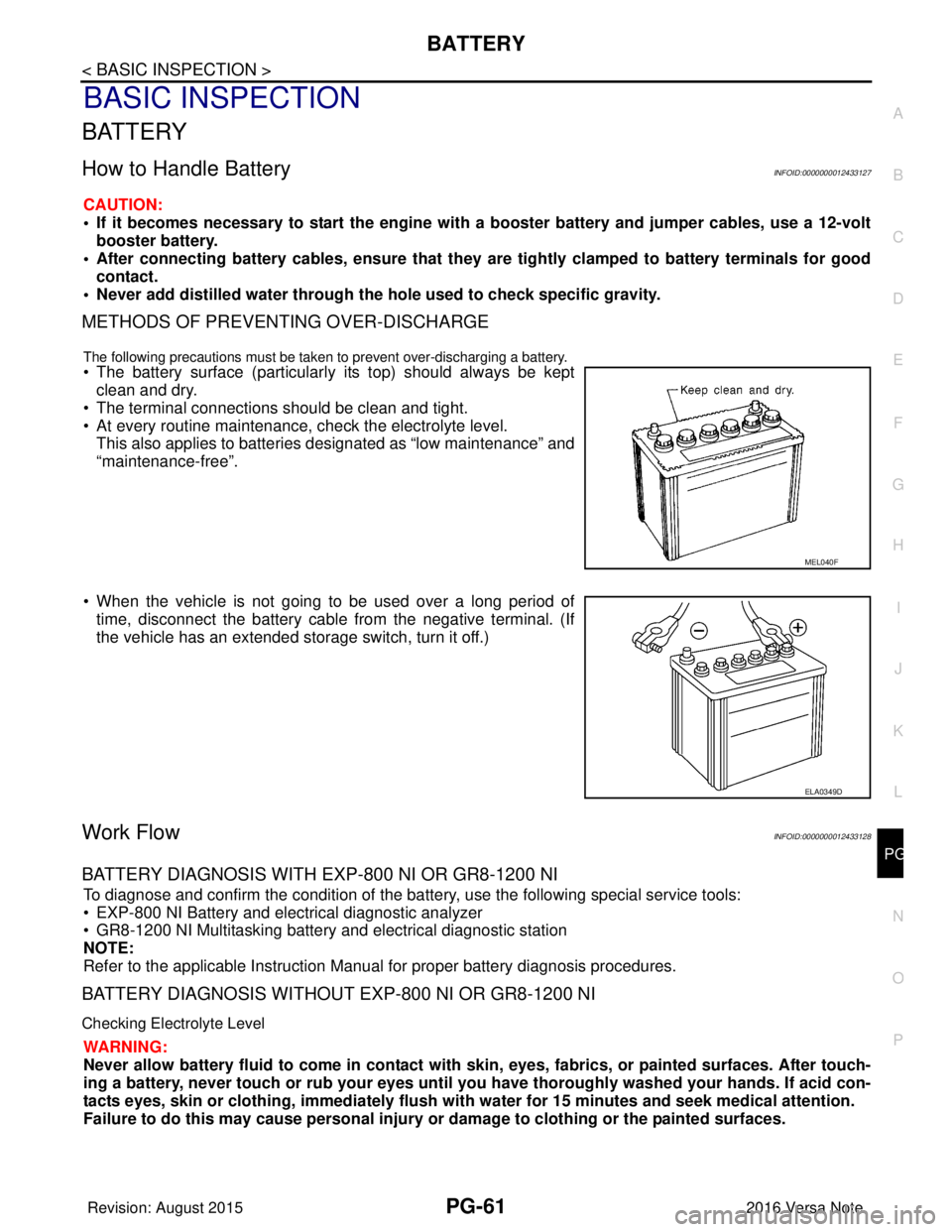
• The battery surface (particularly its top) should always be kept
clean and dry.
• The terminal connections should be clean and tight.
• At every routine maintenance, check the electrolyte level. This also applies to batteries designated as “low maintenance” and
“maintenance-free”.
• When the vehicle is not going to be used over a long period of time, disconnect the battery cable from the negative terminal. (If
the vehicle has an extended storage switch, turn it off.)
Work FlowINFOID:0000000012433128
BATTERY DIAGNOSIS WITH EXP-800 NI OR GR8-1200 NI
To diagnose and confirm the condition of the batte ry, use the following special service tools:
• EXP-800 NI Battery and electrical diagnostic analyzer
• GR8-1200 NI Multitasking battery and electrical diagnostic station
NOTE:
Refer to the applicable Instruction Manual for proper battery diagnosis procedures.
BATTERY DIAGNOSIS WITHOUT EXP-800 NI OR GR8-1200 NI
Checking Electrolyte Level
WARNING:
Never allow battery fluid to come in contact with skin, eyes, fabrics, or painted surfaces. After touch-
ing a battery, never touch or rub your eyes until you have thoroughly washed your hands. If acid con-
tacts eyes, skin or clothing, imme diately flush with water for 15 minutes and seek medical attention.
Failure to do this may cause personal injury or damage to clothing or the painted surfaces.
MEL040F
ELA0349D
Revision: August 2015 2016 Versa Note
cardiagn.com
Page 2649 of 3641
PG-62
< BASIC INSPECTION >
BATTERY
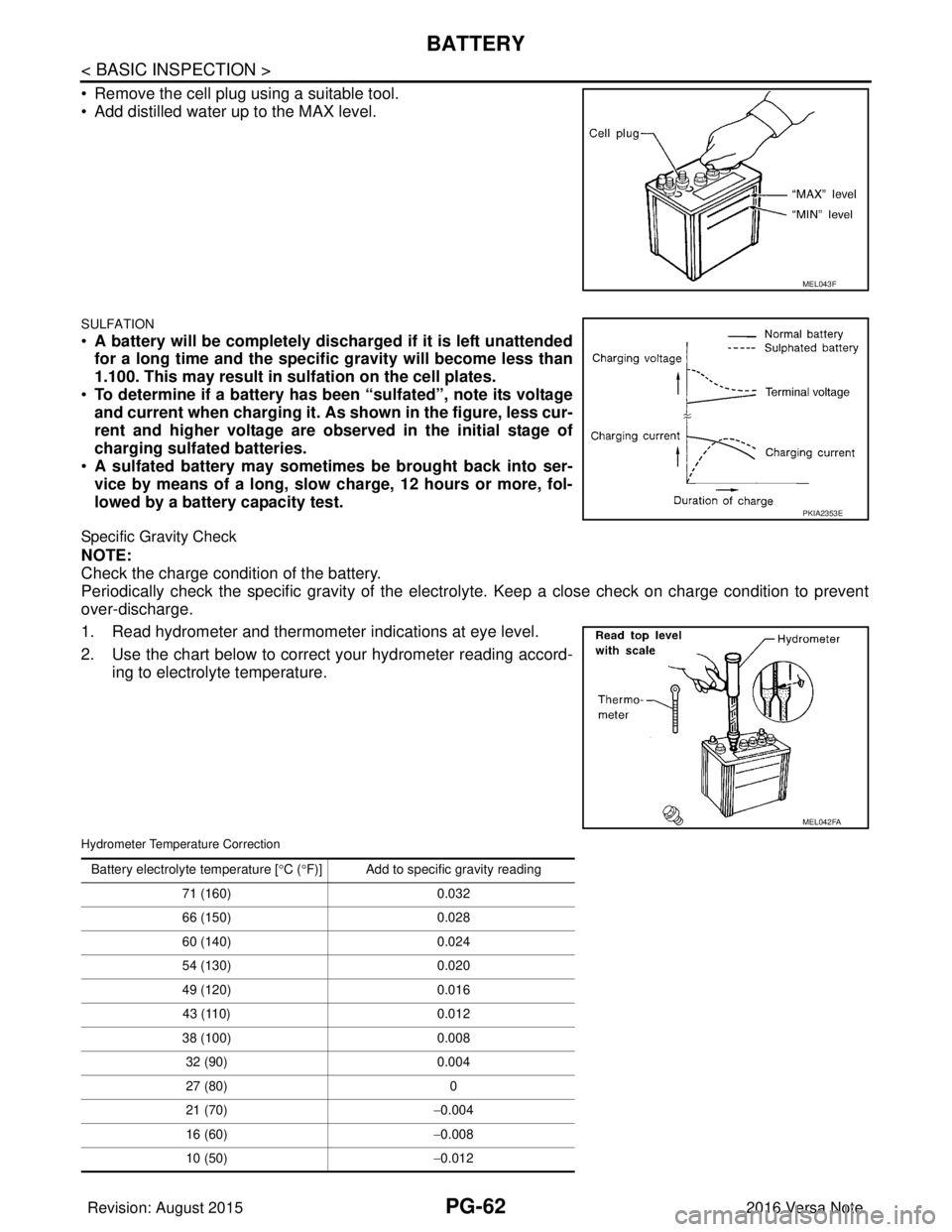
• Remove the cell plug using a suitable tool.
• Add distilled water up to the MAX level.
SULFATION
•A battery will be completely discharged if it is left unattended
for a long time and the specific gravity will become less than
1.100. This may result in su lfation on the cell plates.
• To determine if a battery has been “sulfated”, note its voltage
and current when charging it. As shown in the figure, less cur-
rent and higher voltage are ob served in the initial stage of
charging sulfated batteries.
• A sulfated battery may someti mes be brought back into ser-
vice by means of a long, slow charge, 12 hours or more, fol-
lowed by a battery capacity test.
Specific Gravity Check
NOTE:
Check the charge condition of the battery.
Periodically check the specific gravity of the electr olyte. Keep a close check on charge condition to prevent
over-discharge.
1. Read hydrometer and thermometer indications at eye level.
2. Use the chart below to correct your hydrometer reading accord- ing to electrolyte temperature.
Hydrometer Temperature Correction
MEL043F
PKIA2353E
MEL042FA
Battery electrolyte temperature [° C (°F)] Add to specific gravity reading
71 (160) 0.032
66 (150) 0.028
60 (140) 0.024
54 (130) 0.020
49 (120) 0.016
43 (110) 0.012
38 (100) 0.008
32 (90) 0.004
27 (80) 0
21 (70) −0.004
16 (60) −0.008
10 (50) −0.012
Revision: August 2015 2016 Versa Note
cardiagn.com
Page 2650 of 3641

PG
BATTERYPG-63
< BASIC INSPECTION >
C
DE
F
G H
I
J
K L
B A
O P
N
Charging The Battery
CAUTION:
• Never “quick charge” a fully discharged battery.
• Keep the battery away from open flame while it is being charged.
• When connecting the charger, connect
the leads first, then turn on the charger. Never turn on the
charger first, as this may cause a spark.
• If battery electrolyte temperature rises above 55 °C (131 °F), stop charging. Always charge battery at
a temperature below 55 °C (131 °F).
Charging Rates (Standard Charge)
Charging Rates (Quick Charge)
NOTE:
The ammeter reading on your battery charger will automatically decrease as the battery charges. This indi-
cates that the voltage of the battery is increasing norma lly as the state of charge improves. The charging amps
indicated above refer to initial charge rate.
• If, after charging, the specific gravity of any two cells varies more than 0.050, the battery should be replaced.
4 (40) −0.016
− 1 (30) −0.020
− 7 (20) −0.024
− 12 (10) −0.028
− 18 (0) −0.032
Battery electrolyte temperature [
°C ( °F)] Add to specific gravity reading
Corrected specific gravity Approximate charge condition
1.260 - 1.280 Fully charged
1.230 - 1.250 3/4 charged
1.200 - 1.220 1/2 charged
1.170 - 1.190 1/4 charged
1.140 - 1.160 Almost discharged
1.110 - 1.130 Completely discharged
Approximate charge condi-
tion Charge current (A)
Charge time (h)
Fully charged
72
3/4 charged 2.5
1/2 charged 5
1/4 charged 7.5
Almost discharged 9
Completely discharged 10
Approximate charge condi- tion Charge current (A)
Charge time (h)
Fully charged ——
3/4 charged 16
0.5
1/2 charged
33
1/4 charged
Almost discharged
Completely discharged ——
Revision: August 2015 2016 Versa Note
cardiagn.com
Page 2651 of 3641

PG-64
< BASIC INSPECTION >
INSPECTION AND ADJUSTMENT
INSPECTION AND ADJUSTMENT
ADDITIONAL SERVICE WHEN REMOVING BATTERY NEGATIVE TERMINAL
ADDITIONAL SERVICE WHEN REMOVING BATTERY NEGATIVE TERMINAL : Spe-
cial Repair Requirement
INFOID:0000000012433129
Required Procedure After Battery Disconnection
System ItemReference
Engine Control System Idle Air Volume Learning EC-130
Audio, Visual & Navigation SystemAudio (Radio Preset) Refer to Owner's Manual.
Navigation System
Refer to Owner's Manual.
Revision: August 2015 2016 Versa Note
cardiagn.com
Page 2657 of 3641
PG-70
< REMOVAL AND INSTALLATION >
BATTERY
REMOVAL AND INSTALLATION
BATTERY
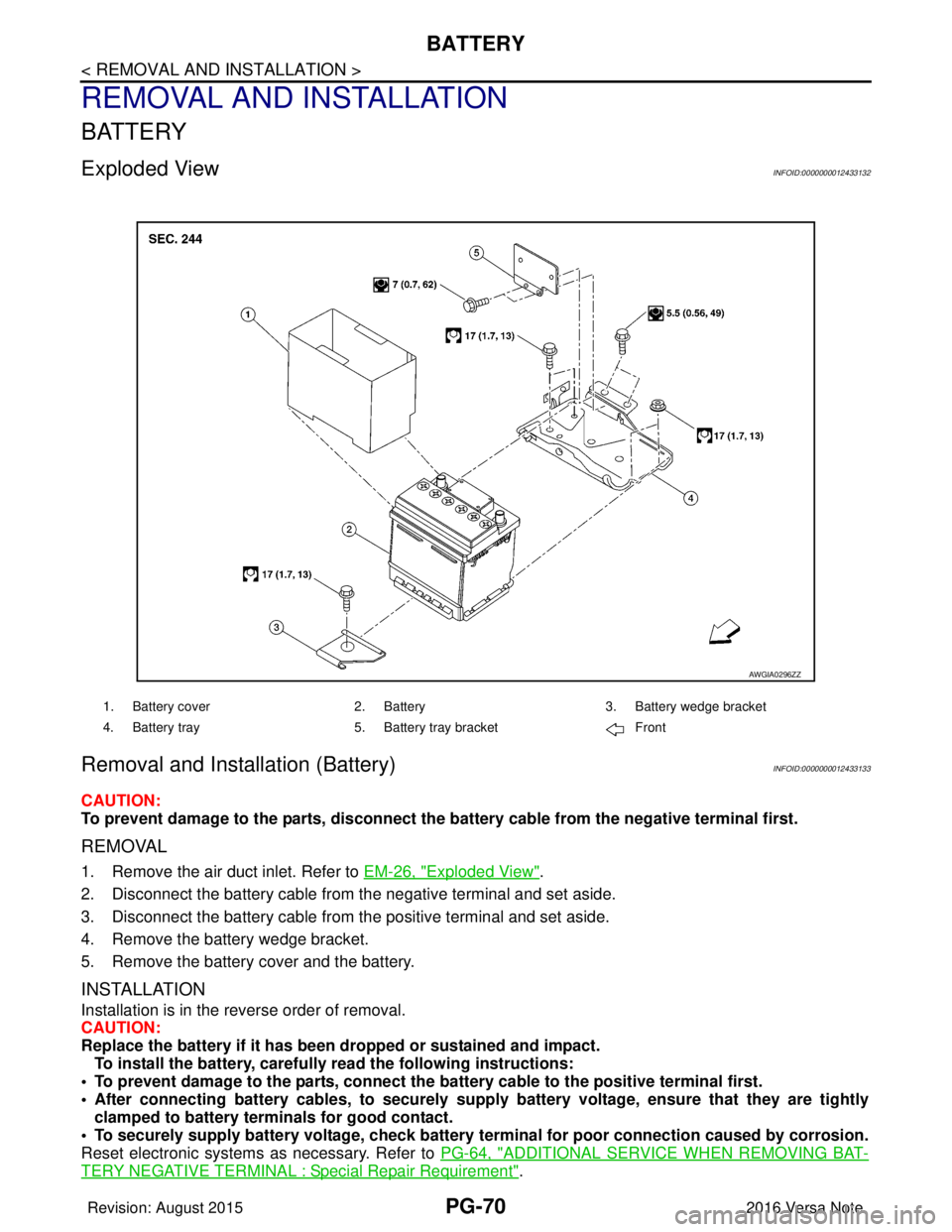
Exploded ViewINFOID:0000000012433132
Removal and Installation (Battery)INFOID:0000000012433133
CAUTION:
To prevent damage to the parts, disconnect the battery cable from the negative terminal first.
REMOVAL
1. Remove the air duct inlet. Refer to EM-26, "Exploded View".
2. Disconnect the battery cable from the negative terminal and set aside.
3. Disconnect the battery cable from the positive terminal and set aside.
4. Remove the battery wedge bracket.
5. Remove the battery cover and the battery.
INSTALLATION
Installation is in the reverse order of removal.
CAUTION:
Replace the battery if it has been dropped or sustained and impact. To install the battery, carefully read the following instructions:
• To prevent damage to the parts, connect the battery cable to the positive terminal first.
• After connecting battery cables, to securely supply battery voltage, ensure that they are tightly
clamped to battery term inals for good contact.
• To securely supply battery voltage, check battery terminal for poor connection caused by corrosion.
Reset electronic systems as necessary. Refer to PG-64, "
ADDITIONAL SERVICE WHEN REMOVING BAT-
TERY NEGATIVE TERMINAL : Special Repair Requirement".
AWGIA0296ZZ
1. Battery cover2. Battery3. Battery wedge bracket
4. Battery tray 5. Battery tray bracket Front
Revision: August 2015 2016 Versa Note
cardiagn.com
Page 2658 of 3641
PG
BATTERYPG-71
< REMOVAL AND INSTALLATION >
C
DE
F
G H
I
J
K L
B A
O P
N
Removal and Installation (Battery Tray)INFOID:0000000012433134
CAUTION:
To prevent damage to the parts, disconnect the battery cable from the negative terminal first.
REMOVAL
1. Remove the battery. Refer to
PG-70, "Removal and Installation (Battery)".
2. Remove the battery tray bracket. Refer to PG-70, "
Exploded View".
3. Remove the IPDM E/R. Refer to PCS-30, "
Removal and Installation".
4. Disconnect the harness from the TCM and remove the TCM bracket. Refer to TM-239, "
Removal and
Installation" (FOR CVT MODEL).
5. Disconnect the harness fr om the battery tray.
6. Remove the nuts and bolts and remove the battery tray. Refer to PG-70, "
Exploded View".
INSTALLATION
Installation is in the reverse order of removal.
CAUTION:
Replace electrical components as necessary, if any have been dropped or sustained and impact.
To install the battery, carefully read the following instructions:
• To prevent damage to the parts, connect the battery cable to the positive terminal first.
• After connecting battery cables, to securely supp ly battery voltage, ensure that they are tightly
clamped to battery terminals for good contact.
• To securely supply battery voltage, check battery terminal for poor connection caused by corrosion.
Reset electronic systems as necessary. Refer to PG-64, "
ADDITIONAL SERVICE WHEN REMOVING BAT-
TERY NEGATIVE TERMINAL : Special Repair Requirement".
Revision: August 2015 2016 Versa Note
cardiagn.com
Page 2659 of 3641
PG-72
< REMOVAL AND INSTALLATION >
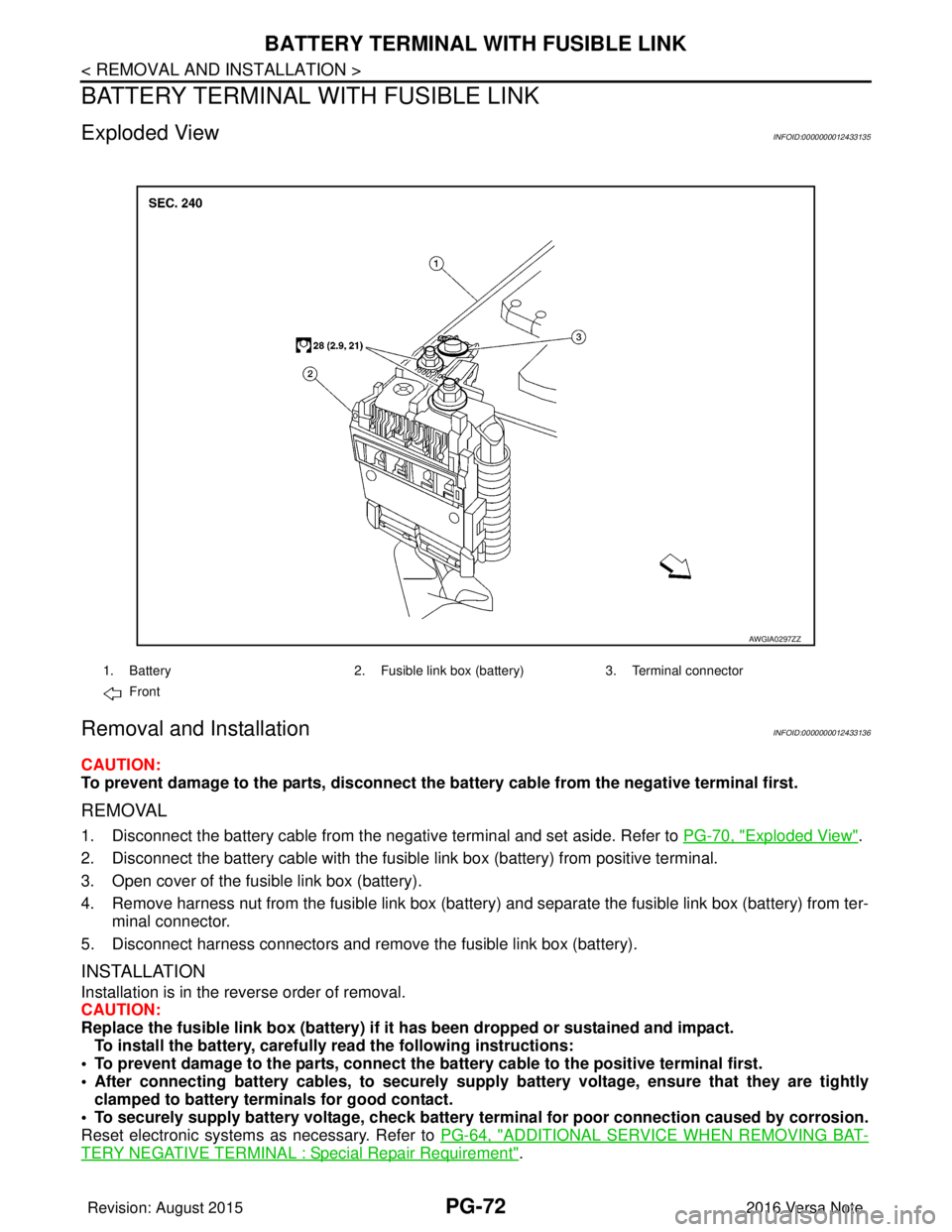
BATTERY TERMINAL WITH FUSIBLE LINK
BATTERY TERMINAL WITH FUSIBLE LINK
Exploded ViewINFOID:0000000012433135
Removal and InstallationINFOID:0000000012433136
CAUTION:
To prevent damage to the parts, disconnect the battery cable from the negative terminal first.
REMOVAL
1. Disconnect the battery cable from the negative terminal and set aside. Refer to PG-70, "Exploded View".
2. Disconnect the battery cable with the fusibl e link box (battery) from positive terminal.
3. Open cover of the fusible link box (battery).
4. Remove harness nut from the fusible link box (battery ) and separate the fusible link box (battery) from ter-
minal connector.
5. Disconnect harness connectors and remove the fusible link box (battery).
INSTALLATION
Installation is in the reverse order of removal.
CAUTION:
Replace the fusible link box (battery) if it has been dropped or sustained and impact.
To install the battery, carefully read the following instructions:
• To prevent damage to the parts, connect the battery cable to the positive terminal first.
• After connecting battery cables, to securely supply battery voltage, ensure that they are tightly
clamped to battery term inals for good contact.
• To securely supply battery voltage, check battery terminal for poor connection caused by corrosion.
Reset electronic systems as necessary. Refer to PG-64, "
ADDITIONAL SERVICE WHEN REMOVING BAT-
TERY NEGATIVE TERMINAL : Special Repair Requirement".
AWGIA0297ZZ
1. Battery2. Fusible link box (battery) 3. Terminal connector
Front
Revision: August 2015 2016 Versa Note
cardiagn.com
Page 2660 of 3641
PG
BATTERY CURRENT SENSORPG-73
< REMOVAL AND INSTALLATION >
C
DE
F
G H
I
J
K L
B A
O P
N
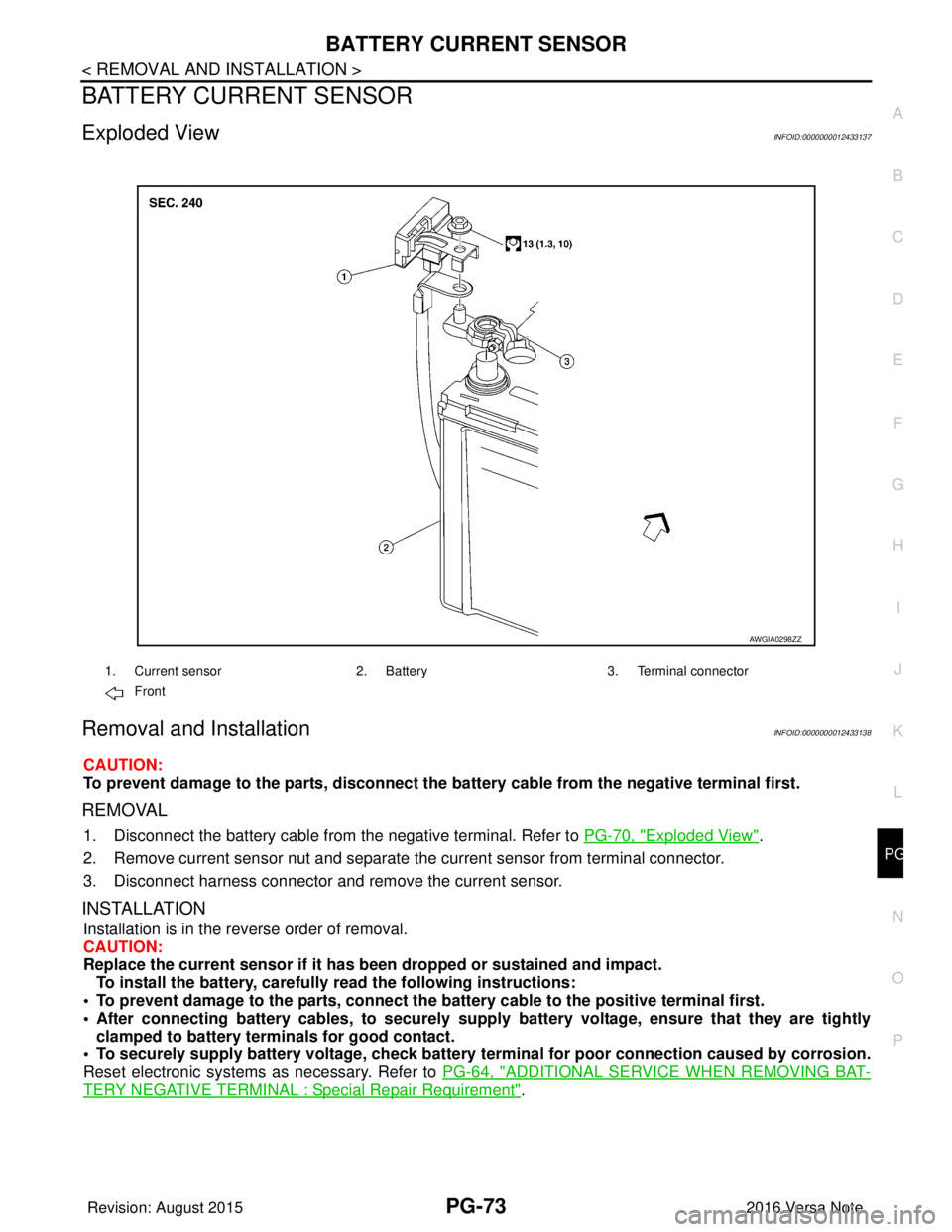
BATTERY CURRENT SENSOR
Exploded ViewINFOID:0000000012433137
Removal and InstallationINFOID:0000000012433138
CAUTION:
To prevent damage to the parts, disconnect the battery cable from the negative terminal first.
REMOVAL
1. Disconnect the battery cable from
the negative terminal. Refer to PG-70, "Exploded View".
2. Remove current sensor nut and separate the current sensor from terminal connector.
3. Disconnect harness connector and remove the current sensor.
INSTALLATION
Installation is in the reverse order of removal.
CAUTION:
Replace the current sensor if it has b een dropped or sustained and impact.
To install the battery, carefully read the following instructions:
• To prevent damage to the parts, connect the battery cable to the positive terminal first.
• After connecting battery cables, to securely supp ly battery voltage, ensure that they are tightly
clamped to battery terminals for good contact.
• To securely supply battery voltage, check battery terminal for poor connection caused by corrosion.
Reset electronic systems as necessary. Refer to PG-64, "
ADDITIONAL SERVICE WHEN REMOVING BAT-
TERY NEGATIVE TERMINAL : Special Repair Requirement".
AWGIA0298ZZ
1. Current sensor2. Battery3. Terminal connector
Front
Revision: August 2015 2016 Versa Note
cardiagn.com