battery NISSAN NOTE 2016 Service Repair Manual
[x] Cancel search | Manufacturer: NISSAN, Model Year: 2016, Model line: NOTE, Model: NISSAN NOTE 2016Pages: 3641, PDF Size: 28.72 MB
Page 2573 of 3641
![NISSAN NOTE 2016 Service Repair Manual PCS-70
< DTC/CIRCUIT DIAGNOSIS >[POWER DISTRIBUTION SYSTEM]
PUSH-BUTTON IGNITION SWITCH
PUSH-BUTTON IGNITION SWITCH
Component Function CheckINFOID:0000000012433317
1.CHECK FUNCTION
1. Select PUSH SW i](/img/5/57363/w960_57363-2572.png "NISSAN NOTE 2016 Service Repair Manual PCS-70
< DTC/CIRCUIT DIAGNOSIS >[POWER DISTRIBUTION SYSTEM]
PUSH-BUTTON IGNITION SWITCH
PUSH-BUTTON IGNITION SWITCH
Component Function CheckINFOID:0000000012433317
1.CHECK FUNCTION
1. Select PUSH SW i")
PCS-70
< DTC/CIRCUIT DIAGNOSIS >[POWER DISTRIBUTION SYSTEM]
PUSH-BUTTON IGNITION SWITCH
PUSH-BUTTON IGNITION SWITCH
Component Function CheckINFOID:0000000012433317
1.CHECK FUNCTION
1. Select PUSH SW in Data Monitor of BCM with CONSULT.
2. Check the push-button ignition switch signal under the following conditions.
Is the indication normal?
YES >> Inspection End.
NO >> Go to PCS-70, "
Diagnosis Procedure".
Diagnosis ProcedureINFOID:0000000012433318
Regarding Wiring Diagram information, refer to PCS-42, "Wiring Diagram".
1. CHECK PUSH-BUTTON IGNITION SWITCH OUTPUT SIGNAL (PUSH-BUTTON IGNITION SWITCH)
1. Turn ignition switch OFF.
2. Disconnect push-button ignition switch connector and IPDM E/R connector E47.
3. Check voltage between push-button ignition switch connector M25 terminal 8 and ground.
Is the inspection result normal?
YES >> GO TO 3.
NO >> GO TO 2.
2. CHECK PUSH-BUTTON IGNI TION SWITCH CIRCUIT (BCM)
1. Disconnect BCM connector M98.
2. Check continuity between BCM connector M98 terminal 76 and push-button ignition switch connector M25 terminal 8.
3. Check continuity between BCM connector M98 terminal 76 and ground.
Is the inspection result normal?
YES >> Replace BCM. Refer to BCS-74, "Removal and Installation".
NO >> Repair or replace harness or connectors.
3. CHECK IGNITION SWITCH OU TPUT SIGNAL (IPDM E/R)
Check voltage between IPDM E/R connector E47 terminal 81 and ground.
Test item ConditionStatus
PUSH SW Push-button ignition switch is pressed
On
Push-button ignition switch is not pressed Off
Push-button ignition switch
GroundVo l ta g e
(Approx.)
Connector Terminal
M25 8—Battery voltage
BCM Push-button ignition switch
Continuity
Connector TerminalConnector Terminal
M 987 6M 25 8 Y es
BCM
Ground Continuity
Connector Terminal
M98 76 — No
Revision: August 2015 2016 Versa Note
cardiagn.com
Page 2574 of 3641
![NISSAN NOTE 2016 Service Repair Manual PCS
PUSH-BUTTON IGNITION SWITCHPCS-71
< DTC/CIRCUIT DIAGNOSIS > [POWER DISTRIBUTION SYSTEM]
C
D
E
F
G H
I
J
K L
B A
O P
N
Is the inspection result normal?
YES >> GO TO 5.
NO >> GO TO 4.
4. CHECK PUSH-](/img/5/57363/w960_57363-2573.png "NISSAN NOTE 2016 Service Repair Manual PCS
PUSH-BUTTON IGNITION SWITCHPCS-71
< DTC/CIRCUIT DIAGNOSIS > [POWER DISTRIBUTION SYSTEM]
C
D
E
F
G H
I
J
K L
B A
O P
N
Is the inspection result normal?
YES >> GO TO 5.
NO >> GO TO 4.
4. CHECK PUSH-")
PCS
PUSH-BUTTON IGNITION SWITCHPCS-71
< DTC/CIRCUIT DIAGNOSIS > [POWER DISTRIBUTION SYSTEM]
C
D
E
F
G H
I
J
K L
B A
O P
N
Is the inspection result normal?
YES >> GO TO 5.
NO >> GO TO 4.
4. CHECK PUSH-BUTTON IGNITION SWITCH CIRCUIT (IPDM E/R)
1. Disconnect BCM connector M98.
2. Check continuity between IPDM E/R connector E47 terminal 81 and push-button ignition switch connector
M25 terminal 8.
3. Check continuity between IPDM E/R connector E47 terminal 81 and ground.
Is the inspection result normal?
YES >> Replace IPDM E/R. Refer to PCS-30, "Removal and Installation".
NO >> Repair or replace harness or connectors.
5.CHECK PUSH-BUTTON IGNITION SWITCH GROUND CIRCUIT
Check continuity between push-button igniti on switch connector M25 terminal 4 and ground.
Is the inspection result normal?
YES >> GO TO 6.
NO >> Repair or replace harness or connectors.
6.CHECK PUSH-BUTTON IGNITION SWITCH
Refer to PCS-71, "
Component Inspection".
Is the inspection result normal?
YES >> Refer to GI-42, "Intermittent Incident".
NO >> Replace push-button ignition switch. Refer to PCS-77, "
Removal and Installation".
Component InspectionINFOID:0000000012433319
1.CHECK PUSH-BUTTON IGNITION SWITCH
1. Turn ignition switch OFF.
2. Disconnect push-button ignition switch connector.
3. Check continuity between push-button ignition switch terminals.
Is the inspection result normal?
IPDM E/R GroundVo l ta g e
(Approx.)
Connector Terminal
E47 81—Battery voltage
IPDM E/R Push-button ignition switch
Continuity
Connector TerminalConnector Terminal
E47 81M25 8Yes
IPDM E/R
Ground Continuity
Connector Terminal
E47 81 — No
Push-button ignition switch GroundContinuity
Connector Terminal
M25 4— Yes
Push-button ignition switch terminals ConditionContinuity
4 – 8 Pressed
Yes
Not pressed No
Revision: August 2015 2016 Versa Note
cardiagn.com
Page 2576 of 3641
![NISSAN NOTE 2016 Service Repair Manual PCS
POWER SUPPLY AND GROUND CIRCUITPCS-73
< DTC/CIRCUIT DIAGNOSIS > [POWER DISTRIBUTION SYSTEM]
C
D
E
F
G H
I
J
K L
B A
O P
N
POWER SUPPLY AND GROUND CIRCUIT
BCM
BCM : Diagnosis ProcedureINFOID:000000](/img/5/57363/w960_57363-2575.png "NISSAN NOTE 2016 Service Repair Manual PCS
POWER SUPPLY AND GROUND CIRCUITPCS-73
< DTC/CIRCUIT DIAGNOSIS > [POWER DISTRIBUTION SYSTEM]
C
D
E
F
G H
I
J
K L
B A
O P
N
POWER SUPPLY AND GROUND CIRCUIT
BCM
BCM : Diagnosis ProcedureINFOID:000000")
PCS
POWER SUPPLY AND GROUND CIRCUITPCS-73
< DTC/CIRCUIT DIAGNOSIS > [POWER DISTRIBUTION SYSTEM]
C
D
E
F
G H
I
J
K L
B A
O P
N
POWER SUPPLY AND GROUND CIRCUIT
BCM
BCM : Diagnosis ProcedureINFOID:0000000012542520
Regarding Wiring Diagram information, refer to
BCS-52, "Wiring Diagram".
1.CHECK FUSES AND FUSIBLE LINK
Check that the following fuses and fusible link are not blown.
Is the fuse blown?
YES >> Replace the blown fuse or fusible link after repairing the affected circuit.
NO >> GO TO 2.
2.CHECK POWER SUPPLY CIRCUIT
1. Disconnect BCM connector M99.
2. Check voltage between BCM connector M99 and ground.
Is the inspection result normal?
YES >> GO TO 3.
NO >> Repair harness or connector.
3.CHECK GROUND CIRCUIT
Check continuity between BCM connector M99 and ground.
Is the inspection result normal?
YES >> Inspection End.
NO >> Repair harness or connector.
IPDM E/R (INTELLIGENT POWER DIST RIBUTION MODULE ENGINE ROOM)
IPDM E/R (INTELLIGENT POWER DISTRIBUTION MODULE ENGINE ROOM) : Di-
agnosis Procedure
INFOID:0000000012542521
Regarding Wiring Diagram information, refer to PCS-21, "Wiring Diagram".
1. CHECK FUSE AND FUSIBLE LINKS
Check that the following IPDM E/R fuse or fusible links are not blown.
Terminal No. Signal nameFuses and fusible link No.
57 Battery power supply 12 (10A)
70 G (40A)
BCM
Ground Voltage
Connector Terminal
M99 57
— Battery voltage
70
BCM GroundContinuity
Connector Terminal
M99 67—Yes
Revision: August 2015 2016 Versa Note
cardiagn.com
Page 2577 of 3641
![NISSAN NOTE 2016 Service Repair Manual PCS-74
< DTC/CIRCUIT DIAGNOSIS >[POWER DISTRIBUTION SYSTEM]
POWER SUPPLY AND GROUND CIRCUIT
Is the fuse blown?
YES >> Replace the blown fuse or fusible link after repairing the affected circuit.
NO >>](/img/5/57363/w960_57363-2576.png "NISSAN NOTE 2016 Service Repair Manual PCS-74
< DTC/CIRCUIT DIAGNOSIS >[POWER DISTRIBUTION SYSTEM]
POWER SUPPLY AND GROUND CIRCUIT
Is the fuse blown?
YES >> Replace the blown fuse or fusible link after repairing the affected circuit.
NO >>")
PCS-74
< DTC/CIRCUIT DIAGNOSIS >[POWER DISTRIBUTION SYSTEM]
POWER SUPPLY AND GROUND CIRCUIT
Is the fuse blown?
YES >> Replace the blown fuse or fusible link after repairing the affected circuit.
NO >> GO TO 2.
2. CHECK BATTERY POWER SUPPLY CIRCUIT
1. Disconnect IPDM E/R connector E42.
2. Check voltage between IPDM E/R connector E42 and ground.
Is the inspection result normal?
YES >> GO TO 3.
NO >> Repair or replace harness or connectors.
3. CHECK GROUND CIRCUIT
1. Disconnect IPDM E/R connectors E45, E46 and E47.
2. Check continuity between IPDM E/R connectors and ground.
Is the inspection result normal?
YES >> Inspection End.
NO >> Repair or replace harness or connectors.
Terminal No. Signal nameFuse and fusible link Nos.
1 Battery power supply A (120A), E (80A)
2 B (60A)
IPDM E/R
GroundVol tag e
(Approx.)
Connector Terminal
E42 1
—Battery voltage
2
IPDM E/R
GroundContinuity
Connector Terminal
E45 19
Ye s
E46 60
E47 89
Revision: August 2015 2016 Versa Note
cardiagn.com
Page 2582 of 3641
PWO-2
< PRECAUTION >
PRECAUTIONS
PRECAUTION
PRECAUTIONS
Precaution for Supplemental Restraint System (SRS) "AIR BAG" and "SEAT BELT
PRE-TENSIONER"
INFOID:0000000012432097
The Supplemental Restraint System such as “A IR BAG” and “SEAT BELT PRE-TENSIONER”, used along
with a front seat belt, helps to reduce the risk or severity of injury to the driver and front passenger for certain
types of collision. Information necessary to service the system safely is included in the SR and SB section of
this Service Manual.
WARNING:
• To avoid rendering the SRS inopera tive, which could increase the risk of personal injury or death in
the event of a collision which would result in air bag inflation, all maintenance must be performed by
an authorized NISSAN/INFINITI dealer.
• Improper maintenance, including in correct removal and installation of the SRS, can lead to personal
injury caused by unintent ional activation of the system. For re moval of Spiral Cable and Air Bag
Module, see the SR section.
• Do not use electrical test equipmen t on any circuit related to the SRS unless instructed to in this
Service Manual. SRS wiring harn esses can be identified by yellow and/or orange harnesses or har-
ness connectors.
PRECAUTIONS WHEN USING POWER TOOLS (AIR OR ELECTRIC) AND HAMMERS
WARNING:
• When working near the Airbag Diagnosis Sensor Unit or other Airbag System sensors with the Igni-
tion ON or engine running, DO NOT use air or electri c power tools or strike near the sensor(s) with a
hammer. Heavy vibration could activate the sensor( s) and deploy the air bag(s), possibly causing
serious injury.
• When using air or electric power tools or hammers , always switch the Ignition OFF, disconnect the
battery and wait at least three minutes before performing any service.
Precaution for WorkINFOID:0000000012432098
• When removing or disassembling each component, be careful not to damage or deform it. If a component may be subject to interference, be sure to protect it with a shop cloth.
• When removing (disengaging) components with a screwdriver or similar tool, be sure to wrap the component with a shop cloth or vinyl tape to protect it.
• Protect the removed parts with a shop cloth and prevent them from being dropped.
• Replace a deformed or damaged clip.
• If a part is specified as a non-reusable part, always replace it with a new one.
• Be sure to tighten bolts and nuts securely to the specified torque.
• After installation is complete, be sure to check that each part works properly.
• Follow the steps below to clean components:
- Water soluble dirt:
• Dip a soft cloth into lukewarm water, wring the water out of the cloth and wipe the dirty area.
• Then rub with a soft, dry cloth.
- Oily dirt:
• Dip a soft cloth into lukewarm water with mild detergent (concentration: within 2 to 3%) and wipe the dirty area.
• Then dip a cloth into fresh water, wring the water out of the cloth and wipe the detergent off.
• Then rub with a soft, dry cloth.
- Do not use organic solvent such as thinner, benzene, alcohol or gasoline.
- For genuine leather seats, use a genuine leather seat cleaner.
Revision: August 2015 2016 Versa Note
cardiagn.com
Page 2588 of 3641

PG
PG-1
ELECTRICAL & POWER CONTROL
C
DE
F
G H
I
J
K L
B
SECTION PG
A
O P
N
CONTENTS
POWER SUPPLY, GROUND & CIRCUIT ELEMENTS
PRECAUTION .......
........................................3
PRECAUTIONS .............................................. .....3
Precaution for Supplemental Restraint System
(SRS) "AIR BAG" and "SEAT BELT PRE-TEN-
SIONER" ............................................................. ......
3
Precaution for Power Generation Voltage Variable
Control System ..........................................................
3
PREPARATION ............................................4
PREPARATION .............................................. .....4
Special Service Tools .......................................... ......4
Commercial Service Tool ..........................................4
SYSTEM DESCRIPTION ..............................5
ELECTRICAL UNITS LOCATION .................. .....5
Electrical Units Location ...................................... ......5
COMPONENT PARTS ........................................9
Circuit Breaker (Built Into BCM) .......................... ......9
Harness Connector ...................................................9
Standardized Relay ............................................. ....12
WIRING DIAGRAM ......................................15
POWER SUPPLY ROUTING CIRCUIT .......... ....15
Wiring Diagram — Battery Power Supply — ....... ....15
Wiring Diagram — Accessory Power Supply — .....23
Wiring Diagram — Ignition Power Supply — ..........27
GROUND ............................................................35
Ground Distribution ............................................. ....35
HARNESS ...................................................... ....42
Harness Layout ................................................... ....42
FUSE BLOCK - JUNCTION BOX (J/B) .............58
Terminal Arrangement ............................................58
FUSE AND FUSIBLE LINK BOX ................... ....59
Terminal Arrangement ............................................59
IPDM E/R (INTELLIGENT POWER DISTRI-
BUTION MODULE ENGINE ROOM) ................
60
IPDM E/R Terminal Arrangement ........................ ....60
BASIC INSPECTION ...................................61
BATTERY ..........................................................61
How to Handle Battery ......................................... ....61
Work Flow ................................................................61
INSPECTION AND ADJUSTMENT ..................64
ADDITIONAL SERVICE WHEN REMOVING BAT-
TERY NEGATIVE TERMINAL ............................... ....
64
ADDITIONAL SERVICE WHEN REMOVING
BATTERY NEGATIVE TERMINAL : Special Re-
pair Requirement .....................................................
64
FUSE INSPECTION ..........................................65
How To Check .........................................................65
FUSIBLE LINK INSPECTION ...........................69
Fusible Link .............................................................69
REMOVAL AND INSTALLATION ...............70
BATTERY ..........................................................70
Exploded View ..................................................... ....70
Removal and Installation (Battery) ..........................70
Removal and Installation (Battery Tray) ..................71
BATTERY TERMINAL WITH FUSIBLE LINK ...72
Exploded View .........................................................72
Removal and Installation .........................................72
BATTERY CURRENT SENSOR .......................73
Exploded View .........................................................73
Removal and Installation .........................................73
SERVICE DATA AND SPECIFICATIONS
(SDS) ............... .......................................... ...
74
Revision: August 2015 2016 Versa Note
cardiagn.com
Page 2589 of 3641

PG-2
SERVICE DATA AND SPECIFICATIONS
(SDS) ..................................................................
74
Battery .................................................................. ...74
Revision: August 2015 2016 Versa Note
cardiagn.com
Page 2590 of 3641
PG
PRECAUTIONSPG-3
< PRECAUTION >
C
DE
F
G H
I
J
K L
B A
O P
N
PRECAUTION
PRECAUTIONS
Precaution for Supplemental
Restraint System (SRS) "AIR BAG" and "SEAT BELT
PRE-TENSIONER"
INFOID:0000000012433111
The Supplemental Restraint System such as “AIR BAG” and “SEAT BELT PRE-TENSIONER”, used along
with a front seat belt, helps to reduce the risk or severi ty of injury to the driver and front passenger for certain
types of collision. Information necessary to service the system safely is included in the SR and SB section of
this Service Manual.
WARNING:
• To avoid rendering the SRS inoper ative, which could increase the risk of personal injury or death in
the event of a collision which would result in air bag inflation, all maintenance must be performed by
an authorized NISSAN/INFINITI dealer.
• Improper maintenance, including in correct removal and installation of the SRS, can lead to personal
injury caused by unintentional act ivation of the system. For removal of Spiral Cable and Air Bag
Module, see the SR section.
• Do not use electrical test equipm ent on any circuit related to the SRS unless instructed to in this
Service Manual. SRS wiring harnesses can be identi fied by yellow and/or orange harnesses or har-
ness connectors.
PRECAUTIONS WHEN USING POWER TOOLS (AIR OR ELECTRIC) AND HAMMERS
WARNING:
• When working near the Airbag Diagnosis Sensor Un it or other Airbag System sensors with the Igni-
tion ON or engine running, DO NOT use air or el ectric power tools or strike near the sensor(s) with a
hammer. Heavy vibration could activate the sensor( s) and deploy the air bag(s), possibly causing
serious injury.
• When using air or electric power tools or hammers, always switch the Ignition OFF, disconnect the
battery and wait at least three mi nutes before performing any service.
Precaution for Power Generation Voltage Variable Control SystemINFOID:0000000012433112
CAUTION:
For this model, the battery current sensor that is in stalled to the battery cable at the negative terminal
measures the charging/discharging current of the battery, and performs various controls. If the electri-
cal component or the ground wire is connected direct ly to the battery terminal, the current other than
that being measured with the battery current sensor is charging to or discharging from the battery.
This condition causes the malfunction of the control, and then the battery discharge may occur. Do
not connect the electrical component or the gr ound wire directly to the battery terminal.
Revision: August 2015 2016 Versa Note
cardiagn.com
Page 2591 of 3641
PG-4
< PREPARATION >
PREPARATION
PREPARATION
PREPARATION
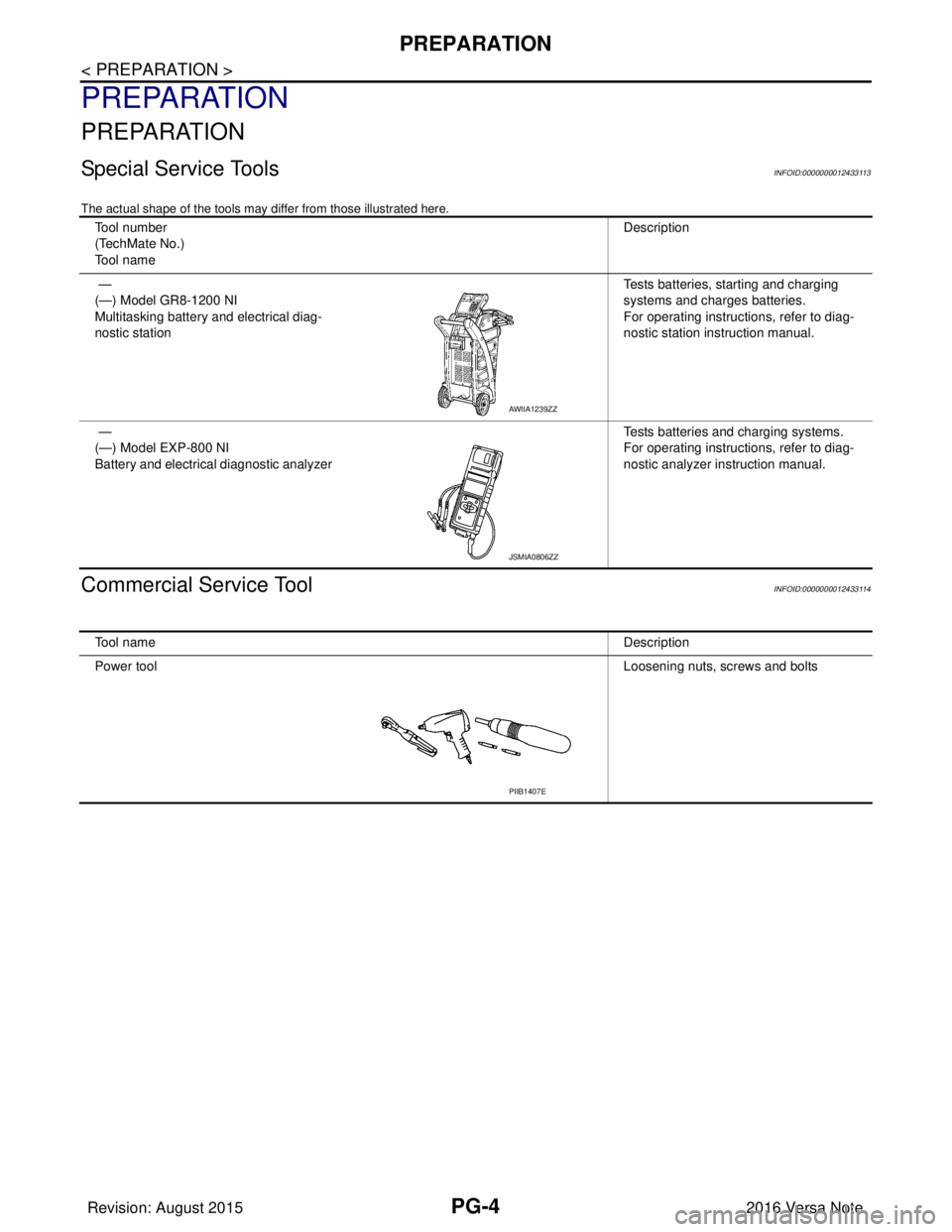
Special Service ToolsINFOID:0000000012433113
The actual shape of the tools may differ from those illustrated here.
Commercial Service ToolINFOID:0000000012433114
Tool number
(TechMate No.)
Tool nameDescription
—
(—) Model GR8-1200 NI
Multitasking battery and electrical diag-
nostic station Tests batteries, starting and charging
systems and charges batteries.
For operating instructions, refer to diag-
nostic station instruction manual.
—
(—) Model EXP-800 NI
Battery and electrical diagnostic analyzer Tests batteries and charging systems.
For operating instructions, refer to diag-
nostic analyzer instruction manual.
AWIIA1239ZZ
JSMIA0806ZZ
Tool name
Description
Power tool Loosening nuts, screws and bolts
PIIB1407E
Revision: August 2015 2016 Versa Note
cardiagn.com
Page 2602 of 3641
PG
POWER SUPPLY ROUTING CIRCUITPG-15
< WIRING DIAGRAM >
C
DE
F
G H
I
J
K L
B A
O P
N
WIRING DIAGRAM
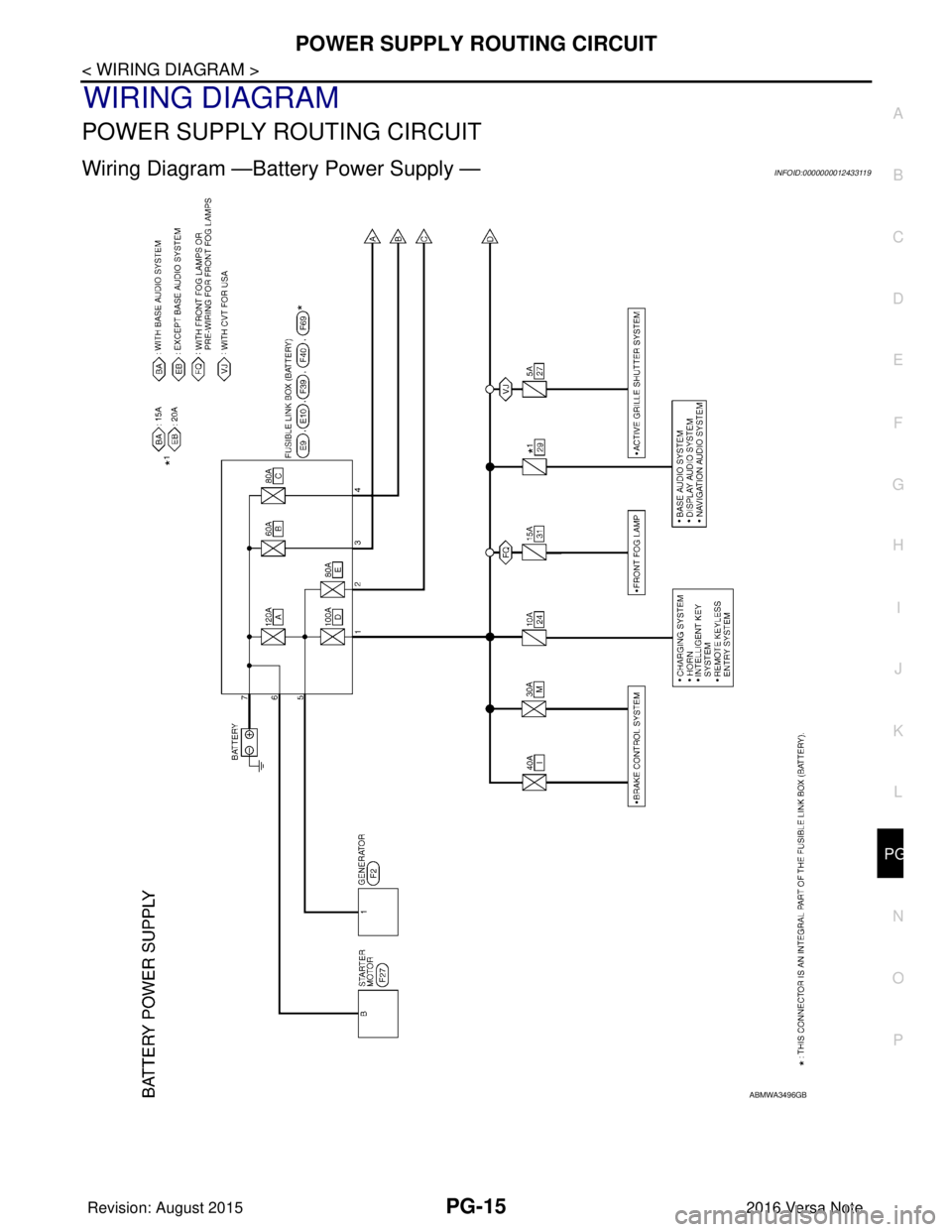
POWER SUPPLY ROUTING CIRCUIT
Wiring Diagram —Battery Power Supply —INFOID:0000000012433119
ABMWA3496GB
Revision: August 2015
2016 Versa Note
cardiagn.com