battery NISSAN NOTE 2016 Service Repair Manual
[x] Cancel search | Manufacturer: NISSAN, Model Year: 2016, Model line: NOTE, Model: NISSAN NOTE 2016Pages: 3641, PDF Size: 28.72 MB
Page 2771 of 3641
WT-28
< DTC/CIRCUIT DIAGNOSIS >
C1708, C1709, C1710, C1711 TRANSMITTER (NO DATA)
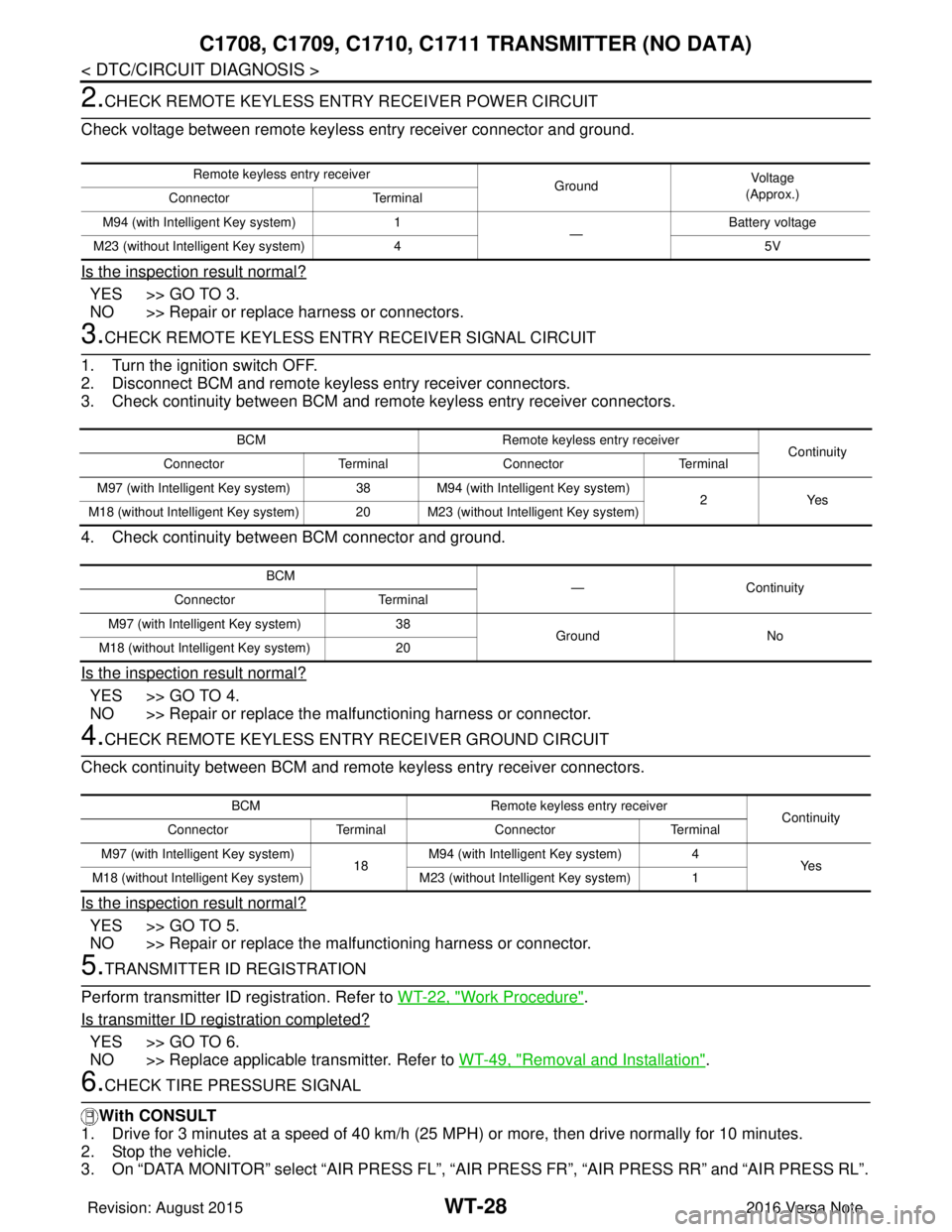
2.CHECK REMOTE KEYLESS ENTRY RECEIVER POWER CIRCUIT
Check voltage between remote keyless entry receiver connector and ground.
Is the inspection result normal?
YES >> GO TO 3.
NO >> Repair or replace harness or connectors.
3.CHECK REMOTE KEYL ESS ENTRY RECEIVER SIGNAL CIRCUIT
1. Turn the ignition switch OFF.
2. Disconnect BCM and remote keyless entry receiver connectors.
3. Check continuity between BCM and remote keyless entry receiver connectors.
4. Check continuity between BCM connector and ground.
Is the inspection result normal?
YES >> GO TO 4.
NO >> Repair or replace the ma lfunctioning harness or connector.
4.CHECK REMOTE KEYLESS ENTRY RECEIVER GROUND CIRCUIT
Check continuity between BCM and remote keyless entry receiver connectors.
Is the inspection result normal?
YES >> GO TO 5.
NO >> Repair or replace the ma lfunctioning harness or connector.
5.TRANSMITTER ID REGISTRATION
Perform transmitter ID registration. Refer to WT-22, "
Work Procedure".
Is transmitter ID registration completed?
YES >> GO TO 6.
NO >> Replace applicable transmitter. Refer to WT-49, "
Removal and Installation".
6.CHECK TIRE PRESSURE SIGNAL
With CONSULT
1. Drive for 3 minutes at a speed of 40 km/h (25 MPH) or more, then drive normally for 10 minutes.
2. Stop the vehicle.
3. On “DATA MONITOR” select “AIR PRESS FL”, “A IR PRESS FR”, “AIR PRESS RR” and “AIR PRESS RL”.
Remote keyless entry receiver
GroundVo l ta g e
(Approx.)
Connector Terminal
M94 (with Intelligent Key system) 1
—Battery voltage
M23 (without Intelligent Key system) 4 5V
BCMRemote keyless entry receiver
Continuity
Connector TerminalConnector Terminal
M97 (with Intelligent Key system) 38 M94 (with Intelligent Key system)
2Yes
M18 (without Intelligent Key system) 20 M23 (without Intelligent Key system)
BCM —Continuity
Connector Terminal
M97 (with Intelligent Key system) 38 GroundNo
M18 (without Intelligent Key system) 20
BCMRemote keyless entry receiver
Continuity
Connector TerminalConnector Terminal
M97 (with Intelligent Key system) 18M94 (with Intelligent Key system)
4
Ye s
M18 (without Intelligent Key system) M23 (without Intelligent Key system) 1
Revision: August 2015 2016 Versa Note
cardiagn.com
Page 2777 of 3641
WT-34
< DTC/CIRCUIT DIAGNOSIS >
POWER SUPPLY AND GROUND CIRCUIT
POWER SUPPLY AND GROUND CIRCUIT
WITH INTELLIGENT KEY
WITH INTELLIGENT KEY : Diagnosis ProcedureINFOID:0000000012542961
Regarding Wiring Diagram information, refer to BCS-52, "Wiring Diagram".
1.CHECK FUSES AND FUSIBLE LINK
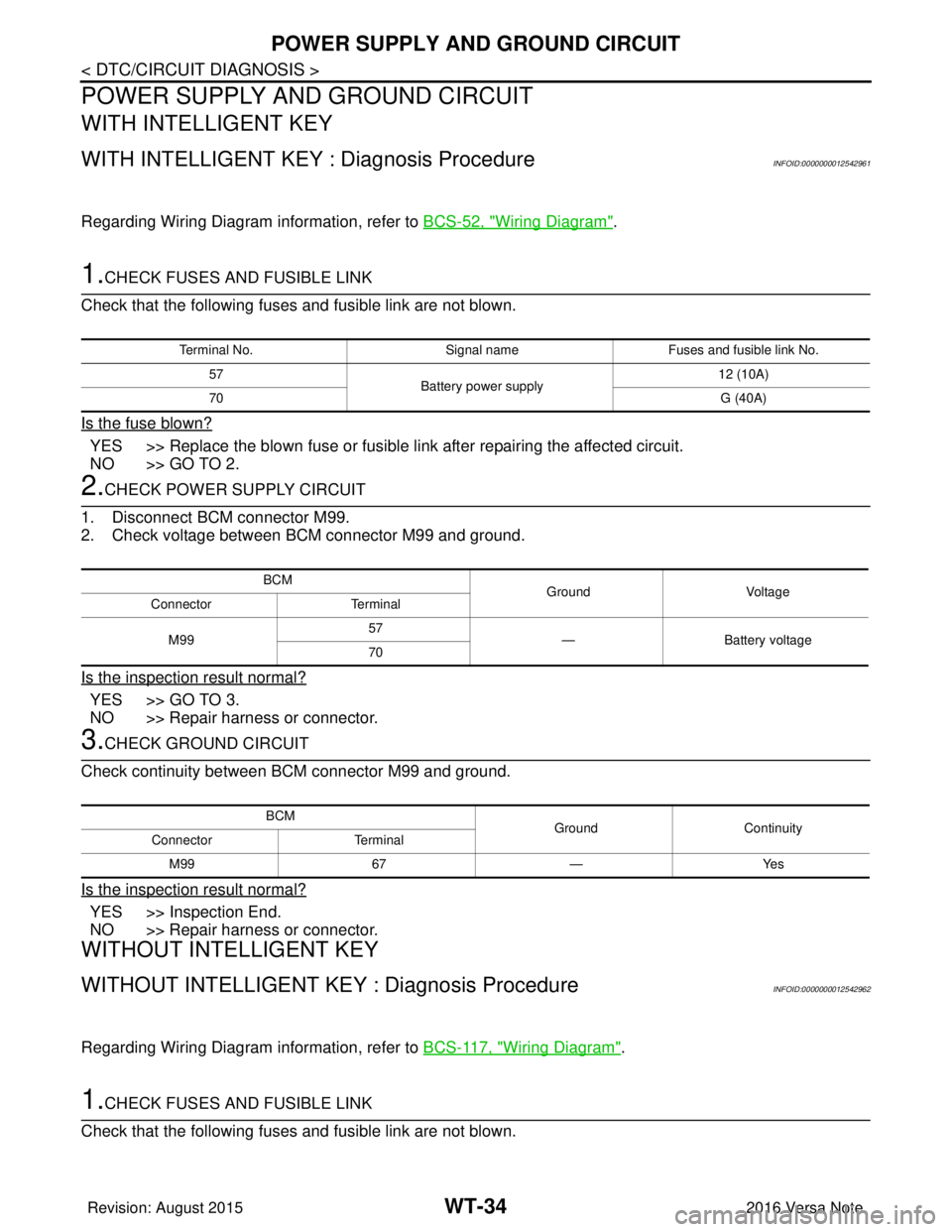
Check that the following fuses and fusible link are not blown.
Is the fuse blown?
YES >> Replace the blown fuse or fusible link after repairing the affected circuit.
NO >> GO TO 2.
2.CHECK POWER SUPPLY CIRCUIT
1. Disconnect BCM connector M99.
2. Check voltage between BCM connector M99 and ground.
Is the inspection result normal?
YES >> GO TO 3.
NO >> Repair harness or connector.
3.CHECK GROUND CIRCUIT
Check continuity between BCM connector M99 and ground.
Is the inspection result normal?
YES >> Inspection End.
NO >> Repair harness or connector.
WITHOUT INTELLIGENT KEY
WITHOUT INTELLIGENT KEY : Diagnosis ProcedureINFOID:0000000012542962
Regarding Wiring Diagram information, refer to BCS-117, "Wiring Diagram".
1.CHECK FUSES AND FUSIBLE LINK
Check that the following fuses and fusible link are not blown.
Terminal No. Signal nameFuses and fusible link No.
57 Battery power supply 12 (10A)
70 G (40A)
BCM
Ground Voltage
Connector Terminal
M99 57
— Battery voltage
70
BCM GroundContinuity
Connector Terminal
M99 67—Yes
Revision: August 2015 2016 Versa Note
cardiagn.com
Page 2778 of 3641
POWER SUPPLY AND GROUND CIRCUITWT-35
< DTC/CIRCUIT DIAGNOSIS >
C
DF
G H
I
J
K L
M A
B
WT
N
O P
Is the fuse blown?
YES >> Replace the blown fuse or fusible link after repairing the affected circuit.
NO >> GO TO 2.
2.CHECK POWER SUPPLY CIRCUIT
1. Turn ignition switch OFF.
2. Disconnect BCM connectors.
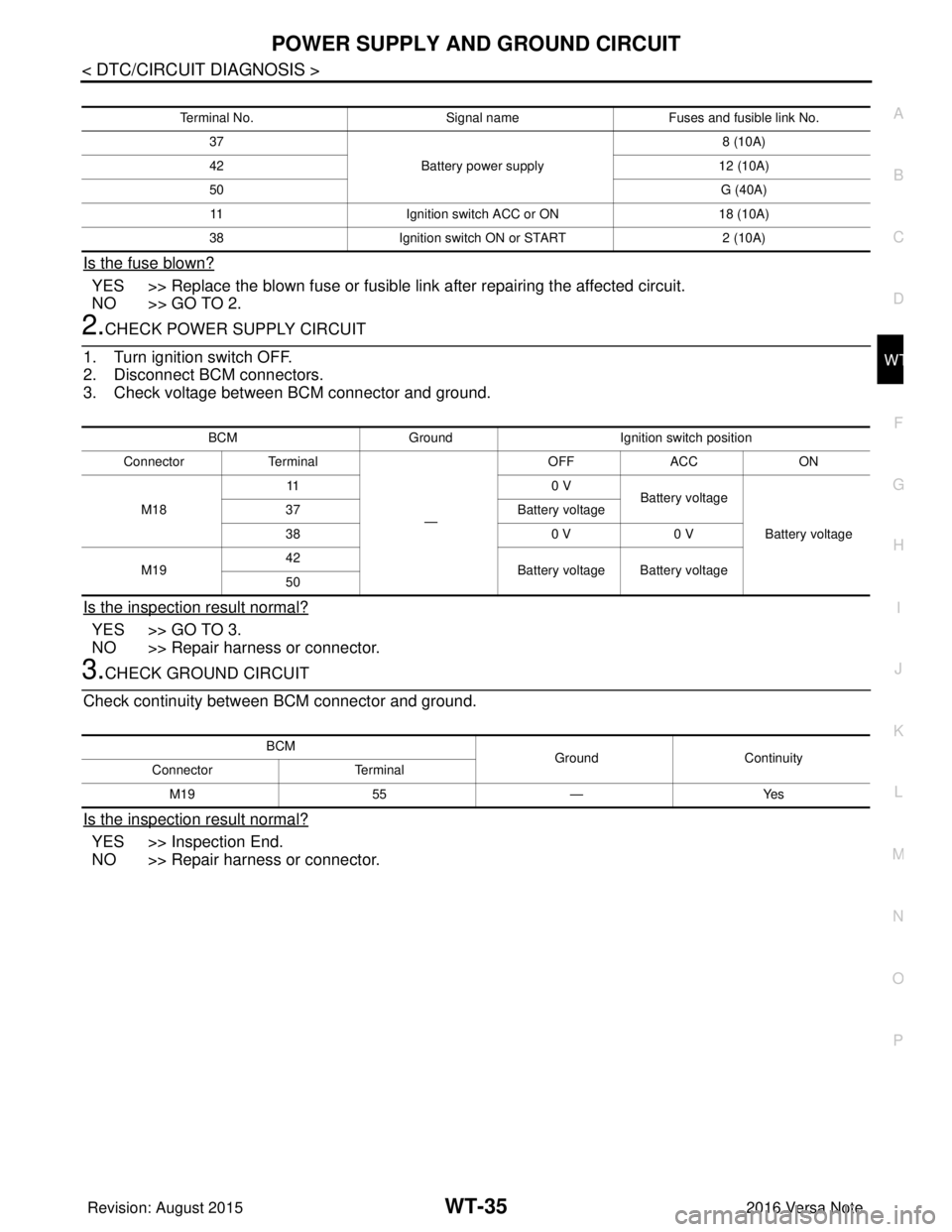
3. Check voltage between BCM connector and ground.
Is the inspection result normal?
YES >> GO TO 3.
NO >> Repair harness or connector.
3.CHECK GROUND CIRCUIT
Check continuity between BCM connector and ground.
Is the inspection result normal?
YES >> Inspection End.
NO >> Repair harness or connector.
Terminal No. Signal nameFuses and fusible link No.
37 Battery power supply 8 (10A)
42 12 (10A)
50 G (40A)
11 Ignition switch ACC or ON 18 (10A)
38 Ignition switch ON or START 2 (10A)
BCMGround Ignition switch position
Connector Terminal
—OFF
ACC ON
M18 11
0 V
Battery voltage
Battery voltage
37
Battery voltage
38 0 V0 V
M19 42
Battery voltage Battery voltage
50
BCM GroundContinuity
Connector Terminal
M19 55—Yes
Revision: August 2015 2016 Versa Note
cardiagn.com
Page 2795 of 3641
WT-52
< REMOVAL AND INSTALLATION >
TRANSMITTER
• Do not tighten valve stem nut to more than the specified torque. It may cause grommet seal dam-age.
• Do not tighten valve stem nut to less than th e specified torque. It may cause an air leak.
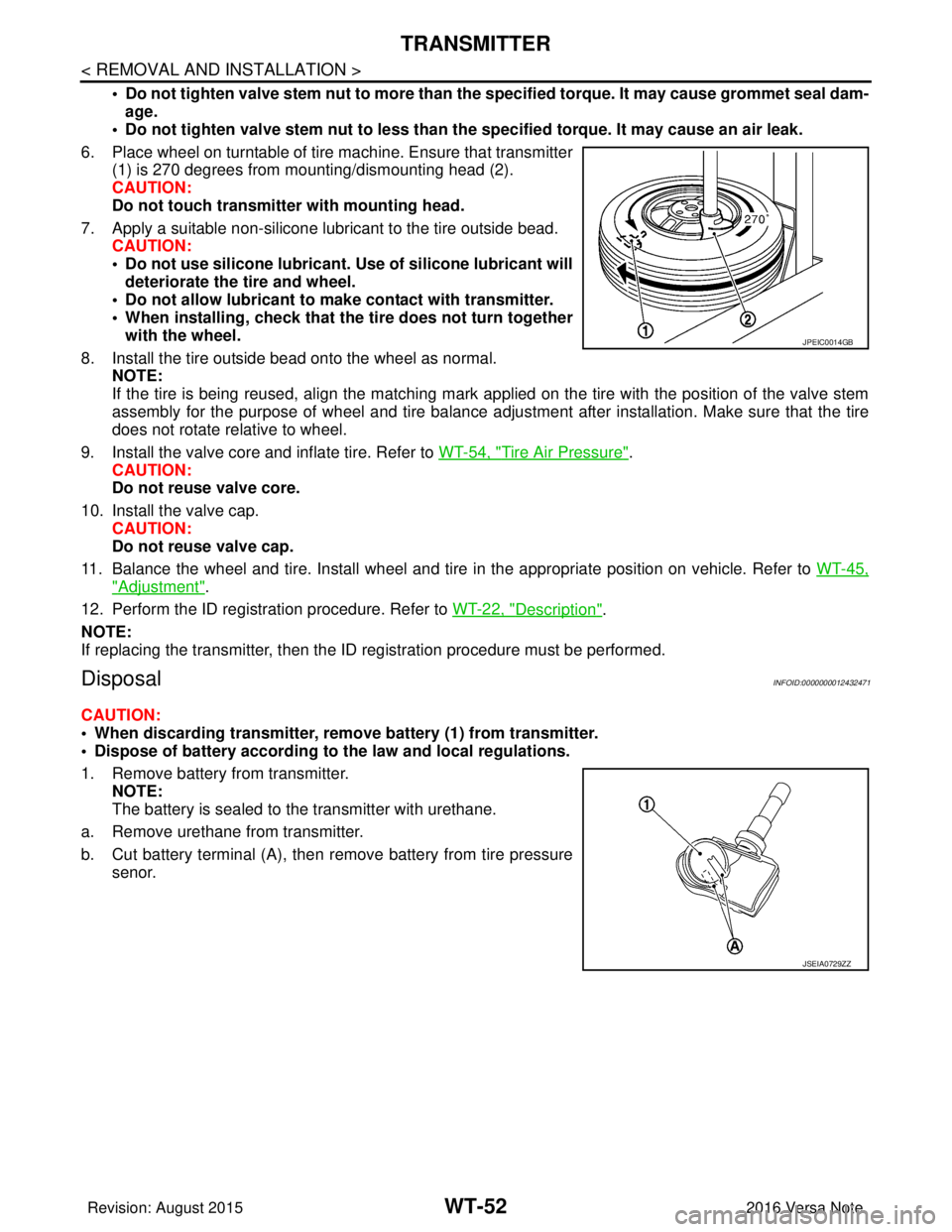
6. Place wheel on turntable of tire machine. Ensure that transmitter (1) is 270 degrees from mounting/dismounting head (2).
CAUTION:
Do not touch transmitter with mounting head.
7. Apply a suitable non-silicone lubricant to the tire outside bead. CAUTION:
• Do not use silicone lubricant. Use of silicone lubricant will
deteriorate the tire and wheel.
• Do not allow lubricant to make contact with transmitter.
• When installing, check that the tire does not turn together with the wheel.
8. Install the tire outside bead onto the wheel as normal. NOTE:
If the tire is being reused, align the matching mark applied on the tire with the position of the valve stem
assembly for the purpose of wheel and tire balance adjus tment after installation. Make sure that the tire
does not rotate relative to wheel.
9. Install the valve core and inflate tire. Refer to WT-54, "
Tire Air Pressure".
CAUTION:
Do not reuse valve core.
10. Install the valve cap. CAUTION:
Do not reuse valve cap.
11. Balance the wheel and tire. Install wheel and tire in the appropriate position on vehicle. Refer to WT-45,
"Adjustment".
12. Perform the ID registration procedure. Refer to WT-22, "
Description".
NOTE:
If replacing the transmitter, then the ID registration procedure must be performed.
DisposalINFOID:0000000012432471
CAUTION:
• When discarding transmitter, remove battery (1) from transmitter.
• Dispose of battery according to the law and local regulations.
1. Remove battery from transmitter. NOTE:
The battery is sealed to the transmitter with urethane.
a. Remove urethane from transmitter.
b. Cut battery terminal (A), then remove battery from tire pressure senor.
JPEIC0014GB
JSEIA0729ZZ
Revision: August 2015 2016 Versa Note
cardiagn.com
Page 2799 of 3641
SB-2
< PRECAUTION >
PRECAUTIONS
PRECAUTION
PRECAUTIONS
Precaution for Supplemental Restraint System (SRS) "AIR BAG" and "SEAT BELT
PRE-TENSIONER"
INFOID:0000000012430695
The Supplemental Restraint System such as “A IR BAG” and “SEAT BELT PRE-TENSIONER”, used along
with a front seat belt, helps to reduce the risk or severity of injury to the driver and front passenger for certain
types of collision. Information necessary to service the system safely is included in the SR and SB section of
this Service Manual.
WARNING:
• To avoid rendering the SRS inopera tive, which could increase the risk of personal injury or death in
the event of a collision which would result in air bag inflation, all maintenance must be performed by
an authorized NISSAN/INFINITI dealer.
• Improper maintenance, including in correct removal and installation of the SRS, can lead to personal
injury caused by unintent ional activation of the system. For re moval of Spiral Cable and Air Bag
Module, see the SR section.
• Do not use electrical test equipmen t on any circuit related to the SRS unless instructed to in this
Service Manual. SRS wiring harn esses can be identified by yellow and/or orange harnesses or har-
ness connectors.
PRECAUTIONS WHEN USING POWER TOOLS (AIR OR ELECTRIC) AND HAMMERS
WARNING:
• When working near the Airbag Diagnosis Sensor Unit or other Airbag System sensors with the Igni-
tion ON or engine running, DO NOT use air or electri c power tools or strike near the sensor(s) with a
hammer. Heavy vibration could activate the sensor( s) and deploy the air bag(s), possibly causing
serious injury.
• When using air or electric power tools or hammers , always switch the Ignition OFF, disconnect the
battery and wait at least three minutes before performing any service.
Precaution for Seat Belt ServiceINFOID:0000000012430696
CAUTION:
• Before removing the seat belt pre-tensioner assembl y, turn the ignition switch OFF, disconnect both
battery terminals and wait at least three minutes. For approximately three minutes after the battery
terminals have been removed, it is still possible for the air bag and seat belt pre-tensioner to deploy.
Therefore, do not attempt work on any SRS connectors or wires until at least three minutes have
passed.
• After replacing or reinstalling seat belt pre -tensioner assembly or reconnecting seat belt pre-ten-
sioner assembly connector, make sure entire SRS operates properly. Refer to SRC-14, "
Description".
• Do not disassemble buckle or seat belt assembly.
• Replace anchor bolts if th ey are deformed or worn out.
• Do not oil tongue or buckle.
• If any component of seat belt assembly is questionable, do not re pair. Replace the whole seat belt
assembly.
• If webbing is cut, frayed or damaged, replace seat belt assembly.
• When replacing seat belt assembly, use a genuine NISSAN seat belt assembly.
Precaution for WorkINFOID:0000000012430697
• When removing or disassembling each component, be careful not to damage or deform it. If a component may be subject to interference, be sure to protect it with a shop cloth.
• When removing (disengaging) components with a screwdriver or similar tool, be sure to wrap the component with a shop cloth or vinyl tape to protect it.
• Protect the removed parts with a shop cloth and prevent them from being dropped.
• Replace a deformed or damaged clip.
• If a part is specified as a non-reusable part, always replace it with a new one.
• Be sure to tighten bolts and nuts securely to the specified torque.
• After installation is complete, be sure to check that each part works properly.
• Follow the steps below to clean components:
Revision: August 2015 2016 Versa Note
cardiagn.com
Page 2806 of 3641
FRONT SEAT BELTSB-9
< REMOVAL AND INSTALLATION >
C
DE
F
G
I
J
K L
M A
B
SB
N
O P
3. Remove seat belt buckle anchor bolt and the seat belt buckle. CAUTION:
Before removing the seat belt buckle anchor bolt , note the positions of washers and spacers for
correct installation.
INSTALLATION
Installation is in the reverse order of removal.
• Tighten the seat belt buckle anchor bolt to specification. Refer to SB-8, "
Exploded View".
• Always perform an inspection after repair to make sure the system is functioning within specifications. Refer
to SB-5, "
Inspection".
SEAT BELT RETRACTOR
SEAT BELT RETRACTOR : Removal and InstallationINFOID:0000000012430702
WARNING:
• Before servicing the SRS, turn the ignition switch off, disconnect both battery terminals then wait at
least three minutes.
• Do not drop the seat belt retractor. Always handle it with care.
• Always point pretensioner cylinder away from body when handling.
REMOVAL
1. Disconnect negative and positive battery terminals, then wait at least three minutes. Refer to PG-70,
"Removal and Installation (Battery)".
2. Slide front seat to the full forward position.
3. Remove center pillar lower finisher. Refer to INT-25, "
CENTER PILLAR LOWER FINISHER : Removal
and Installation".
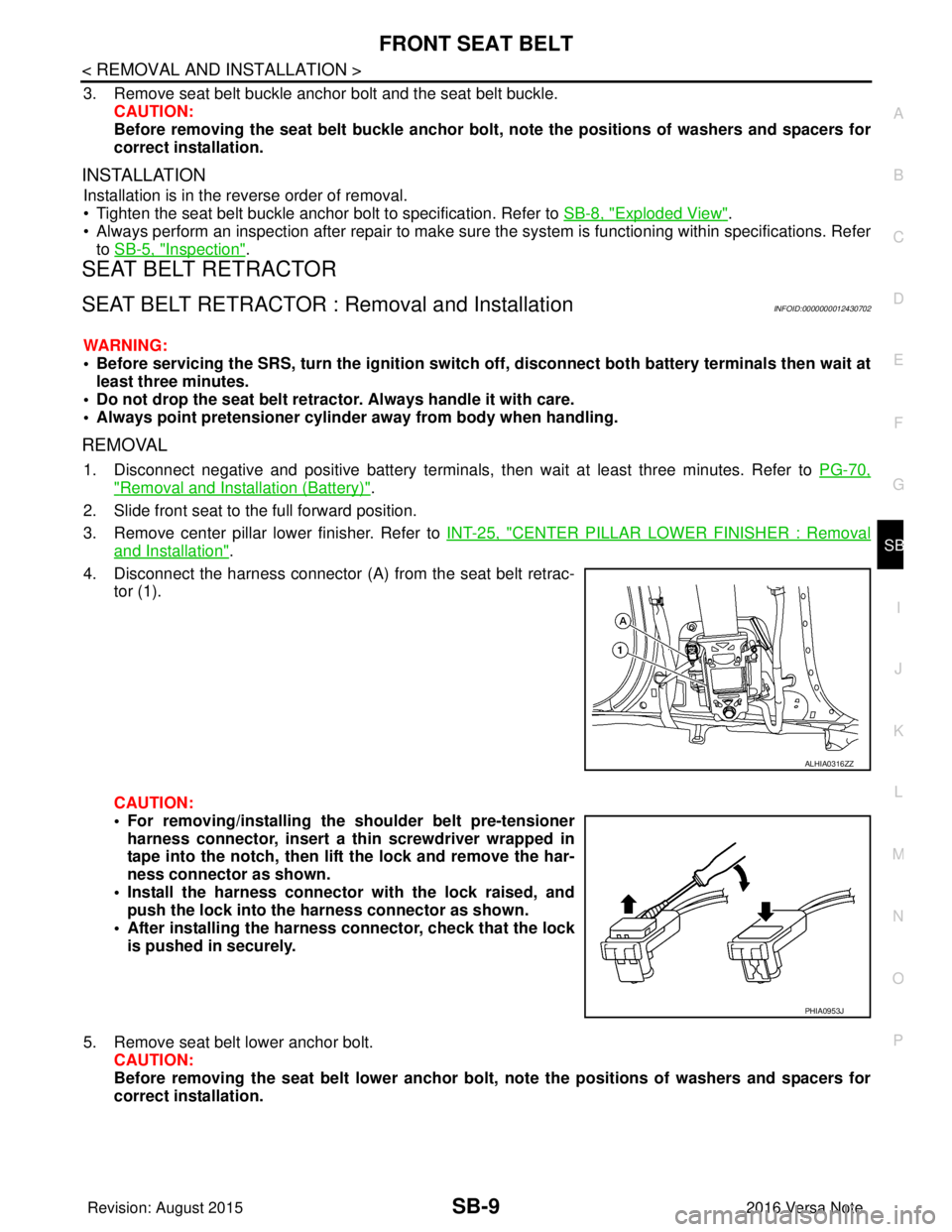
4. Disconnect the harness connector (A ) from the seat belt retrac-
tor (1).
CAUTION:
• For removing/installing the shoulder belt pre-tensioner
harness connector, insert a thin screwdriver wrapped in
tape into the notch, then lift the lock and remove the har-
ness connector as shown.
• Install the harness connector with the lock raised, and push the lock into the harness connector as shown.
• After installing the harness connector, check that the lock
is pushed in securely.
5. Remove seat belt lower anchor bolt. CAUTION:
Before removing the seat belt lower anchor bolt, note the positions of washers and spacers for
correct installation.
ALHIA0316ZZ
PHIA0953J
Revision: August 2015 2016 Versa Note
cardiagn.com
Page 2815 of 3641
SE-2
< PRECAUTION >
PRECAUTIONS
PRECAUTION
PRECAUTIONS
Precaution for Supplemental Restraint System (SRS) "AIR BAG" and "SEAT BELT
PRE-TENSIONER"
INFOID:0000000012432026
The Supplemental Restraint System such as “A IR BAG” and “SEAT BELT PRE-TENSIONER”, used along
with a front seat belt, helps to reduce the risk or severity of injury to the driver and front passenger for certain
types of collision. Information necessary to service the system safely is included in the SR and SB section of
this Service Manual.
WARNING:
• To avoid rendering the SRS inopera tive, which could increase the risk of personal injury or death in
the event of a collision which would result in air bag inflation, all maintenance must be performed by
an authorized NISSAN/INFINITI dealer.
• Improper maintenance, including in correct removal and installation of the SRS, can lead to personal
injury caused by unintent ional activation of the system. For re moval of Spiral Cable and Air Bag
Module, see the SR section.
• Do not use electrical test equipmen t on any circuit related to the SRS unless instructed to in this
Service Manual. SRS wiring harn esses can be identified by yellow and/or orange harnesses or har-
ness connectors.
PRECAUTIONS WHEN USING POWER TOOLS (AIR OR ELECTRIC) AND HAMMERS
WARNING:
• When working near the Airbag Diagnosis Sensor Unit or other Airbag System sensors with the Igni-
tion ON or engine running, DO NOT use air or electri c power tools or strike near the sensor(s) with a
hammer. Heavy vibration could activate the sensor( s) and deploy the air bag(s), possibly causing
serious injury.
• When using air or electric power tools or hammers , always switch the Ignition OFF, disconnect the
battery and wait at least three minutes before performing any service.
Precaution for WorkINFOID:0000000012432027
• When removing or disassembling each component, be careful not to damage or deform it. If a component may be subject to interference, be sure to protect it with a shop cloth.
• When removing (disengaging) components with a screwdriver or similar tool, be sure to wrap the component with a shop cloth or vinyl tape to protect it.
• Protect the removed parts with a shop cloth and prevent them from being dropped.
• Replace a deformed or damaged clip.
• If a part is specified as a non-reusable part, always replace it with a new one.
• Be sure to tighten bolts and nuts securely to the specified torque.
• After installation is complete, be sure to check that each part works properly.
• Follow the steps below to clean components:
- Water soluble dirt:
• Dip a soft cloth into lukewarm water, wring the water out of the cloth and wipe the dirty area.
• Then rub with a soft, dry cloth.
- Oily dirt:
• Dip a soft cloth into lukewarm water with mild detergent (concentration: within 2 to 3%) and wipe the dirty area.
• Then dip a cloth into fresh water, wring the water out of the cloth and wipe the detergent off.
• Then rub with a soft, dry cloth.
- Do not use organic solvent such as thinner, benzene, alcohol or gasoline.
- For genuine leather seats, use a genuine leather seat cleaner.
Revision: August 2015 2016 Versa Note
cardiagn.com
Page 2833 of 3641
SE-20
< REMOVAL AND INSTALLATION >
FRONT SEAT
DRIVER SIDE : Remova l and Installation
INFOID:0000000012432036
WARNING:
• Do not leave any objects (screwdriver s, tools, etc.) on the seat during repair. It can lead to personal
injury if the side air bag module should accidentally deploy.
• Always work from the side or back of th e seatback, do not work in front of seat.
• Do not use air tools or electric tools for servicing the seat.
• Do not drop, tilt, or bump the si de air bag module while installing the seat. Always handle it with
care.
• After the side air bag module inflates, the front seat frame must be replaced.
• Before removing the front seat, tu rn the ignition switch OFF, disconnect both battery cables then
wait at least three minutes.
CAUTION:
• When removing and installing the seat, use shop cloths to pr otect components from damage.
REMOVAL
1. Disconnect negative and positive battery terminals, then wait at least three minutes. Refer to PG-70,
"Removal and Installation (Battery)".
2. Slide the seat to the full forward position.
3. Remove the seat rear bolts.
4. Slide the seat to the full rearward position.
5. Remove the seat front bolts.
6. Tilt the seat rearward and disconnect the harness connectors from the seat and remove.
INSTALLATION
Installation is in the reverse order of removal.
CAUTION:
Make sure that the seat harness or the floor trim is not damaged during installation.
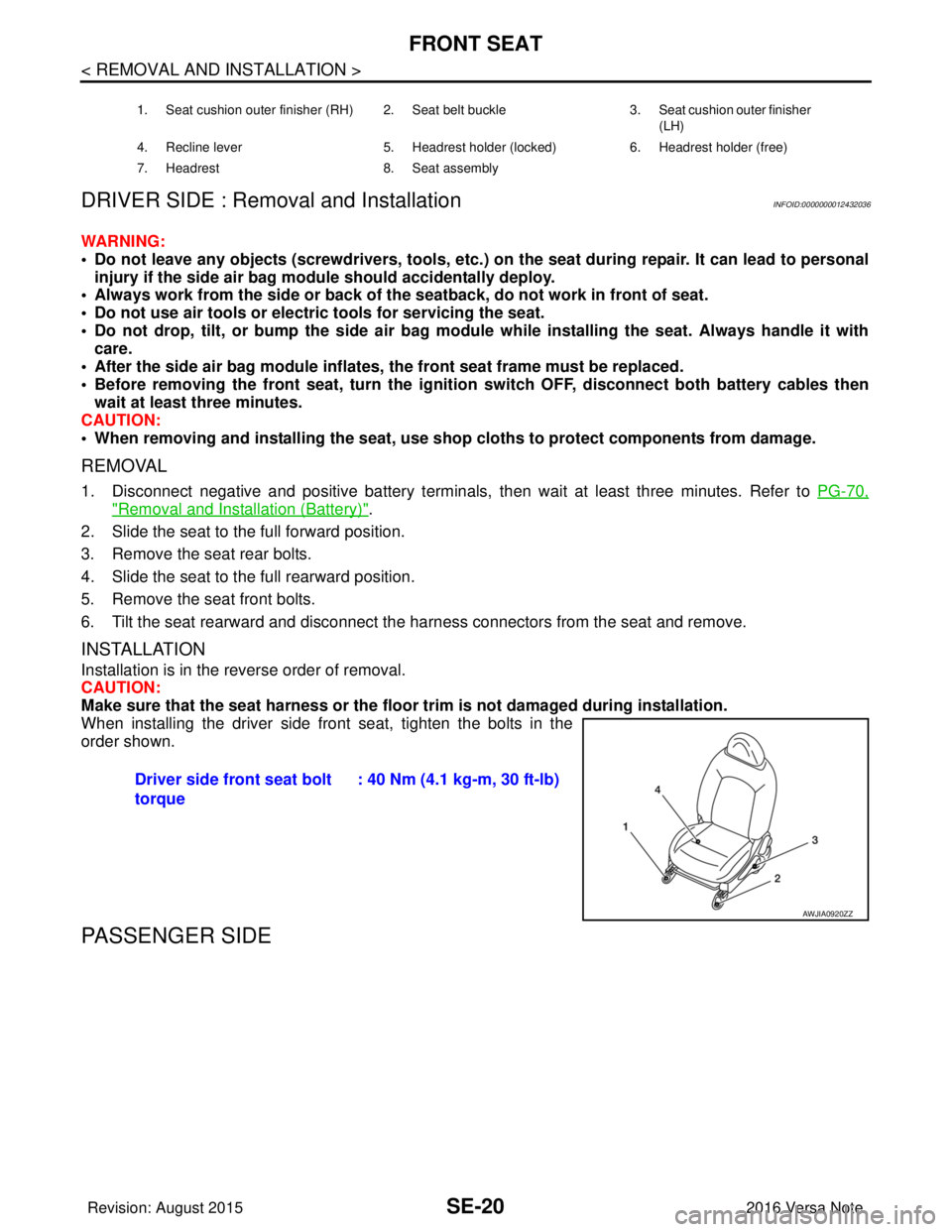
When installing the driver side front seat, tighten the bolts in the
order shown.
PASSENGER SIDE
1. Seat cushion outer finisher (RH) 2. Seat belt buckle 3. Seat cushion outer finisher
(LH)
4. Recline lever 5. Headrest holder (locked) 6. Headrest holder (free)
7. Headrest 8. Seat assembly
Driver side front seat bolt
torque: 40 Nm (4.1 kg-m, 30 ft-lb)
AWJIA0920ZZ
Revision: August 2015
2016 Versa Note
cardiagn.com
Page 2835 of 3641
SE-22
< REMOVAL AND INSTALLATION >
FRONT SEAT
PASSENGER SIDE : Remo val and Installation
INFOID:0000000012432038
WARNING:
• Do not leave any objects (screwdriver s, tools, etc.) on the seat during repair. It can lead to personal
injury if the side air bag module should accidentally deploy.
• Always work from the side or back of th e seatback, do not work in front of seat.
• Do not use air tools or electric tools for servicing the seat assembly.
• Do not drop, tilt, or bump the si de air bag module while installing the seat. Always handle it with
care.
• After the side air bag module inflates, the front seat frame must be replaced.
• Before removing the front seat, tu rn the ignition switch OFF, disconnect both battery cables then
wait at least three minutes.
CAUTION:
When removing and inst alling the seat, use shop cloths to protect components from damage.
REMOVAL
1. Disconnect negative and positive battery terminals, then wait at least three minutes. Refer to PG-70,
"Removal and Installation (Battery)".
2. Slide the seat to the full forward position.
3. Remove the seat rear bolts.
4. Slide the seat to the full rearward position.
5. Remove the seat front bolts.
6. Tilt the seat rearward and disconnect the harness connectors from the seat and remove.
INSTALLATION
Installation is in the reverse order of removal.
WARNING:
• Perform additional services when installing front passenger seat. Refer to SRC-39, "
ZERO POINT
RESET : Description".
• Zero point reset must be performed every time th e front passenger seat is removed from the vehicle.
• Zero point reset is done after the front passenger seat is installed in vehicle and all bolts are tight-
ened to specification.
CAUTION:
Make sure that the seat harness or the floor trim is not damaged during installation.
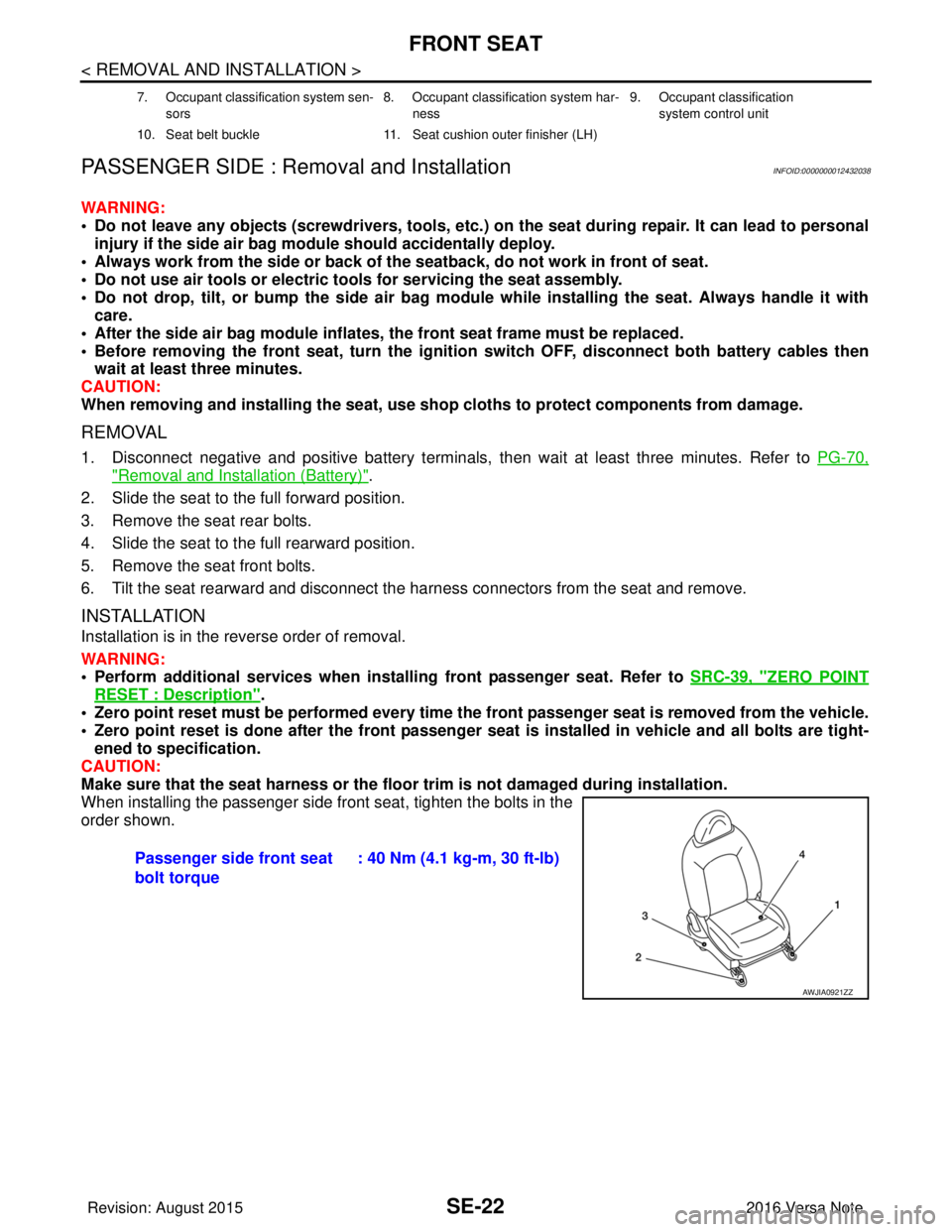
When installing the passenger side front seat, tighten the bolts in the
order shown.
7. Occupant classification system sen-
sors 8. Occupant classification system har-
ness 9. Occupant classification
system control unit
10. Seat belt buckle 11. Seat cushion outer finisher (LH)
Passenger side front seat
bolt torque: 40 Nm (4.1 kg-m, 30 ft-lb)
AWJIA0921ZZ
Revision: August 2015
2016 Versa Note
cardiagn.com
Page 2862 of 3641
![NISSAN NOTE 2016 Service Repair Manual PRECAUTIONSSEC-5
< PRECAUTION > [WITH INTELLIGENT KEY SYSTEM]
C
D
E
F
G H
I
J
L
M A
B
SEC
N
O P
PRECAUTION
PRECAUTIONS
Precaution for Supplemental Restraint System (SRS) "AIR BAG" and "SEAT BELT
PRE](/img/5/57363/w960_57363-2861.png "NISSAN NOTE 2016 Service Repair Manual PRECAUTIONSSEC-5
< PRECAUTION > [WITH INTELLIGENT KEY SYSTEM]
C
D
E
F
G H
I
J
L
M A
B
SEC
N
O P
PRECAUTION
PRECAUTIONS
Precaution for Supplemental Restraint System (SRS) \"AIR BAG\" and \"SEAT BELT
PRE")
PRECAUTIONSSEC-5
< PRECAUTION > [WITH INTELLIGENT KEY SYSTEM]
C
D
E
F
G H
I
J
L
M A
B
SEC
N
O P
PRECAUTION
PRECAUTIONS
Precaution for Supplemental Restraint System (SRS) "AIR BAG" and "SEAT BELT
PRE-TENSIONER"
INFOID:0000000012430321
The Supplemental Restraint System such as “AIR BAG” and “SEAT BELT PRE-TENSIONER”, used along
with a front seat belt, helps to reduce the risk or severi ty of injury to the driver and front passenger for certain
types of collision. Information necessary to service the system safely is included in the SR and SB section of
this Service Manual.
WARNING:
• To avoid rendering the SRS inoper ative, which could increase the risk of personal injury or death in
the event of a collision which would result in air bag inflation, all maintenance must be performed by
an authorized NISSAN/INFINITI dealer.
• Improper maintenance, including in correct removal and installation of the SRS, can lead to personal
injury caused by unintentional act ivation of the system. For removal of Spiral Cable and Air Bag
Module, see the SR section.
• Do not use electrical test equipm ent on any circuit related to the SRS unless instructed to in this
Service Manual. SRS wiring harnesses can be identi fied by yellow and/or orange harnesses or har-
ness connectors.
PRECAUTIONS WHEN USING POWER TOOLS (AIR OR ELECTRIC) AND HAMMERS
WARNING:
• When working near the Airbag Diagnosis Sensor Un it or other Airbag System sensors with the Igni-
tion ON or engine running, DO NOT use air or el ectric power tools or strike near the sensor(s) with a
hammer. Heavy vibration could activate the sensor( s) and deploy the air bag(s), possibly causing
serious injury.
• When using air or electric power tools or hammers, always switch the Ignition OFF, disconnect the
battery and wait at least three mi nutes before performing any service.
Precaution for WorkINFOID:0000000012430322
• When removing or disassembling each component, be ca reful not to damage or deform it. If a component
may be subject to interference, be sure to protect it with a shop cloth.
• When removing (disengaging) components with a screwdriver or similar tool, be sure to wrap the component with a shop cloth or vinyl tape to protect it.
• Protect the removed parts with a shop cloth and prevent them from being dropped.
• Replace a deformed or damaged clip.
• If a part is specified as a non-reusabl e part, always replace it with a new one.
• Be sure to tighten bolts and nuts securely to the specified torque.
• After installation is complete, be sure to check that each part works properly.
• Follow the steps below to clean components:
- Water soluble dirt:
• Dip a soft cloth into lukewarm water, wring the water out of the cloth and wipe the dirty area.
• Then rub with a soft, dry cloth.
-Oily dirt:
• Dip a soft cloth into lukewarm water with mild detergent (concentration: within 2 to 3%) and wipe the dirty
area.
• Then dip a cloth into fresh water, wring the water out of the cloth and wipe the detergent off.
• Then rub with a soft, dry cloth.
- Do not use organic solvent such as thinner, benzene, alcohol or gasoline.
- For genuine leather seats, use a genuine leather seat cleaner.
Revision: August 2015 2016 Versa Note
cardiagn.com