key NISSAN NOTE 2016 Service Repair Manual
[x] Cancel search | Manufacturer: NISSAN, Model Year: 2016, Model line: NOTE, Model: NISSAN NOTE 2016Pages: 3641, PDF Size: 28.72 MB
Page 2754 of 3641
DIAGNOSIS SYSTEM (BCM)WT-11
< SYSTEM DESCRIPTION >
C
DF
G H
I
J
K L
M A
B
WT
N
O P
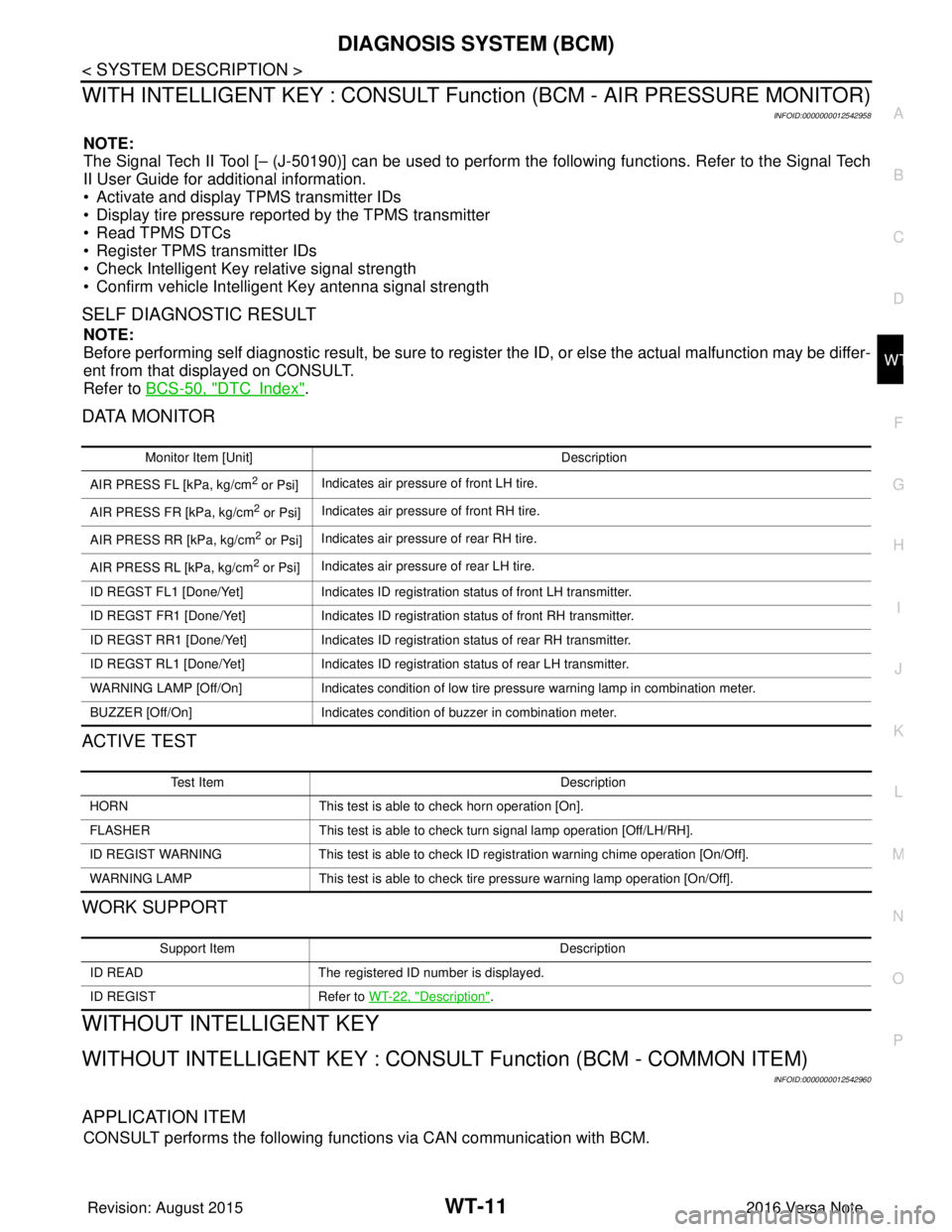
WITH INTELLIGENT KEY : CONSULT Func tion (BCM - AIR PRESSURE MONITOR)
INFOID:0000000012542958
NOTE:
The Signal Tech II Tool [– (J-50190)] can be used to perform the following functions. Refer to the Signal Tech
II User Guide for additional information.
• Activate and display TPMS transmitter IDs
• Display tire pressure reported by the TPMS transmitter
• Read TPMS DTCs
• Register TPMS transmitter IDs
• Check Intelligent Key relative signal strength
• Confirm vehicle Intelligent Key antenna signal strength
SELF DIAGNOSTIC RESULT
NOTE:
Before performing self diagnostic result, be sure to register the ID, or else the actual malfunction may be differ-
ent from that displayed on CONSULT.
Refer to BCS-50, "
DTCIndex".
DATA MONITOR
ACTIVE TEST
WORK SUPPORT
WITHOUT INTELLIGENT KEY
WITHOUT INTELLIGENT KEY : CONSUL T Function (BCM - COMMON ITEM)
INFOID:0000000012542960
APPLICATION ITEM
CONSULT performs the following functions via CAN communication with BCM.
Monitor Item [Unit] Description
AIR PRESS FL [kPa, kg/cm
2 or Psi] Indicates air pressure of front LH tire.
AIR PRESS FR [kPa, kg/cm
2 or Psi] Indicates air pressure of front RH tire.
AIR PRESS RR [kPa, kg/cm
2 or Psi] Indicates air pressure of rear RH tire.
AIR PRESS RL [kPa, kg/cm
2 or Psi] Indicates air pressure of rear LH tire.
ID REGST FL1 [Done/Yet] Indicates ID registration status of front LH transmitter.
ID REGST FR1 [Done/Yet] Indicates ID registration status of front RH transmitter.
ID REGST RR1 [Done/Yet] Indicates ID registration status of rear RH transmitter.
ID REGST RL1 [Done/Yet] Indicates ID registration status of rear LH transmitter.
WARNING LAMP [Off/On] Indicates condition of low tire pressure warning lamp in combination meter.
BUZZER [Off/On] Indicates condition of buzzer in combination meter.
Test Item Description
HORN This test is able to check horn operation [On].
FLASHER This test is able to check turn signal lamp operation [Off/LH/RH].
ID REGIST WARNING This test is able to check ID registration warning chime operation [On/Off].
WARNING LAMP This test is able to check tire pressure warning lamp operation [On/Off].
Support Item Description
ID READ The registered ID number is displayed.
ID REGIST Refer to WT-22, "
Description".
Revision: August 2015 2016 Versa Note
cardiagn.com
Page 2755 of 3641

WT-12
< SYSTEM DESCRIPTION >
DIAGNOSIS SYSTEM (BCM)
SYSTEM APPLICATION
BCM can perform the following functions.
WITHOUT INTELLIGENT KEY : CONSULT Function (BCM - AIR PRESSURE MONI-
TOR)
INFOID:0000000012542959
NOTE:
The Signal Tech II Tool [– (J-50190)] can be used to perform the following functions. Refer to the Signal Tech
II User Guide for additional information.
• Activate and display TPMS transmitter IDs
• Display tire pressure reported by the TPMS transmitter
Direct Diagnostic ModeDescription
ECU Identification The BCM part number is displayed.
Self Diagnostic Result The BCM self diagnostic results are displayed.
Data Monitor The BCM input/output data is displayed in real time.
Active Test The BCM activates outputs to test components.
Work support The settings for BCM functions can be changed.
Configuration • The vehicle specification can be read and saved.
• The vehicle specification can be written when replacing BCM.
CAN DIAG SUPPORT MNTR The result of transmit/receive diagnosis of CAN communication is displayed.
System Sub System Direct Diagnostic Mode
ECU Identification
Self Diagnostic Result
Data Monitor
Active Test
Work support
Configuration
CAN DIAG SUPPORT MNTR
Door lock
DOOR LOCK ×××
Rear window defogger REAR DEFOGGER ××
Warning chime BUZZER ××
Interior room lamp timer INT LAMP ×××
Remote keyless entry system MULTI REMOTE ENT ×××
Exterior lamp HEAD LAMP ×××
Wiper and washer WIPER ×××
Turn signal and hazard warning lamps FLASHER ××
Air conditioner AIR CONDITIONER ×
Combination switch COMB SW ×
BCM BCM× × ×××
Immobilizer IMMU ×××
Interior room lamp battery saver BATTERY SAVER ×××
Vehicle security system THEFT ALM ××
RAP system RETAINED PWR ××
Signal buffer system SIGNAL BUFFER ×
TPMS AIR PRESSURE MONITOR ××××
Panic alarm system PANIC ALARM ×
Revision: August 2015 2016 Versa Note
cardiagn.com
Page 2756 of 3641
DIAGNOSIS SYSTEM (BCM)WT-13
< SYSTEM DESCRIPTION >
C
DF
G H
I
J
K L
M A
B
WT
N
O P
• Read TPMS DTCs
• Register TPMS transmitter IDs
• Test remote keyless entry keyfob relative signal strength
SELF DIAGNOSTIC RESULT
NOTE:
Before performing self diagnostic result, be sure to register the ID, or else the actual malfunction may be differ-
ent from that displayed on CONSULT.
Refer to BCS-115, "
DTCIndex".
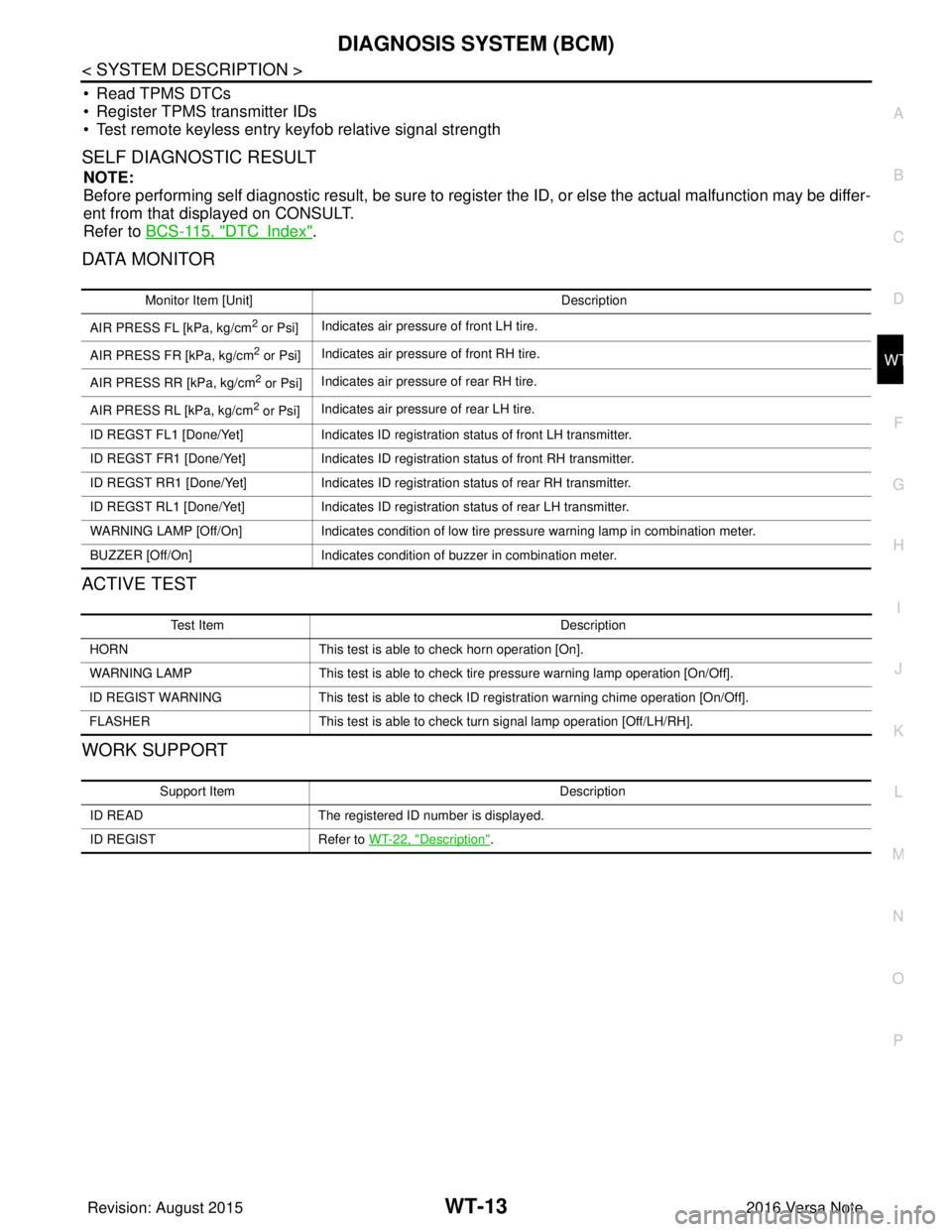
DATA MONITOR
ACTIVE TEST
WORK SUPPORT
Monitor Item [Unit] Description
AIR PRESS FL [kPa, kg/cm
2 or Psi] Indicates air pressure of front LH tire.
AIR PRESS FR [kPa, kg/cm
2 or Psi] Indicates air pressure of front RH tire.
AIR PRESS RR [kPa, kg/cm
2 or Psi] Indicates air pressure of rear RH tire.
AIR PRESS RL [kPa, kg/cm
2 or Psi] Indicates air pressure of rear LH tire.
ID REGST FL1 [Done/Yet] Indicates ID registration status of front LH transmitter.
ID REGST FR1 [Done/Yet] Indicates ID registration status of front RH transmitter.
ID REGST RR1 [Done/Yet] Indicates ID registration status of rear RH transmitter.
ID REGST RL1 [Done/Yet] Indicates ID registration status of rear LH transmitter.
WARNING LAMP [Off/On] Indicates condition of low tire pressure warning lamp in combination meter.
BUZZER [Off/On] Indicates condition of buzzer in combination meter.
Test Item Description
HORN This test is able to check horn operation [On].
WARNING LAMP This test is able to check tire pressure warning lamp operation [On/Off].
ID REGIST WARNING This test is able to check ID registration warning chime operation [On/Off].
FLASHER This test is able to check turn signal lamp operation [Off/LH/RH].
Support Item Description
ID READ The registered ID number is displayed.
ID REGIST Refer to WT-22, "
Description".
Revision: August 2015 2016 Versa Note
cardiagn.com
Page 2757 of 3641
WT-14
< ECU DIAGNOSIS INFORMATION >
BCM
ECU DIAGNOSIS INFORMATION
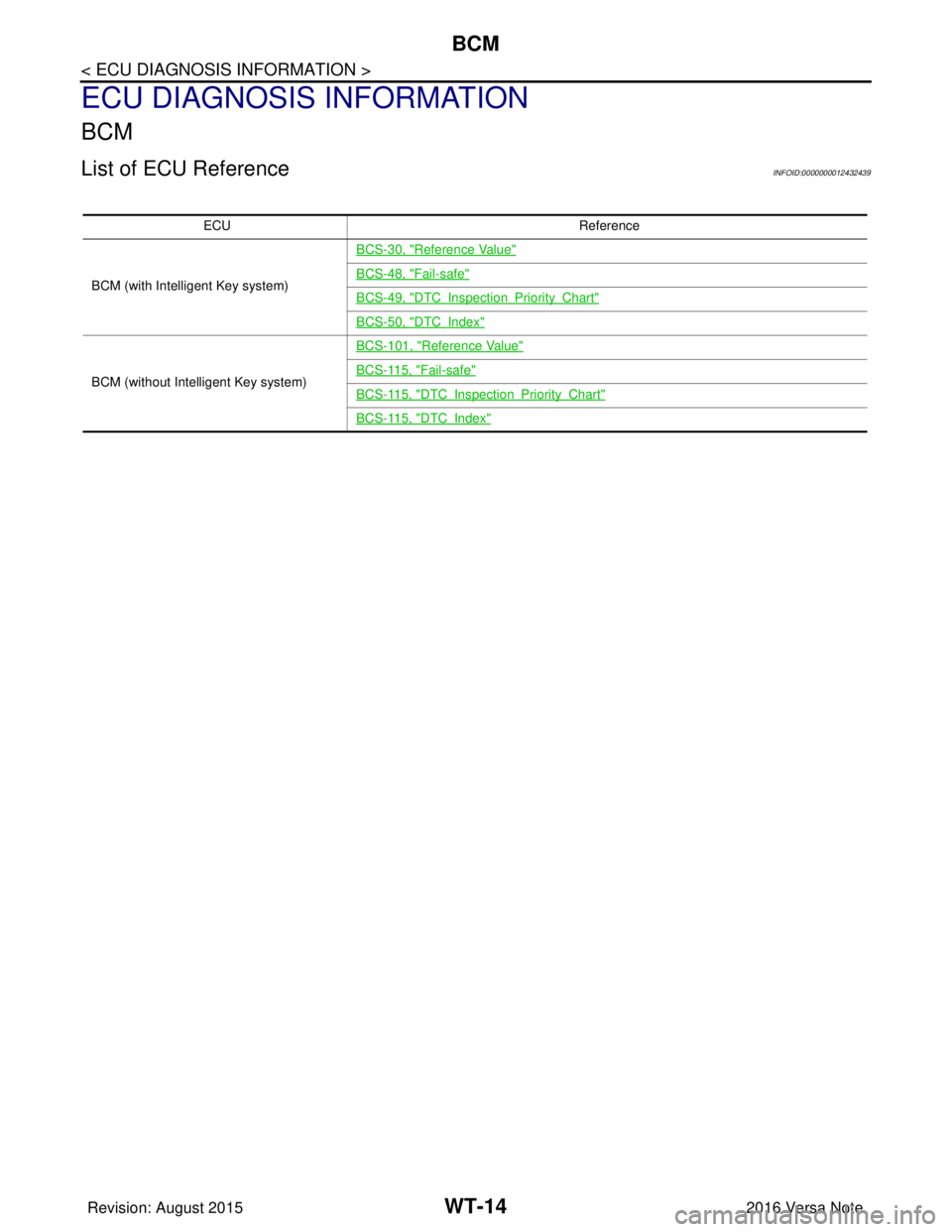
BCM
List of ECU ReferenceINFOID:0000000012432439
ECUReference
BCM (with Intelligent Key system) BCS-30, "
Reference Value"
BCS-48, "Fail-safe"
BCS-49, "DTCInspectionPriorityChart"
BCS-50, "DTCIndex"
BCM (without Intelligent Key system)BCS-101, "
Reference Value"
BCS-115, "Fail-safe"
BCS-115, "DTCInspectionPriorityChart"
BCS-115, "DTCIndex"
Revision: August 2015
2016 Versa Note
cardiagn.com
Page 2758 of 3641
TIRE PRESSURE MONITORING SYSTEMWT-15
< WIRING DIAGRAM >
C
DF
G H
I
J
K L
M A
B
WT
N
O P
WIRING DIAGRAM
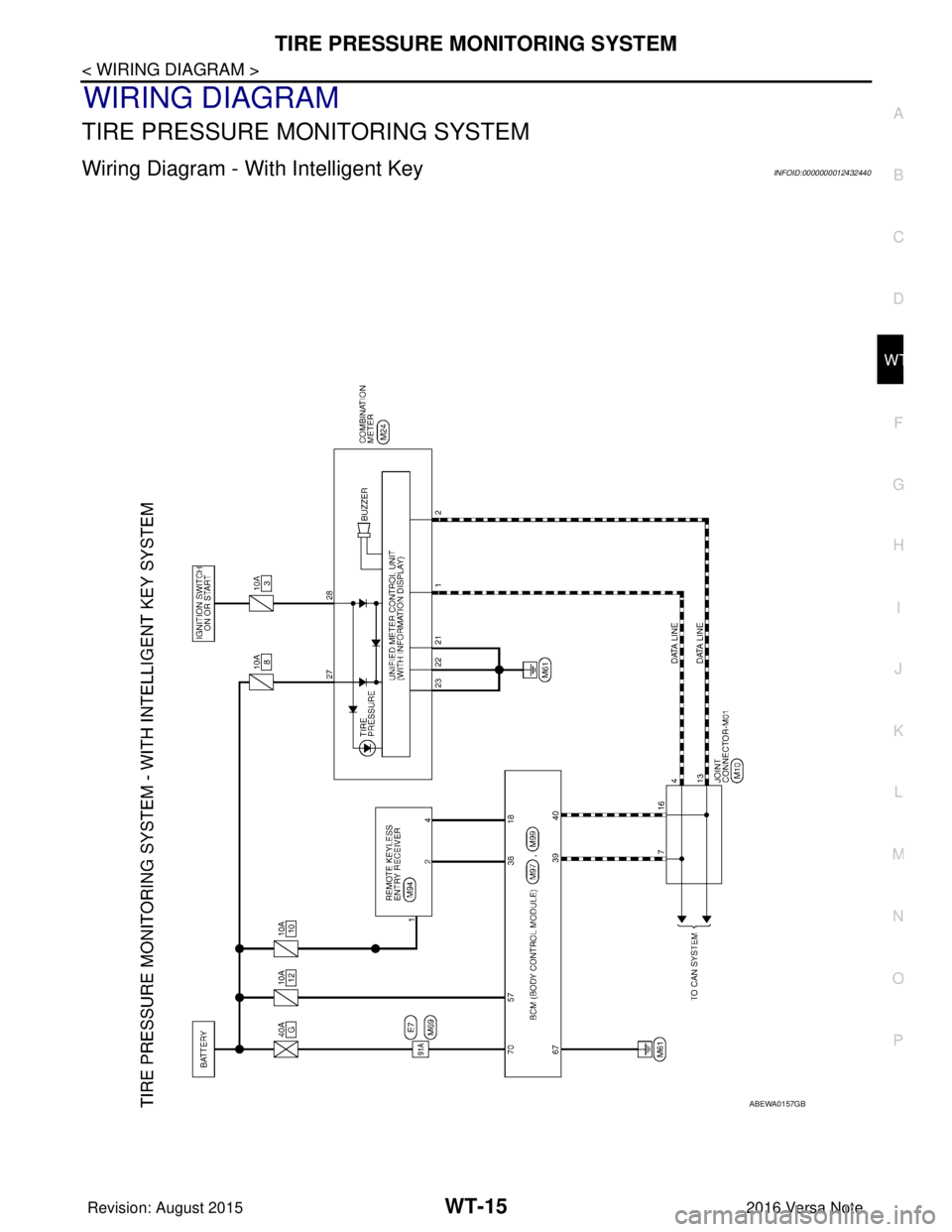
TIRE PRESSURE MO NITORING SYSTEM
Wiring Diagram - With Intelligent KeyINFOID:0000000012432440
ABEWA0157GB
Revision: August 2015 2016 Versa Note
cardiagn.com
Page 2761 of 3641
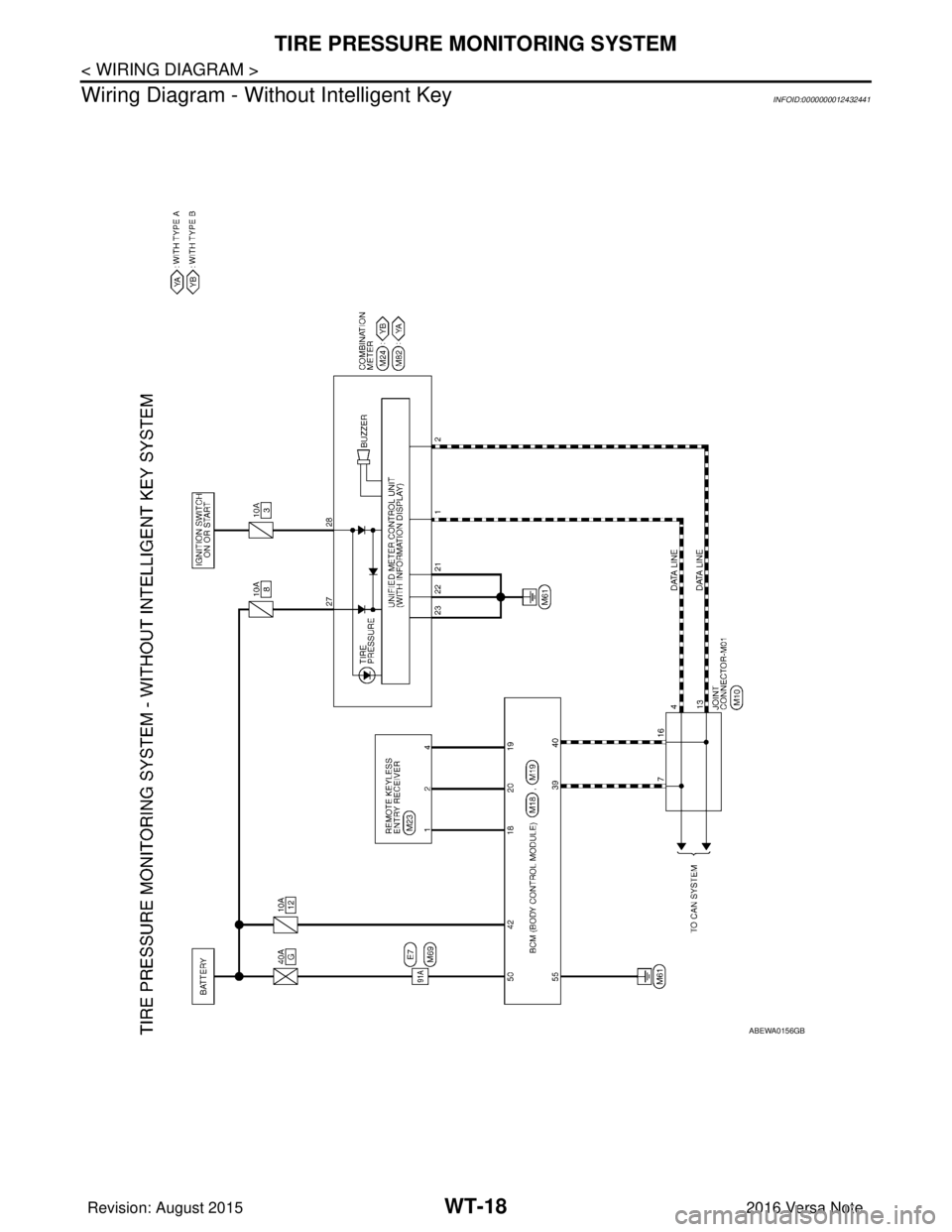
WT-18
< WIRING DIAGRAM >
TIRE PRESSURE MONITORING SYSTEM
Wiring Diagram - With out Intelligent Key
INFOID:0000000012432441
ABEWA0156GB
Revision: August 2015 2016 Versa Note
cardiagn.com
Page 2764 of 3641
DIAGNOSIS AND REPAIR WORK FLOWWT-21
< BASIC INSPECTION >
C
DF
G H
I
J
K L
M A
B
WT
N
O P
BASIC INSPECTION
DIAGNOSIS AND REPAIR WORK FLOW
Work Flow INFOID:0000000012432442
NOTE:
The Signal Tech II Tool [- (J-50190)] can be used to perform the following functions. Refer to the Signal Tech II
User Guide for additional information.
• Activate and display TPMS transmitter IDs
• Display tire pressure repor ted by the TPMS transmitter
• Read TPMS DTCs
• Register TPMS transmitter IDs
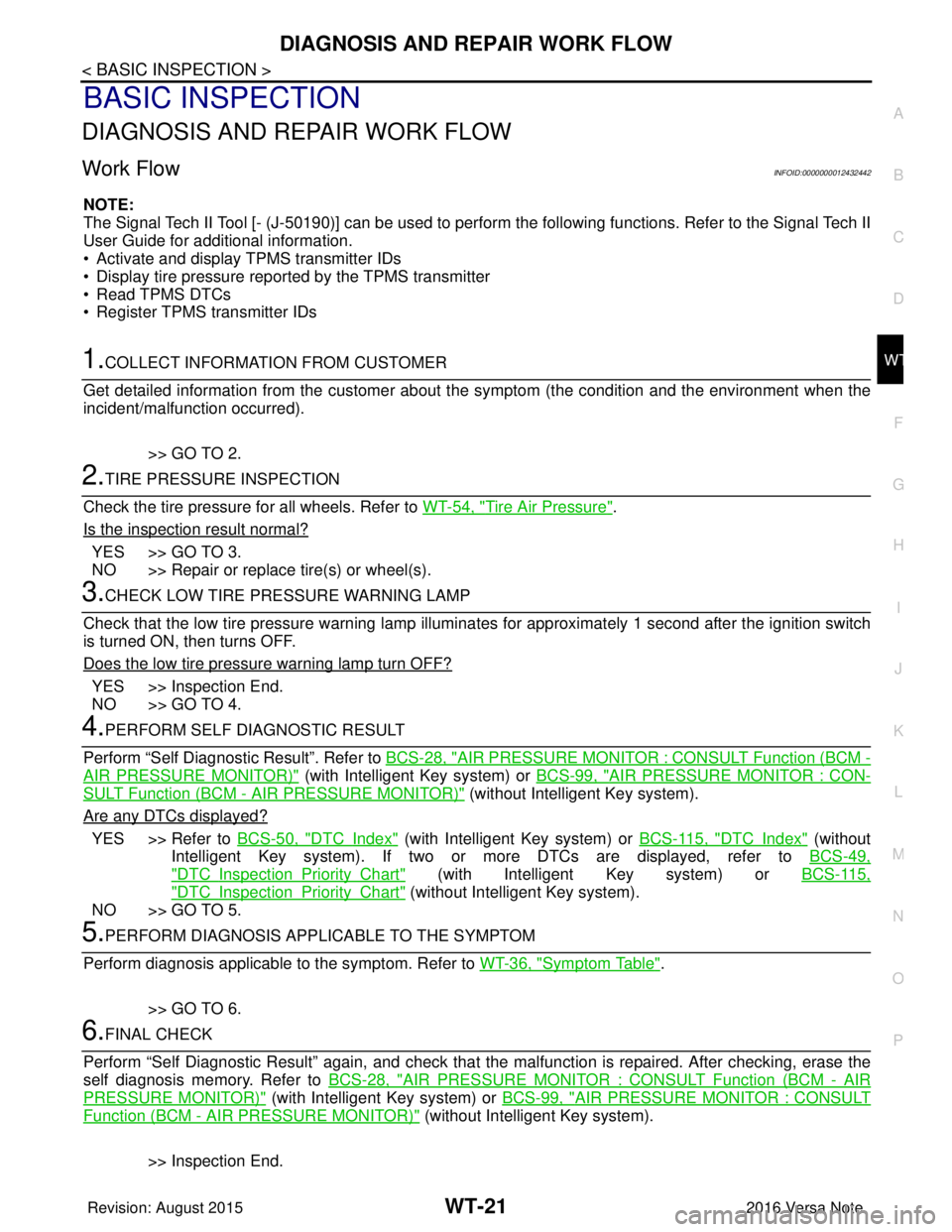
1.COLLECT INFORMATION FROM CUSTOMER
Get detailed information from the customer about t he symptom (the condition and the environment when the
incident/malfunction occurred).
>> GO TO 2.
2.TIRE PRESSURE INSPECTION
Check the tire pressure for all wheels. Refer to WT-54, "
Tire Air Pressure".
Is the inspection result normal?
YES >> GO TO 3.
NO >> Repair or replace tire(s) or wheel(s).
3.CHECK LOW TIRE PRE SSURE WARNING LAMP
Check that the low tire pressure warning lamp illumi nates for approximately 1 second after the ignition switch
is turned ON, then turns OFF.
Does the low tire pressure warning lamp turn OFF?
YES >> Inspection End.
NO >> GO TO 4.
4.PERFORM SELF DIAGNOSTIC RESULT
Perform “Self Diagnostic Result”. Refer to BCS-28, "
AIR PRESSURE MONITOR : CONSULT Function (BCM -
AIR PRESSURE MONITOR)" (with Intelligent Key system) or BCS-99, "AIR PRESSURE MONITOR : CON-
SULT Function (BCM - AIR PRESSURE MONITOR)" (without Intelligent Key system).
Are any DTCs displayed?
YES >> Refer to BCS-50, "DTCIndex" (with Intelligent Key system) or BCS-115, "DTCIndex" (without
Intelligent Key system). If two or more DTCs are displayed, refer to BCS-49,
"DTCInspectionPriorityChart" (with Intelligent Key system) or BCS-115,
"DTCInspectionPriorityChart" (without Intelligent Key system).
NO >> GO TO 5.
5.PERFORM DIAGNOSIS APPLICABLE TO THE SYMPTOM
Perform diagnosis applicable to the symptom. Refer to WT-36, "
Symptom Table".
>> GO TO 6.
6.FINAL CHECK
Perform “Self Diagnostic Result” again, and check that the malfunction is repaired. After checking, erase the
self diagnosis memory. Refer to BCS-28, "
AIR PRESSURE MONITOR : CONSULT Function (BCM - AIR
PRESSURE MONITOR)" (with Intelligent Key system) or BCS-99, "AIR PRESSURE MONITOR : CONSULT
Function (BCM - AIR PRESSURE MONITOR)" (without Intelligent Key system).
>> Inspection End.
Revision: August 2015 2016 Versa Note
cardiagn.com
Page 2770 of 3641
C1708, C1709, C1710, C1711 TRANSMITTER (NO DATA)
WT-27
< DTC/CIRCUIT DIAGNOSIS >
C
DF
G H
I
J
K L
M A
B
WT
N
O P
C1708, C1709, C1710, C1711 TRANSMITTER (NO DATA)
DTC LogicINFOID:0000000012432447
NOTE:
The Signal Tech II Tool [- (J-50190)] can be used to perform the following functions. Refer to the Signal Tech II
User Guide for additional information.
• Activate and display TPMS transmitter IDs
• Display tire pressure repor ted by the TPMS transmitter
• Read TPMS DTCs
• Register TPMS transmitter IDs
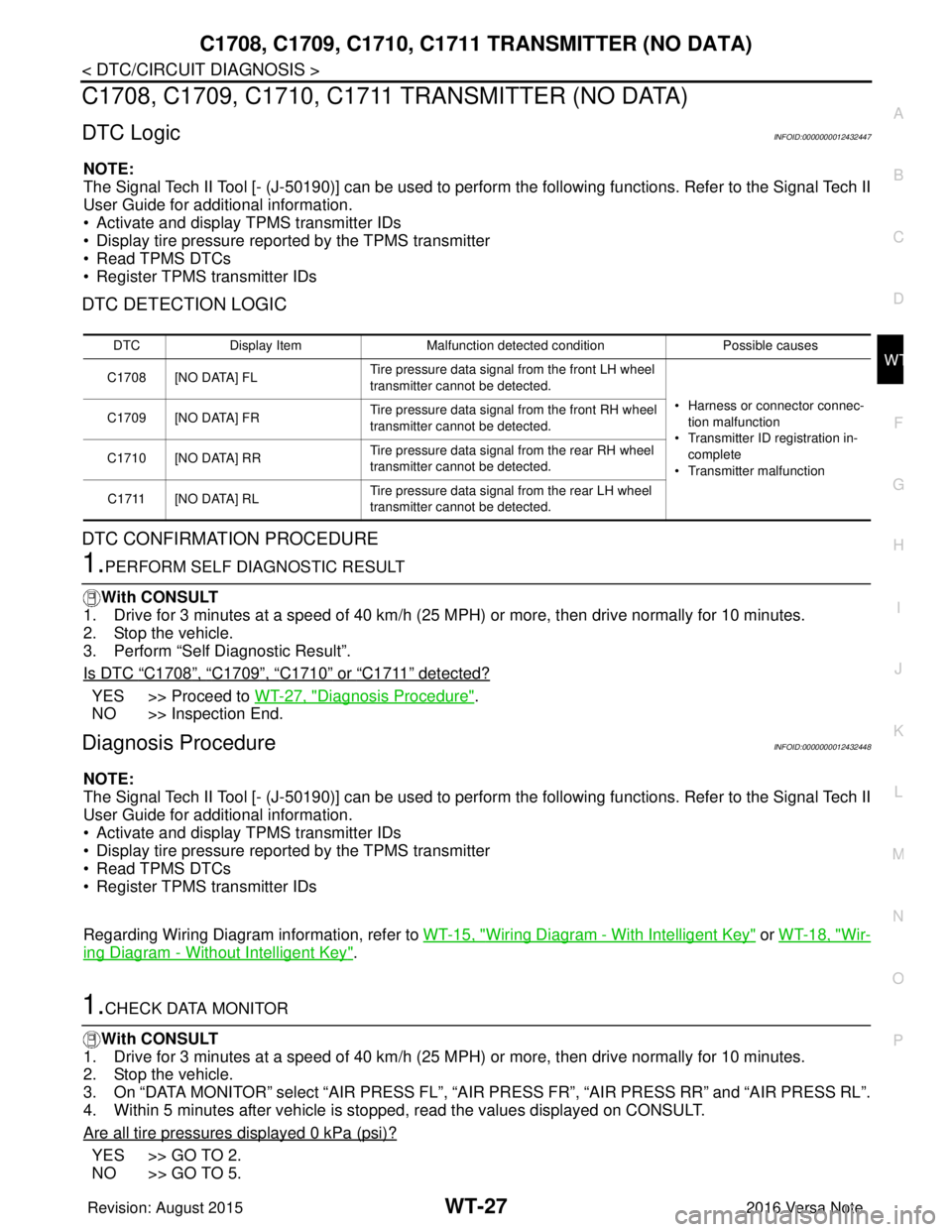
DTC DETECTION LOGIC
DTC CONFIRMATION PROCEDURE
1.PERFORM SELF DIAGNOSTIC RESULT
With CONSULT
1. Drive for 3 minutes at a speed of 40 km/h (25 MPH) or more, then drive normally for 10 minutes.
2. Stop the vehicle.
3. Perform “Self Diagnostic Result”.
Is DTC
“C1708”, “C1709”, “C1710” or “C1711” detected?
YES >> Proceed to WT-27, "Diagnosis Procedure".
NO >> Inspection End.
Diagnosis ProcedureINFOID:0000000012432448
NOTE:
The Signal Tech II Tool [- (J-50190)] can be used to perform the following functions. Refer to the Signal Tech II
User Guide for additional information.
• Activate and display TPMS transmitter IDs
• Display tire pressure repor ted by the TPMS transmitter
• Read TPMS DTCs
• Register TPMS transmitter IDs
Regarding Wiring Diagram information, refer to WT-15, "
Wiring Diagram - With Intelligent Key" or WT-18, "Wir-
ing Diagram - Without Intelligent Key".
1.CHECK DATA MONITOR
With CONSULT
1. Drive for 3 minutes at a speed of 40 km/h (25 MPH) or more, then drive normally for 10 minutes.
2. Stop the vehicle.
3. On “DATA MONITOR” select “AIR PRESS FL”, “AIR PRESS FR”, “AIR PRESS RR” and “AIR PRESS RL”.
4. Within 5 minutes after vehicle is stopped, read the values displayed on CONSULT.
Are all tire pressures displayed 0 kPa (psi)?
YES >> GO TO 2.
NO >> GO TO 5.
DTC Display Item Malfunction detected condition Possible causes
C1708 [NO DATA] FL Tire pressure data signal from the front LH wheel
transmitter cannot be detected.
• Harness or connector connec-tion malfunction
• Transmitter ID registration in- complete
• Transmitter malfunction
C1709 [NO DATA] FR
Tire pressure data signal from the front RH wheel
transmitter cannot be detected.
C1710 [NO DATA] RR Tire pressure data signal from the rear RH wheel
transmitter cannot be detected.
C1711 [NO DATA] RL Tire pressure data signal from the rear LH wheel
transmitter cannot be detected.
Revision: August 2015
2016 Versa Note
cardiagn.com
Page 2771 of 3641

WT-28
< DTC/CIRCUIT DIAGNOSIS >
C1708, C1709, C1710, C1711 TRANSMITTER (NO DATA)
2.CHECK REMOTE KEYLESS ENTRY RECEIVER POWER CIRCUIT
Check voltage between remote keyless entry receiver connector and ground.
Is the inspection result normal?
YES >> GO TO 3.
NO >> Repair or replace harness or connectors.
3.CHECK REMOTE KEYL ESS ENTRY RECEIVER SIGNAL CIRCUIT
1. Turn the ignition switch OFF.
2. Disconnect BCM and remote keyless entry receiver connectors.
3. Check continuity between BCM and remote keyless entry receiver connectors.
4. Check continuity between BCM connector and ground.
Is the inspection result normal?
YES >> GO TO 4.
NO >> Repair or replace the ma lfunctioning harness or connector.
4.CHECK REMOTE KEYLESS ENTRY RECEIVER GROUND CIRCUIT
Check continuity between BCM and remote keyless entry receiver connectors.
Is the inspection result normal?
YES >> GO TO 5.
NO >> Repair or replace the ma lfunctioning harness or connector.
5.TRANSMITTER ID REGISTRATION
Perform transmitter ID registration. Refer to WT-22, "
Work Procedure".
Is transmitter ID registration completed?
YES >> GO TO 6.
NO >> Replace applicable transmitter. Refer to WT-49, "
Removal and Installation".
6.CHECK TIRE PRESSURE SIGNAL
With CONSULT
1. Drive for 3 minutes at a speed of 40 km/h (25 MPH) or more, then drive normally for 10 minutes.
2. Stop the vehicle.
3. On “DATA MONITOR” select “AIR PRESS FL”, “A IR PRESS FR”, “AIR PRESS RR” and “AIR PRESS RL”.
Remote keyless entry receiver
GroundVo l ta g e
(Approx.)
Connector Terminal
M94 (with Intelligent Key system) 1
—Battery voltage
M23 (without Intelligent Key system) 4 5V
BCMRemote keyless entry receiver
Continuity
Connector TerminalConnector Terminal
M97 (with Intelligent Key system) 38 M94 (with Intelligent Key system)
2Yes
M18 (without Intelligent Key system) 20 M23 (without Intelligent Key system)
BCM —Continuity
Connector Terminal
M97 (with Intelligent Key system) 38 GroundNo
M18 (without Intelligent Key system) 20
BCMRemote keyless entry receiver
Continuity
Connector TerminalConnector Terminal
M97 (with Intelligent Key system) 18M94 (with Intelligent Key system)
4
Ye s
M18 (without Intelligent Key system) M23 (without Intelligent Key system) 1
Revision: August 2015 2016 Versa Note
cardiagn.com
Page 2772 of 3641
C1708, C1709, C1710, C1711 TRANSMITTER (NO DATA)
WT-29
< DTC/CIRCUIT DIAGNOSIS >
C
DF
G H
I
J
K L
M A
B
WT
N
O P
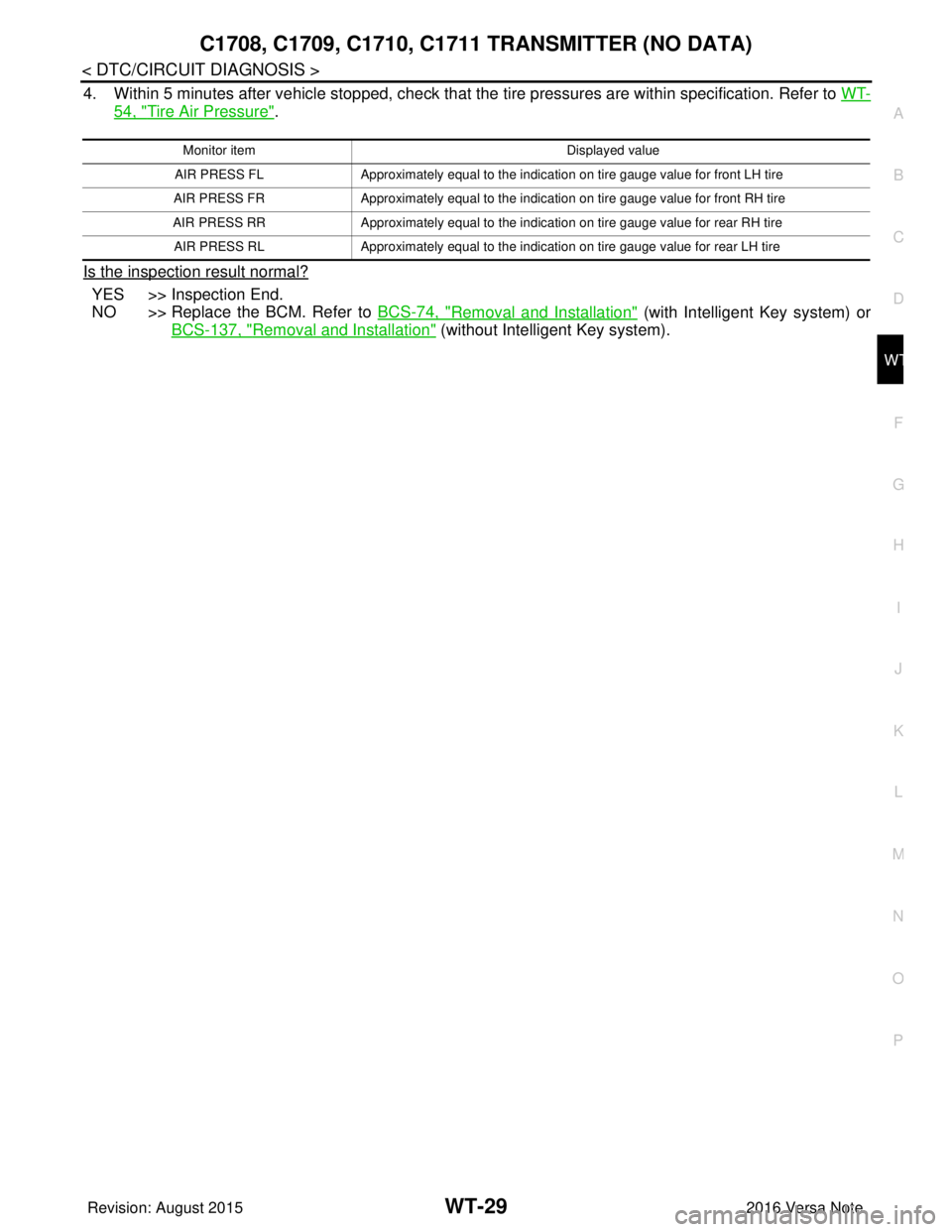
4. Within 5 minutes after vehicle stopped, check that t he tire pressures are within specification. Refer to WT-
54, "Tire Air Pressure".
Is the inspection result normal?
YES >> Inspection End.
NO >> Replace the BCM. Refer to BCS-74, "
Removal and Installation" (with Intelligent Key system) or
BCS-137, "
Removal and Installation" (without Intelligent Key system).
Monitor item Displayed value
AIR PRESS FL Approximately equal to the indication on tire gauge value for front LH tire
AIR PRESS FR Approximately equal to the indication on tire gauge value for front RH tire
AIR PRESS RR Approximately equal to the indication on tire gauge value for rear RH tire
AIR PRESS RL Approximately equal to the indication on tire gauge value for rear LH tire
Revision: August 2015 2016 Versa Note
cardiagn.com