headlamp NISSAN NOTE 2016 Service Manual PDF
[x] Cancel search | Manufacturer: NISSAN, Model Year: 2016, Model line: NOTE, Model: NISSAN NOTE 2016Pages: 3641, PDF Size: 28.72 MB
Page 1749 of 3641
HEADLAMP AIMING ADJUSTMENTEXL-97
< PERIODIC MAINTENANCE >
C
DE
F
G H
I
J
K
M A
B
EXL
N
O P
PERIODIC MAINTENANCE
HEADLAMP AIMING ADJUSTMENT
InspectionINFOID:0000000012432828
PREPARATION BEFORE ADJUSTING
Before performing aiming adjustment, check the following:
• Ensure all tires are inflated to correct pressure.
• Place vehicle and screen on level surface.
• Ensure there is no load in vehicle other than the driver (or equivalent weight placed in driver's position).
• Coolant and engine oil filled to correct level, and fuel tank full.
• Remove cargo and/or luggage to maintain an unloaded vehicle condition.
• Confirm spare tire, jack and tools are properly stowed.
• Carefully wipe off any dirt from headlamp lens. CAUTION:
Do not use organic solvent (thinner, gasoline etc.)
• Place a driver or equivalent weight of 68.5 kg (150 lb) on the driver seat.
• By hand, bounce the front and rear of the vehicle to settle the suspension and eliminate any static load.
• Place the front tires in the straight ahead position.
• Confirm headlamp aiming switch is set to "0" (zero) position.
• Aim each headlamp individually and ensure other headlamp beam pattern is blocked from screen.
NOTE:
• For headlamp aiming details, refer to regulations in your area.
• By regulation, no means for horizontal aim adjustment is provided from the factory; only vertical aim is
adjustable.
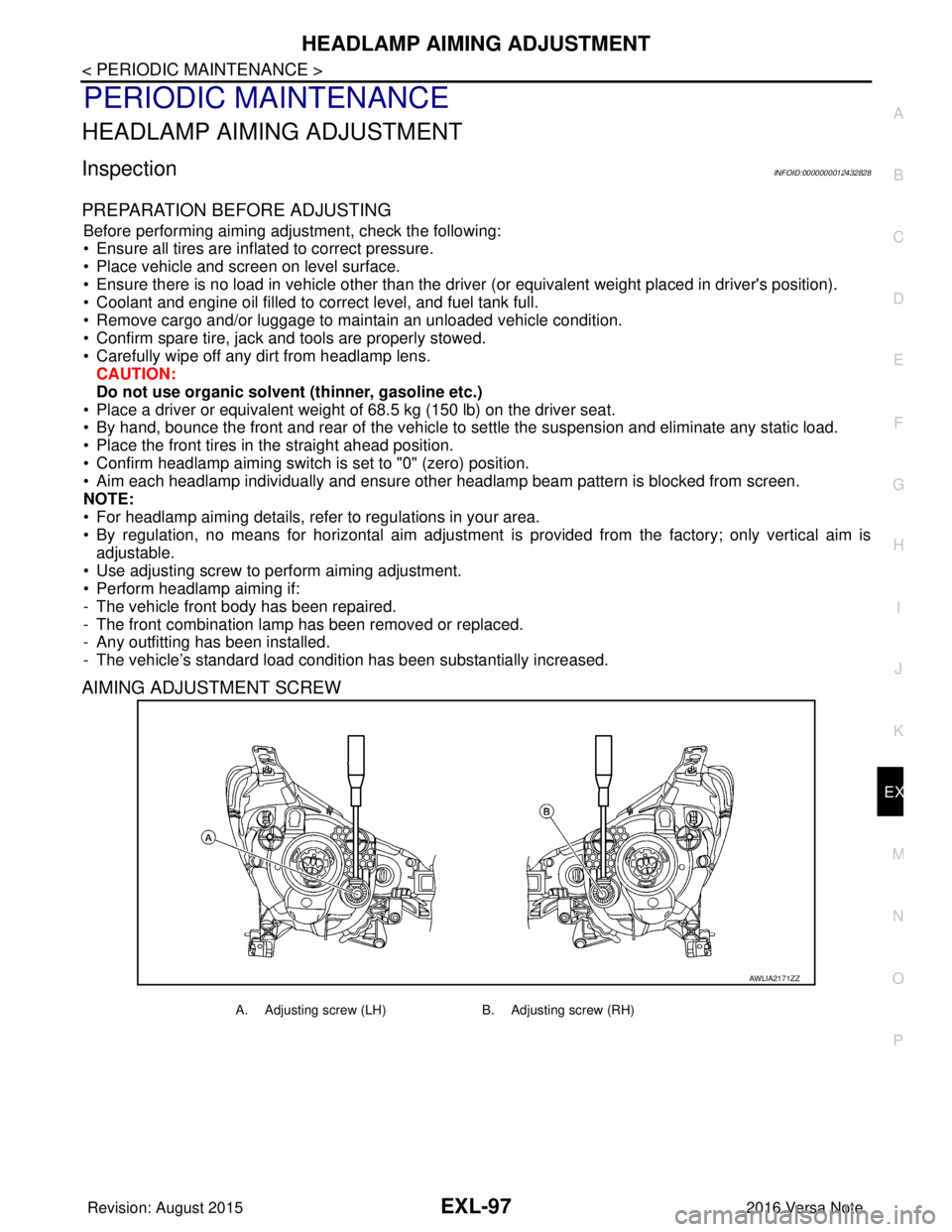
• Use adjusting screw to perform aiming adjustment.
• Perform headlamp aiming if:
- The vehicle front body has been repaired.
- The front combination lamp has been removed or replaced.
- Any outfitting has been installed.
- The vehicle’s standard load condition has been substantially increased.
AIMING ADJUSTMENT SCREW
AWLIA2171ZZ
A. Adjusting screw (LH) B. Adjusting screw (RH)
Revision: August 2015 2016 Versa Note
cardiagn.com
Page 1750 of 3641
EXL-98
< PERIODIC MAINTENANCE >
HEADLAMP AIMING ADJUSTMENT
Aiming Adjustment Procedure
INFOID:0000000012432829
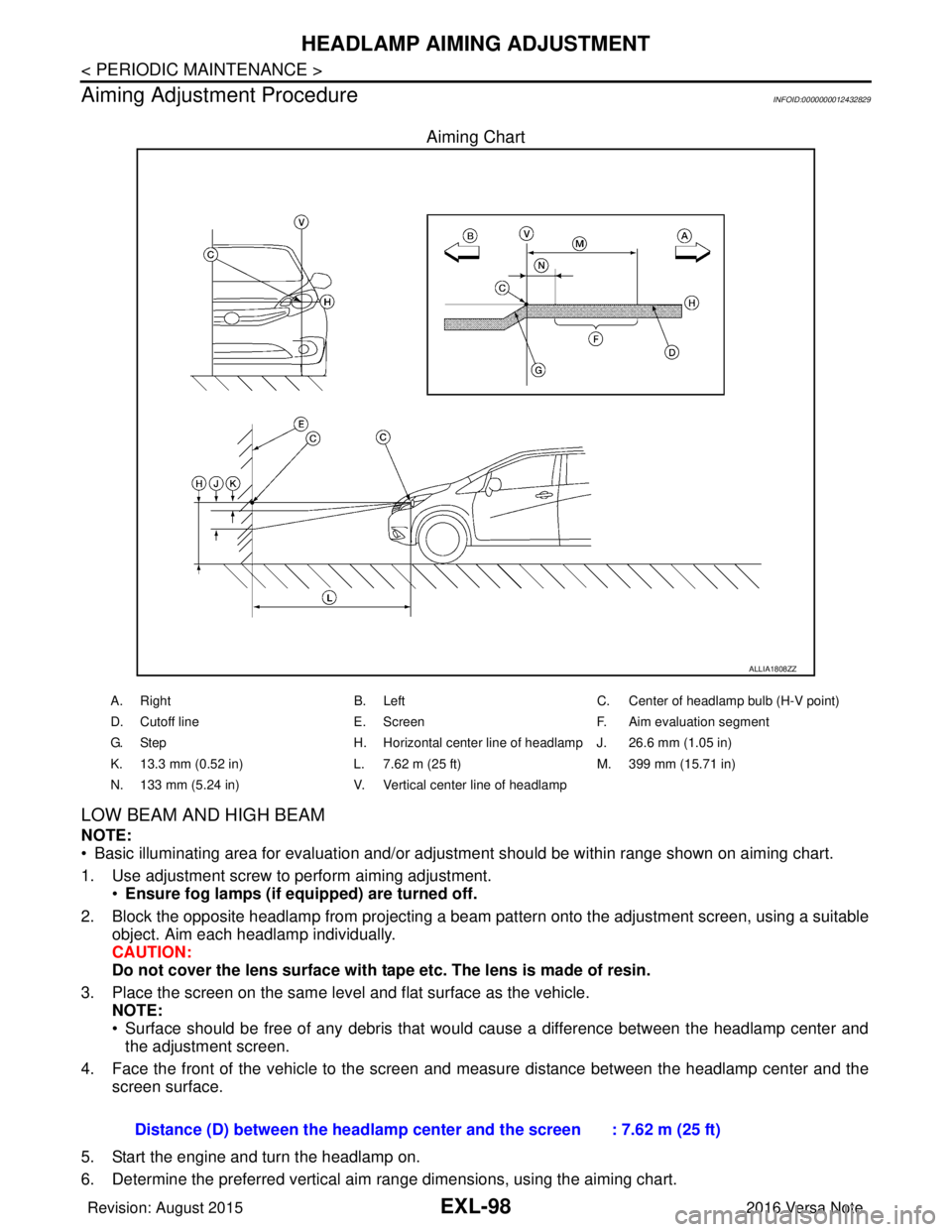
Aiming Chart
LOW BEAM AND HIGH BEAM
NOTE:
• Basic illuminating area for evaluation and/or adjus tment should be within range shown on aiming chart.
1. Use adjustment screw to perform aiming adjustment. •Ensure fog lamps (if eq uipped) are turned off.
2. Block the opposite headlamp from projecting a beam pa ttern onto the adjustment screen, using a suitable
object. Aim each headlamp individually.
CAUTION:
Do not cover the lens surface with tape etc. The lens is made of resin.
3. Place the screen on the same level and flat surface as the vehicle. NOTE:
• Surface should be free of any debris that would cause a difference between the headlamp center and
the adjustment screen.
4. Face the front of the vehicle to the screen and measure distance between the headlamp center and the screen surface.
5. Start the engine and turn the headlamp on.
6. Determine the preferred vertical aim range dimensions, using the aiming chart.
ALLIA1808ZZ
A. Right B. LeftC. Center of headlamp bulb (H-V point)
D. Cutoff line E. ScreenF. Aim evaluation segment
G. Step H. Horizontal center line of headlamp J. 26.6 mm (1.05 in)
K. 13.3 mm (0.52 in) L. 7.62 m (25 ft)M. 399 mm (15.71 in)
N. 133 mm (5.24 in) V. Vertical center line of headlamp
Distance (D) between the headlamp center and the screen : 7.62 m (25 ft)
Revision: August 2015 2016 Versa Note
cardiagn.com
Page 1751 of 3641

HEADLAMP AIMING ADJUSTMENTEXL-99
< PERIODIC MAINTENANCE >
C
DE
F
G H
I
J
K
M A
B
EXL
N
O P
7. Measure the projected beam within t he aim evaluation segment on the screen.
8. Adjust the beam pattern of each headlamp until the ai m evaluation segment (the area relative to both the
highest and lowest cutoff line height) is positioned within the vertical aim range dimensions shown on the
aiming chart.
Revision: August 2015 2016 Versa Note
cardiagn.com
Page 1752 of 3641
EXL-100
< PERIODIC MAINTENANCE >
FRONT FOG LAMP AIMING ADJUSTMENT
FRONT FOG LAMP AIMING ADJUSTMENT
InspectionINFOID:0000000012432830
PREPARATION BEFORE ADJUSTING
Before performing aiming adjustment procedure, check the following:
• Ensure all tires are inflated to correct pressure.
• Place vehicle and screen on level surface.
• Ensure there is no load in vehicle other than the driver (or equivalent weight placed in driver's position).
• Coolant and engine oil filled to correct level, and fuel tank full.
• Remove cargo and/or luggage to maintain an unloaded vehicle condition.
• Confirm spare tire, jack and tools are properly stowed.
• Carefully wipe off any dirt from fog lamp lens. CAUTION:
Do not use organic solvent (thinner, gasoline etc.)
• Place a driver or equivalent weight of 68.5 kg (150 lb) on the driver seat.
• By hand, bounce the front and rear of the vehicle to settle the suspension and eliminate any static load.
• Place the front tires in the straight ahead position.
• Aim each headlamp individually and ensure other headlamp beam pattern is blocked from screen.
NOTE:
• For headlamp aiming details, refer to regulations in your area.
• By regulation, no means for horizontal aim adjustment is provided from the factory; only vertical aim is
adjustable.
• Use adjusting screw to perform aiming adjustment.
• Perform headlamp aiming if:
- The vehicle front body has been repaired.
- The front combination lamp has been removed or replaced.
- Any outfitting has been installed.
- The vehicle’s standard load condition has been substantially increased.
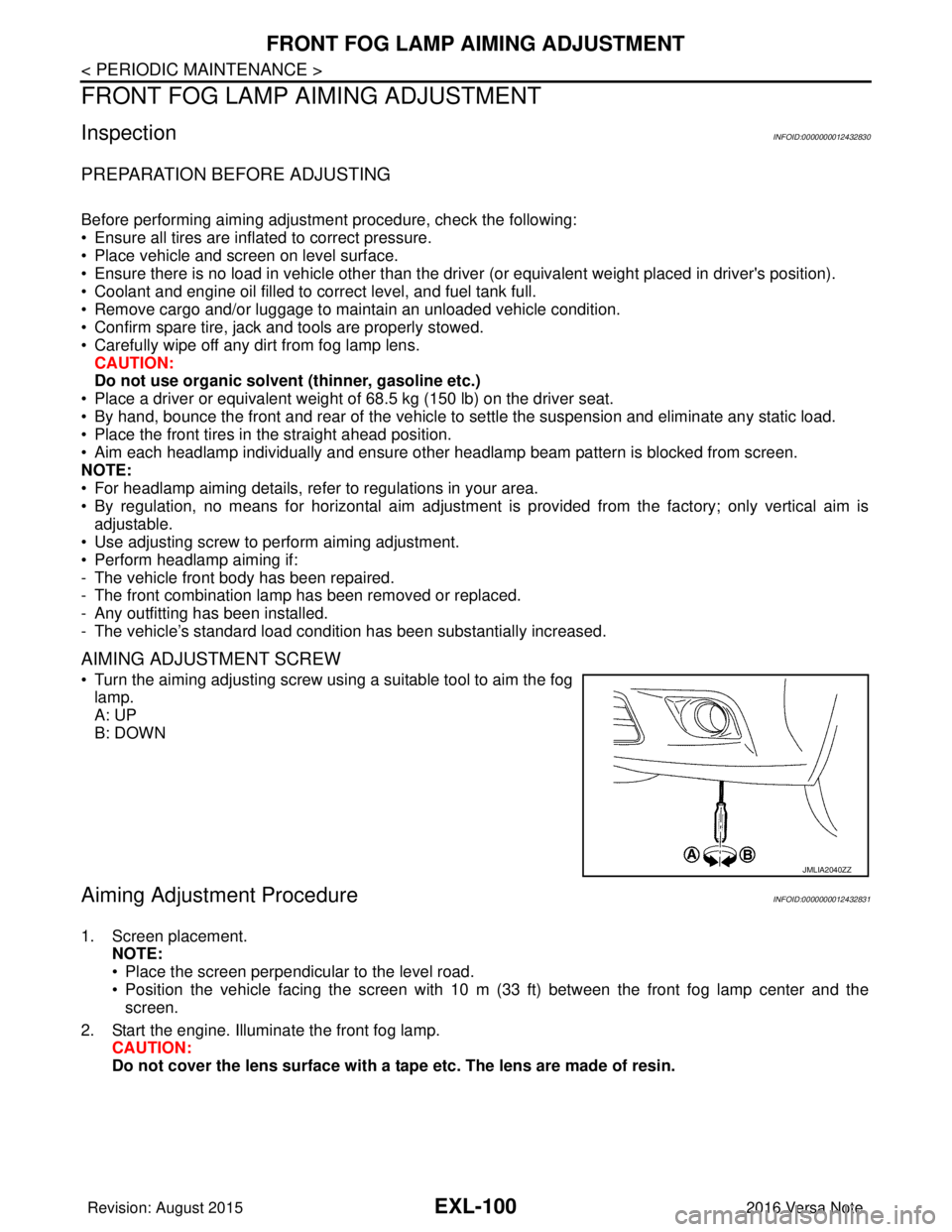
AIMING ADJUSTMENT SCREW
• Turn the aiming adjusting screw using a suitable tool to aim the fog
lamp.
A: UP
B: DOWN
Aiming Adjustment ProcedureINFOID:0000000012432831
1. Screen placement. NOTE:
• Place the screen perpendicular to the level road.
• Position the vehicle facing the screen with 10 m (33 ft) between the front fog lamp center and thescreen.
2. Start the engine. Illuminate the front fog lamp. CAUTION:
Do not cover the lens surface with a tape etc. The lens are made of resin.
JMLIA2040ZZ
Revision: August 2015 2016 Versa Note
cardiagn.com
Page 1754 of 3641
EXL-102
< REMOVAL AND INSTALLATION >
FRONT COMBINATION LAMP
REMOVAL AND INSTALLATION
FRONT COMBINATION LAMP
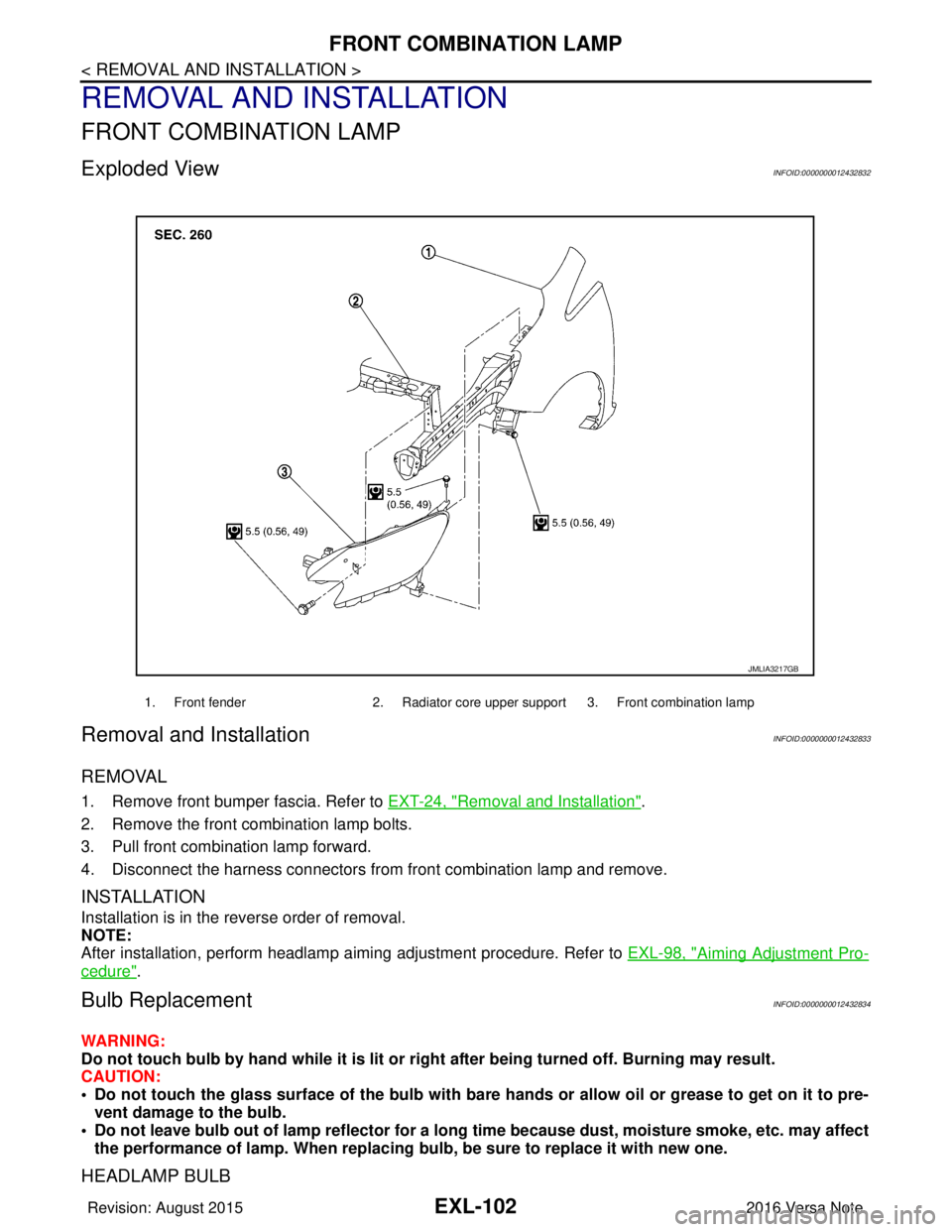
Exploded ViewINFOID:0000000012432832
Removal and InstallationINFOID:0000000012432833
REMOVAL
1. Remove front bumper fascia. Refer to EXT-24, "Removal and Installation".
2. Remove the front combination lamp bolts.
3. Pull front combination lamp forward.
4. Disconnect the harness connectors from front combination lamp and remove.
INSTALLATION
Installation is in the reverse order of removal.
NOTE:
After installation, perform headlamp aiming adjustment procedure. Refer to EXL-98, "
Aiming Adjustment Pro-
cedure".
Bulb ReplacementINFOID:0000000012432834
WARNING:
Do not touch bulb by hand while it is lit or right after being turned off. Burning may result.
CAUTION:
• Do not touch the glass surface of the bulb with bare hands or allow oil or grease to get on it to pre-
vent damage to the bulb.
• Do not leave bulb out of lamp reflector for a long time because dust, moisture smoke, etc. may affect
the performance of lamp. When replacing bulb, be sure to replace it with new one.
HEADLAMP BULB
1. Front fender2. Radiator core upper support 3. Front combination lamp
JMLIA3217GB
Revision: August 2015 2016 Versa Note
cardiagn.com
Page 1765 of 3641
FRONT COMBINATION LAMPEXL-113
< UNIT DISASSEMBLY AND ASSEMBLY >
C
DE
F
G H
I
J
K
M A
B
EXL
N
O P
UNIT DISASSEMBLY AND ASSEMBLY
FRONT COMBINATION LAMP
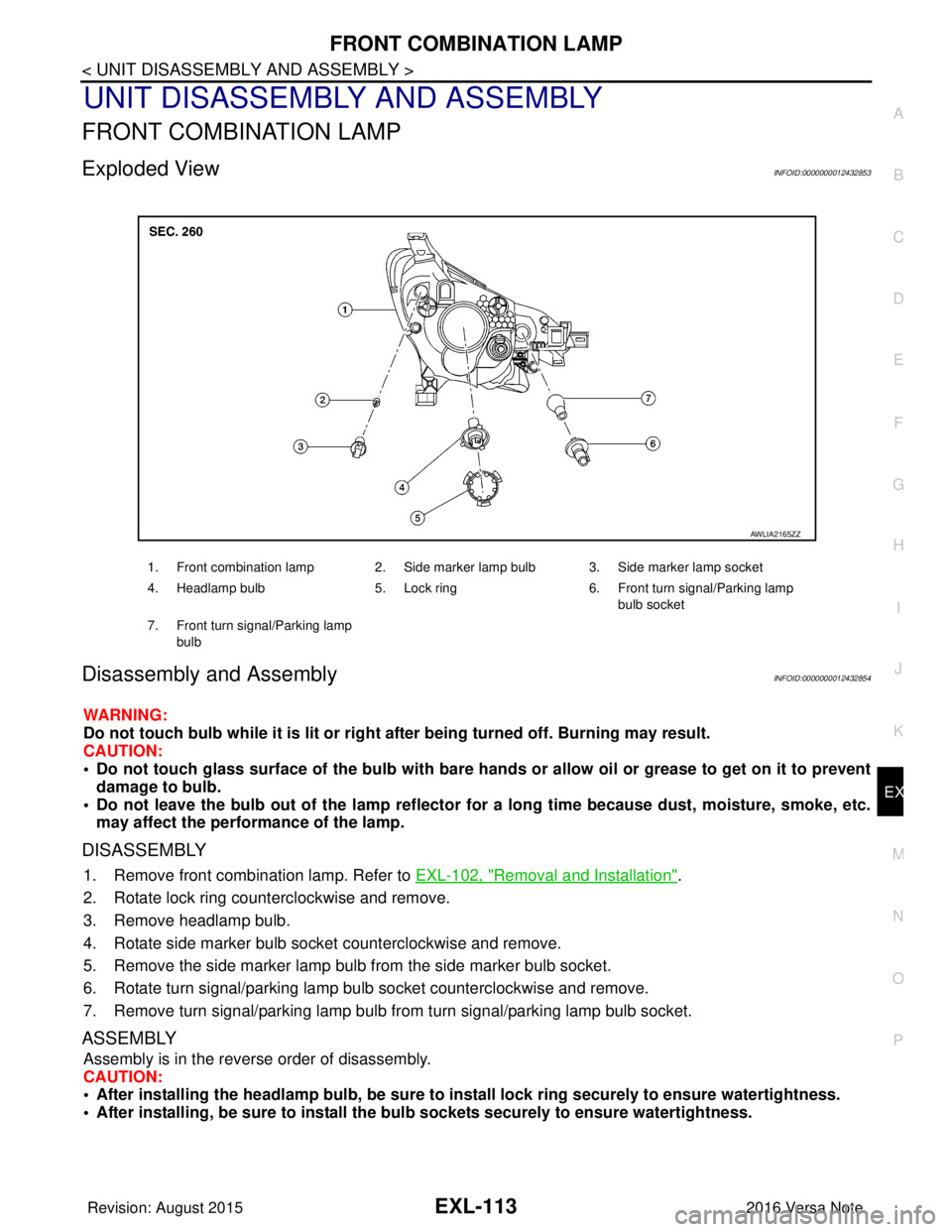
Exploded ViewINFOID:0000000012432853
Disassembly and AssemblyINFOID:0000000012432854
WARNING:
Do not touch bulb while it is lit or right after being turned off. Burning may result.
CAUTION:
• Do not touch glass surface of the bulb with bare hands or allow oil or grease to get on it to prevent damage to bulb.
• Do not leave the bulb out of the lamp reflector for a long time because dust , moisture, smoke, etc.
may affect the performance of the lamp.
DISASSEMBLY
1. Remove front combination lamp. Refer to EXL-102, "Removal and Installation".
2. Rotate lock ring counterclockwise and remove.
3. Remove headlamp bulb.
4. Rotate side marker bulb socket counterclockwise and remove.
5. Remove the side marker lamp bulb from the side marker bulb socket.
6. Rotate turn signal/parking lamp bulb socket counterclockwise and remove.
7. Remove turn signal/parking lamp bulb from turn signal/parking lamp bulb socket.
ASSEMBLY
Assembly is in the reverse order of disassembly.
CAUTION:
• After installing the headlamp bulb, be sure to install lock ring securely to ensure watertightness.
• After installing, be sure to install the bulb sockets securely to ensure watertightness.
1. Front combination lamp 2. Side marker lamp bulb 3. Side marker lamp socket
4. Headlamp bulb 5. Lock ring 6. Front turn signal/Parking lamp
bulb socket
7. Front turn signal/Parking lamp bulb
AWLIA2165ZZ
Revision: August 2015 2016 Versa Note
cardiagn.com
Page 1767 of 3641
SERVICE DATA AND SPECIFICATIONS (SDS)EXL-115
< SERVICE DATA AND SPECIFICATIONS (SDS)
C
DE
F
G H
I
J
K
M A
B
EXL
N
O P
SERVICE DATA AND SPECIFICATIONS (SDS)
SERVICE DATA AND SPECIFICATIONS (SDS)
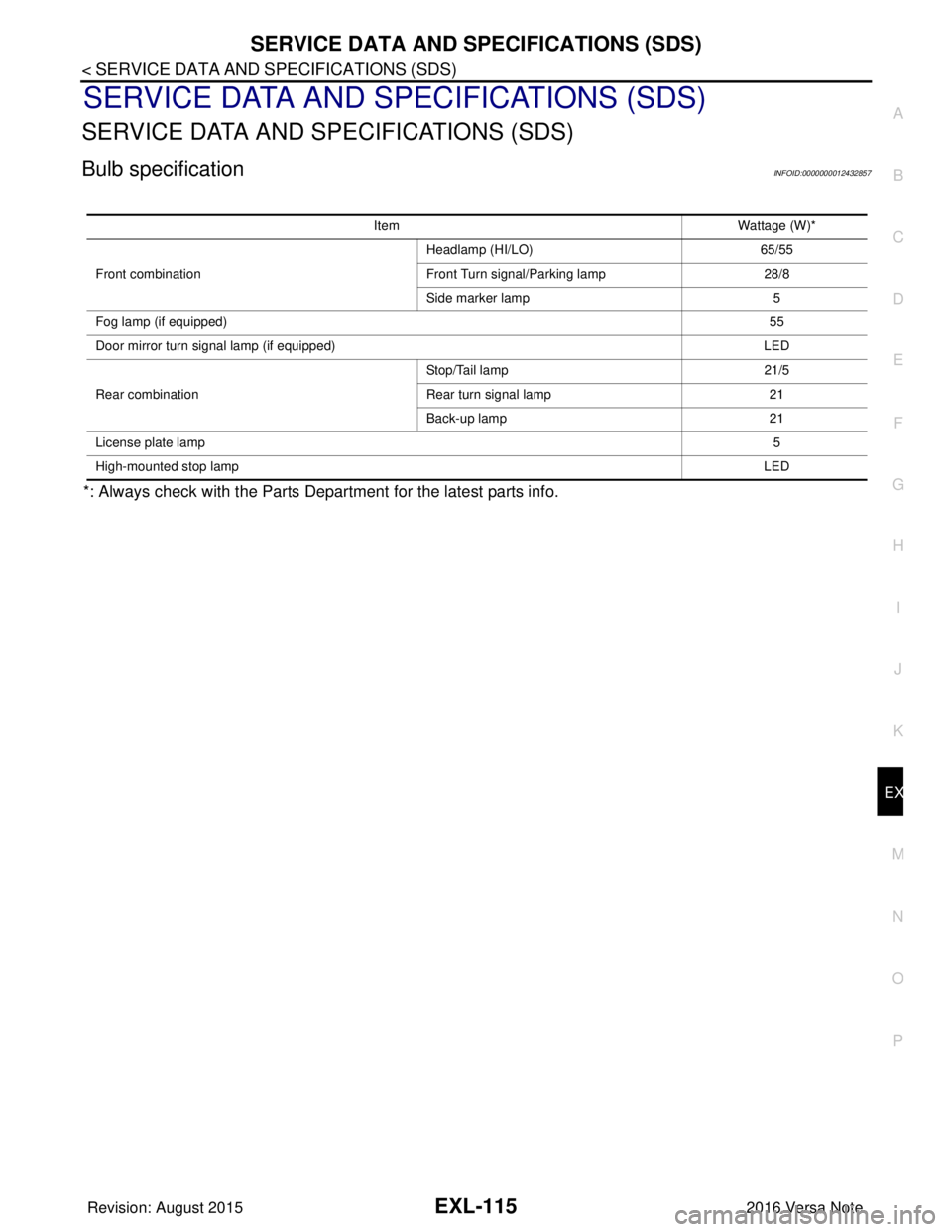
Bulb specificationINFOID:0000000012432857
*: Always check with the Parts Department for the latest parts info.
Item Wattage (W)*
Front combination Headlamp (HI/LO)
65/55
Front Turn signal/Parking lamp 28/8
Side marker lamp 5
Fog lamp (if equipped) 55
Door mirror turn signal lamp (if equipped) LED
Rear combination Stop/Tail lamp
21/5
Rear turn signal lamp 21
Back-up lamp 21
License plate lamp 5
High-mounted stop lamp LED
Revision: August 20152016 Versa Note
cardiagn.com
Page 2198 of 3641
![NISSAN NOTE 2016 Service Manual PDF LAN-10
< SYSTEM DESCRIPTION >[CAN FUNDAMENTAL]
TROUBLE DIAGNOSIS
Symptom When Error Occurs in CAN Communication System
INFOID:0000000012433334
In CAN communication system, multiple control units mutu](/img/5/57363/w960_57363-2197.png "NISSAN NOTE 2016 Service Manual PDF LAN-10
< SYSTEM DESCRIPTION >[CAN FUNDAMENTAL]
TROUBLE DIAGNOSIS
Symptom When Error Occurs in CAN Communication System
INFOID:0000000012433334
In CAN communication system, multiple control units mutu")
LAN-10
< SYSTEM DESCRIPTION >[CAN FUNDAMENTAL]
TROUBLE DIAGNOSIS
Symptom When Error Occurs in CAN Communication System
INFOID:0000000012433334
In CAN communication system, multiple control units mutually transmit and receive signals. Each control unit
cannot transmit and receive signals if any error occurs on CAN communication line. Under this condition, mul-
tiple control units related to the root cause malfunction or go into fail-safe mode.
ERROR EXAMPLE
NOTE:
Each vehicle differs in symptom of each control unit under fail-safe mode and CAN communication line wiring.
Example: Main Line Between Data Link Connector and ABS Actuator and Electric Un it (Control Unit) Open Circuit
JSMIA0442GB
Unit name Major symptom
ECM Engine torque limiting is affected, and shift harshness increases.
BCM • Reverse warning buzzer does not sound.
• The front wiper moves under continuous operation mode even though the front wip-
er switch being in the intermittent position.
EPS control unit The steering effort increases.
Combination meter • The shift position indicator and OD OFF indicator turn OFF.
• The speedometer is inoperative.
• The odo/trip meter stops.
ABS actuator and electric unit (control unit) Normal operation.
TCM No impact on operation.
IPDM E/R When the ignition switch is ON,
• The headlamps (Lo) turn ON.
• The cooling fan continues to rotate.
Revision: August 2015
2016 Versa Note
cardiagn.com
Page 2200 of 3641
![NISSAN NOTE 2016 Service Manual PDF LAN-12
< SYSTEM DESCRIPTION >[CAN FUNDAMENTAL]
TROUBLE DIAGNOSIS
NOTE:
When data link connector branch line is open, transmiss
ion and reception of CAN communication signals are
not affected. Therefor](/img/5/57363/w960_57363-2199.png "NISSAN NOTE 2016 Service Manual PDF LAN-12
< SYSTEM DESCRIPTION >[CAN FUNDAMENTAL]
TROUBLE DIAGNOSIS
NOTE:
When data link connector branch line is open, transmiss
ion and reception of CAN communication signals are
not affected. Therefor")
LAN-12
< SYSTEM DESCRIPTION >[CAN FUNDAMENTAL]
TROUBLE DIAGNOSIS
NOTE:
When data link connector branch line is open, transmiss
ion and reception of CAN communication signals are
not affected. Therefore, no symptoms occur. However, be sure to repair malfunctioning circuit.
Example: CAN-H, CAN-L Harness Short Circuit
CAN Diagnosis with CONSULTINFOID:0000000012433335
CAN diagnosis on CONSULT extracts the root c ause by receiving the following information.
Unit name Major symptom
ECM
Normal operation.
BCM
EPS control unit
Combination meter
ABS actuator and electric unit (control unit)
TCM
IPDM E/R
JSMIA0445GB
Unit name
Major symptom
ECM • Engine torque limiting is affected, and shift harshness increases.
• Engine speed drops.
BCM • Reverse warning buzzer does not sound.
• The front wiper moves under continuous operation mode even though the front
wiper switch being in the intermittent position.
• The room lamp does not turn ON.
• The engine does not start (if an error or malfunction occurs while turning the igni- tion switch OFF.)
• The steering lock does not release (if an error or malfunction occurs while turning the ignition switch OFF.)
EPS control unit The steering effort increases.
Combination meter • The tachometer and the speedometer do not move.
• Warning lamps turn ON.
• Indicator lamps do not turn ON.
ABS actuator and electric unit (control unit) Normal operation.
TCM No impact on operation.
IPDM E/R When the ignition switch is ON,
• The headlamps (Lo) turn ON.
• The cooling fan continues to rotate.
Revision: August 2015
2016 Versa Note
cardiagn.com
Page 2320 of 3641
GENERAL MAINTENANCEMA-5
< PERIODIC MAINTENANCE >
C
DE
F
G H
I
J
K L
M B
MA
N
O A
PERIODIC MAINTENANCE
GENERAL MAINTENANCE
Explanation of Gene
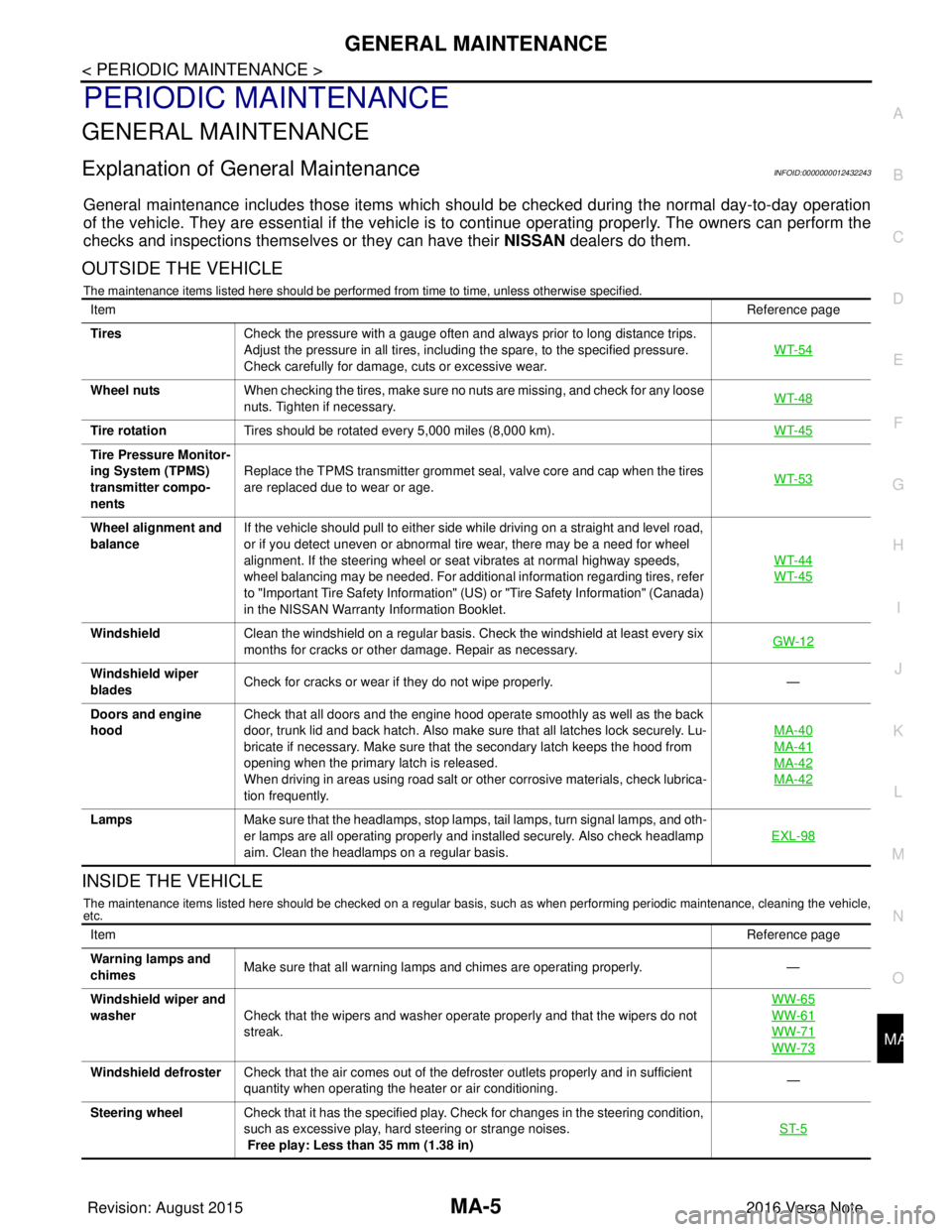
ral MaintenanceINFOID:0000000012432243
General maintenance includes those items which shoul d be checked during the normal day-to-day operation
of the vehicle. They are essential if the vehicle is to continue operati ng properly. The owners can perform the
checks and inspections themselves or they can have their NISSAN dealers do them.
OUTSIDE THE VEHICLE
The maintenance items listed here should be performed from time to time, unless otherwise specified.
INSIDE THE VEHICLE
The maintenance items listed here should be checked on a regular basis, such as when performing periodic maintenance, cleaning the vehicle,
etc.
Item Reference page
Tires Check the pressure with a gauge often and always prior to long distance trips.
Adjust the pressure in all tires, including the spare, to the specified pressure.
Check carefully for damage, cuts or excessive wear. WT-54
Wheel nuts
When checking the tires, make sure no nuts are missing, and check for any loose
nuts. Tighten if necessary. WT-48
Tire rotation
Tires should be rotated every 5,000 miles (8,000 km). WT-45
Tire Pressure Monitor-
ing System (TPMS)
transmitter compo-
nentsReplace the TPMS transmitter grommet seal, valve core and cap when the tires
are replaced due to wear or age.
WT-53
Wheel alignment and
balanceIf the vehicle should pull to either side while driving on a straight and level road,
or if you detect uneven or abnormal tire wear, there may be a need for wheel
alignment. If the steering wheel or seat vibrates at normal highway speeds,
wheel balancing may be needed. For additional information regarding tires, refer
to "Important Tire Safety Information" (US) or "Tire Safety Information" (Canada)
in the NISSAN Warranty
Information Booklet. WT-44
WT-45
Windshield
Clean the windshield on a regular basis. Check the windshield at least every six
months for cracks or other damage. Repair as necessary. GW-12
Windshield wiper
bladesCheck for cracks or wear if they do not wipe properly.
—
Doors and engine
hood Check that all doors and the engine hood operate smoothly as well as the back
door, trunk lid and back hatch. Also make sure that all latches lock securely. Lu-
bricate if necessary. Make sure that the secondary latch keeps the hood from
opening when the primary latch is released.
When driving in areas using road salt or other corrosive materials, check lubrica-
tion frequently. MA-40
MA-41
MA-42
MA-42
Lamps
Make sure that the headlamps, stop lamps, tail lamps, turn signal lamps, and oth-
er lamps are all operating properly and installed securely. Also check headlamp
aim. Clean the headlamps on a regular basis. EXL-98
Item
Reference page
Warning lamps and
chimes Make sure that all warning lamps and chimes are operating properly.
—
Windshield wiper and
washer Check that the wipers and washer operate properly and that the wipers do not
streak. WW-65
WW-61
WW-71
WW-73
Windshield defroster
Check that the air comes out of the defroster outlets properly and in sufficient
quantity when operating the heater or air conditioning. —
Steering wheel Check that it has the specified play. Check for changes in the steering condition,
such as excessive play, hard steering or strange noises.
Free play: Less than 35 mm (1.38 in) ST-5
Revision: August 2015
2016 Versa Note
cardiagn.com