engine NISSAN NOTE 2016 Service Repair Manual
[x] Cancel search | Manufacturer: NISSAN, Model Year: 2016, Model line: NOTE, Model: NISSAN NOTE 2016Pages: 3641, PDF Size: 28.72 MB
Page 3004 of 3641
![NISSAN NOTE 2016 Service Repair Manual B2191, P1615 DIFFERENCE OF KEYSEC-147
< DTC/CIRCUIT DIAGNOSIS > [WITHOUT INTELLIGENT KEY SYSTEM]
C
D
E
F
G H
I
J
L
M A
B
SEC
N
O P
B2191, P1615 DIFFERENCE OF KEY
DescriptionINFOID:0000000012430471
Per](/img/5/57363/w960_57363-3003.png "NISSAN NOTE 2016 Service Repair Manual B2191, P1615 DIFFERENCE OF KEYSEC-147
< DTC/CIRCUIT DIAGNOSIS > [WITHOUT INTELLIGENT KEY SYSTEM]
C
D
E
F
G H
I
J
L
M A
B
SEC
N
O P
B2191, P1615 DIFFERENCE OF KEY
DescriptionINFOID:0000000012430471
Per")
B2191, P1615 DIFFERENCE OF KEYSEC-147
< DTC/CIRCUIT DIAGNOSIS > [WITHOUT INTELLIGENT KEY SYSTEM]
C
D
E
F
G H
I
J
L
M A
B
SEC
N
O P
B2191, P1615 DIFFERENCE OF KEY
DescriptionINFOID:0000000012430471
Performs ID verification through BCM when mechanical key is inserted in the ignition key cylinder.
Prohibits the release of steering lock or start of engine when an unregistered ID of mechanical key is used.
DTC LogicINFOID:0000000012430472
DTC DETECTION LOGIC
DTC CONFIRMATION PROCEDURE
1.PERFORM DTC CONFIRMATION PROCEDURE
1. Insert mechanical key into the key cylinder.
2. Check “Self Diagnostic Result” using CONSULT.
Is DTC detected?
YES >> Refer to SEC-147, "Diagnosis Procedure".
NO >> Inspection End.
Diagnosis ProcedureINFOID:0000000012430473
1.PERFORM INITIALIZATION
Perform initialization with CONSULT. Re-register all mechanical keys.
For initialization and registration of mechanical key. Refer to CONSULT Immobilizer mode and follow the on-
screen instructions.
Can the system be initialized and can the engine be started with re-registered mechanical key?
YES >> Mechanical key was unregistered.
NO >> BCM is malfunctioning. • Replace BCM. Refer to BCS-137, "
Removal and Installation".
• Perform initialization again.
DTC No. Trouble diagnosis
name DTC detecting condition
Possible cause
B2191 DIFFERENCE OF
KEY The ID verification results between BCM and me-
chanical key are NG. The registration is necessary.
Mechanical key
P1615
Revision: August 2015 2016 Versa Note
cardiagn.com
Page 3005 of 3641
![NISSAN NOTE 2016 Service Repair Manual SEC-148
< DTC/CIRCUIT DIAGNOSIS >[WITHOUT INTELLIGENT KEY SYSTEM]
B2192, P1611 ID DI
SCORD, IMMU-ECM
B2192, P1611 ID DISCORD, IMMU-ECM
DescriptionINFOID:0000000012430474
BCM performs the ID verificati](/img/5/57363/w960_57363-3004.png "NISSAN NOTE 2016 Service Repair Manual SEC-148
< DTC/CIRCUIT DIAGNOSIS >[WITHOUT INTELLIGENT KEY SYSTEM]
B2192, P1611 ID DI
SCORD, IMMU-ECM
B2192, P1611 ID DISCORD, IMMU-ECM
DescriptionINFOID:0000000012430474
BCM performs the ID verificati")
SEC-148
< DTC/CIRCUIT DIAGNOSIS >[WITHOUT INTELLIGENT KEY SYSTEM]
B2192, P1611 ID DI
SCORD, IMMU-ECM
B2192, P1611 ID DISCORD, IMMU-ECM
DescriptionINFOID:0000000012430474
BCM performs the ID verification with ECM that allows the engine to start. BCM starts the communication with
ECM if ignition switch is turned ON and starts the engine if the ID is OK. ECM prevents the engine from start-
ing if the ID is not registered.
DTC LogicINFOID:0000000012430475
DTC DETECTION LOGIC
NOTE:
• If DTC B2192 is displayed with DTC U1000, first perform the trouble diagnosis for DTC U1000. Refer to BCS-127, "
DTC Logic".
• If DTC B2192 is displayed with DTC U1010, first perform the trouble diagnosis for DTC U1010. Refer to
BCS-128, "
DTC Logic".
DTC CONFIRMATION PROCEDURE
1.PERFORM DTC CONFIRMATION PROCEDURE
1. Turn ignition switch ON.
2. Check “Self Diagnostic Result” using CONSULT.
Is DTC detected?
YES >> Refer to SEC-148, "Diagnosis Procedure".
NO >> Inspection End.
Diagnosis ProcedureINFOID:0000000012430476
1.PERFORM INITIALIZATION
Perform initialization with CONSULT. Re-register all mechanical keys.
For initialization and registration of mechanical key, refer to CONSULT Immobilizer mode and follow the on-
screen instructions.
Can the system be initialized and can the engine be started with re-registered mechanical key?
YES >> ID was unregistered.
NO >> GO TO 2.
2.REPLACE BCM
1. Replace BCM. Refer to BCS-137, "
Removal and Installation".
2. Perform initialization with CONSULT. Re-register all mechanical keys. For initialization and registration of mechanical key, refer to CONSULT Immobilizer mode and follow the
on-screen instructions.
Can the system be initialized and can the engine be started with re-registered mechanical key?
YES >> BCM is malfunctioning.
NO >> GO TO 3.
3.REPLACE ECM
1. Replace ECM. Refer to EC-477, "
Removal and Installation".
2. Perform initialization with CONSULT. Re-register all mechanical keys.
For initialization and registration of mechanical key, refer to CONSULT Immobilizer mode and follow the
on-screen instructions.
Can the system be initialized and can the engine be started with re-registered mechanical key?
YES >> ECM is malfunctioning.
NO >> GO TO 4.
DTC No. Trouble diagnosis
name DTC detecting condition
Possible cause
B2192 ID DISCORD BCM-
ECM The ID verification results between BCM and ECM
are NG. The registration is necessary. •BCM
•ECM
P1611
Revision: August 2015 2016 Versa Note
cardiagn.com
Page 3007 of 3641
![NISSAN NOTE 2016 Service Repair Manual SEC-150
< DTC/CIRCUIT DIAGNOSIS >[WITHOUT INTELLIGENT KEY SYSTEM]
B2193, P1612 CH
AIN OF ECM-IMMU
B2193, P1612 CHAIN OF ECM-IMMU
DescriptionINFOID:0000000012430477
BCM performs the ID verification wit](/img/5/57363/w960_57363-3006.png "NISSAN NOTE 2016 Service Repair Manual SEC-150
< DTC/CIRCUIT DIAGNOSIS >[WITHOUT INTELLIGENT KEY SYSTEM]
B2193, P1612 CH
AIN OF ECM-IMMU
B2193, P1612 CHAIN OF ECM-IMMU
DescriptionINFOID:0000000012430477
BCM performs the ID verification wit")
SEC-150
< DTC/CIRCUIT DIAGNOSIS >[WITHOUT INTELLIGENT KEY SYSTEM]
B2193, P1612 CH
AIN OF ECM-IMMU
B2193, P1612 CHAIN OF ECM-IMMU
DescriptionINFOID:0000000012430477
BCM performs the ID verification with ECM that allows the engine to start. BCM starts the communication with
ECM if ignition switch is turned ON and starts the engine if the ID is OK. ECM prevents the engine from start-
ing if the ID is not registered.
DTC LogicINFOID:0000000012430478
DTC DETECTION LOGIC
NOTE:
• If DTC B2193 is displayed with DTC U1000, first perform the trouble diagnosis for DTC U1000. Refer to BCS-127, "
DTC Logic".
• If DTC B2193 is displayed with DTC U1010, first perform the trouble diagnosis for DTC U1010. Refer to
BCS-128, "
DTC Logic".
DTC CONFIRMATION PROCEDURE
1.PERFORM DTC CONFIRMATION PROCEDURE
1. Turn ignition switch ON.
2. Check “Self Diagnostic Result” using CONSULT.
Is DTC detected?
YES >> Refer to SEC-150, "Diagnosis Procedure".
NO >> Inspection End.
Diagnosis ProcedureINFOID:0000000012430479
1.REPLACE BCM
1. Replace BCM. Refer to BCS-137, "
Removal and Installation".
2. Perform initialization with CONSULT. For initialization, refer to CONSULT Immob ilizer mode and follow the on-screen instructions.
Does the engine start?
YES >> Inspection End.
NO >> ECM is malfunctioning. • Replace ECM.
• Perform ECM re-communicating function.
DTC No. Trouble diagnosis
name DTC detecting condition
Possible cause
B2193 CHAIN OF BCM-
ECM Inactive communication between ECM and BCM. • Harness or connectors
(The CAN communication line is
open or short)
•BCM
•ECM
P1612
Revision: August 2015
2016 Versa Note
cardiagn.com
Page 3008 of 3641
![NISSAN NOTE 2016 Service Repair Manual B2195 ANTI-SCANNINGSEC-151
< DTC/CIRCUIT DIAGNOSIS > [WITHOUT INTELLIGENT KEY SYSTEM]
C
D
E
F
G H
I
J
L
M A
B
SEC
N
O P
B2195 ANTI-SCANNING
DTC LogicINFOID:0000000012430480
DTC DETECTION LOGIC
DTC CON](/img/5/57363/w960_57363-3007.png "NISSAN NOTE 2016 Service Repair Manual B2195 ANTI-SCANNINGSEC-151
< DTC/CIRCUIT DIAGNOSIS > [WITHOUT INTELLIGENT KEY SYSTEM]
C
D
E
F
G H
I
J
L
M A
B
SEC
N
O P
B2195 ANTI-SCANNING
DTC LogicINFOID:0000000012430480
DTC DETECTION LOGIC
DTC CON")
B2195 ANTI-SCANNINGSEC-151
< DTC/CIRCUIT DIAGNOSIS > [WITHOUT INTELLIGENT KEY SYSTEM]
C
D
E
F
G H
I
J
L
M A
B
SEC
N
O P
B2195 ANTI-SCANNING
DTC LogicINFOID:0000000012430480
DTC DETECTION LOGIC
DTC CONFIRMATION PROCEDURE
1.PERFORM DTC CONFIRMATION PROCEDURE
1. Turn ignition switch ON.
2. Check DTC in “Self Diagnostic Result” of “BCM” using CONSULT.
Is DTC detected?
YES >> Refer to SEC-151, "Diagnosis Procedure".
NO >> Inspection End.
Diagnosis ProcedureINFOID:0000000012430481
1.CHECK SELF DIAGNOSTIC RESULT 1
1. Select “Self Diagnostic Result” of “BCM” using CONSULT.
2. Erase DTC.
3. Perform DTC Confirmation Procedure for DTC P2195. Refer to SEC-151, "
DTC Logic".
Is DTC detected?
YES >> GO TO 2.
NO >> Inspection End.
2.CHECK EQUIPMENT OF THE VEHICLE
Check that unspecified accessory part related to engine start is not installed.
Is unspecified accessory part related to engine start installed?
YES >> GO TO 3.
NO >> GO TO 4.
3.CHECK SELF DIAGNOSTIC RESULT 2
1. Obtain the customer’s approval to remove unspecified accessory part related to engine start, and then remove it.
2. Select “Self Diagnostic Result” of “BCM” using CONSULT.
3. Erase DTC.
4. Perform DTC CONFIRMATION PROCEDURE for DTC B2195. Refer to SEC-151, "
DTC Logic".
Is DTC detected?
YES >> GO TO 4.
NO >> Inspection End.
4.REPLACE BCM
1. Replace BCM. Refer to BCS-137, "
Removal and Installation".
2. Perform initialization of BCM and registration of all ignition keys using CONSULT. For initialization and registration procedures, refer to CONSULT Immobilizer mode and follow the on-
screen instructions.
>> Inspection End.
DTC No. Trouble diagnosis name DTC detecting conditionPossible cause
B2195 ANTI SCANNING ID verification between BCM and ECM is de-
tected out of specification. ID verification request out of specifi-
cation.
Revision: August 2015
2016 Versa Note
cardiagn.com
Page 3009 of 3641
![NISSAN NOTE 2016 Service Repair Manual SEC-152
< DTC/CIRCUIT DIAGNOSIS >[WITHOUT INTELLIGENT KEY SYSTEM]
B2196 DONGLE UNIT
B2196 DONGLE UNIT
DescriptionINFOID:0000000012430482
BCM performs ID verification between BCM and dongle unit.
When](/img/5/57363/w960_57363-3008.png "NISSAN NOTE 2016 Service Repair Manual SEC-152
< DTC/CIRCUIT DIAGNOSIS >[WITHOUT INTELLIGENT KEY SYSTEM]
B2196 DONGLE UNIT
B2196 DONGLE UNIT
DescriptionINFOID:0000000012430482
BCM performs ID verification between BCM and dongle unit.
When")
SEC-152
< DTC/CIRCUIT DIAGNOSIS >[WITHOUT INTELLIGENT KEY SYSTEM]
B2196 DONGLE UNIT
B2196 DONGLE UNIT
DescriptionINFOID:0000000012430482
BCM performs ID verification between BCM and dongle unit.
When verification result is OK, BCM permits cranking.
DTC LogicINFOID:0000000012430483
DTC DETECTION LOGIC
DTC CONFIRMATION PROCEDURE
1.PERFORM DTC CONFIRMATION PROCEDURE
1. Turn ignition switch ON.
2. Turn ignition switch OFF.
3. Turn ignition switch ON.
4. Check DTC in “Self Diagnostic Result” of “BCM” using CONSULT.
Is the DTC detected?
YES >> Refer to SEC-152, "Diagnosis Procedure".
NO >> Inspection End.
Diagnosis ProcedureINFOID:0000000012430484
Regarding Wiring Diagram information, refer to SEC-132, "Wiring Diagram".
1.PERFORM INITIALIZATION
1. Perform initialization of BCM and registration of all mechanical keys using CONSULT. For initialization and registration procedures, refe r to CONSULT Immobilizer mode and follow the on-
screen instructions
2. Start the engine.
Dose the engine start?
YES >> Inspection End.
NO >> GO TO 2.
2.CHECK DONGLE UNIT CIRCUIT
1. Turn ignition switch OFF.
2. Disconnect BCM connector and dongle unit connector.
3. Check continuity between BCM harness connector and dongle unit harness connector.
4. Check continuity between BCM harness connector and ground.
Is the inspection result normal?
DTC No. Trouble diagnosis name DTC detecting conditionPossible cause
B2196 DONGLE NG The ID verification results between BCM
and dongle unit is NG. • Harness or connectors
(Dongle unit circuit is open or shorted.)
• Dongle unit
BCM Dongle unit
Continuity
Connector TerminalConnector Terminal
M18 24M6 1Yes
BCM GroundContinuity
Connector Terminal
M18 24 No
Revision: August 2015 2016 Versa Note
cardiagn.com
Page 3021 of 3641

SRC-4
< PRECAUTION >
PRECAUTIONS
PRECAUTION
PRECAUTIONS
Precaution for Supplemental Restraint System (SRS) "AIR BAG" and "SEAT BELT
PRE-TENSIONER"
INFOID:0000000012430587
The Supplemental Restraint System such as “A IR BAG” and “SEAT BELT PRE-TENSIONER”, used along
with a front seat belt, helps to reduce the risk or severity of injury to the driver and front passenger for certain
types of collision. Information necessary to service the system safely is included in the SR and SB section of
this Service Manual.
WARNING:
• To avoid rendering the SRS inopera tive, which could increase the risk of personal injury or death in
the event of a collision which would result in air bag inflation, all maintenance must be performed by
an authorized NISSAN/INFINITI dealer.
• Improper maintenance, including in correct removal and installation of the SRS, can lead to personal
injury caused by unintent ional activation of the system. For re moval of Spiral Cable and Air Bag
Module, see the SR section.
• Do not use electrical test equipmen t on any circuit related to the SRS unless instructed to in this
Service Manual. SRS wiring harn esses can be identified by yellow and/or orange harnesses or har-
ness connectors.
PRECAUTIONS WHEN USING POWER TOOLS (AIR OR ELECTRIC) AND HAMMERS
WARNING:
• When working near the Airbag Diagnosis Sensor Unit or other Airbag System sensors with the Igni-
tion ON or engine running, DO NOT use air or electri c power tools or strike near the sensor(s) with a
hammer. Heavy vibration could activate the sensor( s) and deploy the air bag(s), possibly causing
serious injury.
• When using air or electric power tools or hammers , always switch the Ignition OFF, disconnect the
battery and wait at least three minutes before performing any service.
ServiceINFOID:0000000012430588
• Never use electrical test equipment to check SRS circuits unless instructed to in this Service Manual.
• Before servicing the SRS, turn ignition switch OF F, disconnect battery negative terminal and wait 3 minutes
or more.
For approximately 3 minutes after the cables are removed, it is still possible for the air bag and seat belt pre-
tensioner to deploy. Therefore, never work on any SR S connectors or wires until at least 3 minutes have
passed.
• Diagnosis sensor unit must always be installed with their arrow marks “ ⇐” pointing towards the front of the
vehicle for proper operation. Also chec k diagnosis sensor unit for cracks, deformities or rust before installa-
tion and replace as required.
• The spiral cable must be aligned with the neutral position since its rotations are limited. Never turn steering wheel and column after removal of steering gear.
• Handle air bag module carefully. Always place driver and front passenger air bag modules with the pad side facing upward and seat mounted front side air bag module standing with the stud bolt side facing down.
• Conduct self-diagnosis to check entire SRS for proper function after replacing any components.
• After air bag inflates, the front instrument panel assembly should be replaced if damaged.
• Always replace instrument panel pad following front passenger air bag deployment.
• Never solder the harness when making repairs. Check that harness is not pinched and that there is no con-
tact with other components.
• Never allow harness to come in contact with oil, grease, waste oil, or water.
• Never insert foreign materials, such as a screwdriver, into the harness connector. (This is to prevent acci- dental activation caused by static electricity.)
• Always use CONSULT or SRS air bag warning lamp to perform the circuit diagnosis. (Never use an electric tester such as a circuit tester.)
Revision: August 2015 2016 Versa Note
cardiagn.com
Page 3118 of 3641

SR-2
< PRECAUTION >
PRECAUTIONS
PRECAUTION
PRECAUTIONS
Precaution for Supplemental Restraint System (SRS) "AIR BAG" and "SEAT BELT
PRE-TENSIONER"
INFOID:0000000012430560
The Supplemental Restraint System such as “A IR BAG” and “SEAT BELT PRE-TENSIONER”, used along
with a front seat belt, helps to reduce the risk or severity of injury to the driver and front passenger for certain
types of collision. Information necessary to service the system safely is included in the SR and SB section of
this Service Manual.
WARNING:
• To avoid rendering the SRS inopera tive, which could increase the risk of personal injury or death in
the event of a collision which would result in air bag inflation, all maintenance must be performed by
an authorized NISSAN/INFINITI dealer.
• Improper maintenance, including in correct removal and installation of the SRS, can lead to personal
injury caused by unintent ional activation of the system. For re moval of Spiral Cable and Air Bag
Module, see the SR section.
• Do not use electrical test equipmen t on any circuit related to the SRS unless instructed to in this
Service Manual. SRS wiring harn esses can be identified by yellow and/or orange harnesses or har-
ness connectors.
PRECAUTIONS WHEN USING POWER TOOLS (AIR OR ELECTRIC) AND HAMMERS
WARNING:
• When working near the Airbag Diagnosis Sensor Unit or other Airbag System sensors with the Igni-
tion ON or engine running, DO NOT use air or electri c power tools or strike near the sensor(s) with a
hammer. Heavy vibration could activate the sensor( s) and deploy the air bag(s), possibly causing
serious injury.
• When using air or electric power tools or hammers , always switch the Ignition OFF, disconnect the
battery and wait at least three minutes before performing any service.
ServiceINFOID:0000000012430561
• Do not use electrical test equipment to check SRS ci rcuits unless instructed to in this Service Manual.
• Before servicing the SRS, turn ignition switch OFF, disconnect both battery cables and wait at least three
minutes.
For approximately three minutes after the cables are remo ved, it is still possible for the air bag and seat belt
pre-tensioner to deploy. Therefore, do not work on any SRS connectors or wires until at least three minutes
have passed.
• Diagnosis sensor unit must always be installed with their arrow marks “ ⇐” pointing towards the front of the
vehicle for proper operation. Also chec k diagnosis sensor unit for cracks, deformities or rust before installa-
tion and replace as required.
• The spiral cable must be aligned with the neutral position since its rotations are limited. Do not turn steering wheel and column after removal of steering gear.
• Handle air bag module carefully. Always place driver and front passenger air bag modules with the pad side facing upward and seat mounted front side air bag module standing with the stud bolt side facing down.
• Conduct self-diagnosis to check entire SRS for proper function after replacing any components.
• After air bag inflates, the instrument panel assembly should be replaced if damaged.
• Always replace instrument panel pad following front passenger air bag deployment.
Precaution for WorkINFOID:0000000012430562
• When removing or disassembling each component, be careful not to damage or deform it. If a component may be subject to interference, be sure to protect it with a shop cloth.
• When removing (disengaging) components with a screwdriver or similar tool, be sure to wrap the component with a shop cloth or vinyl tape to protect it.
• Protect the removed parts with a shop cloth and prevent them from being dropped.
• Replace a deformed or damaged clip.
• If a part is specified as a non-reusable part, always replace it with a new one.
• Be sure to tighten bolts and nuts securely to the specified torque.
• After installation is complete, be sure to check that each part works properly.
Revision: August 2015 2016 Versa Note
cardiagn.com
Page 3153 of 3641

STR-1
ENGINE
C
DE
F
G H
I
J
K L
M
SECTION STR
A
STR
N
O P
CONTENTS
STARTING SYSTEM
PRECAUTION ....... ........................................2
PRECAUTIONS .............................................. .....2
Precaution for Supplemental Restraint System
(SRS) "AIR BAG" and "SEAT BELT PRE-TEN-
SIONER" ............................................................. ......
2
PREPARATION ............................................3
PREPARATION .............................................. .....3
Special Service Tool ........................................... ......3
Commercial Service Tools ........................................3
SYSTEM DESCRIPTION ..............................4
COMPONENT PARTS ................................... .....4
STARTING SYSTEM (WITHOUT INTELLIGENT
KEY) ....................................................................... ......
4
STARTING SYSTEM (WITHOUT INTELLIGENT
KEY) : Component Parts Location ...................... ......
4
STARTING SYSTEM (WITHOUT INTELLIGENT
KEY) : Component Description .......................... ......
5
STARTING SYSTEM (WITH INTELLIGENT KEY) ......5
STARTING SYSTEM (WITH INTELLIGENT KEY)
: Component Parts Location ......................................
6
STARTING SYSTEM (WITH INTELLIGENT KEY)
: Component Description ..........................................
6
SYSTEM ..............................................................8
STARTING SYSTEM (WITHOUT INTELLIGENT
KEY) ....................................................................... ......
8
STARTING SYSTEM (WITHOUT INTELLIGENT
KEY) : System Diagram ...................................... ......
8
STARTING SYSTEM (WITHOUT INTELLIGENT
KEY) : System Description .................................. ......
8
STARTING SYSTEM (WITH INTELLIGENT KEY) ......8
STARTING SYSTEM (WITH INTELLIGENT KEY)
: System Diagram ......................................................
9
STARTING SYSTEM (WITH INTELLIGENT KEY)
: System Description ............................................ .....
9
WIRING DIAGRAM ......................................10
STARTING SYSTEM .........................................10
Wiring Diagram - With Intelligent Key System ..... ....10
Wiring Diagram - Without Intelligent Key System ....16
BASIC INSPECTION ....... ............................21
DIAGNOSIS AND REPAIR WORKFLOW ........21
Work Flow (With GR8-1200 NI) ........................... ....21
Work Flow (Without GR8-1200 NI) ..........................25
DTC/CIRCUIT DIAGNOSIS .........................27
B TERMINAL CIRCUIT .....................................27
Description ........................................................... ....27
Diagnosis Procedure ...............................................27
S CONNECTOR CIRCUIT .................................29
Description ...............................................................29
Diagnosis Procedure ...............................................29
SYMPTOM DIAGNOSIS ..............................30
STARTING SYSTEM .........................................30
Symptom Table ................................................... ....30
REMOVAL AND INSTALLATION ...............31
STARTER MOTOR ...........................................31
Exploded View ..................................................... ....31
Removal and Installation .........................................31
SERVICE DATA AND SPECIFICATIONS
(SDS) ............... .......................................... ...
32
SERVICE DATA AND SPECIFICATIONS
(SDS) .................................................................
32
Starter Motor ........................................................ ....32
Revision: August 2015 2016 Versa Note
cardiagn.com
Page 3154 of 3641

STR-2
< PRECAUTION >
PRECAUTIONS
PRECAUTION
PRECAUTIONS
Precaution for Supplemental Restraint System (SRS) "AIR BAG" and "SEAT BELT
PRE-TENSIONER"
INFOID:0000000012432057
The Supplemental Restraint System such as “A IR BAG” and “SEAT BELT PRE-TENSIONER”, used along
with a front seat belt, helps to reduce the risk or severity of injury to the driver and front passenger for certain
types of collision. Information necessary to service the system safely is included in the SR and SB section of
this Service Manual.
WARNING:
• To avoid rendering the SRS inopera tive, which could increase the risk of personal injury or death in
the event of a collision which would result in air bag inflation, all maintenance must be performed by
an authorized NISSAN/INFINITI dealer.
• Improper maintenance, including in correct removal and installation of the SRS, can lead to personal
injury caused by unintent ional activation of the system. For re moval of Spiral Cable and Air Bag
Module, see the SR section.
• Do not use electrical test equipmen t on any circuit related to the SRS unless instructed to in this
Service Manual. SRS wiring harn esses can be identified by yellow and/or orange harnesses or har-
ness connectors.
PRECAUTIONS WHEN USING POWER TOOLS (AIR OR ELECTRIC) AND HAMMERS
WARNING:
• When working near the Airbag Diagnosis Sensor Unit or other Airbag System sensors with the Igni-
tion ON or engine running, DO NOT use air or electri c power tools or strike near the sensor(s) with a
hammer. Heavy vibration could activate the sensor( s) and deploy the air bag(s), possibly causing
serious injury.
• When using air or electric power tools or hammers , always switch the Ignition OFF, disconnect the
battery and wait at least three minutes before performing any service.
Revision: August 2015 2016 Versa Note
cardiagn.com
Page 3156 of 3641
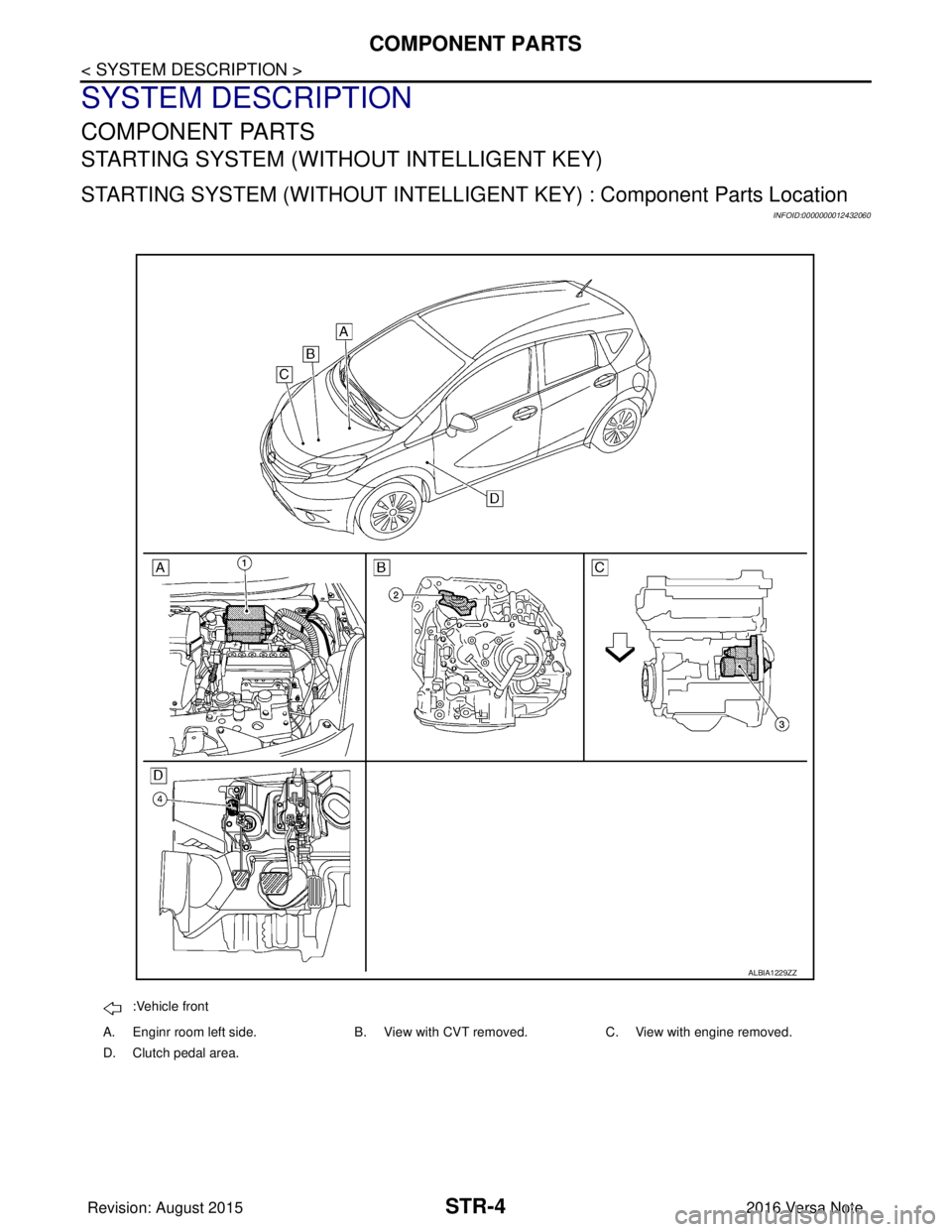
STR-4
< SYSTEM DESCRIPTION >
COMPONENT PARTS
SYSTEM DESCRIPTION
COMPONENT PARTS
STARTING SYSTEM (WITHOUT INTELLIGENT KEY)
STARTING SYSTEM (WITHOUT INTELLIGENT KEY) : Component Parts Location
INFOID:0000000012432060
:Vehicle front
A. Enginr room left side. B. View with CVT removed. C. View with engine removed.
D. Clutch pedal area.
ALBIA1229ZZ
Revision: August 2015 2016 Versa Note
cardiagn.com