lock NISSAN NOTE 2016 Service Manual Online
[x] Cancel search | Manufacturer: NISSAN, Model Year: 2016, Model line: NOTE, Model: NISSAN NOTE 2016Pages: 3641, PDF Size: 28.72 MB
Page 636 of 3641
CL-10
< PERIODIC MAINTENANCE >
CLUTCH FLUID
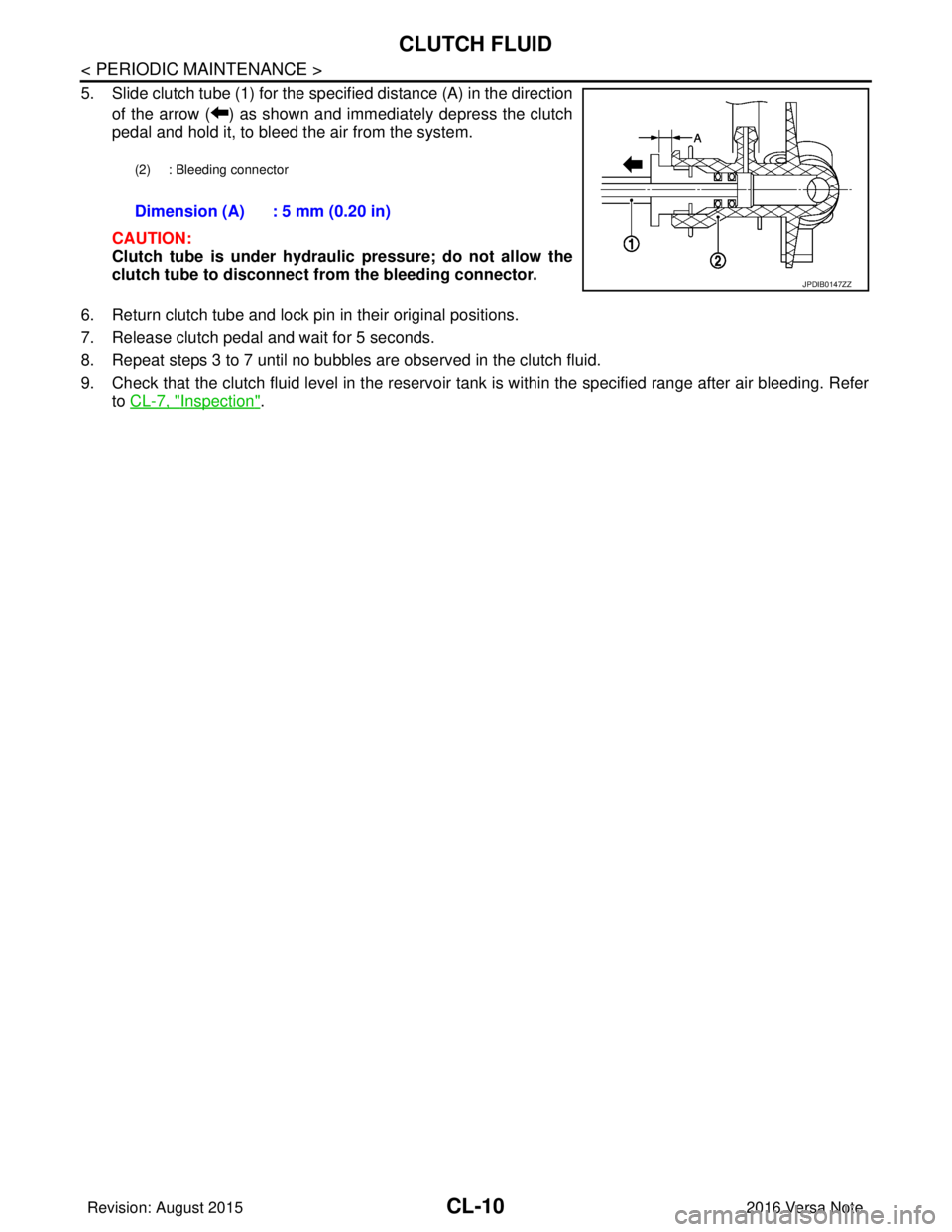
5. Slide clutch tube (1) for the specified distance (A) in the directionof the arrow ( ) as shown and immediately depress the clutch
pedal and hold it, to bleed the air from the system.
CAUTION:
Clutch tube is under hydraulic pressure; do not allow the
clutch tube to disconnect from the bleeding connector.
6. Return clutch tube and lock pin in their original positions.
7. Release clutch pedal and wait for 5 seconds.
8. Repeat steps 3 to 7 until no bubbles are observed in the clutch fluid.
9. Check that the clutch fluid level in the reservoir tank is within the specified range after air bleeding. Refer to CL-7, "
Inspection".
(2) : Bleeding connector
Dimension (A) : 5 mm (0.20 in)
JPDIB0147ZZ
Revision: August 2015 2016 Versa Note
cardiagn.com
Page 637 of 3641
CLUTCH PEDALCL-11
< REMOVAL AND INSTALLATION >
CEF
G H
I
J
K L
M A
B
CL
N
O P
REMOVAL AND INSTALLATION
CLUTCH PEDAL
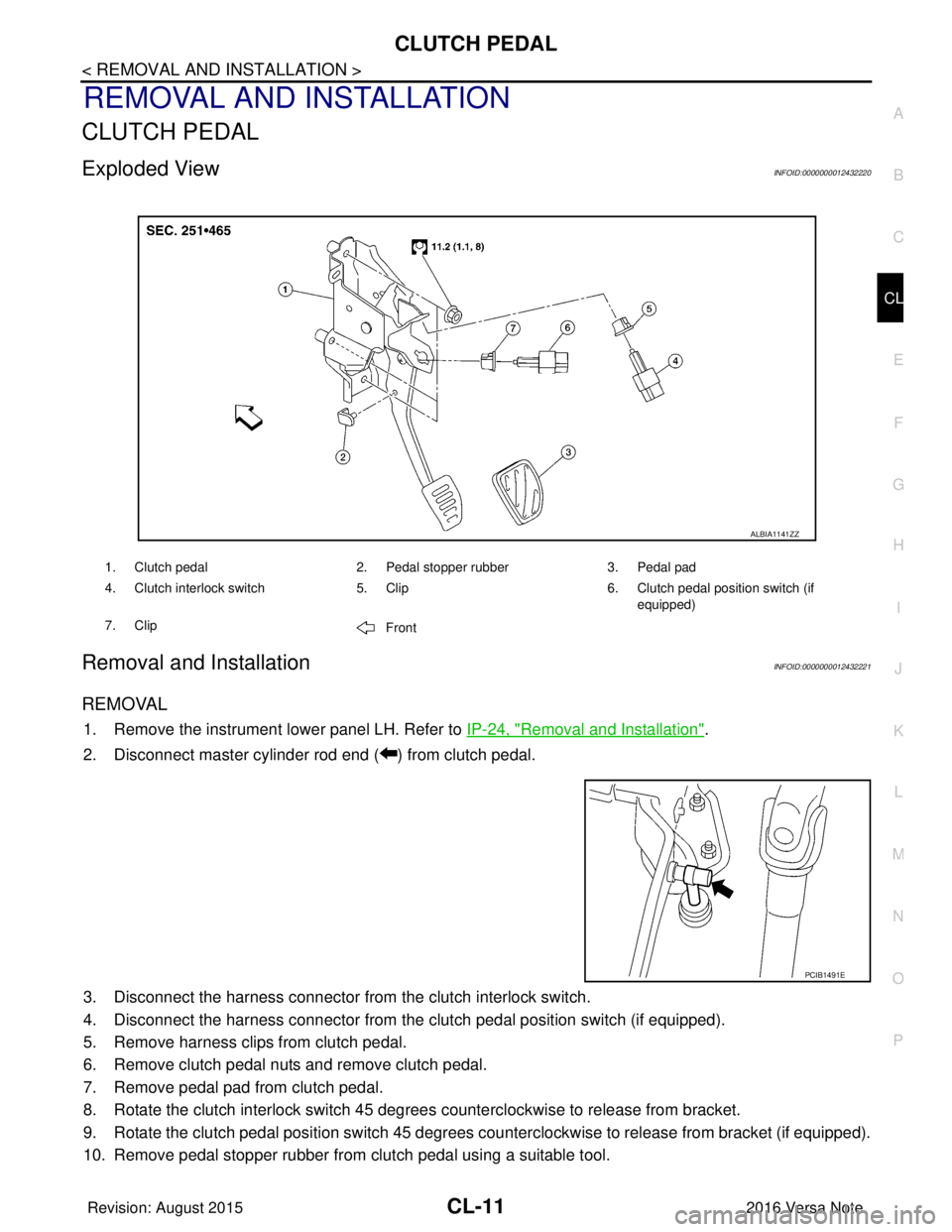
Exploded ViewINFOID:0000000012432220
Removal and InstallationINFOID:0000000012432221
REMOVAL
1. Remove the instrument lower panel LH. Refer to IP-24, "Removal and Installation".
2. Disconnect master cylinder rod end ( ) from clutch pedal.
3. Disconnect the harness connector from the clutch interlock switch.
4. Disconnect the harness connector from the clutch pedal position switch (if equipped).
5. Remove harness clips from clutch pedal.
6. Remove clutch pedal nuts and remove clutch pedal.
7. Remove pedal pad from clutch pedal.
8. Rotate the clutch interlock switch 45 degrees counterclockwise to release from bracket.
9. Rotate the clutch pedal position switch 45 degrees c ounterclockwise to release from bracket (if equipped).
10. Remove pedal stopper rubber from clutch pedal using a suitable tool.
1. Clutch pedal 2. Pedal stopper rubber3. Pedal pad
4. Clutch interlock switch 5. Clip6. Clutch pedal position switch (if
equipped)
7. Clip Front
ALBIA1141ZZ
PCIB1491E
Revision: August 2015 2016 Versa Note
cardiagn.com
Page 638 of 3641
CL-12
< REMOVAL AND INSTALLATION >
CLUTCH PEDAL
INSTALLATION
Installation is in the reverse order of removal.
CAUTION:
Press master cylinder rod end into clutch pedal until it stops.
Inspection and AdjustmentINFOID:0000000012432222
INSPECTION AFTER REMOVAL
• Check clutch pedal for bend, damage, or a cracked weld. If bend, damage, or a cracked weld is found,
replace clutch pedal.
• Check pedal stopper rubber. If damage or deforma tion is found, replace pedal stopper rubber.
• Check pedal pad. If wear or damage is found, replace pedal pad.
INSPECTION AND ADJUSTMENT AFTER INSTALLATION
• Inspect the clutch interlock switch pos ition and adjust as necessary. Refer to CL-5, "Inspection and Adjust-
ment".
• Inspect the clutch pedal position switch position and adjust as necessary (if equipped). Refer to CL-5,
"Inspection and Adjustment".
Revision: August 20152016 Versa Note
cardiagn.com
Page 640 of 3641
CL-14
< REMOVAL AND INSTALLATION >
CLUTCH MASTER CYLINDER
5. Remove master cylinder rod end ( ) from clutch pedal.
6. Use one of the following methods to remove reservoir hose frommaster cylinder.
• Drain clutch fluid from reservoir tank and remove reservoirhose. Refer to CL-7, "
Draining".
• Remove hose from master cylinder.
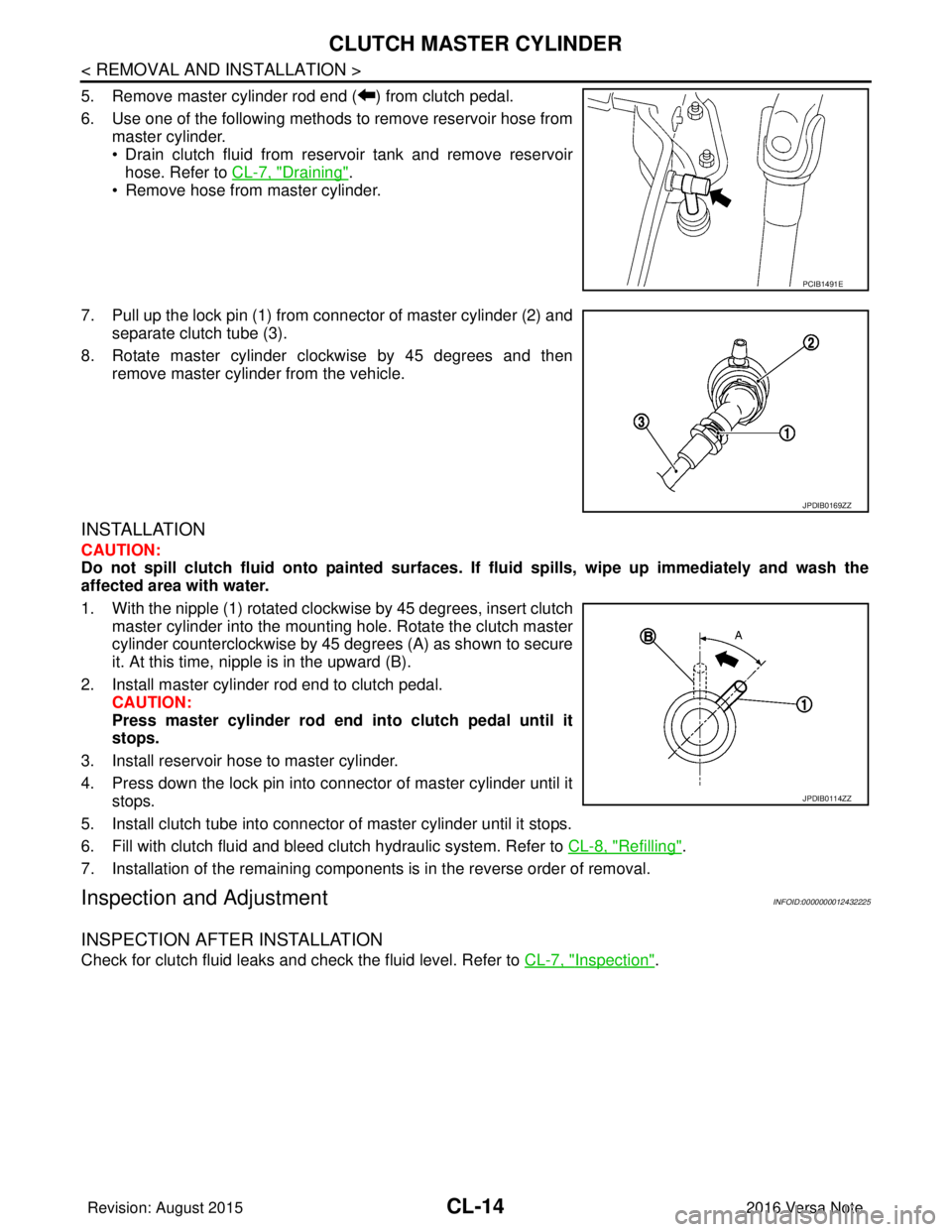
7. Pull up the lock pin (1) from connector of master cylinder (2) and separate clutch tube (3).
8. Rotate master cylinder clockwise by 45 degrees and then remove master cylinder from the vehicle.
INSTALLATION
CAUTION:
Do not spill clutch fluid onto pa inted surfaces. If fluid spills, wipe up imme diately and wash the
affected area with water.
1. With the nipple (1) rotated clockwise by 45 degrees, insert clutch master cylinder into the mounting hole. Rotate the clutch master
cylinder counterclockwise by 45 degrees (A) as shown to secure
it. At this time, nipple is in the upward (B).
2. Install master cylinder rod end to clutch pedal. CAUTION:
Press master cylinder rod end into clutch pedal until it
stops.
3. Install reservoir hose to master cylinder.
4. Press down the lock pin into connector of master cylinder until it stops.
5. Install clutch tube into connector of master cylinder until it stops.
6. Fill with clutch fluid and bleed clutch hydraulic system. Refer to CL-8, "
Refilling".
7. Installation of the remaining components is in the reverse order of removal.
Inspection and AdjustmentINFOID:0000000012432225
INSPECTION AFTER INSTALLATION
Check for clutch fluid leaks and check the fluid level. Refer to CL-7, "Inspection".
PCIB1491E
JPDIB0169ZZ
JPDIB0114ZZ
Revision: August 2015 2016 Versa Note
cardiagn.com
Page 641 of 3641
CLUTCH PIPINGCL-15
< REMOVAL AND INSTALLATION >
CEF
G H
I
J
K L
M A
B
CL
N
O P
CLUTCH PIPING
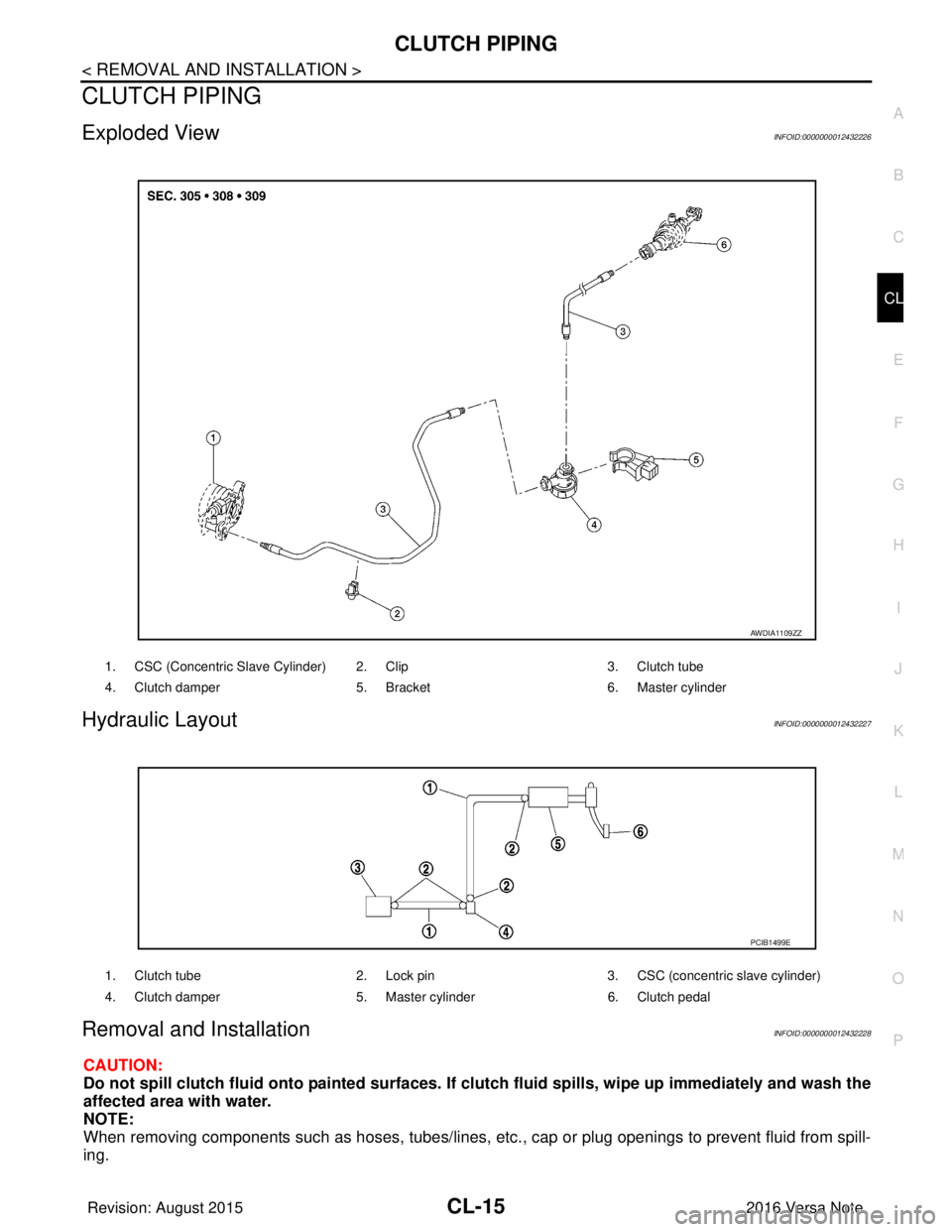
Exploded ViewINFOID:0000000012432226
Hydraulic LayoutINFOID:0000000012432227
Removal and InstallationINFOID:0000000012432228
CAUTION:
Do not spill clutch fluid onto painted surfaces. If clutch fluid spills, wipe up immediately and wash the
affected area with water.
NOTE:
When removing components such as hoses, tubes/lines, etc. , cap or plug openings to prevent fluid from spill-
ing.
1. CSC (Concentric Slave Cylinder) 2. Clip 3. Clutch tube
4. Clutch damper 5. Bracket6. Master cylinder
AWDIA1109ZZ
1. Clutch tube 2. Lock pin3. CSC (concentric slave cylinder)
4. Clutch damper 5. Master cylinder6. Clutch pedal
PCIB1499E
Revision: August 2015 2016 Versa Note
cardiagn.com
Page 642 of 3641
CL-16
< REMOVAL AND INSTALLATION >
CLUTCH PIPING
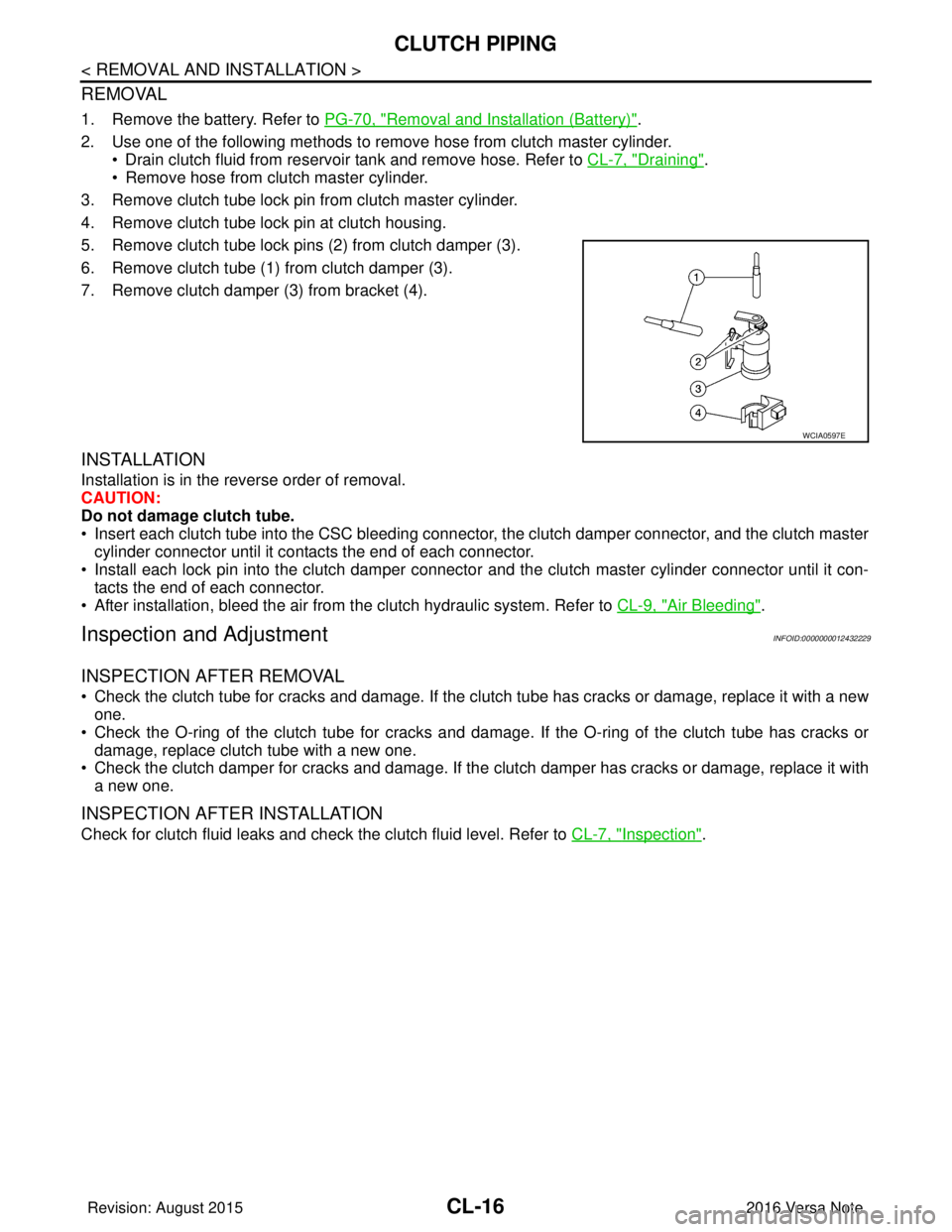
REMOVAL
1. Remove the battery. Refer to PG-70, "Removal and Installation (Battery)".
2. Use one of the following methods to remove hose from clutch master cylinder. • Drain clutch fluid from reservoir tank and remove hose. Refer to CL-7, "
Draining".
• Remove hose from clutch master cylinder.
3. Remove clutch tube lock pin from clutch master cylinder.
4. Remove clutch tube lock pin at clutch housing.
5. Remove clutch tube lock pins (2) from clutch damper (3).
6. Remove clutch tube (1) from clutch damper (3).
7. Remove clutch damper (3) from bracket (4).
INSTALLATION
Installation is in the reverse order of removal.
CAUTION:
Do not damage clutch tube.
• Insert each clutch tube into the CSC bleeding connector, the clutch damper connector, and the clutch master cylinder connector until it contacts the end of each connector.
• Install each lock pin into the clutch damper connecto r and the clutch master cylinder connector until it con-
tacts the end of each connector.
• After installation, bleed the air from the clutch hydraulic system. Refer to CL-9, "
Air Bleeding".
Inspection and AdjustmentINFOID:0000000012432229
INSPECTION AFTER REMOVAL
• Check the clutch tube for cracks and damage. If the cl utch tube has cracks or damage, replace it with a new
one.
• Check the O-ring of the clutch tube for cracks and dam age. If the O-ring of the clutch tube has cracks or
damage, replace clutch tube with a new one.
• Check the clutch damper for cracks and damage. If the clutch damper has cracks or damage, replace it with
a new one.
INSPECTION AFTER INSTALLATION
Check for clutch fluid leaks and check the clutch fluid level. Refer to CL-7, "Inspection".
WCIA0597E
Revision: August 2015 2016 Versa Note
cardiagn.com
Page 648 of 3641
CL-22
< SERVICE DATA AND SPECIFICATIONS (SDS)
SERVICE DATA AND SPECIFICATIONS (SDS)
SERVICE DATA AND SPECIFICATIONS (SDS)
SERVICE DATA AND SPECIFICATIONS (SDS)
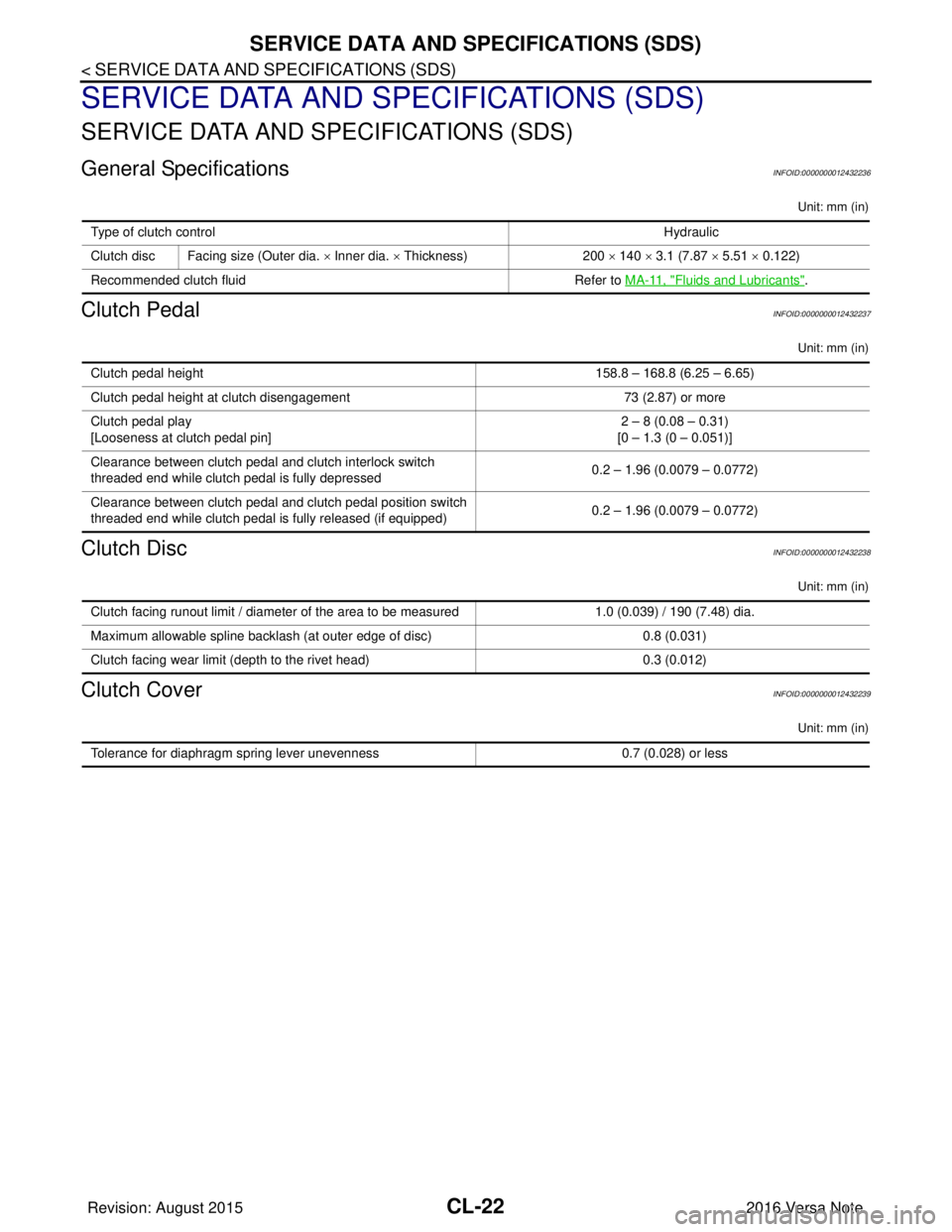
General SpecificationsINFOID:0000000012432236
Unit: mm (in)
Clutch PedalINFOID:0000000012432237
Unit: mm (in)
Clutch DiscINFOID:0000000012432238
Unit: mm (in)
Clutch CoverINFOID:0000000012432239
Unit: mm (in)
Type of clutch controlHydraulic
Clutch disc Facing size (Outer dia. × Inner dia. × Thickness) 200 × 140 × 3.1 (7.87 × 5.51 × 0.122)
Recommended clutch fluid Refer to MA-11, "
Fluids and Lubricants".
Clutch pedal height 158.8 – 168.8 (6.25 – 6.65)
Clutch pedal height at clutch disengagement 73 (2.87) or more
Clutch pedal play
[Looseness at clutch pedal pin] 2 – 8 (0.08 – 0.31)
[0 – 1.3 (0 – 0.051)]
Clearance between clutch pedal and clutch interlock switch
threaded end while clutch pedal is fully depressed 0.2 – 1.96 (0.0079 – 0.0772)
Clearance between clutch pedal and clutch pedal position switch
threaded end while clutch pedal is fully released (if equipped) 0.2 – 1.96 (0.0079 – 0.0772)
Clutch facing runout limit / diameter of the area to be measured
1.0 (0.039) / 190 (7.48) dia.
Maximum allowable spline backlash (at outer edge of disc) 0.8 (0.031)
Clutch facing wear limit (depth to the rivet head) 0.3 (0.012)
Tolerance for diaphragm spring lever unevenness0.7 (0.028) or less
Revision: August 2015 2016 Versa Note
cardiagn.com
Page 658 of 3641

DIAGNOSIS SYSTEM (BCM) (WITH INTELLIGENT KEY SYSTEM)
DEF-7
< SYSTEM DESCRIPTION >
C
D E
F
G H
I
J
K
M A
B
DEF
N
O P
DIAGNOSIS SYSTEM (BCM) (WIT H INTELLIGENT KEY SYSTEM)
COMMON ITEM
COMMON ITEM : CONSULT Function (BCM - COMMON ITEM)INFOID:0000000012542306
APPLICATION ITEM
CONSULT performs the following functions via CAN communication with BCM.
SYSTEM APPLICATION
BCM can perform the following functions.
Direct Diagnostic Mode Description
ECU Identification The BCM part number is displayed.
Self Diagnostic Result The BCM self diagnostic results are displayed.
Data Monitor The BCM input/output data is displayed in real time.
Active Test The BCM activates outputs to test components.
Work support The settings for BCM functions can be changed.
Configuration • The vehicle specification can be read and saved.
• The vehicle specification can be written when replacing BCM.
CAN DIAG SUPPORT MNTR The result of transmit/receive diagnosis of CAN communication is displayed.
System Sub System Direct Diagnostic Mode
ECU Identification
Self Diagnostic Result
Data Monitor
Active Test
Work support
Configuration
CAN DIAG SUPPORT MNTR
Door lock
DOOR LOCK ×××
Rear window defogger REAR DEFOGGER ××
Warning chime BUZZER ××
Interior room lamp timer INT LAMP ×××
Exterior lamp HEAD LAMP ×××
Wiper and washer WIPER ×××
Turn signal and hazard warning lamps FLASHER ×××
Air conditioner AIR CONDITIONER ×
Intelligent Key system INTELLIGENT KEY ××××
Combination switch COMB SW ×
BCM BCM× × ×××
Immobilizer IMMU ××××
Interior room lamp battery saver BATTERY SAVER ×××
Vehicle security system THEFT ALM ××
RAP system RETAINED PWR ×
Signal buffer system SIGNAL BUFFER ×
TPMS AIR PRESSURE MONITOR ××××
Panic alarm system PANIC ALARM ×
Revision: August 2015 2016 Versa Note
cardiagn.com
Page 660 of 3641

DIAGNOSIS SYSTEM (BCM) (WITHOUT INTELLIGENT KEY SYSTEM)DEF-9
< SYSTEM DESCRIPTION >
C
DE
F
G H
I
J
K
M A
B
DEF
N
O P
DIAGNOSIS SYSTEM (BCM) (WITHO UT INTELLIGENT KEY SYSTEM)
COMMON ITEM
COMMON ITEM : CONSULT Function (BCM - COMMON ITEM)INFOID:0000000012542309
APPLICATION ITEM
CONSULT performs the following functions via CAN communication with BCM.
SYSTEM APPLICATION
BCM can perform the following functions.
Direct Diagnostic Mode Description
ECU Identification The BCM part number is displayed.
Self Diagnostic Result The BCM self diagnostic results are displayed.
Data Monitor The BCM input/output data is displayed in real time.
Active Test The BCM activates outputs to test components.
Work support The settings for BCM functions can be changed.
Configuration • The vehicle specification can be read and saved.
• The vehicle specification can be written when replacing BCM.
CAN DIAG SUPPORT MNTR The result of transmit/receive diagnosis of CAN communication is displayed.
System Sub System Direct Diagnostic Mode
ECU Identification
Self Diagnostic Result
Data Monitor
Active Test
Work support
Configuration
CAN DIAG SUPPORT MNTR
Door lock
DOOR LOCK ×××
Rear window defogger REAR DEFOGGER ××
Warning chime BUZZER ××
Interior room lamp timer INT LAMP ×××
Remote keyless entry system MULTI REMOTE ENT ×××
Exterior lamp HEAD LAMP ×××
Wiper and washer WIPER ×××
Turn signal and hazard warning lamps FLASHER ××
Air conditioner AIR CONDITIONER ×
Combination switch COMB SW ×
BCM BCM× × ×××
Immobilizer IMMU ×××
Interior room lamp battery saver BATTERY SAVER ×××
Vehicle security system THEFT ALM ××
RAP system RETAINED PWR ××
Signal buffer system SIGNAL BUFFER ×
TPMS AIR PRESSURE MONITOR ××××
Panic alarm system PANIC ALARM ×
Revision: August 2015 2016 Versa Note
cardiagn.com
Page 675 of 3641
DEF-24
< DTC/CIRCUIT DIAGNOSIS >
REAR WINDOW DEFOGGER POWER SUPPLY AND GROUND CIRCUIT
REAR WINDOW DEFOGGER POWER SUPPLY AND GROUND CIRCUIT
DescriptionINFOID:0000000012431771
Heats the heating wire with the power supply from the rear window defogger relay to prevent the rear window
from fogging up.
Component Function CheckINFOID:0000000012431772
1. CHECK REAR WINDOW DEFOGGER
Check that the heating wire of rear window defogger is heated when turning the rear window defogger switch
ON.
Is the inspection result normal?
YES >> Rear window defogger is OK.
NO >> Refer to DEF-24, "
Diagnosis Procedure".
Diagnosis ProcedureINFOID:0000000012431773
Regarding Wiring Diagram information, refer to DEF-12, "Wiring Diagram".
1. CHECK FUSES
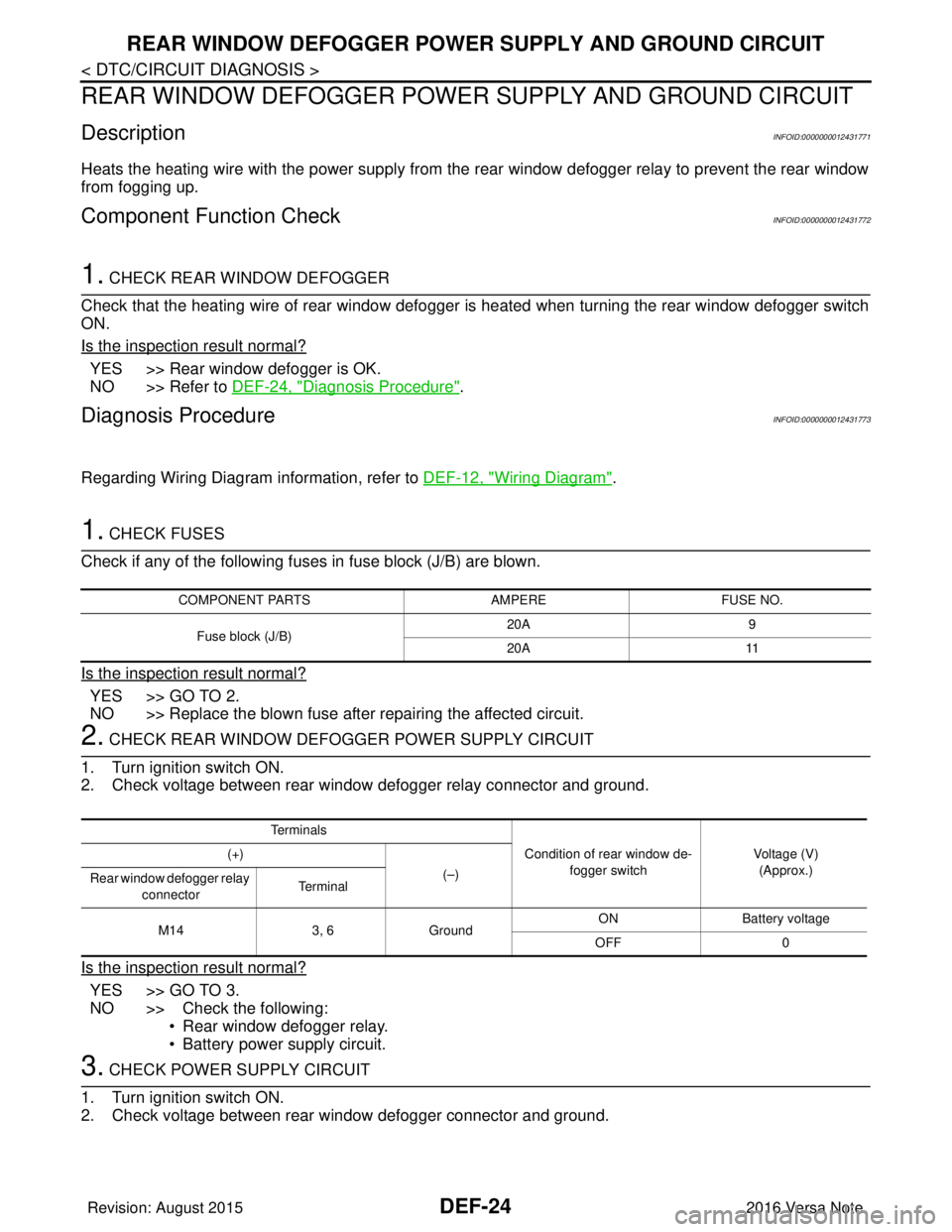
Check if any of the following fuses in fuse block (J/B) are blown.
Is the inspection result normal?
YES >> GO TO 2.
NO >> Replace the blown fuse after repairing the affected circuit.
2. CHECK REAR WINDOW DEFOGGER POWER SUPPLY CIRCUIT
1. Turn ignition switch ON.
2. Check voltage between rear window defogger relay connector and ground.
Is the inspection result normal?
YES >> GO TO 3.
NO >> Check the following: • Rear window defogger relay.
• Battery power supply circuit.
3. CHECK POWER SUPPLY CIRCUIT
1. Turn ignition switch ON.
2. Check voltage between rear window defogger connector and ground.
COMPONENT PARTS AMPEREFUSE NO.
Fuse block (J/B) 20A
9
20A 11
Te r m i n a l s
Condition of rear window de-fogger switch Voltage (V)
(Approx.)
(+)
(–)
Rear window defogger relay
connector Te r m i n a l
M14 3, 6Ground ON Battery
voltage
OFF 0
Revision: August 2015 2016 Versa Note
cardiagn.com