steering NISSAN PATHFINDER 2023 Workshop Manual
[x] Cancel search | Manufacturer: NISSAN, Model Year: 2023, Model line: PATHFINDER, Model: NISSAN PATHFINDER 2023Pages: 665, PDF Size: 4.64 MB
Page 296 of 665
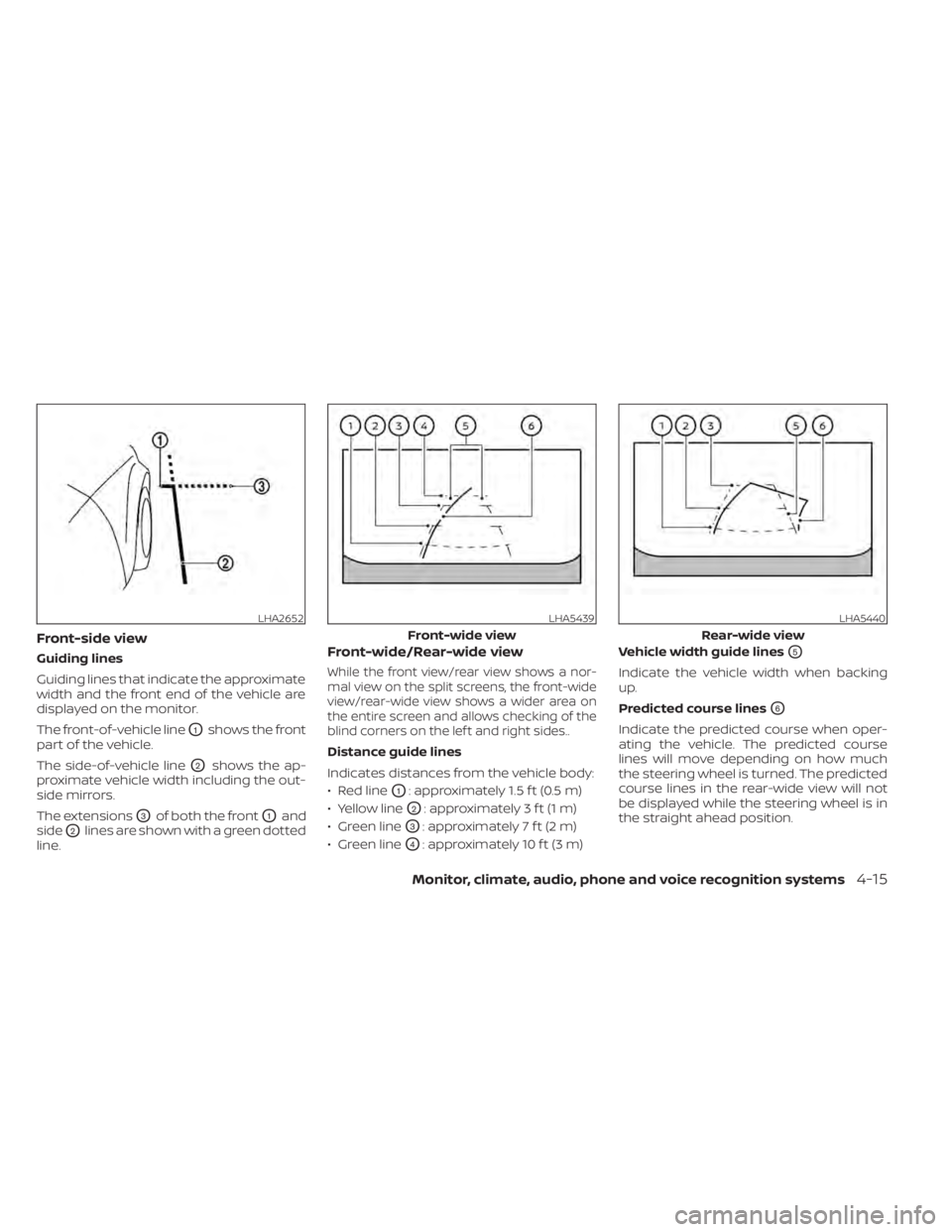
Front-side view
Guiding lines
Guiding lines that indicate the approximate
width and the front end of the vehicle are
displayed on the monitor.
The front-of-vehicle line
O1shows the front
part of the vehicle.
The side-of-vehicle line
O2shows the ap-
proximate vehicle width including the out-
side mirrors.
The extensions
O3of both the frontO1and
side
O2lines are shown with a green dotted
line.
Front-wide/Rear-wide view
While the front view/rear view shows a nor-
mal view on the split screens, the front-wide
view/rear-wide view shows a wider area on
the entire screen and allows checking of the
blind corners on the lef t and right sides..
Distance guide lines
Indicates distances from the vehicle body:
• Red line
O1: approximately 1.5 f t (0.5 m)
• Yellow line
O2: approximately 3 f t (1 m)
• Green line
O3: approximately 7 f t (2 m)
• Green line
O4: approximately 10 f t (3 m) Vehicle width guide lines
O5
Indicate the vehicle width when backing
up.
Predicted course lines
O6
Indicate the predicted course when oper-
ating the vehicle. The predicted course
lines will move depending on how much
the steering wheel is turned. The predicted
course lines in the rear-wide view will not
be displayed while the steering wheel is in
the straight ahead position.
LHA2652LHA5439
Front-wide view
LHA5440
Rear-wide view
Monitor, climate, audio, phone and voice recognition systems4-15
Page 297 of 665
The front-wide view will not be displayed
when the vehicle speed is above 6 mph (10
km/h).
NOTE:
• When the monitor displays the front-wideview and the steering wheel turns about
90 degrees or less from the straight
ahead position, both the right and lef t
predicted course lines
O6are displayed.
When the steering wheel is turns about
90 degrees or more, the predicted course
line is displayed only on the opposite side
of the turn.
DIFFERENCE BETWEEN PREDICTED
AND ACTUAL DISTANCES
The displayed guidelines and their loca-
tions on the ground are for approximate
reference only. Objects on uphill or downhill
surfaces or projecting objects will be actu-
ally located at distances different from
those displayed in the monitor relative to
the guidelines (refer to illustrations). When
in doubt, turn around and view the objects
as you are backing up, or park and exit the
vehicle to view the positioning of objects
behind the vehicle.
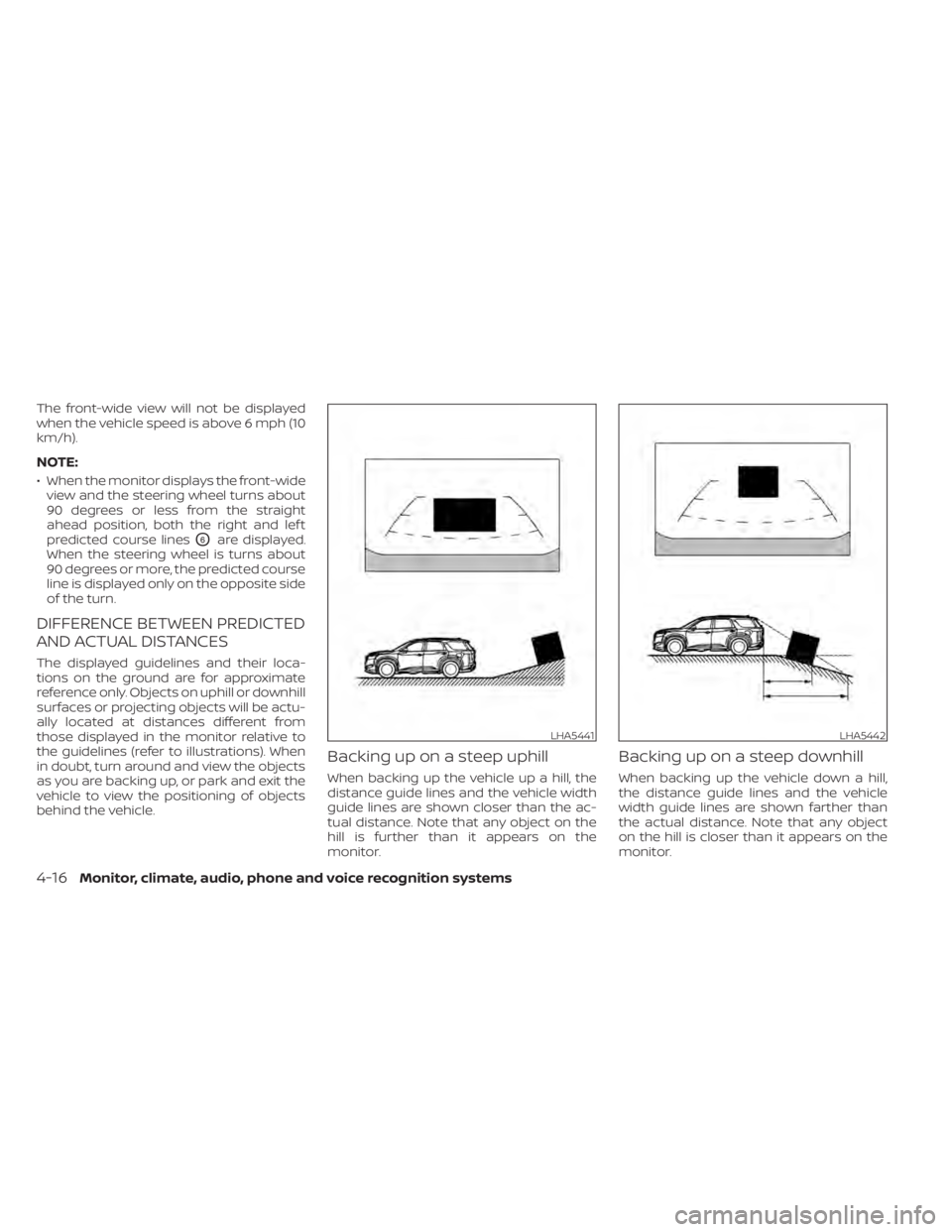
Backing up on a steep uphill
When backing up the vehicle up a hill, the
distance guide lines and the vehicle width
guide lines are shown closer than the ac-
tual distance. Note that any object on the
hill is further than it appears on the
monitor.
Backing up on a steep downhill
When backing up the vehicle down a hill,
the distance guide lines and the vehicle
width guide lines are shown farther than
the actual distance. Note that any object
on the hill is closer than it appears on the
monitor.
LHA5441LHA5442
4-16Monitor, climate, audio, phone and voice recognition systems
Page 298 of 665
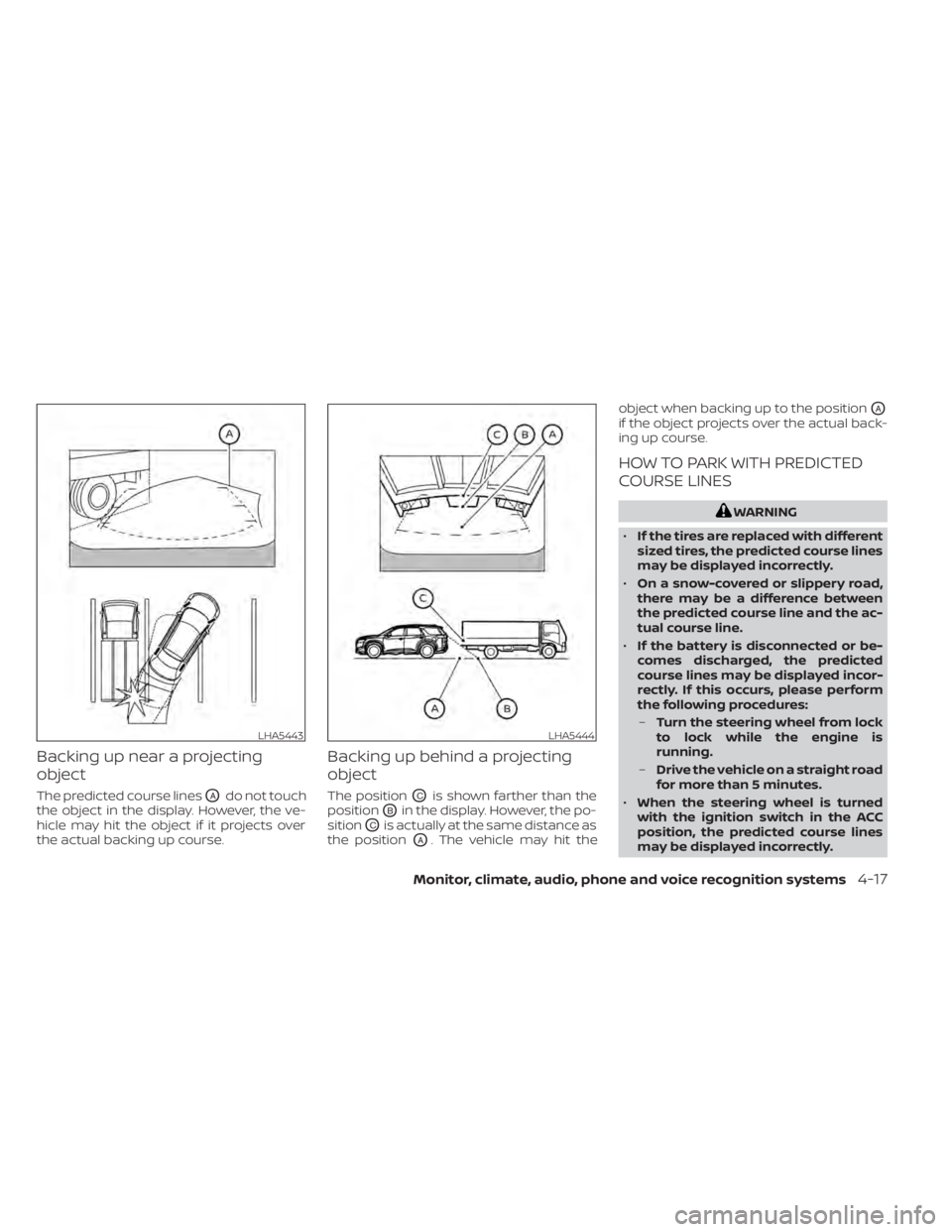
Backing up near a projecting
object
The predicted course linesOAdo not touch
the object in the display. However, the ve-
hicle may hit the object if it projects over
the actual backing up course.
Backing up behind a projecting
object
The positionOCis shown farther than the
position
OBin the display. However, the po-
sition
OCis actually at the same distance as
the position
OA. The vehicle may hit the object when backing up to the position
OA
if the object projects over the actual back-
ing up course.
HOW TO PARK WITH PREDICTED
COURSE LINES
WARNING
• If the tires are replaced with different
sized tires, the predicted course lines
may be displayed incorrectly.
• On a snow-covered or slippery road,
there may be a difference between
the predicted course line and the ac-
tual course line.
• If the battery is disconnected or be-
comes discharged, the predicted
course lines may be displayed incor-
rectly. If this occurs, please perform
the following procedures:
– Turn the steering wheel from lock
to lock while the engine is
running.
– Drive the vehicle on a straight road
for more than 5 minutes.
• When the steering wheel is turned
with the ignition switch in the ACC
position, the predicted course lines
may be displayed incorrectly.
LHA5443LHA5444
Monitor, climate, audio, phone and voice recognition systems4-17
Page 299 of 665
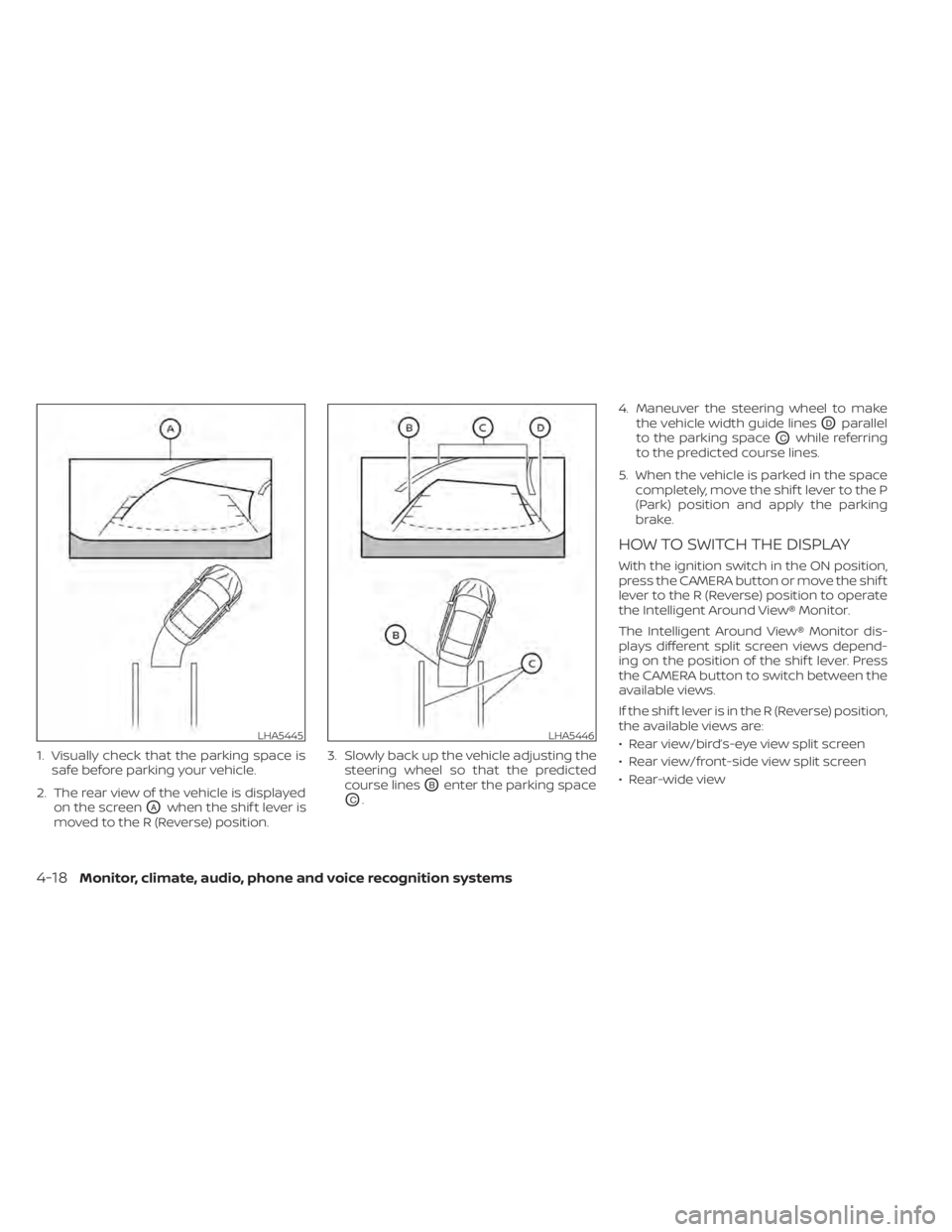
1. Visually check that the parking space issafe before parking your vehicle.
2. The rear view of the vehicle is displayed on the screen
OAwhen the shif t lever is
moved to the R (Reverse) position. 3. Slowly back up the vehicle adjusting the
steering wheel so that the predicted
course lines
OBenter the parking space
OC. 4. Maneuver the steering wheel to make
the vehicle width guide lines
ODparallel
to the parking space
OCwhile referring
to the predicted course lines.
5. When the vehicle is parked in the space completely, move the shif t lever to the P
(Park) position and apply the parking
brake.
HOW TO SWITCH THE DISPLAY
With the ignition switch in the ON position,
press the CAMERA button or move the shif t
lever to the R (Reverse) position to operate
the Intelligent Around View® Monitor.
The Intelligent Around View® Monitor dis-
plays different split screen views depend-
ing on the position of the shif t lever. Press
the CAMERA button to switch between the
available views.
If the shif t lever is in the R (Reverse) position,
the available views are:
• Rear view/bird’s-eye view split screen
• Rear view/front-side view split screen
• Rear-wide view
LHA5445LHA5446
4-18Monitor, climate, audio, phone and voice recognition systems
Page 310 of 665
TURNING MOD ON AND OFF
To turn the MOD system on or off:
1. Press the
orbutton on the
steering wheel and select “Settings” in
the vehicle information display.
2. Using the scroll dial, select “Driver Assis- tance” and press the OK button.
3. Select “Parking Aids”.
4. Toggle ON or OFF “Moving Object” using the OK button.
MOD SYSTEM LIMITATIONS
WARNING
Listed below are the system limitations
for MOD. Failure to operate the vehicle
in accordance with these system limi-
tations could result in serious injury or
death.
• Do not use the MOD system when
towing a trailer. The system may not
function properly.
• Excessive noise (for example, audio
system volume or open vehicle win-
dow) will interfere with the chime
sound, and it may not be heard. •
The MOD system performance will be
limited according to environmental
conditions and surrounding objects
such as:
– When there is low contrast be-
tween background and the mov-
ing objects.
– When there is a blinking source of
light.
– When strong light such as another
vehicle’s headlight or sunlight is
present.
– When camera orientation is not in
its usual position, such as when a
mirror is folded.
– When there is dirt, water drops or
snow on the camera lens.
– When the position of the moving
objects in the display is not
changed.
• The MOD system might detect flow-
ing water droplets on the camera
lens, white smoke from the muffler,
moving shadows, etc.
• The MOD system may not function
properly depending on the speed, di-
rection, distance or shape of the
moving objects. •
If your vehicle sustains damage to
the parts where the camera is in-
stalled, leaving it misaligned or bent,
the sensing zone may be altered and
the MOD system may not detect ob-
jects properly.
• When the temperature is extremely
high or low, the screen may not dis-
play objects clearly. This is not a
malfunction.
NOTE:
The green MOD icon will change to or-
ange if one of the following has oc-
curred:
• When the system is malfunctioning.
• When the component temperature
reaches a high level (icon will blink).
• When the rearview camera has de-
tected a blockage (icon will blink).
If the icon light continues to illuminate
orange, have the MOD system checked. It
is recommended that you visit a NISSAN
dealer for this service.
Monitor, climate, audio, phone and voice recognition systems4-29
Page 313 of 665
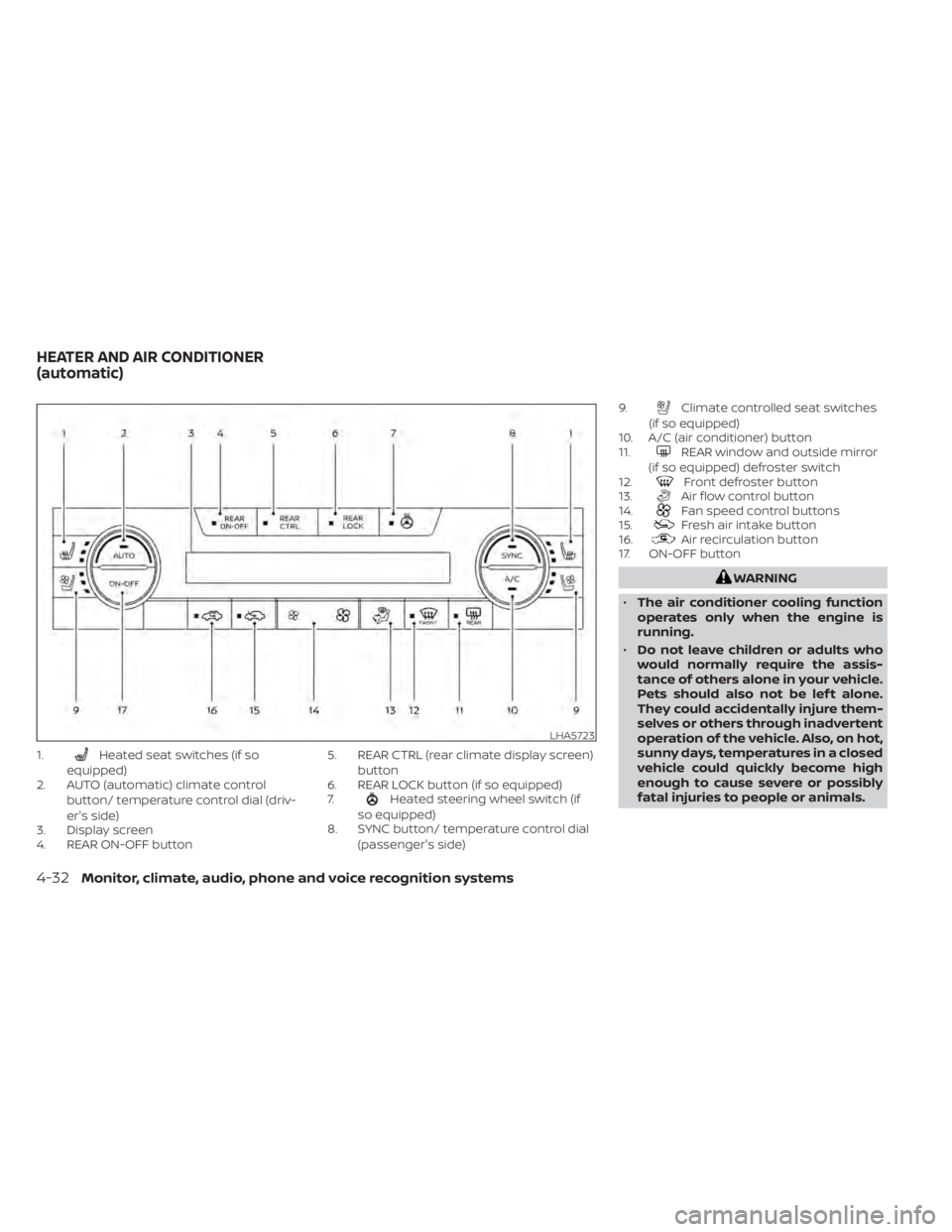
1.Heated seat switches (if so
equipped)
2. AUTO (automatic) climate control
button/ temperature control dial (driv-
er's side)
3. Display screen
4. REAR ON-OFF button 5. REAR CTRL (rear climate display screen)
button
6. REAR LOCK button (if so equipped)
7.
Heated steering wheel switch (if
so equipped)
8. SYNC button/ temperature control dial
(passenger's side) 9.
Climate controlled seat switches
(if so equipped)
10. A/C (air conditioner) button
11.
REAR window and outside mirror
(if so equipped) defroster switch
12.
Front defroster button
13.Air flow control button
14.Fan speed control buttons
15.Fresh air intake button
16.Air recirculation button
17. ON-OFF button
WARNING
• The air conditioner cooling function
operates only when the engine is
running.
• Do not leave children or adults who
would normally require the assis-
tance of others alone in your vehicle.
Pets should also not be lef t alone.
They could accidentally injure them-
selves or others through inadvertent
operation of the vehicle. Also, on hot,
sunny days, temperatures in a closed
vehicle could quickly become high
enough to cause severe or possibly
fatal injuries to people or animals.
LHA5723
HEATER AND AIR CONDITIONER
(automatic)
4-32Monitor, climate, audio, phone and voice recognition systems
Page 315 of 665
• To quickly remove ice from the outside ofthe windows, use thefan speed con-
trol buttons to set the fan speed to
maximum.
• As soon as possible af ter the windshield is clean, press the AUTO button to return
to the automatic mode.
• When the
front defroster button is
pressed, the air conditioner will automati-
cally be turned on at outside tempera-
tures above 36°F (2°C). The air recirculate
mode automatically turns off, allowing
outside air to be drawn into the passen-
ger compartment to further improve the
defogging performance.
Remote Engine Start with
Intelligent Climate Control (if so
equipped)
Vehicles equipped with automatic climate
controls and Remote Engine Start function
may go into automatic heating or cooling
mode when Remote Engine Start is acti-
vated depending on outside and cabin
temperatures. During this period, the cli-
mate control display and buttons will be
inoperable until the ignition switch is
placed in the ON position. In Remote En-
gine Start defrosting mode, the rear win-
dow defroster, heated seats (if so equipped) and heated steering wheel (if so
equipped) may be activated automatically.
Voice Recognition logic (if so
equipped)
When the climate control system is on, the
front and rear fan speeds may be auto-
matically lowered so that commands are
more easily recognized. Fan speed can be
adjusted using the fan speed decrease and
increase buttons, if desired.
MANUAL OPERATION
Fan speed control
Press thefan speed control buttons
to manually control the fan speed.
Press the AUTO button to return to auto-
matic control of the fan speed.
Temperature control dial
The temperature control dial allows you to
adjust the temperature of the outlet air. To
lower the temperature, turn the dial to the
lef t. To increase the temperature, turn the
dial to the right. Temperature can be ad-
justed on the driver’s and passenger’s side.
Air recirculation
Press theair recirculation button to
recirculate interior air inside the vehicle.
The
indicator light on the button will
come on.
The air recirculation cannot be activated
when the air conditioner is in the
front
defrosting mode.
When the outside temperature exceeds
70°F (21°C), the air conditioning system may
default to air recirculation mode automati-
cally to reduce overall power consumption.
To exit air recirculation mode, deselect the
air recirculation button (indicator will turn
off ) to enter fresh air mode.
Fresh air intake
Press thefresh air intake button to
draw outside air into the passenger
compartment.
A/C (air conditioner) button
Start the engine, press thefan speed
control buttons to the desired position and
press the
button to turn on the air
conditioner. To turn off the air conditioner,
press the
button again.
4-34Monitor, climate, audio, phone and voice recognition systems
Page 316 of 665
The air conditioner cooling function op-
erates only when the engine is running.
Air flow control
Pressing theair flow control button
manually controls air flow and selects the
air outlet:
— Air flows from center and side
vents.
— Air flows from center and sidevents and foot outlets.
— Air flows mainly from foot out-lets.
— Air flows from defroster and footoutlets.
Synchronize climate settings
Press the SYNC button to synchronize cli-
mate settings. The sync indicator will turn
on.
When rear climate is off, pressing SYNC will
synchronize only driver's and front passen-
ger's climate settings. When rear climate is
on, pressing SYNC will synchronize driver,
front passenger, and rear temperature
mode and auto fan settings.
SYNC text will appear above the rear tem-
perature display when rear climate is syn-
chronized with the driver’s settings. To change climate settings when SYNC is
active (the SYNC indicator is on):
• The driver's side temperature control dial
will control the driver, front passenger,
and rear (if rear climate is on)
temperatures.
• The fan speed control buttons will control the front and rear climate fan speeds.
• The front AUTO (automatic) climate con- trol ON-OFF button will activate the front
and rear climate automatic settings.
• The air flow control button will control the front and rear airflow direction.
To exit SYNC:
• To remove the front passenger from SYNC, turn the passenger's side tem-
perature control dial. The driver and rear
settings remain in SYNC until rear is re-
moved from SYNC.
• To remove the rear from SYNC, change any of the rear climate settings. The
driver and front passenger settings re-
main in SYNC until the front passenger is
removed from SYNC.
• To reactivate SYNC press the SYNC button.
To turn system off
Press the ON-OFF button to turn the sys-
tem off.
To turn system on
Press the ON-OFF button when the heater
or air conditioner is off. The system will turn
on with the settings that were used imme-
diately before the system was turned off.
Rear window and outside mirror
(if so equipped) defroster switch
For additional information, see “Rear win-
dow and outside mirror (if so equipped)
defroster switch” (P. 2-81).
Heated seat switches (if so
equipped)
For additional information, see “Heated
seat switches” (P. 2-91).
Heated steering wheel switch (if
so equipped)
For additional information, see “Heated
steering wheel switch” (P. 2-93).
Monitor, climate, audio, phone and voice recognition systems4-35
Page 324 of 665
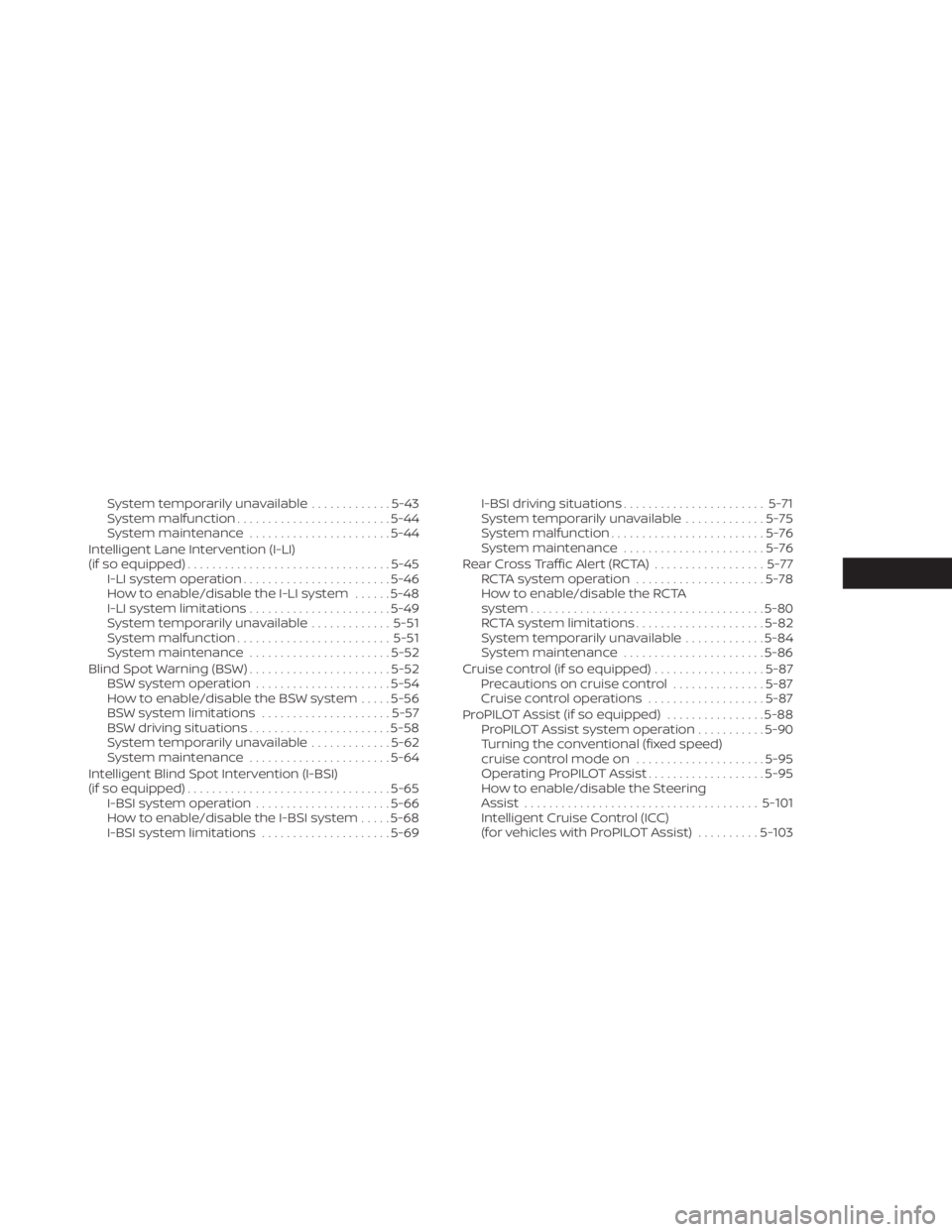
System temporarily unavailable.............5-43
System malfunction ......................... 5-44
System maintenance .......................5-44
Intelligent Lane Intervention (I-LI)
(if so equipped) ................................. 5-45
I-LI system operation ........................ 5-46
How to enable/disable the I-LI system ......5-48
I-LI system limitations .......................5-49
System temporarily unavailable .............5-51
System malfunction ......................... 5-51
System maintenance .......................5-52
Blind Spot Warning (BSW) .......................5-52
BSW system operation ......................5-54
How to enable/disable the BSW system .....5-56
BSW system limitations .....................5-57
BSW driving situations .......................5-58
System temporarily unavailable .............5-62
System maintenance .......................5-64
Intelligent Blind Spot Intervention (I-BSI)
(if so equipped) ................................. 5-65
I-BSI system operation ......................5-66
How to enable/disable the I-BSI system .....5-68
I-BSI system limitations .....................5-69I-BSI driving situations
....................... 5-71
System temporarily unavailable .............5-75
System malfunction ......................... 5-76
System maintenance .......................5-76
RearCrossTrafficAlert(RCTA) .................. 5-77
RCTA system operation .....................5-78
How to enable/disable the RCTA
system ...................................... 5-80
RCTA system limitations .....................5-82
System temporarily unavailable .............5-84
System maintenance .......................5-86
Cruise control (if so equipped) ..................5-87
Precautions on cruise control ...............5-87
Cruise control operations ...................5-87
Pr
oPILOT Assist (if so equipped) ................5-88
ProPILOT Assist system operation ...........5-90
Turning the conventional (fixed speed)
cruise control mode on .....................5-95
Operating ProPILOT Assist ...................5-95
How to enable/disable the Steering
Assist ...................................... 5-101
Intelligent Cruise Control (ICC)
(for vehicles with ProPILOT Assist) ..........5-103
Page 325 of 665
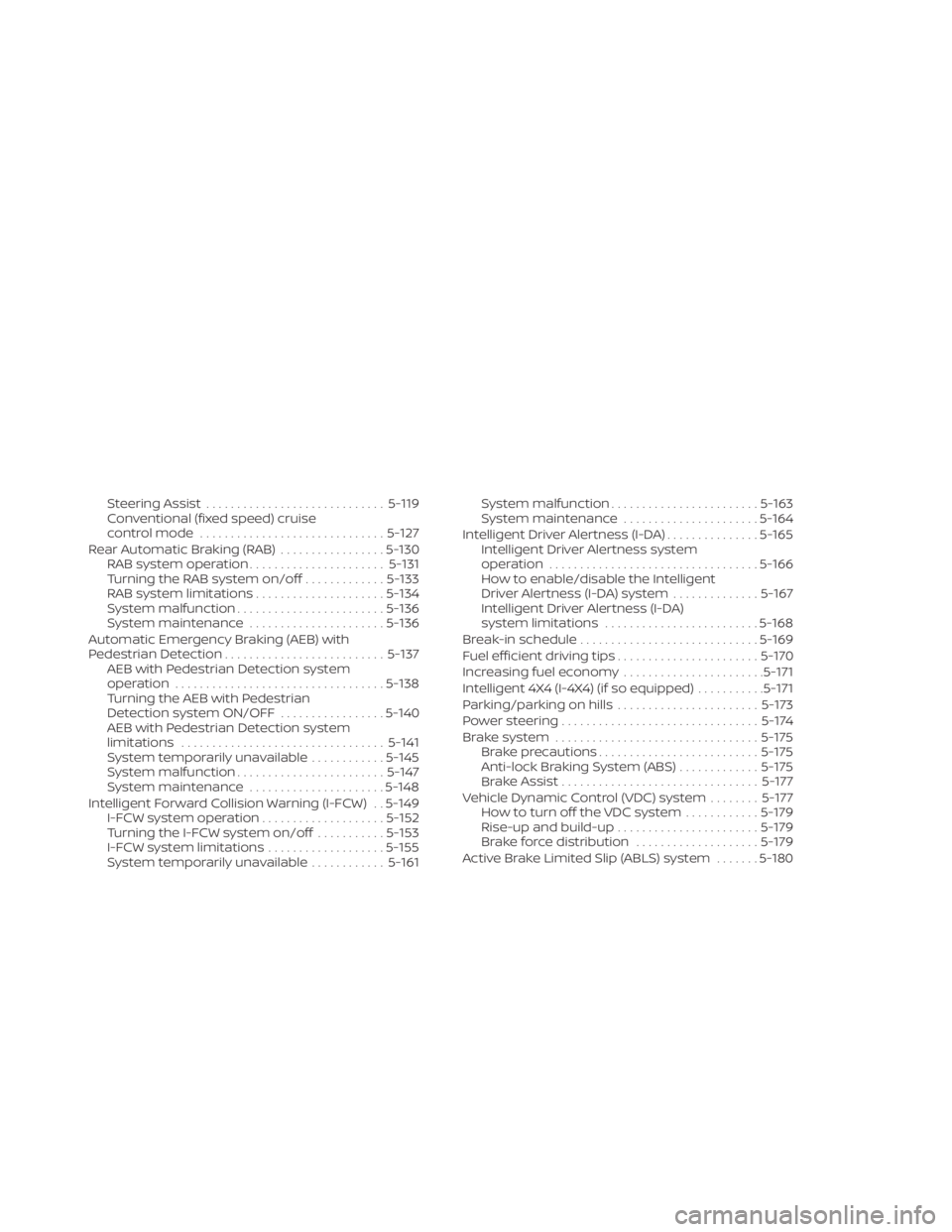
Steering Assist............................. 5-119
Conventional (fixed speed) cruise
control mode .............................. 5-127
Rear Automatic Braking (RAB) .................5-130
RAB system operation ......................5-131
Turning the RAB system on/off .............5-133
RAB system limitations .....................5-134
System malfunction ........................ 5-136
System maintenance ......................5-136
Automatic Emergency Braking (AEB) with
Pedestrian Detection .......................... 5-137
AEB with Pedestrian Detection system
operation .................................. 5-138
Turning the AEB with Pedestrian
Detection system ON/OFF .................5-140
AEB with Pedestrian Detection system
limitations ................................. 5-141
System temporarily unavailable ............5-145
System malfunction ........................ 5-147
System maintenance ......................5-148
Intelligent Forward Collision Warning (I-FCW) . . 5-149 I-FCW system operation ....................5-152
Turning the I-FCW system on/off ...........5-153
I-FCW system limitations ...................5-155
System temporarily unavailable ............5-161 System malfunction
........................ 5-163
System maintenance ......................5-164
Intelligent Driver Alertness (I-DA) ...............5-165
Intelligent Driver Alertness system
operation .................................. 5-166
How to enable/disable the Intelligent
Driver Alertness (I-DA) system ..............5-167
Intelligent Driver Alertness (I-DA)
system limitations ......................... 5-168
Break-in schedule ............................. 5-169
Fuel efficient driving tips .......................5-170
Increasing fuel economy .......................5-171
Intelligent 4X4 (I-4X4) (if so equipped) ...........5-171
Parking/parking on hills .......................5-173
Power steering ................................ 5-174
Brake system ................................. 5-175
Brake precautions .......................... 5-175
Anti-lock Braking System (ABS) .............5-175
Br
ake Assist ................................ 5-177
Vehicle Dynamic Control (VDC) system ........5-177
How to turn off the VDC system ............5-179
Rise-up and build-up ....................... 5-179
Brake force distribution ....................5-179
Active Brake Limited Slip (ABLS) system .......5-180