power NISSAN QASHQAI 2014 Owner´s Manual
[x] Cancel search | Manufacturer: NISSAN, Model Year: 2014, Model line: QASHQAI, Model: NISSAN QASHQAI 2014Pages: 338, PDF Size: 4.87 MB
Page 4 of 338
Examples of the batteries that the vehicle contains:
•Vehicle battery
•Remote controller battery (for Intelligent Key and/or Remote keyless entry
system)
•Tyre Pressure Monitoring System (TPMS) sensor battery
•Remote controller battery (for Mobile Entertainment system)
If in doubt, contact your local authority, or a NISSAN dealer, or a qualified work-
shop for advice on disposal.
mBluetooth® is a trademark owned by Bluetooth SIG, Inc.
miPod® is a trademark of Apple Inc.
m
Gracenote® and CDDB are registered trademarks of
Gracenote, Inc. The Gracenote logo and logo type, and
the “Powered by Gracenote” logo are trademarks of
Gracenote.
Page 9 of 338
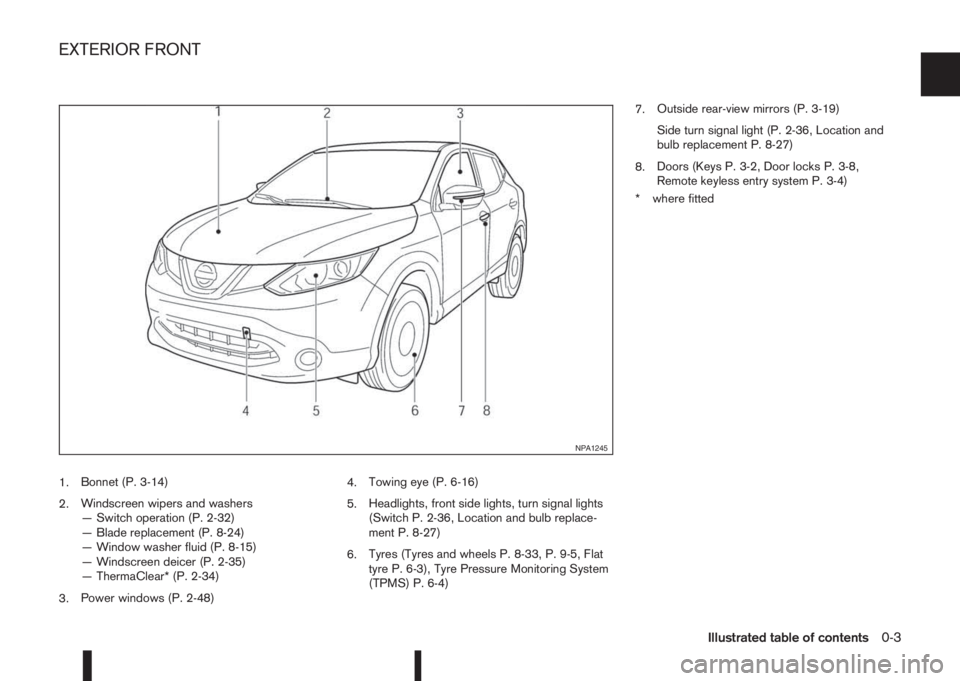
1.Bonnet (P. 3-14)
2.Windscreen wipers and washers
— Switch operation (P. 2-32)
— Blade replacement (P. 8-24)
— Window washer fluid (P. 8-15)
— Windscreen deicer (P. 2-35)
— ThermaClear* (P. 2-34)
3.Power windows (P. 2-48)4.Towing eye (P. 6-16)
5.Headlights, front side lights, turn signal lights
(Switch P. 2-36, Location and bulb replace-
ment P. 8-27)
6.Tyres (Tyres and wheels P. 8-33, P. 9-5, Flat
tyre P. 6-3), Tyre Pressure Monitoring System
(TPMS) P. 6-4)7.Outside rear-view mirrors (P. 3-19)
Side turn signal light (P. 2-36, Location and
bulb replacement P. 8-27)
8.Doors (Keys P. 3-2, Door locks P. 3-8,
Remote keyless entry system P. 3-4)
* where fitted
NPA1245
EXTERIOR FRONT
Illustrated table of contents0-3
Page 11 of 338
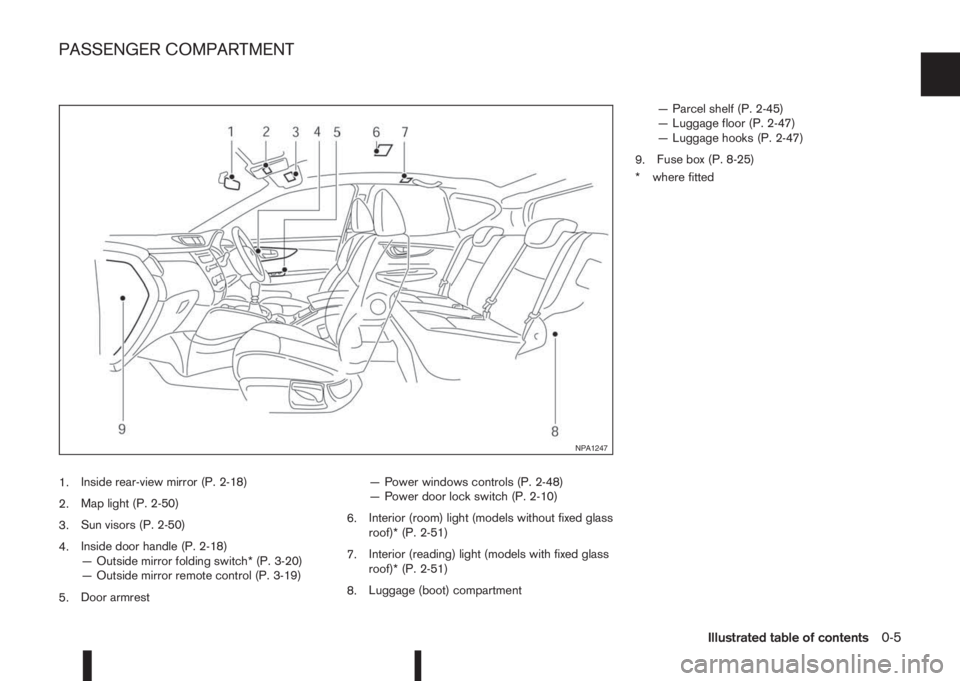
1.Inside rear-view mirror (P. 2-18)
2.Map light (P. 2-50)
3.Sun visors (P. 2-50)
4.Inside door handle (P. 2-18)
— Outside mirror folding switch* (P. 3-20)
— Outside mirror remote control (P. 3-19)
5.Door armrest— Power windows controls (P. 2-48)
— Power door lock switch (P. 2-10)
6.Interior (room) light (models without fixed glass
roof)* (P. 2-51)
7.Interior (reading) light (models with fixed glass
roof)* (P. 2-51)
8.Luggage (boot) compartment— Parcel shelf (P. 2-45)
— Luggage floor (P. 2-47)
— Luggage hooks (P. 2-47)
9.Fuse box (P. 8-25)
* where fitted
NPA1247
PASSENGER COMPARTMENT
Illustrated table of contents0-5
Page 12 of 338
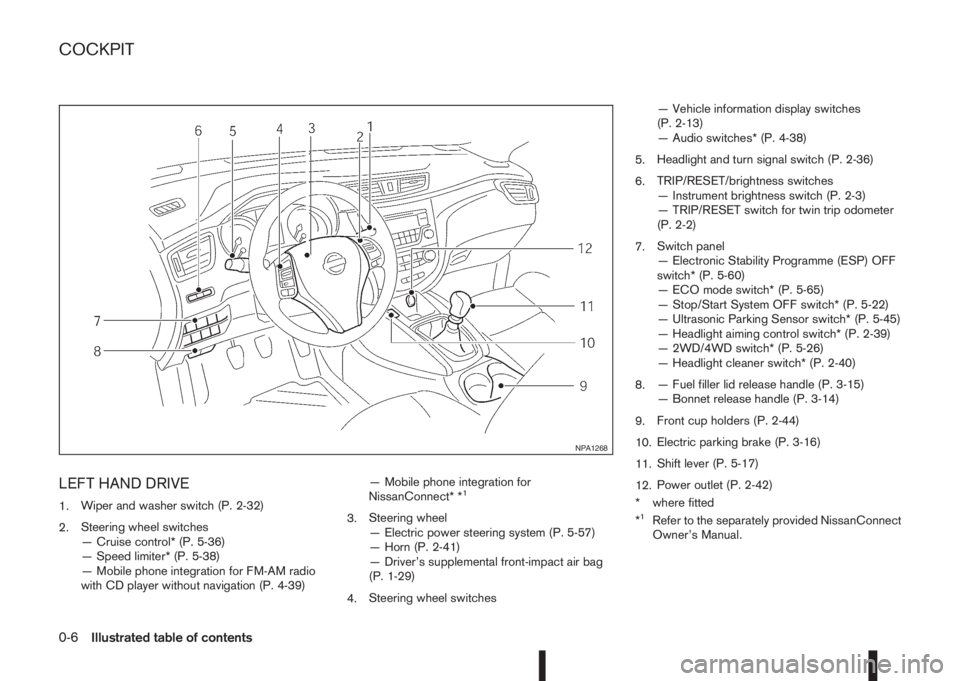
LEFT HAND DRIVE
1.Wiper and washer switch (P. 2-32)
2.Steering wheel switches
— Cruise control* (P. 5-36)
— Speed limiter* (P. 5-38)
— Mobile phone integration for FM-AM radio
with CD player without navigation (P. 4-39)— Mobile phone integration for
NissanConnect* *1
3.Steering wheel
— Electric power steering system (P. 5-57)
— Horn (P. 2-41)
— Driver’s supplemental front-impact air bag
(P. 1-29)
4.Steering wheel switches— Vehicle information display switches
(P. 2-13)
— Audio switches* (P. 4-38)
5.Headlight and turn signal switch (P. 2-36)
6.TRIP/RESET/brightness switches
— Instrument brightness switch (P. 2-3)
— TRIP/RESET switch for twin trip odometer
(P. 2-2)
7.Switch panel
— Electronic Stability Programme (ESP) OFF
switch* (P. 5-60)
— ECO mode switch* (P. 5-65)
— Stop/Start System OFF switch* (P. 5-22)
— Ultrasonic Parking Sensor switch* (P. 5-45)
— Headlight aiming control switch* (P. 2-39)
— 2WD/4WD switch* (P. 5-26)
— Headlight cleaner switch* (P. 2-40)
8.— Fuel filler lid release handle (P. 3-15)
— Bonnet release handle (P. 3-14)
9.Front cup holders (P. 2-44)
10.Electric parking brake (P. 3-16)
11.Shift lever (P. 5-17)
12.Power outlet (P. 2-42)
* where fitted
*1Refer to the separately provided NissanConnect
Owner’s Manual.
NPA1268
COCKPIT
0-6Illustrated table of contents
Page 13 of 338
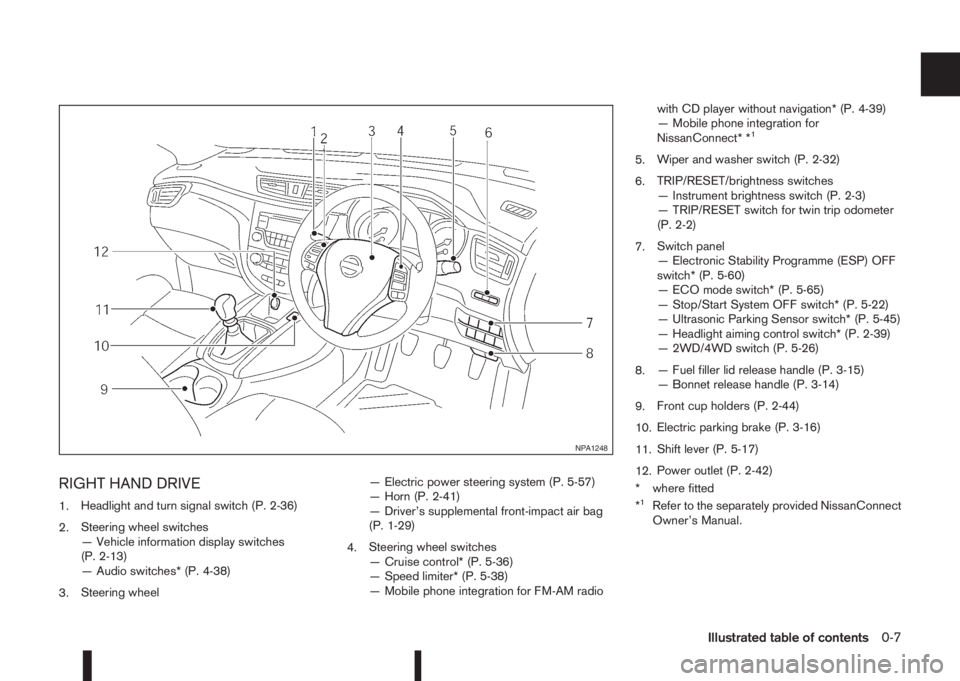
RIGHT HAND DRIVE
1.Headlight and turn signal switch (P. 2-36)
2.Steering wheel switches
— Vehicle information display switches
(P. 2-13)
— Audio switches* (P. 4-38)
3.Steering wheel— Electric power steering system (P. 5-57)
— Horn (P. 2-41)
— Driver’s supplemental front-impact air bag
(P. 1-29)
4.Steering wheel switches
— Cruise control* (P. 5-36)
— Speed limiter* (P. 5-38)
— Mobile phone integration for FM-AM radiowith CD player without navigation* (P. 4-39)
— Mobile phone integration for
NissanConnect* *
1
5.Wiper and washer switch (P. 2-32)
6.TRIP/RESET/brightness switches
— Instrument brightness switch (P. 2-3)
— TRIP/RESET switch for twin trip odometer
(P. 2-2)
7.Switch panel
— Electronic Stability Programme (ESP) OFF
switch* (P. 5-60)
— ECO mode switch* (P. 5-65)
— Stop/Start System OFF switch* (P. 5-22)
— Ultrasonic Parking Sensor switch* (P. 5-45)
— Headlight aiming control switch* (P. 2-39)
— 2WD/4WD switch (P. 5-26)
8.— Fuel filler lid release handle (P. 3-15)
— Bonnet release handle (P. 3-14)
9.Front cup holders (P. 2-44)
10.Electric parking brake (P. 3-16)
11.Shift lever (P. 5-17)
12.Power outlet (P. 2-42)
* where fitted
*
1Refer to the separately provided NissanConnect
Owner’s Manual.
NPA1248
Illustrated table of contents0-7
Page 24 of 338
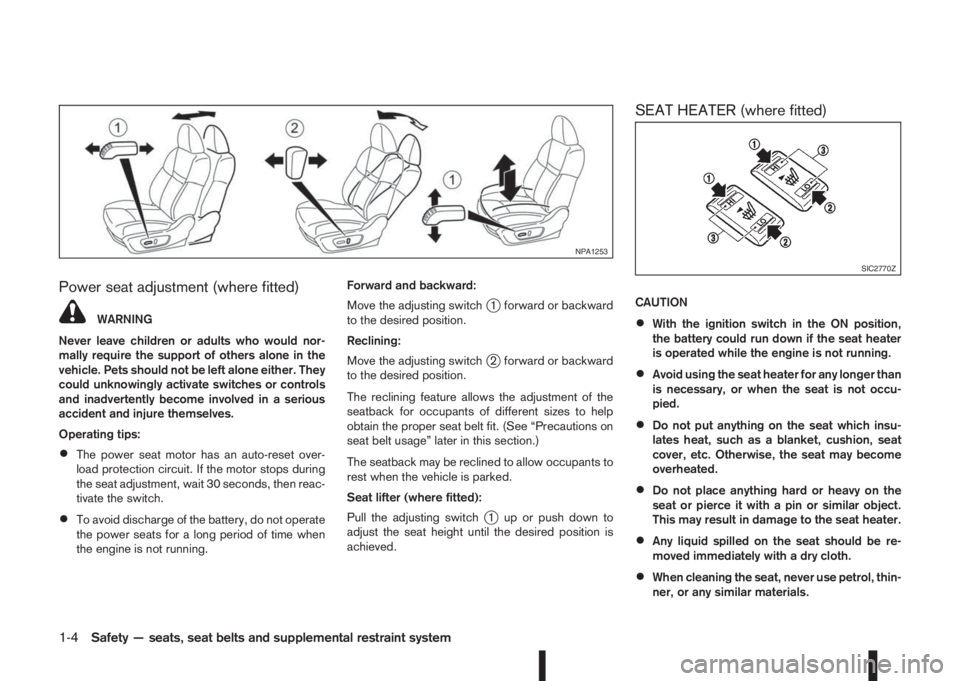
Power seat adjustment (where fitted)
WARNING
Never leave children or adults who would nor-
mally require the support of others alone in the
vehicle. Pets should not be left alone either. They
could unknowingly activate switches or controls
and inadvertently become involved in a serious
accident and injure themselves.
Operating tips:
•The power seat motor has an auto-reset over-
load protection circuit. If the motor stops during
the seat adjustment, wait 30 seconds, then reac-
tivate the switch.
•To avoid discharge of the battery, do not operate
the power seats for a long period of time when
the engine is not running.Forward and backward:
Move the adjusting switch
j1 forward or backward
to the desired position.
Reclining:
Move the adjusting switch
j2 forward or backward
to the desired position.
The reclining feature allows the adjustment of the
seatback for occupants of different sizes to help
obtain the proper seat belt fit. (See “Precautions on
seat belt usage” later in this section.)
The seatback may be reclined to allow occupants to
rest when the vehicle is parked.
Seat lifter (where fitted):
Pull the adjusting switch
j1 up or push down to
adjust the seat height until the desired position is
achieved.
SEAT HEATER (where fitted)
CAUTION
•With the ignition switch in the ON position,
the battery could run down if the seat heater
is operated while the engine is not running.
•Avoid using the seat heater for any longer than
is necessary, or when the seat is not occu-
pied.
•Do not put anything on the seat which insu-
lates heat, such as a blanket, cushion, seat
cover, etc. Otherwise, the seat may become
overheated.
•Do not place anything hard or heavy on the
seat or pierce it with a pin or similar object.
This may result in damage to the seat heater.
•Any liquid spilled on the seat should be re-
moved immediately with a dry cloth.
•When cleaning the seat, never use petrol, thin-
ner, or any similar materials.
NPA1253
SIC2770Z
1-4Safety — seats, seat belts and supplemental restraint system
Page 58 of 338
2Instruments and controlsInstruments and controls
Meters and gauges .................................................. 2-2
Speedometer...................................................... 2-2
Fuel gauge ......................................................... 2-2
Tachometer ........................................................ 2-2
Engine coolant temperature gauge ...................... 2-3
Instrument panel brightness control..................... 2-3
Warning/indicator lights and audible reminders ........ 2-4
Checking bulbs .................................................. 2-4
Warning lights .................................................... 2-5
Indicator lights .................................................... 2-10
Audible reminders............................................... 2-12
Vehicle information display ....................................... 2-13
How to use the Vehicle Information Display ......... 2-14
Startup display.................................................... 2-14
Settings .............................................................. 2-14
Vehicle information display warnings and
indicators............................................................ 2-21
Trip computer ..................................................... 2-27
[Clock] and [outside air temperature] .................. 2-29
Traffic sign recognition (where fitted) .................. 2-30
Wiper and washer switch ........................................ 2-32
Windscreen ........................................................ 2-32
Rear window ...................................................... 2-33
ThermaClear Heated Windscreen button ................. 2-34
ThermaClear Heated Windscreen (where
fitted).................................................................. 2-34
Defogger switch ...................................................... 2-35
Rear window defogger ....................................... 2-35
Outside mirror defogger (where fitted) ................ 2-35
Headlight and turn signal switch............................... 2-36Headlight switch ................................................. 2-36
Turn signal switch ............................................... 2-38
Fog light switch ....................................................... 2-38
Front fog light (where fitted)................................ 2-38
Rear fog light (where fitted)................................. 2-39
Headlight aiming control .......................................... 2-39
Headlight aiming control switch (where fitted) ..... 2-39
Automatic aiming control (LED headlights) .......... 2-40
Headlight cleaner (where fitted) ............................... 2-40
Headlight cleaner switch (where fitted) ............... 2-40
Horn ........................................................................ 2-41
Seat heating (where fitted) ....................................... 2-41
Power outlet ............................................................ 2-42
Storage ................................................................... 2-42
Storage trays ...................................................... 2-42
Glove box ........................................................... 2-42
Console box ....................................................... 2-43
Cup holders ....................................................... 2-44
Bottle holder ....................................................... 2-44
Coat hooks ......................................................... 2-44
Map pocket (where fitted) ................................... 2-44
Seat pocket (where fitted)................................... 2-44
Roof rail (where fitted) ........................................ 2-45
Parcel shelf ........................................................ 2-45
Luggage compartment/boot floor (where
fitted).................................................................. 2-47
Luggage hooks ................................................... 2-47
Windows ................................................................. 2-48
Power windows .................................................. 2-48
Fixed glass roof (where fitted) .................................. 2-49
Page 62 of 338
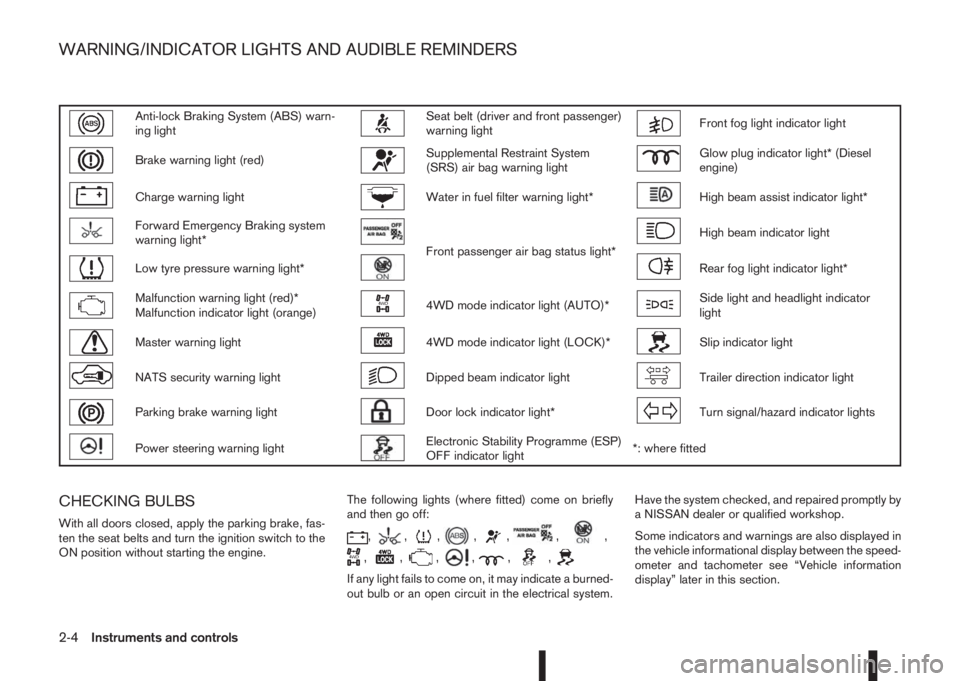
Anti-lock Braking System (ABS) warn-
ing lightSeat belt (driver and front passenger)
warning lightFront fog light indicator light
Brake warning light (red)Supplemental Restraint System
(SRS) air bag warning lightGlow plug indicator light* (Diesel
engine)
Charge warning lightWater in fuel filter warning light*High beam assist indicator light*
Forward Emergency Braking system
warning light*
Front passenger air bag status light*
High beam indicator light
Low tyre pressure warning light*Rear fog light indicator light*
Malfunction warning light (red)*
Malfunction indicator light (orange)4WD mode indicator light (AUTO)*Side light and headlight indicator
light
Master warning light4WD mode indicator light (LOCK)*Slip indicator light
NATS security warning lightDipped beam indicator lightTrailer direction indicator light
Parking brake warning lightDoor lock indicator light*Turn signal/hazard indicator lights
Power steering warning lightElectronic Stability Programme (ESP)
OFF indicator light*: where fitted
CHECKING BULBS
With all doors closed, apply the parking brake, fas-
ten the seat belts and turn the ignition switch to the
ON position without starting the engine.The following lights (where fitted) come on briefly
and then go off:,,,,,,,
,,,,,,
If any light fails to come on, it may indicate a burned-
out bulb or an open circuit in the electrical system.Have the system checked, and repaired promptly by
a NISSAN dealer or qualified workshop.
Some indicators and warnings are also displayed in
the vehicle informational display between the speed-
ometer and tachometer see “Vehicle information
display” later in this section.
WARNING/INDICATOR LIGHTS AND AUDIBLE REMINDERS
2-4Instruments and controls
Page 67 of 338
Low brake fluid warning light:
When the ignition switch is in the ON position, the
light warns of a low brake fluid level. If this warning
light illuminates, the Electronic Stability Programme
(ESP) warning light and the brake system warning
light (yellow) also illuminate. If the light illuminates
while the ignition switch is in the ON position with
the parking brake not applied, stop the vehicle and
perform the following steps:
1. Check the brake fluid level. If brake fluid level is
low, add fluid and have the system checked by a
NISSAN dealer or qualified workshop. See
“Brake and clutch fluid” in the “8. Maintenance
and do-it-yourself” section.
2. If the brake fluid level is correct, have the warn-
ing system checked by a NISSAN dealer or quali-
fied workshop.
WARNING
•Your brake system may not be working prop-
erly if the warning light is on. Driving could be
dangerous. If you judge the brake system to
be safe, drive carefully to the nearest service
station for repairs. Otherwise, have your ve-
hicle towed because driving it could be dan-
gerous.
•Pressing the brake pedal when the ignition
switch is not in the ON position and/or when
the brake fluid level is low may increase the
stopping distance and braking will require
greater pedal effort as well as pedal travel.
•If the brake fluid level is below the minimum
or MIN mark on the brake fluid reservoir, do
not drive until the brake system has been
checked at a NISSAN dealer or qualified work-
shop.
For further parking brake operation information see
“Parking brake switch” in the “8. Pre-driving checks
and adjustments” section.
Power steering warning light
WARNING
•If the engine is not running or is turned off
while driving, the power assist for the steer-
ing will not work. Steering will be harder to
operate.
•When the power steering warning light illumi-
nates with the engine running, there will be
no power assist for the steering. You will still
have control of the vehicle but the steering
will be harder to operate. Have the power
steering system checked by a NISSAN dealer
or qualified workshop.
When the ignition switch is placed in the ON posi-
tion, the power steering warning light illuminates.
After starting the engine, the power steering warn-
ing light turns off. This indicates that the electric
power steering system is operational.
If the power steering warning light illuminates while
the engine is running, it may indicate the power
steering system is not functioning properly and mayneed servicing. Have the electric power steering
system checked by a NISSAN dealer or qualified
workshop. See “Electric power steering system” in
the “5. Starting and driving” section.
Seat belt (driver and front
passenger) warning light
The seat belt warning light reminds you to fasten
your seat belts. The light illuminates whenever the
ignition switch is placed in the ON or START posi-
tion and remains illuminated until the driver’s and/or
front passenger’s seat belt is fastened. At the same
time, the chime sounds for about 6 seconds unless
the driver’s and/or front passenger’s seat belt is
securely fastened see “Seat belt reminder chime”
later in this section. The seat belt warning light may
also illuminate if the front passenger’s seat belt is
not fastened when the front passenger’s seat is oc-
cupied. For 7 seconds after the ignition switch is
placed in the ON position, the system does not acti-
vate the warning light for the front passenger. See
“Seat belts” in the “1. Safety — Seats, Seat belts
and Supplemental Restraint System” section for
precautions on seat belt usage.
Supplemental Restraint System
(SRS) air bag warning light
WARNING
If the supplemental air bag warning light is on, it
could mean that the front air bag, side air bag
(where fitted), curtain air bag (where fitted) and/
or pre-tensioner systems will not operate in an
Instruments and controls2-9
Page 69 of 338
Door lock indicator light
(where fitted)
The door lock indicator light located on the instru-
ment panel illuminates when all the doors are locked
while the ignition switch is in the ON position.
•When the doors are locked with the power door
lock switch, the door lock indicator light will illu-
minate for 30 minutes.
•When the doors are locked by pushing the
LOCK button on the Intelligent Key or any re-
quest switch (where fitted), the door lock indica-
tor light will illuminate for 1 minute.
•The door lock indicator light turns off when any
door is unlocked.
For locking or unlocking doors, see “Door locks” in
the “3. Pre-driving checks and adjustments” sec-
tion.
Electronic Stability Programme
(ESP) OFF indicator light
(where fitted)
The light comes on when the Electronic Stability
Programme (ESP) OFF switch is pushed to the OFF
position. This indicates that the ESP system is not
operating.
This light also comes on briefly when the ignition
switch is turned to the ON position. The light will
turn off after approximately 1 second if the ESP sys-
tem is operational.
When the ESP OFF indicator light and SLIP indica-tor light (see “SLIP indicator light (where fitted)”
later in this section) come on with the ESP system
turned on, it alerts the driver to the fact that the sys-
tem’s fail-safe mode is operating. This means that
the system may not be functioning properly. Have
the system checked by your NISSAN dealer or quali-
fied workshop.
If an abnormality occurs in the system, the ESP sys-
tem function will be cancelled, but the vehicle is still
driveable. For additional information, see “Electronic
Stability Programme (ESP) system (where fitted)” in
the “5. Starting and driving” section.
Front fog light indicator light
The light comes on when the front fog lights are
switched on (see “Fog light switch” later in this sec-
tion).
Glow plug indicator light (Diesel
engines)
This light comes on when the ignition switch is in the
ON position and goes out when the glow plugs have
been pre-heated. When the engine is cold, the glow
plug warm-up time will be longer.
High beam assist indicator light
(where fitted)
The indicator light illuminates when the headlights
come on while the headlight switch is in the AUTO
position with the high beam selected. This indicates
that the high beam assist system is operational. (See
2-36.)
High beam indicator light
This light comes on when the headlight high beam
is on and goes out when the low beam is selected.
Malfunction Indicator light
(orange)
When the ignition switch is turned to the ON posi-
tion, the orange Malfunction Indicator light illumi-
nates. This means that the system is operational.
If the orange Malfunction Indicator light comes on
steady or blinks (where fitted) while the engine is
running, it may indicate an engine control system
malfunction.
See “Malfunction warning light (red) (where fitted)”
earlier in this section for details of the red malfunc-
tion warning light (where fitted).
On steady (orange):
An engine malfunction has been detected. Have the
vehicle inspected by a NISSAN dealer or qualified
workshop. You do not need to have your vehicle
towed to the dealer.
Blinking (orange) (where fitted):
An engine misfire has been detected which may
damage the engine control system.
To reduce or avoid engine control system dam-
age:
•Do not drive at speeds above 70 km/h (43
MPH).
•Avoid hard acceleration or deceleration.
Instruments and controls2-11