engine NISSAN QASHQAI 2017 Owner´s Manual
[x] Cancel search | Manufacturer: NISSAN, Model Year: 2017, Model line: QASHQAI, Model: NISSAN QASHQAI 2017Pages: 508, PDF Size: 2.68 MB
Page 323 of 508
5-38Starting and driving
blink to alert the driver. Then, the LDP system
will automatically apply the brakes for a short
period of time to help assist the driver to return
the vehicle to the center of the traveling lane.
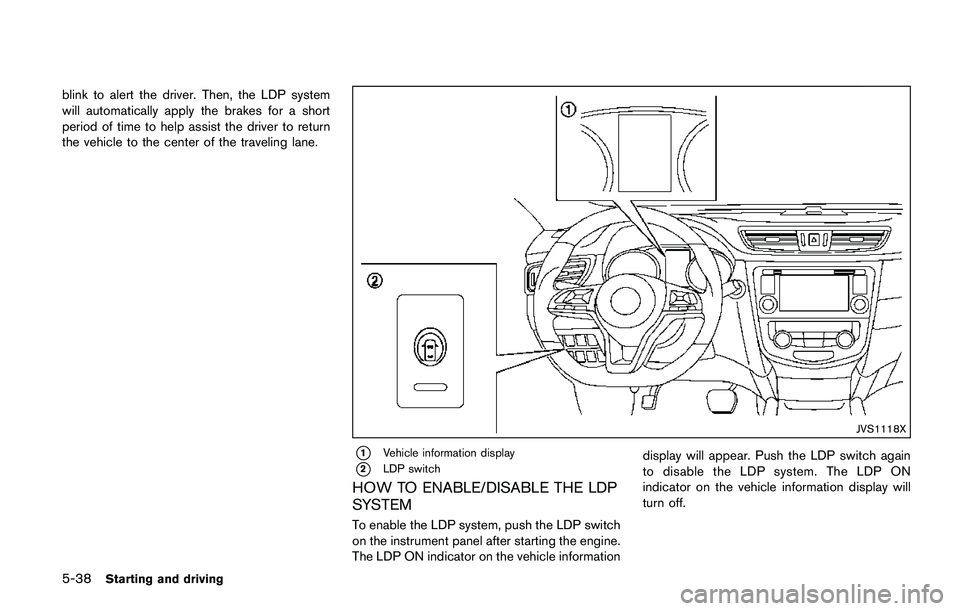
JVS1118X
*1Vehicle information display
*2LDP switch
HOW TO ENABLE/DISABLE THE LDP
SYSTEM
To enable the LDP system, push the LDP switch
on the instrument panel after starting the engine.
The LDP ON indicator on the vehicle informationdisplay will appear. Push the LDP switch again
to disable the LDP system. The LDP ON
indicator on the vehicle information display will
turn off.
Page 326 of 508

Temporary disabled status at high tem-
perature:
If the vehicle is parked in direct sunlight under
high temperature conditions (over approximately
1048F (408C)) and then the LDP system is
turned on, the LDP system may be deactivated
automatically and the following message will
appear on the vehicle information display:
“Unavailable: High Cabin Temperature.” When
the interior temperature is reduced, the system
will resume operating automatically.
SYSTEM MALFUNCTION
If the LDP system malfunctions, it will cancel
automatically. The LDP indicator (orange) will
illuminate and the “Malfunction” warning mes-
sage appear in the display.
If the LDP indicator (orange) illuminates in the
display, pull off the road to a safe location. Turn
the engine off and restart the engine. If the LDP
indicator (orange) continues to illuminate, have
the LDP system checked. It is recommended
that you visit a NISSAN dealer for this service.JVS1079X
SYSTEM MAINTENANCE
The lane camera unit*Afor the LDP system is
located above the inside mirror. To keep the
proper operation of the LDP system and prevent
a system malfunction, be sure to observe the
following:
.Always keep the windshield clean.
.Do not attach a sticker (including transpar-
ent material) or install an accessory near the
camera unit.
.Do not place reflective materials, such as
white paper or a mirror, on the instrument
panel. The reflection of sunlight may ad-
versely affect the camera unit’s capability of
detecting the lane markers..Do not strike or damage the areas around
the camera unit. Do not touch the camera
lens or remove the screw located on the
camera unit. If the camera unit is damaged
due to an accident, it is recommended that
you visit a NISSAN dealer.
Starting and driving5-41
Page 329 of 508

5-44Starting and driving
JVS1092X
*1Vehicle information display
*2Steering-wheel-mounted controls (left side)
*3Blind Spot Warning (BSW) switch (for models
without LDP system)
HOW TO ENABLE/DISABLE THE BSW
SYSTEM
Perform the following steps to enable or disablethe BSW system.
1. Press the
button until “Settings”
displays in the vehicle information display
and then press “OK” button. Use the
button to select “Driver Assistance”. Then
press the “OK” button.2. Select “Driving Aids” and press the “OK”
button.
3. Use the
buttons to navigate in the menu
and use the “OK” button to select or change
an item.
.Select “Blind Spot” and press the “OK”
button.
Use the “OK” button to check/uncheck
the box for “Warning.”
For models without LDP system:
To enable the BSW system, push the Blind Spot
Warning (BSW) switch on the instrument panel
after starting the engine.
The BSW ON indicator on the vehicle informa-
tion display will appear. Push the BSW switch
again to disable the BSW system. The BSW ON
indicator on the vehicle information display will
turn off.
NOTE:
The system will retain current settings in
the vehicle information display even if the
engine is restarted.
Page 334 of 508

JVS1090X
*1Vehicle information display
SYSTEM TEMPORARILY UNAVAIL-
ABLE
When radar blockage is detected, the BSW
system will be turned off automatically, a chime
will sound and the “Unavailable: Side Radar
Obstruction” warning message will appear in thevehicle information display
*1.
The system is not available until the conditions
no longer exist.
The radar sensors may be blocked by temporary
ambient conditions such as splashing water,
mist or fog. The blocked condition may also be
caused by objects such as ice, frost or dirtobstructing the radar sensors.
NOTE:
If the BSW system stops working, the
RCTA system will also stop working.
Action to take:
When the above conditions no longer exist, the
system will resume automatically.
If the “Unavailable: Side Radar Obstruction”
warning message continues to appear, have the
system checked. It is recommended that you
visit a NISSAN dealer for this service.
SYSTEM MALFUNCTION
When the BSW system malfunctions, it will be
turned off automatically and the system mal-
function warning message will appear in the
vehicle information display.
NOTE:
If the BSW system stops working, the
RCTA system will also stop working.
Action to take:
Stop the vehicle in a safe location, turn the
engine off and restart the engine. If the message
continues to appear, have the BSW system
checked. It is recommended that you visit a
NISSAN dealer for this service.
Starting and driving5-49
Page 338 of 508

JVS0942X
*1Vehicle information display
*2Steering-wheel-mounted controls (left side)
HOW TO ENABLE/DISABLE THE
RCTA SYSTEM
Perform the following steps to enable or disable
the RCTA system.1. Press the
button until “Settings”
displays in the vehicle information display
and then press “OK” button. Use the
button to select “Driver Assistance” Then
press the “OK” button.
2. Use the button to select “Parking Aids” then
press the OK button.3. Select “Cross Traffic” and press the “OK”
button.
4. Use the “OK” button to enable or disable the
system.
NOTE:
The system setting will be retained even if
the engine is restarted.
Starting and driving5-53
Page 341 of 508
5-56Starting and driving
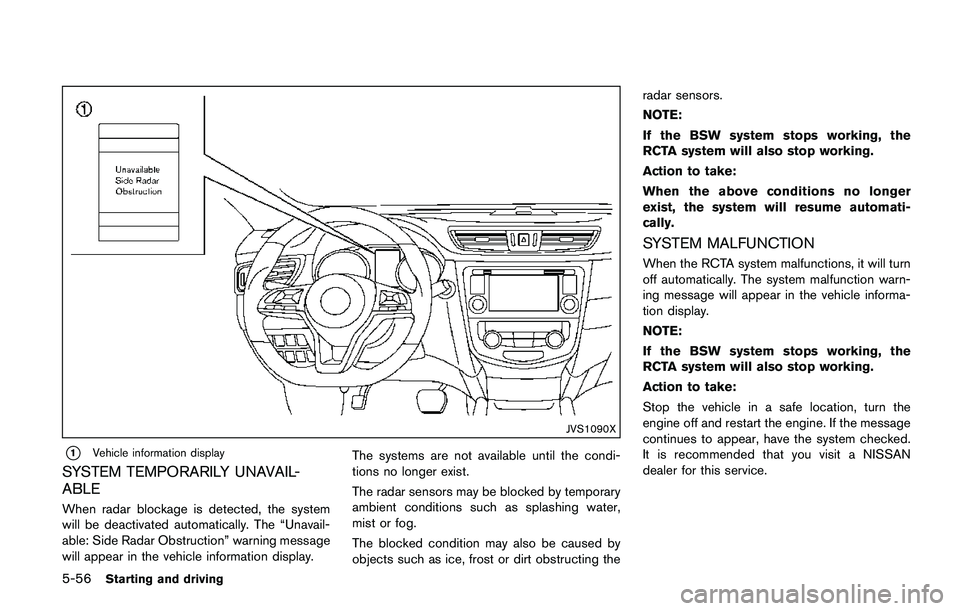
JVS1090X
*1Vehicle information display
SYSTEM TEMPORARILY UNAVAIL-
ABLE
When radar blockage is detected, the system
will be deactivated automatically. The “Unavail-
able: Side Radar Obstruction” warning message
will appear in the vehicle information display.The systems are not available until the condi-
tions no longer exist.
The radar sensors may be blocked by temporary
ambient conditions such as splashing water,
mist or fog.
The blocked condition may also be caused by
objects such as ice, frost or dirt obstructing theradar sensors.
NOTE:
If the BSW system stops working, the
RCTA system will also stop working.
Action to take:
When the above conditions no longer
exist, the system will resume automati-
cally.
SYSTEM MALFUNCTION
When the RCTA system malfunctions, it will turn
off automatically. The system malfunction warn-
ing message will appear in the vehicle informa-
tion display.
NOTE:
If the BSW system stops working, the
RCTA system will also stop working.
Action to take:
Stop the vehicle in a safe location, turn the
engine off and restart the engine. If the message
continues to appear, have the system checked.
It is recommended that you visit a NISSAN
dealer for this service.
Page 343 of 508
5-58Starting and driving
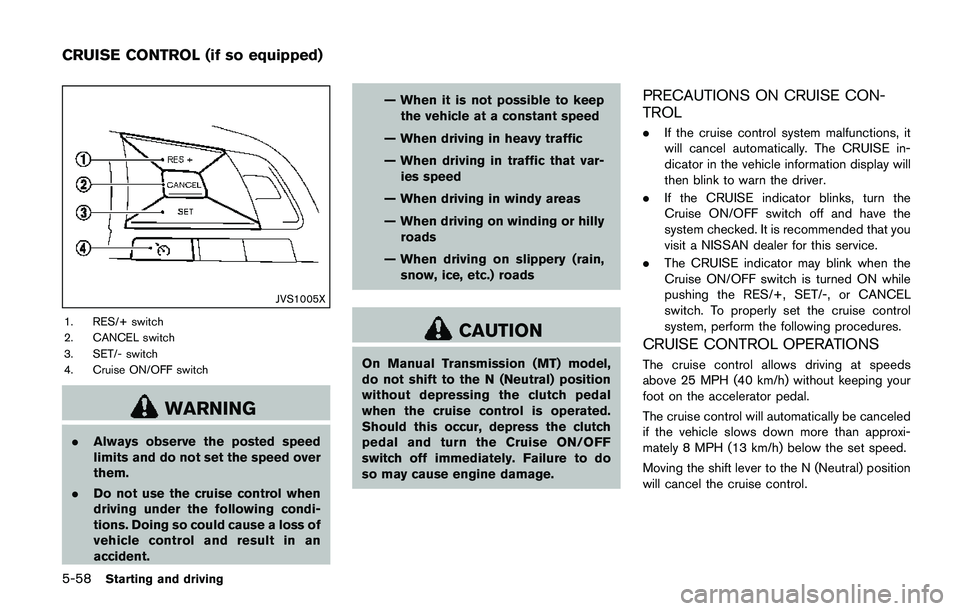
JVS1005X
1. RES/+ switch
2. CANCEL switch
3. SET/- switch
4. Cruise ON/OFF switch
WARNING
.Always observe the posted speed
limits and do not set the speed over
them.
.Do not use the cruise control when
driving under the following condi-
tions. Doing so could cause a loss of
vehicle control and result in an
accident.— When it is not possible to keep
the vehicle at a constant speed
— When driving in heavy traffic
— When driving in traffic that var-
ies speed
— When driving in windy areas
— When driving on winding or hilly
roads
— When driving on slippery (rain,
snow, ice, etc.) roads
CAUTION
On Manual Transmission (MT) model,
do not shift to the N (Neutral) position
without depressing the clutch pedal
when the cruise control is operated.
Should this occur, depress the clutch
pedal and turn the Cruise ON/OFF
switch off immediately. Failure to do
so may cause engine damage.
PRECAUTIONS ON CRUISE CON-
TROL
.If the cruise control system malfunctions, it
will cancel automatically. The CRUISE in-
dicator in the vehicle information display will
then blink to warn the driver.
.If the CRUISE indicator blinks, turn the
Cruise ON/OFF switch off and have the
system checked. It is recommended that you
visit a NISSAN dealer for this service.
.The CRUISE indicator may blink when the
Cruise ON/OFF switch is turned ON while
pushing the RES/+, SET/-, or CANCEL
switch. To properly set the cruise control
system, perform the following procedures.
CRUISE CONTROL OPERATIONS
The cruise control allows driving at speeds
above 25 MPH (40 km/h) without keeping your
foot on the accelerator pedal.
The cruise control will automatically be canceled
if the vehicle slows down more than approxi-
mately 8 MPH (13 km/h) below the set speed.
Moving the shift lever to the N (Neutral) position
will cancel the cruise control.
CRUISE CONTROL (if so equipped)
Page 354 of 508
JVS0965X
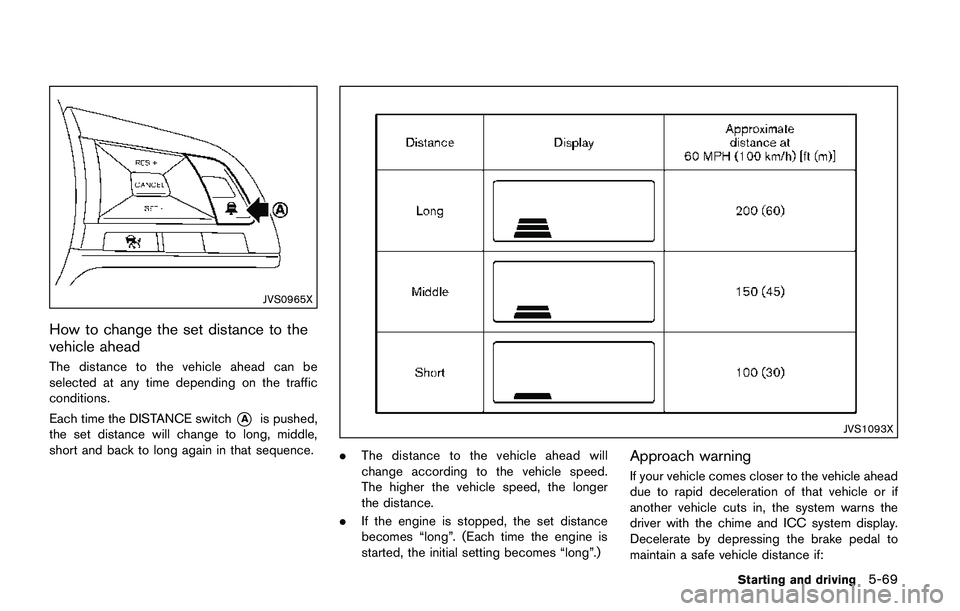
How to change the set distance to the
vehicle ahead
The distance to the vehicle ahead can be
selected at any time depending on the traffic
conditions.
Each time the DISTANCE switch
*Ais pushed,
the set distance will change to long, middle,
short and back to long again in that sequence.JVS1093X
.The distance to the vehicle ahead will
change according to the vehicle speed.
The higher the vehicle speed, the longer
the distance.
.If the engine is stopped, the set distance
becomes “long”. (Each time the engine is
started, the initial setting becomes “long”.)Approach warning
If your vehicle comes closer to the vehicle ahead
due to rapid deceleration of that vehicle or if
another vehicle cuts in, the system warns the
driver with the chime and ICC system display.
Decelerate by depressing the brake pedal to
maintain a safe vehicle distance if:
Starting and driving5-69
Page 359 of 508
5-74Starting and driving
JVS1074X
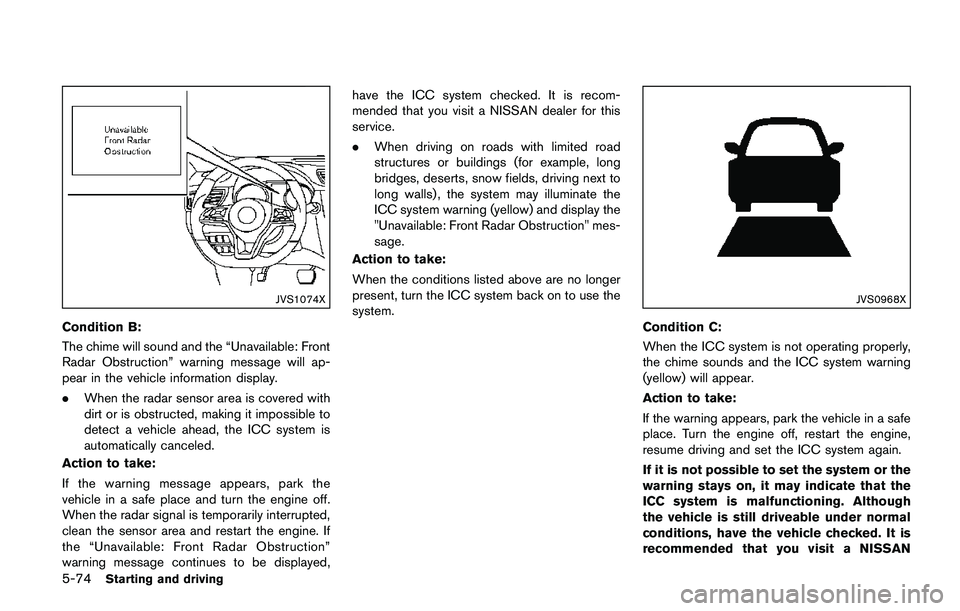
Condition B:
The chime will sound and the “Unavailable: Front
Radar Obstruction” warning message will ap-
pear in the vehicle information display.
.When the radar sensor area is covered with
dirt or is obstructed, making it impossible to
detect a vehicle ahead, the ICC system is
automatically canceled.
Action to take:
If the warning message appears, park the
vehicle in a safe place and turn the engine off.
When the radar signal is temporarily interrupted,
clean the sensor area and restart the engine. If
the “Unavailable: Front Radar Obstruction”
warning message continues to be displayed,have the ICC system checked. It is recom-
mended that you visit a NISSAN dealer for this
service.
.When driving on roads with limited road
structures or buildings (for example, long
bridges, deserts, snow fields, driving next to
long walls) , the system may illuminate the
ICC system warning (yellow) and display the
"Unavailable: Front Radar Obstruction" mes-
sage.
Action to take:
When the conditions listed above are no longer
present, turn the ICC system back on to use the
system.
JVS0968X
Condition C:
When the ICC system is not operating properly,
the chime sounds and the ICC system warning
(yellow) will appear.
Action to take:
If the warning appears, park the vehicle in a safe
place. Turn the engine off, restart the engine,
resume driving and set the ICC system again.
If it is not possible to set the system or the
warning stays on, it may indicate that the
ICC system is malfunctioning. Although
the vehicle is still driveable under normal
conditions, have the vehicle checked. It is
recommended that you visit a NISSAN
Page 364 of 508
the desired speed.
3. Push, then quickly release the SET/- switch.
Each time you do this, the set speed will
decrease by about 1 MPH (1.6 km/h) .
To resume the preset speed,push and
release the RES/+ switch. The vehicle will
resume the last set cruising speed when the
vehicle speed is over 25 MPH (40 km/h) .
System temporarily unavailable
A chime sounds under the following conditions
and the control is automatically canceled.
.When the vehicle slows down more than 8
MPH (13 km/h) below the set speed
.When the shift lever is not in the D (Drive) or
manual shift mode
.When the parking brake is applied.
.When the VDC (including the traction
control system) operates
.When a wheel slips
JVS1003X
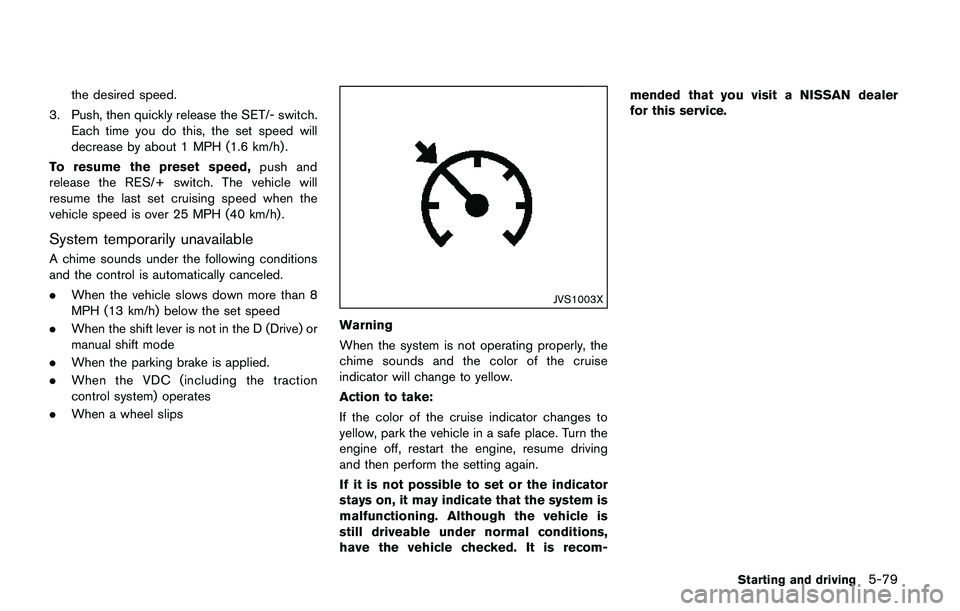
Warning
When the system is not operating properly, the
chime sounds and the color of the cruise
indicator will change to yellow.
Action to take:
If the color of the cruise indicator changes to
yellow, park the vehicle in a safe place. Turn the
engine off, restart the engine, resume driving
and then perform the setting again.
If it is not possible to set or the indicator
stays on, it may indicate that the system is
malfunctioning. Although the vehicle is
still driveable under normal conditions,
have the vehicle checked. It is recom-mended that you visit a NISSAN dealer
for this service.
Starting and driving5-79