Condition NISSAN TEANA 2008 Service Manual
[x] Cancel search | Manufacturer: NISSAN, Model Year: 2008, Model line: TEANA, Model: NISSAN TEANA 2008Pages: 5121, PDF Size: 69.03 MB
Page 3368 of 5121

MWI-114
< ECU DIAGNOSIS >
IPDM E/R (INTELLIGENT POWER DISTRIBUTION MODULE ENGINE ROOM)
If No CAN Communication Is Available With BCM
IGNITION RELAY MALFUNCTION DETECTION FUNCTION
IPDM E/R monitors the voltage at the contact circuit and excitation coil circuit of the ignition relay inside it.
IPDM E/R judges the ignition relay error if the voltage differs between the contact circuit and the excitation
coil circuit.
If the ignition relay cannot turn OFF due to contact seizure, it activates the tail lamp relay for 10 minutes to
alert the user to the ignition relay malfunction when the ignition switch is turned OFF.
FRONT WIPER CONTROL
IPDM E/R detects front wiper stop position by a front wiper auto stop signal.
When a front wiper auto stop signal is in the conditions listed below, IPDM E/R stops power supply to wiper
after repeating a front wiper 10 seconds activation and 20 seconds stop five times.
Control part Fail-safe operation
Cooling fan Turns ON the cooling fan relay-2 and the cooling fan relay-3 when ignition switch is
turned ON (Cooling fan operates at HI)
Turns OFF the cooling fan relay-1, the cooling fan relay-2 and the cooling fan relay-3
when the ignition switch is turned OFF (Cooling fan does not operate)
A/C compressor A/C relay OFF
Alternator Outputs the power generation command signal (PWM signal) 0%
Control part Fail-safe operation
Headlamp Turns ON the headlamp low relay when the ignition switch is turned ON
Turns OFF the headlamp low relay when the ignition switch is turned OFF
Headlamp high relay OFF
Parking lamps
License plate lamps
Illuminations
Tail lamps Turns ON the tail lamp relay when the ignition switch is turned ON
Turns OFF the tail lamp relay when the ignition switch is turned OFF
Front wiper The status just before activation of fail-safe control is maintained until the ignition
switch is turned OFF while the front wiper is operating at LO or HI speed.
The wiper is operated at LO speed until the ignition switch is turned OFF if the fail-
safe control is activated while the front wiper is set in the INT mode and the front wiper
motor is operating.
Front fog lamps Front fog lamp relay OFF
Horn Horn OFF
Ignition relay The status just before activation of fail-safe is maintained.
Starter motor Starter control relay OFF
Steering lock unit Steering lock relay OFF
Headlamp washer relay Headlamp washer relay OFF
Voltage judgment
IPDM E/R judgment Operation
Ignition relay contact sideIgnition relay excitation coil
side
ON ON Ignition relay ON normal —
OFF OFF Ignition relay OFF normal —
ON OFF Ignition relay ON stuck Detects DTC “B2098: IGN RELAY ON”
Turns ON the tail lamp relay for 10 min-
utes
OFF ON Ignition relay OFF stuck Detects DTC “B2099: IGN RELAY OFF”
Page 3369 of 5121
MWI
IPDM E/R (INTELLIGENT POWER DISTRIBUTION MODULE ENGINE ROOM)
MWI-115
< ECU DIAGNOSIS >
C
D
E
F
G
H
I
J
K
L
MB A
O
P
NOTE:
This operation status can be confirmed on the IPDM E/R “Data Monitor” that displays “BLOCK” for the item
“WIP PROT” while the wiper is stopped.
STARTER MOTOR PROTECTION FUNCTION
IPDM E/R turns OFF the starter control relay to protect the starter motor when the starter control relay remains
active for 90 seconds.
DTC IndexINFOID:0000000003900504
NOTE:
The details of time display are as follows.
- CRNT: A malfunction is detected now
- PAST: A malfunction was detected in the past.
IGN counter is displayed on FFD (Freeze Frame data).
- The number is 0 when is detected now
- The number increases like 1 → 2 ··· 38 → 39 after returning to the normal condition whenever IGN OFF →
ON.
- The number is fixed to 39 until the self-diagnosis results are erased if it is over 39.
×: Applicable
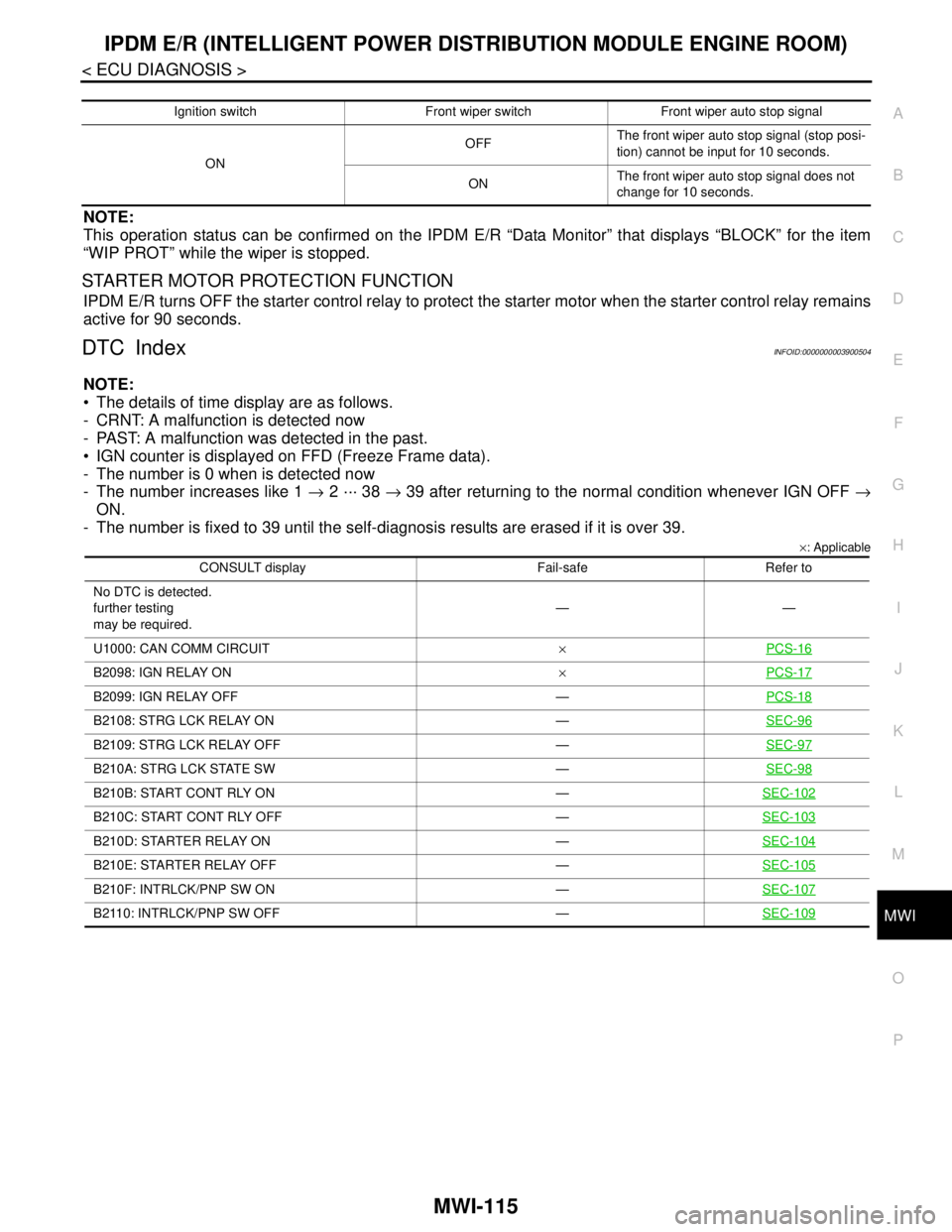
Ignition switch Front wiper switch Front wiper auto stop signal
ONOFFThe front wiper auto stop signal (stop posi-
tion) cannot be input for 10 seconds.
ONThe front wiper auto stop signal does not
change for 10 seconds.
CONSULT display Fail-safe Refer to
No DTC is detected.
further testing
may be required.——
U1000: CAN COMM CIRCUIT×PCS-16
B2098: IGN RELAY ON×PCS-17
B2099: IGN RELAY OFF —PCS-18
B2108: STRG LCK RELAY ON —SEC-96
B2109: STRG LCK RELAY OFF —SEC-97
B210A: STRG LCK STATE SW —SEC-98
B210B: START CONT RLY ON —SEC-102
B210C: START CONT RLY OFF —SEC-103
B210D: STARTER RELAY ON —SEC-104
B210E: STARTER RELAY OFF —SEC-105
B210F: INTRLCK/PNP SW ON —SEC-107
B2110: INTRLCK/PNP SW OFF —SEC-109
Page 3374 of 5121

MWI-120
< SYMPTOM DIAGNOSIS >
THE PARKING BRAKE RELEASE WARNING CONTINUES DISPLAYING, OR
DOES NOT DISPLAY
THE PARKING BRAKE RELEASE WARNING CONTINUES DISPLAYING,
OR DOES NOT DISPLAY
DescriptionINFOID:0000000003792609
The parking brake warning is displayed during vehicle travel even though the parking brake is released
The parking brake warning is not displayed even though driving the vehicle with the parking brake applied
Diagnosis ProcedureINFOID:0000000003792610
1.CHECK PARKING BRAKE WARNING LAMP OPERATION
1. Start engine.
2. Check the operation of the parking brake warning lamp when operating the parking brake.
Is the inspection result normal?
YES >> Replace combination meter.
NO >> GO TO 2.
2.CHECK PARKING BRAKE SWITCH SIGNAL CIRCUIT
1. Turn ignition switch OFF.
2. Check the parking brake switch signal circuit. Refer to MWI-52, "
Diagnosis Procedure".
Is the inspection result normal?
YES >> GO TO 3.
NO >> Repair harness or connector.
3.CHECK PARKING BRAKE SWITCH UNIT
Perform a unit check for the parking brake switch. Refer to BRC-124, "
Component Inspection".
Is the inspection result normal?
YES >> Replace combination meter.
NO >> Replace parking brake switch.
Condition Warning lamp status
When parking brake is applied ON
When parking brake is released OFF
Page 3377 of 5121
MWI
THE AMBIENT TEMPERATURE DISPLAY IS INCORRECT
MWI-123
< SYMPTOM DIAGNOSIS >
C
D
E
F
G
H
I
J
K
L
MB A
O
P
THE AMBIENT TEMPERATURE DISPLAY IS INCORRECT
DescriptionINFOID:0000000003792615
The displayed ambient air temperature is higher than the actual temperature.
The displayed ambient air temperature is lower than the actual temperature.
Diagnosis ProcedureINFOID:0000000003792616
NOTE:
Check that the symptom is not applicable to the normal operating condition before starting diagnosis. Refer to
MWI-124, "
INFORMATION DISPLAY : Description".
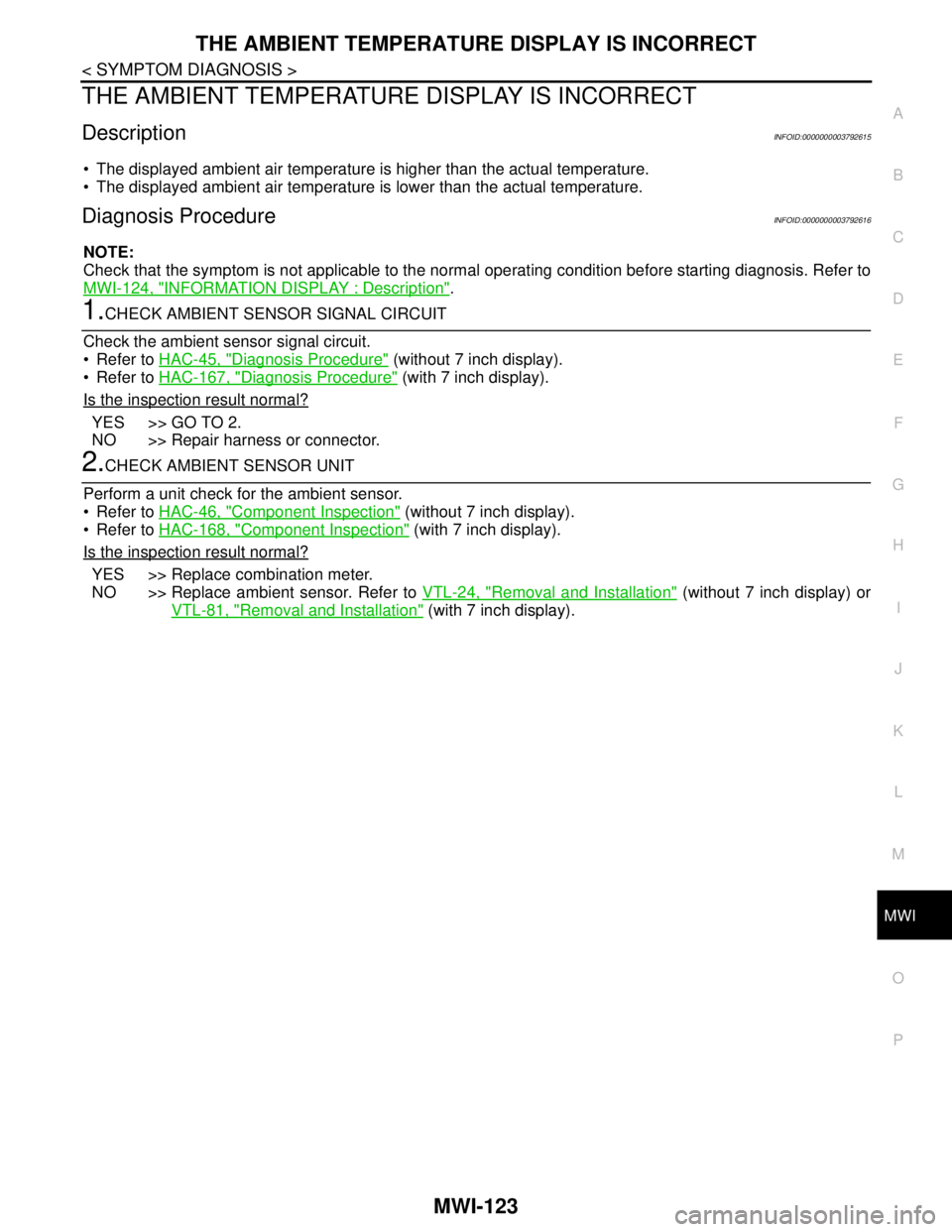
1.CHECK AMBIENT SENSOR SIGNAL CIRCUIT
Check the ambient sensor signal circuit.
Refer to HAC-45, "
Diagnosis Procedure" (without 7 inch display).
Refer to HAC-167, "
Diagnosis Procedure" (with 7 inch display).
Is the inspection result normal?
YES >> GO TO 2.
NO >> Repair harness or connector.
2.CHECK AMBIENT SENSOR UNIT
Perform a unit check for the ambient sensor.
Refer to HAC-46, "
Component Inspection" (without 7 inch display).
Refer to HAC-168, "
Component Inspection" (with 7 inch display).
Is the inspection result normal?
YES >> Replace combination meter.
NO >> Replace ambient sensor. Refer to VTL-24, "
Removal and Installation" (without 7 inch display) or
VTL-81, "
Removal and Installation" (with 7 inch display).
Page 3378 of 5121

MWI-124
< SYMPTOM DIAGNOSIS >
NORMAL OPERATING CONDITION
NORMAL OPERATING CONDITION
INFORMATION DISPLAY
INFORMATION DISPLAY : DescriptionINFOID:0000000003792618
AMBIENT AIR TEMPERATURE
The displayed ambient air temperature on the information display may differ from the actual temperature
because it is a corrected value calculated from the ambient sensor signal by the combination meter. Refer to
MWI-27, "
INFORMATION DISPLAY : System Description" for details on the correction process.
POSSIBLE DRIVING DISTANCE
The calculated possible driving distance may differ from the actual distance to empty if the refueling amount is
approximately 15 (3-3/10 Imp gal) or less. This is because the refuel control (moves the fuel gauge needle
quicker than normal judging that the driver is refueling the vehicle) is not performing.
Page 3383 of 5121
PB-2
< ON-VEHICLE MAINTENANCE >
PARKING BRAKE SYSTEM
ON-VEHICLE MAINTENANCE
PARKING BRAKE SYSTEM
Inspection and AdjustmentINFOID:0000000003811312
INSPECTION
Pedal Stroke
1. Operate the parking brake pedal with a force of 196 N (20 kg, 44 lb). Check that the pedal stroke is within
the specified number of notches. (Check it by listening to the clicks of the ratchet.)
2. When brake warning lamp turns ON, check that the pedal stroke is within the specified number of
notches. (Check it by listening to the clicks of the ratchet.)
Inspect Components
• Check each component for installation condition such as looseness.
Check the device assembly for bend, damage and cracks. Replace if necessary.
Check the cables for wear, damage and cracks. Replace if necessary.
Check the parking brake switch, and replace it if necessary. Refer to BRC-41, "
Diagnosis Procedure" (with-
out VDC), BRC-124, "
Component Inspection" (with VDC).
ADJUSTMENT
1. Remove rear tires.
2. Fix the disc rotor using wheel nuts.
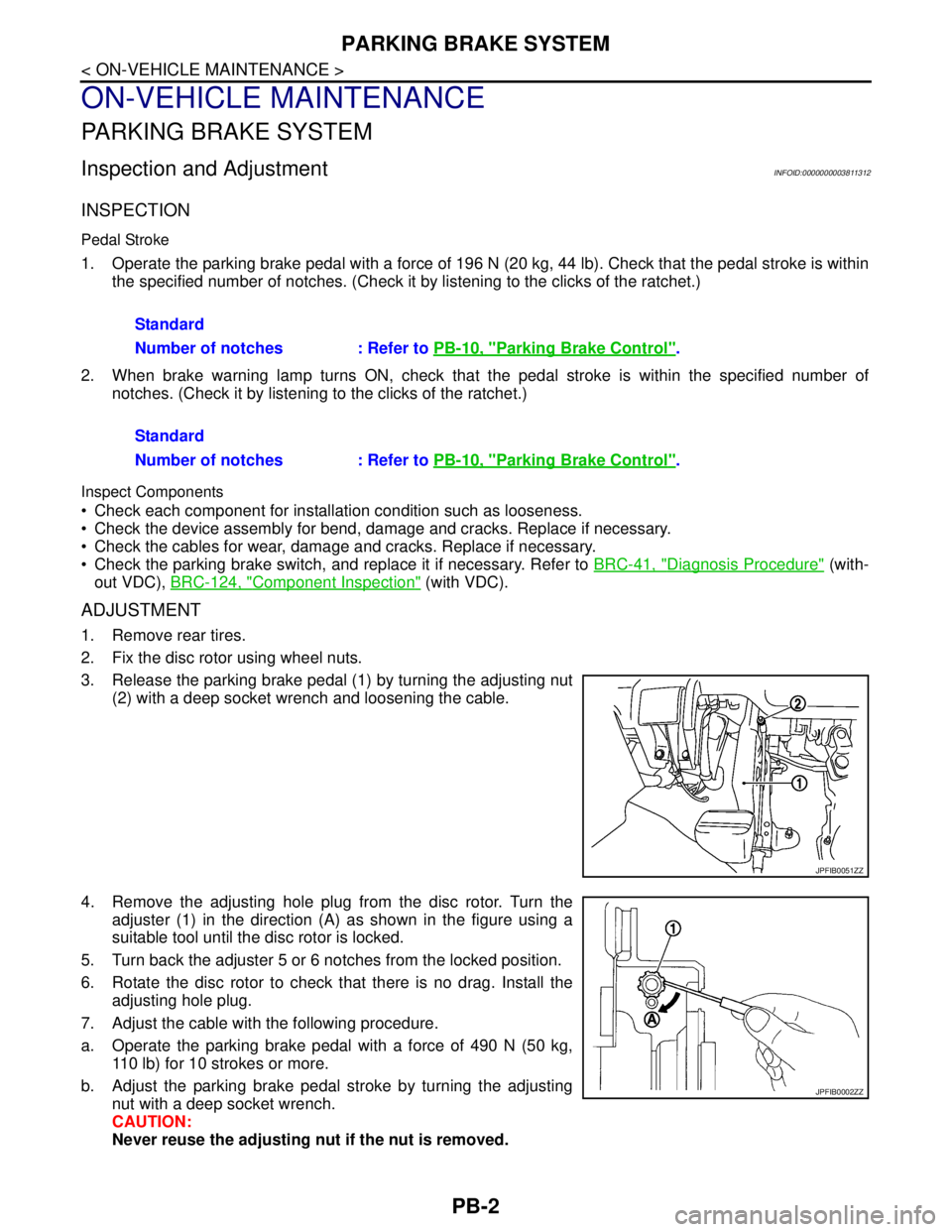
3. Release the parking brake pedal (1) by turning the adjusting nut
(2) with a deep socket wrench and loosening the cable.
4. Remove the adjusting hole plug from the disc rotor. Turn the
adjuster (1) in the direction (A) as shown in the figure using a
suitable tool until the disc rotor is locked.
5. Turn back the adjuster 5 or 6 notches from the locked position.
6. Rotate the disc rotor to check that there is no drag. Install the
adjusting hole plug.
7. Adjust the cable with the following procedure.
a. Operate the parking brake pedal with a force of 490 N (50 kg,
110 lb) for 10 strokes or more.
b. Adjust the parking brake pedal stroke by turning the adjusting
nut with a deep socket wrench.
CAUTION:
Never reuse the adjusting nut if the nut is removed.Standard
Number of notches : Refer to PB-10, "
Parking Brake Control".
Standard
Number of notches : Refer to PB-10, "
Parking Brake Control".
JPFIB0051ZZ
JPFIB0002ZZ
Page 3385 of 5121

PB-4
< ON-VEHICLE MAINTENANCE >
PARKING BRAKE SHOE
PARKING BRAKE SHOE
AdjustmentINFOID:0000000003811313
1. Adjust parking brake pedal stroke. Refer to PB-2, "Inspection and Adjustment".
2. Perform parking brake break-in (drag on) operation by driving vehicle under the following conditions:
Drive forward
Vehicle speed: 40 km/h (25 MPH) set (constant and forward)
Parking brake operating force: 196 N (20 kg, 44 lb)
Distance: 100 m (328 ft)
Number of times: 1
CAUTION:
To prevent lining from getting too hot, allow a cool off period of approximately 5 minutes after
every break-in operation.
3. After the break-in procedure, check parking pedal stroke of parking brake.
CAUTION:
If it is out of the specification, adjust again. Refer to PB-2, "
Inspection and Adjustment".
Page 3396 of 5121
![NISSAN TEANA 2008 Service Manual PCS
RELAY CONTROL SYSTEM
PCS-5
< FUNCTION DIAGNOSIS >[IPDM E/R]
C
D
E
F
G
H
I
J
K
L B A
O
P N
NOTE:
BCM controls the starter relay.Control relay Input/output Transmit unit Control part Reference page](/img/5/57391/w960_57391-3395.png "NISSAN TEANA 2008 Service Manual PCS
RELAY CONTROL SYSTEM
PCS-5
< FUNCTION DIAGNOSIS >[IPDM E/R]
C
D
E
F
G
H
I
J
K
L B A
O
P N
NOTE:
BCM controls the starter relay.Control relay Input/output Transmit unit Control part Reference page")
PCS
RELAY CONTROL SYSTEM
PCS-5
< FUNCTION DIAGNOSIS >[IPDM E/R]
C
D
E
F
G
H
I
J
K
L B A
O
P N
NOTE:
BCM controls the starter relay.Control relay Input/output Transmit unit Control part Reference page
• Headlamp low relay
Headlamp high relay Low beam request signal
High beam request signalBCM (CAN) Headlamp low
Headlamp highEXL-11
(Xenon headlamp)
EXL-200
(Halogen headlamp)
Front fog lamp relay Front fog light request signal BCM (CAN) Front fog lampEXL-17
(Xenon headlamp)
EXL-204
(Halogen headlamp)
Tail lamp relay Position light request signal BCM (CAN) Parking lamp
Side marker lamp
License plate lamp
Tail lampEXL-21
(Xenon headlamp)
EXL-208
(Halogen headlamp)
IlluminationsINL-12
Front wiper relay
Front wiper high relayFront wiper request signal BCM (CAN)
Front wiperWW-5
Front wiper auto stop signal Front wiper motor
Horn relay Theft warning horn request
signal
Horn reminder signalBCM (CAN) Horn (low)
Horn (high)SEC-17
Starter relayNOTE
Starter control relayStarter control relay signal BCM (CAN)
Starter motorSEC-104SEC-102
Steering lock unit condition
signalSteering lock unit
Starter relay control signal TCM
Steering lock relaySteering lock relay signal BCM (CAN)
Steering lock unitSEC-69
Steering lock unit condition
signalSteering lock unit
Control device (Detention
switch) signalControl device (Detention
switch)
A/C relayA/C compressor request sig-
nalECM (CAN)A/C compressor
(magnet clutch)HAC-36
(Without 7-inch dis-
play)
HAC-154
(With 7-inch display)
Cooling fan relay-1
Cooling fan relay-2
Cooling fan relay-3Cooling fan speed request sig-
nalECM (CAN) Cooling fan motor-
1
Cooling fan motor-
2EC-60
Headlamp washer relayHeadlamp washer request
signalBCM (CAN) Headlamp washerWW-10
Ignition relayIgnition switch ON signal BCM (CAN)
Ignition relay PCS-17Vehicle speed signal Combination meter (CAN)
Push-button ignition switch
signalPush-button ignition
switch
Page 3400 of 5121
![NISSAN TEANA 2008 Service Manual PCS
POWER CONSUMPTION CONTROL SYSTEM
PCS-9
< FUNCTION DIAGNOSIS >[IPDM E/R]
C
D
E
F
G
H
I
J
K
L B A
O
P N
POWER CONSUMPTION CONTROL SYSTEM
System DiagramINFOID:0000000003857763
System DescriptionINFOI](/img/5/57391/w960_57391-3399.png "NISSAN TEANA 2008 Service Manual PCS
POWER CONSUMPTION CONTROL SYSTEM
PCS-9
< FUNCTION DIAGNOSIS >[IPDM E/R]
C
D
E
F
G
H
I
J
K
L B A
O
P N
POWER CONSUMPTION CONTROL SYSTEM
System DiagramINFOID:0000000003857763
System DescriptionINFOI")
PCS
POWER CONSUMPTION CONTROL SYSTEM
PCS-9
< FUNCTION DIAGNOSIS >[IPDM E/R]
C
D
E
F
G
H
I
J
K
L B A
O
P N
POWER CONSUMPTION CONTROL SYSTEM
System DiagramINFOID:0000000003857763
System DescriptionINFOID:0000000003773265
OUTLINE
IPDM E/R incorporates a power consumption control function that reduces the power consumption accord-
ing to the vehicle status.
IPDM E/R changes its status (control mode) with the sleep wake up signal received from BCM via CAN com-
munication.
Normal mode (wake-up)- CAN communication is normally performed with other control units.
- Individual unit control by IPDM E/R is normally performed.
Low power consumption mode (sleep)- Low power consumption control is active.
- CAN transmission is stopped.
SLEEP MODE ACTIVATION
IPDM E/R judges that the sleep-ready conditions are fulfilled when the ignition switch is OFF and none of the
conditions below are present. Then it transmits a sleep-ready signal (ready) to BCM via CAN communica-
tion.
- Outputting signals to actuators
- Switches or relays operating
- Output requests are being received from control units via CAN communication.
IPDM E/R stops CAN communication and enters the low power consumption mode when it receives a sleep
wake up signal (sleep) from BCM and the sleep-ready conditions are fulfilled.
WAKE-UP OPERATION
IPDM E/R changes from the low power consumption mode to the normal mode when it receives a sleep
wake-up signal (wake up) from BCM or any of the following conditions is fulfilled. In addition, it transmits a
sleep-ready signal (not-ready) to BCM via CAN communication to report the CAN communication start.
- Ignition switch ON
- An output request is received from a control unit via CAN communication.
JPMIA1046GB
Page 3407 of 5121
![NISSAN TEANA 2008 Service Manual PCS-16
< COMPONENT DIAGNOSIS >[IPDM E/R]
U1000 CAN COMM CIRCUIT
COMPONENT DIAGNOSIS
U1000 CAN COMM CIRCUIT
DescriptionINFOID:0000000003773269
CAN (Controller Area Network) is a serial communication li](/img/5/57391/w960_57391-3406.png "NISSAN TEANA 2008 Service Manual PCS-16
< COMPONENT DIAGNOSIS >[IPDM E/R]
U1000 CAN COMM CIRCUIT
COMPONENT DIAGNOSIS
U1000 CAN COMM CIRCUIT
DescriptionINFOID:0000000003773269
CAN (Controller Area Network) is a serial communication li")
PCS-16
< COMPONENT DIAGNOSIS >[IPDM E/R]
U1000 CAN COMM CIRCUIT
COMPONENT DIAGNOSIS
U1000 CAN COMM CIRCUIT
DescriptionINFOID:0000000003773269
CAN (Controller Area Network) is a serial communication line for real time applications. It is an on-vehicle mul-
tiplex communication line with high data communication speed and excellent error detection ability. Modern
vehicle is equipped with many electronic control unit, and each control unit shares information and links with
other control units during operation (not independent). In CAN communication, control units are connected
with 2 communication lines (CAN-H line, CAN-L line) allowing a high rate of information transmission with less
wiring. Each control unit transmits/receives data but selectively reads required data only.
CAN Communication Signal Chart. Refer to LAN-22, "
CAN Communication Signal Chart".
DTC LogicINFOID:0000000003773270
DTC DETECTION LOGIC
Diagnosis ProcedureINFOID:0000000003773271
1.PERFORM SELF DIAGNOSTIC
1. Turn ignition switch ON and wait for 2 seconds or more.
2. Check “Self Diagnostic Result” of IPDM E/R.
Is
“CAN COMM CIRCUIT” displayed?
YES >> Refer to LAN-14, "Trouble Diagnosis Flow Chart".
NO >> Refer to GI-35, "
Intermittent Incident".
DTCCONSULT-III display
descriptionDTC Detection Condition Possible cause
U1000 CAN COMM CIRCUITWhen IPDM E/R cannot communicate CAN
communication signal continuously for 2
seconds or moreCAN communication system