Ioni NISSAN TEANA 2008 Service Manual
[x] Cancel search | Manufacturer: NISSAN, Model Year: 2008, Model line: TEANA, Model: NISSAN TEANA 2008Pages: 5121, PDF Size: 69.03 MB
Page 5027 of 5121

DIAGNOSIS SYSTEM (IPDM E/R)
WW-15
< FUNCTION DIAGNOSIS >
C
D
E
F
G
H
I
J
K
MA
B
WW
N
O
P
DIAGNOSIS SYSTEM (IPDM E/R)
Diagnosis DescriptionINFOID:0000000003941292
AUTO ACTIVE TEST
Description
In auto active test mode, the IPDM E/R sends a drive signal to the following systems to check their operation.
Oil pressure warning lamp
Front wiper (LO, HI)
Parking lamps
License plate lamps
Tail lamps
Front fog lamps
Headlamps (LO, HI)
A/C compressor (magnet clutch)
Cooling fan
Operation Procedure
1. Close the hood and lift the wiper arms from the windshield. (Prevent windshield damage due to wiper
operation)
NOTE:
When auto active test is performed with hood opened, sprinkle water on windshield beforehand.
2. Turn ignition switch OFF.
3. Turn the ignition switch ON, and within 20 seconds, press the driver door switch 10 times. Then turn the
ignition switch OFF.
CAUTION:
Close passenger door.
4. Turn the ignition switch ON within 10 seconds. After that the horn sounds once and the auto active test
starts.
5. The oil pressure warning lamp starts blinking when the auto active test starts.
6. After a series of the following operations is repeated 3 times, auto active test is completed.
NOTE:
When auto active test mode has to be cancelled halfway through test, turn ignition switch OFF.
CAUTION:
• If auto active test mode cannot be actuated, check door switch system. Refer to DLK-57,
"ComponentFunctionCheck".
Do not start the engine.
Inspection in Auto Active Test Mode
When auto active test mode is actuated, the following 5 steps are repeated 3 times.
Operation
sequenceInspection location Operation
A Oil pressure warning lamp Blinks continuously during operation of auto active test
1 Front wiper LO for 5 seconds → HI for 5 seconds
2Parking lamps
License plate lamps
Tail lamps
Front fog lamps10 seconds
3 Headlamps LO ⇔ HI 5 times
4 A/C compressor (magnet clutch) ON ⇔ OFF 5 times
5 Cooling fan LO for 5 seconds → MID for 3 seconds → HI for 2 seconds
Page 5032 of 5121

WW-20
< COMPONENT DIAGNOSIS >
WIPER AND WASHER FUSE, FUSIBLE LINK
COMPONENT DIAGNOSIS
WIPER AND WASHER FUSE, FUSIBLE LINK
DescriptionINFOID:0000000003761584
Fuse, fusible link list
Diagnosis ProcedureINFOID:0000000003761585
1.CHECK FUSES
Check that the following fuses and fusible link are not fusing.
Is the fuse fusing?
YES >> Replace the fuse or fusible link with a new one after repairing the applicable circuit.
NO >> The fuse is normal.
Unit Location No. Capacity
Front wiper motor IPDM E/R 60 30 A
Washer pump IPDM E/R 47 10 A
Headlamp washer pump Fuse and fusible link block J 40 A
Unit Location No. Capacity
Front wiper motor IPDM E/R 60 30 A
Washer pump IPDM E/R 47 10 A
Headlamp washer pump Fuse and fusible link block J 40 A
Page 5042 of 5121
WW-30
< COMPONENT DIAGNOSIS >
WASHER SWITCH
WASHER SWITCH
DescriptionINFOID:0000000003761593
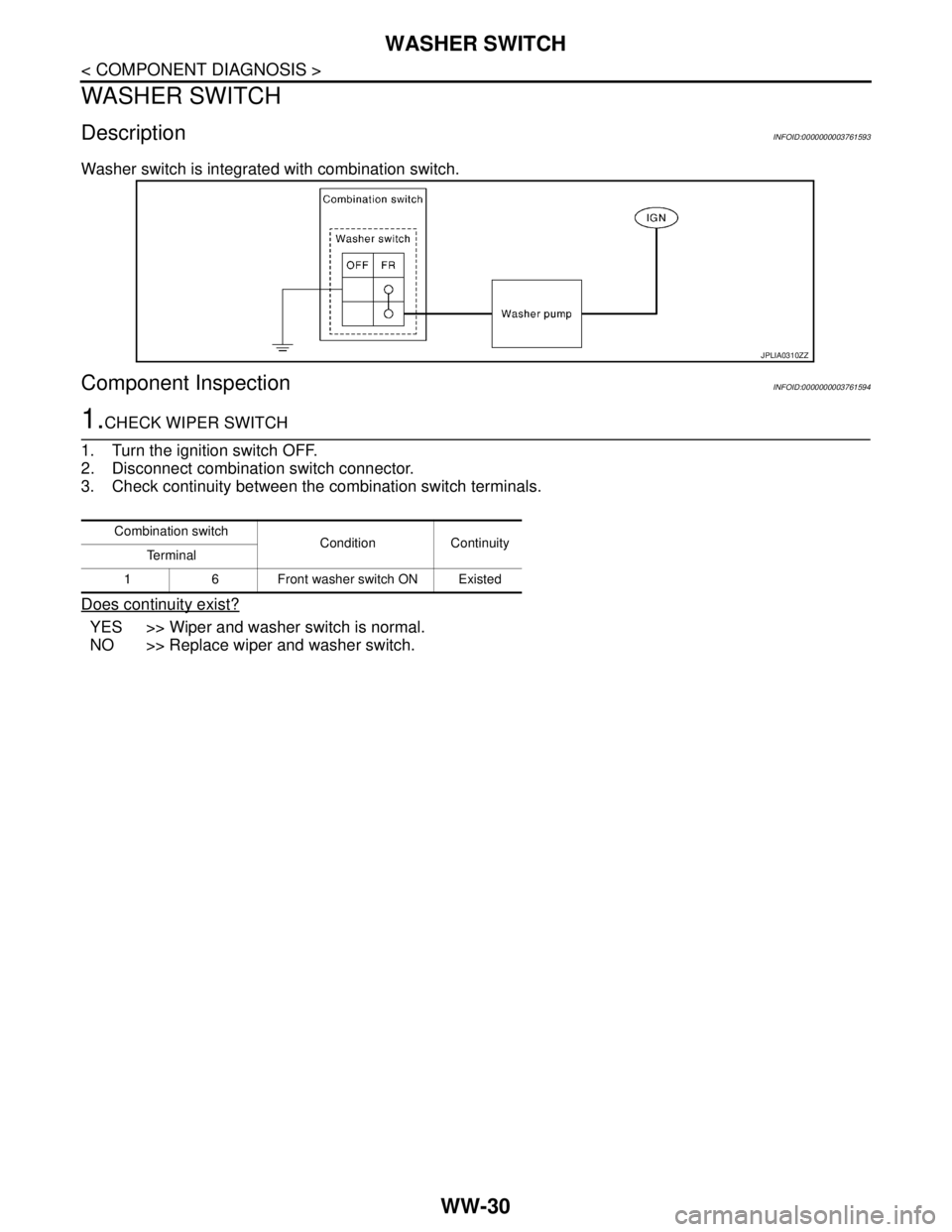
Washer switch is integrated with combination switch.
Component InspectionINFOID:0000000003761594
1.CHECK WIPER SWITCH
1. Turn the ignition switch OFF.
2. Disconnect combination switch connector.
3. Check continuity between the combination switch terminals.
Does continuity exist?
YES >> Wiper and washer switch is normal.
NO >> Replace wiper and washer switch.
JPLIA0310ZZ
Combination switch
Condition Continuity
Te r m i n a l
1 6 Front washer switch ON Existed
Page 5043 of 5121

HEADLAMP WASHER RELAY
WW-31
< COMPONENT DIAGNOSIS >
C
D
E
F
G
H
I
J
K
MA
B
WW
N
O
P
HEADLAMP WASHER RELAY
Component InspectionINFOID:0000000003761595
1.CHECK HEADLAMP WASHER RELAY
1. Turn the ignition switch OFF.
2. Remove headlamp washer relay.
3. Apply battery voltage to headlamp washer relay between terminals 1 and 2.
4. Check continuity of headlamp washer relay.
Does continuity exist?
YES >> Headlamp washer relay is normal.
NO >> Replace headlamp washer relay.
Headlamp washer relay Condition
Continuity
Terminal Voltage
35Apply Existed
Not Apply Not existed
Page 5066 of 5121
WW-54
< ECU DIAGNOSIS >
BCM (BODY CONTROL MODULE)
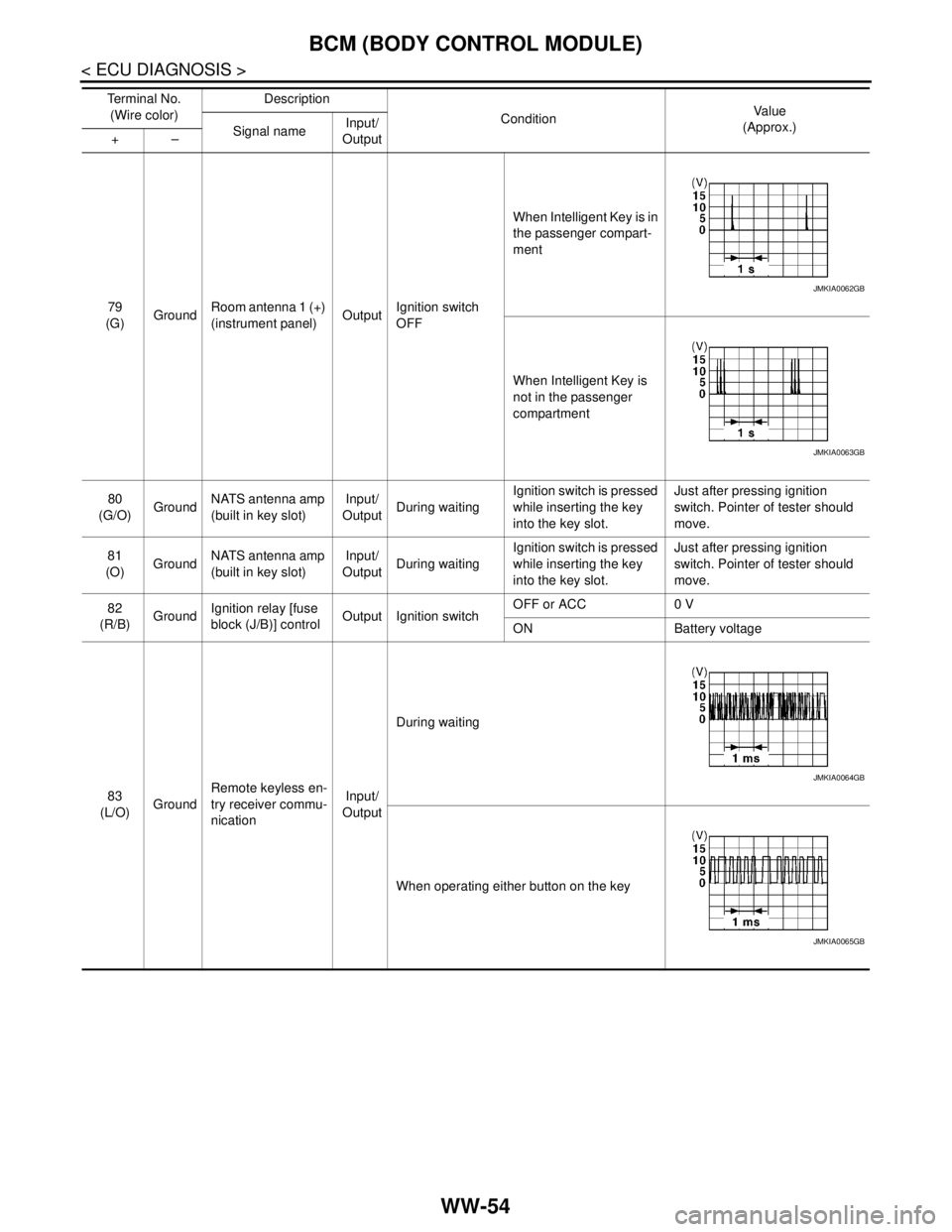
79
(G)GroundRoom antenna 1 (+)
(instrument panel)OutputIgnition switch
OFFWhen Intelligent Key is in
the passenger compart-
ment
When Intelligent Key is
not in the passenger
compartment
80
(G/O)GroundNATS antenna amp
(built in key slot)Input/
OutputDuring waitingIgnition switch is pressed
while inserting the key
into the key slot.Just after pressing ignition
switch. Pointer of tester should
move.
81
(O)GroundNATS antenna amp
(built in key slot)Input/
OutputDuring waitingIgnition switch is pressed
while inserting the key
into the key slot.Just after pressing ignition
switch. Pointer of tester should
move.
82
(R/B)GroundIgnition relay [fuse
block (J/B)] controlOutput Ignition switchOFF or ACC 0 V
ON Battery voltage
83
(L/O)GroundRemote keyless en-
try receiver commu-
nicationInput/
OutputDuring waiting
When operating either button on the key Te r m i n a l N o .
(Wire color)Description
ConditionVa l u e
(Approx.)
Signal nameInput/
Output +–
JMKIA0062GB
JMKIA0063GB
JMKIA0064GB
JMKIA0065GB
Page 5073 of 5121
BCM (BODY CONTROL MODULE)
WW-61
< ECU DIAGNOSIS >
C
D
E
F
G
H
I
J
K
MA
B
WW
N
O
P
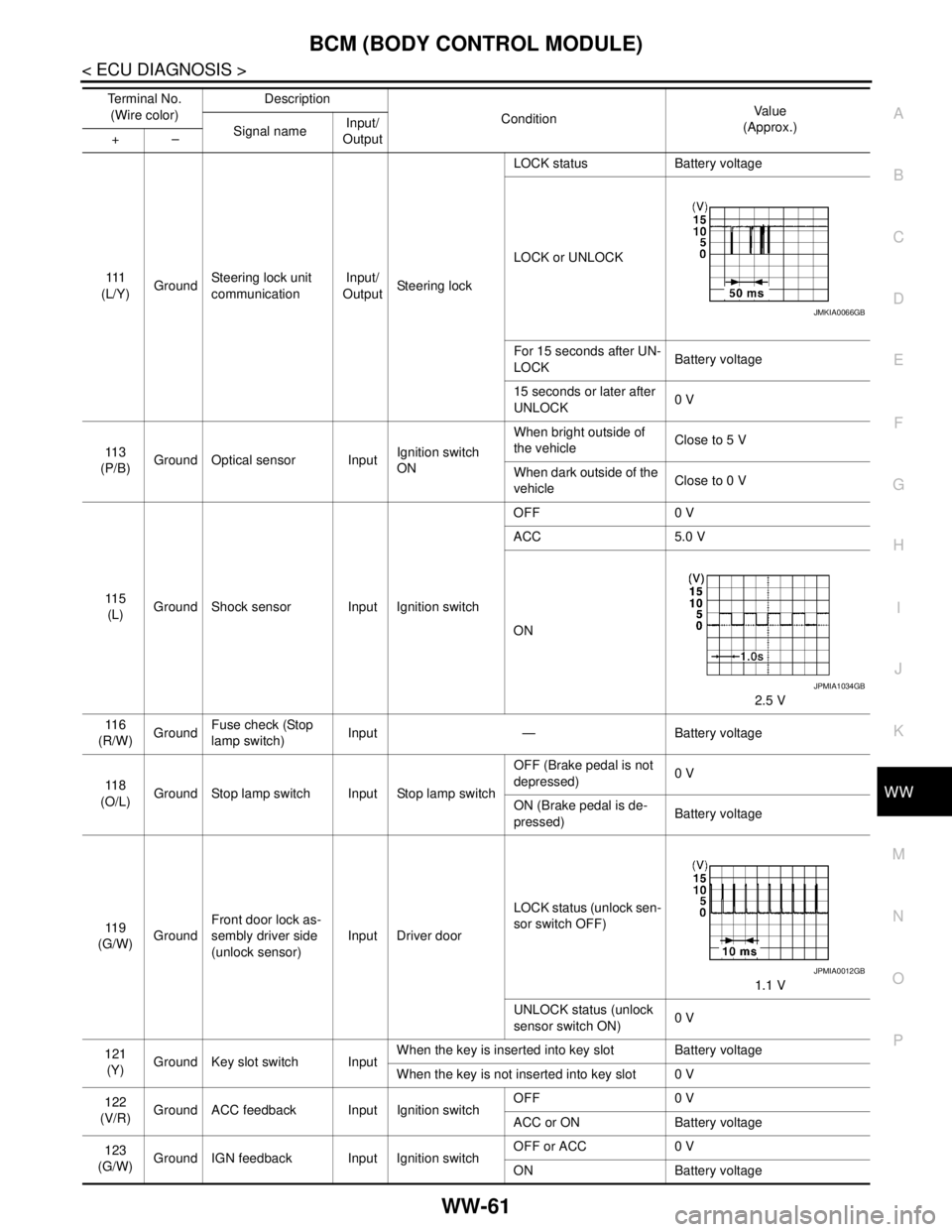
111
(L/Y)GroundSteering lock unit
communicationInput/
OutputSteering lockLOCK status Battery voltage
LOCK or UNLOCK
For 15 seconds after UN-
LOCKBattery voltage
15 seconds or later after
UNLOCK0 V
11 3
(P/B)Ground Optical sensor InputIgnition switch
ONWhen bright outside of
the vehicleClose to 5 V
When dark outside of the
vehicleClose to 0 V
11 5
(L)Ground Shock sensor Input Ignition switchOFF 0 V
ACC 5.0 V
ON
2.5 V
11 6
(R/W)GroundFuse check (Stop
lamp switch)Input — Battery voltage
11 8
(O/L)Ground Stop lamp switch Input Stop lamp switchOFF (Brake pedal is not
depressed)0 V
ON (Brake pedal is de-
pressed)Battery voltage
11 9
(G/W)GroundFront door lock as-
sembly driver side
(unlock sensor)Input Driver doorLOCK status (unlock sen-
sor switch OFF)
1.1 V
UNLOCK status (unlock
sensor switch ON)0 V
121
(Y)Ground Key slot switch InputWhen the key is inserted into key slot Battery voltage
When the key is not inserted into key slot 0 V
122
(V/R)Ground ACC feedback Input Ignition switchOFF 0 V
ACC or ON Battery voltage
123
(G/W)Ground IGN feedback Input Ignition switchOFF or ACC 0 V
ON Battery voltage Te r m i n a l N o .
(Wire color)Description
ConditionVa l u e
(Approx.)
Signal nameInput/
Output +–
JMKIA0066GB
JPMIA1034GB
JPMIA0012GB
Page 5074 of 5121
WW-62
< ECU DIAGNOSIS >
BCM (BODY CONTROL MODULE)
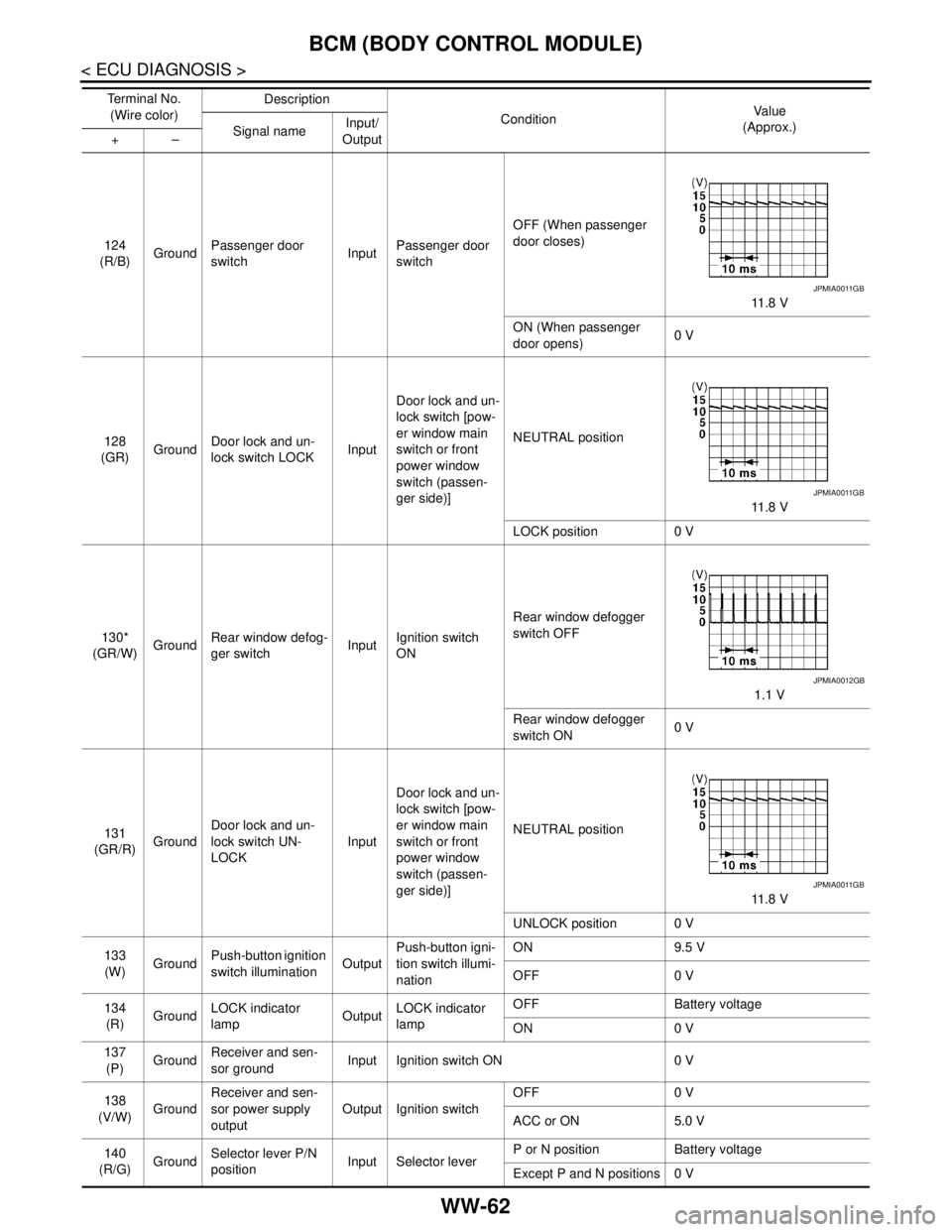
124
(R/B)GroundPassenger door
switchInputPassenger door
switchOFF (When passenger
door closes)
11 . 8 V
ON (When passenger
door opens)0 V
128
(GR)GroundDoor lock and un-
lock switch LOCKInputDoor lock and un-
lock switch [pow-
er window main
switch or front
power window
switch (passen-
ger side)]NEUTRAL position
11 . 8 V
LOCK position 0 V
130*
(GR/W)GroundRear window defog-
ger switchInputIgnition switch
ONRear window defogger
switch OFF
1.1 V
Rear window defogger
switch ON0 V
131
(GR/R)GroundDoor lock and un-
lock switch UN-
LOCKInputDoor lock and un-
lock switch [pow-
er window main
switch or front
power window
switch (passen-
ger side)]NEUTRAL position
11 . 8 V
UNLOCK position 0 V
133
(W)GroundPush-button ignition
switch illuminationOutputPush-button igni-
tion switch illumi-
nationON 9.5 V
OFF 0 V
134
(R)GroundLOCK indicator
lampOutputLOCK indicator
lampOFF Battery voltage
ON 0 V
137
(P)GroundReceiver and sen-
sor groundInput Ignition switch ON 0 V
138
(V/W)GroundReceiver and sen-
sor power supply
outputOutput Ignition switchOFF 0 V
ACC or ON 5.0 V
140
(R/G)GroundSelector lever P/N
positionInput Selector leverP or N position Battery voltage
Except P and N positions 0 V Te r m i n a l N o .
(Wire color)Description
ConditionVa l u e
(Approx.)
Signal nameInput/
Output +–
JPMIA0011GB
JPMIA0011GB
JPMIA0012GB
JPMIA0011GB
Page 5104 of 5121

WW-92
< SYMPTOM DIAGNOSIS >
NORMAL OPERATING CONDITION
NORMAL OPERATING CONDITION
DescriptionINFOID:0000000003761617
FRONT WIPER MOTOR PROTECTION FUNCTION
IPDM E/R may stop the front wiper to protect the front wiper motor if any obstruction (operation resistance)
such as a large amount of snow is detected during the front wiper operation.
At that time turn OFF the front wiper and remove the foreign object. Then wait for approximately 20 seconds
or more and reactivate the front wiper. The wiper will operate normally.
Page 5105 of 5121
FRONT WIPER DOES NOT OPERATE
WW-93
< SYMPTOM DIAGNOSIS >
C
D
E
F
G
H
I
J
K
MA
B
WW
N
O
P
FRONT WIPER DOES NOT OPERATE
DescriptionINFOID:0000000003761613
The front wiper does not operate under any operating conditions.
Diagnosis ProcedureINFOID:0000000003761614
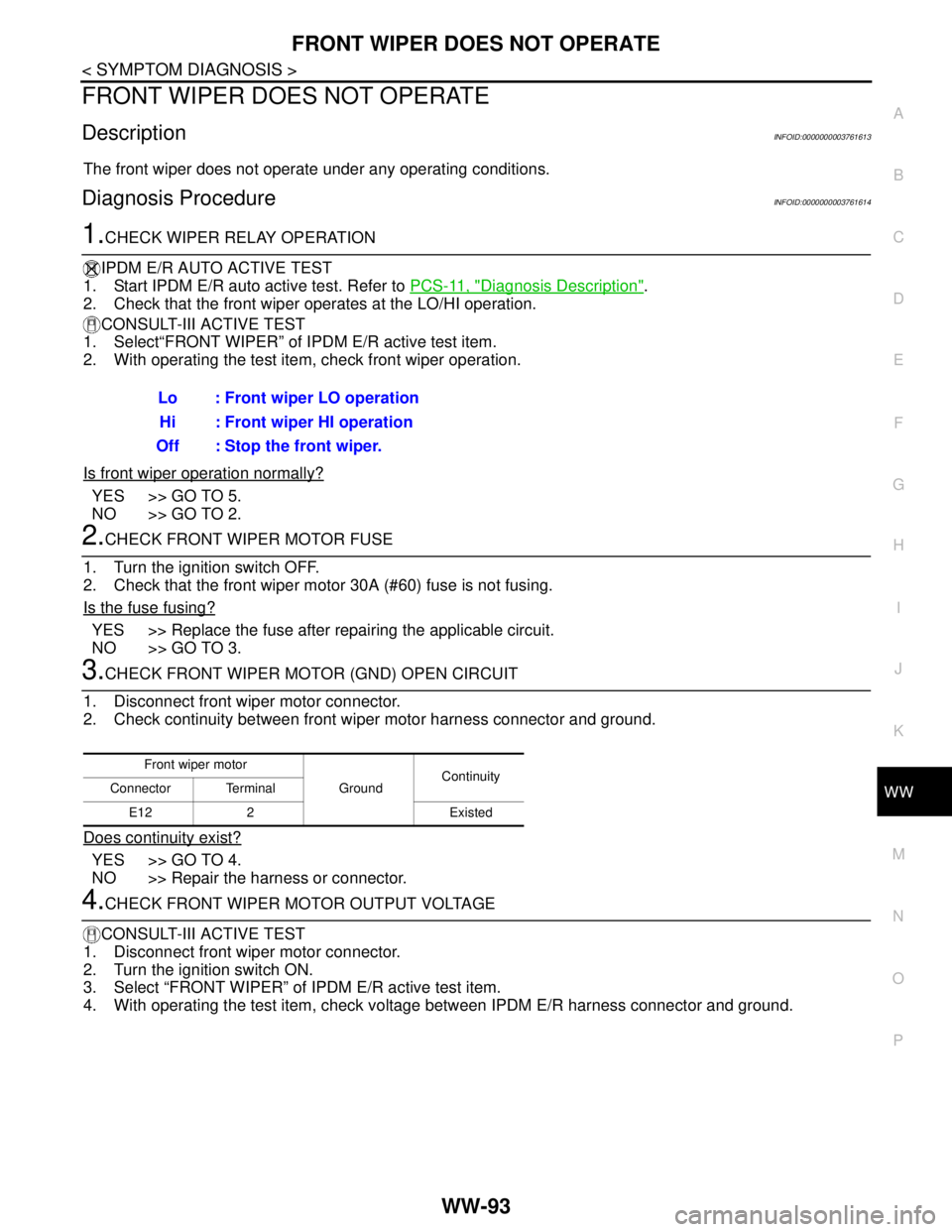
1.CHECK WIPER RELAY OPERATION
IPDM E/R AUTO ACTIVE TEST
1. Start IPDM E/R auto active test. Refer to PCS-11, "
Diagnosis Description".
2. Check that the front wiper operates at the LO/HI operation.
CONSULT-III ACTIVE TEST
1. Select“FRONT WIPER” of IPDM E/R active test item.
2. With operating the test item, check front wiper operation.
Is front wiper operation normally?
YES >> GO TO 5.
NO >> GO TO 2.
2.CHECK FRONT WIPER MOTOR FUSE
1. Turn the ignition switch OFF.
2. Check that the front wiper motor 30A (#60) fuse is not fusing.
Is the fuse fusing?
YES >> Replace the fuse after repairing the applicable circuit.
NO >> GO TO 3.
3.CHECK FRONT WIPER MOTOR (GND) OPEN CIRCUIT
1. Disconnect front wiper motor connector.
2. Check continuity between front wiper motor harness connector and ground.
Does continuity exist?
YES >> GO TO 4.
NO >> Repair the harness or connector.
4.CHECK FRONT WIPER MOTOR OUTPUT VOLTAGE
CONSULT-III ACTIVE TEST
1. Disconnect front wiper motor connector.
2. Turn the ignition switch ON.
3. Select “FRONT WIPER” of IPDM E/R active test item.
4. With operating the test item, check voltage between IPDM E/R harness connector and ground. Lo : Front wiper LO operation
Hi : Front wiper HI operation
Off : Stop the front wiper.
Front wiper motor
GroundContinuity
Connector Terminal
E12 2 Existed
Page 5107 of 5121
HEADLAMP WASHER DOES NOT OPERATE
WW-95
< SYMPTOM DIAGNOSIS >
C
D
E
F
G
H
I
J
K
MA
B
WW
N
O
P
HEADLAMP WASHER DOES NOT OPERATE
DescriptionINFOID:0000000003774630
Headlamp washer does not operate linked to front washer operation.
Diagnosis ProcedureINFOID:0000000003774631
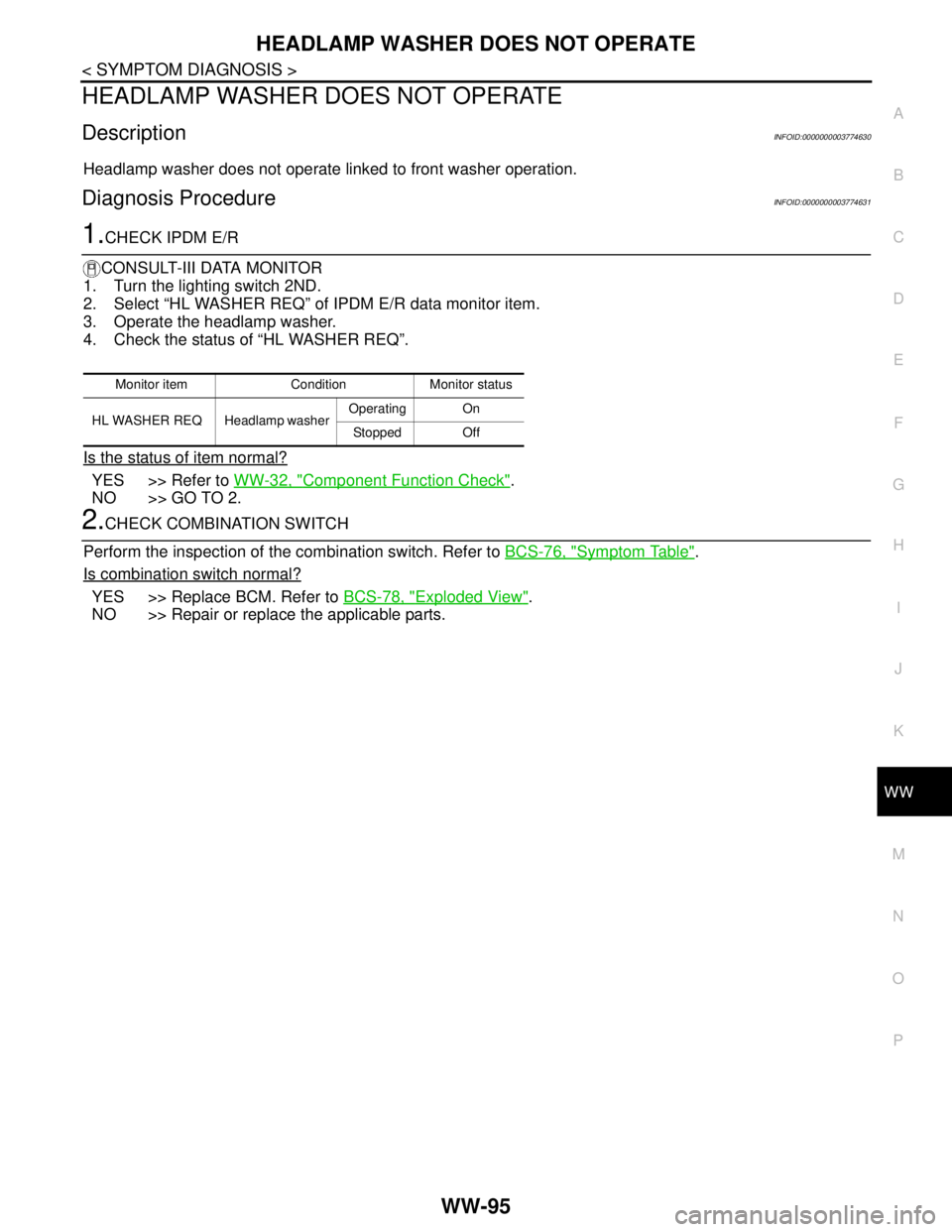
1.CHECK IPDM E/R
CONSULT-III DATA MONITOR
1. Turn the lighting switch 2ND.
2. Select “HL WASHER REQ” of IPDM E/R data monitor item.
3. Operate the headlamp washer.
4. Check the status of “HL WASHER REQ”.
Is the status of item normal?
YES >> Refer to WW-32, "Component Function Check".
NO >> GO TO 2.
2.CHECK COMBINATION SWITCH
Perform the inspection of the combination switch. Refer to BCS-76, "
Symptom Table".
Is combination switch normal?
YES >> Replace BCM. Refer to BCS-78, "Exploded View".
NO >> Repair or replace the applicable parts.
Monitor item Condition Monitor status
HL WASHER REQ Headlamp washer Operating On
Stopped Off