battery NISSAN TEANA 2008 User Guide
[x] Cancel search | Manufacturer: NISSAN, Model Year: 2008, Model line: TEANA, Model: NISSAN TEANA 2008Pages: 5121, PDF Size: 69.03 MB
Page 66 of 5121
ADP-60
< COMPONENT DIAGNOSIS >
SLIDING SENSOR
SLIDING SENSOR
DescriptionINFOID:0000000003759161
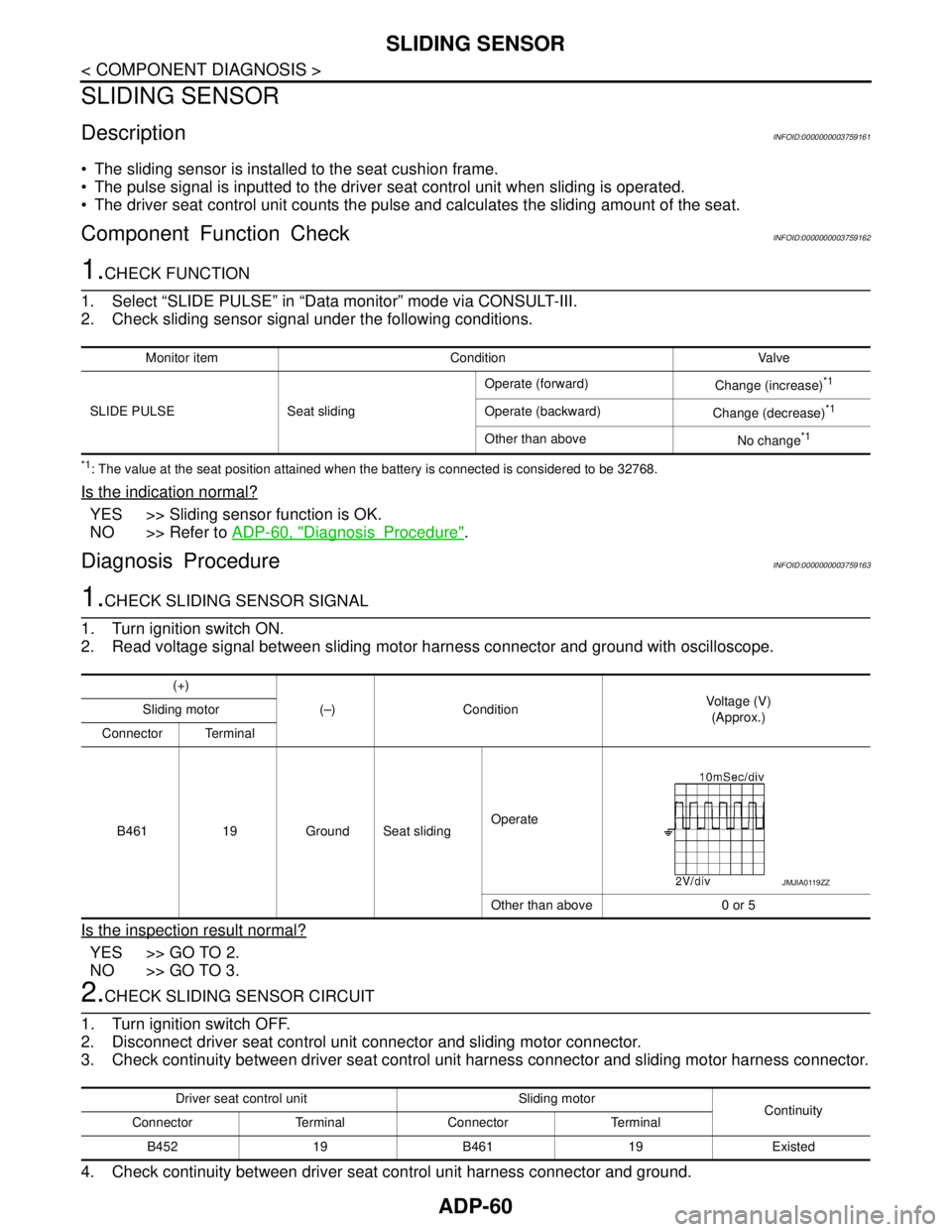
The sliding sensor is installed to the seat cushion frame.
The pulse signal is inputted to the driver seat control unit when sliding is operated.
The driver seat control unit counts the pulse and calculates the sliding amount of the seat.
Component Function CheckINFOID:0000000003759162
1.CHECK FUNCTION
1. Select “SLIDE PULSE” in “Data monitor” mode via CONSULT-III.
2. Check sliding sensor signal under the following conditions.
*1: The value at the seat position attained when the battery is connected is considered to be 32768.
Is the indication normal?
YES >> Sliding sensor function is OK.
NO >> Refer to ADP-60, "
DiagnosisProcedure".
Diagnosis ProcedureINFOID:0000000003759163
1.CHECK SLIDING SENSOR SIGNAL
1. Turn ignition switch ON.
2. Read voltage signal between sliding motor harness connector and ground with oscilloscope.
Is the inspection result normal?
YES >> GO TO 2.
NO >> GO TO 3.
2.CHECK SLIDING SENSOR CIRCUIT
1. Turn ignition switch OFF.
2. Disconnect driver seat control unit connector and sliding motor connector.
3. Check continuity between driver seat control unit harness connector and sliding motor harness connector.
4. Check continuity between driver seat control unit harness connector and ground.
Monitor item Condition Valve
SLIDE PULSE Seat slidingOperate (forward)
Change (increase)
*1
Operate (backward)
Change (decrease)*1
Other than above
No change*1
(+)
(–) ConditionVoltage (V)
(Approx.) Sliding motor
Connector Terminal
B461 19 Ground Seat slidingOperate
Other than above 0 or 5
JMJIA0119ZZ
Driver seat control unit Sliding motor
Continuity
Connector Terminal Connector Terminal
B452 19 B461 19 Existed
Page 67 of 5121
SLIDING SENSOR
ADP-61
< COMPONENT DIAGNOSIS >
C
D
E
F
G
H
I
K
L
MA
B
ADP
N
O
P
Is the inspection result normal?
YES >> Replace driver seat control unit. Refer to ADP-136, "Removal and Installation".
NO >> Repair or replace harness.
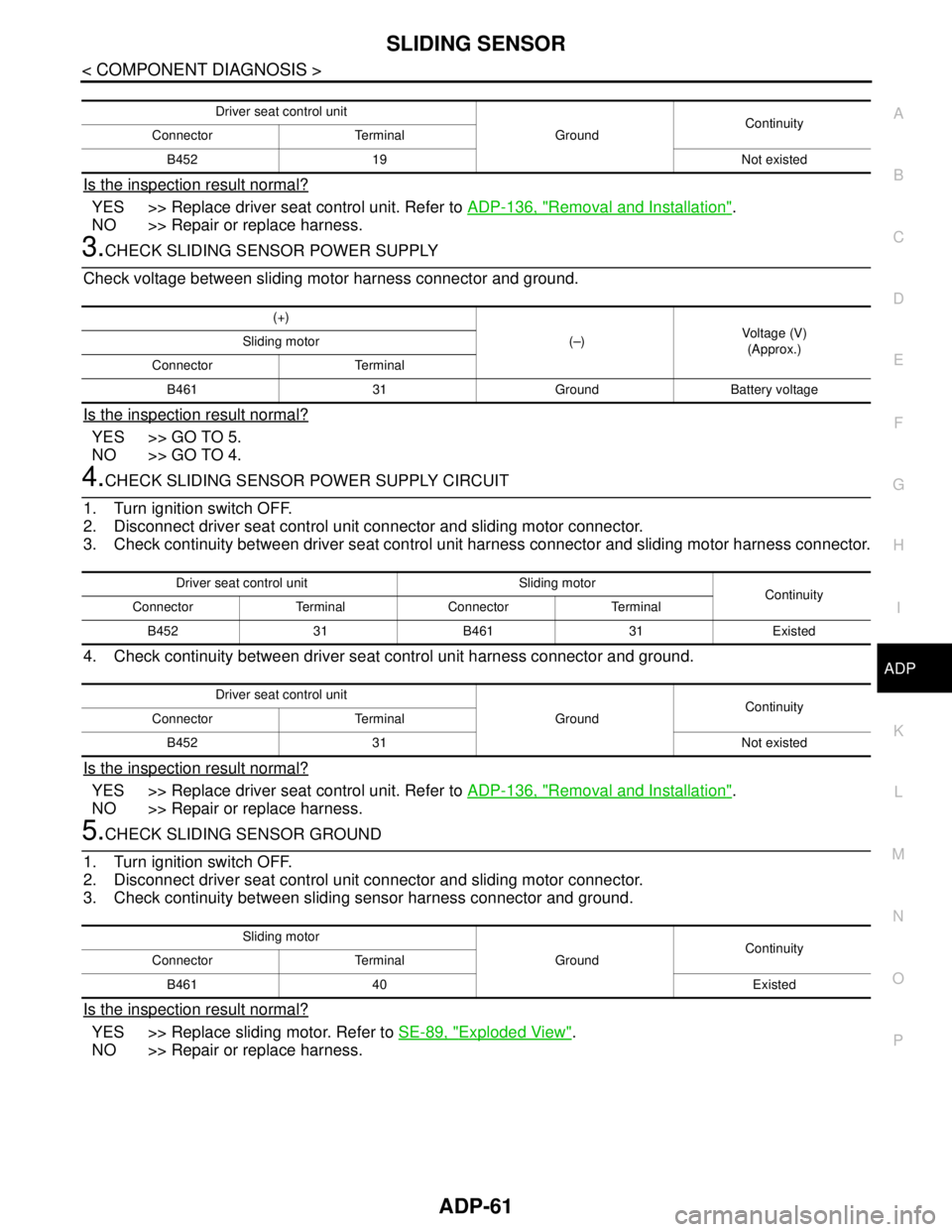
3.CHECK SLIDING SENSOR POWER SUPPLY
Check voltage between sliding motor harness connector and ground.
Is the inspection result normal?
YES >> GO TO 5.
NO >> GO TO 4.
4.CHECK SLIDING SENSOR POWER SUPPLY CIRCUIT
1. Turn ignition switch OFF.
2. Disconnect driver seat control unit connector and sliding motor connector.
3. Check continuity between driver seat control unit harness connector and sliding motor harness connector.
4. Check continuity between driver seat control unit harness connector and ground.
Is the inspection result normal?
YES >> Replace driver seat control unit. Refer to ADP-136, "Removal and Installation".
NO >> Repair or replace harness.
5.CHECK SLIDING SENSOR GROUND
1. Turn ignition switch OFF.
2. Disconnect driver seat control unit connector and sliding motor connector.
3. Check continuity between sliding sensor harness connector and ground.
Is the inspection result normal?
YES >> Replace sliding motor. Refer to SE-89, "Exploded View".
NO >> Repair or replace harness.
Driver seat control unit
GroundContinuity
Connector Terminal
B452 19 Not existed
(+)
(–)Voltage (V)
(Approx.) Sliding motor
Connector Terminal
B461 31 Ground Battery voltage
Driver seat control unit Sliding motor
Continuity
Connector Terminal Connector Terminal
B452 31 B461 31 Existed
Driver seat control unit
GroundContinuity
Connector Terminal
B452 31 Not existed
Sliding motor
GroundContinuity
Connector Terminal
B461 40 Existed
Page 68 of 5121
ADP-62
< COMPONENT DIAGNOSIS >
RECLINING SENSOR
RECLINING SENSOR
DescriptionINFOID:0000000003759164
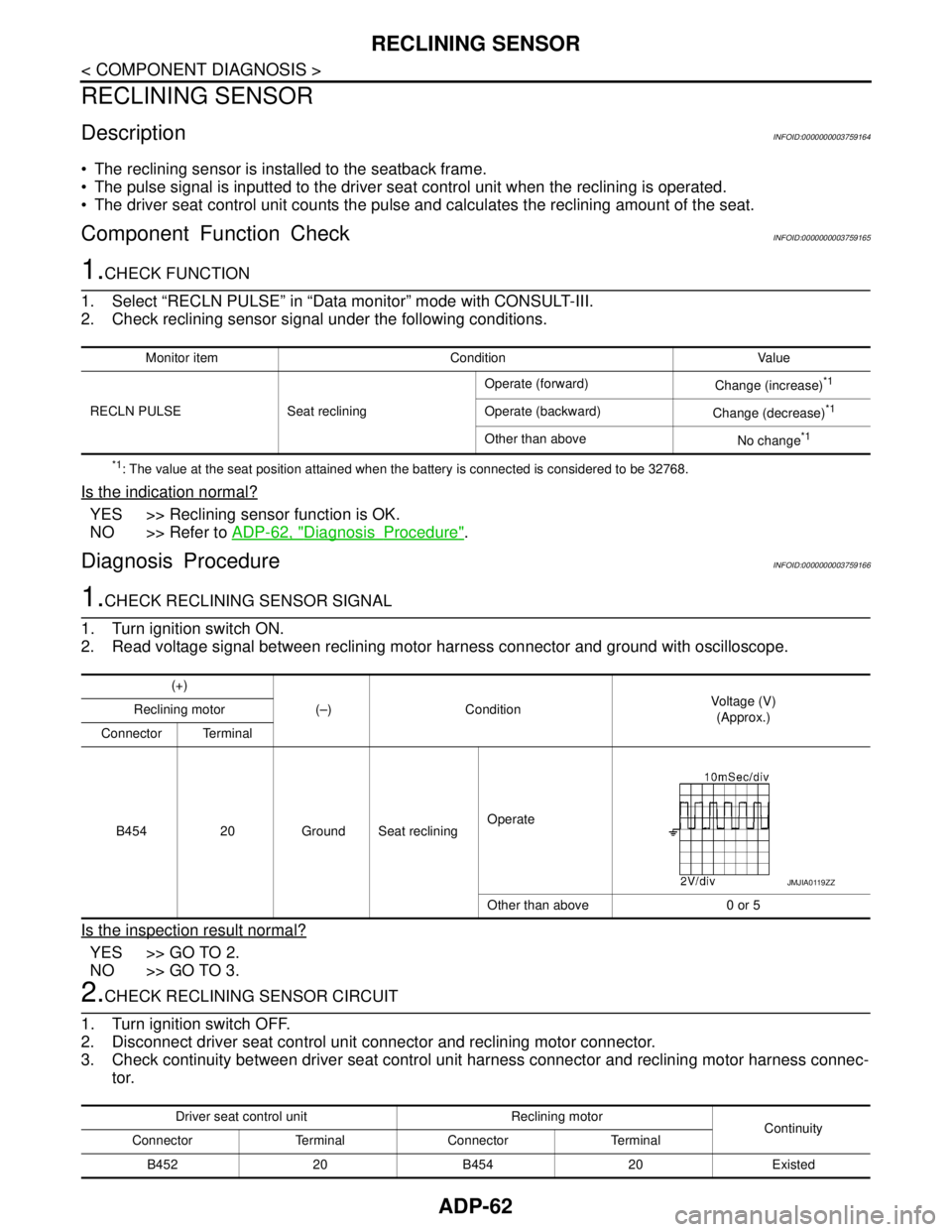
The reclining sensor is installed to the seatback frame.
The pulse signal is inputted to the driver seat control unit when the reclining is operated.
The driver seat control unit counts the pulse and calculates the reclining amount of the seat.
Component Function CheckINFOID:0000000003759165
1.CHECK FUNCTION
1. Select “RECLN PULSE” in “Data monitor” mode with CONSULT-III.
2. Check reclining sensor signal under the following conditions.
*1: The value at the seat position attained when the battery is connected is considered to be 32768.
Is the indication normal?
YES >> Reclining sensor function is OK.
NO >> Refer to ADP-62, "
DiagnosisProcedure".
Diagnosis ProcedureINFOID:0000000003759166
1.CHECK RECLINING SENSOR SIGNAL
1. Turn ignition switch ON.
2. Read voltage signal between reclining motor harness connector and ground with oscilloscope.
Is the inspection result normal?
YES >> GO TO 2.
NO >> GO TO 3.
2.CHECK RECLINING SENSOR CIRCUIT
1. Turn ignition switch OFF.
2. Disconnect driver seat control unit connector and reclining motor connector.
3. Check continuity between driver seat control unit harness connector and reclining motor harness connec-
tor.
Monitor item Condition Value
RECLN PULSE Seat recliningOperate (forward)
Change (increase)
*1
Operate (backward)
Change (decrease)*1
Other than above
No change*1
(+)
(–) ConditionVoltage (V)
(Approx.) Reclining motor
Connector Terminal
B454 20 Ground Seat recliningOperate
Other than above 0 or 5
JMJIA0119ZZ
Driver seat control unit Reclining motor
Continuity
Connector Terminal Connector Terminal
B452 20 B454 20 Existed
Page 69 of 5121
RECLINING SENSOR
ADP-63
< COMPONENT DIAGNOSIS >
C
D
E
F
G
H
I
K
L
MA
B
ADP
N
O
P
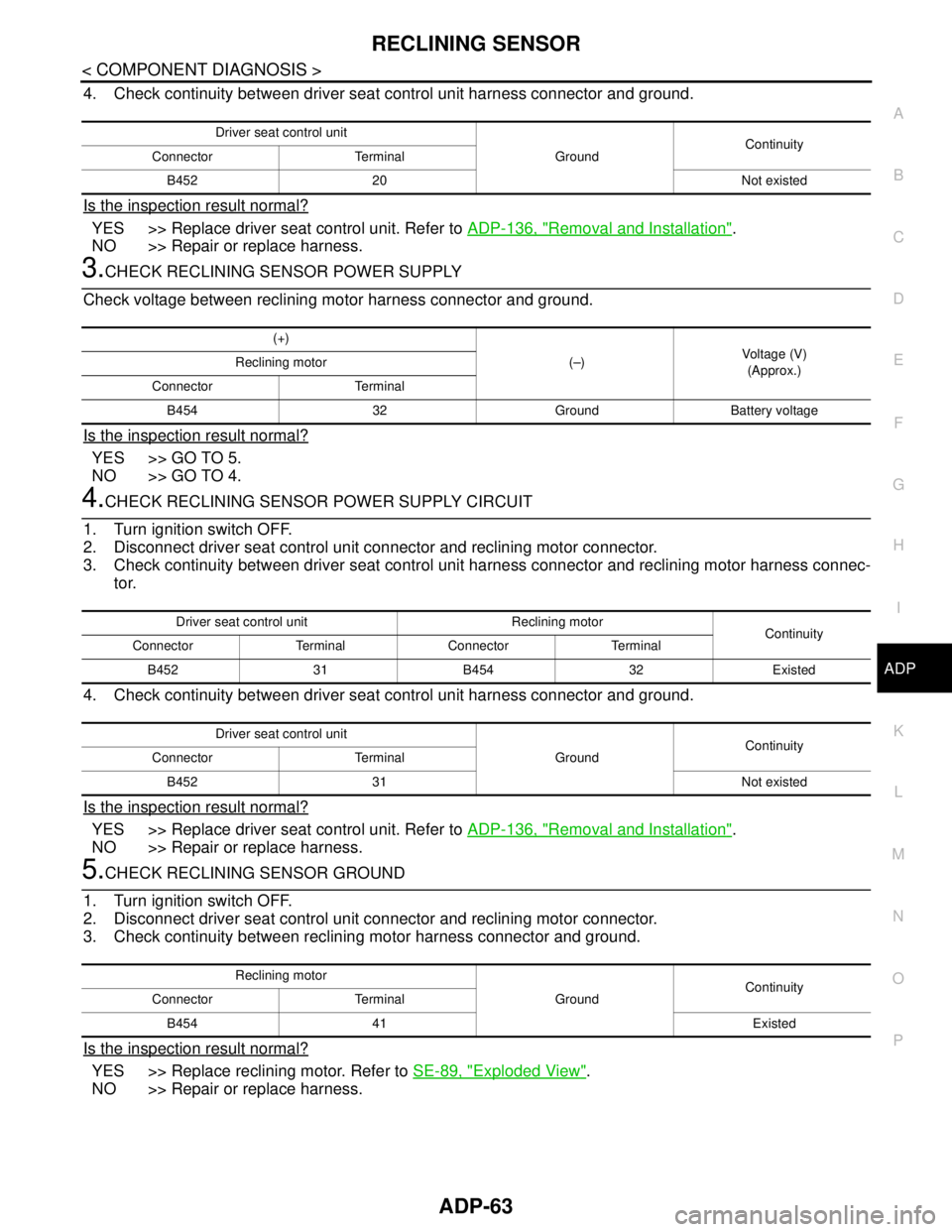
4. Check continuity between driver seat control unit harness connector and ground.
Is the inspection result normal?
YES >> Replace driver seat control unit. Refer to ADP-136, "Removal and Installation".
NO >> Repair or replace harness.
3.CHECK RECLINING SENSOR POWER SUPPLY
Check voltage between reclining motor harness connector and ground.
Is the inspection result normal?
YES >> GO TO 5.
NO >> GO TO 4.
4.CHECK RECLINING SENSOR POWER SUPPLY CIRCUIT
1. Turn ignition switch OFF.
2. Disconnect driver seat control unit connector and reclining motor connector.
3. Check continuity between driver seat control unit harness connector and reclining motor harness connec-
tor.
4. Check continuity between driver seat control unit harness connector and ground.
Is the inspection result normal?
YES >> Replace driver seat control unit. Refer to ADP-136, "Removal and Installation".
NO >> Repair or replace harness.
5.CHECK RECLINING SENSOR GROUND
1. Turn ignition switch OFF.
2. Disconnect driver seat control unit connector and reclining motor connector.
3. Check continuity between reclining motor harness connector and ground.
Is the inspection result normal?
YES >> Replace reclining motor. Refer to SE-89, "Exploded View".
NO >> Repair or replace harness.
Driver seat control unit
GroundContinuity
Connector Terminal
B452 20 Not existed
(+)
(–)Voltage (V)
(Approx.) Reclining motor
Connector Terminal
B454 32 Ground Battery voltage
Driver seat control unit Reclining motor
Continuity
Connector Terminal Connector Terminal
B452 31 B454 32 Existed
Driver seat control unit
GroundContinuity
Connector Terminal
B452 31 Not existed
Reclining motor
GroundContinuity
Connector Terminal
B454 41 Existed
Page 70 of 5121
ADP-64
< COMPONENT DIAGNOSIS >
LIFTING SENSOR (FRONT)
LIFTING SENSOR (FRONT)
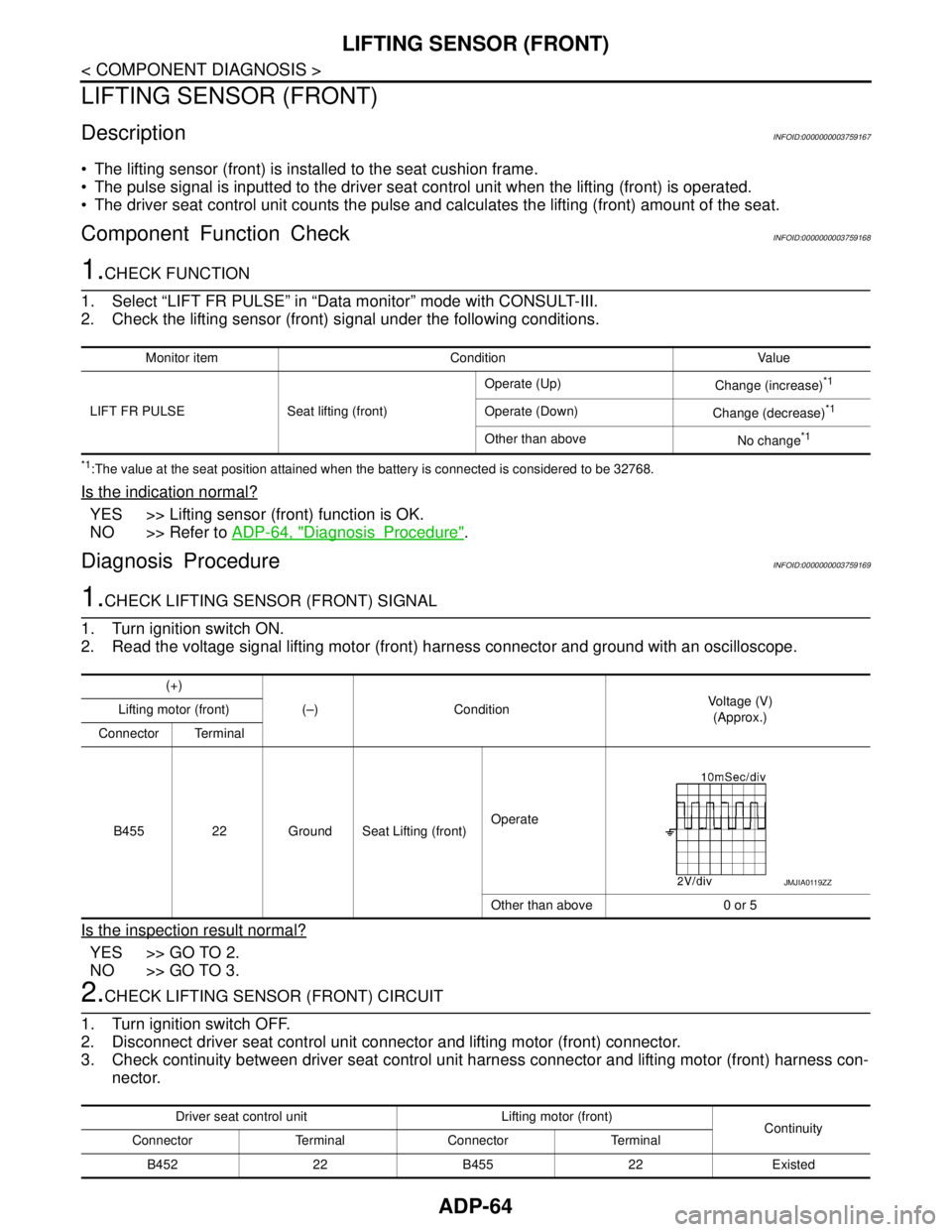
DescriptionINFOID:0000000003759167
The lifting sensor (front) is installed to the seat cushion frame.
The pulse signal is inputted to the driver seat control unit when the lifting (front) is operated.
The driver seat control unit counts the pulse and calculates the lifting (front) amount of the seat.
Component Function CheckINFOID:0000000003759168
1.CHECK FUNCTION
1. Select “LIFT FR PULSE” in “Data monitor” mode with CONSULT-III.
2. Check the lifting sensor (front) signal under the following conditions.
*1:The value at the seat position attained when the battery is connected is considered to be 32768.
Is the indication normal?
YES >> Lifting sensor (front) function is OK.
NO >> Refer to ADP-64, "
DiagnosisProcedure".
Diagnosis ProcedureINFOID:0000000003759169
1.CHECK LIFTING SENSOR (FRONT) SIGNAL
1. Turn ignition switch ON.
2. Read the voltage signal lifting motor (front) harness connector and ground with an oscilloscope.
Is the inspection result normal?
YES >> GO TO 2.
NO >> GO TO 3.
2.CHECK LIFTING SENSOR (FRONT) CIRCUIT
1. Turn ignition switch OFF.
2. Disconnect driver seat control unit connector and lifting motor (front) connector.
3. Check continuity between driver seat control unit harness connector and lifting motor (front) harness con-
nector.
Monitor item Condition Value
LIFT FR PULSE Seat lifting (front)Operate (Up)
Change (increase)
*1
Operate (Down)
Change (decrease)*1
Other than above
No change*1
(+)
(–) ConditionVoltage (V)
(Approx.) Lifting motor (front)
Connector Terminal
B455 22 Ground Seat Lifting (front)Operate
Other than above 0 or 5
JMJIA0119ZZ
Driver seat control unit Lifting motor (front)
Continuity
Connector Terminal Connector Terminal
B452 22 B455 22 Existed
Page 71 of 5121
LIFTING SENSOR (FRONT)
ADP-65
< COMPONENT DIAGNOSIS >
C
D
E
F
G
H
I
K
L
MA
B
ADP
N
O
P
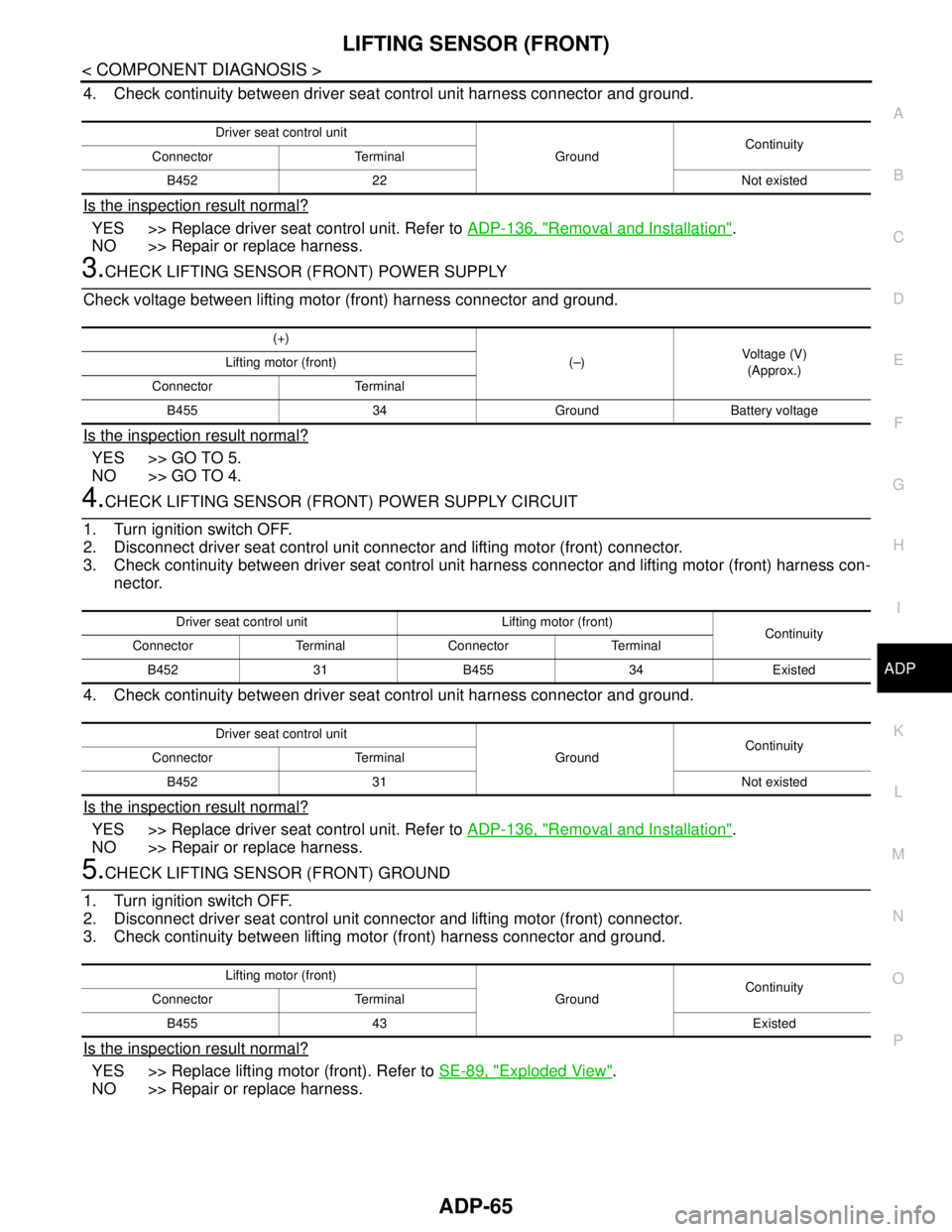
4. Check continuity between driver seat control unit harness connector and ground.
Is the inspection result normal?
YES >> Replace driver seat control unit. Refer to ADP-136, "Removal and Installation".
NO >> Repair or replace harness.
3.CHECK LIFTING SENSOR (FRONT) POWER SUPPLY
Check voltage between lifting motor (front) harness connector and ground.
Is the inspection result normal?
YES >> GO TO 5.
NO >> GO TO 4.
4.CHECK LIFTING SENSOR (FRONT) POWER SUPPLY CIRCUIT
1. Turn ignition switch OFF.
2. Disconnect driver seat control unit connector and lifting motor (front) connector.
3. Check continuity between driver seat control unit harness connector and lifting motor (front) harness con-
nector.
4. Check continuity between driver seat control unit harness connector and ground.
Is the inspection result normal?
YES >> Replace driver seat control unit. Refer to ADP-136, "Removal and Installation".
NO >> Repair or replace harness.
5.CHECK LIFTING SENSOR (FRONT) GROUND
1. Turn ignition switch OFF.
2. Disconnect driver seat control unit connector and lifting motor (front) connector.
3. Check continuity between lifting motor (front) harness connector and ground.
Is the inspection result normal?
YES >> Replace lifting motor (front). Refer to SE-89, "Exploded View".
NO >> Repair or replace harness.
Driver seat control unit
GroundContinuity
Connector Terminal
B452 22 Not existed
(+)
(–)Voltage (V)
(Approx.) Lifting motor (front)
Connector Terminal
B455 34 Ground Battery voltage
Driver seat control unit Lifting motor (front)
Continuity
Connector Terminal Connector Terminal
B452 31 B455 34 Existed
Driver seat control unit
GroundContinuity
Connector Terminal
B452 31 Not existed
Lifting motor (front)
GroundContinuity
Connector Terminal
B455 43 Existed
Page 72 of 5121
ADP-66
< COMPONENT DIAGNOSIS >
LIFTING SENSOR (REAR)
LIFTING SENSOR (REAR)
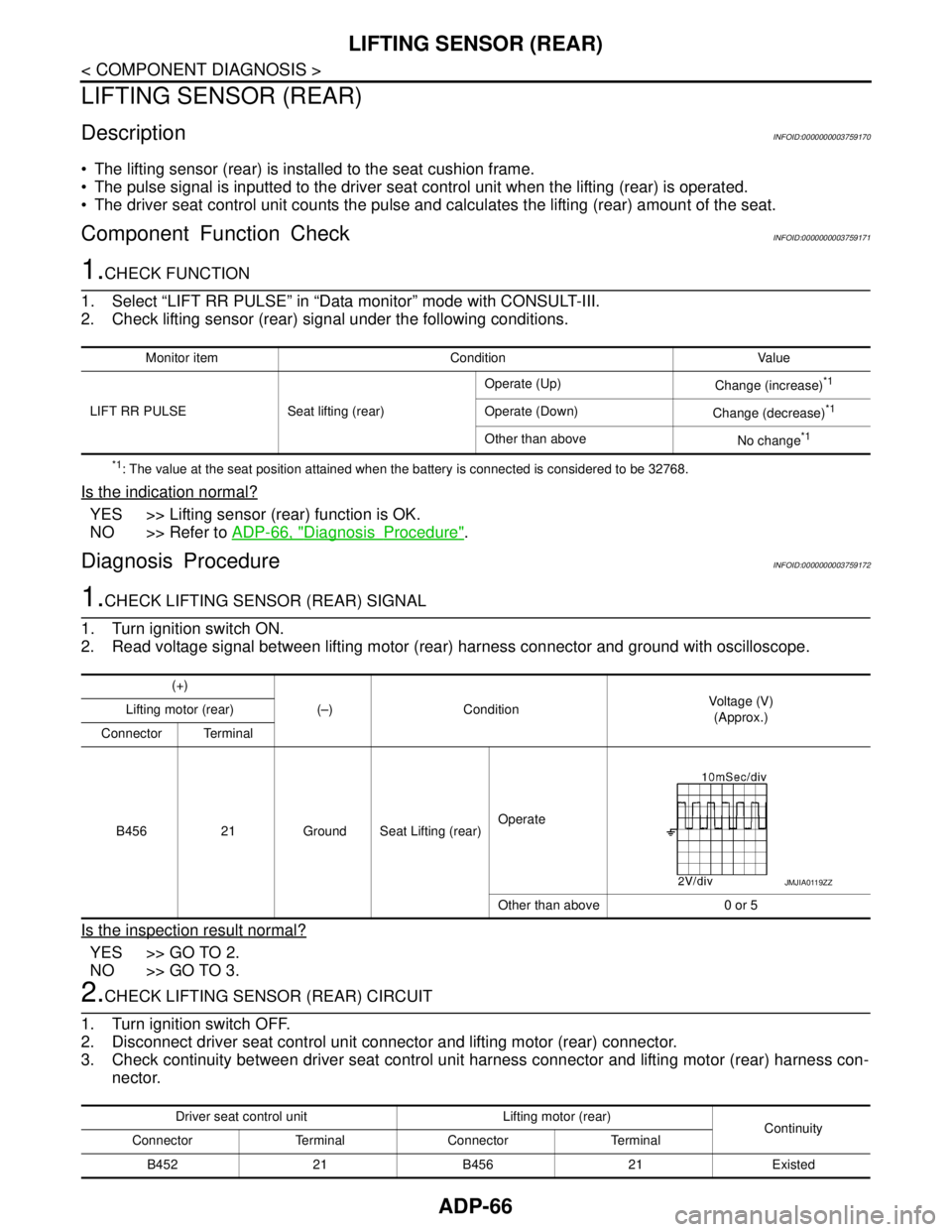
DescriptionINFOID:0000000003759170
The lifting sensor (rear) is installed to the seat cushion frame.
The pulse signal is inputted to the driver seat control unit when the lifting (rear) is operated.
The driver seat control unit counts the pulse and calculates the lifting (rear) amount of the seat.
Component Function CheckINFOID:0000000003759171
1.CHECK FUNCTION
1. Select “LIFT RR PULSE” in “Data monitor” mode with CONSULT-III.
2. Check lifting sensor (rear) signal under the following conditions.
*1: The value at the seat position attained when the battery is connected is considered to be 32768.
Is the indication normal?
YES >> Lifting sensor (rear) function is OK.
NO >> Refer to ADP-66, "
DiagnosisProcedure".
Diagnosis ProcedureINFOID:0000000003759172
1.CHECK LIFTING SENSOR (REAR) SIGNAL
1. Turn ignition switch ON.
2. Read voltage signal between lifting motor (rear) harness connector and ground with oscilloscope.
Is the inspection result normal?
YES >> GO TO 2.
NO >> GO TO 3.
2.CHECK LIFTING SENSOR (REAR) CIRCUIT
1. Turn ignition switch OFF.
2. Disconnect driver seat control unit connector and lifting motor (rear) connector.
3. Check continuity between driver seat control unit harness connector and lifting motor (rear) harness con-
nector.
Monitor item Condition Value
LIFT RR PULSE Seat lifting (rear)Operate (Up)
Change (increase)
*1
Operate (Down)
Change (decrease)*1
Other than above
No change*1
(+)
(–) ConditionVoltage (V)
(Approx.) Lifting motor (rear)
Connector Terminal
B456 21 Ground Seat Lifting (rear)Operate
Other than above 0 or 5
JMJIA0119ZZ
Driver seat control unit Lifting motor (rear)
Continuity
Connector Terminal Connector Terminal
B452 21 B456 21 Existed
Page 73 of 5121
LIFTING SENSOR (REAR)
ADP-67
< COMPONENT DIAGNOSIS >
C
D
E
F
G
H
I
K
L
MA
B
ADP
N
O
P
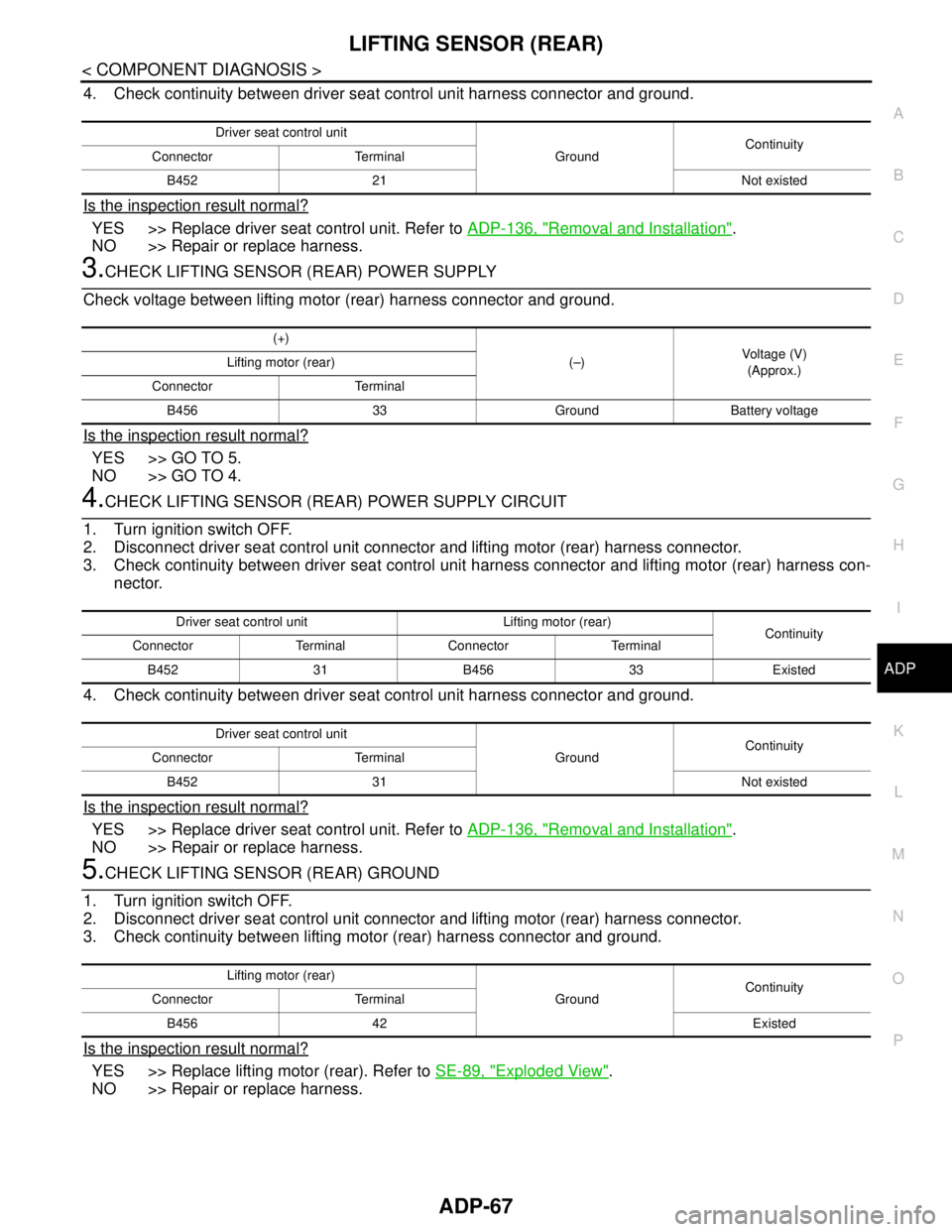
4. Check continuity between driver seat control unit harness connector and ground.
Is the inspection result normal?
YES >> Replace driver seat control unit. Refer to ADP-136, "Removal and Installation".
NO >> Repair or replace harness.
3.CHECK LIFTING SENSOR (REAR) POWER SUPPLY
Check voltage between lifting motor (rear) harness connector and ground.
Is the inspection result normal?
YES >> GO TO 5.
NO >> GO TO 4.
4.CHECK LIFTING SENSOR (REAR) POWER SUPPLY CIRCUIT
1. Turn ignition switch OFF.
2. Disconnect driver seat control unit connector and lifting motor (rear) harness connector.
3. Check continuity between driver seat control unit harness connector and lifting motor (rear) harness con-
nector.
4. Check continuity between driver seat control unit harness connector and ground.
Is the inspection result normal?
YES >> Replace driver seat control unit. Refer to ADP-136, "Removal and Installation".
NO >> Repair or replace harness.
5.CHECK LIFTING SENSOR (REAR) GROUND
1. Turn ignition switch OFF.
2. Disconnect driver seat control unit connector and lifting motor (rear) harness connector.
3. Check continuity between lifting motor (rear) harness connector and ground.
Is the inspection result normal?
YES >> Replace lifting motor (rear). Refer to SE-89, "Exploded View".
NO >> Repair or replace harness.
Driver seat control unit
GroundContinuity
Connector Terminal
B452 21 Not existed
(+)
(–)Voltage (V)
(Approx.) Lifting motor (rear)
Connector Terminal
B456 33 Ground Battery voltage
Driver seat control unit Lifting motor (rear)
Continuity
Connector Terminal Connector Terminal
B452 31 B456 33 Existed
Driver seat control unit
GroundContinuity
Connector Terminal
B452 31 Not existed
Lifting motor (rear)
GroundContinuity
Connector Terminal
B456 42 Existed
Page 74 of 5121
ADP-68
< COMPONENT DIAGNOSIS >
SLIDING MOTOR
SLIDING MOTOR
DescriptionINFOID:0000000003759185
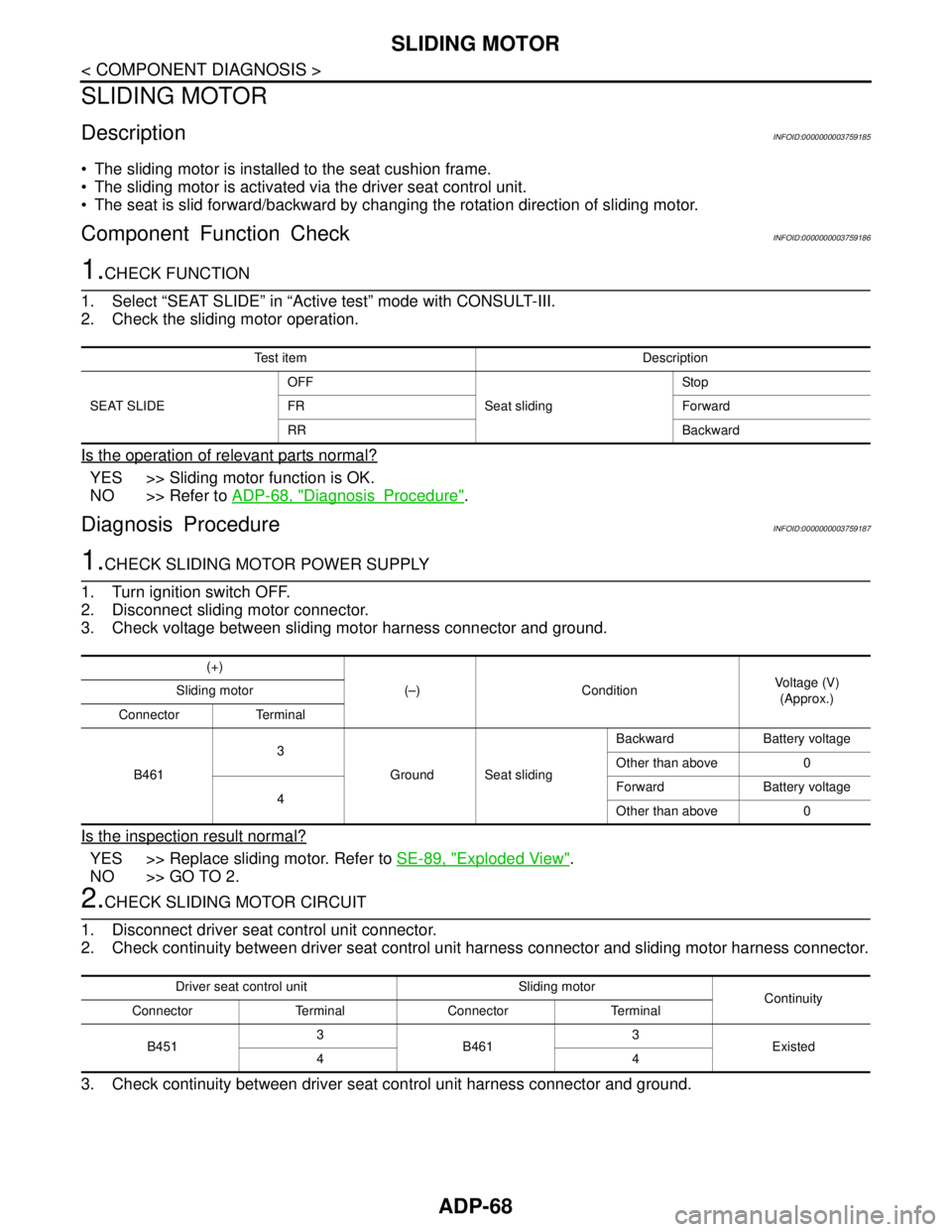
The sliding motor is installed to the seat cushion frame.
The sliding motor is activated via the driver seat control unit.
The seat is slid forward/backward by changing the rotation direction of sliding motor.
Component Function CheckINFOID:0000000003759186
1.CHECK FUNCTION
1. Select “SEAT SLIDE” in “Active test” mode with CONSULT-III.
2. Check the sliding motor operation.
Is the operation of relevant parts normal?
YES >> Sliding motor function is OK.
NO >> Refer to ADP-68, "
DiagnosisProcedure".
Diagnosis ProcedureINFOID:0000000003759187
1.CHECK SLIDING MOTOR POWER SUPPLY
1. Turn ignition switch OFF.
2. Disconnect sliding motor connector.
3. Check voltage between sliding motor harness connector and ground.
Is the inspection result normal?
YES >> Replace sliding motor. Refer to SE-89, "Exploded View".
NO >> GO TO 2.
2.CHECK SLIDING MOTOR CIRCUIT
1. Disconnect driver seat control unit connector.
2. Check continuity between driver seat control unit harness connector and sliding motor harness connector.
3. Check continuity between driver seat control unit harness connector and ground.
Test item Description
SEAT SLIDEOFF
Seat slidingSto p
FR Forward
RR Backward
(+)
(–) ConditionVoltage (V)
(Approx.) Sliding motor
Connector Terminal
B4613
Ground Seat slidingBackward Battery voltage
Other than above 0
4Forward Battery voltage
Other than above 0
Driver seat control unit Sliding motor
Continuity
Connector Terminal Connector Terminal
B4513
B4613
Existed
44
Page 76 of 5121
ADP-70
< COMPONENT DIAGNOSIS >
RECLINING MOTOR
RECLINING MOTOR
DescriptionINFOID:0000000003759188
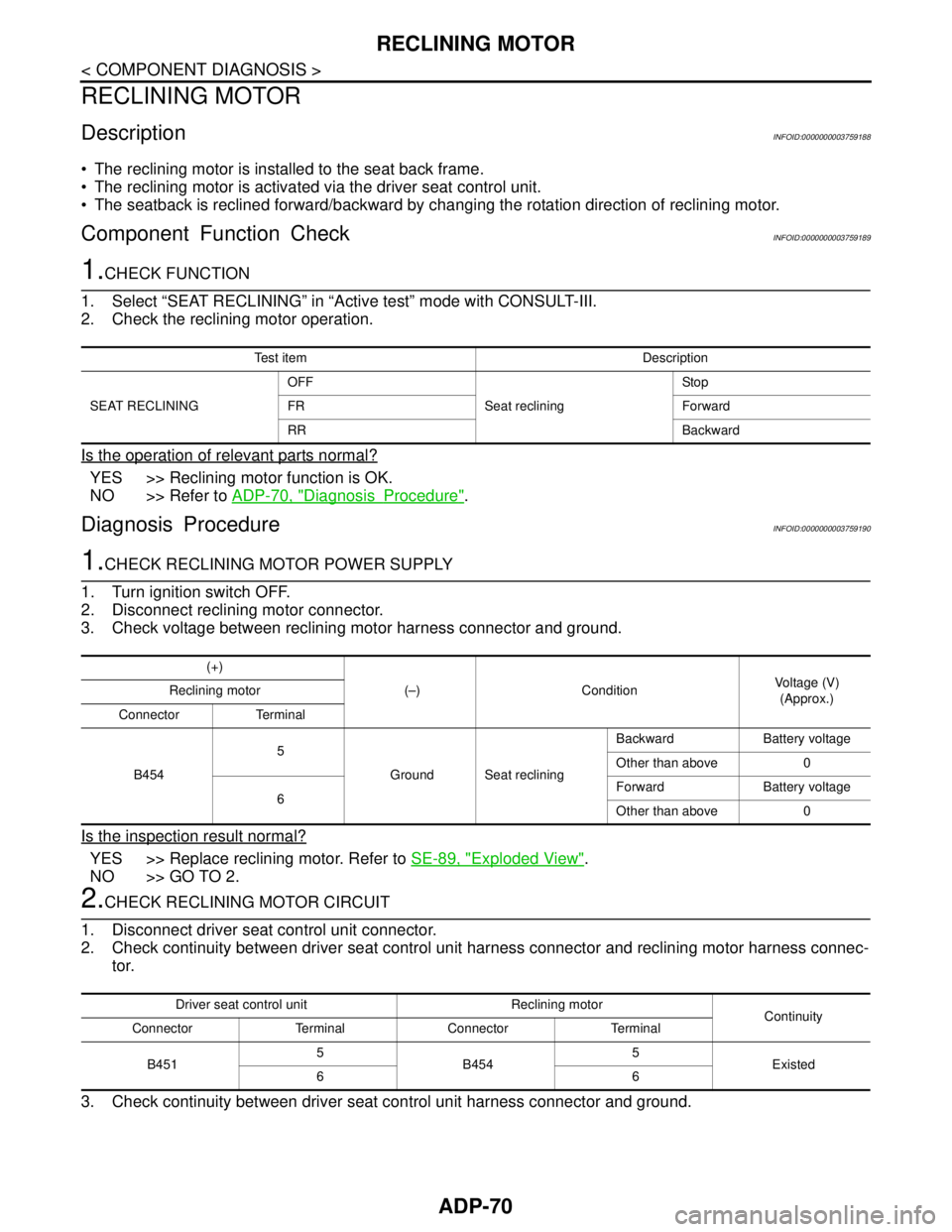
The reclining motor is installed to the seat back frame.
The reclining motor is activated via the driver seat control unit.
The seatback is reclined forward/backward by changing the rotation direction of reclining motor.
Component Function CheckINFOID:0000000003759189
1.CHECK FUNCTION
1. Select “SEAT RECLINING” in “Active test” mode with CONSULT-III.
2. Check the reclining motor operation.
Is the operation of relevant parts normal?
YES >> Reclining motor function is OK.
NO >> Refer to ADP-70, "
DiagnosisProcedure".
Diagnosis ProcedureINFOID:0000000003759190
1.CHECK RECLINING MOTOR POWER SUPPLY
1. Turn ignition switch OFF.
2. Disconnect reclining motor connector.
3. Check voltage between reclining motor harness connector and ground.
Is the inspection result normal?
YES >> Replace reclining motor. Refer to SE-89, "Exploded View".
NO >> GO TO 2.
2.CHECK RECLINING MOTOR CIRCUIT
1. Disconnect driver seat control unit connector.
2. Check continuity between driver seat control unit harness connector and reclining motor harness connec-
tor.
3. Check continuity between driver seat control unit harness connector and ground.
Test item Description
SEAT RECLININGOFF
Seat recliningSto p
FR Forward
RR Backward
(+)
(–) ConditionVoltage (V)
(Approx.) Reclining motor
Connector Terminal
B4545
Ground Seat recliningBackward Battery voltage
Other than above 0
6Forward Battery voltage
Other than above 0
Driver seat control unit Reclining motor
Continuity
Connector Terminal Connector Terminal
B4515
B4545
Existed
66