sensor NISSAN TEANA 2008 User Guide
[x] Cancel search | Manufacturer: NISSAN, Model Year: 2008, Model line: TEANA, Model: NISSAN TEANA 2008Pages: 5121, PDF Size: 69.03 MB
Page 66 of 5121
ADP-60
< COMPONENT DIAGNOSIS >
SLIDING SENSOR
SLIDING SENSOR
DescriptionINFOID:0000000003759161
The sliding sensor is installed to the seat cushion frame.
The pulse signal is inputted to the driver seat control unit when sliding is operated.
The driver seat control unit counts the pulse and calculates the sliding amount of the seat.
Component Function CheckINFOID:0000000003759162
1.CHECK FUNCTION
1. Select “SLIDE PULSE” in “Data monitor” mode via CONSULT-III.
2. Check sliding sensor signal under the following conditions.
*1: The value at the seat position attained when the battery is connected is considered to be 32768.
Is the indication normal?
YES >> Sliding sensor function is OK.
NO >> Refer to ADP-60, "
DiagnosisProcedure".
Diagnosis ProcedureINFOID:0000000003759163
1.CHECK SLIDING SENSOR SIGNAL
1. Turn ignition switch ON.
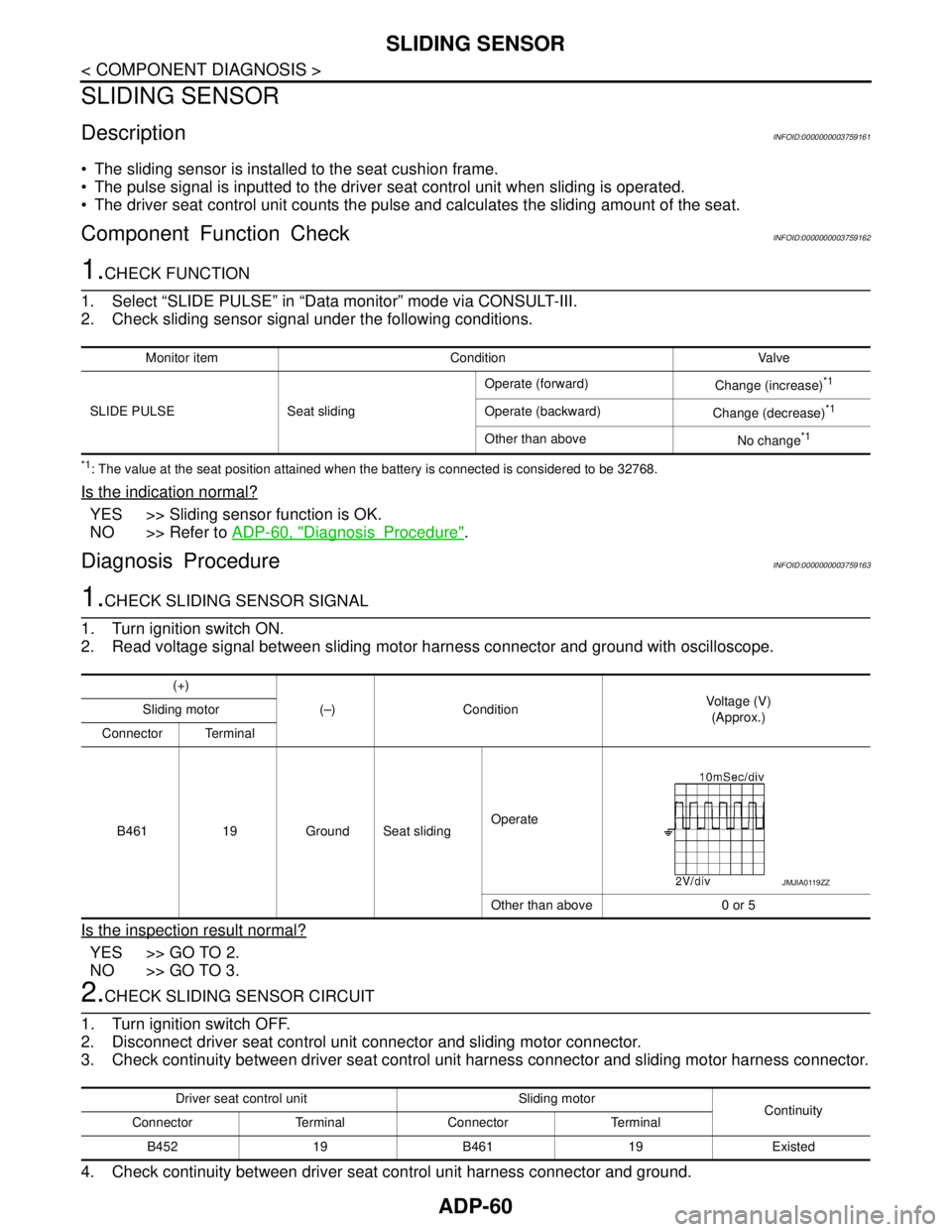
2. Read voltage signal between sliding motor harness connector and ground with oscilloscope.
Is the inspection result normal?
YES >> GO TO 2.
NO >> GO TO 3.
2.CHECK SLIDING SENSOR CIRCUIT
1. Turn ignition switch OFF.
2. Disconnect driver seat control unit connector and sliding motor connector.
3. Check continuity between driver seat control unit harness connector and sliding motor harness connector.
4. Check continuity between driver seat control unit harness connector and ground.
Monitor item Condition Valve
SLIDE PULSE Seat slidingOperate (forward)
Change (increase)
*1
Operate (backward)
Change (decrease)*1
Other than above
No change*1
(+)
(–) ConditionVoltage (V)
(Approx.) Sliding motor
Connector Terminal
B461 19 Ground Seat slidingOperate
Other than above 0 or 5
JMJIA0119ZZ
Driver seat control unit Sliding motor
Continuity
Connector Terminal Connector Terminal
B452 19 B461 19 Existed
Page 67 of 5121
SLIDING SENSOR
ADP-61
< COMPONENT DIAGNOSIS >
C
D
E
F
G
H
I
K
L
MA
B
ADP
N
O
P
Is the inspection result normal?
YES >> Replace driver seat control unit. Refer to ADP-136, "Removal and Installation".
NO >> Repair or replace harness.
3.CHECK SLIDING SENSOR POWER SUPPLY
Check voltage between sliding motor harness connector and ground.
Is the inspection result normal?
YES >> GO TO 5.
NO >> GO TO 4.
4.CHECK SLIDING SENSOR POWER SUPPLY CIRCUIT
1. Turn ignition switch OFF.
2. Disconnect driver seat control unit connector and sliding motor connector.
3. Check continuity between driver seat control unit harness connector and sliding motor harness connector.
4. Check continuity between driver seat control unit harness connector and ground.
Is the inspection result normal?
YES >> Replace driver seat control unit. Refer to ADP-136, "Removal and Installation".
NO >> Repair or replace harness.
5.CHECK SLIDING SENSOR GROUND
1. Turn ignition switch OFF.
2. Disconnect driver seat control unit connector and sliding motor connector.
3. Check continuity between sliding sensor harness connector and ground.
Is the inspection result normal?
YES >> Replace sliding motor. Refer to SE-89, "Exploded View".
NO >> Repair or replace harness.
Driver seat control unit
GroundContinuity
Connector Terminal
B452 19 Not existed
(+)
(–)Voltage (V)
(Approx.) Sliding motor
Connector Terminal
B461 31 Ground Battery voltage
Driver seat control unit Sliding motor
Continuity
Connector Terminal Connector Terminal
B452 31 B461 31 Existed
Driver seat control unit
GroundContinuity
Connector Terminal
B452 31 Not existed
Sliding motor
GroundContinuity
Connector Terminal
B461 40 Existed
Page 68 of 5121
ADP-62
< COMPONENT DIAGNOSIS >
RECLINING SENSOR
RECLINING SENSOR
DescriptionINFOID:0000000003759164
The reclining sensor is installed to the seatback frame.
The pulse signal is inputted to the driver seat control unit when the reclining is operated.
The driver seat control unit counts the pulse and calculates the reclining amount of the seat.
Component Function CheckINFOID:0000000003759165
1.CHECK FUNCTION
1. Select “RECLN PULSE” in “Data monitor” mode with CONSULT-III.
2. Check reclining sensor signal under the following conditions.
*1: The value at the seat position attained when the battery is connected is considered to be 32768.
Is the indication normal?
YES >> Reclining sensor function is OK.
NO >> Refer to ADP-62, "
DiagnosisProcedure".
Diagnosis ProcedureINFOID:0000000003759166
1.CHECK RECLINING SENSOR SIGNAL
1. Turn ignition switch ON.
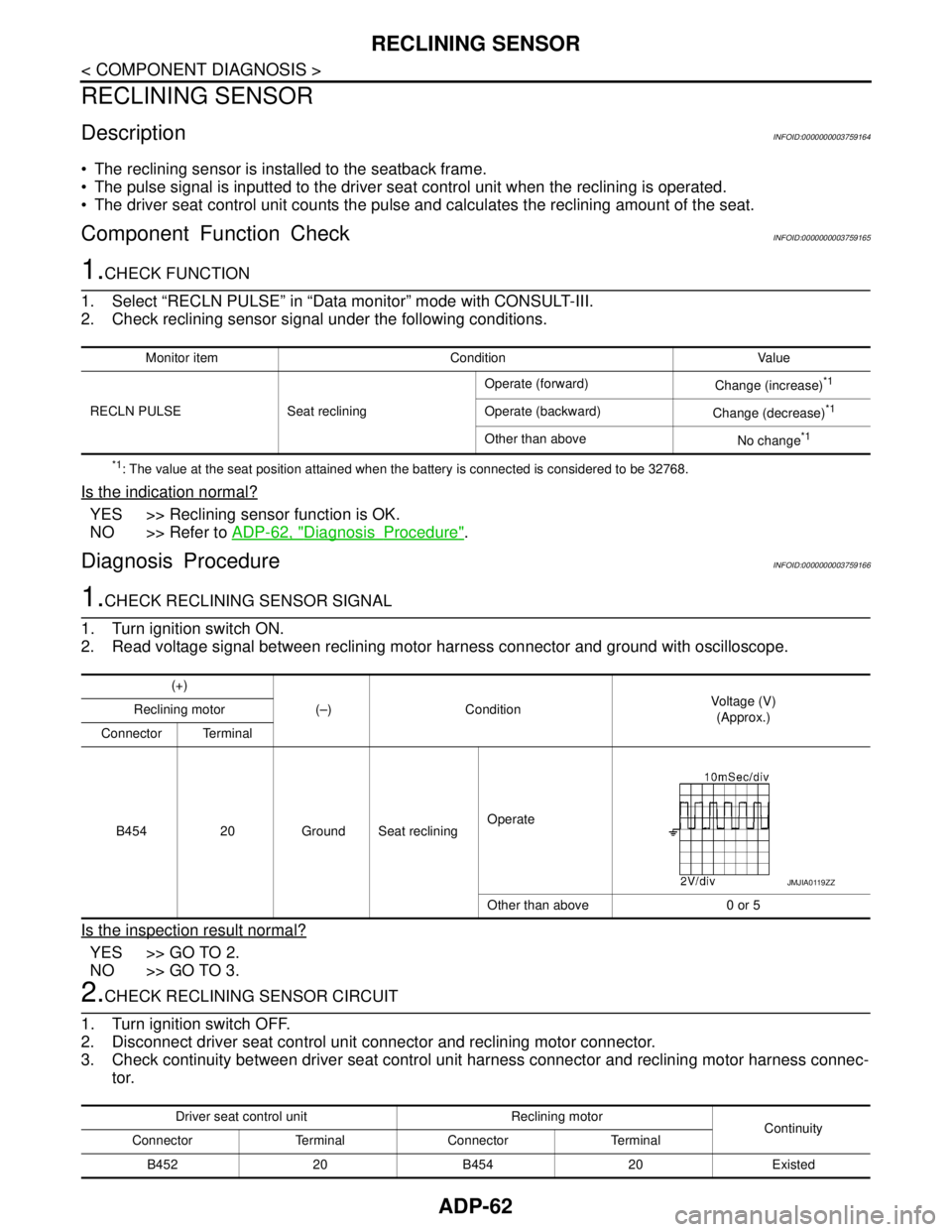
2. Read voltage signal between reclining motor harness connector and ground with oscilloscope.
Is the inspection result normal?
YES >> GO TO 2.
NO >> GO TO 3.
2.CHECK RECLINING SENSOR CIRCUIT
1. Turn ignition switch OFF.
2. Disconnect driver seat control unit connector and reclining motor connector.
3. Check continuity between driver seat control unit harness connector and reclining motor harness connec-
tor.
Monitor item Condition Value
RECLN PULSE Seat recliningOperate (forward)
Change (increase)
*1
Operate (backward)
Change (decrease)*1
Other than above
No change*1
(+)
(–) ConditionVoltage (V)
(Approx.) Reclining motor
Connector Terminal
B454 20 Ground Seat recliningOperate
Other than above 0 or 5
JMJIA0119ZZ
Driver seat control unit Reclining motor
Continuity
Connector Terminal Connector Terminal
B452 20 B454 20 Existed
Page 69 of 5121
RECLINING SENSOR
ADP-63
< COMPONENT DIAGNOSIS >
C
D
E
F
G
H
I
K
L
MA
B
ADP
N
O
P
4. Check continuity between driver seat control unit harness connector and ground.
Is the inspection result normal?
YES >> Replace driver seat control unit. Refer to ADP-136, "Removal and Installation".
NO >> Repair or replace harness.
3.CHECK RECLINING SENSOR POWER SUPPLY
Check voltage between reclining motor harness connector and ground.
Is the inspection result normal?
YES >> GO TO 5.
NO >> GO TO 4.
4.CHECK RECLINING SENSOR POWER SUPPLY CIRCUIT
1. Turn ignition switch OFF.
2. Disconnect driver seat control unit connector and reclining motor connector.
3. Check continuity between driver seat control unit harness connector and reclining motor harness connec-
tor.
4. Check continuity between driver seat control unit harness connector and ground.
Is the inspection result normal?
YES >> Replace driver seat control unit. Refer to ADP-136, "Removal and Installation".
NO >> Repair or replace harness.
5.CHECK RECLINING SENSOR GROUND
1. Turn ignition switch OFF.
2. Disconnect driver seat control unit connector and reclining motor connector.
3. Check continuity between reclining motor harness connector and ground.
Is the inspection result normal?
YES >> Replace reclining motor. Refer to SE-89, "Exploded View".
NO >> Repair or replace harness.
Driver seat control unit
GroundContinuity
Connector Terminal
B452 20 Not existed
(+)
(–)Voltage (V)
(Approx.) Reclining motor
Connector Terminal
B454 32 Ground Battery voltage
Driver seat control unit Reclining motor
Continuity
Connector Terminal Connector Terminal
B452 31 B454 32 Existed
Driver seat control unit
GroundContinuity
Connector Terminal
B452 31 Not existed
Reclining motor
GroundContinuity
Connector Terminal
B454 41 Existed
Page 70 of 5121
ADP-64
< COMPONENT DIAGNOSIS >
LIFTING SENSOR (FRONT)
LIFTING SENSOR (FRONT)
DescriptionINFOID:0000000003759167
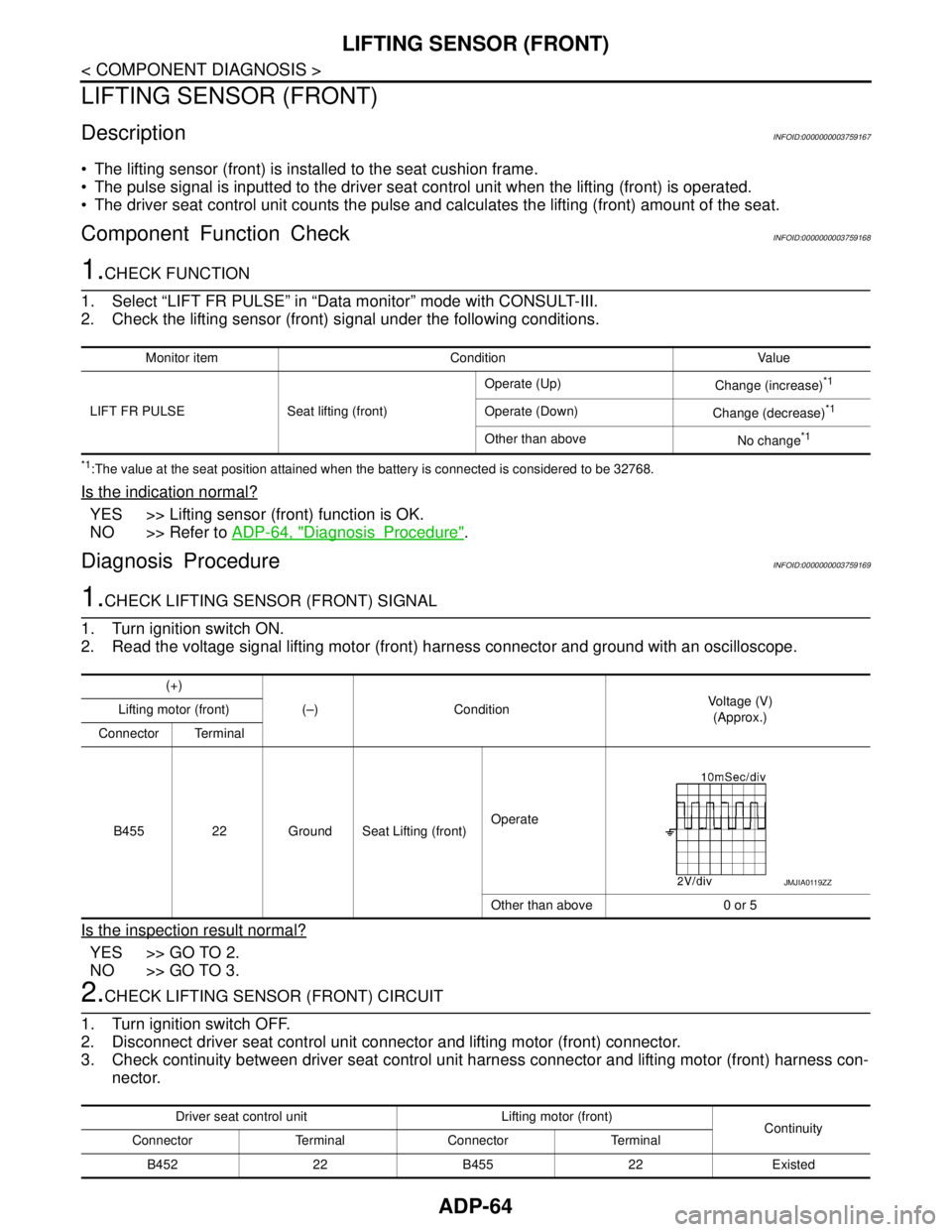
The lifting sensor (front) is installed to the seat cushion frame.
The pulse signal is inputted to the driver seat control unit when the lifting (front) is operated.
The driver seat control unit counts the pulse and calculates the lifting (front) amount of the seat.
Component Function CheckINFOID:0000000003759168
1.CHECK FUNCTION
1. Select “LIFT FR PULSE” in “Data monitor” mode with CONSULT-III.
2. Check the lifting sensor (front) signal under the following conditions.
*1:The value at the seat position attained when the battery is connected is considered to be 32768.
Is the indication normal?
YES >> Lifting sensor (front) function is OK.
NO >> Refer to ADP-64, "
DiagnosisProcedure".
Diagnosis ProcedureINFOID:0000000003759169
1.CHECK LIFTING SENSOR (FRONT) SIGNAL
1. Turn ignition switch ON.
2. Read the voltage signal lifting motor (front) harness connector and ground with an oscilloscope.
Is the inspection result normal?
YES >> GO TO 2.
NO >> GO TO 3.
2.CHECK LIFTING SENSOR (FRONT) CIRCUIT
1. Turn ignition switch OFF.
2. Disconnect driver seat control unit connector and lifting motor (front) connector.
3. Check continuity between driver seat control unit harness connector and lifting motor (front) harness con-
nector.
Monitor item Condition Value
LIFT FR PULSE Seat lifting (front)Operate (Up)
Change (increase)
*1
Operate (Down)
Change (decrease)*1
Other than above
No change*1
(+)
(–) ConditionVoltage (V)
(Approx.) Lifting motor (front)
Connector Terminal
B455 22 Ground Seat Lifting (front)Operate
Other than above 0 or 5
JMJIA0119ZZ
Driver seat control unit Lifting motor (front)
Continuity
Connector Terminal Connector Terminal
B452 22 B455 22 Existed
Page 71 of 5121
LIFTING SENSOR (FRONT)
ADP-65
< COMPONENT DIAGNOSIS >
C
D
E
F
G
H
I
K
L
MA
B
ADP
N
O
P
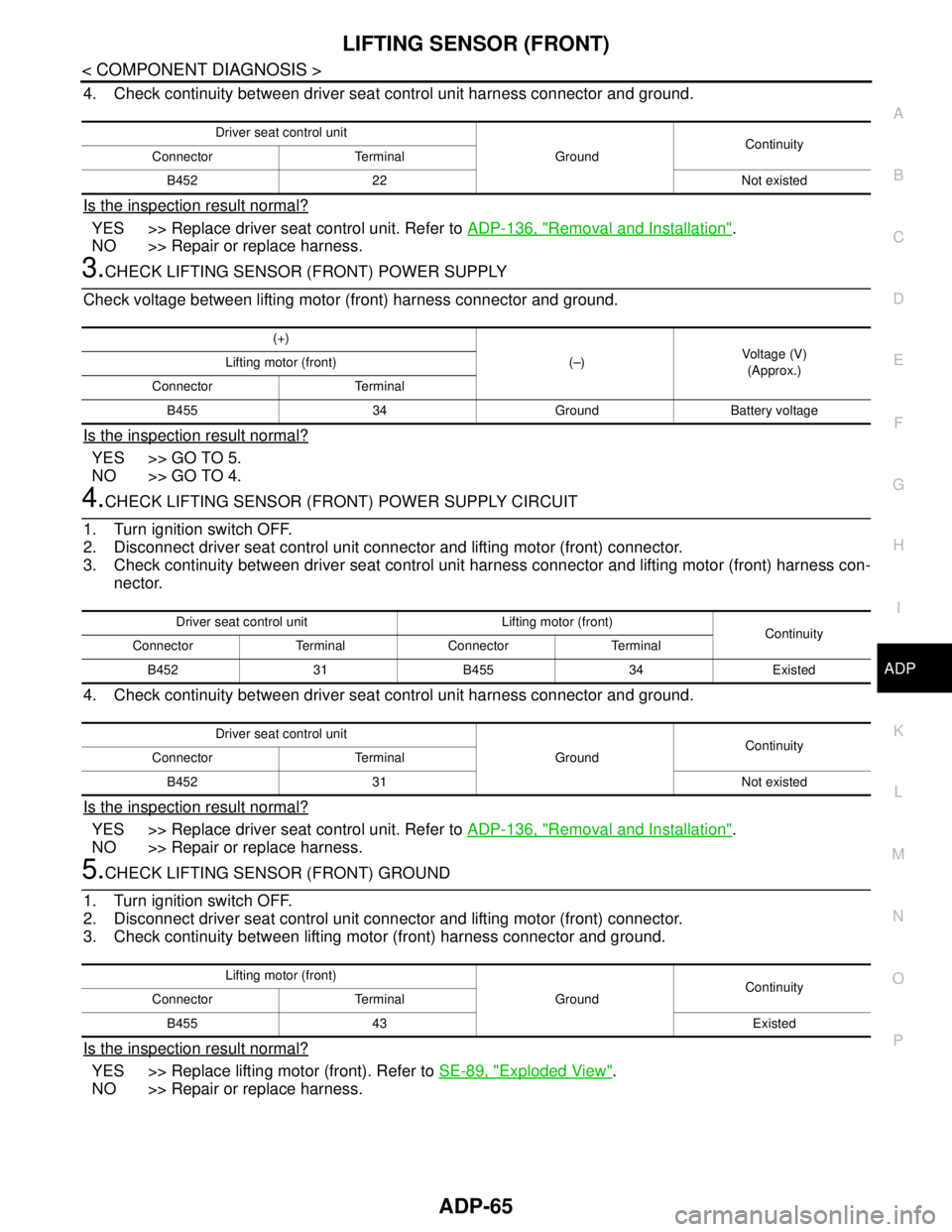
4. Check continuity between driver seat control unit harness connector and ground.
Is the inspection result normal?
YES >> Replace driver seat control unit. Refer to ADP-136, "Removal and Installation".
NO >> Repair or replace harness.
3.CHECK LIFTING SENSOR (FRONT) POWER SUPPLY
Check voltage between lifting motor (front) harness connector and ground.
Is the inspection result normal?
YES >> GO TO 5.
NO >> GO TO 4.
4.CHECK LIFTING SENSOR (FRONT) POWER SUPPLY CIRCUIT
1. Turn ignition switch OFF.
2. Disconnect driver seat control unit connector and lifting motor (front) connector.
3. Check continuity between driver seat control unit harness connector and lifting motor (front) harness con-
nector.
4. Check continuity between driver seat control unit harness connector and ground.
Is the inspection result normal?
YES >> Replace driver seat control unit. Refer to ADP-136, "Removal and Installation".
NO >> Repair or replace harness.
5.CHECK LIFTING SENSOR (FRONT) GROUND
1. Turn ignition switch OFF.
2. Disconnect driver seat control unit connector and lifting motor (front) connector.
3. Check continuity between lifting motor (front) harness connector and ground.
Is the inspection result normal?
YES >> Replace lifting motor (front). Refer to SE-89, "Exploded View".
NO >> Repair or replace harness.
Driver seat control unit
GroundContinuity
Connector Terminal
B452 22 Not existed
(+)
(–)Voltage (V)
(Approx.) Lifting motor (front)
Connector Terminal
B455 34 Ground Battery voltage
Driver seat control unit Lifting motor (front)
Continuity
Connector Terminal Connector Terminal
B452 31 B455 34 Existed
Driver seat control unit
GroundContinuity
Connector Terminal
B452 31 Not existed
Lifting motor (front)
GroundContinuity
Connector Terminal
B455 43 Existed
Page 72 of 5121
ADP-66
< COMPONENT DIAGNOSIS >
LIFTING SENSOR (REAR)
LIFTING SENSOR (REAR)
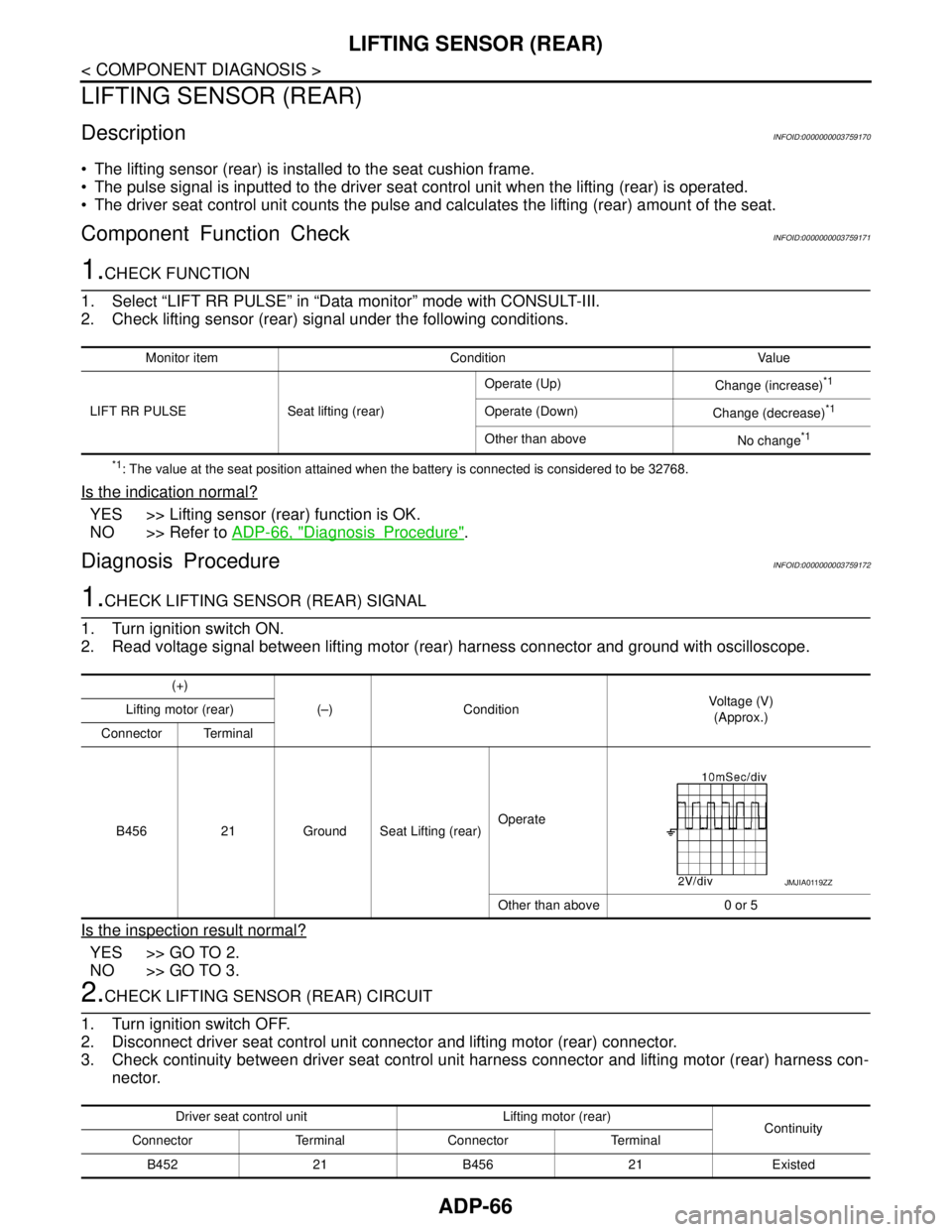
DescriptionINFOID:0000000003759170
The lifting sensor (rear) is installed to the seat cushion frame.
The pulse signal is inputted to the driver seat control unit when the lifting (rear) is operated.
The driver seat control unit counts the pulse and calculates the lifting (rear) amount of the seat.
Component Function CheckINFOID:0000000003759171
1.CHECK FUNCTION
1. Select “LIFT RR PULSE” in “Data monitor” mode with CONSULT-III.
2. Check lifting sensor (rear) signal under the following conditions.
*1: The value at the seat position attained when the battery is connected is considered to be 32768.
Is the indication normal?
YES >> Lifting sensor (rear) function is OK.
NO >> Refer to ADP-66, "
DiagnosisProcedure".
Diagnosis ProcedureINFOID:0000000003759172
1.CHECK LIFTING SENSOR (REAR) SIGNAL
1. Turn ignition switch ON.
2. Read voltage signal between lifting motor (rear) harness connector and ground with oscilloscope.
Is the inspection result normal?
YES >> GO TO 2.
NO >> GO TO 3.
2.CHECK LIFTING SENSOR (REAR) CIRCUIT
1. Turn ignition switch OFF.
2. Disconnect driver seat control unit connector and lifting motor (rear) connector.
3. Check continuity between driver seat control unit harness connector and lifting motor (rear) harness con-
nector.
Monitor item Condition Value
LIFT RR PULSE Seat lifting (rear)Operate (Up)
Change (increase)
*1
Operate (Down)
Change (decrease)*1
Other than above
No change*1
(+)
(–) ConditionVoltage (V)
(Approx.) Lifting motor (rear)
Connector Terminal
B456 21 Ground Seat Lifting (rear)Operate
Other than above 0 or 5
JMJIA0119ZZ
Driver seat control unit Lifting motor (rear)
Continuity
Connector Terminal Connector Terminal
B452 21 B456 21 Existed
Page 73 of 5121
LIFTING SENSOR (REAR)
ADP-67
< COMPONENT DIAGNOSIS >
C
D
E
F
G
H
I
K
L
MA
B
ADP
N
O
P
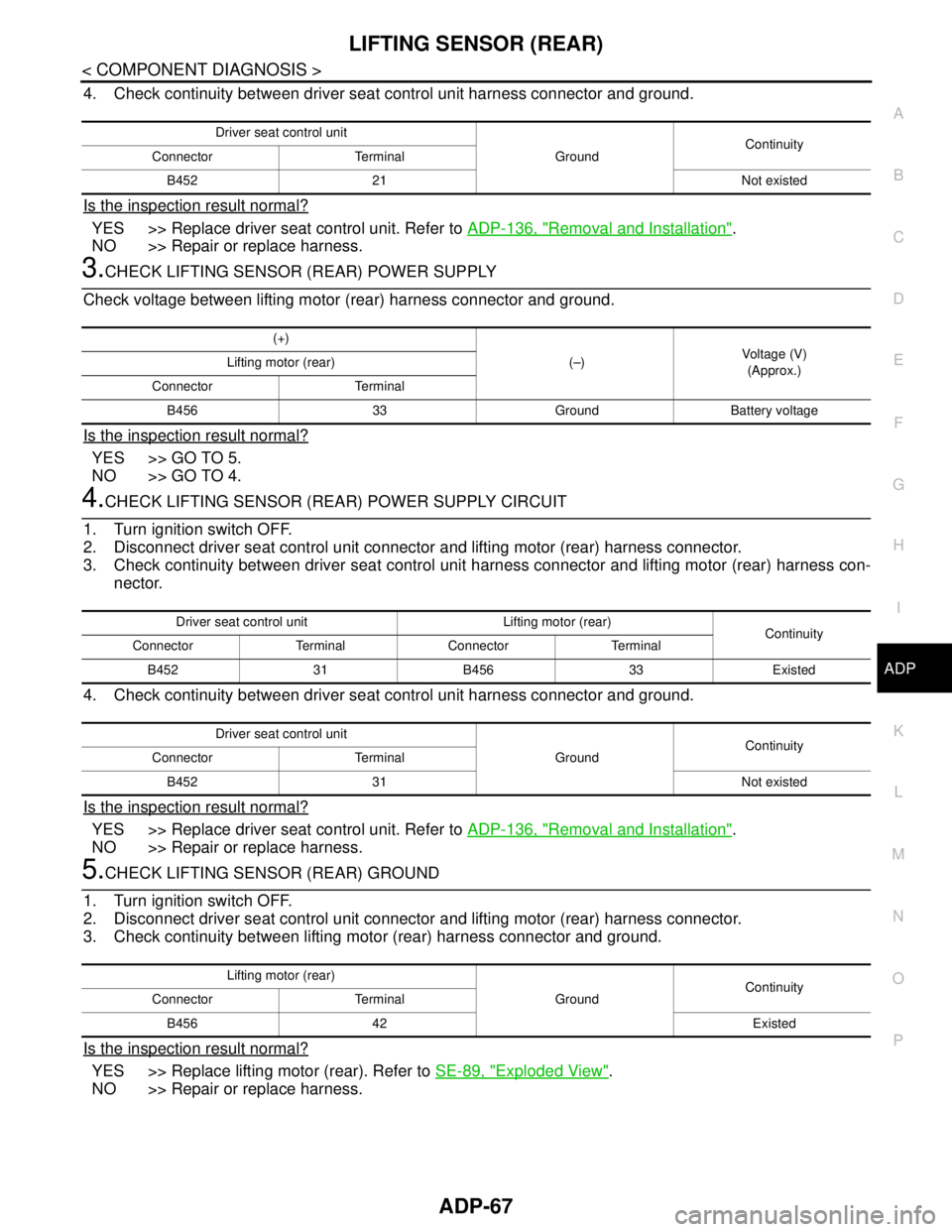
4. Check continuity between driver seat control unit harness connector and ground.
Is the inspection result normal?
YES >> Replace driver seat control unit. Refer to ADP-136, "Removal and Installation".
NO >> Repair or replace harness.
3.CHECK LIFTING SENSOR (REAR) POWER SUPPLY
Check voltage between lifting motor (rear) harness connector and ground.
Is the inspection result normal?
YES >> GO TO 5.
NO >> GO TO 4.
4.CHECK LIFTING SENSOR (REAR) POWER SUPPLY CIRCUIT
1. Turn ignition switch OFF.
2. Disconnect driver seat control unit connector and lifting motor (rear) harness connector.
3. Check continuity between driver seat control unit harness connector and lifting motor (rear) harness con-
nector.
4. Check continuity between driver seat control unit harness connector and ground.
Is the inspection result normal?
YES >> Replace driver seat control unit. Refer to ADP-136, "Removal and Installation".
NO >> Repair or replace harness.
5.CHECK LIFTING SENSOR (REAR) GROUND
1. Turn ignition switch OFF.
2. Disconnect driver seat control unit connector and lifting motor (rear) harness connector.
3. Check continuity between lifting motor (rear) harness connector and ground.
Is the inspection result normal?
YES >> Replace lifting motor (rear). Refer to SE-89, "Exploded View".
NO >> Repair or replace harness.
Driver seat control unit
GroundContinuity
Connector Terminal
B452 21 Not existed
(+)
(–)Voltage (V)
(Approx.) Lifting motor (rear)
Connector Terminal
B456 33 Ground Battery voltage
Driver seat control unit Lifting motor (rear)
Continuity
Connector Terminal Connector Terminal
B452 31 B456 33 Existed
Driver seat control unit
GroundContinuity
Connector Terminal
B452 31 Not existed
Lifting motor (rear)
GroundContinuity
Connector Terminal
B456 42 Existed
Page 85 of 5121

BCM (BODY CONTROL MODULE)
ADP-79
< COMPONENT DIAGNOSIS >
C
D
E
F
G
H
I
K
L
MA
B
ADP
N
O
P
DOOR SW-BKNOTE:
The item is indicated, but not monitored. Off
CDL LOCK SWOther than power door lock switch LOCK Off
Power door lock switch LOCK On
CDL UNLOCK SWOther than power door lock switch UNLOCK Off
Power door lock switch UNLOCK On
KEY CYL LK-SWNOTE:
The item is indicated, but not monitored. Off
KEY CYL UN-SWNOTE:
The item is indicated, but not monitored. Off
KEY CYL SW-TRNOTE:
The item is indicated, but not monitored. Off
HAZARD SWHazard switch is OFF Off
Hazard switch is ON On
REAR DEF SW
NOTE:
At model with BOSE au-
dio system this item is in-
dicated, but is not
monitored.Rear window defogger switch is OFF Off
Rear window defogger switch is ON On
TR CANCEL SWNOTE:
The item is indicated, but not monitored. Off
TR/BD OPEN SWTrunk lid opener switch OFF Off
While the trunk lid opener switch is turned ON On
TRNK/HAT MNTRTrunk lid closed Off
Trunk lid opened On
RKE-LOCKLOCK button of the key is not pressed Off
LOCK button of the key is pressed On
RKE-UNLOCKUNLOCK button of the key is not pressed Off
UNLOCK button of the key is pressed On
RKE-TR/BDTRUNK OPEN button of the key is not pressed Off
TRUNK OPEN button of the key is pressed On
RKE-PANICNOTE:
The item is indicated, but not monitored. Off
RKE-P/W OPENNOTE:
The item is indicated, but not monitored. Off
RKE-MODE CHGLOCK/UNLOCK button of the key is not pressed and held simulta-
neouslyOff
LOCK/UNLOCK button of the key is pressed and held simulta-
neouslyOn
OPTICAL SENSORBright outside of the vehicle Close to 5 V
Dark outside of the vehicle Close to 0 V
REQ SW -DRDriver door request switch is not pressed Off
Driver door request switch is pressed On
REQ SW -ASPassenger door request switch is not pressed Off
Passenger door request switch is pressed On
REQ SW -RRNOTE:
The item is indicated, but not monitored. Off Monitor Item Condition Value/Status
Page 103 of 5121

BCM (BODY CONTROL MODULE)
ADP-97
< COMPONENT DIAGNOSIS >
C
D
E
F
G
H
I
K
L
MA
B
ADP
N
O
P
111
(L/Y)GroundSteering lock unit
communicationInput/
OutputSteering lockLOCK status Battery voltage
LOCK or UNLOCK
For 15 seconds after UN-
LOCKBattery voltage
15 seconds or later after
UNLOCK0 V
11 3
(P/B)Ground Optical sensor InputIgnition switch
ONWhen bright outside of
the vehicleClose to 5 V
When dark outside of the
vehicleClose to 0 V
11 5
(L)Ground Shock sensor Input Ignition switchOFF 0 V
ACC 5.0 V
ON
2.5 V
11 6
(R/W)GroundFuse check (Stop
lamp switch)Input — Battery voltage
11 8
(O/L)Ground Stop lamp switch Input Stop lamp switchOFF (Brake pedal is not
depressed)0 V
ON (Brake pedal is de-
pressed)Battery voltage
11 9
(G/W)GroundFront door lock as-
sembly driver side
(unlock sensor)Input Driver doorLOCK status (unlock sen-
sor switch OFF)
1.1 V
UNLOCK status (unlock
sensor switch ON)0 V
121
(Y)Ground Key slot switch InputWhen the key is inserted into key slot Battery voltage
When the key is not inserted into key slot 0 V
122
(V/R)Ground ACC feedback Input Ignition switchOFF 0 V
ACC or ON Battery voltage
123
(G/W)Ground IGN feedback Input Ignition switchOFF or ACC 0 V
ON Battery voltage Te r m i n a l N o .
(Wire color)Description
ConditionVa l u e
(Approx.)
Signal nameInput/
Output +–
JMKIA0066GB
JPMIA1034GB
JPMIA0012GB