tires NISSAN TEANA 2008 User Guide
[x] Cancel search | Manufacturer: NISSAN, Model Year: 2008, Model line: TEANA, Model: NISSAN TEANA 2008Pages: 5121, PDF Size: 69.03 MB
Page 968 of 5121
![NISSAN TEANA 2008 User Guide C1115 WHEEL SENSOR
BRC-27
< COMPONENT DIAGNOSIS >[ABS]
C
D
E
G
H
I
J
K
L
MA
B
BRC
N
O
P
C1115 WHEEL SENSOR
DescriptionINFOID:0000000003767292
When the sensor rotor rotates, the magnetic field changes.](/img/5/57391/w960_57391-967.png "NISSAN TEANA 2008 User Guide C1115 WHEEL SENSOR
BRC-27
< COMPONENT DIAGNOSIS >[ABS]
C
D
E
G
H
I
J
K
L
MA
B
BRC
N
O
P
C1115 WHEEL SENSOR
DescriptionINFOID:0000000003767292
When the sensor rotor rotates, the magnetic field changes.")
C1115 WHEEL SENSOR
BRC-27
< COMPONENT DIAGNOSIS >[ABS]
C
D
E
G
H
I
J
K
L
MA
B
BRC
N
O
P
C1115 WHEEL SENSOR
DescriptionINFOID:0000000003767292
When the sensor rotor rotates, the magnetic field changes. Wheel sensor converts the magnetic field changes
to current signals (rectangular wave) and transmits them to the ABS actuator and electric unit (control unit).
DTC LogicINFOID:0000000003766759
DTC DETECTION LOGIC
DTC CONFIRMATION PROCEDURE
1.DTC REPRODUCTION PROCEDURE
1. Start the engine and drive the vehicle at 30 km/h (19 MPH) or more for approximately 1 minute.
2. Perform ABS actuator and electric unit (control unit) self-diagnosis.
Is DTC
“C 111 5” detected?
YES >> Proceed to diagnosis. Refer to BRC-27, "Diagnosis Procedure".
NO >> INSPECTION END
Diagnosis ProcedureINFOID:0000000003767293
CAUTION:
Do not check between wheel sensor terminals.
1.CHECK TIRES
Check air pressure, wear and size. Refer to WT-5, "
Tire Air Pressure".
Is the inspection result normal?
YES >> GO TO 2.
NO >> Repair or replace damaged parts.
2.CHECK SENSOR AND SENSOR ROTOR
Check sensor rotor for damage.
Check wheel sensor for damage, disconnection or looseness.
Is the inspection result normal?
YES >> GO TO 3.
NO >> Repair wheel sensor mount or replace sensor rotor. Then perform the self-diagnosis.
3.CHECK CONNECTOR
1. Turn the ignition switch OFF.
2. Disconnect ABS actuator and electric unit (control unit) connector.
3. Disconnect malfunctioning wheel sensor connector.
4. Check terminal to see if it is deformed, disconnected, looseness, etc.
Is the inspection result normal?
YES >> GO TO 4.
NO >> Repair or replace damaged parts.
4.CHECK WHEEL SENSOR HARNESS
1. Check the continuity between ABS actuator and electric unit (control unit) harness connector and wheel
sensor harness connector. (Also check continuity when steering wheel is turned right and left and when
sensor harness inside the wheel house is moved.)
DTC Display item Malfunction detected condition Possible cause
C 111 5ABS SENSOR
[ABNORMAL SIGNAL]When wheel sensor input signal is malfunctioning. Harness or connector
Wheel sensor
ABS actuator and electric unit
(control unit)
Page 1003 of 5121
![NISSAN TEANA 2008 User Guide BRC-62
< BASIC INSPECTION >[VDC/TCS/ABS]
DIAGNOSIS AND REPAIR WORK FLOW
BASIC INSPECTION
DIAGNOSIS AND REPAIR WORK FLOW
Work FlowINFOID:0000000003766879
PRECAUTIONS FOR DIAGNOSIS
If steering angle sen](/img/5/57391/w960_57391-1002.png "NISSAN TEANA 2008 User Guide BRC-62
< BASIC INSPECTION >[VDC/TCS/ABS]
DIAGNOSIS AND REPAIR WORK FLOW
BASIC INSPECTION
DIAGNOSIS AND REPAIR WORK FLOW
Work FlowINFOID:0000000003766879
PRECAUTIONS FOR DIAGNOSIS
If steering angle sen")
BRC-62
< BASIC INSPECTION >[VDC/TCS/ABS]
DIAGNOSIS AND REPAIR WORK FLOW
BASIC INSPECTION
DIAGNOSIS AND REPAIR WORK FLOW
Work FlowINFOID:0000000003766879
PRECAUTIONS FOR DIAGNOSIS
If steering angle sensor, steering system parts, suspension system parts, ABS actuator and electric unit (con-
trol unit) or tires have been replaced, or if wheel alignment has been adjusted, be sure to adjust neutral posi-
tion of steering angle sensor before driving. Refer to BRC-66, "
ADJUSTMENT OF STEERING ANGLE
SENSOR NEUTRAL POSITION : Description".
Page 1007 of 5121
![NISSAN TEANA 2008 User Guide BRC-66
< BASIC INSPECTION >[VDC/TCS/ABS]
INSPECTION AND ADJUSTMENT
INSPECTION AND ADJUSTMENT
ADDITIONAL SERVICE WHEN REPLACING CONTROL UNIT
ADDITIONAL SERVICE WHEN REPLACING CONTROL UNIT : Description](/img/5/57391/w960_57391-1006.png "NISSAN TEANA 2008 User Guide BRC-66
< BASIC INSPECTION >[VDC/TCS/ABS]
INSPECTION AND ADJUSTMENT
INSPECTION AND ADJUSTMENT
ADDITIONAL SERVICE WHEN REPLACING CONTROL UNIT
ADDITIONAL SERVICE WHEN REPLACING CONTROL UNIT : Description")
BRC-66
< BASIC INSPECTION >[VDC/TCS/ABS]
INSPECTION AND ADJUSTMENT
INSPECTION AND ADJUSTMENT
ADDITIONAL SERVICE WHEN REPLACING CONTROL UNIT
ADDITIONAL SERVICE WHEN REPLACING CONTROL UNIT : Description
INFOID:0000000003766881
After replacing the ABS actuator and electric unit (control unit), perform the neutral position adjustment for the
steering angle sensor.
ADDITIONAL SERVICE WHEN REPLACING CONTROL UNIT : Special Repair Re-
quirement
INFOID:0000000003766882
1.PERFORM THE NEUTRAL POSITION ADJUSTMENT FOR THE STEERING ANGLE SENSOR
Perform the neutral position adjustment for the steering angle sensor.
>> Refer to BRC-66, "
ADJUSTMENT OF STEERING ANGLE SENSOR NEUTRAL POSITION : Spe-
cial Repair Requirement".
ADJUSTMENT OF STEERING ANGLE SENSOR NEUTRAL POSITION
ADJUSTMENT OF STEERING ANGLE SENSOR NEUTRAL POSITION : Description
INFOID:0000000003766883
When doing work that applies to the list below, make sure to adjust neutral position of steering angle sensor
before running vehicle.
×: Required –: Not required
ADJUSTMENT OF STEERING ANGLE SENSOR NEUTRAL POSITION : Special Re-
pair Requirement
INFOID:0000000003766884
ADJUSTMENT OF STEERING ANGLE SENSOR NEUTRAL POSITION
CAUTION:
To adjust neutral position of steering angle sensor, make sure to use CONSULT-III.
(Adjustment cannot be done without CONSULT-III.)
1.ALIGN THE VEHICLE STATUS
Stop the vehicle with front wheels in straight-ahead position.
>> GO TO 2.
2.PERFORM THE NEUTRAL POSITION ADJUSTMENT FOR THE STEERING ANGLE SENSOR
1. On the CONSULT-III screen, touch "WORK SUPPORT" and “ST ANG SEN ADJUSTMENT" in order.
2. Touch “START”.
Situation Adjustment of steering angle sensor neutral position
Removing/Installing ABS actuator and electric unit (control unit) —
Replacing ABS actuator and electric unit (control unit)×
Removing/Installing steering angle sensor×
Replacing steering angle sensor×
Removing/Installing steering components×
Replacing steering components×
Removing/Installing suspension components×
Replacing suspension components×
Change tires to new ones—
Tire rotation—
Adjusting wheel alignment×
Page 1026 of 5121
![NISSAN TEANA 2008 User Guide C1101, C1102, C1103, C1104 WHEEL SENSOR
BRC-85
< COMPONENT DIAGNOSIS >[VDC/TCS/ABS]
C
D
E
G
H
I
J
K
L
MA
B
BRC
N
O
P
COMPONENT DIAGNOSIS
C1101, C1102, C1103, C1104 WHEEL SENSOR
DescriptionINFOID:00000](/img/5/57391/w960_57391-1025.png "NISSAN TEANA 2008 User Guide C1101, C1102, C1103, C1104 WHEEL SENSOR
BRC-85
< COMPONENT DIAGNOSIS >[VDC/TCS/ABS]
C
D
E
G
H
I
J
K
L
MA
B
BRC
N
O
P
COMPONENT DIAGNOSIS
C1101, C1102, C1103, C1104 WHEEL SENSOR
DescriptionINFOID:00000")
C1101, C1102, C1103, C1104 WHEEL SENSOR
BRC-85
< COMPONENT DIAGNOSIS >[VDC/TCS/ABS]
C
D
E
G
H
I
J
K
L
MA
B
BRC
N
O
P
COMPONENT DIAGNOSIS
C1101, C1102, C1103, C1104 WHEEL SENSOR
DescriptionINFOID:0000000003766902
When the sensor rotor rotates, the magnetic field changes. Wheel sensor converts the magnetic field changes
to current signals (rectangular wave) and transmits them to the ABS actuator and electric unit (control unit).
DTC LogicINFOID:0000000003766903
DTC DETECTION LOGIC
DTC CONFIRMATION PROCEDURE
1.DTC REPRODUCTION PROCEDURE
1. Start the engine and drive the vehicle at 30 km/h (19 MPH) or more for approximately 1 minute.
2. Perform ABS actuator and electric unit (control unit) self-diagnosis.
Is DTC
“C1101”, “C1102”, “C1103” or “C1104” detected?
YES >> Proceed to diagnosis. Refer to BRC-85, "Diagnosis Procedure".
NO >> INSPECTION END
Diagnosis ProcedureINFOID:0000000003766904
CAUTION:
Do not check between wheel sensor terminals.
1.CHECK TIRES
Check air pressure, wear and size. Refer to WT-5, "
Tire Air Pressure".
Is the inspection result normal?
YES >> GO TO 2.
NO >> Repair or replace damaged parts.
2.CHECK SENSOR AND SENSOR ROTOR
Check sensor rotor for damage.
Check wheel sensor for damage, disconnection or looseness.
Is the inspection result normal?
YES >> GO TO 3.
NO >> Repair wheel sensor mount or replace sensor rotor. Then perform the self-diagnosis.
3.CHECK CONNECTOR
1. Turn the ignition switch OFF.
2. Disconnect ABS actuator and electric unit (control unit) connector.
3. Disconnect malfunctioning wheel sensor connector.
4. Check terminal to see if it is deformed, disconnected, looseness, etc.
Is the inspection result normal?
YES >> GO TO 4.
NO >> Repair or replace damaged parts.
DTC Display item Malfunction detected condition Possible cause
C1101 RR RH SENSOR-1Circuit of rear RH wheel sensor is open. Or when the sen-
sor power voltage is outside the standard.
Harness or connector
Wheel sensor
ABS actuator and electric unit
(control unit) C1102 RR LH SENSOR-1Circuit of rear LH wheel sensor is open. Or when the sen-
sor power voltage is outside the standard.
C1103 FR RH SENSOR-1Circuit of front RH wheel sensor is open. Or when the
sensor power voltage is outside the standard.
C1104 FR LH SENSOR-1Circuit of front LH wheel sensor is open. Or when the
sensor power voltage is outside the standard.
Page 1029 of 5121
![NISSAN TEANA 2008 User Guide BRC-88
< COMPONENT DIAGNOSIS >[VDC/TCS/ABS]
C1105, C1106, C1107, C1108 WHEEL SENSOR
C1105, C1106, C1107, C1108 WHEEL SENSOR
DescriptionINFOID:0000000003767326
When the sensor rotor rotates, the magnet](/img/5/57391/w960_57391-1028.png "NISSAN TEANA 2008 User Guide BRC-88
< COMPONENT DIAGNOSIS >[VDC/TCS/ABS]
C1105, C1106, C1107, C1108 WHEEL SENSOR
C1105, C1106, C1107, C1108 WHEEL SENSOR
DescriptionINFOID:0000000003767326
When the sensor rotor rotates, the magnet")
BRC-88
< COMPONENT DIAGNOSIS >[VDC/TCS/ABS]
C1105, C1106, C1107, C1108 WHEEL SENSOR
C1105, C1106, C1107, C1108 WHEEL SENSOR
DescriptionINFOID:0000000003767326
When the sensor rotor rotates, the magnetic field changes. Wheel sensor converts the magnetic field changes
to current signals (rectangular wave) and transmits them to the ABS actuator and electric unit (control unit).
DTC LogicINFOID:0000000003766908
DTC DETECTION LOGIC
DTC CONFIRMATION PROCEDURE
1.DTC REPRODUCTION PROCEDURE
1. Start the engine and drive the vehicle at 30 km/h (19 MPH) or more for approximately 1 minute.
2. Perform ABS actuator and electric unit (control unit) self-diagnosis.
Is DTC
“C1105”, “C1106”, “C1107” or “C1108” detected?
YES >> Proceed to diagnosis. Refer to BRC-88, "Diagnosis Procedure".
NO >> INSPECTION END
Diagnosis ProcedureINFOID:0000000003767327
CAUTION:
Do not check between wheel sensor terminals.
1.CHECK TIRES
Check air pressure, wear and size. Refer to WT-5, "
Tire Air Pressure".
Is the inspection result normal?
YES >> GO TO 2.
NO >> Repair or replace damaged parts.
2.CHECK SENSOR AND SENSOR ROTOR
Check sensor rotor for damage.
Check wheel sensor for damage, disconnection or looseness.
Is the inspection result normal?
YES >> GO TO 3.
NO >> Repair wheel sensor mount or replace sensor rotor. Then perform the self-diagnosis.
3.CHECK CONNECTOR
1. Turn the ignition switch OFF.
2. Disconnect ABS actuator and electric unit (control unit) connector.
3. Disconnect malfunctioning wheel sensor connector.
DTC Display item Malfunction detected condition Possible cause
C1105 RR RH SENSOR-2When the circuit in the rear RH wheel sensor is short-cir-
cuited. Or when the distance between the wheel sensor
and sensor rotor is too large and the sensor pulse cannot
be recognized by the control unit.
Harness or connector
Wheel sensor
ABS actuator and electric unit
(control unit) C1106 RR LH SENSOR-2When the circuit in the rear LH wheel sensor is short-cir-
cuited. Or when the distance between the wheel sensor
and sensor rotor is too large and the sensor pulse cannot
be recognized by the control unit.
C1107 FR RH SENSOR-2When the circuit in the front RH wheel sensor is short-cir-
cuited. Or when the distance between the wheel sensor
and sensor rotor is too large and the sensor pulse cannot
be recognized by the control unit.
C1108 FR LH SENSOR-2When the circuit in the front LH wheel sensor is short-cir-
cuited. Or when the distance between the wheel sensor
and sensor rotor is too large and the sensor pulse cannot
be recognized by the control unit.
Page 1037 of 5121
![NISSAN TEANA 2008 User Guide BRC-96
< COMPONENT DIAGNOSIS >[VDC/TCS/ABS]
C1115 WHEEL SENSOR
C1115 WHEEL SENSOR
DescriptionINFOID:0000000003767333
When the sensor rotor rotates, the magnetic field changes. Wheel sensor converts th](/img/5/57391/w960_57391-1036.png "NISSAN TEANA 2008 User Guide BRC-96
< COMPONENT DIAGNOSIS >[VDC/TCS/ABS]
C1115 WHEEL SENSOR
C1115 WHEEL SENSOR
DescriptionINFOID:0000000003767333
When the sensor rotor rotates, the magnetic field changes. Wheel sensor converts th")
BRC-96
< COMPONENT DIAGNOSIS >[VDC/TCS/ABS]
C1115 WHEEL SENSOR
C1115 WHEEL SENSOR
DescriptionINFOID:0000000003767333
When the sensor rotor rotates, the magnetic field changes. Wheel sensor converts the magnetic field changes
to current signals (rectangular wave) and transmits them to the ABS actuator and electric unit (control unit).
DTC LogicINFOID:0000000003766930
DTC DETECTION LOGIC
DTC CONFIRMATION PROCEDURE
1.DTC REPRODUCTION PROCEDURE
1. Start the engine and drive the vehicle at 30 km/h (19 MPH) or more for approximately 1 minute.
2. Perform ABS actuator and electric unit (control unit) self-diagnosis.
Is DTC
“C1115” detected?
YES >> Proceed to diagnosis. Refer to BRC-96, "Diagnosis Procedure".
NO >> INSPECTION END
Diagnosis ProcedureINFOID:0000000003767334
CAUTION:
Do not check between wheel sensor terminals.
1.CHECK TIRES
Check air pressure, wear and size. Refer to WT-5, "
Tire Air Pressure".
Is the inspection result normal?
YES >> GO TO 2.
NO >> Repair or replace damaged parts.
2.CHECK SENSOR AND SENSOR ROTOR
Check sensor rotor for damage.
Check wheel sensor for damage, disconnection or looseness.
Is the inspection result normal?
YES >> GO TO 3.
NO >> Repair wheel sensor mount or replace sensor rotor. Then perform the self-diagnosis.
3.CHECK CONNECTOR
1. Turn the ignition switch OFF.
2. Disconnect ABS actuator and electric unit (control unit) connector.
3. Disconnect malfunctioning wheel sensor connector.
4. Check terminal to see if it is deformed, disconnected, looseness, etc.
Is the inspection result normal?
YES >> GO TO 4.
NO >> Repair or replace damaged parts.
4.CHECK WHEEL SENSOR HARNESS
1. Check the continuity between ABS actuator and electric unit (control unit) harness connector and wheel
sensor harness connector. (Also check continuity when steering wheel is turned right and left and when
sensor harness inside the wheel house is moved.)
DTC Display item Malfunction detected condition Possible cause
C 111 5ABS SENSOR
[ABNORMAL SIGNAL]When wheel sensor input signal is malfunctioning. Harness or connector
Wheel sensor
ABS actuator and electric unit
(control unit)
Page 1091 of 5121
![NISSAN TEANA 2008 User Guide BRC-150
< PRECAUTION >[VDC/TCS/ABS]
PRECAUTIONS
Precaution for Brake Control
INFOID:0000000003767032
When starting engine or when starting vehicle just after starting engine, brake pedal may vibrate](/img/5/57391/w960_57391-1090.png "NISSAN TEANA 2008 User Guide BRC-150
< PRECAUTION >[VDC/TCS/ABS]
PRECAUTIONS
Precaution for Brake Control
INFOID:0000000003767032
When starting engine or when starting vehicle just after starting engine, brake pedal may vibrate")
BRC-150
< PRECAUTION >[VDC/TCS/ABS]
PRECAUTIONS
Precaution for Brake Control
INFOID:0000000003767032
When starting engine or when starting vehicle just after starting engine, brake pedal may vibrate or motor
operating noise may be heard from engine compartment. This is normal condition.
When an error is indicated by ABS or another warning lamp, collect all necessary information from customer
(what symptoms are present under what conditions) and check for estimate causes before starting diagnos-
tic servicing. Besides electrical system inspection, check brake booster operation, brake fluid level, and oil
leaks.
If tire size and type are used in an improper combination, or brake pads are not Genuine NISSAN parts,
stopping distance or steering stability may deteriorate.
ABS might be out of order or malfunctions by putting a radio (wiring inclusive), an antenna and a lead-in wire
near the control unit.
If aftermarket parts (car stereo, CD player, etc.) have been installed, check for incidents such as harness
pinches, open circuits, and improper wiring.
VDC system may not operate normally or a VDC OFF indicator lamp or SLIP indicator lamp may light.
- When replacing the following parts with parts other than genuine parts or making modifications: Suspension
related parts (shock absorber, spring, bushing, etc.), tires, wheels (other than specified sizes), brake-related
parts (pad, rotor, caliper, etc.), engine-related parts (muffler, ECM, etc.) and body reinforcement-related parts
(roll bar, tower bar, etc.).
- When driving with worn or deteriorated suspension, tires and brake-related parts.
Precautions for Harness RepairINFOID:0000000003843440
COMMUNICATION LINE
Solder the repaired area and wrap tape around the soldered area.
NOTE:
A fray of twisted lines must be within 110 mm (4.33 in).
Bypass connection is never allowed at the repaired area.
NOTE:
Bypass connection may cause communication error as spliced
wires that are separate from the main line or twisted lines lose
noise immunity.
Replace the applicable harness as an assembly if error is detected
on the shield lines of communication line.
SKIB8766E
SKIB8767E
Page 1127 of 5121

CO-4
< SYMPTOM DIAGNOSIS >
OVERHEATING CAUSE ANALYSIS
Except cool-
ing system
parts mal-
function— Overload on engineAbusive drivingHigh engine rpm under no
load
Driving in low gear for ex-
tended time
Driving at extremely high
speed
Powertrain system malfunc-
tion
— Installed improper size
wheels and tires
Dragging brakes
Improper ignition timing
Blocked or restricted air
flowBlocked bumper —
— Blocked radiator grilleInstalled car brassiere
Mud contamination or paper
clogging
Blocked radiator —
Blocked condenser
Blocked air flow
Installed large fog lamp Symptom Check items
Page 1913 of 5121
EM-38
< ON-VEHICLE REPAIR >
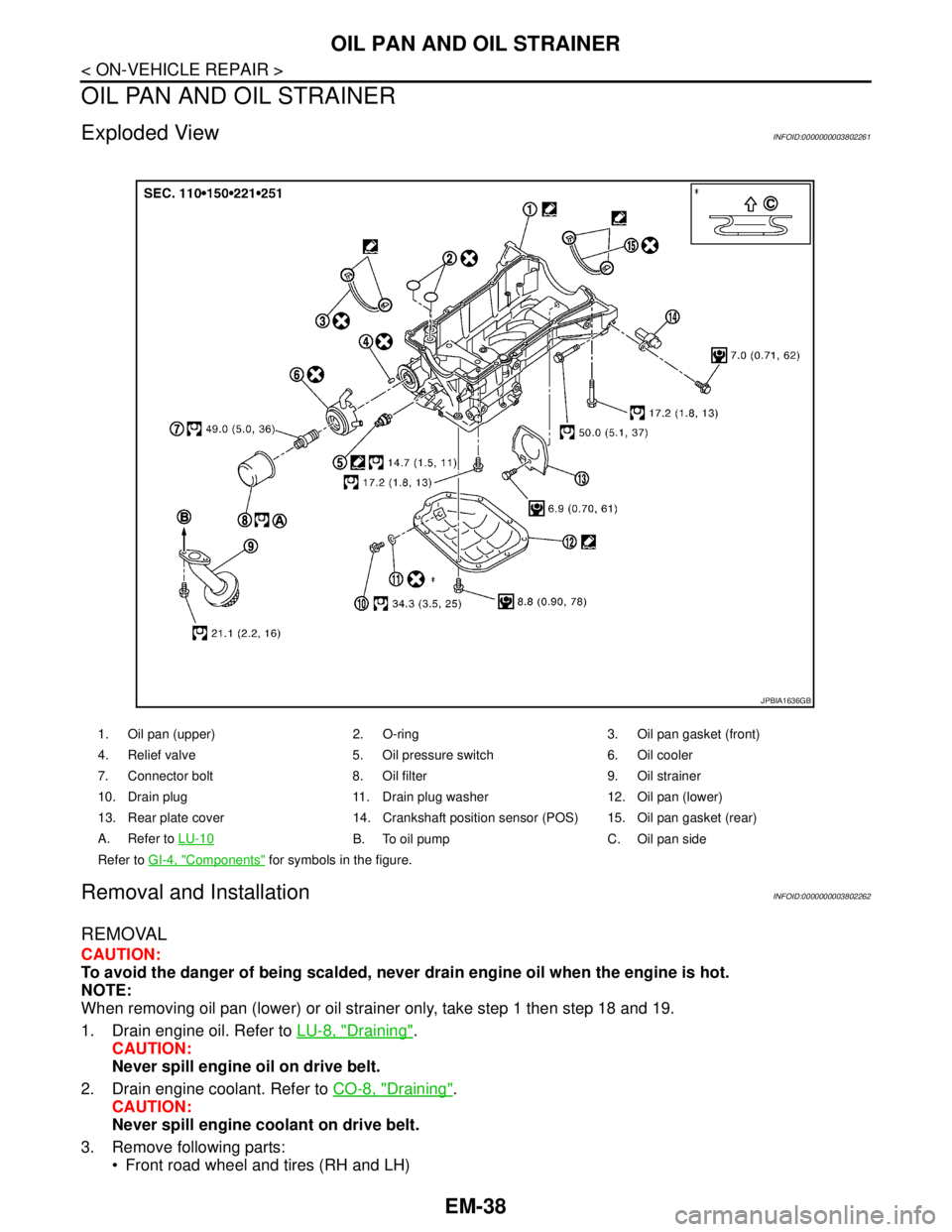
OIL PAN AND OIL STRAINER
OIL PAN AND OIL STRAINER
Exploded ViewINFOID:0000000003802261
Removal and InstallationINFOID:0000000003802262
REMOVAL
CAUTION:
To avoid the danger of being scalded, never drain engine oil when the engine is hot.
NOTE:
When removing oil pan (lower) or oil strainer only, take step 1 then step 18 and 19.
1. Drain engine oil. Refer to LU-8, "
Draining".
CAUTION:
Never spill engine oil on drive belt.
2. Drain engine coolant. Refer to CO-8, "
Draining".
CAUTION:
Never spill engine coolant on drive belt.
3. Remove following parts:
Front road wheel and tires (RH and LH)
1. Oil pan (upper) 2. O-ring 3. Oil pan gasket (front)
4. Relief valve 5. Oil pressure switch 6. Oil cooler
7. Connector bolt 8. Oil filter 9. Oil strainer
10. Drain plug 11. Drain plug washer 12. Oil pan (lower)
13. Rear plate cover 14. Crankshaft position sensor (POS) 15. Oil pan gasket (rear)
A. Refer to LU-10
B. To oil pump C. Oil pan side
Refer to GI-4, "
Components" for symbols in the figure.
JPBIA1636GB
Page 1943 of 5121
EM-68
< REMOVAL AND INSTALLATION >
ENGINE ASSEMBLY
Place chocks at front and back of rear wheels.
For engines not equipped with engine slingers, attach proper slingers and bolts described in PARTS
CATALOG.
CAUTION:
Always be careful to work safely, avoid forceful or uninstructed operations.
Never start working until exhaust system and engine coolant are cool enough.
If items or work required are not covered by the engine section, refer to the applicable sections.
Always use the support point specified for lifting.
Use either 2-pole lift type or separate type lift as best you can. If board-on type is used for unavoid-
able reasons, support at the rear axle jacking point with transmission jack or similar tool before
starting work, in preparation for the backward shift of center of gravity.
For supporting points for lifting and jacking point at rear axle, refer to GI-30, "
Garage Jack and
Safety Stand and 2-Pole Lift".
REMOVAL
Outline
At first, remove the engine and the transaxle assembly with front suspension member downward. Then sepa-
rate the engine and the transaxle.
Preparation
1. Release fuel pressure. Refer to EC-411, "Inspection".
2. Drain engine coolant. Refer to CO-8, "
Draining".
CAUTION:
Perform this step when the engine is cold.
Never spill engine coolant on drive belt.
3. Remove the following parts:
Engine cover: Refer to EM-24, "
Exploded View".
Front road wheel and tires
Splash guards (RH and LH): Refer to EXT-22, "
FENDER PROTECTOR : Exploded View".
Air duct (inlet), air cleaner cases (upper and lower) with mass air flow sensor and air duct assembly:
Refer to EM-26, "
Exploded View".
Battery and battery tray: Refer to PG-109, "
Removal and Installation".
Drive belt: Refer to EM-12, "
Removal and Installation".
Reservoir tank of radiator. Refer to CO-13, "
Exploded View".
Front wiper arm: Refer to WW-105, "
Exploded View".
4. Disconnect engine room harness at the TCM, ECM and other sides.
CAUTION:
To keep clean harness connector and avoid damage and foreign materials, cover them completely
with plastic bags or something similar.
5. Remove battery bracket with ECM and TCM.
6. Remove extension cowl top. Refer to EXT-20, "
Exploded View".
Engine Room
1. Disconnect heater hoses. Refer to CO-25, "Exploded View".
Install plug to avoid leakage of engine coolant.
2. Remove EVAP hose. Refer to EM-28, "
Exploded View".
3. Disconnect fuel feed hose quick connector at fuel tube side. Refer to EM-44, "
Exploded View".
Install plug to avoid leakage of fuel.
4. Disconnect transaxle shift control cable at transaxle side. Refer to TM-319, "
Exploded View" (VQ25DE) or
TM-157, "
Exploded View" (VQ35DE).
5. Disconnect brake booster vacuum hose at engine side. Refer to EM-28, "
Exploded View".
6. Disconnect ground cable.
7. Disconnect A/C compressor piping at A/C compressor side. Refer to HA-36, "
Exploded View".
8. Disconnect suction hoses of power steering oil pump at reservoir tank side. Refer to ST-34, "
Exploded
View".
Install plug to avoid leakage of power steering fluid.
9. Disconnect CVT fluid cooler hoses from radiator. Refer to CO-13, "
Exploded View".